

Quick answer
AngularJS end of life came on December 31, 2021, and the final release, 1.8.3, followed on April 7, 2022 with no code changes. Your app still runs. But at least 12 flaws found since then will never get an official fix, so treat it as a plan-this-year job, not a weekend emergency.
This page used to sell AngularJS development as a smart choice for new projects.
That advice was already out of date when it went up in 2023, so we've rewritten it for the people who need it now: owners who still have an AngularJS app running somewhere in the business.
Here's what end of life means, how to check in 30 seconds, how big the risk really is, and what each way out costs.
Key takeaways
- AngularJS support ended on December 31, 2021.
- Version 1.8.3 was the last release, and it changed no code.
- Type angular.version.full in Chrome's console to see which version you run.
- Never run npm audit fix --force on angular-sanitize; it installs version 1.3.0.
- An app that earns money should move to supported Angular this year.
Support ended in 2021, but your app didn't stop
AngularJS is the original 1.x version of Google's JavaScript framework for web apps. Its official version support page says "AngularJS support has officially ended as of January 2022."
The archived Angular upgrade guide gives the exact day: "The end of life of AngularJS is December 31st, 2021."
One more release came after that. The AngularJS changelog lists 1.8.3 "ultimate-farewell" on April 7, 2022, made "in order to update package README files on npm." The last version with real code fixes was 1.8.2, in October 2020.
So nobody fixes AngularJS anymore.
The GitHub repository is archived, which means, in the docs' words, "no new issues or pull requests can be submitted."
And since support ended, nobody on the Angular team checks it against new Chrome, Safari or Firefox releases.
Nothing got switched off, though. The same page promises that "The code will remain accessible on GitHub, npm, Bower, and Release archive." The angular package on npm still installs; it just carries a deprecation note that points to the newer framework.
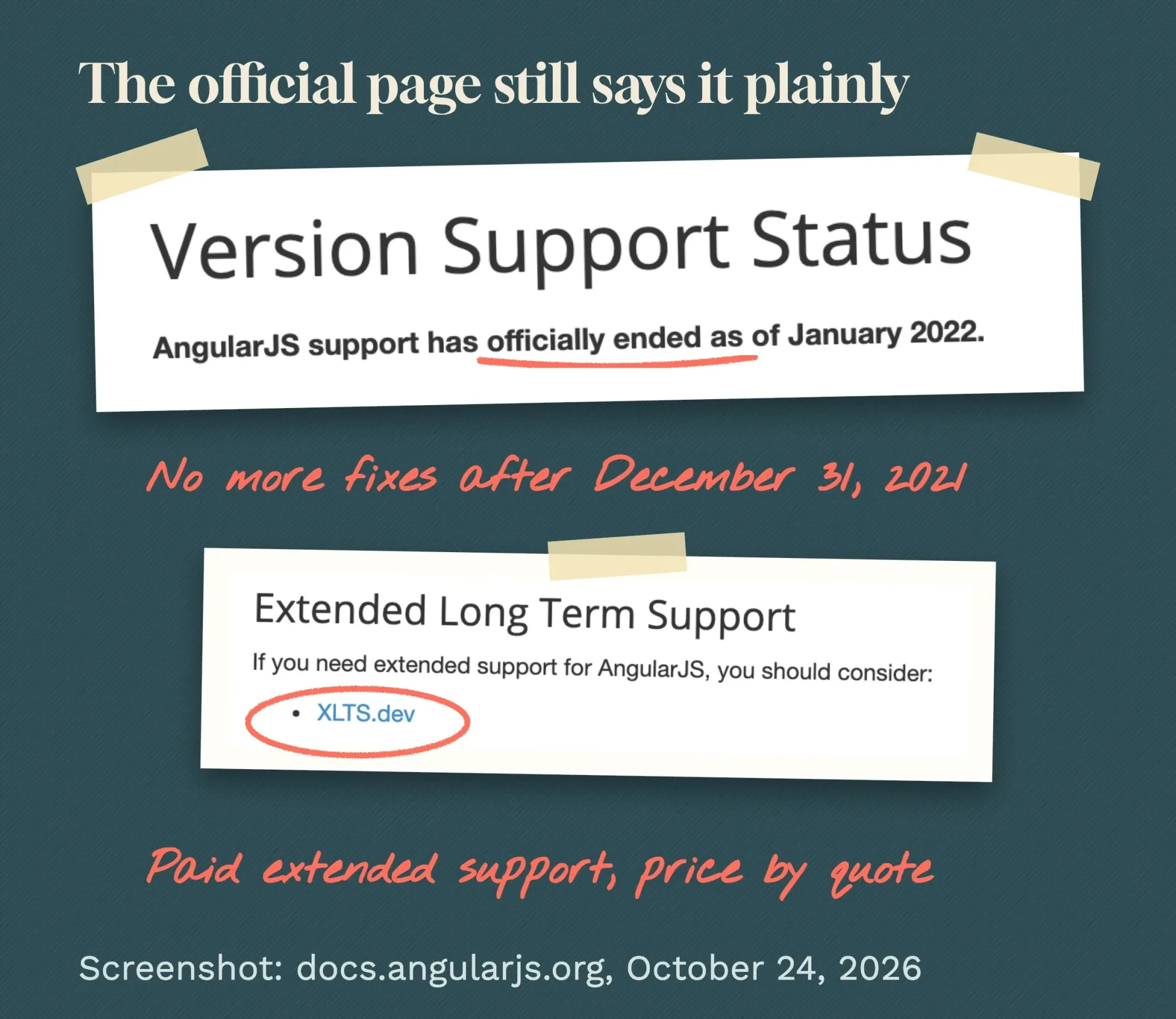 Screenshot: docs.angularjs.org version support status page, October 24, 2026.
Don't mix it up with Angular, version 2 and later.
That's a separate framework with its own release schedule, and it's actively maintained. The old version of this post made exactly that mistake when it credited AngularJS with tools that belong to modern Angular.
Check for AngularJS in your browser's console
That mix-up is why the first job is finding out which one you've got.
You don't need a developer for this, just Chrome on a computer:
- Open the page of your app you want to check, including a logged-in screen if the app has one.
- Right-click anywhere on the page, choose Inspect, then click the Console tab.
- Type
angular.version.fulland press Enter. - Read the answer: a number that starts with 1 (such as "1.8.3") means AngularJS. "ReferenceError: angular is not defined" means there's no AngularJS on that page.
We tried both outcomes on October 24, 2026. We built a one-page test app that loads AngularJS 1.8.3 from cdnjs and opened it in headless Google Chrome 155 on a Mac. The console answered "1.8.3", and the page carried an ng-app attribute. Then we ran the same command on angular.dev, which runs modern Angular. It threw "ReferenceError: angular is not defined", and the page's root element carried ng-version="22.2.3+sha-273ff4a" instead.
That gives you a second clue.
ng-app in the page means AngularJS; ng-version means modern Angular.
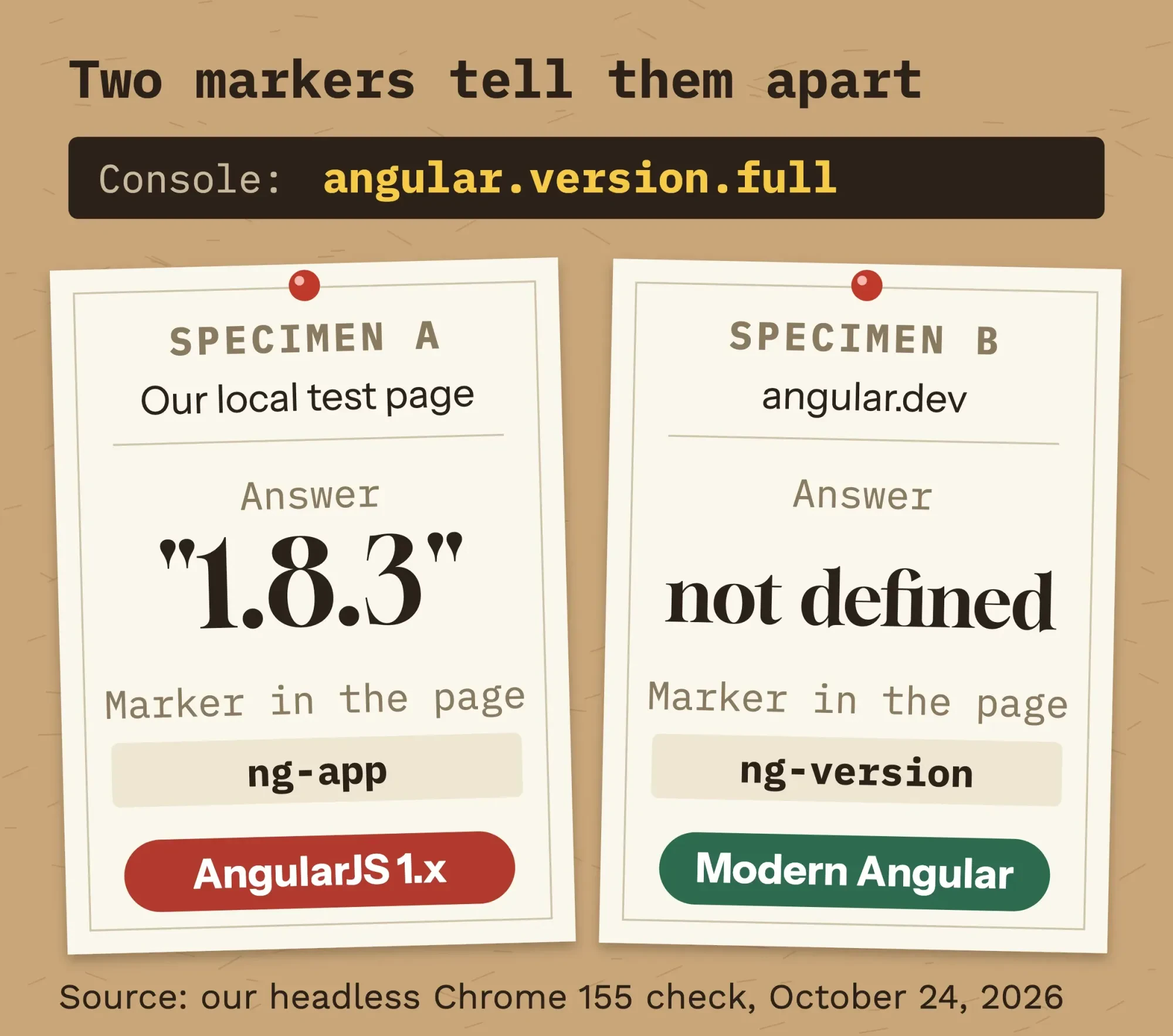 Source: our headless Chrome 155 check of a local AngularJS 1.8.3 test page and angular.dev, October 24, 2026.
If you've got a developer, the project's package.json settles it.
A line like "angular": "1.8.3" is AngularJS, while @angular/core is modern Angular.
And if a scanner report flagged "end-of-life software" on your site, this check tells you whether AngularJS is the reason.
Is AngularJS 1.8.3 safe to keep running?
Once you know it's AngularJS, the next question is how exposed you are.
The short answer: it works, but it's got known flaws, and npm says plainly that no fix is coming.
We checked that ourselves on October 24, 2026. We made an empty folder with a package.json that lists angular 1.8.3 and angular-sanitize 1.8.3, the usual add-on for cleaning HTML. We ran npm install --package-lock-only --ignore-scripts, which only fetches package details and downloads no code. Then we ran npm audit with npm 11.19.1 on a Mac.
It reported "2 vulnerabilities (1 moderate, 1 high)".
Under angular it listed 10 advisories, rated "Severity: high", and ended with "No fix available".
The npm audit docs explain that the command checks your packages against known advisories. For AngularJS, there isn't a newer version to move to.
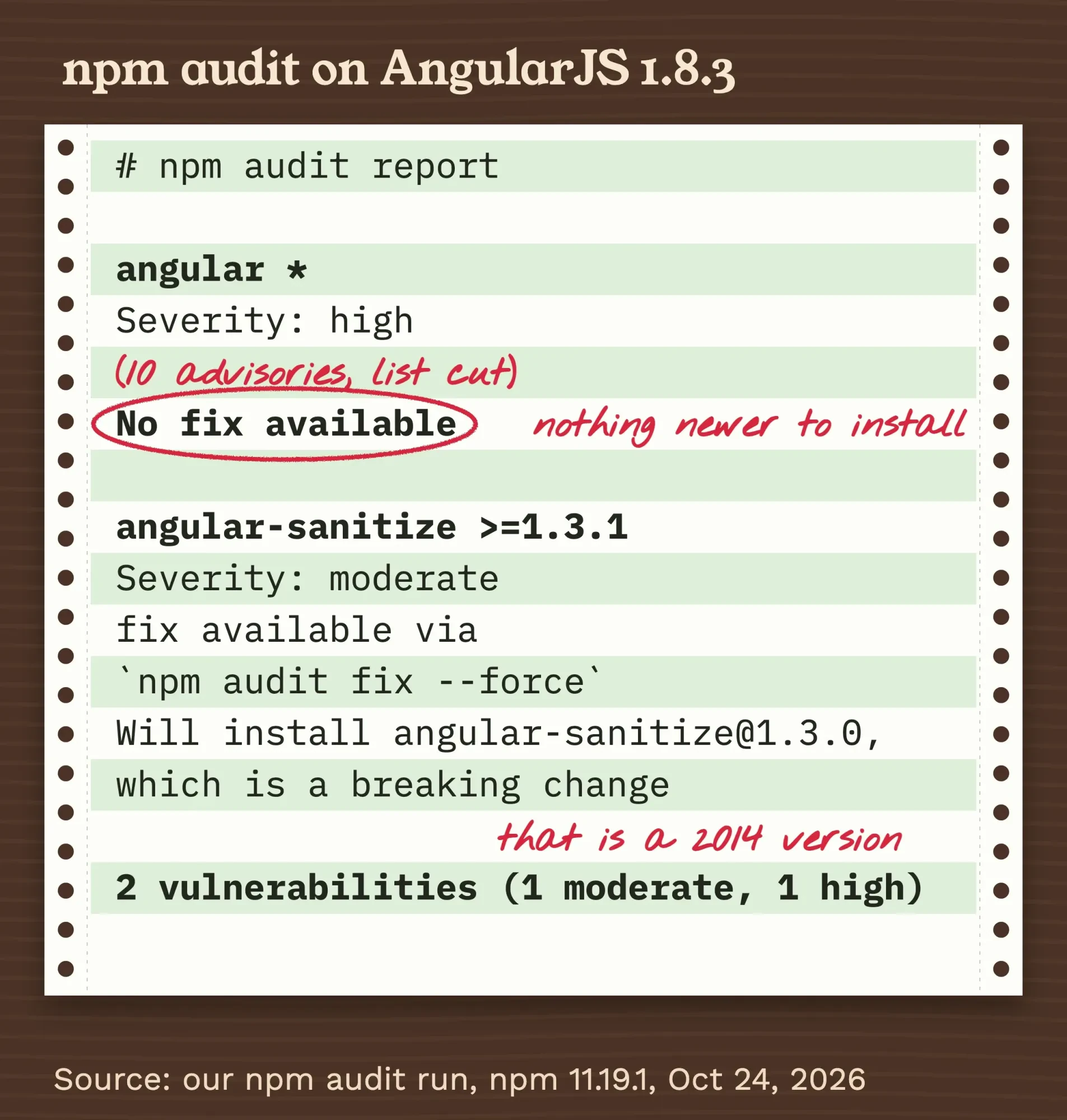 Source: our npm audit run, npm 11.19.1, angular and angular-sanitize 1.8.3, October 24, 2026 (excerpt).
Here's the trap.
For angular-sanitize, npm offers a "fix available via npm audit fix --force" and adds "Will install [email protected], which is a breaking change". That's not an upgrade. The 1.3 line dates from October 2014, per endoflife.date, so the "fix" swaps in a version from 2014.
Don't run it.
Twelve flaws since 2022, and none will get a fix
Those npm advisories map to public CVE records. We counted at least 12 for AngularJS itself in the National Vulnerability Database, published between May 2022 and June 2026, and re-checked each one on October 24, 2026.
Three carry a High score from at least one scorer.
CVE-2022-25844 and CVE-2024-21490 are both rated 7.5 by NVD: each can make the page's code grind through a slow pattern match and freeze the visitor's tab.
The newest, CVE-2026-11998, is rated 7.6 by the organization that reported it and is still awaiting NVD analysis. Its record says the flaw "can lead to arbitrary JavaScript execution within the context of the victim's browser session."
The other nine are Medium.
Many records spell out the catch, as CVE-2025-4690 does: "The AngularJS project is End-of-Life and will not receive any updates to address this issue."
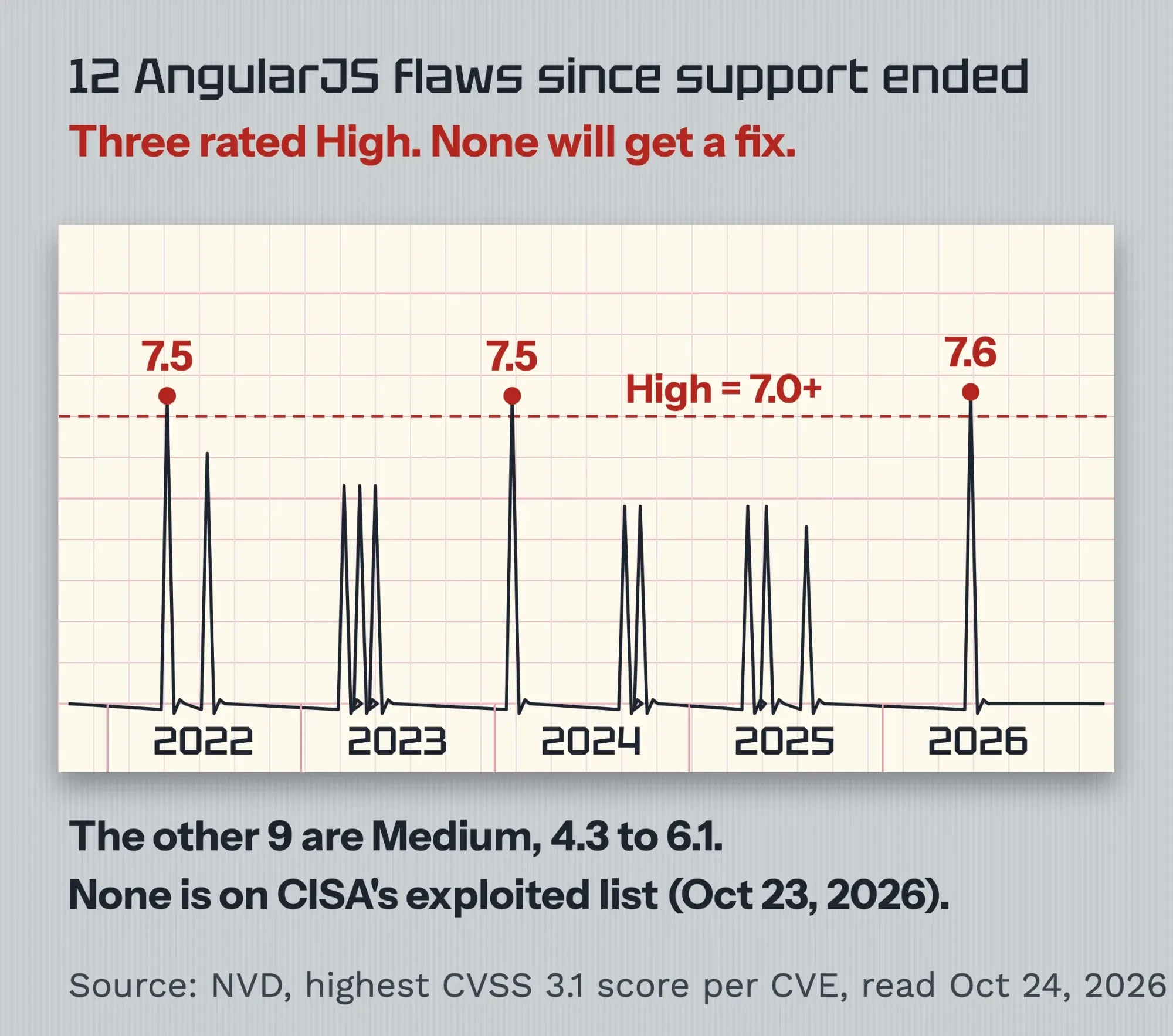 Source: NVD records, highest listed CVSS 3.1 score per CVE, read October 24, 2026.
Now the calmer half of the picture. None of these flaws is in CISA's Known Exploited Vulnerabilities catalog, the US government list of flaws seen in real attacks. We searched all 1,755 entries in the October 23, 2026 edition.
So the flaws are real but mostly medium, and there's no sign of mass attacks.
That's a reason to plan the move, not to pull the app offline tonight.
The risk climbs if your app shows content other people typed, handles logins or payments, or sits on a page anyone can reach.
Your options, in the order we'd weigh them
So what do you do with an app that works but won't be fixed?
There are four ways out, and we'd weigh them in this order: the first two end the problem, while the last two only buy time.
1. Move to modern Angular, one screen at a time
Angular's own route is a hybrid app built with ngUpgrade. One of the keys, says the archived guide, is to upgrade incrementally, "running the two frameworks side by side in the same application, and porting AngularJS components to Angular one by one."
The guide calls ngUpgrade "a very useful tool for upgrading anything but the smallest of applications."
The app stays live the whole time, and the upgrade package still ships with each Angular release. The catch? You'll run two frameworks side by side for months.
Before the move, your developer usually reorganizes the old code into components and a module system, and errors like Cannot use import statement outside a module are a normal part of that step.
Aim at a supported version. Angular's release page says each major version is "typically supported for 24 months" and that "Angular versions v2 to v19 are no longer supported."
Moving to v17 today would land you on a version that's already out of support, so target v21 or v22.
2. Rewrite it, if the app is small
A rewrite fits a small app, or one whose screens no longer match how you work. It doesn't have to be Angular. React, Vue or a plain website can take its place, and for a simple booking or quote form a builder might do; our no-code vs custom development comparison covers that call. If the app is really a store, read our WordPress vs Shopify comparison before anyone writes code.
The risk is scope creep, so freeze new features until the rewrite ships.
Our explainer on the software development life cycle shows what you approve at each stage.
In our view, AI coding tools can help a developer read old code and draft new components, but there's no official automatic converter.
3. Pay for extended support
Three vendors sell patched builds of AngularJS. HeroDevs offers a drop-in replacement and says "all you have to do is change your package.json and rebuild your project."
XLTS.dev, the vendor named on the official docs page, sells contracts of "1, 2, or 3+ years" and says "Current plans are to offer support through December 2030."
OpenLogic covers 1.5.x, 1.6.x and 1.8.x "through 2030", and it's quote-only too.
None of them publishes a price as of October 24, 2026.
HeroDevs says its pricing "is based on the number of users who will be committing code to the project repo," and the other two quote on request.
So we won't guess a number.
Extended support makes sense for an app that earns money or faces an audit while a migration runs. It doesn't remove the migration, though.
4. Contain it while you decide
If the app's an internal tool with a few users and no payments or personal data, you can keep it for a while with guard rails:
- Put admin screens behind a login or your office network, never on a public page.
- Don't let anything people type be rendered as part of an AngularJS template.
- Add a Content Security Policy, a header that tells browsers which scripts may run.
- Write down the version, every add-on and the npm audit output, and set a review date.
Our free HTTP header checker shows whether your app's pages already send a Content Security Policy.
Outside scripts carry the same kind of risk, which our post on third-party integrations explains, and application monitoring tells you fast if a screen breaks.
Our take: if the app earns money, plan an incremental move to a supported Angular version this year, and buy extended support only to cover the gap.
A migration's cost, worked out from federal pay data
That leaves the money question. No vendor or agency we read publishes a migration price, so here's the method we use. It's our estimate, not a quote.
The BLS, the federal agency that tracks US pay, puts median pay for software developers at $64.44 an hour in 2025. Web developers and digital designers earned a median $47.85 an hour. Those are employee wages; freelancers and agencies charge more because their rate also covers overhead.
Example: Keystone Sign Supply is a made-up sign-materials distributor in Harrisburg, Pennsylvania. Its dealers order through a 2016 AngularJS portal with 25 screens. Say a developer needs 200 hours to move it to Angular 22, which is our assumption for the example, not data. At the software developer median, that's 200 x $64.44 = $12,888 in wages alone, as of October 2026. At the web developer median it's $9,570, and either figure rises once overhead is added.
That's why the hours are what's worth arguing about.
Ask any developer to count screens and add-ons before quoting, and to say how many hours each takes. Our guide to hiring a full stack developer covers who can do this work.
If you'd like us to look, we take on migrations like this through our web development service; it's paid work we sell, so factor that into our advice.
Frequently asked
How long is each modern Angular version supported?
Each major version is typically supported for 24 months: 12 months of active updates, then 12 months of long-term support with critical and security fixes only. As of October 2026, the Angular release page lists v22 as active until June 2027 and in LTS until June 2028. So a migration also means a yearly upgrade budget.
What Node.js and TypeScript versions does Angular 22 need?
As of October 2026, the Angular version compatibility table lists Node.js 22.22.3, 24.15.0 or 26.0.0 and newer within those lines. It asks for TypeScript 6.0. An old build server set up for AngularJS will usually need both updated before migration work starts.
Does AngularJS use jQuery?
Only if jQuery loads first. The AngularJS angular.element docs say that when jQuery is available, angular.element becomes an alias for it. Otherwise AngularJS uses its own small built-in version, jqLite. If your app loads jQuery, check that copy's version too, since it ships separately.
When to call a developer
Still, some apps can wait a few months. Others shouldn't, and you'll want to call a developer this month if any of these is true:
- The app handles payments, logins or personal data.
- A scanner, an auditor or a client flagged AngularJS.
- A browser update broke a screen, or one looks wrong in Safari.
- Nobody on your team knows who built it or where the code lives.
- npm audit lists a High item, and the app sits on a page the public can reach.
Before you call, you'll want the version from the console check, the list of add-ons, the npm audit output and a list of what the app touches.
Get the code and hosting accounts in your company's name too; our guide to hiring a web designer lists the contract terms that make that stick.
If you want a second opinion on a migration quote, ask us for one. We sell this work, so read our answer knowing that.
How we made this guide: Our web team checked every date, CVE score and vendor claim on October 24, 2026, against the AngularJS docs and changelog, angular.dev, NVD, CISA's catalog, the vendors' own pages and federal pay data. We ran the npm audit and the console check ourselves that day, on a Mac with npm 11.19.1 and Chrome 155, using a local test page rather than anyone's live app. Each source is linked at the claim it supports.
First published July 2023. Rewritten October 24, 2026: the old post praised AngularJS for new projects long after its support ended. It now covers the end-of-life dates, a console check, our npm audit result, the CVEs published since 2022, four options in order and a labeled cost estimate.
Sources
- AngularJS docs: Version Support Status
- Angular (v17 archive): Upgrading from AngularJS to Angular
- AngularJS on GitHub: CHANGELOG
- GitHub: angular/angular.js repository (archived)
- npm: angular package
- Chrome for Developers: Console overview
- npm Docs: npm audit
- endoflife.date: AngularJS
- NIST National Vulnerability Database: search
- NVD: CVE-2022-25844
- NVD: CVE-2024-21490
- NVD: CVE-2025-4690
- NVD: CVE-2026-11998
- CISA: Known Exploited Vulnerabilities Catalog
- Angular: Versioning and releases
- Angular API: UpgradeModule
- HeroDevs: Never-Ending Support for AngularJS (vendor)
- XLTS.dev: XLTS for AngularJS (vendor)
- OpenLogic by Perforce: AngularJS support (vendor)
- MDN Web Docs: Content Security Policy
- U.S. Bureau of Labor Statistics: Software Developers
- U.S. Bureau of Labor Statistics: Web Developers and Digital Designers

Comments
No comments yet. Start the conversation below.