
Quick answer
A small team can set up a CRM in about 30 days. Pick a free plan that fits, then clean and import your contacts. Build 5 to 7 pipeline stages and a few fields, connect email, calendar and your website form, then track three numbers. Clean the list first; our test shows why.
Most of the setup is the list, not the software.
We merged 370 made-up contact rows from three sources, then matched them on the email column exactly as typed, but only 17 of the 70 duplicates came out. Fifty-three slipped through.
So this guide puts cleaning near the top, in the order we'd do the work. Software choice gets one section. For a full product comparison, see our CRM software guide.
Key takeaways
- Write down three questions the CRM must answer by day 30.
- HubSpot Free covers 2 users and 1,000 contacts; Zoho CRM Free covers 3 users.
- Lowercase and trim emails before import, since exact email matching misses duplicates.
- Import contacts who unsubscribed with the opt-out set, or leave them out.
- Track three numbers weekly: new leads by source, quotes sent and deals won.
Write down three jobs before you pick a CRM
A CRM (customer relationship management system) is a shared address book that also tracks each lead, quote and conversation.
That's a big promise, so shrink it. Before you open a pricing page, write down the three questions the CRM must answer on day 30.
For most small service businesses they're the same. Who do I call today? What's in the pipeline, and what is it worth? Where did this month's leads come from?
Example: Willow Creek Pool Care is a made-up pool service in Tupelo, Mississippi. It has two owners, one tech and about 300 customers. Those customers are spread across an old spreadsheet, a Gmail inbox and a clipboard of sign-up sheets from a home show. No two of those lists use the same format. Their three questions are the ones above, plus one more: which customers are due for a spring opening?
Do your answers sound more like inventory, invoices and payroll? Then you may be shopping for the wrong system, and our post on cloud ERP for small business explains where that line sits.
Keep the list of questions. You'll use it to say no to features later.
Pick a free plan by its user and contact caps
Those three questions fit inside most free plans, so start there. We read each vendor's own pricing page on October 26, 2026, and because limits change without much notice, check again on the day you actually sign up.
| HubSpot | 2 | 1,000 contacts | Starter starts at $15/month per seat |
| Zoho CRM | 3 | not stated on the pricing page | 10 free exports |
| Bigin by Zoho | 1 | 500 records (contacts, deals, activities and notes all count) | Single pipeline, 3 automations |
| Capsule | 2 | 250 contacts | Single sales pipeline |
| Freshsales | no free plan | n/a | 21-day trial, Growth $9/user/month billed annually |
Where the numbers come from: HubSpot’s free CRM page promises "up to two users, 1,000 contacts". Zoho CRM’s pricing page says "Free forever for 3 users," and lets you export data "for up to 10 times for free." Bigin lists "500 Records" for one user. Capsule’s FAQ says "you can only have 250 contacts, two users". The Freshsales pricing page shows only paid plans and a 21-day trial.
Read Bigin's cap twice. A record there is "Each row of data you enter across Pipelines, Contacts, Activities and Notes," so 300 customers plus notes won't fit.
Our take: start on HubSpot's or Zoho CRM's free plan, and pay only when you hit a cap you can name, such as HubSpot's third user.
Willow Creek has about 300 customers and three users. That fits Zoho CRM Free. HubSpot Free holds the contacts but not the third user.
Clean the list before it goes in
A free plan takes an afternoon to pick. Cleaning the list takes most of the first week, and it's the step people skip.
Most CRMs match duplicates on import by email. HubSpot says it "automatically deduplicates contacts using email addresses". An imported row with a matching email "will update the existing contact rather than create a new one". Zoho CRM can skip rows that match existing records by ID, name or email.
So the real question is how many of your duplicates share an identical email.
We tested that on a made-up file. A Python script built 370 contact rows for Willow Creek, which works out to 300 fake people plus 70 duplicates of the kinds a merged list really has. Eighteen were exact copies, though one original row had no email. Sixteen had a capital letter in the email, 10 had a stray space, and 16 had no email at all. The last 10 used a second address. Then we tried three cleaning rules before import.
- Matching the email exactly as typed removed 17 duplicates.
- Trimming spaces and lowercasing the email first removed 40.
- Adding a phone match for rows with a blank email removed 53, with no wrong merges.
- The same rule flagged 17 rows where a new email shared a phone number. All 17 were the same person, but only a human could tell.
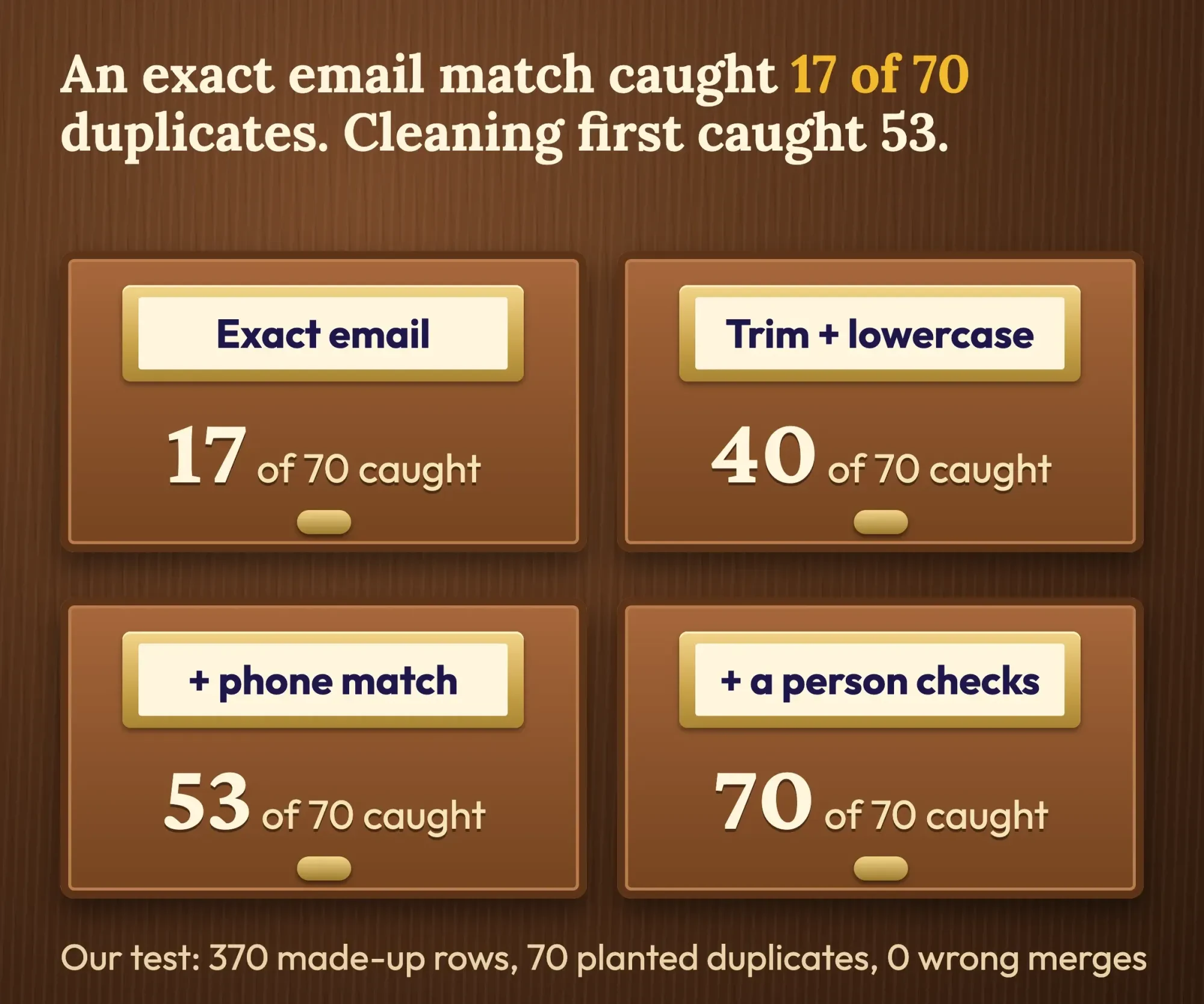 Diagram by DigitalTreed: our dedupe test on 370 made-up contact rows (seed 233, October 26, 2026). Not client data.
Capital letters and spaces are the cheap wins.
We didn't test how each CRM treats them. No need. Clean them first. Lowercase and trim the email column in your spreadsheet before you import, and put every phone number in one format, such as +1 followed by ten digits.
Old list? Run one more pass. Bounced addresses hurt your sender reputation once you email from the CRM, and our comparison of email verification tools shows the cost per check.
Import with the columns your CRM expects
Once the list is clean, the import is mostly about column headers. HubSpot accepts "a .csv, .xlsx, or .xls file". Pipedrive’s import guide says "Each column represents a field" and "Each row represents one record".
The rules that trip people up are small. HubSpot’s import file rules want a header row that matches its property names. They want UTF-8 encoding if any names have accents, and they want phone numbers written as "+[country code][number]" so the country code isn't lost on the way in.
For contacts, the one required column is Email. Rows without it don't fail. Each one comes in as a new contact, which is how duplicates sneak back in.
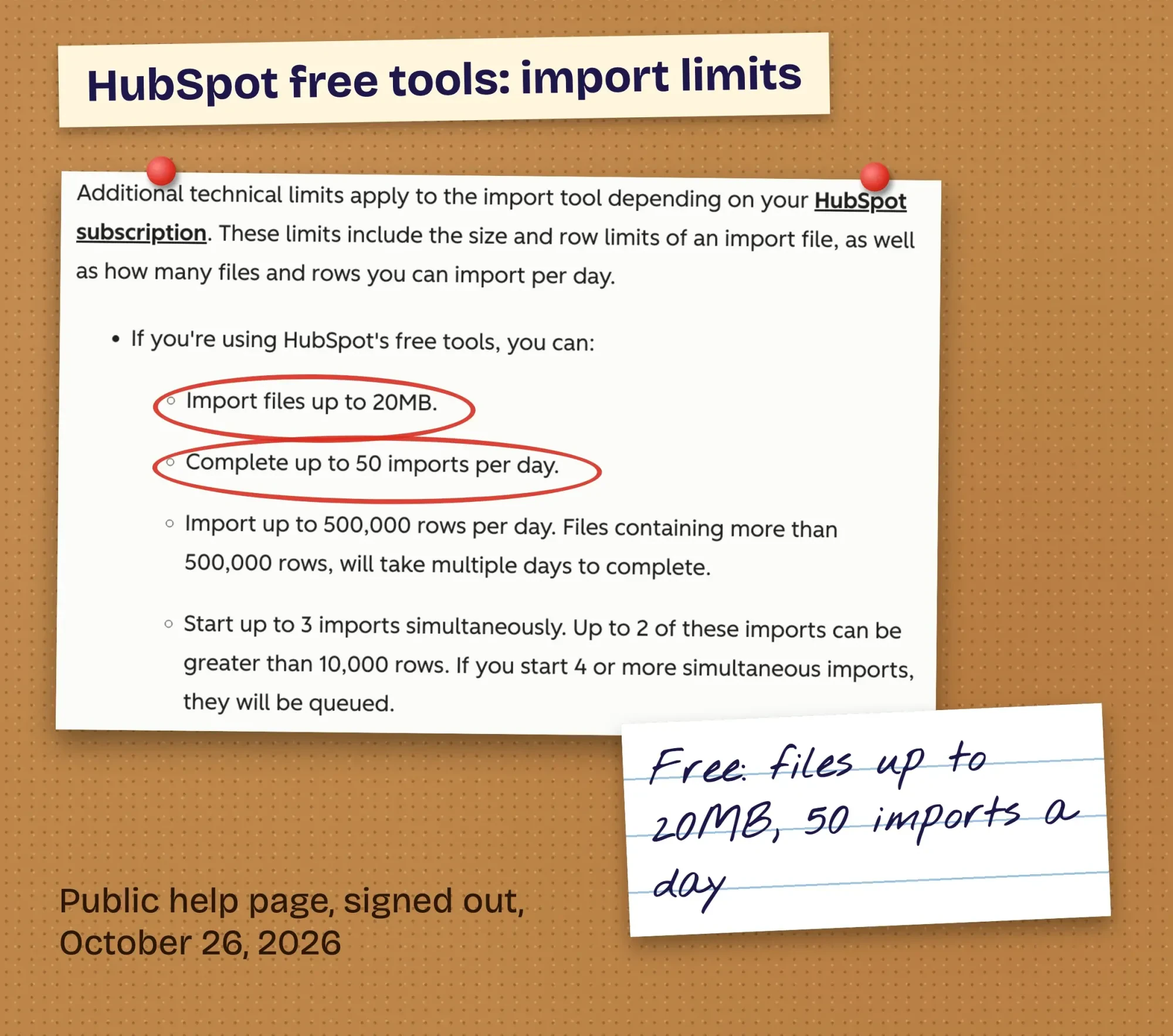 Screenshot: HubSpot Knowledge Base, "Format import files" (public page, signed out, read October 26, 2026), cropped and annotated by DigitalTreed.
The free limits are generous. HubSpot's free tools take files up to 20MB and 50 imports a day. A 300-row list won't come close.
These are the columns we'd put in a small-business contact file, in this order:
- First name, Last name, Email, Phone (+1 format)
- Company (blank for homeowners)
- Lead source (referral, website, home show, Google)
- Owner, by email address
- Status or lifecycle stage
- Email opt-out (yes or no)
- Last contact date
Don't drop that opt-out column.
If someone unsubscribed in your old email tool, the CRM won't know unless you tell it. The FTC's CAN-SPAM guide says to "Honor opt-out requests promptly". It adds: "You must honor a recipient’s opt-out request within 10 business days." Import unsubscribed people with the opt-out set, or leave them out. Our email campaign checklist covers the rest before a first send.
How many pipeline stages should a CRM have?
With contacts imported, build the pipeline next. HubSpot's help page puts it simply: "Pipelines help visualize your processes through stages, which are steps that signal where a record is in a process."
Stages should match moments you can see. "Quote sent" is a fact. "Warm" isn't.
Five to seven stages cover most service businesses. Past that, deals sit in the wrong column because nobody on the team still remembers what "Stage 4b" was supposed to mean three months after you made it. One pipeline is enough unless you sell two different ways. HubSpot’s guidance is that separate pipelines are "only recommended if your processes have unique stages that require different pipelines."
Willow Creek's pipeline has five stages:
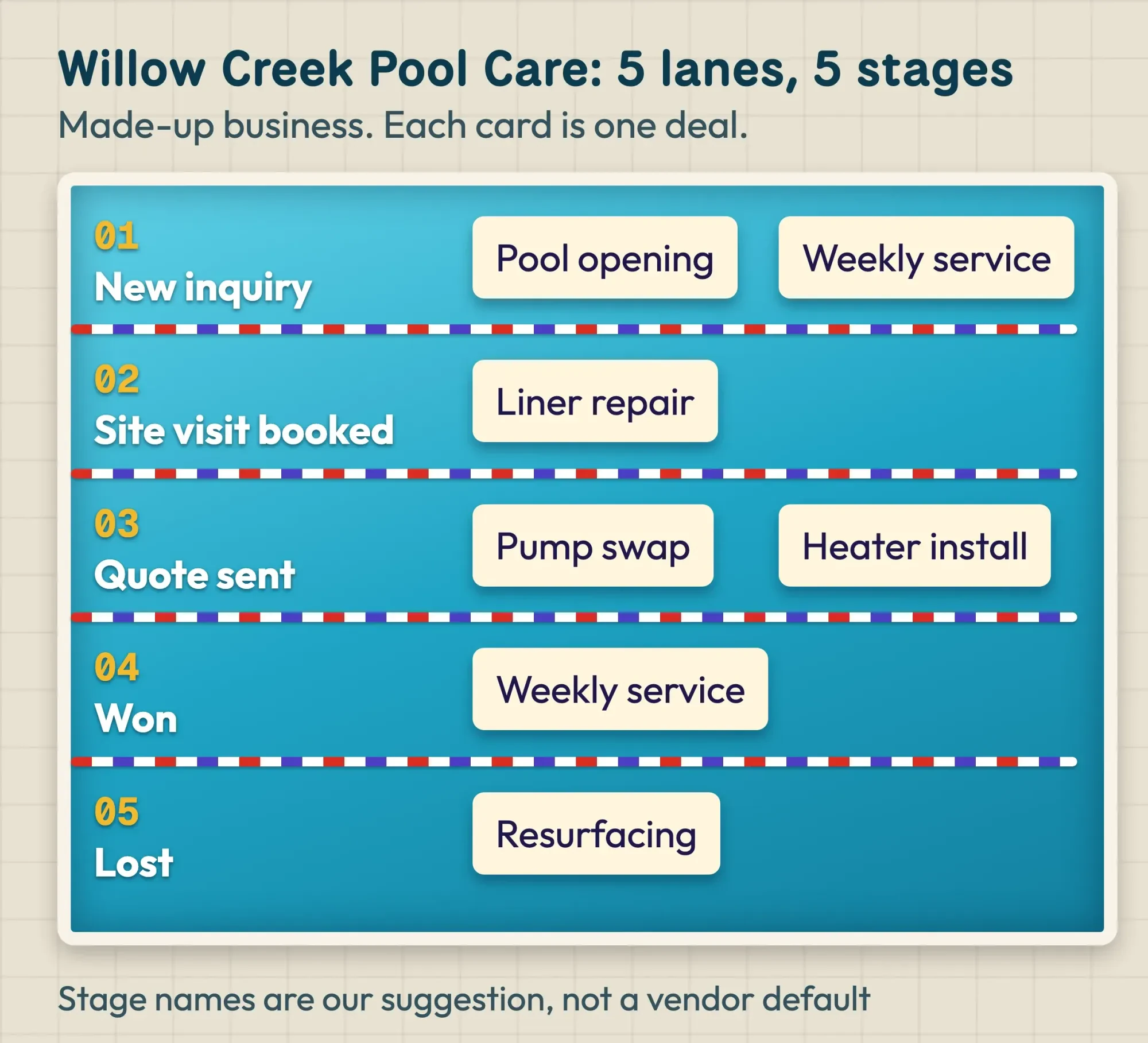 Diagram by DigitalTreed: a pipeline for the made-up Willow Creek Pool Care. Stage names are our suggestion.
Lost is a stage, not a delete. A pool quote that dies in May often comes back in March, and you'll want the notes.
Add only the fields someone will fill in
Pipeline stages say where a deal is. Fields say what you know about the customer.
Every extra field is a box someone must fill in on a busy Tuesday.
Start with three custom fields: lead source, service type and next step date. Make lead source a dropdown, not free text, or the monthly report turns into a mess of spellings like Google, google and GOOGLE. Free plans limit how many you can add; HubSpot notes that "the number of custom properties you can create depends on your HubSpot subscription."
Leave out what you don't need. The FTC's data security guide puts it plainly: "Keep only what you need for your business". A pool company has no reason to store a driver's license number, so don't ask for one.
Give each person the access their job needs
Fields hold customer data, so decide who sees which records before the team logs in.
The same FTC guide calls this the "principle of least privilege". It means "each employee should have access only to those resources needed to do their particular job."
In practice, one owner is the admin. In HubSpot that's the Super Admin, who can set user permissions "to control what users can view, create, edit, or delete". Everyone else edits their own records and views the rest, which at Willow Creek means the tech sees his own jobs but can't export the customer list.
It feels fussy for a three-person shop. It isn't, the day someone leaves.
Connect email, calendar and your website form
With access settled, plug in the places leads already arrive. This step makes the CRM fill itself.
Email comes first, because HubSpot connects Gmail, Microsoft Outlook and other providers over IMAP, so replies get logged on the contact without anyone copying them over. Connect a business address, not a personal one. Our guide to creating a business email address walks through that.
Most CRMs sync the calendar from the same screen. That puts each site visit on the deal.
Then the website form. HubSpot's forms are available on all plans, and Bigin's free plan includes a "No-code form for contacts & pipelines". If your site already has a form, it needs to post into the CRM, not only email you. Our HTML contact form guide covers the form side. Our post on third-party integrations explains the connectors in between.
Getting the form, the CRM and a calendar tool to talk is the fiddliest part of the month. It's also part of the web development work we charge for. Keep that bias in mind when we say it's worth getting help.
Once leads flow in by themselves, automate the follow-up; our CRM automation examples start where this step ends. Before any bulk send, remember Gmail's sender rules. They ask you to keep spam rates "below 0.3%". That's one more reason the cleanup matters.
Track three numbers from the first week
Your reports should answer the three questions you wrote down on day 1.
So track three numbers at first: new leads by source, quotes sent and deals won. Check them every Monday.
Lead source only works if your links say where people came from. Add tracking tags to the links in emails and social posts with a free UTM builder. Then compare the form leads you see in analytics with the ones that landed in the CRM. If the two counts don't match, the form connection needs a look. Our GA4 setup guide counts form leads as key events, and the Tag Manager guide tracks form sends and phone taps.
Later, once a few hundred customers live in one place, the same data feeds repeat-customer ideas. Our post on customer relationship marketing picks up there.
The 30-day CRM setup plan
Here's the whole month on one page. The day ranges are our suggestion for a team of one to five people giving it about an hour a day, so stretch them if it's your busy season.
- Days 1-2: write your three questions and list where contacts live today.
- Days 3-4: compare free plans with your user and contact count; sign up for one.
- Days 5-9: merge lists, lowercase and trim emails, fix phone formats, mark opt-outs, flag same-phone rows.
- Day 10: test-import 20 rows, check them, then import the rest.
- Days 11-13: build 5 to 7 pipeline stages and add open deals.
- Days 14-15: add 3 custom fields; make lead source a dropdown.
- Days 16-17: add users, one admin, and set permissions.
- Days 18-21: connect email and calendar, then the website form; send a test lead.
- Days 22-24: tag your links with UTM parameters and set up the three reports.
- Days 25-28: train the team on one rule: every call and quote goes in.
- Days 29-30: review the numbers, cut the field nobody uses, and decide if you've outgrown the free plan.
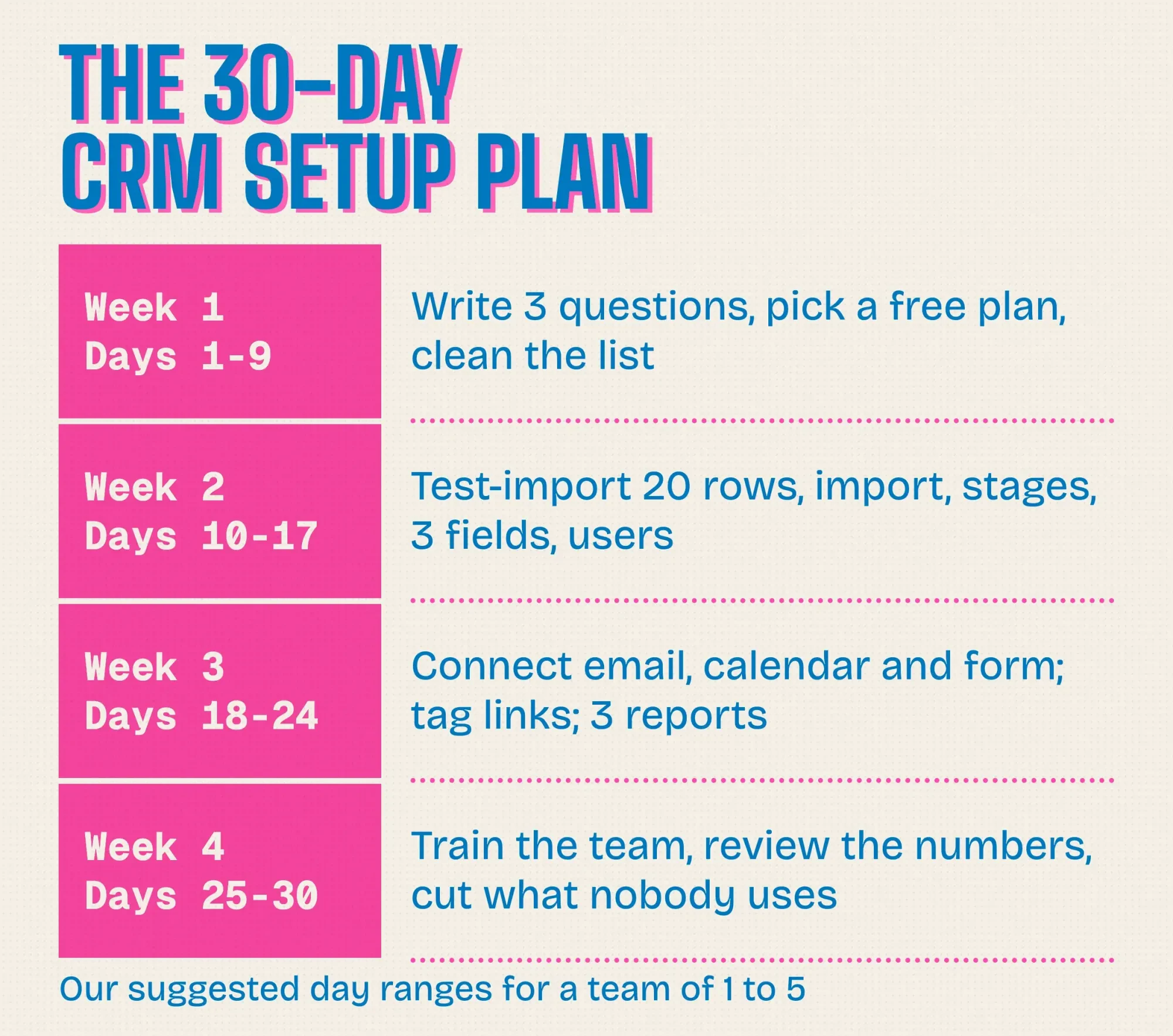 Diagram by DigitalTreed: the 30-day plan above as a printable calendar. Day ranges are our suggestion.
Day 10 is the one people rush.
Import 20 rows first and open five of them. Look for split names, missing phone numbers and opt-outs that didn't carry over, and if you find one, fix the file and import again rather than patching records by hand.
Want a hand with the import or the form wiring? Request a quote with your CRM's name and contact count. We'd bill for that setup, yet our take above still starts you on a free plan.
How we made this guide: on October 26, 2026 we checked every fact against the vendors' own pricing and help pages and the FTC's data security and CAN-SPAM guides. Links sit at the claims they back. The first-hand part is our duplicate test, a script run on 370 made-up rows, plus a screenshot of HubSpot's public help page taken while signed out. We didn't sign up for any CRM, so in-app screens may differ a little.
First published August 2020. Rewritten October 26, 2026: the old tutorial defined CRM in general terms. This version is a setup guide with free plan limits, an import column list, our duplicate test, pipeline and permission steps, and a 30-day plan.
FTC lines quoted above show what the agency expects from businesses. They aren't advice about your situation; for that, talk to a lawyer in your state.
Frequently asked
Does the free HubSpot CRM expire?
No. As of October 2026, HubSpot's free CRM page says the plan is 100% free with no expiration date. It also says no credit card is needed to sign up. The user and contact caps still apply, so watch those instead of a trial clock.
How do I get my Gmail contacts into a CRM?
Export them from Google Contacts first. Google's export help page says to select the contacts, then click More actions and Export. Pick Google CSV, then click Export to save the file. Clean that file before you import it.
What happens when I outgrow a free CRM plan?
Paid tiers raise the caps a lot. As of October 2026, Capsule's pricing page lists 30,000 contacts on its Starter plan and 60,000 on Growth. Its free plan holds 250. Each paid plan has a 14-day free trial with no card required.
Sources
- HubSpot: Free CRM software (free plan limits)
- Zoho CRM: Pricing and editions
- Bigin by Zoho: Pricing and editions
- Capsule CRM: Pricing
- Freshworks: Freshsales pricing
- HubSpot Knowledge Base: Format import files (last updated September 11, 2026)
- HubSpot Knowledge Base: Deduplicate records in HubSpot (last updated October 2, 2026)
- Zoho CRM Help: Importing data
- Pipedrive Knowledge Base: Importing data into Pipedrive with spreadsheets (last updated October 19, 2026)
- HubSpot Knowledge Base: Set up and manage object pipelines
- HubSpot Knowledge Base: Create and edit properties
- HubSpot Knowledge Base: HubSpot user permissions guide
- HubSpot Knowledge Base: Connect an individual work email
- HubSpot Knowledge Base: Create and customize forms
- Federal Trade Commission: Protecting Personal Information: A Guide for Business
- Federal Trade Commission: CAN-SPAM Act: A Compliance Guide for Business
- Gmail Help: Email sender guidelines


Comments
No comments yet. Start the conversation below.