
Quick answer
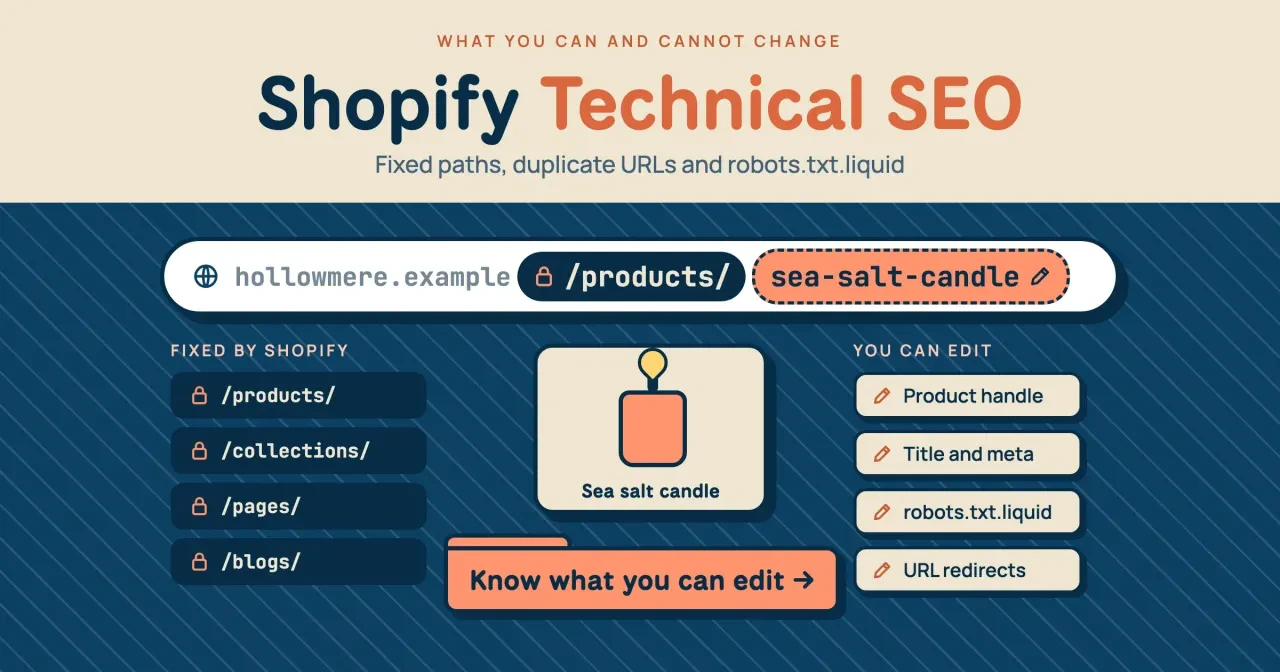
As of October 29, 2026, Shopify fixes 4 URL path prefixes, so technical SEO there means editing handles, titles and meta, URL redirects and robots.txt.liquid. If your theme links products through collection paths, one product answers at 3 or more URLs, and its canonical tag tells Google which one to index. Start by checking which URL your product pages' canonical tag names.
Running a Shopify store while reading technical SEO checklists written for WordPress gets confusing fast, because many items assume you can edit files that Shopify writes for you. Shopify technical SEO is the short list of crawl, URL and markup settings a store owner can still change. The platform writes everything else. We'd check canonical tags before anything else, since one theme edit can quietly flip them.
First come the fixed paths, then why one product answers at three addresses and which URL your canonical tag should name. Handles and redirects follow, then robots.txt.liquid for search and filter pages, the sitemap, theme product markup and speed. Two setups of a made-up candle store show what the checks found, and the last section lists what stays out of your hands.
Key takeaways
- A theme edit flipped 2 of 7 product canonicals in our mock store test.
- Shopify fixes /products/, /collections/, /pages/ and /blogs/; you edit only the handle.
- Shopify redirects only broken URLs, up to 100,000 outside the Plus plan.
- Shopify already blocks sort URLs; add a search rule if needed, never block products.
- Keep the Liquid loop in robots.txt.liquid; plain-text rules stop getting Shopify updates.
Shopify fixes four URL paths for you
Start with the address bar, because Shopify decides most of it before you add a single product. The URL redirect rules in Shopify's Help Center call /products, /collections and /collections/all "fixed Shopify paths." Pages and posts get set prefixes too. Shopify's migration guide says an old policy page might now live at example.com/pages/shipping-policy, and the Liquid docs for blog articles show posts under /blogs/ plus the blog's name. You own only the last part, the handle. Hollowmere Candle Co. is a made-up shop at hollowmere.example that we use for the rest of this guide. Its owner can rename sea-salt-candle in /products/sea-salt-candle, but never /products/.
So advice like "drop the category folder" or "flatten your URL structure" doesn't apply here. Google's URL structure guide for online stores wants descriptive words in paths, preferring /product/black-t-shirt-with-a-white-collar over /product/3243, and a clear handle already does that job. Shopify's site structure help adds that its URLs "use standard characters and a simple, readable structure." Still deciding between platforms? The WordPress vs Shopify comparison on this site covers how much URL control each one gives a store.
Why one product can answer at three addresses
Those fixed prefixes don't stop duplicates, though. Shopify's docs for the within filter say it builds a product URL inside a collection, such as /collections/candles/products/sea-salt-candle. The same docs warn that this page and the standard product page show the same content on separate URLs. Variants add a third form. Shopify's product object reference says a product shown in search results or a filtered collection gets a ?variant= parameter for its most relevant variant. Here's how those forms look on Hollowmere's candle, plus the combined tag pages, which copy a whole collection the same way. The last column shows what you want to find on your own store.
| URL form (made-up store) | Where it comes from | What you want |
|---|---|---|
| /products/sea-salt-candle | The default product URL | Listed in the sitemap; names itself as canonical |
| /products/sea-salt-candle?variant=1002 | Variant links, search results, filtered collections | Canonical names /products/sea-salt-candle |
| /collections/candles/products/sea-salt-candle | Themes that use the within filter | Canonical names /products/sea-salt-candle |
| /collections/candles/soy+unscented | Combined tag filters on a collection | Kept out of crawling by Shopify's default /collections/*+* rule |
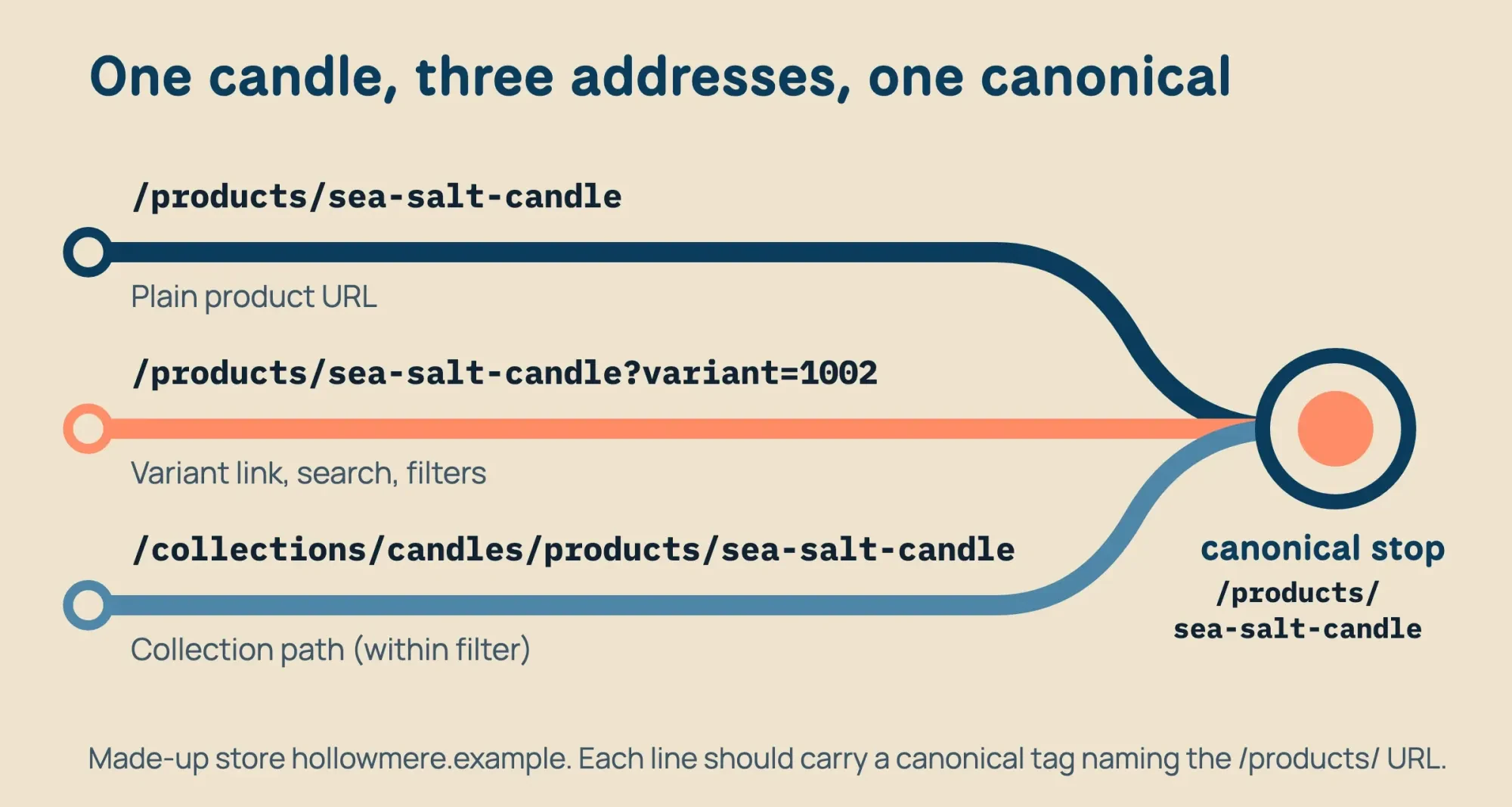 Diagram by DigitalTreed, from shopify.dev docs for the within filter and the product object, read October 29, 2026; store and URLs are made up
Shopify's SEO overview says "Auto-generated canonical tags are added to pages to prevent duplicate content from appearing in search results."
Dawn, Shopify's reference theme, links its product cards to the plain product URL with no within filter. Older or heavily edited themes may not, and nothing on the storefront shows you which kind you have.
Which URL does your canonical tag name?
That leaves the canonical tag, which Shopify says is automatic. None of the pages we read says which URL the tag names on a collection-scoped product page, though. The canonical_url object is described only as "The canonical URL for the current page." Dawn's theme.liquid file prints that object in a link tag, while a custom theme can print anything. So check your own store:
- Open a product from a collection page and copy the address you land on.
- Open the page source and find the link tag with rel="canonical" in it.
- Confirm it names /products/ and the handle, with no collection path or ?variant= part.
- Repeat on the same product's plain URL and on one ?variant= URL.
The canonical tag checker we built does the same read if you paste the three URLs in. A wrong answer means theme code, usually theme.liquid or a section file, and that's a job for whoever edits your theme.
Don't patch it with robots.txt. Google's guide to duplicate URLs says "Don't use the robots.txt file for canonicalization purposes," and a page Googlebot isn't allowed to fetch can't show Google its canonical tag at all. Once your tags are right, the indexing controls chapter of the Advanced SEO guide explains how Google weighs canonicals against redirects and sitemaps.
Changing a product handle without losing the old URL
Once the canonicals check out, look at handles, the one part of the address you own. Shopify writes the first draft, and the Liquid basics page on shopify.dev sets the rules. Handles are lowercase. Spaces and special characters turn into a single hyphen, and leading ones are dropped. A repeated title gets a number, so two products called Potion become potion and potion-1, and changing a product's title later leaves its handle alone. For products, you edit it in the search engine listing, next to the page title and meta description; the Liquid docs say other resources may use a Handle field instead.
Shopify's product editing help says a title over 70 characters or a description over 320 "might get cut off" in results. It's blunt about the handle too: "don't edit it too often or the product might not display in search engine results."
When you do rename, the old address needs a redirect. Shopify's redirect page says "You can redirect only from broken URLs," so the old URL has to return a 404 first.
Plus stores can hold up to 20,000,000 redirects, and every other plan up to 100,000. Both live under Content, then Menus, then View URL Redirects.
The collection settings offer a "Create a URL redirect from the previous handle" option when you rename a collection. The product help we read doesn't mention a matching option for products, so open the redirect list after renaming a product and check that the old handle is there. Renaming many products at once, or moving from another platform? List old and new URLs in the redirect map builder and point each old URL straight at its final address. Shopify's redirect page also notes that browsers and search engines cache 301 redirects, so a mistaken one can linger after you delete it.
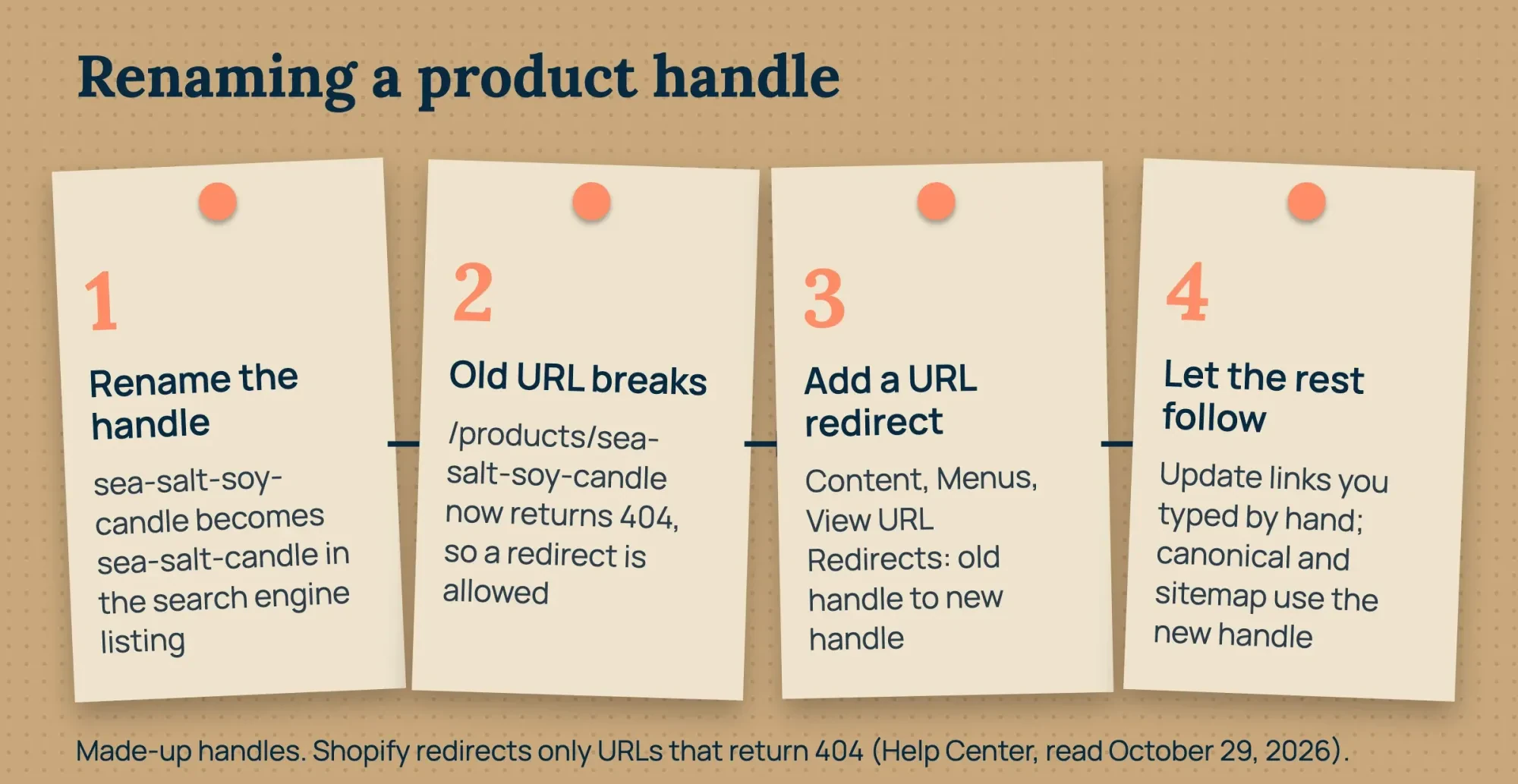 Diagram by DigitalTreed, from Shopify Help pages on product editing and URL redirects and the shopify.dev Liquid basics page, read October 29, 2026; store and handles are made up
Tag pages, filters and site search in robots.txt.liquid
Most stores never need to touch robots.txt. Shopify's robots.txt.liquid help says the default file "works for most stores," and lists its key lines: blocks on /admin, /cart/, checkout, account and order pages. Two more cover duplicates, /collections/*+* for filtered collection pages and /collections/*sort_by* for sorted ones. Search result pages are the gap worth checking. The same help page notes that an older theme template can carry rules such as Disallow: /search "that the default file no longer has." If Search Console shows your internal search URLs being crawled, shopify.dev's robots.txt.liquid tutorial adds one ?q= rule inside Shopify's default groups:
{% for group in robots.default_groups %}
  {{- group.user_agent }}
  {%- for rule in group.rules -%}
    {{ rule }}
  {%- endfor -%}
  {%- if group.user_agent.value == '*' -%}
    {{ 'Disallow: /*?q=*' }}
  {%- endif -%}
  {%- if group.sitemap != blank -%}
    {{ group.sitemap }}
  {%- endif -%}
{% endfor %}
Shopify calls this "an unsupported customization." Its Support team can't help with it, and the help page warns that incorrect use "can result in loss of all traffic."
Keep the Liquid loop. Replacing it with plain-text rules is "strongly not recommended, as rules may become out of date." Uploading a theme from the admin's Themes section won't import the file, either. Before you publish, save a copy of the live /robots.txt as shopify.dev suggests, then paste the rendered rules into the robots.txt tester and compare the two.
The file can't hide pages, though: Google's robots.txt introduction says it "is not a mechanism for keeping a web page out of Google." Use noindex for that, as the next section shows. Rules for AI crawlers are a separate decision, and the Google-Extended explainer covers them.
The sitemap Shopify writes, and the pages it leaves out
Unlike robots.txt, sitemap.xml has no template to edit. Shopify's list of theme templates includes robots.txt.liquid but no sitemap, and the SEO overview says both files are "automatically generated" for you. Shopify's sitemap help says every store generates one linking to all its products, their primary images, pages, collections and blog posts. It points to a separate sitemap for each type, updates itself whenever you add something, and needs submitting only once, in Search Console under Indexing, then Sitemaps. What goes in is up to you. Shopify's guide to hiding pages says a seo.hidden metafield set to 1 removes a page, blog post or product "from sitemaps, search engines, and your online store search."
For a product you want reachable only by direct link, the guide points to the Unlisted status instead. It also gives a theme.liquid snippet that adds noindex to search result pages.
Google's sitemap guide caps one file at 50MB uncompressed or 50,000 URLs. None of the Shopify pages we read says how a store handles that cap, so a very large catalog is worth a look in Search Console's sitemap report.
Google also says it ignores priority and changefreq values, so those tags change nothing there. After a big catalog import, run the sitemap through the XML sitemap validator to catch hidden products that still appear.
Product markup comes from your theme
Structured data is the theme's job, not yours. The sitemap help says current Shopify-supported themes and Theme Store themes include it by default.
Shopify's structured_data filter prints a product with no variants as a schema.org Product, and one with variants as a ProductGroup. Dawn's main product section wraps that filter in a JSON-LD script tag. That matches Google's product variant guide, which groups variants under ProductGroup with variesBy, hasVariant and productGroupID.
Look for a second block. A reviews or SEO app can print its own Product markup with different values, and then the page tells search engines two different stories about the same product. The schema markup validator lists every block on a page. If you see two, switch one source off. Merchant listings and AI shopping answers are their own topic, and the post on products in AI search walks through them.
Speed: what a theme decides and what you can trim
Speed depends mostly on the theme and the apps added to it. Shopify's theme performance guide sets a Theme Store entry bar: an average Lighthouse performance score of at least 60 across the home, product and collection pages. Shopify sets that bar for theme sellers, not as a target for your store.
The targets come from Google's Core Web Vitals page: Largest Contentful Paint by 2.5 seconds, INP (Interaction to Next Paint) below 200 milliseconds, and CLS (layout shift) below 0.1. Shopify's guide names app-injected content among the usual causes of layout shift, next to images without dimensions and fonts that swap in late. So remove apps you no longer use, shrink the hero image to the size the theme actually shows, and drop any font you added that the theme didn't need. Then run one home, product and collection page through the website speed test, before and after.
Two setups of a made-up candle store, side by side
The docs never show what a broken theme looks like from outside, so we wrote two versions of Hollowmere's pages on one Mac and ran the same checks on both. One was stock-style, and one carried three bad theme edits.
What we tested on 127.0.0.1
On October 29, 2026, our Python script put a hand-written Hollowmere store on 127.0.0.1, with 2 products, 3 variants, tag pages, a sitemap index and a 301 redirect. The stock setup links to /products/ and names it in every canonical. The edited setup adds three made-up theme edits: collection-path links, a self-naming canonical there and a second app JSON-LD block. No Shopify store, admin or account was used.
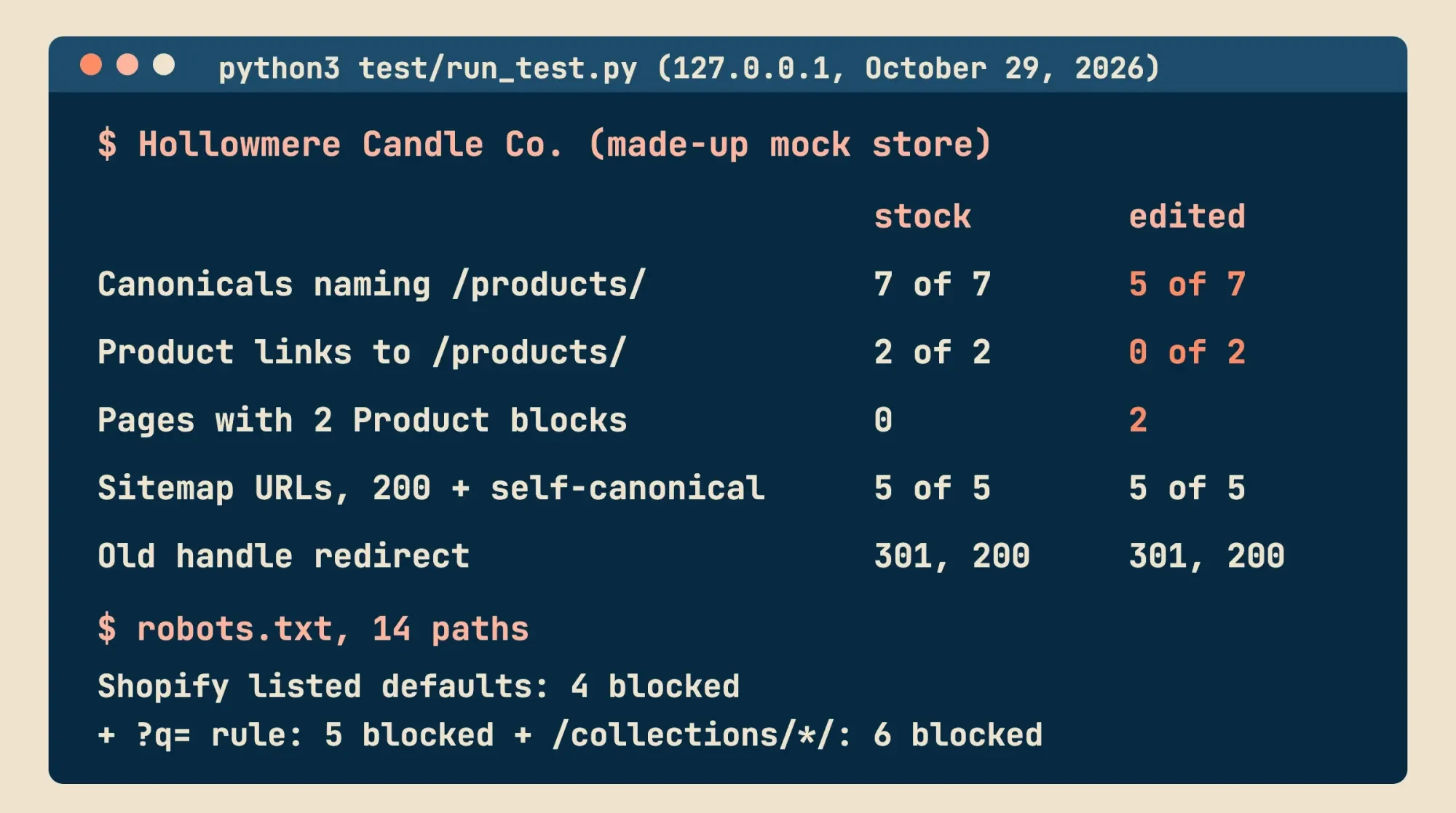 Source: our October 29, 2026 local test on 127.0.0.1, test/output.txt; rules from Shopify Help, shopify.dev and Google developer pages read that day
What the checks found in the edited theme
The stock setup passed every check we wrote. All 7 product URL forms named /products/ and the handle. Both product links on the home and collection pages went to /products/, and no page carried two Product blocks.
The edited setup failed in three places. Its 2 collection-scoped product pages named themselves as canonical, so only 5 of 7 forms were right. Both product links on the home and collection pages went through /collections/candles/products/. Those same 2 pages carried two Product blocks. The app's copy listed 26.00 for every variant, against the theme's 24.00 and 32.00 for the sea salt candle and 24.00 for the fig and cedar one. None of the three changes the product text or prices a shopper reads on the page.
Two checks passed in both setups. The old handle, /products/sea-salt-soy-candle, answered with a 301 and landed on /products/sea-salt-candle with a 200, one hop.
The sitemap stayed clean in both setups too: 4 child sitemaps and 5 URLs, every one returning 200 and naming itself as canonical. So in the edited store, the sitemap said /products/ while links and canonicals said /collections/. Google's duplicate guide ranks a sitemap listing below canonical tags and redirects, so the sitemap alone wouldn't win that argument.
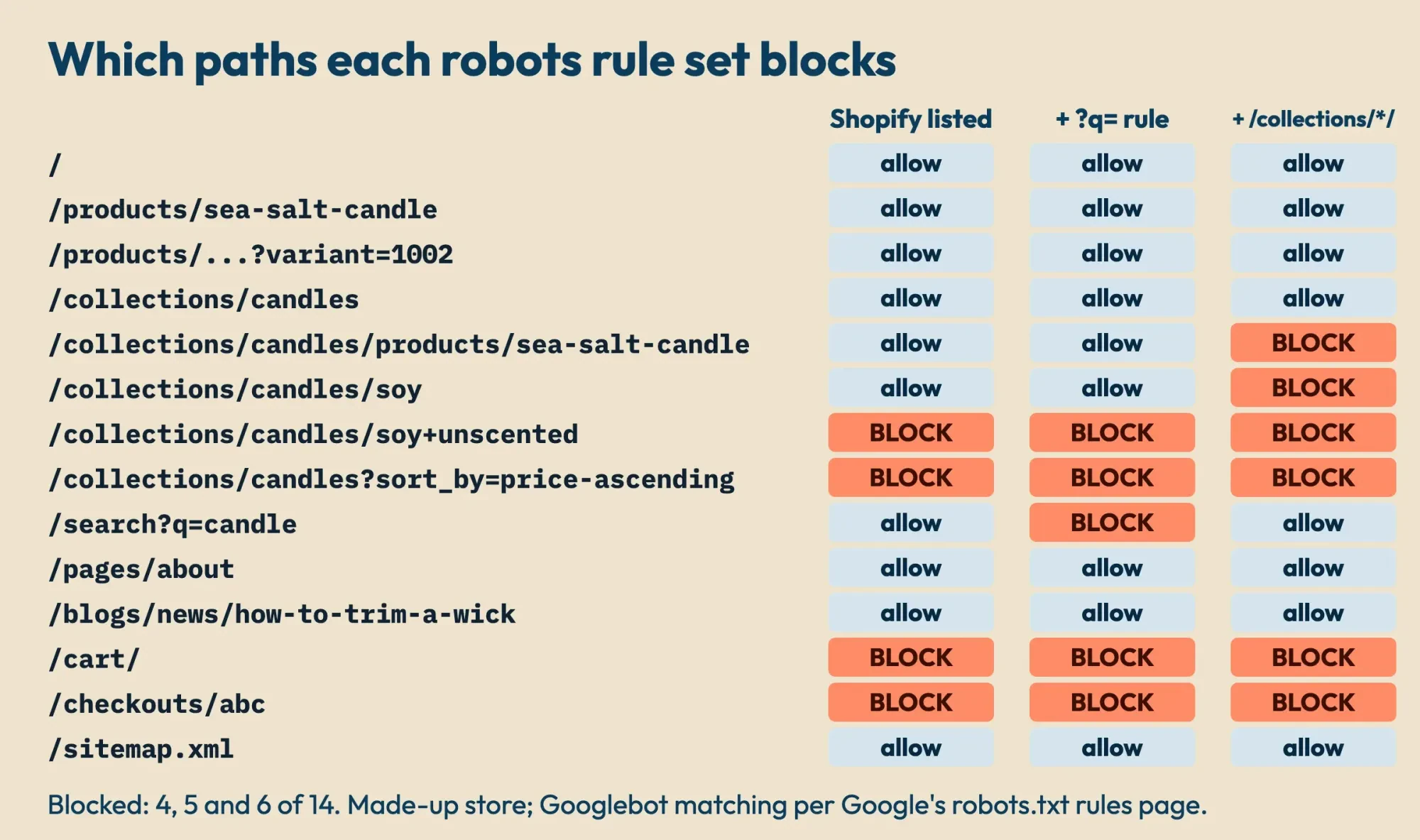 Source: our October 29, 2026 local test, test/output.txt; matching follows Google's robots.txt rules page, default lines from Shopify Help, read that day
For robots.txt, the script matched 14 paths against three rule sets, following how Google reads robots.txt rules. The longest rule wins, and the less restrictive one wins a tie. Shopify's listed lines blocked 4: the combined tag page, the sorted page, the cart and a checkout URL. Adding the ?q= rule blocked a fifth, /search?q=candle. A made-up overreach, Disallow: /collections/*/, blocked 6. It caught the soy tag page and also the collection-scoped product page, and blocking that product page hides its canonical tag from Google's crawler entirely.
Handles followed our reading of Shopify's rules, not Shopify's own output. "Fig & Cedar Candle, 8 oz" became fig-cedar-candle-8-oz, and a second "Sea Salt Candle" became sea-salt-candle-1.
What stays out of your hands on Shopify
The Shopify help pages linked above put these five things out of a store owner's reach:
- The /products/, /collections/, /pages/ and /blogs/ prefixes.
- Redirects from an address that still loads a page.
- Redirects for collection tag URLs such as /collections/candles/soy.
- Image file names after upload; Shopify's structure help says "You can't change file names in Shopify."
- Help from Shopify Support with robots.txt.liquid edits.
The rest is yours to check. Start with the free website audit tool for wrong canonicals, broken links and slow pages, then work through the sections above in order. For checks that apply to any platform, the step-by-step technical SEO audit picks up where this page stops. We'd leave robots.txt.liquid alone until search URLs show up in Search Console, since Shopify itself warns that a bad edit can cost a store all of its traffic.
Theme fixes are Liquid work, which DigitalTreed's web development people take on, and redirect maps and audits sit in the SEO service. Both are paid services, and every check in this guide runs without them.
Other Shopify crawl and URL questions
Frequently asked
Why does Search Console say "Indexed, though blocked by robots.txt" for my Shopify store?
Usually there's nothing to fix. Shopify's robots.txt.liquid help calls it "normal behavior." If your homepage shows it, Shopify says Google's data about your store is probably outdated.
Do Shopify URL redirects work in other country subfolders?
Yes. Shopify's redirect help says one redirect applies to all language or market subfolders, so /products/blue-t-shirt also covers /en-ca/products/blue-t-shirt.
Why isn't my new Shopify store showing in Google?
Check the plan first. Shopify's SEO questions page says "Search engines don't index trial stores," and private mode keeps a store out too.
Does Shopify add other languages to the sitemap?
Yes. The sitemap help says languages you sell in are added to each domain's sitemap files automatically.
How we made this guide: Every platform rule here comes from 10 Shopify Help Center pages, 9 shopify.dev pages and 3 Dawn theme files. Google's rules come from 6 Search Central pages and 1 Google crawling infrastructure page, all opened on October 29, 2026. The Help Center refuses scripted requests, so those pages were opened in an ordinary browser. The Hollowmere test used only pages we wrote, on 127.0.0.1. Facts checked by the DigitalTreed team on October 29, 2026.
First published August 2021, when this URL held a broad technical SEO overview. Rewritten October 29, 2026 for Shopify stores, with the platform-neutral checks moved to the technical SEO audit guide.
Sources
- Shopify Help Center: Editing robots.txt.liquid
- Shopify Help Center: Finding and submitting your sitemap
- Shopify Help Center: Creating and managing URL redirects
- Shopify Help Center: SEO overview
- Shopify Help Center: Hiding a page from search engines
- Shopify Help Center: Adding and updating products
- Shopify Help Center: Collection settings
- Shopify Help Center: Optimizing your site structure for search engines
- Shopify Help Center: Migrate to Shopify
- Shopify Help Center: Frequently asked questions about SEO
- shopify.dev: Customize robots.txt
- shopify.dev: Liquid basics (handles)
- shopify.dev: Liquid filter within
- shopify.dev: Liquid object product
- shopify.dev: Liquid object canonical_url
- shopify.dev: Liquid filter structured_data
- shopify.dev: Liquid object article
- shopify.dev: Performance best practices for Shopify themes
- shopify.dev: Templates (theme architecture)
- Shopify Dawn theme on GitHub: layout/theme.liquid
- Shopify Dawn theme on GitHub: snippets/card-product.liquid
- Shopify Dawn theme on GitHub: sections/main-product.liquid
- Google Search Central: How to specify a canonical URL
- Google Search Central: Introduction to robots.txt
- Google Crawling Infrastructure: How Google interprets the robots.txt specification
- Google Search Central: Build and submit a sitemap
- Google Search Central: Product variant structured data
- Google Search Central: Core Web Vitals
- Google Search Central: URL structure for ecommerce sites


Comments
No comments yet. Start the conversation below.