

Quick answer
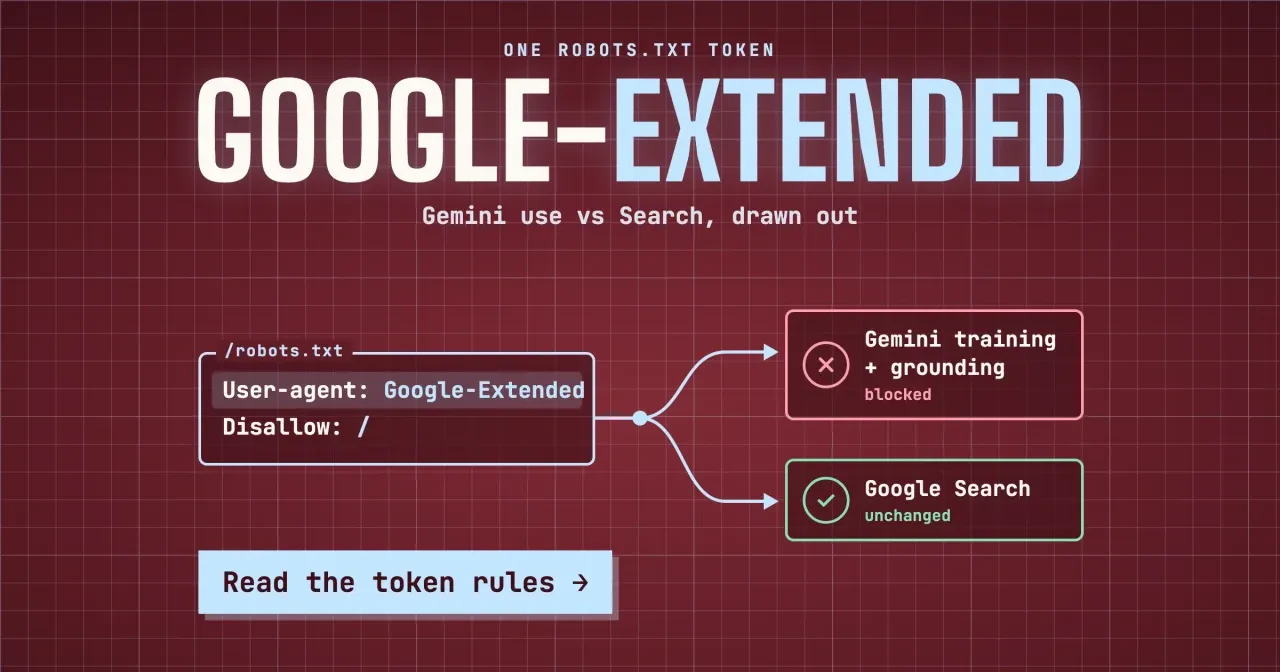
As of October 29, 2026, a Google-Extended rule in robots.txt opts your pages out of 2 uses: future Gemini training and Gemini answer grounding. Your Google Search listing, rankings and place in AI Overviews stay the same, since Googlebot and other controls govern those. Read your live robots.txt first, then pick the control that fits your goal.
You've probably met Google-Extended as a plugin toggle or a line in a competitor's robots.txt and wondered what it switches off. Google-Extended is a robots.txt product token that Google reads as a yes or no on using your pages for Gemini. It doesn't fetch a single page.
We cover why it's a permission flag rather than a bot, what a block covers and what stays the same in Google Search. Then come which Google control does what, robots.txt patterns, what we tested and four results, who should block it, and how to confirm it's live. Our view: leave it allowed on marketing pages.
Key takeaways
- Google-Extended never crawls; Googlebot fetches pages and the token only sets permission.
- A block takes pages out of Gemini app grounding, not Google Search results.
- Putting Googlebot in the same Disallow: / group blocks your Search crawl too.
- Once Google-Extended has its own group, your * rules stop applying to it.
- Python's robots.txt reader and our spec-based reader split on 5 of 70 checks.
Google-Extended is a permission flag, not a bot
There's no Google-Extended crawler to block. Google's list of common crawlers says the token has no HTTP user agent string of its own.
The crawling is done with Google's existing user agents, and the token is used, in Google's words, "in a control capacity." So when you disallow it, Googlebot keeps fetching your pages for Search, and the flag only tells Google which other uses those pages may go to.
That's why the name never shows up in server logs. Search a month of access logs for Google-Extended and you should find nothing at all, even on a site that blocks it, since the visits carry Googlebot's user agent. Our log file analyzer shows which Google and AI crawlers really visit. No log line will show the flag doing its job, so you confirm it by reading robots.txt instead.
Google announced Google-Extended on September 28, 2023 as a way to choose whether a site helps improve Bard and the Vertex AI generative APIs. Bard was renamed Gemini on February 8, 2024, which is why Google's current pages say Gemini. Our plain-English guide to large language models explains what these models do with text. The Advanced SEO guide lists the other AI crawlers by company. If an old plugin or checklist still labels the setting as a Bard opt-out, it's pointing at the very same robots.txt token we cover here. Google's crawler page still files it among the common crawlers, right next to Googlebot and GoogleOther, even though nothing ever arrives at your server under its name.
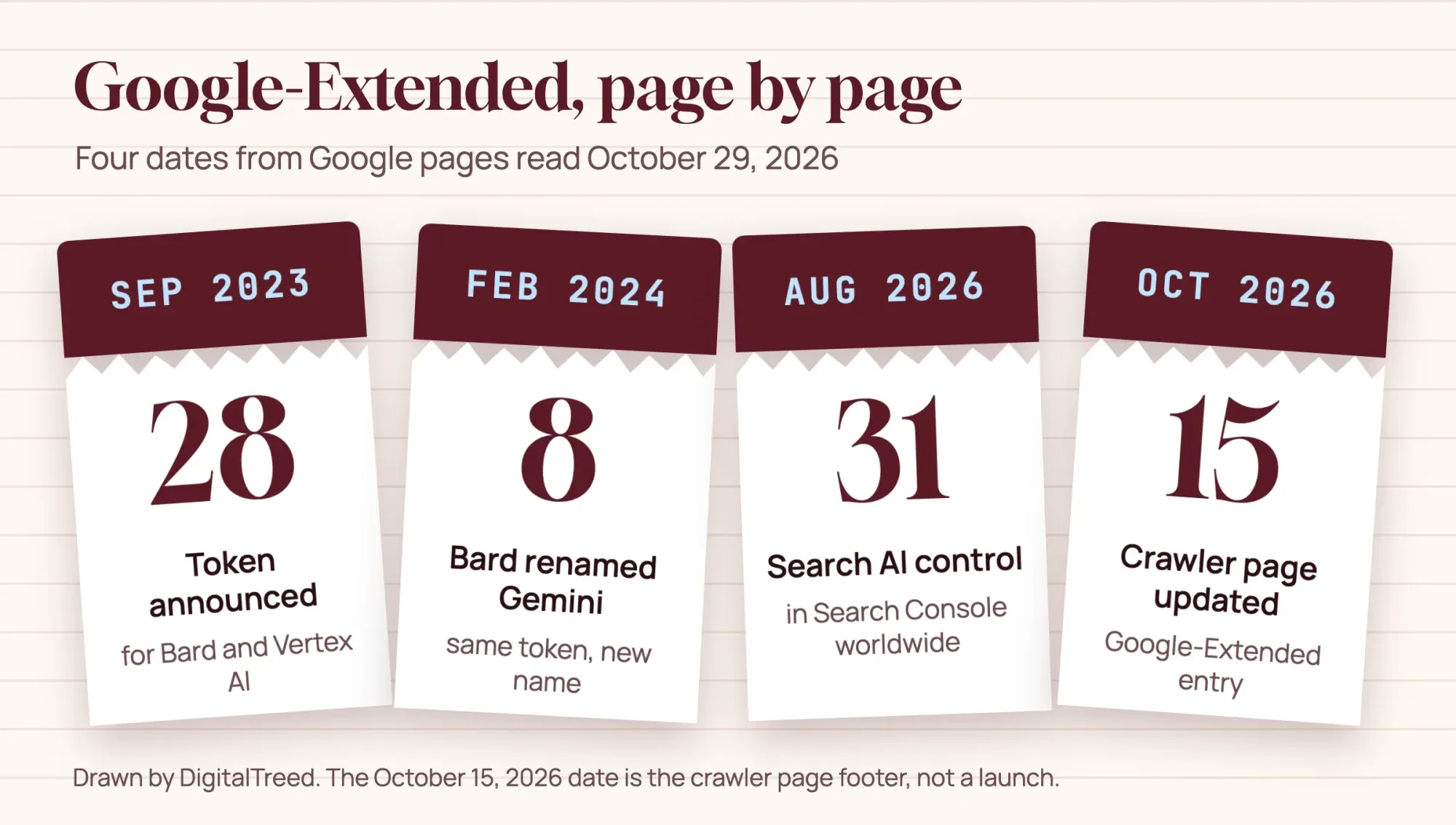 Drawn by us from Google pages read October 29, 2026; the last date is the crawler page footer
What a Google-Extended block covers
A block covers two jobs, and both belong to Gemini. The first is training. The same crawler page says the token manages whether crawled content may be used to train future generations of Gemini models. Those models power Gemini Apps and the Vertex AI API for Gemini. The second job is grounding, which Google describes as giving the model content from the Search index at prompt time. The aim, per Google, is better factuality and relevancy. In plain terms, training shapes what a model knows later, and grounding decides which live pages it reads while it answers. Both happen after Googlebot has fetched the page, which is why a block never shows up as a crawl change.
Grounding is the one you'd notice. When someone asks the Gemini app a question, Google can pull indexed pages into the answer. A Google-Extended block keeps your pages out of that step, both in the app and in Grounding with Google Search on Vertex AI. Google Cloud's grounding documentation, now filed under Gemini Enterprise Agent Platform, confirms that grounding skips pages that disallow Google-Extended. So a developer building on Google's API won't get your pages as sources either. That's the part of a block with a visible cost, since a grounded answer is built from the pages Google pulled in and yours would no longer be among them.
There's a third mention worth knowing. Search Console's help page for the Search generative AI control says that control doesn't affect AI training. For training of the models behind AI features in Search, it points to Google-Extended instead.
Look closely at the word future, too. Google talks about training future generations of models, and it says nothing about pulling pages out of models already trained. We'd treat a block as a choice about what comes next.
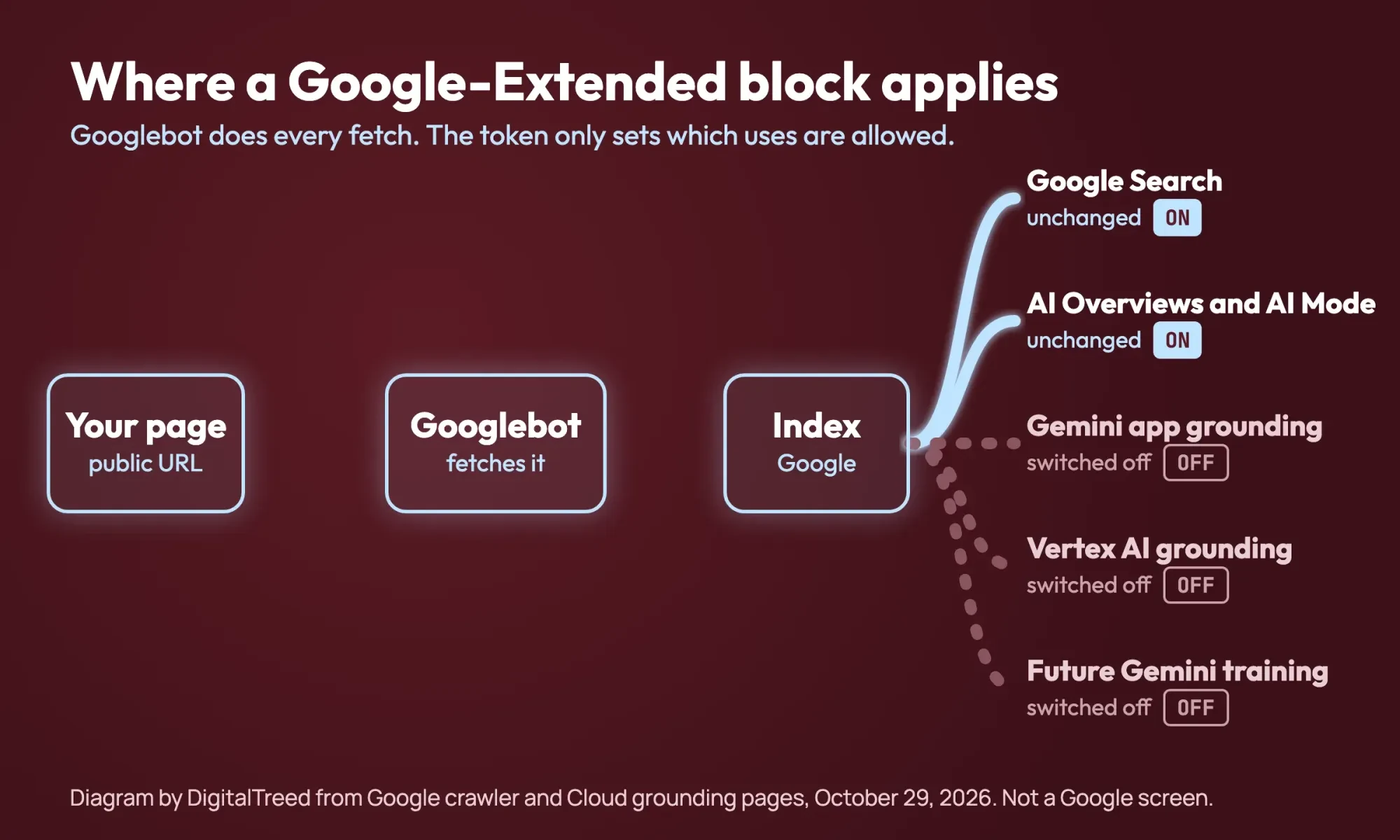 Diagram by DigitalTreed, drawn from Google crawler and Cloud grounding pages read October 29, 2026
What stays the same in Google Search
Google's crawler page states that Google-Extended has no effect on whether your site is included in Google Search, and that it isn't used as a ranking signal there either. Your listings, positions and organic clicks shouldn't move when you add the line.
AI Overviews and AI Mode don't move either. Google's page on AI features and your website says AI is built into Search. That's why robots.txt rules for Googlebot are the crawl control for those features, while Google-Extended is mentioned only for "some of Google's other systems." To be a supporting link in those answers, a page must be indexed and eligible for a snippet. The Search Console help page names AI Overviews, AI Mode and generative AI features in Discover as what its Exclude setting covers. So if you want out of AI Overviews, Google-Extended is the wrong tool.
Which Google control does what?
Five Google controls touch AI, and they don't line up the way plugin toggles suggest. The table reads each one against four outcomes, using only what Google's own pages state. "Not stated" means the page doesn't say.
| Control | Google Search listing | AI Overviews and AI Mode | Gemini app grounding | Future Gemini training |
|---|---|---|---|---|
| Google-Extended disallow | No effect | Still shown | Left out | Left out |
| Search Console AI control set to Exclude | No effect | Left out | Not stated | No effect |
| nosnippet | Listed with no text snippet | Not a direct input | Not stated | Not stated |
| noindex | Dropped | Not eligible | Not stated | Not stated |
| Googlebot disallow | Not crawled; URL may still be listed | Not crawled for them | Not stated | Not stated |
Google's robots meta tag rules back the nosnippet row. They say the rule also keeps content from being a direct input for AI Overviews and AI Mode. For one paragraph rather than a whole page, the data-nosnippet attribute works at element level, and max-snippet caps the text length. The introduction to robots.txt backs the last row. It says robots.txt isn't the way to keep a page out of Google, and it points to noindex for that. Only the first row reaches Gemini, and only the second hides you from AI Overviews without touching the rest of Search, so most sites need one control at most.
Robots.txt patterns, and the one-line mistake
The syntax is short, and Google's own example on the crawler page is a partial block. Most small sites need one of three shapes: block the whole site, block one folder, or share a rule with Googlebot. The first is the two-line version everyone copies.
Here's the second, which keeps one paid folder out of Gemini and leaves the rest open:
# Keep the paid guides out of Gemini, leave the rest usable
User-agent: Google-Extended
Disallow: /guides/
The third shape lists two user-agent lines over one set of rules, so both tokens follow them. It's handy for a members area or client portal that you want kept out of Google Search and out of Gemini at the same time.
It's also where the costly slip happens, when someone puts the whole-site rule under both names:
# Don't copy this: Googlebot shares the block
User-agent: Google-Extended
User-agent: Googlebot
Disallow: /
That file tells Googlebot to stop crawling everything. Pages it can't fetch may still be indexed from links, but Google can't read or refresh what's on them. In our test below, this exact file disallowed Googlebot on all 5 paths we asked about. Our robots.txt generator has an AI bots option, but read its output line by line before you upload. On WordPress, our Yoast SEO guide covers the plugin's Bot Blocker setting, which edits robots.txt for you.
Our test bench: 7 robots.txt files, 2 readers
On October 29, 2026 we wrote 7 small robots.txt files, the patterns above plus three trickier ones, and served them from 127.0.0.1 on one Mac. Two readers answered whether Googlebot and Google-Extended may fetch 5 paths in each file, which made 70 checks in all (7 files, 2 tokens and 5 paths). Reader A is a short script we wrote from Google's robots.txt spec page and RFC 9309. Reader B is Python 3.9 urllib.robotparser. Neither is Google's code.
What we tested, file by file
Files 1, 2 and 4 are the three shapes above, and file 5 is the mistake. File 3 adds a * group blocking /cart/, file 6 puts a User-agent: Google group with Allow: / first, and file 7 drops the hyphen from the token.
Four results that change how you write the file
Four results changed how we'd write the file. In file 3, both readers allowed Google-Extended on /cart/, even though the * group blocks it there. That's by design. Google's spec says only the most specific group applies, and specific groups don't merge with *.
File 5, the shared mistake, disallowed Googlebot on all 5 paths, which on a live site would stop Google Search crawling every page instead of only keeping Gemini out. File 7 used the typo GoogleExtended with no hyphen, and neither reader applied it to anything, so a one-character slip leaves the whole block silently switched off.
Files 1, 2 and 4 held no surprises. In both readers, file 1 blocked Google-Extended on all 5 paths, file 2 only on /guides/, and file 4 blocked both tokens on /members/ alone.
File 6 is where the readers split. It put a User-agent: Google group with Allow: / above the Google-Extended block. Python's reader counts a name found inside the token as a match, and it stops at the first group that fits. So it allowed Google-Extended on all 5 paths, while reader A matched only the exact token, picked the Google-Extended group and blocked all 5. Those were the only disagreements in 70 checks, and all 5 came from that one file. Nothing else in the run depended on which reader we asked.
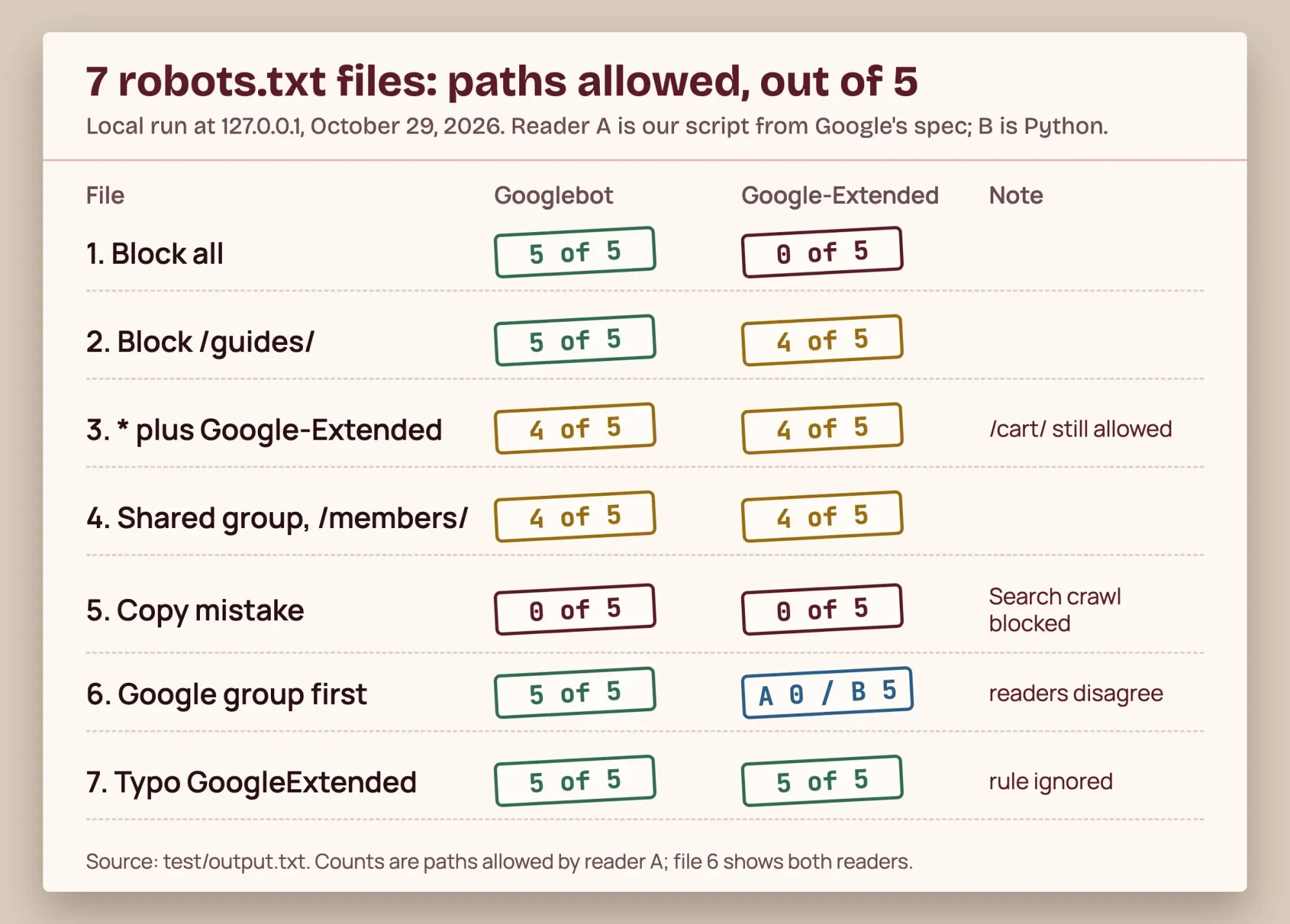 Source: our October 29, 2026 run at 127.0.0.1, test/output.txt; one stamp per file and token, summed over 5 paths
The /cart/ result in file 3 leaks little in practice, because Googlebot follows the * group and never fetches /cart/. File 6 is the one to remember. A checker built on a different reader can report a block that Google's written rules wouldn't apply, or the reverse. Paste your file into our {a(T_TEST, 'robots.txt tester')} and compare its answer for Google-Extended with the rule you meant.
Who should block Google-Extended?
For most small US businesses, we'd leave it allowed. The cost of a block is concrete. It's lost reach. The Gemini app stops grounding answers on your pages, so a question about your service or your area can't draw on your own words in that app. The gain is a no to training future Gemini models, which matters most when your writing is what you sell.
In our view the block fits a short list of sites, and for those we'd use the folder pattern on anything you charge money for. A paid newsletter archive, a course whose lessons are the product, or a research firm whose reports are the business all have text worth guarding. A plumber, a dental office or a local agency usually gains more from being quotable in Gemini answers than from keeping a few service pages out of training.
Google-Extended is only Google's piece of the picture. For GPTBot, ClaudeBot and the rest, see how to protect website content from copying, which covers the wider robots.txt set.
Our GEO guide explains how AI answers choose their sources. Our SEO service includes technical audits and fixes, and since we sell that work, weigh our view accordingly.
How to confirm the rule is live
A rule only counts if Google can read it. Google's guide to creating a robots.txt file says it must sit at the root of the host it applies to. A site gets one file, and a copy in a subfolder such as /pages/robots.txt doesn't count. Under Google's robots.txt spec, a file at https://example.com/robots.txt doesn't cover https://www.example.com/ or a store on another subdomain. Each host that serves pages needs its own copy of the Google-Extended group, and that includes the shop or booking subdomain your platform may have set up for you. It also means your rule can't reach copies of your text on other people's sites.
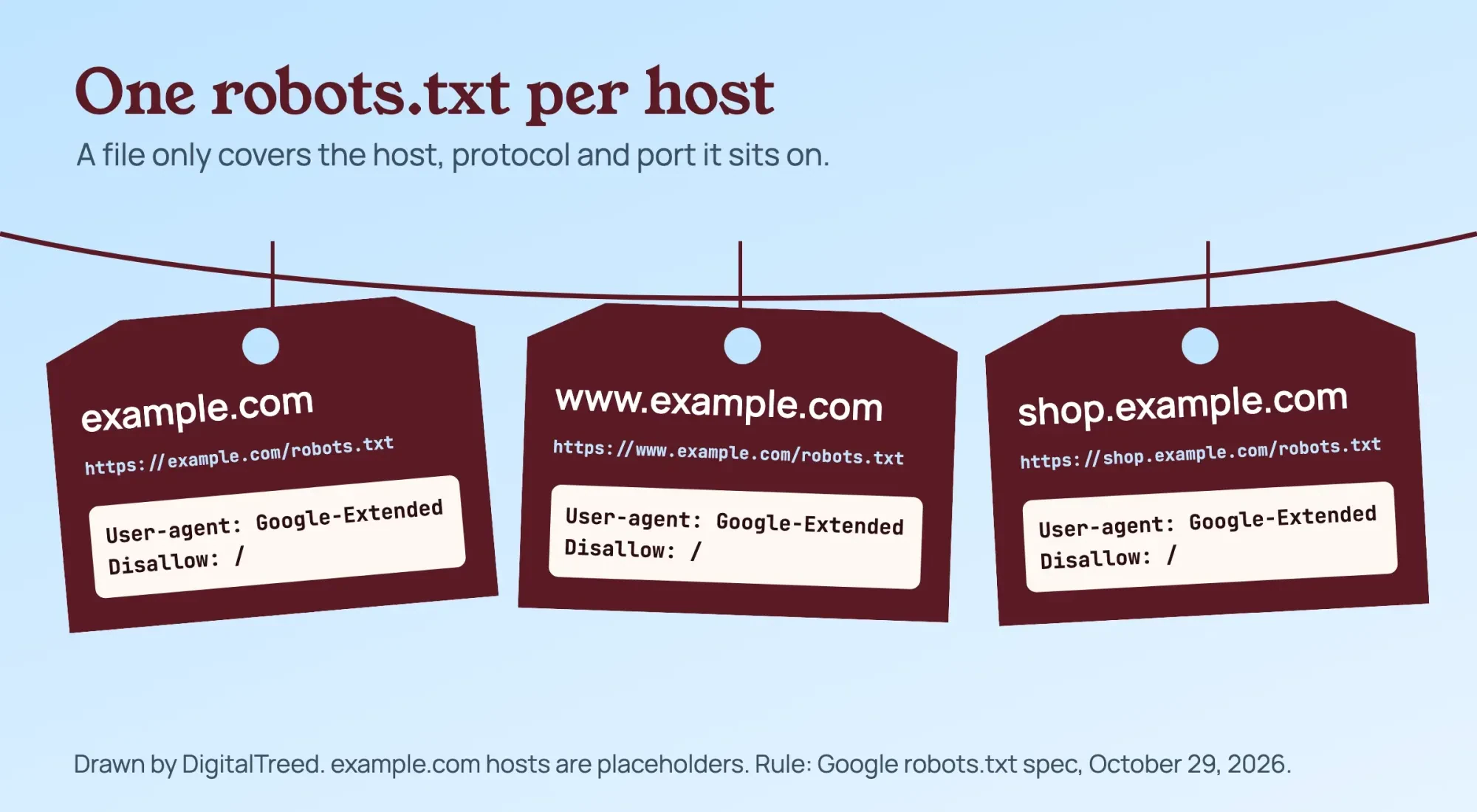 Drawn by us: example.com hosts are placeholders; the per-host rule is from the Google robots.txt spec
Open each live file in a browser and look for the exact token, Google-Extended, hyphen included. Our AI crawler checker reads a public site's robots.txt and shows which AI bots it lets in, which gives you the live answer without reading every line yourself.
For a site you maintain on a schedule, add this line to the robots.txt step of the step-by-step technical SEO audit we published. Recheck it after any plugin change, since a plugin setting such as Yoast's Bot Blocker can rewrite the file for you.
FAQ about Google-Extended
Frequently asked
How long does a robots.txt change take to reach Google?
Usually about a day. Google's robots.txt spec says it generally caches the file for up to 24 hours. Timeouts or 5xx errors can stretch that.
Can I block Google-Extended for only some pages?
Yes. Disallow the folder, then Allow any page inside it that should stay open. RFC 9309 says the most specific match wins, counted in octets (bytes), and an allow rule should win a tie.
Is Google-Extended the same as GoogleOther or Google-CloudVertexBot?
No, each is its own token. Google's crawler list says GoogleOther doesn't affect any specific product. Google-CloudVertexBot crawls when a site owner asks, to build Vertex AI Agents.
Does blocking Google-Extended remove my pages from models already trained?
Google hasn't said so. Its 2023 announcement framed the control as helping improve future generations of models. It describes no removal from a trained model.
How we made this guide: On October 29, 2026 we read Google's crawler, robots.txt, AI features and meta tag pages. Other reads that day: the Search Console and Cloud help pages, RFC 9309 and two Google blog posts. Our test ran 70 checks on 7 robots.txt files at 127.0.0.1, with no account involved. Facts checked by the DigitalTreed team on October 29, 2026.
First published February 2023 as a post about Bard. Rewritten October 29, 2026 around Google-Extended, the robots.txt control Google launched for Bard in 2023 that now applies to Gemini.
Sources
- Google Crawling Infrastructure: List of Google common crawlers (Google-Extended, GoogleOther, Google-CloudVertexBot), updated October 15, 2026
- Google Crawling Infrastructure: How Google interprets the robots.txt specification, updated October 23, 2026
- Google Crawling Infrastructure: Create and submit a robots.txt file
- Google Search Central: Introduction to robots.txt
- Google Search Central: AI features and your website
- Google Search Central: Robots meta tag, data-nosnippet and X-Robots-Tag specifications
- Search Console Help: Search generative AI control
- Google Cloud: Grounding with Google Search (Gemini Enterprise Agent Platform)
- RFC 9309: Robots Exclusion Protocol
- Google blog: An update on web publisher controls (September 28, 2023)
- Google blog: Bard becomes Gemini (February 8, 2024)
- Python 3.9 documentation: urllib.robotparser

Comments
No comments yet. Start the conversation below.