
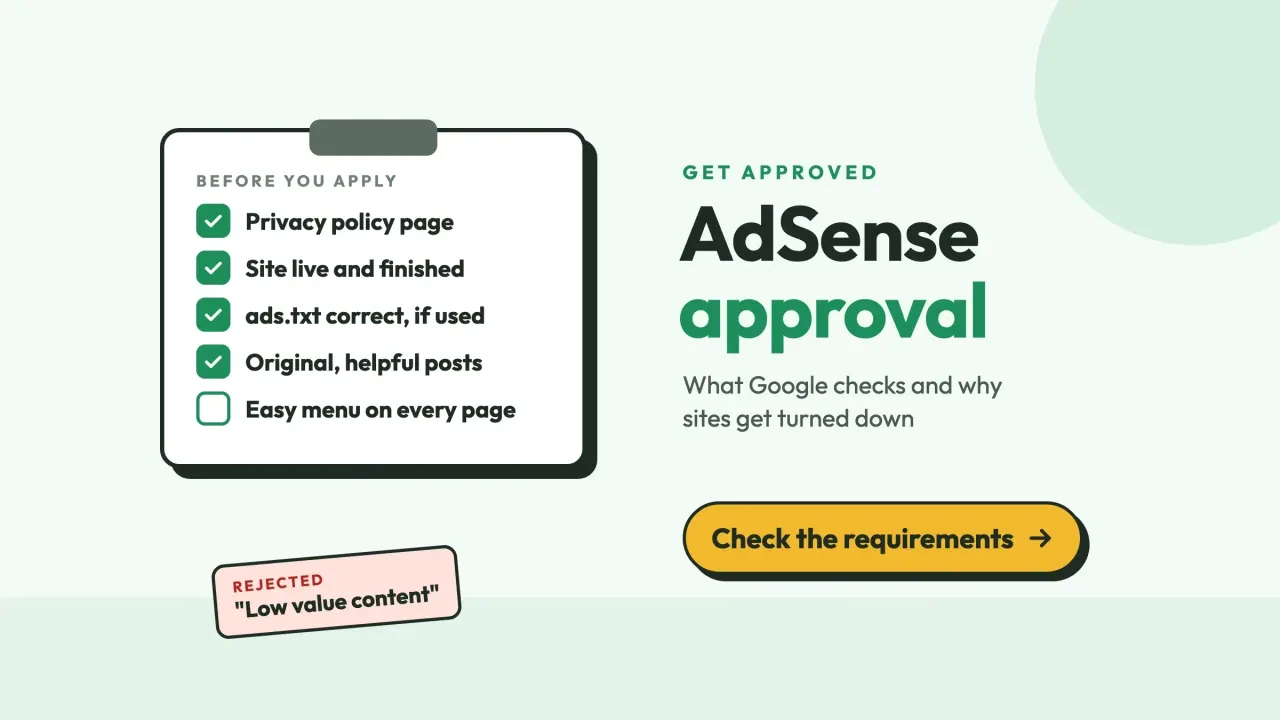
Quick answer
AdSense approval needs four things from Google's own Help pages. You're 18 or older, the site is yours and you can edit its HTML, the content is original, and it follows the policies. Review usually takes a few days, sometimes 2 to 4 weeks. Labels like "Low value content" aren't AdSense Help headings, so fix against the matching Help text.
AdSense approval is Google's check of your website, and of your account details, before it lets you show its ads. Google says it reviews your entire site against the AdSense Program policies, not just the page where you pasted the code.
This guide covers websites you run yourself.
Blogger blogs and YouTube channels follow a different path. Google's eligibility page asks you to sign up via your Blogger or host partner account, or through YouTube Studio for video.
Earnings are a separate topic, too; our guide to making money with AdSense picks up once you're in.
Key takeaways
- You must be 18 or older, or sign up through a parent or guardian.
- Google names no post count, domain age or traffic floor in AdSense Help.
- Your privacy policy must say Google and other vendors use ad cookies.
- Review usually takes a few days, but can take 2 to 4 weeks.
- An ads.txt file without your publisher ID stops every ad request.
Google's real requirement list is shorter than you think
Google's eligibility page boils down to one line: “If you have your own content that meets our policies and you’re 18 or over, you can sign up for AdSense.” Everything else is detail on those words.
- You're at least 18. Under 18, a parent or guardian can sign up with their own Google Account, and payments go to that adult.
- The content is yours. Google wants it “high-quality, original, and attract an audience.”
- The site follows the AdSense Program policies before you apply, not after.
- You own the site and can edit its HTML. Google says you must be able to place AdSense code between the <head> tags of your pages.
That's the list.
You'll read elsewhere that you need 30 posts, a 6-month-old domain or a traffic floor.
We didn't find any of those numbers in the AdSense Help pages we read on October 27, 2026.
Google does say the site must be live with enough content for our specialists to evaluate. That's a judgment, not a count.
Ownership has a sharp edge. If you sign up with a site you don't own, Google says it "won't be able to verify that you're the site owner" and won't set up the account.
A blogspot address can still work, because Blogger is an AdSense host partner with its own sign-up. Our Blogger vs WordPress comparison explains who controls the site in each case.
Your privacy policy needs three ad-cookie lines
The one page Google does name is a privacy policy. Its Required content page says yours should tell visitors that “Third party vendors, including Google, use cookies to serve ads based on a user’s prior visits to your website or other websites.”
Two more lines follow. One says Google's advertising cookies let it and its partners serve ads based on visits to your site and others. The other tells users they may opt out of personalized advertising by visiting Ads Settings.
The Google Publisher Policies go wider. Publishers must have and abide by a privacy policy that discloses data collection, sharing and use that come from using Google's products.
What about About and Contact pages?
They aren't on the AdSense requirement pages we read.
Build them anyway, for people. A reader who can't find who runs a site has little reason to trust it, and a contact page is where advertisers and sponsors find you.
We aren't lawyers, and none of this is legal advice. Google itself says it's unable to suggest specific privacy policy language because laws vary, and its setup page names the California Privacy Rights Act (CPRA).
If you collect more than ad and analytics cookies, have a lawyer read the page.
Connect the site, then press Request review
Once those pages are live, connect the site from your AdSense account. These are the steps from Google's Connect your site to AdSense page.
- Sign in to AdSense and add the site's address. It appears on the Sites page as "Requires review".
- Pick one verification method: the AdSense code snippet, an ads.txt snippet, or a meta tag.
- Paste the code into the HTML between the <head> and </head> tags, or upload ads.txt to the root of the site.
- Tick the box to confirm you've finished, then click Verify.
- Finish the tasks listed on your AdSense homepage, such as payments information. Google says a site whose setup tasks aren't done will not be reviewed and stays at "Getting ready".
- Click Request review.
Google suggests the meta tag if you don't want the code snippet on your homepage yet. Its example looks like this, with your own publisher ID in place of the zeros:
<meta name="google-adsense-account" content="ca-pub-0000000000000000">There's a fourth route. If you've already verified the site in Search Console, Google says it will continue checking your site without the code.
Verifying a domain takes a DNS record; the steps are in our complete Search Console walkthrough.
Put the code on a real page.
Google's setup tips say to paste it on a page that contains content and gets regular traffic. A test page with nothing but the code won't be approved.
Ads.txt isn't required for approval, but a wrong one stops every ad
Ads.txt is a plain text file at the root of your domain that lists who may sell ads on it. Google's ads.txt guide says “Use of ads.txt is not mandatory, but it’s highly recommended.”
Here's the catch. If a file exists and your ID isn't in it, the Sites page shows "Unauthorized", and Google says "All ad requests from this site are being rejected".
So a half-done file is worse than none.
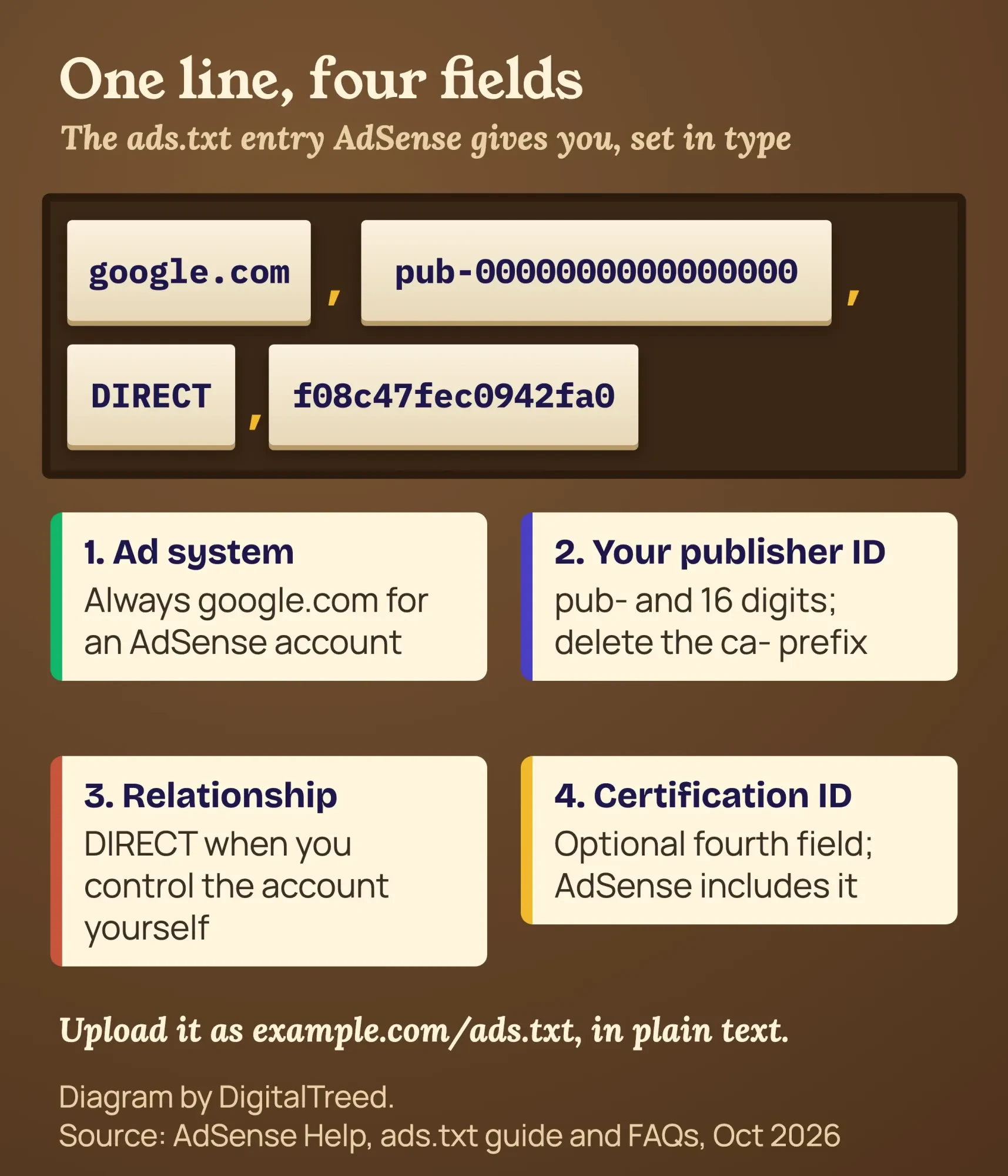 Diagram by DigitalTreed. Line format: AdSense Help, ads.txt guide and FAQs, October 2026
The whole file can be this single line, with your publisher ID:
google.com, pub-0000000000000000, DIRECT, f08c47fec0942fa0Google's ads.txt pages list the rules that trip people up:
- Use pub- and the 16 digits only. The FAQ says to delete the product-specific prefix, such as ca-.
- Upload it to the root, so it opens at example.com/ads.txt, not in a folder.
- If your site lives at www, the bare domain must redirect. A file at www.domain.com/ads.txt will only be crawled if domain.com/ads.txt redirects to it.
- Make it answer on both HTTP and HTTPS, with an HTTP 200 OK status.
- Write it in a plain text editor; Google warns against pasting from rich text editors.
Then open the file in your browser. Google says that if it displays in your web browser, AdSense will likely find it.
To see the status code itself, paste both addresses into the DigitalTreed status code tool; each should end in 200.
Give it time. Google says ads.txt changes can take a few days to show, and up to a month on a site with few ad requests.
Example (made up): Prairie Thimble is a quilting-pattern blog run from Ottumwa, Iowa, on WordPress at its www address. Its owner uploads ads.txt through a plugin, and the file opens fine at the www address.
She also checks the bare domain, because that's where Google's crawler starts. If it doesn't redirect to www, she asks her host to add the redirect before she clicks Verify.
Our test: one robots.txt line can hide ads.txt from Google
That redirect isn't the only thing that can hide a correct file.
Robots.txt can too, and the cause is easy to miss.
On October 27, 2026, we built a tiny fictional copy of Prairie Thimble on this Mac and served it locally. Its ads.txt answered 200 OK as plain text. Then we ran four robots.txt versions through Python's standard robots.txt parser. With "Disallow: /ads", the parser blocked /ads.txt for all three Google user agents we tried, while the homepage stayed open. The rule was meant for an /ads/ folder, but robots rules match by prefix, so it caught the file too.
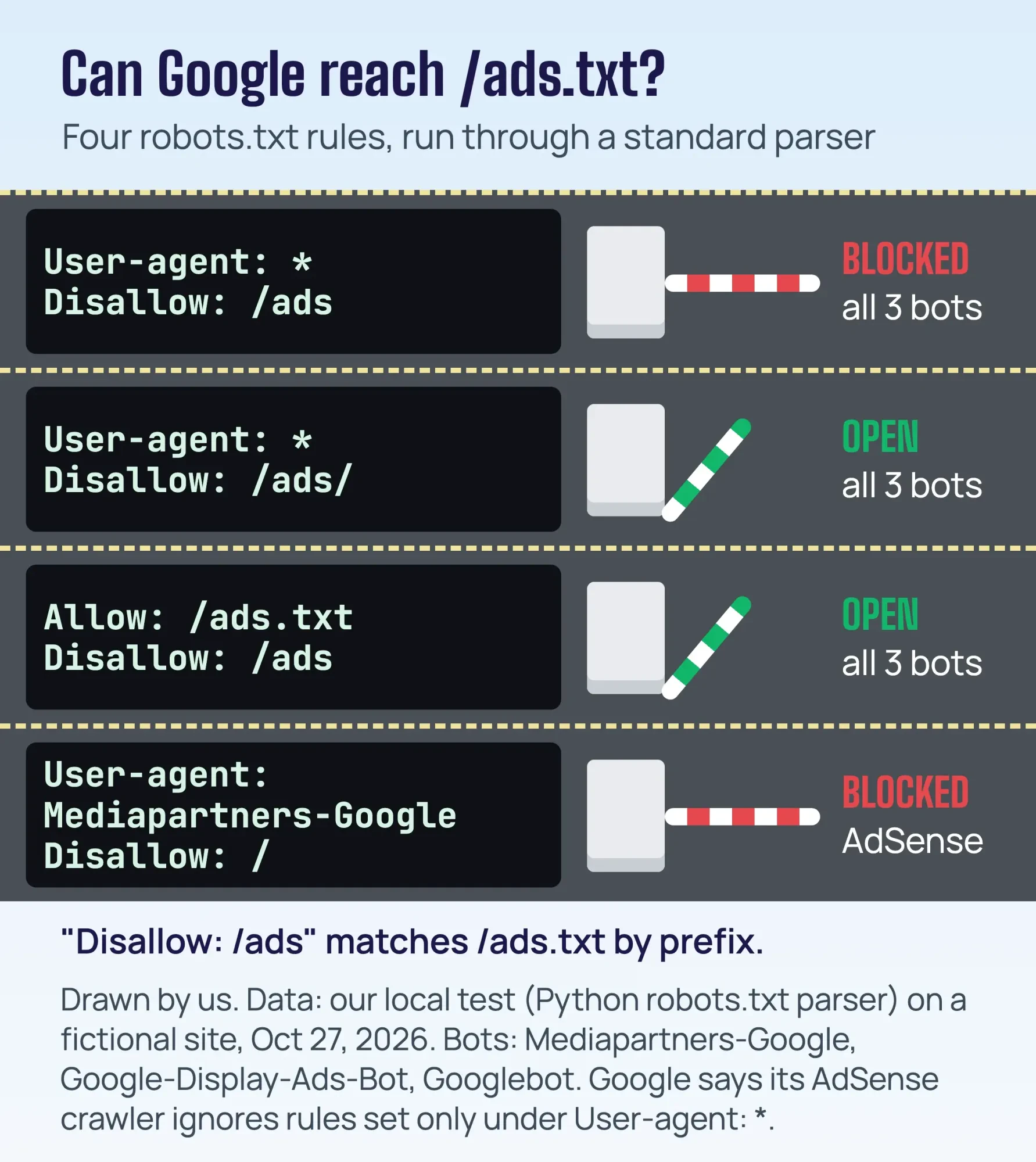 Drawn by us. Data: our local test with Python's robots.txt parser, October 27, 2026. A parser result, not Google's own crawler
Google's own ads.txt page gives the same example. With User-agent: * and Disallow: /ads, it says "the ads.txt file will be ignored by crawlers that respect the robots.txt standard". Both of its fixes passed our test: change the rule to Disallow: /ads/, or add Allow: /ads.txt above it.
The fourth version blocked Mediapartners-Google on every page. That one stops ads outright, and Google's fix is to remove those two lines.
Unsure what yours says? Paste it into our free robots.txt tester, type Mediapartners-Google as the user agent, and test /ads.txt.
A standard parser isn't Google's crawler. Google's AdSense crawler page even says that crawler still visits pages blocked only under User-agent: *, which our parser doesn't model. Treat this as a check you can repeat, not proof of how Google treats every rule.
How long does AdSense approval take?
AdSense approval usually takes a few days, but Google says it can take 2-4 weeks in some cases.
You'll see the progress as a status on the Sites page.
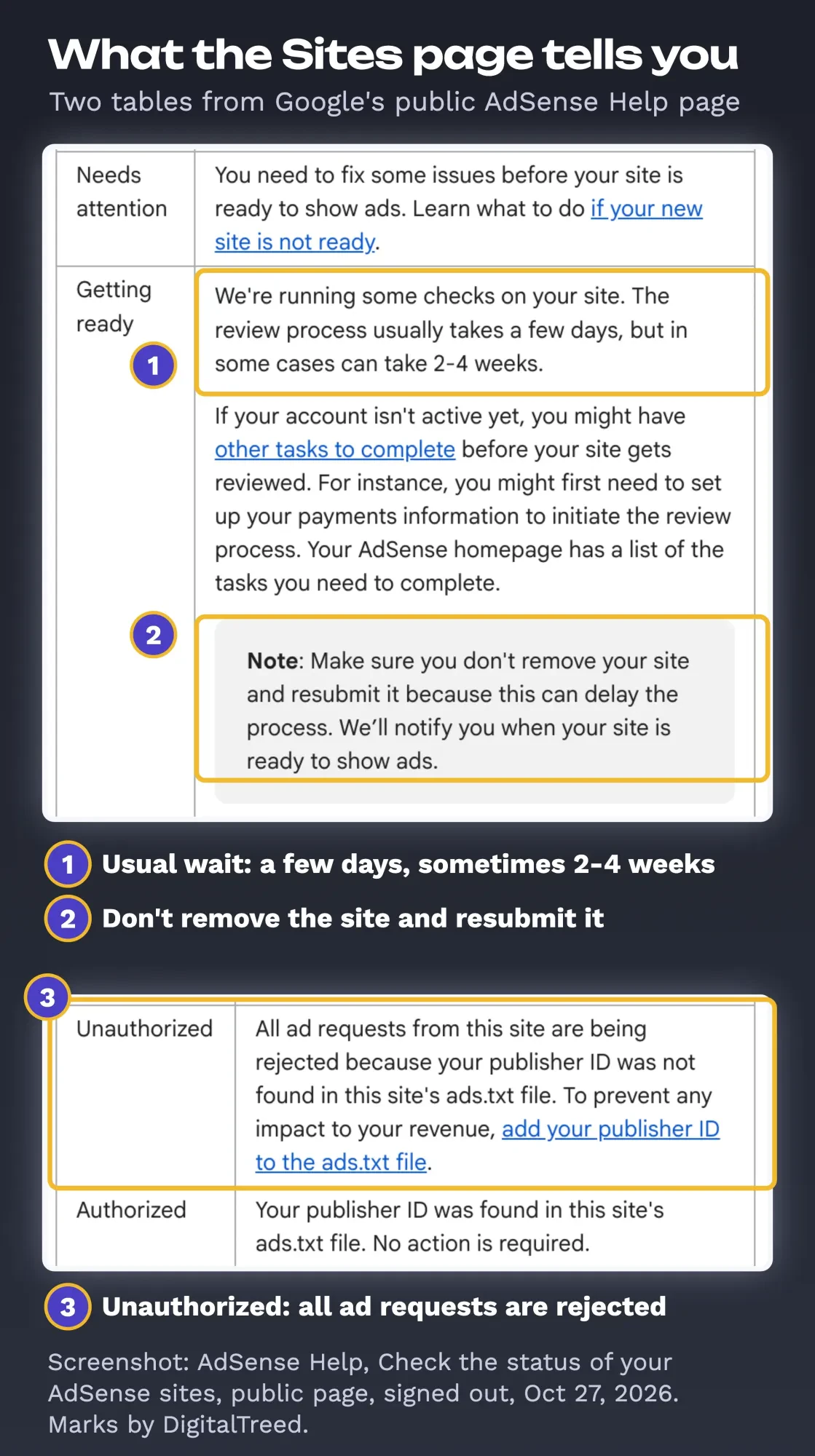 Screenshot: AdSense Help, Check the status of your AdSense sites, public page, signed out, October 27, 2026. Marks added by DigitalTreed
- Requires review: you haven't asked for a review yet.
- Getting ready: Google is running its checks.
- Needs attention: something must be fixed first.
- Ready: ads can show.
Waiting is the hard part.
Don't remove the site and add it again to restart the clock. Google's status page says this can delay the process.
Two newer steps can add time. Since June 2026, Google says you may need to verify your identity with a government-issued photo ID, and you get 45 days to finish once asked.
The whole setup also has a limit: after 6 months unfinished, the account is deactivated.
If it's slow, check the page with the code first. Google says long waits usually happen because publishers haven’t placed the code on a page that gets regular views.
The rejection labels aren't AdSense Help headings, so use this map
When a site isn't approved, owners often quote a short label, such as "Low value content" or "Site down or unavailable".
So we looked for those labels in Google's own documentation.
On October 27, 2026, we searched the AdSense Help Center for each label in quotes. Both searches said the phrase did not match any answers in Google AdSense Help. Below that it listed looser matches: a few Help articles and one AdSense Community thread per label. Only the threads use the labels as titles. The nearest Google wording is one line in the Google Publisher Policies: no ads on screens "without publisher-content or with low-value content."
So the label tells you which part of the Help to read, not what to fix.
Google's "not ready" page groups the causes under four headings, and its "wasn't approved" page adds detail. This table matches each label to that text.
| Label people quote | Matching AdSense Help heading | Fix this first |
|---|---|---|
| Low value content | "Your site doesn't have enough unique content or provide a good user experience"; "Insufficient content"; "Content quality issues" | Finish thin pages, remove copied or auto-made ones, and keep the code off empty pages |
| Policy violations | "Your site has policy violations"; "Content policy violations" | Read the Program policies and Publisher Policies; remove the content or practice |
| Site down or unavailable | "Your site is unreachable" | Check the URL, uptime, login walls, robots.txt and the SSL certificate |
| Navigation issues | "Site navigation issues" | Fix broken links, redirects, pop-ups and pages under construction |
| Code missing | "Your ad code is missing or incomplete" | Paste the code between the head tags on the site you added |
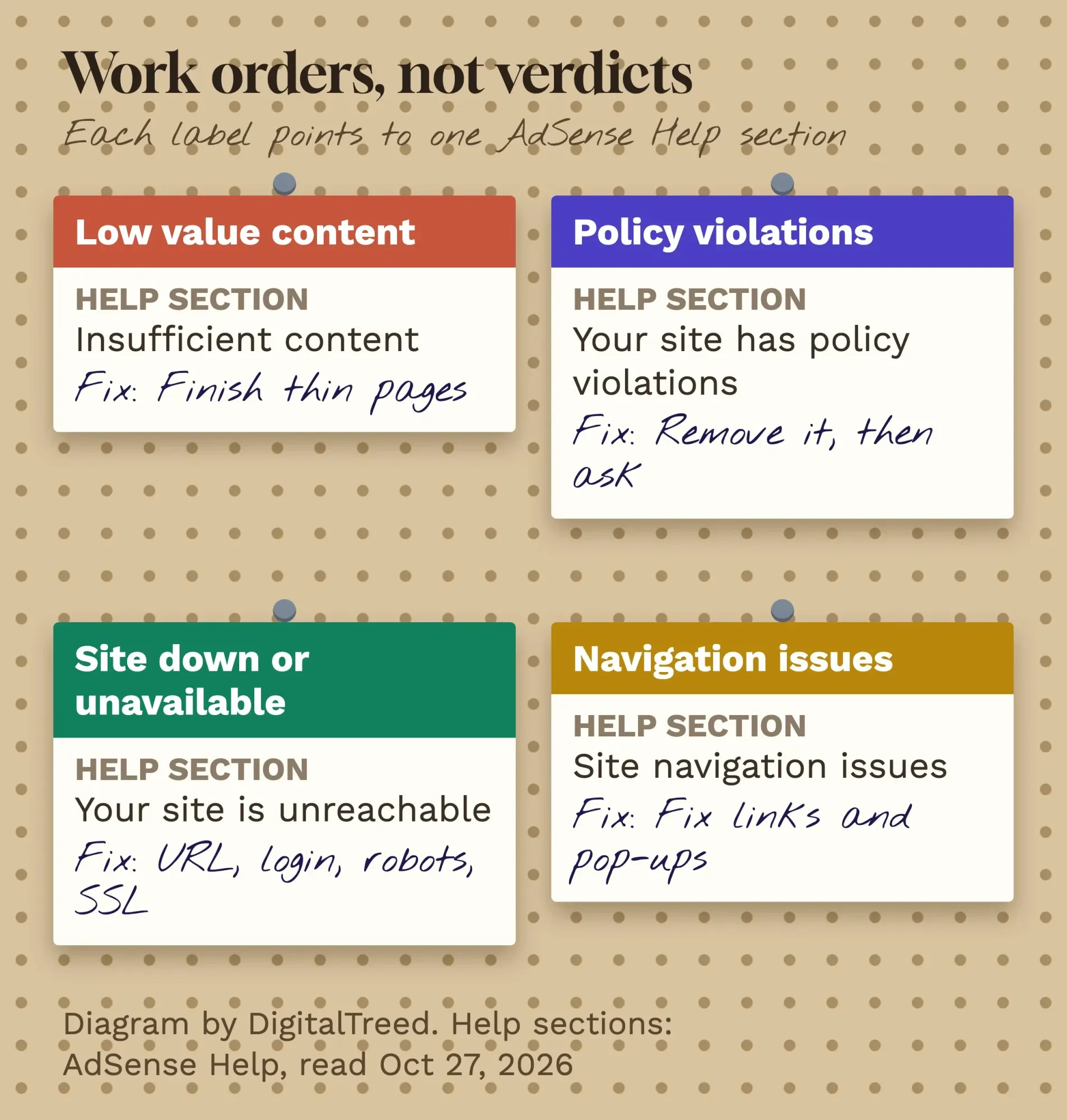 Diagram by DigitalTreed. Headings quoted from AdSense Help, read October 27, 2026
"Low value content" means thin, copied or unfinished pages
Start with the first row of that map. Google's "wasn't approved" page says a site may have been found to have “too little text” or to be “under construction.” Or Google believes there isn’t enough “original, rich content that would be of value to users.”
Its fixes are specific:
- Write complete sentences and paragraphs, not only headlines.
- Don't apply while the site is a template or still being built.
- Keep the code off auto-generated pages and pages with little original content.
- Make affiliate content a minor part of the site unless it adds real features.
Copying is the other half. Google's content page names sites that copy and republish others' work, or modify it slightly with synonyms or automated tools.
The Publisher Policies also block ads on screens with copied content that adds no commentary, curation or other value.
AI-written pages fall under the same test. AdSense requires you to follow Google's spam policies, which define scaled content abuse as many pages made to manipulate rankings rather than help people. Its first example is using generative AI tools to make many pages without adding value.
Write fewer pages that each answer a real question. Our step-by-step blog post method walks through one.
Then reread your newest posts as a stranger would. Any page that only repeats another site goes.
Policy violations: the two policy pages decide, not a checklist
That second label points to two documents. The AdSense Program policies, last updated August 4, 2026, cover clicks, traffic and placement.
The Google Publisher Policies cover content and behavior. Google says breaking them can lead to blocking ads or terminating your account.
The traps people walk into before approval are behavioral:
- Clicking your own ads, even to test. The policy says publishers may not click their own ads.
- Asking visitors to click, with lines like "support us" or arrows pointing at ads.
- Buying cheap traffic. Google says some traffic services send artificial traffic, and paid-to-click or autosurf programs are banned.
- Opening a second account. AdSense allows one account per publisher.
Invalid traffic also counts when someone else causes it. Google says it's your responsibility to keep the traffic on your ads valid.
Two more rules catch content sites. Pages must be primarily in a supported language (English and Spanish both qualify).
And ad screens must meet the Better Ads Standards, which bar experiences such as pop-up ads and large sticky ads on desktop.
Fix the page, or remove it. Then ask for review.
"Site down or unavailable" is an access problem
That label has nothing to do with quality. It matches Google's “Your site is unreachable” heading: Google couldn't reach your pages.
Google's checklist, in order:
- Is the URL right? If not, remove the wrong site and add the correct one.
- Is the site published and live?
- Can Google reach it without a password?
- Is the AdSense crawler blocked in robots.txt?
- If you use HTTPS, is the certificate valid and not self-signed, and does HTTP redirect to HTTPS?
For the last question, enter your domain in the certificate checker on our site; it shows who issued the certificate and when it expires.
Short outages count too.
If your host went down while Google looked, you won't know unless something watches the site. A free monitor is enough, and our website uptime monitoring guide sets one up.
Security rules can shut out the crawlers as well. Google's two are Mediapartners-Google and, during site checks, Google-Display-Ads-Bot.
If your host or a security plugin blocks unknown bots, ask it to allow both.
Server rules are where many owners stop. Fixes like this are part of the web development work we do; we'd like the job, so weigh the mention knowing that.
Navigation issues come from broken links, redirects and pop-ups
Navigation is the label people expect least. Google's "wasn't approved" page lists the usual causes: “redirects, pages behind a login or restricted access, broken links, excessive pop-ups, dialers, and pages under construction or not yet launched.”.
Its content page adds what a menu should get right: alignment, readability, working drop-downs and links that go where they say. It also warns against links that lead to missing pages or claim downloads that don't exist.
Run the whole site through our free broken link checker before you reapply.
Then open the site on a phone and reach every main page from the menu, with no dead ends.
Google's own wording for the goal is "clear navigation and organization."
Fix first, then ask for one more review
Once the fixes are live, not drafted, request the review again from the Sites page:
- Sign in to AdSense and click Sites.
- Click the site that needs review.
- Confirm the AdSense code is still on the site, then click Next.
- Click Request review.
Google notes that it may review all pages of your site, so fix the pattern everywhere, not just the page you pasted the code on.
Give the crawler time to see the changes. Google says that may take up to 1 or 2 weeks.
Skip the shortcuts.
There's no setting, theme or post count that buys approval, and the tricks sold for it break the rules we quoted above. Google also says publishers terminated for invalid traffic or policy violations are not permitted to open new AdSense accounts.
One rejection is a fix list. A closed account is the end.
While you wait, AdSense doesn't have to be your only ad income. Some blogs add income from blog sponsorships with brands that fit their readers, and others sell ad space on their website directly to local advertisers.
Our take: treat the label as a pointer to one Help section, fix that section across the whole site, and request review once.
If the honest fix is more and better content, that's content work you can do yourself or hand to a writer.
How we made this guide: on October 27, 2026, our team went through more than 30 AdSense Help pages, the Google Publisher Policies, Google's spam policies and the Better Ads Standards, signed out. Every requirement, status and time here matches those pages. We searched the AdSense Help Center for both rejection labels and tested the robots.txt and ads.txt rules on a fictional site served on our own computer.
We didn't apply for AdSense, see an account screen or get a rejection of our own, so the labels come from Google's community threads, not our account. Prairie Thimble is made up. Each source sits inline beside the claim it supports. Before it goes up, Eram N. reviews this version and gives the final OK.
First published April 2020. Rewritten October 27, 2026: replaced a general AdSense overview with an approval guide. Added Google's own eligibility rules, privacy policy lines, connection methods, ads.txt rules with our robots.txt test, review times and statuses, and a map from each rejection label to Google's Help text.
Frequently asked
When does AdSense pay you after approval?
Google pays once your earnings reach the payment threshold. As of October 2026, that's $100 for an account that reports in US dollars, per Google's AdSense payment thresholds page. You also need no holds on the account and must follow the Program policies.
What is the AdSense PIN, and how long does it take?
When earnings reach the verification threshold, Google mails a 6-digit PIN to your payments address. Google's address verification page says it usually takes 3 weeks to arrive. As of October 2026, ads stop if you don't verify within 4 months, or if you enter the PIN wrong 3 times.
Can an approved site lose its AdSense approval?
Yes, if it stops showing ads. Google's inactive site page says a site with no ads for at least four months counts as inactive. As of October 2026, a site that stays inactive for over five months needs another review.
Sources
- AdSense Help: Eligibility requirements for AdSense
- AdSense Help: Age requirement for an AdSense account
- AdSense Help: Owning the site you want to use to participate in AdSense
- AdSense Help: Make sure your site's pages are ready for AdSense
- AdSense Help: Sign up for AdSense
- AdSense Help: Complete your AdSense account setup
- AdSense Help: Connect your site to AdSense
- AdSense Help: Add a new site to your AdSense sites list
- AdSense Help: Check the status of your AdSense sites
- AdSense Help: What to do when your site is not ready to show ads
- AdSense Help: Your AdSense account wasn't approved
- AdSense Help: Google AdSense content and user experience
- AdSense Help: Required content (privacy policy)
- AdSense Help: AdSense Program policies (last updated August 4, 2026)
- AdSense Help: Invalid traffic
- AdSense Help: If you want to purchase traffic to your site
- AdSense Help: Ads.txt guide
- AdSense Help: Ads.txt FAQs
- AdSense Help: Ensure your ads.txt files can be crawled
- AdSense Help: Resolve common ads.txt issues
- AdSense Help: AdSense ads crawler
- AdSense Help: Give access to our crawler in your robots.txt file
- AdSense Help: Languages that AdSense supports
- AdSense Help: Your site is inactive
- Publisher Policies Help: Google Publisher Policies
- Google Search Central: Spam policies for Google web search (updated August 28, 2026)
- Coalition for Better Ads: The Better Ads Standards
- AdSense Help Center search for "low value content" (our check, October 27, 2026)

Comments
No comments yet. Start the conversation below.