

What Google Keyword Planner is, who it's for, and when you don't need it
This guide is part of our "SEO tools explained" path. It's for small business owners, beginners and freelancers who want search volumes without paying for a suite. Think of a Kanpur sweet shop choosing which sweets to write about, a Pune coaching centre sizing its exam pages, a D2C brand picking blog topics. You don't need any ads experience.
By the end you'll be able to open Keyword Planner without creating a campaign and pick the right location, language and network. You'll know which columns matter for SEO and which are about ads. You'll also know how to work with volume ranges and turn the results into a keyword sheet with Google Trends and Search Console.
There are five chapters, under 30 minutes in all. Chapter 1 says what the tool is and when you can skip it. Chapter 2 gets you in. Chapter 3 covers the two ways to search and the targeting settings, and chapter 4 explains the columns, filters, forecasts and exports. Chapter 5 puts it to work for SEO and compares it with the paid tools, with prices checked on the vendors' own sites on 16 October 2026. If you're new to keywords, Guide 1's keyword basics is a gentler start.
Quick answer
Google Keyword Planner is a free tool inside Google Ads. It suggests keywords and estimates how often each one is searched and what advertisers pay for it. It's built for ad campaigns, but SEOs use it for search volumes. You need a Google Ads account with billing details, not a running ad.
Keyword Planner is Google's own keyword tool. Google describes it as a way to discover new keywords related to your business and see estimates of the searches they receive and the cost to target them.[1] It lives inside Google Ads, under the Tools menu, because its first job is helping advertisers plan Search campaigns.
That's the thing to hold on to through this whole guide. Every column was designed for someone buying ads. Some of those columns are very useful for SEO. Others look useful and aren't. Chapter 4 sorts them out.
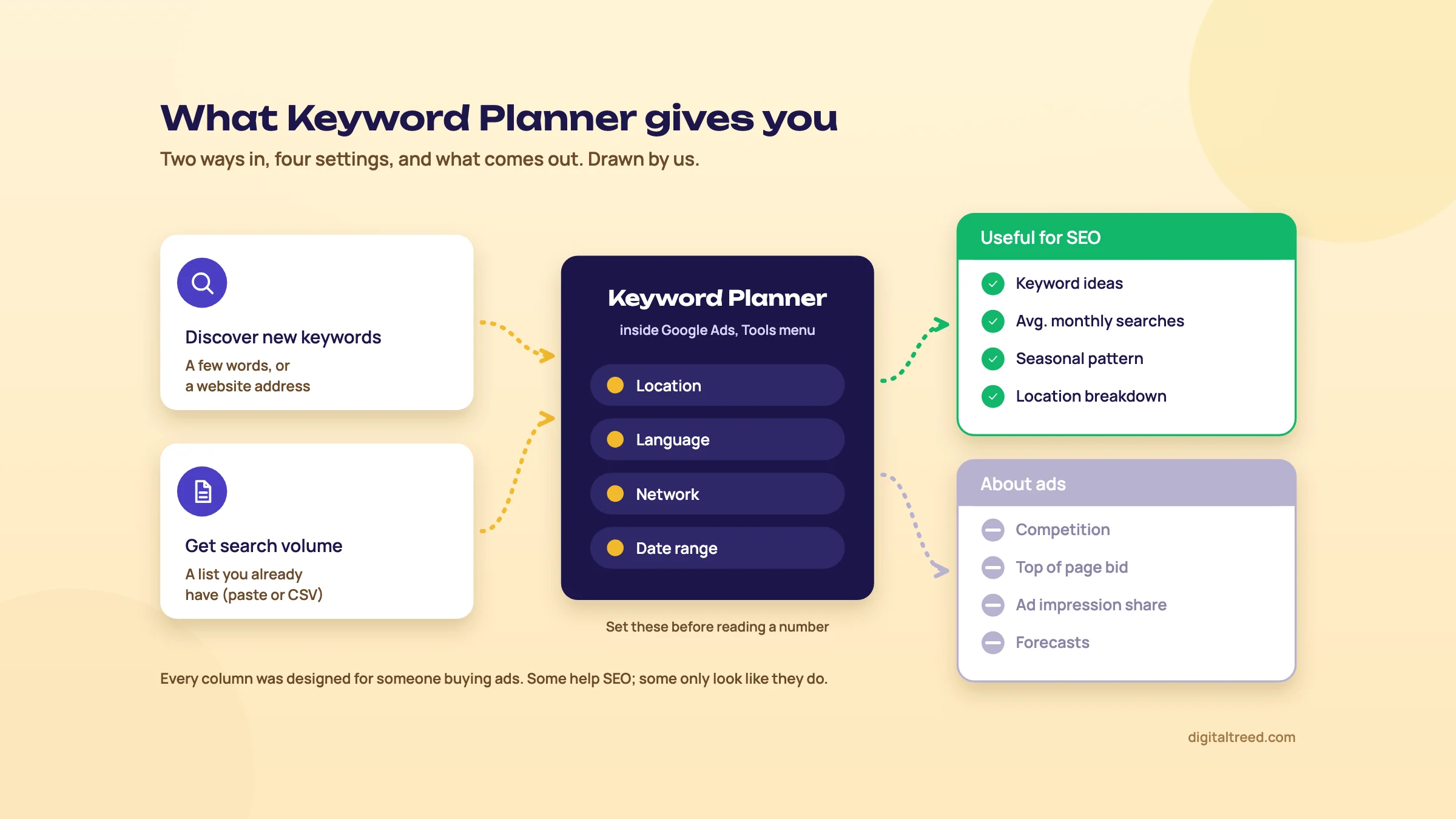 What goes in, what you set, and which outputs matter for SEO. Drawn by us.
What it does, in plain words
Keyword Planner has two starting points.[1]
- Discover new keywords. You type a few words about what you sell, or a website address, and it returns a list of related keywords with their numbers.
- Get search volume and forecasts. You paste or upload a list you already have, and it gives you the numbers for those keywords and a forecast of what ads on them might get.
For each keyword you see the average monthly searches: how many times people searched for that keyword and its close variants, in the place and months you picked. By default it's averaged over 12 months.[2] You also see how that changed recently, how many advertisers compete for it, and the range of bids advertisers have paid to show at the top of the page.
Two other Google tools get mixed up with it. Google Trends shows interest on a 0 to 100 scale, relative to all searches in a place and time, so it's good for seasons and comparisons but gives no counts.[3] Search Console shows the searches your own site already appeared for. Keyword Planner is the one of the three that puts a size on a keyword you don't rank for yet.
Who it's for
- Small business owners who want to know whether "sweet shop Kanpur" or "mithai shop near me" is the bigger search, without paying for a suite.
- Beginners learning SEO. It costs nothing, and the estimates come from Google's own search data.
- Freelancers sizing a market for a pitch, before a client pays for a suite.
- Anyone planning Google Ads, which is what it was built for. If you'd rather have someone run the ads, see our search ads service.
What it doesn't do
It has no keyword difficulty score for SEO. The "Competition" column measures how many advertisers showed ads on a keyword, not how hard it is to rank in the free results.[2] It doesn't show who ranks, how many links they have, or what kind of page wins. For that you read the results page yourself, as Guide 2 shows in keyword research in depth.
It also leaves things out. Google says keywords with very low search volumes, and keywords in sensitive categories such as health or finance, may not be discoverable or forecastable at all.[1] That can matter if you're a dentist in Delhi, especially for treatment and symptom words. Chapter 3 shows what to do instead.
Warning
Most free accounts see volumes as ranges, such as "1K–10K", not exact numbers. Search Engine Land reported in August 2016 that Google confirmed advertisers with a "lower monthly spend" could see limited data, and Google has never published the threshold.[4] Chapter 4 explains how to work with ranges, because for SEO they're usually enough.
When you don't need it
We'd skip Keyword Planner, or use it only for a quick check, in three cases.
- Your site already has a year of Search Console data. The Queries report shows the real searches you appear for, with real clicks. Start there; it's Google's measured data about your own site, not an estimate.
- You sell to a tiny, specific audience. A machine-parts maker in Ludhiana may find that most of its buyers' searches show as zero or don't appear. Talk to customers and read the results pages instead.
- You already pay for Semrush or Ahrefs. Their keyword tools add difficulty and the pages that rank. Keyword Planner is still a useful second opinion on volume, but you won't live in it.
If you've read Guide 1's keyword basics, you've met Keyword Planner as step four of a free keyword list. This guide goes further: getting in without an ad, every setting, every column, and how to combine it with Trends and Search Console. Next, chapter 2 gets you into the tool without running an ad.
Get into Keyword Planner without running an ad
Quick answer
Sign up for Google Ads, skip the campaign (Google's sign-up offers to create the account without one), and enter India as the billing country with your payment details. Pick your time zone and currency carefully, because both are permanent. Then open Tools, Keyword Planner. Ads are the only thing you pay for, though Google may ask for a small, refundable prepayment to verify the account.
This is where most beginners give up. Google Ads is built to get you running an ad, and the sign-up pushes you towards a campaign at every step. You don't need one. Here's the route, and the settings that you can't undo later.
What Google asks for today
Google's help is short on this. To use basic features like getting new keyword ideas, you must complete your account setup by entering your billing information.[1] It doesn't say you need a live campaign or any spend.
Google's sign-up guide goes further. It recommends creating your account before creating a campaign, says you can skip all recommendations to create a campaign, and mentions an option to create an account without a campaign.[5] That's the button you're looking for.
Note
Older versions of Google's help, and many blog posts, say you must click "Switch to Expert Mode" and then choose to create the account without a campaign. Google's current help pages don't use that wording. If your sign-up screen shows an "Expert Mode" link instead of a skip option, that's the same route.
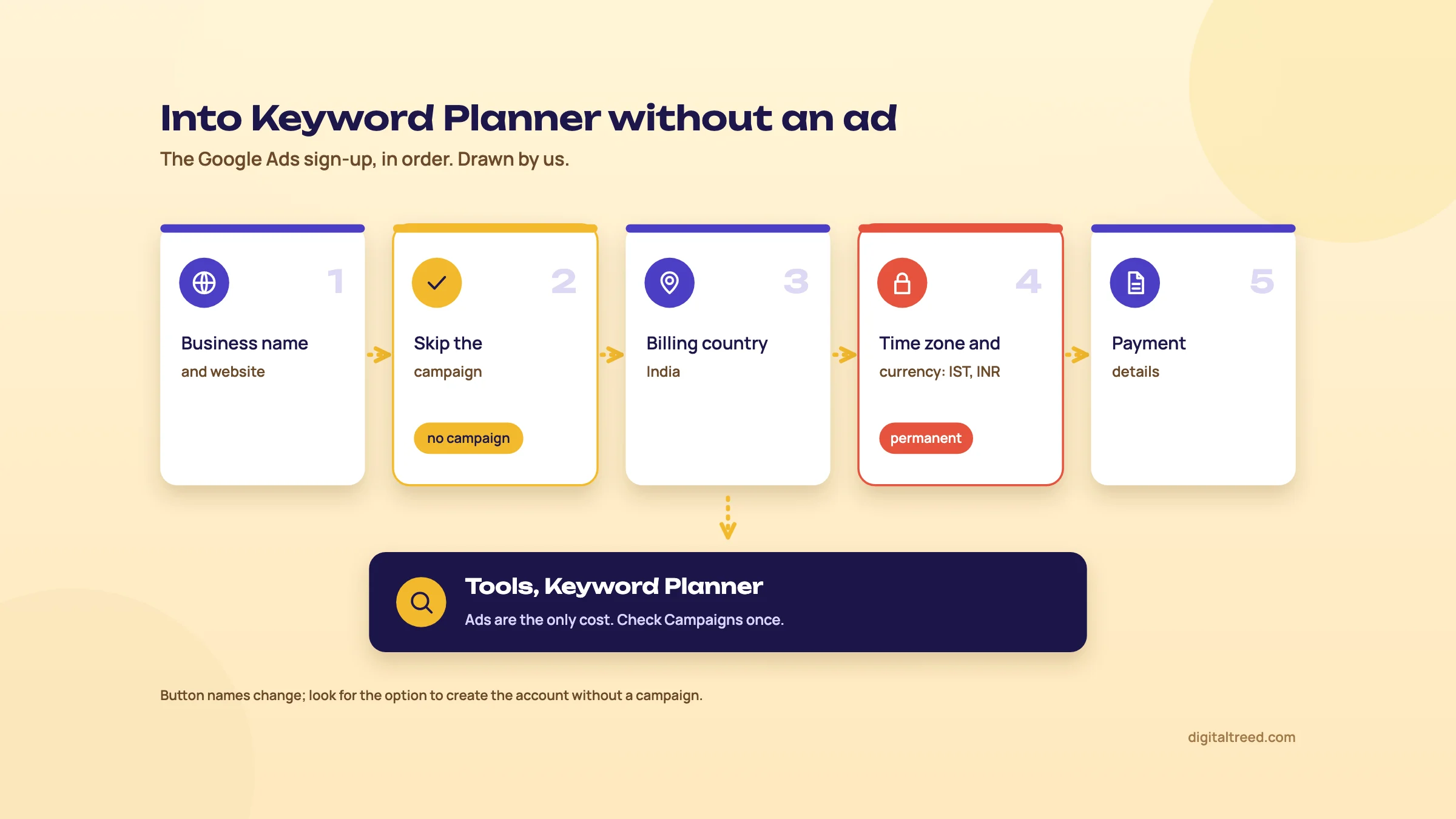 Skip the campaign and choose IST and INR carefully: they can't be changed later. Drawn by us.
Open Keyword Planner without creating a campaign
- Use the right Google account Sign in with the Google account you use for the business, ideally the same one that owns Search Console and the Business Profile. A Kanpur sweet shop's owner would use the shop's Gmail, not a nephew's.
- Start the sign-up Go to ads.google.com and choose to start. Google asks for your business name and website first, and offers to link a YouTube channel or Business Profile.[5] Linking is optional.
- Skip the campaign When Google suggests a campaign goal or shows a campaign builder, look for the option to create the account without a campaign and take it. Don't fill in a budget just to get past the screen.
- Set billing country, time zone and currency Choose India as the billing country, and check the time zone reads India Standard Time. Google says both the time zone and the currency are permanently set when you set up the account.[6] For an Indian business, that means INR and IST.
- Add payment details Pick Organization or Individual as the account type, then add a payment method.[5] Your card may show a temporary authorization, and Google may ask for a small prepayment for verification, which it says is refundable if you ask or close the account.[5]
- Open Keyword Planner In Google Ads, open the Tools menu and choose Keyword Planner.[1] You should see two cards: Discover new keywords, and Get search volume and forecasts.
If Keyword Planner is missing or empty
| What you see | Likely reason | What to do |
|---|---|---|
| Keyword ideas won't load, or a message about finishing setup | Billing details aren't complete[1] | Open Billing in Google Ads and finish the payment profile |
| No Keyword Planner in the Tools menu, and a very short menu overall | The account may be in Smart Mode, the simplified view for Smart campaigns[7] | Look for "Switch to Expert Mode" in the account's settings or Tools menu; Smart campaigns keep running after the switch |
| An error asking you to try different keywords | Very low volume, or a sensitive topic such as health or finance[1] | Try broader words; see chapter 3 for clinics and finance businesses |
| Odd or inconsistent numbers | Logging in through a manager account vs directly, or a browser cache problem[1] | Try an incognito window, another browser, or log in directly |
Make sure nothing is spending
Google Ads only charges you for ads. If you skipped the campaign, there's nothing to charge. Still, open Campaigns once after sign-up. If the sign-up created a draft or an enabled campaign anyway, pause or remove it. It takes a minute and saves an awkward card statement.
Do not
- Don't enter a budget "just to get through" a campaign screen
- Don't accept the default currency or time zone without reading them; you can't change them later
- Don't use a personal Gmail you might lose access to
Do
- Use the business Google account that owns Search Console
- Choose India, INR and India Standard Time
- Check Campaigns after sign-up and pause anything you didn't mean to create
Link Search Console while you're here
If you also run your site's Search Console, link it to Google Ads. Google's linking page says you need admin access to the Ads account and owner access in Search Console. You start from Tools, Data manager, then Search Console.[8] Linking gives you a paid and organic report that shows the searches your pages appeared for in the free results.[8] It's also what Keyword Planner needed, when the column launched, before it could fill "Organic impression share", which chapter 4 explains; you may also have to add that column yourself.[9]
If you don't have Search Console yet, set it up first with our Search Console guide. Then move on to chapter 3 and run your first search.
Find keywords and check volumes: the two modes, locations and languages
Quick answer
Use Discover new keywords when you need ideas, starting from a few customer words or a website. Use Get search volume and forecasts when you already have a list. Before reading any number, set the location (India, a state or a city), the language and the network to Google only, because every number depends on them.
When you open Keyword Planner you get two cards. They give you the same kind of numbers, but they start from different places.[1]
| Discover new keywords | Get search volume and forecasts | |
|---|---|---|
| You start with | A few words, a website, or both | Your own list, pasted or uploaded as a CSV with one "Keyword" column |
| You get | Your words plus related ideas, each with its numbers | Numbers for your list only, plus a forecast for ads |
| Use it when | You're starting out, or looking for phrases you hadn't thought of | You've built a list from Search Console, autocomplete or customers, and want sizes |
| Limits | Up to 80 characters and 10 words per keyword[1] | The same limits per keyword |
Set the targeting first
Above the results there's a targeting bar. Google's help lists four settings.[10] Change them before you look at a single number.
- Location. Countries, regions and cities. "India" for a D2C brand that ships everywhere; "Uttar Pradesh" or "Kanpur" for a sweet shop. A "Nearby" link suggests places around the one you typed. Removing every location means "All locations", which is almost never what an Indian business wants.
- Language. The language of the ideas you want. Google Ads supports Hindi, Bengali, Marathi, Tamil, Telugu, Gujarati, Kannada, Malayalam, Punjabi and Urdu, among others.[11]
- Search networks. "Google" means Google Search only. "Google and search partners" adds other Google sites such as Maps, and partner sites that show Google ads. For SEO, pick Google.
- Date range. By default, volumes are averaged over 12 months.[2] You can pick other months to see what's searched in a season.
Tip
Hindi takes some care. Google's definition says average monthly searches count the term "regardless of language".[2] Read that way, the language setting mainly changes which ideas you're shown, not how a keyword you typed is counted. If a number moves when you switch language, trust the bigger picture, not the exact figure. To see Hindi-script searches, type your seed words in Devanagari as well as in English. Guide 2's chapter How India searches explains mixed-language and transliterated queries.
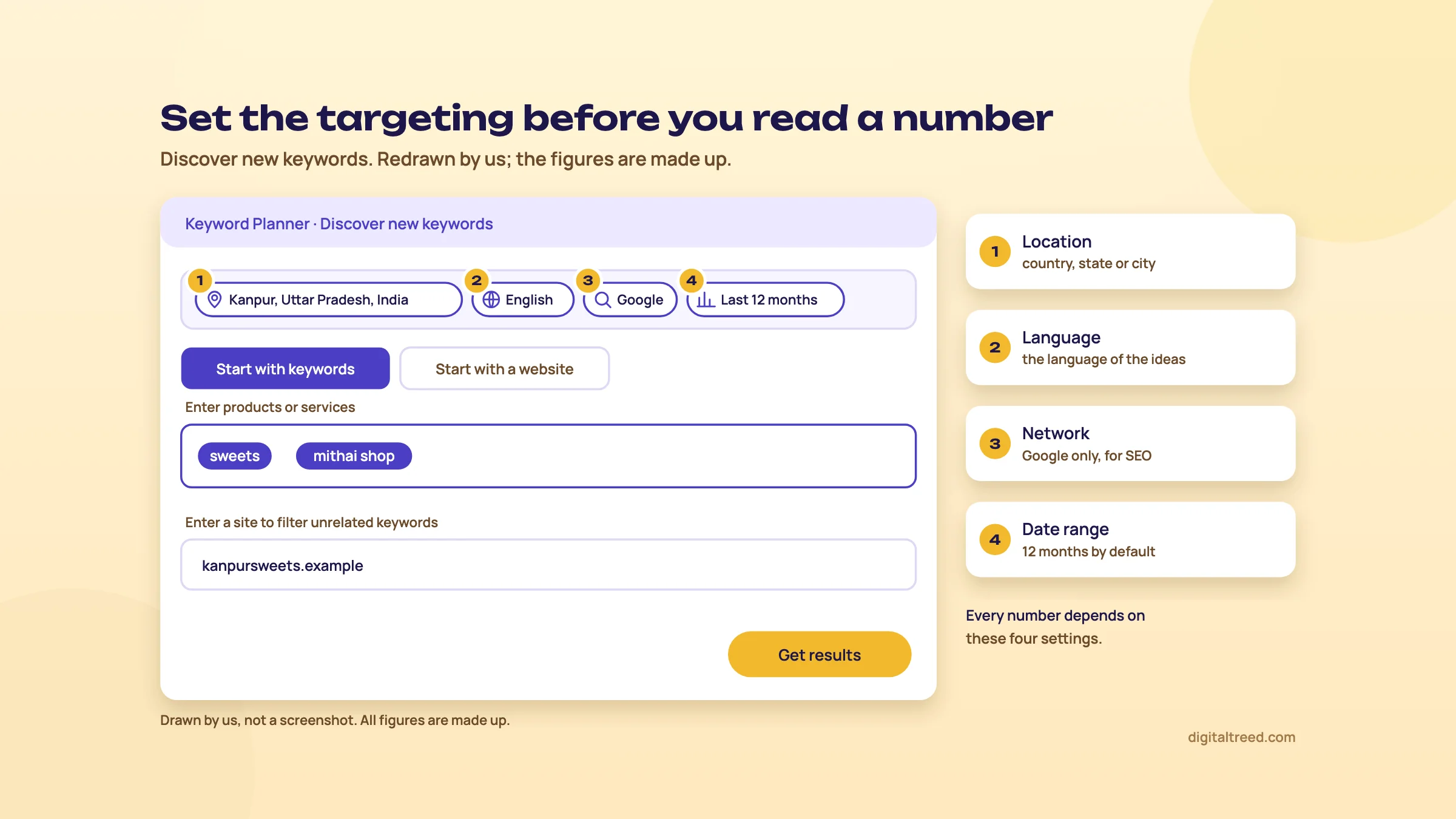 Set location, language, network and dates first. Drawn by us; not a screenshot.
Choose seed words the way Google suggests
Google publishes its own tips for getting useful ideas.[12] In short:
- Describe the category the way customers think of it. "Hiking boots" in Google's example, not a full question like "what are the best hiking boots".
- Be specific, but not too specific. "Wedding venue" works; "wedding" is too general and "wedding venues for small weddings" too narrow.
- Add a website. A keyword plus a website can give more relevant ideas.
- Don't start with an adjective. Start with "hiking boots", then try "best hiking boots".
- Use several phrases on the same topic, not unrelated ones.
- Leave the city out of the seed if you set it as the location. Add a place name only if your customers search from somewhere else.
The website field has two catches. Google doesn't read the text of links on the page you enter.[1] For ideas from your whole site rather than one page, you add and verify the site in Google Ads. That can take up to a month to show results.[10]
Find keyword ideas for a Pune coaching centre
- Open Discover new keywords Choose Start with keywords.
- Type three seeds For a centre teaching for engineering and medical entrance exams: "jee coaching, neet coaching, jee classes". Use the words parents say on calls, not the brochure's tagline.
- Add your own domain Google uses it to drop ideas unrelated to what you offer.[1]
- Set the targeting Location Pune, language English, network Google, last 12 months. Click Get results.
- Run it again with Maharashtra, then India Ideas that only appear at state or country level show you what parents search before they narrow it to a city.
- Add the useful ones to your plan Tick them and add them to Saved keywords.[1] Chapter 4 shows how to filter the long list down first.
When you already have a list
Use Get search volume and forecasts. Paste the list, or upload a CSV whose only column is headed "Keyword". Select Submit, then Get started.[1] You'll land on the forecast page. For SEO, switch to the historical metrics view to see the volumes; the forecast is about ads, as chapter 4 explains.
Check a Kanpur sweet shop's list: Kanpur vs India
- Build the list Ten phrases from customers and autocomplete, such as "kaju katli", "sweet shop near me", "mithai box for diwali", "sugar free sweets".
- Paste them into Get search volume and forecasts Submit, then Get started.
- Set location to Kanpur Note the volume or range for each phrase.
- Change the location to India Note the numbers again. A phrase that is big in India but tiny in Kanpur is a product to ship, not a reason to visit the shop.
- Expect gaps Small cities produce small numbers. Google warns that forecasts for small areas are less accurate, because there's less data.[2] If a city shows nothing, use the state.
Clinics, loans and other sensitive topics
Here's the catch for a dentist in Delhi. Google says its personalised advertising and data privacy policies often prevent results for keywords in sensitive categories like health or finance.[1] You may get an error, or a list with gaps.
Don't take that as "nobody searches". Try the less personal words: "dental clinic", "teeth cleaning", "braces cost". Then fill the gaps from Search Console once the site has data, and from Google's autocomplete and "People also ask". Add Google Trends, which shows relative interest for most topics. Guide 2's point holds: if a phrase came from a real patient, it deserves a section on the right page, whatever a tool says.
Once you have a list with numbers, chapter 4 explains what each column means and which ones to ignore.
Read the numbers: columns, ranges, filters, forecasts and exports
Quick answer
For SEO, read average monthly searches as a size, and use the three-month and year-on-year changes to spot trends. Ignore competition and bids as difficulty measures, because they describe advertisers. Ranges are fine for choosing between keywords. Filter and refine the list, skip forecasts unless you plan ads, then download it to a sheet.
A results table in Keyword Planner can run to hundreds of rows and eight or more columns. Here's what each one means, in Google's words where Google defines it, and what we'd do with it for SEO.
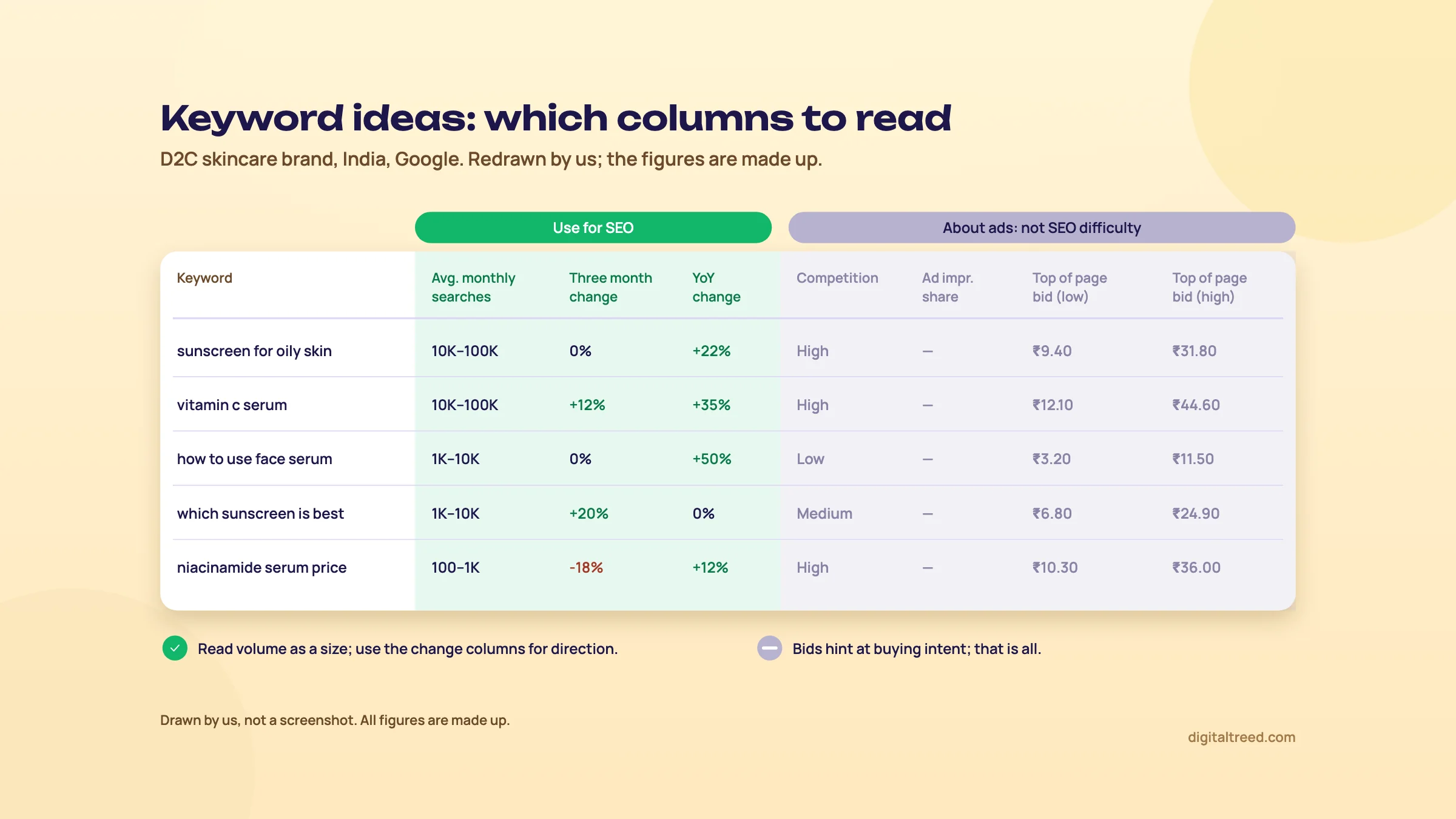 Green columns for SEO, grey columns for ads. Drawn by us; not a screenshot.
The columns, one by one
| Column | What it means | Use for SEO? |
|---|---|---|
| Avg. monthly searches | Searches for the keyword and its close variants, for your location, network and months, averaged over 12 months by default[2] | Yes, as a size: tiny, small, medium, big |
| Three month change | How searches moved over a recent three-month window (Google's help doesn't define the exact comparison) | Yes, as a direction: rising or falling |
| YoY change | How the latest month compares with the same month a year earlier, as most guides read it (Google's help doesn't define it) | Yes, to tell a trend from a season |
| Competition | The number of advertisers that showed on the keyword relative to all keywords across Google, shown as low, medium or high[2] | No, it's about ads |
| Ad impression share | Your ads' impressions divided by the exact-match searches in the last calendar month; a dash means not enough data[2] | No |
| Organic impression share | The share of searches for the keyword that showed a listing from your website[2] | Yes, if it shows, as a rough "do we appear at all" |
| Top of page bid (low and high range) | About the 20th and 80th percentile of what advertisers paid to show at the top of the page, from the last 30 days[2] | Only as a hint of commercial value |
Why "Competition" isn't keyword difficulty
"Competition: high" sounds like "hard to rank". It isn't. It counts advertisers, for the location and network you chose.[2] A keyword like "buy sugar free sweets online" may be high, because shops pay for it, and still have weak pages in the free results. A question like "how long does kaju katli last" may be low competition for ads and fiercely contested by food blogs.
To judge SEO difficulty, search the keyword yourself and look at what ranks: the type of page, how good it is, and who wrote it. Guide 2 walks through that in keyword research in depth. If you want a score, paid tools have one; chapter 5 compares them.
The bid columns are more useful than they look. A high top-of-page bid means advertisers expect that search to make money. For a D2C brand choosing between two blog topics with similar volume, the one with the higher bids is usually closer to a purchase. Treat it as a hint about intent, not a fact.
Ranges vs exact numbers
If your account spends little or nothing on ads, you'll probably see volumes as ranges. Search Engine Land reported the buckets in 2016: 0, 1–100, 100–1K, 1K–10K, 10K–100K, 100K–1M and 1M+.[4] Google confirmed then that advertisers with a "lower monthly spend" could see limited data, and it hasn't published the spend level since.[4] We wouldn't spend money on ads just to get exact numbers.
Three reasons ranges are enough for SEO:
- Exact numbers aren't exact either. Google says its search volume statistics are rounded,[2] and they're averages over the months you pick.
- You're choosing, not forecasting. "1K–10K" vs "10–100" tells you which page to write first. That's the decision.
- Other tools fill in. Search Console gives real impressions for keywords you already appear for, and Google Trends shows which of two phrasings is bigger.
Two more quirks. Average monthly searches are shown for exact matches only, whatever match type you pick.[2] And because the figure includes close variants, a singular and a plural, or a spelling with and without a space, can show the same number, though not always.[13] When two variants show the same figure, don't add them together.
Filter and refine a long list
Discover new keywords can return hundreds of ideas. Two tools cut it down.[10]
- Add filter. Filter by keyword text, average monthly searches, either bid range, competition, organic or ad impression share, or exclude keywords already in your account. For SEO, the keyword text filter is the one we'd use most: "contains: price", "contains: near me", "contains: how".
- Refine keywords. A side panel groups the ideas into categories, such as brands or product features. All are ticked by default. Untick a category to drop its keywords, for example a competitor's brand names.
The menu beside the table also breaks volumes down by device (computers, mobiles and tablets with full browsers) and by location.[10] Use the device split before you plan a page: if nearly all searches for a keyword come from phones, check the page on a phone first.
There's also an Organize keywords into ad groups option. It groups keywords for ad campaigns and works in English only.[1] Its groups are a reasonable first draft of a topic cluster, but we'd check them by hand against the results pages, as Guide 2's topic clusters chapter explains.
Shortlist and export keywords for a D2C skincare brand
- Get ideas Discover new keywords with "sunscreen, face serum, vitamin c serum", location India, network Google.
- Drop other brands In Refine keywords, untick the brand category so competitor names go.
- Filter out the tiny ones Add filter, Avg. monthly searches, and set a minimum that suits you, such as 100.
- Pull out questions Add a keyword text filter "contains: how", then "contains: which". These are blog topics.
- Look at the change columns Note anything with a big rise in YoY change. Check it in Google Trends before you believe it.
- Download Use the download icon above the table to save the ideas to a file you can open in a spreadsheet. Keep the location and date range in the file name, because the numbers mean nothing without them.
Forecasts: skip them for SEO
Forecasts estimate what ads on your saved keywords might get: clicks, impressions, cost, click-through rate and average cost per click, at the bid and budget you choose.[2] They're refreshed daily from the last 7 to 10 days of data, adjusted for seasonality.[1] They cover the Search Network only.[2]
None of that is an organic traffic forecast. An ad forecast assumes you're paying for a spot at the top. Your page in the free results might sit at position six, or below an AI Overview. So we don't use these numbers in SEO plans. The download button on the forecast page is there if you do plan ads.[1]
Now you can read every column. Chapter 5 turns that into an SEO keyword list with Trends and Search Console, and compares Keyword Planner with the paid tools.
Use Keyword Planner for SEO, what it costs, and the alternatives
Quick answer
For SEO, use Keyword Planner to size keywords, Google Trends for seasons, and Search Console for the searches you already get. Keyword Planner itself is free with a Google Ads account. Paid tools add difficulty scores and competitor data: Ahrefs Starter costs $29 a month and Semrush SEO $139, checked 16 October 2026.
Keyword Planner answers one question well: roughly how big is this search? An SEO keyword list needs three more answers. When do people search it? Do we already show up for it? And what kind of page wins it? Keyword Planner, Trends and Search Console cover the first three questions between them. The last one needs your own eyes on the results page.
| Tool | Answers | Watch out for |
|---|---|---|
| Keyword Planner | How big is it, and what else do people search? | Ranges on small accounts; gaps for health and finance |
| Google Trends | When does it peak, and which phrasing is bigger? | A 0 to 100 scale, not counts; very low-volume terms show as 0[3] |
| Search Console | Which searches do we already appear for, and do people click? | Only your own site, and only searches you already show for |
| The results page | What kind of page ranks, and how good is it? | Results differ by city and device, so check from where your customers are |
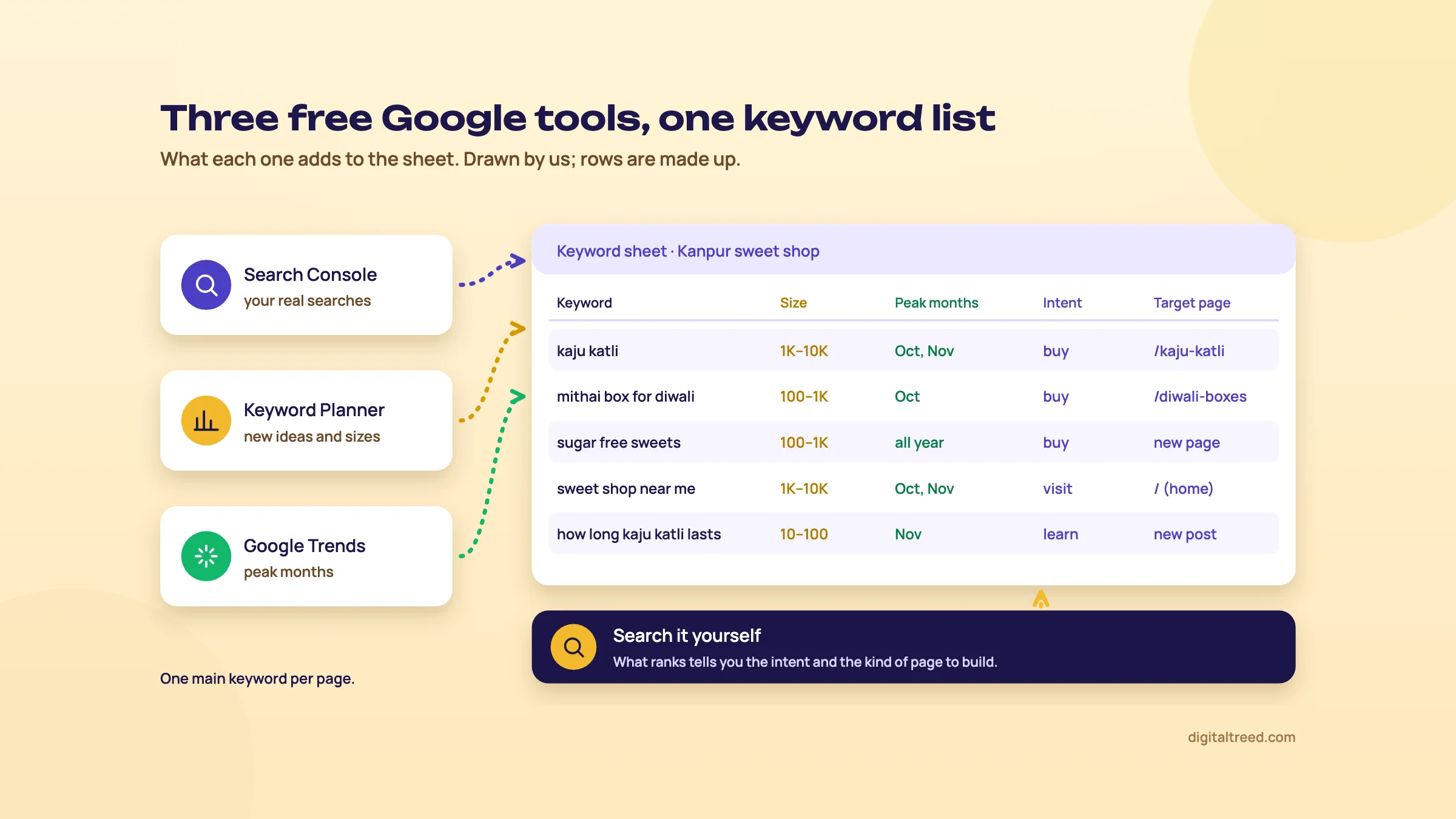 Each tool fills one part of the keyword sheet. Drawn by us; rows are made up.
Build an SEO keyword sheet with Keyword Planner, Trends and Search Console
- Start with Search Console Open Performance, Search results, and the Queries tab. The default view is the last three months.[14] Export it and copy the queries with many impressions and few clicks into your sheet.
- Add new ideas from Keyword Planner Run Discover new keywords with your main products or services, your location and network Google (chapter 3). Add the relevant ideas you don't yet rank for.
- Get sizes for the whole list Paste the full sheet into Get search volume and forecasts, with the same location. Copy each keyword's average monthly searches or range into a "size" column.
- Check seasons in Trends Put your top five keywords into Google Trends for India over five years. Note peak months, such as Diwali for a sweet shop, or exam months for a coaching centre.
- Search the top 20 yourself In an incognito window, note what ranks: a shop page, a list, a video, a map pack. That tells you the intent and the kind of page to build.
- Map each keyword to one page Write the target URL beside each keyword, or "new page". One main keyword per page.
Note
From our work: a women's wear manufacturer's online store. Its product pages targeted short, competitive keywords. We moved them to long-tail keywords, the longer and more specific phrases buyers use. Results started within a month. The lesson: a smaller search you can win beats a big one you can't.
That's why we don't sort a Keyword Planner export by volume and start at the top. The biggest rows are usually the hardest, and the least specific. For a small site, the "100–1K" and "10–100" rows are often where the first wins are. Guide 2 explains how to weigh volume against intent and business value in keyword research in depth.
Once you've written the page, check you've used the keyword naturally with our free checker, and check the title and description in our Meta Tag Analyzer:
How accurate is it?
Nobody outside Google knows exactly. The most cited comparison is from a vendor. Ahrefs compared estimates with Search Console impressions and found Keyword Planner's volumes "roughly accurate in 45% of cases", against 60% for its own tool.[15] That's a company testing itself, and Ahrefs also builds its volumes partly from Keyword Planner data.[15] Our reading: every tool's volume is an estimate, so use one tool consistently and compare keywords against each other, not against reality.
Warning
Never take a search volume from ChatGPT, Gemini or any chatbot. They give a confident number no tool measured. Use them for ideas, then check the numbers in Keyword Planner or Search Console, as Guide 2 says in keyword research in depth.
What it costs
Keyword Planner is free. You need a Google Ads account with billing details, and you pay only if you run ads (chapter 2). There's no paid version of Keyword Planner itself. The only "upgrade" is spending on ads, which may turn ranges into exact numbers. Google doesn't say how much spend that takes.[4]
The paid keyword tools list prices in US dollars. None of the pages below showed a rupee price on 16 October 2026. So we give rupees at ₹96 to US$1, the X-Rates monthly average for 1 to 16 October 2026.[16]
| Tool and plan | Price, checked 16 October 2026 | About ₹ | What it adds over Keyword Planner |
|---|---|---|---|
| Google Keyword Planner | Free (Google Ads account with billing details) | ₹0 | - |
| Semrush free account | $0, 10 reports a day, 1 demo project[17] | ₹0 | A few keyword and competitor look-ups a day |
| Ahrefs Starter | $29 a month[18] | ₹2,784 | Keywords Explorer with difficulty scores, on monthly credits[19] |
| Mangools Basic | $30.50 a month, or $226.20 a year ($18.85 a month)[20] | ₹2,928 (₹21,715 a year) | KWFinder with difficulty, 100 keyword research requests a day[20] |
| Ahrefs Lite | $129 a month[18] | ₹12,384 | Keywords Explorer with higher limits, plus competitor analysis |
| Semrush SEO | $139 a month, or $117.33 a month billed yearly[17] | ₹13,344 (₹11,264 yearly) | Basic keyword research and competitor analysis, as Semrush calls it, plus 500 keywords tracked daily[17] |
Mangools shows the yearly price first; switch its pricing page to Monthly to see the $30.50.[20] We haven't listed Ubersuggest here; our Ubersuggest guide covers its plans.
Pros and cons
Pros
- Free, with data from Google's own searches
- Location down to a city, and Hindi plus nine other Indian languages in its language options
- Ideas from a competitor's website, not just from words
- Bid ranges hint at which keywords make money
- Device and location breakdowns, and month-by-month seasonality
Cons
- Needs a Google Ads account with billing details
- Ranges instead of exact numbers on small accounts
- No SEO difficulty; "Competition" is about ads
- Gaps for health, finance and very low-volume keywords
- Forecasts are for ads, not organic traffic
- No view of who ranks or why
Alternatives, and which one when
We don't have our own keyword volume tool yet. Our free tools cover the steps after research: checking how a page uses its keywords, and how its title and description look in Google.
| Situation | Our pick | Why |
|---|---|---|
| Local business, new site, no budget | Keyword Planner and Google Trends | Free sizes and seasons; ranges are enough to pick pages |
| Site with a year of data | Search Console first, Keyword Planner for new ideas | Your real searches beat any estimate |
| Clinic, lender or other sensitive topic | Search Console, autocomplete, Trends | Keyword Planner often has gaps here |
| Freelancer, a few clients, tight budget | Ahrefs Starter or Mangools | Difficulty scores without a suite's price |
| Agency or in-house team | Semrush or Ahrefs | Competitor keywords, rank tracking and difficulty in one place; see Ahrefs vs Semrush |
| Writing the page | Our Word Counter & Keyword Density Checker and Meta Tag Analyzer | Free, and they check the text and tags you actually published |
For a wider list of free options, see our best free SEO tools guide. If you'd rather hand the research and writing over, our SEO service and content marketing team can build a keyword plan like this for you. You can also get a quote online.
Test yourself
Ten questions on the whole guide. Pick an answer, check it, and see your score at the end.
You got 0 of 10 right.
Frequently asked questions
Frequently asked
Is Google Keyword Planner free?
Yes. Keyword Planner itself costs nothing. You need a Google Ads account with billing information entered, but you're only charged if you run ads. Google may ask for a small prepayment during sign-up for verification, which it says is refundable.
Can I use Keyword Planner without running ads?
Yes. Google's sign-up guide recommends creating the account before a campaign and offers an option to create an account without one. Enter your billing details, then open Tools, Keyword Planner. Check the Campaigns page afterwards and pause anything you didn't mean to create.
Why does Keyword Planner show ranges like 1K–10K instead of exact numbers?
Accounts with little or no ad spend usually see ranges. Google confirmed in 2016 that advertisers with a "lower monthly spend" could see limited data, and it has never published the spend level. For SEO, ranges are usually enough to compare keywords and pick which page to write first.
How accurate is Keyword Planner search volume?
It's an estimate. Google says the volumes are rounded and averaged over the months you choose, usually 12. A vendor study by Ahrefs found Keyword Planner's volumes roughly accurate in 45% of cases when compared with Search Console impressions. Use it to compare keywords, not as an exact count.
What does "Competition" mean in Keyword Planner?
It shows how many advertisers showed ads on a keyword compared with all keywords on Google, for your chosen location and network, as low, medium or high. It's about paid ads. It doesn't tell you how hard it is to rank in the free results.
Can I find keyword volumes for one city in India?
Yes. Set the location to a city such as Kanpur or Pune in the targeting bar. Small cities give small numbers and more gaps, and Google warns that forecasts for small areas are less accurate. If a city shows nothing, try the state.
Does Keyword Planner work for Hindi keywords?
Yes. Hindi is one of the languages you can choose, along with Bengali, Marathi, Tamil, Telugu and others. Type your seed words in Devanagari as well as English to see Hindi-script searches. Google counts average monthly searches for a term regardless of language, so the language setting seems to change mainly which ideas you see.
Why doesn't Keyword Planner show results for my clinic's keywords?
Google says its advertising and privacy policies often prevent results for sensitive categories like health or finance. Very low-volume keywords are also left out. Use broader words, your Search Console queries, Google autocomplete and Google Trends to fill the gaps.
Is Keyword Planner good enough for SEO, or do I need Semrush or Ahrefs?
For a small local site, Keyword Planner with Google Trends and Search Console is enough. Paid tools add keyword difficulty, competitor keywords and the pages that rank. On 16 October 2026, Ahrefs Starter cost $29 a month and Semrush's SEO plan $139 a month.
What is the difference between Keyword Planner and Google Trends?
Keyword Planner estimates how many searches a keyword gets a month. Google Trends shows interest on a 0 to 100 scale relative to all searches in a place and time, with no counts. Use Keyword Planner for size and Trends for seasons and for comparing two phrasings.
Sources
References
- Use Keyword Planner, Google Ads Help, accessed 16 Oct 2026
- About Keyword Planner forecasts, Google Ads Help, accessed 16 Oct 2026
- FAQ about Google Trends data, Google Trends Help, accessed 16 Oct 2026
- Google officially throttling Keyword Planner data for low spending AdWords accounts, Search Engine Land, Greg Finn, 13 Aug 2016, accessed 16 Oct 2026
- Create a Google Ads account: How to sign up, Google Ads Help, accessed 16 Oct 2026
- About your language, number format, time zone, and currency settings, Google Ads Help, accessed 16 Oct 2026
- About Smart campaigns benefits and features, Google Ads Help, accessed 16 Oct 2026
- Product Linking: Link Search Console and Google Ads, Google Ads Help, accessed 16 Oct 2026
- AdWords Keyword Planner update appears to be rolling out in the new interface, Search Engine Land, Ginny Marvin, 22 Feb 2018, accessed 16 Oct 2026
- Refine your new keywords in Keyword Planner, Google Ads Help, accessed 16 Oct 2026
- Codes and formats: language codes, Google Ads API documentation, accessed 16 Oct 2026
- Best practices for finding new keywords, Google Ads Help, accessed 16 Oct 2026
- What the heck is going on with Google Keyword Planner?, Search Engine Land, Ginny Marvin, 30 Jun 2016, accessed 16 Oct 2026
- Performance report (Search results): Overview and basic setup, Search Console Help, accessed 16 Oct 2026
- How accurate is keyword search volume in Ahrefs?, Ahrefs Help Center (vendor study), accessed 16 Oct 2026
- US dollar to Indian rupee, monthly average 2026, X-Rates, 1-16 Oct 2026 average, accessed 16 Oct 2026
- SEO and AI Search plans and pricing, Semrush, prices seen 16 Oct 2026, accessed 16 Oct 2026
- Plans and pricing, Ahrefs, prices seen 16 Oct 2026, accessed 16 Oct 2026
- About Ahrefs' Starter plan, Ahrefs Help Center, updated 3 Sep 2026, accessed 16 Oct 2026
- Plans and pricing, Mangools, prices seen 16 Oct 2026, accessed 16 Oct 2026
Get the free checklist
Every step of this guide on one page, to print or tick off. We email you the PDF link.