
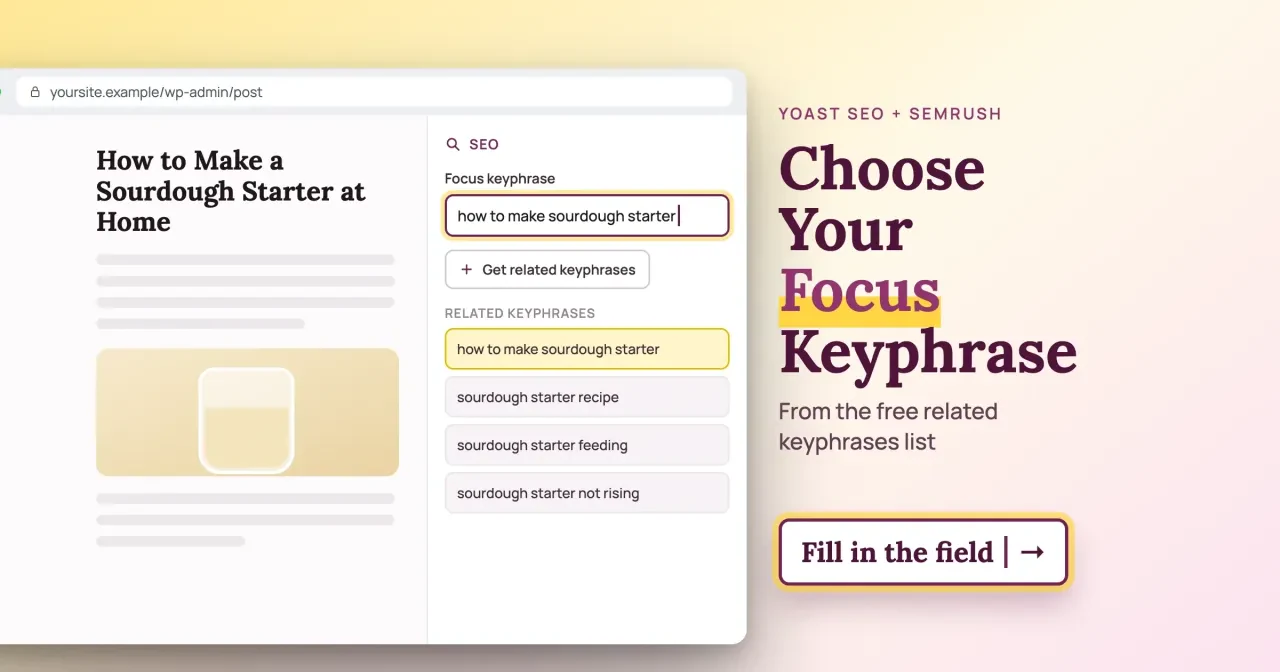
Quick answer
As of October 29, 2026, a free Semrush account lets you request up to 10 related keyphrases a day, and you pick the one matching your page's intent. If one of your older posts already targets those words, pick a different row, because Yoast says a keyphrase belongs to one page only. The sourdough example below walks through each step.
Choosing a Yoast focus keyphrase starts with a limit: the field in the Yoast sidebar takes one phrase per page. On an older blog the catch is the back catalog, since your first idea may already belong to another post, as our sourdough test shows. Our Yoast SEO guide explains the field itself. This post is only about picking the words, and our view is simple: start from what the page is for, then let the Semrush data narrow it down.
Below: what the page is for, what Get related keyphrases shows, how to read the results page by hand, and why it's one keyphrase per page. After our sourdough test and the phrase that survived it, we cover pages where the field should stay empty, Premium synonyms and real queries after publishing.
Key takeaways
- Decide the page's intent first, then pick the related keyphrase that matches it.
- A free Semrush account lets you request up to 10 related keyphrases daily.
- Our word-level clash check missed feed versus feeding across 4 candidates.
- Contact pages and short-lived announcements can keep the field empty, per Yoast.
- Premium: synonyms, up to five keyphrases, $118.80/year before VAT as of Oct 29, 2026.
Start with what the page is for
The keyphrase follows from the page's job, so settle that before you open any tool. Google's explainer on ranking results says its systems first work out the intent behind a query, and only then look for pages that match it. Its local-intent example is pizza: Google says that search brings up nearby businesses that deliver. A phrase whose searchers want a shop won't suit a recipe post, so note the page's intent beside your draft title before you read a single number.
Yoast's metrics explanation sorts intent into four types: informational, navigational, commercial and transactional. A how-to serves the first. Product and booking pages serve the last two.
Next, write a seed phrase the way a customer would type it. Google's starter guide for site owners gives charcuterie and cheese board as an example of experts and newcomers typing different words for the same thing. A professional baker says levain. A home cook types sourdough starter, and the home cook is usually the person you're writing for. Our keyword suggestion tool is one place to collect more seed phrases. For a fuller method, the keyword research chapter in Intermediate SEO, one of our free guides, covers intent, potential and difficulty. Plain words also pay off later, because the same phrase has to read naturally in your title, first paragraph and meta description.
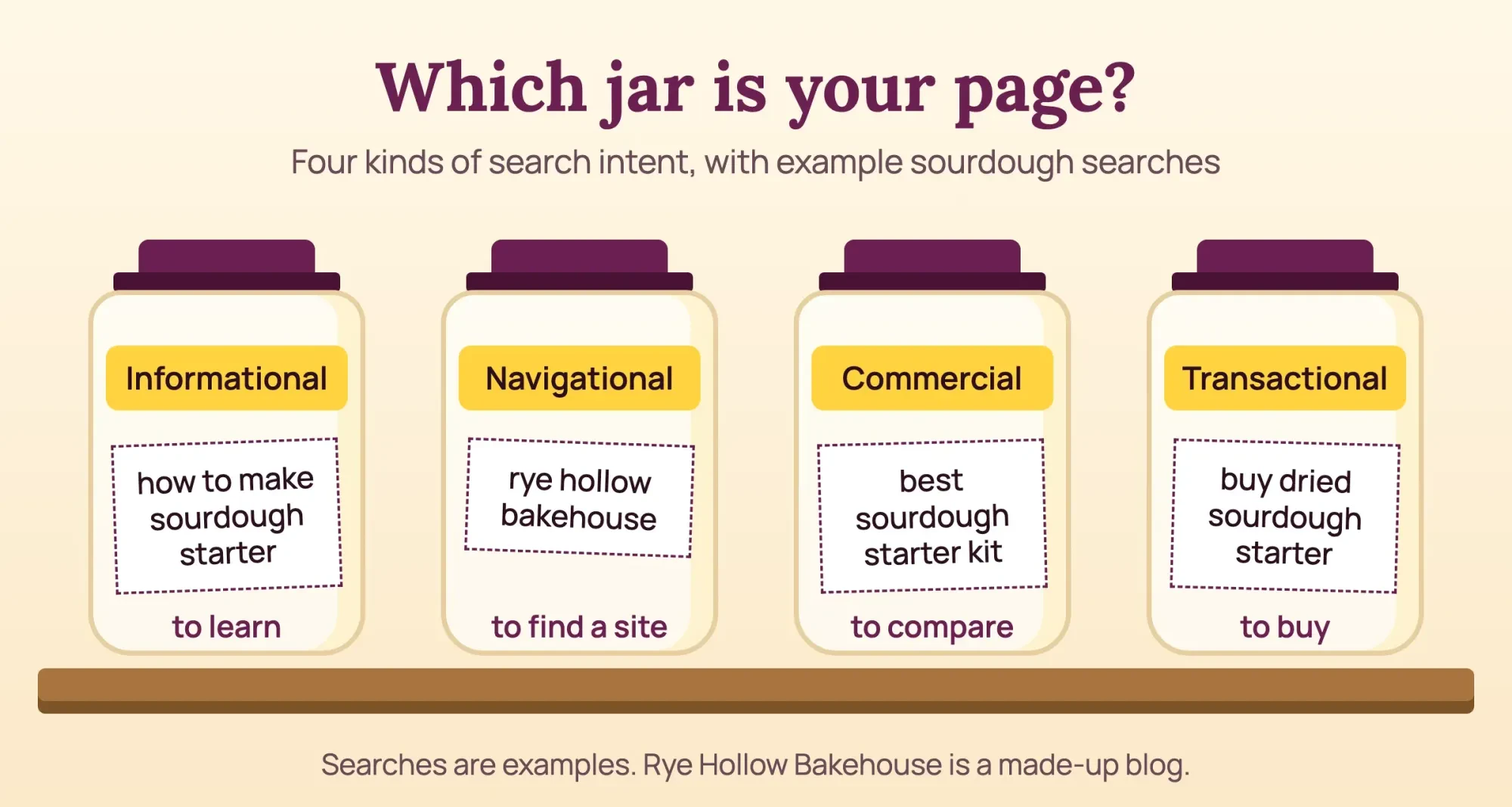 Drawn by us: the four intent types are from Yoast’s metrics page; the queries are examples, and Rye Hollow Bakehouse is made up
What does Get related keyphrases show you?
Once you have an intent and a seed phrase, the button under the focus keyphrase field can pull related searches from Semrush. Yoast's help page for the feature says it works in both free and Premium Yoast SEO for WordPress. It needs a phrase in the field first. If the plugin isn't on your site yet, start with the plugin list in our WordPress website walkthrough, which names the other plugins a small business site usually adds.
The first click asks you to log in to Semrush or create an account, then approve the connection. That help page says a free Semrush account lets you request up to 10 related keyphrases per day.
Then you pick a country and a language from over 100 options. Pick the United States if your buyers are American, since the figures belong to that market.
Four columns follow: Intent, Volume, Trend and Difficulty. Volume, per Yoast's metrics page, is average monthly searches over the last 12 months, and Trend shows interest across those same months. Difficulty is Semrush's score, which its KD% help page grades from 0 to 100 in six bands:
| Semrush band | KD% | What Semrush says ranking takes |
|---|---|---|
| Very easy | 0-14 | The least effort; a good start for new pages |
| Easy | 15-29 | Quality content focused on the keyword’s intent |
| Possible | 30-49 | Well-structured content, properly optimized |
| Difficult | 50-69 | Some quality backlinks plus optimized content |
| Hard | 70-84 | A lot of effort on better quality backlinks |
| Very hard | 85-100 | Content, link building, on-page SEO and promotion |
We'd shortlist rows in the first two bands that match your intent and park anything above 50 for later, at least on a young site with few links. That's our habit, not a Semrush guideline.
The Add button on each row is Premium only. On the free plugin, copy the phrase into the field by hand. For lists longer than this panel shows, our Semrush guide covers the Keyword Magic Tool.
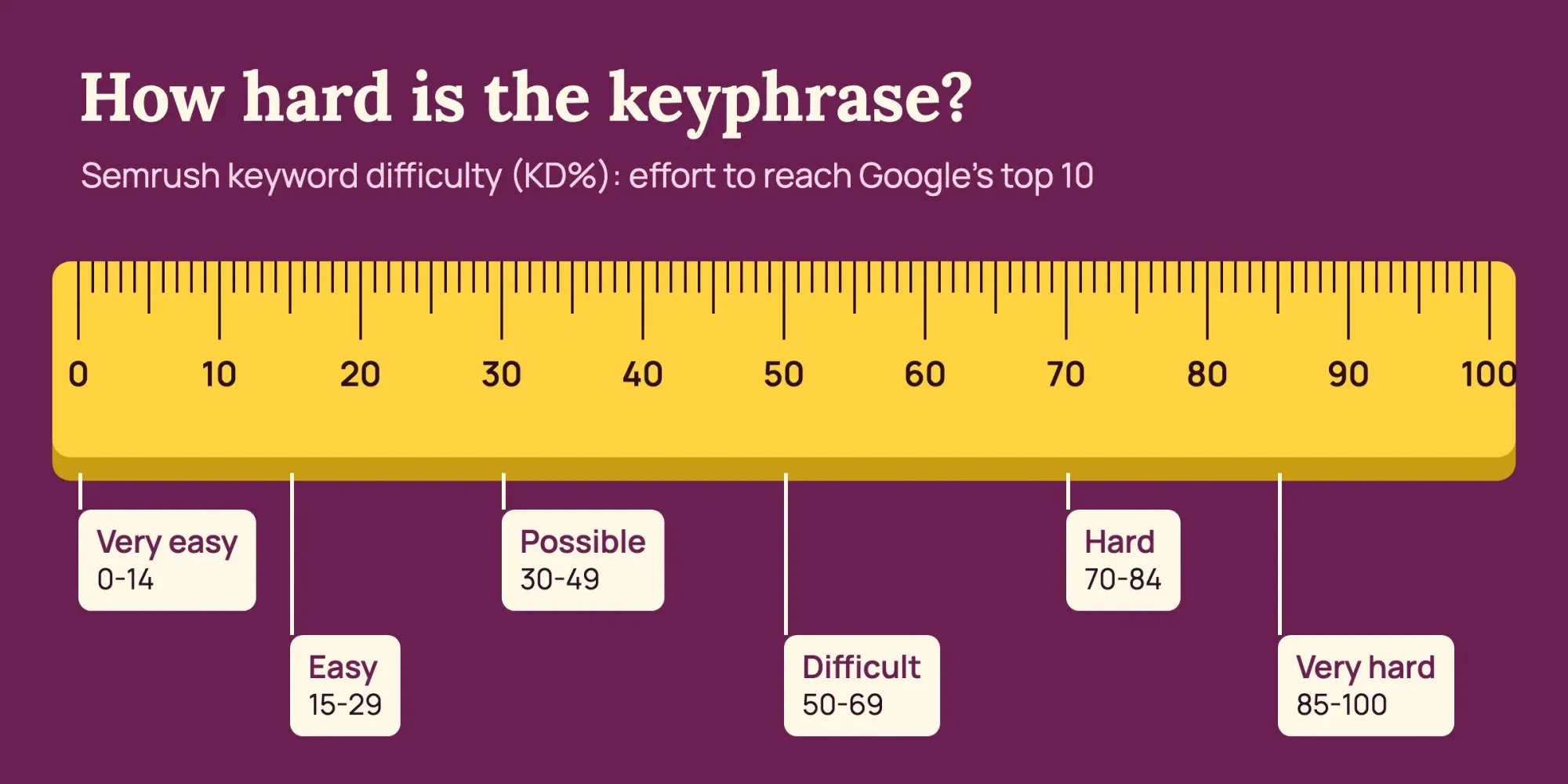 Diagram by DigitalTreed from Semrush’s KD% help page, read October 29, 2026
Read the results page by hand before you commit
But the columns tell you how many people search, not what they want, so open the results page yourself before you type anything into the field. Yoast's focus keyword article gives the same advice: google the phrase and see what kind of content ranks.
If page one is mostly product listings and you're writing a blog post, the phrase belongs elsewhere. Read the whole first page. We read four things there:
- The page types: recipes, product pages, videos, local listings or forum threads.
- Whether the top results answer the exact question in your draft title.
- How many of the 10 come from the same few sites.
- The questions in the People also ask box, which can become subheadings.
Treat what you see as a sample. Search Console's Performance report help says results are specific to "the time, place, device, and recent history of the person searching."
A search from your phone in Iowa won't match a buyer's in Texas. Judge the kinds of pages that rank, not exact positions, and expect suggestions to shift, since Yoast's article says they're often tuned to what you've searched before.
One keyphrase per page, checked against your own posts
Even a phrase that fits the results page can be the wrong pick if another of your posts already targets it. Yoast's duplicate keyphrases page is blunt: use a keyphrase only once, or your pages compete with each other. The plugin's SEO analysis checks whether your keyphrase's words were used in another post's keyphrase. It also flags a link whose text contains your keyphrase, since that link points search engines at a second page on the same subject. The plugin only knows keyphrases somebody typed in, though.
Yoast's cannibalization article adds two checks: a site: search with the phrase in quotes, and Search Console's query filter to see which pages already get impressions for it. If an older post already shows up for your candidate, we'd update that post or give the new page a narrower phrase.
A sourdough test on a made-up bakery blog
That overlap is easy to miss, so we tested a word-level check on purpose. The four candidates are the related phrases drawn in this post's featured image: how to make sourdough starter, sourdough starter recipe, sourdough starter feeding and sourdough starter not rising. Our Python script, which isn't Yoast's code, dropped a short stop list of our own, words such as how, to and a. Then it asked whether another page used the exact phrase, and whether another page's keyphrase held every remaining word. Last, it looked for those words in the draft's title, slug, meta description and first paragraph. Nothing else was checked.
What we tested
On October 29, 2026 we served 7 WordPress-like pages from 127.0.0.1 for Rye Hollow Bakehouse, a made-up baking blog in Decorah, Iowa. Four posts had a keyphrase in a meta tag. Two left it blank. The seventh was the draft, make-a-starter.
Which sourdough phrase survived the check
Here's every row from test/output.txt. In the last four columns, Yes means the draft held all of the candidate's remaining words in that spot:
| Candidate | Exact clash | Word clash | Title | Slug | Meta description | First paragraph |
|---|---|---|---|---|---|---|
| how to make sourdough starter | No | No | Yes | No | Yes | Yes |
| sourdough starter recipe | No | Yes: /easy-sourdough-starter-recipe/ | No | No | No | No |
| sourdough starter feeding | No | No | No | No | No | No |
| sourdough starter not rising | No | No | No | No | No | No |
No candidate matched an older keyphrase exactly. The word check caught one. Every word of sourdough starter recipe sits inside an older post's keyphrase, easy sourdough starter recipe, so publishing both would put two pages on one search. Sourdough starter feeding is the miss worth remembering. The script found no clash, yet the blog already had a post whose keyphrase was how often to feed sourdough starter. To an exact word match, feeding and feed are different words. The other three candidates each shared 2 words, sourdough and starter, with both older sourdough posts; the script listed that overlap but didn't count it as a clash.
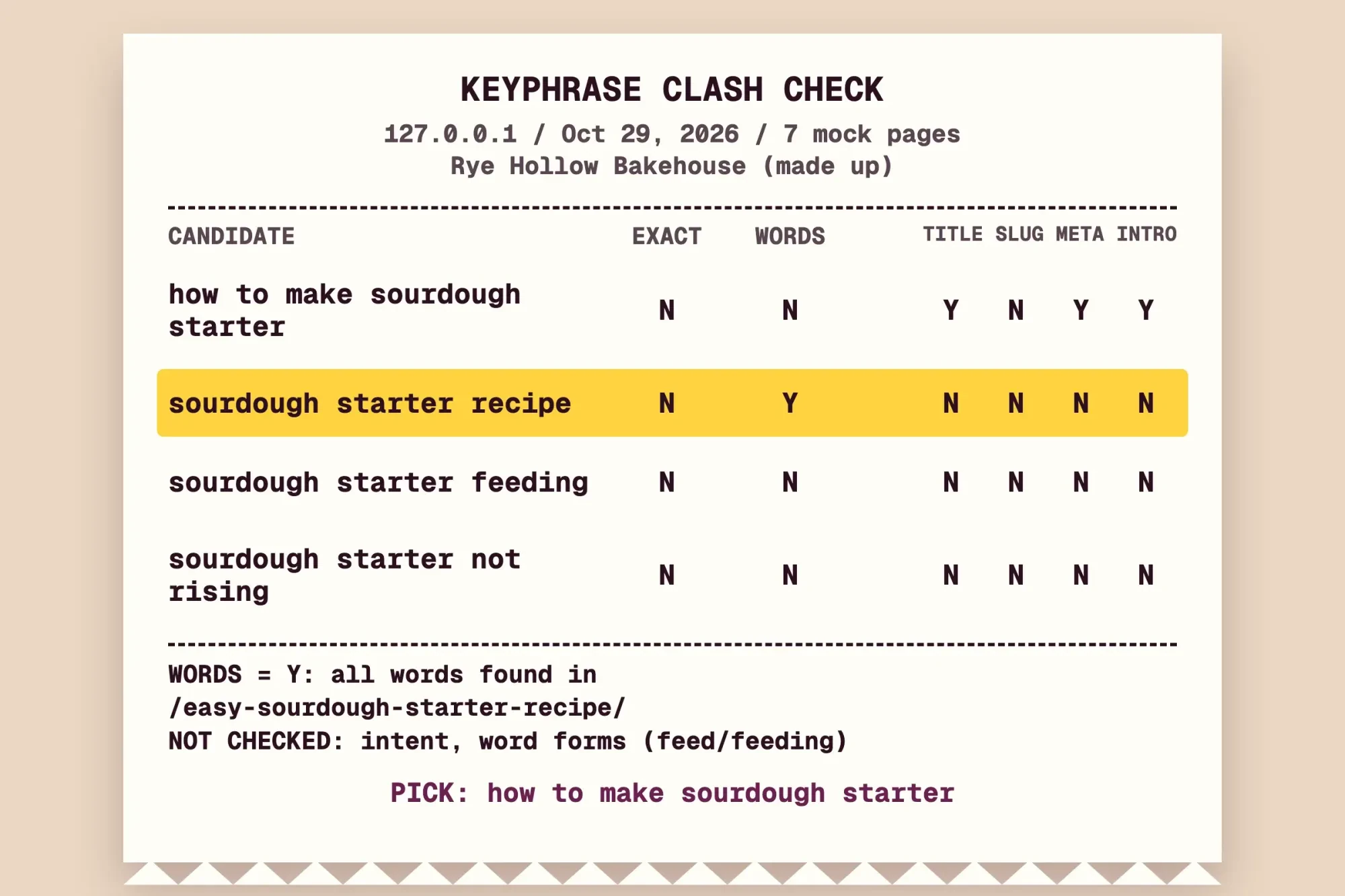 Source: the output file of our 127.0.0.1 test run, October 29, 2026 (Rye Hollow Bakehouse is made up)
Sourdough starter not rising cleared every clash check and still lost, on intent. It's a troubleshooting search and the draft is a how-to, so we struck it by reading it; the script doesn't judge intent. That left how to make sourdough starter. It was in the draft's title, meta description and first paragraph, and missed only the slug, because make-a-starter lacks the word sourdough. We picked it and added sourdough to the slug while the page was still a draft and nothing linked to it, though we didn't rerun the script afterward. Our SERP snippet preview shows how a title and URL look in results before you publish.
Pages where the field should stay empty
Then there are pages that need no keyphrase at all, and Yoast says so itself. Its focus keyword article calls it perfectly fine to leave a contact page empty, since it might only need to rank for your company name plus address. Temporary announcements probably aren't worth optimizing either, the article adds. Our mock blog had one of each, a contact page and a 2026 holiday schedule.
Thank-you, login and cart pages belong in the same group, in our view. Nobody searches for them. If the empty-field warning on those pages bothers you or your writers, Yoast's help page on switching off the SEO analysis lists every setting involved. It can go off site-wide, for one user, for a content type such as tags, or for a single page.
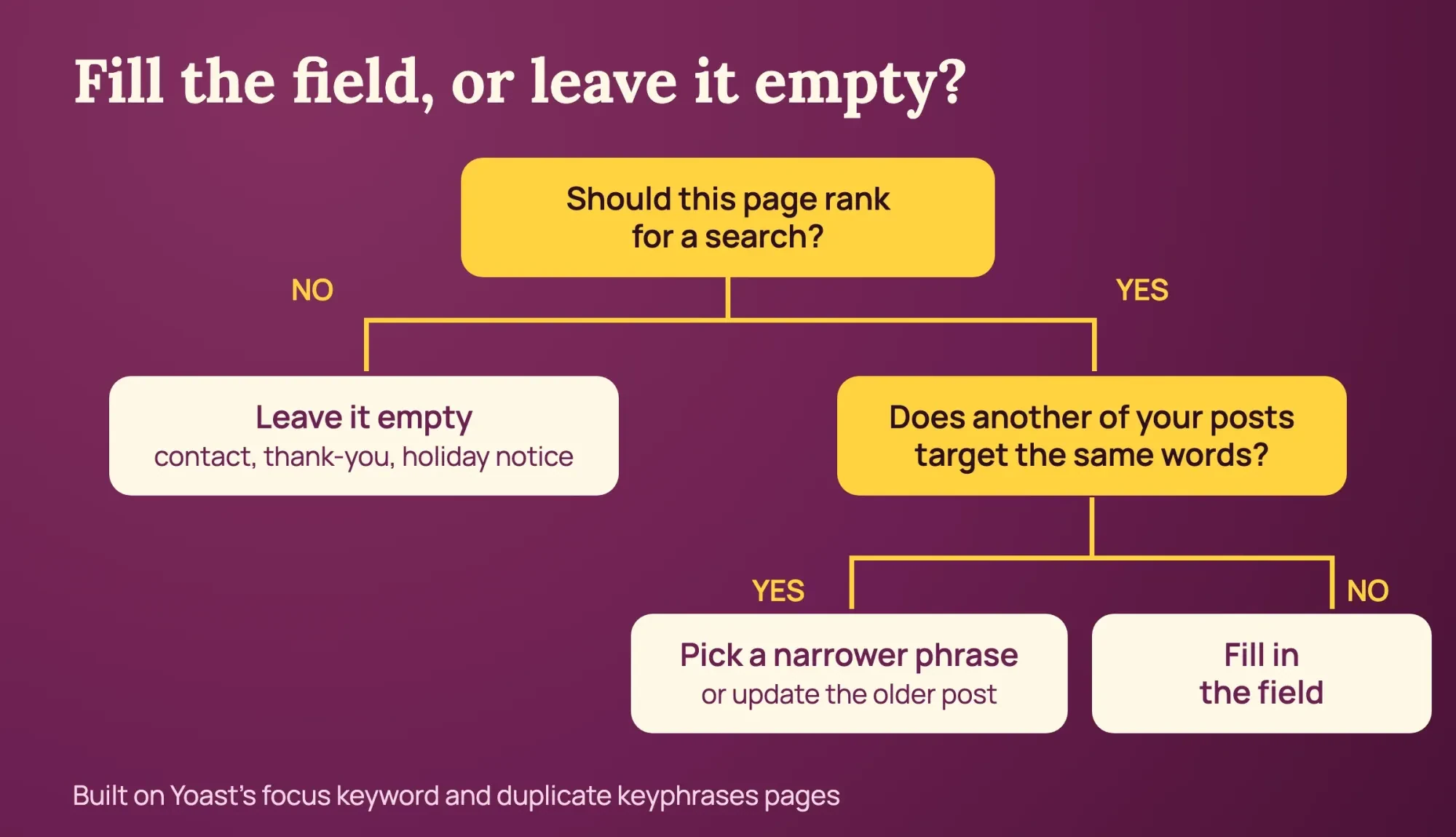 Diagram by DigitalTreed: our decision steps, built on Yoast’s focus keyword and duplicate keyphrases pages
When Premium synonyms are worth paying for
After the empty pages, one choice is left: would the paid plugin pick any better? As of October 29, 2026, Yoast's Premium page lists it at $118.80 a year before VAT for one site, with US dollars selected on the page. One seat for the Yoast SEO Google Docs add-on is included, and each extra one costs $5 a month before VAT.
That price buys checks against up to five keyphrases per page. It also counts synonyms and word forms in 20+ languages.
Word-form matching is the feature aimed at our feeding miss. We didn't run Premium, so we can't say it would have caught it.
Yoast's synonyms page uses dog game and dog sport as its example. You type the synonym under the keyphrase, and the analysis then looks for it in your meta description, introduction, subheadings and image alt text. The plugin's related keyphrases page says up to four extra phrases get a less strict check than the main one.
Our take: on a blog with a few dozen posts, the free version is enough to choose well. Every step that decided our sourdough pick (intent, the results page, the older-post check) costs nothing. Premium earns its fee when several writers publish weekly and nobody remembers every keyphrase.
Either way, don't repeat the phrase to turn a light green. Google's spam policies define keyword stuffing as filling a page with keywords to manipulate rankings. If you're still choosing a plugin, our Yoast vs Rank Math guide compares how each handles extra keyphrases.
After publishing, compare the keyphrase with real queries
Once the post is live, Search Console shows whether searchers agree with your pick. Give it a few weeks, open the Performance report, filter to the page and read the Queries tab. If the searches bringing impressions sit close to your keyphrase, it worked. If they show another intent, such as people hunting for fixes when you wrote a recipe, the page may want a new angle or a sister post. Filters are covered step by step in our Search Console guide. When the free Semrush allowance runs short, our keyword research tools comparison weighs paid options by data and price.
Keyphrase planning across a whole site is also part of our SEO service. We charge clients for that planning, so weigh this mention with that in view.
Focus keyphrase questions
Frequently asked
Can a focus keyphrase be only words like "the" or "how"?
Yoast flags a keyphrase made only of function words. Its focus keyword article says double quotes around the phrase make the plugin look for that exact match.
How do I switch the Semrush account connected to Yoast?
Go to Yoast SEO, then Integrations, and switch Semrush off. Per Yoast's feature help, you then switch it back on and log in with the other account.
Can I add related keyphrases without a Semrush account?
Yes, in Premium. Yoast's related keyphrases page describes an Add related keyphrase button for typing up to four by hand.
Does Google rank a page because of the Yoast focus keyphrase?
Yoast calls the field the term it checks your content against. Google's ranking explainer names query keywords in a page's headings or body text as the most basic relevance signal.
How we made this guide: Sources: 10 Yoast pages, Semrush's KD% help page, three Google Search pages and one Search Console help page, all read on October 29, 2026. Our test ran 4 candidates against 7 mock pages at 127.0.0.1, and nobody signed in to Yoast or Semrush. Facts checked by the DigitalTreed team on October 29, 2026.
First published October 2020 as news of the Yoast and Semrush partnership. Rewritten October 29, 2026 as a how-to for choosing the focus keyphrase with that integration.
Sources
- Yoast help center: How to use the Semrush related keyphrases feature in Yoast SEO for WordPress
- Yoast help center: Related keyphrases, metrics explanation
- Semrush Knowledge Base: Keyword Difficulty (KD%)
- Yoast: The perfect focus keyword for your post or page, with examples
- Yoast: SEO analysis feature page (list of checks)
- Yoast: Duplicate keyphrases check
- Yoast: Keyword cannibalization
- Yoast help center: How to enable or disable the SEO analysis
- Yoast SEO Premium for WordPress (price in USD, read October 29, 2026)
- Yoast: Synonyms in the Premium SEO analysis
- Yoast: Related keyphrases feature page
- Google: How Search works, ranking results
- Google Search Central: SEO Starter Guide
- Google Search Central: Spam policies for Google web search
- Search Console Help: Performance report (Search results)
Comments
No comments yet. Start the conversation below.