
Quick answer
Amazon Associates approval comes after you sign up, not before: Amazon reviews your account once you've made at least 3 qualified sales within 180 days. Your own orders don't count. And passing isn't the end, since an account can still close later over small habits, like a typed price or a missing disclosure.
Key takeaways
- Amazon reviews your site only after 3 qualified sales in 180 days.
- Your own and your family's purchases never count.
- Show prices only through Amazon's own links or its API.
- Put a disclosure next to links and the Associate line on your site.
- After a closure, you have 5 business days to appeal.
Amazon Associates is Amazon's affiliate program: you link to products, and you earn a commission when readers buy. New to the idea? Our short explainer on affiliate marketing covers it in a few minutes.
This guide covers the part that trips people up: Amazon Associates approval, and keeping the account afterwards.
We read Amazon's current agreement, policies and help pages on October 27, 2026. Then we tested the rules on a made-up blog post.
How does Amazon Associates approval work?
You're accepted twice.
Signing up gives you an Associate ID and links you can use at once. The real review comes later. Amazon's help page says its team checks your application "once you’ve driven qualified sales", and it requires at least three within the first 180 days.
Personal orders don't qualify, it adds.
So the clock starts on sign-up day, and if three sales from real readers don't arrive within those 180 days, the account never reaches the approval step at all.
Example: Trail Stove Notes, a made-up camp-cooking blog in Hood River, Oregon, signs up on November 2, 2026, so its 180-day window runs to about May 1, 2027.
That's the date its three outside sales must land by.
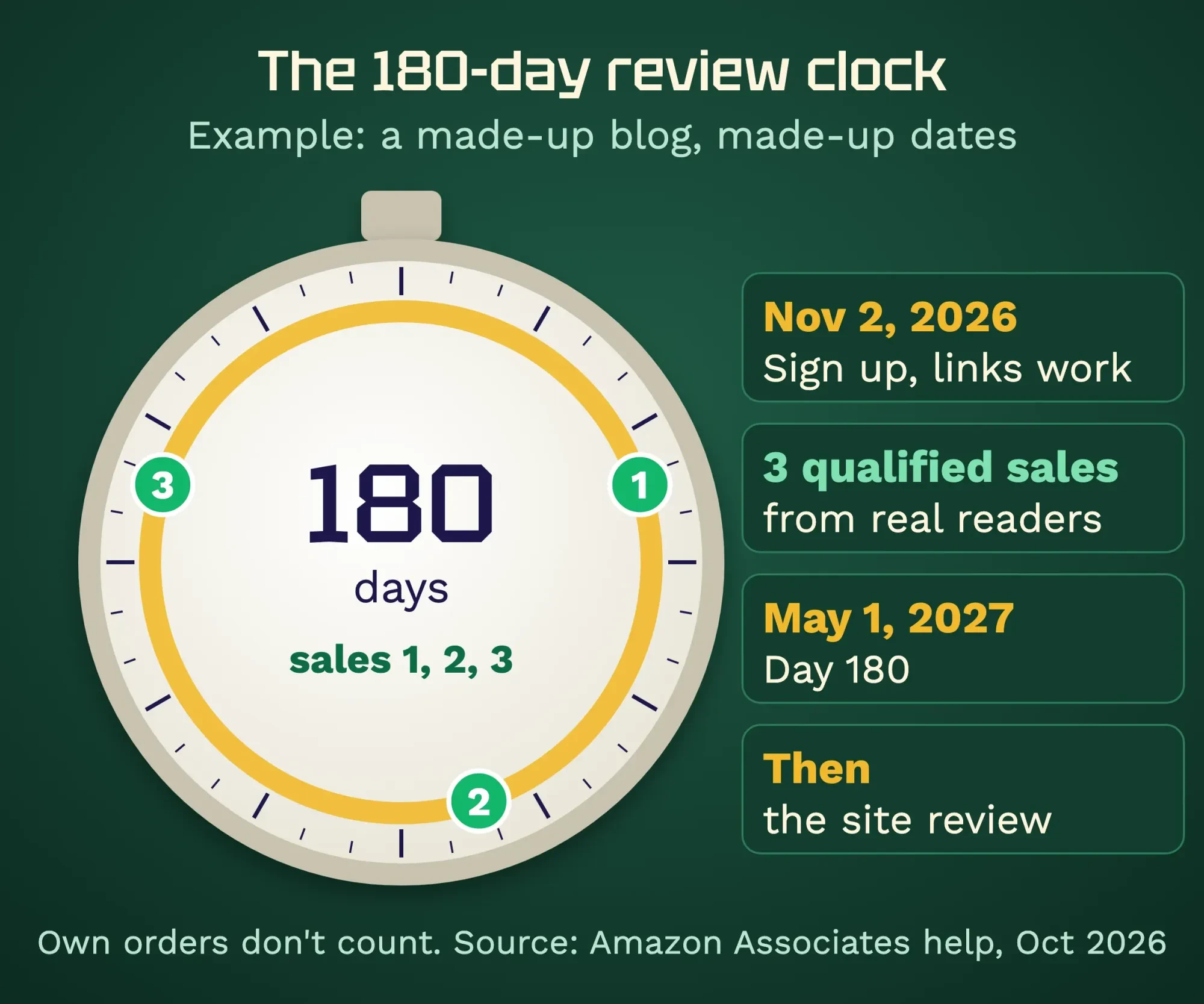 Diagram by DigitalTreed. Example dates for a made-up blog; the 3 sales in 180 days rule is from Amazon Associates help, read October 2026.
So: site first, sign-up second.
Get the site ready before you start the clock
So what does a ready site look like? Amazon's help page asks for "original content" that holds up even with the ads removed. Its rule of thumb is at least 10 posts.
Websites also need recent content, "generally within the last 60 days", and you must own the site.
The Program Policies add that the site must be public at the address you gave, and that pages built from other people's material need "significant commentary, analysis, or transformation".
Closed groups and paywalls fail.
Check your domain name too.
Amazon's help bars anyone "whose URL contains the word "amazon"" or a misspelling of it. A name like amazoncampgear-notes fails before anyone reads a post.
Social pages have their own bar.
Amazon accepts Facebook pages (not personal profiles), Instagram, Twitter, YouTube, TikTok and Twitch. In most cases it expects at least 500 organic followers, shown publicly.
If your blog is thin, fix that first.
Our blogging tips for beginners help you plan posts people search for. A WordPress site you own meets the ownership rule, and our Search Console walkthrough confirms Google can see your pages.
One last warning from Amazon itself: the program is free, and it has "never authorized any business to provide paid set-up or consulting services".
So skip anyone selling guaranteed approval.
Sign up and list every place you will post links
Once the site is ready, sign-up is short.
We didn't open an account for this guide, since the form needs an Amazon sign-in. These steps stick to Amazon's public pages, and your screens may differ.
- Start on the Associates site and accept the Operating Agreement "without change", as it says.
- Fill in the application completely. The policies require it to be accurate and kept current.
- List every website, app and social page where you'll post links. Amazon reviews all of them.
- Keep your email address current. Amazon treats notices sent there as received.
- Build links with your Associate ID (the tag that looks like yourname-20) and place them on the pages you listed.
Step 5 catches people.
Amazon's help lists rejections for missing "tagged" links: the tag must sit in your Amazon product links on the sites you declared. Placement is a topic of its own; see how to use affiliate links for that.
Five habits that get accounts closed
Approval opens the door, but the Operating Agreement lets Amazon close an account at once for a "material breach". Breaking the disclosure rule counts as one, and so do the breaches the Program Policies name.
These five habits come straight from that text.
| Habit | What Amazon's text says (as of October 2026) | The fix |
| No disclosure | Section 5 requires "As an Amazon Associate I earn from qualifying purchases." | Add it site-wide, plus a note by each link |
| Typed prices | Prices only if Amazon serves the link or you use its Creators API or PA API | Write "see today's price on Amazon" |
| Offline or unsolicited links | No print, ebooks, mailings or oral pitches; email, SMS and DMs only if opted in | Use links on your site and in lists people joined |
| Hidden destinations | No shortener that hides Amazon, no cloaking, no automatic redirects | Use plain Amazon links |
| Buying your own way in | No buying through your links; no asking friends, family or staff to | Let real readers make the sales |
Two of those surprise people.
Email first.
Old guides say "never put Amazon links in email". The current Program Policies allow links in emails, SMS and social DMs that are "solicited". You become the "Sender" under laws like the CAN-SPAM Act, and offline use is still out.
Then there's pricing, because a price you typed last spring goes stale fast, so Amazon allows only the prices it serves itself through its own links or API.
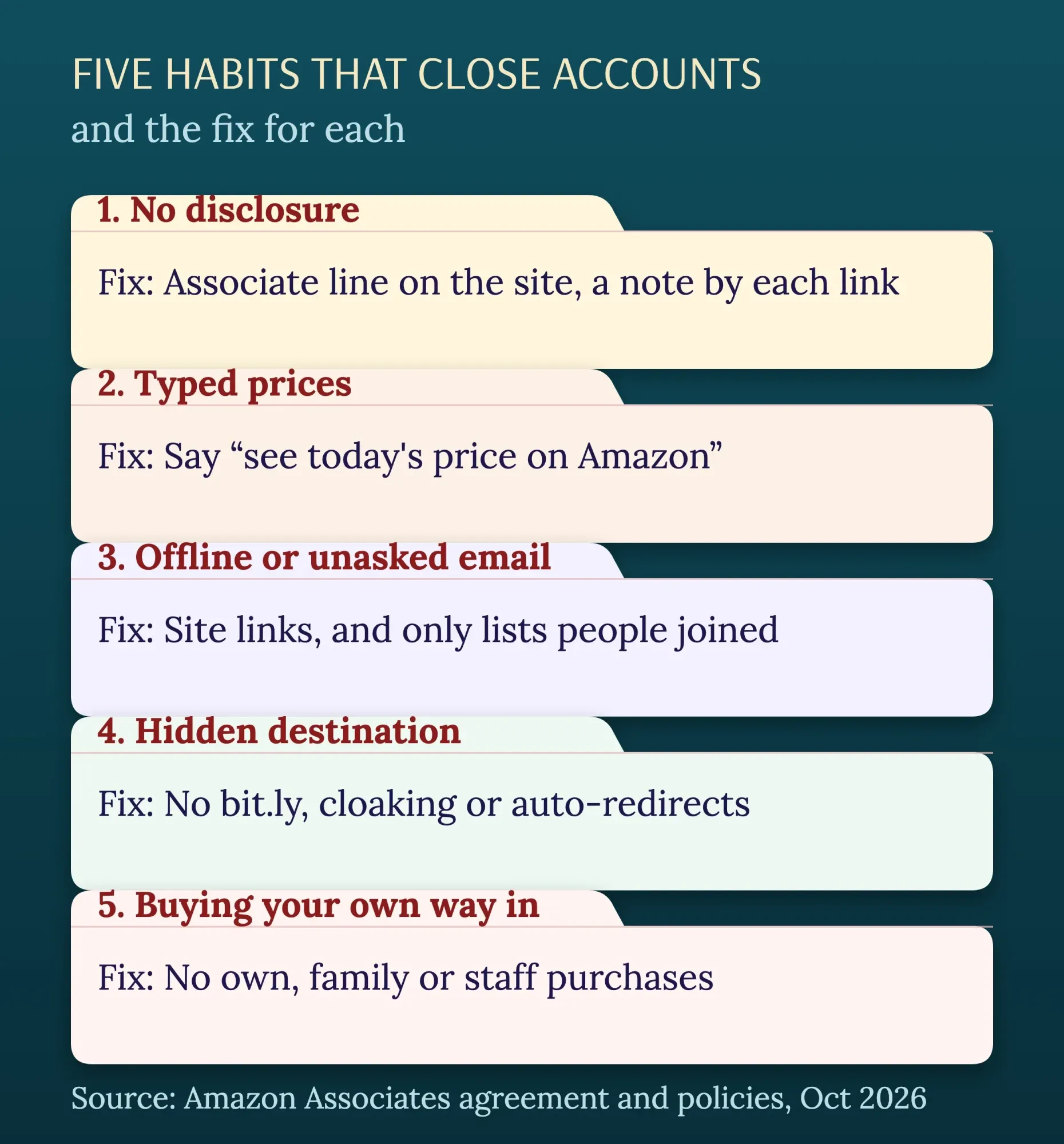 Diagram by DigitalTreed. Rules from the Amazon Associates Operating Agreement and Program Policies, read October 2026.
Short links need care too.
The policies ban a shortener that makes it "unclear" you're linking to Amazon. Amazon also says you can’t redirect visitors automatically. Got old bit.ly links? Paste one into our Redirect Checker to see where it ends.
Rewards are the quiet trap.
Amazon's help says you can't offer anything for using your links, or "request support" through them. So "buying here helps support the blog" breaks the rule, however kindly it's meant.
We checked a mock post and found 9 problems
Those habits are easy to agree with and just as easy to miss in your own posts, which is why we tested them on a page we wrote ourselves.
On October 27, 2026, we wrote a short made-up post for Trail Stove Notes. It had three camp stoves and three Amazon links, written the way many new blogs write. Then we built a small script that reads a saved page and flags the patterns Amazon's pages name. It ran on this machine only, and nothing went to Amazon.
The first version got 9 flags.
- No Associate line anywhere on the page
- "amazon" in the site name
- A bit.ly link that hid the destination
- A typed price of $49.99 (invented for the test)
- One Amazon link with no tag
- Three links with no disclosure next to them
- A "support the blog" line
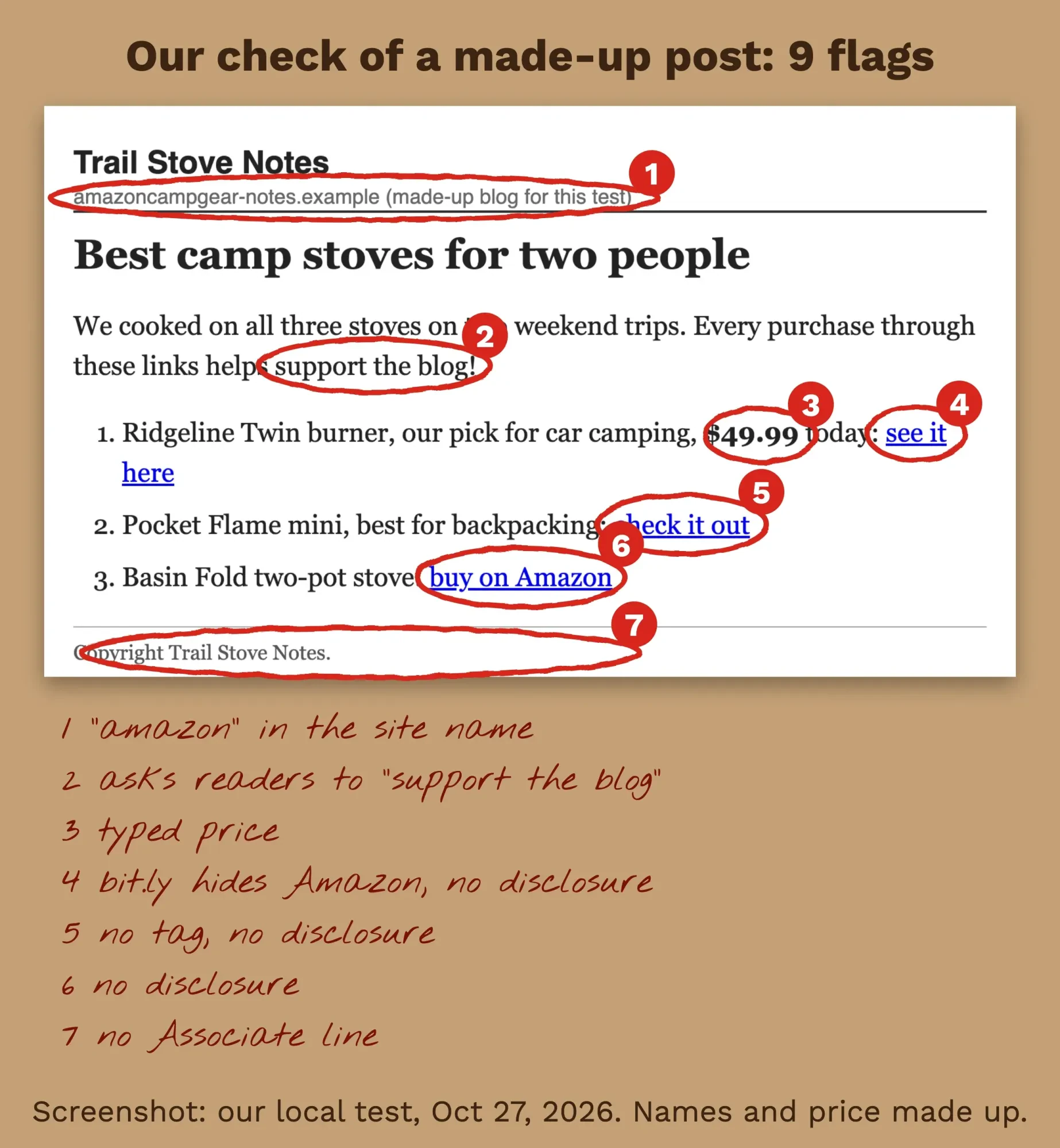 Screenshot: our local test page for a made-up blog, October 27, 2026, annotated by DigitalTreed. Products and prices are invented.
The fixed version scored 0.
It took six small edits.
We changed the domain and put the Associate line in the footer. Each link got a tag and "(paid link)" after it. The price became "see today's price on Amazon", and the support line became a plain commission note.
None of those mistakes is dramatic; each one is just a habit.
A script like ours only reads a page, though, and it can't see your sales, your traffic or your Sites list, so it's a checklist aid rather than a verdict.
Does every page need an Amazon disclosure?
After that test, the answer is yes: every page with Amazon links needs two lines doing two jobs. Amazon's help says you must "include a legally compliant disclosure with your links". You must also name yourself on your site as an Amazon Associate.
The link-level note is for US law. The FTC's staff Q&A says "The closer the disclosure is to your recommendation, the better."
It adds that readers "might not understand" the words "affiliate link", and a "buy now" button isn't enough. Its suggested wording is plain: "I get commissions for purchases made through links in this post."
Amazon's own examples are shorter still: "(paid link)", "#ad" or "#CommissionsEarned". The FTC's blogger example at 16 CFR 255.5 makes the same point for reviews with affiliate links.
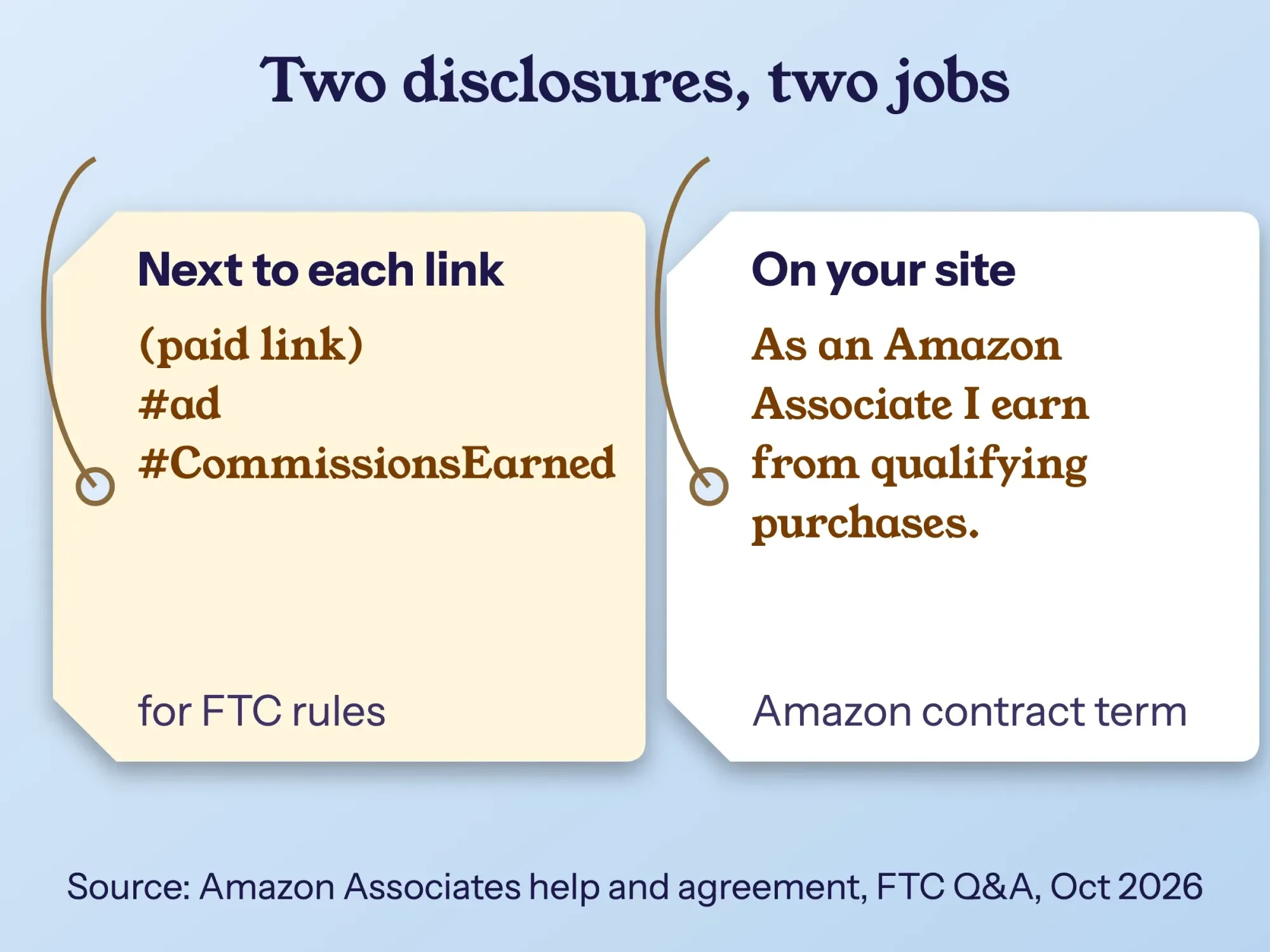 Diagram by DigitalTreed. Wording from Amazon Associates help, the Operating Agreement and the FTC staff Q&A, read October 2026.
The site line is a contract term, and Amazon sets its words: "As an Amazon Associate I earn from qualifying purchases." A footer works for that one.
For video or voice, Amazon wants the note in the same medium as the recommendation, and our post on sponsored blog posts covers the wider disclosure habits.
We're summarizing public rules here, not giving legal advice; for an unusual setup, ask a lawyer who knows FTC advertising law.
Rejected or closed: what you can still do
Even with all that in place, rejections and closures happen, and Amazon treats them differently. After a rejection, its help says you're "welcome to reapply once our program requirements are met".
But the old application is gone: Amazon says it can't reassess one once it's rejected.
The Program Policies draw a harder line: after a rejection for any reason other than unsuitable content, or a closure for a violation, you need Amazon's advance authorization to rejoin.
A closed account has a short window.
Amazon says to appeal "within 5 business days of your closure" through the Contact Us form, with the subject "Closed Account Appeal". For customer trust closures, it reviews only appeals showing "detailed evidence that our facts were wrong".
Many closures start with a warning, and the reply has a set shape.
Amazon's warning-response page asks for a list of every change you made. It also wants three confirmations: your Sites list is complete, every Site shows the Associate line, and you've reviewed the agreement.
After fixing pages, run the whole site through our Broken Link Checker, so that old product links you removed or changed don't send readers to dead pages.
Our take: treat the first 180 days as practice for the rules, not just a sales race. Under the agreement, a breach can cost pending commissions as well as the account.
Before your first payout
Once you're approved, two set-up items stand between you and the money. The first is tax: Amazon's help says the tax interview "must be completed and validated with the Internal Revenue Service (IRS)" before it pays. It can't tell you whether you owe US tax, so ask a tax professional.
The second is the payment method.
As of October 2026, the Payment Minimum Chart lists US minimums of $10 for direct deposit or gift card. A check needs $100 and carries a $15 fee.
Amazon pays about 60 days after the end of the month in which you earned it, by whichever of those methods you picked when you set up the account.
What you earn per sale depends on the product category, which is the next step in this series: Amazon Associates commission rates and payouts.
Need more original posts before you apply? We write and plan blog content for US businesses through our content marketing service. It's our own offer, so weigh it that way.
Frequently asked
Do my own purchases count toward the 3 Amazon Associates sales?
No. The Program Policies say you can't buy through your own links. You also can't ask friends, relatives, employees or contractors to, so those orders can put the account at risk.
Can I use Amazon affiliate links in emails?
Yes, if readers opted in. The Program Policies allow links in solicited emails, SMS and social DMs. Amazon can ask for sample materials and a written certification, and not providing it is a material breach.
How many followers do I need for Amazon Associates?
For social pages, Amazon's review page says "in most cases, at least 500" organic followers or likes. You can't apply with a page that hides its posts or follower count from non-followers.
What happens if my Amazon Associates account sits unused?
After 3 years with no substantial activity, the Program Policies let Amazon withhold accrued commissions after 7 days' written notice. The amount is capped at the gift-card minimum, $10 in the US as of October 2026.
How we made this guide: The DigitalTreed team checked these rules on October 27, 2026. We read Amazon's Operating Agreement (updated October 15, 2025), its Program Policies (updated April 14, 2026), seven Associates help pages and the FTC's endorsement Q&A. We built and ran the page check ourselves on a made-up post, offline. We didn't open an Associates account, so the sign-up screens weren't tested. Every source is linked where it's used.
First published August 2020. Rewritten October 27, 2026: now a guide to getting approved and staying approved. It adds the 3-sales review, the content bar, the habits that close accounts and the newer email rule. It also adds our page check, disclosures, appeals and payout set-up.
Sources
- Amazon Associates: Associates Program Operating Agreement (updated October 15, 2025)
- Amazon Associates: Associates Program Policies (updated April 14, 2026)
- Amazon Associates help: Application Review Process
- Amazon Associates help: My account was closed. Am I able to appeal the closure?
- Amazon Associates help: I received a warning about compliance
- Amazon Associates help: Why do I have to identify myself as an Associate?
- Amazon Associates help: How do I complete the Tax Interview?
- Amazon Associates help: Are there any restrictions regarding my Web site's URL?
- Amazon Associates help: Can I automatically redirect a visitor to Amazon.com?
- FTC: FTC's Endorsement Guides, What People Are Asking
- eCFR: 16 CFR 255.5, Disclosure of material connections
- FTC: CAN-SPAM Act, A Compliance Guide for Business
Comments
No comments yet. Start the conversation below.