

Quick answer
Facebook Quiet Mode launched on April 9, 2020 to mute most push notifications, but as of November 20, 2026 Facebook's Help Center has no Quiet Mode article. It has Sleep mode, which mutes notifications during hours you set, and a Daily limit. Instagram's Quiet mode became Sleep mode in January 2025. Your phone's Focus or Do Not Disturb works too.
Facebook Quiet Mode is a setting Meta added on April 9, 2020 that muted most push notifications for a stretch you picked. This post first ran on April 12, 2020, three days after the launch. We reread Meta's own pages on November 20, 2026. The newsroom post about the launch is still up, but the Help Center has no Quiet Mode article. The setting there that mutes Facebook notifications on a schedule is Sleep mode, listed next to a Daily limit.
We'd still start with your phone's Focus or Do Not Disturb. It covers every app and doesn't depend on Facebook keeping a feature.
Key takeaways
- Schedule quiet hours on your phone; that works whatever Facebook changes.
- Meta announced Quiet Mode on April 9, 2020 to mute most push notifications.
- Facebook's Help Center lists Sleep mode, not Quiet Mode, under Time management.
- Instagram renamed its Quiet mode to Sleep mode in January 2025.
- Android app timers close Facebook at your limit and reset at midnight.
What Facebook Quiet Mode did at launch
Meta's own record of the launch sits inside a long running page about its pandemic response. According to Facebook’s post, in an update dated April 9, 2020, "We added Quiet Mode, which mutes most push notifications". Meta wrote "most", not all, and never listed the exceptions. If you tried to open Facebook while it was on, the app reminded you that you'd set this time aside. The same update added shortcuts to Notification Settings and News Feed Preferences.
TechCrunch's report from launch day fills in how it worked. You could switch Quiet Mode on when you wanted, or schedule it for set hours such as a 9 AM to 5 PM workday. The controls sat in a new section with charts of your daily time on Facebook, your daytime against nighttime use, and how many times a day you opened the app. It reached iPhones first, "over the next month or so". Android came later: "The rollout on Android will begin with testing in May and a broader release in June."
TechCrunch also pointed out a catch: outside your quiet hours, Facebook kept its permission to push alerts.
In 2018, Meta's post on managing your time added "an activity dashboard, a daily reminder and a new way to limit notifications". That last one was a "Mute Push Notifications" setting on the Your Time on Facebook screen, meant to limit alerts for a while whenever you needed to focus. Quiet Mode added the reminder screen and the schedule on top.
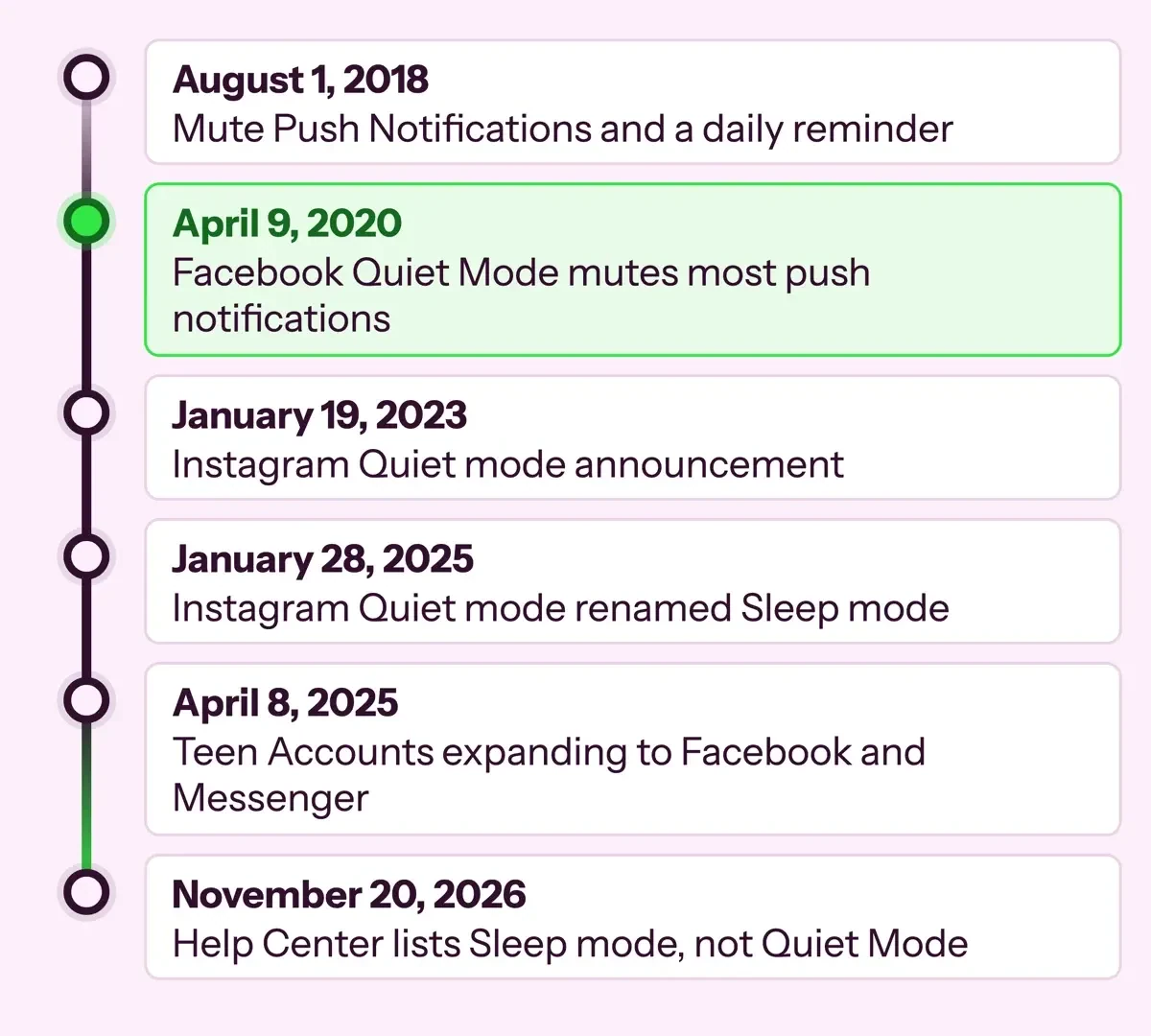 Diagram by DigitalTreed: dates from Meta newsroom posts and TechCrunch, read November 20, 2026.
Is Quiet Mode still in the Facebook app?
On November 20, 2026 we checked Meta's Help Center and newsroom with a script. Then we opened the Help Center in a browser, without opening the app. A setting can exist without a help article, so this tests what Meta publishes, not what every phone shows. Facebook's Help Center Notifications topic loaded fine. It says: "You can go to your notifications settings to change what you're notified about and how you're notified." Its seven articles cover notification dots, text alerts, Marketplace and similar settings. None mentions Quiet mode.
Two of them, How to change Facebook notifications and notification dots and Turn notifications on or off for people or Pages, returned only titles. Their steps load with JavaScript, which our script doesn't run. Opened in a browser, the first says: "You can't turn off notifications entirely, but you can choose what you're notified about and how you're notified." It doesn't mention Quiet mode. We have only the title of the second.
The newsroom has its own post search, and the phrase quiet mode returned seven posts, the coronavirus page among them. None of the other six announces a change to Quiet Mode for adult Facebook accounts. The newest, a January 31, 2024 post on young people, lists "Prompting teens to turn on Quiet Mode" among its teen tools. We also searched the Help Center by hand on November 20, 2026. There, the search "quiet mode" returned 22 results with no Quiet Mode article. Facebook's time management page has Sleep mode instead: "You can use sleep mode to mute notifications and get a reminder to stop using Facebook during certain hours."
Meta doesn't call it Quiet Mode's replacement, but both mute alerts for hours you choose. One limit: "you'll still receive email or text (SMS) notifications that are on for your account."
| Where our script looked | What it showed | Result (November 20, 2026) |
|---|---|---|
| Meta newsroom, coronavirus post | Quiet Mode line in the April 9, 2020 update | Confirmed |
| Meta newsroom post search, "quiet mode" | 7 posts; no later one on Quiet Mode for adult Facebook accounts | No later Facebook news |
| Facebook Help Center, Notifications topic | 7 notification articles listed, none on Quiet mode | Not found |
| Facebook Help Center, 2 notification articles | Titles only; steps need JavaScript | Not readable |
| Facebook Help Center, 33 other topic pages | No article lists without JavaScript | Not readable |
| Instagram Help Center | Empty page without JavaScript | Not readable |
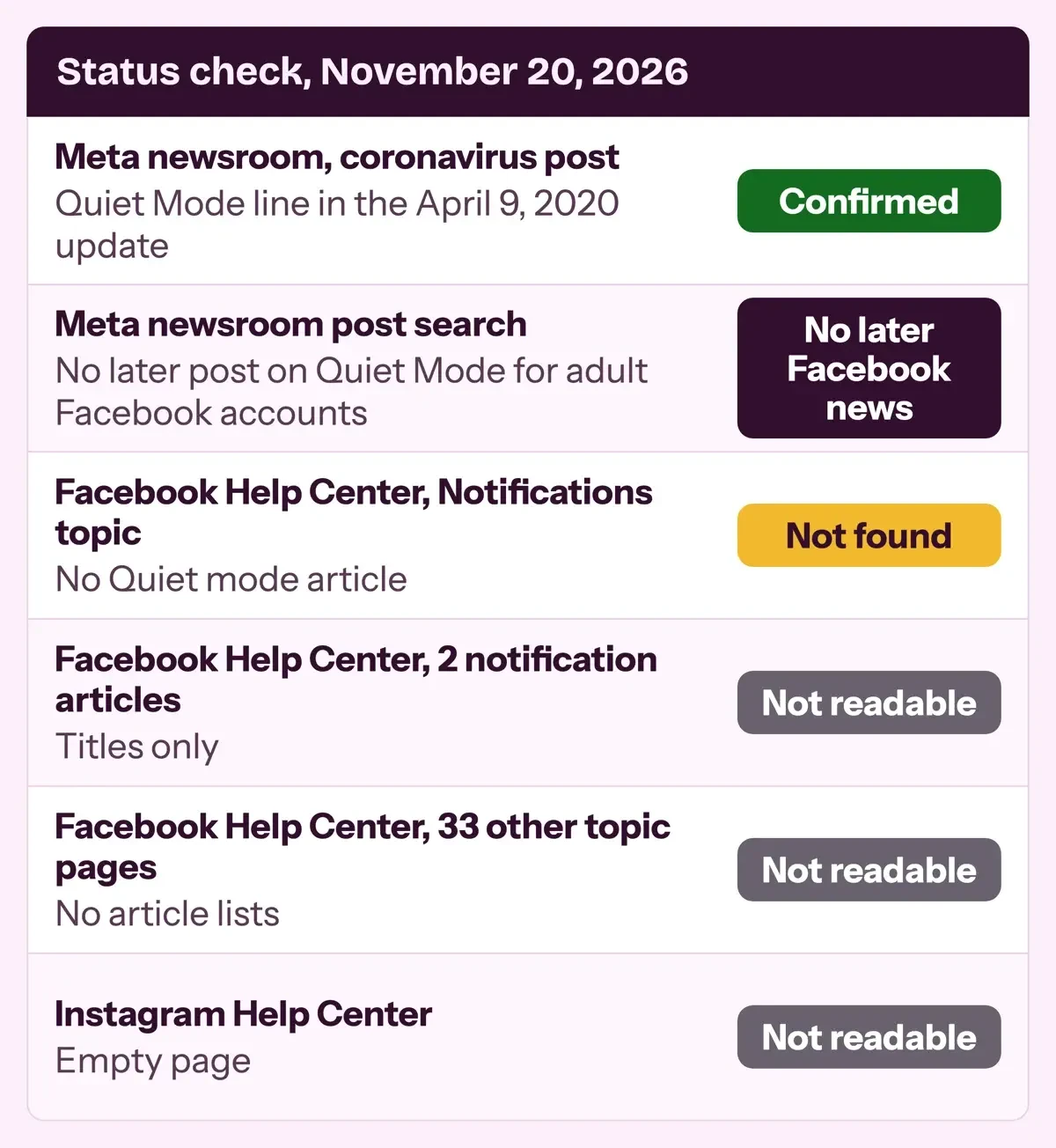 Diagram by DigitalTreed: results of our status check on November 20, 2026, from test/results.json.
On teen accounts the old name lives on. TechCrunch reported on September 25, 2025 that Facebook Teen Accounts send reminders after an hour a day and, in its words, put teens in "Quiet mode" overnight.
In its April 8, 2025 announcement, Meta itself only promises "similar, automatic protections" to Instagram's. Those protections started with teens in the US, the UK, Australia and Canada, and Meta said it would bring them to teens in other regions soon after.
Adults set Sleep mode by hand, in the app only. In the Facebook app for iPhone or Android, tap Menu, then Settings and privacy, then Time management, and tap Sleep mode below Manage your time. Flip the toggle. Then tap the schedule to pick start and end times and days of the week, and save.
What we tested
Our script, test/status_check.py, looked for 19 exact phrases on the saved pages, and all 19 came out as expected. Two were meant to be missing: the word "legally", which our 2020 version tied to Meta's post, and any Quiet mode title in the Notifications topic. Both were missing. A second script read 33 Help Center topic pages, and none listed articles without JavaScript. Then we searched Facebook's Help Center in a browser. "Quiet mode" returned 22 results, none of them a Quiet Mode article, and "time management" led to the Sleep mode page.
Instagram's Quiet mode is now Sleep mode
Instagram's version, now also called Sleep mode, runs on a schedule of days and hours too. Meta's Instagram Quiet mode announcement of January 19, 2023 says it "turns off notifications and sends an auto-reply when someone sends you a direct message (DM)". It started with everyone in the US, the UK, Ireland, Canada, Australia and New Zealand, and a June 27, 2023 update from Meta took it to every country.
An update on that first post, dated January 28, 2025, reads: "At launch, Sleep mode was called Quiet mode, but its name has since changed."
To turn it on, go to your profile and tap the three-bar More options icon. Under Settings and activity, tap Time Management, then Sleep mode, and flip the toggle. You can then pick the days and hours it runs, and tap the arrow at the top left to save. Teens don't have to do any of this. Meta's Instagram Teen Accounts post of September 17, 2024 says "Sleep mode will be turned on between 10 PM and 7 AM". It mutes notifications overnight and auto-replies to DMs, and teens also get a nudge to leave after 60 minutes a day. Sleep mode won't change who sees your stories; our guide to hiding Instagram stories from anonymous viewers covers those settings.
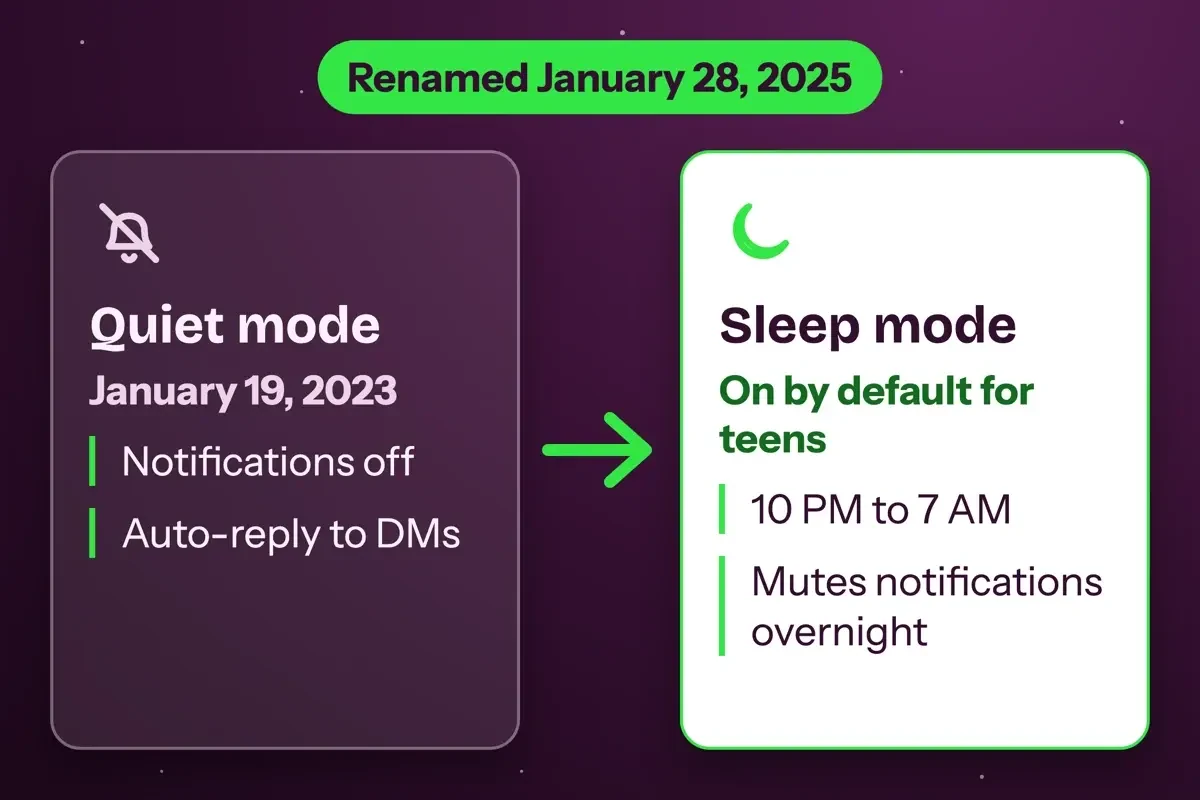 Diagram by DigitalTreed: Instagram Quiet mode and Sleep mode, from Meta newsroom posts dated 2023, 2024 and 2025.
Turn off Facebook notifications without Quiet Mode
Facebook's notifications settings sit under Settings and privacy, not Time management. Its notifications article gives the iPhone path. Tap Menu in the top left, then Settings and privacy, then Settings, and tap Notifications below Preferences. Then tap to adjust how and what you're notified about.
To stop Facebook notifications completely, go to the phone, since the app's own settings can't turn them all off. On an iPhone, Apple's notification settings guide says to open Settings, tap Notifications and then tap Facebook, the same screen where you'd change its alert sounds, banners or badges. The key line: "Turn off notifications for the app: Turn off Allow Notifications." If you'd rather batch alerts than lose them, choose Scheduled Summary under Notification Delivery. Apple adds that some apps show a link on that screen to their own notification settings.
On Android, Google's guide to controlling notifications goes through Settings, then Notifications, then App notifications. Tap Facebook and turn everything off, or only some categories. Google notes that menus vary by phone maker.
Keep login alerts on, because they're often the first sign of trouble, as our guide to spotting a hacked Facebook account explains.
Quiet hours on your phone: Focus and Do Not Disturb
A Focus schedule does on the phone what Quiet Mode did in the app, and it can silence other apps too. Apple's Focus guide puts it plainly: "Focus is a feature that helps you concentrate on a task by minimizing distractions." In Settings, tap Focus. Pick one, such as Do Not Disturb or Work. Use Apps to silence Facebook, then tap Add Schedule. A Focus can start at a set time, at a location or while you're using a certain app. If you also turn on Share Focus Status, people who text you will see that your notifications are silenced.
Android calls these Modes. Google's Do Not Disturb guide says: "To turn Do Not Disturb on or off, swipe down from the top of your screen." For a fixed window, open Settings, tap Modes, then Bedtime, and set a start and end time. You can also have it turn on while the phone charges. Google warns that some of these steps only work on Android 14 and up.
Paths from the Apple, Google and Meta pages cited above. If a label on your phone doesn't match, search Settings for the last word in the line:
- iPhone, mute Facebook only: Settings > Notifications > Facebook > Allow Notifications off
- iPhone, batch alerts: Settings > Notifications > Facebook > Scheduled Summary
- iPhone, quiet hours: Settings > Focus > Do Not Disturb > Apps, then Add Schedule
- Android, mute Facebook only: Settings > Notifications > App notifications > Facebook
- Android, quiet hours: Settings > Modes > Bedtime > set start and end time
- Android, daily cap: Settings > Digital Wellbeing > App timers > Set timer next to Facebook
- Instagram, quiet nights: Profile > More options > Time Management > Sleep mode
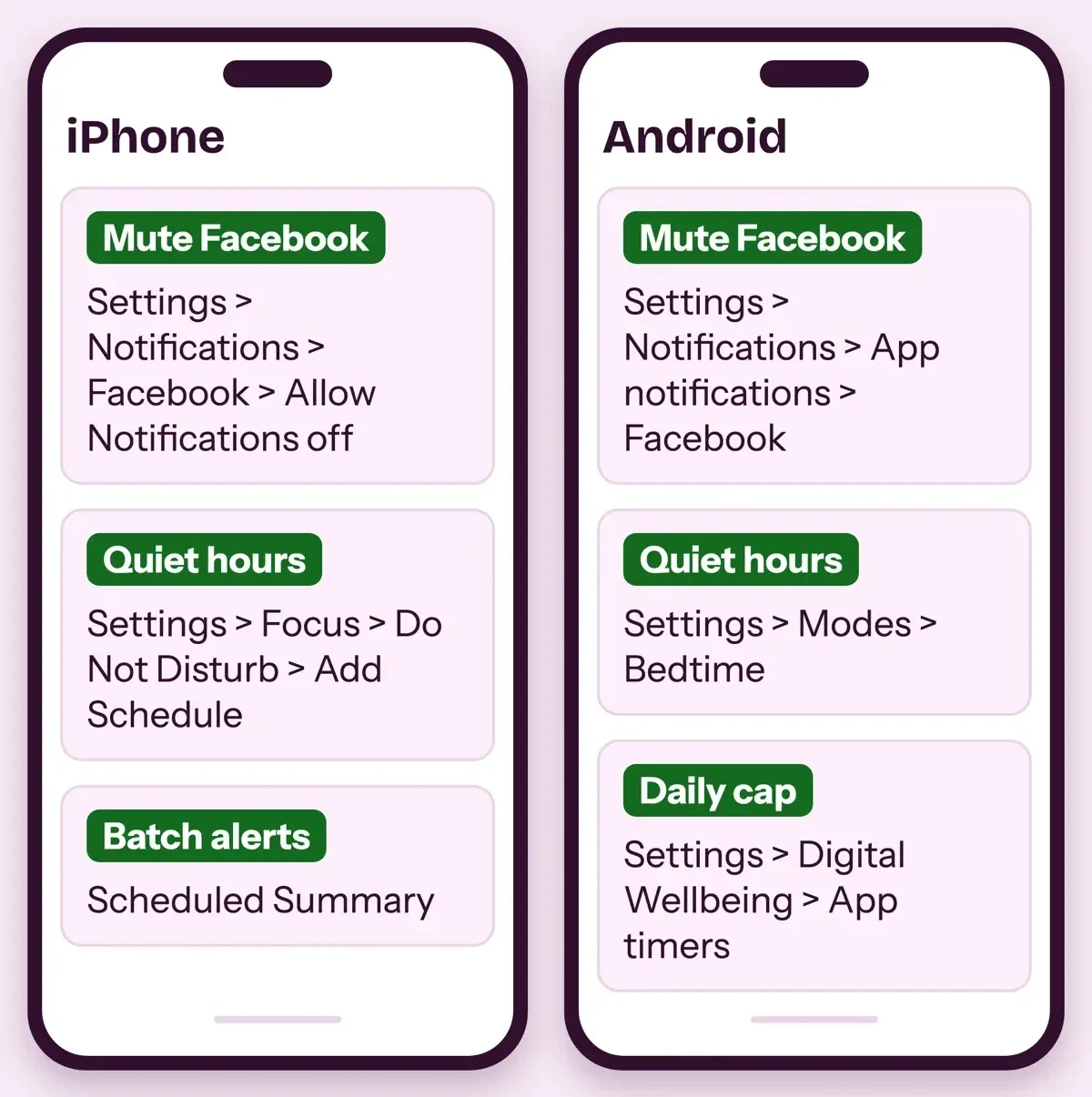 Drawn by us: iPhone and Android settings paths from Apple and Google support pages, read November 20, 2026.
Can you set a time limit on Facebook?
Muted alerts won't stop you opening the app out of habit. Meta's 2018 daily reminder was built for that: it alerted you "when you've reached the amount of time you want to spend on that app for that day". Today it's called Daily limit. Facebook's time management page says: "You can set a daily limit to get a reminder when you've spent a certain amount of time on Facebook." To set one, tap Menu, then Settings and privacy, then Time management, then Daily limit below Manage your time, and choose an amount of time before you tap Save. For teens, Meta's June 2023 post said they would "see a notification when they've spent 20 minutes on Facebook".
Android's built-in cap is firmer than a reminder. In Google's Digital Wellbeing guide, you open Settings, tap Digital Wellbeing, then App timers, and set a timer next to Facebook for however many minutes you'll allow it each day. "When you run out of time, the app closes and its icon dims," and "App timers reset at midnight." A 30-minute daily timer caps you at 210 minutes a week (example: 30 x 7 = 210). Google also says some work and school accounts might not work with app timers.
Teen accounts get a limit by default. Meta's November 9, 2026 Teen Accounts update says they cap "their time on our apps" across Instagram, Facebook and Messenger.
If Facebook is part of your job, muting it at night won't make the Page work go away, but you can bunch it into fewer sessions. Pick two posting slots a day from our Facebook posting times guide and check reactions in the same window, with our walkthrough on who shared your Facebook post. Group admins can read our Facebook group for business guide, and our Facebook story size specs let you make a week of stories in one sitting. A weekly schedule from our step-by-step social media plan keeps all of it inside set hours.
Our take: put Facebook in a scheduled Focus or Bedtime mode first, then add a 30-minute timer if you still open it out of habit.
If you'd rather keep it inside Facebook, Sleep mode and Daily limit do the same two jobs in the app. Sleep mode still lets email and text alerts through, though.
Frequently asked
What replaced Quiet Mode on Facebook?
Meta hasn't named one, but Facebook's time management page lists Sleep mode, which also mutes notifications during hours you set.
Is Instagram Quiet mode the same as Sleep mode?
Yes. Meta renamed it on January 28, 2025, per its Quiet mode post; the steps run through Time Management.
Do teens on Facebook get quiet hours by default?
TechCrunch says yes, overnight. Meta's April 2025 post started Facebook Teen Accounts in the US, UK, Australia and Canada.
How do I stop Facebook notifications at night on Android?
Use Bedtime mode. Google's Do Not Disturb guide lets it run on a schedule or while charging.
How we made this guide: We saved Meta, Apple and Google pages on November 20, 2026 and checked them with two scripts, without opening any app. We then opened Facebook's Help Center search and two of its pages in a browser. Facts checked by the DigitalTreed team on November 20, 2026.
First published April 12, 2020 as news of the Quiet Mode rollout. Rewritten November 20, 2026: the launch facts from Meta's own post, a dated status check, Facebook's Sleep mode, Instagram's rename to Sleep mode, and phone settings that work now. The unsourced list of alerts that still got through, and the 2020 menu path, were cut.
Sources
- Meta: Keeping People Safe and Informed About the Coronavirus (April 9, 2020 update)
- TechCrunch: Facebook's new Quiet Mode option (April 9, 2020)
- Meta: New tools to manage your time on Facebook and Instagram (August 1, 2018)
- Meta: Instagram Quiet Mode, with the January 28, 2025 Sleep mode update
- Meta: Giving teens and parents more ways to manage their time (June 27, 2023)
- Meta: Our work to help provide young people with safe, positive experiences (January 31, 2024)
- Meta: Introducing Instagram Teen Accounts (September 17, 2024)
- Meta: Teen Accounts expanding to Facebook and Messenger (April 8, 2025)
- TechCrunch: Meta rolls out Teen Accounts on Facebook and Messenger globally (September 25, 2025)
- Meta: Expanding Teen Account protections (November 9, 2026)
- Facebook Help Center: Notifications; Facebook Help Center: How you can manage the time that you spend on Facebook
- Facebook Help Center: How to change Facebook notifications and notification dots
- Facebook Help Center: Turn notifications on or off for people or Pages you follow
- Apple: Set up a Focus on iPhone
- Apple: Change notification settings on iPhone
- Google: Limit interruptions with Modes and Do Not Disturb on Android
- Google: Control notifications on Android
- Google: Digital Wellbeing on Android
Comments
No comments yet. Start the conversation below.