
Quick answer
Yes, for reels. A Facebook collab post is one reel that shows on two Facebook Pages at once, after the second Page accepts your collaborator invite. Meta's publishing guide caps each Page at 10 invites every 24 hours. It doesn't offer collabs for photo posts or personal profiles, so use a co-hosted event or a tag there.
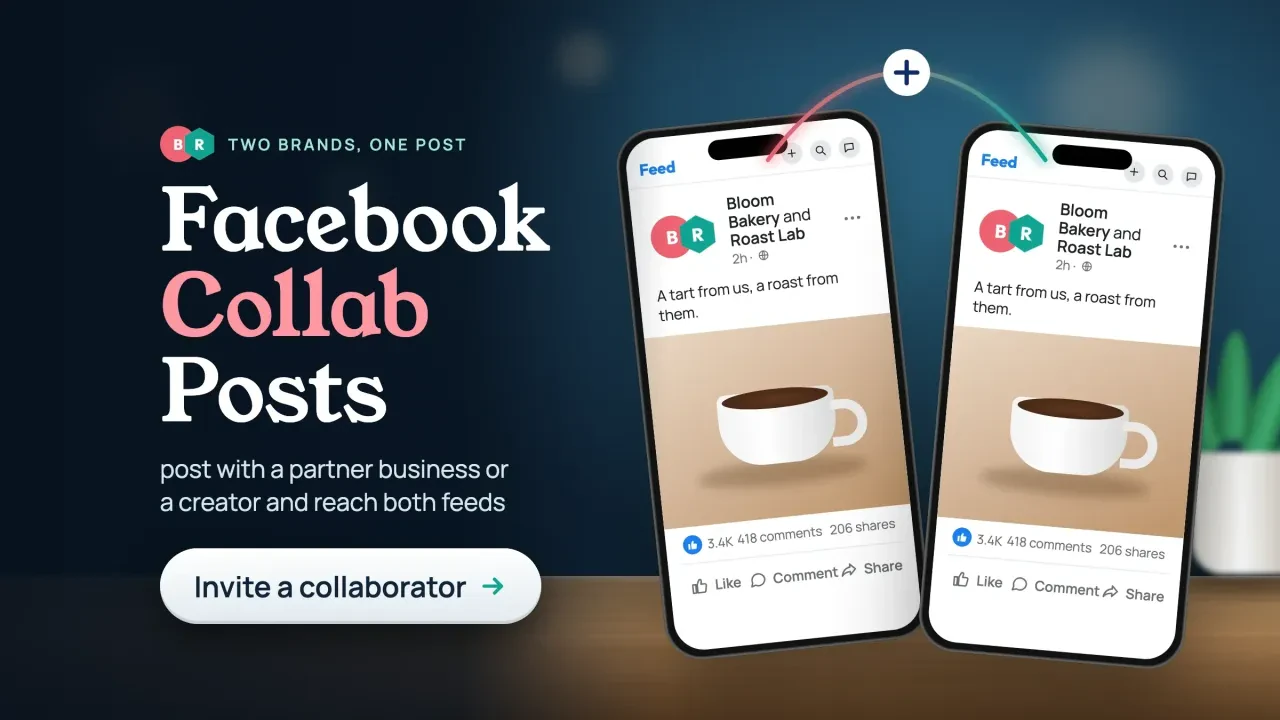
A Facebook collab post is a reel that one Page publishes and a second Page agrees to carry, so it appears on both Pages with both names on it. It's the same reel in both places, not a reshare. That's how a neighbor business, or a creator with a Page, can put your video in front of their followers without you buying an ad.
We checked, because the guides that rank for this don't agree with each other.
On October 26, 2026, we went to Meta's own documentation and Facebook's help pages, and below is what Meta actually confirms and where you'd just be guessing.
Key takeaways
- A Facebook collab post is one reel shown on two Pages at once.
- Collabs work only between Facebook Pages, not personal profiles.
- Meta caps each Page at 10 collaborator invites every 24 hours.
- For a joint event, create it from your Page and add a co-host Page.
- Paid collabs need words like "Ad" in the caption, not only Meta's label.
Collab posts work on Facebook, but only for reels between Pages
Facebook collab posts are real, and they work for reels shared between two Facebook Pages. Meta's Reels Publishing API guide, updated July 30, 2026, says you can "invite a collaborator to publish the reel on their Facebook Page."
Its limits section is plain: "You can only publish Reels to other Facebook Pages."
That second rule is the one people miss.
Your personal profile can't be the partner. Neither can a creator who only posts from a profile; they'll need a Page. Meta's guide doesn't mention profiles in professional mode at all, so don't build a plan around them.
So why do some guides say collabs are "video only"? Because on Facebook, videos and reels are now the same thing. Meta announced on June 17, 2025 that "all videos on Facebook will be shared as reels," and that reels would drop their length and format limits. Any video your Page posts is a reel, and that's where the collaborator option lives. Photos, text updates and link posts have no collaborator option in Meta's documentation.
The guide names no country limits, either. We found nothing that keeps US Pages out.
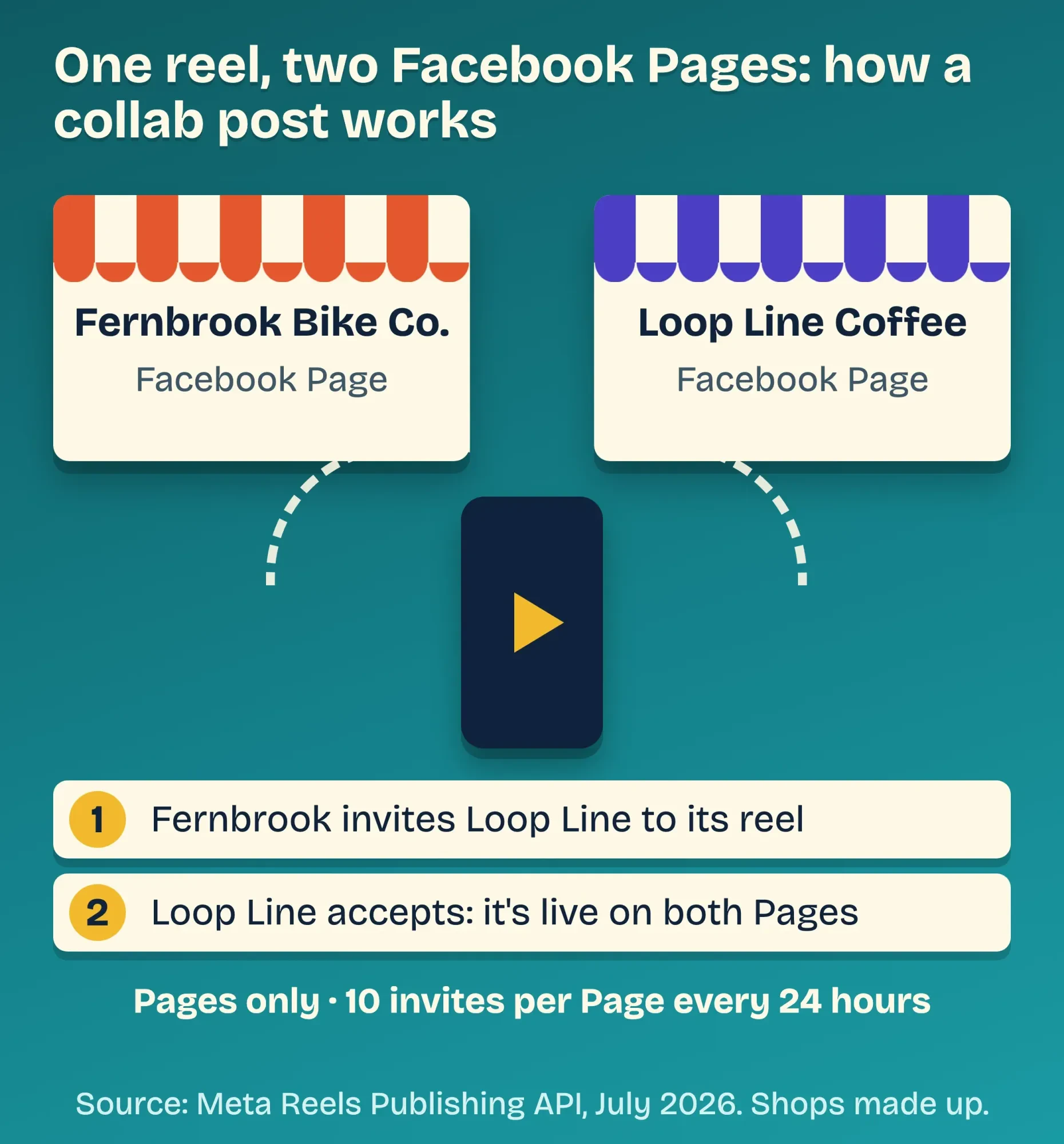 Diagram by DigitalTreed, from Meta's Reels Publishing API guide (updated July 30, 2026). Example: both shops are made up.
Posting a photo or a 24-hour update? Skip ahead to events and tags, or use Facebook Stories on each Page.
What Meta says vs what the collab guides say
That's the official version. The how-to pages ranking for "facebook collab post" tell a messier story, and you'll want to know where they split before you promise a partner anything.
On October 26, 2026, we put Meta's guide next to five of the top-ranking how-to pages. We checked four things: which posts qualify, how many collaborators you get, who can join, and whether there's a daily cap. Two scheduling-tool vendors say one collaborator per video: Nuelink (April 14, 2026) and Publer (updated December 2025). A New Zealand agency, The Hive NZ, says "up to 5 collaborators per post" in a guide updated September 16, 2026. Only one page mentioned the 10-invite daily cap, and it didn't link Meta.
None of the five linked Meta's own page.
That's how one feature ends up with three different rulebooks.
| Question | Meta's guide (July 30, 2026) | What ranking guides claim | What we'd plan for |
|---|---|---|---|
| Which posts qualify | Reels, and every Facebook video is a reel since 2025 | "Video only" (most); no limit stated (1) | A vertical video |
| Collaborators per reel | Not stated | 1 (Nuelink, Publer); up to 5 (1 agency) | One partner (count unverified) |
| Who can join | Other Facebook Pages only | Pages; none say profiles work | A Page on both sides |
| Daily limit | 10 invites per Page per 24 hours | Mentioned once, unlinked | Space out invites |
| When it shows on their Page | On acceptance, or when you publish | After they accept | Same-day acceptance |
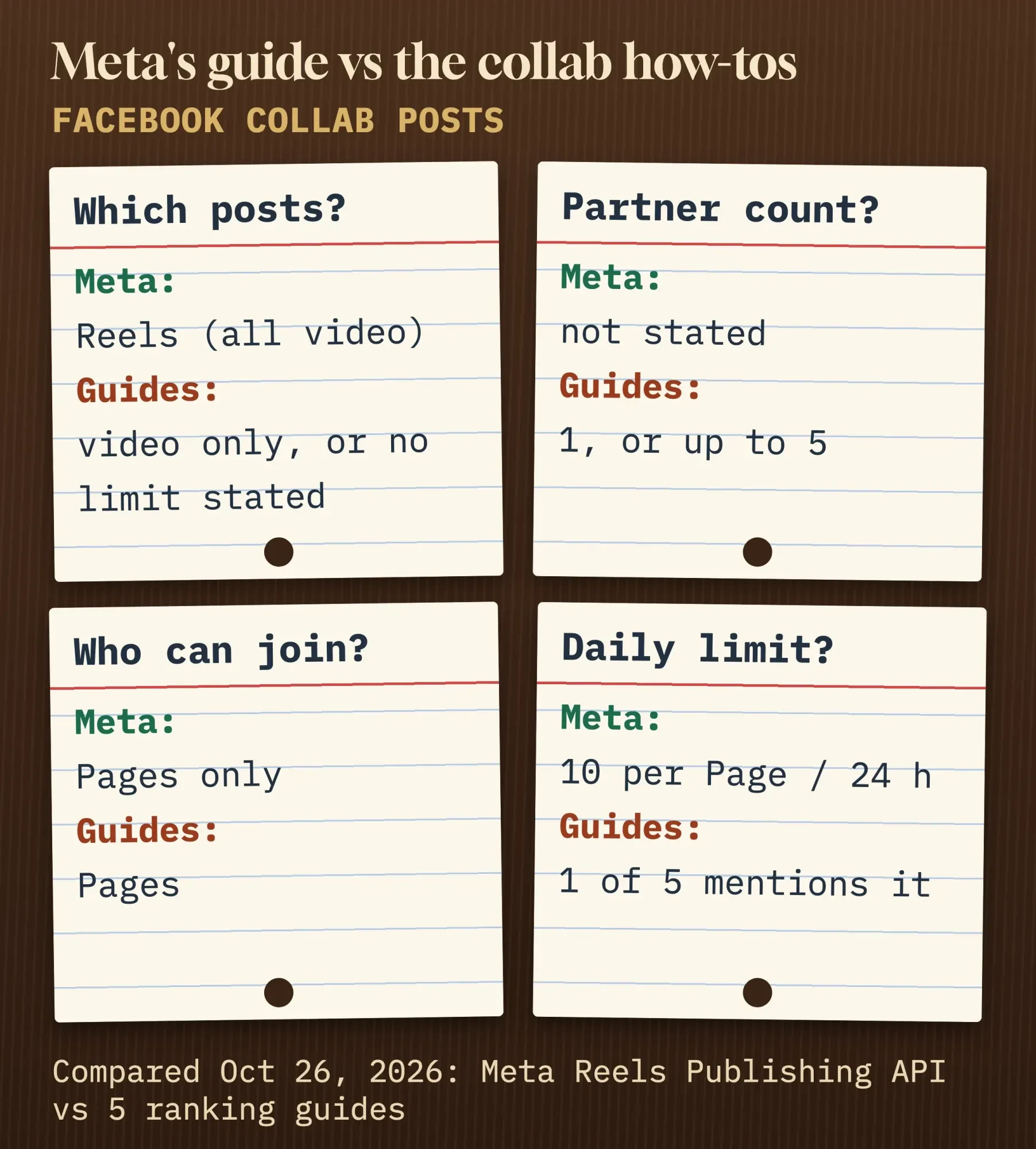 Diagram by DigitalTreed: Meta's Reels Publishing API guide vs five ranking how-to pages, compared October 26, 2026.
Our take: plan every collab as one reel, one partner Page, and an acceptance you chase the same day. If your app offers more than that, treat it as a bonus.
How to send a Facebook collab post invite and get it accepted
So here's the order that fits Meta's rules. We couldn't find a Facebook Help Center article for the collaborator button itself, so the menu names below are what tool vendors and one agency reported in 2025 and 2026. They may look a little different in your app.
- Agree on the video, the caption and the post time with the other business first. Check that the person on each side can post for their own Page.
- Film one vertical video. For reels posted through its API, Meta recommends 1080 x 1920 pixels in a 9:16 frame and allows 3 to 90 seconds.
- Start the reel from your Page, not your profile. Before you share, look for the collaborator option. As for the label, Publer's guide (December 2025) calls its own button "Tag Collaborators," and The Hive NZ (September 16, 2026) reports a Meta Business Suite toggle called "Invite collaborator."
- Search for the partner's Page and send the invite. You can do it before or after publishing.
- The partner opens their Page's notifications, not their personal ones, and accepts. Until then, the reel shows only on your Page.
- Both of you reply to comments on day one, and the partner shares it to their Story.
Timing is the part people get wrong.
Meta's guide says that once the partner accepts, the reel "will immediately be published on their Facebook Page if the reel has been published." If they accept first, it goes up when you publish. So a partner who accepts three days late gets a three-day-old reel on their Page.
It happens. If the invite seems lost, send the partner the reel's link and ask them to check their Page notifications. A busy Page that invites a different partner for every video can also hit Meta's cap of 10 invites in 24 hours. In that case, wait a day.
Not sure what to film? Our list of Facebook post ideas has video ideas sorted by goal.
Who makes a good Facebook collab partner?
Once the mechanics work, the partner matters more than the button. The best collab partner sells something your customers already buy next, and doesn't compete with you.
Example: Fernbrook Bike Co. is a made-up three-person bike shop in Eugene, Oregon, and Loop Line Coffee is a made-up roaster two doors down. Fernbrook films its Saturday shop ride ending on Loop Line's patio, a 40-second reel posted from Fernbrook's Page with Loop Line as the collaborator. Riders who follow the shop meet the roaster. Coffee regulars see a group ride they could join. And nobody's product gets undercut, because the two shops sell different things to the same people.
Here's a quick test before you ask: would the partner's followers be glad to hear about you, or mildly annoyed?
Follower count comes second.
Neighbors usually beat big names here. Our hyperlocal marketing guide covers finding nearby businesses to team up with. For where a monthly collab sits next to your other posts, see our step-by-step social media plan.
One piece of old collab advice you should drop: the joint giveaway where people must tag friends or share the post to enter. Meta's Pages, Groups and Events Policies say a promotion must not require or reward sharing, reposting or tagging others. Our Facebook giveaway rules guide explains what you can ask entrants to do instead.
For a joint event, co-host it from both Pages
But not every collab is a video. For a class, a sidewalk sale or an open house, a Facebook event with two host Pages does what a collab reel does: one listing for both businesses. The help page doesn't say whether the co-host Page must accept, so check that your partner's name shows before you promote it.
There's one catch. Facebook's help page on adding hosts says, "Only a Page can add another Page as a co-host."
From a personal profile, "You can only add Facebook friends as co-hosts." So create the event from your business Page. Every time.
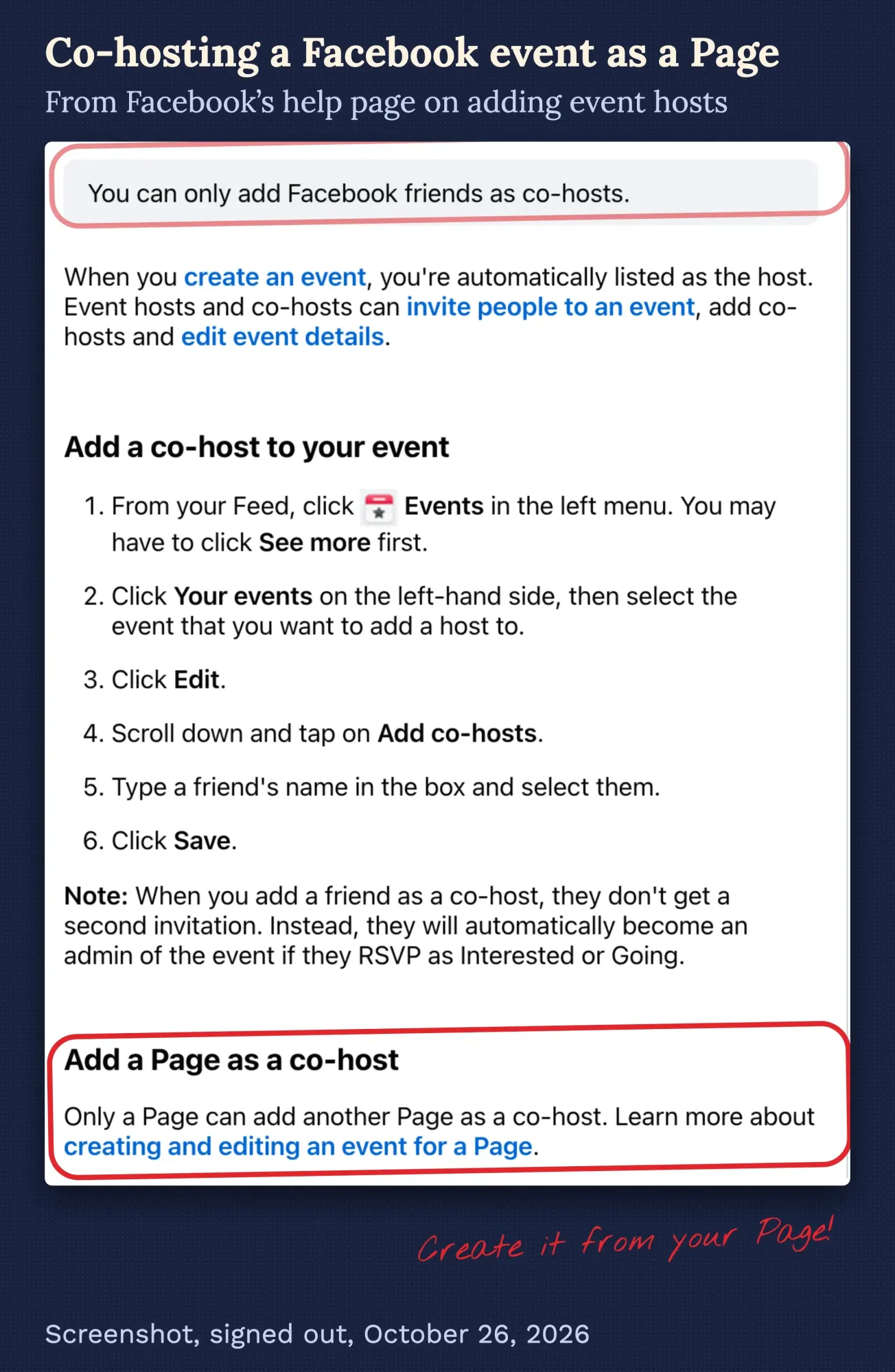 Screenshot: Facebook Help Center, "Add more hosts to your Facebook event," October 26, 2026, signed out. Marks are ours.
Page events are always open to everyone. Meta's guide to Page events says, "All events hosted by Pages are public." That suits a store event, and it doesn't suit anything members-only, which belongs in a Facebook Group for your business instead.
Hosts and co-hosts can invite people, add more co-hosts and edit the details. Facebook also lets hosts invite people who aren't on Facebook, which is handy for regulars who barely open the app. Fernbrook would create the ride as its own event, then add Loop Line's Page as co-host.
Tag the partner in photo and text posts
That leaves everyday photos and updates, where a tag does the job. Facebook's tagging help page says, "When you tag someone, you create a link to their profile."
They also get a notification.
A tag is lighter than a collab, though. The post stays yours; Facebook says it "may also be added" to the tagged person's timeline, but there's no collaborator invite and no shared reel. If you want the partner's followers to see it, ask them to share it.
Curious whether they did? Our guide to seeing who shared your Facebook post shows where Pages can check.
And one thing a tag does surprises people: in the FTC's eyes, it can count as an endorsement.
Paid or gifted collabs need "Ad" words, not only a label
That's where money changes the rules. If one business pays the other, or sends free product in return for the post, the FTC treats the post as an endorsement with a connection you must disclose. The rule text in 16 CFR 255.5 says material connections "can include a business, family, or personal relationship," and also the "provision of free or discounted products."
The FTC has a plain-English page for creators, Disclosures 101 for Social Media Influencers. Its first rule under "When to Disclose" reads: "Disclose when you have any financial, employment, personal, or family relationship with a brand."
On placement, it's short: "Place it so it’s hard to miss."
Meta has a tool for this. On Facebook, branded content is "an organic post you create with a "Paid partnership" label to disclose a brand relationship."
The label alone isn't enough, though. The FTC says "Don’t assume that a platform’s disclosure tool is good enough" and suggests adding your own words too.
A tag doesn't count as that disclosure, either. The FTC's answers to common endorsement questions are blunt: "Tagging a brand is an endorsement, but it’s not a disclosure that you have a connection to a brand."
If you're the brand, the same page adds, "Your company is ultimately responsible for what others do on your behalf." So read the creator's caption before you approve it.
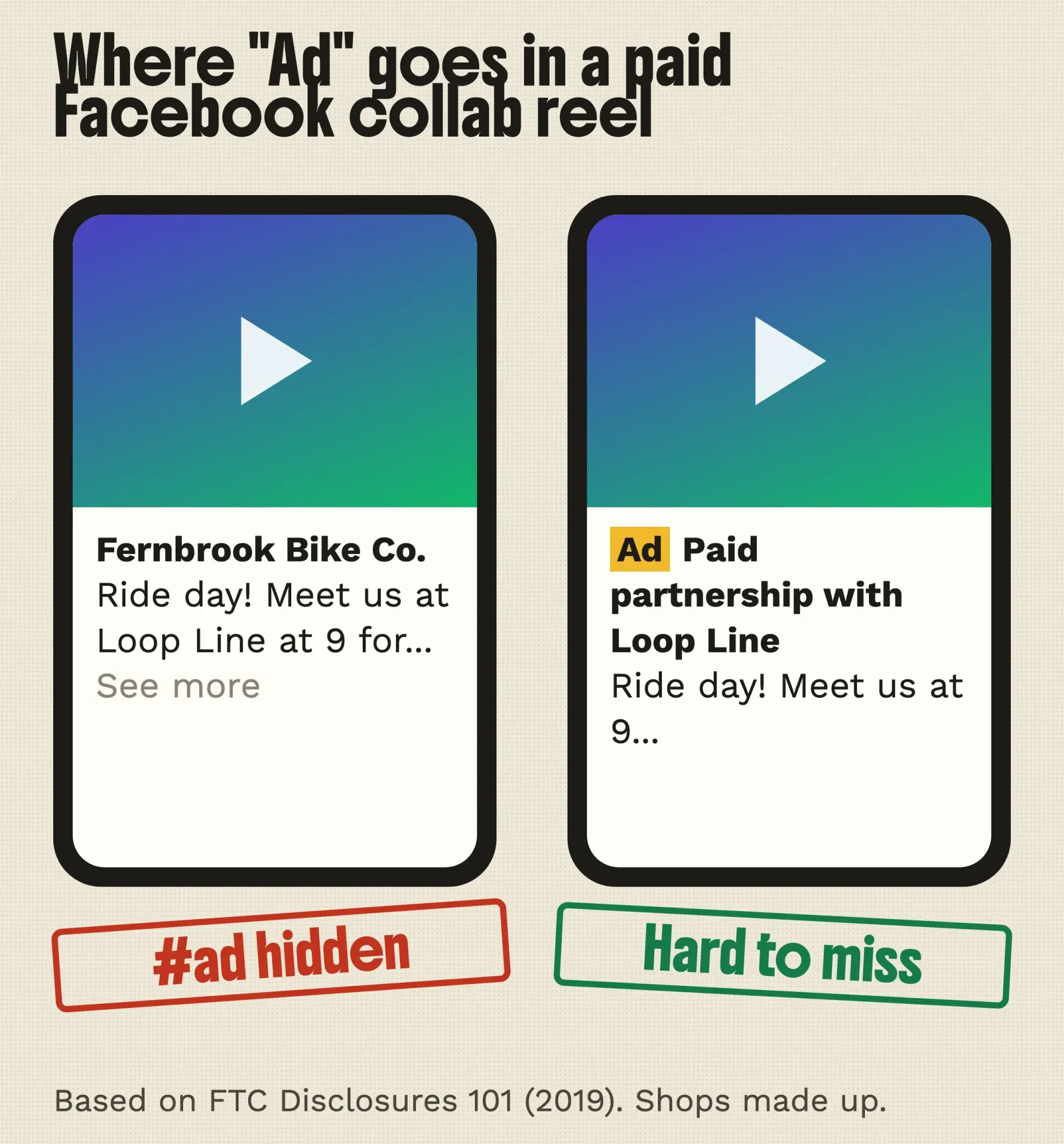 Diagram by DigitalTreed, based on the FTC's Disclosures 101 (November 2019). Example: both shops are made up.
In practice, a paid collab reel gets "Ad" or "Paid partnership with Loop Line" in the first line of the caption. Add a spoken mention in the video, and switch Meta's label on. Our guide to sponsored blog posts applies the same thinking to paid articles. If a brand wants to put ad money behind the reel, that's a separate setup called Facebook partnership ads.
Nobody on our team is a lawyer. Treat this section as our plain reading of the FTC pages on October 26, 2026, and ask a lawyer before a large deal or anything in a regulated industry.
Measure what each Page got out of it
Once the reel is live, the real question is who got what. Give each Page its own tracking link, and you can split the results without arguing about them.
Google's URL builder help page defines utm_source as the referrer, utm_medium as the marketing medium and utm_campaign as the product or promo. You can make a tagged link in about a minute with the DigitalTreed UTM builder, which is free. Use the same campaign name on both sides and a different utm_content for each business, like this link for Loop Line's caption:
https://example.com/saturday-ride?utm_source=facebook&utm_medium=social&utm_campaign=saturday_ride&utm_content=looplineThen read the visits in Google Analytics. If you're new to it, the GA4 setup and reports guide on our site shows where campaign traffic lands.
After two weeks, send your partner a short note with reel views, clicks on each link, and one thing you'd change. That note is usually what gets you a second collab.
Reach numbers inside Facebook are nice. Sales from your own link are the proof. Keep both.
Frequently asked
Can a Facebook collab reel use a popular song?
Be careful. Meta's Music Guidelines say, "Use of music for commercial or non-personal purposes in particular is prohibited unless you have obtained appropriate licences." A business reel is commercial, so use original audio or music you've licensed.
Can I schedule a collab post with a social media tool?
Some tools do it through Meta's API. Meta's guide caps that route at 30 API-published posts in a moving 24-hour period. The invite can go out before the reel is live; if the partner accepts first, the reel appears on their Page when you publish.
If you'd like help planning collabs with local partners, our social media team does this for small businesses. We earn money when you hire us. Whoever you pick, ask how they'll track results before you sign.
How we made this guide: on October 26, 2026, we read Meta's Reels Publishing API guide (July 30, 2026 version). Next came Meta's June 2025 newsroom post and four Facebook Help Center articles in English. We also read Meta's policy and creator pages, the FTC's two endorsement pages and the eCFR rule text. Then we compared Meta's guide with five ranking how-to pages and took a signed-out screenshot of the co-host help page.
We didn't send a real collab invite, because that needs a signed-in Page, so the in-app button names are marked as reported by tool guides. Meta's Business Help Center pages didn't load for us, and nothing here relies on them. Every source is linked at the fact it supports. Eram N., the author, reads this guide in full and approves it before it's published.
First published July 2023. Rewritten October 26, 2026: the old post gave general partnership tips, including a tag-to-enter giveaway that Meta's rules don't allow. This version checks what Facebook's collab feature really does and adds co-hosted events, tags, FTC disclosure and per-partner tracking.
Sources
- Meta for Developers: Reels Publishing API, updated July 30, 2026
- Meta Newsroom: Making it easier to create videos on Facebook, June 17, 2025
- Facebook Help Center: Add more hosts to your Facebook event
- Facebook Help Center: Create an event for your Facebook Page
- Facebook Help Center: Invite people to your Facebook event
- Facebook Help Center: What is tagging on Facebook and how does it work?
- Meta: Pages, Groups and Events Policies
- Facebook for Creators: Branded content
- Meta: Music Guidelines, effective March 26, 2024
- FTC: Disclosures 101 for Social Media Influencers, November 2019
- FTC: FTC's Endorsement Guides, What People Are Asking
- eCFR: 16 CFR 255.5, Disclosure of material connections
- Google Analytics Help: URL builders, collect campaign data with custom URLs
Comments
No comments yet. Start the conversation below.