
Quick answer
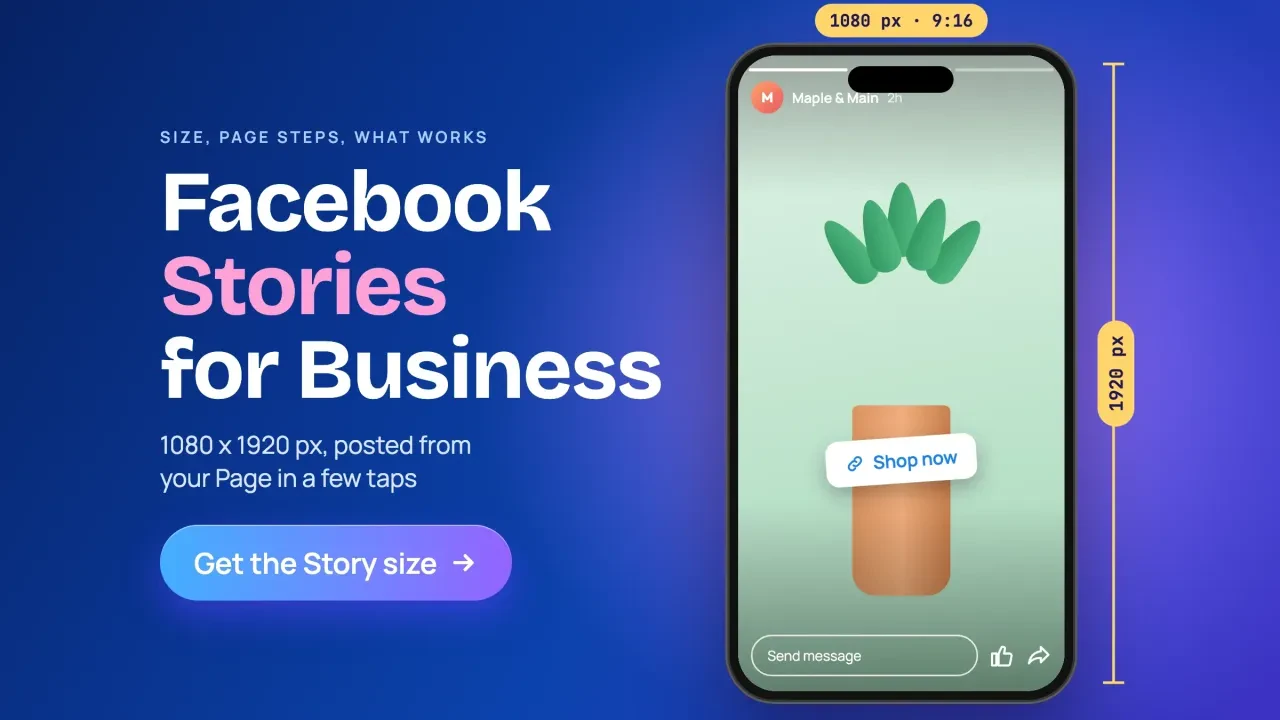
Facebook story size is 1080 x 1920 pixels (9:16) for a Page story, and Meta's Ads Guide asks for 1440 x 2560 for Story ads, as of October 2026. Keep words out of the top 14%, the bottom 35% and 6% on each side. That bottom third is where Meta's buttons sit, so text placed there gets covered.
A lot of the advice out there is stale.
Our own 2023 version of this page said 1080 x 1080 and two minutes of video. Both are wrong today. So on October 26, 2026, we read Meta's own spec pages and help articles side by side, and noted where they quietly disagree.
Key takeaways
- Page stories use 1080 x 1920 pixels; Story ads use 1440 x 2560.
- Keep words out of the top 14%, the bottom 35% and 6% per side.
- Page story videos can run up to 60 seconds.
- Ad videos over 15 seconds are split into separate Stories cards.
- Use Meta's royalty-free sounds, licensed music or no music on business stories.
Facebook story size is 1080 x 1920, but ads ask for more
A Facebook story is a photo, video or post you share that's only visible for 24 hours, per Meta's story help page.
The shape is always 9:16. The pixel count depends on whether you're posting or paying.
For a normal Page story, Meta's Stories API documentation recommends 1080 x 1920 pixels and sets a minimum of 540 x 960 for video.
That's a developer page, but it's the only place we found Meta printing organic story numbers. None of the help articles we read lists any.
Story ads are different. The Meta Ads Guide for Facebook Stories images recommends 1440 x 2560 pixels, JPG or PNG, up to 30 MB.
| Spec (as of October 2026) | Page story (free) | Story ad (paid) |
|---|---|---|
| Shape | 9:16 | 9:16, 1% tolerance |
| Recommended size | 1080 x 1920 px | 1440 x 2560 px |
| Smallest allowed | 540 x 960 px (video) | 500 px wide (image), 250 px wide (video) |
| File size | Photo up to 10 MB (API upload) | Image 30 MB, video 4 GB |
| Video length | Up to 60 seconds | 1 second to 3 minutes |
| How long it shows | 24 hours | Image: 8 seconds per view |
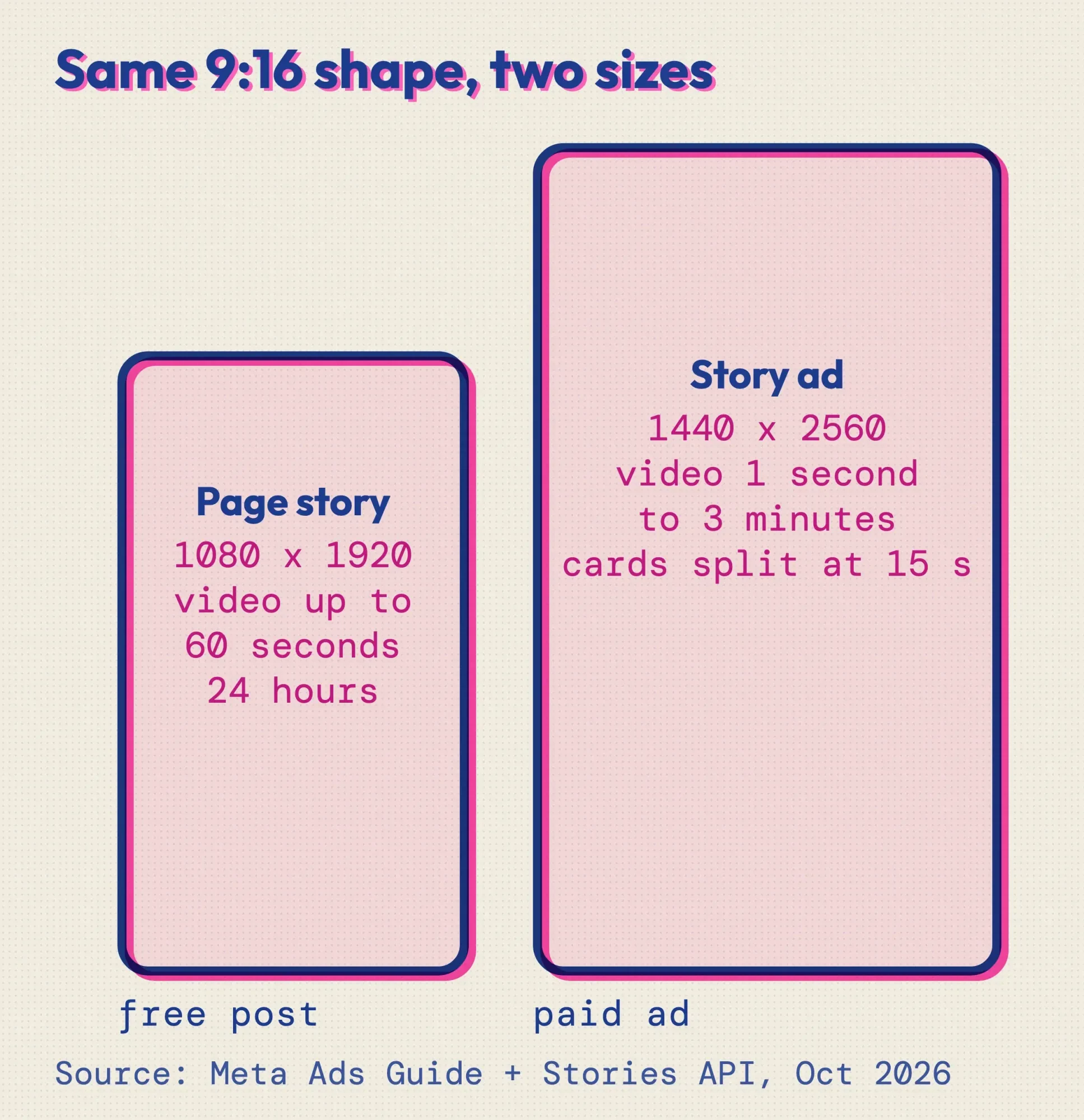 Source: Meta Ads Guide and Meta for Developers Stories API, October 2026. Drawn by us.
Bigger is safe.
A 1440 x 2560 file is still 9:16, so one file can serve as both a Page story and an ad, as long as the words stay inside the safe box. Going the other way still meets the ad minimums, but it falls below Meta's recommended 1440 x 2560.
For video ads, the Ads Guide lists MP4, MOV or GIF files up to 4 GB.
If you only remember five numbers, make it these:
- Every Page story stays up for 24 hours (Meta Page Stories help).
- Page story: 1080 x 1920 recommended, video up to 60 seconds.
- Story ad: 1440 x 2560 recommended, video from 1 second to 3 minutes.
- Image ads show for 8 seconds or until the viewer swipes.
- Video ads over 15 seconds are split into separate cards.
The safe zone leaves you a square, not a tall frame
That size is only half the job. Meta's Ads Guide says to leave "roughly 14% of the top and 35% of the bottom and 6% from each side" free of text, logos and key details. The reason it gives: buttons such as the call-to-action sit on top of those areas.
Two of the eight top size guides we read still say 250 pixels or 20 percent at the bottom.
That's the gap.
On October 26, 2026, we compared Meta's image-ad page, its video-ad page and the Stories API page, then worked the percentages into pixels ourselves.
On a 1080 x 1920 canvas, the top margin is about 269 pixels, the bottom is 672 and each side is about 65. What's left is a box roughly 950 pixels wide and 979 tall. It's almost a square, sitting a little above the middle of the screen.
On a 1440 x 2560 canvas, the same rule leaves about 1267 x 1306 pixels.
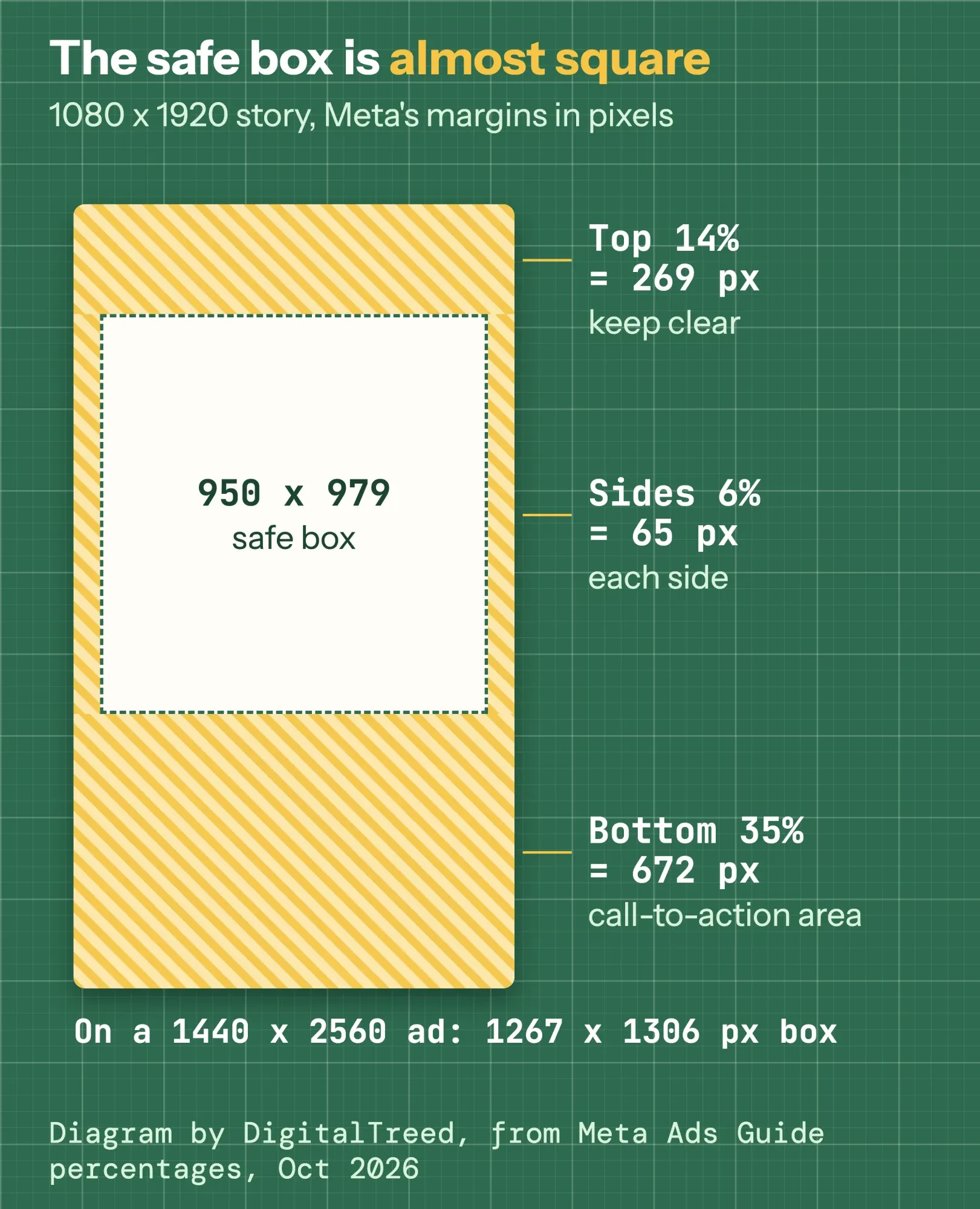 Diagram by DigitalTreed. Pixel values are our math on the Meta Ads Guide's 14%, 35% and 6% margins, October 2026.
So design your words like a square post. Then stretch the background, the color or the photo to fill the full 9:16 frame.
Meta's safe zone is written for ads.
We found no Meta safe zone for free Page stories, but they carry on-screen labels and buttons too, so we use the same box for both kinds of story.
If your product photo has a busy background, cut it out first with the background remover on our site and place it inside the box.
Need a 1080 x 1920 export? Most free editors can do it, and our free photo editor test shows which ones export without a watermark.
How to post a story from a Facebook Page
Once the file fits, posting takes a few clicks.
You need Facebook access to the Page, according to Meta's help page on sharing to a Page's story. A Page story goes to your Page's followers and is "available for 24 hours."
How to post a story on a Facebook Page from a computer
- Log in and click your profile photo in the top right.
- Click See all profiles, then pick your Page.
- From the Page's Feed, click Create story at the top.
- Click Create a photo story and upload a photo.
- Add text or a button, and drag the photo into place.
- Click Share to story.
Meta's computer steps cover photo stories only. For video, use the phone app.
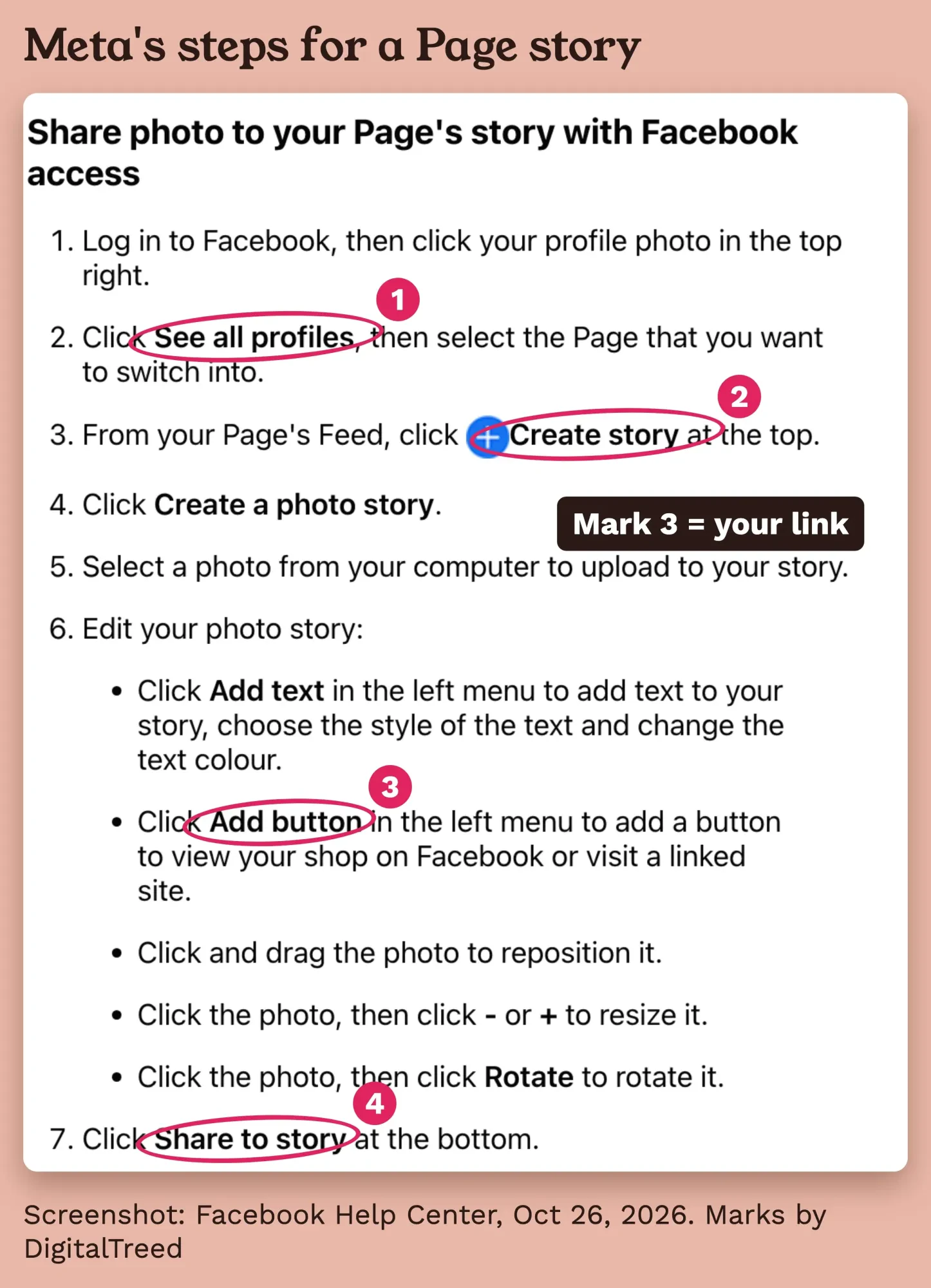 Screenshot: Facebook Help Center, "Share a photo or video to your Page's story on Facebook", taken signed out on October 26, 2026. Marks added by DigitalTreed.
Post a Page story from your phone
- Tap Menu or your profile picture.
- Tap Options and switch into your Page.
- Tap Create at the bottom, then Story.
- Pick a photo or video, or open the camera.
- Add stickers, text or effects if you want.
- Tap Done, then Share.
Those are Meta's iPhone steps. We didn't check the Android version, so its labels may differ.
People with Facebook and task access can build Page stories in Meta Business Suite instead, per the same Meta article.
And if you post personal stories too, check the audience before you share, because profile stories have their own Public, Friends and Custom settings.
How long can a Facebook story video be?
A Page story video can run up to 60 seconds, based on Meta's Stories API page.
The same page also mentions "3 to 90 seconds" in another spot. We'd trim to 60 seconds or less and skip the guesswork.
Story ads get more room. The video ad specs allow "1 second to 3 minutes," with a catch.
Anything over 15 seconds gets chopped into separate Stories cards.
Example: Lakeshore Scoops is a made-up two-person ice cream shop in Sheboygan, Wisconsin. It runs a 50-second video ad for its flavor of the week. Going by that 15-second rule, Facebook would show it as four cards: 15, 15 and 15 seconds, then a final 5. If the flavor's name only appears in the last 5 seconds, plenty of viewers will tap away before they see it.
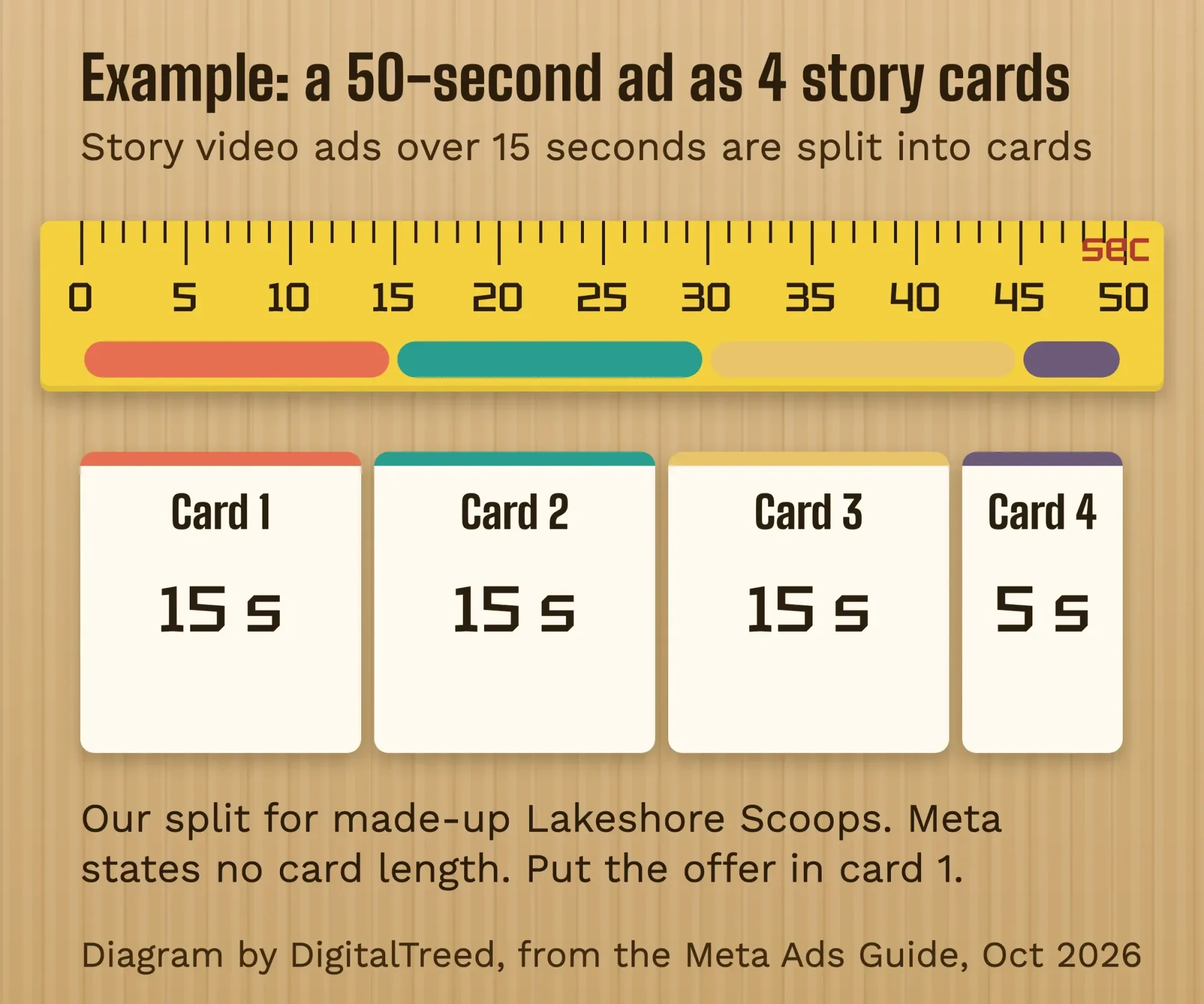 Diagram by DigitalTreed, October 2026: our example split, since the Meta Ads Guide says only that Story video ads over 15 seconds are split into cards. Lakeshore Scoops is made up.
So put the point in the first card. Then let each later card stand on its own.
Photos run on a clock too.
The image ad page says an image ad shows "for eight seconds or until the user swipes out." That's about one short line of text and a price.
Add a button so the story leads somewhere
That one line needs somewhere to send people.
On a computer, Meta's Page story steps include an Add button option that sends viewers to "your shop on Facebook" or "a linked site." It's the closest thing a Page story has to a link.
Tag that link before you paste it. A UTM link builder adds source and campaign tags, so story visits get their own line in your analytics.
This GA4 walkthrough shows where those visits appear.
Example: Lakeshore Scoops adds a button to its order page with utm_source=facebook and utm_medium=story.
Ads use Meta's own call-to-action buttons instead, such as "Shop now." Our guide to Facebook call to action buttons covers which one fits which goal.
Music on a business story needs care
Music is the part businesses get wrong most quietly. Meta's Music Guidelines say: "Use of music for commercial or non-personal purposes in particular is prohibited unless you have obtained appropriate licences."
The Instagram help page adds that "certain business accounts and certain types of posts do not have access to the library," so check which library you actually have before you add a track. Its alternative is Sound Collection, described there as "over 14,000 songs and sounds which are entirely royalty free."
Our rule is simple: Meta's royalty-free sounds, music you've licensed, or no music at all.
That's our practical reading of Meta's own rules, not legal advice. If a song matters to your brand, ask the rights holder or a lawyer.
What works in a business story
Specs get the story seen.
Content gets it watched. These are the habits we'd start with:
- Shoot vertical from the start, so nothing important is cropped.
- Put words inside the square box, and keep them short.
- Add captions to video for people watching on mute.
- Give each story one job: one product, one offer or one button.
- Post when your followers are online.
The video ad page marks both captions and sound as "Optional, but recommended." We read that as: plan for viewers who watch on mute.
For timing, our roundup of Facebook timing studies compares five data sets with Meta's own advice.
For things to put in a story, our Instagram Story ideas carry over well, and these Facebook post ideas for small businesses cover the feed.
Stories are one piece of a bigger plan. A Facebook Group for your business builds the regulars, collab posts with a partner business reach their followers, and seeing who shared your post tells you what spread.
Paying a creator to post about you is a different job. Run it as Facebook partnership ads, and make sure the creator labels it.
The FTC's influencer disclosure guide tells creators to "superimpose the disclosure over the picture" in Stories.
Check it worked, then keep the archive on
Before you share, open the preview on a phone. Can you read every word without squinting? Is anything hiding under a button or label?
After 24 hours, the story disappears from view.
Meta's Page Stories help lists an article on how to "Turn your Facebook Page's story archive on or off," plus one on insights for Page stories. On a personal profile, turning on the story archive means stories are "automatically saved when they disappear." We couldn't open the Page version, so check that the Page switch is on before you count on reusing old stories.
Watch those insights for a few weeks before you change anything. Then fold what works into your overall social plan.
Want someone else to run your stories? We plan, design and post them through the social media service we sell. We'd earn money if you hire us, so compare a few options first.
Frequently asked
What file types work for Facebook Stories?
For Story ads, Meta's Ads Guide accepts JPG or PNG images and MP4, MOV or GIF video. The Stories API page lists JPEG, BMP, PNG, GIF and TIFF photos, with MP4 recommended for video, as of October 2026.
How much text can a Facebook Story ad have?
The same Ads Guide page recommends 125 characters of primary text and a 40-character headline for Story ads, as of October 2026. Text inside the image itself should stay in the safe box.
Can a Facebook Page story stay up longer than 24 hours?
No. A Page story is visible for 24 hours, per Meta's Page Stories help. Meta also lists a story archive switch for Pages, but that article didn't open for us, so check the switch before you count on reposting an old story.
How we made this guide: on October 26, 2026, we read Meta's Ads Guide pages for Facebook Stories images and video and the Facebook Stories API documentation. We also read the Facebook Help Center articles on stories, Page stories, privacy and the archive. We took the screenshot above from a public help page while signed out, and worked out the safe-zone pixels ourselves. Each fact links to the page it came from.
Some of Meta's Page story help topics, such as insights, stickers and music, showed us only their titles, so we don't describe those screens. We didn't post a story or run an ad for this guide. Eram N., the author, reviews and approves every change before publication.
First published July 2023. Rewritten October 26, 2026: the old post listed a square 1080 x 1080 size and a 2-minute limit. This version gives Meta's current story and ad sizes, the safe zone in pixels, Page posting steps, video limits, the Add button, music rules and what to check after posting.
Sources
- Meta Ads Guide: Image ad specs on Facebook Stories
- Meta Ads Guide: Video ad specs on Facebook Stories
- Meta for Developers: Facebook Stories API
- Facebook Help Center: Create and share your story
- Facebook Help Center: Page Stories
- Facebook Help Center: Share a photo or video to your Page's story on Facebook
- Facebook Help Center: Change your story's privacy setting on Facebook
- Facebook Help Center: View your Facebook story archive
- Meta: Music Guidelines (effective March 26, 2024)
- Instagram Help Center: Access to the licensed music library on Instagram
- FTC: Disclosures 101 for Social Media Influencers (November 2019)
Comments
No comments yet. Start the conversation below.