
Quick answer
You can see who shared your Facebook post only when that share's audience includes you, as of October 2026. In the phone app, iGeeksBlog's July 2026 test found that list behind the share count. Friends-only shares, private groups and Messenger sends still add to the count, but they never show a name. That gap is normal, not a bug.
The first time you notice the mismatch, it's confusing.
If you've searched "who shared my Facebook post" because the count says 24 and the list shows 9, nothing is broken.
Facebook is doing what its privacy rules say. Here's where the list lives, why it's short, and what shares actually do for your reach.
Key takeaways
- You only see the shares whose audience includes you.
- Friends-only, private group and Messenger shares add to the count without names.
- Meta publishes no help steps for viewing the list of sharers.
- Page share totals live in Meta Business Suite Insights.
- Meta demotes posts that explicitly ask people to share them.
How to see who shared your Facebook post
The list of people who shared a post sits on the post itself, behind the share count. Meta publishes no steps for it. Here is the phone route iGeeksBlog reported on July 28, 2026:
- Open the post in the Facebook app on your phone.
- Tap the comment icon. The share count sits at the top right of the comment box, shown as the number followed by "shares."
- Tap that number. You'll see only the shares you're allowed to see.
- On iPhone, iGeeksBlog saw each repost with the sharer's caption.
iGeeksBlog ran that test on Android and iPhone, so your app version may lay it out differently.
In its test, the computer version showed only reactions, with no way to open the list of sharers. So if you're on a laptop and nothing opens, try the phone app before you assume the shares are gone.
Meta itself doesn't document this screen.
On October 26, 2026, we read 19 Facebook Help Center pages, covering its sharing, privacy, Page publishing and insights sections. Meta gives exact steps to see who reacted to a post: click the reaction icons below it, then pick a reaction, but we found no matching article for shares.
So any guide that calls the share-count tap "official" is going on what the app shows. It isn't going on Meta's help pages.
Labels move around between app versions.
If yours differ, tap the share count anyway.
Why is the share count bigger than the list of names?
The share count is bigger than the list because the count includes every share, and the list shows only shares whose audience includes you. Each share is a new post with an audience the sharer picks, and Meta's help page says "people you include in the audience of the post may see it."
A friend who shares your post to "Friends" shows it only to their friends, so if you're not one of them, their share never appears in your list.
Example: Sandhill Hardware is a made-up family hardware store in Bismarck, North Dakota. Its Page posts that snow shovels are back in stock. By evening the post shows 24 shares, but the list holds 9 names.
Those 9 shared it publicly. The other 15 shared to friends-only audiences, into private neighborhood groups, or by sending it in Messenger.
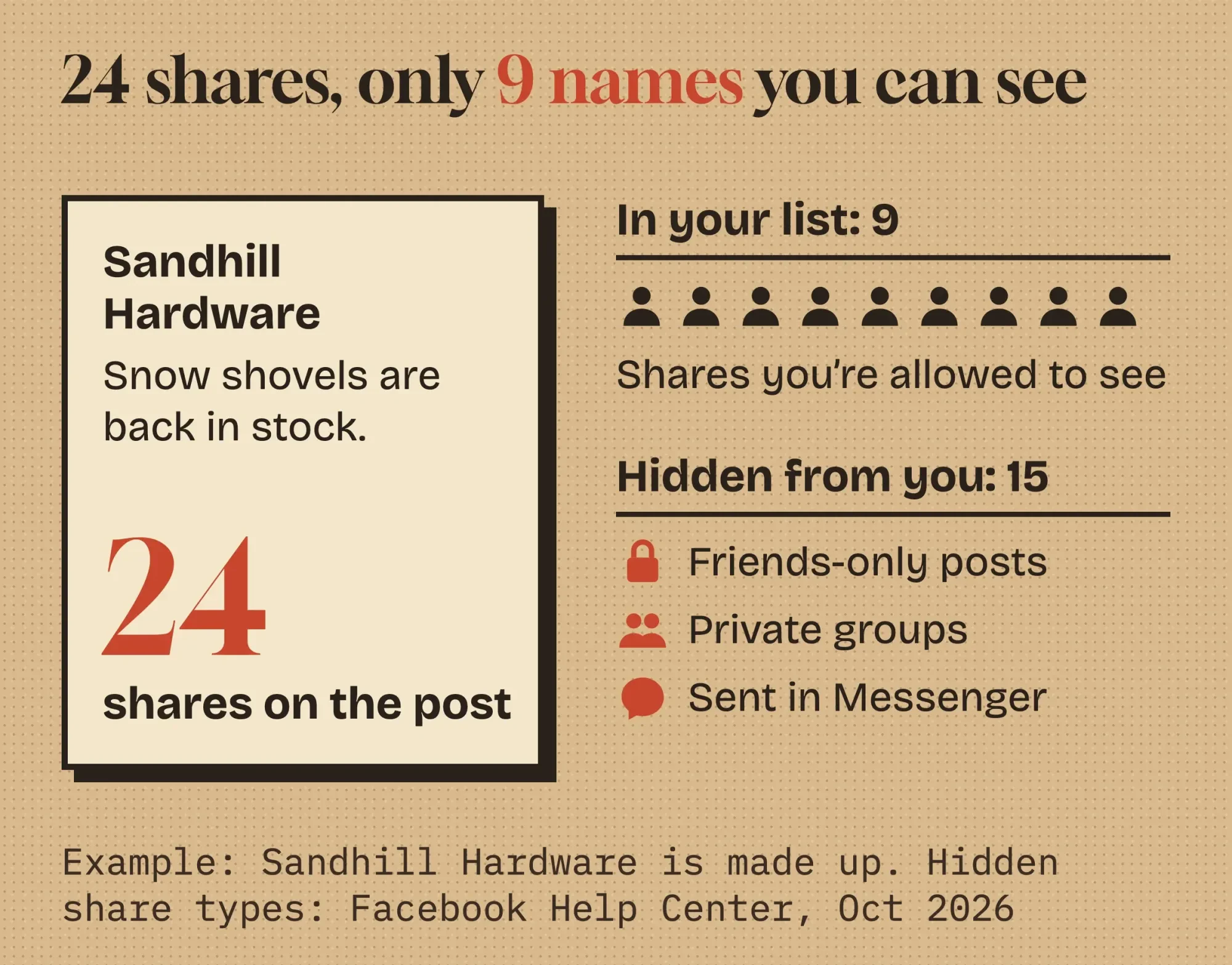 Diagram by DigitalTreed, October 2026, using our made-up Sandhill Hardware example. Hidden share types are from Facebook Help Center articles on sharing and groups.
Nothing in that split is a glitch.
Here's each kind of share and whether you can see it, based on Meta's own rules as of October 2026:
| Where the share went | Can you see who shared it? | Meta's rule |
|---|---|---|
| Public post on their profile | Yes | The sharer picked Public, so the share is open to you |
| Friends-only post | Only if you're their friend | Only the audience the sharer picks sees it |
| Locked profile | Only if you're their friend | Locking turns past public posts to Friends |
| Public group | Yes | Anyone can see what's shared there |
| Private group | Only if you're a member | "Only current members" see posts (group help) |
| Messenger | No | A private send, listed as "Send in Messenger" (share help) |
| Their story | Only if you're in their story audience | Gone if your original post is deleted (story help) |
No outside app can fill in the blanks either.
Each hidden share is hidden by the sharer's own privacy setting, so there's nothing for a tool to read without that person's permission, whatever the tool promises.
Meta's rule, in its own words
Meta's Who can see your posts article sets the ceiling. When someone clicks Share, "they aren't able to share your photos, videos or status updates" with anyone outside "the audience that you originally selected to share with."
That means a friends-only post can't be reshared to the public.
The audience can only stay the same or get smaller. Never wider.
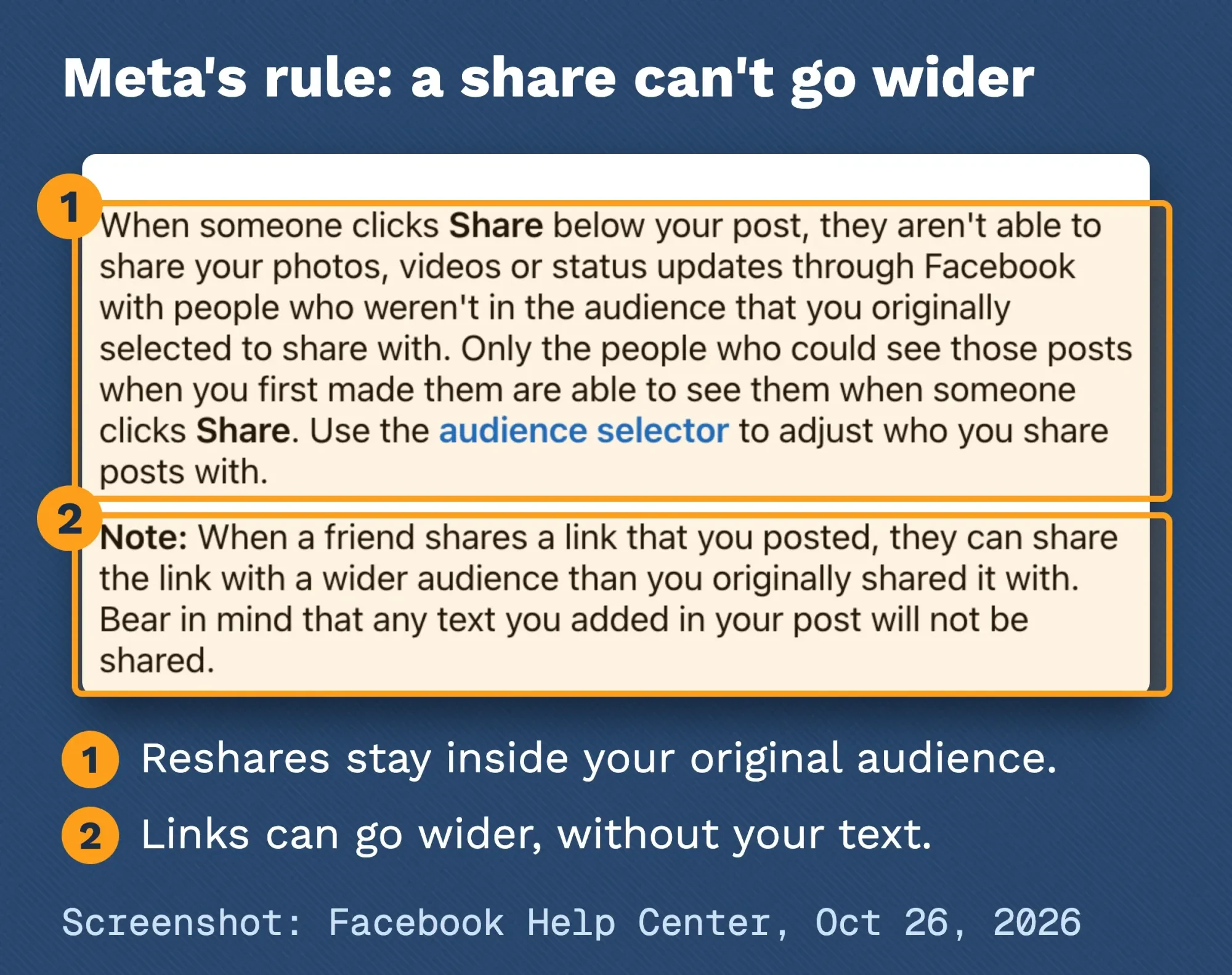 Screenshot: Facebook Help Center, "Who can see your posts on Facebook", taken signed out on October 26, 2026. Marks added by DigitalTreed.
Links are the exception, and it's easy to miss.
The same page says a friend who shares a link you posted "can share the link with a wider audience than you originally shared it with."
It adds that "any text you added in your post will not be shared."
Your caption above a link stays behind.
See who shared a Facebook Page post: totals live in Meta Business Suite
Pages follow the same audience rule. The names a Page can see still sit behind the share count, and the totals live in insights. Meta's Page post insights article gives the path, as of October 2026:
- Log in, click your profile photo in the top right, then click See all profiles and switch into the Page.
- Click Meta Business Suite in the left menu.
- Click Insights in the left menu.
- Under Content, click Overview to see your posts and stories.
Insights are there "as soon as the post has been published," according to that article.
Meta describes the numbers as post reach and post engagement.
Engagement includes shares. Meta's Graph API insights reference defines Page post engagement as people engaging "through reactions, comments, shares and more."
The same reference describes a viral reach metric that "counts reach when your Facebook content was shared as a repost or story."
One detail matters if you boost posts.
That reference also says "Reach from shares only counts towards organic distribution."
So if someone shares your paid post, the people who see their share land in your organic numbers, not your paid ones. Meta's reach article explains how organic, paid and post reach differ.
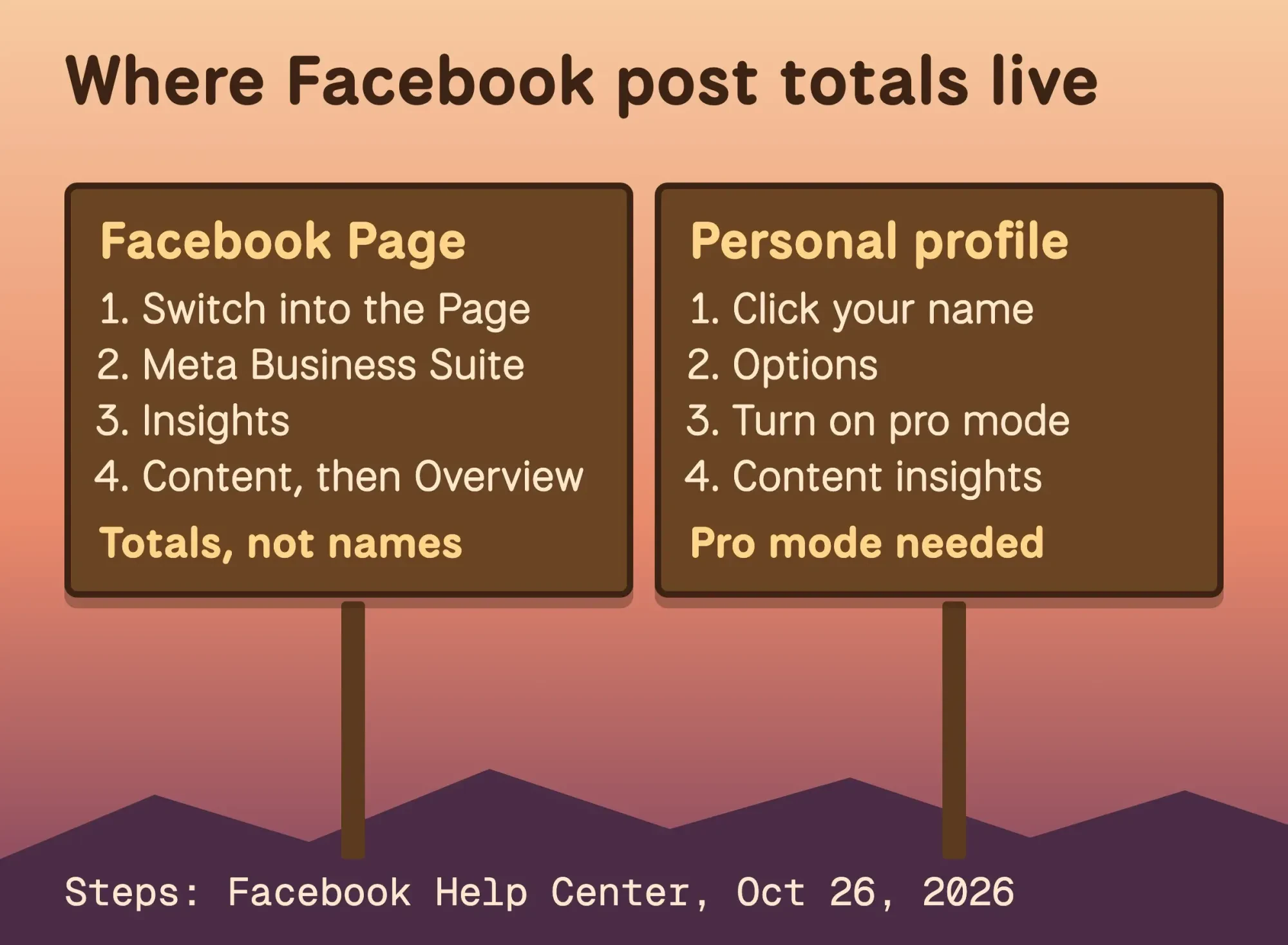 Diagram by DigitalTreed. Steps from Facebook Help Center articles on Page post insights and pro mode, read October 26, 2026.
Personal profiles don't get insights by default. Pro mode changes that.
Turning on pro mode lets you "view content and audience insights to track your progress," per Meta. Click your profile photo in the top right, then your name, then Options below your cover photo, then Turn on pro mode.
Some Pages won't see insights at all: Meta's Page Insights article notes that Community Pages don't have them.
You decide who can reshare when you pick the audience
The audience you pick is the real control. Choose it before you post if spread matters.
On a profile, use the audience selector on each post. Meta's audience article adds one twist: "When you post to another person's profile, that person controls who can see the post."
Pages are public by habit. They don't have to be.
Meta's Page audience article lets you pick Restricted under Privacy settings when you create a post in Meta Business Suite. Then "if someone shares the post, only people in the audience that you choose for the post will be able to see it."
That's useful for a members-only offer or an age-limited event.
It's the wrong setting for anything you want spread widely.
For link posts, put the key detail, like the price or the date, on the page you're linking to, since your caption won't follow the link.
What shares do for reach, according to Meta
Beyond who sees them, shares matter for reach because Facebook's ranking tries to predict them. Meta's Feed ranking overview lists the prediction "How likely you are to share the post," and calls predicting a share "a good signal of value for us to use."
It also lists the "Total number of times content from this Page has been shared by users" as a signal. Meta's Feed system card says the system scores "about 500 posts" and orders them by that score.
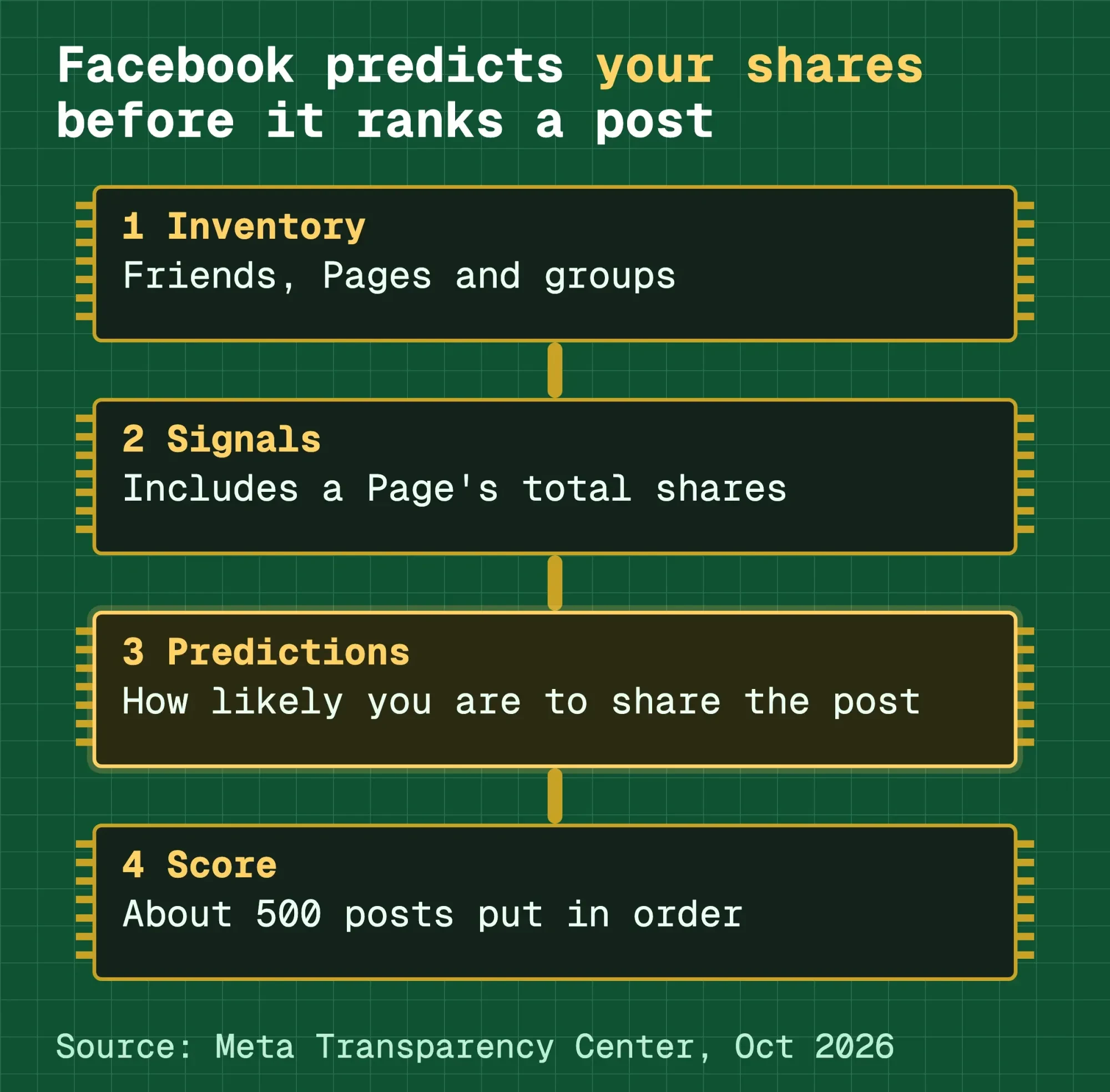 Diagram by DigitalTreed. Steps and quoted predictions from Meta Transparency Center Feed ranking pages, updated June 2025 and October 2026.
Private sharing counts too.
The recommendations system card predicts "How likely you will privately share a post on other platforms," using signals such as how often someone shares in Messenger.
You'll never see those shares in your list.
Asking for shares backfires, though.
Meta's engagement bait guideline covers "Posts that explicitly request engagement (such as votes, shares, comments, tags, likes, or other reactions)." Meta lists that under content it demotes, saying "we reduce its distribution in Feed for everyone."
Real calls to action, like raising money or sharing a petition, are excluded, and the difference shows in our walkthrough of CTA buttons and post wording on Facebook.
Contests have a stricter rule. It's blunt.
Meta's Pages policy says "Your promotion must not require or incentivise participants to share, repost, tag others." If you're planning a giveaway, our Facebook giveaway rules cover the rest.
Our take: treat shares as a sign that a post was worth passing on, not a number to chase. Meta publishes predictions, not weights, so no one outside Meta knows exactly how much a share counts. For the wider ranking picture, see our older piece on increasing reach on Facebook.
Earn shares instead of asking for them
That's also why the shares worth having are earned.
People share posts that help them look useful, kind or in the know. A few of our guides go deeper on each piece:
- What to post: Facebook post ideas for small businesses, grouped by goal.
- Short, timely posts: Facebook Stories for business, with sizes and Page steps.
- Regulars who pass things on: a Facebook Group for your business.
- A partner's followers: Facebook collab posts with another business or creator.
- Paid reach for a creator's post: Facebook partnership ads.
- When to post: our roundup of Facebook timing studies.
For link posts, check how the preview looks before you post. Our social media optimization guide explains why shared links sometimes lose their image.
Then tag the link with our UTM link builder. Clicks from every share carry the same tags, so they show up as Facebook traffic in your analytics reports even when the sharer's name is hidden.
Shares work best inside a plan. Our step-by-step guide to a social media strategy walks through one.
Want someone else to run the posting? That's what the social media service we sell does. We'd earn money if you hire us. Compare a few options first.
Frequently asked
Does Facebook notify you when someone shares your post?
Meta doesn't document share notifications. As of October 2026, we found no help center article on them. The reliable record is the share count on the post and, for Pages, post insights in Meta Business Suite, which give totals but no names.
Can I see who shared my post in Messenger?
No. "Send in Messenger" is one of the share options in Meta's sharing help, and it goes to a private chat. iGeeksBlog's test found such sends still count toward the total, but no name appears.
Can a Facebook Page see more about sharers than a profile?
Not names. A Page gets totals in Meta Business Suite insights, but the same audience rule from Meta's help page applies, so a friends-only share stays hidden from the Page too.
How we made this guide: We checked each step Meta documents against its help page on October 26, 2026. Eram N., the author, reads this version ahead of publication. That day we read 19 Facebook Help Center pages and 8 Meta Transparency Center, policy and developer pages in their US English versions. We found no help article that documents a share list. The screenshot of Meta's sharing rule comes from its public help page, captured without logging in. Each source sits next to the line it supports.
No Facebook account was used for this guide, and no live share list was checked. The phone steps are iGeeksBlog's July 28, 2026 report, and your app version may differ.
First published July 2023. Rewritten October 26, 2026: the old post covered a general "share algorithm" with an outdated timeline. This version covers where to see who shared a post on a profile or Page. It also explains why some shares stay hidden, how audience settings limit reshares, and what Meta says shares do for reach.
Sources
- Facebook Help Center: Who can see your posts on Facebook
- Facebook Help Center: Choose who can see your post on Facebook
- Facebook Help Center: Control who can see your Page's posts on Facebook
- Facebook Help Center: Share a post that you see in your Feed on Facebook
- Facebook Help Center: Share a Feed post to your story on Facebook
- Facebook Help Center: Who can see a post in their Feed about something I share?
- Facebook Help Center: Differences between public and private Facebook groups
- Facebook Help Center: Lock your Facebook profile
- Facebook Help Center: See insights for your Facebook Page posts
- Facebook Help Center: See Page Insights on Facebook
- Facebook Help Center: Learn the difference between organic, paid and post reach
- Facebook Help Center: Turn pro mode on or off for your Facebook profile
- Facebook Help Center: See who's reacted to your Facebook post or comment
- Meta Transparency Center: Our Approach to Facebook Feed Ranking (updated June 11, 2025)
- Meta Transparency Center: Facebook Feed Recommendations AI system (updated June 24, 2026)
- Meta Transparency Center: Facebook Feed AI system (updated October 6, 2026)
- Meta Transparency Center: Types of content we demote (updated July 2, 2025)
- Meta Transparency Center: Engagement Bait
- Meta: Pages, groups and events policies (Promotions)
- Meta for Developers: Graph API Page insights reference
- iGeeksBlog: I tried to see who shared my Facebook post (updated July 28, 2026)


Comments
No comments yet. Start the conversation below.