
Quick answer
To index backlinks, make sure each linking page is live, open to Google and holds a real HTML link to you. Then wait. Google finds links by crawling pages it already knows, and it gives no set timeline for that. You can't request indexing for a site you don't own, and Google doesn't sell faster crawling.
You earned a link from a local blog or your chamber of commerce, and you want Google to see it. This guide shows how to index backlinks the honest way. If you're new to links, start with our guide to what a backlink is.
Most pages that rank for this topic are written by companies that sell indexing services. We used Google's own documents instead, plus a test we ran on October 22, 2026. Google says so on its How Search works page: it "doesn't accept payment to crawl a site more frequently."
Key takeaways
- Google finds a backlink by crawling the page that holds it. Your job is to make sure that page can be crawled and indexed.
- In our test of 5 linking pages, only 1 link could be found. A noindex tag, a noindex header, a fake link and a 404 page blocked the rest.
- A meta tag check alone missed the noindex header. Check both the page code and the HTTP header.
- The Indexing API only works for job posting and livestream pages on sites you own. It is not a backlink tool.
- Google announced the end of its sitemap ping endpoint on June 26, 2023, and the shutdown is complete. Ping services do nothing for Google today.
How does Google find a backlink?
A backlink is a link on someone else's page. Google finds new pages when it "extracts a link from a known page to a new page," per its guide to how Search works. So Google sees your backlink only after it crawls the linking page.
That page also has to use a normal link. Google's link best practices say it can generally crawl a link only if it's an <a> element with an href attribute. A button that runs JavaScript doesn't count.
So "indexing a backlink" means getting the linking page crawled and indexed. Most of that is in the other site owner's hands, not yours.
Key facts about backlink indexing
- Crawling "can take anywhere from a few days to a few weeks," per Google's recrawl help page.
- Google announced the end of its sitemap ping endpoint on June 26, 2023, per its Search Central blog.
- The Indexing API allows 200 publish requests a day per project by default, as of October 2026 (Google quota page).
- Search Console's Links report tables stop at 1,000 rows, per its help page.
- In our October 22, 2026 test below, 1 of 5 linking pages passed every check.
How long does it take Google to index a backlink?
Google publishes no timeline for finding a link. Even a requested recrawl "can take anywhere from a few days to a few weeks," per its page about asking Google to recrawl URLs. The same page says a request "does not guarantee" inclusion in search results "at all."
There's a second limit. Only an owner or full user of a Search Console property can request indexing in the URL Inspection tool. You can't ask Google to recrawl a blogger's page, because you don't own their site.
The same page says that asking again and again "won't get it crawled any faster." Its Page indexing report help says not every page gets indexed. "Crawled - currently not indexed" pages need no resubmission, per the same page.
Why do some backlinks get found faster?
Google doesn't publish a list of speed factors. Its How Search works guide says Googlebot "uses an algorithmic process to determine which sites to crawl, how often, and how many pages to fetch."
Google's crawl budget guide says not every crawled page gets indexed. It adds that "URLs that are more popular on the Internet tend to be crawled more often."
Our take: a link on a busy news site's home page will likely be found sooner than one deep in a small blog's archive. That is also why the fixes below focus on the linking page.
Is your backlink indexed yet?
Search Google for site: plus the exact linking URL. Google's site: operator page warns that an indexed URL showing up this way is "not guaranteed." So a blank result is a hint, not proof. For links to your own site, the Search Console Links report is the better check.
Open that report a few weeks later. Google's Links report help says it shows "a sample" of links, not a full list. Its tables stop at 1,000 rows.
To check many links at once, use the export on the Links report's main page. Its "Latest links" file lists the most recently found links to your site, up to 100,000 rows.
The same help page says that file is sorted by discovery date. If your new link is in it, Google has found it. Our Search Console guide to the Links report shows where it sits.
Our take: check once at 2 weeks and once at 6 weeks, then stop checking that link.
How do I check that a backlink can be indexed?
You can't force indexing, but you can check whether anything blocks it. All 5 checks are free and take about 5 minutes per link. Start with our free meta tag analyzer, which reads the page's title, robots tag and canonical tag.
- Open the linking page. Load it in a private browser window. If it asks for a login, Google can't see it either.
- Check the status code. The page should answer 200 OK. A 404 or 410 means the page, and your link, are gone.
- Check the robots meta tag. Look for noindex in the robots meta tag. A noindex page is dropped from Google, links and all.
- Check the X-Robots-Tag header. A server can send noindex in an HTTP header instead of the page code. A meta tag check won't show it.
- Find the real link. View the page source and search for your domain. You want an <a href> link. Note any rel value, such as nofollow or sponsored.
Google's robots meta tag documentation covers both places a noindex can live: the meta tag and the X-Robots-Tag header. Step 4 is the one the top guides we read skip.
What we found when we tested 5 linking pages
On October 22, 2026, we built a small fictional local site on our own computer. It had 5 pages that link to a made-up bakery. Each page had one common problem, except one clean page.
We ran the code behind our free noindex tag checker and our meta tag analyzer on all 5 pages. Tool code versions: the noindex checker from October 7, 2026 and the meta tag analyzer from October 20, 2026. We fetched the pages ourselves, because our live tools refuse local addresses by design. The image shows the output.
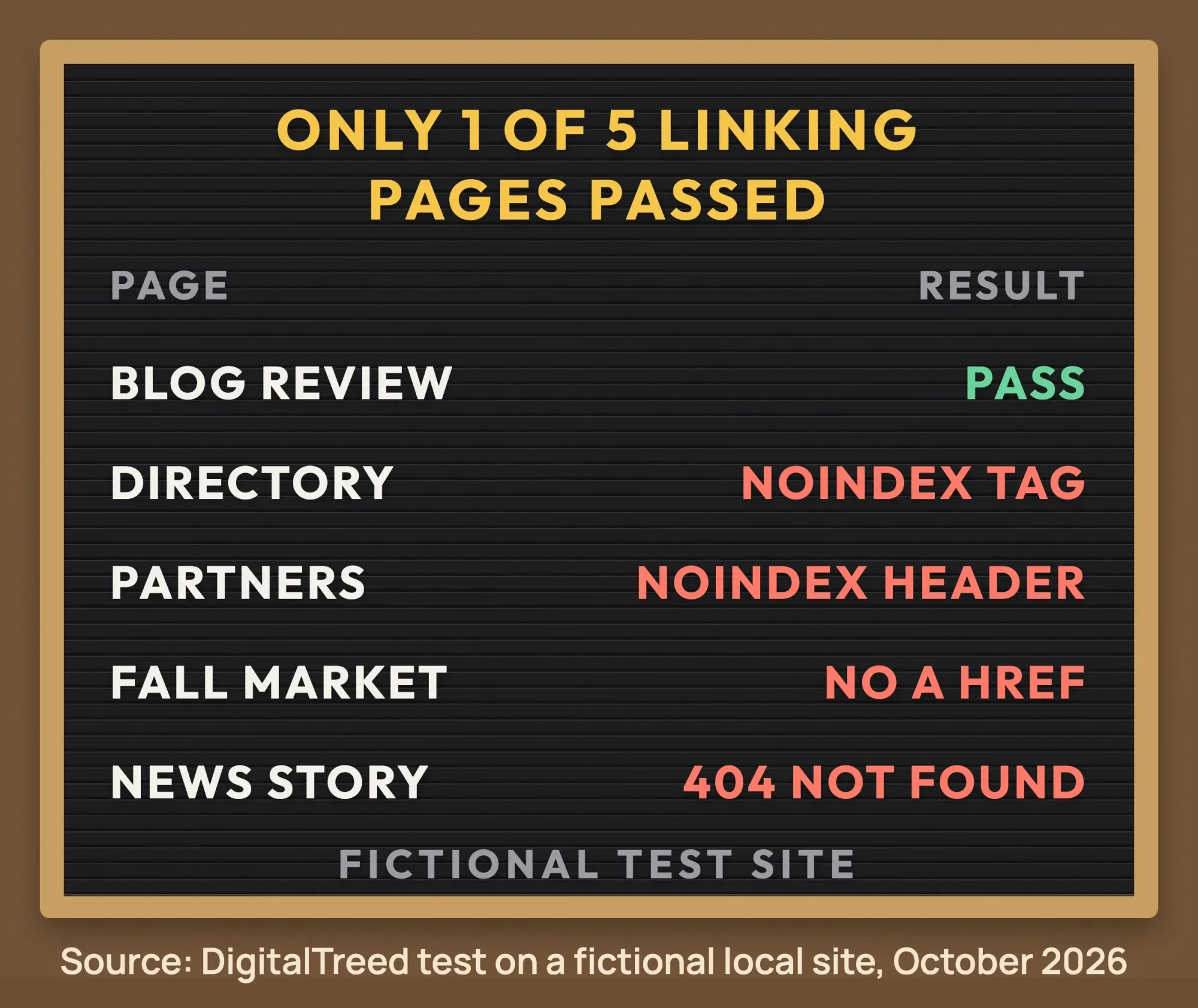 Source: DigitalTreed test on a fictional local site, October 2026.
- The blog review page passed: 200, indexable, a self canonical and a real <a href> link.
- The business directory page had noindex in its robots meta tag.
- The partners page looked clean to the meta tag check. The noindex sat in the X-Robots-Tag header, and only the header check caught it.
- The events page "linked" with a JavaScript click on a span. There was no <a href>, so Google has no link to follow.
- The news page returned 404, so there was nothing to crawl.
Our take: 4 of 5 pages failed on things no paid service can fix. Only the site owner can remove a noindex, add a real link or bring a page back.
Why isn't my backlink indexed?
Usually the linking page is blocked, gone or holds no real link, so Google never reaches your backlink. Most causes sit on the linking site. Check the page's status first with our free HTTP status checker, then work down this list.
- The page has noindex. Google drops it "regardless of whether other sites link to it," per its noindex documentation.
- Robots.txt blocks the page. Then Google never even sees a noindex rule, according to the same page.
- The page is gone or redirects somewhere else.
- The link isn't a real <a href> link.
- The page is new, thin or buried deep in the site, so Google hasn't crawled it or chose not to index it.
Crawl and index controls are covered in more depth in our advanced SEO guide. Google hasn't said whether a link on a page it crawled but didn't index still counts. We don't know, so we won't guess.
How can I help Google find the linking page?
The best fix is to make the linking page easier to reach. These steps are free and follow Google's rules. Ask the linking site's owner for a few small fixes, and share the page with real customers, not link networks.
- Ask the site owner to fix any noindex or broken link you found. Send them the exact URL and what you saw.
- Ask them to link to the page from their home page, a category page or a roundup post.
- Ask them to keep the page in their XML sitemap.
- Share the page where real customers will see it, such as your newsletter. Google hasn't said that shares speed up indexing, so do it for people.
For pages on your own site, you have more control. Request indexing in URL Inspection, as our Google Search Console guide shows. On WordPress, our post on getting a new WordPress site indexed walks through sitemaps.
Emailing site owners and chasing fixes takes time. Our SEO team can audit your links and handle the outreach. (DigitalTreed sells this service.)
Does the Google Indexing API work for backlinks?
No. Google's Indexing API quickstart says the API "can only be used" for pages with JobPosting or BroadcastEvent in a VideoObject. In plain words: job posts and livestream videos. It won't help with backlinks, because those sit on sites you don't own.
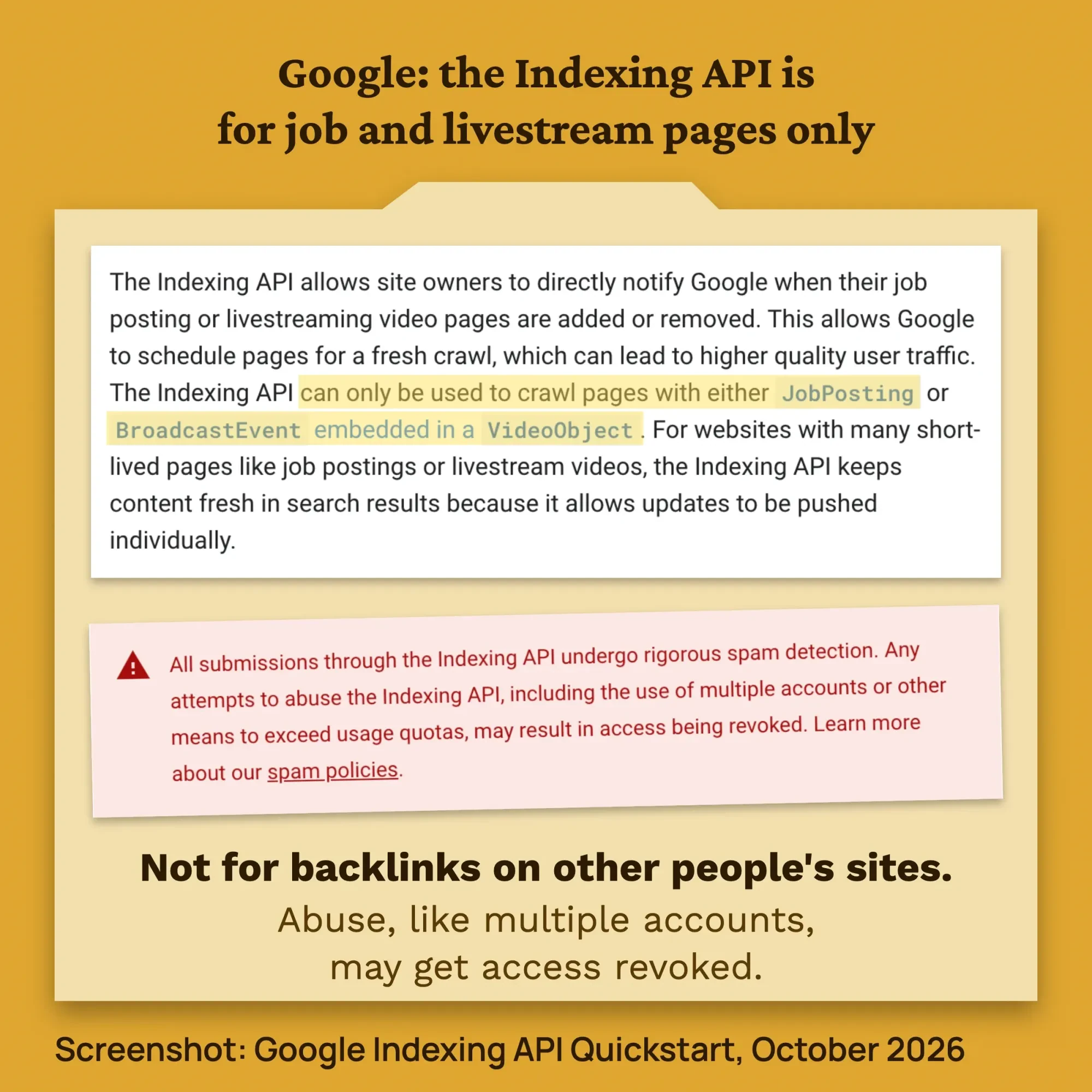 Screenshot: Google Search Central, Indexing API Quickstart, October 2026.
You also have to verify the site in Search Console. And Google's Indexing API usage rules say: "Don't circumvent our submission limits, such as by using multiple accounts."
It's free to use, with a default of 200 publish requests a day per project, as of October 2026, per Google's quota and pricing page. Our take: a service that pushes backlinks on other people's sites through it is breaking Google's rules, or not really using it.
Do ping services still work?
Not for Google. On June 26, 2023, Google announced the end of its sitemap ping endpoint. It said most of these unauthenticated submissions led to spam, and the endpoint would stop working in 6 months. Today, pinging Google does nothing for your backlinks.
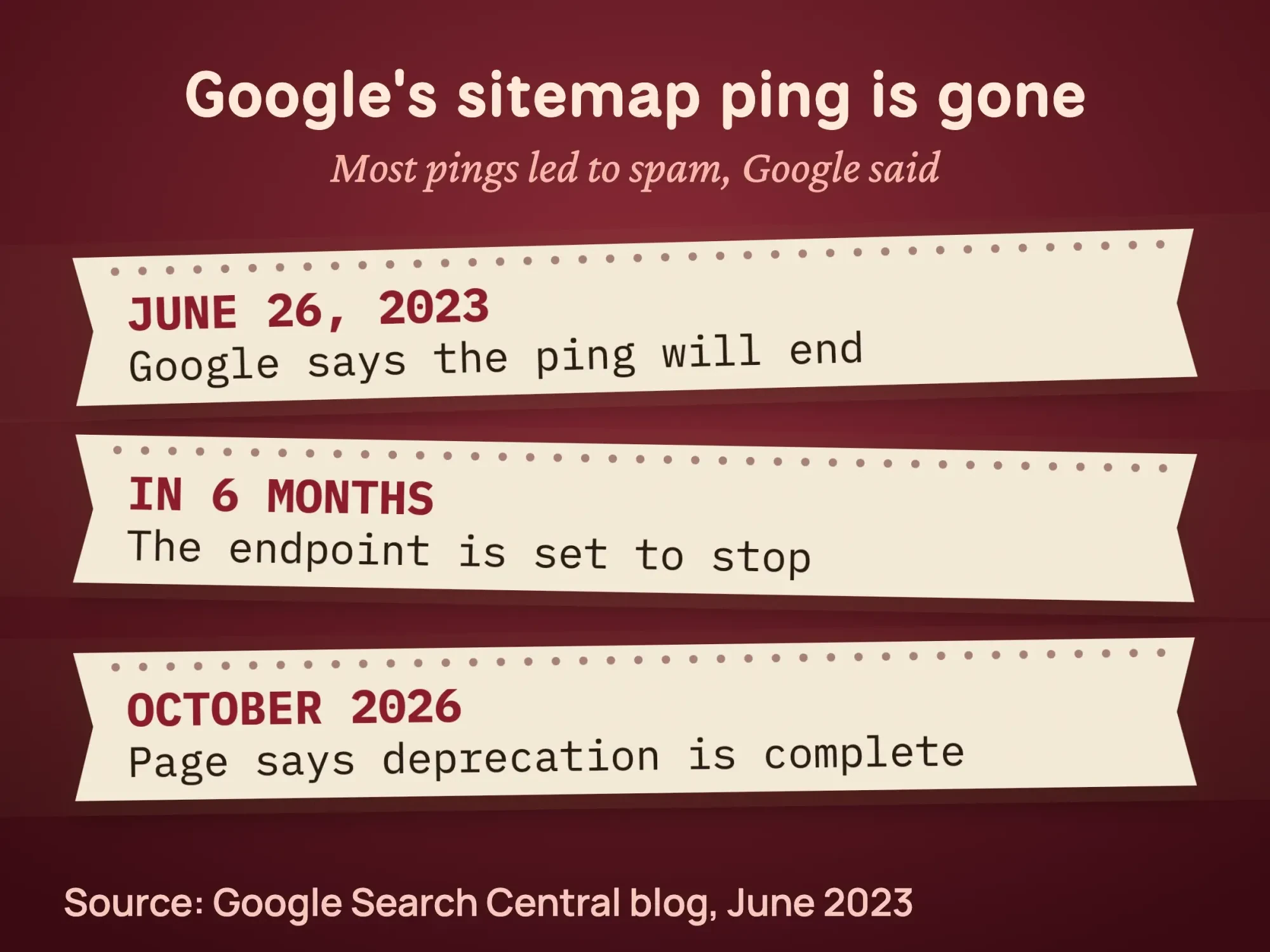 Source: Google Search Central blog, June 2023; page checked October 2026.
That blog post now carries a note that the deprecation is complete. You can still submit sitemaps through robots.txt and Search Console.
IndexNow is a different system, and it doesn't include Google. Its list of search engines names Bing, Yandex, Seznam, Naver, Yep, the Internet Archive and Amazonbot. It also works only for sites you own, per the IndexNow documentation.
Can I put my backlinks in my own sitemap?
Some guides suggest listing other sites' pages in a video sitemap on your own site. Google's rules don't support that.
Its sitemap guide allows other sites' pages in two ways. You must have "verified ownership of all the sites" in Search Console, or edit each site's robots.txt file. You can't do either on a blogger's site, so that path is closed too.
Should you pay for a backlink indexing service?
Our take: no. These services don't explain how they work, and Google's rules leave them few honest options. Google says it "doesn't accept payment to crawl a site more frequently," per its How Search works guide. The checks and fixes in this guide are free.
Google's link spam policy lists "using automated programs or services to create links to your site" as an example. Our take: an indexer that builds links to the linking page to get it crawled fits that example. The ones we looked at don't say how they work.
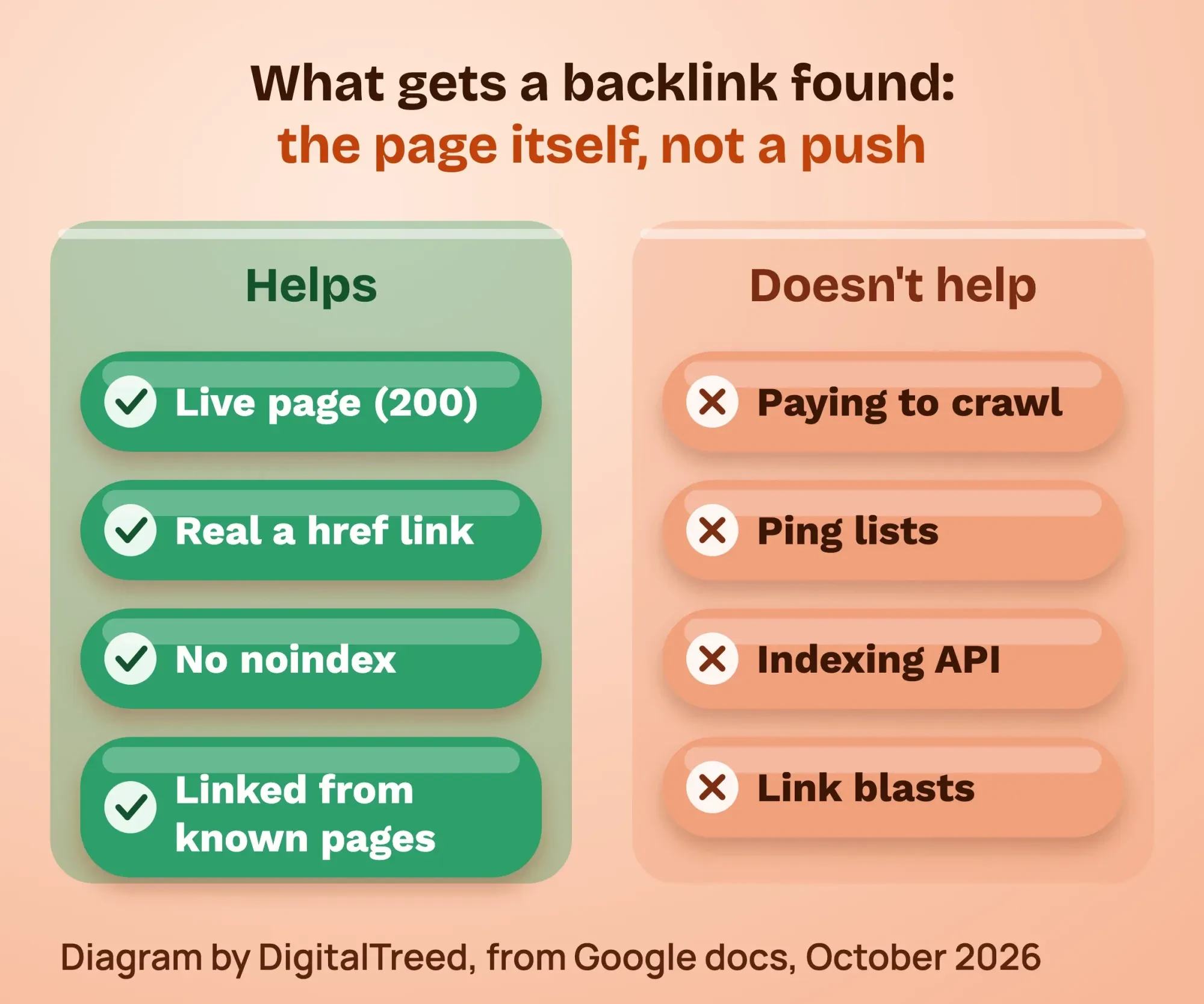 Diagram by DigitalTreed, based on Google Search Central docs, October 2026.
Before you pay for any "indexing" service, ask 4 questions:
- Does it say exactly how it works?
- Does it build links to the page that links to you?
- Does it promise a rate or a deadline? Google promises neither.
- Would the method still work if Google knew about it?
The same policy covers paid links. Paying for a link that passes ranking credit is link spam, unless the link has rel="sponsored" or rel="nofollow," per Google's guide to qualifying outbound links. Our off-page SEO checklist covers which links are worth earning.
Paid posts can also fall under US advertising rules. The FTC's Endorsement Guides FAQ says a paid mention can be covered by the FTC Act. This is general information, not legal advice; check with an attorney for your situation.
Do tier 2 links help backlinks get indexed?
No. Our take: tier 2 link building usually breaks Google's link spam policy. Tier 2 links are links built to the page that links to you, so Google finds that page sooner. Some guides use Web 2.0 blogs or bookmark sites for this.
Google's link spam policy names "low-quality directory or bookmark site links" as one example. It defines link spam as "creating links to or from a site primarily for the purpose of manipulating search rankings."
Our take: links built only to push another link fit that definition. Skip Web 2.0 posts and bookmark blasts.
There's one honest version. If a local paper writes about you, link to the story from your own "In the news" page, where customers will see it. That page is yours, so you can request indexing for it in URL Inspection.
Example: a bakery checks its 5 new links
Example: Harbor Street Bakery is a made-up shop in Portland, Maine. In one month, it earns 5 links. They come from a food blog, a business council, a partners page, a fall market and a local news site.
The owner runs the 5 checks above. The pages match the 5 pages in our test. Only the food blog review is ready to be found.
The owner emails the business council about its noindex and the market organizer about its JavaScript link. The news site had taken its story down, so the owner asks if it can come back. An indexer could fix none of these.
Should you check every backlink?
No. Check the links that matter: local news, your industry group, real reviews. Don't chase profile and directory links. Google lists "low-quality directory or bookmark site links" as link spam on its spam policies page. For links worth the effort, see the link building chapter of our intermediate SEO guide.
If you're doing your own SEO, add a link check to the routine in our guide to your first SEO audit. Once a quarter is enough for most small businesses.
Frequently asked
Do backlinks need to be indexed to count?
Google must crawl the linking page to see the link. Google hasn't said whether a link on a crawled but not indexed page counts. Make the page crawlable and indexable, then let it be.
Does an indexed backlink help my rankings?
Not by itself. Google "uses links as a signal when determining the relevancy of pages," per its link best practices. But it "doesn't guarantee that it will crawl, index, or serve your page," per its How Search works guide. Our SEO for beginners guide explains crawling, indexing and serving.
Can I request indexing for a page I don't own?
No. Only an owner or full user of a Search Console property can request indexing for its URLs. Ask the site owner instead.
Is the Google Indexing API a backlink indexer?
No. Google limits it to job posting and livestream video pages on sites you have verified.
Does IndexNow help with Google?
No. Google isn't on the IndexNow list of search engines. It can help Bing find pages on your own site, as our Bing Webmaster Tools guide explains.
Should I disavow backlinks that never get indexed?
No. Google hasn't said that an unindexed link does any harm. Save the disavow tool for spammy links you can't get removed.
Your next step
Pick your 3 most important backlinks. Run each linking page through the 5 checks above, and email the site owner about anything you find.
If you'd rather have someone check your links and earn better ones, our SEO services cover it, and you get a fixed quote first.
How we made this guide: it's built from Google Search Central documentation, the Search Console Help Center, the IndexNow site and the FTC. On October 22, 2026, we tested our own meta tag and noindex checker code on a fictional local site. We also took the Indexing API screenshot. We checked every number against the source linked next to it the same day. Updated October 23, 2026: added why links get found faster, a Latest links export check, tier 2 links, the sitemap trick and a rankings FAQ. We also moved the indexed check up. Updated October 25, 2026: added Key facts, direct answers under each question, our tool code versions and our link building chapter.
First published March 27, 2025. Rewritten October 22, 2026: Google's own rules on crawling, the Indexing API and ping, our 5-page test, free checks, and no paid indexer tips.
Sources
- Google Search Central: In-depth guide to how Google Search works
- Google Search Central: Ask Google to recrawl your URLs
- Google Search Central: Link best practices
- Google Search Central: Robots meta tag and X-Robots-Tag
- Google Search Central: Block indexing with noindex
- Google Search Central: site: search operator
- Google Search Central: Crawl budget management
- Google Search Central: Build and submit a sitemap
- Google Search Central: Indexing API Quickstart
- Google Search Central: Using the Indexing API
- Google Search Central: Indexing API quota and pricing
- Google Search Central blog: Sitemaps ping endpoint is going away, June 26, 2023
- Google Search Central: Spam policies, link spam
- Google Search Central: Qualify your outbound links
- Search Console Help: Links report
- Search Console Help: Page indexing report
- IndexNow: participating search engines
- IndexNow: documentation
- FTC: Endorsement Guides, what people are asking
Comments
No comments yet. Start the conversation below.