

Quick answer
An SEO audit for small business is a check of whether Google can find, read and show your pages, and what holds them back. For a 10 to 30 page site, it takes one afternoon with free tools: Search Console, a site scan, PageSpeed Insights and your Business Profile.
You don't need an agency for your first SEO audit. Google's own page Do you need an SEO? says a small local business owner "can probably do much of the work yourself".
This guide gives you the checks in the order that matters for a small site. On October 22, 2026, we built a small fictional bakery site with typical beginner mistakes and tested it with Google's free Lighthouse tool. Below is what it caught.
Key takeaways
- Start with Search Console. It is free and it is the only place that shows how Google itself sees your pages.
- Do 7 checks in order: indexing, a site scan, titles, speed, internal links, your Business Profile, then backlinks.
- Google sets no word count and no title length rule. Unique, descriptive titles matter more than character counts.
- Track rankings free in the Search Console Performance report. Average position is your top spot for each search, averaged across searches, so watch the trend.
- On our fictional test site, Lighthouse caught a missing description, vague link text and images with no alt text in under a minute.
What is an SEO audit, and can you do it yourself?
An SEO audit is a list of what stops your pages from showing in Google, sorted by how much each problem costs you. Yes, you can do one yourself, and you don't need an agency. It covers 3 questions: can Google find the page, can it read it, and does it answer the search better than the next result?
Google recommends starting with its SEO Starter Guide, and our beginner’s guide to how search works helps if SEO is new to you. If you later hire someone for an audit, Google says to "only grant read access to Search Console" at that stage. Our guide on how to hire an SEO freelancer lists the roles to give and the questions to ask. It also says, in bold, "No one can guarantee a #1 ranking on Google."
Key facts to know before your SEO audit
- Google's Core Web Vitals targets are LCP within 2.5 seconds, INP under 200 milliseconds and CLS under 0.1.
- PageSpeed Insights field data comes from real Chrome users over a 28-day period.
- After you click Validate fix, the Page indexing report help says validation typically takes up to about two weeks.
- The Search Console Performance table shows at most 1,000 rows, and new data usually takes 2 to 3 days, per Google's data limits page.
- The FTC's Consumer Reviews and Testimonials Rule took effect October 21, 2024.
What does this audit cover, and what does it leave out?
People use "SEO audit" for several jobs. This guide is the first, broad pass for a small site. Each deeper audit has its own guide.
| Audit type | What it checks | Where to go |
|---|---|---|
| Small-business SEO audit (this guide) | Indexing, titles, speed, phones, links, Business Profile, backlinks | The 7 steps below |
| Technical SEO audit | robots.txt, canonical URLs, redirects, sitemaps, rendering, structured data | Our technical SEO audit checklist |
| Local SEO audit | Business Profile, reviews, local listings | Our local SEO guide |
| Backlink audit | Who links to you, and how to earn better links | Our off-page SEO checklist |
| Content audit | Which pages earn visits, which earn none, and what to merge | The section on pages, after Step 7 |
Free tools for a small-business SEO audit
- A Google Search Console account with your site verified. Our Google Search Console guide walks through setup.
- Your Google Business Profile, claimed and verified, if you serve customers in a local area.
- A spreadsheet with 5 columns: issue, page, impact (high, medium or low), effort, and the date you fixed it.
- One free afternoon. That is our estimate for a site under 30 pages, not a published benchmark.
| Tool | Cost as of October 2026 | What it does in this audit |
|---|---|---|
| Google Search Console | Free | Indexing, queries, average position, links |
| PageSpeed Insights | Free | Core Web Vitals from real users, plus a lab test |
| Google Business Profile | Free | Your listing in Maps and the local results |
| DigitalTreed website audit | Free; 1 a day, 3 a day signed in | 50+ checks across 10 areas, up to 25 pages |
| Screaming Frog SEO Spider | Free up to 500 URLs; $279 a year per license | A full crawl of bigger sites |
Prices and limits are as of October 2026. The Screaming Frog numbers come from its pricing page, which lists the free version's 500 URL crawl limit and $279 per license per year.
Step 1: Is Google seeing your pages?
To see whether Google sees your pages, search Google for site:yourdomain.com, then confirm in the Search Console Page indexing report. If your pages show up in the site: search, they are in the index. Don't treat the count as exact. Google's site: operator documentation says an indexed URL can show up there, "however it's not guaranteed."
The real check is in Search Console. Open Indexing, then Pages, and read the list called "Why pages aren't indexed". The Page indexing report help lists reasons such as Server error (5xx), Not found (404) and Soft 404. If your site has an XML sitemap, submit it in Search Console's Sitemaps report too. Google's sitemap guide says WordPress, Wix and Blogger have likely made one for you already. It also calls a sitemap "merely a hint," so it helps but guarantees nothing.
- Look for your key pages first: home, each service page, contact, and your top blog posts.
- Use URL Inspection on any key page that is missing, then fix the reason it gives.
- Ignore pages that should stay out of Google, such as thank-you pages, cart pages or duplicates.
- After a fix, click "Validate fix" once. Google says validation "typically takes up to about two weeks."
The same help page says, in bold, "Don't expect every URL on your site to be indexed". Aim for your important pages, not every URL.
If URL Inspection says a key page is blocked by robots.txt, check that file first. Google's robots.txt guide says it "is not a mechanism for keeping a web page out of Google." Use a noindex tag for that.
Canonical URLs, redirects and sitemap errors go deeper than a first audit needs. Our technical SEO audit checklist covers them step by step.
Step 2: Run a site-wide scan
A scan reads your pages the way a crawler does and lists missing titles, missing descriptions and images without alt text. For a real public site, run our free website audit. It checks up to 25 pages across 10 areas in about a minute. (DigitalTreed makes this tool and also sells SEO services.)
Our Lighthouse test: what a free scan caught
To show what a scan catches, we built a fictional test site for a made-up Maple Street Bakery in Dayton, Ohio. It had 4 pages and the mistakes we see most on small sites. We ran Google's free Lighthouse tool, version 12.8.2, on its home page in mobile mode on October 22, 2026.
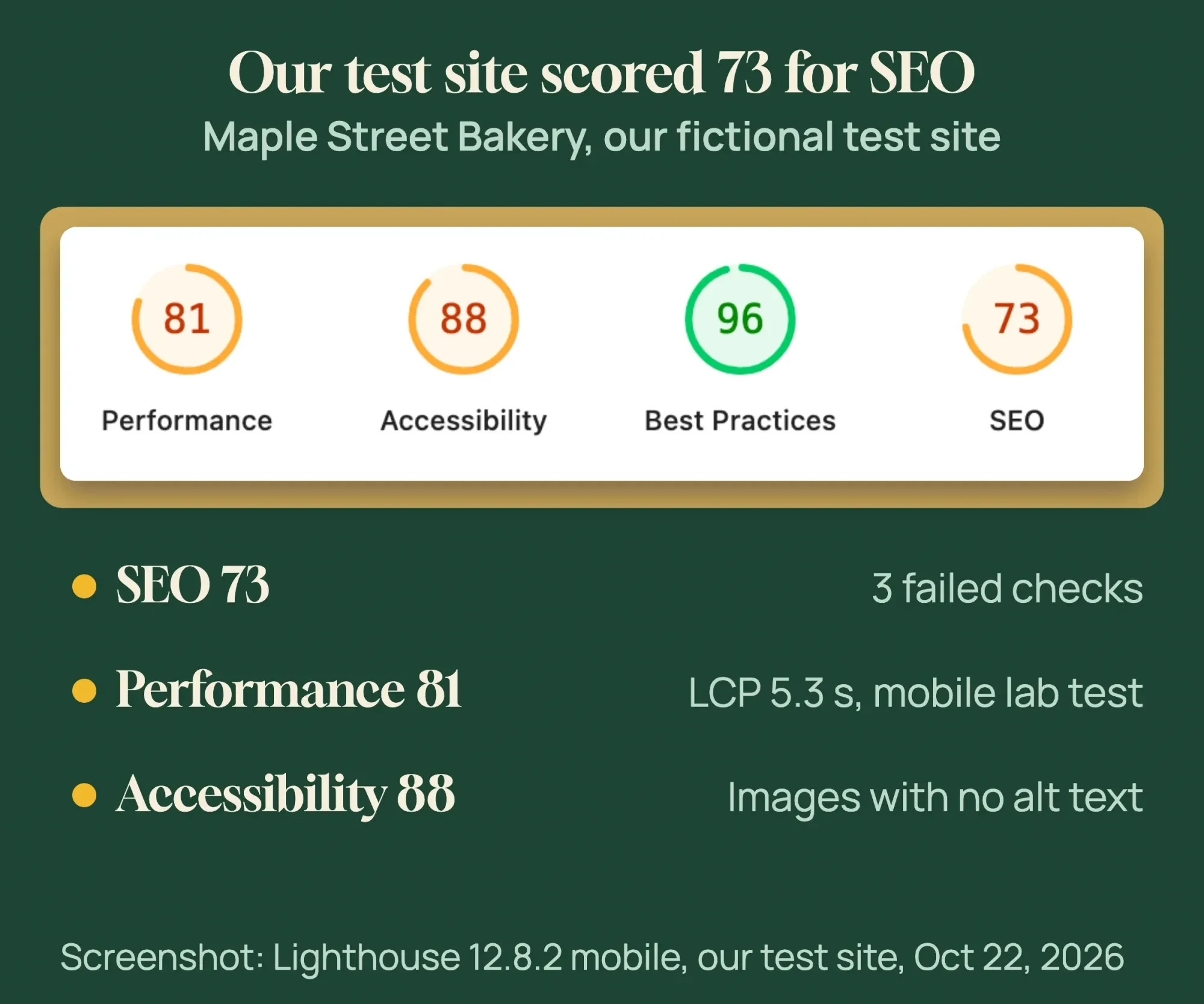 Screenshot: Lighthouse 12.8.2 mobile report of our fictional test site, October 22, 2026.
Our test page scored 73 for SEO, 81 for performance, 88 for accessibility and 96 for best practices. A score is a summary, not the goal. The useful part is the list of failed checks under each score.
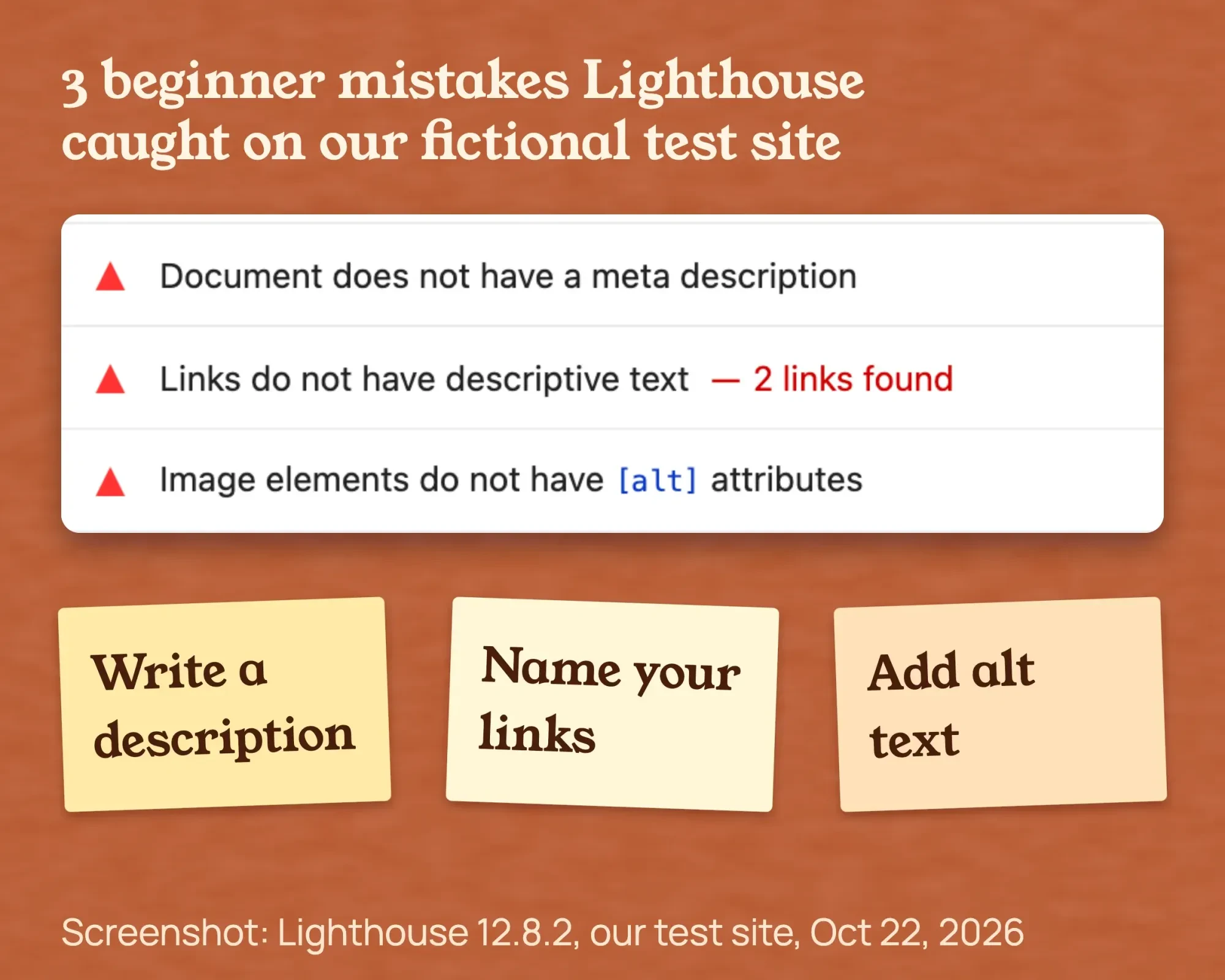 Screenshot: failed checks in Lighthouse 12.8.2 on our fictional test site, October 22, 2026.
Lighthouse flagged 3 of our planted mistakes: no meta description, 2 links with vague words, and images with no alt text. Each one takes minutes to fix.
Lighthouse checks one page at a time, and our free audit checks up to 25. Neither has rank tracking or a backlink list. Neither can see Search Console data, so neither can tell you which pages Google indexed. Both only read pages and change nothing.
If your site has more than 25 pages, add a crawler. Our Screaming Frog guide shows how to run the free version on up to 500 URLs.
Add every broken link and every page that returns 404 to your sheet. Our free audit flags broken internal links on the pages it crawls.
Step 3: Fix your titles and descriptions
Give every page its own title that says what the page is. Google's title link guidelines ask for "descriptive and concise" titles. They warn against "repeated or boilerplate text" too. On a service page, name the service and the town.
Our test site's home page title ran to about 100 characters, so Google would cut the end off in results. That is a display problem, not a penalty. Google says there's no limit on title length, and the title link "is truncated in Google Search results as needed."
Meta descriptions work the same way. Google's snippet documentation says snippets are "primarily created from the page content itself," so write a unique, plain summary and don't stuff keywords. Check how each one looks with our free SERP snippet preview before you publish.
Give each page one clear main heading that matches its title. Google's starter guide says there's "no magical, ideal amount of headings" for a page.
Duplicate pages are "not a violation of our spam policies," the same guide says, but search engines "might waste crawling resources" on them. If 2 pages cover the same service, merge them or make each one clearly different.
Skip the old word count rules too. The Google starter guide says "there's no magical word count target, minimum or maximum." Write until the question is answered.
Step 4: Check speed and Core Web Vitals
Run your home page and your top service page through PageSpeed Insights, on mobile first. Read the real-user data at the top before the score. Google's Core Web Vitals page sets the targets: LCP within 2.5 seconds, INP under 200 milliseconds and CLS under 0.1.
Field data comes from real Chrome users over 28 days. A page passes when the 75th percentile of all 3 metrics is good, per the PageSpeed Insights documentation. The lab score is for debugging. Google calls a lab score of 90 or above good and below 50 poor.
Our test page had one unresized 810 KiB (about 830 KB) storefront photo. In the Lighthouse mobile lab test, which simulates a slow 4G phone, LCP was 5.3 seconds, in the poor band. A new or small site often has no real-user data, so the lab test is what you get.
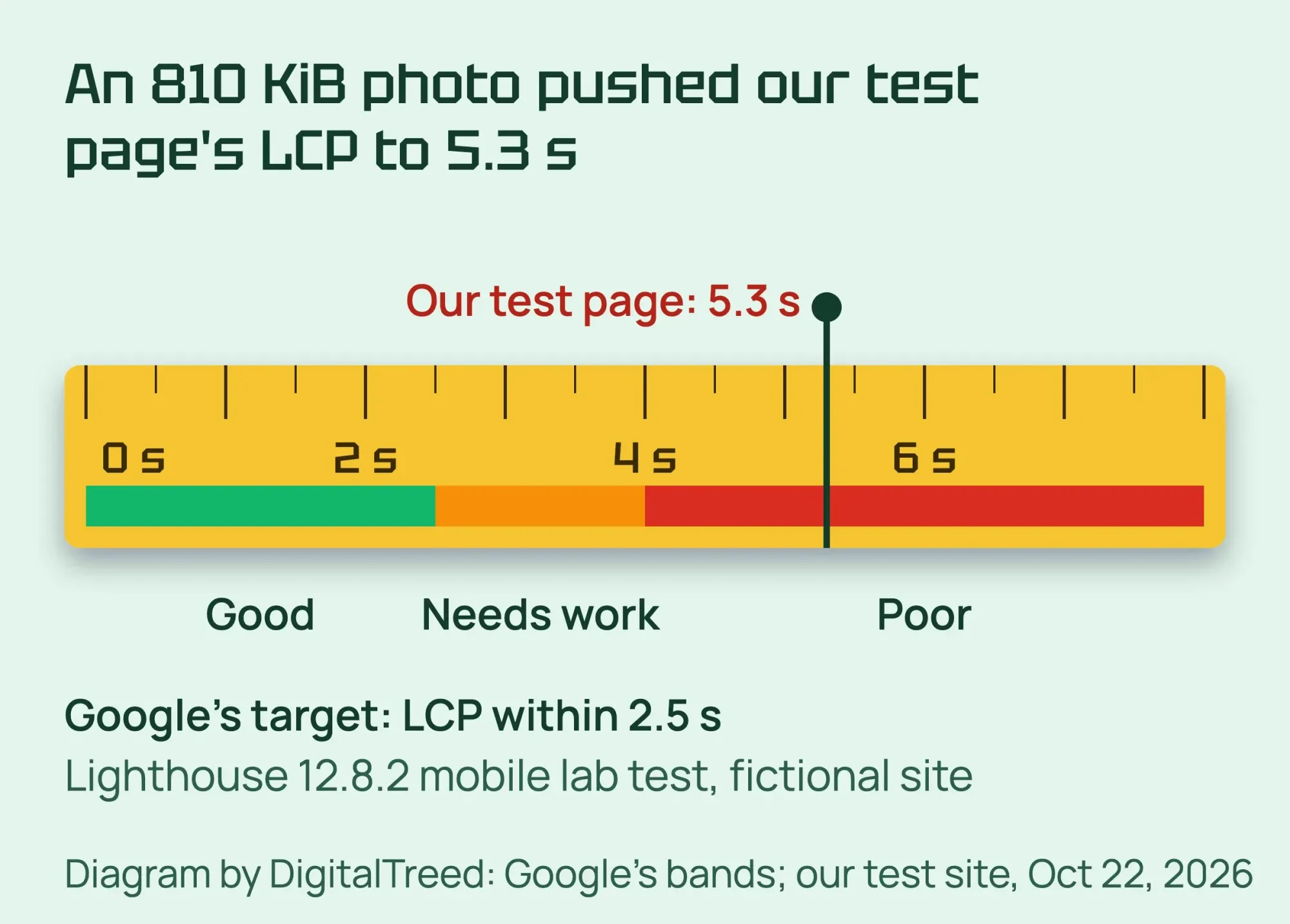 Diagram by DigitalTreed: bands from Google's PageSpeed Insights docs; Lighthouse lab result for our fictional test site, October 22, 2026.
For a second view with plain-English advice, use our free website speed test. Our PageSpeed Insights guide explains each part of Google's report.
Does your site work on phones and use HTTPS?
Google uses the mobile version of a site's content "for indexing and ranking," per its mobile-first indexing guide. Make sure your phone layout shows the same text, photos and links as the desktop one.
To check, open each key page on your own phone, then run Lighthouse in mobile mode. Google's page experience page names Lighthouse as a way to find fixes, "including mobile usability."
The same Google page asks, "Are your pages served in a secure fashion?" Open the HTTPS report in Search Console. It shows how many indexed URLs on your site use HTTP and how many use HTTPS.
Any HTTP page or an invalid certificate goes near the top of your sheet.
Step 5: Check your internal links
Every service page should be linked from your home page or menu. Google says it uses links "to find new pages to crawl," and that it can usually only follow a normal a element with an href. Links built only with buttons or scripts may not be followed.
Use descriptive words in each link, such as "water heater repair" and not "our services". To list the links you already have, follow our guide on how to find internal links.
Step 6: Check your Google Business Profile and reviews
For a local business, your Business Profile can matter as much as your website. Google says local results are mainly based on "relevance, distance, and popularity," and that businesses with complete, accurate info are more likely to show up.
- Pick the right main category and add your services.
- Set hours, including holiday hours, and add real photos.
- Use the same business name, address and phone number as your website.
- Reply to reviews. Google says replies show "you value their feedback."
A common gap is a website with no link to its Business Profile, or a different phone number on the site and the listing. Our guides to local SEO and Google Business Profile optimization cover the full setup.
Ask every customer for a review. Our free Google review link generator gives you a short link to send. Never pay for positive reviews or post fake ones. The FTC's Consumer Reviews and Testimonials Rule took effect October 21, 2024, and lets courts impose civil penalties for knowing violations.
This is general information, not legal advice; check with an attorney for your situation.
Step 7: Look at your backlinks
In Search Console, open Links and read the "Top linking sites" table. Google's Links report help says this is "a sample of internal and external links," not every link. Check that you recognize the sites.
Real local links, such as a chamber of commerce, a supplier or a team you sponsor, beat bought links. Don't disavow links on a hunch. Google suggests it only "if all else fails". Our guide to backlinks and our off-page SEO checklist show how to earn better ones.
Which pages bring visitors, and which bring none?
The Pages tab of the Search Console Performance report shows which pages bring visitors from Google and which bring none at all. Google's Performance report help says it lets you "see which pages have the highest (and lowest) click-through rate."
Use it once the 7 checks are done.
- Open Performance, then Search results, and set the date to the last 3 months.
- Click the Pages tab and sort by Impressions.
- Pages with many impressions but few clicks: rewrite the title and description first.
- Key pages with almost no impressions: check indexing in Step 1, then check that the page answers what people search for.
- Two thin pages on the same topic: merge them into one stronger page.
To judge a weak page, use Google's helpful content questions. One asks if a reader will "leave feeling they've learned enough about a topic to help achieve their goal."
Search Console only shows Google Search. To see visits from every channel, our Google Analytics 4 guide shows the setup.
Which fixes should you do first?
Fix what blocks Google first. That means key pages that aren't indexed, a stray noindex tag or server errors. Then fix broken links, vague titles, slow pages and Business Profile gaps, in that order. Sort your sheet by impact first and effort second. For most small sites, this order works:
- Key pages not indexed, a noindex tag left on by mistake, or server errors.
- Broken links and pages that return 404.
- Duplicate or vague titles on service pages.
- Slow pages, starting with the largest images.
- Business Profile gaps and a different phone number between the site and the listing.
- Missing alt text and internal links.
Google's starter guide says some changes show in "a few hours" and others "could take several months". Give each fix a few weeks before you judge it. If the fixes need a developer, our search engine optimization services team can do them. You get a written price before any work. (DigitalTreed sells this service.)
How do you track rankings for free in Search Console?
You track rankings for free in the Search Console Performance report. Turn on Average position, filter to the United States and mobile, and copy your 10 to 15 target searches into a sheet once a month. Average position isn't your exact rank for one search; it's a trend line.
- Open Performance, then Search results.
- Turn on Average position next to Clicks and Impressions.
- Set the date to the last 28 days and compare it with the previous period.
- Add filters: Country is United States, and Device is Mobile.
- In the Queries tab, find your 10 to 15 target searches. Copy clicks, impressions, CTR and position into your sheet once a month.
Average position is not your rank for one search. Google's help page on position says it is the "topmost position" of your site, "averaged across all queries" where you appeared. In its example, your site shows at 2, 4 and 6 for one query, so that query counts as 2.
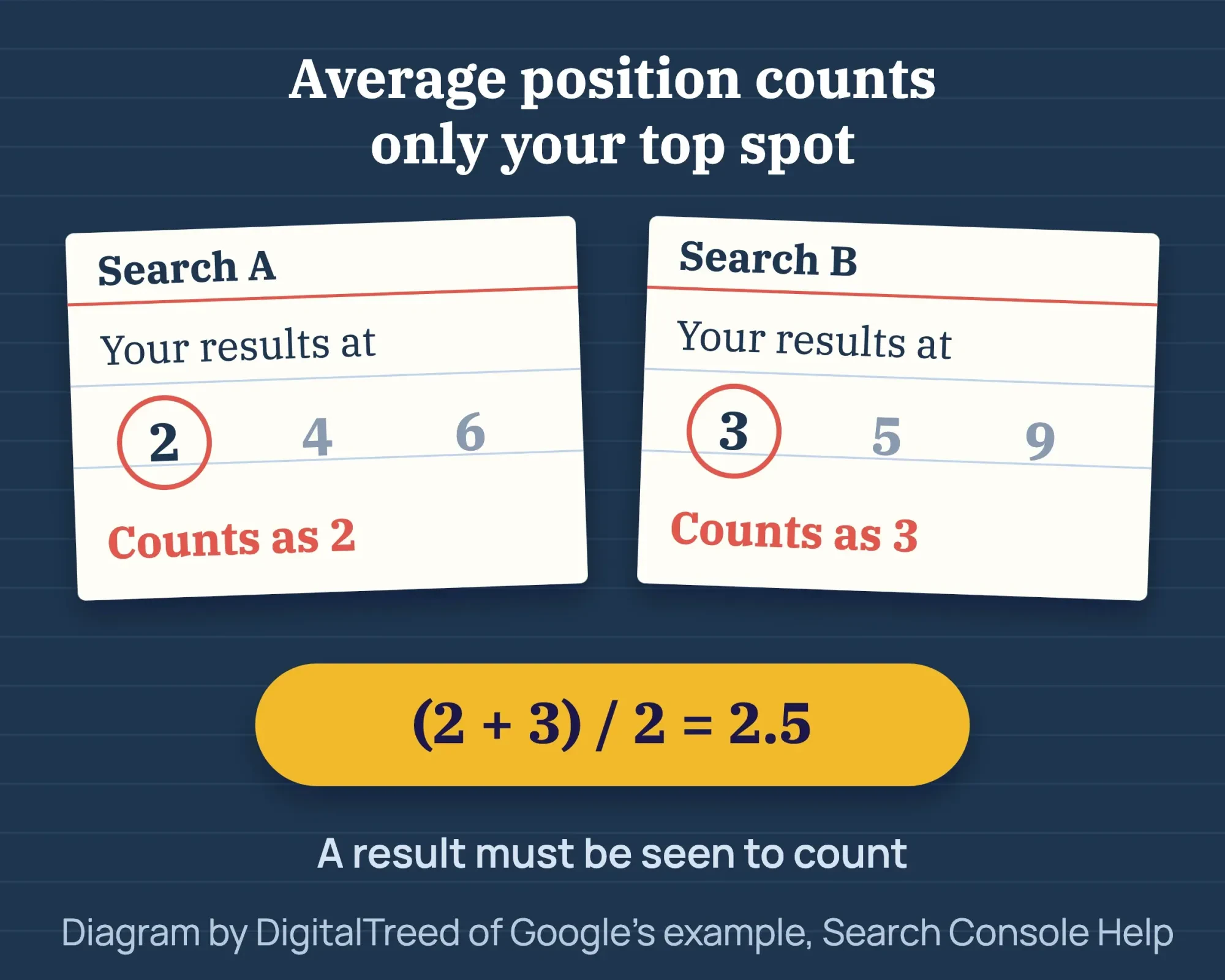 Diagram by DigitalTreed of Google's example in Search Console Help, read October 22, 2026.
Google's data limits page lists what the report hides. The table shows at most 1,000 rows, rare queries are left out of the table, and new data usually takes 2 to 3 days. History goes back 16 months, per Google's 2018 announcement.
Don't check rankings by searching Google yourself. The Performance report help says results depend on "the time, place, device, and recent history" of the searcher. For more on measuring, see the measuring SEO chapter of our intermediate guide. If many rankings drop at once, check our list of Google algorithm updates for a rollout on those dates.
Example: a plumber in Columbus, Ohio
Example (fictional): Ridgeline Plumbing is a made-up 3-van plumber in Columbus, Ohio, with a 14-page WordPress site. The numbers below are invented to show the method.
- The site: search shows 11 of 14 pages. Page indexing lists 2 pages with a noindex tag left from a test copy and 1 Soft 404, an empty coupons page.
- The scan finds 9 pages with the same title, "Home - Ridgeline Plumbing."
- PageSpeed Insights has no field data for the page. The hero image is 2.4 MB.
- The Business Profile has 1 category and no services, and its phone number differs from the site footer.
The owner removes the noindex tags, fills the coupons page, and rewrites the 9 titles. One becomes "Water Heater Repair in Columbus, OH". Then they shrink the hero image, fix the profile, and validate in Search Console. They track 12 queries each month.
A 30-day SEO audit checklist for your first month
- Week 1: set up Search Console and your Business Profile, do the site: check, run the scan and fill your sheet. Export 3 months of Performance data as a baseline.
- Week 2: fix indexing problems and broken links, then titles and descriptions. Validate in Search Console.
- Week 3: fix speed on your 2 most visited pages, add internal links, and finish your profile and review requests.
- Week 4: run the scan again and compare. Pick a monthly date for rank tracking.
When your site grows past this checklist, our advanced guide has a full SEO audit step by step.
Frequently asked
How long does an SEO audit take?
For a site under 30 pages, plan one afternoon for the first pass. That is our estimate. Fixing what you find takes longer, often a few weeks.
How much does an SEO audit cost?
A DIY audit with the tools in this guide costs $0, as of October 2026. Screaming Frog costs $279 a year per license if you outgrow its free 500 URLs. We found no neutral source for US agency audit prices, so we don't quote one.
How often should a small business do an SEO audit?
Our take: a quick monthly look at Search Console, a full audit every quarter, and one after any redesign or move to a new host.
What is a good average position in Search Console?
Under 10 means page one on average for that search, and under 3 is strong. That is our rule of thumb, not Google's. Your own business name should be close to 1.
Why is my keyword missing from Search Console?
You may never have appeared for it. It may be a rare query that Google hides for privacy, or it may sit beyond the 1,000-row table.
Can a free audit tool hurt my site?
No. Lighthouse and our free audit only read your pages and change nothing. Before you act on any tool's advice, Google suggests checking it against its own guidance.
Do you need a separate audit for AI Overviews?
No. Google says there are "no additional requirements to appear in AI Overviews or AI Mode" on its page about AI features and your website. The same checks in this guide apply.
When should you hire someone for an SEO audit?
Google names two examples of a great time to hire: when you consider "a site redesign (the earlier, the better)," and when you plan a new site. Give an outside auditor read access to Search Console only.
Your next step
Today, open Search Console and read the "Why pages aren't indexed" list. Then run one scan and write the first 5 issues into your sheet.
If you'd rather hand the fixes to someone, our SEO services team works from your audit, and you get a written price first.
How we made this guide: Aijaz Alam wrote it from Google's own help pages and docs, the PageSpeed Insights docs and the Federal Trade Commission. Sources are linked inline. We built a fictional test site, tested it with Lighthouse 12.8.2 and took the screenshots on October 22, 2026. We checked every number against its source the same day. Updated October 23, 2026: added a table of audit types and sitemap, robots.txt, broken link, phone and HTTPS checks. We also added a section on which pages bring visitors, and FAQs on cost, AI Overviews and hiring.
First published May 2026. Rewritten October 2026: a US example, a Lighthouse test of a fictional site with screenshots, Google's rules on titles and indexing, and free rank tracking. Updated October 25, 2026: we added short facts with sources and direct answers under the question headings. We also added the Lighthouse version and a link to our beginner's guide.
Sources
- Google Search Central: Do you need an SEO?
- Google Search Central: SEO Starter Guide
- Google Search Central: site: search operator
- Search Console Help: Page indexing report
- Google Search Central: Influencing title links
- Google Search Central: Snippets and meta descriptions
- Google Search Central: Core Web Vitals
- PageSpeed Insights: About PageSpeed Insights
- Google Search Central: Link best practices
- Search Console Help: Links report
- Search Console Help: Performance report
- Search Console Help: What are impressions, position, and clicks?
- Search Console Help: Performance report data limits
- Google Search Central Blog: Introducing the new Search Console, January 2018
- Google Business Profile Help: Tips to improve your local ranking
- FTC: Consumer Reviews and Testimonials Rule, Questions and Answers
- Chrome for Developers: Introduction to Lighthouse
- Google Search Central: Build and submit a sitemap
- Search Console Help: Sitemaps report
- Google Search Central: Robots.txt introduction and guide
- Google Search Central: Mobile-first indexing best practices
- Google Search Central: Understanding page experience
- Search Console Help: HTTPS report
- Google Search Central: Creating helpful, reliable, people-first content
- Google Search Central: AI features and your website
- Screaming Frog: SEO Spider pricing (vendor)
Comments
No comments yet. Start the conversation below.