

What Bing Webmaster Tools is, and why Bing matters in India
This guide is for anyone who has, or is about to set up, Google Search Console. That might be a shop owner in Kanpur who looks after their own WordPress site, a freelancer with ten local clients, or the marketing person at a D2C brand. You don't need any Bing experience. If Search Console is new to you too, start with Guide 1, chapter 8.
By the end you'll be able to add a site and keep it verified, read Bing's traffic and indexing reports, and find out why a page isn't on Bing. You'll also set up IndexNow and prove it works, run a free site scan, find link prospects from competitors' backlinks, and read the AI Performance report without overselling it.
There are six chapters, about 40 minutes of reading. Chapter 1 explains what the tool is and why Bing matters in India beyond its small share. Chapter 2 covers sign-up, the Search Console import and day-one settings. Chapter 3 goes through Search performance, URL inspection, Site explorer and Sitemaps. Chapter 4 is IndexNow and URL submission. Chapter 5 covers Site scan, Recommendations, Backlinks and Keyword research. Chapter 6 covers AI Performance, Copilot, Bing Places, cost and the alternatives.
Bing Webmaster Tools and IndexNow are free. Where we mention a paid plugin or suite, we link to its own guide in this series, where prices were checked on 16 October 2026.
Quick answer
Bing Webmaster Tools is Microsoft's free version of Search Console. It shows how Bing crawls, indexes and ranks your site, and how often Copilot cites it. Bing has under 2% of search in India, but almost 9% on desktop, and its index also feeds Yahoo, most of DuckDuckGo's links and Microsoft Copilot.
Most site owners in India set up Google Search Console and stop there. That's understandable: Google sends almost all the search traffic. But Bing Webmaster Tools takes about ten minutes to add once Search Console is done, and it costs nothing. It also shows you a few things Google's tool doesn't, such as AI citations and other sites' backlinks.
How much of India searches on Bing
In September 2026, Bing had 1.92% of search engine traffic in India across all devices, against Google's 96.63%.[1] On desktops alone the picture changes. Bing had 8.57% there, and Yahoo, which shows Bing's results, another 2.71%.[2]
Warning
StatCounter counts visits that search engines send to websites running its tracker. It isn't a count of searches. Use it to see who matters, not as an exact number. Guide 1, chapter 4 compares all the engines.
Who uses a desktop to search? Office workers on Windows laptops, procurement teams, students in computer labs, anyone whose browser came set to Bing. If you sell to businesses, run a B2B service, or get enquiries from people at work, your Bing share may be well above the national average. Check your own GA4 data: the source "bing / organic" shows it.
Bing reaches further than bing.com
Bing's index does quiet work for other products. DuckDuckGo says it sources its traditional links and images "largely" from Bing.[3] Microsoft says Microsoft 365 Copilot Chat writes a short query from your prompt and sends it to Bing.[4] And Bing's own blog lists Yahoo, DuckDuckGo and "AI tools like ChatGPT" among the experiences it powers.[5]
Treat the ChatGPT part with care. That's Bing describing itself. OpenAI says ChatGPT search sometimes sends rewritten queries to third-party search providers, and its help page links to Microsoft's privacy statement among them, without saying how much each is used.[6] So Bing is likely one input to ChatGPT search, not the whole of it. Our GEO guide, chapter 2 goes engine by engine.
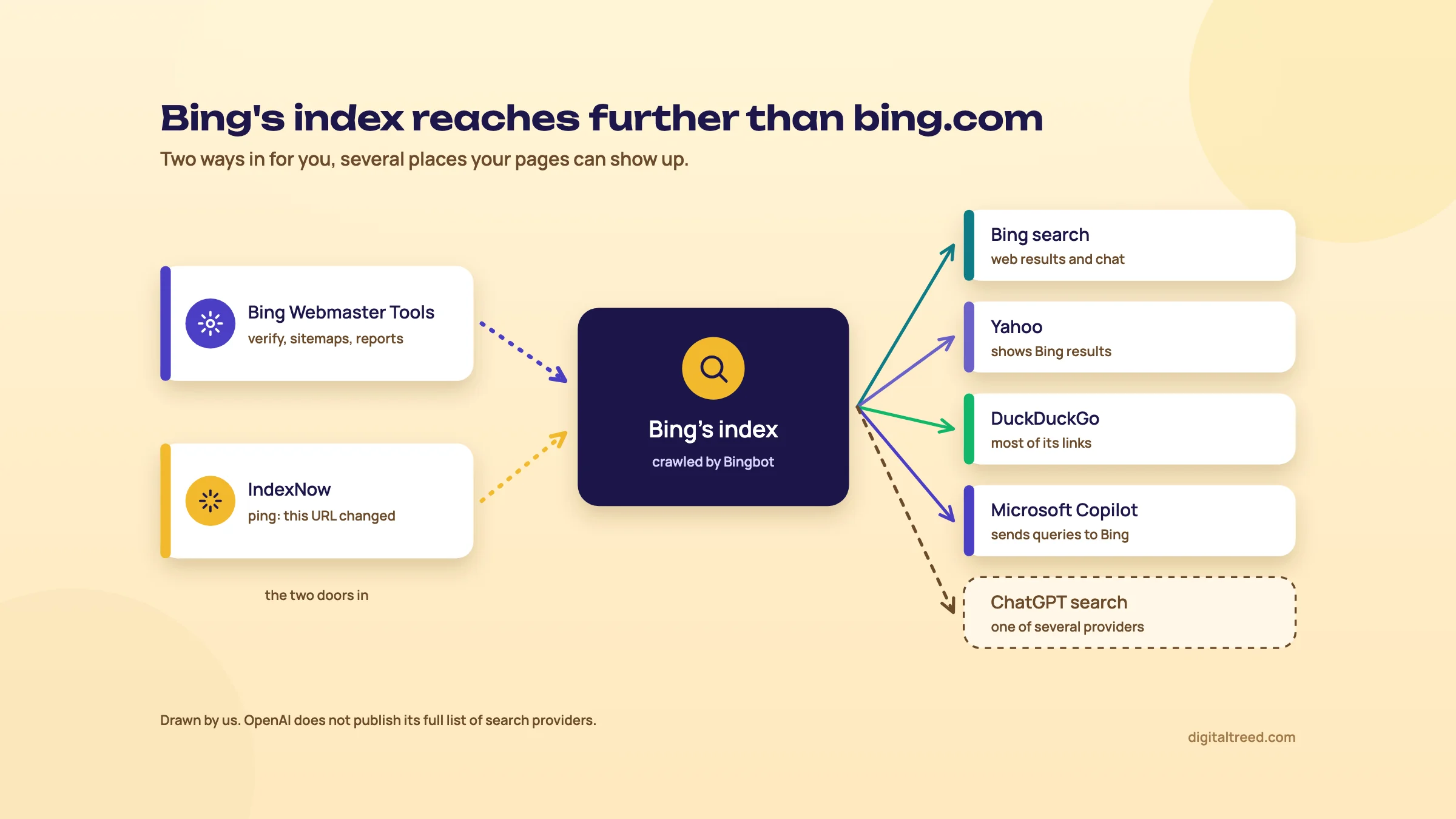 One index, several places your pages can show up. Drawn by us.
What's inside the tool
Bing's help centre lists most of these reports and tools;[7] AI Performance[8] and Copilot[9] were added later.
| Area | Tool | What it's for | Chapter |
|---|---|---|---|
| Traffic | Search performance | Clicks, impressions, CTR and position from Bing, including Copilot chat links | 3 |
| Indexing | URL inspection, Site explorer, Sitemaps | Is a page indexed, why not, and what Bing knows about your site | 3 |
| Indexing | IndexNow, URL submission | Tell Bing a page is new, changed or gone | 4 |
| Audits | Site scan, Recommendations (called Insights before October 2024) | Technical and on-page problems Bing found | 5 |
| Links and keywords | Backlinks, Keyword research | Links to your site or any other, and Bing search volumes | 5 |
| AI | AI Performance, Copilot | Citations in Copilot and Bing's AI answers, and a chat helper | 6 |
| Control | Crawl control, Block URLs, Robots.txt tester, Verify Bingbot | How fast Bingbot crawls, hiding pages for a while, checking bots | 3 |
How it compares with Google Search Console
The two tools overlap a lot. Both have a performance report, URL inspection and sitemaps, and Bing can import your Search Console sites so you don't verify twice. Fabrice Canel of Bing names three things Bing does that Google's tool doesn't: IndexNow, Site Explorer, and backlink data for sites other than your own.[10] Add the AI Performance report, which counts citations. Search Console's generative AI report counts impressions only.[11]
Search Console wins on Google data, obviously, and on the rendered view of a page in URL inspection.[10] Our Google Search Console guide covers that tool report by report.
Who it's for, and when you can skip it
Set it up for any site that wants search traffic. A Kanpur sweet shop, a Delhi dental clinic, a D2C brand and a client's WordPress blog all qualify. The set-up is one import. The weekly habit is five minutes.
You can leave it alone if the site isn't meant to be found in search, such as a staging site or a login-only portal. The same goes if nobody will ever look at it. An unread tool does nothing. Even then, we'd switch on IndexNow, because it works without anyone opening a report.
Tip
It's free. Bing's getting-started checklist calls it a "free Bing Webmaster Tools account",[12] and we've found no paid tier. Chapter 6 covers what you might pay for elsewhere.
Next, chapter 2: the import from Search Console, the other ways to verify, and the settings worth changing on day one.
Setting up: sign-up, the Search Console import and day-one settings
Quick answer
Sign in at bing.com/webmasters with a Microsoft, Google or Facebook account. If your site is already verified in Search Console, import it: Bing verifies it and copies your sitemaps. Otherwise verify with Domain Connect, an XML file, a meta tag or a DNS record. Then switch on email alerts, add your team and check the sitemap.
The short version of this set-up is in Guide 1, chapter 8. Our planned video "Set up Google Search Console and Bing Webmaster Tools" walks through it on screen. This chapter covers what those two leave out. That's what the import really does, what happens if you disconnect Google, the other ways to verify, and the settings to change before you close the tab.
Step 1: the account
Go to bing.com/webmasters and sign in. Bing accepts an existing Microsoft, Google or Facebook account, or you can create a new Microsoft account during sign-up.[12]
Use an account the business will keep. If a freelancer signs in with their personal Gmail and then leaves, the site sits in their account. Add the owner as a user on day one (below), so access never depends on one person.
Step 2: import from Google Search Console
This is the fastest route, and the one we'd use for any site that's already in Search Console. Bing's own steps:[13]
- Sign in to Bing Webmaster Tools.
- On the My Sites page, click Import.
- Sign in with your Search Console account and click Allow, so Bing can read your list of verified sites and sitemaps.
- Bing lists your verified sites, with the number of sitemaps and your role on each. Tick the ones you want and click Import.
The imported sites are verified automatically. You can import up to 100 sites at a time, from more than one Google account, and an account holds up to 1,000 sites. Traffic data can take up to 48 hours to appear.[13] The import also brings your users and their permission levels across from Search Console.[14]
Two things the import keeps doing after day one. Bing checks your ownership again from time to time by syncing with Search Console, and any new sitemap it finds there is imported too.[14] That's handy. It also means the link matters: if you revoke Bing's access to Search Console, you'll have to verify those sites another way, such as a meta tag or DNS record.[13]
Warning
Cleaning up old Google permissions? Disconnecting the Search Console account in Bing (under Settings, or Profile on some help pages) has the same effect. Bing's help says you'll need to reverify the imported sites, by hand or by importing again.[7] Add a meta tag or DNS record first if you plan to cut the link.
If fewer sites show up for import than you have in Search Console, that's expected. Bing hides sites already in your Bing account at the same or a higher permission level, and it may group some URLs together.[14]
The other ways to verify
Some sites aren't in Search Console, and some owners don't want the two accounts linked. In those cases, add the site by hand and prove you own it. You can add a whole domain (example.com) or one section of a site (example.com/clothing/).[14] Then pick a method:
| Method | What you do | Good for |
|---|---|---|
| Domain Connect | Log in to your DNS provider when Bing asks; the record is added for you | Domains at a provider that supports it (Bing names GoDaddy, Bluehost and Wix as examples)[5] |
| XML file | Download BingSiteAuth.xml and upload it to the site's root folder | Sites where you have file access by FTP or the hosting file manager |
| Meta tag | Paste Bing's meta tag at the end of the home page's <head> | WordPress sites: SEO plugins have a box for it |
| DNS record | Add the verification code as a record at your domain registrar | Anyone with registrar access; survives theme and plugin changes |
Bing's help page describes the DNS option as a CNAME record,[14] but its June 2025 set-up post calls it a TXT record.[5] Expect a CNAME, but follow whatever the verification screen shows you.
On WordPress, the meta tag is the easy route, because SEO plugins such as Yoast and Rank Math have a box for Bing's code. Our Yoast SEO guide and Rank Math guide show where. Whatever you pick, a green tick means you're in. A red cross comes with an error message to fix before you try again.[12]
Day-one settings
Five minutes now saves a surprise later.
- Email alerts. Open Settings (the gear icon next to the bell in the header) and turn on the communication setting. You can pick how often you get emails and which issue types. Bing suggests a daily digest of new and unread messages.[7] Without it, crawl and index alerts sit behind the bell icon where nobody sees them.
- Users. Add the business owner, and anyone else who needs access, with User management. It gives different permission levels.[7]
- Sitemap. Open Sitemaps and check yours is listed and processed. Imported and discovered sitemaps show up here next to the ones you submit (chapter 3).[15]
- IndexNow. Bing calls it optional but "highly recommended" at set-up.[5] We agree. Chapter 4 shows how.
- Crawl control. Leave it alone unless Bingbot is slowing your server. It sets how fast Bingbot requests pages.[7]
Day one in Bing Webmaster Tools for a Delhi dental clinic
- Sign in Go to bing.com/webmasters with the clinic's own Google account, the one that owns its Search Console property.
- Import On My Sites, click Import, allow access, tick the clinic's site and import it. Check the green tick.
- Add a backup method In the clinic's SEO plugin, paste Bing's meta tag too. If someone later removes Bing's access to Search Console, the site stays verified.
- Turn on alerts Settings, Receive Communication on, daily digest, crawl and index issues ticked.
- Add the dentist User management: add the clinic owner's email so the account doesn't depend on you.
- Check the sitemap Sitemaps: the sitemap from Search Console should be listed. If not, submit it.
- Come back in two days Data takes about 48 hours. Put a reminder in your calendar to open Search performance on day three.
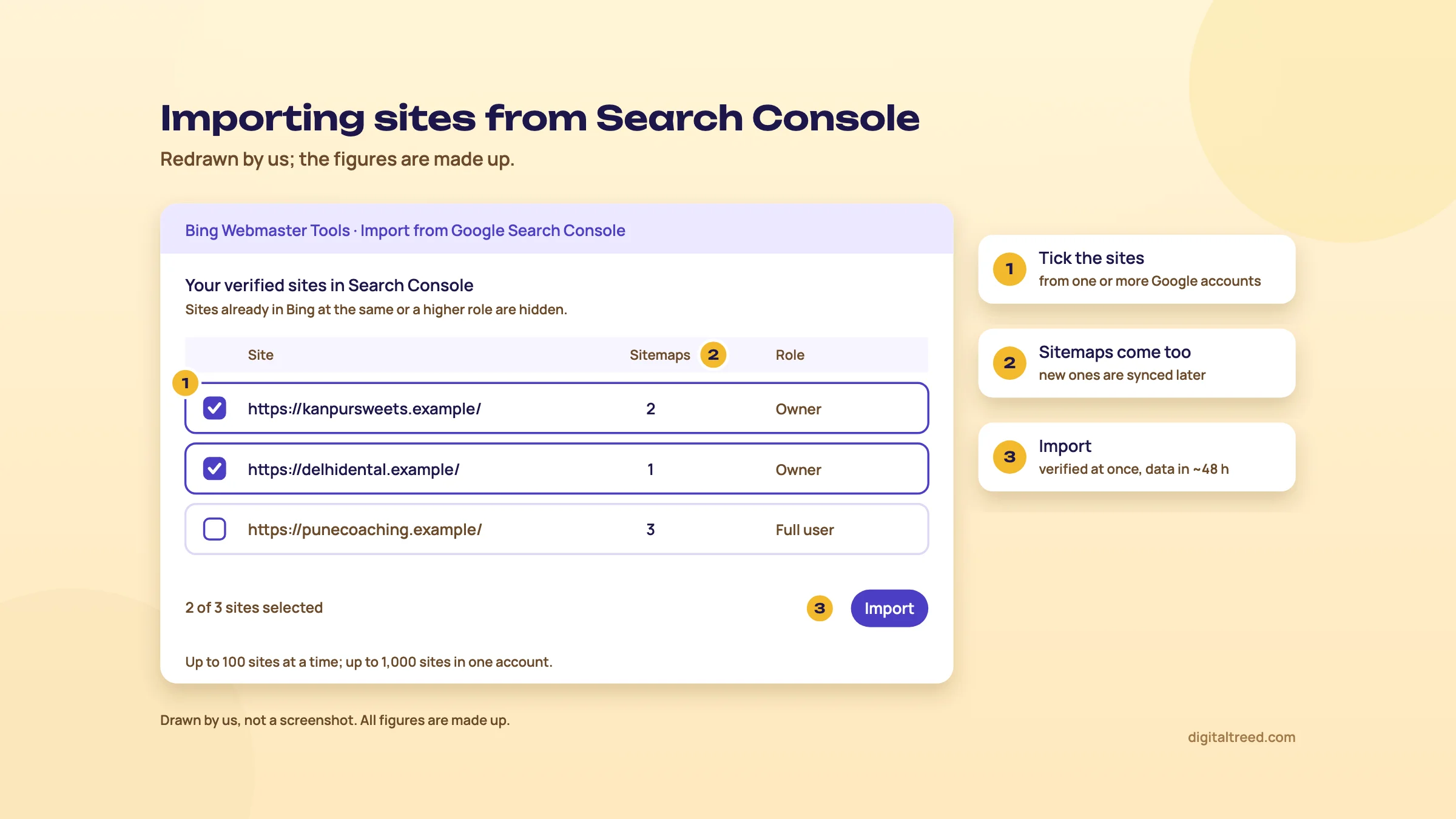 Tick the sites, check the sitemaps, import. Drawn by us; the figures are made up.
Your site is in. Chapter 3 goes through the reports you'll open most: Search performance, URL inspection, Site explorer and Sitemaps.
Search performance, URL inspection, Site explorer and Sitemaps
Quick answer
Search performance shows clicks, impressions, CTR and position from Bing, with Copilot chat links counted under "Web and Chat". URL inspection tells you whether one page is indexed and why not. Site explorer shows the whole site folder by folder, with filters for errors, noindex and redirects. Sitemaps shows what Bing read and when.
If you know Search Console, these four will feel familiar. The differences are in the details, and a few of them change how you read the numbers.
Search performance
This is Bing's traffic report. It shows which pages get clicked and which searches your pages appear for, and it also charts crawling and indexing on the same timeline.[16] The metrics:
| Metric | What it counts |
|---|---|
| Impressions | Times a link to your site showed on Bing: web results, chat responses, news answers, image results, the knowledge panel. Two of your pages in one result count as two. |
| Clicks | Clicks on those links, from the same places |
| Avg. CTR | Share of impressions that became a click |
| Avg. position | Average position of your pages in results. Only for the Web and Chat source. |
| Crawl requests, crawl errors | How often Bing asked for your pages, and how often that failed |
| Indexed pages | Pages Bing crawled and indexed |
The report splits traffic by source: All, Web and Chat, News, Images, Videos and Knowledge Panel, plus Crawl and Indexing. Web and Chat includes the "Learn more" links in Bing's chat responses. Bing added the extra sources on 24 March 2023, so a jump in clicks and impressions from that date isn't real growth.[16]
Two limits matter. The Keywords and Pages tables cover Web traffic only, not chat or other verticals. And the table can add up to less than the chart total, because some rows are left out.[16] Search Console has the same habit.
How far back the data goes
Bing's help page still says up to six months.[16] That's out of date: on 16 October 2024 Bing extended Search performance to 16 months of history.[17] In August 2025 Microsoft's Krishna Madhavan said on LinkedIn that it now goes back 24 months, as PPC Land reported,[18] but Bing hasn't said so on its own blog. We'd trust the date picker in your own account over any of these.
Whatever the window, it only starts on the day you add the site. Bing can't show data from before that.[16] That's the best reason to set it up now, even if you won't look for a month.
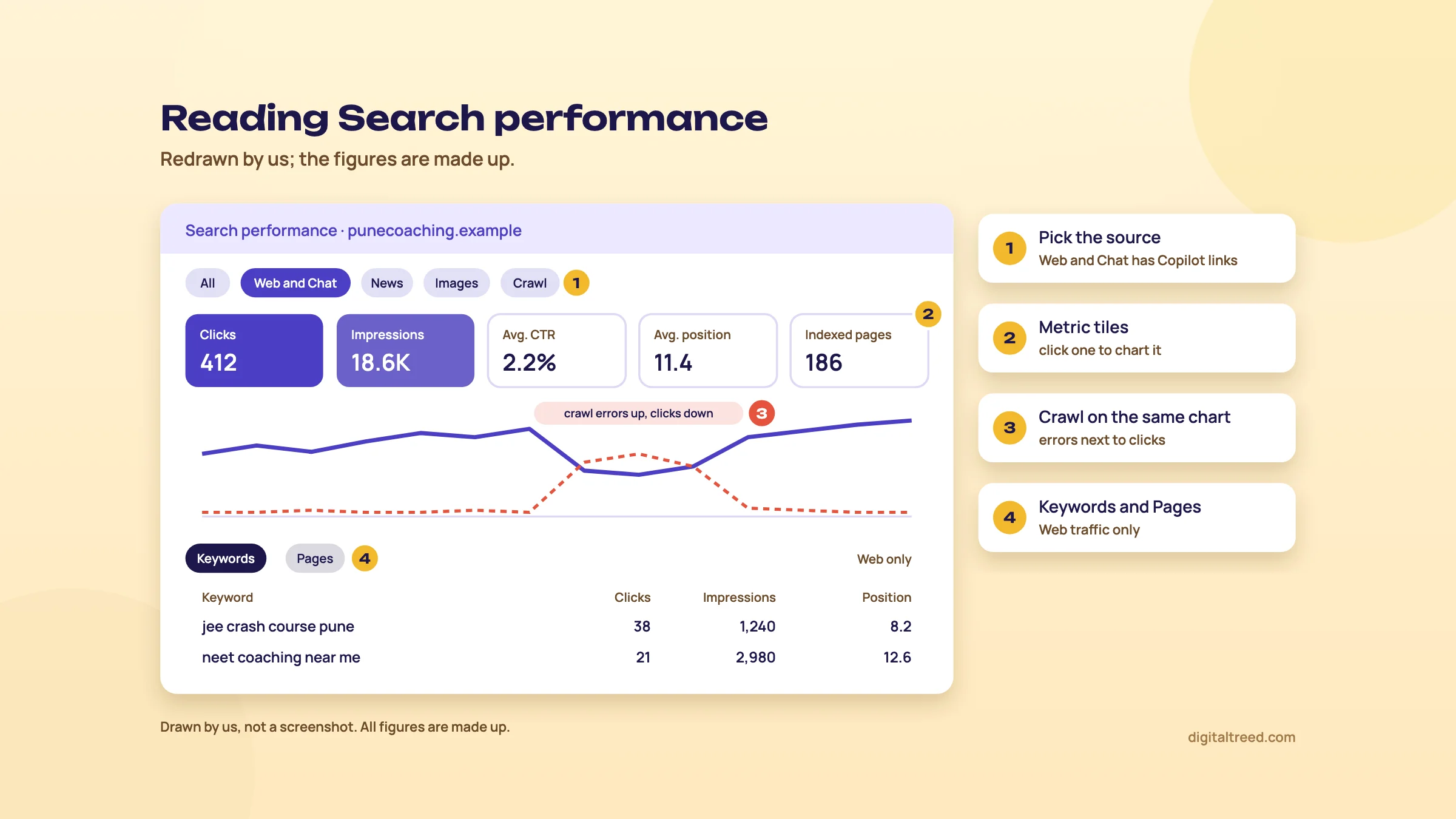 Crawl errors sit on the same chart as clicks. Drawn by us; the figures are made up.
Reading it for a small Indian site
Expect small numbers, in line with Bing's share in chapter 1. The useful questions are the same as in Search Console. Which pages get impressions but few clicks (rewrite the title and description)? Which queries show at positions 8 to 15 (improve that page)? Our Meta Tag Analyzer checks a page's title and description and shows them in a search snippet preview.
One thing is better than in Search Console. Crawl requests, crawl errors and indexed pages sit on the same chart as clicks. If clicks drop the same week crawl errors jump, you've found your cause.
URL inspection
Type a URL from your site, or pick one of the last 10 you checked. Bing returns three cards:[19]
- Index card: whether the URL is indexed, when it was discovered, crawled and indexed, the HTTP response and the HTML. If something's wrong, it shows the error and an action, such as request indexing, edit robots.txt or contact support.
- SEO card: errors, warnings and notices against Bing's SEO best practices, colour-coded red (high), yellow (medium) and blue (low), each with "How to fix".
- Markup card: the structured data Bing read, in HTML Microdata, Microformats, Open Graph or JSON-LD. It doesn't check ordinary HTML.
The Live URL tab fetches the page now, as Bingbot. Use it after a fix, or if you suspect the site serves different HTML to Bingbot than to people (a sign of a hacked site). It doesn't follow redirects: it tells you where the page redirects, and you inspect that destination separately.[19]
Request indexing depends on your daily URL submission quota (chapter 4).[19] Bing's own comparison names the rendered page view as something Search Console's URL Inspection offers.[10] To see what JavaScript changes on a page, use Google's live test.
Site explorer
This is the report we'd open second. It shows your site the way Bing sees it, as folders: a subdomain or part of a URL path. For each folder you get the number of URLs, clicks, impressions and backlinks, and four crawl counts:[20]
- Indexed: URLs successfully indexed
- Error: critical crawl errors that stop indexing
- Warning: guideline issues, temporary crawl problems or robots.txt blocks
- Excluded: spam violations, low rank and similar
The filters are where it earns its place. You can list only indexed URLs, dead links (404 to 410), server errors (403 and 5xx) or robots.txt-blocked URLs. Other filters show URLs with a noindex tag, redirects, canonical sources, guideline issues, URLs "selected but not yet crawled", and malware.[20] From any URL you can open URL inspection, request indexing or test it in the robots.txt tester.
For a WooCommerce store, the noindex and redirects filters often turn up surprises: category pages someone set to noindex years ago, or product URLs that redirect twice. Check a batch of them with our HTTP Status Checker, which follows every redirect hop for up to 10 URLs.
Sitemaps
Bing reads XML sitemaps and sitemap index files, RSS 2.0, Atom 0.3 and 1.0, and plain text files with one URL per line.[15] The Sitemaps page lists the ones you submitted, the ones imported from Search Console and the ones Bing found by itself. Each has its dates, processing status and URL count. Click one to see its exact errors and warnings.
Use "Submit sitemaps" to add one, and the one-click resubmit after a big change. You can only resubmit one sitemap at a time.[15] Bing says it processes sitemaps at least once every 24 hours.[5] Also add a Sitemap: line to robots.txt, which Bing and Google both read.
A sitemap and IndexNow do different jobs. IndexNow tells Bing what changed today. The sitemap is the full list. Bing's set-up post says a sitemap is still worth having "even when using IndexNow".[5]
The control tools
A few smaller tools round it off. Crawl control sets how fast Bingbot requests pages. Block URLs hides a page, folder or cached copy from Bing results for a while, which buys time to fix or remove it. The robots.txt tester checks your file against Bingbot and other robots. Verify Bingbot tells you whether an IP address really belongs to Bingbot, useful when a "Bingbot" in your logs looks suspicious.[7]
Our Robots.txt Tester has Bingbot in its list, so you can test new rules before you upload them, alongside Googlebot and the AI bots.
Find out why a page isn't showing on Bing
- Inspect the URL Paste the page, say a Pune coaching centre's "JEE crash course" page, into URL inspection. Read the Index card first.
- Read the reason If it's blocked by robots.txt, has a noindex, or returns an error, the card says so and suggests an action.
- Check from outside Run the URL through our Noindex Tag Checker, which reads the meta tag, the X-Robots-Tag header and robots.txt, and our HTTP Status Checker for the status code.
- Fix the cause Remove the stray noindex or Disallow line, or fix the redirect, on the live site.
- Run Live URL Confirm Bingbot now gets a 200 and no block.
- Ask Bing to recrawl Click Request indexing, or let your IndexNow plugin send it (chapter 4).
- Look for the pattern In Site explorer, filter by the same problem, such as URLs with NOINDEX tag, to see whether other pages share it.
Next, chapter 4: IndexNow, the key file, the WordPress plugins and the report that shows Bing got your URLs.
IndexNow and URL submission: telling Bing what changed
Quick answer
IndexNow is a free, open ping that tells search engines a URL was added, updated or deleted. Bing, Naver, Seznam.cz, Yandex and Yep support it, and they share what you send; Google doesn't. On WordPress, a plugin does everything. Check it worked in Bing Webmaster Tools' IndexNow report. Manual URL submission still exists, but Bing prefers IndexNow.
Search engines find changes by crawling, and they don't crawl every page often. IndexNow.org says that without a ping it "can take days to weeks" for an engine to notice a change.[21] With IndexNow, you tell them the moment you publish, so they can put that URL near the front of the queue.
Guide 3, chapter 1 explains where IndexNow fits in crawl management on large sites. This chapter is the hands-on part: setting it up, checking it, and reading Bing's report.
Which engines use it today
IndexNow.org lists support from Microsoft Bing, Naver, Seznam.cz, Yandex and Yep.[21] Its list of participants also includes the Internet Archive and Amazonbot.[22] Engines that join agree to share every submitted URL with the others, so one ping reaches all of them.[23]
Google isn't on the list. IndexNow does nothing for your Google rankings, and it doesn't replace a sitemap or Search Console. For an Indian business that means it's mainly a Bing tool. Through Bing, it also helps keep Copilot current: Bing's webmaster guidelines say timely IndexNow notifications "reduce outdated or incorrect URL references in Copilot responses and grounding results".[24]
What it does and doesn't promise
- A 200 response means the engine received your URL, nothing more.[23]
- Submitting doesn't guarantee a crawl or indexing. The engine still decides, based on its crawl quota, scheduling and quality signals.[25]
- Every submitted URL still counts towards your crawl quota. You're telling the engine which URLs you care about.[25]
- Send only URLs that changed after you started. Don't push last year's pages; your sitemap with accurate lastmod dates covers those.[25]
- Send deleted and redirected URLs too, so engines drop or update them.[25]
The key file
IndexNow needs proof that the pings come from you. You make a key, and you host it as a text file on your site.[23]
- The key is 8 to 128 characters: letters a to z and A to Z, numbers and dashes.
- Save it in a UTF-8 text file named after the key, with the key as its only content. For the key
3f9a2c71b8e04d5athat's3f9a2c71b8e04d5a.txt. - Put it in the site's root, so it opens at
https://example.in/3f9a2c71b8e04d5a.txt. Another folder works if you send its address askeyLocation, but a key in a folder only covers URLs in that folder. IndexNow "strongly" recommends the root.[23] - Each subdomain is a separate host and needs its own key file.[25]
If a CMS or plugin handles IndexNow for you, you don't make the file at all.[25] The plugin makes a key and serves it.
Sending URLs by hand
One URL is a single web address you can open in a browser or with curl:[25]
https://api.indexnow.org/indexnow?url=https://example.in/kaju-katli-1kg&key=3f9a2c71b8e04d5aIndexNow asks you to URL-encode the page address (: becomes %3A, / becomes %2F); a plain address like the one above usually works, but encode anything with special characters. For many URLs, POST a JSON list to https://api.indexnow.org/indexnow with your host, key and up to 10,000 URLs per request.[25] You can also send to Bing's own endpoint, https://www.bing.com/indexnow; either way the URL is shared with the other engines.[25]
What the answer codes mean:[23]
| Code | Meaning | What to do |
|---|---|---|
| 200 | URL received | Nothing |
| 202 | Received, key not yet checked | Normal on your first ping; later pings should get 200 |
| 400 | Bad request | Check the format and URL encoding |
| 403 | Key not valid: file missing, or the key isn't in it | Open the key file's address in a browser |
| 422 | URLs don't belong to the host, or the key doesn't match | Send only URLs from the domain the key is on |
| 429 | Too many requests | Slow down; don't resend unchanged URLs |
IndexNow doesn't publish rate limits, because each engine sets its own. Its advice is to wait at least 5 minutes before resending the same URL.[25]
WordPress and other platforms
Most sites never touch a key. Bing's IndexNow page lists these WordPress plugins: Microsoft's own IndexNow plugin, Yoast, Rank Math, AIOSEO and SEOPress.[26] IndexNow.org names Shopify, Wix, GoDaddy, Duda and others among platforms with IndexNow built in or through add-ons.[25] Cloudflare's Crawler Hints supports IndexNow on every plan, the free one included.[27]
| Plugin | Cost of the IndexNow part | Where to switch it on | Manual submit |
|---|---|---|---|
| Rank Math | Free | Rank Math SEO, enable the Instant Indexing module; choose post types in Instant Indexing, Settings[28] | Yes, Submit URLs tab, plus a History log with response codes |
| Yoast SEO | Premium only | Premium: switch on IndexNow under Site features[29] | Not mentioned in Yoast's help; pings go out automatically since Premium 18.8 (June 2022)[30] |
| AIOSEO | Every paid plan, from Basic; the free Lite version isn't stated[31] | Feature Manager, IndexNow, Activated[32] | Not covered in AIOSEO's guide |
| IndexNow plugin (Microsoft) | Free | Settings, IndexNow, Let's Get Started[33] | Yes |
Rank Math skips URLs set to noindex.[28] Microsoft's plugin checks the rendered HTML, the X-Robots-Tag header and WordPress's own search visibility setting before it sends. It shows only the last 20 successful and 20 failed submissions in WordPress, and points you to the search engines for the rest; Bing's IndexNow report is where to look.[33]
Warning
Use one sender. If your SEO plugin, Microsoft's plugin and Cloudflare all ping IndexNow, each change goes out two or three times. IndexNow's FAQ says to avoid resending unchanged URLs, because that wastes crawl quota.[25] Pick the one you already have, usually the SEO plugin, and switch the others off.
Our Rank Math guide covers the Instant Indexing module in full, and our Yoast SEO guide covers Premium.
Turn on IndexNow in Rank Math and check Bing got it
- Enable the module On a Kanpur sweet shop's WordPress site, open Rank Math SEO and switch on Instant Indexing.[28]
- Pick post types In Instant Indexing, Settings, tick Posts, Pages and Products. Leave out anything you keep out of search. Save.
- Check the key Click Check Key. A new tab should show only the key. If it doesn't, a security plugin or robots.txt may be blocking it.[28]
- Send a test Edit the Diwali gift box page and update it, or paste its URL into Submit URLs.
- Read the response In History, the first ping may show 202 Accepted while the key is checked. After that you should see 200 OK.[28]
- Confirm in Bing A day later, open IndexNow in Bing Webmaster Tools. The URL should be in the submitted list with the plugin as its source (next section).
Custom sites: a key file by hand
If your site isn't on a platform with IndexNow, your developer can add it in an afternoon. Here's the order we'd follow for a Pune coaching centre's custom PHP site.
- Make a key Generate a random string of 32 or more letters, numbers and dashes, for example with a UUID generator.
- Upload the file Save the key as
{key}.txtin UTF-8, with only the key inside, and upload it to the site root. - Check it from outside Run the file's address through our HTTP Status Checker. You want a 200 with no redirect. A login wall, firewall or IP block stops verification.[25]
- Hook it into publishing When a batch page or result page is added, changed or deleted, send its URL to the IndexNow endpoint. Log the time, URL and response code.[25]
- Debounce Don't resend the same URL within 5 minutes, and skip changes that are only layout.[25]
- Check the report After a week, read Bing's IndexNow report, especially "Important URLs Missed".
The IndexNow report in Bing Webmaster Tools
This is how you know it works. Bing's IndexNow page shows:[34]
- URLs submitted and sources: how many URLs came in, and from where (self-submission, a WordPress plugin, Cloudflare, Shopify, Drupal and others)
- Submitted URLs list: a near real-time sample, with submission time (UTC unless stated) and source. "View" shows crawl status, index status and first indexed time. "Late submission" means the URL got indexed through another source, such as a sitemap.
- Important URLs Missed: significant URLs indexed in the last 7 days that didn't come through IndexNow. If your new pages show up here, your plugin isn't firing.
- View complete report: submitted, crawled and indexed counts by date, exportable to CSV or Excel
- Status groups: Indexed, Need Attention and Informational, with reasons such as content quality, canonical URL exists, redirect, no-index tag, robots disallowed, not crawled and deadlink
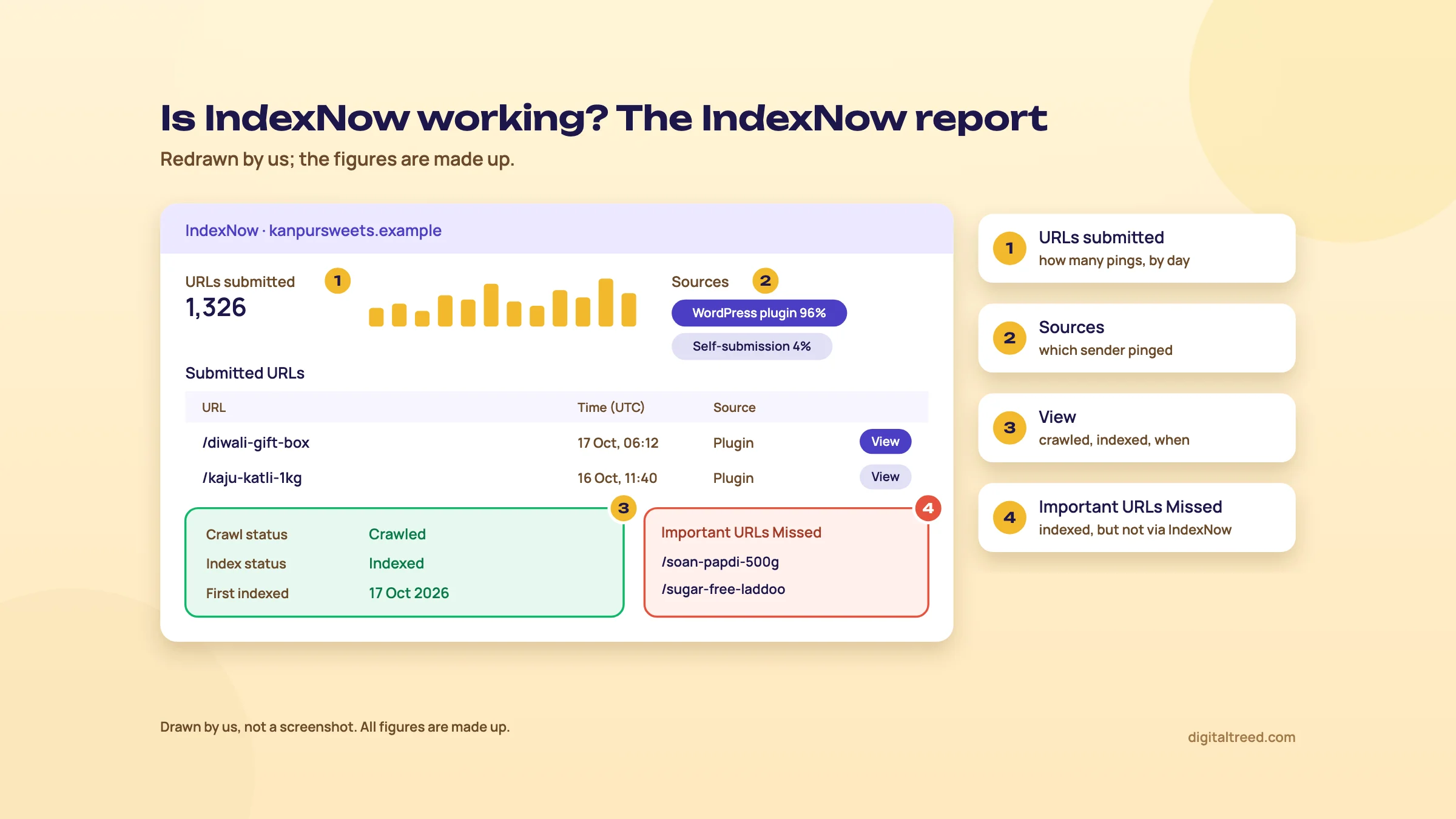 Pages under Important URLs Missed mean your sender isn't firing. Drawn by us; the figures are made up.
Read Need Attention like the Pages report in Search Console. A product page under "Content quality" was received and crawled, then left out. Pinging it again won't help. Improving the page will.
URL submission: the older route
Bing still has a Submit URLs tool and a URL Submission API. Its help page now says they "may be deprecated in the future as IndexNow adoption expands".[35] The limits, as Bing states them:
- Manual submission: up to 10,000 URLs per domain per day, one per line, resetting at midnight UTC (5:30 am in India). The quota is per domain, not per subdomain.
- History: the last 1,000 submitted URLs.
- API: the same 10,000 a day, up to 500 URLs per batch, with OAuth 2.0, and only to Bing.
- More quota: ask Bing Webmaster Tools support. Bing also says the quota "is set based on multiple parameters", so yours may be lower.
You'll see much lower numbers in older articles. Check the quota on your own Home page, which shows the URL submission quota left for the day.[36] Bing's own note is blunt: repeated manual submissions don't speed up indexing.[35] We'd use the manual box only for the odd urgent fix, and let IndexNow handle the rest.
Chapter 5 turns to the audit and research tools: Site scan, Recommendations, Backlinks and Keyword research.
Site scan, Recommendations, Backlinks and Keyword research
Quick answer
Site scan is a free on-demand crawl of your site that sorts problems into errors, warnings and notices. Recommendations lists issues Bing found on your indexed pages, by severity. Backlinks shows links to your site and to any other site; Bing removed its disavow tool in 2023. Keyword research gives Bing search volumes by country, language and device.
These four are the reason some SEOs open Bing Webmaster Tools more often than they expected. Google's free tool has nothing like Site scan or other sites' backlinks, and only Bing gives you Bing's own search volumes.
Site scan
Site scan is an on-demand audit: Bing crawls your site and checks for common technical SEO issues.[37] Click "Start new scan" and fill in:
- Scan name
- Scope: Website (start from the home page, a subdomain or a folder and follow links, like Bingbot), Sitemap (scan only the URLs in one sitemap, without following links) or a URL list
- Limit scan to: the maximum pages to crawl. Your remaining monthly quota is shown below it.
- Advanced settings: maximum scan depth, crawling speed in URLs per second, URL parameters to ignore, and an option to ignore robots.txt
The quota is set by Bing for each site, based on "signals available to Bing", and Bing doesn't take requests to raise it.[37] Bing doesn't publish the number. You'll see it on the scan screen. You can keep up to five scans; delete one to start a sixth.
The scan uses Bingbot's user agent, but Bing says it currently crawls from IP addresses that aren't Bingbot's, so a firewall that checks Bingbot IPs may block it.[37] Keep crawling speed low on shared hosting. A fast scan can slow the site for real visitors, and Bing's help says so too.
The report lists pages scanned, errors and warnings, and every issue with its severity and the number of pages affected:[37]
- Errors: the most serious, which can affect whether pages get indexed. Fix these first.
- Warnings: medium severity, may affect SEO health
- Notices: low severity, look at them last
Click an issue to see the affected pages, sorted by depth, and download them as CSV for your developer.
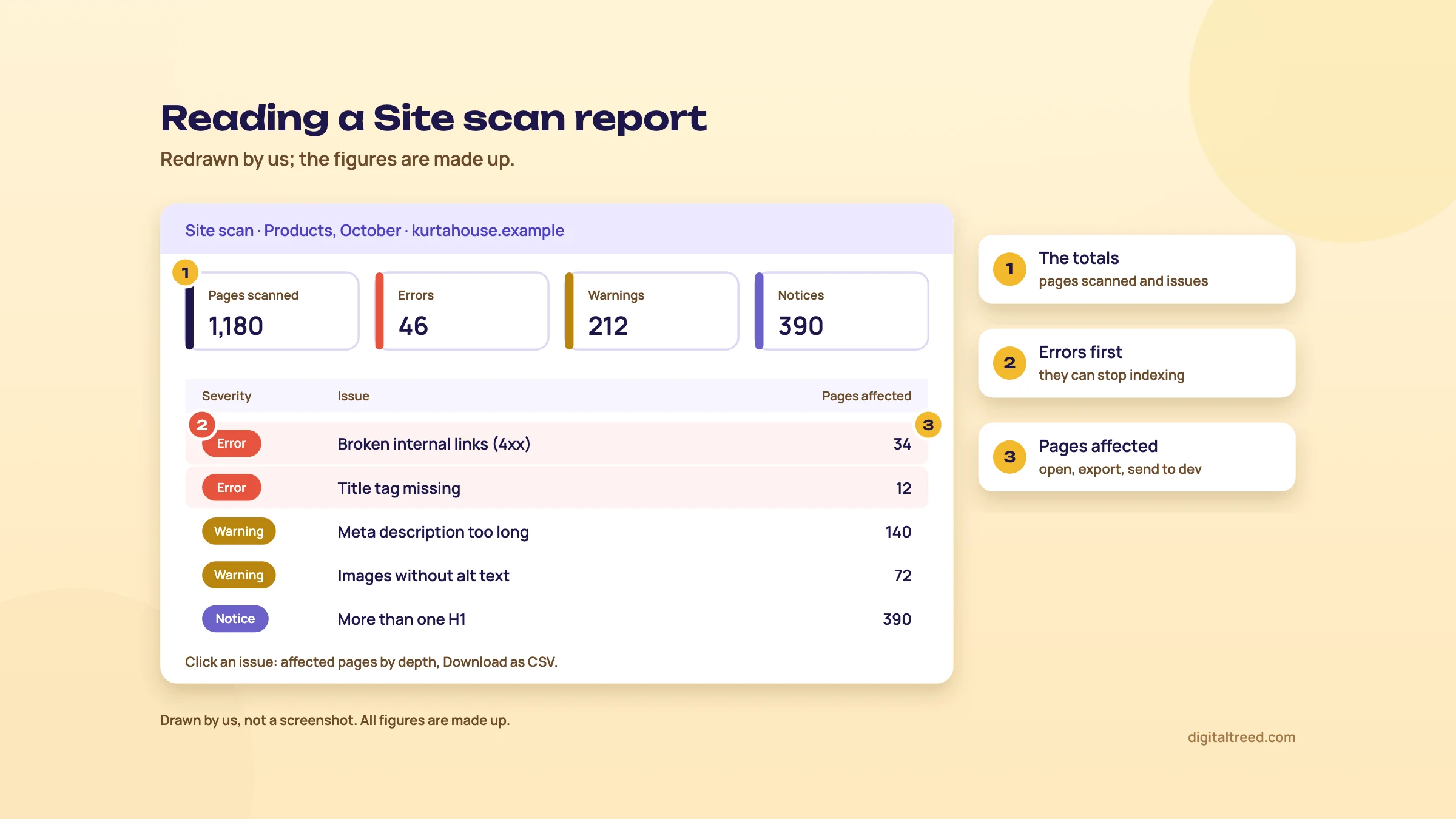 Fix errors first, then export the affected pages for your developer. Drawn by us; the issues and figures are made up.
Run a Site scan on a D2C store's product sitemap
- Start a scan In Site scan, click Start new scan and name it "Products, October".
- Choose Sitemap Paste the product sitemap URL, for example /product-sitemap.xml. Only those URLs get scanned, which saves quota.
- Set the limit Enter the number of products plus a margin, and check the remaining quota shown under it.
- Ignore tracking parameters In Advanced settings, add parameters such as utm_source so the same page isn't scanned twice.
- Keep speed low Leave crawling speed at a low value if the store is on shared hosting.
- Read errors first When the scan finishes, open each error, download the CSV and send it to the developer with the fix.
- Re-scan after fixes Delete the oldest scan if you already have five, then run the same scope again and compare.
Note
From our work: a lesson from teaching. When I taught SEO, technical SEO was the hardest part for students who were already doing client work, because most local business sites ran on WordPress with shared hosting. The most common issue was site speed. A free crawl like Site scan finds broken links and missing tags quickly. Speed is a separate test, so run that too.
Our PageSpeed Insights guide explains what the speed numbers mean. For a second opinion, our Free Website Audit crawls up to 25 pages. Our Screaming Frog guide covers a full desktop crawler.
Recommendations
Recommendations is Bing's list of issues on the pages it has indexed from your verified site. Bing checks those pages against its SEO best practices, groups the problems by type and marks each High, Moderate or Low. It refreshes automatically as Bing recrawls.[38] Each issue has a Recommended Action page showing:
- severity, pages with the error, and total errors
- the recommended fix and why it matters
- up to 50 affected URLs on screen, with Download all for the full CSV
Older help pages describe a similar SEO reports feature that runs every other week, and your console may still list it under its own name.[12] On 16 October 2024 Bing said it was turning its Insights feature into a fuller tool "now called Recommendations".[39]
Site scan and Recommendations differ in one way that matters. Site scan crawls what you tell it to, today. Recommendations reads only what's already in Bing's index. A page that isn't indexed can't appear in Recommendations, so use Site scan or Site explorer for pages Bing hasn't picked up.
Backlinks
The Backlinks report shows referring pages, referring domains and anchor texts that Bing has found. Bing is upfront that it's "a representative set of links", not a complete profile.[40]
| Tab | What it shows | Limit |
|---|---|---|
| Domains | Sites linking to you, with source URL, target URL and anchor text | 1,500 domains; 10,000 backlinks each |
| Anchor texts | The words used in links to you | 1,500 anchor texts |
| Pages | Pages on the web linking to your site | 100,000 URLs |
All three export to CSV. The part Google's tool doesn't have is "Backlinks to any site". Compare your site with up to two others. Then filter to domains that link to all of you, or to domains that link to the others but not to you.[40] That second filter is a free list of link prospects. The comparison uses the top 500 referring domains and anchor texts, and the detail view shows 100 referring pages.
Find link prospects for a Delhi dental clinic
- Add two competitors In Backlinks, open Backlinks to any site and add two clinics that rank above yours for "dentist in Hauz Khas".
- Filter Choose "Show domains not linking to my site".
- Sort the list Look for local sources: health directories, Delhi news sites, resident welfare association pages, dental college pages, a local event that listed sponsors.
- Skip the junk Ignore link farms, paid guest post sites and anything you'd be embarrassed to show the dentist.
- Plan real reasons For each good domain, write down why it would mention you: a free check-up camp, a sourced article on children's dental care, a listing you're missing.
- Export Download the list and track it in a sheet.
Guide 2, chapter 9 explains which links help and which get you penalised.
What happened to the disavow tool
Bing removed its Disavow Links tool and API in October 2023. Its reason: its systems can now tell natural from unnatural links and "ignore or discount the latter". You'll still see the tool in older help pages and guides. Bing kept the Backlinks report, and still warns that link schemes, link buying and link spamming can get a site delisted.[41]
So in Bing, there's nothing to upload. If a past SEO built spammy links, stop building more, and get the worst removed by asking the site owners if you can. Google's disavow tool still exists for Google; Guide 3, chapter 10 explains when to use it, which is rarely.
Keyword research
Bing's Keyword research tool takes a root keyword and returns Bing search volumes, a trend over time and related ideas. Filter by country, language and device, for any period in the last six months. By default it shows all countries, languages and devices for the previous three months.[42] It gives three lists:
- Related keywords: ideas Bing thinks are related, sorted by relevance
- Question keywords: questions people asked around those ideas
- Newly discovered: related keywords that became relevant to your root keyword in the last 30 days. Bing says these aren't new searches, just newly linked to your keyword.
It also shows a global breakdown of volume by country, and the top 10 URLs ranking for the root keyword with Bing's topic for each.[42]
Use it with care in India. These are Bing volumes, and Bing has under 2% of India's search traffic (chapter 1). A keyword with 200 Bing searches a month in India tells you people search it, not how many search it on Google. We'd use it for the question lists and for spotting desktop and B2B demand. For Google volumes, use Google Keyword Planner; for seasonality, Google Trends.
A quick example: a Kanpur sweet shop types "soan papdi" with the country set to India. The question list may show what people want to know (price, shelf life, sugar-free). Each good question is a section for the product page or a short blog post. Guide 1, chapter 6 covers turning questions into pages.
Chapter 6 covers AI Performance, Copilot inside the tool, Bing Places, and the alternatives.
AI Performance, Copilot, Bing Places, cost and alternatives
Quick answer
AI Performance counts how often Copilot, Bing's AI summaries and some partners cite your pages, with the grounding queries behind them. Citations aren't clicks. Since 13 October 2026 a Topics Portfolio beta shows themes and missed queries. Copilot in the tool answers questions about your data. Everything is free; pair it with Search Console.
AI Performance: what it counts
Bing launched AI Performance in public preview on 10 February 2026.[8] Our GEO guide, chapter 8 puts it beside Search Console, GA4 and a manual prompt log, and explains how to report AI visibility to a client. Here we go further into the report itself.
It covers three places: Microsoft Copilot, AI-generated summaries in Bing, and "select partner AI integrations". The main figures:[43]
- Total citations: times your content was visibly shown as a source in an AI answer in the period
- Average cited pages: unique pages from your site cited per day, averaged over the period
- Grounding queries: short, grouped phrases the AI used when it retrieved your content. They aren't the user's actual question.
- Pages: citation counts per URL
- Timeline: citations over 7 days, 30 days, 3 months or a custom range
Click a grounding query to see which pages it cited, or a page to see its grounding queries. You can filter by one or the other, not both at once. Data refreshes daily with a short delay, and exports to CSV or Excel.[43]
What it doesn't tell you
Bing is unusually clear about the limits, and they're worth reading before you show the numbers to anyone:[43]
- A citation isn't a click. Bing's FAQ says it "does not represent traffic, clicks, or user engagement".
- The data is a sample. Low or occasional citations may not appear, and totals can differ between views.
- It doesn't measure ranking, authority or importance, and changes in the trend can't be tied to one cause.
- No grounding queries at all usually means too little citation activity. Bing says this "does not indicate a penalty or exclusion".
It also covers only Microsoft's surfaces and its partners. It won't tell you about ChatGPT, Perplexity or Gemini. For Google's AI features, Search Console's generative AI report counts impressions only, not clicks (our Search Console guide).
The newer views: Intents, Topics, Citation Share, Compare
On 16 June 2026 Bing added four preview views, rolling out globally.[44]
- Intents labels each grounding query by type, such as Informational, Commercial, Navigational, Learn and Solve, Research, Local, Comparison or Planning.[43]
- Topics groups related grounding queries into themes.
- Citation Share is your percentage of all citations shown for one grounding query. Bing calls it "an observational metric – not a ranking system or a competitive scoreboard", and it doesn't name the other sites.[44]
- Compare overlays an earlier period on the chart, as a dashed line.[43]
The labels come from AI classifiers. Bing says some will be broad or a poor fit, especially for niche sites.[44] Read them as a rough map.
Topics Portfolio, the October 2026 beta
The newest piece arrived on 13 October 2026. Topics Portfolio is a beta tab next to Citations & Pages, and it appears only if your site has enough data.[45] For each topic where you have a real presence it shows:
- Topic Size: approximate citations across all sites for that topic
- Sites Cited: approximately how many sites appear, so how crowded it is
- Queries: approximately how many grounding queries the topic holds
Below the table, Top Opportunity Queries lists queries where other sites are cited and yours isn't, with volumes shown as ranges. Open a topic to see Your Grounding Queries next to its Opportunity Queries. You can choose a one-, two- or three-month window.[45]
Bing lists the catches itself. Small sites "may see a shorter list or may not even see this feature". Branded queries can show up as opportunities, and every number is approximate. Bing says to read them as "directional signals for planning, not as a precise ledger".[45] For most small Indian business sites, expect to see little here for now.
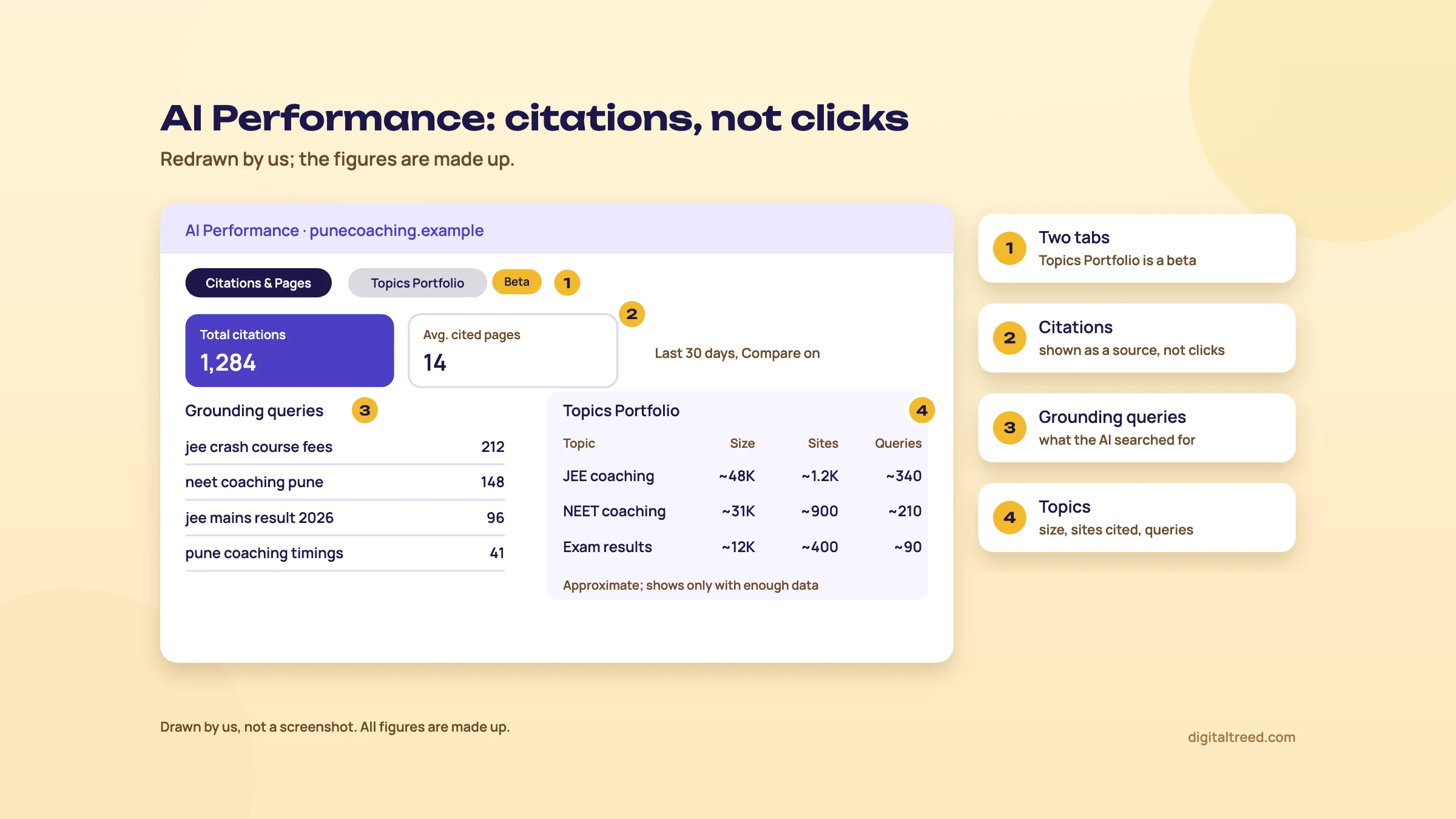 Citations count how often you were shown as a source, not clicks. Drawn by us; the figures are made up.
A monthly AI Performance check for a Pune coaching centre
- Set the range Open AI Performance, choose 30 days and turn on Compare against the previous 30.
- Note the totals Write total citations and average cited pages in your monthly sheet, next to last month's.
- Read the grounding queries Sort by citations. Phrases like "JEE crash course fees" tell you what the AI pulled your pages for. Check they match the pages you want cited.
- Check the pages Click your fees page and your results page. If a key page has no citations, look at it: is the answer clear, dated and sourced?
- Look at Intents If you get Informational citations but no Local or Commercial ones, your location and fees pages may need clearer facts.
- Open Topics Portfolio if you have it Work down the opportunity queries in your strongest topic. Skip competitor brand names.
- Export and file Download the CSV. Answers change, so keep the evidence.
Bing's own advice in the launch post is general: clear headings and tables, evidence and sources, fresh content, and IndexNow to keep pages current.[8] GEO guide chapter 4 covers writing for citation in depth.
Copilot inside Bing Webmaster Tools
Bing Webmaster Tools has its own AI assistant, also called Copilot. It opened to all users on 18 March 2025, in English only at launch. Bing lists four features: real-time question and answer chat about your site, "deep data insights" on performance, built-in learning resources, and feedback that shapes the tool.[9] Bing's June 2025 post still lists it as a built-in assistant for troubleshooting and finding your way around.[5]
We'd use it like any chatbot on our own data. Ask "which pages lost the most clicks this month?", then check the answer in the report before you act on it.
Bing Places for local businesses
Bing Webmaster Tools is for your website. Your shop, clinic or coaching centre's listing on Bing Maps lives in Bing Places for Business, which is free.[46] Bing's AI Performance launch post suggests local businesses register there so address, hours and contact details stay current and "eligible for inclusion in AI-generated responses".[8]
Set it up after your Google Business Profile, with the same name, address and phone. Guide 2, chapter 10 covers Bing Places among the Indian citations, and our Google Business Profile guide covers the Google side.
What it costs
Nothing. Bing Webmaster Tools is a free account,[12] IndexNow is free to use, and so are Rank Math's IndexNow module and Microsoft's IndexNow plugin (chapter 4). The only money you might spend is on a paid SEO suite for things Bing doesn't do, below. We found no paid version when we checked on 18 October 2026.
Pros
- Free, with a 10-minute set-up if you're already in Search Console
- The only first-party report we know of that counts AI citations (Copilot and Bing AI answers)
- Backlink data for any site, with a "not linking to me" filter
- Site scan: an on-demand crawl Google's tool doesn't offer
- IndexNow report shows whether your pings arrived and what happened next
- Crawl, error and index counts on the same chart as clicks
Cons
- Bing data only: under 2% of India's search traffic
- Backlinks are a sample, and Keyword research volumes are Bing's
- Help pages are out of date in places (six months of data, disavow, SEO reports)
- AI Performance shows no clicks and is sampled
- No rendered page view in URL inspection
- Site scan quota is set by Bing and can't be raised
Alternatives, and which one when
Start with our free tools for quick checks, Search Console for Google, and Bing Webmaster Tools for Bing. Paid suites come in when you need data on other sites at scale.
| Job | Our free tool | Free outside tool | Paid option |
|---|---|---|---|
| Is a page blocked or broken? | Noindex Tag Checker, HTTP Status Checker, Robots.txt Tester | Bing URL inspection, Search Console URL Inspection | Not needed |
| Quick site health check | Free Website Audit (up to 25 pages) | Bing Site scan | Screaming Frog licence for big sites |
| Traffic from search | None | Search Console (Google), Bing Search performance | Not needed |
| Fast indexing of changes | HTTP Status Checker to test the key file | IndexNow via Rank Math or Microsoft's plugin | Yoast Premium if you already pay for it |
| Backlinks | None yet | Bing Backlinks (any site), Search Console Links (own site), Ahrefs Webmaster Tools (own site) | Ahrefs, Semrush |
| Keyword volumes | None yet | Google Keyword Planner (Google), Bing Keyword research (Bing) | Semrush, Ahrefs |
| AI visibility | AI Crawler Checker (access only) | Bing AI Performance, Search Console generative AI report | Trackers in our GEO guide, chapter 8 |
Selling into Russia or South Korea? Yandex and Naver have their own webmaster tools, as Guide 1, chapter 4 lists. They also take IndexNow pings, so one ping from your plugin reaches them too.
Our pick for almost every Indian site: Search Console plus Bing Webmaster Tools, IndexNow on through your SEO plugin, and a 10-minute look at Bing once a month. When you'd rather have someone else watch both consoles, our SEO service does it as part of monthly reporting.
Before you judge any AI number, run the AI Crawler Checker. A site that blocks Bingbot won't be cited by Copilot, and no report will tell you why. Then take the quiz to check what you've learned.
Test yourself
Ten questions on the whole guide. Pick an answer, check it, and see your score at the end.
You got 0 of 10 right.
Frequently asked questions
Frequently asked
Is Bing Webmaster Tools free?
Yes. You open a free account at bing.com/webmasters with a Microsoft, Google or Facebook account, and every report in this guide, from Site scan to AI Performance, is included. We found no paid version when we checked in October 2026.
Do I need Bing Webmaster Tools if I already use Google Search Console?
We'd set it up anyway. It takes about ten minutes with the Search Console import, and Bing's index also feeds Yahoo, most of DuckDuckGo's links and Microsoft Copilot. It also has things Search Console doesn't: AI citation counts, an on-demand site scan and backlinks for any site.
How do I verify my site in Bing Webmaster Tools?
The quickest way is to import it from Google Search Console: on My Sites, click Import, allow access and pick your sites. They're verified automatically. You can also verify by hand with Domain Connect, an XML file (BingSiteAuth.xml), a meta tag in the home page's head, or a DNS record.
How long does Bing take to show data for a new site?
Bing says it usually takes about 48 hours after you add a site. Search performance data starts from the day you add it; Bing can't show anything from before then.
What is IndexNow and does Google support it?
IndexNow is a free, open way to tell search engines that a URL was added, changed or deleted. Bing, Naver, Seznam.cz, Yandex and Yep support it and share what you send with each other. Google doesn't use it, so keep your sitemap and Search Console as they are.
How do I check that IndexNow is working?
Open IndexNow in Bing Webmaster Tools. Your recent URLs should appear in the submitted list with their source, such as a WordPress plugin, and "View" shows whether each was crawled and indexed. If new pages appear under Important URLs Missed, your plugin isn't sending them.
How many URLs can I submit to Bing a day?
Bing's help page says up to 10,000 URLs per domain per day through manual submission or the URL Submission API, resetting at midnight UTC. Your quota may be lower, and the Home page shows what's left for the day. Bing recommends IndexNow instead and says the older methods may be deprecated.
Can I disavow links in Bing?
No. Bing removed its disavow tool and API in October 2023, saying its systems can now tell natural from unnatural links and ignore the bad ones. The Backlinks report is still there.
Does Bing's AI Performance report show clicks from Copilot?
No. It counts citations: how often Copilot, Bing's AI summaries and some partner services showed your pages as a source, with the grounding queries and pages behind them. Bing says a citation does not represent traffic or clicks, and the data is a sample.
Is Bing Places the same as Bing Webmaster Tools?
No. Bing Webmaster Tools is for your website. Bing Places for Business is your free listing on Bing Maps, with address, hours and phone. A shop or clinic should set up both, with the same details as its Google Business Profile.
Sources
References
- Search engine market share in India, StatCounter Global Stats, September 2026 data, accessed 18 Oct 2026
- Desktop search engine market share in India, StatCounter Global Stats, September 2026 data, accessed 18 Oct 2026
- Where do DuckDuckGo search results come from?, DuckDuckGo Help, accessed 18 Oct 2026
- How web search works in Microsoft 365 Copilot Chat and agents, Microsoft Support, accessed 18 Oct 2026
- Start using Bing Webmaster Tools to improve your site visibility, Bing Webmaster Blog, 17 Jun 2025, accessed 16 Oct 2026
- ChatGPT search, OpenAI Help Center, accessed 16 Oct 2026
- Webmaster tools and features (Refreshed Webmaster Tools), Bing Webmaster Tools Help, accessed 18 Oct 2026
- Introducing AI Performance in Bing Webmaster Tools public preview, Bing Webmaster Blog (Madhavan, Merchant, Canel, Nigam), 10 Feb 2026, accessed 16 Oct 2026
- Copilot in Bing Webmaster Tools is now available to all users, Bing Webmaster Blog, 18 Mar 2025, accessed 16 Oct 2026
- Bing Webmaster Tools or Google Search Console: a comparison, Bing Webmaster Blog (Fabrice Canel), 20 Aug 2024, accessed 16 Oct 2026
- Generative AI performance report (Search), Search Console Help, accessed 16 Oct 2026
- Getting started checklist, Bing Webmaster Tools Help, accessed 18 Oct 2026
- Easily verify your site in Bing Webmaster Tools by importing from Google Search Console, Bing Webmaster Blog, 13 Sep 2019, updated June 2025, accessed 16 Oct 2026
- Adding a site (Add and verify site), Bing Webmaster Tools Help, accessed 18 Oct 2026
- Sitemaps, Bing Webmaster Tools Help, accessed 18 Oct 2026
- Search performance, Bing Webmaster Tools Help, accessed 18 Oct 2026
- Bing Webmaster Tools extends Search Performance data to 16 months, Bing Webmaster Blog, 16 Oct 2024, accessed 16 Oct 2026
- Microsoft expands Bing Webmaster Tools data capabilities to 24 months, PPC Land, 8 Aug 2025, accessed 18 Oct 2026
- URL inspection, Bing Webmaster Tools Help, accessed 18 Oct 2026
- Site explorer, Bing Webmaster Tools Help, accessed 18 Oct 2026
- What is IndexNow?, IndexNow.org, accessed 18 Oct 2026
- IndexNow participating search engines (searchengines.json), IndexNow.org, accessed 18 Oct 2026
- IndexNow documentation, IndexNow.org, accessed 18 Oct 2026
- Bing Webmaster Guidelines, Microsoft Bing, accessed 18 Oct 2026
- IndexNow FAQ, IndexNow.org, accessed 18 Oct 2026
- How to add IndexNow to your website, Bing Webmaster Tools, accessed 18 Oct 2026
- Crawler Hints, Cloudflare Docs, accessed 18 Oct 2026
- How to use IndexNow with Rank Math, Rank Math Knowledge Base, updated 26 Sep 2023, accessed 16 Oct 2026
- Yoast SEO settings: Site features, Yoast Help Center, updated 21 Apr 2026, accessed 16 Oct 2026
- We're launching an IndexNow integration in Yoast SEO, Yoast, 28 Jun 2022, accessed 16 Oct 2026
- Pricing, AIOSEO, accessed 18 Oct 2026
- Integrating with IndexNow to Instantly Re-index Your Content, AIOSEO docs, updated 14 Aug 2026, accessed 18 Oct 2026
- IndexNow Plugin, WordPress.org plugin directory (by bingwebmastertools), version 1.0.4, accessed 18 Oct 2026
- IndexNow, Bing Webmaster Tools Help, accessed 18 Oct 2026
- URL submission, Bing Webmaster Tools Help, accessed 18 Oct 2026
- Home, Bing Webmaster Tools Help, accessed 18 Oct 2026
- Site Scan, Bing Webmaster Tools Help, accessed 18 Oct 2026
- Recommendations in Bing Webmaster Tools, Bing Webmaster Tools Help, accessed 18 Oct 2026
- Bing Webmaster Tools introduces Recommendations, Bing Webmaster Blog, 16 Oct 2024, accessed 16 Oct 2026
- Backlinks, Bing Webmaster Tools Help, accessed 18 Oct 2026
- Bing Webmaster Tools to remove Disavow Links feature in October 2023, Bing Webmaster Blog (Fabrice Canel), 21 Sep 2023, accessed 16 Oct 2026
- Keyword research, Bing Webmaster Tools Help, accessed 18 Oct 2026
- AI Performance in Bing Webmaster Tools (FAQs), Bing Webmaster Tools Help, accessed 18 Oct 2026
- New AI visibility insights in Bing Webmaster Tools: Intents, Topics, Citation Share, Compare, Bing Search Blog, 16 Jun 2026, accessed 16 Oct 2026
- Introducing Topics Portfolio (Beta) in AI Performance, Bing Webmaster Blog (Madhavan, Nigam, Jain), 13 Oct 2026, accessed 16 Oct 2026
- Bing Places for Business, Microsoft, accessed 18 Oct 2026
Get the free checklist
Every step of this guide on one page, to print or tick off. We email you the PDF link.