

Quick answer
googleadservices.com is Google's own ad address, so when it won't open, something on your side has almost always blocked it: an ad blocker, a DNS filter or security software. Read the error code first. Then let www.googleadservices.com through for that one click, or skip the ad and open the regular result.
A googleadservices.com not working message has two sides: the person whose ad click failed, and the business whose Google Ads conversions suddenly look too low.
This guide covers both.
Key takeaways
- ERR_BLOCKED_BY_CLIENT means an extension in your browser stopped the request.
- DNS_PROBE_FINISHED_NXDOMAIN here usually means a DNS filter refused the lookup.
- On a Pi-hole, allow only the www.googleadservices.com address.
- Treat googleadservices.com links in unexpected emails as possible open redirects.
- Advertisers should test conversions in a clean browser with no extensions.
googleadservices.com is where Google Ads clicks and conversions go
googleadservices.com is a Google domain that Google Ads uses for two jobs: passing ad clicks on to advertisers and running the conversion tag on their websites.
It isn't a stranger's site.
Verisign's public registry record shows it was registered in 2003, and its name servers are Google's own, ns1 to ns4.google.com.
Job one is the click.
Ad links on Google pages point to an address that starts with www.googleadservices.com/pagead/aclk, which then sends you on to the advertiser's page. You can see that pattern in EasyList, a public ad-blocking list: it has a rule that hides links starting with exactly that address on Google's own pages.
Job two is the conversion.
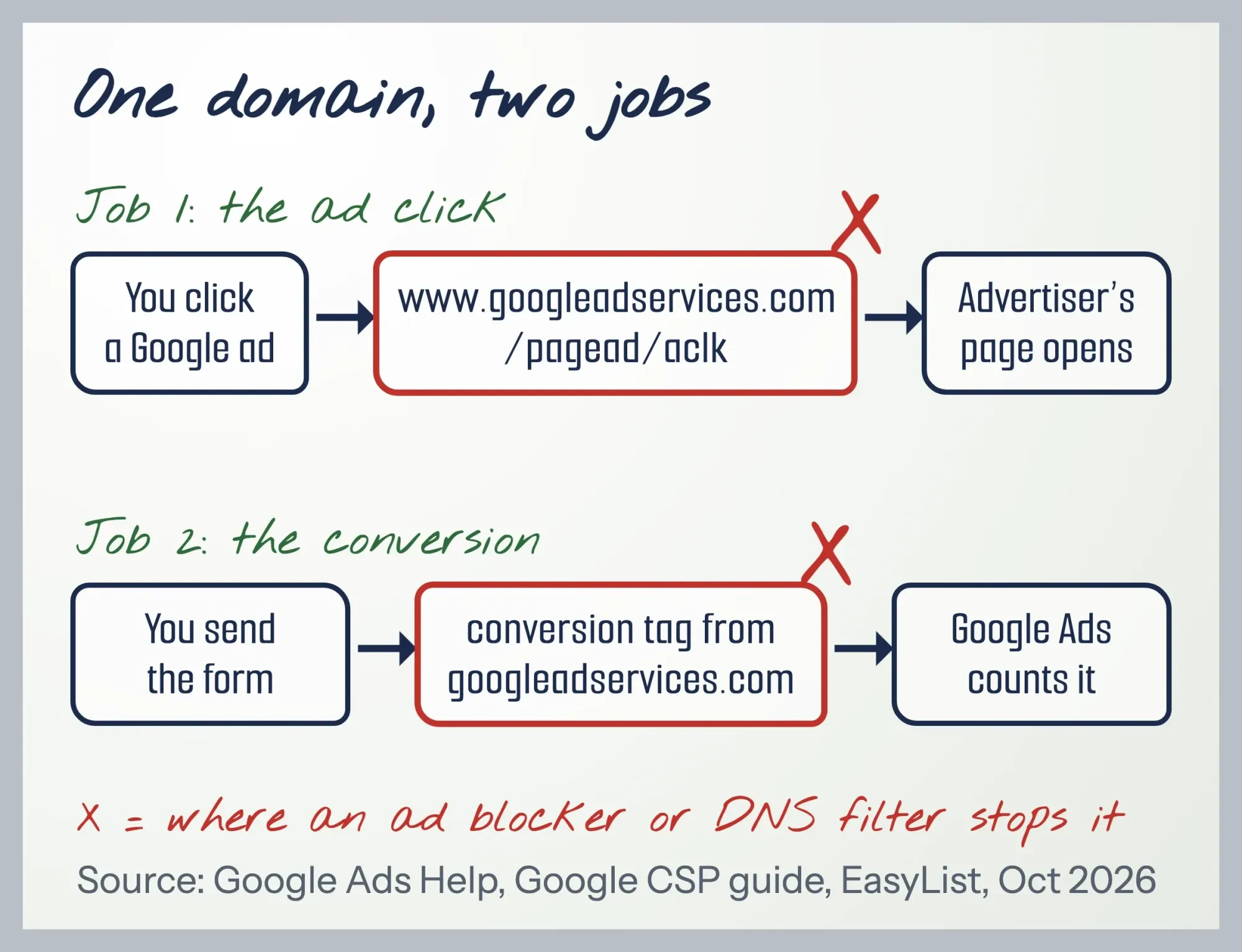 Diagram by DigitalTreed from Google Tag Platform and Google Ads Help pages and EasyList, October 2026.
Google's Content Security Policy guide lists https://www.googleadservices.com among the addresses a page must allow to use "a Google Ads Conversion, Remarketing, or Conversion Linker tag". In plain words, your conversion tag loads from there and reports back there.
One block can hurt two people at once.
The visitor's click goes nowhere, and the advertiser never hears about a sale or lead that really happened.
New to Google Ads itself? Our PPC advertising guide covers the basics, and the ad text that leads to this click is in our Google search ads writing guide.
The error message tells you what blocked it
That blocked click leaves an error page behind, and on a googleadservices.com page the error code names the kind of blocker that stopped you. Read it first.
| What Chrome shows | What blocked it | First fix |
|---|---|---|
| "www.googleadservices.com is blocked" and ERR_BLOCKED_BY_CLIENT | An extension or app inside your browser, usually an ad blocker | Pause the blocker for one click, or allow www.googleadservices.com in it |
| "This site can't be reached" and "DNS_PROBE_FINISHED_NXDOMAIN" or ERR_NAME_NOT_RESOLVED | A DNS filter: Pi-hole, a router, a VPN or your office network | Allow www.googleadservices.com in that filter |
| "This page is blocked" and ERR_BLOCKED_BY_ADMINISTRATOR | Your employer's or school's browser policy | Ask IT; don't try to get around it |
| "Your connection is not private" on googleadservices.com | In our test: a DNS filter that answered 0.0.0.0 on a computer running its own web server | Don't click through the warning; check the DNS filter instead |
The codes come straight from Chrome's source. Chromium's network error list describes ERR_BLOCKED_BY_CLIENT as "The client chose to block the request", and ERR_NAME_NOT_RESOLVED as "The host name could not be resolved."
"Client" means your browser or something running in it, not Google.
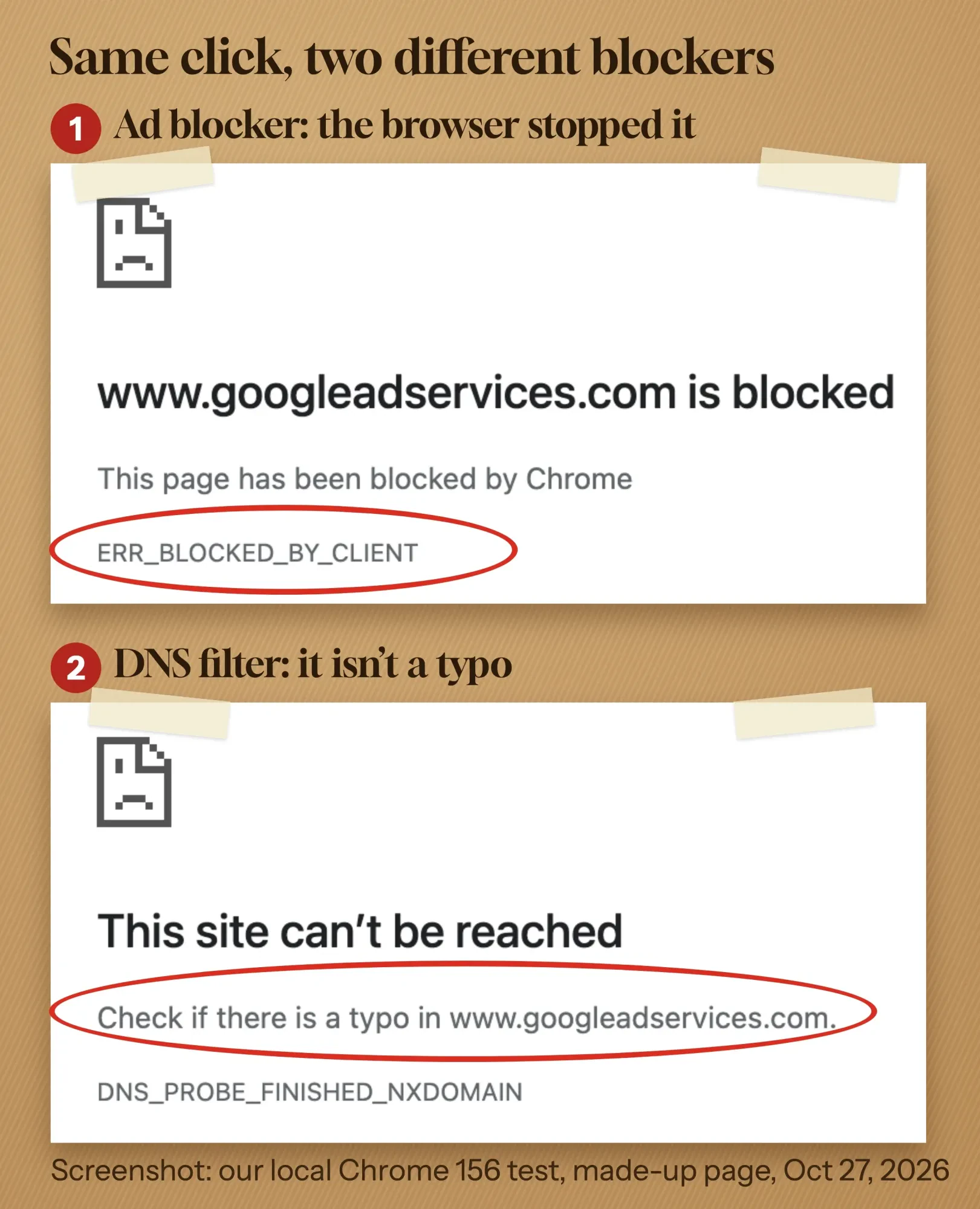
We reproduced the first two errors on October 27, 2026, without touching a real ad. On our own computer we built a made-up landing page that loads Google's conversion script and has a fake "Sponsored" link to a googleadservices.com click address. Then we opened it in Chrome 156 three ways. First, nothing was blocked. Next, every googleadservices.com request was stopped the way an ad-blocking extension stops it. Last, a DNS rule said the name doesn't exist. Unblocked, the script loaded. Blocked either way, it never loaded, and the fake ad click ended on the two error pages shown below.
 Screenshot: our local Chrome 156 test with a made-up page, October 27, 2026. Marks added by DigitalTreed.
One line surprised us.
The DNS version says "Check if there is a typo in www.googleadservices.com." There's no typo; your filter just won't look the name up.
Our simulated block reads "This page has been blocked by Chrome". With a real extension, Chromium's error page text switches that line to "This page has been blocked by an extension".
Not sure which it is? Chrome's connection errors help suggests a quick test: if the page works in Incognito, go on to disable extensions or delete browsing data.
An ad blocker is the usual cause, and you can let one click through
That ERR_BLOCKED_BY_CLIENT code is what an ad blocker leaves behind, and an ad blocker is the most likely reason a googleadservices.com click fails.
Ad blockers' filter lists name the domain.
EasyPrivacy, a tracker list that many blockers can load, has a rule blocking googleadservices.com whenever another site loads it. That's the conversion tag on an advertiser's page.
There's no need to turn your blocker off for good. Let one click through instead:
- Click the blocker's icon next to Chrome's address bar while you're on the Google results page.
- Pause it for google.com, or add www.googleadservices.com to its allowlist. Each extension words this a little differently.
- Click the ad again.
- If you paused it everywhere, turn it back on.
Can't tell which extension is doing it? Chrome's help says to disable all extensions, then re-enable them in turn until the error comes back. You'll find them under More, then Extensions, then Manage extensions.
Or skip the ad.
The same business usually has a regular listing a little further down the page, or you can type its web address yourself.
Neither one passes through googleadservices.com.
A DNS filter shows a "typo" error that isn't a typo
Now the other common code: "DNS_PROBE_FINISHED_NXDOMAIN" on a googleadservices.com click usually means a DNS filter refused to look up the name.
A DNS filter blocks web addresses for every device on a network, not just one browser. Pi-hole is one you can run at home, and offices and schools can filter DNS for a whole building.
DNS filter lists disagree about this domain. We read four of them on October 26 and 27, 2026.
StevenBlack's Unified Hosts list blocks www.googleadservices.com outright. It's also the list Pi-hole's installer suggests: "Select 'Yes' to include: StevenBlack's Unified Hosts List".
On a Pi-hole set up with that suggested list, any Google ad click that passes through www.googleadservices.com fails.
The AdGuard DNS filter takes the other road. It blocks googleadservices.com but makes an exception for www, with this note: "These ads cannot be hidden on the DNS-level, so we should not break clicks on the adverts".
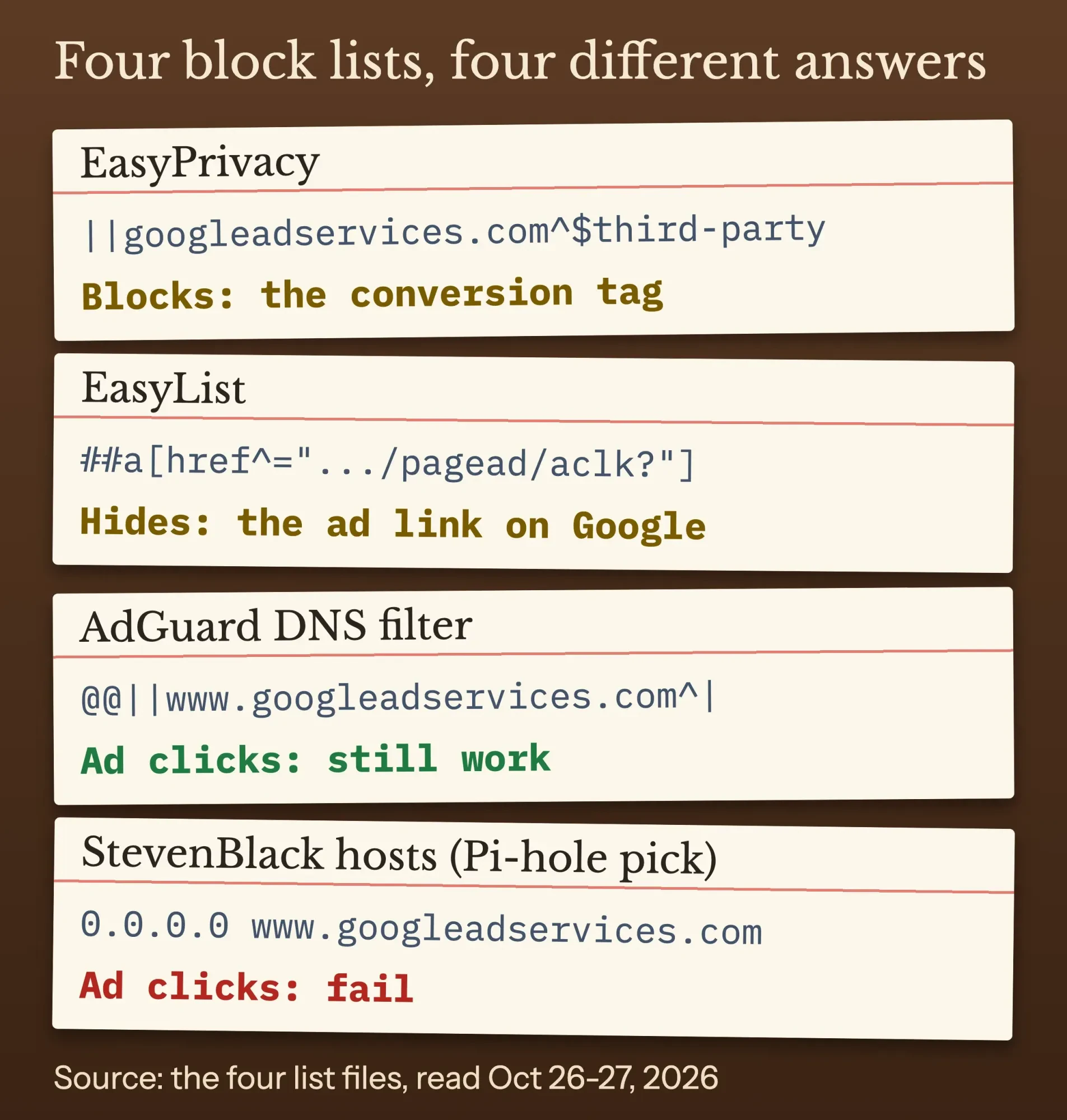 Diagram by DigitalTreed. Source: EasyList, EasyPrivacy, AdGuard DNS filter and StevenBlack hosts files, read October 26-27, 2026.
Pi-hole's default answer for a blocked name is 0.0.0.0, its blocking mode docs say, not a "no such domain" reply. A Pi-hole user may see a different connection error than ours.
On our test Mac, which runs its own web server, the 0.0.0.0 answer even produced a "Your connection is not private" warning.
On a Pi-hole, check the name first, then allow only the www address. Both commands are in Pi-hole's command docs:
pihole -q www.googleadservices.com
pihole allow www.googleadservices.com
Here's the trade: allowing www also lets advertisers' conversion tags through on your network, because they use the same address.
Routers, VPNs and paid DNS services call the same setting an allowlist or whitelist. On a work network, ask IT.
If every site fails with this error, not just googleadservices.com, a filter isn't the problem. Our fix guide for that DNS error covers that case.
Security apps, the hosts file and privacy browsers can block it too
Still blocked, with no ad blocker and no DNS filter? Then the block is coming from somewhere else on your own computer or browser, and there are three common places to check.
Security suites and VPN apps sometimes include their own ad or tracker blocking. Users in Norton's community forum have asked whether Norton blocks Google Ad Services links.
Turn that one feature off for a minute to test, then add an exception instead of leaving protection off.
A hosts file can block the name on one computer. Microsoft says a changed hosts file "can override normal network name resolution and cause connectivity issues". On Windows it's usually in C:\Windows\System32\drivers\etc; look for a line with googleadservices.com and a 0.0.0.0 in front of it.
Privacy browsers block it by design. Brave says its Shields "are on for every site you visit", and you can turn them off for one site when it looks broken.
ERR_BLOCKED_BY_ADMINISTRATOR is a policy, not a fault.
Chromium describes it as a block list "configured by the domain administrator". That's your employer or school, so ask them.
Is googleadservices.com down, or is it a virus?
googleadservices.com is a real Google domain, not a virus. A block on your side is far more likely than an outage, because an outage would hit every ad for everyone at once.
Google keeps a public Google Ads Status Dashboard for its ad services. When we checked it on October 26, 2026, at 9:51 pm UTC, it said "No incidents".
The real risk is a link that only looks like Google.
An open redirect is a link on a trusted domain that forwards you somewhere else. Email security firm Sublime Security has a detection rule for messages that use "the Google Ad Services open redirect, but the sender is not Google". The rule adds: "This has been exploited in the wild."
Treat a googleadservices.com link in an unexpected email like any other unexpected link.
Don't click it. Open the business's website yourself.
Advertisers: your own ad blocker can hide your conversions
Now the other side. If you run Google Ads, googleadservices.com not working rarely shows up as an error page. It shows up as conversions that look too low.
Google Ads counts a conversion when the tag on your site recognizes an earlier ad click. Google's conversion measurement page says a temporary cookie is placed at the click, and "our system recognizes the cookie (through the code snippet you added)" when the customer acts.
Block the tag, and there's nothing to recognize the click.
Example (made up): Kettlebrook Plumbing in Montpelier, Vermont, runs search ads for emergency repairs. The owner fills in the "Book a visit" form to test a new conversion tag, sees no Google Ads hit, and calls a developer to fix the "broken" tag. The tag was fine. The ad blocker in the owner's own browser stopped it.
That's what happened in our local test too: the conversion script never loaded in any blocked mode.
Test the way a customer without a blocker would:
- Open a new Chrome profile or an Incognito window with no extensions, and turn off any VPN or DNS filter for the test.
- Start Tag Assistant from the conversion action in Google Ads, or at tagassistant.google.com, and connect your website.
- Do the conversion yourself: send the form or reach the thank-you page.
- Close Tag Assistant and refresh the conversions page. Google says verified actions update in about 30 minutes.
Google's Tag Assistant help says to use it when the status column shows "Unverified", "Tag inactive" or "Needs attention".
When you connect, Tag Assistant adds a _dbg parameter to your URL, so don't copy that test URL into your ads.
Each status means something different.
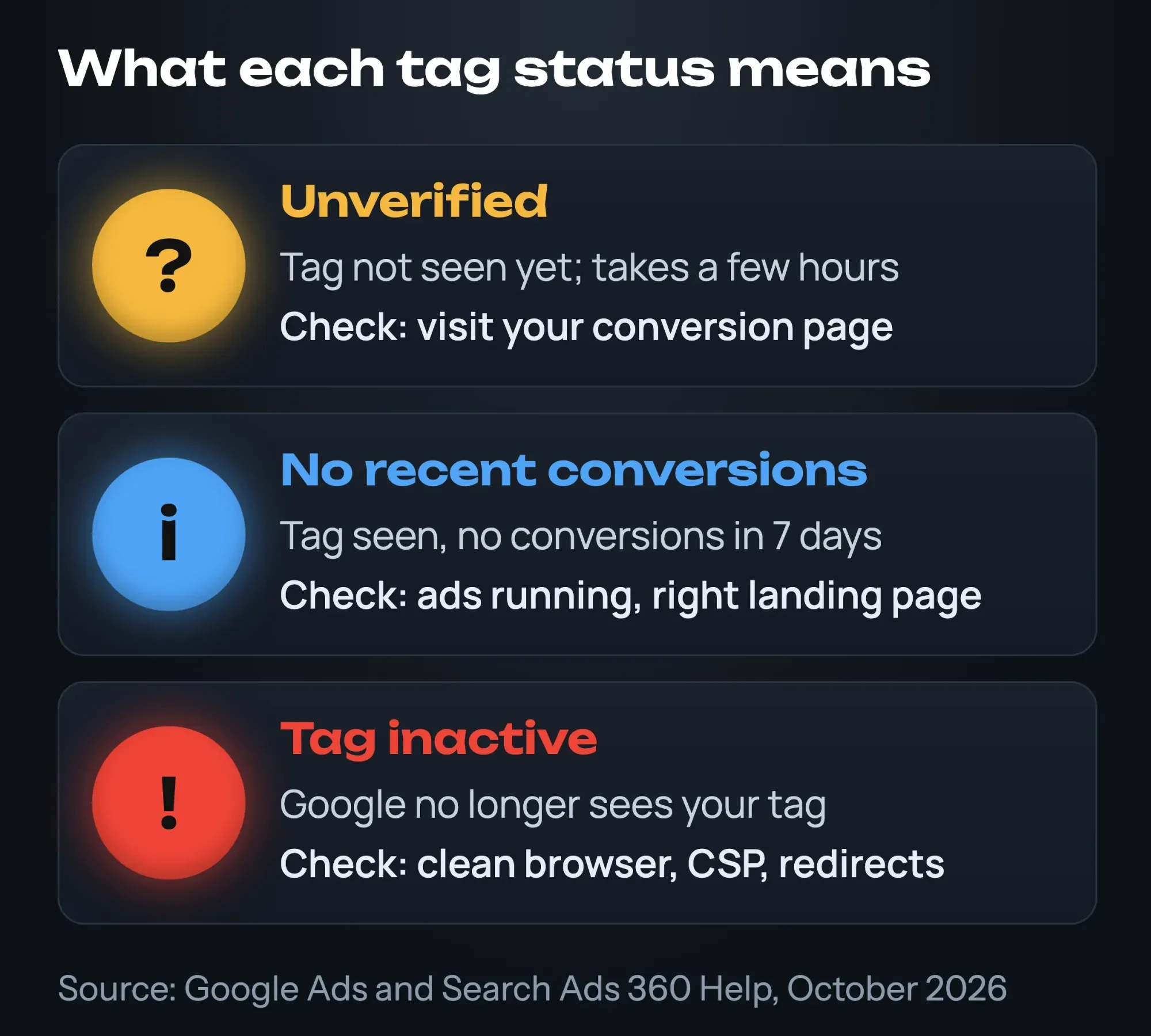 Diagram by DigitalTreed. Source: Google Ads and Search Ads 360 Help, October 2026.
Per Google's status definitions, Unverified means "We haven't verified that your tag has been put on your website yet. This takes a few hours." No recent conversions means the tag was seen, but nothing was recorded in the last 7 days. Tag inactive means "We no longer see your tag".
If your tags live in Tag Manager, our Google Tag Manager guide walks through setting it up for tracking. The same Google tag also builds remarketing lists, which our retargeting ads guide explains.
Two settings on your website can block the tag
Once a clean test still shows nothing, look at two settings on your website that can block the tag for every visitor, blocker or not.
The first is a Content Security Policy, a header that lists which outside addresses your pages may load.
If it leaves out googleadservices.com, your site stops your own conversion tag. Google's CSP guide says the policy must allow https://www.googleadservices.com, https://www.googletagmanager.com and https://www.google.com for scripts, with googleadservices.com in the image and connection rules too.
The second is a redirect that drops the click ID.
Google's auto-tagging page explains that it adds a GCLID, short for "Google Click Identifier", to the URL people click through. It also warns that "If your website uses redirects, it's also important to make sure the GCLID is passed to the final landing page in order to track conversions."
To check yours, paste your landing page URL with ?gclid=test on the end into our redirect checker. Look at the last address in the chain.
Your gclid should still be there.
Counting leads in GA4 as well? Our GA4 guide covers counting leads as key events, so you have a second number to compare.
Frequently asked
Can Microsoft Edge block googleadservices.com without an ad blocker?
Edge has its own tracking prevention, set at edge://settings/privacy, with Basic, Balanced and Strict levels. Balanced is the default. Strict is built for people "okay trading website compatibility for maximum privacy," per Microsoft's tracking prevention docs. If ad clicks fail only in Edge, check that setting first.
How long after a click can Google Ads still count a conversion?
For Search and Display, the default conversion window is 30 days, and you can set it from 1 to 90 days depending on the conversion source, as of October 2026. A blocked tag still misses the conversion, whatever the window. The settings are on Google's About conversion windows page.
Does ad click tracking slow down an advertiser's landing page?
Less than it used to. With parallel tracking, Google sends people straight from the ad to the final URL while click measurement happens in the background, which helps the page load faster. It's mandatory for Search, Shopping, Display, Video and Performance Max campaigns, as of October 2026, per Google's parallel tracking page.
You can't unblock visitors, but you can recover some conversions
That fixes your side. Visitors' own blockers stay out of your reach, so the aim now is to lose fewer of their conversions.
Google offers four settings for this. They solve different gaps:
- First-party cookies: Google says opting out of them "will lead to less accurate conversion measurement". In Tag Manager, the Conversion Linker tag stores the click details in first-party cookies under your domain.
- Enhanced conversions sends "hashed first party conversion data", such as the email address from a form, using SHA256. Send only data your privacy notice covers.
- Consent mode matters if you run a cookie banner. In advanced mode, Google tags send "cookieless pings" while consent is denied, which feeds Google's conversion modeling.
- Google tag gateway serves your Google tag from your own domain through a CDN, load balancer or web server.
On tag gateway, Google's launch post of May 2, 2025, says "Advertisers who configured Google tag gateway for advertisers saw an 11% uplift in signals."
That's Google's own figure, and the page doesn't show how it was measured.
Our take: start with the clean-browser test and the two site settings, because they're free and they catch real breakage. Add enhanced conversions next. Leave tag gateway for later, since it means changing your CDN or server setup.
While you're at it, make sure the landing page itself answers with a 200 code. A quick run through our HTTP status checker shows it.
To compare ad conversions with your other numbers, our website analytics tools guide sorts the free options by job.
Prefer to hand it off? Our search ads service sets up Google Ads campaigns with conversion tracking in your own ad account.
We earn money from that service, so take our advice as coming from a seller; every check above works without us.
How we made this guide: the DigitalTreed team read the four block lists on October 26, 2026. We checked each Google, Chromium, Pi-hole, Microsoft and Brave page quoted above on October 27, 2026. Each link sits beside the line it backs up. Our Chrome 156 test used a made-up page on our own computer. We didn't click a real ad, sign in to Google Ads or use a Pi-hole. Firefox steps are missing because Mozilla's help pages put up a bot check when we tried to read them. We invented Kettlebrook Plumbing for the example.
First published November 2023. Rewritten October 27, 2026: it now explains what googleadservices.com does and maps each error code to its blocker with our own Chrome test. It also adds the block lists, Pi-hole steps and an advertiser section on conversion tracking.
Sources
- Google for Developers: Use Tag Manager with a Content Security Policy
- Google Ads Help: About auto-tagging
- Google Ads Help: About conversion measurement
- Google Ads Help: How Google Ads tracks website conversions
- Google Ads Help: About enhanced conversions
- Google Ads Help: About consent mode
- Google Ads Help: Use Tag Assistant to troubleshoot your unverified or inactive conversion actions
- Search Ads 360 Help: Check the tracking status of your Google Ads conversion action
- Tag Assistant Help: Troubleshoot with Tag Assistant
- Google Ads Help: Google tag gateway for advertisers (May 2, 2025)
- Google for Developers: Google tag gateway for advertisers
- Google Ads Status Dashboard
- Google Chrome Help: Fix connection and loading errors in Chrome
- Chrome Web Store Help: Install and manage extensions
- Chromium source: net_error_list.h
- Chromium source: error_page_strings.grdp
- EasyList (version 202610262122)
- EasyPrivacy (version 202610262122)
- AdGuard DNS filter (modified October 26, 2026)
- StevenBlack Unified Hosts (October 26, 2026)
- Pi-hole installer script (basic-install.sh)
- Pi-hole documentation: Blocking mode
- Pi-hole documentation: The pihole command
- Microsoft Support: How to reset the Hosts file back to the default
- Brave: Brave Shields
- Verisign RDAP: googleadservices.com
- Sublime Security via Detection.FYI: Open redirect, Google Ad Services


Comments
No comments yet. Start the conversation below.