

What Sitebulb is, Desktop vs Cloud, and when you don't need it
This guide is part of our "SEO tools explained" path, written at the advanced level. It's for SEOs who already know what a canonical and a redirect chain are, and want to know how Sitebulb handles them, where its priorities are right, and where they need your judgement.
By the end you'll be able to set up an audit that doesn't drown in parameter URLs, read a Hint by priority, coverage and indexable count, and tell lab Web Vitals from field data. You'll also be able to turn Hints into a short fix list a developer can act on, and prove a fix worked with Lost and Found. Our running example is a made-up D2C home-textiles store on WooCommerce with about 2,000 pages.
There are six chapters, about 39 minutes in all. Chapter 1 explains what Sitebulb is and when you don't need it. Chapter 2 covers the install, trial and audit settings, and chapter 3 the Hints and reports. Chapter 4 is crawl maps, audit comparison, client reports and the new MCP for Claude and ChatGPT. Chapter 5 does three jobs step by step. Chapter 6 has the plans, read on Sitebulb's own pricing pages on 18 October 2026, with pros, cons and alternatives, our free tools first.
Quick answer
Sitebulb is a website crawler that turns crawl data into ranked findings called Hints, with explanations, crawl maps and PDF reports. Sitebulb Desktop runs on your Windows or Mac machine; Sitebulb Cloud runs the same audits on a server in your browser. You don't need it for a 20-page site or if raw data exports are all you want.
Sitebulb is made by Sitebulb Limited, a UK company based in Kent, England.[1] It first launched in 2017,[2] and on 18 October 2026 the current version was v10.2.[3] Like any crawler, it starts at one URL, follows links and records what each URL returns. The difference from a table-first crawler is what happens after the crawl: Sitebulb checks the data against 300+ Hints in 15 sections, from Indexability and Redirects to Accessibility and Performance, and gives each one a priority.[4]
Each Hint has a "Learn more" page that explains why it matters and how to fix it. Sitebulb says the wording is simple enough to paste into a client report.[5] That's the real product. You're paying for the triage and the explanation as much as for the crawl.
Desktop and Cloud are the same auditor in two places
Both versions share the Hints, reports and crawl maps. What changes is where the crawl runs and who can see it.
| Question | Sitebulb Desktop (Lite, Pro) | Sitebulb Cloud |
|---|---|---|
| Where it runs | Your computer: 64-bit Windows 10 or 11, or macOS Sonoma or later, with at least 4GB of free RAM (8GB recommended)[6] | A Sitebulb server, used through the browser[7] |
| URLs per audit | Lite 10,000; Pro 500,000 by default, which you can raise to 2 million if your machine copes[1] | 50,000 on the smallest plan, up to 1 million on Medium and more on Enterprise[8] |
| Team access | One user per licence; you share an audit as an exported .sbp file[9] | 2 to 10+ users working on the same projects[8] |
| Long crawls | The machine must stay on, or you pause and resume[10] | Recurring audits run in the background[8] |
| Price, checked 18 October 2026 | From $18 a month (chapter 6) | From $125 or £95 a month (chapter 6) |
Sitebulb's own advice is that Cloud fits people who crawl very big sites, "hundreds of thousands of URLs or more", or a team that wants to work from the same audit data. It also says plainly that Cloud is "a lot more expensive".[1] For most consultants and small agencies in India, Desktop Pro is the version to evaluate. Cloud starts to make sense when two or more people audit the same clients every week, or when a crawl runs for days.
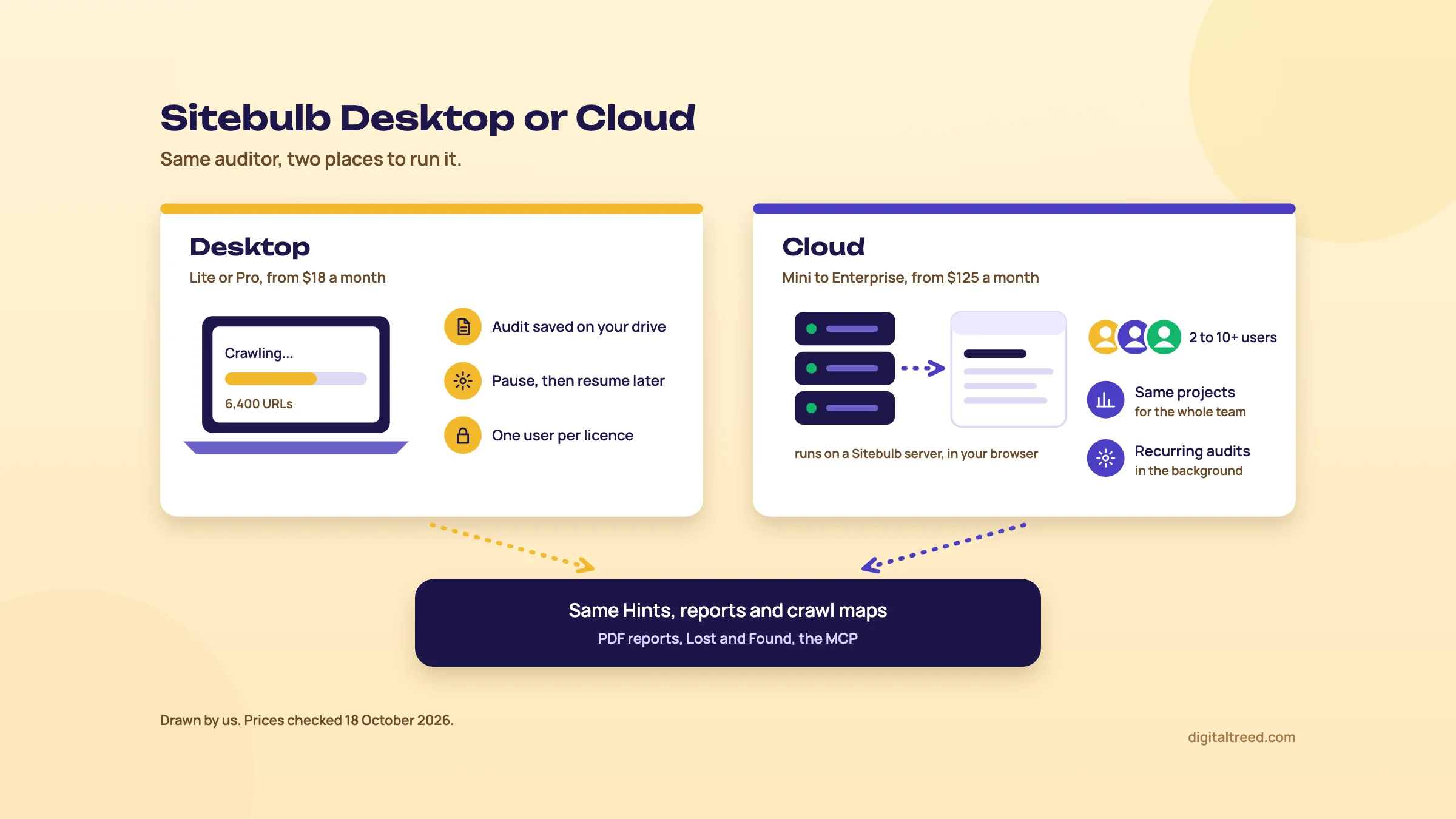 Desktop and Cloud run the same audits in different places. Drawn by us; prices checked 18 October 2026.
Who it's for
Sitebulb pitches Pro at "SEO professionals, consultants and digital marketing agencies", and Lite at people who audit less often, such as "freelancers, startups, website owners and web agencies".[1] We'd put it more bluntly. Sitebulb earns its fee when someone else has to act on the audit: a client who won't read a spreadsheet, or a developer who needs a short, ranked list with the reason for each fix.
It's also a good teacher. Every Hint links to its explanation, so a junior SEO learns why a canonical pointing at a redirect is a problem while fixing it.
Note
From our work: a teaching lesson. When I taught SEO, the students were already doing client work and saw results in two to three weeks. Technical SEO was the hardest part for them, because most local business sites they handled ran on WordPress with shared hosting, and the most common issue was site speed. A crawler that explains each finding helps with the first half of that problem. It doesn't fix shared hosting.
When you don't need it
- Your site has fewer than 25 pages. Our Free Website Audit crawls up to 25 pages and runs 50+ checks across ten scored areas; sign in and each fix shows how many points it adds. It needs no install.[11]
- Your site has a few hundred URLs and you can read tables. Screaming Frog's free version crawls 500 URLs at no cost (our Screaming Frog guide).[12]
- You already pay for a suite. Ahrefs and Semrush both include a cloud site audit; use that first and add a crawler when you hit its limits (our Ahrefs and Semrush guides).
- You want raw data and automation more than explanations. Custom extraction, list-mode migrations and command-line runs are Screaming Frog's ground. Our Screaming Frog vs Sitebulb guide puts them side by side.
- You want real-user Core Web Vitals. Sitebulb measures speed in its own lab browser (chapter 3). Field data comes from PageSpeed Insights and Search Console.
Start with the free check
Before you install anything, run the homepage through our audit. It takes about a minute and tells you whether the site's problems are crawl problems at all. If the top fixes are an expired certificate, a 6-second mobile load and no DMARC record, a 2,000-URL crawl won't change your first week's work.
If you've never run a full technical audit, read Guide 3's full SEO audit, step by step first. It sets out the order of checks; this guide shows how to do the crawl part in Sitebulb. Next, chapter 2 installs it and sets up a first audit.
Install, free trial and the audit settings that matter
Quick answer
Download Sitebulb, create an account inside the app and start the 14-day Pro trial; no card is needed and it doesn't renew. For each project, choose Sample or Standard audit, mobile or desktop, and the HTML or Chrome Crawler. Then tick only the reports you need, add sitemaps as a crawl source and set a polite crawl speed.
Install and start the trial
The trial is part of the desktop app, so there's no web sign-up first. Sitebulb's help page gives these steps:[13]
- Download the installer for Windows, macOS on Apple Silicon or macOS on Intel.[6]
- Open the app. On the Sign in page, choose "Create a new free account" and register.
- Verify the email and set a password from the link Sitebulb sends.
- Sign in inside the app and click Start Free Trial.
The trial is "equivalent to a Pro license", runs 14 days, and doesn't auto-renew; when it ends you lose the Pro features unless you buy a plan.[14] Fourteen days goes fast. Have the site, the Search Console access and the developer's crawl-speed limit ready before you click the button. Then the trial covers a real audit and a re-audit after fixes (chapter 5).
Projects, audits and the pre-audit
In Sitebulb a project is one website, and every crawl of it is an audit inside that project.[15] Keep that structure in mind. Comparisons and the Lost and Found tables (chapter 4) work between audits of the same project. So a re-audit should be a new audit in the old project, not a new project.
When you save a new project, Sitebulb runs pre-audit checks, such as reading robots.txt to see whether the site can be crawled at all.[10] Its CEO's release notes add that the pre-audit also flags heavy reliance on JavaScript and a site-wide disallow. It also spots a CDN such as Cloudflare that may block the crawler unless you allow-list it.[3] On a client site behind Cloudflare, ask the developer to allow Sitebulb's user agent or your IP before the trial clock starts.
Sample or Standard audit
Under Audit Type you pick Standard or Sample. A Sample audit limits how deep the crawl goes and how many URLs it takes at each level; Sitebulb's large-site example uses 10 levels and 1,500 random URLs per level.[10] Its advice for any big or unknown site is to run a sample first, look at what kinds of URLs came back, then set limits for the full crawl.
A sample tells you what a site: search can't. In Sitebulb's worked example, a site with about 300,000 indexable pages had roughly one page resource URL and one external URL for every internal URL, plus one non-indexable page for every ten indexable ones. Crawling everything would have meant about 930,000 URLs and about 32 hours at 8 URLs a second.[10] Those ratios differ for every site. That's why you measure them.
Crawler type: HTML or Chrome
| HTML Crawler | Chrome Crawler | |
|---|---|---|
| What it does | Reads the HTML the server sends; the default and the quickest option | Renders each page in headless Chrome, so it sees content and links that JavaScript adds |
| Speed | Fast | Slower: it downloads every page resource to render |
| Needed for | Most server-rendered sites | Performance and Mobile Friendly, Accessibility, and the Response vs Render report |
Source for the table: Sitebulb's crawler settings and audit data pages.[16] The Chrome requirement for Performance and Accessibility is on the audit data page.[17]
Don't guess. Sitebulb suggests a sample crawl with the Chrome Crawler, then a look at the response vs rendered HTML, or its Single Page Analysis tool on key templates.[16] If nothing important changes during rendering, Sitebulb says the HTML Crawler "is perfectly adequate".[18] If titles, canonicals or product links only appear after rendering, you need Chrome, and you need Guide 3's chapter on rendering and JavaScript SEO.
You also pick a device at setup. If you choose Desktop, only desktop user agents are offered later, and the same goes for Mobile.[19] Sitebulb's performance guide says to go with mobile if you're unsure.[20] We agree; Guide 3 explains mobile-first indexing and why the mobile version is the one that counts.
Audit data: tick less than you think
The Audit Data screen decides which reports the audit will contain. Sitebulb's help pages disagree on the defaults: its settings guide says only the Search Engine Optimisation report is ticked,[21] an older page says SEO, Page Resources and Security.[17] So look at the ticks before you start. The rest you add on purpose:
- Page Resources: checks JavaScript, CSS, images, video and audio files.
- Performance and Mobile Friendly: lab Web Vitals and Lighthouse checks; Chrome Crawler only.
- Structured Data: validates against Schema.org and Google's search feature rules.
- Security, International, Spell Checker, AMP: as named.
- Accessibility: automated accessibility checks; Chrome Crawler only.
That list is from the audit data help page, which also warns against ticking everything: Performance and Accessibility are CPU-heavy, so "only select them if you actually care about the data".[17] Two smaller defaults are worth knowing. Similar-content checks are off by default because they use a lot of CPU and RAM.[17] And since January 2026, new projects don't check external URL status codes, because CDN-protected sites often answer a crawler with 403 or 429.[3]
Tip
Projects are unlimited, so split heavy work. Run the full crawl with SEO, Page Resources and Structured Data, and a second project for Performance on a URL list of key pages. Sitebulb suggests exactly this for performance audits on bigger sites.[22]
Crawl sources, and why they matter for orphans
Crawl Sources is the one setting that isn't optional, because Sitebulb needs at least one. Crawl Website (follow links from the start URL) is ticked by default. You can add XML Sitemaps, which Sitebulb pre-fills from robots.txt, and a URL List.[23] With Google Analytics and Search Console connected, you can also tell it to crawl URLs found there that the crawler didn't reach.[23]
Add sitemaps and Search Console every time. A crawler only finds pages that are linked. Orphan pages, the ones in your sitemap or getting search traffic with no internal links, only show up when there's a second list to compare with.[24]
Connecting Search Console also unlocks the URL Inspection report, which pulls Google's own indexing status for your URLs through the URL Inspection API. Google allows 2,000 inspections a day per property,[25] so on a bigger site Sitebulb checks the top 2,000 HTML URLs by its internal-link score, URL Rank. The quota is per site, not per tool, so another tool using the API the same day eats into it.[26]
Crawler settings: speed and limits
By default Sitebulb crawls with 5 threads (or 5 instances of Chrome) and a cap of 5 URLs per second.[21] Threads set how many requests go to the server at once; the URL cap is a ceiling, not a target. Two limits sit beside them: Maximum URLs to Audit, which ends the crawl at a number, and Maximum Crawl Depth, useful when endless pagination keeps generating pages.[16]
On shared hosting, common for small business sites in India, we'd leave 5 per second or go lower, and ask before going higher. Sitebulb's own tip is to understand what the server can handle "especially before you increase" speed,[21] and to watch for errors creeping in as you test faster rates.[10] A crawl that slows the shop down at 8 pm on a sale day is not a technical SEO win.
Robots directives and parameters
Sitebulb crawls with its own user agent and respects robots directives by default. In Robots Directives you can pick another bot or browser under Search Engine Bot or Browser Emulation, untick Respect Robots Directives, or paste a virtual robots.txt that Sitebulb follows instead of the live one. That's handy for testing a new file before it goes live.[19] Sitebulb's audit set-up guide also suggests ticking "Save disallowed URLs" so you can see what robots.txt is blocking.[27]
Parameters are where e-commerce crawls blow up. By default Sitebulb crawls URLs with query strings as separate pages. Untick Crawl Parameters and it ignores them, and a Safe Query String Parameters box lets you keep the ones you need, such as pagination. URL rewriting can also strip named parameters before any crawl decision is made.[28] Sitebulb's own examples of bloat are tracking tags like utm_source, gclid and fbclid, and sort, order and view parameters on shops.
Disk space and long crawls
Sitebulb writes crawl data to disk rather than keeping it in RAM. A site with 100,000+ URLs can take from 250MB to about 2GB. Link Analysis is the big one: in Sitebulb's example, a 1.6-million-URL site took 6GB without it and 36GB with it.[10] If you can't leave a laptop on overnight, press Pause, wait until it says Paused, and close the app; it offers to resume when you reopen it.[10]
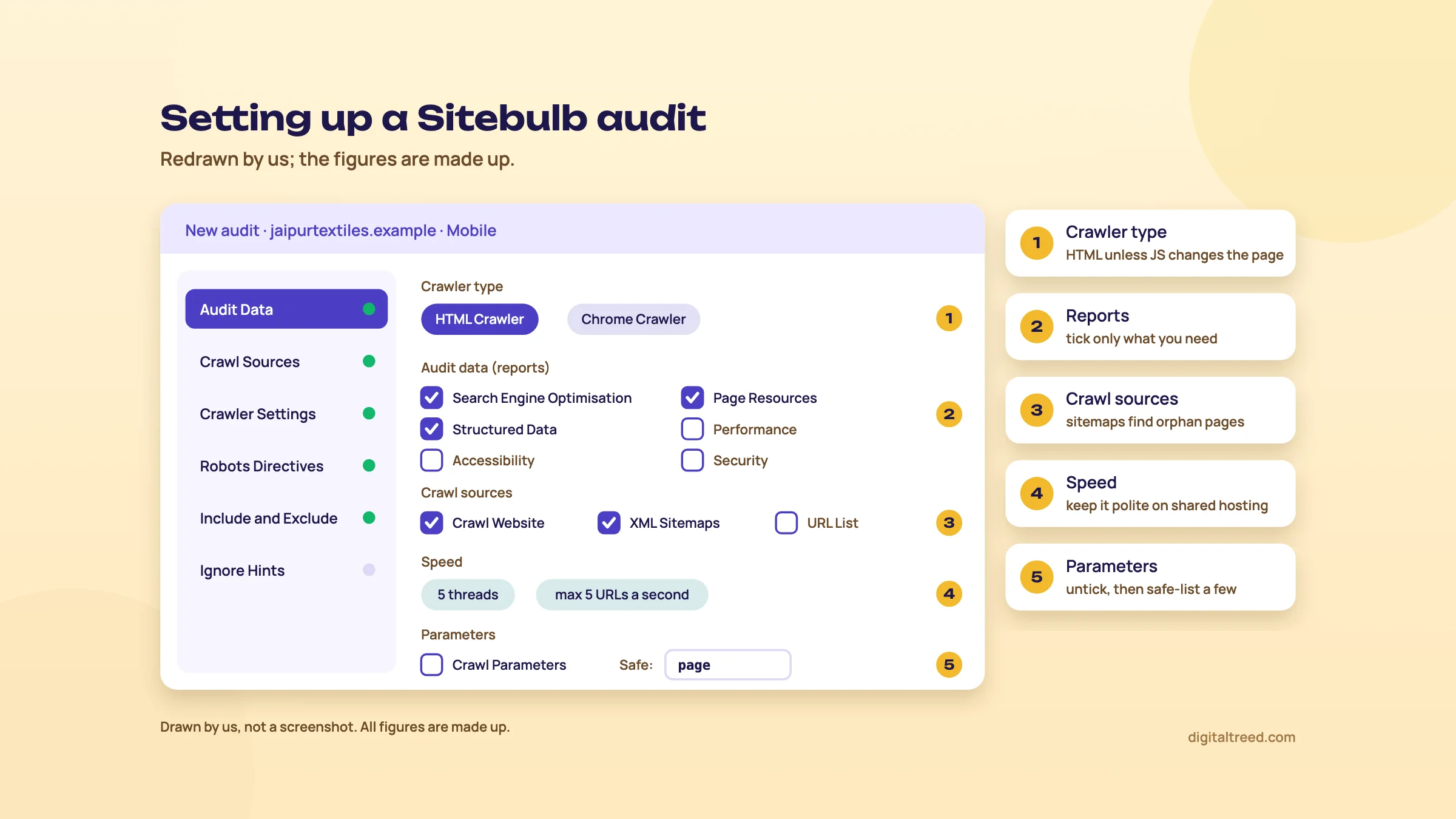 The five set-up decisions that matter most. Drawn by us; figures made up.
With the audit set, chapter 3 explains how to read what comes back.
Hints and the reports that matter: what each number means
Quick answer
A Hint is a pre-checked issue or opportunity with a priority (Critical, High, Medium, Low or Insight), a type (Issue, Opportunity or Potential Issue), a URL count and a coverage percentage. Read priority, coverage and how many affected URLs are indexable together. Then use the reports to find the template behind the problem.
How to read one Hint
Every report in the left menu has its own Hints tab, and All Hints lists everything the audit triggered.[29] Each Hint carries the same set of labels. These definitions are Sitebulb's own:[4]
| Label | Meaning |
|---|---|
| Critical | "Requires immediate attention", as it may seriously affect crawling, indexing or ranking |
| High | "Very important, and definitely warrants attention" |
| Medium | Worth investigating, depending on the type and number of URLs affected |
| Low | Lowest significance; only after the more serious issues are handled |
| Insight | "Neither an issue nor an opportunity"; a lead worth following |
| Issue | An error that needs fixing |
| Opportunity | A chance to optimise |
| Potential Issue | Probably not hurting now, but could cause trouble later |
| URLs and Coverage | How many URLs triggered it, and that number as a share of all URLs that could have |
The help pages add two more columns, Indexable and Not Indexable: how many of the affected URLs could appear in search.[5] This is the column we look at second, after priority. Sitebulb's own example makes the point: a Critical Hint on 2 URLs that are both not indexable can usually be ruled out quickly.
Click View URLs for the list, Export URLs for a CSV or Google Sheet, and Hint Details on a URL to see the problem highlighted in the rendered HTML.[5] The Learn more link under each Hint opens its explanation page, with examples of what triggers it and how to fix it.[4]
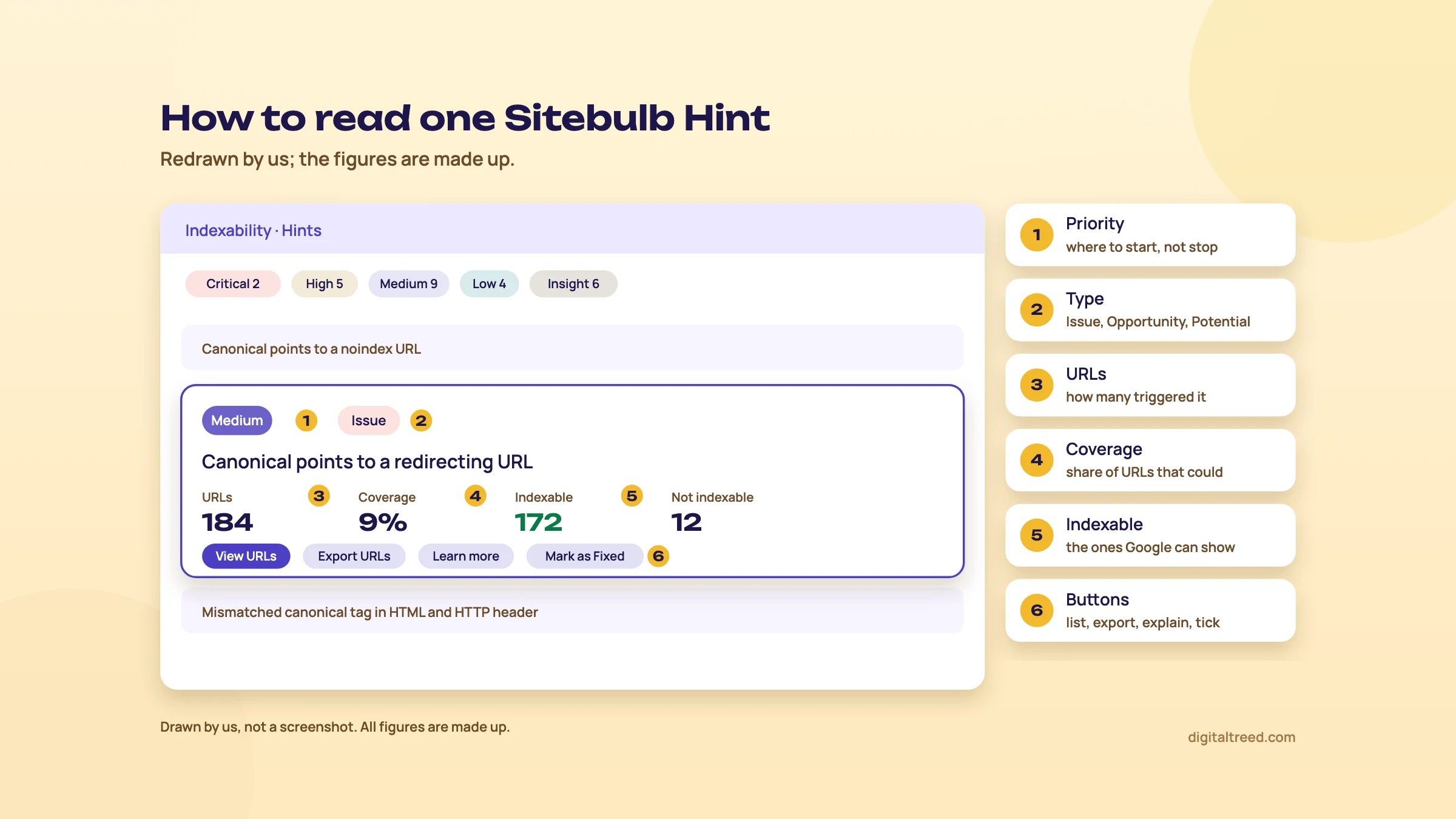 Read priority, coverage and the indexable count together. Drawn by us; figures made up.
Priority is where you start, not where you stop
Sitebulb's audit scores are calculated from the number, type and priority of the Hints triggered.[29] They're a fair summary for a client slide. They're not a plan. Sitebulb says every site "will trigger at least 20 Hints", and that fixing standard checklist items such as broken links, redirects and titles often won't move organic results.[5] We agree, and it's the most useful sentence in its documentation.
The priority labels are Sitebulb's general view, and your site may differ. Two examples from its Hint pages on 18 October 2026:
- "HTML file size exceeds Google's 2MB limit" is Critical.[30] Sitebulb added it in February 2026, and its CEO wrote that he was ambivalent about it, because most people don't need to worry about it.[3] If it fires, check what's past the 2MB mark before you panic; Guide 3's chapter on crawling at scale explains what Googlebot does with the rest of the file.
- "Canonical points to a redirecting URL" is only Medium,[31] yet its own explanation says search engines may then ignore the canonical and pick their own. On a store where every product canonical points at an old URL that now redirects, we'd move that to the top of the list.
If a Hint truly doesn't apply to a site, ignore it in the project settings; it then drops out of the reports and the scores for future audits of that project. Global settings ignore it for every project, which Sitebulb suggests only when you're sure.[32] Mark as Fixed is different: it's a checklist tick with an optional comment, it doesn't change the score, and it doesn't carry to the next audit.[33]
The reports, and what to do with each
Which reports appear depends on what you ticked in Audit Data (chapter 2).[29] These are the ones we open on almost every audit.
| Report | What it shows | What to do with it |
|---|---|---|
| Indexability | Indexable pages, noindex and nofollow, robots.txt disallows, and serving rules such as nosnippet, max-snippet and unavailable_after[34] | Check that every page you want in Google is indexable and every page you don't isn't. Start with canonical Hints. |
| Links and Link Explorer | Broken and redirected internal links, incoming followed links per page, anchor text, URL Rank and crawl depth[24] | Fix links to redirects and 404s at the source; add links to key pages with few incoming links or deep crawl depth. |
| Redirects | Internal and external redirects, chains, loops and broken redirects; Export Redirect Chains gives the full chains[24] | Point links straight at the final URL; collapse chains to one hop. |
| Internal | URL patterns: parameters for sorting, filters, sessions and tracking, upper case, double slashes[35] | Use it to decide which parameter URLs should be crawlable at all (Guide 3, faceted navigation). |
| Page Resources | JavaScript, CSS, images and media files, and their status codes[17] | Find broken or redirected images, scripts and stylesheets, and fix the reference in the template. |
| Duplicate Content | Pages with the same title, meta description, H1, near-identical HTML or a technically duplicate URL, broken down by path and template[36] | Decide per pattern: rewrite, canonicalise, or merge. Turn on Check Similar Content for near-duplicates. |
| Structured Data | Schema.org validation and, separately, Google Search Features validation with errors and warnings[37] | Fix errors first: they block rich result eligibility. Warnings are suggestions.[38] |
| HTML Templates | Pages grouped by the template they share, up to the top 50[39] | Rename templates (names persist across audits) and report issues per template, not per URL. |
| URL Inspection | Google's indexing status per URL from the Search Console API, up to 2,000 URLs a day[26] | Compare "Sitebulb says indexable" with "Google says not indexed" and investigate the gap. |
| Response vs Render | What changes between the server's HTML and the rendered page: content, links, indexability; Chrome Crawler only[18] | If a title, canonical or noindex changes after rendering, find out whether that's intended. |
URL Rank and crawl depth
URL Rank is Sitebulb's score out of 100 for the link equity a page gets.[40] It counts internal links only, and Sitebulb says key pages should be close to 100.[24] Crawl depth counts the clicks from the start URL: the homepage is depth 0, pages it links to are depth 1, and so on.[24] A best-selling category at depth 5 with a URL Rank of 12 is a clearer brief for a developer than "improve internal linking".
Performance: lab data, measured as it crawls
Sitebulb's Core Web Vitals numbers don't come from PageSpeed Insights. With the Chrome Crawler and Performance and Mobile Friendly ticked, it collects lab metrics in its own headless Chrome as it crawls, with CPU throttled to emulate slow 4G as Lighthouse does. The metrics are LCP, CLS, TBT, TTI, FCP and TTFB.[20]
Two things follow. First, Web Vitals are collected for a sample, 10% by default, because each sampled URL adds about 2 seconds: that's 33 minutes for 1,000 URLs and 6 hours for 10,000. The Lighthouse opportunity and diagnostic Hints and the performance budgets still run on every URL.[41] Second, this is lab data. Google's Core Web Vitals are LCP, INP and CLS, with "good" set at 2.5 seconds, under 200 milliseconds and under 0.1.[42] INP isn't on Sitebulb's list, so for what real visitors experience, use the field data in PageSpeed Insights and Search Console's Core Web Vitals report.
The performance score works like Lighthouse's: 90 to 100 is good, 50 to 89 needs improvement, 0 to 49 is poor, and it's averaged across the sampled URLs only.[20] The most useful view isn't the score. It's the HTML Templates tab of the Performance report, which averages Web Vitals by template, so "product pages have poor LCP" becomes one finding.[22]
Accessibility
The Accessibility report uses Deque's axe engine and needs the Chrome Crawler. Sitebulb's product page says it runs over 95 automated checks on every crawled page, and each Hint links to Deque's explanation of the rule.[43] Automated checks can't judge everything, so treat a clean report as a floor, not a pass. Things like whether alt text actually describes the image still need a person.
Structured data in two passes
Sitebulb validates structured data twice: against the Schema.org specification, and against Google's own rules for search features. Its Google pass checks technical requirements only; Sitebulb says it can't check Google's quality guidelines.[38] If the markup is added by JavaScript, crawl with Chrome.[37] For a single page, our Schema Markup Validator or Google's Rich Results Test is quicker (our Rich Results Test guide).
Chapter 4 covers what you do with all this once it's read: crawl maps, comparisons, reports for clients, and the new AI connection.
Crawl maps, audit comparison, client reports and the MCP
Quick answer
Crawl maps show how the crawler found your pages, coloured by depth. Lost and Found and Compare Audits show what changed between two crawls, down to URLs fixed and regressed. PDF reports and .sbp exports share the results. Since September 2026, the Sitebulb MCP lets Claude or ChatGPT read finished audits, read-only.
Crawl maps and the other five visualisations
Open Site Visualisations from the top bar of a finished audit. There are six graphs: three "Crawl" graphs (Crawl Map, Crawl Tree, Crawl Radial) built from the links the crawler followed, and three "Directory" graphs built from folder paths, where the lines are not links.[44]
A Crawl Map is easy to misread, so know its rules:[40]
- Each dot is a URL; each line is the first link the crawler found to it. Sitebulb crawls breadth first, so a product linked from the homepage shows at depth 1 even if every other link to it is deeper.
- Colour and size show crawl depth. The length of a line means nothing.
- Sitebulb's FAQ says only internal, indexable HTML URLs with incoming links are drawn, while its visualisations page says non-indexable URLs are mapped too (up to 10,000 URLs), which is what the highlight below shows. Either way, the number of children per node is capped at deeper levels (usually up to 50 at depths 2 to 5, then 10, then 1).
- It's a picture of the crawl, not of your XML sitemap.
Two settings make it useful. In the settings cog, Highlight non-indexable URLs turns non-indexable pages red. Sitebulb's own example looked normal until the toggle showed half the map red because of a canonical problem.[44] And right-click a node and pick "Rebuild from this URL" to redraw the map from one category page.
A map with very few dots usually means canonicals: if the homepage is canonicalised elsewhere, the Crawl Map can come out almost empty.[40] Guide 3's chapter on site architecture already suggests crawl maps for showing an owner what the structure looks like. A long tail of dots running off one node is the pattern to look for: Sitebulb names pagination chains as a common one.[40]
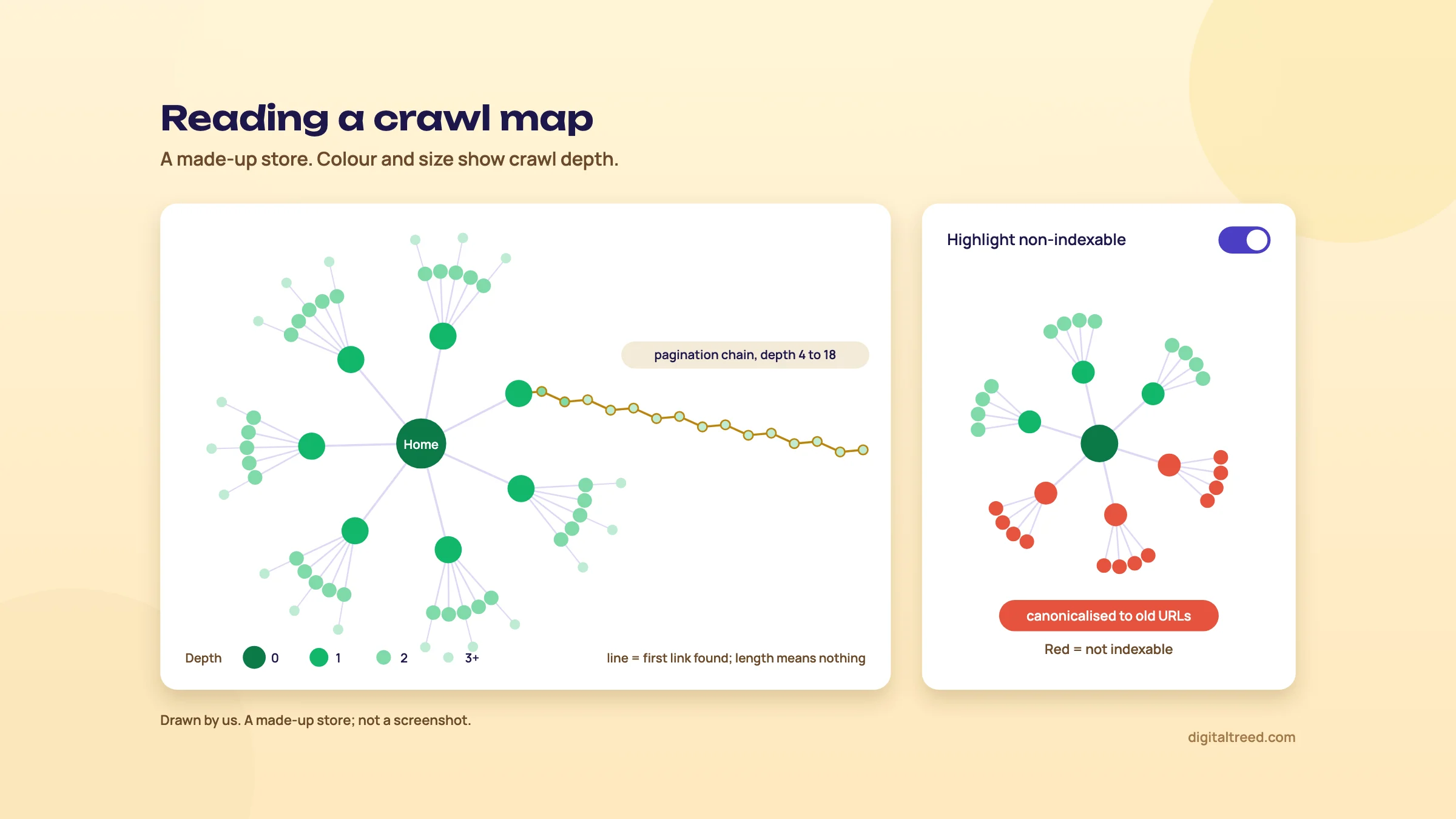 Look for long chains, and switch on the non-indexable highlight. Drawn by us.
Comparing two audits
Comparison is built in at two levels.
Lost and Found appears automatically on the Audit Overview, the Internal report and every Hints list from the second audit in a project. It compares this audit with the one before it. For URLs you get Remained, Found and Lost. For each Hint you also get Regressed (URLs that trigger it now but didn't last time) and Fixed (URLs that triggered it last time, were crawled again, and no longer do).[45] Fixed and Regressed are the two numbers a developer wants to see after a release.
Compare Audits lets you pick any two audits. Inside a project, tick Compare on two audits under Website Audit History and click Compare Audits. From the top menu, you can even compare audits from two different projects. It shows the change in each report and Hint as a percentage. Toggle "Hide not changed" to cut the noise, export to CSV, or open both URL lists side by side.[46] Audit comparison is a Pro feature, not in Lite.[1]
Both only work if the second crawl matches the first. Use Start a New Audit, then "Start with current configuration", from the old audit's overview. That creates a new audit in the same project with the same start URL and settings.[47] Change the crawler or the parameter rules between audits and half the "changes" are your own.
Client and developer reports
From the Audit Overview, the PDF Report button builds a report of the whole audit. Each report also has a Printable PDF button for that report alone. In both you choose which reports, charts and data tables go in.[48] The pricing page lists "Customized PDF Reports" as a Pro feature.[1]
On white label: Sitebulb's Upgrade to Pro page says Pro PDF reports are "completely white label", with no mention of Sitebulb anywhere in them.[58] No help page says how to add your own logo or a cover page, so test that in the trial before you promise a client a branded report.
Other ways to share:
- Share Audit on the Audit Overview saves a .sbp file another Sitebulb user can import.[9]
- Export URLs on any Hint sends the list to CSV or Google Sheets.[4]
- Bulk Exports in the top menu exports several data types at once, including some data the interface doesn't show.[29]
- Cloud users simply invite colleagues to the same projects.[9]
For a developer, a spreadsheet beats a PDF. Chapter 5 turns Hints into one.
AI: the Sitebulb MCP and Skills
Sitebulb v10.0, released on 9 September 2026, added the Sitebulb MCP: a connector that lets Claude and ChatGPT read your crawl data, on both Desktop and Cloud.[3] Sitebulb's pricing pages list MCP access on Lite and Pro[1] and on every Cloud plan.[8]
What it can do, from Sitebulb's help page:[15]
- List projects and audits, summarise an audit (score, URLs crawled, issues by severity), and group Hints by category with their URL counts and whether they went up or down since the last crawl.
- Show up to 50 example URLs for an issue, look up one URL in detail, and say what changed between an audit and the previous one.
What it can't: it's read-only, so it can't start, schedule or change a crawl, and it can't read an unfinished audit. It never returns the complete list of affected URLs either; for that you export from the app.[15] On Desktop, Sitebulb has to be running on your computer, on the latest version.[50]
Sitebulb also publishes five ready-made Skills for Claude and ChatGPT that ask about the business first and then read the audit: What To Fix First, What Changed, Technical SEO Audit, Release Check, and Dev Handoff, which pushes issues into Jira.[51]
Our view: the useful part is context. Sitebulb's CEO makes the same point in the launch notes, saying the tool doesn't know whether the dev team "just completed a migration last week".[3] Tell the assistant that, and the triage gets better. But a 50-URL sample is a sample, so check the export before a fix goes to a developer, and read every AI-written summary before a client sees it.
Next, chapter 5 puts all of this to work on a real-sized job.
Step by step: audit a store, brief a developer, check the fix
Quick answer
Three real jobs. Audit a 2,000-page WooCommerce store with a sample crawl first and parameters under control. Turn Critical and High Hints into one fix per template for the developer. Then re-audit with the same settings and read Fixed and Regressed in Lost and Found before you call anything done.
The example throughout is made up: a D2C home-textiles brand from Jaipur selling bedsheets and curtains on WooCommerce, with about 2,000 pages (1,700 products, 120 categories, 150 blog posts and a few pages). All figures below are invented for the example.
Task 1: audit a 2,000-page WooCommerce store
Two thousand pages is not two thousand URLs. Every product image, script and stylesheet is a URL too, and so is every sort and filter combination the theme links to. On Lite's 10,000-URLs-per-audit limit,[1] a store like this can run out before the crawl reaches the blog. Lite also lacks the Structured Data and Performance reports and audit comparison. So do this job on the Pro trial or a Pro licence.
Audit a 2,000-page WooCommerce store in Sitebulb
- Run the free checks first. Put the homepage through our Free Website Audit and the robots.txt through our Robots.txt Tester. Fix anything that blocks crawling or breaks HTTPS before you spend crawl time.
- Agree the crawl with the developer. Ask for Search Console and GA access, a speed limit, an off-peak time, and an allow-list entry for Sitebulb if the site is behind Cloudflare or a similar CDN (chapter 2).
- Run a Sample audit. New project named "Store sample", Audit Type Sample, device Mobile, HTML Crawler, default speed of 5 URLs a second. Sitebulb recommends a sample before any big or unknown crawl.[10]
- Read the sample for scope. Look at the ratio of internal, resource and external URLs, the share of non-indexable pages in Indexability, and the Internal Hints for sort and filter parameters. Those parameter Hints are only Insights,[52] but on a store they show where the crawl will balloon.
- Check rendering on two templates. Use Single Page Analysis on one product and one category page and compare response and rendered HTML.[16] If price, title, canonical and product links are all in the response, stay on the HTML Crawler.
- Set the full audit. New project, Audit Type Standard. Tick Search Engine Optimisation, Page Resources and Structured Data. Add XML Sitemaps, Search Console and GA as crawl sources, and tick the URL Inspection API option.[26] In Include and Exclude URLs, untick Crawl Parameters and list in Safe Query String Parameters only the ones the store needs for real pages.[28]
- Crawl, then pause if you must. Start it at night. If the laptop has to sleep, Pause, wait for Paused, and resume next morning.[10]
- Run performance separately. A second project with a URL List of about 50 key URLs (home, top categories, best sellers, cart), Chrome Crawler, Performance and Mobile Friendly at 100% sampling. At about 2 extra seconds per URL,[41] that adds under two minutes.
Why untick parameters instead of crawling everything? Because the question for this audit is "what's wrong with the pages we want indexed", and a crawl stuffed with ?orderby= and ?filter_colour= variations (our made-up store's sort and filter URLs) answers a different question. If you want to know how many such URLs the theme exposes, the sample already told you. Guide 3's chapter on faceted navigation covers what to do about them.
Task 2: turn Hints into a fix list for a developer
Developers don't want 4,000 rows. They want to know which template to change, what to change, and how to check it. Sitebulb's HTML Templates feature exists for this: pages that share a template share the same HTML, so one problem usually means one fix.[39]
Turn Sitebulb Hints into a developer fix list
- Name the templates. Open HTML Templates and rename the groups: Product, Category, Blog post, Page. The names stay for future audits.[39]
- Filter the Hints to Critical and High. On each report overview, click the priority labels beside the score to filter.[29] Then scan Medium for anything that touches canonicals, redirects or indexability.
- Drop what doesn't matter here. Check the Indexable count and Coverage on each Hint. A Critical Hint on three non-indexable URLs goes to the bottom; a Medium on 60% of products goes up.[5]
- Find the template behind each Hint. View URLs and check which template the URLs belong to. Open Hint Details on one URL to see the exact spot in the HTML.
- Write one row per fix per template. Use the columns below. Paste the plain-English reason from the Hint's Learn more page, then rewrite it for this store.
- Attach the evidence. Export the URL list for each row to Google Sheets and link it in the row.[4]
- Hand it over and track it. When a fix ships, Mark as Fixed with a short comment in this audit; the real proof comes in Task 3.[33]
A finished list for the made-up store might look like this:
| # | Finding (Sitebulb Hint) | Template | URLs | Fix | Check |
|---|---|---|---|---|---|
| 1 | Canonical points to a redirecting URL | Product | 1,140 | Canonical should output the current product URL, not the old /shop/ path | Hint at 0 in re-audit |
| 2 | Internal redirected URLs | All (header menu) | 6 | Point the 6 menu links at the final category URLs instead of the old ones that redirect | The 6 old URLs drop out of the crawl |
| 3 | URL is orphaned and was not found by the crawler | Product | 85 | Add the discontinued-range products back to their category, or redirect them | Orphan Hint at 0 |
| 4 | Structured data error: missing property 'offers', 'review' or 'aggregateRating' | Product | 1,700 | Output offers markup with the price for variable products | Structured Data errors at 0 |
| 5 | Poor LCP in the 50-URL performance project | Category | 20 of 20 | Smaller hero image, lazy-load below the fold only | LCP bucket moves to Good |
Sitebulb's Hint pages rate rows 1 to 3 as Medium,[31] Medium[53] and High.[54] Row 4 is a Google Search Features error.[38] We ranked row 1 first anyway, because it touches every product the store sells. That re-ordering is your job, and it's the part the client pays for.
Note
From our work: a perfume brand. A slow WordPress site was hurting crawling and indexing. Working with the developer, we moved to a lighter theme, added a caching plugin and optimised the images. We also wrote blog posts on topics competitors covered and synced the products to Google Merchant Center. Results, including organic orders, came in 5 to 6 weeks. The lesson for a fix list: theme, caching and images are site-wide changes, so they belong in a few clear rows, not hundreds.
If you've connected the Sitebulb MCP, its Dev Handoff Skill can push issues into Jira for you.[51] Use it to draft tickets, then check each one against the full export, since the MCP returns at most 50 example URLs per issue (chapter 4).
Task 3: compare before and after a fix
Check a fix with a before and after audit
- Re-audit with identical settings. From the first audit's overview, click Start a New Audit, then "Start with current configuration".[47]
- Read Lost and Found on the Audit Overview. Compare Internal URLs and Not Found. A sudden drop in HTML URLs after a release is a bigger story than any Hint.[45]
- Open the Lost and Found tab on the Hints list. For each row of your fix list, Fixed should be close to last audit's URL count and Regressed should be zero. For redirect and broken-link Hints, look at Lost too: once nothing links to an old URL, the crawler stops finding it at all.
- Run Compare Audits with "Hide not changed". Export to CSV and attach it to the fix list.[46]
- Spot-check by hand. Put five fixed URLs through our HTTP Status Checker and Canonical Tag Checker.
- Then wait for Google. Watch the URL Inspection report in the next audits and the Page indexing report in Search Console over the following weeks.
In the made-up store's re-audit, row 1 shows Fixed 1,140 and Regressed 0. Row 2 shows Lost 6, not Fixed 6: the old category URLs are gone from the crawl because nothing links to them now, which is the point. It also shows Found 1. The same release added a footer link to a sale page that redirects. That's the reason to re-crawl the whole site after a fix, not just the URLs you changed.
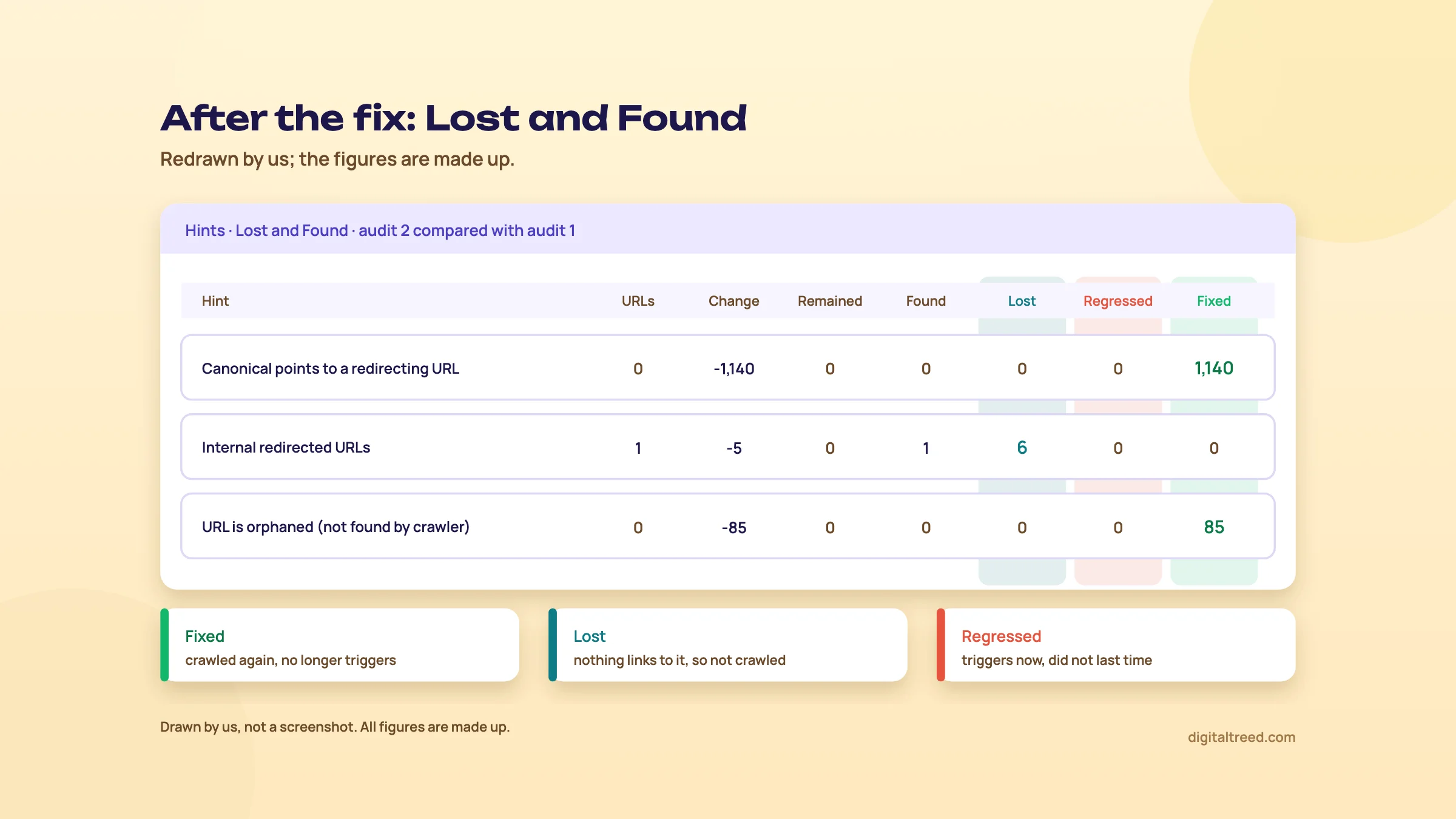 After a release, read Fixed, Lost and Regressed per Hint. Drawn by us; figures made up.
For a site migration rather than a fix, the job changes: Guide 3's migration chapter sets the steps, and our Screaming Frog guide covers list-mode redirect checks. Chapter 6 has the prices.
Pricing, pros and cons, and alternatives
Quick answer
There's no free plan, only a 14-day Pro trial. On 18 October 2026 Lite cost $18 a month (about ₹1,730) for 10,000 URLs per audit, and Pro $42 a month (about ₹4,030) for 500,000. Yearly Desktop plans save about 15%. Cloud starts at $125 a month. Small sites should start with our Free Website Audit.
Free trial, no free plan
Sitebulb has no free tier. The 14-day trial is the full Pro feature set with no card and no auto-renewal (chapter 2).[14] That's the biggest practical difference from Screaming Frog, whose free version crawls 500 URLs for as long as you like.[12]
Desktop plans, checked 18 October 2026
Sitebulb's pricing page shows prices in US dollars, pounds and euros, monthly or yearly; it shows no rupee price. The rupee figures here are the dollar price at ₹96 = US$1, the X-Rates average for 1 to 16 October 2026.[55]
| Plan | Monthly | Yearly | About in INR | URLs per audit |
|---|---|---|---|---|
| Lite, 1 user | $18 (£12.50) | $180 (£125) | ₹1,730 a month, or ₹17,280 a year | 10,000 |
| Pro, 1 user | $42 (£30) | $425 (£305) | ₹4,030 a month, or ₹40,800 a year | 500,000 (up to 2 million) |
| Each extra Pro user | $11 (£7.50) | $115.60 (£77.50) for the second user, $112.20 for each one after | ₹1,060 a month | Same as Pro |
Source: Sitebulb's pricing page, monthly and yearly views, in USD and GBP.[1] The yearly prices are on the yearly view.[56] Pro goes up to 50 users on one subscription. Payment is by card or PayPal; purchase orders and invoices are for yearly plans only.[1]
What Lite leaves out matters more than the URL cap. Per Sitebulb's FAQ, these are Pro-only: Performance and Mobile Friendly, Structured Data, International and hreflang, Spell Checker, Accessibility, AMP, scheduling and auto-export to Google Sheets. Lite also has limits on crawl speed and on content extraction.[1] The pricing cards add that audit comparisons and customised PDF reports are Pro features, and that Lite gets "100+ Hints" against Pro's "300+".[1]
Cloud plans, checked 18 October 2026
| Plan | Monthly | About in INR | Users | URLs a month / per audit | Desktop licences |
|---|---|---|---|---|---|
| Mini | $125 (£95) | ₹12,000 | 2 | 50,000 / 50,000 | No |
| Small | $245 (£195) | ₹23,520 | 5 | 1 million / 250,000 | Yes |
| Medium | $495 (£395) | ₹47,520 | 10 | 2.5 million / 1 million | Yes |
| Enterprise | Custom | Custom | 10+ | 5 million+ / 2.5 million+ | Yes |
Source: Sitebulb's Cloud pricing page.[8] Every Cloud plan has unlimited projects and recurring audits; concurrent crawling starts at Medium. The yearly prices we saw ($1,500, $2,940 and $5,940) were twelve times the monthly ones.[57]
Is Pro worth ₹40,800 a year?
For comparison, a Screaming Frog licence was £199 or $279 a year (about ₹26,800) when our Screaming Frog guide checked it on 16 October 2026.[12] So Sitebulb Pro yearly costs about one and a half times as much. What the difference buys is the prioritised Hints, the explanations, crawl maps and client-ready PDFs.
If you send audits to clients or developers every month, we think it's worth it, because the explanation work is what eats an auditor's time. If you're one in-house SEO on one site who reads tables happily, it's harder to justify, and Screaming Frog's licence or free version will do. Lite at ₹17,280 a year is a fair buy only for small sites that don't need structured data or performance checks, and for those our free tools cover a lot.
Pros and cons
Pros
- Hints ranked by priority, with coverage and indexable counts, so triage is quick
- A plain-English explanation page for every Hint, usable in client reports
- Crawl maps that show structure problems to people who'll never open a spreadsheet
- Lost and Found, with Fixed and Regressed counts per Hint, for checking releases
- HTML Templates that turn thousands of URLs into a handful of fixes
- JavaScript rendering, structured data, accessibility and lab performance in one crawl
- A read-only MCP for Claude and ChatGPT, on every plan
Cons
- No free plan; the trial lasts 14 days
- Lite leaves out structured data, performance, accessibility and audit comparison
- Desktop crawls depend on your machine, disk space and keeping it on
- Performance numbers are lab data from its own browser, not real-user data
- Less flexible than Screaming Frog for custom extraction and automation
- No documented white-label PDF option
- Cloud costs at least $125 a month
Alternatives, and which one when
Start with what's free. Our Free Website Audit crawls up to 25 pages, runs 50+ checks across ten scored areas in about a minute; a free sign-in ranks each fix by the points it adds.[11] For one page at a time, our HTTP Status Checker, Canonical Tag Checker and Noindex Tag Checker answer the questions most crawl Hints raise.
Screaming Frog SEO Spider is the other desktop crawler most SEOs own: free to 500 URLs, then a yearly licence. Read our Screaming Frog guide, and Screaming Frog vs Sitebulb for the side-by-side. The suites have cloud audits too: see our Ahrefs, Semrush and SE Ranking guides, and Bing Webmaster Tools for its free Site Scan. Sitebulb itself positions Cloud against enterprise cloud crawlers such as Botify, Lumar and OnCrawl.[7] Our best free SEO tools guide lists the free limits side by side.
| Situation | Our pick | Why |
|---|---|---|
| Local business site under 25 pages | Free Website Audit | Ranked fixes after a free sign-in, no install, no settings to learn |
| Up to 500 URLs, you read tables | Screaming Frog free | No cost, no time limit |
| Consultant or agency sending audits to clients | Sitebulb Pro | Ranked, explained Hints, crawl maps and PDFs |
| In-house SEO checking every release | Sitebulb Pro, or Cloud for a team | Lost and Found shows Fixed and Regressed per Hint |
| Custom extraction, list-mode migrations, command line | Screaming Frog licence | Built for raw data and automation |
| Several SEOs on the same sites, or week-long crawls | Sitebulb Cloud | Shared projects, recurring audits, no laptop left on |
| You already pay for Ahrefs or Semrush | Their site audit first | No extra cost; add a crawler when you hit its limits |
Not sure? Use the trial on a real client, re-audit after the first fixes, and decide on day 13. If you'd rather hand the whole audit over, our SEO service starts with one, or get a quote.
Test yourself
Ten questions on the whole guide. Pick an answer, check it, and see your score at the end.
You got 0 of 10 right.
Frequently asked questions
Frequently asked
What is Sitebulb used for?
Technical SEO audits. It crawls a website, checks the data against 300+ Hints in areas such as indexability, redirects, links, structured data, accessibility and performance, and ranks each finding by priority. Its explanations, crawl maps and PDF reports make it popular with consultants and agencies who must present an audit to clients or developers.
Is Sitebulb free?
No. There's no free plan, but every new user gets a 14-day trial with Pro features, no card needed, and it doesn't renew into a paid plan. If you need a free crawler for longer, Screaming Frog's free version crawls up to 500 URLs, and our Free Website Audit checks up to 25 pages.
How much does Sitebulb cost in India?
Sitebulb doesn't show rupee prices. On 18 October 2026, Lite was $18 a month (about ₹1,730) and Pro $42 a month (about ₹4,030), or $180 and $425 a year (about ₹17,280 and ₹40,800), at ₹96 to the dollar. Sitebulb Cloud started at $125 a month (about ₹12,000).
What is the difference between Sitebulb Lite and Pro?
Lite crawls 10,000 URLs per audit and Pro 500,000, which you can raise to 2 million. Pro also adds the Performance and Mobile Friendly, Structured Data, International, Spell Checker, Accessibility and AMP reports, scheduling, audit comparison and customised PDF reports. For client work, Pro is the version that makes sense.
Should I choose Sitebulb Desktop or Sitebulb Cloud?
Desktop for one person crawling sites up to a few hundred thousand URLs on their own computer. Cloud when several people need the same audits, when crawls run for days, or when you want recurring audits without leaving a laptop on. Cloud costs a lot more, from $125 a month.
Is Sitebulb better than Screaming Frog?
It's better at explaining and prioritising. Screaming Frog is better at raw data, custom extraction and automation, and it has a free version. Many SEOs own both. Our Screaming Frog vs Sitebulb guide compares them job by job.
Does Sitebulb crawl JavaScript websites?
Yes. Choose the Chrome Crawler, which renders each page in headless Chrome before reading it. It's slower than the default HTML Crawler, so test first: a sample crawl with the Response vs Render report shows whether the content you care about depends on JavaScript.
Does Sitebulb show Core Web Vitals?
It shows lab Web Vitals, such as LCP, CLS and TBT, measured in its own Chrome for a sample of pages, plus Lighthouse-style checks on every page. It isn't real-user data and doesn't include INP. For field data, use PageSpeed Insights and Search Console's Core Web Vitals report.
What are Sitebulb Hints?
Pre-checked issues and opportunities. Each has a priority (Critical, High, Medium, Low or Insight), a type (Issue, Opportunity or Potential Issue), a count of URLs affected and a coverage percentage. Each also links to a page explaining why it matters and how to fix it.
Does Sitebulb have AI features?
Since version 10.0 in September 2026 it has the Sitebulb MCP, which lets Claude and ChatGPT read your finished audits, plus five ready-made Skills such as What To Fix First and Dev Handoff. The MCP is read-only: it can't run crawls and returns up to 50 example URLs per issue.
Sources
References
- Desktop plans for SEO professionals (pricing page, monthly view, and its FAQ), Sitebulb, prices seen 18 Oct 2026, accessed 16 Oct 2026
- Sitebulb Desktop vs Cloud: full product comparison, Sitebulb, accessed 18 Oct 2026
- Release Notes (v10.0 Sitebulb MCP launch, 9 Sep 2026; v9.5.0, 27 Feb 2026; v9.4.3, 27 Jan 2026), Sitebulb, accessed 18 Oct 2026
- Hint Explanations (what Hints are, importance levels, warning types, coverage), Sitebulb, accessed 18 Oct 2026
- About Sitebulb Hints, Sitebulb Help Centre, updated 27 Jan 2025, accessed 16 Oct 2026
- Download Sitebulb (Windows and Mac system requirements), Sitebulb, accessed 18 Oct 2026
- Sitebulb Cloud, Sitebulb, accessed 18 Oct 2026
- Cloud plans for SEO teams and agencies (Cloud Server pricing), Sitebulb, prices seen 18 Oct 2026, accessed 16 Oct 2026
- How to share a Sitebulb Desktop Audit, Sitebulb Help Centre, updated 5 Dec 2025, accessed 16 Oct 2026
- How to crawl large websites, Sitebulb Help Centre, updated 1 Oct 2025, accessed 16 Oct 2026
- Free Website Audit, DigitalTreed, accessed 18 Oct 2026
- SEO Spider pricing (free vs paid features, licence prices in GBP, USD and EUR), Screaming Frog, prices seen 16 Oct 2026, accessed 16 Oct 2026
- How to start your free Sitebulb Desktop trial, Sitebulb Help Centre, updated 1 Oct 2025, accessed 16 Oct 2026
- How does the Sitebulb free trial work?, Sitebulb Help Centre, updated 1 Aug 2025, accessed 16 Oct 2026
- What the Sitebulb MCP can and can't do, Sitebulb Help Centre, updated 20 Jul 2026, accessed 16 Oct 2026
- Crawler Settings, Sitebulb Help Centre, updated 20 Jun 2025, accessed 16 Oct 2026
- Audit Data, Sitebulb Help Centre, updated 18 Oct 2024, accessed 16 Oct 2026
- Response vs Render Report, Sitebulb Help Centre, updated 17 Oct 2024, accessed 16 Oct 2026
- Robots Directives Settings, Sitebulb Help Centre, updated 14 Oct 2024, accessed 16 Oct 2026
- Performance Report, Sitebulb Help Centre, updated 30 Mar 2026, accessed 16 Oct 2026
- Choosing the right settings for efficient auditing, Sitebulb Help Centre, updated 28 Feb 2025, accessed 16 Oct 2026
- Auditing Performance & Mobile Friendly with Sitebulb, Sitebulb Help Centre, updated 18 Nov 2025, accessed 16 Oct 2026
- Audit settings, Sitebulb Help Centre, updated 18 Oct 2024, accessed 16 Oct 2026
- Auditing Internal Linking with Sitebulb, Sitebulb Help Centre, updated 18 Nov 2025, accessed 16 Oct 2026
- Usage limits (Search Console API), Google for Developers, updated 28 Aug 2025, accessed 16 Oct 2026
- URL Inspection Report, Sitebulb Help Centre, updated 17 Oct 2024, accessed 16 Oct 2026
- Setting up your Technical SEO Auditing crawl, Sitebulb Help Centre, updated 27 Jul 2026, accessed 16 Oct 2026
- Include & Exclude URLs settings, Sitebulb Help Centre, updated 2 Mar 2026, accessed 16 Oct 2026
- Navigating Sitebulb Audits, Sitebulb Help Centre, updated 20 Mar 2025, accessed 16 Oct 2026
- HTML file size exceeds Google's 2MB limit (Hint), Sitebulb, accessed 18 Oct 2026
- Canonical points to a redirecting URL (Hint), Sitebulb, accessed 18 Oct 2026
- Ignore Hints, Sitebulb Help Centre, updated 10 Sep 2024, accessed 16 Oct 2026
- Marking Hints as 'Fixed', Sitebulb Help Centre, updated 27 Jan 2025, accessed 16 Oct 2026
- Indexability Report, Sitebulb Help Centre, updated 8 Aug 2025, accessed 16 Oct 2026
- Internal Hints, Sitebulb, accessed 18 Oct 2026
- Duplicate Content Report, Sitebulb Help Centre, updated 18 Oct 2024, accessed 16 Oct 2026
- Structured Data Report, Sitebulb Help Centre, updated 28 Oct 2024, accessed 16 Oct 2026
- Google Search Features Validation, Sitebulb Help Centre, updated 18 Oct 2024, accessed 16 Oct 2026
- HTML Page Templates, Sitebulb Help Centre, updated 9 Jul 2025, accessed 16 Oct 2026
- Crawl Maps FAQs, Sitebulb Help Centre, updated 17 Sep 2024, accessed 16 Oct 2026
- Web Vitals URL sampling, Sitebulb Help Centre, updated 18 Oct 2024, accessed 16 Oct 2026
- Understanding Core Web Vitals and Google search results, Google Search Central, updated 10 Dec 2025, accessed 16 Oct 2026
- Website AI Agent & Human Accessibility Audit Tool, Sitebulb, accessed 18 Oct 2026
- Site Visualisations, Sitebulb Help Centre, updated 14 Oct 2024, accessed 16 Oct 2026
- Lost and Found URL Metrics, Sitebulb Help Centre, updated 28 Nov 2025, accessed 16 Oct 2026
- Comparing Audits, Sitebulb Help Centre, updated 28 Oct 2024, accessed 16 Oct 2026
- How to re-audit with the same settings, Sitebulb Help Centre, updated 18 Oct 2024, accessed 16 Oct 2026
- Build PDF reports from Sitebulb Audits, Sitebulb Help Centre, updated 10 Oct 2024, accessed 16 Oct 2026
- Sitebulb Website Audit Tool - Software Features, Sitebulb, accessed 18 Oct 2026
- Sitebulb MCP: Start Here, Sitebulb Help Centre, updated 28 Aug 2026, accessed 16 Oct 2026
- Sitebulb Skills for Claude and ChatGPT, Sitebulb Help Centre, updated 11 Aug 2026, accessed 16 Oct 2026
- Query string contains sort parameters (Hint), Sitebulb, accessed 18 Oct 2026
- Internal redirected URLs (Hint), Sitebulb, accessed 18 Oct 2026
- URL is orphaned and was not found by the crawler (Hint), Sitebulb, accessed 18 Oct 2026
- Exchange Rate Average (US Dollar, Indian Rupee), X-Rates, average for 1-16 Oct 2026, accessed 16 Oct 2026
- Desktop plans for SEO professionals (Yearly toggle), Sitebulb, yearly prices seen 18 Oct 2026 after selecting Yearly, accessed 16 Oct 2026
- Cloud plans for SEO teams and agencies (Yearly toggle), Sitebulb, yearly prices seen 18 Oct 2026 after selecting Yearly, accessed 16 Oct 2026
- Upgrade to Sitebulb Pro, Sitebulb, accessed 21 Oct 2026
Get the free checklist
Every step of this guide on one page, to print or tick off. We email you the PDF link.