

Quick answer
An online course website costs $29 a month on Teachable Starter or $82 a month on Thinkific Start ($978 a year), billed yearly as of October 28, 2026. Each US card sale adds 2.9% + $0.30, and Starter also takes 7.5%. At four example $149 sales a month, Teachable Builder costs less, at $828 a year. Check the per-sale table before you pick a plan.
If you've filmed a course and now need somewhere to sell it, you're choosing between renting a course platform and running your own WordPress site. An online course website is a site that sells a course, takes the payment and lets each student sign in to the lessons. Our made-up example is Kilnhaven Pottery School. It sells one course at an example price of $149. We'd start most first-time sellers on Teachable Builder or Thinkific Start, and the fee math below shows why, plan by plan and sale by sale.
The order follows the money. You'll see the five parts a course site needs, the three routes side by side and the fee each plan takes from a sale. After that come the Starter vs Builder line and the fees that free courses, sales tax and subscriptions add. The guide closes with what owning the site means, six set-up steps and the route we'd pick.
Key takeaways
- Builder beats Starter above $533.33 in monthly sales, billed yearly.
- Teachable Starter keeps $133.20 of an example $149 sale; Builder keeps $144.38.
- New Teachable schools pay $0.50 a month per free signup above 100.
- Teachable and Thinkific both charge 2.9% + $0.30 per US card sale.
- WordPress with Tutor LMS's free core came to $602.28 in our example year.
What a course website needs before the first sale
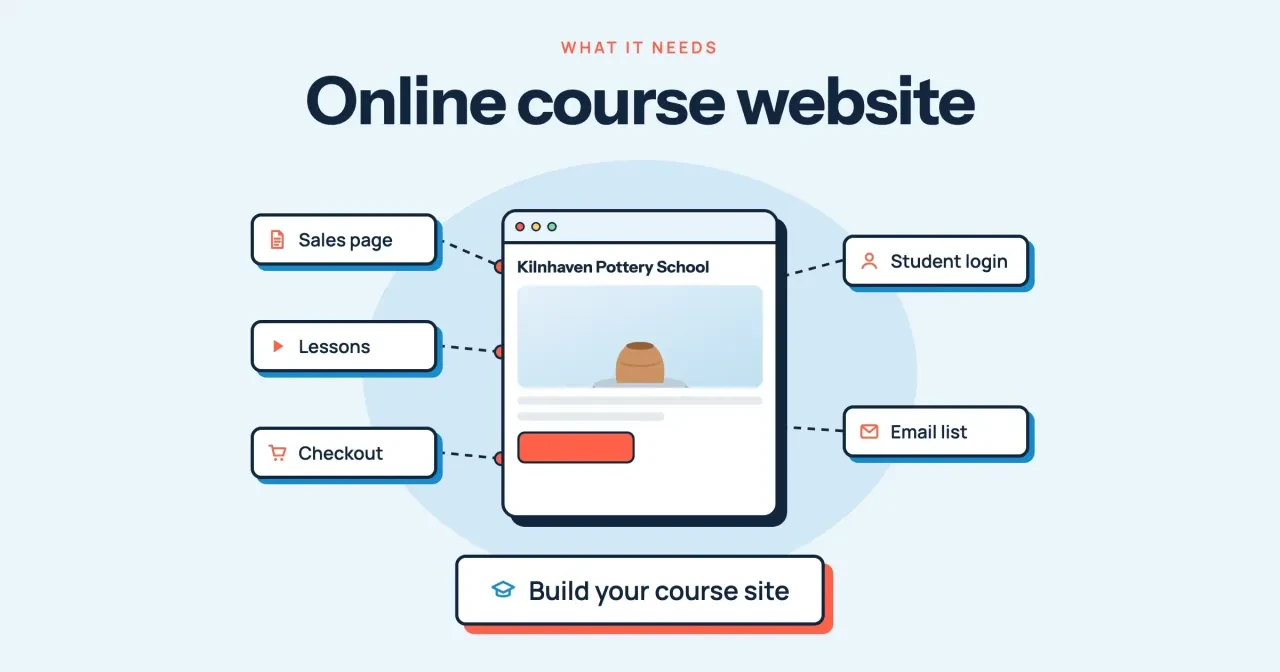
A course site can't sell without five parts. Every route here has to deliver the same five, and the difference is who builds and runs each one:
- A sales page that explains the course, shows the price and carries the buy button.
- Lessons: the videos, downloads and quizzes, released all at once or week by week.
- A checkout that takes the card, sends the receipt and enrolls the student.
- A student login, so only buyers can open the lessons and pick up where they stopped.
- An email list, so you can reach past buyers and free signups when the next course opens.
On a hosted platform, the plan supplies the server, the lessons and the checkout. Thinkific's pricing FAQ says it hosts your site and manages payments and e-commerce, so on that route there's no separate server to rent and no checkout plugin to install. Teachable bundles its own Teachable Payments into the checkout too, and its payments page lists Apple Pay, Google Pay and 35+ local payment methods. WordPress is the do-it-yourself route. WordPress.org calls it "open source software" under the GPLv2, so the core carries no license fee. The lessons then come from an LMS plugin, the checkout from a payment plugin, and the server from a hosting plan you renew every year.
Everything below assumes you're selling a course you made. If you'd rather take one, our roundup of YouTube marketing courses compares them, and our guide on whether your business needs a website covers the step before this one.
Teachable vs Thinkific vs WordPress LMS, side by side
Here are the three routes as of October 28, 2026, on yearly billing:
| Route | Plan price, yearly billing | Course limit | Platform fee per sale | US card rate | Trial or refund |
| Teachable | Starter $29, Builder $69, Growth $139 a month | 5, 10 or 50 products | Starter 7.5%, Builder 0%, Growth 0% (on Teachable Payments) | 2.9% + $0.30 | Plan cards list a 7-day trial; 30-day money-back guarantee |
| Thinkific | Start $978, Grow $1,968 a year; Expand $374 a month | Unlimited courses | None on Thinkific Payments | 2.9% + $0.30 | 30-day trial |
| WordPress + Tutor LMS | Core plugin $0; Pro $199 a year for 1 site | Unlimited courses on Pro | None listed | WooPayments 2.90% + $0.30 | Pro: 30-day money-back guarantee |
| WordPress + LearnDash | $350 for 1 site, bundled with Kadence, Give and The Events Calendar; term not stated | Not stated on the page | None listed | PayPal Checkout 3.49% + $0.49 | Not stated on the page |
Teachable's pricing page lists the Starter, Builder and Growth prices, product limits and the 7.5% Starter fee. Its yearly prices check out against the stated savings, for example $39 x 12 - $120 = $348 for Starter, the same as $29 x 12. Its FAQ calls Teachable a paid service with a 7-day trial and a 30-day money-back guarantee, though a banner on the same page offered 30 days on October 28. Thinkific's annual figures come from its August 2026 price update, which labels Start at $978 USD a year and Grow at $1,968 USD a year. Thinkific has no free plan, only the trial.
The WordPress rows take more reading. Tutor LMS's pricing page lists Pro at $199 a year for one site, and it calls the core plugin free forever. Its Business license covers up to 10 sites for $399 a year, which only matters if you run more than one school. LearnDash's page, now on Liquid Web's site, shows $350 for one site with no billing term, so ask the seller whether that price renews before you buy. The $350 buys a bundle of LearnDash, Kadence, Give and The Events Calendar. Neither plugin page lists a per-sale fee, which is why the fee column in the table above reads "None listed" for both WordPress rows.
Both plugins also need hosting, and that's a yearly bill the hosted platforms fold into their plan price. SiteGround's StartUp plan is $3.99 a month prepaid for 12 months, then renews at $17.99 a month, which is the figure to budget for from year two onward.
What each plan takes from an example $149 sale
But plan prices are only half the bill. Every sale also pays a percentage. Teachable's fee breakdown lists the US domestic card rate as 2.9% + $0.30 and says Starter's 7.5% plan fee comes on top of that payment processing. Thinkific's payments fee page gives the same 2.9% + $0.30 for US card payments on Thinkific Payments, and it adds 1.5% when the buyer pays with an international card.
For WordPress we used two processors. WooPayments' fee page lists 2.90% + $0.30 for US cards, with no setup or monthly fee for online payments. It adds 1.50% for international cards and $15.00 per dispute, refunded if you challenge the dispute and win. LearnDash's payments settings page lists PayPal among its built-in gateways, and PayPal's US fee page charges 3.49% for PayPal Checkout plus $0.49 on US dollar sales. PayPal's page lists a separate rate of 2.99% plus the same fixed fee for standard credit and debit card payments made outside Checkout. We used the Checkout rate. Each percentage is rounded to the cent before the fixed fee is added:
| Setup | Fee on one example $149 sale | You keep | Year 1 at 10 example sales a month |
| Teachable Starter | 7.5% x $149.00 = $11.18 + 2.9% x $149.00 + $0.30 = $4.62 -> $15.80 | $133.20 | $348.00 + $1,896.00 fees = $2,244.00 |
| Teachable Builder | 2.9% x $149.00 + $0.30 = $4.62 | $144.38 | $828.00 + $554.40 fees = $1,382.40 |
| Teachable Growth | 2.9% x $149.00 + $0.30 = $4.62 | $144.38 | $1,668.00 + $554.40 fees = $2,222.40 |
| Thinkific Start | 2.9% x $149.00 + $0.30 = $4.62 | $144.38 | $978.00 + $554.40 fees = $1,532.40 |
| Thinkific Grow | 2.9% x $149.00 + $0.30 = $4.62 | $144.38 | $1,968.00 + $554.40 fees = $2,522.40 |
| Thinkific Expand | 2.9% x $149.00 + $0.30 = $4.62 | $144.38 | $4,488.00 + $554.40 fees = $5,042.40 |
| WordPress + Tutor LMS (free core) | 2.9% x $149.00 + $0.30 = $4.62 | $144.38 | $0.00 + $47.88 hosting + $554.40 fees = $602.28 |
| WordPress + Tutor LMS Pro | 2.9% x $149.00 + $0.30 = $4.62 | $144.38 | $199.00 + $47.88 hosting + $554.40 fees = $801.28 |
| WordPress + LearnDash | 3.49% x $149.00 + $0.49 = $5.69 | $143.31 | $350.00 + $47.88 hosting + $682.80 fees = $1,080.68 |
Read the last column with care. Hosted rows add the yearly plan price to 120 sales' worth of fees, and WordPress rows also add SiteGround's first-year $47.88, which is $3.99 x 12. No row includes a domain, a theme, an email tool or your own set-up hours, since every route needs a domain and a way to email students. In year two, hosting renews at $17.99 a month. That lifts the WordPress rows to $770.28 with the Tutor LMS core and $969.28 with Tutor LMS Pro. LearnDash's year two comes to $898.68, plus any renewal its pricing page doesn't state.
So on these example numbers, the WordPress route has the lowest yearly cost, and Teachable Builder has the lowest hosted cost at $1,382.40 for the first year. Past Starter, every hosted plan takes the same $4.62 per sale, so the yearly price is the only fee difference.
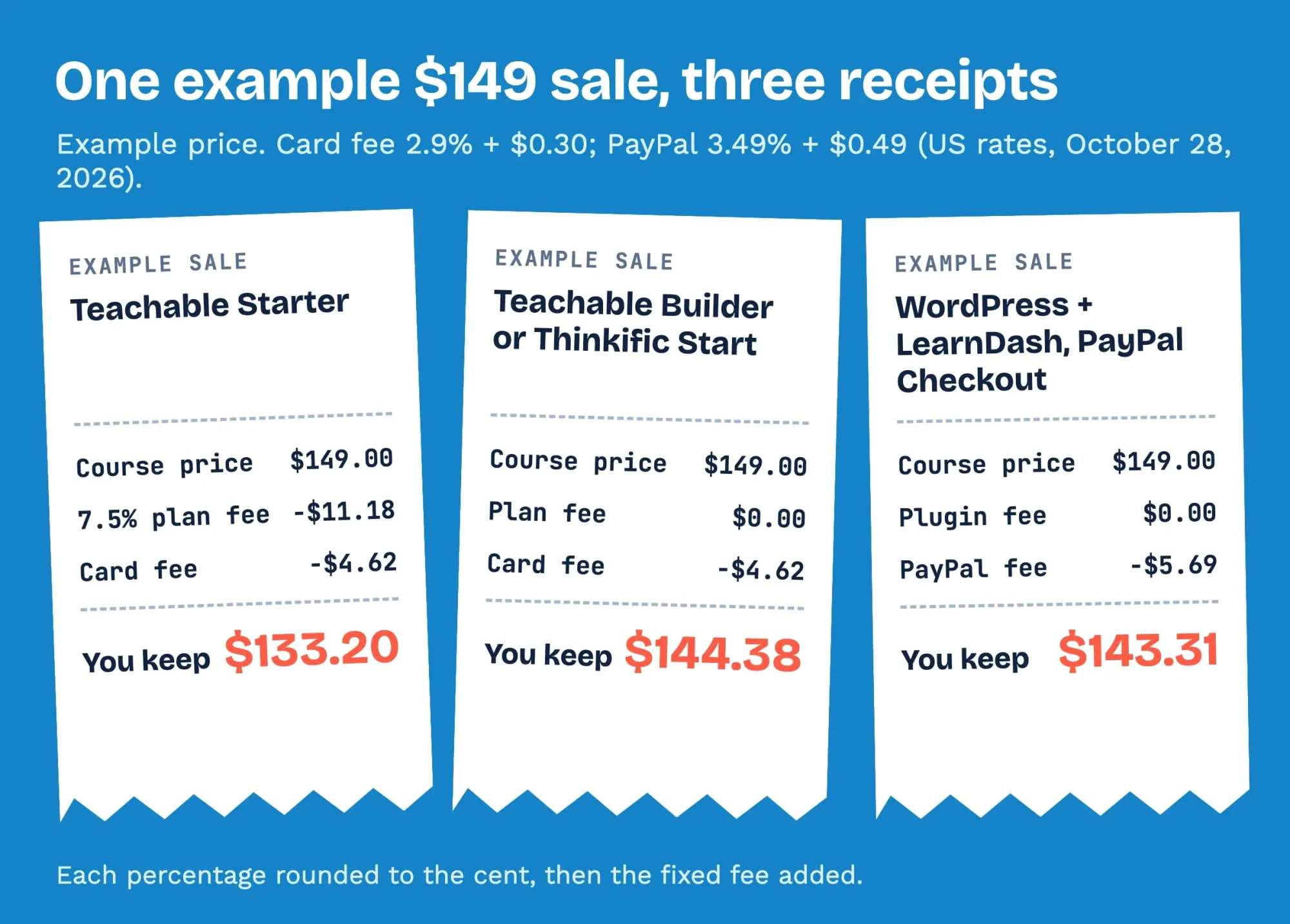 Diagram by DigitalTreed. Example $149 sale; fee rates from Teachable's, Thinkific's and PayPal's US pages, read October 28, 2026.
What we tested
On October 28, 2026, we ran a small fee script on one Mac, with no platform account and nothing sent online. It used the plan prices and card rates above with example inputs: a $149 course, 10 US card sales a month and 300 free signups. It printed nine per-sale fees, nine year-one totals and three WordPress year-two totals. It also printed two break-even figures, a six-row Starter vs Builder table, one student-fee total and one tax add-on. Every one appears in this guide, and our build script stops if the text and the results file disagree.
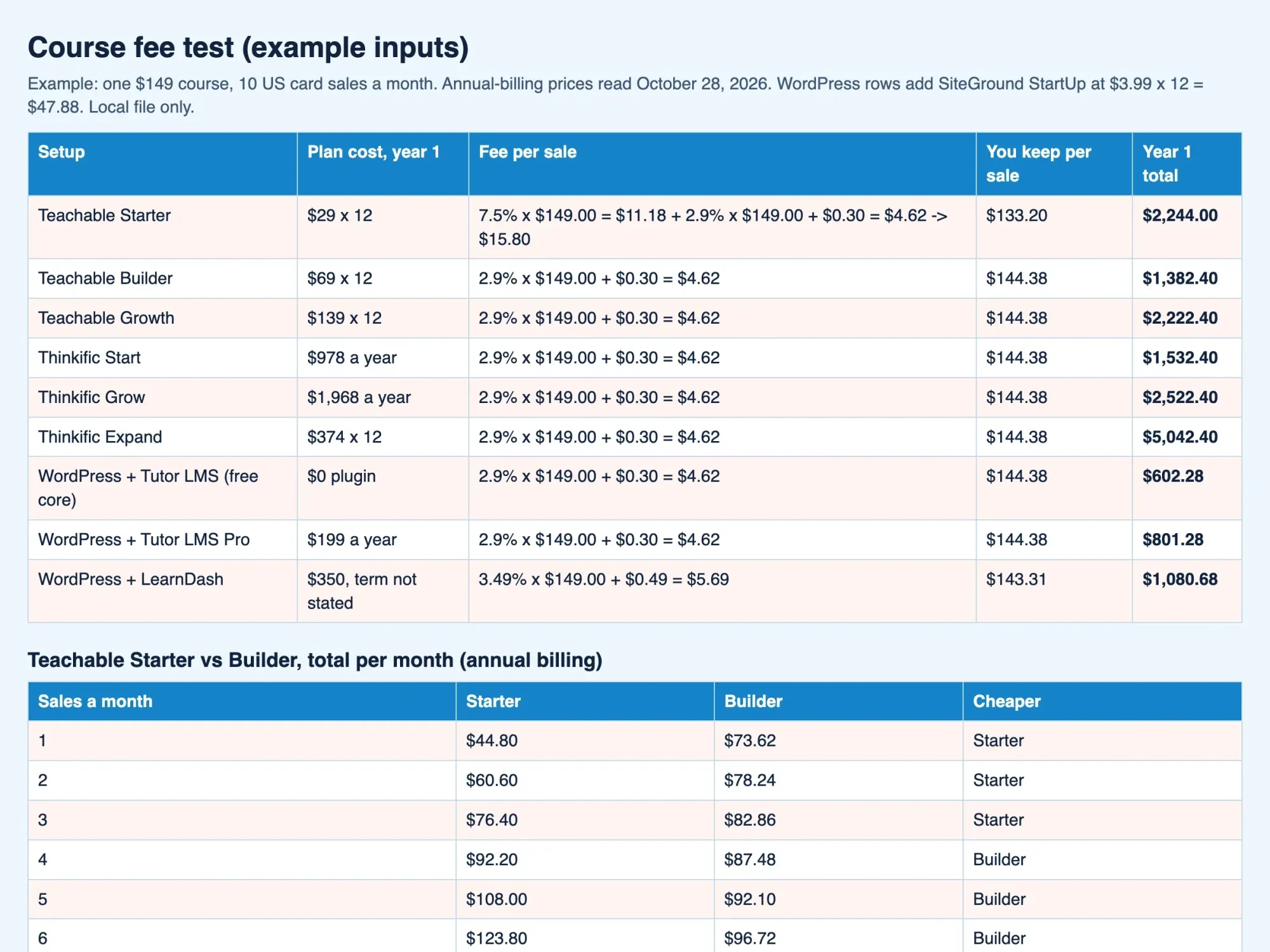 Screenshot: fees.html from our fee script, opened from 127.0.0.1 on October 28, 2026. Example inputs.
When does Teachable Starter's 7.5% fee cost more than Builder?
That leaves Starter, which looks like the safe first plan because it's the smallest bill. Its 7.5% grows with every sale, though, and that's where it gets expensive. On yearly billing, Builder costs $40 a month more ($69 - $29), and Starter's extra fee is 7.5% of sales. The break-even is $40 / 7.5% = $533.33 of sales a month. At our example $149 price that's 3.58 sales. So the fourth sale of the month is where Builder's lower fee starts saving you money. Monthly billing widens the gap to $50 ($89 - $39). That moves the break-even to $666.67 of sales a month, or 4.47 example sales. Teachable's FAQ says you can change plans at any time from the school's admin.
At three example sales, Starter totals $76.40 a month against Builder's $82.86, so Starter costs less while you find out whether the course sells. At four, Builder already saves $4.72 a month ($92.20 - $87.48). At six it saves $27.08 ($123.80 - $96.72), all on yearly billing from our fee script.
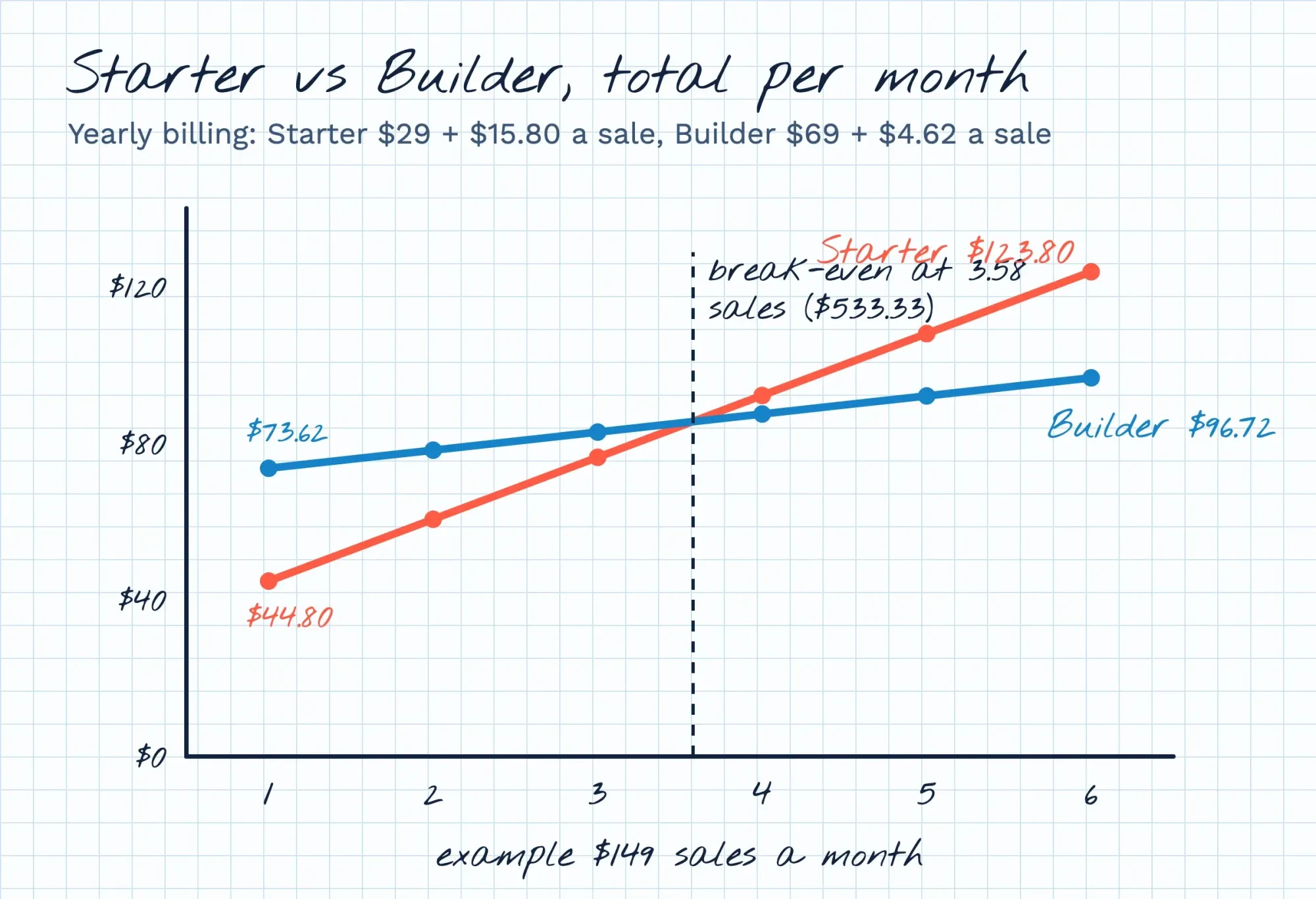 Drawn by us. Monthly totals at 1 to 6 example $149 sales, yearly billing, from our local fee script.
Free courses, sales tax and subscriptions add fees
Those totals assume one paid course sold to US buyers, and a few common choices change them, starting with a free mini-course to grow your list. Teachable's usage fee policy counts students enrolled at US$0, including free products and 100% coupons. Above 100 such students, Teachable bills $0.50 per student each month, a rule that covers every school created on or after September 3, 2026. With our example 300 free signups, that's (300 - 100) x $0.50 = $100 a month, or $1,200 a year. The policy also counts students imported through the admin panel or the API, so moving an old list across costs the same $0.50 each above 100.
Thinkific's pricing table lists 10,000 current students on Start, Grow and Expand. That's a cap, not a per-student fee, so 300 free signups add no listed fee to the Thinkific bill.
Sales tax is the next line. Teachable's payments page says Teachable Payments calculates, collects and remits sales tax, VAT and GST across 45+ countries. Its fee page adds 0.5% where tax is assessed on the default Standard bundle, and the Global bundle charges 2.8% on every sale but waives that tax fee. Thinkific's sales tax tool charges the same 0.5% on every paid sale to a student located in the United States. On an example $149 sale, that's $0.745. The WordPress plugins we read don't file tax for you, and LearnDash's payments page covers gateways and currency only. Which states tax a video course isn't something we can answer here, so ask a CPA.
Subscriptions add 0.7% on both hosted platforms, and Teachable lists 4.4% + $0.30 for international cards, so an example $149 sale abroad costs $6.86 instead of $4.62. One more Teachable fee hides in the settings. Connect your own Stripe account instead of Teachable Payments, and the fee page adds a 2% integration fee per transaction for US schools. That's another $2.98 on every example $149 sale.
Owning the site: domain, student list and data
Fees decide the first year, but ownership decides what happens if you ever move to another platform or hand the school to someone else. The student list matters most, because the lessons can be uploaded again anywhere while a list of past buyers and their emails can't be rebuilt from scratch. Teachable's user export page lets the school owner download a CSV with each student's email and whether they've opted out of marketing emails. The download link arrives by email and expires 24 minutes after it's sent, so run the export when you can open the file at once. Set a monthly reminder for it, since a list saved in spring won't hold summer's buyers.
On WordPress, the data sits in your own hosting account. You hold the keys, and the chores. WordPress.org lists the first GPL freedom as the freedom to run the program for any purpose. WooCommerce's plugin page says its open-source license means you keep full ownership of your store's content and data, and the Tutor LMS plugin page lists WooCommerce among its add-ons. The catch is upkeep. Plugin updates, backups and security become your job or your developer's while the course stays on sale. The set-up itself is in our step-by-step WordPress guide, and the WordPress and Shopify cost comparison weighs the same own-or-rent choice for physical products.
Thinkific sits in between. Its FAQ says you can connect a custom domain and run Thinkific next to an existing WordPress or custom-built site. Keep a copy of the list in an email tool you control too, and the Brevo setup and pricing guide shows one way.
Set up the course site in six steps
The build order is the same on all three routes, and each step needs the one before it:
- Register the domain in the school's name, not a freelancer's or the platform's.
- Pick the plan from the per-sale table, using your realistic sales a month.
- Write the sales page: who the course is for, what students can do after it, the price and the refund terms.
- Upload the lessons, then decide whether they open at once or one module a week.
- Connect payments, then enroll yourself with a 100% coupon to check enrollment and the receipt.
- Open the sales page on a phone and run a speed test before you send the launch email.
Step five is the one to never skip, because a $0 test order shows a broken enrollment or a missing receipt before a real buyer ever runs into it. On Teachable, that test student counts toward the 100 free students. One test won't move the bill.
On WordPress, the same test order also shows whether the payment plugin is still in test mode. Our payment gateway integration guide explains test mode and each processor's fees.
For step six, run the sales page through the DigitalTreed speed test tool. If the lessons aren't recorded yet, the business podcast guide covers microphones and room noise, which matter as much for course audio as for a show.
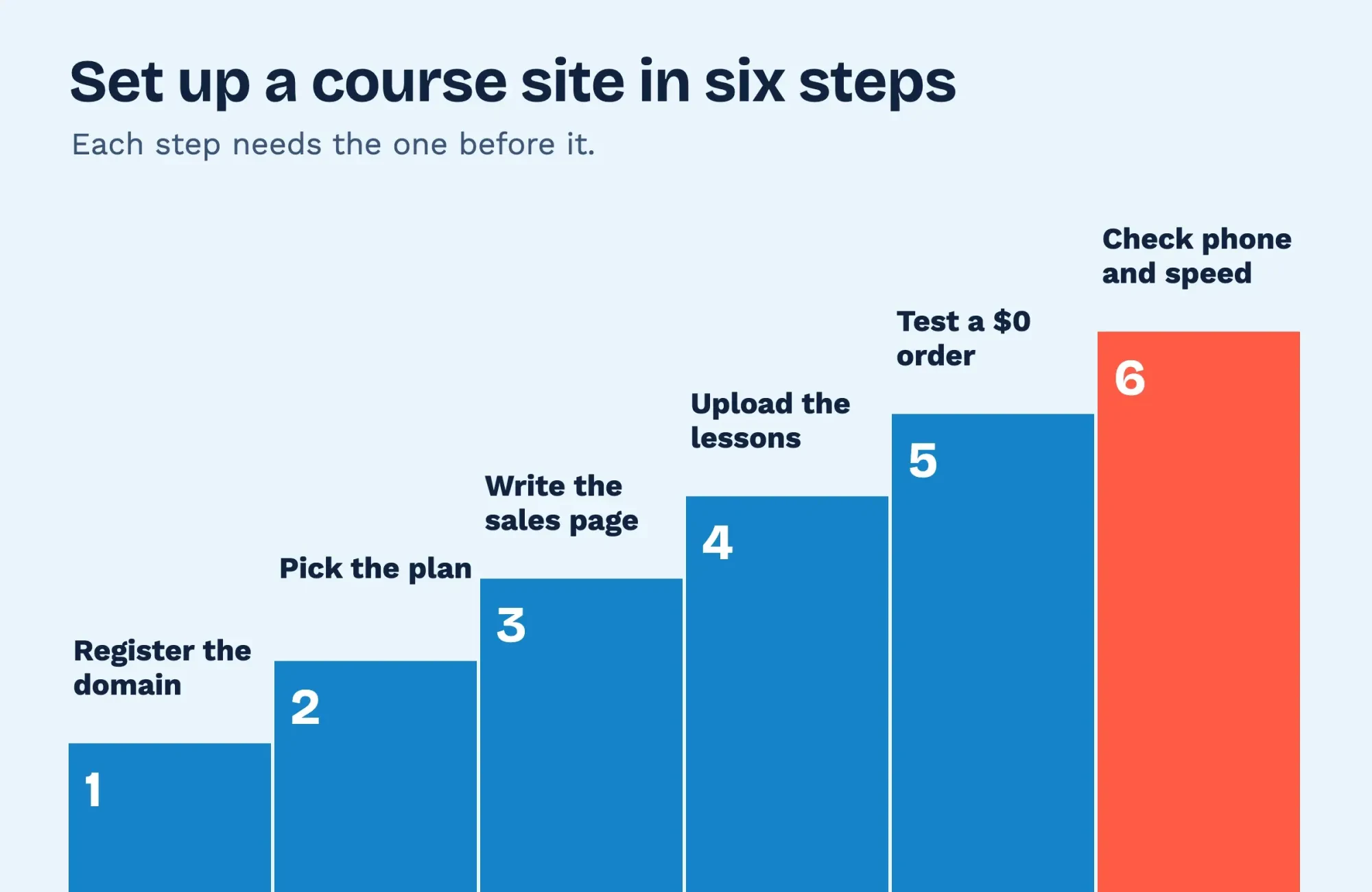 Diagram by DigitalTreed. The six set-up steps from this guide.
Which route we'd pick for a first course
The fee math narrows the field. What's left depends on how much of the site you want to run yourself, from the checkout to the backups. Choose Teachable Builder if you sell up to ten products and want tax handled for you. Its FAQ says memberships and bundles don't count toward that product limit, and neither do unpublished drafts. On our example numbers it was the lowest-cost hosted plan, at $1,382.40 for the first year. Choose Teachable Starter only while you expect fewer than four example $149 sales a month, and plan the upgrade. Teachable's pricing page also invites sellers above $12,000 a year to contact sales for special terms.
Choose Thinkific Start if you need more than ten courses or live sessions. It includes unlimited courses for $978 a year. The Start plan also lists live cohorts, coaching and one community at the same price. Grow, at $1,968 a year, is the step up if you want Thinkific branding removed from the school. Choose WordPress with Tutor LMS if someone on your team already maintains WordPress and is happy to handle updates, backups and the checkout set-up for you. It kept the most money per year in our example and keeps the data in your own hosting account. Tutor LMS Pro adds $199 a year if you want its paid add-ons and themes.
Our take: for a first course, use Teachable Builder or Thinkific Start, and export the student list every month. Move to WordPress once the course earns enough to pay for upkeep.
Prefer a WordPress course site built for you, with the payment test done? We build them as paid client work through DigitalTreed's web development team, so we gain when you hire us. Get a price from us and set it beside a freelancer's bid.
Course website questions
Frequently asked
Is yearly billing cheaper on Teachable?
Yes. Teachable's pricing FAQ says annual billing saves 22% over paying monthly, as of October 28, 2026. By its own plan prices the saving is 25.6% on Starter ($10 / $39), 22.5% on Builder ($20 / $89) and 26.5% on Growth ($50 / $189).
Can I use my own domain with Thinkific?
Yes. Thinkific's pricing FAQ says you can connect an existing domain or buy one through Thinkific.
How much video can a course platform hold?
Teachable's usage fee page includes 1,000 GB of video storage, then charges $15 a month per extra TB.
Is there a one-time price for Tutor LMS Pro?
Yes. Tutor LMS's pricing page lists a lifetime Individual license at $499 USD for one site.
How we made this guide: Every plan price and fee here comes from the vendors' own US pages, copied on October 28, 2026. Those vendors are Teachable, Thinkific, Tutor LMS, LearnDash, WooCommerce, PayPal and SiteGround. No Stripe rate appears, because stripe.com showed us its India page instead of the US one. A local script with example inputs did every sum, and no platform account was opened. Facts checked by the DigitalTreed team on October 28, 2026.
First published March 2022 as an explainer on technology in education. Rewritten October 28, 2026: now a comparison of three ways to sell your own course, with the fee on every plan worked out.
Sources
- Teachable: Plans and pricing
- Teachable Help Center: Understand your transaction fees and bundles
- Teachable: Usage Fees
- Teachable: Teachable Payments
- Teachable Help Center: Users
- Thinkific: Pricing
- Thinkific Support: Thinkific's 2026 Plan Pricing Update
- Thinkific Support: Thinkific Payments Supported Countries and Transaction Fees
- WordPress.org: About
- Tutor LMS: Pricing
- WordPress.org: Tutor LMS plugin
- Liquid Web: LearnDash pricing
- Nexcess Documentation: LearnDash Payments
- WordPress.org: WooCommerce plugin
- WooCommerce: WooPayments fees
- PayPal: Merchant fees (US)
- SiteGround: WordPress hosting plans

Comments
No comments yet. Start the conversation below.