
Quick answer
For a typical small business, the YouTube marketing course to start with costs $0 as of October 2026. YouTube's creator site and Google's Skillshop teach setup, titles and video ads free. If you want a guided plan and a certificate, Google's digital marketing certificate costs $49 a month in the US. Start with YouTube's free pages, then check our comparison table.
Small business owners who want customers from YouTube keep seeing course ads that promise a channel that sells. A YouTube marketing course is a set of lessons on planning, publishing and promoting videos that bring in buyers. Most of what a new business channel needs is free. We'd start there and pay later.
We begin with the free and paid courses side by side in one table, then the free courses from YouTube and Google. Next come the paid courses and what they cost, and why prices change with the country you open the page from. We end with which YouTube course to take first, and what we left out.
Key takeaways
- Only 2 of 19 provider pages we read showed a US dollar price.
- YouTube's own creator site teaches channel setup and title tests for free.
- Skillshop's free Google Ads courses include a Video certification.
- Google's digital marketing certificate costs $49 a month in the US.
- Four LinkedIn Learning YouTube courses total 207 minutes, inside one trial month.
Free and paid YouTube marketing courses side by side
The table below lists each course we could read on its provider's own page on October 28, 2026. Length, price and certificate come from each page, not from older lists, and "not stated" means the page didn't say.
| Course | Provider | Length on the page | Price we saw | Certificate |
| Get started and Optimize your content | YouTube for Creators | Not stated (guide pages) | $0 | None |
| Google Ads Video courses | Google Skillshop | Not stated | $0 | Google Ads Video certification |
| Small Business Marketing Using YouTube | Coursera | 1 hour | Included with Coursera Plus | Shareable certificate |
| YouTube Marketing 2026: YouTube SEO & Algorithms | Coursera | 1 week at 10 hours a week | "Enroll for free" button | Shareable certificate |
| YouTube Ads & Video Marketing - 2026 | Coursera | 4 hours | "Enroll for free" button | Shareable certificate |
| 4 YouTube courses: strategy, SEO, ads, analytics | LinkedIn Learning | 207 minutes in total | 1-month free trial, then not shown to us | Listed on 2 of the 4 pages |
| Digital Marketing & E-commerce Certificate | About 6 months at 10 hours a week | $49 a month (US) | Career certificate | |
| Boost plan with masterclasses | vidIQ | Not stated | $19 a month or $199 a year | None stated |
The free rows come straight from YouTube and Google. They cover the first jobs on a business channel: setup, titles, thumbnails and ads. The paid rows add a fixed lesson order, assignments and a certificate, and that's mostly what your money buys. Length varies even more than price. It runs from a 1-hour project to a certificate that plans for about 6 months.
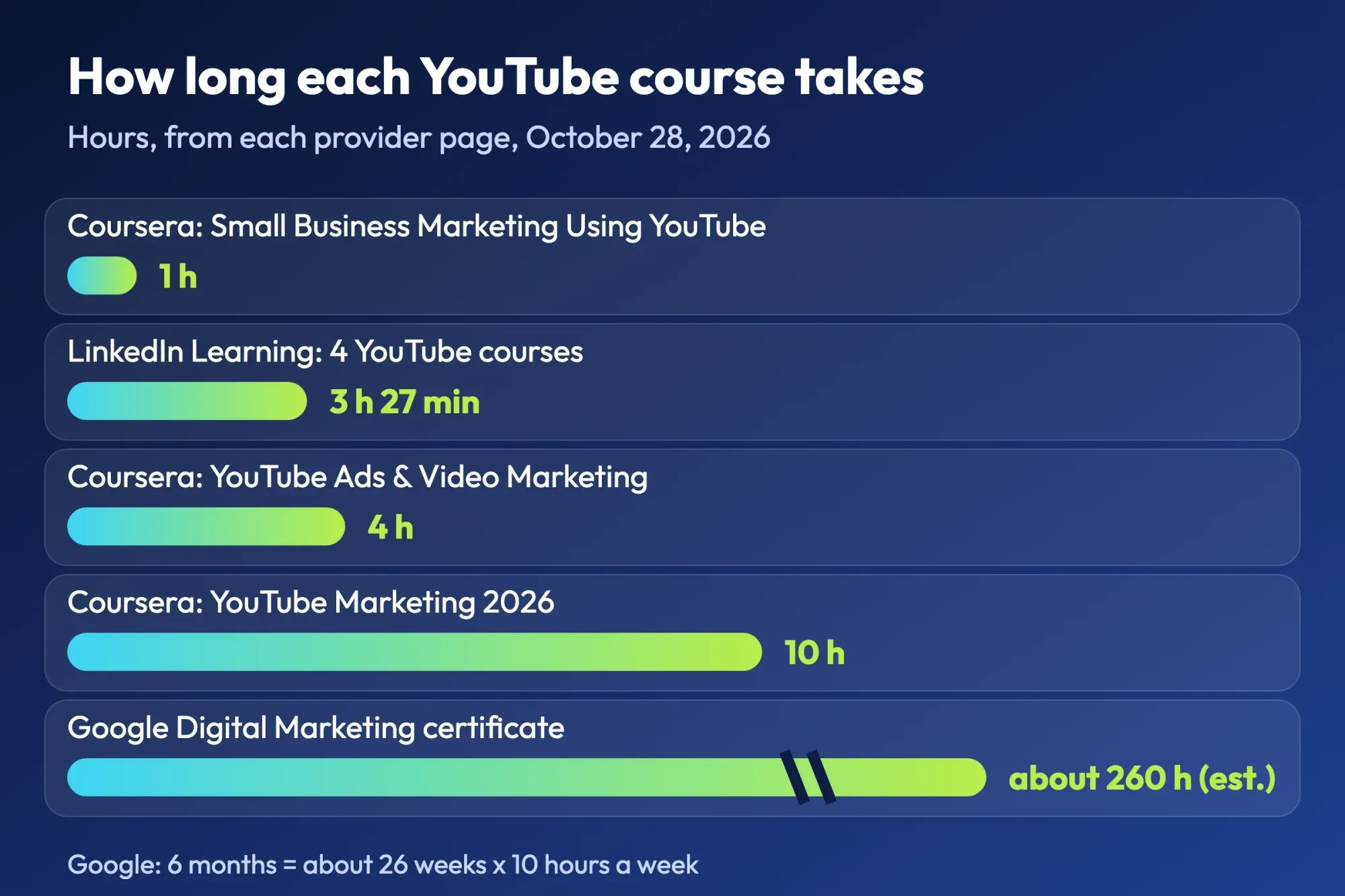 Diagram by DigitalTreed, from the length each provider's page shows, read October 28, 2026. Google's figure is our estimate: 26 weeks x 10 hours.
Free YouTube courses straight from YouTube and Google
Those free rows are the place to start, since they come from the companies that run YouTube and change when a feature does. Neither source charges, though Google's Skillshop asks you to sign up before a course opens.
YouTube for Creators
YouTube's free creator site isn't one course with lessons in order. It's a set of guide pages, and two of them matter most to a business. The Get started page walks you through creating a channel in 5 steps. Then 5 more cover the basics: banner, profile picture, description, website links and a contact email. The business channel setup guide on this site covers the same steps with the settings a company page needs.
The second page, Optimize & evolve your content, is where the marketing starts. It tells you to "use important keywords early" in titles and to track click-through rate in YouTube Analytics. It also explains YouTube's built-in test, where you upload several thumbnail and title options and "let YouTube test what grabs attention and drives watch time." A floor care company could test "How to clean grout without bleach" against "Grout cleaning in 10 minutes" on one video, then keep whichever title YouTube's test picks. For the words to put first, try the keyword suggestions tool we built, which costs nothing to use. How videos rank in YouTube and Google is covered in the DigitalTreed YouTube SEO walkthrough.
What these pages don't give you is a finish line. There's no quiz, no certificate and no set order. So it's easy to read the setup page, skim the optimize page and never come back to the analytics advice once the first videos are live. We'd fix that by putting one page a week on your calendar and doing its task on your own channel the same evening.
Google Ads Video courses on Skillshop
If you plan to pay for YouTube ads, Skillshop is the free course that fits. Google's page on Google Ads training says you get "the library of free online courses designed by Google product experts" and can work at your own pace. Certification comes with it, covering "Search, Display, Measurement, Video, and Shopping ads." YouTube video ads sit on the Google Ads side of Skillshop, which Google split from its other topics on May 31, 2024.
One trap catches owners who search Skillshop for "YouTube." Skillshop's learning paths page describes its YouTube topic as "Courses for managed Music, Enterprise, Media partners and Content ID partners." A local business channel isn't any of those. Skip it. Open the Google Ads Video path from the Skillshop home page instead, which lists Video beside Search and Display. You'll learn how Google wants video ads built, targeted and measured, which is worth knowing even if you later hire an agency or a freelancer to run them for you.
We'd save that path for the week you set your first ad budget, because targeting lessons stick better once real money is at stake.
Paid YouTube marketing courses and what they cost
Once the free pages run out, paid courses earn their price with a fixed lesson order, someone checking that you finished, and a certificate. Some cost time more than money. We note each gap where a page hid its price.
LinkedIn Learning: four short YouTube courses
LinkedIn Learning offers a short set of paid courses; only Coursera's 1-hour project, below, takes less time. Its YouTube topic page shows 377 results for "YouTube," and four courses cover what a business needs. Developing a YouTube Strategy runs 44 minutes and covers Shorts, competitor research, search and release timing. Learning YouTube SEO takes 29 minutes and Advertising on YouTube takes 52. Learning YouTube Analytics is the longest at 1 hour 22 minutes. Three of the four are several years old: Analytics was released March 5, 2020, Strategy October 28, 2020 and SEO February 9, 2021. Compare their screens with today's YouTube Studio.
Added up, 44 + 29 + 52 + 82 is 207 minutes, or 3 hours 27 minutes. Each of the four course pages offers a 1-month free trial, so one course a week fits inside it. That month is the longest free window we saw, since Google's certificate and Coursera Plus each list a 7-day trial. We can't give you the monthly price after the trial, because LinkedIn's subscription page returned a 403 error to our checker when we read it on October 28. Two of the four pages also list a Certificate of Completion for your LinkedIn profile.
Coursera: three YouTube courses, priced by country
Coursera lists three courses built around YouTube marketing. Their lengths differ a lot. Small Business Marketing Using YouTube is a 1-hour Guided Project for beginners, rated 4.7 from 1,442 reviews. It teaches "How to create a YouTube channel" and how to promote a small business with it. YouTube Marketing 2026: YouTube SEO & Algorithms has 27 modules and plans for 1 week at 10 hours a week. YouTube Ads & Video Marketing - 2026 has 4 modules over 4 hours, and its first module covers creating a Google Ads account for YouTube ads.
The two longer courses showed us an "Enroll for free" button, and all three say they're included with Coursera Plus. We can't give you the US price of Coursera Plus. We tried. The Coursera Plus page showed our machine in India a monthly price in rupees only, and that says nothing about a US checkout. Open it in your own browser to see what you'd pay.
Google Digital Marketing & E-commerce Certificate
Google's Digital Marketing & E-commerce Certificate is the only course page that printed a US price for us in October 2026. vidIQ's plans page, for a tool, was the other one. "In the U.S. and Canada, the subscription cost is $49 USD per month after an initial 7-day free trial period," the page says. It's a 7-course series planned for about 6 months at 10 hours a week, and the page says many learners finish in 3 to 6 months.
So your cost depends on your pace: 3 months is 3 x $49 = $147, and 6 months is 6 x $49 = $294 as of October 2026. Know what you're buying, though. It isn't a YouTube course. Its page names search, social media and email as the channels it teaches, and it's aimed at people who want a marketing job. For an owner who only wants a channel that brings in customers, it's more course than you need.
Pick it for a career change, not for a channel.
vidIQ plans with masterclasses
vidIQ is a YouTube research tool first, but its Boost plan lists "Masterclasses from top creators" among its features. The vidIQ plans page gives US list prices of $19 a month or $199 a year for Boost, and $49 a month or $468 a year for MAX. Paying yearly saves 12 x $19 - $199 = $29 on Boost and 12 x $49 - $468 = $120 on MAX, as of October 2026. That only makes sense if you'll use the research tools every week, because $199 spent on a tool you open twice a month pays for very few lessons.
The vidIQ Academy page promises growth "in just 30 days" but shows no price or lesson list, so we can't say what's in it.
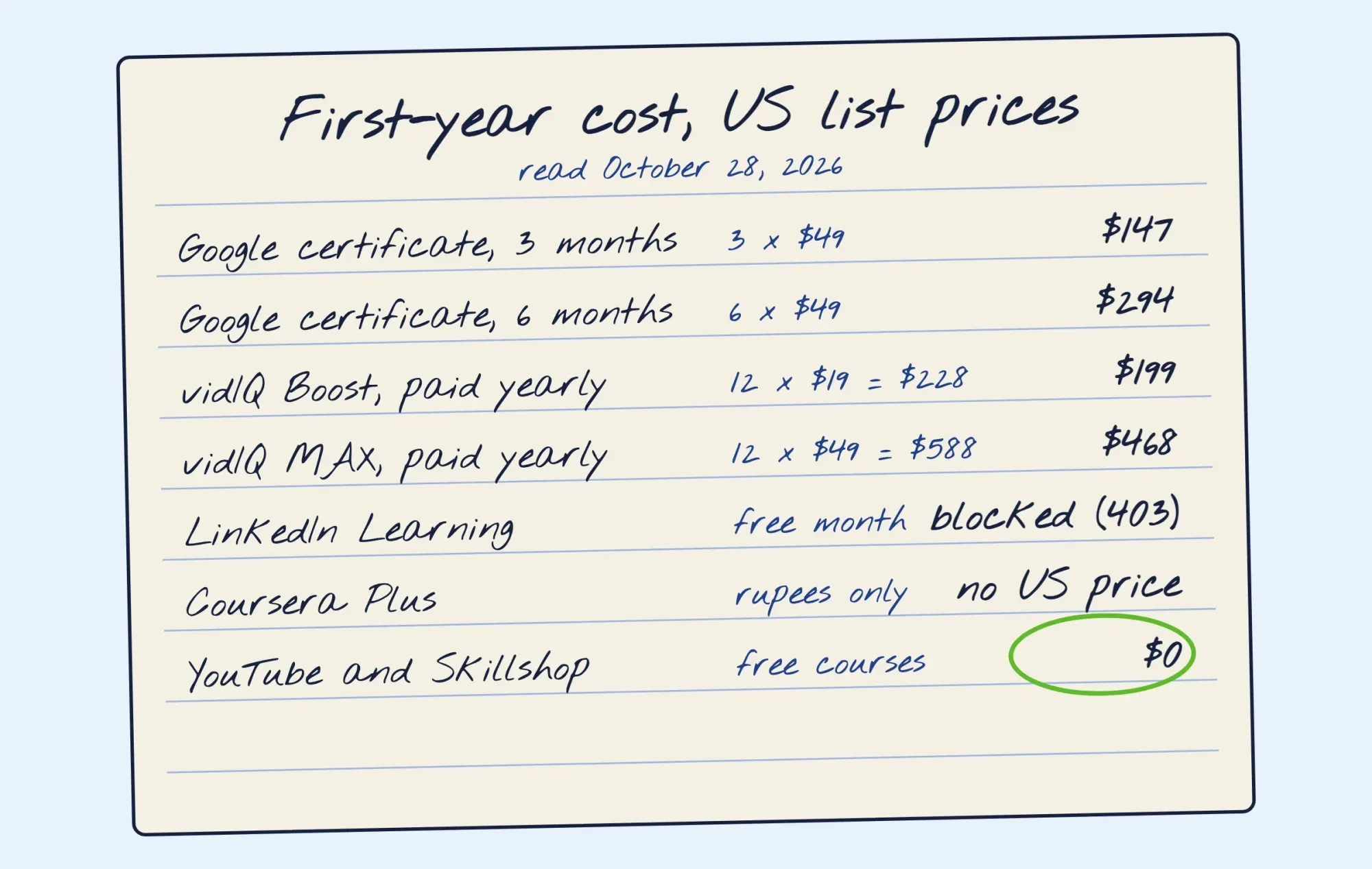 Drawn by us, from the prices on grow.google and vidIQ's plans page, read October 28, 2026.
Prices change with the country you open the page from
That missing Coursera price isn't a glitch on our side. Course sites set prices by country, and two of the pages we read say so plainly.
vidIQ's plans page warns that "Local pricing may vary. Final pricing is shown at checkout." Google's certificate page says that outside the US and Canada, "your cost may be lower." So a price copied from someone else's list can be wrong for you. It may have been read from another country, or during a sale. Coursera showed us an "Ends soon" sale banner on Coursera Plus that same day.
Trust the checkout page over any list, this one included.
What we tested
We saved 19 provider pages on October 28, 2026, from a machine in India. A Python script then read each saved copy for its HTTP status, length, price and certificate wording.
| Result | Pages |
| Checked | 19 |
| Readable | 16 |
| Readable with a US dollar price | 2 |
| Showing rupees | 3 |
| Blocked with a 403 error | 2 |
| Empty without JavaScript | 1 |
Only grow.google and vidIQ printed a dollar price we could quote. Udemy and LinkedIn's pricing page blocked our checker, and HubSpot's course address returned no readable text.
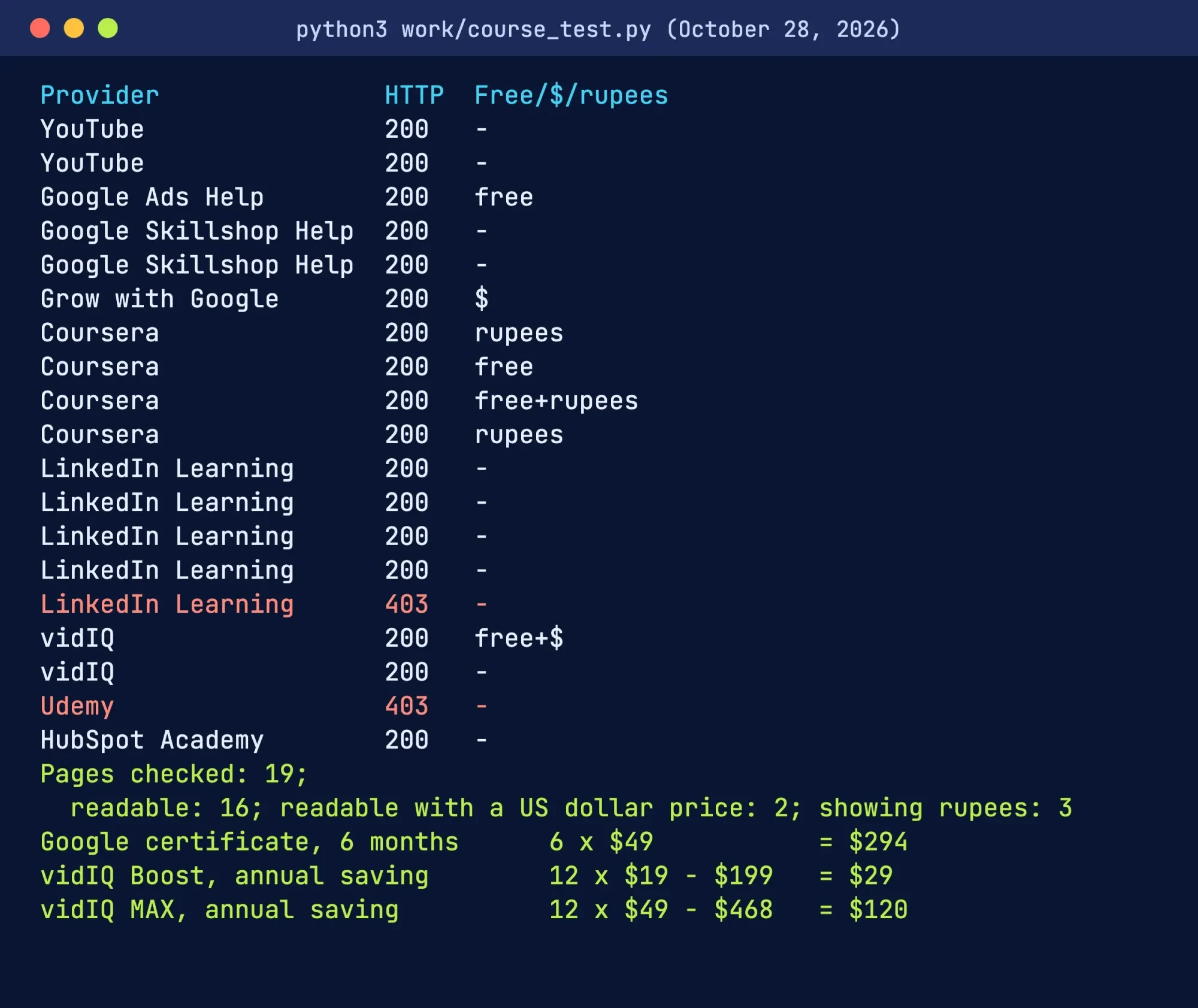 Screenshot: our course page check, run October 28, 2026 (trimmed).
Which YouTube course should you take first?
So start free, and pay only once you know what you're missing. This is the order we'd use for Dana, who runs Wapsi Floor Care in Ames, Iowa, and has one free evening a week. Both are made up.
- Week 1: read YouTube's Get started page and set up the channel with our business channel guide.
- Week 2: read the Optimize page, then run one title and thumbnail test on your best video.
- Week 3: if you'll run ads, take the Google Ads Video path on Skillshop.
- Week 4: start LinkedIn Learning's free month and watch the strategy and analytics courses.
That plan costs $0 if you cancel the LinkedIn trial before it renews, as the course pages read on October 28, 2026. Pay for Google's $49-a-month certificate only if you want a credential for a marketing job, or if you'd like all of digital marketing rather than YouTube alone. Once videos are live, the free UTM builder on this site tags the links in your descriptions. Then your analytics shows which videos send visitors.
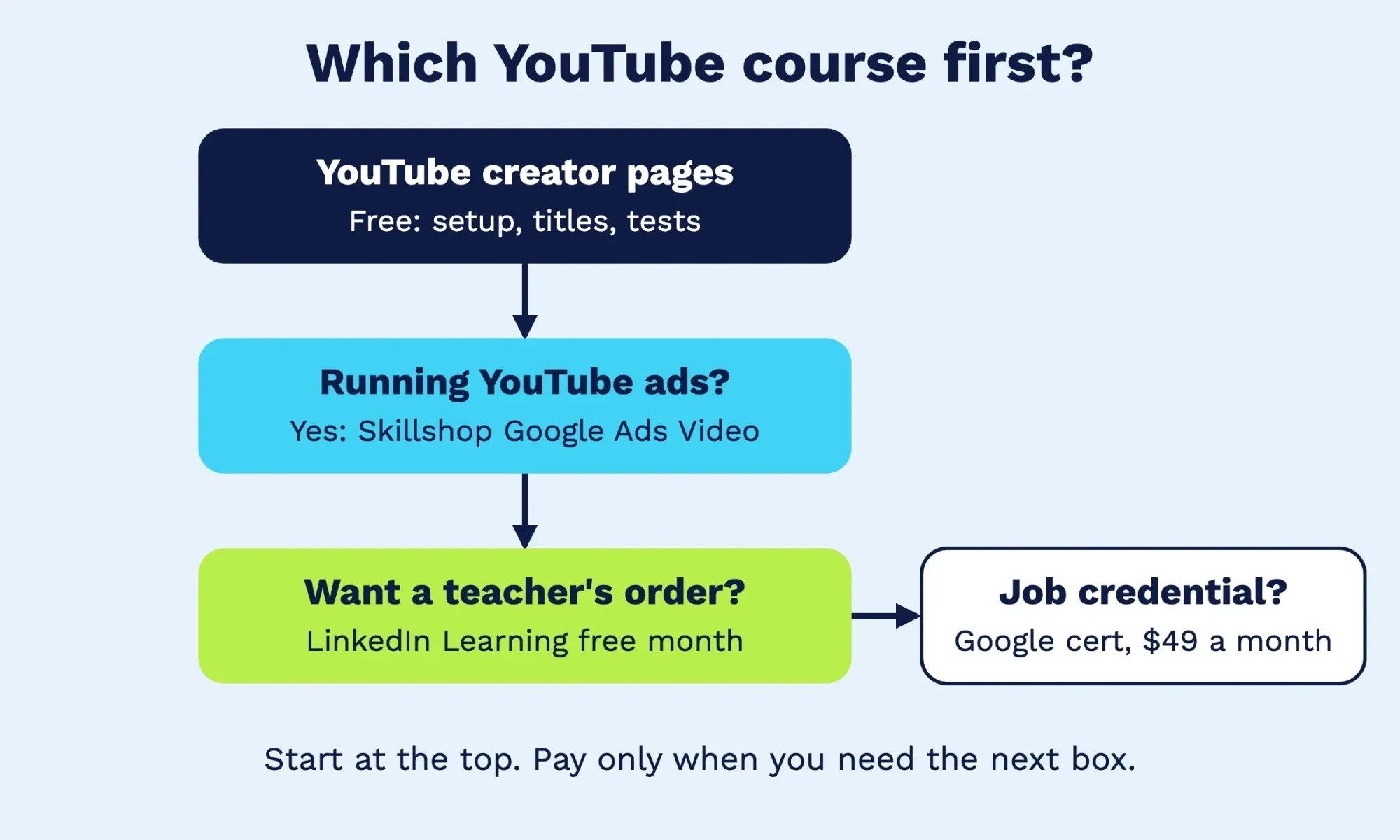 Diagram by DigitalTreed, built from the course pages in this guide, read October 28, 2026.
Our take: for a local service business, the course matters less than the habit of publishing one useful video a week and reading the numbers. When those numbers raise a question, our guides on YouTube audience retention, thumbnail best practices, getting your first 1,000 subscribers and YouTube hashtags each answer one. For planning the videos themselves, read our YouTube marketing strategy guide.
What we left out, and why
Older course lists, including our own earlier version of this article, name three providers that aren't in the table above.
A Udemy course topped the earlier version of this article, but its course page returned a 403 error to our checker. A 403 means the site refused an automated read, not that the course is gone, and the page may open fine in your own browser on a normal visit. We left it out because we couldn't confirm its price, length or rating today. HubSpot Academy's YouTube course address returned an empty page without JavaScript. Nothing to read. And Ahrefs Academy, whose YouTube SEO videos were another past pick, lists no YouTube marketing course today; its free catalog covers SEO, blogging, link building and affiliate marketing.
Rather not film and edit yourself? The DigitalTreed graphics and video team makes YouTube videos and thumbnails for businesses. We charge for that work, which is why it sits down here and not in the course table.
Frequently asked
What happened to Google Digital Garage?
Google began retiring it in early 2025, with notices on February 6 and March 4, per Skillshop Help. Its marketing course now gives a Skillshop badge with no final exam.
Is a YouTube marketing certificate worth it for a business owner?
Rarely, since customers won't see it. Google's Skillshop page says certification can "signal your expertise to the industry," which helps more with clients or jobs.
Does a free YouTube course require a Google account?
For Skillshop, yes, though YouTube's creator pages open without signing in. Skillshop's help page says one Google account works on both Skillshop sites, but you log in to each separately.
Can I share a LinkedIn Learning YouTube certificate?
Yes, where a page lists one. The strategy course page says it shows under "Licenses and Certificate" on your profile.
How we made this guide: We read each provider's own course and pricing pages on October 28, 2026, and saved copies. A local script then pulled out prices, lengths and certificate wording. Nothing was bought, joined or signed into. Facts checked by the DigitalTreed team on October 28, 2026.
First published July 2020. Rewritten October 28, 2026: now a free-versus-paid comparison with prices taken from each provider's own page.
Sources
- YouTube for Creators: Get started
- YouTube for Creators: Optimize & evolve your content
- Google Ads Help: Google Ads training on Skillshop
- Google Skillshop home page
- Skillshop Help: Learning paths for Skillshop Google Ads/GMP/GA
- Skillshop Help: Learning paths for Skillshop Other Topics
- Skillshop Help: Separation of Skillshop Google Ads/GMP/GA and Other Topics
- Skillshop Help: Fundamentals of Digital Marketing (FoDM) Award
- Skillshop Help: Legacy Digital Garage Certificate
- Grow with Google: Google Digital Marketing & E-commerce Certificate
- Coursera: Small Business Marketing Using YouTube
- Coursera: YouTube Marketing 2026: YouTube SEO & Algorithms
- Coursera: YouTube Ads & Video Marketing - 2026
- Coursera Plus
- LinkedIn Learning: YouTube courses
- LinkedIn Learning: Developing a YouTube Strategy
- LinkedIn Learning: Learning YouTube SEO
- LinkedIn Learning: Advertising on YouTube
- LinkedIn Learning: Learning YouTube Analytics
- vidIQ: Pricing and plans
- vidIQ Academy
- Ahrefs Academy
1 comment
jigyasa sewkani
youtube marketing is the best thing to do. there are many sources to earn from it. thanks for sharing love your content.
Reply