
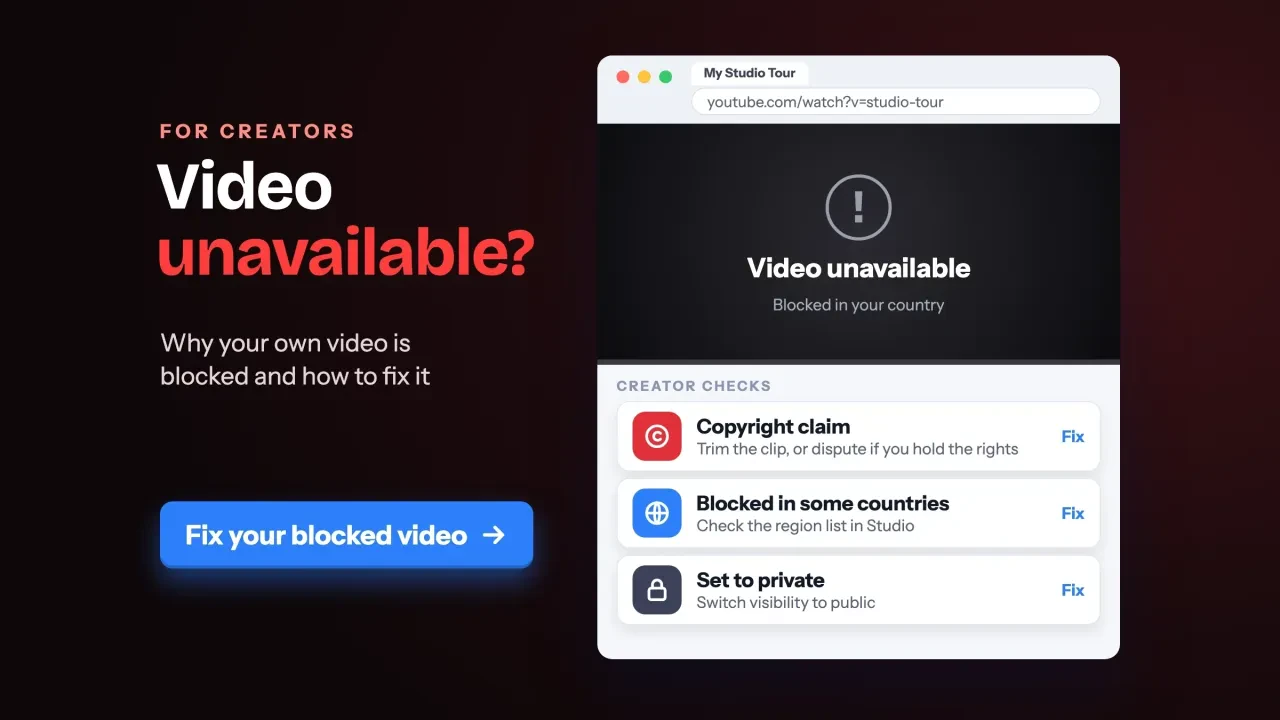
Quick answer
When your own YouTube video says "Video unavailable", the cause is almost always something you can see in YouTube Studio. There are 7 usual suspects: privacy, a copyright claim block, a copyright strike, a guidelines removal, an age restriction, made-for-kids limits or processing. Check Studio first. Don't delete the video; a deleted video keeps its strike.
A YouTube video unavailable message is the screen YouTube shows in place of a video that a viewer isn't allowed to play, in their country, on their account or on the page where it's embedded. YouTube Help lists it among its most common error messages.
For viewers, the fix is often a reload. For creators, it's usually a setting, or a decision someone else made about the video.
We wrote it for the business owner whose own upload won't play for customers.
We'll go cause by cause, with each fix and each deadline from YouTube's own help pages, and keep the viewer side short. If the video is part of a bigger plan, our YouTube marketing strategy for small business covers the rest.
Key takeaways
- Start in YouTube Studio's Content page and check Visibility and Restrictions.
- A copyright claim on its own is not a strike.
- Three copyright strikes in 90 days can get a channel terminated.
- Deleting a struck video doesn't clear the strike, and you can't appeal again.
- Age-restricted videos don't play for signed-out viewers or on most websites.
Start in YouTube Studio's Content page, not your browser
So where do you look first?
In YouTube Studio, open Content and find the video. Two columns tell you almost everything: Visibility and Restrictions.
YouTube's claim steps run through that same screen: filter by Claims, hover over the Restrictions column, then click See details. That's how Learn about copyright claims describes it, and the details page names the claimant.
We wanted to see which status words a creator actually meets, without an account. On October 27, 2026, we opened YouTube Help's Troubleshoot video removals page signed out, in headless Google Chrome on our office Mac in India, and saved it. The page lists four copyright labels: Includes copyrighted content, Muted due to copyrighted content, Blocked worldwide, and Blocked in some countries or regions. It lists three removal labels too, for guidelines, Terms of Service and trademark problems. Nothing on the page needs a sign-in, so any owner can check the wording the same way.
Each label points to a different fix.
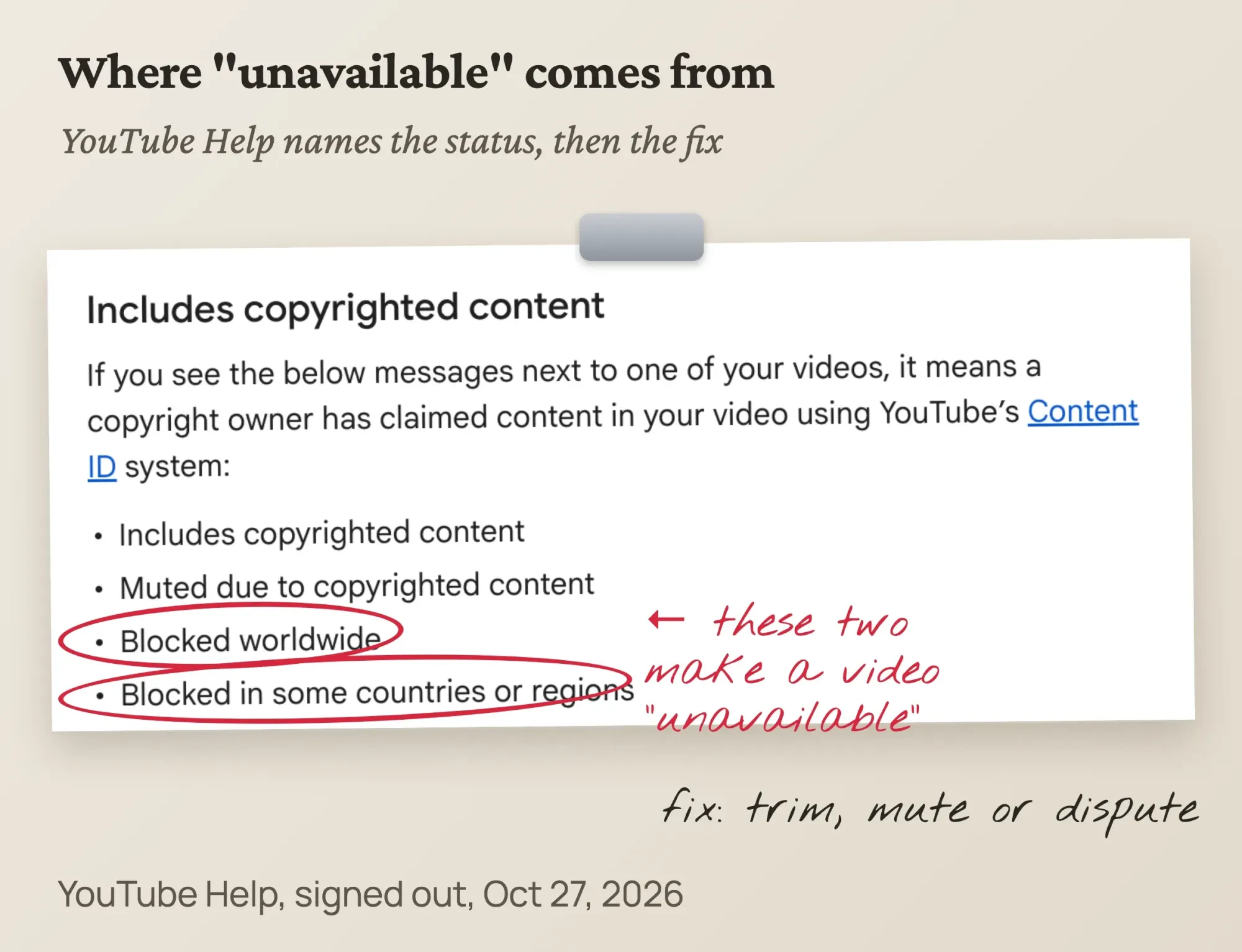 Screenshot: YouTube Help, "Troubleshoot video removals" (support.google.com, US English), signed out, October 27, 2026, annotated by DigitalTreed
Every status message, its cause and the first fix
That's the list. Here's what each one means, what to do first and how long you have, from the YouTube Help page linked in each section below.
| What Studio shows | What caused it | First fix | Clock |
|---|---|---|---|
| Visibility: Private | Your setting (default for creators aged 13 to 17) | Change Visibility to Public or Unlisted | None |
| Visibility: Scheduled | Private until the publish time | Publish now, or wait | None |
| Blocked in some countries or regions | Content ID claim, block policy in those places | Trim, replace or mute the claimed part | Dispute: claimant has 30 days |
| Blocked worldwide | Content ID claim, block everywhere | Same, or Escalate to Appeal if you hold the rights | Appeal: claimant has 7 days |
| Removed, with a copyright strike | Legal copyright removal request | Copyright School, retraction or counter notification | Expires in 90 days if you finish Copyright School |
| Video removed: Inappropriate content | Community Guidelines | Appeal in Studio | 6 months (strike), 1 year (removal) |
| Viewable by 18+ | Age restriction | Appeal once in Studio | No deadline listed |
| Set to made for kids | YouTube changed your audience | Appeal once in Studio | No deadline listed |
Two rows aren't penalties at all. Start with them.
Private, unlisted or scheduled: the two-minute fix
These first two rows are settings, and Google's privacy settings page is plain about the first: "Private videos and playlists can only be seen by you and whomever you choose."
Anyone else gets the unavailable screen.
Age matters here. YouTube sets new uploads to private by default for creators aged 13 to 17, and to public at 18 or older.
To change it:
- Sign in to YouTube Studio and select Content.
- Point to the video and click the arrow under Visibility.
- Choose Public, or Unlisted if only people with the link should watch.
- Click Save.
Unlisted is the right pick for a client preview.
The link works for anyone, and they don't need a Google Account. It never shows on your channel's Videos tab, and it stays out of YouTube search unless someone adds it to a public playlist.
A scheduled video is private on purpose: scheduled publishing keeps it private until the time you set. If the link went out early, publish now or tell people the time.
Fresh uploads can also be the problem. The upload help page says a video can be published once SD processing is complete, and HD or 4K versions may take longer.
Give it time before you change anything else.
One more setting-based case: members-only videos play only for paying members. Our channel memberships guide covers how those perks are set.
A copyright claim can block a video in some countries or everywhere
Now the most common cause that isn't a setting.
Content ID is YouTube's automated matching system. Every upload is scanned against audio and video files that rights owners submit, and when it finds a match, the owner's settings decide what happens. How Content ID works lists three actions: block, monetize or track.
The block can be partial. YouTube says a video can be monetized in one country and blocked in another.
That's why your video may play fine for you and fail for a customer abroad.
Short videos get a stricter rule. New vertical videos of 1 to 3 minutes have counted as Shorts since October 15, 2024. For Official Artist Channels and channels linked to a music Content Owner, the date is December 8, 2025. YouTube Help on claims says those are blocked by any active claim, "regardless of policy."
So a claim that only puts ads on a long video can block a 2-minute Short.
A claim on its own isn't a strike, though. YouTube answers that question with one word: "No."
Remove the claimed part, and the block goes with it
If the claim is right (you used a song you don't have a license for), edit it out. Remove copyright-claimed content from videos lists three options that clear the claim when they work:
- In Studio, open Content and click the notice on the video, then View details.
- Find the claim and click Take Action.
- Pick Trim out segment, Replace song (a track from the YouTube Audio Library) or Erase song.
- For Erase song, YouTube calls Mute all sound in the claimed segments "usually faster and more likely to automatically remove the claim."
- Preview, save and wait for processing, then reload to check that the claim is gone.
Two catches before you save.
Since June 2025, you can't undo an edit after saving, so download a copy first. And if your channel isn't in the YouTube Partner Program, you may not be able to save changes once the video has over 100,000 views.
Example (made up): Ironwood Dance Studio in Hattiesburg, Mississippi, uploads its spring recital with a chart pop song as the soundtrack. Studio shows Blocked in some countries or regions. The studio has no license for the song, so a dispute isn't an option. Erasing the song, or muting the claimed segments, keeps the dancers on screen and clears the claim once no claimed audio is left. The link families already have keeps working.
Dispute or appeal a claim only when you hold the rights
Editing isn't the only answer when the claim is wrong.
If you own the material, licensed it, or your use is fair use, you can dispute the claim, and the claimant then has 30 days to respond.
YouTube also lists reasons that don't count: giving credit to the owner, owning a copy of the song, and choosing not to monetize.
This is where creators get hurt.
If the claimant still believes its claim is valid, it can answer your dispute with a copyright removal request. If that request is valid, the video comes down and your channel gets a strike.
Fair use is a US legal doctrine, not a YouTube setting. The US Copyright Office lists four factors courts weigh: why and how you used the work, what kind of work it is, how much you used, and the effect on the market for the original. It also warns that "there is no formula" for a safe amount.
If the claimant rejects your dispute, you may be able to appeal, and per Appeal a copyright claim the claimant then has 7 days. For a claim that blocks the video, Escalate to Appeal skips the 30-day step. The risk doesn't change: a rejected appeal can turn into a removal request and a strike.
Money keeps flowing when both sides monetize. YouTube Help says revenue is held from the first day of the claim if you dispute within 5 days.
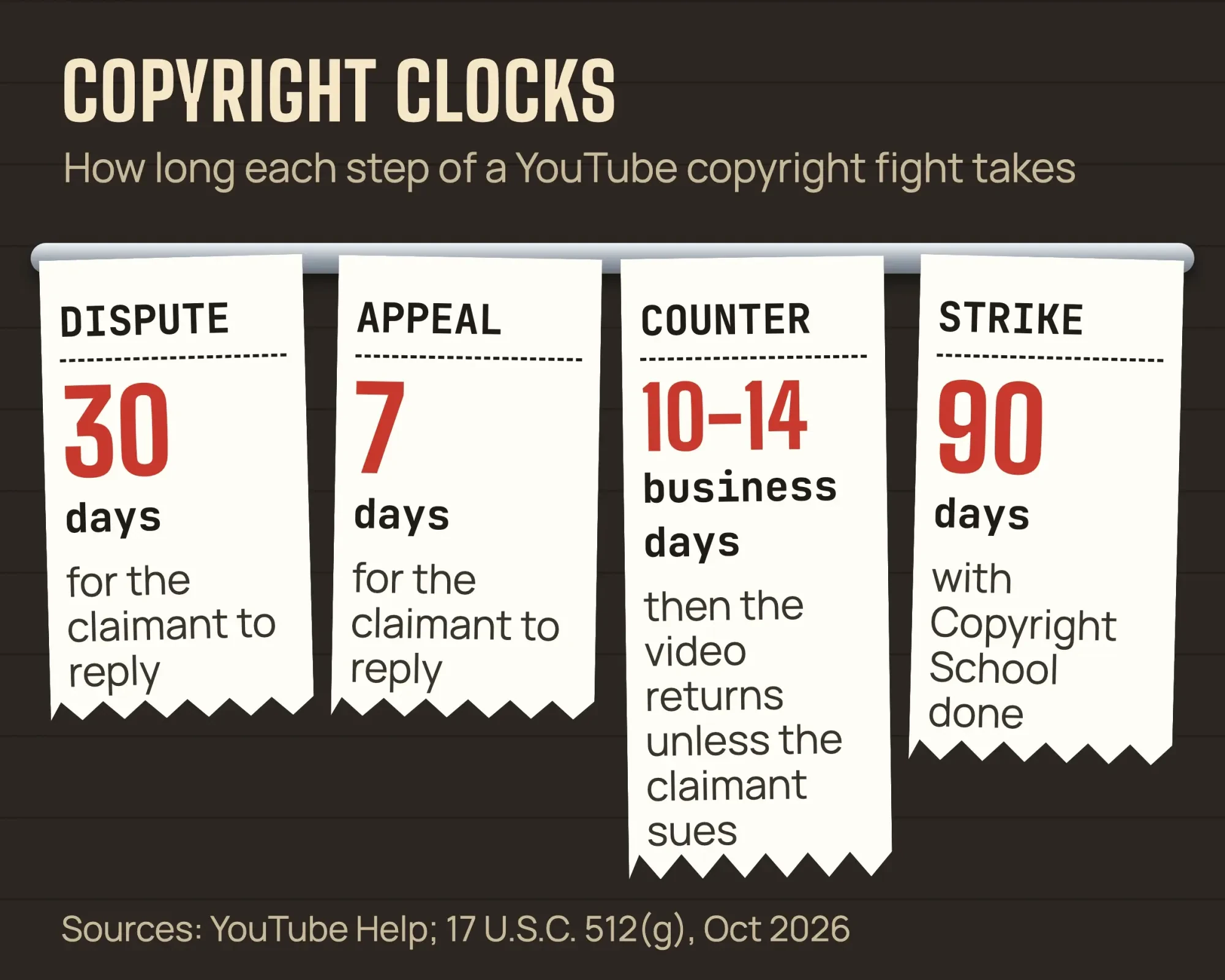 Diagram by DigitalTreed: deadlines from YouTube Help and 17 U.S.C. 512, October 2026
This is US copyright law (17 U.S.C. 512 and the fair use rules), and the same goes for the counter notice in the next section. Read both as a description of how the process works. It isn't legal advice on your video. We make and market business videos; only a copyright attorney who sees your facts can say whether your use is fair or a counter notice is safe to sign. YouTube's dispute page itself suggests legal advice if you're unsure.
If music claims keep coming back, our video production team cuts business videos with music licensed for that use. It's paid work for us, which is worth knowing as you weigh this tip.
A removed video with a copyright strike has three ways back
A strike is the step after a claim.
It means a rights owner sent a legal removal request and YouTube took the video down. The copyright strike page is blunt: "Channels that get 3 copyright strikes in 90 days are subject to termination."
You have three ways to clear one:
- Take Copyright School, a 4-question course, and wait. The strike expires 90 days after it was applied, as long as you have fewer than 3.
- Ask the claimant to retract the removal request. A retraction restores the video unless you deleted it.
- File a counter notification if the removal was a mistake or a misidentification, which can include content that qualifies as fair use.
A counter notification is a legal document, and YouTube shares it with the claimant. In Studio, filter Content by Copyright, find the video marked Removed, hover over Copyright, click See details, then Take action and Submit a counter notification. Use your full legal name and physical address, not a company or channel name.
You'll agree to two statements, and here they are word for word.
The first opens with "I consent to the jurisdiction of the Federal District Court for the district in which my address is located,". It goes on: "or if my address is outside of the United States, the judicial district in which YouTube is located,". It ends: "and will accept service of process from the claimant."
The second: "I swear, under penalty of perjury, that I have a good faith belief that the material was removed or disabled as a result of a mistake or misidentification of the material to be removed or disabled."
Then you wait. YouTube says the claimant has 10 US business days to show legal action, and the law, 17 U.S.C. 512(g), has the platform restore the video "not less than 10, nor more than 14, business days" after the counter notice.
That holds unless the claimant tells YouTube it filed a court action. And that's the real risk of this route. With the first statement, you agree that the claimant can serve you and take you to a federal court. Under 512(f) of the same law, anyone who knowingly and materially misrepresents that material was removed by mistake is "liable for any damages, including costs and attorneys' fees". If you can't honestly swear the removal was a mistake, don't file one.
One exception changes the advice on deleting. If the strike email says the removal was scheduled, you have 7 days to delete the video and avoid the strike. In every other case, deleting doesn't resolve it.
Community Guidelines removals start with a warning
Not every removal is about copyright.
If Studio says Video removed: Inappropriate content, the video broke YouTube's Community Guidelines. The first time is "typically only a warning".
An optional policy training lets that warning expire after 90 days.
After that, the penalties grow:
- First strike: 1 week without uploads, live streams, Premieres or new custom thumbnails.
- Second strike in the same 90 days: 2 weeks without posting.
- Third strike in 90 days: the channel may be removed for good.
There's a side effect people miss. During a penalty, scheduled public videos are set to private, so the video you planned for Monday shows as unavailable until you reschedule it.
The rules cover thumbnails, links and private videos as well as what plays. If a custom thumbnail got flagged, our YouTube thumbnail guide covers what YouTube allows.
To appeal, follow YouTube Help: in Studio, open Content, hover over the notice on the video and use its link. For a strike, use the Channel violations card on the Dashboard.
You have 6 months after a warning or strike, and up to 1 year after a removal. Each strike can be appealed only once.
An appeal can also end halfway, with the video back up under an age restriction. If a whole channel is terminated, the termination page gives you 1 year and two appeals.
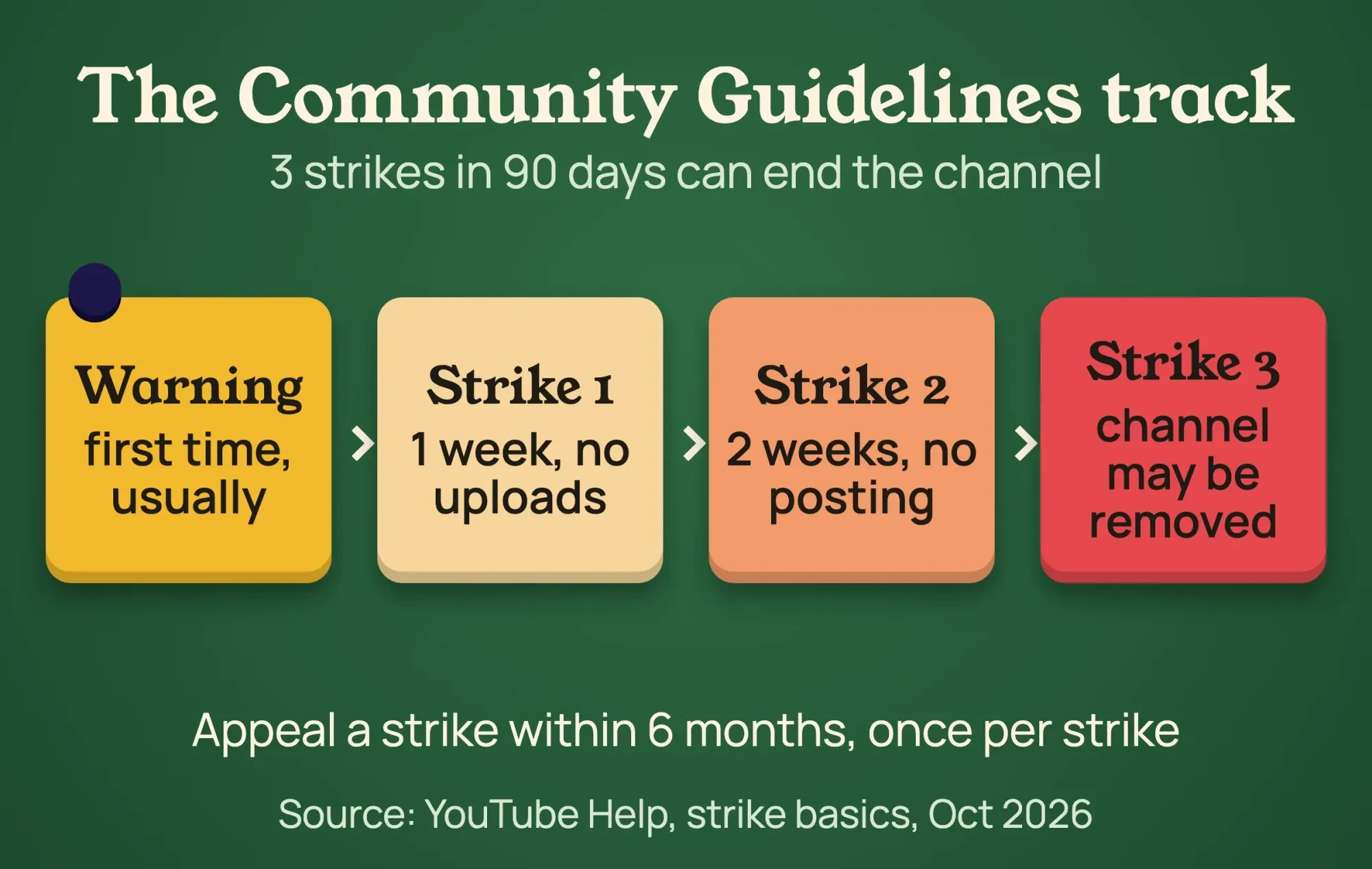 Diagram by DigitalTreed: Community Guidelines strike steps from YouTube Help, October 2026
Age-restricted videos vanish for signed-out viewers and most websites
An age restriction is quieter than a strike, but it hides more than people expect.
YouTube's age-restriction policy says these videos "are not viewable to users who are under 18 years of age or signed out."
They can't be watched on most third-party websites either, so the embed on your site sends people back to YouTube to sign in.
To check, filter Content by Age-Restriction, or look for Viewable by 18+ under Notices.
If you think it's wrong, appeal the age restriction: hover over the notice, click Review and take action, give your reason and submit. You get one appeal per video, so write it carefully.
Unavailable only on your website?
Then check one box. According to Edit video settings, License and distribution is where you choose whether the video "can be embedded on a different website."
If it's off, the video plays on YouTube but not in your page's player.
Made for kids doesn't hide a video, but it turns features off
Made-for-kids settings come from US children's privacy law. YouTube asks every creator to set an audience under a settlement with the FTC and the New York Attorney General, and its made for kids guidance counts anyone under 13 as a kid in the United States. That matches the definition of a child in 15 U.S.C. 6501.
The video still plays. But YouTube's audience settings page lists features that switch off, and some look like the video is broken:
- Comments and the notification bell
- Playback in the Miniplayer
- Save to playlist and Save to watch later
- Cards or end screens
- Personalized ads
If YouTube changed your setting and it now reads Set to made for kids, you can't switch it back yourself. Hover over that label in Content and click Appeal; each video gets one appeal.
Don't try to fix it with a disclaimer.
The made for kids FAQ says a 13+ note "doesn’t mean that the FTC will automatically deem your content as not made for kids."
Pick the audience honestly instead. Our guide to creating a YouTube channel for business shows where that setting sits during setup.
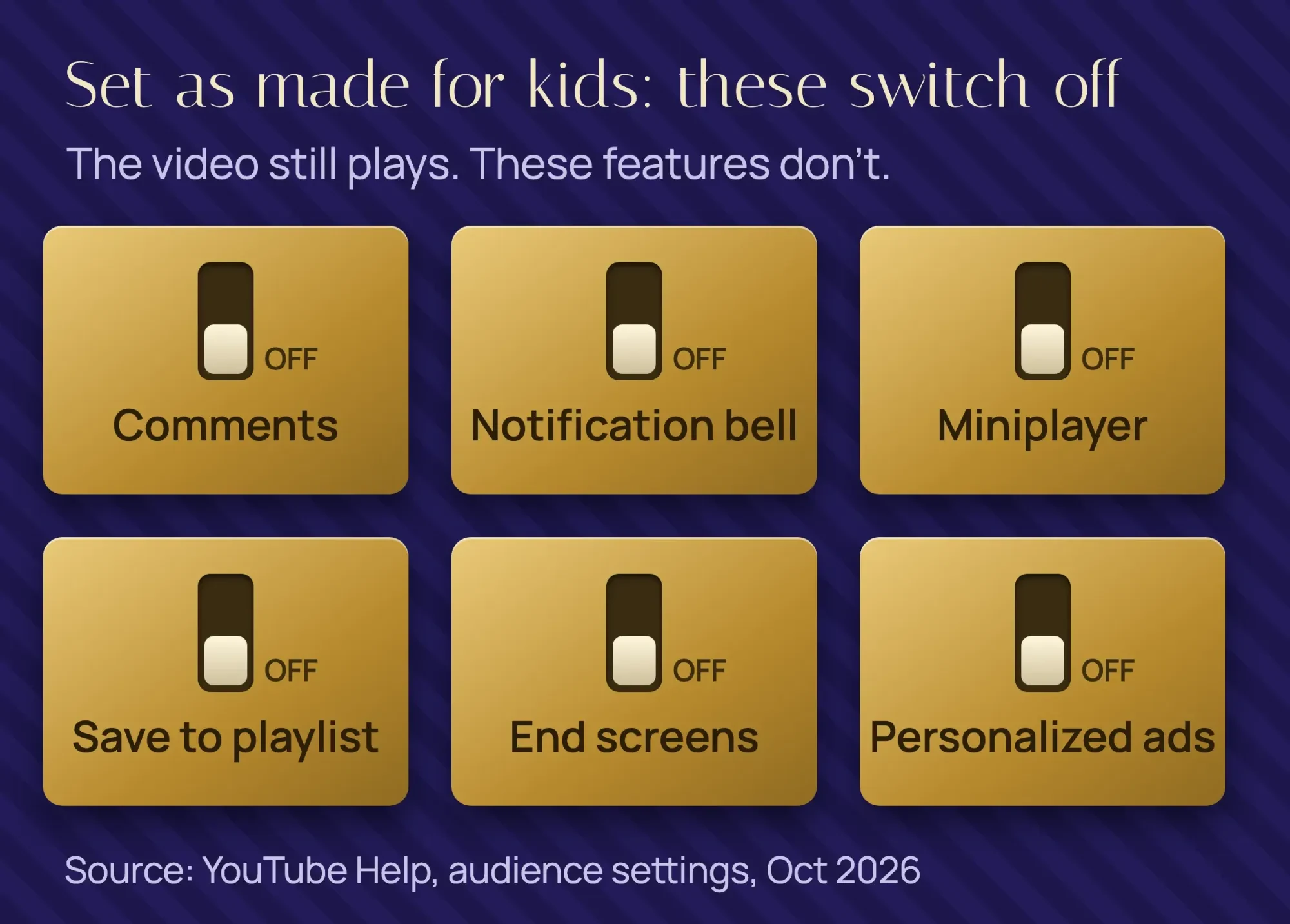 Diagram by DigitalTreed: features off on made-for-kids videos, from YouTube Help (Set your channel or video’s audience), October 2026
Should you delete it and upload it again?
Usually it isn't worth it.
Deleting doesn't clear a copyright or guidelines strike, and YouTube's appeal page warns that once you delete a struck video, you can't appeal again.
A re-upload of the same file also meets the same scan. The upload flow's Copyright check looks for copyrighted content, and YouTube adds that its results "aren’t final."
If a strike has frozen your uploads, the strike rules also forbid using another channel to get around it.
A fresh upload makes sense in a few cases: a file that failed in processing, a version you've already cut the claimed music out of, or a video whose audience setting was wrong from day one.
If you do re-upload, give it a proper title. Our free keyword suggestion tool pulls real phrases from YouTube's own autocomplete, and our YouTube SEO guide covers titles, descriptions and chapters.
When it's a viewer's problem, not yours
Sometimes Studio shows nothing wrong, and only one viewer gets the error.
YouTube's video error help lists the usual fixes: restart the connection, sign in, clear the browser cache, check ad blockers, update the app, and on a TV, unplug it for at least 30 seconds.
Two cases fool creators.
YouTube may stop signed-out users from viewing certain content featuring minors. And a network administrator may turn on Restricted Mode in libraries, universities and other public institutions, to screen out potentially mature content.
Skip the VPN advice older posts give. YouTube's Terms of Service forbid users to "circumvent, disable, fraudulently engage with, or otherwise interfere with any part of the Service".
For a numbered error, see our YouTube error 400 fixes.
How to know it's fixed
Once you've made the change, check it the way a customer would.
- In Studio, the Visibility and Restrictions columns should no longer show the block, removal or notice you started with.
- Open the watch link in a private browser window, signed out.
- Play it on the page where you embedded it.
- If it was blocked in some countries, open the claim's See details page and confirm the block is gone.
Our take: on a business channel, most of these problems start with music. Use tracks you have a license for, or the YouTube Audio Library, and you'll skip the worst branches of this guide.
Want us to look at a blocked video, or make the next one with cleared music? Ask for a quote and send the Studio status you see.
Frequently asked
Can I cancel a copyright dispute after I submit it?
No. YouTube Help says a dispute can't be canceled once submitted. An appeal can be canceled, but then that claim can't be appealed again.
Can one video have several copyright claims?
Yes. A video can have several claims and several removal requests, but only one copyright strike at a time.
Will a copyright claim hurt my whole channel?
Usually not. YouTube Help says claims affect videos but "usually don't impact your channel or account." Strikes are different.
How we made this guide: on October 26 and 27, 2026, our team read 30 YouTube Help pages in US English while signed out. We also read 17 U.S.C. 512, the COPPA definitions and the US Copyright Office's fair use page, and matched every step, quote and deadline here to them. We captured the Help page on video removals in headless Google Chrome on October 27, 2026 and annotated it. Sources sit inline at each fact.
We didn't sign in to YouTube, open Studio, upload a video or file a claim, dispute or appeal, so Studio menus are as YouTube's help describes them. Ironwood Dance Studio is made up. Our author, Eram N., gives this version a final read before it's published.
First published July 2020. Rewritten October 27, 2026: the post now covers every "Video unavailable" cause a creator meets, with a status-to-fix table and deadlines. The old viewer browser tips, the VPN advice and the repair-software tip are gone.
Sources
- YouTube Help: Troubleshoot video removals
- YouTube Help: Change video privacy settings
- YouTube Help: Schedule video publish time
- YouTube Help: Upload YouTube videos (processing and Checks)
- YouTube Help: Edit video settings (embedding)
- YouTube Help: How Content ID works
- YouTube Help: Learn about copyright claims
- YouTube Help: Remove copyright-claimed content from videos
- YouTube Help: Dispute a copyright claim
- YouTube Help: Appeal a copyright claim
- YouTube Help: Monetization during copyright claim disputes
- YouTube Help: Understand copyright strikes
- YouTube Help: Submit a copyright counter notification
- YouTube Help: Retract a copyright removal request
- YouTube Help: Community Guidelines strike basics
- YouTube Help: Appeal a Community Guidelines strike or video removal
- YouTube Help: Channel or account terminations
- YouTube Help: Age-restricted content
- YouTube Help: Appeal the age restriction on your video
- YouTube Help: Set your channel or video’s audience
- YouTube Help: Determining if your content is "made for kids"
- YouTube Help: Frequently asked questions about "made for kids"
- YouTube Help: Troubleshoot YouTube video errors
- YouTube Help: Turn Restricted Mode on or off
- YouTube Terms of Service (dated December 15, 2023)
- 17 U.S. Code § 512, Cornell Legal Information Institute
- US Copyright Office: Fair Use Index
- 15 U.S. Code § 6501 (COPPA definitions), Cornell Legal Information Institute
Comments
No comments yet. Start the conversation below.