
Quick answer
YouTube channel memberships open once your channel is in the YouTube Partner Program, which starts at 500 subscribers. Members pay a monthly price you pick from 25 US options, $0.99 to $499.99, and you keep 70%. They're worth it only if you can deliver the perks every single month.
YouTube channel memberships are paid monthly subscriptions that viewers buy from one channel in exchange for perks the creator sets, such as badges, emoji, members-only videos and live chats. YouTube runs the billing. You decide the levels, the prices and what each level gets, inside YouTube’s rules.
We wrote this for a US small business or solo creator with a growing channel. It covers who qualifies, what members pay, what YouTube keeps, how the money and the tax paperwork reach you, and when Patreon is the better fit.
Key takeaways
- You can change each level's price only once every 12 months.
- A price change applies to new members only.
- Turning memberships off deletes your levels, perks and members.
- Payouts come through AdSense for YouTube once your balance reaches $100.
- Submit a Form W-9 first, or Google may withhold 24% of your earnings.
Channel memberships are a monthly subscription to one channel
Channel memberships work like a tip jar with a door behind it. Viewers press the Join button, pay every month, and get perks the public can't. YouTube's own description says members pay "through monthly payments" and get "exclusive members-only perks in return like badges, emoji, and other goods" (YouTube Help).
Picture a guitar repair shop that posts setup videos. A few hundred viewers watch every upload. Some of them would gladly pay $3 a month for the shop's bench notes, an early look at the next video, and a monthly live clinic where the owner answers their questions.
That's the whole idea.
It sits next to the other fan funding tools, Super Chat, Super Stickers and Super Thanks. Those are one-off payments. Memberships repeat, which is why they're the one most businesses care about (Commerce Products policies).
You need 500 subscribers, not 30,000
That Join button appears once your channel joins the YouTube Partner Program at its lower tier. That tier asks for 500 subscribers, 3 public uploads in the last 90 days, and either 3,000 watch hours on public long videos in 12 months or 3 million public Shorts views in 90 days. The United States is on the list of countries for that tier.
The bigger tier, 1,000 subscribers with 4,000 watch hours or 10 million Shorts views, adds ad revenue and YouTube Premium money. Memberships come with both tiers, according to YouTube's table of thresholds. Views you bought with ads don't count toward any of it.
A few other rules apply to everyone. You must be at least 18, live where memberships are offered, and keep your channel off the made-for-kids setting. YouTube also checks that a big share of your videos aren't made for kids or carrying music claims (minimum requirements; memberships eligibility). Joining the program itself needs 2-Step Verification and an AdSense for YouTube account (what you need to join).
Then there's 2027. Starting February 1, 2027, new channels need 8,000 watch hours or 20 million Shorts views to reach the full tier. But YouTube says plainly that there are "no changes to the eligibility requirements for fan funding," so memberships still open at 500 subscribers (Changes to the YouTube Partner Program).
Turned memberships on before 2023? Then you'll need to accept the newer Commerce Product Module in YouTube Studio by January 31, 2027.
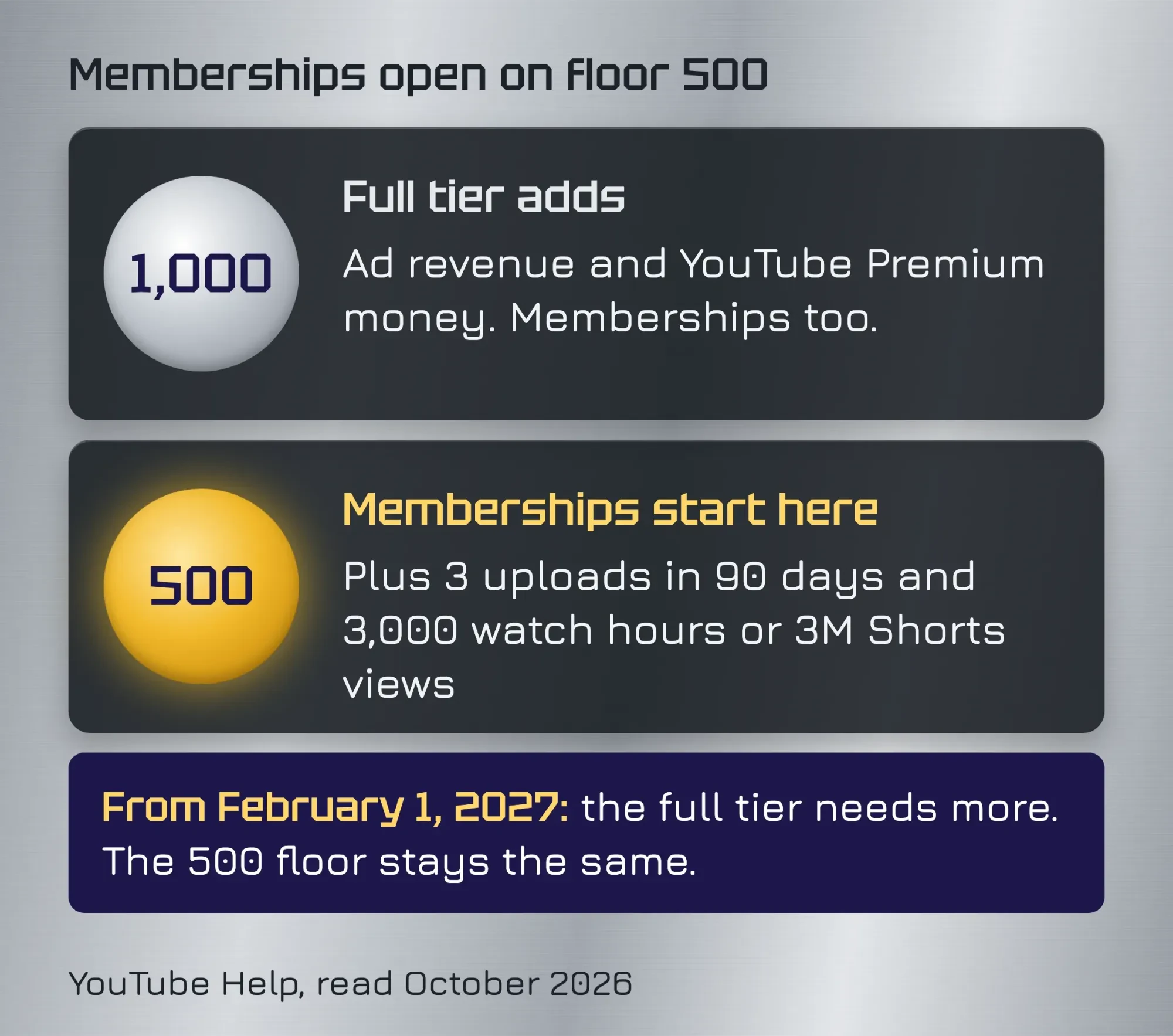 Diagram by DigitalTreed, from YouTube Help: Choose how you want to monetize, and Changes to the YouTube Partner Program, read October 2026.
We got this wrong ourselves. The 2023 version of this post told readers they needed 30,000 subscribers. One of its FAQs said you could change prices "at any time." When we checked both lines against YouTube Help on October 25, 2026, neither held up. The real entry point is 500 subscribers, a sixtieth of what we'd said. Price changes are limited too, as the next section shows.
If that number kept you from trying, it shouldn't now.
Prices come from a fixed list of 25 US price points
That 500-subscriber door opens onto a short price menu, and you can't type in any price you like. In the US, YouTube offers 25 fixed monthly prices, from $0.99 up to $499.99, as of October 2026. Each level you create uses one of them (US price list).
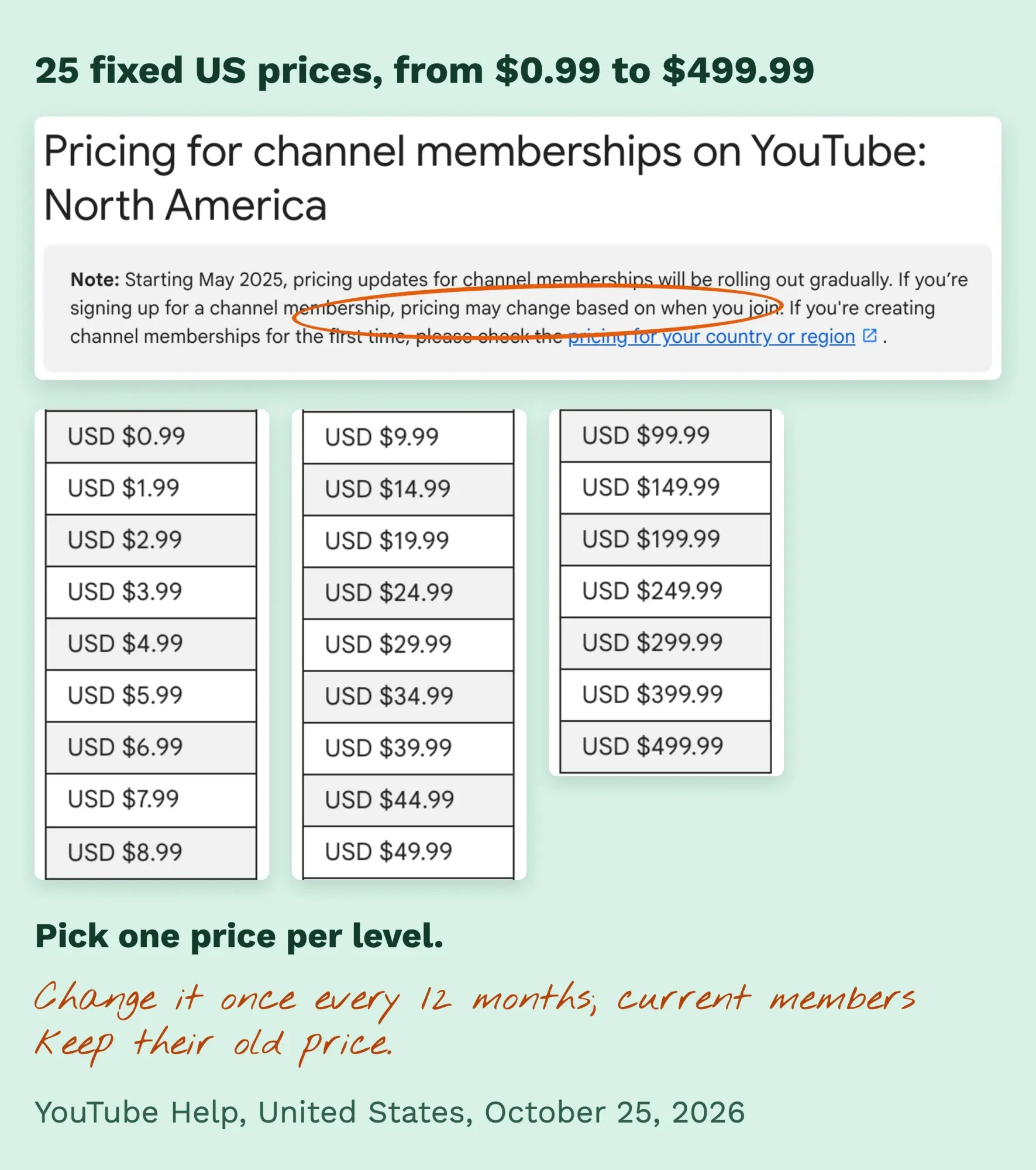 Screenshot: YouTube Help, "Pricing for channel memberships on YouTube: North America", United States, captured October 25, 2026 with no account signed in; notes by DigitalTreed.
Two rules matter more than the list itself. First, you can change the price of each level only once every 12 months. Second, a price change applies to new members only. Your current members keep paying what they signed up at, unless they cancel and rejoin.
So pick prices you can live with for a year.
YouTube may also suggest "recommended prices" based on your audience. It adds that it "does not guarantee" more revenue if you take them. And the list itself moves. A note on the US page says pricing updates started rolling out gradually in May 2025. So what a member pays "may change based on when you join." Prices also vary by country, which is why your intro video shouldn't quote a dollar figure (intro video rules).
How much does YouTube take from memberships?
So here's the split: YouTube keeps 30% of channel membership revenue, and you keep 70%. The exact wording is "70% of membership revenue after applicable taxes and fees are deducted," and YouTube says it currently covers card fees and other transaction costs (memberships revenue share). A second YouTube page gives the same 70% for all fan funding features, against 55% for ads on long videos.
Here's what that looks like at 10 of the 25 US prices. These are our numbers: 70% of each list price, cut to the cent, before any tax or fee YouTube takes out first.
| Member pays each month (US, as of October 2026) | Your 70% share (our math) | Per 100 members a month |
|---|---|---|
| $0.99 | $0.69 | $69.30 |
| $1.99 | $1.39 | $139.30 |
| $2.99 | $2.09 | $209.30 |
| $4.99 | $3.49 | $349.30 |
| $9.99 | $6.99 | $699.30 |
| $14.99 | $10.49 | $1,049.30 |
| $24.99 | $17.49 | $1,749.30 |
| $49.99 | $34.99 | $3,499.30 |
| $99.99 | $69.99 | $6,999.30 |
| $499.99 | $349.99 | $34,999.30 |
Two things can make your payout smaller than the table. Taxes come off first: YouTube says sales tax and similar taxes "are not included in the partner revenue share calculation" (YouTube's earnings overview).
And if your channel sits in a multi-channel network, the network can take an extra cut, so you may land below 70%.
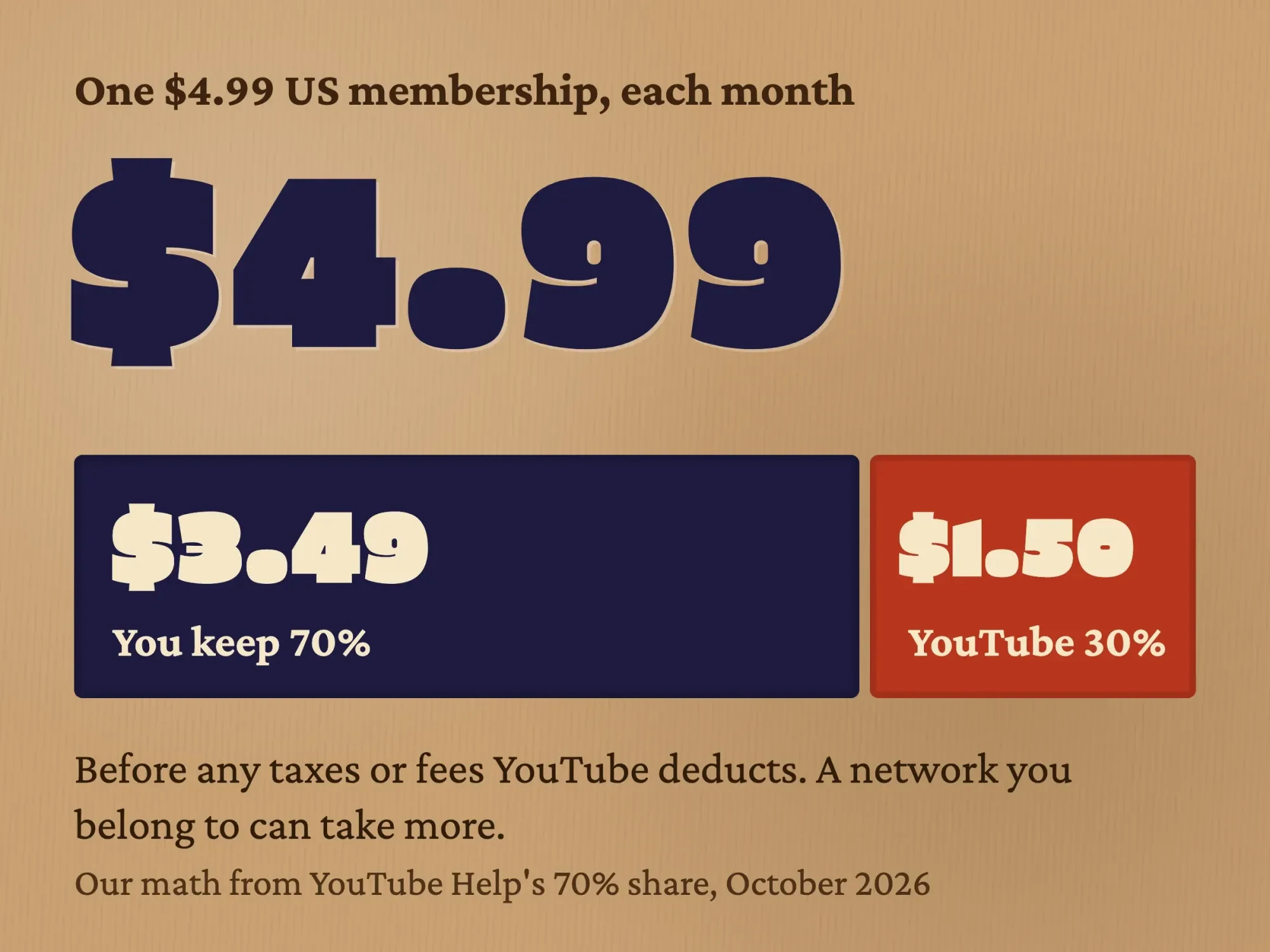 Diagram by DigitalTreed: a $4.99 US membership split at YouTube's published 70% creator share, before taxes and fees, October 2026.
Example (made up): Hollow Oak Guitar Repair, a one-bench shop in Fort Wayne, Indiana, runs two levels. Bench Notes costs $2.99 and Shop Floor costs $9.99. With 60 members at $2.99 and 15 at $9.99, members pay $329.25 a month ($179.40 plus $149.85). Hollow Oak's 70% is about $230 a month before taxes and fees, at prices as of October 2026 (US price list).
That's not rent money, but it's a steady extra line that grows a little each time a video brings in new members.
Turning memberships on takes a few clicks and a day or two of review
Once you're accepted into the program, the Memberships tab can take up to 2 days to appear while YouTube reviews your channel. The setup itself runs on a computer (turn on channel memberships; add levels):
- Sign in to YouTube Studio and select Earn in the left menu.
- Open the Memberships tab and click Get started.
- Sign the Commerce Product Module, the contract for fan funding, if Studio asks.
- Add your levels and perks, then click Publish.
- Wait about a day while YouTube checks your perks against its policies.
One warning before you experiment: turning memberships off isn't a pause button. YouTube deletes your levels, perks and members, cancels every monthly payment, and fans would have to join again from scratch.
Unsure about a level? Edit it, and leave memberships switched on.
Set the channel up as a business before you start, with a Brand Account and the right people as managers. Our guide to creating a YouTube channel for business walks through it.
Build levels you can deliver every month
Once the tab is live, you build levels. We'd start most small channels with one or two, though YouTube allows up to 6. Each level carries between 1 and 5 perks, and higher levels automatically get everything below them (levels and perks). That stacking is why your cheapest level should feel worth it on its own. YouTube has a set of built-in perks. They're loyalty badges, custom emoji, members-only Posts, members-only videos and Shorts, members-first videos that go public later, members-only live streams or live chat, milestone chats, and a recognition shelf on your channel page. Anything else you promise, you deliver yourself, within YouTube's perk rules.
For a business channel, the perks that hold up are the ones tied to what you already know. A repair shop can post its job notes. A bakery can stream a monthly decorating class. An accountant can run a members-only Q&A live in tax season. To find topics members would pay for, look at the questions people type into YouTube; our keyword suggestion tool pulls those from YouTube autocomplete (set the country to the United States first).
YouTube shares two numbers here. It says that on average, 20% of new members join after seeing a promotion for members-only content. And in a January to February 2023 check, videos that went to members first "performed the same" once they turned public (the levels and perks page linked above).
So early access doesn't seem to cost you public views.
Some perks aren't allowed at all. YouTube bans downloads of your YouTube videos, in-person 1:1 meetings, anything handed to members at random (contests, lotteries, sweepstakes), and perks aimed at children (perk guidelines). A members-only giveaway breaks the random-draw rule. If a sponsor pays for a perk, disclose it the way you'd disclose any paid mention; our post on sponsored posts and disclosure explains how.
Badges and emoji are the first thing members see, so they're worth getting right. Our graphics and video team designs custom badge sets, emoji and the intro video for the Join window. We charge for that work, so weigh the suggestion the way you'd weigh any vendor's.
What members see, pay and can cancel
Members must be 18 or older. They pay monthly, can upgrade or downgrade between your levels, and can cancel any time at youtube.com/paid_memberships. They keep the perks until the billing period ends, and YouTube gives no refund for the unused part of a month (join, change or cancel; refund policy). Prices aren't the same for everyone, either: YouTube says a membership "may be priced differently" depending on the member's country and the platform they sign up on. On top of that, viewers who signed up through Apple have to ask Apple for refunds.
Joining is also public. When someone joins, other viewers can see their channel name, profile picture, the date they joined and their level, and "the channel may share info with 3rd-party companies to give perks" (membership benefits). Members get a badge in comments and live chat, alerts for members-only posts and streams, and, from their second month, one highlighted milestone message a month.
You can't remove a member, by the way, only block their comments.
Promote the /join link, gifts and trials
The fastest way to sell a membership is a direct link. Add /join to the end of your channel URL and it opens the Join window. YouTube suggests putting it in descriptions, cards, end screens, Posts and your other social accounts (promote your memberships). When you share that link off YouTube, in an email or on Instagram, tag it so you can tell which place brought members. The UTM builder on our site makes the tagged link in your browser, and it's free. Then check the Memberships tab in YouTube Studio, which shows total and active members, revenue, sign-ups, cancellations and the reasons members picked when they left (Memberships tab).
Two built-in offers help as well. Eligible viewers can take one free month as a trial, once across all of YouTube, and you can switch trials off in Studio (membership trials). During live streams and Premieres, you or your fans can gift one-month memberships to viewers who've opted in. If you've got a level under $5, YouTube may hand you free promotional gifts each month, though they aren't available for Brand Accounts yet, which many business channels use.
A short intro video in the Join window does a lot of the selling. Keep it unlisted, original and free of music claims, and say what members get, not what it costs. Members-only video titles and thumbnails stay visible to everyone, so our thumbnail guide applies to them too.
Why are my channel memberships paused?
Channel memberships pause when your channel loses its standing to earn: it's terminated, it breaks the monetization policies, it loses monetization after leaving or switching content owners, or you set it as made for kids. YouTube calls this "paused mode" (how paused mode works). While paused, members lose their perks, their monthly payments stop, and the Join button disappears.
Paused mode doesn't cancel anyone, but members can still cancel on their own.
To get out, fix whatever caused it, then resume memberships in Studio. Watch the quiet causes too. YouTube can switch off monetization on channels that haven't uploaded or posted in 6 months or more (stay active to keep earning).
Payouts come through AdSense for YouTube, after your tax info
YouTube pays membership money through AdSense for YouTube on a monthly cycle. Last month's finalized earnings land in your account between the 7th and 12th, and they're paid out by the 21st to 26th once your balance reaches the payment threshold (when you get paid). For a US dollar account, that threshold is $100, as of October 2026 (AdSense payment thresholds).
Tax info comes first. US creators fill in a Form W-9 in AdSense for YouTube, as an individual or as a business (submitting your US tax info). With valid info, Google doesn't withhold US tax from a US creator. Without it, Google may hold back 24% of your total earnings worldwide, and that applies to memberships too (US tax requirements).
Each year, US creators typically get a Form 1099-MISC from Google by early March.
Your own return is the other half. The IRS says income from online platforms is reportable even when it's side income and even if no form arrives (IRS gig economy tax center). If you're a sole proprietor, membership income usually counts as self-employment income, taxed at 15.3% for Social Security and Medicare once your net earnings reach $400 (IRS self-employment tax). If you expect to owe $1,000 or more for the year, the IRS expects quarterly estimated payments.
Here's what we'd tell a friend: everything in this section comes from YouTube's and the IRS's own pages, read on October 25, 2026, and none of it's tax advice. How your memberships are taxed depends on how your business is set up, so run the numbers past a CPA or an enrolled agent.
Memberships keep fans on YouTube; Patreon gives you the list
The main difference is who holds the relationship. Channel memberships live inside YouTube, so a viewer can join without leaving the video, and YouTube keeps 30%. Patreon charges 10% of what you earn, "plus payment processing, currency conversion, and payout fees," as of October 2026 (Patreon pricing), and it runs on its own site.
That 10% looks far cheaper, and on a $4.99 tier it leaves $4.49 before Patreon's other fees, against $3.49 on YouTube.
But the sale is harder, because your viewer has to leave YouTube, sign up somewhere new and enter a card again.
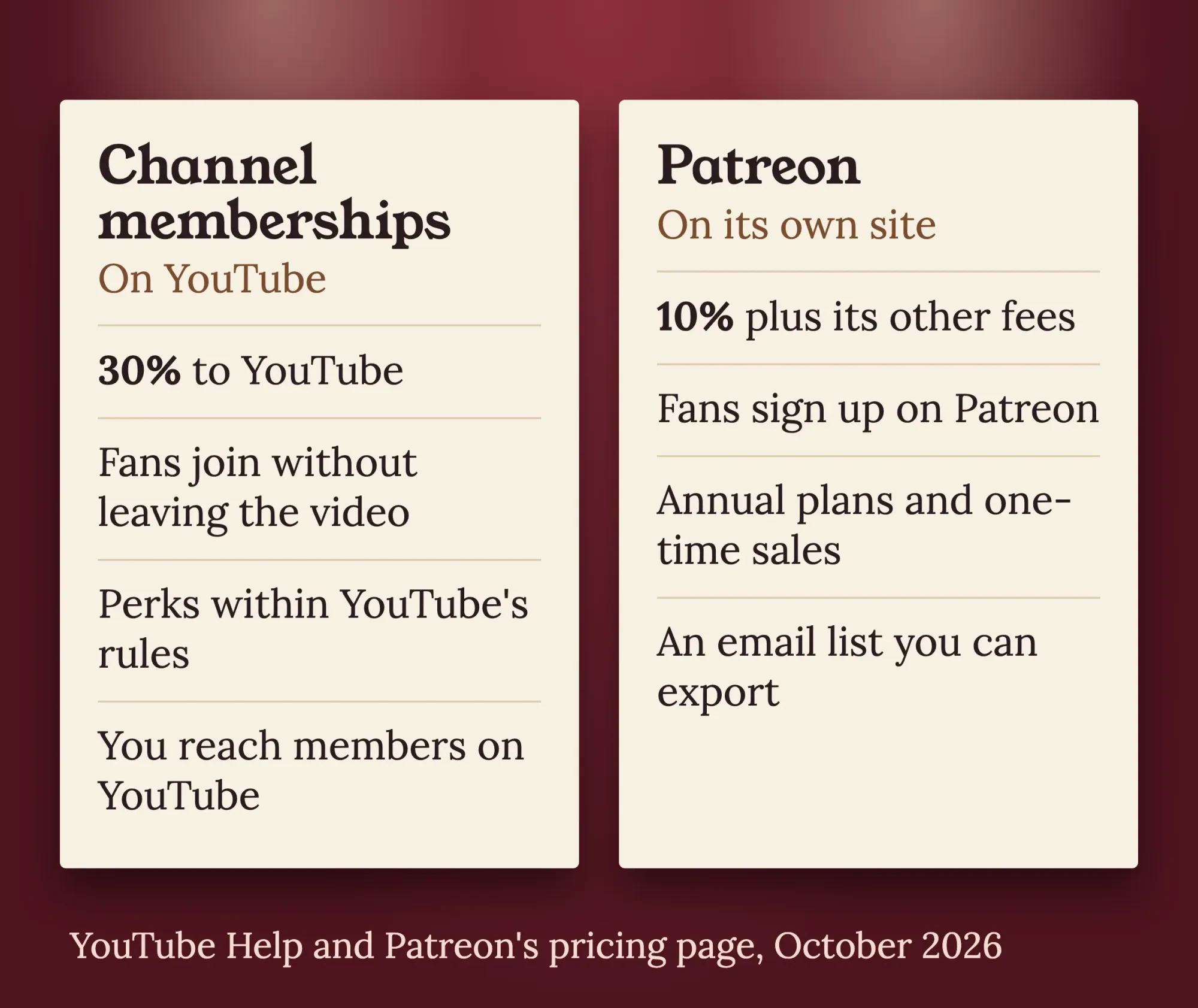 Diagram by DigitalTreed, from YouTube Help (memberships revenue share and perk guidelines) and Patreon's pricing page, read October 2026.
Patreon's pricing page lists features memberships don't have, such as annual plans, one-time payments and an email list you can export. With memberships, you reach members through YouTube itself, every perk has to follow YouTube's rules, and a policy problem can pause everything at once. On Patreon, an exported email list lets you reach members even if you ever leave the platform, which is the same reason we keep pushing owners toward more than one revenue stream.
Our take: start with YouTube memberships if most of your fans watch on YouTube and you're testing whether anyone will pay. Move to, or add, Patreon once members want things YouTube doesn't allow, such as downloads or an annual price, or once you want an email list you can take with you.
Start with one level you can keep for a year
If you're under 500 subscribers, the work is the same as any channel growth plan: regular uploads people search for and click. If you're already in, set up one simple level first and add a second only after you see who joins.
- Check your status in YouTube Studio under Earn. If you're not there yet, our guides to YouTube SEO and to a YouTube marketing plan for small businesses help.
- Write down one perk you can deliver every month for a year, then price it from the list.
- Submit your W-9 in AdSense for YouTube before the first payout.
- Add your member numbers to your media kit, since a paying community is something sponsors ask about.
Memberships are one income line, like the creator funds and brand deals in our TikTok money guide. If you'd like a hand planning the channel, the perks and the content around them, you can request a quote from us. It's paid work, and we'll say so if you don't need it.
Questions owners ask after setup
Frequently asked
Can I remove a member I don’t want?
No. YouTube says you can't remove anyone who has joined, but you can block their comments with comment and live chat filters (YouTube Help).
What happens if I delete a level?
Members at that level lose its perks right away and get a refund of their last month's payment, which comes out of your share (remove a level).
Do I have to answer every member request?
No, but you must deliver the perks you listed. YouTube says it "does not take responsibility for your creator perks," and members can report perks that don't work and ask for a refund (perk rules; report a perk).
How we made this guide: on October 25, 2026, our team read each YouTube Help, AdSense Help and IRS page cited here, plus Patreon's pricing page, and checked every quote and number against it. That day we captured YouTube's public US price list in headless Google Chrome without signing in, and worked out the 70% shares and the Hollow Oak example ourselves. Hollow Oak Guitar Repair is made up. We didn't test anything inside YouTube Studio, because that needs an eligible channel. Each fact links to the page we checked it on, right where it appears. Eram N. reads and approves this rewrite before it's published.
First published July 2023. Rewritten October 25, 2026: the wrong 30,000-subscriber rule became today's 500-subscriber entry point and the February 2027 changes. We added the US price list, a take-home table, payouts and US tax, perk rules, paused mode, and a Patreon comparison.
Sources
- YouTube Help: Get started with channel memberships on YouTube
- YouTube Help: YouTube Commerce Products monetization policies
- YouTube Help: Choose how you want to monetize
- YouTube Help: Overview of the expanded YouTube Partner Program
- YouTube Help: YouTube Partner Program overview and eligibility
- YouTube Help: Changes to the YouTube Partner Program (updates starting February 1, 2027)
- YouTube Help: Turn on or turn off channel memberships
- YouTube Help: Create or manage your channel’s memberships levels and perks
- YouTube Help: Pricing for channel memberships on YouTube, North America (United States)
- YouTube Help: Pricing for channel memberships on YouTube
- YouTube Help: Analyze and manage your channel memberships program
- YouTube Help: YouTube partner earnings overview
- YouTube Help: U.S. tax requirements for YouTube earnings
- YouTube Help: Submitting your U.S. tax info to Google
- YouTube Help: Join, change, or cancel a membership
- YouTube Help: Use and manage your channel membership benefits
- YouTube Help: Promote your channel’s memberships program
- YouTube Help: YouTube channel membership refunds
- Google AdSense Help: Payment thresholds
- IRS: Gig economy tax center
- IRS: Self-employment tax (Social Security and Medicare taxes)
- IRS: Estimated taxes
- Patreon: Pricing (vendor page)
Comments
No comments yet. Start the conversation below.