
Quick answer
Google Discover is the personalized feed in the Google app and on Chrome's new tab page on phones. There's no sign-up: any indexed page that follows Discover's content policies can appear. For Google Discover optimization, use large 1200 px images, honest headlines, clear bylines and dates, and write in topics where you have real expertise.
Key takeaways
- Google says content is automatically eligible for Discover if it's indexed and meets the content policies; no special tags or structured data are needed.
- Large images matter: Google asks for images at least 1200 px wide with the max-image-preview:large setting. Its case study showed a 79% click-through lift for one food blog.
- The February 2026 Discover core update aimed at more local content, less clickbait and expertise judged topic by topic.
- Google calls Discover traffic supplemental and less predictable than search, so treat it as a bonus, not a plan.
This guide is for small business sites and blogs that have seen a spike from "Discover" in Google Search Console and want more of it. It also helps if you keep reading that Discover is now a big source of Google traffic. It sticks to what Google itself documents, flags the advice that's out of date, and is honest about how unpredictable this traffic is.
What is Google Discover?
Google Discover is a part of Google Search that shows people articles and videos tied to their interests, without them searching, Google's documentation says. It appears below the search bar in the Google app and on Chrome's new tab page on phones.
The feed is built from each person's interests: what they search for, read and follow. Unlike search, nobody types a keyword. Google picks content it thinks someone will want.
For news publishers, the feed has become huge. NewzDash, a news SEO tool vendor, studied more than 400 news publishers. Discover grew to 67.5% of their Google mobile traffic in the fourth quarter of 2025, while search fell to 27.4%.
Those are news sites, not small business blogs, but they show how much traffic the feed can carry.
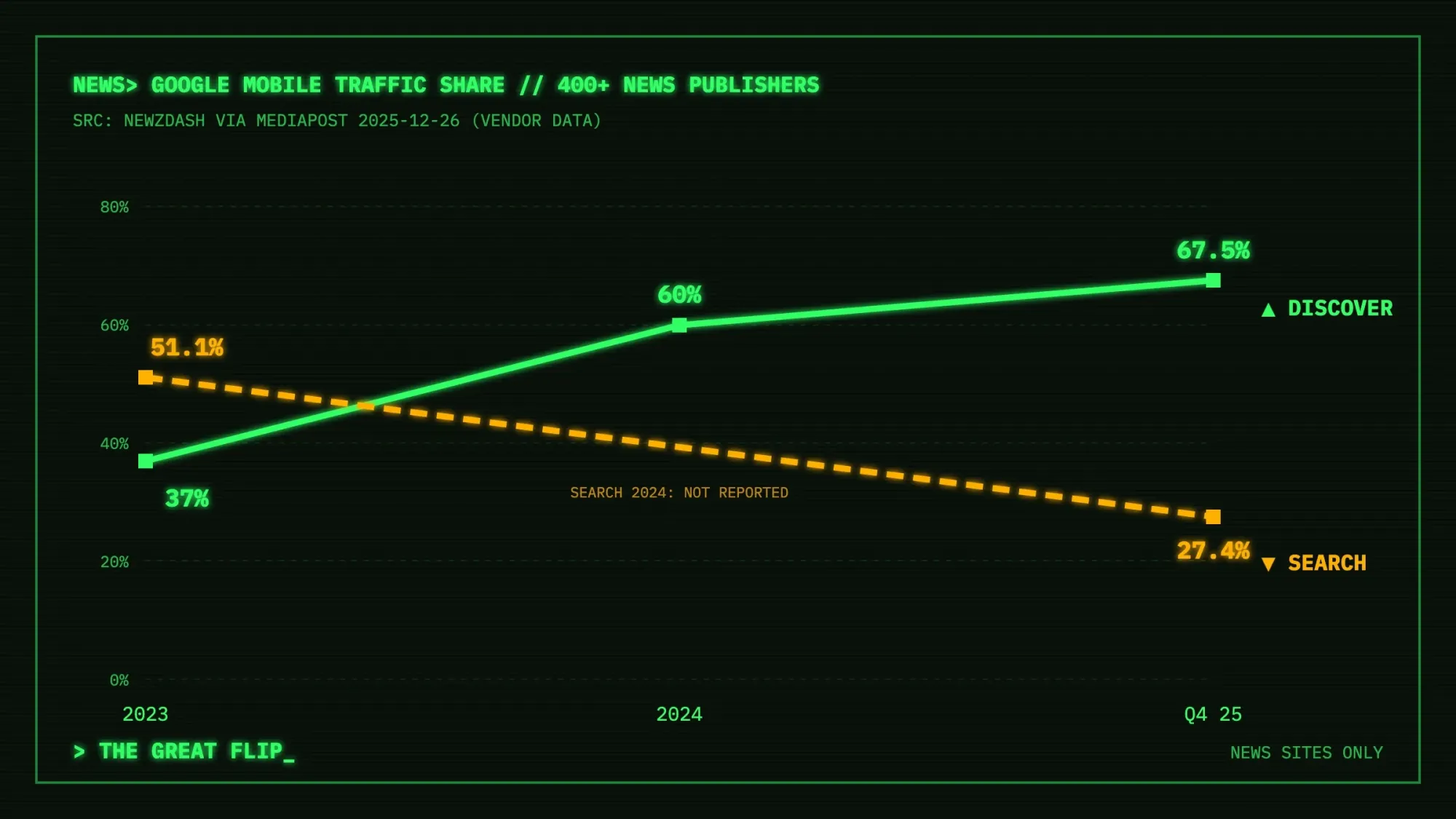 Source: NewzDash data reported by MediaPost, December 2025. Share of Google mobile traffic to 400+ news publishers (vendor data, news sites only).
How to find Google Discover on your phone
To see the feed yourself, open the Google app. Google's Discover help page says Android users can also find it at google.com in a browser. On some devices, you swipe right from the home screen.
If your feed looks generic, the same page says to turn on saved history and personalized recommendations. Google is updating these settings, so the names may change. Some updates are based on your home location. Scrolling your own feed is the quickest way to see how cards look.
Key facts about Google Discover
- In Google's August 2021 large images case study, food blog Kirbie's Cravings saw a 79% rise in click-through rate after enabling large previews.
- Google removed its Follow feature guidance on November 19, 2025, because the feature is no longer shown in Discover.
- The February 2026 Discover update started on February 5, 2026 and finished rolling out on February 27, 2026.
- Google first released it to English-language users in the US, according to the Search Central Blog post of February 5, 2026. Google said it would expand it to all countries and languages, but we found no notice that it has.
- Google then ran 2 broad core updates, starting March 27, 2026 and May 21, 2026.
How content gets into Discover
There's no application form. Google's Discover documentation says "content is automatically eligible to appear in Discover if it is indexed by Google and meets Discover's content policies. No special tags or structured data are required." It adds that eligibility "is not a guarantee of appearing."
Google also says Discover uses "many of the same signals and systems used by Search" to judge what is helpful, people-first content. In other words, the basics of good SEO carry over.
It isn't only for breaking news, either. A well-made guide on a seasonal topic can surface months after you publish it. Google says older content may appear "if it's helpful and relevant to individuals based on their interests."
Google Discover vs Google Search
With Google Search, people type a query and get results. With Google Discover, content reaches them before they search, based on their interests. Both use many of the same ranking signals, but Discover traffic is less steady, and its report has no queries.
| Question | Google Search | Google Discover |
|---|---|---|
| How people find your page | They type a query | Google shows it based on their interests, with no query |
| Where it appears | Search results pages | The Google app, google.com in a browser on Android phones, and Chrome's new tab page on phones |
| What decides it | Google's ranking systems | Many of the same signals and systems used by Search |
| How steady the traffic is | Keyword-driven and steadier | Google calls it less predictable and supplemental |
| Search Console report | Search results report, with queries | Discover report, with pages but no queries |
| What you control most | Keywords, titles and links | Images, honest headlines and topic expertise |
How to get on Google Discover: what Google asks for
1. Use large, real images
In a visual feed like Discover, image size is where Google gives its most specific technical advice. In Google's 2021 case study on large images, food blog Kirbie's Cravings "saw their click-through-rate (CTR) increase by 79%" after enabling large previews. Brazilian publisher Istoé "increased CTR 30% and over 6 months their clicks increased by 332%" with the same change.
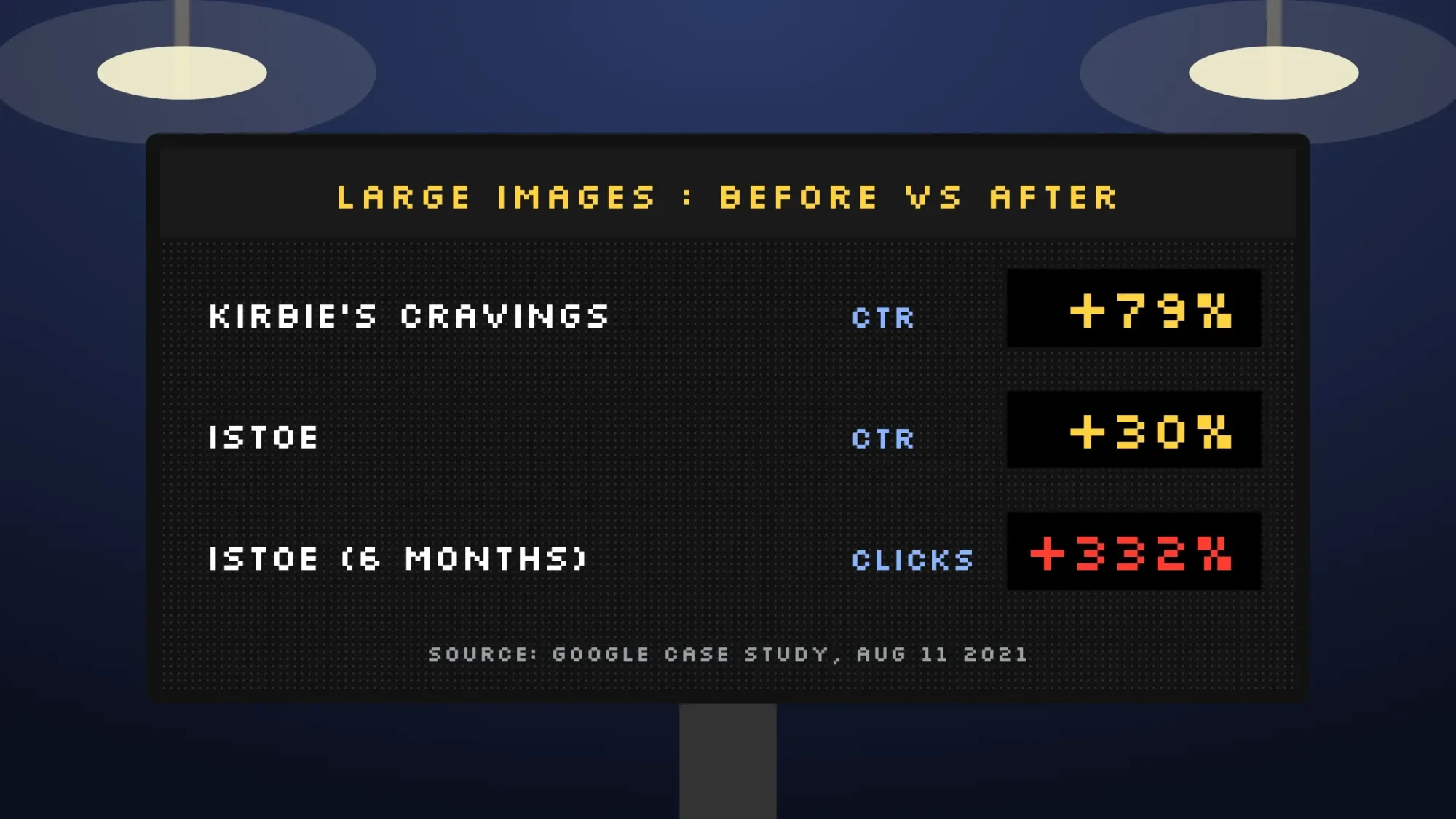 Source: Google large images case study, August 2021.
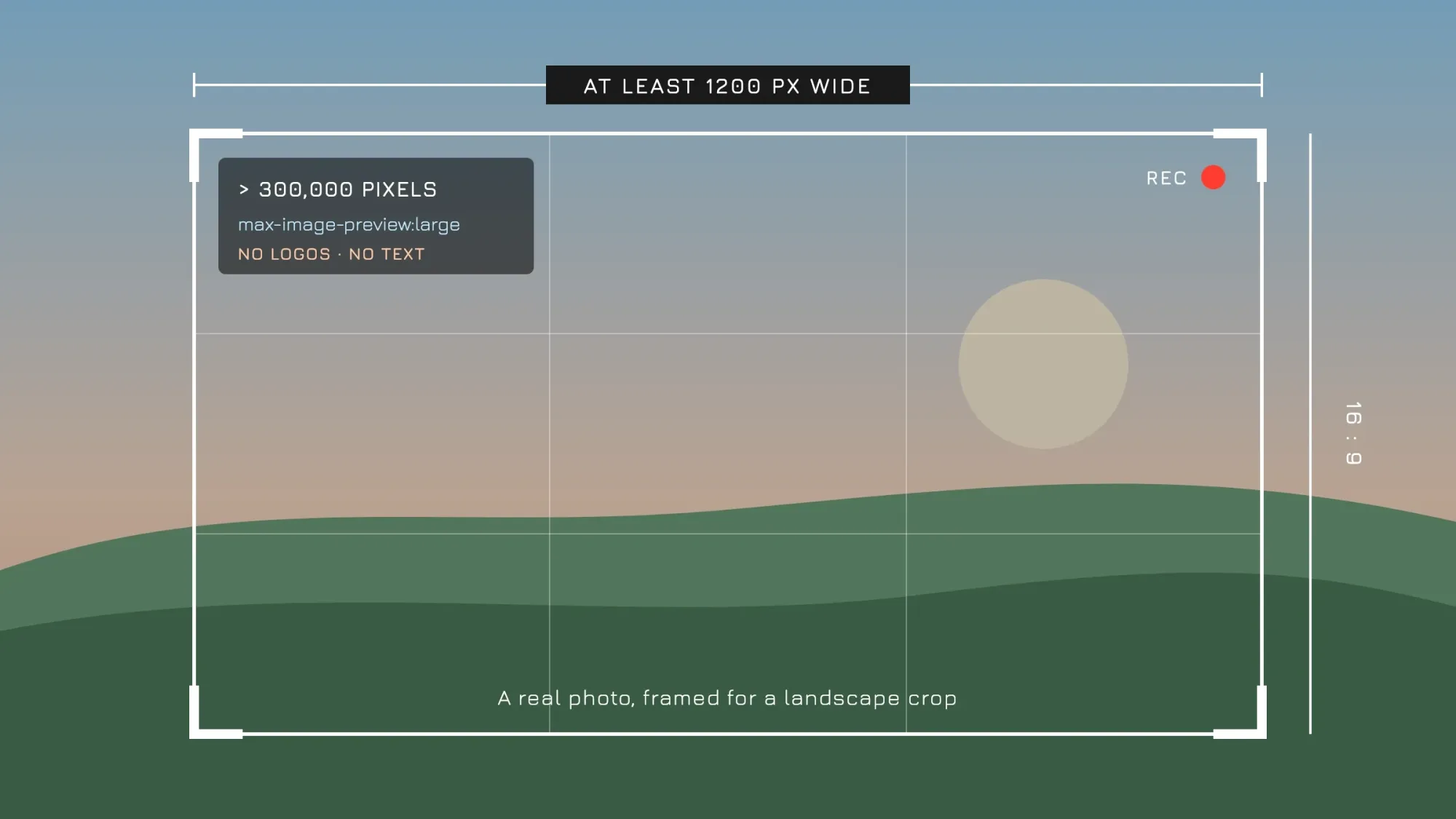 Illustration: Google's Discover image requirements at a glance.
| Requirement | What Google says |
|---|---|
| Width | At least 1200 px wide |
| Resolution | More than 300,000 total pixels (a 16:9 image at 1280 x 720 has 921,600) |
| Shape | 16x9 aspect ratio, cropped well for landscape |
| Permission | The max-image-preview:large robots setting, or AMP |
| Where to declare it | schema.org image markup or the og:image meta tag |
| Avoid | Your site logo, text-heavy images and extreme aspect ratios |
Many SEO plugins add max-image-preview:large for you, but check your page source to be sure. Then test how your featured image and title look when shared.
2. Write headlines that tell the truth
Google wants "page titles and headlines that capture the essence of the content" and warns against clickbait. It names "misleading or exaggerated details in preview content (title, snippets, or images)" as one such tactic. Holding back the information readers need to understand the page is another. It also asks you to avoid sensationalism that plays on "morbid curiosity, titillation, or outrage."
Some guides still recommend clickbait headlines for Discover. We wouldn't: it breaks Google's own guidance, and reducing clickbait was a stated goal of the 2026 update.
Do not
- "You won't believe what this remodel cost"
- "This one mistake is destroying your lawn"
- "The shocking truth about coffee grinders"
Do
- "How much a kitchen remodel costs in Ohio in 2026"
- "5 lawn mistakes that kill grass in a Texas summer"
- "Our test: which coffee grinder is quietest"
3. Show who you are
Google's Discover content policies say news sources should be transparent, with "clear dates and bylines", information about the authors and publisher, and "contact information". A real author page, an About page and a contact page are table stakes. Our guide to E-E-A-T and helpful content shows how to build these trust signals.
The policies also say "advertising and other paid promotional material on your pages should not exceed your content." Sponsorship "should be clearly disclosed to readers."
4. Stick to topics you know
Google's February 2026 update post says its systems judge expertise "on a topic-by-topic basis". Its example is a movie review site with a single gardening article, which would likely not count as a gardening expert.
For a small business, that's good news. A landscaper writing about lawns, or a dentist writing about teeth, is exactly the focused expertise the update describes.
5. Give people a reason to tap
Google's advice is to "provide content that's timely for current interests, tells a story well, or provides unique insights". For a small site that might be a seasonal how-to, local prices, your own photos, or results from something you tested. Google says the feed regularly shows sports, health, entertainment and lifestyle content.
Discover uses SafeSearch and filters out content "that might be seen as shocking or unexpected". It also filters some formats: it "might not recommend job applications, petitions, forms, code repositories, or satirical content without any context."
6. Give readers a good page experience
The Discover page also asks you to provide "an overall great page experience" for readers. Its page experience guide lists questions to check, such as good Core Web Vitals, secure HTTPS pages and content that displays well on phones.
It also asks whether pages avoid too many ads and intrusive interstitials, the pop-ups that cover the main content. Our PageSpeed Insights guide shows how to measure Core Web Vitals and find the slow parts.
What changed in 2025 and 2026
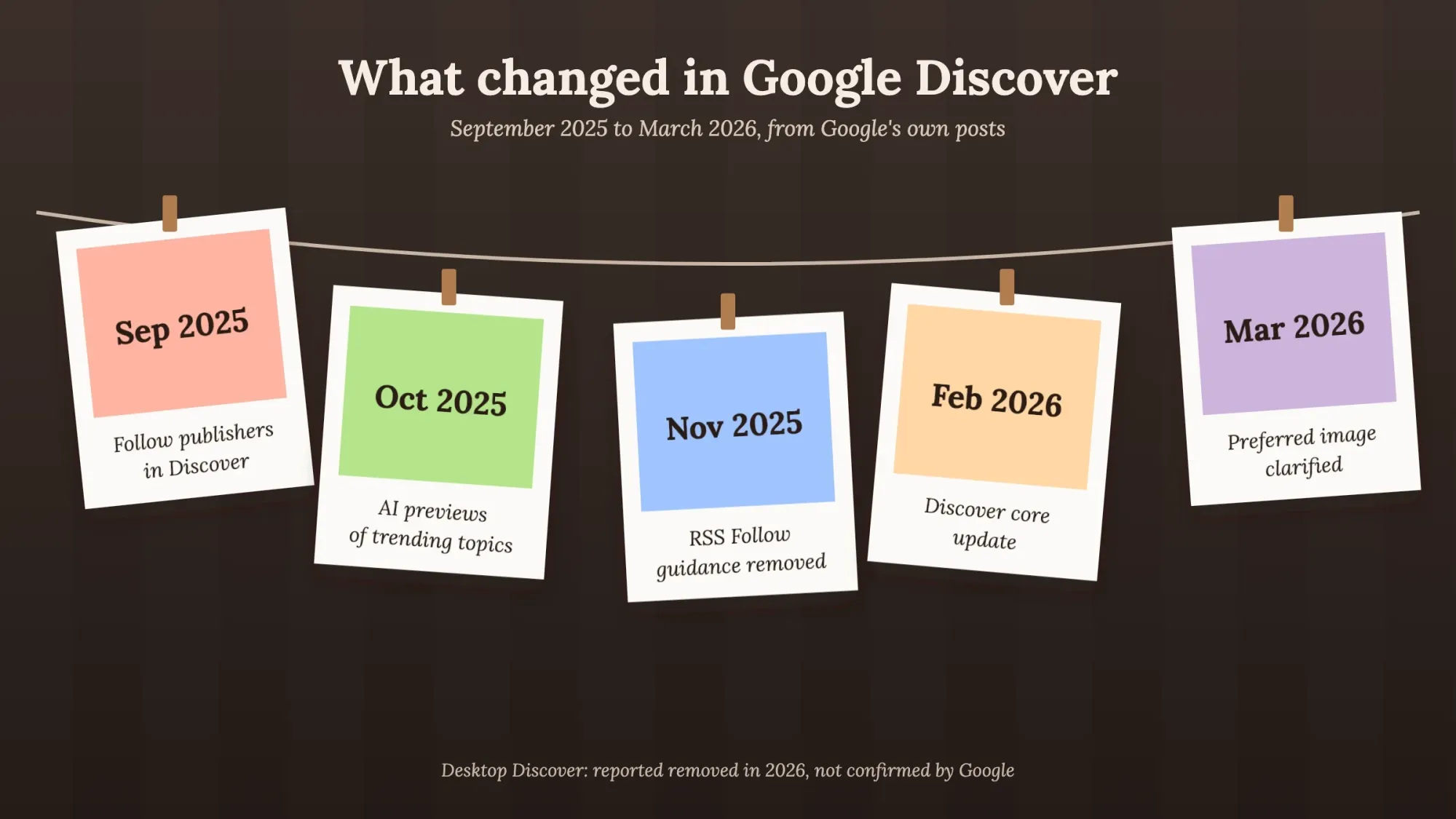 Illustration: Discover changes from September 2025 to March 2026, from Google's own posts.
| When | Change | What it means for you |
|---|---|---|
| September 2025 | Signed-in users can follow publishers and creators inside Discover | Keep your site name and branding consistent; there's no documented setup |
| October 2025 | Google rolled out AI-powered previews of trending topics in Discover (US, South Korea, India) | The previews include links to content on the web; we found no Google data on how they affect clicks |
| November 2025 | Google removed its guidance for the RSS-based Follow feature, saying it "is no longer shown in Google Discover" | Skip guides telling you to set up RSS for Discover's Follow button |
| February 2026 | Discover core update: more local content, less clickbait, expertise by topic; first released to English-language users in the US | Focus your blog, write honest headlines, and serve your own country's readers |
| March 2026 | Google clarified it uses both schema.org markup and og:image to choose image thumbnails | Set a proper featured image in both places |
| March and May 2026 | Google ran two broad core updates, from March 27 and May 21 | Google says Search updates can change Discover traffic, so check these dates too |
One more note: several guides say Discover is available on desktop, but a September 2026 Search Engine Roundtable report says it has disappeared. We found no Google statement about it, so plan for mobile.
Note
Local means local. One of the update's goals is "showing users more locally relevant content from websites based in their country". Google doesn't say how it decides where a site is based, so make it clear. Show your location on your About and contact pages, and write for your real audience with local examples, prices and units. That's how we write this blog too.
How to check your Discover traffic in Search Console
To see your Discover traffic, open Google Search Console, go to Performance and choose Discover. That opens a separate Discover performance report. Google says it shows impressions, clicks and CTR for content that "appeared on Discover in the last 16 months". The data appears only once you pass a minimum number of impressions. The report includes traffic from Chrome.
If you don't see it, your property most likely hasn't reached that minimum yet. Google doesn't publish the threshold.
- There are no queries in this report, because nobody searched; you see pages, countries, appearance types and dates
- Google assigns all metrics "to the canonical URL, not to the page where the user lands"
- An impression is counted when the item is scrolled into view, once per result per session
- Google News has its own separate report
To learn what works, open the Pages tab in the report's table and sort by clicks. Look at the topics, images and headlines of your top posts. Then plan more posts in those topics.
Why Google Discover traffic drops, and what to do
Your Google Discover traffic can drop for 3 reasons Google names: interests change, Discover shifts the content types it shows, or Google updates Search. A site problem or a manual action can also cause it, so rule those out first.
Expect Discover traffic to swing. Google says it "is less predictable or dependable when compared to keyword-driven search visits". It advises treating Discover traffic "as supplemental to your keyword-driven search traffic".
Sites "may see changes in their traffic that are unrelated to the quality or publishing frequency of their content," Google adds. Our advanced SEO chapter on manual actions and updates covers recovery in more depth.
When your Discover traffic falls
- Check it's real Look at weekly totals, not one day, and make sure no noindex, robots or canonical change went live on your site.
- Line it up with updates Compare the dates with Google's Search Status Dashboard; the February 2026 Discover update ran from February 5 for about three weeks. Google also ran core updates from March 27 and May 21, 2026, and Search updates can move Discover traffic too.
- Check manual actions In Search Console, open Security & Manual actions and look for a manual action marked "(News and Discover)". If there's one, fix it and request a review.
- Look for one big spike A single viral post can make the following weeks look like a drop. Compare against your normal baseline.
- Audit headlines and images Remove anything that withholds information or exaggerates. Replace logos or text graphics with real 1200 px images (DigitalTreed sells graphic design as a service).
- Keep going If nothing is broken, keep publishing helpful posts in your core topics and build traffic you control, such as search and email.
That last step matters most. Discover can send a burst of visitors one week and almost none the next. An email list doesn't disappear when an algorithm changes; our guide to an email marketing strategy shows how to start one.
Free Google Discover optimization checklist (10 checks)
- The page is indexed (check with URL Inspection in Search Console) and not set to noindex
- The page allows large image previews (max-image-preview:large)
- The featured image is at least 1200 px wide, 16:9, a real photo or illustration, set in og:image and schema markup
- The headline says what the post delivers, with no withholding or outrage
- The post has a byline linking to an author page, plus a visible date
- Your site has About and contact pages, and sponsored content is disclosed
- Ads don't outweigh the content
- The post is in a topic you cover regularly and know well
- It offers something timely, original or local
- The page works well on a phone, loads fast, uses HTTPS and has no intrusive pop-ups
Next step: run your best post through this checklist, then your next five. If you want help with the search basics that Discover builds on, see our search engine optimization service.
Frequently asked
How do I get my content on Google Discover?
There's no sign-up. Google says indexed content that meets Discover's content policies is automatically eligible. Large images, honest headlines, clear authorship and expertise in your topic improve your chances, but appearing is never guaranteed.
What is the difference between Google Discover and Google Search?
Search shows results after someone types a query. Discover shows content based on a person's interests before they search. Both use many of the same signals, but Discover traffic is less predictable, so Google calls it supplemental.
What image size does Google Discover need?
Google asks for images at least 1200 px wide, more than 300,000 total pixels, ideally 16:9, with the max-image-preview:large setting enabled. Avoid logos and text-heavy images as your featured image.
Why did my Google Discover traffic drop?
Often for reasons outside your control: interests change, and Google updates its systems. Check for site changes, manual actions and update dates first. If nothing is broken, Google says there may be nothing you need to do.
Do I need an RSS feed for Google Discover?
Not for the old Follow button. Google removed that guidance in November 2025 because the RSS-based Follow feature is no longer shown in Discover.
Can a small business blog get into Discover?
Yes. Discover isn't only for news sites. Google says older content can appear if it's relevant to someone's interests, and its 2026 update favors sites with expertise in a topic.
Is Google Discover on desktop?
Search Engine Roundtable reports that Google tested Discover on desktop in 2023 and began rolling it out in 2025. Its September 2026 report says it has since been removed from desktop. We found no Google statement about it, so optimize for mobile.
How do I turn on Google Discover?
Open the Google app, or google.com in a browser on an Android phone, and scroll below the search bar. For a personal feed, Google's help page says to turn on saved history and personalized recommendations. Some features are not available in every country.
Where do I see Discover traffic?
In Search Console, under Performance, in the Discover report. It appears only after your site has reached a minimum number of Discover impressions.
How we made this guide: it is built mainly from Google's own pages. They include the Discover documentation, the February 2026 Discover core update post, the large images case study and Search Console Help. The traffic-share numbers are NewzDash data reported by MediaPost. Sources are linked inline. We checked every number against the source named next to it on October 22, 2026. First published August 2021. Rewritten October 2026: new sections on the February 2026 Discover core update, the 2025 follow and AI preview changes, and the Search Console report. It also adds a checklist for traffic drops. Updated October 23, 2026: added a definition, key facts, a Discover vs Search table and how to find Discover on your phone. It also adds a page experience step, the March and May 2026 core updates, and Google's sensationalism and SafeSearch rules. Tips for reading the Discover report, a free checklist label and 2 FAQs are new too. We checked the new facts on October 23, 2026.
Sources
- Google Search Central: Discover and your website (updated March 9, 2026)
- Google Search Central Blog: February 2026 Discover core update (February 5, 2026)
- Google Search Central: Documentation updates
- Google Search Status Dashboard
- Google: Discover content policies
- Search Console Help: Performance report (Discover)
- Search Console Help: Manual actions report
- Google Search Central: Image SEO best practices
- Google Search Central: Robots meta tag
- Google: Large images case study (August 11, 2021)
- Google Keyword blog: Discover updates (September 17, 2025)
- Google Keyword blog: AI features and web content (October 13, 2025)
- MediaPost: Google search traffic shifts to Discover mobile (December 26, 2025; NewzDash data)
- Search Engine Roundtable (September 17, 2026)
- Google Search Help: Customize what you find in Discover
- Google Search Central: Understanding page experience in Google Search results
- Google Search Status Dashboard: February 2026 Discover update (February 5 to 27, 2026)
- Google Search Status Dashboard: March 2026 core update (March 27 to April 8, 2026)
- Google Search Status Dashboard: May 2026 core update (May 21 to June 2, 2026)
- Google Search Status Dashboard: ranking updates history
Comments
No comments yet. Start the conversation below.