
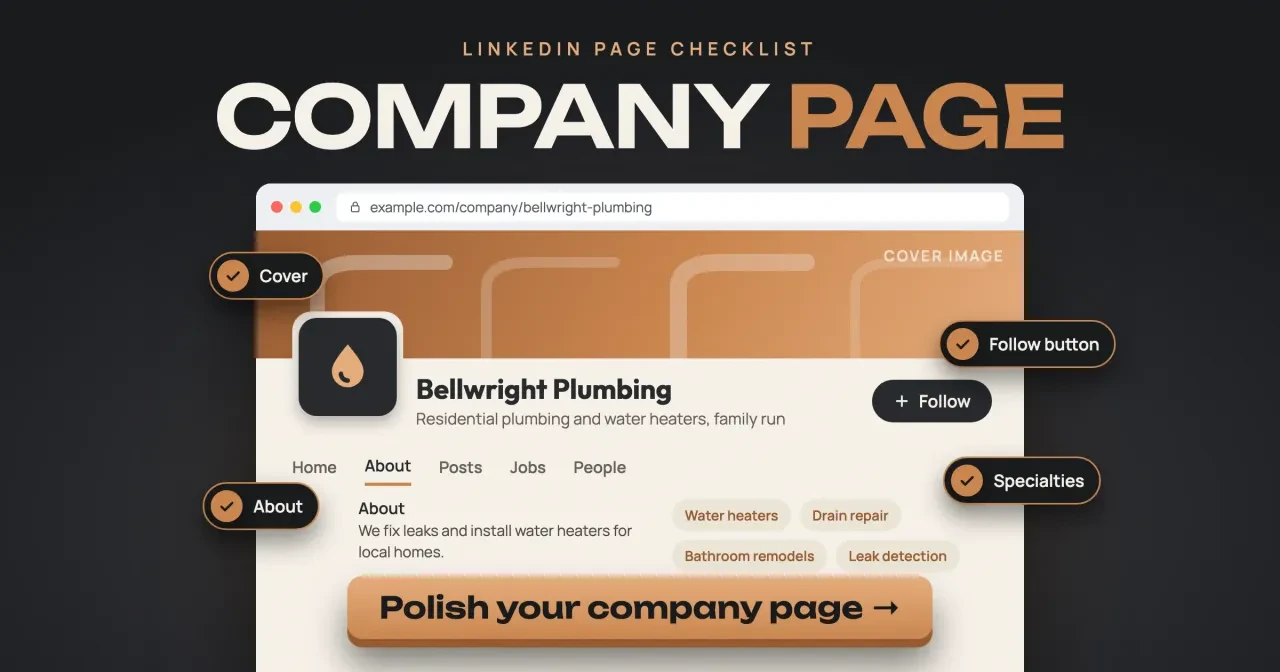
Quick answer
To optimize a LinkedIn Company Page as of October 29, 2026, fill LinkedIn's 10 key sections, add a 400 x 400 logo and 1512 x 256 cover, and post weekly. The one checklist item that costs money is the top-of-page custom button, which needs a paid Premium Company Page. Fill Industry, Company size and Overview first, since Invite to follow stays locked without them.
If a customer or a job applicant looks you up on LinkedIn and finds a gray logo square and an empty About tab, the page costs you trust. A LinkedIn Company Page is a free business page that admins run from their personal profiles. This LinkedIn Company Page optimization checklist is for US small businesses where one person keeps the page up between other jobs.
First comes the free page versus Premium, then name, URL and tagline, image sizes, the About tab and buttons. Midway we test a made-up plumber's draft and report what it flagged. Then come posting, admins and followers, a second page and monthly analytics. We would keep the page free, because most small businesses never need to pay.
Key takeaways
- Invite to follow stays locked until Industry, Company size and Overview are filled.
- A top-of-page custom button needs Premium; free pages tuck it under More.
- LinkedIn's help page asks for a 1512 x 256 cover, not 1536 x 768.
- In our test, 4 of 8 draft image files passed LinkedIn's published specs.
- Add a second super admin, since LinkedIn can't replace or remove admins.
A Company Page is free, and Premium is a separate subscription
Everything on this checklist works on a free page, the custom button included, though there it sits under More. LinkedIn's guide to page types says a free Company Page lets you post, use analytics and add a call to action, while Premium is a subscription you buy on top. You'll need a personal LinkedIn profile first, since every page is run from one, and LinkedIn's steps to create a Page work on desktop or iOS, not Android. Whoever creates the page becomes its super admin. LinkedIn's best practices for creating a Page say to check that no page exists yet, and an eligible employee can claim a Listing Page that LinkedIn already made.
The table splits features by plan, using LinkedIn's Premium Company Page help. We left the price out because no LinkedIn page we could open without signing in showed one.
| Feature | Free Company Page | Premium Company Page |
|---|---|---|
| Logo, cover, About tab, posts and analytics | Yes | Yes |
| Custom button in the page header | No, it shows under the More button | Yes, also in feed posts and search results |
| Cover slideshow | No | Up to five images |
| Invite people to follow | 1st-degree connections only | Also followers of similar Pages, plus auto-invites |
| Custom testimonial and credibility highlights | No | Yes |
| Verified badge | Eligibility varies, not promised | Eligible, not guaranteed |
For a plumber or another local service business, we'd stay free until the weekly posting habit sticks. Premium may not even be offered to you yet, since LinkedIn says it's "gradually making this product available."
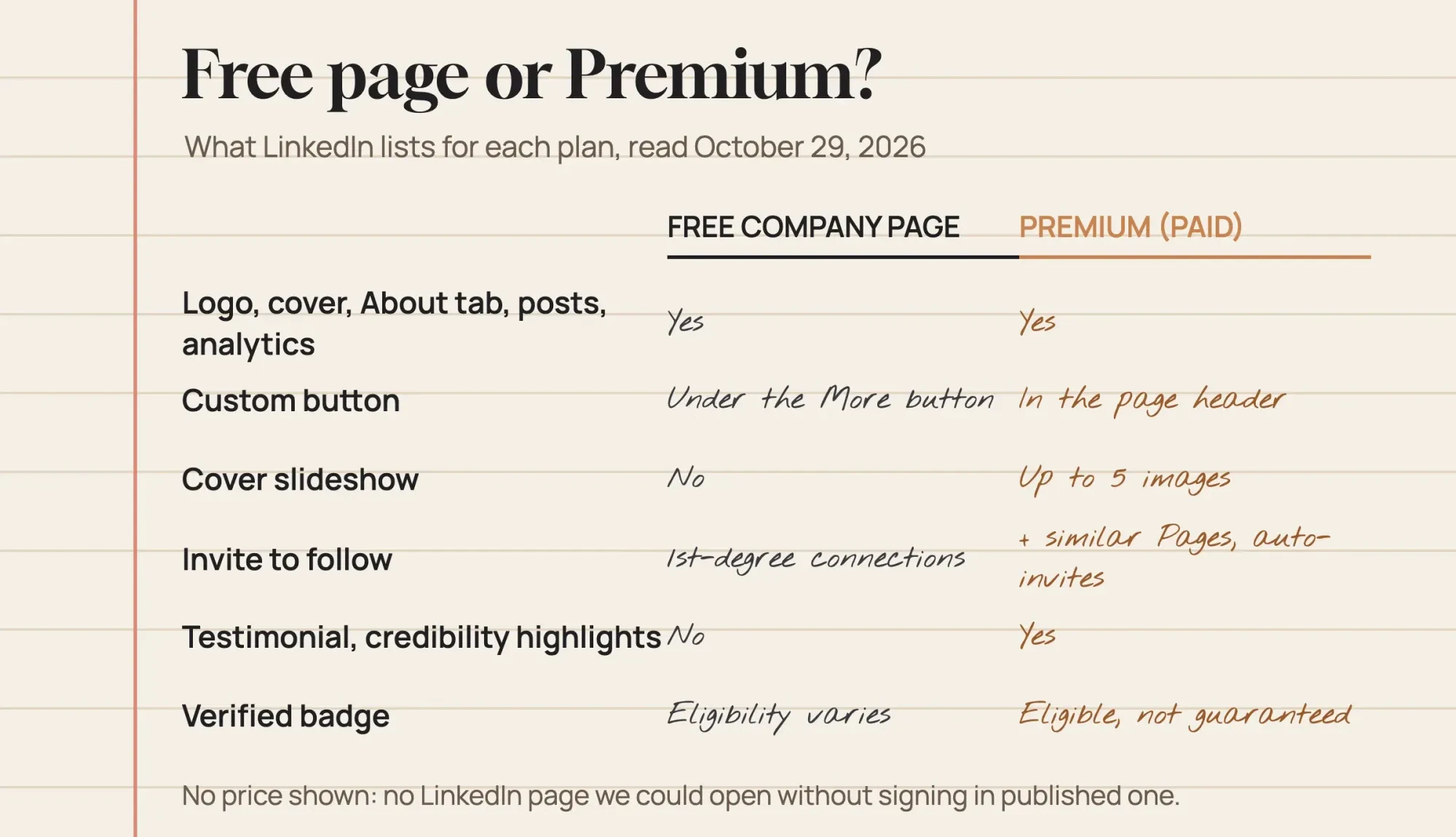 Diagram by DigitalTreed, drawn from LinkedIn Help pages on page types and Premium Company Page read October 29, 2026; no price shown because no page we could open without signing in showed one
Your name, URL and tagline come first
With the plan settled, give the three lines visitors read first some careful thought. LinkedIn's rules for page names say the name must match the business and can't use any variation of "LinkedIn."
A later name change doesn't automatically change the URL, and admins of a verified page have to contact LinkedIn before they can rename it at all. The address follows the pattern linkedin.com/company/your-name, per LinkedIn's best practices for creating a Page. It must be lowercase. It also needs at least one character that isn't a number. Double hyphens aren't allowed. Neither is a hyphen at the start or end. LinkedIn swaps any improper character, such as a space or an ampersand, for a hyphen. Since a rename leaves the address as it was, settle the URL before it goes on trucks, invoices and the back of every business card.
The tagline is the short line under your name. LinkedIn's create form marks it optional. Bellwright Plumbing, a made-up family plumber in Olathe, Kansas, is our example for the rest of this guide. Its tagline reads "Residential plumbing and water heaters, family run." That's 7 words. They name the work, the customer and one reason to call. None of the help pages we read gives a character limit for taglines, so keep yours short enough to read on a phone at a glance. On iOS, LinkedIn's create form also asks for the website, industry, company size and company type up front.
Logo and cover sizes, when LinkedIn gives two answers
Images are where LinkedIn contradicts itself. Its image specifications page asks for PNG or JPEG files of up to 3MB. The logo should be at least 268 x 268 pixels, with 400 x 400 recommended, and the cover 1512 x 256.
LinkedIn's Action Plan for Small Businesses page says logos "should be sized at 300x300" and covers at 1536 x 768. The help page also warns that a transparent logo is shown on white. Test yours on light and dark backgrounds.
We'd follow the help page. It shows "Last updated: 2 months ago," while the action plan still introduces a feature as new "Starting May 2019." Scale a 1536 x 768 image to 1512 pixels wide and it's 756 rows tall. A 1512 x 256 frame holds only 256 of those rows, or 33.9% of the height. About two thirds of the height would go. That's our arithmetic for a crop to the help page's shape. LinkedIn itself only says covers may be trimmed to fit the screen. If you already made a 1536 x 768 cover from that plan, crop a 1512 x 256 strip from its middle rather than uploading the whole image.
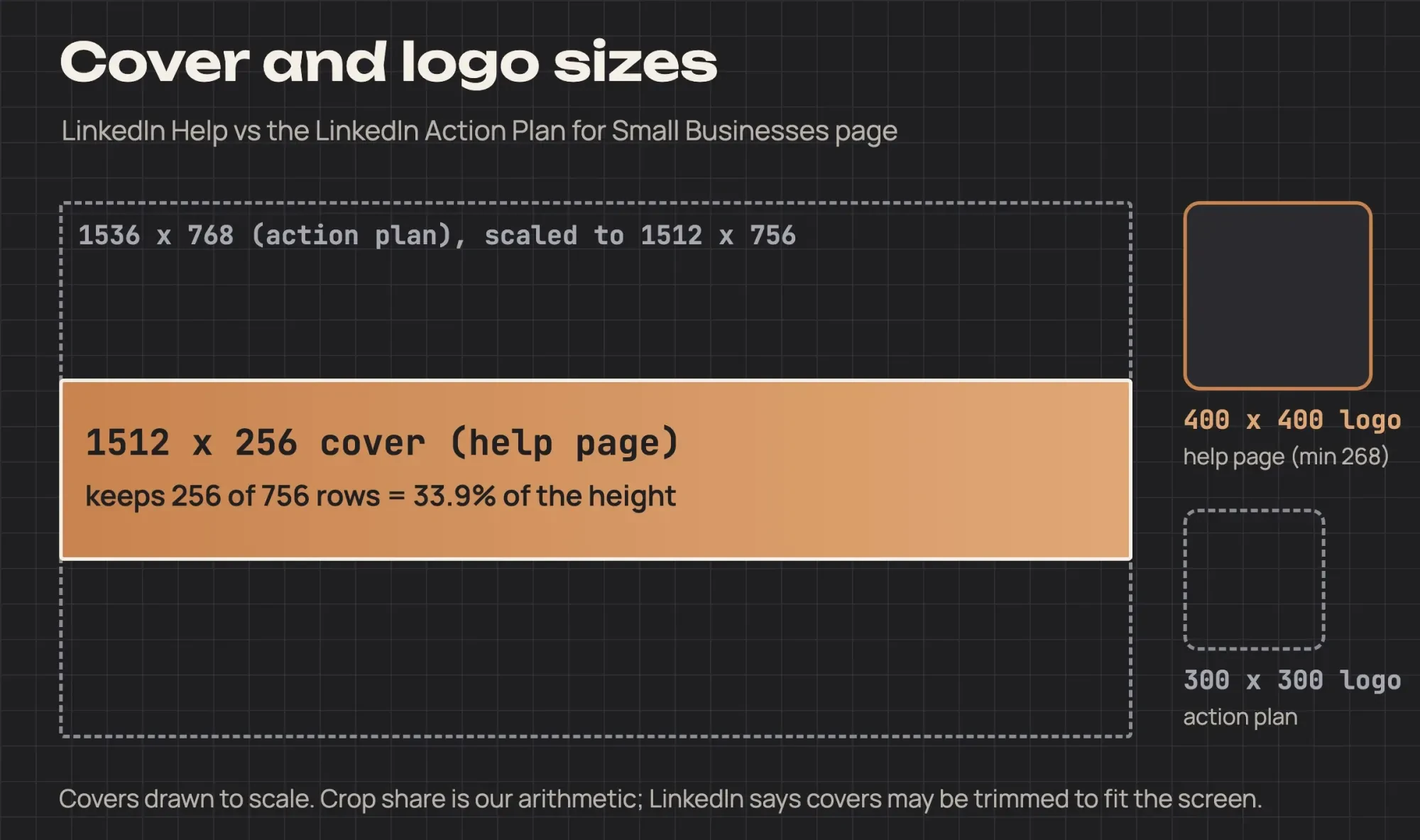 Diagram by DigitalTreed: sizes from LinkedIn Help image specifications and the LinkedIn Action Plan for Small Businesses page, read October 29, 2026; crop share is our arithmetic
Keep key details away from the cover's edges, especially the lower-right corner, the specs page adds. If a phone photo tops 3MB, shrink it with our image compressor and save it as a JPEG, which the specs page prefers over PNG for sharpness.
Fill the About tab so search and invites work
Once the images are in, the About tab does most of the selling. LinkedIn's help page on completing a Page lists 10 key sections: Industry, Company size, Overview, Description, Logo, Commitments, Website URL, Location, a custom call-to-action option and work email verification. That page also says pages with a logo, description and website URL "potentially receive 30% more weekly views." LinkedIn's Pages best practices state the 30% without the hedge, and neither page gives a date or a method. Invites lean on this tab too. Invite to follow won't work until Industry, Company size and Overview are filled, and LinkedIn's help page on inviting connections adds that you need a minimum number of connections.
For the overview, the best-practices page says to lead with relevant terms, because members search by keywords. Here's how the Bellwright draft filled the fields a local service business leans on most:
- Overview: "We fix leaks and install water heaters for local homes." Both services sit in the first sentence, where searchers see them.
- Industry: the NAICS title for plumbing contractors. LinkedIn's industry options page says its list now follows the North American Industry Classification System (NAICS), so pick its closest match.
- Location: Olathe, Kansas, set as the primary office. A page can list several locations and mark one as primary.
- Specialties: Water heaters, Drain repair, Bathroom remodels and Leak detection. LinkedIn's organization data docs call these admin-defined specialty tags.
- Website URL: the page where customers book or call, not another social profile.
We left two fields blank on purpose. Company size and Commitments stayed empty, the way a rushed first pass might leave them. The test below shows what that cost.
Buttons on and off the page
Buttons turn a visit into a call or a follow. Here the free and paid plans split. LinkedIn's custom call-to-action options list ten button names, from Visit website and Contact us to Request services. With Premium, the button sits in the page header, in feed posts and on search result cards, but on a free page it only shows after someone clicks More. The best-practices page lists a call-to-action button under completing your page and doesn't mention Premium there. Two names carry conditions: Request services needs services offered on your Company Page, and Request demo needs a published Flagship product page.
We'd still set one on a free page and point it at your contact page. Add UTM tags from our UTM builder so those visits show up in your web analytics. LinkedIn's steps for adding the button go through Edit page and the Buttons tab.
The second button belongs on your website. LinkedIn's small-business plan tells owners to add a Follow button there, and LinkedIn's Follow Company Plugin docs give this snippet. Swap 0000 for your Company ID, which the docs say sits in your page's admin URL:
<script src="https://platform.linkedin.com/in.js" type="text/javascript"> lang: en_US</script>
<script type="IN/FollowCompany" data-id="0000" data-counter="bottom"></script>
The plugin page was last updated May 8, 2023. Put the snippet on your contact page first, and check that the Follow button loads before you add it sitewide.
We ran Bellwright's day-one draft against LinkedIn's rules
To see how a rushed first pass fares, we wrote that day-one draft for the made-up Bellwright Plumbing. Then we built 3 logos, 3 covers and 2 link-post images to go with it. The draft is ours, not a client's.
What we tested on the draft files
On October 29, 2026, a Python script on one Mac read the format, pixels and bytes of 8 local image files. It also checked 7 candidate URLs and the draft's 8 plain fields. Nothing was uploaded, and no LinkedIn account was used.
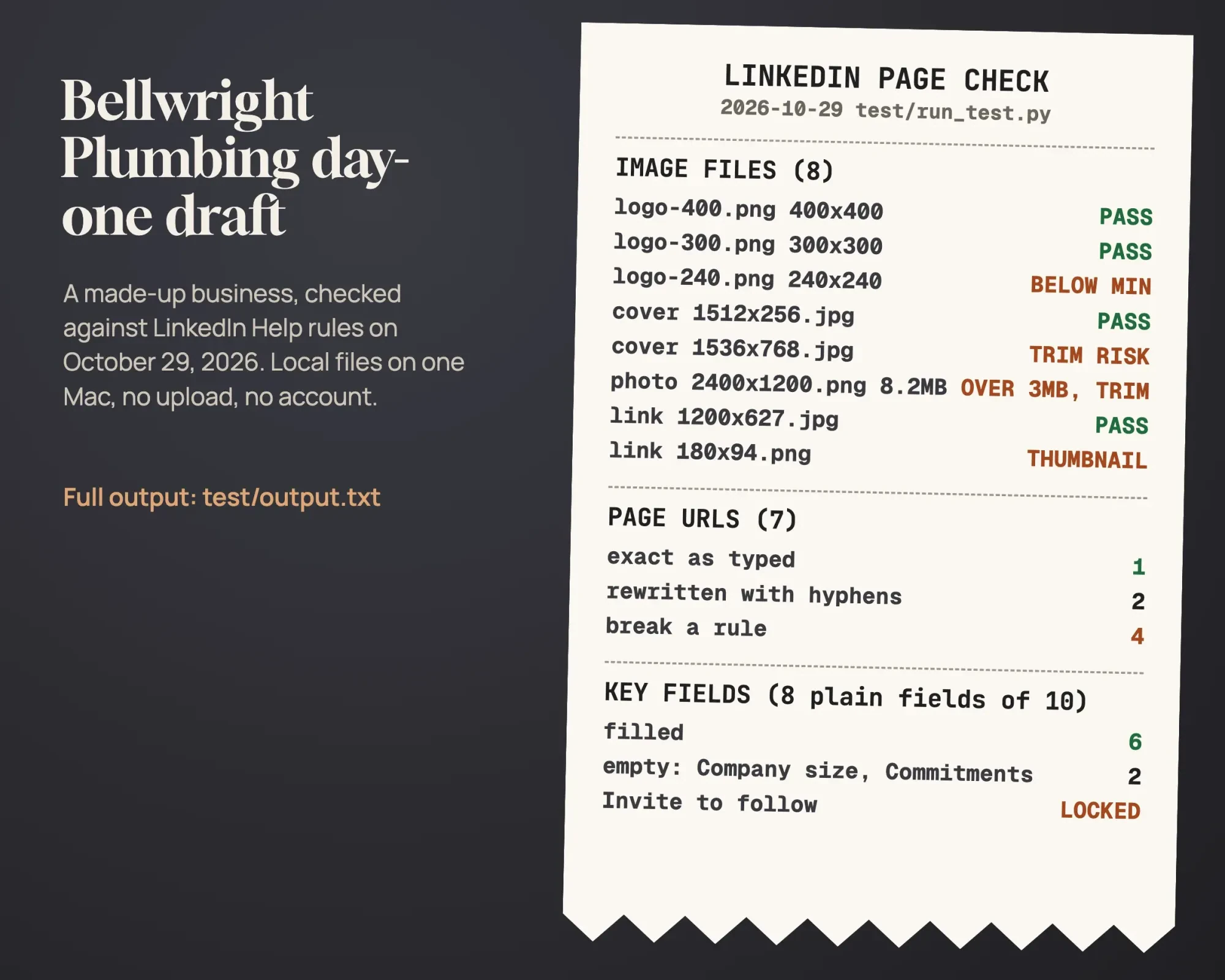 Source: our October 29, 2026 local test, test/output.txt; rules from LinkedIn Help pages read that day
What the check flagged on the made-up page
Half of the image files passed outright: the 400 x 400 and 300 x 300 logos, the 1512 x 256 cover and the 1200 x 627 link image. The 240 x 240 logo fell below the 268 x 268 minimum.
Of the three logos, only the 400 x 400 matched LinkedIn's recommended size. The covers fared worse. The 1536 x 768 file, built to the action plan's size, was flagged as a trim risk, even though it's bigger than the help page's minimum in both directions. Its 2:1 shape is far from the help page's 5.91:1. Our stand-in for an unedited photo, a 2400 x 1200 PNG, weighed 8.2MB, so it broke the 3MB cap and carried the same trim risk. The 180-pixel-wide link image would show as a small thumbnail on the left of a post, per the specs page.
Only 1 of 7 URLs went through exactly as typed: bellwright-plumbing. Two more, one with a space and one with an ampersand, would be rewritten with hyphens. Uppercase letters, a double hyphen, a trailing hyphen and an all-number address each broke a rule. The field check found 6 of those 8 fields filled, with Company size and Commitments empty. That one blank size field kept Invite to follow locked. It's the first field we'd fill. Contact us is on LinkedIn's list of button names, but on this free draft it'd sit under More, where a visitor has to go looking for it.
Posting from the page: LinkedIn's own numbers
After setup, a page still needs posts, and LinkedIn's advice on how often ranges widely. Its help page on posting as your Page says weekly posters have five times more followers than monthly ones and grow seven times faster.
The best-practices page puts weekly posting at a 2x lift in engagement, and the small-business plan pushes all the way to 1-2 posts per day. That's a wide range. We'd start with one post a week. A finished job, a seasonal tip or a team photo all work for a plumber, and you can add a second weekly post once that's routine. For a post with a link, the specs page asks for a 1.91:1 image at 1200 x 627. Our social preview checker shows the card your link will produce before you share it. For a weekly calendar across every network, see our step-by-step social media plan for small businesses.
Admins, employees and the first 150 followers
Next, protect the page. LinkedIn's help page on creating a Page says to add other super admins in case one loses access or leaves. LinkedIn can't replace or remove admins for you, the page warns. LinkedIn's admin roles page lists three page roles: super admin, content admin and analyst.
A part-time helper who only posts needs content admin. We'd name two super admins at minimum. Staff appear on the page once they list it as their employer, which LinkedIn's Page creation help says can take 14 to 30 days. Invitations to follow come from an admin's personal profile and use monthly credits that all admins share, so two admins inviting in one week draw from one pool. Those credits renew on the first day of each month. Running out in January doesn't block February's invitations. LinkedIn's marketing pages also say growth speeds up past 150 followers, again with no method given. Between invites, put the page link in every staff email signature with our email signature generator.
Is a second page for one service line worth it?
Probably not at first. A super admin can create child pages under the main page for a brand, business unit or initiative, and LinkedIn's help page on creating them caps them at 25. Its FAQ for these child pages adds that they aren't meant for short-term marketing campaigns. For Bellwright, a remodeling arm with its own customers might earn one someday. A spring water-heater deal should stay a post. The water-heater line as a whole fits better as a specialty tag plus a few posts a month. Each child page needs its own posts, followers and admin time, which splits a small team that already struggles to post weekly on one page.
Check three analytics tabs once a month
Last comes a monthly check on whether the rest is working. LinkedIn's Page analytics overview lists seven types, from Content and Followers to Search appearances and Competitors. Every admin role can open them. Three of them are plenty for a plumber or a dentist.
They're Search appearances, Visitors and Content, and the first is the one to open first. LinkedIn's search appearances help says it counts how often your page appeared in search and the searches from the last seven days. It also lists the top keywords people used to find you. The same tab shows the companies, industries and job titles of the searchers. For a plumber, that shows whether property managers are looking. If "water heater" brings Bellwright visitors and "remodel" never does, lead the overview and specialties with what works. Then check again next month. Visitors shows button clicks. Each post's own analytics list the followers it gained.
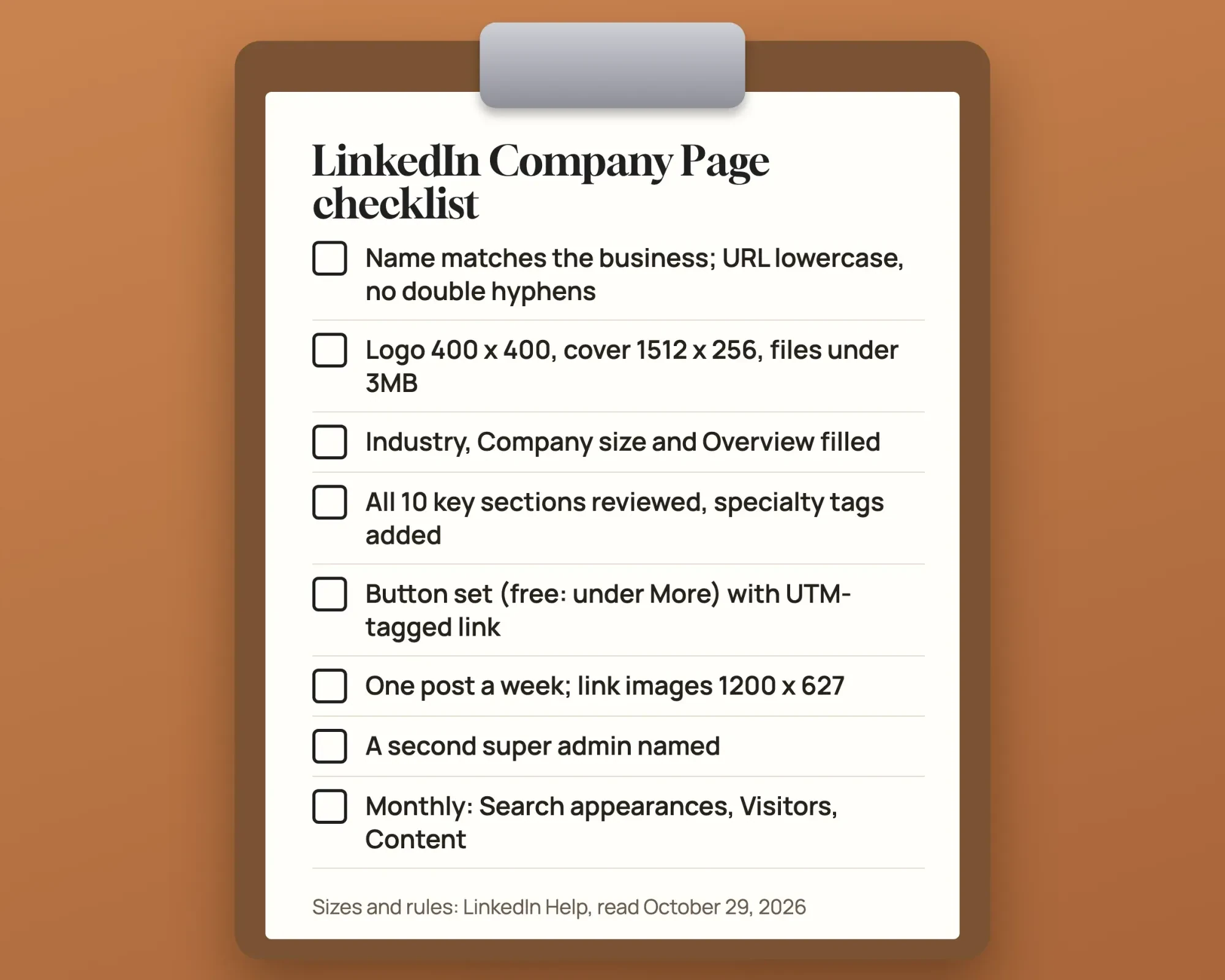 Drawn by us: the checklist from this guide, with sizes and rules from LinkedIn Help pages read October 29, 2026
Our social media audit template lines LinkedIn's numbers up with your other channels. Our monthly social media report guide covers what to show a partner or boss. Want to hand the page off? We run social media marketing for small businesses as a paid service, so we have a stake in that choice. For Bellwright, that means every key section filled and one post a week on the free page, with Premium left for later. For profiles and link previews on your other networks, our social media optimization guide picks up where this checklist stops.
Verification, phone posting and other LinkedIn Page questions
Frequently asked
Can a small business get a verified LinkedIn Page?
Possibly. LinkedIn's verification steps say eligibility may depend on posting regularly, responding to members or buying products such as Ads, Jobs or Premium Company Page. You'll need to prove you own the website, and LinkedIn says the check may run as long as 48 hours.
Can I post to my Company Page from my phone?
Yes. LinkedIn's posting help lets super and content admins post from the app. On mobile, though, the audience stays on Anyone and can't be changed, so targeted posts need a desktop.
Is Premium Company Page the same as LinkedIn Premium Business?
No. LinkedIn's Premium Company Page help says it is separate from other Premium subscriptions, Premium Business included. Its purchase page adds a 20% discount when a super admin buys it together with an individual Premium plan.
What is the difference between a Company Page and a Service Page?
A Company Page represents the business. LinkedIn's page types guide says a Service Page lets any member message you for free about your services and request a proposal.
How we made this guide: Nineteen LinkedIn Help pages, two LinkedIn marketing pages and two LinkedIn developer pages sit behind this checklist, all read without signing in. The Bellwright Plumbing test used made-up files on one Mac, and no LinkedIn account was touched. Facts checked by the DigitalTreed team on October 29, 2026.
First published August 2021 as a general guide to social media optimization. Rewritten October 29, 2026 as a LinkedIn Company Page checklist; the cross-platform material now lives in our social media optimization guide.
Sources
- LinkedIn Help: LinkedIn Page types and their functions
- LinkedIn Help: Create a LinkedIn Page
- LinkedIn Help: Create a LinkedIn Page best practices
- LinkedIn Help: LinkedIn Premium Company Page
- LinkedIn Help: Purchase LinkedIn Premium Company Page
- LinkedIn Help: Manage your LinkedIn Page name
- LinkedIn Help: Image specifications for your LinkedIn Pages and Career Pages
- LinkedIn Help: Complete your LinkedIn Page
- LinkedIn Help: Invite connections to follow your LinkedIn Page
- LinkedIn Help: LinkedIn industry options for profiles and Pages
- LinkedIn Help: Custom call-to-action options for your LinkedIn Page
- LinkedIn Help: Add a custom call-to-action button to your LinkedIn Page
- LinkedIn Help: Post as your LinkedIn Page
- LinkedIn Help: LinkedIn Page admin roles
- LinkedIn Help (a566168): creating child pages for a brand or business unit
- LinkedIn Help (a563141): FAQs on child pages
- LinkedIn Help: LinkedIn Page analytics
- LinkedIn Help: Search Appearances analytics for your LinkedIn Page
- LinkedIn Help: Request verification for your LinkedIn Page
- LinkedIn: LinkedIn Pages best practices
- LinkedIn: Action Plan for Small Businesses
- LinkedIn developer docs (Microsoft Learn): Organization Lookup API
- LinkedIn developer docs (Microsoft Learn): Follow Company Plugin

Comments
No comments yet. Start the conversation below.