
Quick answer
Successfully rebranding online means sending every old URL to its matching new page with a 301 redirect. Google says to keep those redirects at least 1 year, as of November 2026. A brand refresh that keeps the domain skips most of that, while a new domain also needs Search Console's Change of Address tool, which runs 180 days. Start with a USPTO name search.
Successfully rebranding a business that already has a website, reviews and years of Google traffic is mostly a moving job once the new name is picked. A full rebrand is a new name, usually on a new domain. Customers get lost when an old link lands on an error page, a Google listing still shows the old name, or an email bounces.
A name that fails a USPTO search after you've bought the domain leaves you holding a domain you can't use. A Change of Address request filed before the redirects work gets stopped by Google's own pre-check. We built a redirect map for a made-up candle shop, tested it on 127.0.0.1, and 5 of its 12 old URLs broke in ways that look fine on launch day. The Business Profile name shouldn't change before the new sign goes up, because Google wants the name exactly as it appears on your signage. We confirmed each rule below on its official page and say at the end which pages we couldn't read.
Key takeaways
- Send each old URL to its own new page, never the home page.
- Our made-up redirect map failed 5 of 12 old URLs before launch.
- Change the storefront sign before you edit your Business Profile name.
- Keep the redirects and pay for the old domain for at least 1 year.
- Announcement emails from the new domain still need a postal address and opt-out.
What changes online when you rebrand a business?
A brand refresh keeps the name and the domain. You swap the logo, colors and photos, and Google sees the same site with new paint. A full rebrand changes the name, which usually means a new domain, and that's a site move in Google's terms.
| Online piece | Brand refresh (same name) | Full rebrand (new name) |
|---|---|---|
| Domain and page addresses | Stay the same | New domain, with a 301 from every old page |
| Search Console | Nothing to file | Change of Address for each old domain variant |
| Site name and favicon | New favicon file | New site name markup and favicon |
| Google Business Profile | New logo and photos | A name edit, or a new profile |
| Social accounts | New profile images | New handles where the platform allows |
| No change | New domain, old one kept as an alias |
If the name's changing, the right-hand column is your task list. If only the look's changing, you can skip the redirect and Change of Address sections below. Small businesses come in more sizes than the name suggests. In the US, the SBA sets the cutoff for "small" industry by industry, with a size standard for each NAICS code. Its contracting guide on size standards says most manufacturers with 500 employees or fewer qualify as small, as of November 2026. So do most non-manufacturing businesses with average annual receipts under $7.5 million.
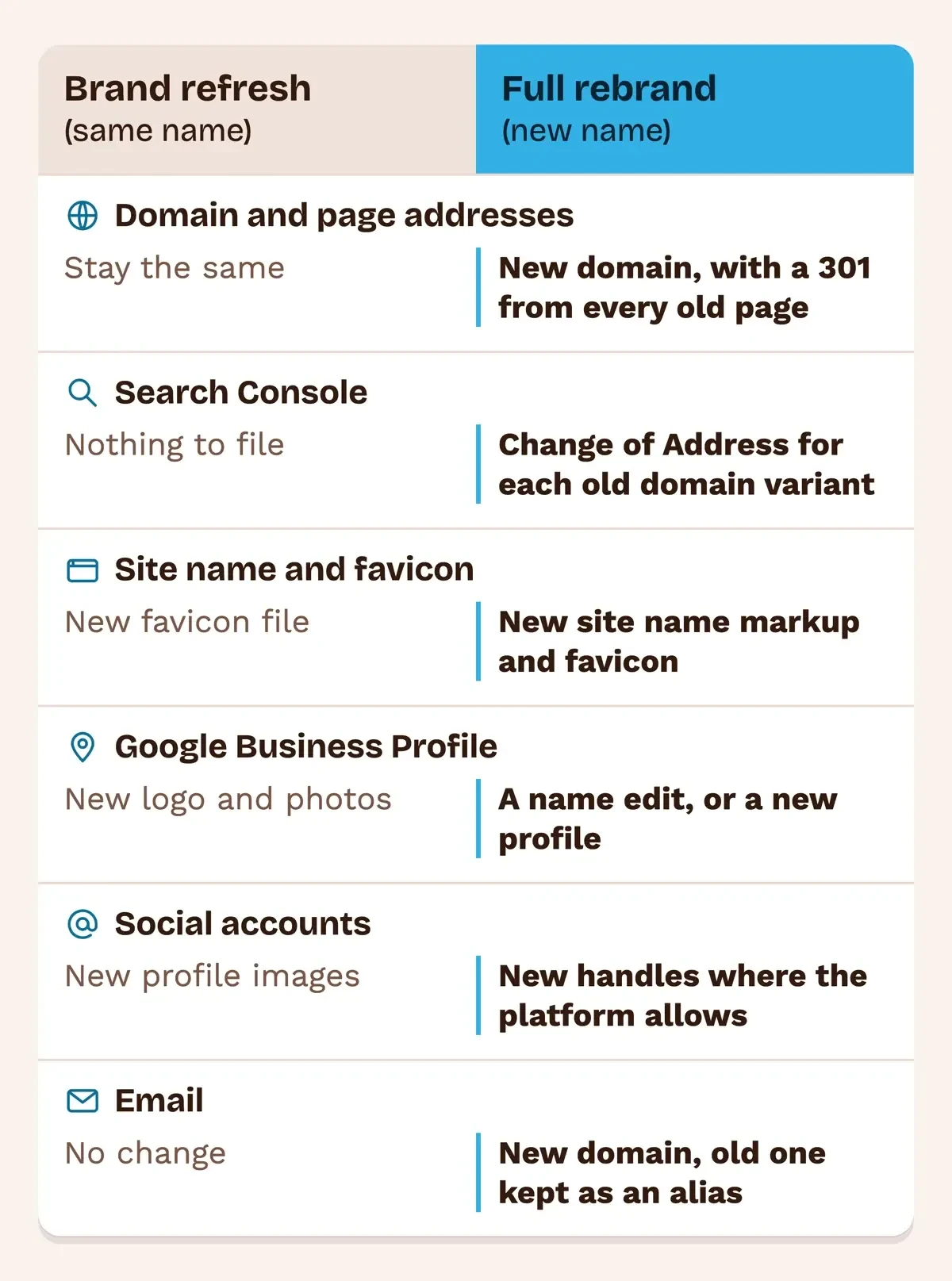 Diagram by DigitalTreed, from Google Search Central and Search Console Help pages read November 20, 2026.
Our post on when to rebrand a business, with a full checklist covers whether a new name is worth it at all, plus legal names and DBAs.
Search the USPTO before you buy the new domain
That new name needs one check before any money goes on a domain, a logo or a sign. The USPTO's likelihood of confusion page calls confusion with an existing mark "the most common reason for refusing registration." A near miss can still be refused, since the USPTO adds that marks "don't have to be identical to be confusingly similar." So run the name, and close spellings of it, through the USPTO Trademark Search system first. If it's clear and you'd like to file, the USPTO fee page lists a base filing fee of $350 per class of goods or services as of November 2026. Two classes cost $700 ($350 x 2), the page's own example.
Still choosing? Our guide for selection of brand name for business walks through shortlisting. If positioning and voice are changing too, start with our small business branding strategy plan.
Build the redirect map page by page
Now that the domain's bought, list every page you're moving. Google's guide to site moves with URL changes asks for a URL mapping from every current address to its new one, then server-side permanent redirects. Use 301 or 308.
Three rules in that guide shape the map. Small and medium sites should move every URL at once, not one section at a time. Chains should stay short: Googlebot can follow up to 10 hops, but Google wants ideally no more than 3, and fewer than 5. And many old URLs aimed at one unrelated page, like the new home page, "might be treated as a soft 404 error." In practice that's a spreadsheet with two columns. Pull the old column from your sitemap and from your analytics landing pages, because old blog posts and forgotten promo pages often bring in visits nobody remembers. Then fill the new column one row at a time.
Our redirect map builder takes both columns and marks any row that points at the home page or at another redirect. For a bigger site, our site migrations chapter covers server logs and staged moves.
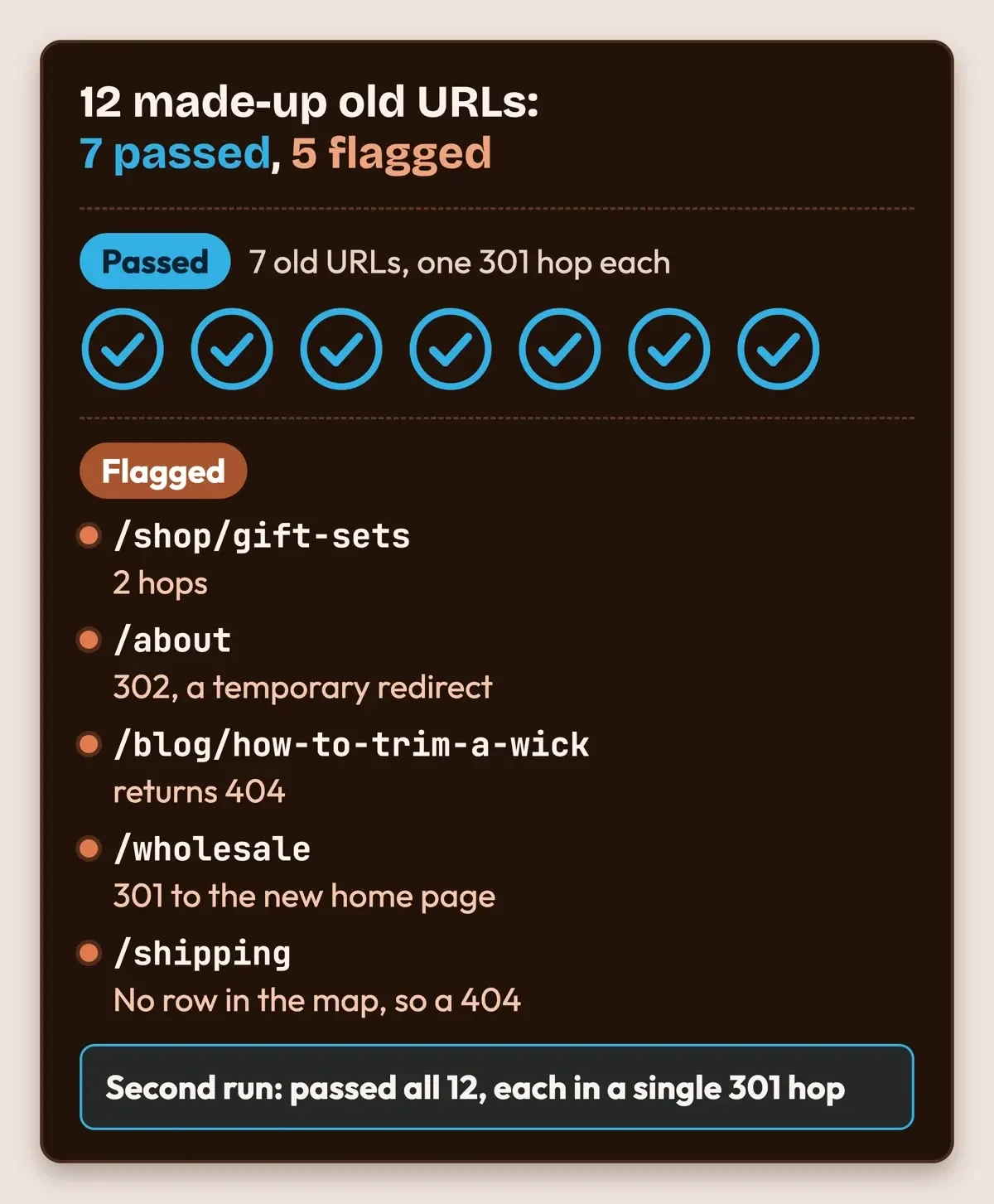
We built a map for the made-up candle shop with the kind of slips a busy owner makes, then checked it. Only 7 of the 12 old URLs passed, and the other 5 each failed in a different way.
| Old URL (made up) | What happened | Fix |
|---|---|---|
| /shop/gift-sets | 301 to /gift-sets, then 301 to /gifts: 2 hops | Point the row straight at /gifts |
| /about | 302, a temporary redirect | Change it to a 301 |
| /blog/how-to-trim-a-wick | 301 to /journal/trim-wick, which returns 404 | Fix the typo: /journal/trim-a-wick |
| /wholesale | 301 to the new home page | Build a wholesale page and point there |
| /shipping | No row in the map, so a 404 | Add a row to /help/shipping |
After those five fixes, plus a new wholesale page, the second run passed all 12, each in a single 301 hop. The typo and the missing row worry us most, because nothing looks broken on launch day until a customer clicks an old link and lands on a 404.
 Drawn by us from our local redirect-map check of made-up URLs, November 20, 2026.
What we tested
On November 20, 2026, we ran a small Python checker against two local test servers on 127.0.0.1, one acting as the old site and one as the new. The shop's a made-up candle store moving 12 URLs to a new domain.
The script checks each map row against the new sitemap, then requests every old URL with a plain GET and follows each redirect by hand.
Change of Address, and why the old domain stays paid
Once the redirects are live and checked, tell Google about the move with Search Console's Change of Address tool. Google says to use it after you've moved and redirected, and only for a move from one domain to another. It isn't meant for http to https, www to non-www, or path changes inside one site.
The requirements are strict. You've got to own both the old and new properties in Search Console, using the same Google account. The tool works only on domain-level properties and won't move subdomains, www included, so file it for every variant of the old domain, even ones you don't use. Its pre-work asks for a 301 from the old home page to the new one. Then the tool checks "for 301s on a few pages on your site" before it sends anything. If a critical check fails, you can't continue until it's fixed.
Search Console shows a move notice for 180 days, and Google wants the redirects kept at least that long. The site move guide goes further and says to keep them "generally at least 1 year." We'd follow the year, because after 180 days Google "does not recognize any relationship between the old and new sites" if the old one's still crawlable. Old URLs can also keep showing in results when they're live and have no matching page on the new site.
Don't let the old domain lapse, either. Google's Change of Address page recommends paying for the old domain for at least a year. If it lapses and someone else registers it, every old link and printed address points to them. Under ICANN's renewal and expiration FAQ, registrars must send two reminders, about one month and one week before expiry. Those reminders need to reach an inbox someone will still read after the switch.
If a renewal's missed anyway, the same FAQ says a name in its 30-day Redemption Grace Period can still be redeemed or renewed before that period ends.
Put the new name and logo in Google results
There's a site name and a small icon beside your Google listing. Google picks the site name automatically, from your home page and how other sites refer to you, according to its site names documentation. You can state a preference with WebSite structured data, putting the new name in the name field on your home page. That page lists acronyms and shorter names as uses for the optional alternateName field. It doesn't mention former names. We'd leave the old brand out. Google also says crawling "can take anywhere from several days to several weeks" after you update the markup.
The new logo usually becomes the new favicon, too. Google's favicon guidelines ask for a square image at least 8x8 pixels and recommend one larger than 48x48. They also say "The favicon URL must be stable," so change the file once at launch and then leave its address alone.
Business Profile and social handles: sign first, then rename
Your Google listing has a stricter rule than your website. Google's guidelines for representing your business let you keep the same profile only for "a minor name change." The proper nouns in the name can't change. Neither can its services or the category. Anything bigger counts as a new business, so you'd mark the old profile closed and create a new one.
Don't edit the profile before the new sign is up. Google's profile editing help asks for the name "exactly as it appears on your real world business signage." Plan for a second round of verification, too, because Google warns you "might need to verify your business again." The representation guidelines agree. Use the name from your storefront, website and stationery. So the sign, the website header and your invoices should carry the new name before you touch the profile. Verification is covered step by step in our Business Profile walkthrough.
Social platforms each set their own handle rules. YouTube's page on handles says they run 3 to 30 characters, sit apart from the channel name, and each channel gets one. It adds that legacy personalized URLs keep working, and its custom URL help says a new handle URL "is created automatically whenever you choose or change your handle."
YouTube also keeps the right to change, reclaim or remove a handle at any time, so the channel name and your website link carry the brand too.
We couldn't read the Instagram, Facebook or X help pages on handle and name changes, since our script got blank pages from the first two and a 403 from X. Check each one by hand before launch. Then update the links on those profiles too, since Google's site move guide counts social profile links among the links you control and should update.
Move email to the new domain without losing mail
Email's where a rebrand quietly loses customers, because old addresses sit in phone contacts, old invoices, supplier systems and printed business cards for years after the switch. If you're on Google Workspace, its guide to changing your primary domain has you add the new domain as a secondary domain first. Verification may need as long as 24 hours. Setting the new domain's MX records "won't affect or change your current email."
After that, you switch the primary domain, which Google says usually happens faster than its 48-hour maximum, and move each user and group over. An address like info@ on the old domain becomes info@ on the new one. Last, keep the old domain as a domain alias. Google says you can then "send and receive email at your new primary domain and old domain at no additional cost."
The same page suggests SPF and DKIM on the new domain so your mail isn't flagged as spam.
On another email host, ask support before launch day whether the old domain can stay on as an alias, and for how long. Get the answer in writing.
Tell customers by email the CAN-SPAM way
The announcement goes out from the new domain. The US law that governs it is CAN-SPAM. Per the FTC's compliance guide for business, it covers "any electronic mail message the primary purpose of which is the commercial advertisement or promotion" of a product or service. B2B mail gets no pass either.
A bare note about a new name might not count as commercial. Most rebrand emails also push a product or an offer, though, so we'd follow the rules either way. Header details, "including the originating domain name and email address," must be accurate and identify the sender. Send from the new domain. Name the old brand in the first line so people know who you are. Each commercial email also has to show a real postal address for the business, and an opt-out has to take effect in 10 business days. Each separate violating email can cost as much as $53,088, per the FTC as of November 2026.
List cleanup and send timing are in our email marketing plan post. Bring an unusual list or message to a lawyer, since this summary can't cover every case.
Launch order: what to switch on which day
This example schedule fits a site of a few dozen pages. Day 0 is launch day. The right-hand column gives the rule or test result behind each step's place.
| When | Step | Why it goes here |
|---|---|---|
| Day -60 to -30 | USPTO search, buy the new domain, claim social handles | The name has to clear before anything gets printed |
| Day -30 to -7 | Build the redirect map and test it on a staging copy | Our made-up test map flagged 5 of 12 old URLs |
| Day -7 | Add the new domain to your email host | Workspace verification may need 24 hours |
| Day 0 | Turn on the 301s, the new site name markup and the favicon | Small sites move all pages at once |
| Day 0 to 1 | File Change of Address for each old variant; submit the new sitemap | The tool checks for 301s first |
| Day 1 to 7 | Change signs and invoices, then the Business Profile name | Google wants the name on your signage |
| Day 7 | Switch the email domain, keep the old one as an alias, email customers | Customers hear it from the new address |
| Day 30, 90, 180 | Recheck the redirects and Search Console | Moves take a few weeks; the notice runs 180 days |
| Day 365 | Review the redirects; keep renewing the old domain | Google says at least 1 year |
The day counts are an example and can stretch. Two pairs shouldn't be swapped, though. Redirects come before Change of Address, because the tool checks for 301s. The new sign comes before the Business Profile edit, because Google matches the profile name to your signage.
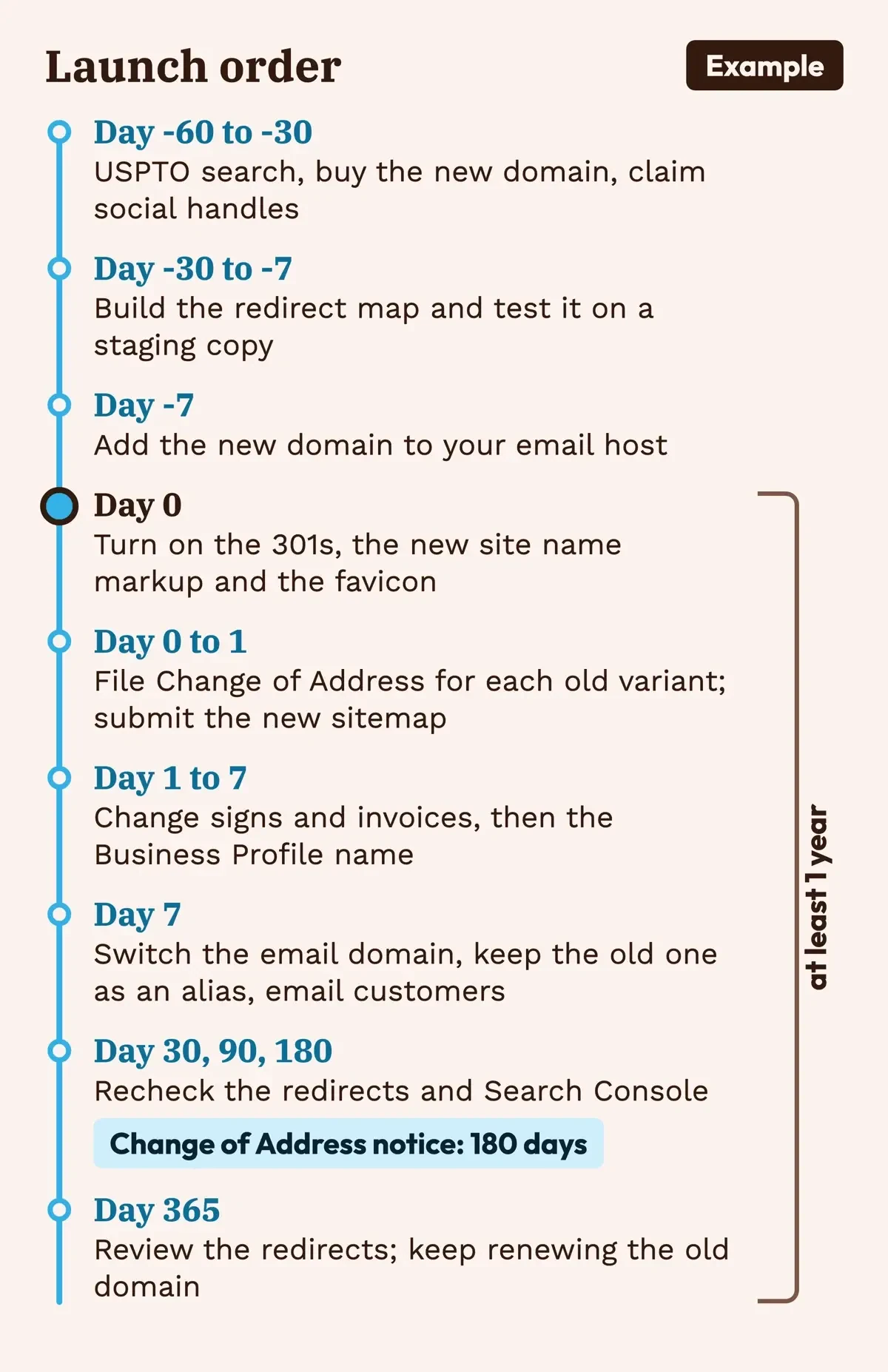 Diagram by DigitalTreed: an example launch order, with timings from Google and Workspace help pages read November 20, 2026.
Did the rebrand keep its search traffic?
Google's site move guide says a small to medium site "can take a few weeks for most pages to move," and rankings can swing while Google recrawls. In Search Console, the Performance report shows clicks and impressions for the past three months by default. That's long enough to compare the old property's last weeks with the new one's first. Problems show up in the Page indexing report. Old URLs should land under Page with redirect, which is expected. Redirect error covers chains that run too long and loops, and Soft 404 can flag old pages sent somewhere unrelated.
Add the new domain as its own Search Console property before launch, so its report starts with the first crawl.
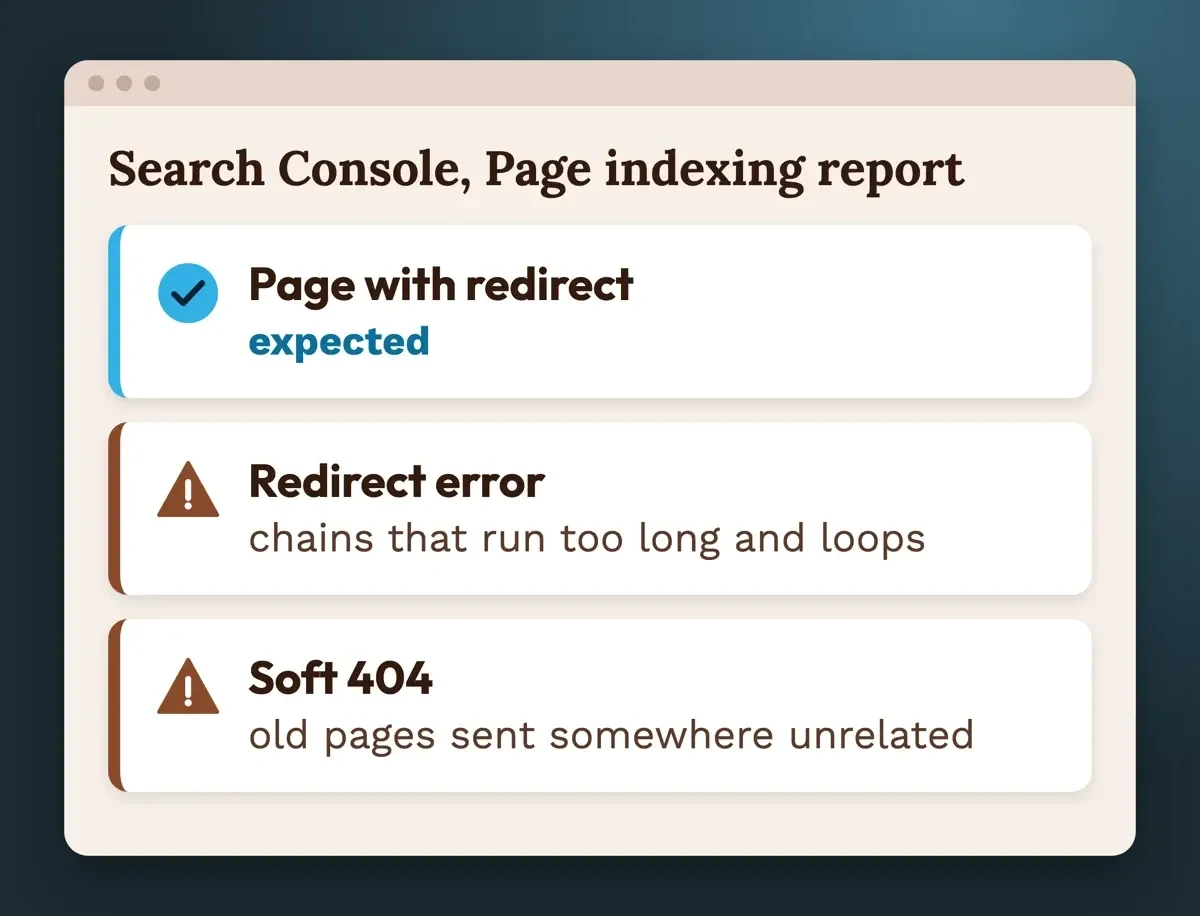 Diagram by DigitalTreed, from Search Console Help, read November 20, 2026.
Rerun your redirect check at day 30 and day 90 with our redirect checker, which shows each hop and status code. Both reports get a fuller tour in our Search Console walkthrough. If one page's clicks fell and stayed down, test its old URL first, since our test's broken rows all looked fine until something requested them.
What we confirmed on November 20, 2026, and what we couldn't
Everything above comes from pages we fetched on November 20, 2026, signed out, using plain requests that identified us as DigitalTreed-check, plus our local redirect test.
- Confirmed on the source page: Google's site move, redirect, Change of Address, site name, favicon, Business Profile, Search Console and Workspace help. The USPTO, FTC, ICANN and SBA lines quoted here were confirmed too.
- Confirmed on YouTube's help pages: the 3 to 30 character handle length, one handle per channel and the automatic handle URL.
- Not readable to our script: Instagram and Facebook help pages loaded no text, X returned a 403, and LinkedIn's old help address for Page names returned a 404.
- Not tested: a real domain move. Our test used made-up URLs on 127.0.0.1, not a live site.
For Instagram, Facebook, X and LinkedIn, open each help center yourself before launch day and read the current handle and name rules. Fees and help pages elsewhere in this guide can change too, so recheck the USPTO fee page and Google's help pages in the month you launch.
Frequently asked
Should I use a 302 redirect while the new site settles in?
Not for a rebrand. Google's redirects guide treats 301 and 308 as permanent, and says a temporary redirect "may help keep the old URL in its Search results," the opposite of what you want.
Do 301 redirects lose ranking?
Google's site move guide says "301 and other permanent redirects don't cause a loss in PageRank." Rankings can still move around for a few weeks while Google recrawls.
Can I redesign the site during the domain change?
You can, but Google's Change of Address help warns that pairing a move with a new content and URL structure means "you will probably see some traffic loss." We'd move first, then redesign.
Can I undo a Change of Address request?
Yes, within 180 days. Google's Change of Address help says to remove the old 301s, add 301s from the new site back to the old one, then click Cancel Move.
Want the move handled for you? We build and migrate small business sites through our website build and migration service. We charge for it, so get a second quote to compare.
How we made this guide: We read every rule here on its official page, signed out, and ran a redirect-map check of made-up URLs on two local test servers. Facts checked by the DigitalTreed team on November 20, 2026.
First published July 17, 2020 as a general explainer on rebranding. Rewritten November 20, 2026 to cover the online steps of a rebrand: name search, redirects, Google signals, profiles, email and the customer notice.
Sources
- Wikipedia: Small business
- U.S. Small Business Administration: Get started with contracting (size standards)
- USPTO: Likelihood of confusion
- USPTO: Search our trademark database
- USPTO: Trademark fee information
- Google Search Central: Site moves with URL changes
- Google Search Central: Redirects and Google Search
- Search Console Help: Change of Address tool
- ICANN: Domain name renewal and expiration FAQs
- Google Search Central: Site names in Google Search
- Google Search Central: Favicon in Google Search
- Google Business Profile Help: Guidelines for representing your business
- Google Business Profile Help: Edit your Business Profile
- YouTube Help: Learn about YouTube handles
- YouTube Help: Custom URLs
- Google Workspace Help: Change your primary domain
- FTC: CAN-SPAM Act, A Compliance Guide for Business
- Search Console Help: Performance report
- Search Console Help: Page indexing report


Comments
No comments yet. Start the conversation below.