
Quick answer
Rebranding a business means changing the name, look or promise customers know you by. Do it when the old brand blocks growth, clashes with a trademark or confuses customers. Then keep redirects from the old site for at least a year. The logo's the easy part; Google and the paperwork are where rebrands go wrong.
Key takeaways
- Check the new name for trademark conflicts before paying for a logo or domain.
- Federal trademark registration costs $350 per class as of October 2026.
- A bigger name change needs a new Business Profile, not an edit.
- Map each old URL to its new page with one 301 redirect.
- Keep the redirects and the old domain for at least a year.
A rebrand is a change your customers have to relearn
Rebranding is changing how customers recognize your business: the name, the logo and colors, or what you say you stand for. A refresh keeps the name and updates the look. A full rebrand changes the name.
That's where the cost and the risk live.
Your name's printed on your trucks, filed with your state, typed into Google by your regulars and attached to every single review you've earned over the years. A new logo touches your design files. A new name touches all of those at once. Starting from nothing? Our branding strategy plan for small businesses fits you better. What follows is for the owner who already has a brand and has to change it without losing the people it brought in.
When should you rebrand your business?
Rebrand when the brand itself is costing you work. We'd look for one of these five situations, and most of them start with the name.
- The name ties you to one town or one service you've outgrown, so new customers think you aren't for them.
- Someone with an earlier claim to a similar name, for related goods or services, has objected, or a search shows they could.
- Two businesses merged, or a new owner bought in and the old name belongs to the seller.
- Customers keep mixing you up with another local business, and calls or reviews land in the wrong place.
- The name's tied to a bad chapter you've fixed, and it keeps following you into search results.
Our take: only the trademark clash forces your hand, and the rest are business calls, so put a number on them first.
If you can't point to lost jobs, wrong calls or a lawyer's letter, you probably need a refresh, not a new name.
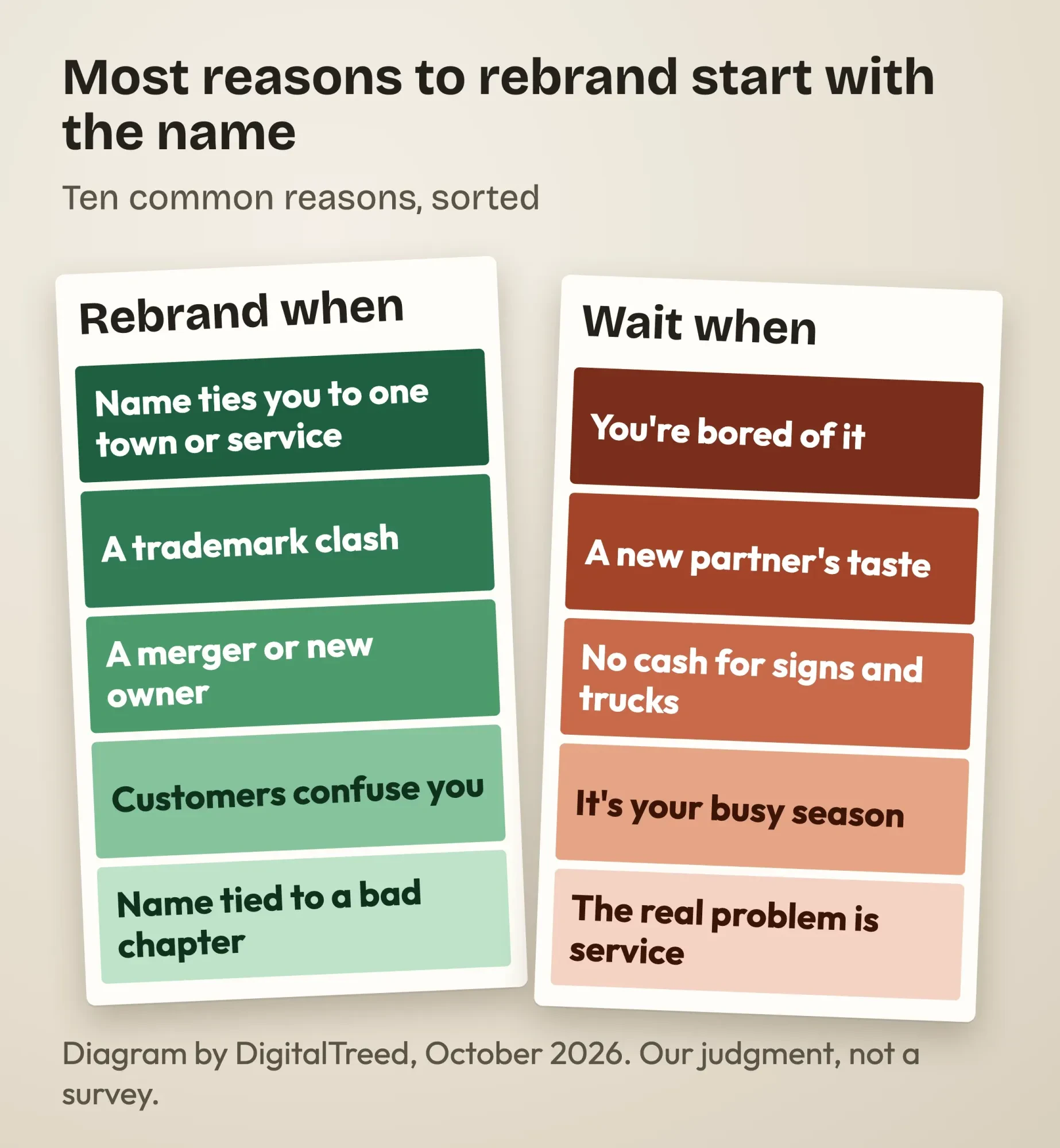 Diagram by DigitalTreed: our list of reasons to rebrand and reasons to wait, drawn as paint swatch cards.
Five reasons to leave the brand alone
But plenty of rebrands start for the wrong reasons, and we'd talk an owner out of these five before anyone spends a dollar on design.
Boredom is the big one. You see your logo all day. Your customers see it now and then, and that familiarity is what you paid for.
Taste is second. A new partner who likes blue better isn't a business case.
Then there's money and timing. Signs, vehicle wraps, uniforms, invoices and printed stock all have to change in the same week, or for a while you'll look like two different companies sharing one phone number. If the cash isn't there yet, wait. The same goes for your busiest season: a lawn care crew that renames in April spends its best month answering "are you the same people?"
The last one is quieter. A new name won't fix slow callbacks or sloppy work, and reviewers will say so under the new name too.
So if one of these is the real reason, refresh instead. Keep the name, update the logo, colors and website, and you can skip most of the legal and Google steps below.
Check the new name before anyone designs a logo
Once you've settled on a new name, check it for trademark conflicts before you pay for a logo, a domain or a single sign. The U.S. Patent and Trademark Office calls a likelihood of confusion "the most common reason for refusing registration". Marks "don’t have to be identical to be confusingly similar", it adds.
Sound, look or meaning can be enough when the goods or services are related.
The search is free. Start in the USPTO's Trademark Search system for registered and pending marks. Its clearance search page says that, at a minimum, you should check its database and its Official Gazette, "and also search the internet for common-law use". That last part matters for a shop like yours, because a business two counties over can have rights in a name from use alone, with nothing filed anywhere.
If the name passes, federal registration costs $350 per class of goods or services as of October 2026, per the USPTO fee page. US-based owners don't have to hire a lawyer to file. Still, the USPTO says "we strongly encourage you to hire a U.S.-licensed attorney who specializes in trademark law". For a name you'll paint on trucks, we agree.
Picking the name is its own job, with domain and handle checks, and our how to name a business checklist walks through it.
Change the legal name, or add a DBA
Next comes the paperwork, and you've got two legal routes to a new name. Change the legal name of your LLC or corporation, or keep it and register the new name as a DBA ("doing business as"). The SBA says a DBA "doesn’t provide legal protection by itself, but most states require you to register your DBA if you use one". Rules vary by structure, state, county and city.
Texas shows the difference well. An LLC or corporation changing its legal name files a Certificate of Amendment, Form 424. The Texas Secretary of State takes those online "24 hours a day, 7 days a week". To keep the legal name and trade under a new one, you file an assumed name certificate, Form 503. That costs $25 at the state as of October 2026. Sole proprietors file with the county clerk instead.
One Texas rule catches owners who already have an assumed name.
When the details on it become "materially misleading", a new certificate "must be filed within 60 days". A rebrand with an old DBA on file means paperwork on a clock.
Taxes are simpler than people expect. The IRS says "You don’t need a new EIN if you just change your business name or address". A merger or a new structure is different, so read that page if your rebrand comes with one.
We've kept this section general, and none of it is legal advice, because your state's rules and your operating agreement decide the details. Have an attorney or your state's filing office confirm the route before you file.
Google Business Profile: edit the name or start a new profile
After the filings comes Google, which lets you edit your Business Profile name only for a minor change. A bigger one counts as a new business. Its guidelines for representing your business allow a rename in place only for "a minor name change". That means "the proper nouns and services described in the business name remain unchanged and the business category remains unchanged".
Miss that test, and Google is blunt: "it's considered a new business. You must mark the existing Business Profile as closed and then create a new Business Profile with your new business name".
Google adds that businesses with multiple locations may also be eligible when the business name changes.
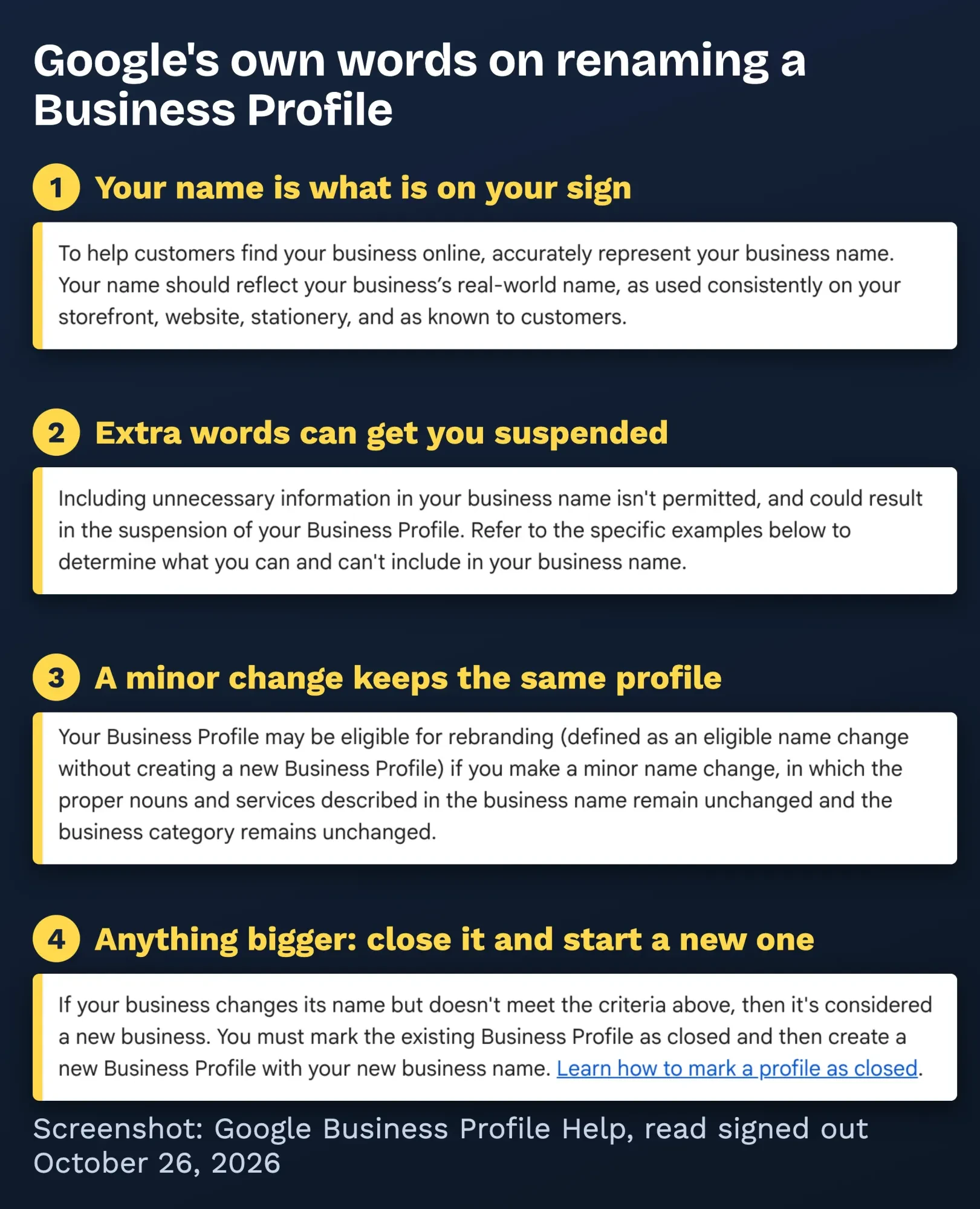 Screenshot: Google Business Profile Help, "Guidelines for representing your business on Google", read signed out on October 26, 2026. Highlights and notes added by DigitalTreed.
The name rules don't loosen during a rebrand. Google says "Your name should reflect your business’s real-world name, as used consistently on your storefront, website, stationery, and as known to customers".
It also says "Including unnecessary information in your business name isn't permitted, and could result in the suspension of your Business Profile". Its list of things not to add includes marketing taglines, service or product information, and location information.
In plain terms: no keyword stuffing.
A rebrand isn't the moment to slip "Plumbing Repair Dallas" into the name. Change the sign first. Google's editing help page says to enter the name "exactly as it appears on your real world business signage". It also warns that after a name change "you might need to verify your business again". Our guide to running a Business Profile covers verification and categories.
Example: why a Tyler mower shop becomes a new profile
Example (made up): Tyler Mower Fix LLC repairs lawn mowers in Tyler, Texas. It now fixes generators too and has opened a second shop in Longview, so the owners pick a new name, Pineywood Small Engine (also made up).
Under Google's test, the proper noun changes (Tyler becomes Pineywood) and the service words change (mower becomes small engine). That isn't minor. The shop marks the old profile closed and verifies a new one.
A punctuation fix that keeps "Tyler", "mower" and the category is the kind of change the rule leaves room for. Google makes the call, so ask its support team first. One thing we couldn't confirm: Google's page on closing a profile doesn't say whether reviews move to the new one. It does say a closed profile "may still appear on Search and Maps for users who search for it". Ask support about your reviews, then fill in the new profile with our Business Profile optimization steps.
Keep your search traffic through a domain change
Beyond the profile, a new domain is a site move in Google's eyes, and Google has a step-by-step guide for it. The core is a URL map: a list of every old URL next to the new one that replaces it. Then set up "server side permanent redirects" from each old address to its match. Small and medium sites should move everything at once; Google recommends "moving all URLs on your site simultaneously".
We tested why the map matters.
On October 26, 2026 we put the made-up mower shop's 5 old URLs on a local test server and tried three common setups. We used Python 3.9 and curl 7.53 on a Mac in India. Sending everything to the new home page left 4 of the 5 old pages with no matching page. A page-to-page map got all 5 to the right page in one 301 hop. A setup that bounced through an in-between address got there in two hops, and its last hop was a 302, which Google treats as temporary.
| A: every old URL to the new home page | 1 of 5 (the home page) | 1 | 301 |
| B: page-to-page map | 5 of 5 | 1 | 301 |
| C: old URL to an in-between URL, then the new page | 5 of 5 | 2 | 301, then 302 |
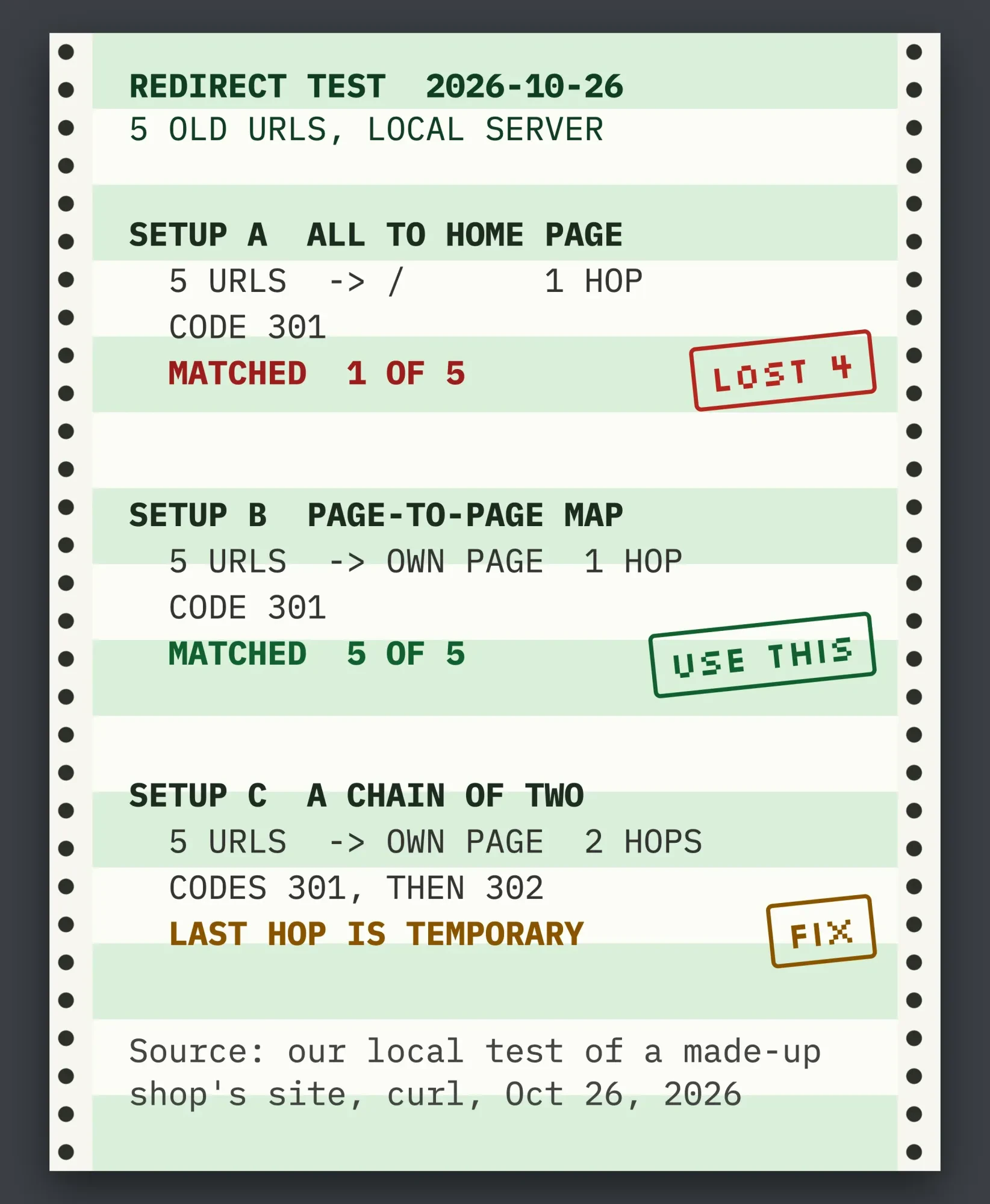 Source: our local redirect test of a made-up shop's 5 URLs, run with curl on October 26, 2026.
Setup B is what Google asks for. Our Redirect Map Generator matches old URLs to new ones and flags home-page dumping and chains before launch. Google also says "Avoid chaining redirects". Submit a new sitemap in Search Console, and update the links you control, including "Profile links such as from Facebook, Twitter, and LinkedIn".
Next, tell Google with the Change of Address tool in Search Console, and do it for "all subdomain variants of the old domain, including www and non-www". Then expect rankings to move around for a while. Google calls it "temporary fluctuation". That's normal. Google says a medium-sized site "can take a few weeks or more" to show the new URLs.
Here's the catch we found reading both pages side by side.
The site move guide says to keep redirects "generally at least 1 year". The Change of Address page says "at least 180 days". Follow the year. Google says that time "allows Google to transfer all signals to the new URLs". It's blunt about the limit. After 180 days, it "does not recognize any relationship between the old and new sites". The Change of Address page also recommends "continuing to pay for the old domain for at least a year". That way nobody else can buy it and misuse it. Don't let it lapse.
Want more depth on logs and monitoring? Our site migrations chapter covers both, step by step. We also handle website builds and domain moves for small businesses; we're paid when you hire us, so get one other quote to compare.
The rebranding checklist, in the order we'd work it
That covers the hard parts. Here's the full rebranding checklist we'd hand a small business, grouped by when each step happens. Copy it into a spreadsheet and give each line an owner and a date.
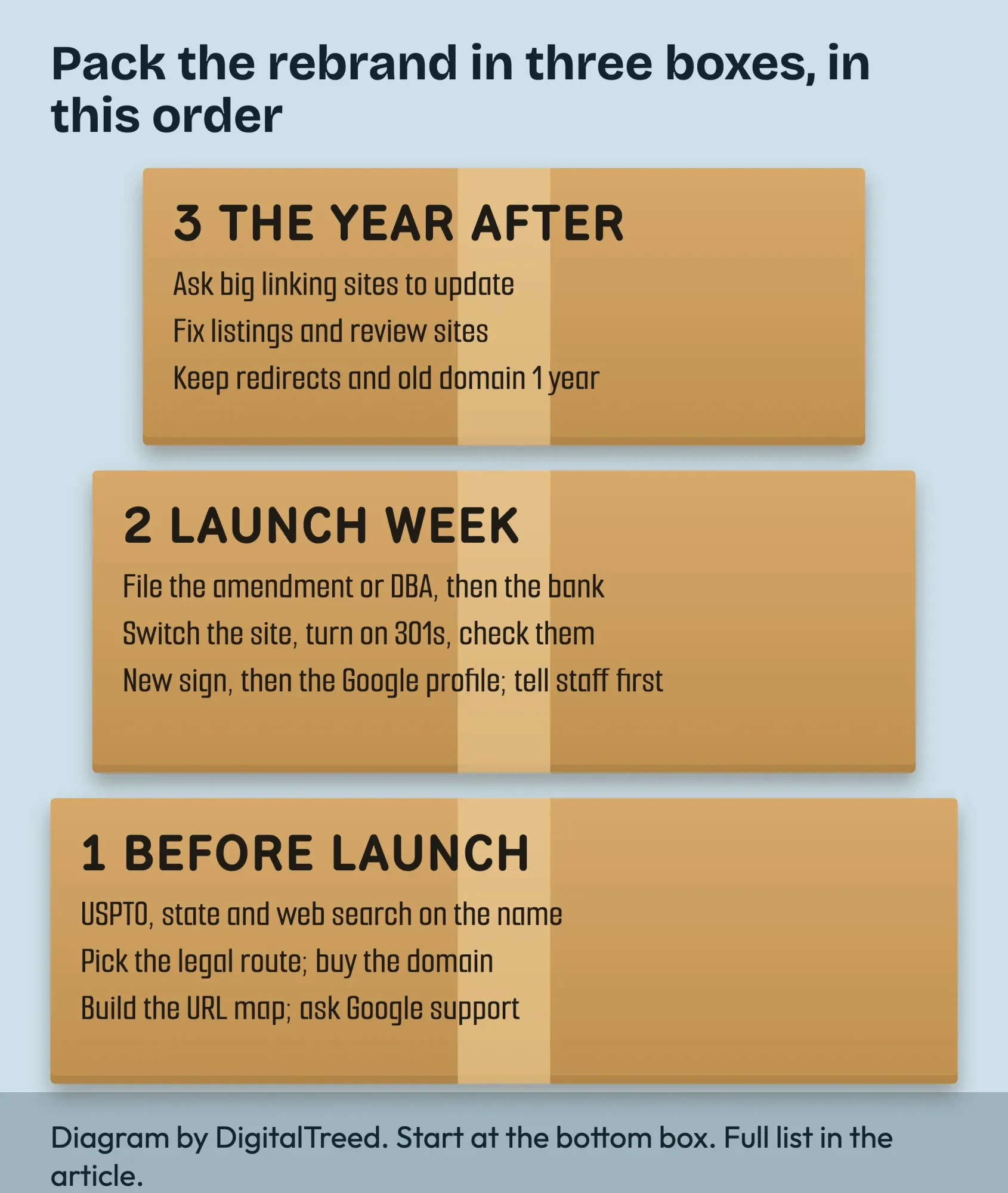 Diagram by DigitalTreed: the rebranding checklist grouped into three stages.
Before you announce anything
- Write down why you're rebranding and what stays the same: phone, address, people, prices.
- Search the new name in the USPTO system, on the web and in your state's business name search.
- Buy the new domain and claim the social handles.
- Pick the legal route, an amendment or a DBA, and check state and county rules.
- Brief a designer with the new name and the parts of the old look you're keeping.
- List every place the old name appears: signs, vehicles, uniforms, invoices, contracts, bank, licenses, listings, email signatures.
- Build the URL map and test it on a staging copy.
- Ask Business Profile support whether your change counts as minor, and what happens to reviews.
Launch week
- File the amendment or DBA, then update the bank account and licenses.
- Switch the website and turn on the page-to-page 301s.
- Spot-check old URLs in our Redirect Checker: one hop, a 301, the right page.
- Submit the Change of Address and the new sitemap.
- Change the sign, then edit the profile name or close the old profile and open the new one.
- Move email to the new domain and keep the old addresses as aliases (our business email setup covers DNS).
- Rename social profiles and fix their links (our social profile guide lists the fields).
- Tell staff first, then customers.
The year after
- Ask the sites that link to you most to update their links.
- Update directories, review sites and supplier accounts.
- Check Search Console weekly for the first few months.
- Keep the redirects and the old domain for at least a year.
- Keep a "formerly" line on your About page and profiles.
Budget for design work on its own line. Our graphic designer cost guide breaks down US rates.
How do you tell customers about a rebrand?
Tell customers before they find out by accident, and lead with what isn't changing. Same phone, same people, same warranty. Then the new name and one honest sentence on why.
Order matters, and it's easy to get backwards.
Staff hear it first, since they're the ones customers will ask, and nothing worries a regular like a new name the person at the counter can't explain. Your best customers come next, by a personal email or a call. Then everyone else: your email list, a banner on the website for a few months, a post on each profile and a note with the next invoice.
Keep the old name visible for a while. In our made-up example, "Pineywood Small Engine, formerly Tyler Mower Fix" on the site and invoices saves a lot of confused calls, because regulars search for the name they know.
And answer the phone the long way for a month. It sounds clumsy. It works.
Three more questions we get about rebrands
Frequently asked
Do I need a trademark attorney to rebrand?
Not by law, if you're based in the US. The USPTO says US-domiciled applicants aren’t required to hire one, though it strongly encourages it. Foreign-domiciled applicants must use a U.S.-licensed attorney.
Does registering a DBA stop someone else from using my new name?
No. Texas, for example, says an assumed name certificate does not prevent anyone else from filing the same assumed name. Trademark rights are a separate question.
Can I keep getting email at my old address?
Usually, yes. In Google Workspace you can keep your old domain as a domain alias after changing your primary domain, so mail to both addresses lands in one inbox.
Need the new look itself? We design logos and brand graphics for small businesses. We're paid for that work, so it's fair to ask another studio for a quote too.
How we made this guide: on October 26, 2026 we read every rule quoted here on its own site, signed out. That meant Google's Business Profile, Search Central and Search Console pages, Google Workspace Admin Help, the IRS, the SBA, five USPTO pages and the Texas Secretary of State's FAQ. Each rule went into our notes word for word and is linked where it appears. Our own work is the local redirect test, the side-by-side read of Google's two move pages, and the marked-up screenshot of Google's name rules. We didn't sign in to a Business Profile, file with a state or run a live site move.
This rewrite goes live only after Eram N. has checked it.
First published July 2020. Rewritten October 26, 2026: the old post explained what branding is, which our branding strategy guide now covers. This version is about changing a brand you already have. It covers when to rebrand and when to wait, the USPTO check, amendments and DBAs with a Texas example, and Google's Business Profile rule. It also covers site moves with our own test, a full checklist and telling customers.
Sources
- Google Business Profile Help: Guidelines for representing your business on Google
- Google Business Profile Help: Edit your Business Profile
- Google Business Profile Help: Mark your business as closed
- Google Search Central: Site moves with URL changes
- Search Console Help: Change of Address tool
- Google Search Central: Redirects and Google Search
- Google Search Central: Build and submit a sitemap
- USPTO: Search our trademark database
- USPTO: Likelihood of confusion
- USPTO: Comprehensive clearance search for similar trademarks
- USPTO: Trademark fee information
- USPTO: Hiring a U.S.-licensed attorney
- U.S. Small Business Administration: Register your business
- Texas Secretary of State: Name Filings FAQs
- IRS: When to get a new EIN
- Google Workspace Admin Help: Change your primary domain

Comments
No comments yet. Start the conversation below.