
Quick answer
"Missing a temporary folder" in WordPress means PHP could not save your upload to its temporary folder, so the upload failed before WordPress ran. The folder is missing, not writable, or blocked by an open_basedir rule. The fix is in your server's PHP settings, so most site owners need their host to fix it.
You drag a photo into the Media Library, and WordPress says the upload failed. The reason it gives is "Missing a temporary folder". This is PHP upload error 6, defined in the PHP source code as a missing /tmp or similar folder.
We caused this error on purpose on a local test copy of WordPress 7.1.3, not a real host, on October 22, 2026. The site ran PHP 8.3.35. Then we tried the fix the top guides give, and it did not work for uploads. A writable upload_tmp_dir did, and this guide shows how.
Key takeaways
- The message comes from PHP, not WordPress. PHP fails to store the file before any WordPress code runs.
- In our test, adding WP_TEMP_DIR to wp-config.php did not fix failed image uploads. It changes WordPress's own temp folder, which update downloads use.
- The real fix is a writable PHP upload temp folder (upload_tmp_dir) that open_basedir allows. On shared hosting, only your host can set it.
- WP_DEBUG_LOG did not record the error in our test. Look in your host's PHP error log instead.
- Never set a folder to 777 to fix it. WordPress says directories should be 755 or 750.
What does "Missing a temporary folder" mean?
"Missing a temporary folder" is the WordPress message for PHP upload error 6. It means PHP could not create a temporary file for your upload. Its temp folder is missing, not writable or blocked by open_basedir, so the upload fails before WordPress runs.
When you upload a file, PHP first saves it to a temporary folder on the server. Only then does WordPress get the file and move it to wp-content/uploads.
When that fails, PHP logs "File upload error - unable to create a temporary file" and sets error 6, per the PHP upload handler. WordPress reads that code and shows the matching text.
The WordPress 7.1.3 upload code says its error strings are "Courtesy of php.net." It only reports PHP's code, so the cause is your server's PHP setup, not a plugin or theme.
A different message, such as "Failed to write file to disk.", points to a different error. Check the table under "Which WordPress image upload error do you have?" first.
Key facts about PHP upload error 6
- The PHP manual lists "Missing a temporary folder." as upload error 6 and "Failed to write file to disk." as error 7.
- WordPress added get_temp_dir() in version 2.5.0. WP_TEMP_DIR changes only that folder.
- The WordPress permissions page says all folders should be 755 or 750.
- In our October 22, 2026 test (WordPress 7.1.3, PHP 8.3.35), uploads still failed with WP_TEMP_DIR set. A writable upload_tmp_dir fixed them.
Where does the error show up?
On our test site, we pointed both PHP temp settings at folders that don't exist. Then we uploaded a 6 KB photo in 3 places and a plugin zip in a 4th, and every upload failed.
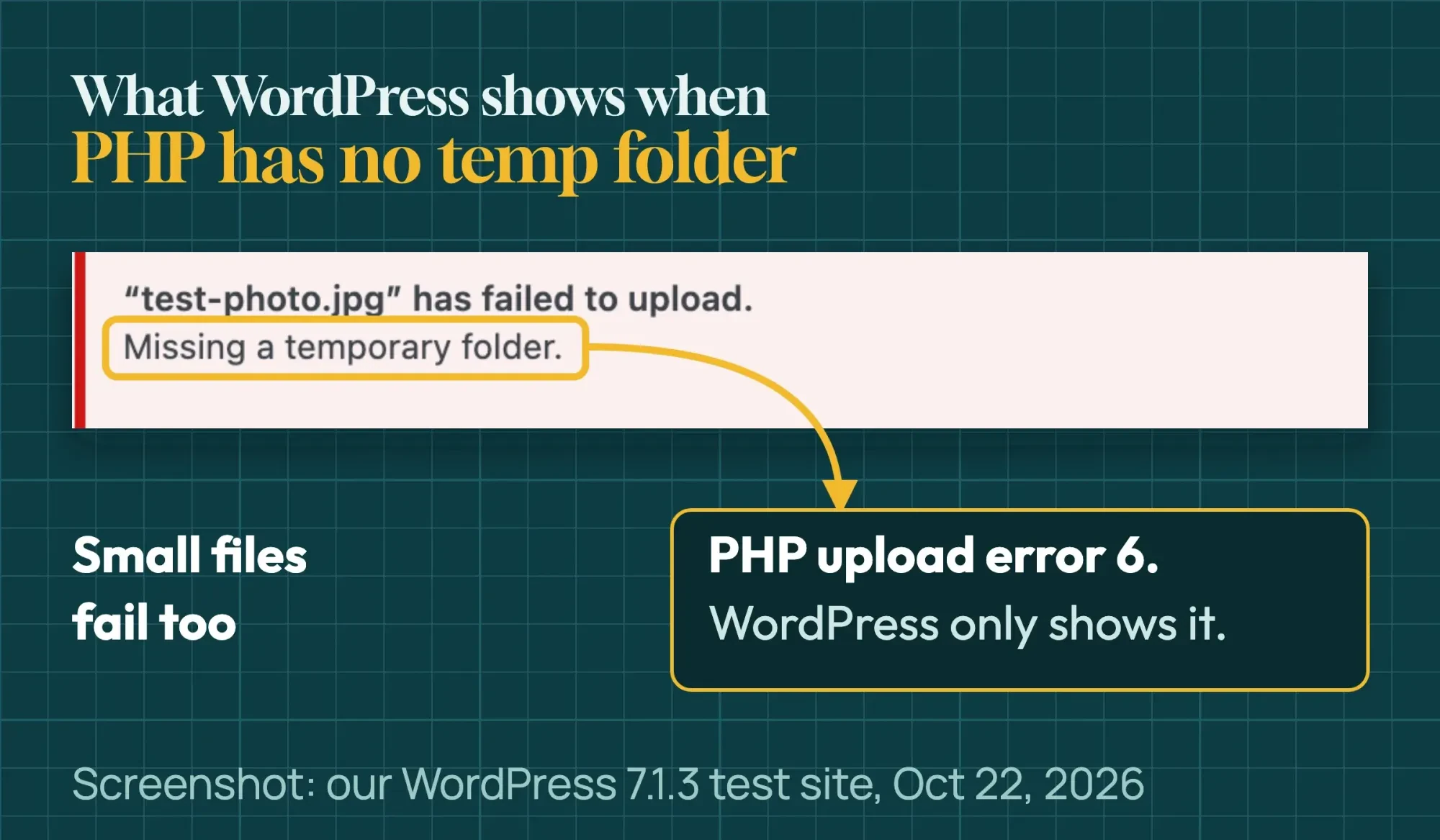 Screenshot: our WordPress 7.1.3 test site, Media > Add Media File, October 22, 2026.
- Media > Add Media File: "“test-photo.jpg” has failed to upload." with "Missing a temporary folder." under it.
- Media Library grid: the file name, the same reason, and a "Dismiss errors" button.
- Block editor, Image block: a small black notice at the bottom that says "Missing a temporary folder."
- Plugins > Add Plugin > Upload Plugin: a plain page with only "Missing a temporary folder."
Small files fail too, so this is not a size limit. A file that is too big shows a different message, such as "exceeds the maximum upload size for this site."
Does WP_TEMP_DIR fix "Missing a temporary folder"?
Not for uploads. The top 4 guides we read tell you to add a WP_TEMP_DIR line to wp-config.php. But that line only changes the temp folder WordPress uses for update downloads. We added it, created the folder, and uploaded again. The upload failed with the same message, and the PHP log showed the same warning.
That matches the code. WP_TEMP_DIR overrides get_temp_dir(), the function that picks WordPress's own temp folder, used for downloads. PHP stores uploads before WordPress loads, so it never reads the constant.
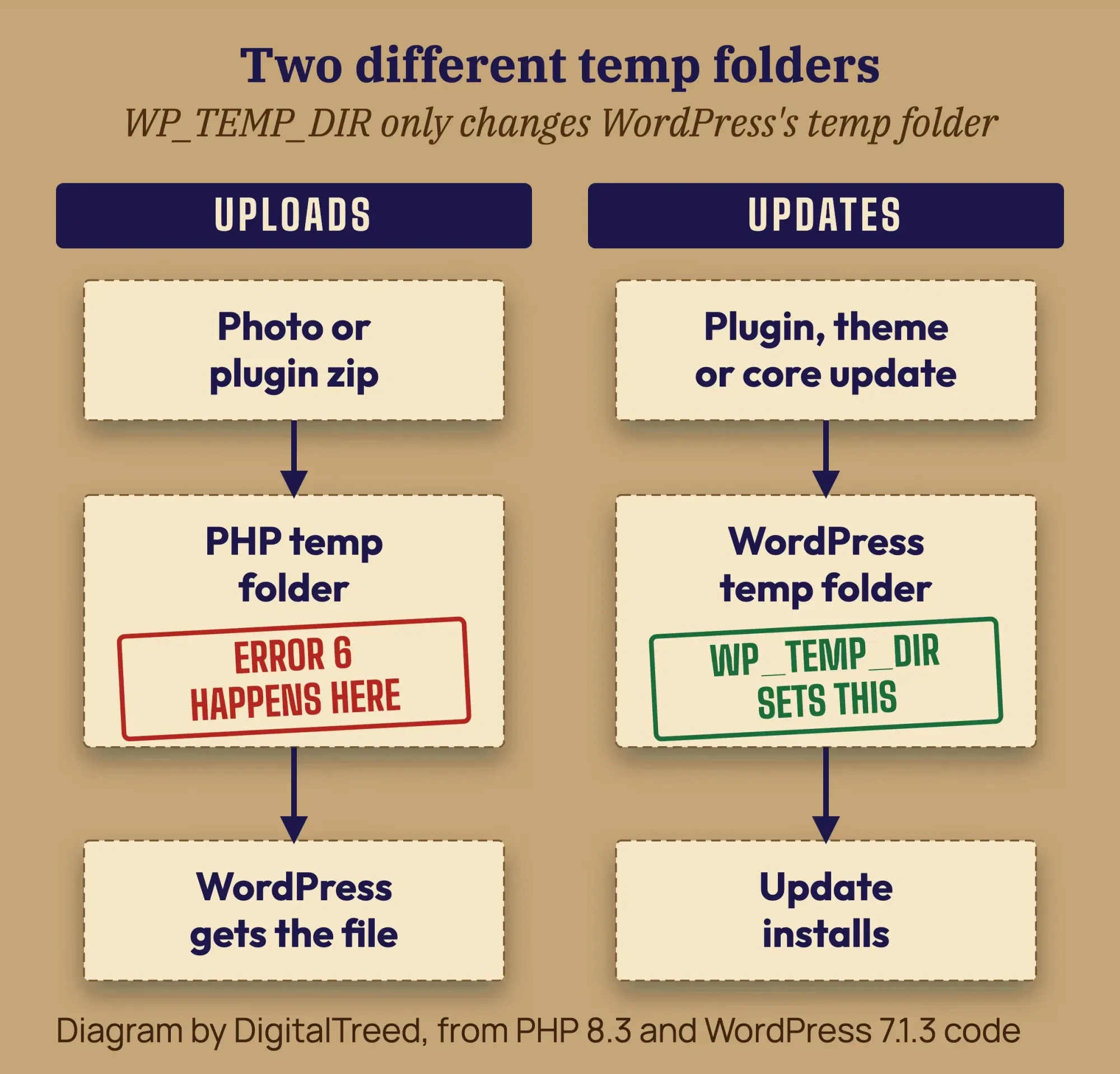 Diagram by DigitalTreed, based on PHP 8.3 and WordPress 7.1.3 source code and our test, October 22, 2026.
WP_TEMP_DIR does help when updates fail. download_url() saves each plugin, theme or core update to that WordPress temp folder first. Per the code, the update fails only when no temp folder WordPress tries is writable.
With PHP's temp folders still broken, installing Hello Dolly from WordPress.org worked. WordPress quietly used wp-content as its temp folder. Only the zip upload failed.
How to fix "Missing a temporary folder" on uploads
Take a backup first, then work down this list in order. Steps 1 to 3 need no code. For most site owners, step 5 (the host email) is the fix.
- Try one small JPG: upload a photo under 1 MB in Media > Add Media File. If it fails with the same message, you have error 6, not a size problem.
- Ask what changed: a new PHP version, a host move, a server update or a new security tool can all change the temp folder. If you just switched PHP versions in your host panel, switch back and test.
- Read the PHP error log: find the time of your failed upload. Look for "unable to create a temporary file" or "open_basedir restriction in effect." Copy that line for your host.
- Check the PHP values: your host panel's PHP info page lists upload_tmp_dir, sys_temp_dir and open_basedir. "no value" for upload_tmp_dir is normal. PHP then uses the system temp folder.
- Email your host: send the message, the time, the log line and your PHP version. Use the email below. On shared or managed hosting, the host must make the change.
- On your own server, set upload_tmp_dir: point upload_tmp_dir at a folder the PHP user owns, inside open_basedir. Then restart PHP. The code is below.
Most hosts show the PHP error log in their panel. SiteGround keeps it in Site Tools statistics. Hostinger and DreamHost have their own log pages, and WP Engine shows the last 24 hours of PHP errors.
If you check the values with a phpinfo file, delete it right after. The PHP manual says it outputs "a large amount of information" about your PHP setup. That is a map for attackers.
Why does it start after a host move or PHP switch?
A host move or PHP version switch changes the setup under your site, so the PHP temp folder and open_basedir rules can change too. If the new temp folder is missing or blocked, every upload fails with error 6. An old upload_tmp_dir path alone is not the cause, though.
The PHP manual says PHP falls back to the system temp folder when the upload_tmp_dir folder is not writable. So the error means the fallback fails too, or open_basedir blocks it. Our own pre-check showed the same: a bad upload_tmp_dir alone still let the upload through.
Watch for one leftover in wp-config.php. If it came over with a WP_TEMP_DIR line, get_temp_dir() returns that path without checking it. If the folder doesn't exist on the new server, update downloads can fail. Remove the line or create the folder.
After any host move or PHP version switch, upload one small test photo right away. Then you catch the problem before a busy day does.
Why Site Health and debug.log miss it
We turned on WP_DEBUG_LOG and uploaded again. No debug.log file was created. PHP wrote the warning only to its own error log, because it fails before WordPress starts. Our guide to the WordPress debug log covers what that log does catch.
Site Health doesn't help either. On our broken test site, Tools > Site Health > Info showed File uploads as Enabled and every existing folder as Writable. It has no row for the PHP temp folder.
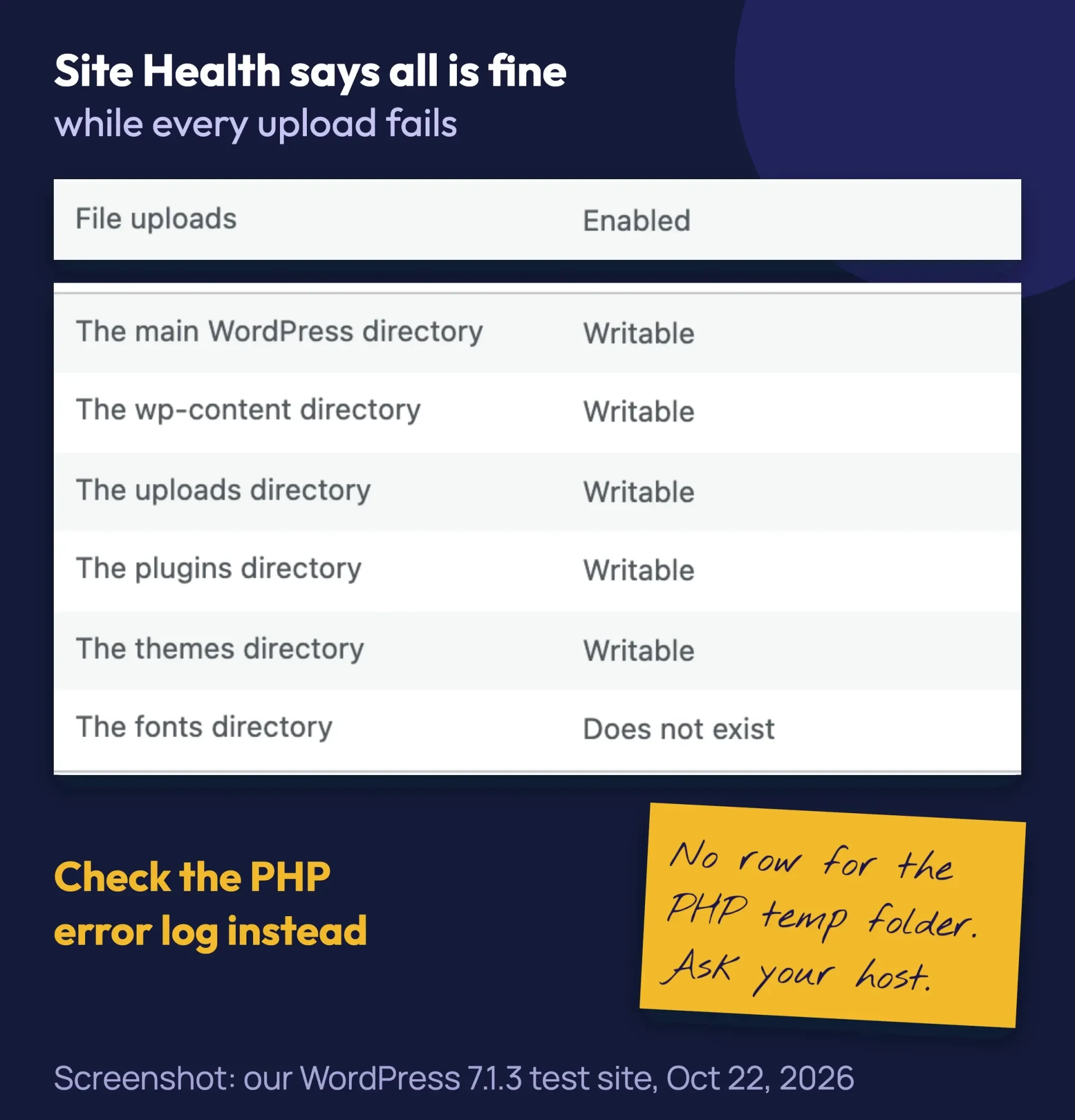 Screenshot: our WordPress 7.1.3 test site with broken PHP temp folders, Tools > Site Health > Info, October 22, 2026.
Email for your host
Give your host the facts in the first email. Copy this and fill in the brackets:
Note
Subject: Uploads fail with "Missing a temporary folder" on example.com. Since [date and time, with time zone], every WordPress upload fails with "Missing a temporary folder." That is PHP upload error 6. Small files fail too. My PHP error log shows: [paste the line]. Please check that PHP's upload_tmp_dir or system temp folder exists, is writable by my site's PHP user and has free space. Please also check that open_basedir allows it. My PHP version is [version]. Thank you.
Can you set upload_tmp_dir in cPanel?
Sometimes. You can add upload_tmp_dir in cPanel's MultiPHP INI Editor, but it only works if your host's PHP reads that file. The editor has a Basic Mode for basic settings and an Editor Mode where you can add new ones. Editor Mode edits the php.ini file for one domain or the whole account.
So ask your host first. We did not test cPanel. If the host says yes, follow these steps:
- In File Manager, create a folder named tmp in your home folder, outside public_html.
- Open MultiPHP INI Editor, choose the Editor Mode tab, and pick your domain.
- Add the line below, with your cPanel user name in place of "example". Type it without quotes, since the editor rejects the " character.
- Click Save, then upload a small test photo.
upload_tmp_dir = /home/example/tmpcPanel warns that errors in this editor can leave PHP scripts not working. If uploads still fail, or the site breaks, remove the line and send your host the email above.
If you run your own server
This step is for a VPS or dedicated server only. The PHP manual lists upload_tmp_dir as INI_SYSTEM. Per the PHP mode table, that means php.ini or the server config only, never .htaccess or .user.ini.
First create a private temp folder owned by the user PHP runs as. Replace "example" with that user (ask your host if you're not sure which user PHP runs as):
mkdir -p /home/example/tmp
chown example:example /home/example/tmp
chmod 750 /home/example/tmp
Copy your php.ini before you edit it. Then set the folder in php.ini:
upload_tmp_dir = /home/example/tmpIf your site runs on PHP-FPM, you can set it per pool instead. The PHP-FPM docs show the php_admin_value format. If the pool sets open_basedir, add the new folder to the end of that line, separated by a colon. Keep every path already there; the paths below are only an example:
php_admin_value[upload_tmp_dir] = /home/example/tmp
php_admin_value[open_basedir] = /home/example/public_html:/home/example/tmp
Restart PHP-FPM (or Apache, if PHP runs as an Apache module), then upload a test photo. If the site shows a 502 after the restart, PHP did not come back up. Our 502 bad gateway guide covers that. To undo, restore the php.ini or pool file copy and restart again.
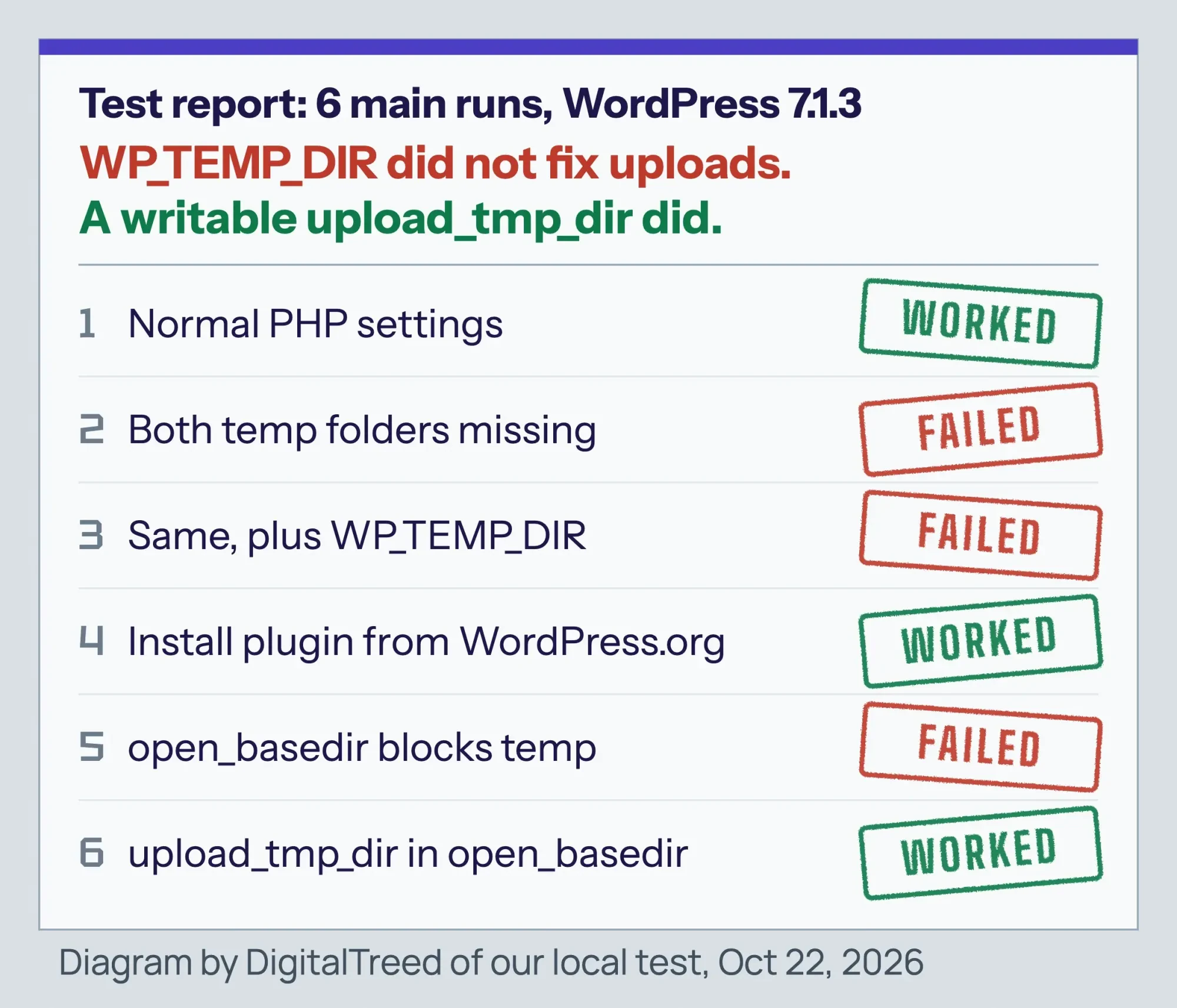 Diagram by DigitalTreed of our test runs on a local WordPress 7.1.3 site, October 22, 2026.
Server changes are easy to get wrong, and a bad pool file can take the whole site down. If you'd rather have it done, our WordPress development team can trace the log line and fix the PHP setup. (DigitalTreed sells this service.)
How to fix failed updates with WP_TEMP_DIR
Use this when a plugin, theme or core update fails to download. Per WordPress's code, the message reads "Download failed. Could not create temporary file." We could not make it appear in our test. This line sets the folder WordPress uses for update downloads.
- Download a copy of wp-config.php from your site's main folder. That copy is your undo.
- In your host's File Manager, create a folder named temp inside wp-content.
- Open wp-config.php and add the line below just above "That's all, stop editing!"
- Save, then retry the update.
- Check that your home page still loads.
define( 'WP_TEMP_DIR', __DIR__ . '/wp-content/temp/' );Type the line with straight quotes. __DIR__ has 2 underscores on each side. Some guides print curly quotes or single underscores, and either one breaks the file. If your wp-config.php sits one folder above WordPress, ask your host for the right path.
After saving, run your home page through our free HTTP status checker. It should return 200. A 500 or "There has been a critical error" means a typo, so see our HTTP 500 error guide. If you see "Error establishing a database connection," a database line got damaged; our database connection fix explains it.
In our test, we also made wp-content read-only. Downloads then failed with "Destination directory for file streaming does not exist or is not writable." Installs asked for FTP details instead. When we called WordPress's download function directly, pointing WP_TEMP_DIR at a writable folder fixed the download.
If folders are not writable, ask your host to fix the ownership. The WordPress permissions guide says directories should be 755 or 750, and that no directory should ever get 777. Our 403 forbidden guide explains ownership in plain words.
Which WordPress image upload error do you have?
Read the exact words of the message first. In WordPress's upload code, "Missing a temporary folder." is PHP upload error 6 and "Failed to write file to disk." is error 7. The upload_max_filesize message is error 1. Messages about the server or a download come from WordPress itself.
Upload error lookup table: 8 messages, their source and usual cause
| What you see | Where it comes from | Usual cause |
|---|---|---|
| Missing a temporary folder. | PHP upload error 6 | PHP temp folder missing, not writable or outside open_basedir |
| Failed to write file to disk. | PHP upload error 7 | PHP could not write the file; often a full disk or quota (not tested by us) |
| The uploaded file exceeds the upload_max_filesize directive in php.ini. | PHP upload error 1 | The file is bigger than the PHP limit |
| The uploaded file could not be moved to wp-content/uploads/... | WordPress move step | PHP got the file, but WordPress can't write to uploads |
| Unexpected response from the server. The file may have been uploaded successfully... | WordPress uploader (its "HTTP error" message) | The server answered the upload with an error; not error 6 |
| The server cannot process the image... | WordPress uploader, images only | Per WordPress's own text, the server may be busy or short of resources |
| Download failed. Could not create temporary file. | WordPress update download (from the code, not seen in our test) | The WordPress temp folder is not writable |
| Could not create directory. | WordPress updater | wp-content or a plugin folder is not writable |
The table matches each message to its source in the PHP upload error list and WordPress's own code. Only the first row is this guide's problem. For browser errors such as a redirect loop, see our too many redirects guide.
The 2 "server" messages come from WordPress's uploader text. Its uploader script shows the first one when the server answers the upload with an error.
Example: a flower shop in Tucson
Example: a made-up flower shop in Tucson, Arizona, moves its WordPress site to a new shared host. The next morning, every bouquet photo fails with "Missing a temporary folder."
The owner adds WP_TEMP_DIR, as an old guide suggests, and nothing changes. The PHP error log shows an "open_basedir restriction in effect" line. The owner sends the host email at 9 a.m. The host adds a private temp folder to the account, and photos upload again.
Mistakes that make it worse
- Setting folders to 777. It opens your site to other users on the server and doesn't touch PHP's temp folder.
- Pasting a code line with curly quotes. One wrong character in wp-config.php can take the whole site down.
- Adding php_value upload_tmp_dir to .htaccess. PHP ignores it there, since the setting is INI_SYSTEM. On servers without mod_php, a php_value line can even cause a 500 error (not tested by us). cPanel's MultiPHP INI Editor writes to php.ini. Whether your host reads that file varies, and we did not test cPanel, so ask first.
- Leaving a phpinfo file on the server after checking.
- Deleting files to "free up space" before you know which error code you have.
Before any change, take a backup. The WordPress backup guide explains what to save. If you're still setting up your site, our WordPress website guide covers choosing a host that handles this for you.
Frequently asked
Is "Missing a temporary folder" a WordPress bug?
No. PHP raises it before WordPress runs, and WordPress only shows its text for PHP's error code. The fix is in the server's PHP settings.
Does adding WP_TEMP_DIR to wp-config.php fix image uploads?
Not in our test. It changes WordPress's own temp folder, which update downloads use. PHP stores uploads in its own temp folder first.
Can I set upload_tmp_dir in .htaccess or .user.ini?
No. The PHP manual marks it INI_SYSTEM, so only php.ini or the server config can set it. On shared hosting, ask your host.
Why did the error start suddenly?
Something on the server changed: a PHP version switch, a host move, a server update or a cleaned-up temp folder. Ask your host what changed on the date it started.
Can a plugin or theme cause "Missing a temporary folder"?
No. PHP raises error 6 while it reads the upload, before WordPress or any plugin loads. So turning plugins off won't fix it.
Can a full disk cause it?
Usually not this message. Per PHP's source code, error 6 means PHP could not create the temp file at all. A write that stops partway, as when a disk fills up mid-upload, gives error 7. Normal PHP builds log no line for it. We did not test a full disk. WordPress shows error 7 as "Failed to write file to disk."
Can file permissions cause it?
Only if PHP can't write to its own temp folder. If wp-content/uploads is the problem, you see "could not be moved to" instead.
Your next step
Right now, upload one small JPG and note the exact message and time. Then read your PHP error log for that minute and send your host the email above. Starting a new site instead? Our step-by-step WordPress website guide walks through hosting, setup and launch.
Does your host blame WordPress, or do you run your own server? Our WordPress team can fix it, and you get a fixed quote first.
How we made this guide: it's built from the PHP manual, the PHP 8.3 and WordPress 7.1.3 source code and WordPress's developer docs. We also used host help pages. We caused the error on a local WordPress 7.1.3 test site and took the screenshots on October 22, 2026. Sources are linked where we use them, and we checked each one the same day. Updated October 23, 2026: added a cPanel section, a section on host moves, 2 uploader errors in the look-alike table and 2 FAQs. Updated October 25, 2026: added direct answers under the question headings, sourced facts on error 6, a labeled error table and numbered fix steps.
First published July 2020. Rewritten October 22, 2026: our own test of the error and a test showing WP_TEMP_DIR did not fix uploads. New: the real PHP fix, a host email, a look-alike table and copy-safe code. We dropped the old 775 advice.
Sources
- PHP manual: Description of core php.ini directives (upload_tmp_dir)
- PHP manual: Where a configuration setting may be set
- PHP manual: File upload error messages explained
- PHP manual: PHP-FPM configuration
- PHP manual: phpinfo()
- PHP 8.3 source: main/rfc1867.h
- PHP 8.3 source: main/rfc1867.c
- WordPress 7.1.3 source: wp-admin/includes/file.php
- WordPress 7.1.3 source: wp-includes/script-loader.php
- WordPress 7.1.3 source: wp-includes/js/plupload/handlers.js
- WordPress Developer Resources: get_temp_dir()
- WordPress Developer Resources: download_url()
- WordPress Developer Resources: File permissions
- WordPress Developer Resources: Debugging in WordPress
- WordPress Developer Resources: Backups
- WordPress.org: Site Health screen
- cPanel docs: MultiPHP INI Editor (vendor)
- SiteGround: error logs (vendor)
- Hostinger: where to find error logs (vendor)
- DreamHost: viewing error logs (vendor)
- WP Engine: error logs (vendor)

Comments
No comments yet. Start the conversation below.