
Quick answer
YouTube Shopping for business lets a channel in the YouTube Partner Program (500 subscribers in the US, as of October 2026) connect a store on a supported platform like Shopify. Then it can tag those products in videos, Shorts and live streams. Buyers pay your store, not YouTube. Letting other creators tag them is a separate door that costs more.
Most guides to YouTube Shopping are written for creators selling merch, not for shops.
We wanted the version for a shop owner. So on October 26, 2026, we read 19 of YouTube's Help pages and 5 of Google Merchant Center's, signed out, and checked four ranking guides against them. One of those guides got the subscriber rule wrong, and none of them mentioned what it costs to let other creators sell your products. If YouTube isn't part of your plan yet, start with our YouTube marketing strategy for small businesses.
Key takeaways
- In the US, a channel can apply to YPP and sell at 500 subscribers.
- Your store must sit on a supported platform, such as Shopify or Wix.
- Show each tagged product clearly and say its name in the video.
- For your own products, payments go through your store, not through YouTube.
- Letting creators tag your products needs Shopify Advanced, listed at $399 a month.
YouTube Shopping puts your products under your own videos
YouTube Shopping is a set of features that shows products, with prices, next to YouTube content and sends buyers to the seller's store.
YouTube's Get started with Shopping page names four places your own products can appear. They are your channel's store tab, the video description, a product shelf below the video, and a Shopping button on the video.
Shorts can get a sticker instead of a button, though YouTube shows it depending on how viewers interact. Per YouTube's product tagging help, the sticker shows "for the first product in the tagged product list."
Not every viewer sees any of it.
Tags stay hidden for anyone watching "on a mobile browser, smart TV, or game console," per that tagging page.
They also need the viewer to be in one of the countries on YouTube's buyer availability list. The United States is on it. So a tag works best for people watching in the YouTube app or on a computer.
There are two doors, and most small businesses want the first
That's the basic idea. The confusing part is that "YouTube Shopping for business" covers two different setups, with different rules and different bills. A third option, tagging other brands' products, is the affiliate program. Here are all three side by side, as of October 2026.
| What you want | Who qualifies | What it costs you | Who pays whom |
|---|---|---|---|
| Sell your own products on your channel | Your channel is in the YouTube Partner Program, not set as Made for Kids, no Hate Speech strikes; store on a supported platform | Your store plan only; YouTube Help names no Shopping fee | The buyer pays your store; "YouTube and AdSense are not involved" |
| Let other creators tag your products | US Shopify merchant on the Advanced or Plus plan, Google & YouTube app, USD store, US billing address | Shopify Advanced at $399/mo paid monthly (read October 24, 2026) plus a commission you set; the median is about 15% | You pay commission monthly, through Google, on sales creators drive |
| Tag other brands' products on your channel | YouTube Partner Program, based in an eligible country such as the US, not a music or Made for Kids channel | Nothing up front | The brand pays a commission; YouTube pays you through AdSense in 60 to 120 days |
Sources for the table: YouTube's eligibility rules, Merchant Center's affiliate program rules for Shopify merchants and commission guidance, Shopify's pricing page and YouTube's affiliate program overview.
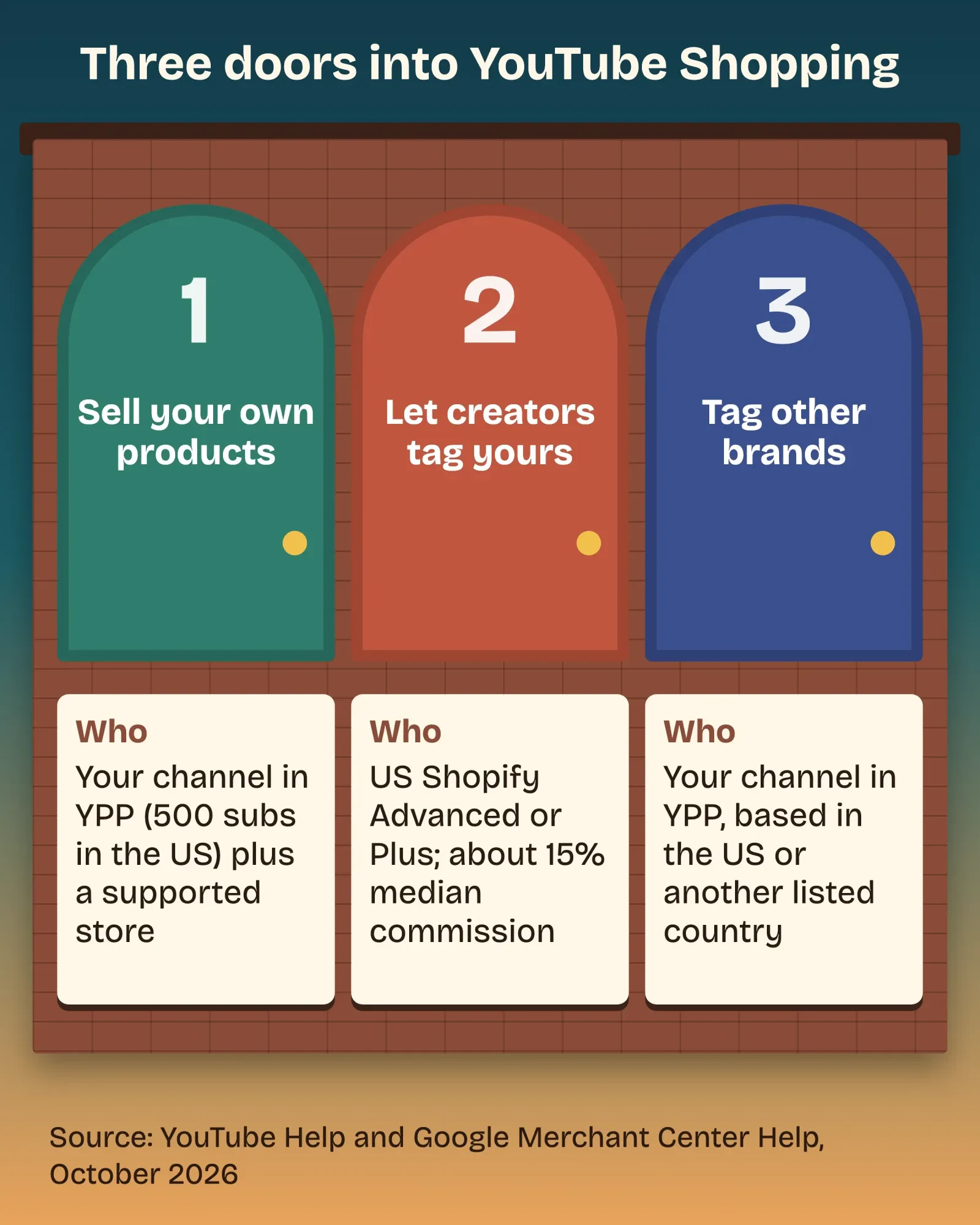 Diagram by DigitalTreed, October 2026, based on YouTube Help and Google Merchant Center Help pages read October 26, 2026.
Door 1 is where nearly every small shop should start, so the rest of this guide follows it, then covers the other two more briefly.
Can my business use YouTube Shopping? The 500-subscriber rule
Yes, if your channel is in the YouTube Partner Program (YPP). To sell your own products, YouTube's eligibility list asks that your channel "meets the subscriber threshold for YPP."
It also can't be set as Made for Kids or carry Hate Speech strikes.
In the US, that threshold is lower than most people think. The expanded YPP page lets you apply at 500 subscribers with "3 valid public uploads in the last 90 days" plus either of these:
- "3,000 qualified watch hours in the last 12 months"
- "3 million qualified Shorts views in the last 90 days"
That 500 level includes Shopping.
Ad revenue sharing still needs 1,000 subscribers.
YouTube reviews applications "typically in about 1 month," per the same page.
Then we held four top-ranking guides up against those pages. vidIQ's YouTube Shopping guide says the affiliate program needs "at least 10,000 subscribers." YouTube's own page asks for the YPP threshold, nothing more. Sprout Social and Toptal both put the number at 500, which matches.
If you're short of 500, our guide to getting your first 1,000 YouTube subscribers is the place to start. If the channel itself isn't set up yet, see how to create a YouTube channel for your business.
Which store platforms does YouTube Shopping support?
Once the channel qualifies, the store matters. YouTube only connects stores from its own list. As of October 26, 2026, its connect your store help page names these platforms with no country limit: Shopify, Wix, Fourthwall, SHOPLINE, Spreadshop, Spring (formerly Teespring) and TeePublic. Four more work only in Japan or South Korea. There's also a long list of merch retailers.
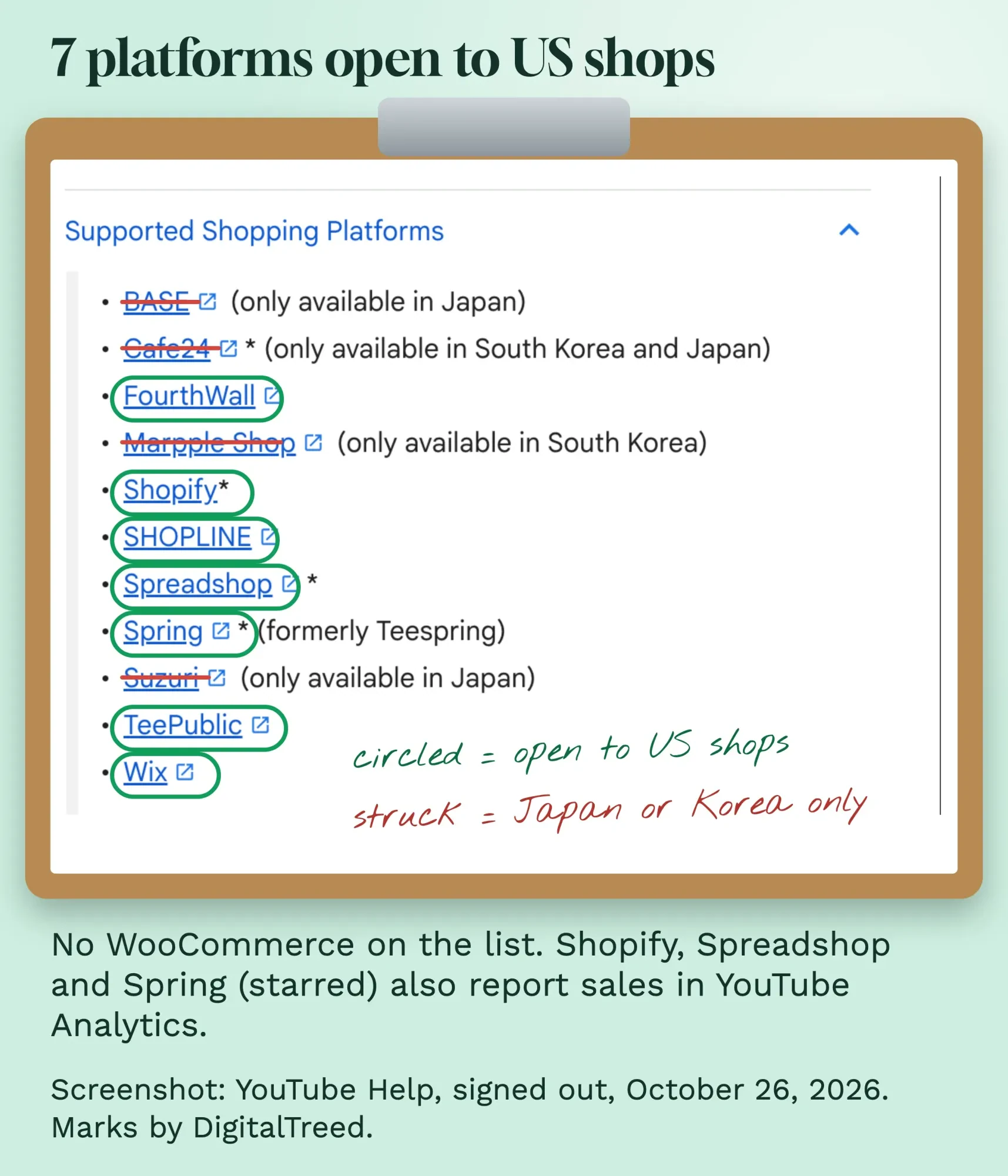 Screenshot: YouTube Help, "Connect, manage, & disconnect your store on YouTube", taken signed out on October 26, 2026, cropped to the platform list. Labels by DigitalTreed.
WooCommerce isn't on that list. That's odd, because WooCommerce's own documentation says its Google for WooCommerce plugin, version 3.6.0 or later, syncs your catalog to YouTube Shopping through Google Merchant Center. We couldn't confirm it without an account. If you're on WooCommerce, check the platform list in YouTube Studio before you build a plan around it.
Some products are out, too. Google's YouTube store policies rule out anything in the "refurbished or used goods category."
The store also carries the legal duties. YouTube's Shopping page makes the merchant responsible for "disclosing all legally required information to consumers," such as contact details, warnings and refund policies. Put those on the store before you connect it. Our ecommerce trends guide for 2026 covers the store side.
How to connect a Shopify store to YouTube
Shopify is the most common route for small US shops, so here are its steps from YouTube's connect your store page, as of October 2026. First, make sure you use "the same email address for both YouTube and Shopify," with admin access on both.
- On a computer, sign in to YouTube Studio and select Earn in the left menu.
- Open the Shopping tab. It only appears if your channel is eligible.
- Click Get Started and choose Shopify from the list.
- In Shopify, add the free Google & YouTube app and connect your Google Account.
- In the app, go to Overview, then YouTube Shopping, then Get Started.
- Pick the right channel, read the program rules, accept the terms and select Complete setup.
Then you wait.
YouTube reviews your products against its policies and Google Merchant Center's. Its help page says the review "typically takes a few business days."
That review runs again whenever you change a product: per the manage products page, any edit to "title, description, or image" starts a new one.
So don't swap product photos the day before a launch video.
Planning a channel and its first shopping videos is work we do for clients, under social media marketing at DigitalTreed. Hiring us earns us money, so run these six steps yourself first; they don't need an agency.
How to tag products on YouTube without getting tags removed
With the store approved, you tag products. For a video that's already live, YouTube's tagging help gives these steps. In YouTube Studio, open Content, click the video, go to the description on the Details page and click Products, then search for the product and drag it in. "You can tag up to 60 products."
For a Short, tag in the YouTube mobile app under stickers, then Products. The first product in your list becomes the sticker, so put your best seller first.
Live streams take tags too, up to 30 items, added from Create, then Go Live, in YouTube Studio. YouTube's live tagging page adds that tags "will only surface if the products are available for shipping to the viewer's country/region."
Tags that break YouTube's four rules may be removed. A tagged product must be:
- "easily identifiable and featured prominently"
- "meaningfully related to your content"
- something a viewer "may reasonably want to learn more or buy"
- "used as intended"
YouTube also wants each tagged product "verbally or textually mentioned."
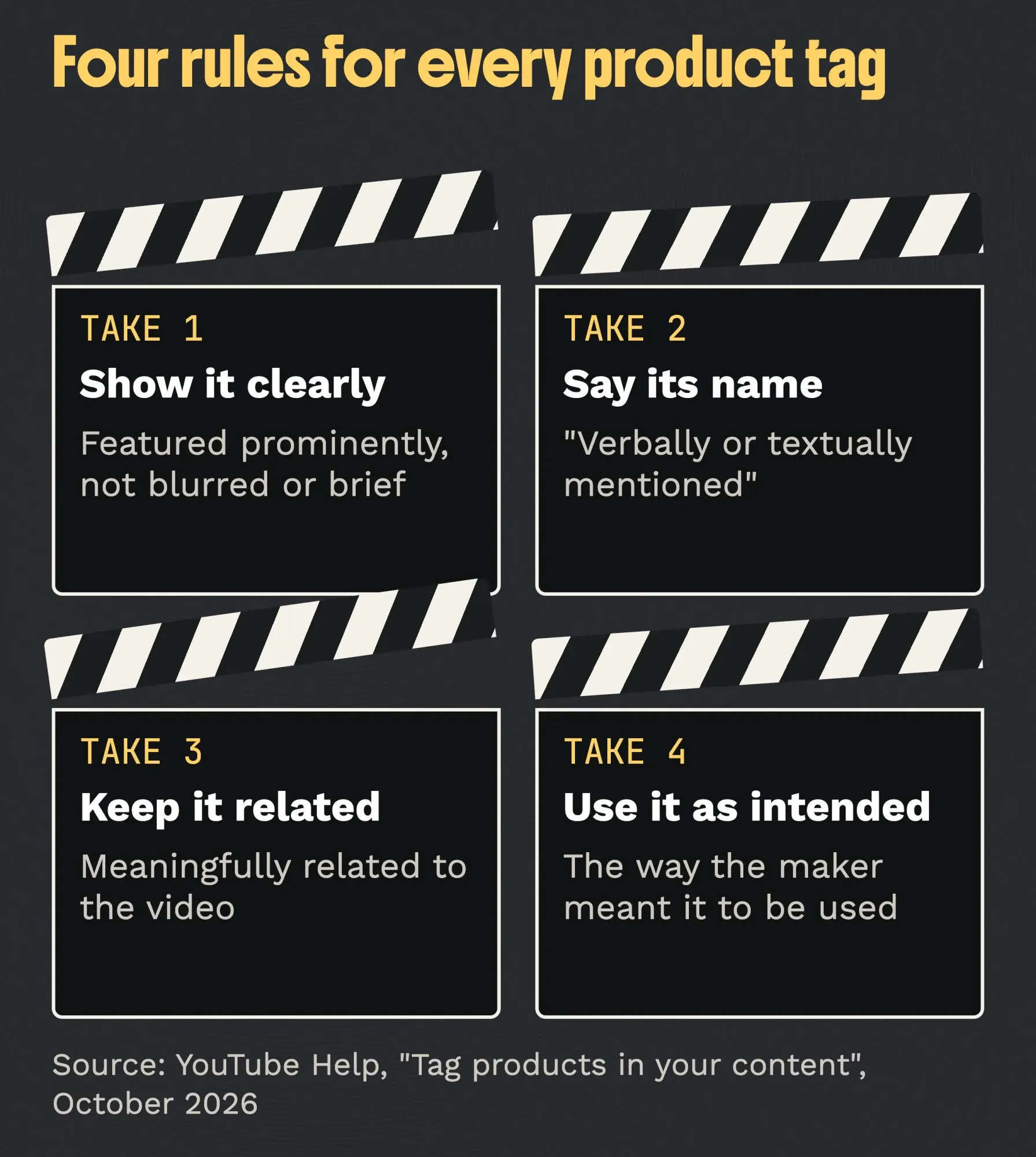 Diagram by DigitalTreed, October 2026, from the tagging guidelines on YouTube Help's "Tag products in your content" page.
In plain terms: show it, say its name, and use it the way it's meant to be used. A product sitting on a shelf in the background doesn't count unless you mention it.
Two extras help on longer videos.
Timestamps make a product pop up while it's on screen. You add them on a computer, to videos "at least 1 minute long," and each runs 15 to 60 seconds.
Collections, made in the YouTube Studio mobile app, group 3 to 30 products into one themed set, like a holiday gift list.
People only buy what they stay to see. Our guide to YouTube audience retention is worth a read before you script the demo.
You get paid by your store, not by YouTube
This part surprises people. For your own products, YouTube's Shopping page says "all payments for the sale of merch and products are paid through your merch retailer or platform. YouTube and AdSense are not involved." The page names no Shopping fee for your own products, and your store handles fulfillment, refunds and customer service, the same as any other order.
On most videos, a tap on a product sends the viewer to your store's website.
A few US shops can skip that step. YouTube's accelerated checkout page opens it to "select retailers that have a Shopify store in the United States," and personalized items, bundles, pre-orders and subscriptions can't use it.
To see what sold, open YouTube Analytics, then Revenue; its revenue help lists "Connected Stores" as a revenue source and says revenue takes 2 days to show. YouTube's figures may not match your store's report, since returns and ad blockers can skew them, so trust the store for the final number. Only Shopify, Spreadshop, Spring and Cafe24 send sales data to YouTube Analytics.
For the plain store link in your description, add tracking. Our UTM builder tags it so your analytics show which video sent the sale.
Shopping isn't the only YPP income for a business channel. Our guide to YouTube channel memberships covers the paid-fan side.
Letting creators tag your products costs a Shopify upgrade
That covers your own channel. Door 2 works the other way round: creators in YouTube's affiliate program tag your products in their videos, and you pay them a commission. It has no subscriber rule for you. But Merchant Center's rules for Shopify merchants, as of October 2026, ask for all of this:
- A Google Merchant Center account with the United States as its target country.
- A Shopify Advanced or Plus plan.
- The Google & YouTube app, with automated product sync, conversion tracking and auto-tagging on.
- A store currency in US dollars and a US billing address.
The plan is the hurdle. Shopify's pricing page listed Advanced at $399 a month paid monthly, against $39 for Basic, when we read it on October 24, 2026. That's $360 more every month before a single sale.
Then there's the commission. Google's commission guidance says the median rate in the program was "around 15%." The bottom quarter of rates sat at 10% or less.
Your rate must be "equal to or greater than the rate you offer on other affiliate programs."
By default, a creator gets credit for 30 days after a viewer clicks the tag. Per the pending period page, you can hold commission for 30 to 50 days so returns cancel it. The billing page says you're billed "on the first of each month" for locked sales, with commission worked out on the price "excluding taxes and other fees."
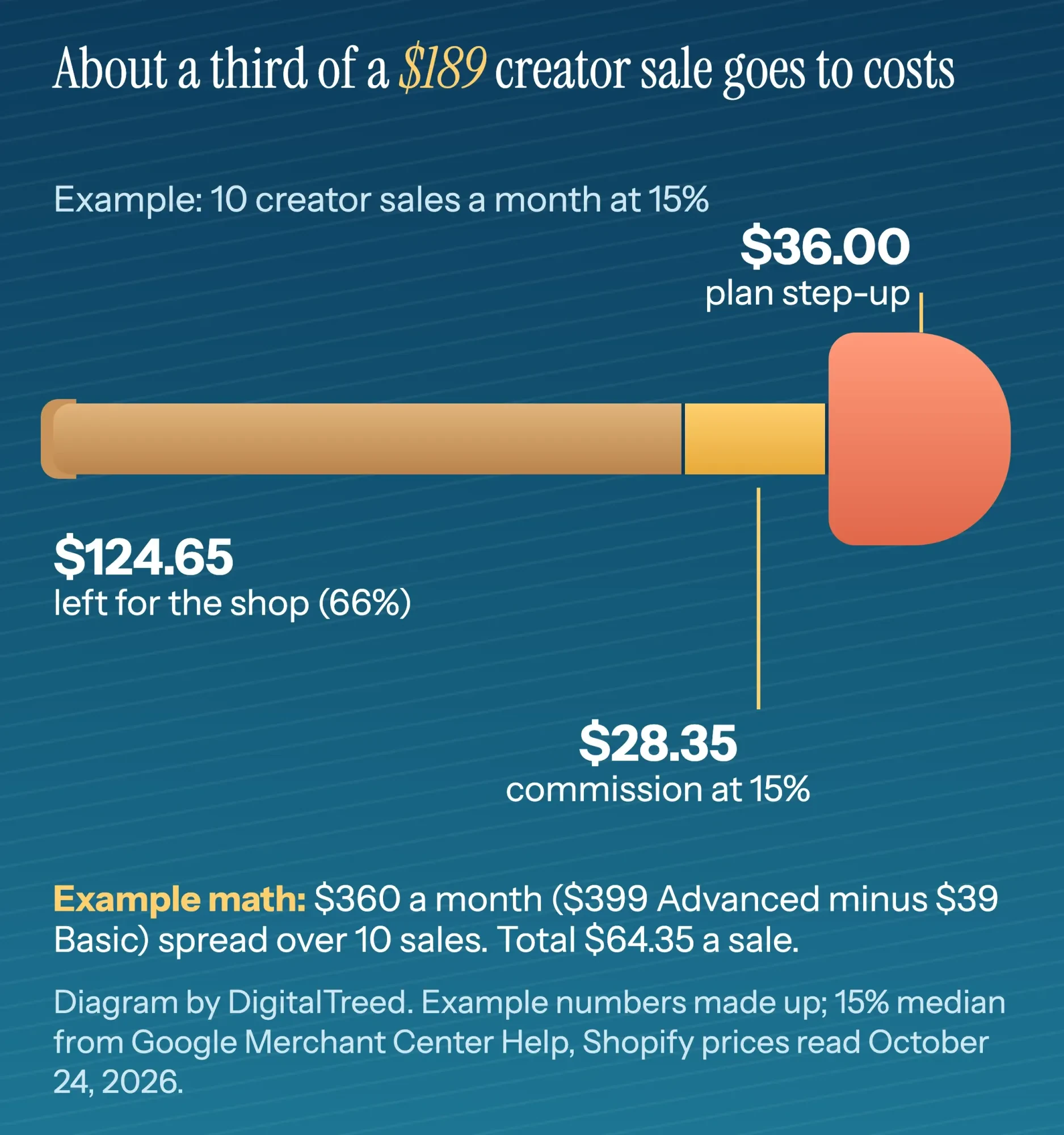 Diagram by DigitalTreed, October 2026. Example only: the $189 paddle and 10 sales a month are made up; the 15% median is from Google Merchant Center Help. The $399 and $39 Shopify prices are from Shopify's pricing page as read on October 24, 2026.
Example, with made-up numbers: a $189 product, using Shopify's prices as we read them on October 24, 2026. At 15%, each creator sale costs $28.35 in commission. If creators sell 10 a month, the $360 plan step-up adds $36 a sale. That's $64.35 per sale, about 34% of the price.
Our take: open Door 1 first. Door 2 makes sense once creators are already asking for your products, or your margins can carry a third of the price.
Tagging other brands on your channel is the affiliate program
Door 3 is for a business channel that reviews or uses other companies' gear. It needs YPP and a base in an eligible country, which includes the US, per YouTube's affiliate program page. You join under Earn, then Programs, then Join Now.
The money is slow. Commissions are "paid through AdSense for YouTube within 60 to 120 days after purchase."
Rates move, too. YouTube's commission rates page says your payout "reflects the rate on the day of each purchase, not the date you tagged the product."
Keep those links on YouTube. Sharing them on your website or in emails is "against our Terms of Service," per the same affiliate page.
Tagged products need a disclosure the viewer can't miss
Whichever door you use, a paid relationship needs a clear disclosure, whether that's an affiliate tag, a free product from a brand, or a creator you pay.
In its FAQ for endorsers, the FTC says a video disclosure "has the best chance of being clear and conspicuous if it's included in the video itself."
A line in the description alone is "not enough on its own because consumers can easily miss disclosures in the video description."
A second FTC page, Disclosures 101 for Social Media Influencers, says viewers are likelier to notice disclosures "made in both audio and video." So say it and show it.
For a written link, the FAQ's answer is short: "“Paid link” right next to an affiliate link should be an adequate disclosure of the nature of the link."
YouTube has its own switch as well. When a video includes paid promotion, you have to tick the paid promotion box in the video details. YouTube's branded content help says it "adds a disclosure label that appears at the beginning of your video."
Creators who tag your products for commission in Door 2 need to disclose too. Our guide to honest affiliate review videos has the FTC detail for reviews.
Nothing in this section is legal advice. It's our reading of public FTC and YouTube pages, and a contract with a creator deserves a lawyer who handles advertising.
Example: Portage Lake Paddle Co. tags its first video
To show the steps together, here's a business we made up. Portage Lake Paddle Co. is a two-person shop in Houghton, Michigan that carves wooden canoe paddles. It sells on Shopify Basic, and its channel just reached 600 subscribers and joined YPP. Every number here is invented.
The owner connects the Shopify store on a Monday. Eight paddles pass review by Thursday.
Her next video is a 9-minute "How to pick the right paddle length." She holds up each of the three paddles she talks about, says its name, and paddles with one on the lake. She tags those three, puts the best seller first, and adds 30-second timestamps where each one appears. She leaves out the life jacket on the dock, because she never mentions it.
She cuts a Short from the lake shot, with the same paddle as the sticker, and adds the hashtags from our YouTube hashtags guide. Then she ticks nothing under paid promotion, because nobody paid her. Two weeks later, she checks Revenue in YouTube Analytics against her Shopify orders.
She doesn't open Door 2. At $189 a paddle and 10 creator sales a month, the math above says a third of each sale would go to commission and the plan upgrade.
Frequently asked
Does YouTube take a cut of sales from my own store?
YouTube charges no fee, but the sale still has costs. Your store platform takes its usual payment processing fee on each order, just as it would for a sale from your website.
Why can't I see the Shopping tab in YouTube Studio?
The tab only appears if your channel is eligible, per YouTube's connect your store page. Check that you're in YPP, not set as Made for Kids, and signed in to the right channel.
Can I add product tags to old videos?
Yes. YouTube's tagging help lets you tag existing videos from Content in YouTube Studio, but not videos with a copyright claim, set as made for kids, or limited for monetization.
Want your product videos shot and edited for Shopping? That's part of our video and graphics service. We earn from that service, so test Door 1 on one video of your own first.
How we made this guide: on October 26, 2026, we read 19 YouTube Help pages and 5 Google Merchant Center Help pages, while signed out. They cover eligibility, stores, tagging, checkout, analytics and the affiliate program. We then checked Sprout Social, vidIQ, Toptal and WooCommerce's guides against them on five points and found one wrong subscriber rule and no mention of the merchant-side costs. The screenshot comes from a public Help page. Each fact carries its link in the sentence that uses it.
We had no Studio, Shopify or Merchant Center account to click through, so the steps come from Help text and your buttons may sit elsewhere. The FTC's site blocked our headless browser on October 26, so we checked its quotes against our October 25 reading. Another reader confirmed them the same day, and Shopify's US prices from October 24. Every change to this page gets Eram N.'s sign-off.
First published July 2023. Rewritten October 26, 2026: the old post listed 15 ways to earn on YouTube. This version is a how-to for businesses selling products with YouTube Shopping. It covers who qualifies, supported stores, connecting Shopify, tagging rules, how you get paid, the merchant and affiliate options, and FTC disclosure, with a worked example.
Sources
- YouTube Help: Get started with Shopping on YouTube
- YouTube Help: Tag products in your content
- YouTube Help: Connect, manage, & disconnect your store on YouTube
- YouTube Help: Manage products from your store on YouTube
- YouTube Help: Overview of the expanded YouTube Partner Program
- YouTube Help: YouTube Shopping affiliate program overview & eligibility
- YouTube Help: Understand commission rates & earnings in the YouTube Shopping affiliate program
- YouTube Help: Manage accelerated checkout on YouTube
- YouTube Help: Create and manage Shopping collections on YouTube
- YouTube Help: Tag products in your live streams
- YouTube Help: Check your YouTube revenue
- YouTube Help: Add branded content restrictions & disclosure labels
- Google Merchant Center Help: Get started with the YouTube Shopping affiliate program (for Shopify merchants)
- Google Merchant Center Help: Set up default commission rates (for Shopify merchants)
- Google Merchant Center Help: About commission eligibility: pending period and attribution period
- Google Merchant Center Help: About billing (for Shopify merchants)
- Google Merchant Center Help: YouTube store policies
- FTC: FTC's Endorsement Guides: What People Are Asking
- FTC: Disclosures 101 for Social Media Influencers (November 2019)
- Shopify: Pricing (US prices read October 24, 2026)
- Shopify App Store: Google & YouTube by Google LLC
- WooCommerce: YouTube Shopping with Google for WooCommerce (May 2026)
- vidIQ: YouTube Shopping guide (April 21, 2026)
Comments
No comments yet. Start the conversation below.