
Quick answer
To start blog writing, follow our example plan: posts on days 9, 16, 23 and 30. Pick a platform on day 1 and list 8 post ideas from real questions by day 7. WordPress.com's free plan costs $0 as of November 2026 but shows its ads. Its Personal plan drops them for $48 a year, paid yearly, before tax.
To start blog writing, you need three decisions: where the blog lives, which 8 questions it answers first, and which evenings you write. Blog writing is a habit of publishing short, dated posts that each answer one question for a reader you can picture. The plan assumes a day job and an example budget of 2.5 hours a week, and it's free until you choose a paid plan.
Every example here, from the post ideas to our practice drafts, uses one made-up blog about growing vegetables in pots, so trade the subject for yours. The last section lists what we checked on November 20, 2026, and what's still yours to check.
Key takeaways
- Example plan: posts on days 9, 16, 23 and 30 leave 4 posts live.
- WordPress.com's free plan costs $0 but shows WordPress.com ads to visitors.
- Take your first 8 post ideas from questions people already asked you.
- One edit cut our first example draft from 51.5 to 11.5 words per sentence.
- Put a paid-link disclosure beside the link, not at the page bottom.
The 30-day plan at a glance
Days 1 to 8 are setup, and the four publish days fall a week apart: days 9, 16, 23 and 30. Each row ends with a check you can tick, like a verified Search Console property on day 2 or a live post on day 9.
| Days | Job | Done when |
|---|---|---|
| Day 1 | Pick a platform and create the blog | The blog has an address you can type |
| Day 2 | Add the blog to Google Search Console | The property shows as verified |
| Days 3-7 | Collect questions and list 8 post ideas | Eight ideas, each written as a question |
| Day 8 | Draft post 1 in one sitting | A full draft exists, however rough |
| Day 9 | Edit post 1 and publish it | Post 1 is live |
| Days 10-16 | First routine week | Post 2 live on day 16 |
| Days 17-23 | Second routine week | Post 3 live on day 23 |
| Days 24-30 | Third routine week, then read your log | Post 4 live on day 30, next 4 ideas picked |
The schedule's our example for a beginner with a job, not a rule from any platform. If weekly is too much, keep the order and double the gaps: posts on days 9, 23, 37 and 51 run the same routine at half the speed.
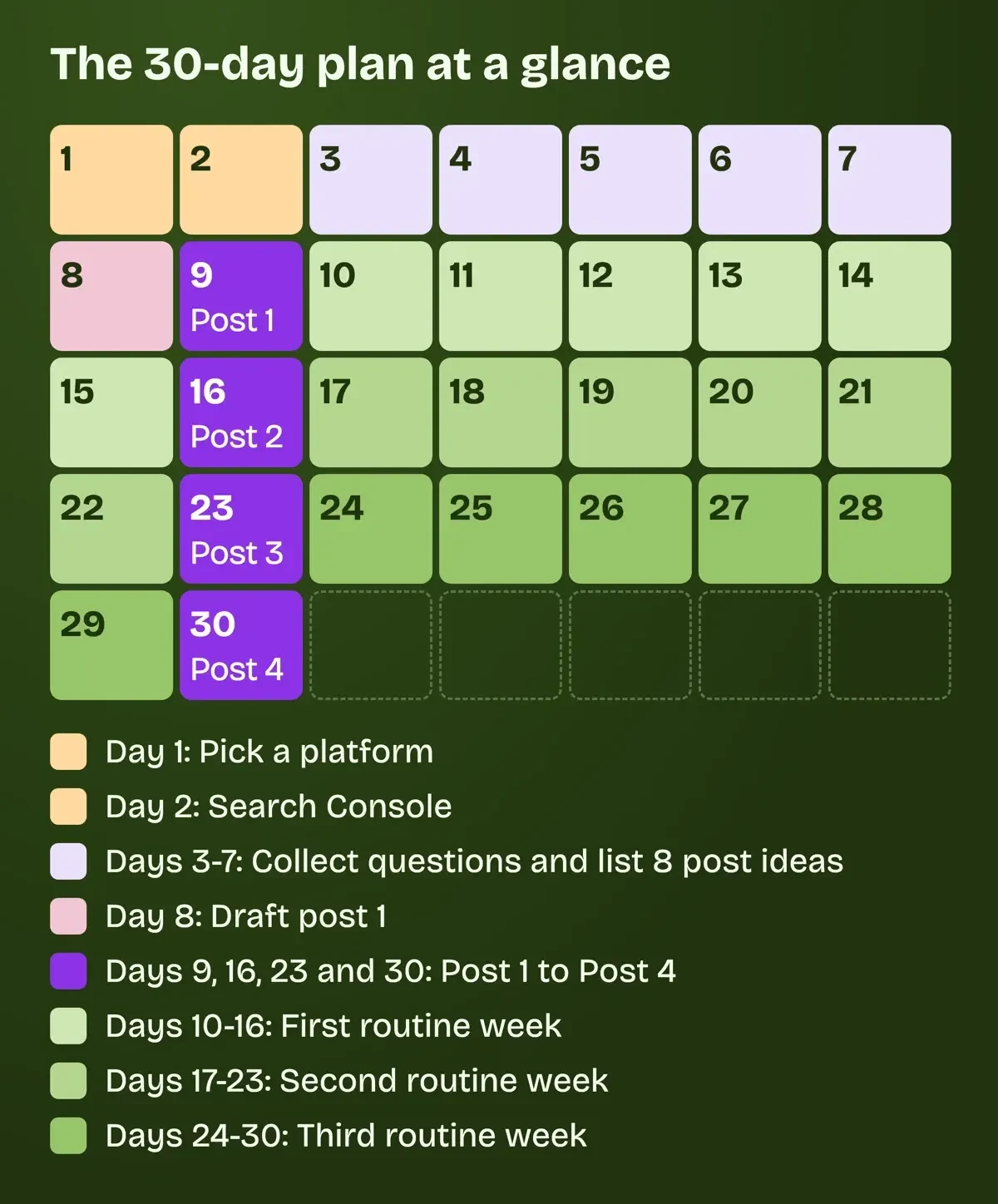 Diagram by DigitalTreed: our example 30-day plan for a new blog.
Days 1-2: pick a platform in one evening
Day 1 is one evening. Its only decision is where the blog lives. You're choosing between a hosted service, where the company runs the software for you, and self-hosted WordPress, which runs on a server you rent and look after.
The hosted version of WordPress, at WordPress.com, is where we'd start a first month. There's nothing to install. The free plan on its pricing page comes with a wordpress.com address, 1 GB of storage and no cap on posts. Visitors to a free site see WordPress.com's own ads. Personal turns those ads off and adds a domain that's free for the first year. It costs $4 a month if you pay for 12 months up front, or $9 month to month, before tax, as of November 2026. That's $4 x 12 = $48 a year, against $9 x 12 = $108 paid month by month, so paying yearly saves $60 if you're sure you'll keep going.
Blogger, Google's blogging service, is the other no-cost route. The about page offers a blogspot.com address or your own domain, with no plan price listed. Google's steps for creating a blog take only a few screens: New blog, a name for it, an address, then Save. Self-hosted WordPress is free software, licensed under the GPLv2 in WordPress.org's words. You'll still pay a host. You also run the updates, and the requirements page recommends a host with "PHP version 8.3 or greater," MariaDB 10.11 or MySQL 8.4 or newer, and HTTPS. We'd leave that for month two, when you know the habit sticks. When you get there, our self-hosted WordPress setup guide covers it.
Work down the table below; the first row that's true for you is your pick. Its WordPress.com figures come from the US pricing page.
| If this is true for you | Pick | Cost as of November 2026 |
|---|---|---|
| You want to spend $0 and maintain nothing | WordPress.com free plan or Blogger | $0; WordPress.com shows its own ads |
| You want your own domain and no platform ads | WordPress.com Personal | $48 a year, billed yearly, plus tax |
| You want plugins and full control, and will run updates | Self-hosted WordPress | Hosting and domain, priced by your host |
Whichever row wins, end day 1 with a blog address you can type into a browser. Day 2 goes to Google Search Console. That way search data starts collecting before post 1 is up, and you aren't guessing later about when Google found it.
If you're torn between the two free options, our Blogger vs WordPress comparison sets them side by side on cost, speed and ownership.
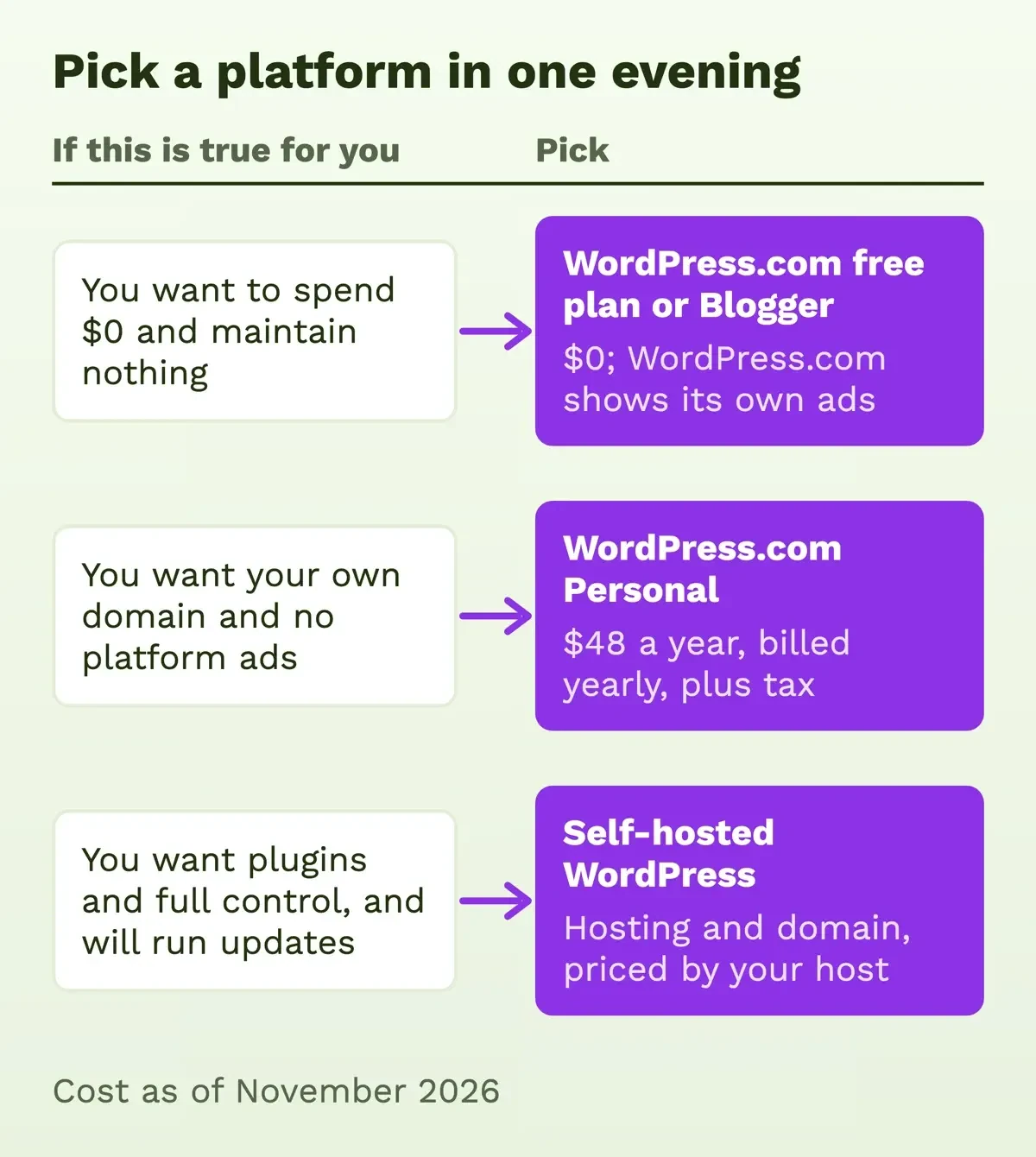 Diagram by DigitalTreed, prices from the WordPress.com pricing page read November 20, 2026.
Days 3-7: list 8 post ideas from real questions
Spend days 3 to 7 collecting questions, not brainstorming topics. The word tomatoes doesn't tell you who's reading, while a question about how often to water tomatoes in pots shows who's asking and what answer ends their search.
Start with questions people asked you in the last month, by text, by email or at work, since those people already showed you the words they use. Then type your subject into Google and copy down the autocomplete suggestions. Google's autocomplete help page says those "reflect real searches that have been done on Google." Keep the exact words, too. In its SEO starter guide, Google points out that people who know a topic search with different words than newcomers do. Write down the beginner's wording, not yours.
If autocomplete runs dry, our keyword suggestions tool lists related searches for a seed word. The 8 example ideas below are for a made-up container-garden blog, each phrased the way a neighbor might ask, and our practice drafts later answered the first three. Use your own subject, but phrase every idea as a question.
- How often should you water tomatoes in pots?
- What size pot does a pepper plant need?
- Can you grow lettuce on a balcony with four hours of sun?
- Why are the bottom leaves on my tomato plant turning yellow?
- Plastic or clay pots: which dries out faster in summer?
- What did my first year of container vegetables cost, receipt by receipt?
- What would I do differently after my first season with pots?
- Is a self-watering container worth it for someone who travels?
Rank them by how well you could answer each one this week, so the top three become posts 1 to 3 and the other five wait for a bad week.
Once Search Console has data, its Performance report shows the queries people used to find you over the past three months, its default range. Those queries are where your next 8 ideas come from.
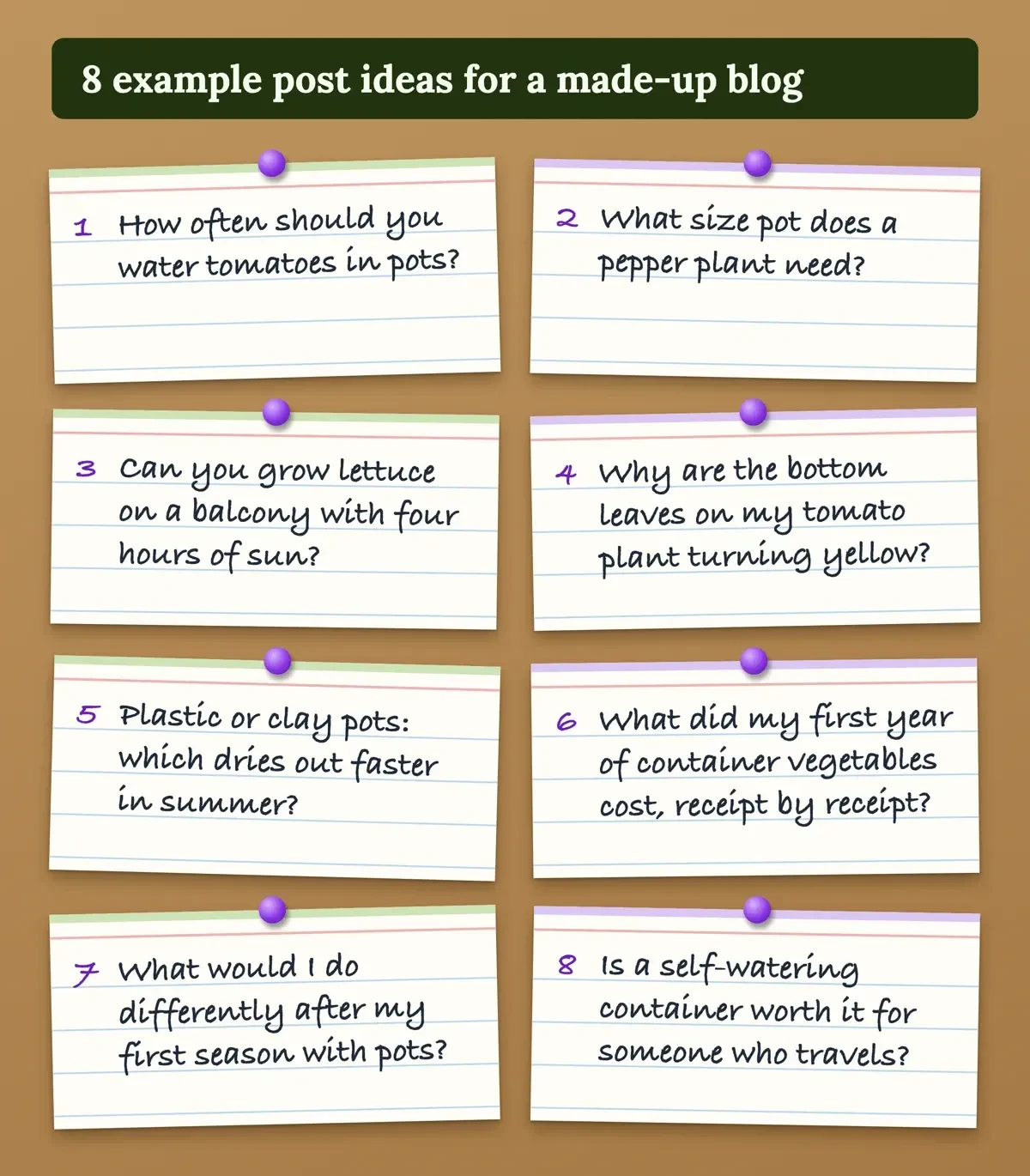 Drawn by us: 8 example post ideas for a made-up blog.
What does a weekly writing and editing routine look like?
Days 10 to 30 run on one week, repeated three times. We split writing and editing into separate sittings, because your own long sentences are far easier to spot a day or two later than on the same evening.
| Sitting | When (example) | Time (example) | Job |
|---|---|---|---|
| Draft | Tuesday evening | 60 minutes | Write the whole post from the question down, no fixing |
| Edit | Thursday evening | 45 minutes | Run the log, split long sentences, check facts and links |
| Publish | Saturday morning | 30 minutes | Add a photo, schedule or publish, share it once |
| Questions | Any day | 15 minutes | Add new reader questions to the ideas list |
That example adds up to 60 + 45 + 30 + 15 = 150 minutes, or 2.5 hours a week. Scheduling lets a finished post go out on its day even when Saturday fills up. In Blogger's post help you pick Set date and time, then Publish. WordPress.com's scheduling help says "Only 100 scheduled posts are possible at a time." A scheduled post there goes out on the first site visit after its set time. For the shape of a single post, from the opening answer to the title, see our 8-step guide to writing a blog post. If you're writing about your life rather than a trade, our personal blog guide covers names and privacy.
For three practice drafts we kept a writing log. Each draft answered one of ideas 1 to 3 for the made-up blog. We wrote each one fast, then edited it once with two rules: split any sentence over 25 words, and cut filler like really, just, honestly and basically.
| Draft | Version | Words | Avg words per sentence | Longest sentence | Filler words | Flesch (estimate) |
|---|---|---|---|---|---|---|
| Draft 1 | First | 309 | 51.5 | 68 | 13 | 44.2 |
| Draft 1 | Edited | 184 | 11.5 | 17 | 0 | 86.2 |
| Draft 2 | First | 182 | 26.0 | 49 | 3 | 73.1 |
| Draft 2 | Edited | 132 | 13.2 | 22 | 0 | 81.3 |
| Draft 3 | First | 162 | 16.2 | 33 | 0 | 87.5 |
| Draft 3 | Edited | 137 | 11.4 | 21 | 0 | 88.4 |
Draft 1 was the messiest. Its first version averaged 51.5 words a sentence, with one 68-word run-on and 13 filler words. One edit took it to 11.5 with no filler. Drafts 2 and 3 started tighter, at 26.0 and 16.2. We wrote all three ourselves as examples, so the drop shows what a log catches, not how fast a new writer improves. Keep yours as one spreadsheet row per post and read it on day 30.
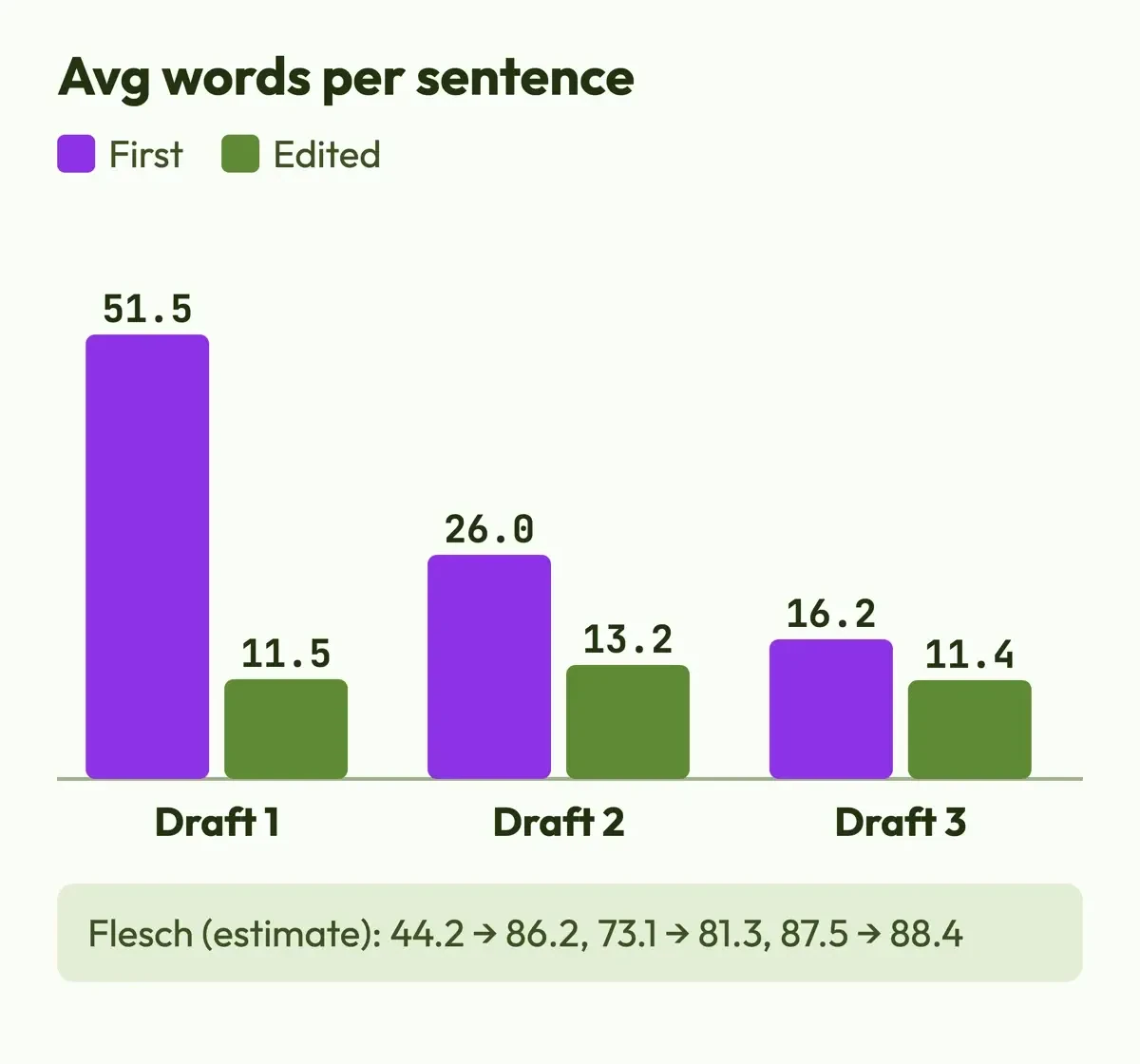 Drawn by us from our local draft log of made-up practice drafts, November 20, 2026.
What we tested
On November 20, 2026, we ran a 61-line Python script over the six draft files on a laptop, with no network calls. It counts words, sentences, the longest sentence and filler words. It also estimates a Flesch Reading Ease score: 206.835 - 1.015 x (words / sentences) - 84.6 x (syllables / words). The syllable count is a rough vowel-group count, so the score's an estimate. On the Flesch scale, 60 to 70 reads as plain English at an 8th to 9th grade level.
What Google's helpful-content guidance asks of a new blog
Google's helpful-content page is a list of self-check questions, and one settles the length worry. Google doesn't have a preferred word count. The questions that matter most for a new blog ask about first-hand expertise and original information. Google's own example of first-hand expertise is the kind that comes from having actually used a product or service, or from visiting a place. On the made-up container-garden blog, that means the watering schedule you actually keep, the pots you bought and the plants that died, details nobody else can copy.
AI writing tools aren't off limits, and Google's note on AI content says "Appropriate use of AI or automation is not against our guidelines." It draws the line at content made "primarily to manipulate search rankings." Its spam policies name the risky pattern scaled content abuse: lots of pages made mainly to move rankings rather than to help readers. Thirty AI posts in week one look far more like that than four posts you've built from your own work.
Search basics like titles and links are in our SEO and blogging for a beginner guide. Our Search Console walkthrough explains the reports you set up on day 2.
Before a link pays you: the FTC disclosure rule
If you start a blog to make money, the FTC's endorsement FAQ speaks to you directly. If you get free products or perks "with the expectation that you'll promote or discuss the advertiser's products in your blog, the FTC Act applies to you." The same FAQ covers placement. It warns that readers "might overlook a disclosure at the very top of the page" and "may miss a disclosure at the bottom of a blog or page." Put it beside the link. On wording, the agency's view is that the words affiliate link alone may not tell readers you're paid. Paid link, placed right next to the link, "should be an adequate disclosure."
Ad networks, income and taxes are covered in our scope of blogging post. For month one, we'd add no paid links at all until you've written and saved the exact disclosure line you'll put beside each one.
Checked on November 20, 2026: confirmed, missing, and yours to check
Those rules, prices and steps all came from pages we read on November 20, 2026, signed out, with requests that named us as DigitalTreed-check. The draft log ran locally, and it reads only files we wrote.
- Confirmed on the source page: WordPress.com prices and free-plan limits, Blogger's setup pages, WordPress.org's requirements, and every Google and FTC page linked above.
- Shown in US dollars to our request: the WordPress.com pricing page. A reader outside the US may see another currency.
- Not shown: WordPress.com's renewal price after year 1, which the page carries only as a blank template field, and the sales tax added at checkout.
- Not tested: signing up on any platform. We created no account, so sign-up steps come from help pages only.
- Not priced: self-hosted WordPress, since hosting and domain costs depend on the host you choose.
Before paying for any plan, open the checkout in the month you sign up. Read the renewal price and the tax line there, since neither shows on the public pricing page.
Frequently asked
How do I start a blog for free?
Use WordPress.com's free plan or Blogger. The WordPress.com free plan doesn't include a custom domain, so your address ends in wordpress.com. Blogger gives you a blogspot.com address and lists no plan price on its about page.
How many posts can I schedule ahead?
On WordPress.com, 100 at a time, its scheduling help says. Blogger's help shows how to set a date and time per post but doesn't state a limit.
Do I need DNS records to add a Blogger blog to Search Console?
No. Google's Search Console property help says a Domain property needs DNS verification "unless the property is on a Google product such as Blogger or Google Sites."
Is a disclosure on my About page enough?
No. In its Disclosures 101 guide, the FTC writes: "The disclosure should be placed with the endorsement message itself." The same guide warns that people may overlook a disclosure placed only on an About Me or profile page.
How we made this guide: We read each platform, Google and FTC page cited here, signed out, and logged three made-up practice drafts with a local script. Facts checked by the DigitalTreed team on November 20, 2026.
First published July 18, 2020 as a general guide to starting a blog. Rewritten November 20, 2026 as a 30-day plan with platform prices, a writing routine and a draft log.
Sources
- WordPress.com
- WordPress.com: Pricing
- Blogger: About
- Blogger Help: Create a blog
- WordPress.org: About
- WordPress.org: Requirements
- Google Search Help: How autocomplete predictions work
- Google Search Central: SEO Starter Guide
- Google Search Central: Creating helpful, reliable, people-first content
- Google Search Central Blog: Google Search guidance about AI-generated content
- Google Search Central: Spam policies for Google web search
- Search Console Help: Performance report
- Search Console Help: Add a website property
- Blogger Help: Create, edit, manage, or delete a post
- WordPress.com Support: Schedule posts and pages
- FTC: FTC's Endorsement Guides, What People Are Asking
- FTC: Disclosures 101 for Social Media Influencers
- Wikipedia: Flesch-Kincaid readability tests

Comments
No comments yet. Start the conversation below.