

Quick answer
SEO lead generation means turning Google searches into calls and form requests. A service business needs 5 things: service pages, honest city pages and a complete Business Profile with a local number. Add click-to-call with a short form, and GA4 key events that count each lead. Then call back fast. That part isn't SEO, but it decides the sale.
SEO lead generation is the work of getting people who are ready to buy from Google search to your phone or your inbox. Google's own Analytics team defines a lead as "someone who shows interest in your products or services" and is likely to pay. Traffic is only the first step of that chain.
Most service businesses don't have a traffic problem.
They have a leak. People land on a page that doesn't match what they searched, can't find the number on a phone, give up on a nine-field form, or call and get voicemail. This guide follows one lead through each of those points, with the rules Google publishes and a tracking snippet we tested ourselves.
Key takeaways
- Leads come from searches that name a job, a city or a problem.
- Build one page per service, and city pages only with real local facts.
- Use a local phone number under your direct control on your Business Profile.
- Count generate_lead after your server answers, not the form_submit event.
- Decide who answers each lead before you spend more on SEO.
Leads come from buyer searches, not from traffic
Leads start with searches that sound like a job: "emergency plumber near me", "water heater installation Lufkin", "drain cleaning cost". A search like "why is my drain gurgling" brings readers, and some of them call, but most want a do-it-yourself answer.
Both are worth having, but only one fills next week's schedule.
Example: Lantern Rock Plumbing is a made-up plumber in Lufkin, Texas, serving Lufkin, Diboll and Huntington. We'll use it all the way through. Its owner doesn't need a blog post about pipe history. She needs pages that answer "drain cleaning in Lufkin" and make calling easy.
So where do those searches come from? Start with your own data. Search Console's Performance report helps you "Learn which queries are bringing traffic to your site". Sort by impressions, then mark the queries that name a service, a city or a problem someone pays to fix. If the filters are new to you, this Search Console walkthrough shows each one.
If the site is new and the report is empty, list the jobs you actually want more of and the towns you'll drive to. Then paste those words into DigitalTreed's keyword suggestions to see how people phrase them.
Write down 10 to 20 buyer phrases, because that list decides which pages you build.
Build a page for each service, then city pages only where you work
Those buyer phrases map to pages. The page that wins a lead is usually a service page about one job, explained the way a customer asks about it. It says what the job includes, how long it takes, the areas you cover and how to book.
A single "Services" page listing ten jobs in one paragraph each rarely answers anyone well. Google's guidance on helpful, people-first content asks whether your content shows "first-hand expertise and a depth of knowledge". It also asks you to check whether the page is "primarily made to attract visits from search engines". A drain cleaning page written by people who clear drains every day passes that test easily, if you put the real details in.
City pages are where most service sites go wrong.
The usual move is to copy one page 30 times and swap the town name, and Google's spam policy describes exactly that. In Google's words, "Doorway abuse is when sites or pages are created to rank for specific, similar search queries. They lead users to intermediate pages that aren't as useful as the final destination." Its examples include "Having multiple domain names or pages targeted at specific regions or cities that funnel users to one page".
A separate rule covers volume. "Scaled content abuse is when many pages are generated for the primary purpose of manipulating search rankings and not helping users."
Neither rule bans city pages; they ban pages that exist only to rank.
So what makes a city page honest? It has facts that are only true for that place. Lantern Rock's Diboll page could say how long the drive is and which jobs the team has done there. It could name the problems the team sees most often, the local permit office for water heater work, and reviews from Diboll customers.
If you can't write five true local sentences for a town, skip the page and list the town in your service area instead.
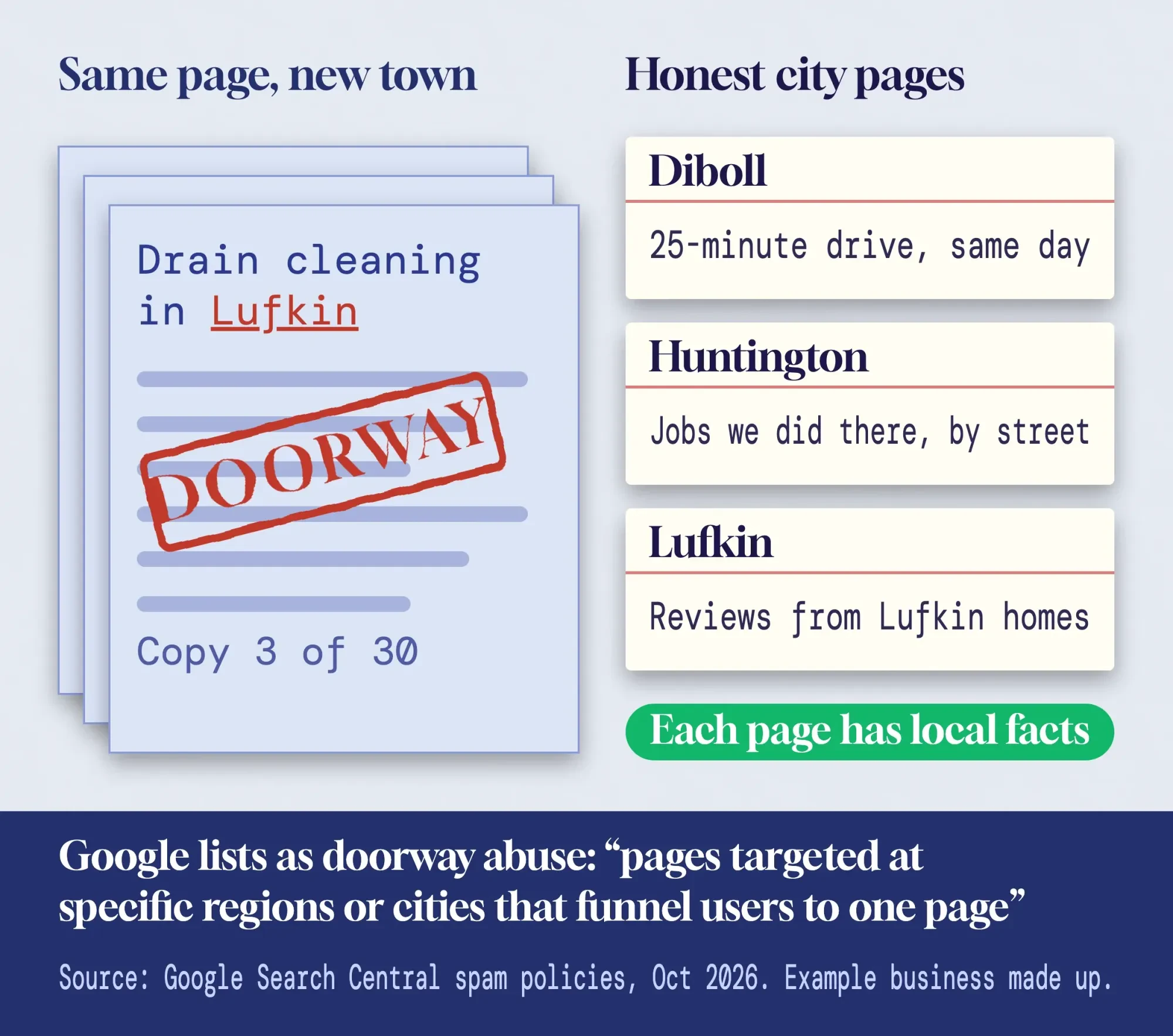 Diagram by DigitalTreed. Quotes from Google Search Central's spam policies (last updated August 28, 2026, read October 2026).
The same thinking applies to any trade. Our guide to SEO for law firms shows it with practice-area pages, where the rules on what a firm may claim make thin copies even riskier.
Your Business Profile can bring calls before anyone sees your site
Service pages win the blue links. For "near me" searches, though, many calls come straight from the map listing, and the website never loads. Google says local results are "mainly based on relevance, distance, and popularity", and adds plainly: "There's no way to request or pay for a better local ranking on Google."
That makes a complete profile the cheapest lead source you have.
Our Business Profile optimization post covers set-up and verification. For leads, four settings matter most.
- Service areas. A plumber or cleaner who visits customers is a service-area business, and you "can set up to 20 service areas" by city or ZIP code. Google's rules say the area "shouldn't extend farther than about 2 hours of driving time" from your base, and you should hide a home address.
- A real local number. Google's Business Profile guidelines say: "Use a local phone number instead of a central call center helpline number whenever possible." They also say "The phone number must be under the direct control of the business."
- The right primary category, with hours that match when someone actually answers.
- Reviews, because Google says more reviews and positive ratings "can help your business's local ranking".
Watch the phone rule if a vendor offers call tracking. The same guidelines ban numbers that "redirect or "refer" users to landing pages or phone numbers other than those of the actual business". A tracking number that rings your own office is a different case from one that sends callers to a lead seller's call center.
Ask which one you're buying. Our post on measuring campaigns with call tracking covers how those systems work.
Then check what the profile sends you. In the Business Profile performance report, "Calls" is "The number of times a customer clicked on the call button on your Business Profile". "Website clicks" counts taps on your website link. Bookings and direction requests are there too.
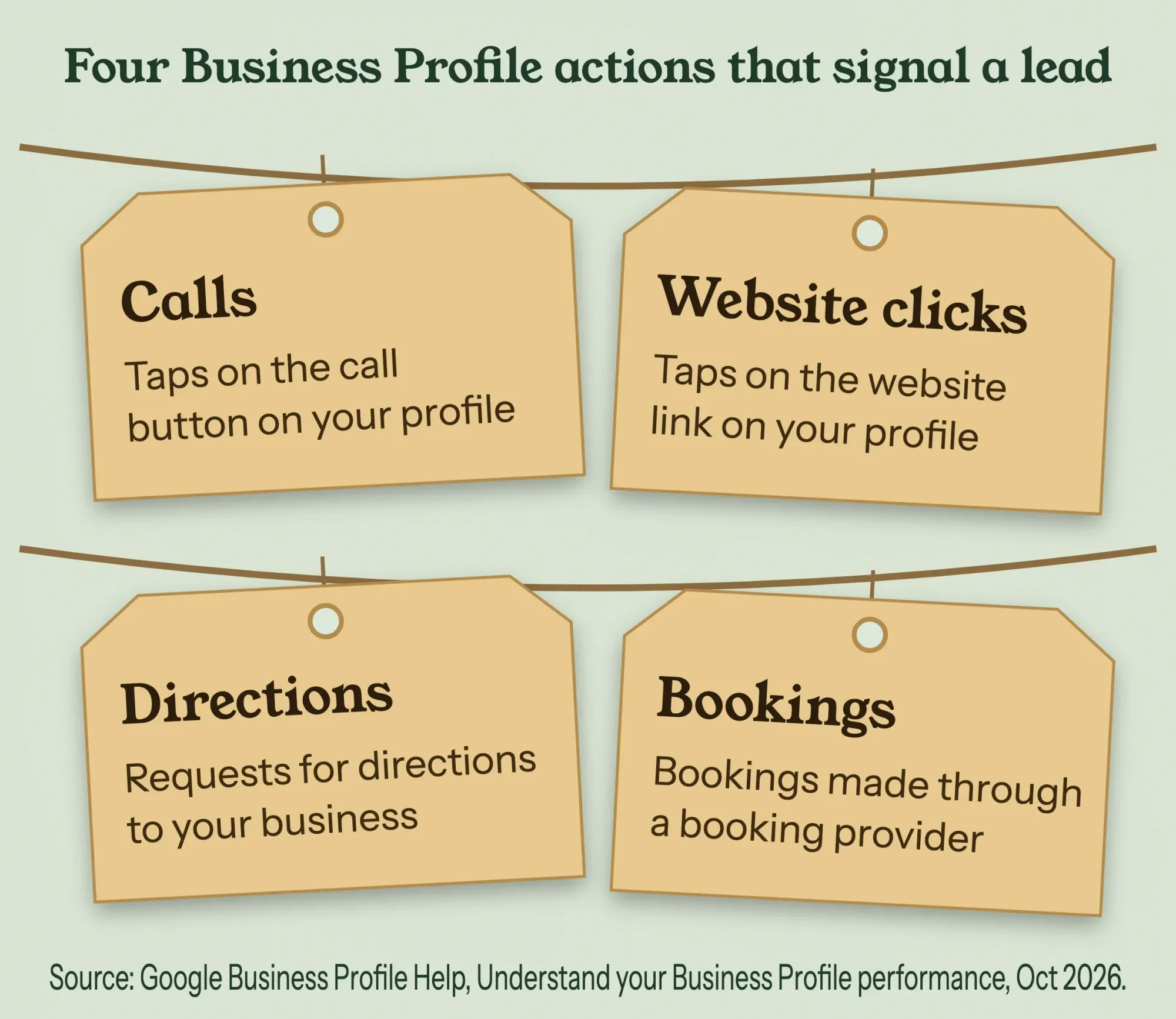 Diagram by DigitalTreed. Definitions from Google Business Profile Help, Understand your Business Profile performance (read October 2026).
One gap: those website clicks blend into Google organic traffic in GA4. Many agencies, us included, add UTM tags to the profile's website link so visits show up as their own source. That's our habit, not a Google rule; Google's UTM help page only explains the tags. Our UTM builder makes the link in a few seconds. Every screen is in our complete Business Profile walkthrough, and our plain-English local SEO guide explains how the map pack fits with your website.
Give every page one next step
Once a visitor lands, the page has one job: make the next step obvious. For a service business that's a call or a short request form. A newsletter box, a chat bubble, a coupon pop-up and three different buttons compete with it.
Google's own lead tutorial for Analytics shows how small this can get. In its example, a business sees people drop off and tests two ideas: that "the button text is unclear" and that "the form has too many required fields." Those are Google's made-up example, not study results, but they're the two fixes we'd try first on almost any service site.
Good button text says what happens next. "Get a call back in 15 minutes" beats "Submit". Put the phone number in the header so it stays in view on phones. Then repeat the main action after the parts people read longest, such as pricing or the service area.
If you can give a price range, show it, so callers arrive with fewer surprises.
Click-to-call and a short form, tested on a phone
The next step only works if the button works. A phone link is plain HTML: a link that starts with tel: instead of http. MDN notes that "Cellular devices autodial the number" when someone taps it. Write the number in the + country code form from the tel: standard, RFC 3966, so +1 and ten digits for a US line:
<!-- the number people see, and the number the phone dials -->
<a class="call" href="tel:+19365550142">Call (936) 555-0142</a>
Make the button big enough to hit with a thumb. The WCAG 2.2 rule on target size asks that a target be "at least 24 by 24 CSS pixels", with some exceptions.
That's a floor, and a full-width header button is far safer.
Keep the form to what you need for the first call back: name, phone, ZIP code and an optional note. Then make sure it really sends. Our guide to building an HTML contact form that sends email covers the server side, which is where many "we never got it" complaints start.
We tested the tracking part ourselves on October 27, 2026. We built a made-up Lantern Rock page on our own computer and ran it in headless Chrome 155, with the final run in a phone-size 390 by 844 frame. A stand-in for Google's tag recorded events on the page, so nothing went to Google, and the script tapped the call button, sent the form empty, then sent it filled in.
The first run had a bug we hadn't expected.
The call tap logged fine, and the empty form logged nothing because the browser blocked it. But the real lead logged its form name as {}. Our form has a field called "name", and in JavaScript form.name returns that field, not the form's own name. Switching to form.getAttribute('name') fixed it, and the second run logged "lead-form": 2 events for 3 actions, which is right.
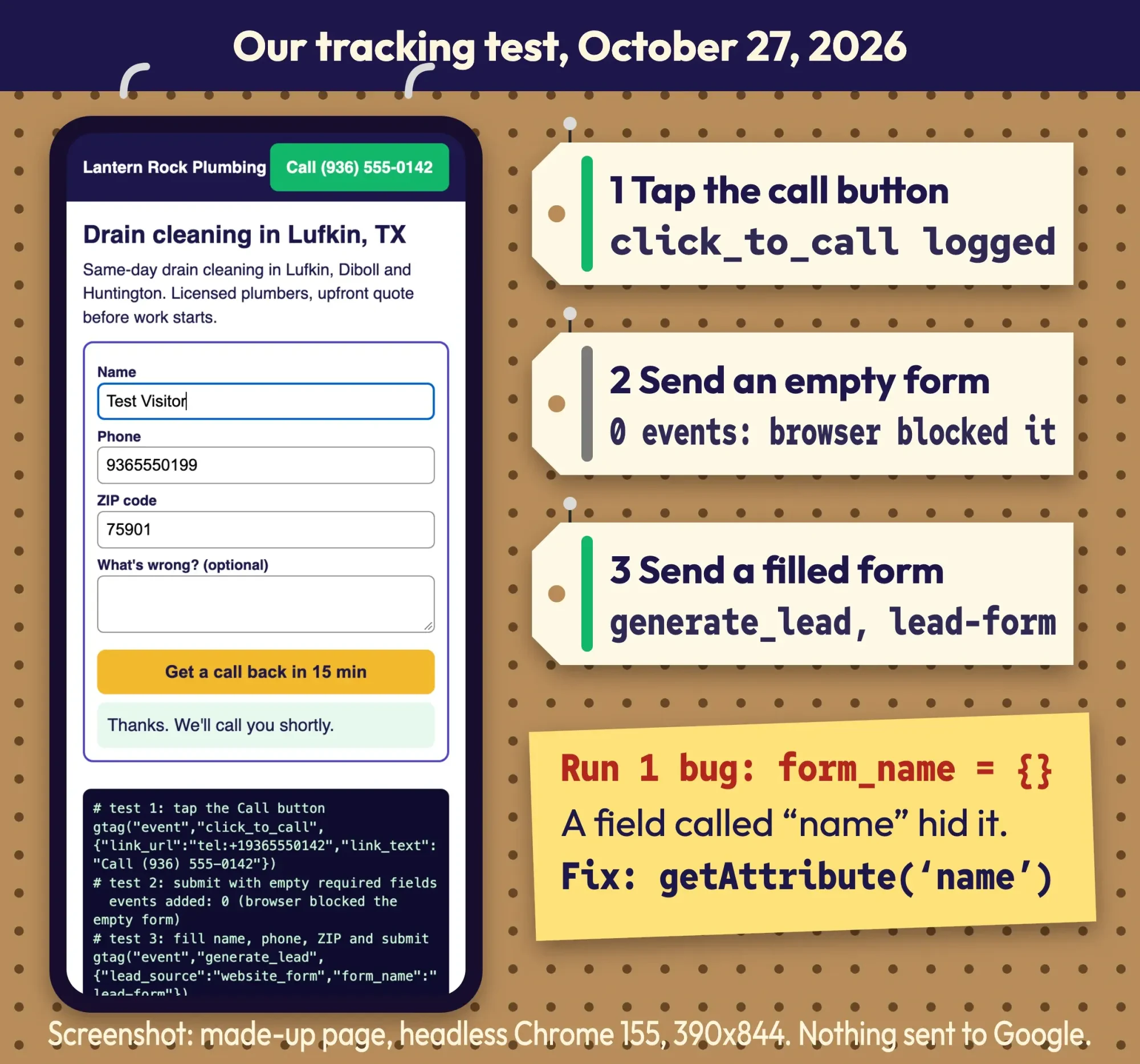 Screenshot: our local tracking test of a made-up page, headless Chrome 155 at 390x844, October 27, 2026. No data sent to Google.
Here's the snippet as we'd ship it, with a real fetch call and a thank-you redirect in place of our test's stand-ins. It counts a lead only after your server answers, so a failed send isn't counted as a lead:
// 1) Count a tap on any phone link before the phone app opens.
document.querySelectorAll('a[href^="tel:"]').forEach(function (link) {
  link.addEventListener('click', function () {
    gtag('event', 'click_to_call', { link_url: link.href });
  });
});

// 2) Count a form lead only after your server says the message arrived.
document.getElementById('quote').addEventListener('submit', function (e) {
  e.preventDefault();
  var form = e.target;
  fetch(form.action, { method: 'POST', body: new FormData(form) }).then(function (res) {
    if (!res.ok) return;
    gtag('event', 'generate_lead', {
      lead_source: 'website_form',
      form_name: form.getAttribute('name')  // not form.name: a field called "name" hides it
    });
    window.location.href = '/thanks';
  });
});
A slow page loses people before they see any of this. Check the page on mobile with a free page speed test before you blame the copy.
How do you track leads in GA4?
You track leads in GA4 by sending an event for each lead and marking it as a key event, Google's term for an event that measures "the important user interaction". Some lead signals arrive without code: with enhanced measurement on, GA4 records "form_start" the first time someone uses a form in a session and "form_submit" when they submit it.
Don't count form_submit as your lead, though.
It fires on the submit, not on a confirmed send. Google's events reference has a recommended event for the real thing: generate_lead, which "measures when a lead has been generated (for example, through a form)." That's the event in our snippet. Phone taps need your own event, like our click_to_call, because the default outbound-click event is built for links to other websites.
Then mark the events. In GA4's Admin, under Data display > Events, you mark one "by clicking the star icon next to it". A standard property can mark up to 30 events, and Google says to allow up to 24 hours before a new key event shows in standard reports. It doesn't change historic data, so start now rather than later. No developer? Send people to a thank-you page after the form and build a key event from page_view on that page only. Google's create or modify key events page uses that exact example, and warns you can't mark page_view itself, "since all pageviews will then count as key events."
| Visits the service page | page_view | Automatic | No |
| Starts the form | form_start | Enhanced measurement | No |
| Presses send | form_submit | Enhanced measurement | No (fires even if the send fails) |
| Form arrives | generate_lead | Your code, after the server answers | Yes |
| Taps the phone number | click_to_call (your name) | Your code on tel: links | Yes |
| Lands on the thank-you page | a new event made from page_view | GA4 Admin, no code | Yes, if you skip generate_lead |
| Becomes a customer | close_convert_lead | Your code or CRM import | Optional |
That table is the lead-tracking map we set up first on any service site. To see where people drop out, Google's tutorial builds a funnel exploration with four steps: home page view, form page view, form_start and form_submit.
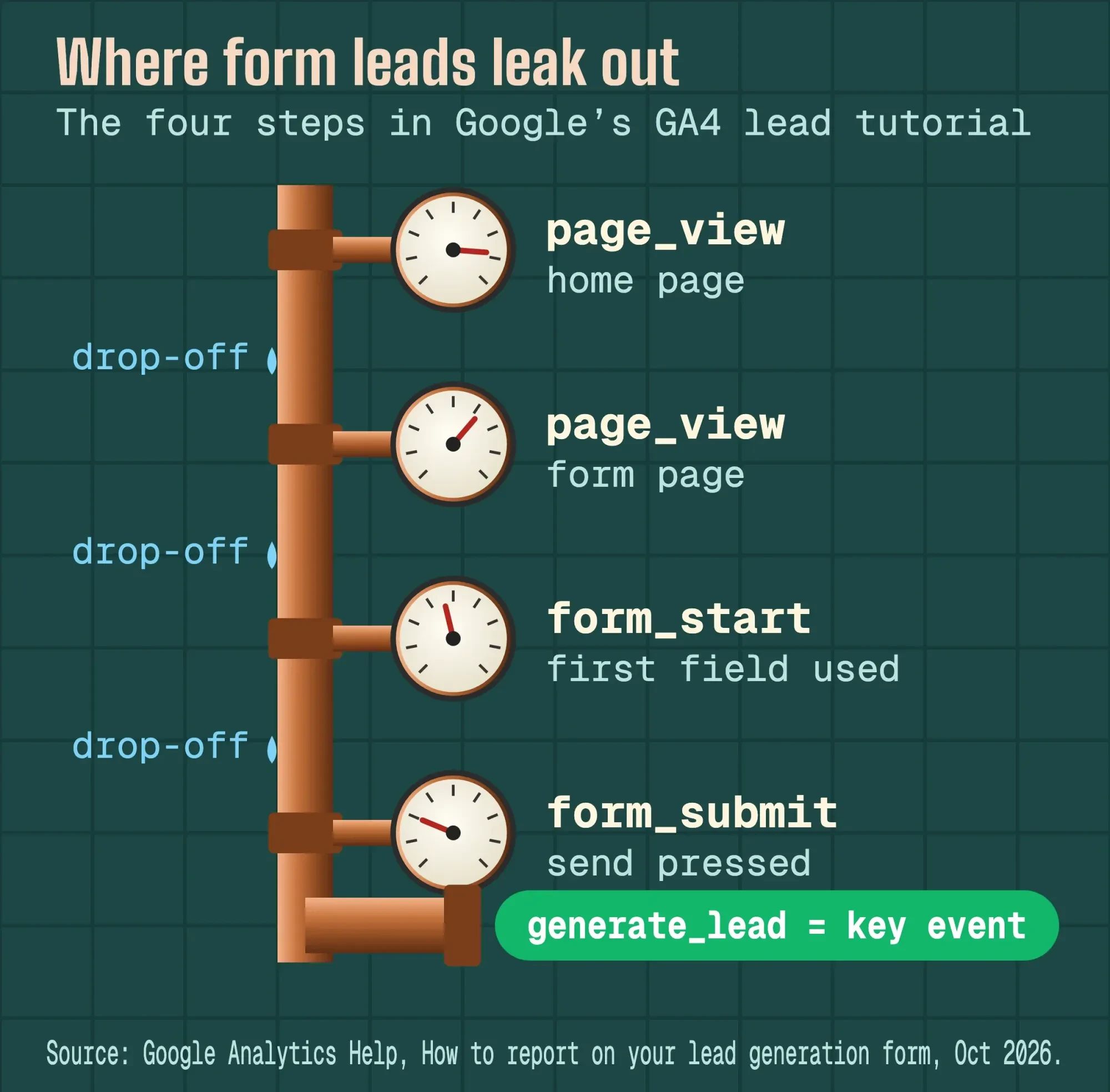 Diagram by DigitalTreed. Steps from Google Analytics Help, How to report on your lead generation form (read October 2026).
Our GA4 guide for SEO covers the set-up screens in order, including the settings to change on day one.
The callback is part of SEO lead generation
Even a tracked lead is still only a name and a number, and what happens next decides whether it turns into a job.
You'll often see bold claims about how fast you must reply, usually traced to a Harvard Business Review study from March 2011. We couldn't read that study today because it sits behind a paywall, so we won't repeat its numbers. We didn't find a free, primary, recent study on response time either.
What we can point to is Google's own behavior in a related product. For Local Services Ads, Google lists "Your responsiveness to customer inquiries and requests" among its ranking factors. It warns that "Missed calls may negatively affect your responsiveness", and counts "average response time" in profile quality.
It's an ads rule, not an organic one, but it shows Google measures how fast businesses answer.
Our take: decide who answers each lead before you spend another dollar on SEO. Name a person for calls and one for forms, set a callback target you can keep, and send missed calls to a voicemail that says when you'll call back.
Then close the loop. GA4's lead events go beyond the first contact: qualify_lead, working_lead and close_convert_lead, which you log "when a qualified lead is successfully converted into a customer". Even a simple CRM can record which leads came from search and which became jobs. Our first 30 days of a small-business CRM shows a set-up that a two-person office can keep up with.
Frequently asked
Do Business Profile call counts include calls from Google Ads?
Yes. As of October 2026, Google's Business Profile performance page says performance data covers views, searches and actions from both organic search results and Google Ads. So if you also run ads, the Calls number isn't purely organic. Compare it with your ad account before you credit SEO.
Can I list more than one phone number on my Business Profile?
Yes, up to 3 in total. As of October 2026, Google's guide to editing your profile says you can add up to 2 more numbers besides your primary one. They can be mobile or landline numbers, but not fax. You can also choose to hide your phone number.
Why can't I see this month's search terms in my Business Profile?
The report updates once a month. As of October 2026, Google's performance help page says the searches metric is updated at the start of each month. It might take up to 5 days to show up. Check last month's terms for the buyer phrases you track.
What an SEO lead generation service should do for you
If you hire help, the work above is what you're paying for: pages built around buyer searches, a clean Business Profile and a page that converts. You should also get tracking you can read and a monthly report in leads, not only rankings.
Google's page on whether you need an SEO is blunt: "No one can guarantee a #1 ranking on Google". For an audit, it says to "only grant read access to Search Console (at this stage, don't grant them write access)". It also suggests asking, "What kind of results do you expect to see, and in what timeframe? How do you measure your success?"
Two more rules from us. Keep your own Business Profile, GA4 property and domain in your name, with the agency added as a user. And be careful with any service that "sends you leads" from its own pages or numbers: when you stop paying, those leads stop too.
Hiring an SEO freelancer lists more questions and red flags. Want a team to build the pages, the profile and the tracking with you? Our SEO service does that work, and it's our own paid service, so we have a stake in you choosing it.
How we made this guide: On October 27, 2026, we checked each rule quoted here against its Google page. Those were Search Central's spam and helpful-content pages, Business Profile Help, Analytics Help's lead-generation tutorial and the GA4 events reference. We also used MDN, RFC 3966 and WCAG 2.2 for the phone link. You'll find each link beside the sentence it backs up.
Our hands-on part was a local test of the tracking snippet on a made-up page. We didn't open a GA4 property or a Business Profile for this guide, and no data went to Google. We made up Lantern Rock Plumbing and its phone number for this guide.
First published February 2024. Rewritten October 27, 2026: replaced a general piece about white-label agencies with a step-by-step guide to turning search visits into leads. Added service and city pages with Google's doorway rule, Business Profile phone and service-area rules, calls to action, click-to-call and forms, our tracking test, GA4 key events and follow-up.
Sources
- Google Search Central: Spam policies for Google web search (last updated August 28, 2026)
- Google Search Central: Creating helpful, reliable, people-first content
- Google Search Central: Do you need an SEO? (last updated June 5, 2026)
- Search Console Help: Performance report (Search results)
- Google Business Profile Help: Tips to improve your local ranking on Google
- Google Business Profile Help: Guidelines for representing your business on Google
- Google Business Profile Help: Manage your service areas for service-area and hybrid businesses
- Google Business Profile Help: Understand your Business Profile performance and insights
- Analytics Help: How to generate more leads on your website
- Analytics Help: How to report on your lead generation form
- Analytics Help: Enhanced measurement events
- Analytics Help: Mark events as key events
- Analytics Help: Create or modify key events
- Analytics Help: URL builders, collect campaign data with custom URLs
- Google for Developers: Google Analytics recommended events reference
- MDN Web Docs: The anchor element, linking to telephone numbers
- IETF RFC 3966: The tel URI for Telephone Numbers
- W3C: Understanding WCAG 2.2 Success Criterion 2.5.8, Target Size (Minimum)
- Local Services Help: About ad rankings
- Harvard Business Review: The Short Life of Online Sales Leads (March 2011, paywalled; numbers not used)


Comments
No comments yet. Start the conversation below.