
Quick answer
To build an Amazon affiliate website that lasts, start with a narrow niche you can test at home, 8 basic pages and review pages built on Google's review checklist. Product data must come from Amazon's own tools. The hard part isn't the software. It's proof: your photos, your numbers, your drawbacks.
Key takeaways
- Pick a niche narrow enough to test every product yourself.
- Plan 8 pages, including About, Disclosure and Privacy, before reviews.
- Build each review on Google's checklist: evidence, measurements, drawbacks.
- Show Amazon prices, images and ratings only through Amazon's tools.
- Our mock first build had 19 problems; the fixed one had 0.
An Amazon affiliate website is a site that recommends products and earns a commission through Amazon Associates links when readers buy. If you haven't joined yet, our guide to Amazon Associates sign-up and approval covers that part.
This one covers what comes before and after: the site itself.
We read Google's and Amazon's current rules on October 27, 2026. Then we built a small made-up site twice, once the quick way and once the careful way, and checked both.
Pick a niche you can actually test
So where do you start? With a niche small enough that you can use what you recommend. Google's helpful content guidance asks whether your content shows "first-hand expertise", like expertise "from having actually used a product".
That question rules out most "best everything" sites.
A site about "home and garden" needs hundreds of products in hand. A site about grow lights for kitchen herbs needs maybe a dozen. You can buy them, run them side by side and photograph the results.
Example: Sprout Shelf, a made-up indoor-gardening site run from Grand Forks, North Dakota, covers only herb lights, seed trays and timers. It's the site we built for our test below.
Before you settle on a niche, check what Amazon actually pays on it. Our guide to how much Amazon affiliates make walks through the math per 1,000 visitors.
And choosing which products to cover is its own skill; our post on affiliate product research covers program terms and checking pay before you commit.
WordPress or a site builder?
Now for the platform: WordPress suits most Amazon affiliate websites, because it's free, it handles hundreds of posts well and it doesn't lock you to one host. WordPress.org's requirements page asks for PHP 8.3 or newer, MySQL 8.0 or MariaDB 10.11, and HTTPS.
Almost any paid host meets that. Ask first.
Our step-by-step WordPress website guide walks through buying a domain, installing WordPress, securing it and launching, with real year 1 and renewal costs for each piece.
A builder can work too, especially if you don't want to update plugins. Our guide to building a website with AI compares AI builders with WordPress. Whatever you pick, make sure it lets you edit the footer, add rel attributes to links and create plain pages.
You'll need all three in the next step.
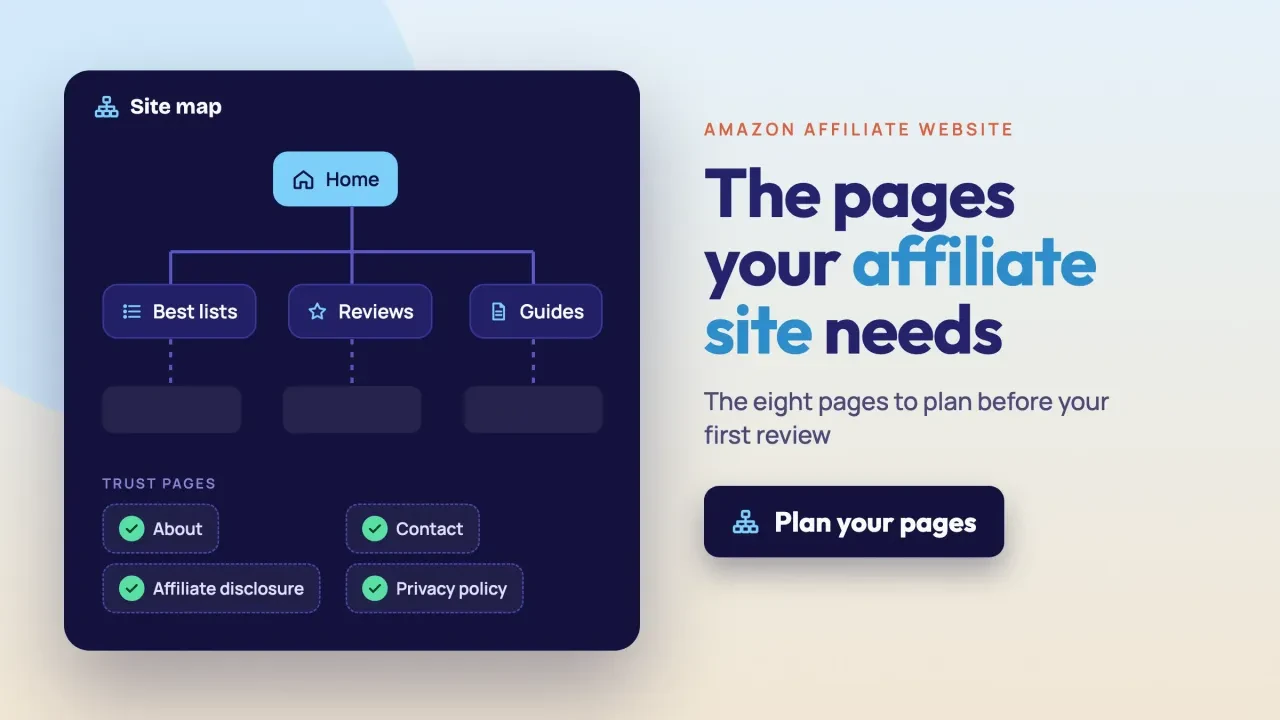
Plan 8 pages before you write a single review
Next comes the site map, and most first affiliate sites get it backwards. They launch with a home page and a few reviews.
Plan all of it first. Some pages carry rules, not content.
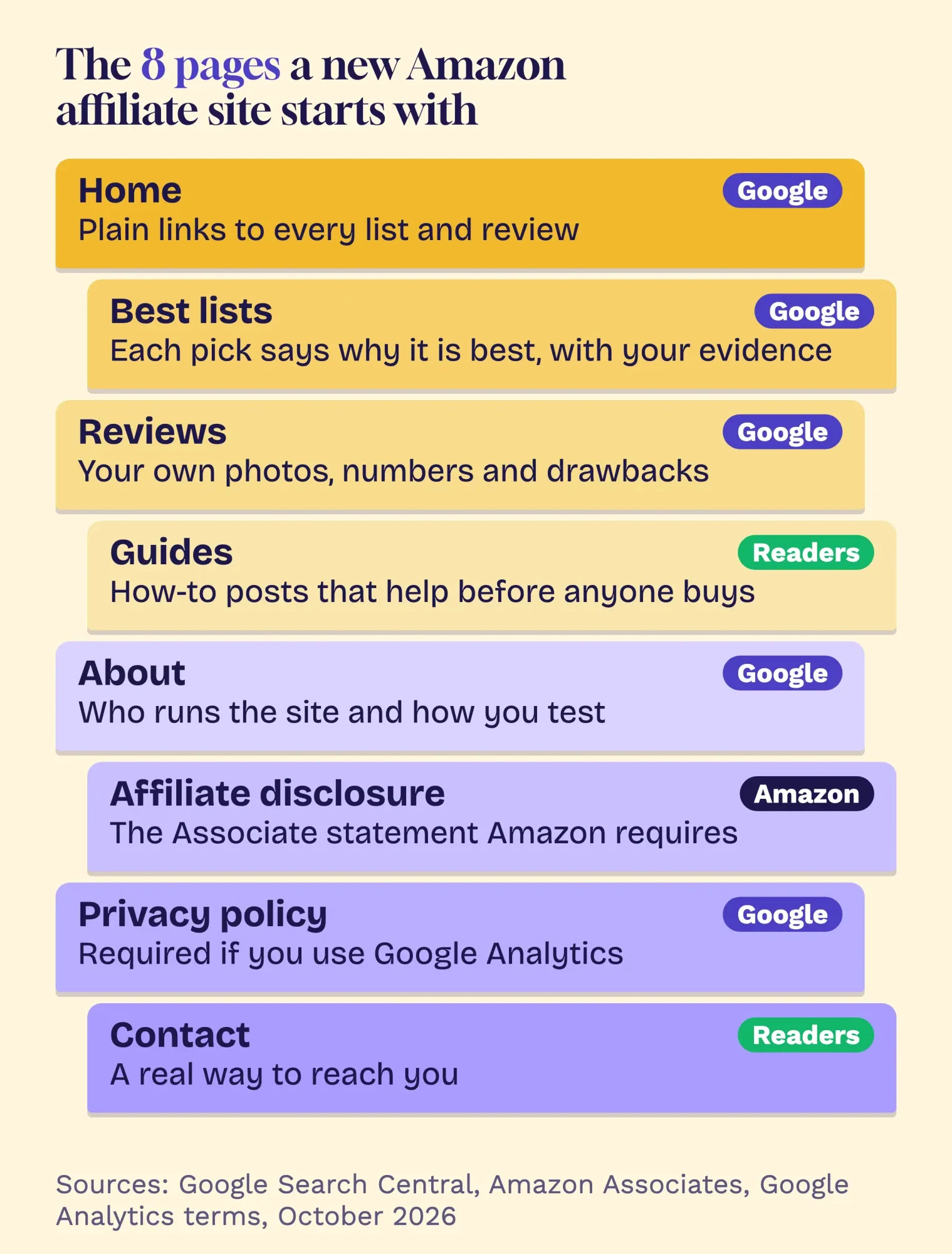 Diagram by DigitalTreed. Who expects each page, from Google Search Central, Amazon Associates and the Google Analytics terms, read October 2026.
Two of the eight are rules, not choices. Amazon's Operating Agreement requires a statement on your site that you're an Amazon Associate; a disclosure page plus the footer line covers that.
If you use Google Analytics, its terms say "You must post a Privacy Policy" that gives notice of your cookies. That's the privacy page.
The About page is for trust. Google's helpful content guidance asks whether readers can find "background about the author or the site", such as "a site's About page". Say who tests, where and how.
Then wire the pages together. Google's starter guide for Search notes that it "primarily finds pages through links from other pages it already crawled". So every list and review needs a plain link from the home page, a list or a guide.
Use readable addresses as well, like /grow-lights/leaflamp-2-review (LeafLamp 2 is our made-up lamp), not a string of numbers.
If the build is the part you'd rather hand off, we set up WordPress sites like this for clients; here's how we handle web development. It's our own business, so read that as a pitch.
What makes a review page Google trusts?
Once the pages are planned, a review page earns trust when it shows proof you used the product: your own photos, your measurements, the drawbacks and who it suits best. Google's Write high quality reviews page lists exactly these, and it's short enough to print.
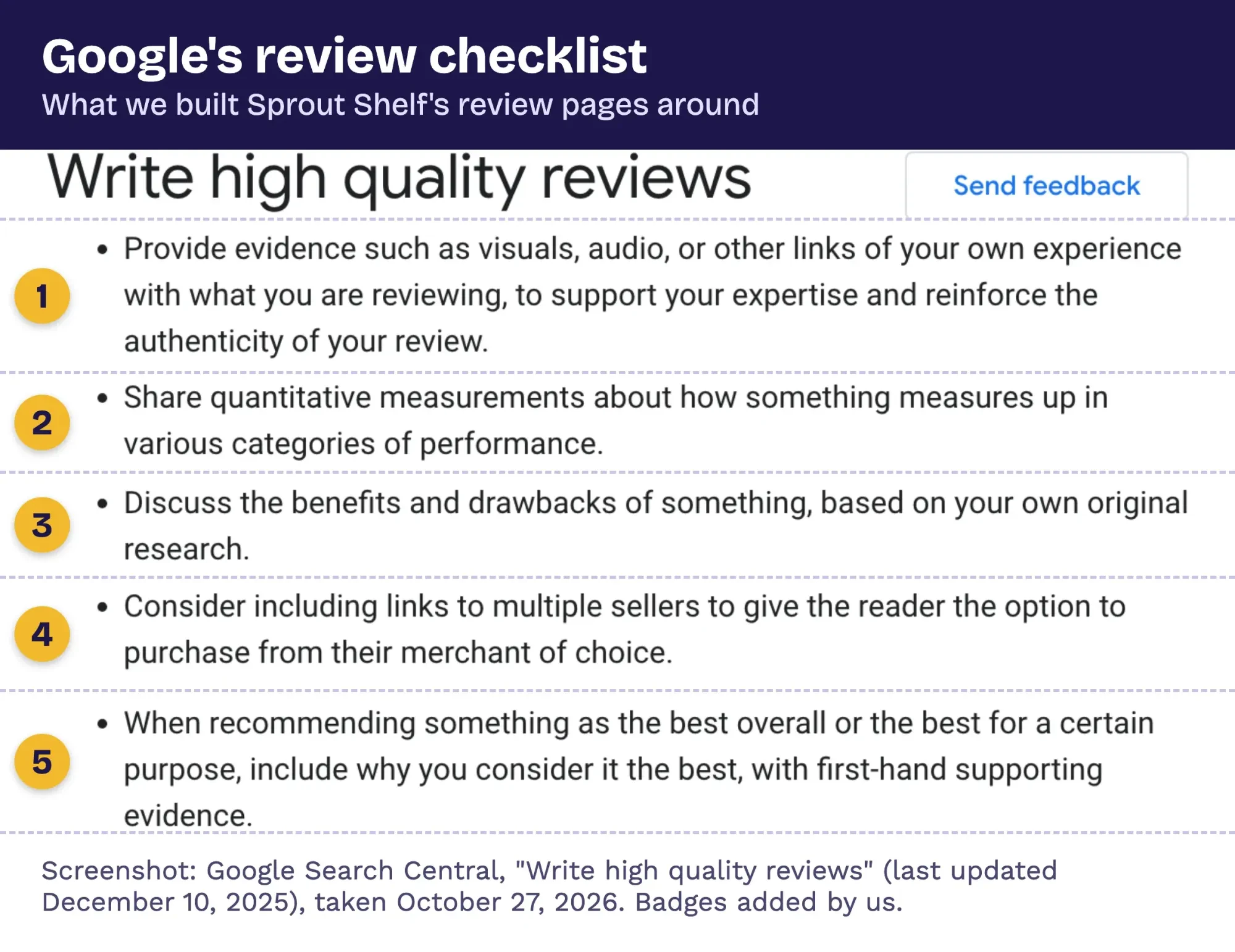 Screenshot: Google Search Central, "Write high quality reviews", taken October 27, 2026. Numbered badges added by DigitalTreed.
Three lines on that page matter most.
Google asks you to "provide evidence such as visuals, audio, or other links of your own experience". It wants "quantitative measurements". And it wants "benefits and drawbacks" from "your own original research".
For ranked lists, Google adds that a "best overall" pick should say why, "with first-hand supporting evidence". It also suggests linking to several sellers, so readers can buy where they like. That's worth weighing even on an Amazon-first site.
Now the part most guides skip. Google's reviews system page says it mainly judges reviews page by page. But for sites with "a substantial amount of review content, any content within a site might be evaluated".
An Amazon affiliate site is almost all reviews. So one lazy template, copied across 50 products, can weigh on the good pages too.
Google's spam policies call that pattern "thin affiliation". It means product descriptions and reviews "copied directly from the original merchant without any original content or added value". Its scaled content rules also cover pages mass-made by AI tools without value.
If video is easier for you than writing, a filmed test counts as evidence too. Our post on affiliate review videos covers how to make one that sells honestly.
Use Amazon's tools for prices, images and star ratings
Even with your own proof in place, product details are where copy and paste gets accounts in trouble. Amazon's rules are stricter than most people expect.
The Program Policies are blunt about ratings. You won't show "any of our customer reviews or star ratings, in part or in whole" without a link from Amazon's Creators API or PA API. So "4.6 out of 5 stars" typed into a review is a breach. Even one line.
They also say you won't alter Program Content, though you may resize an image if you keep its proportions.
If you pull prices through the API and refresh them less often than hourly, the policies want a date and time stamp right next to the price.
Our take: take your own product photos, and let Amazon's links and tools handle prices and ratings. Your photos count as Google's evidence, and you skip Amazon's image limits.
The links themselves need a label as well. Google's outbound links page asks you to mark paid links with rel="sponsored", and says nofollow is still acceptable. Our guide to using affiliate links covers placement, disclosure lines and tracking.
Our mock site went from 19 flags to 0
Those rules are easy to read and easy to miss, so we tested them. On October 27, 2026, we built Sprout Shelf twice, as local files. Version one was the quick build most beginners ship: 4 pages, with a home page, one list, one review and a contact page. Version two had all 8 pages. Then we wrote a small Python script that reads every page and flags what the sources above ask for.
It checked whether each page can be reached from home, whether the trust pages exist and are linked everywhere, and whether the Associate line is on each page. It also flagged Amazon links without rel="sponsored", Amazon-hosted images, copied star ratings and review pages with no photo, numbers or drawbacks.
The quick build failed 19 checks. The careful build failed none.
Nineteen to zero.
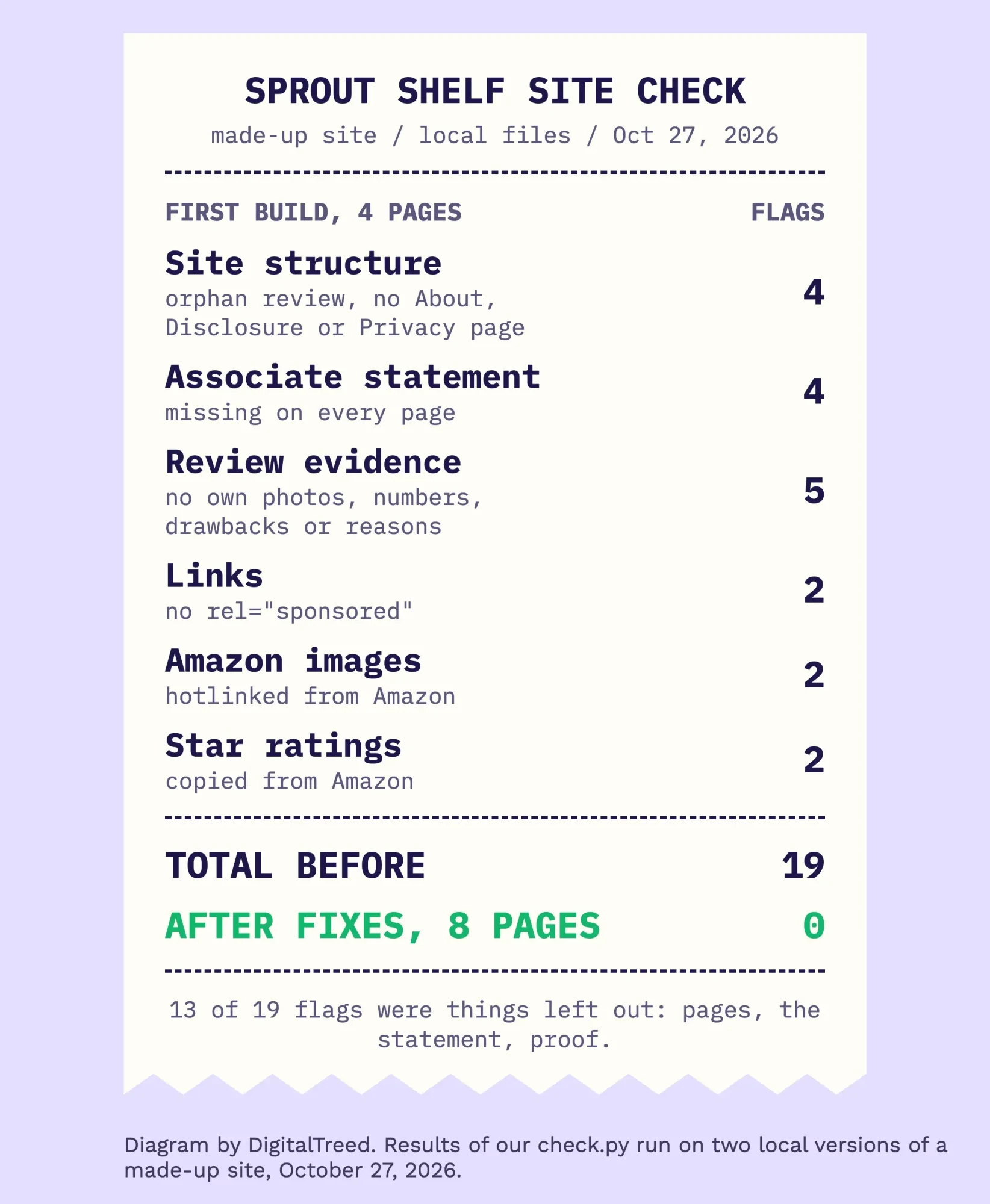 Diagram by DigitalTreed. Our check.py run on two local versions of a made-up site, October 27, 2026.
What surprised us was how few of the 19 were about writing. Thirteen were things left out: the About, disclosure and privacy pages, the Associate line on 4 pages, and the photos, numbers, drawbacks and reasons. The 13th: the review page was an orphan, so no link reached it from home.
Here's the fixed review page, with the parts that cleared the flags marked.
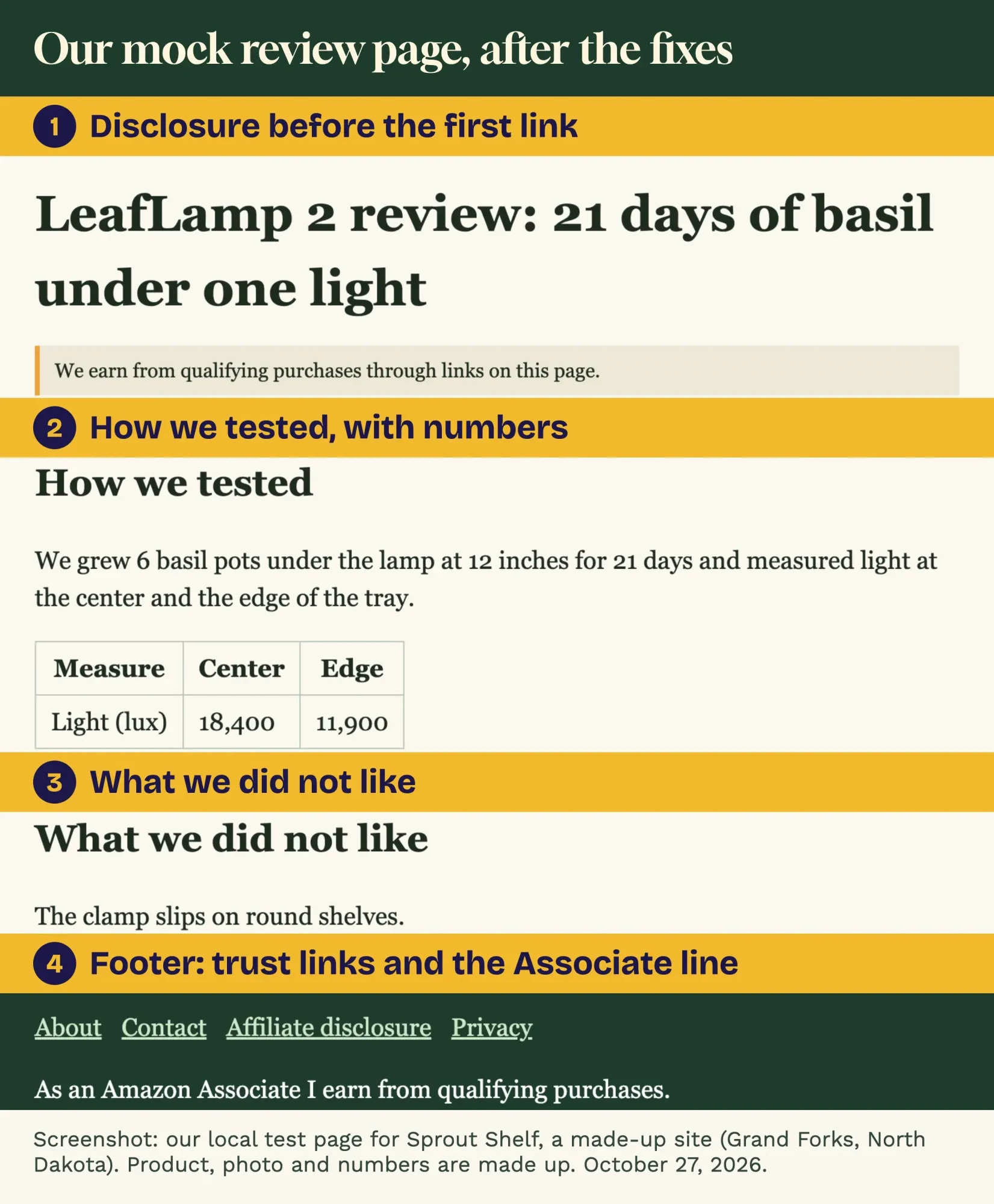 Screenshot: our local test page for Sprout Shelf, a made-up site. Product, photo and numbers are made up. October 27, 2026.
One limit matters. Our script reads HTML; it isn't Google's ranking or Amazon's compliance review, and it can't judge whether a review is any good. It only catches the gaps that are easy to miss.
Keep pages fast and links labelled
Then comes speed, the last part of the build. Photo-heavy review pages are where it slips. Google's Core Web Vitals page sets the targets: Largest Contentful Paint within 2.5 seconds, Interaction to Next Paint under 200 milliseconds and Cumulative Layout Shift under 0.1.
Big photos straight off a phone are the usual cause on affiliate sites.
Resize each one to the width your theme shows. Save it as WebP or a compressed JPEG. Then set a width and height, so the page doesn't jump while it loads.
Then run your heaviest review through the DigitalTreed speed test. The PageSpeed Insights chapter in our guides explains the field and lab numbers you'll see.
Launch, then grow one cluster at a time
Once the 8 pages are live and a few reviews are done, the site is ready for Amazon's review. The rules for that stage, including the sales Amazon expects, are in the sign-up guide linked at the top.
After launch, grow in clusters rather than at random: add one list, then the single reviews behind it, then a how-to guide that links to both of them.
Each new page should link to the others, and a quick pass with our website audit tool will catch missing titles, broken links and slow pages as the site grows.
Patience is part of the plan. Google's starter guide says some changes take effect "in a few hours, others could take several months", and suggests waiting "a few weeks" before judging a change.
Is writing tested reviews week after week the bottleneck? We plan and write posts for US sites as a content marketing service. We charge for it, so we're biased.
Frequently asked
Can I use Amazon product images on my affiliate site?
Only through Amazon's own tools, and with limits. The Program Policies say you won't store or cache API images, though you may store a link to one for up to 24 hours. Your own photos avoid that rule entirely.
Does Google penalize Amazon affiliate websites?
Not for being affiliates. Google's spam policies say "Not every site that participates in an affiliate program is a thin affiliate." They name good examples: original reviews, rigorous testing and ratings, and product comparisons.
Can I build an Amazon affiliate site about kids' products?
For parents, yes, but not a site aimed at children. The same policies rule out sites that are "directed toward children" or that knowingly collect data from children under 13, and name the Children's Online Privacy Protection Act. Ask a lawyer if your audience is mixed.
Does every Amazon affiliate link need rel="sponsored"?
Google asks for it on paid links. Its outbound links page says sponsored is preferred and nofollow is "still an acceptable way to flag them". It doesn't replace the disclosure readers see.
How we made this guide: The DigitalTreed team checked every rule here on October 27, 2026. We read seven Google Search Central pages, WordPress.org's requirements, the Google Analytics terms, and Amazon's Program Policies (updated April 14, 2026) and Operating Agreement (updated October 15, 2025). We built the Sprout Shelf mock site and the checking script ourselves and ran them offline. No Amazon account or real product was used, so the LeafLamp 2 test numbers are invented for the mock page. Sources are linked where each rule appears.
First published August 2020. Rewritten October 27, 2026: the list of famous affiliate sites is replaced by a build guide. It now covers the niche, the platform, the 8 pages, review pages built on Google's checklist, Amazon's rules for product data, page speed and our mock-site check.
Sources
- Google Search Central: Write high quality reviews (last updated December 10, 2025)
- Google Search Central: Google Search's reviews system and your website
- Google Search Central: Spam policies for Google web search, thin affiliation
- Google Search Central: Creating helpful, reliable, people-first content
- Google Search Central: Qualify your outbound links to Google
- Google Search Central: Understanding Core Web Vitals and Google search results
- Google Search Central: SEO Starter Guide
- WordPress.org: Requirements
- Amazon Associates: Associates Program Policies (updated April 14, 2026)
- Amazon Associates: Associates Program Operating Agreement (updated October 15, 2025)
- Google Analytics Terms of Service (US)

Comments
No comments yet. Start the conversation below.