
Quick answer
The best SEO analysis tools for a small business are free and come from Google. Use Search Console for indexing and search clicks, PageSpeed Insights for speed and the Rich Results Test for markup. Add a free site crawl. Pay for a suite like Semrush, Ahrefs, Moz or SE Ranking only when you need competitor data every month.
SEO analysis tools show how search engines see your site: which pages are indexed, what people search and what slows a page down. Google's Do you need an SEO? page says "it costs nothing to appear in our organic search results." It points owners to Search Console, which is free.
This guide is built around jobs, not brands. For each job you get the free tool first, then the point where a paid tool earns its fee. On October 22, 2026, we also ran Lighthouse on a fictional local test page to show what a tool score can and can't tell you.
Key takeaways
- Set up Google Search Console before you buy anything. It is the only tool with Google's own search data about your site.
- In our test, a page with the meta description "Home" scored 100 for SEO in Lighthouse. A perfect score means the basics exist, not that the page is good.
- The same page scored 71, 75 and 75 for Performance in 3 runs. Small changes between runs are normal.
- As of October 2026, Moz Pro listed $99 a month and SE Ranking Core $129 a month on monthly billing, per their pricing pages.
- Check your reports about once a month, as Google suggests, plus after any big site change.
What is an SEO analysis tool?
An SEO analysis tool is software that checks your site the way a search engine sees it. Some show Google's own data about your site. Others test one page, visit every page, or estimate data about your competitors.
- Google's own reports: Search Console, PageSpeed Insights and the Rich Results Test. The data comes from Google itself.
- Page testers: Lighthouse and most "SEO checker" sites. They test one page against a fixed list of rules.
- Crawlers: Screaming Frog and site audit tools. They visit every page and list broken links, missing titles and redirects.
- Suites: Semrush, Ahrefs, Moz Pro and SE Ranking. They add keyword and backlink estimates for other sites, plus rank tracking.
For every free tool and its limits in one table, see our guide to the best free SEO tools by job. This post is about choosing between the kinds above, and knowing when to pay.
Want to learn each tool in depth? Our SEO tools explained learning path gives every tool its own guide, from Search Console to Screaming Frog.
SEO analysis tools: key facts
- Search Console keeps the last 16 months of data, per Google Analytics Help.
- Its Performance report opens on the past 3 months by default, per Search Console Help.
- A Largest Contentful Paint (LCP) of 2.5 seconds or less is good at the 75th percentile of real users, per Google's PageSpeed Insights docs.
- Screaming Frog crawls up to 500 URLs for free, per its pricing page (vendor, October 2026).
- Google's page on third-party SEO tools, updated June 5, 2026, says they "don't have access to our internal ranking data."
- Bing added AI Performance to Bing Webmaster Tools in public preview on February 10, 2026, per Bing's webmaster blog.
Which SEO analysis tool fits which job?
Most jobs need only a free Google tool: Search Console for indexing and clicks, PageSpeed Insights for speed and the Rich Results Test for markup. A paid suite helps mainly with competitor keywords, backlinks and daily rank tracking. The table matches 10 common jobs to a free tool.
| Job | Free tool to start | When a paid tool helps |
|---|---|---|
| Is Google indexing my pages? | Search Console: Page indexing and URL Inspection | Rarely, on a small site |
| What do people search to find me? | Search Console: Performance report | To see the keywords competitors rank for |
| Where do I rank for my main keywords? | Search Console: Performance report, Queries tab (average position) | Daily rank tracking for hundreds of keywords |
| Which search visits turn into leads? | Google Analytics, linked to Search Console | Rarely, on a small site |
| Is my site fast on phones? | PageSpeed Insights | Not needed |
| Is my structured data valid? | Rich Results Test | Not needed |
| Broken links, missing titles, redirects | A site crawl (Screaming Frog is free up to 500 URLs) | Bigger sites, or crawls on a schedule |
| Keyword ideas | Keyword Planner in Google Ads, Google's autocomplete | Search volume and difficulty for many keywords |
| Who links to my site? | Search Console: Links report; Ahrefs Free for verified sites | Backlink research on competitors |
| Am I cited in AI answers? | Bing Webmaster Tools: AI Performance | AI tracking add-ons in the suites |
Google's Search Console starter guide says URL Inspection "provides the current index status of website pages" for any URL. The Keyword Planner help page says it shows "estimates of the searches they receive" for each keyword. Screaming Frog's pricing page sets the free crawl limit at 500 URLs.
Want a first look before you set anything up? Run our free website audit tool on your home page. It runs 50+ checks across 10 areas, crawls up to 25 pages and sorts the fixes by what they are worth.
Can SEO analysis tools show if you appear in AI answers?
Partly, and for free: Search Console counts appearances in Google's AI Overviews and AI Mode inside its normal Performance report. Bing Webmaster Tools goes further and counts how often Copilot and Bing's AI summaries cite your pages. Google's guide to AI features in Search places them under the "Web" search type. Google also says there are "no additional requirements to appear in AI Overviews or AI Mode."
Bing added AI Performance in Bing Webmaster Tools in public preview on February 10, 2026. It counts how often your pages are cited as sources in Microsoft Copilot and Bing's AI summaries.
How do you do an SEO analysis of your website?
Check 5 things in order: indexing, search clicks, speed, structured data and site-wide errors. On a small site, free tools cover all 5: Search Console, PageSpeed Insights, the Rich Results Test and a free crawler. Then fix the pages with the most impressions first, because those changes reach the most searchers.
Do a free SEO analysis of a small website
- Verify your site in Search Console Verify that you own the site, so Google starts showing you its data. The next section has the setup steps.
- Check indexing Open the Page indexing report, then run URL Inspection on your key pages. It shows the current index status of each page.
- Read search clicks In the Performance report, sort pages by impressions and look for a low CTR (click-through rate). Those titles need a rewrite.
- Test speed Run PageSpeed Insights on your home page and your main service page. Read the real-user data first, if the page has enough visits.
- Test structured data Run your markup through the Rich Results Test and fix any errors it lists.
- Crawl the whole site Use a crawler to find broken links, redirects and missing titles. Screaming Frog is free up to 500 URLs.
For a quick first pass, try our free SEO audit tool. It checks HTTPS and security, SEO and schema, and Google PageSpeed, and crawls up to 25 pages, in about a minute.
Which free Google SEO tools should you set up first?
Set up Google Search Console first. Google calls it a tool that helps "anyone with a website to understand how they are performing on Google Search," in its getting started guide. You verify that you own the site, then Google starts showing you its data.
- Verify ownership. Your web host or website builder usually has a one-click option.
- Submit your sitemap. Google says this "might speed up your site's discovery," though it can find pages without it.
- Watch for email alerts. Search Console emails you when it finds a new issue on your site.
- Open the Performance report and look at the last 3 months, which is the default view.
The Performance report help page defines 4 numbers. Clicks count how often people clicked through to your site from Google Search. Impressions count how often your site appeared. CTR (click-through rate) is clicks divided by impressions, and average position is the average spot of your topmost result.
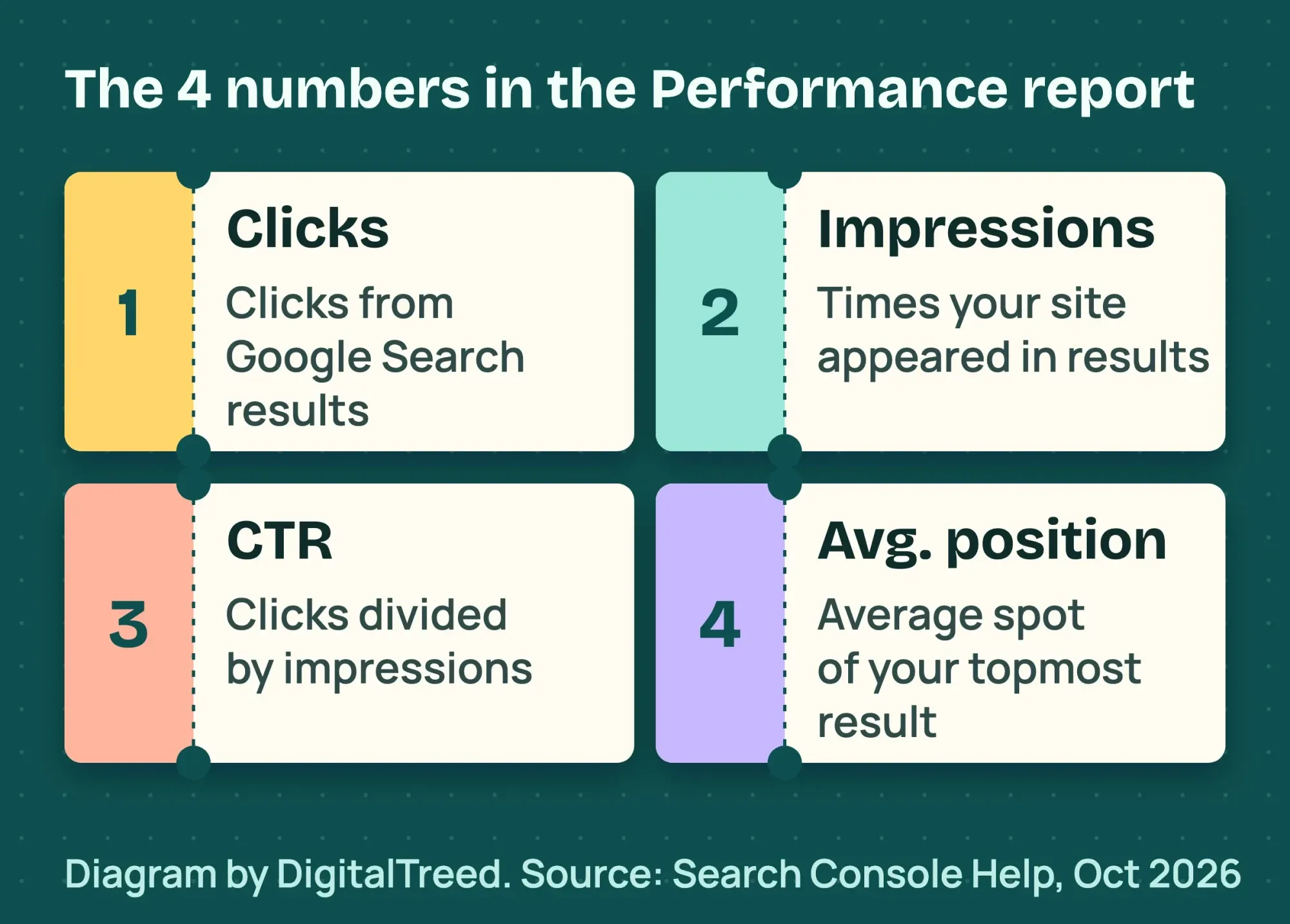 Diagram by DigitalTreed, definitions from Google Search Console Help, read October 2026.
This report holds your quickest win. Sort pages by impressions and find ones with low CTR. Those pages show up but don't get clicked, so rewrite their titles and descriptions. Check the new wording in our free SERP snippet preview before you publish it.
Don't expect Search Console clicks to match Google Analytics sessions. Google's page on the two tools says the numbers differ and calls that normal, "not something you need to fix" at all. For a full tour of every report, read our Google Search Console guide.
Do you need Google Analytics for SEO analysis?
Yes, if you want to know which search visits turn into calls or form fills. Search Console shows what happens on Google, and Google Analytics shows what visitors do on your site after the click. For heatmaps, cookieless counts and what each tool costs, see our guide to website analytics tools by job.
Link the two, and Analytics adds 2 reports: Google Organic Search Queries and Google Organic Search Traffic, per Google Analytics Help. They show which queries lead to clicks and which landing pages engage visitors. The data arrives 48 hours after Search Console collects it.
In Analytics, the Organic Search channel counts visits from non-ad search results, including Google's AI Overviews and AI Mode, per Google's default channel group page. Our Google Analytics 4 for SEO guide shows the setup and key events.
What does a tool's score really tell you?
A score tells you which rules a page passed, such as having a title and a meta description. It doesn't tell you whether people will find the page useful or click it. We tested this on October 22, 2026.
Our test: Lighthouse scores on a fictional plumber page
We built a one-page site for a fictional business, "Cedar Ridge Plumbing (example)," and served it on our own computer. Then we ran Lighthouse 12.8.2, the free page tester built into Chrome, in mobile mode.
- With no meta description, the SEO score was 91. Lighthouse flagged "Document does not have a meta description."
- We added a useless description, the single word "Home." The SEO score went to 100.
- We ran the first page 3 times without changing it. The Performance scores were 71, 75 and 75.
- We gave the page a deliberately oversized 9.6 MB photo. Its Largest Contentful Paint was 47.9 seconds in all 3 runs, far slower than a normal page.
| Run | Meta description | SEO | Performance | Accessibility | Best Practices | LCP |
|---|---|---|---|---|---|---|
| 1 | None | 91 | 71 | 100 | 96 | 47.9 s |
| 2 | None | 91 | 75 | 100 | 96 | 47.9 s |
| 3 | None | 91 | 75 | 100 | 96 | 47.9 s |
| 4 | The word "Home" | 100 | 75 | 100 | 96 | 47.9 s |
All 4 runs used Lighthouse 12.8.2 in mobile mode on October 22, 2026, on the same fictional page. From run 3 to run 4, only the SEO score changed, because the page now had a description. You are welcome to cite these numbers with a link to this page.
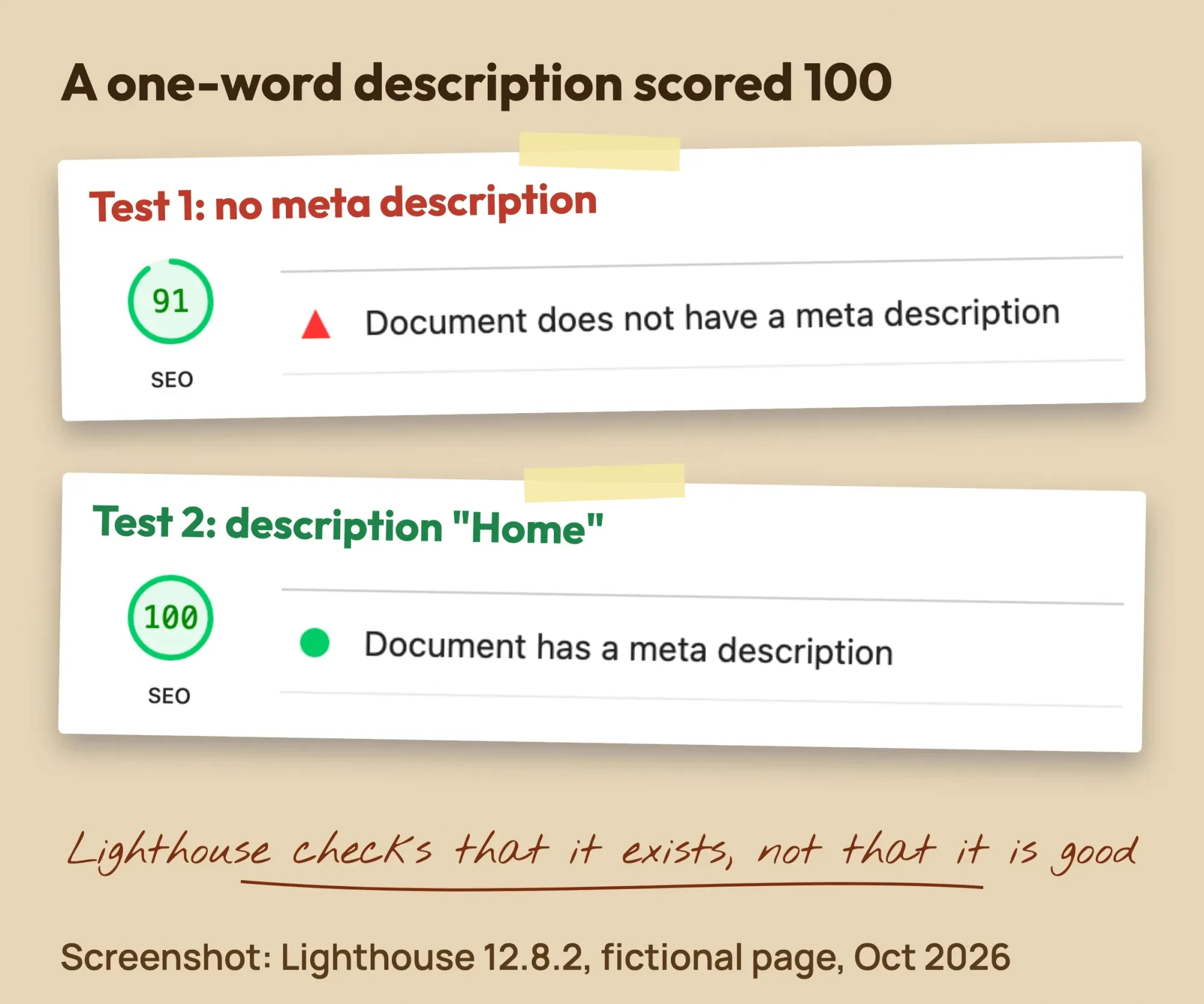 Screenshot: Lighthouse 12.8.2 on our fictional local test page, October 22, 2026.
That matches the Lighthouse meta description audit page, which says "Lighthouse doesn't evaluate the quality of your description." The check only asks whether one exists. So a 100 means the basics are in place, not that your page will rank.
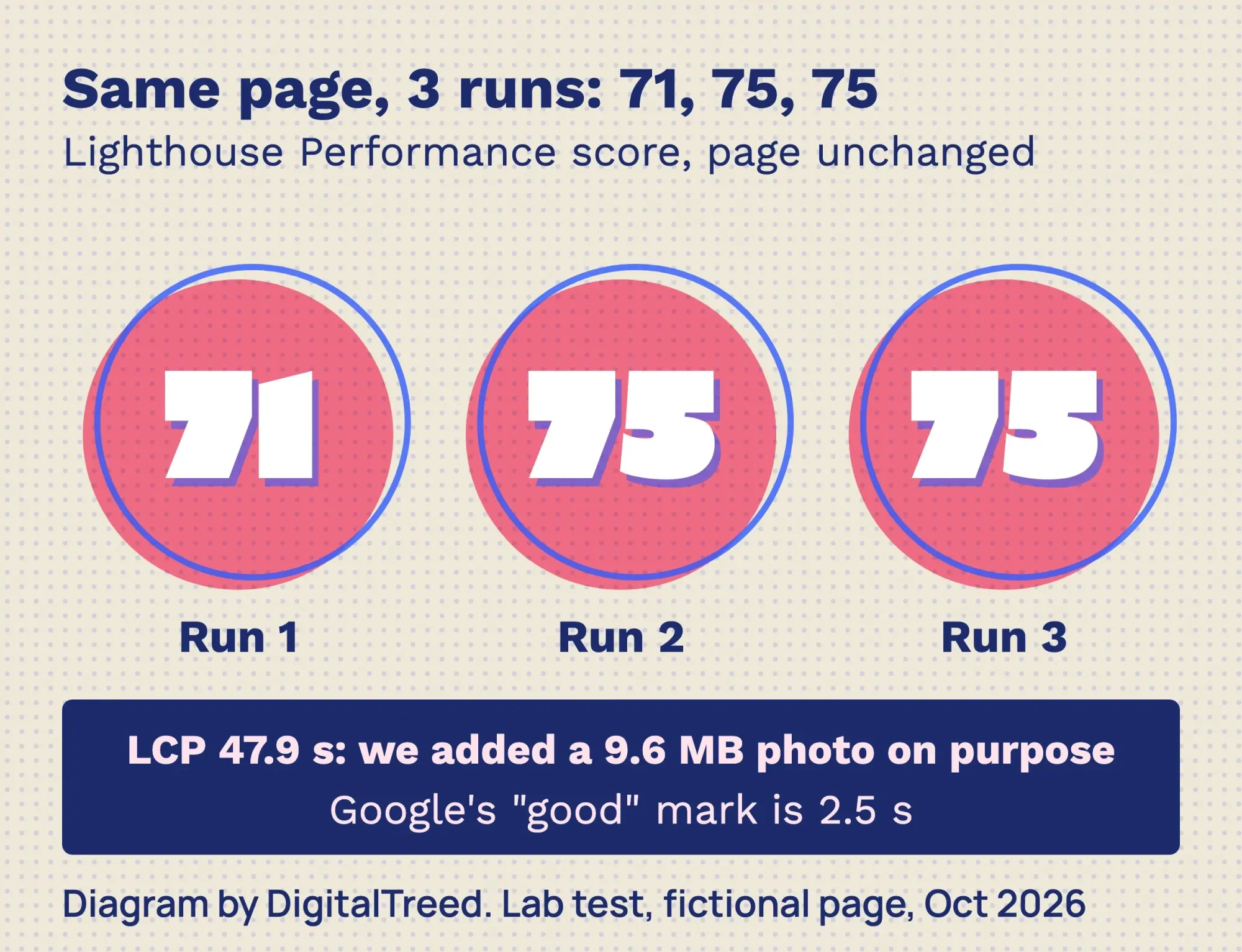 Diagram by DigitalTreed from our Lighthouse 12.8.2 runs, October 22, 2026. Lab test of a fictional local page.
Scores also move between runs. The PageSpeed Insights documentation names "local network availability, client hardware availability, and client resource contention" as common causes. It rates 90 or above as good, 50 to 89 as needs improvement and under 50 as poor.
The same page explains lab data and field data. Lab data comes from one simulated test, like ours. Field data comes from real Chrome users over the last 28 days. Google says good lab data "does not necessarily mean real-user experiences will also be good."
Many small sites see no field data at all. That data needs a "sufficient number of distinct samples," so a site with few visitors may only get lab numbers. That isn't an error.
To check how much your page weighs and how fast your server answers, try our free website speed test. Our PageSpeed Insights guide explains every metric in the report.
One more rule from Google. Its advice on hiring an SEO says to check a third-party tool's audit "against official guidance from Google Search" before big changes. Treat any "SEO score" email the same way.
Google's guidance on third-party SEO tools goes further. It says these tools "don't have access to our internal ranking data" and adds, "They can't guarantee performance."
Turning these reports into a fix list is the hardest part. If you'd rather hand it off, our SEO services team can read them and do the work. You see the plan first. (DigitalTreed sells this service.)
How do you test structured data before it goes live?
Use the Rich Results Test's Code tab. Google's Rich Results Test help page says to "choose Code instead of URL" and paste the code to be tested. You can edit and rerun it "as often as you like."
We pasted this fictional LocalBusiness code for our test plumber. The phone number uses the 555-01xx range, and .test is a reserved domain name.
<script type="application/ld+json">
{"@context": "https://schema.org", "@type": "Plumber",
 "name": "Cedar Ridge Plumbing (example)",
 "telephone": "+1-208-555-0142",
 "address": {"@type": "PostalAddress", "streetAddress": "100 Example St",
   "addressLocality": "Boise", "addressRegion": "ID", "postalCode": "83702", "addressCountry": "US"},
 "openingHours": "Mo-Fr 08:00-17:00",
 "url": "https://cedar-ridge-plumbing.test/"}
</script>
On October 22, 2026, we ran it signed out on the Code tab. It found 2 valid items, Local businesses and Organization, and listed 2 non-critical issues: the optional "image" and "priceRange" fields were missing.
The same help page warns that the test ignores comments inside JSON-LD, but the JSON-LD standard doesn't allow them. Remove comments before you publish. For a second check on pasted code, use our free schema markup validator, which also lists missing fields for 18 common types.
When is a paid SEO suite worth it?
A suite is worth it when you will act on competitor data every month. Think keywords other sites rank for, their backlinks and daily rank tracking. If you only need to check your own site, the free tools above cover it.
How much do SEO tools cost?
Google's SEO tools cost $0. As of October 2026, Moz Pro listed plans from $49 a month, and SE Ranking Core cost $129 a month on monthly billing. Semrush and Ahrefs did not show us plan prices. The table lists each vendor's price and free option.
| Tool | Price on the vendor's page (as of October 2026) | Free option |
|---|---|---|
| Google Search Console, PageSpeed Insights, Rich Results Test | $0 | Free |
| Screaming Frog SEO Spider | $279 per license per year (1 to 4 licenses) | Free up to 500 URLs |
| Moz Pro | $99, $179 or $299 a month billed monthly; $79, $143 or $239 a month billed yearly; entry plan $49 a month | Free trial |
| SE Ranking | Core $129 a month, or $103.20 a month billed annually; Growth $279 a month | 14-day free trial |
| Semrush | Plans named SEO, Starter, Pro+ and Advanced; prices did not load for us | 7-day free trial |
| Ahrefs | Paid plans listed; prices did not load for us; extra users from $40 a month | Ahrefs Free for verified sites |
All prices are vendor data, read on Moz Pro's pricing page, SE Ranking's plans page and Screaming Frog's page on October 22, 2026. Prices change often, so check before you buy.
We could not see plan prices on Semrush's pricing page. It lists an SEO plan "for freelancers and small businesses" with 5 websites and 500 tracked keywords. Semrush also offers a 7-day free trial.
Ahrefs' pricing page didn't show plan prices to us either, and it says "We never run discounts" in its FAQ. Its Ahrefs Free account is "Not a trial" and gives verified sites limited access to Site Explorer and Site Audit.
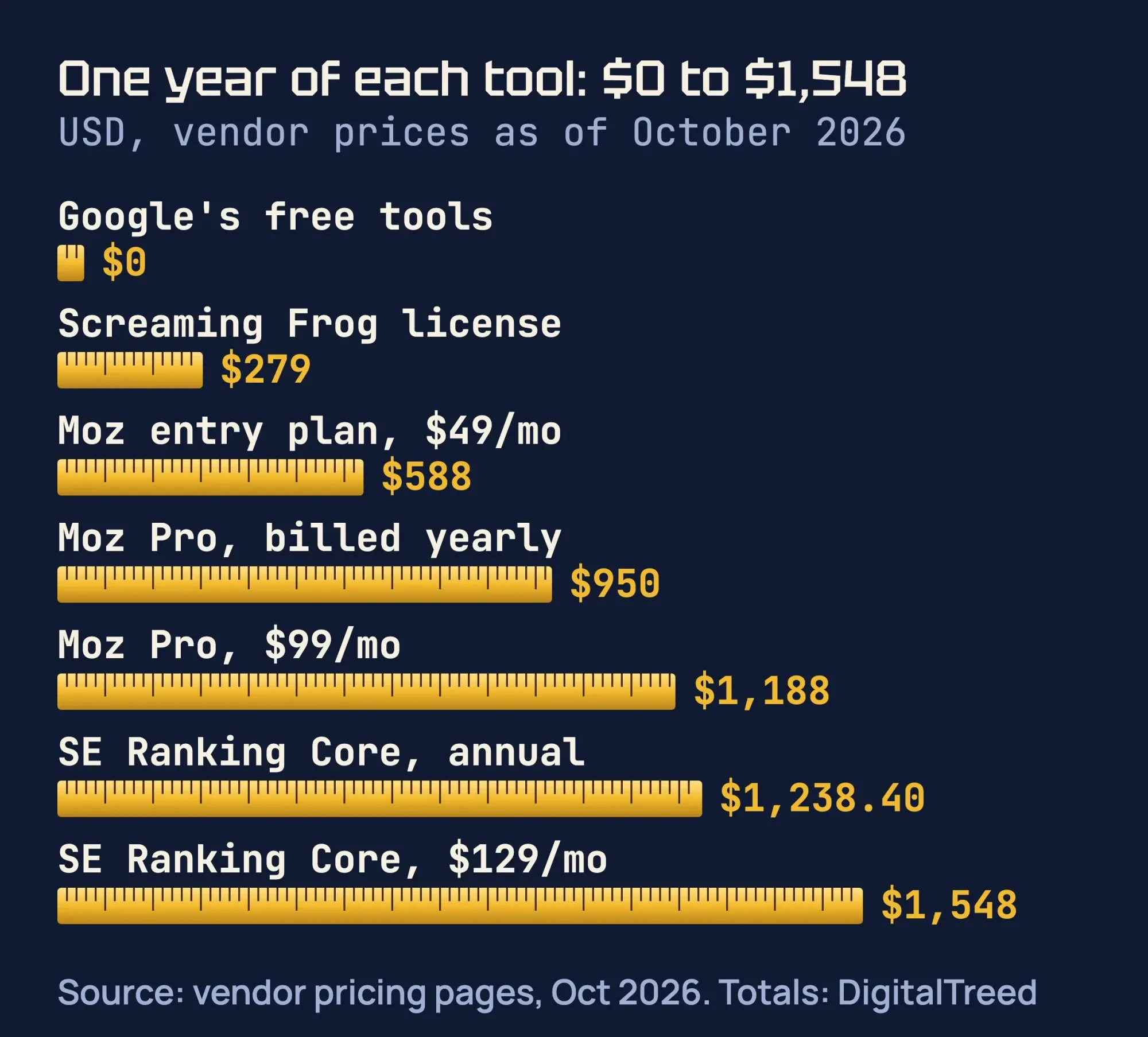 Source: Moz, SE Ranking and Screaming Frog pricing pages, October 2026. Yearly totals calculated by DigitalTreed.
Over a year, the difference grows. As of October 2026, Moz Pro's $99 plan costs $1,188 billed monthly, or "$950 billed for your first year" on yearly billing, per Moz. SE Ranking Core costs $1,548 a year billed monthly, or $1,238.40 on its annual plan.
Torn between the two big suites? Our Ahrefs vs Semrush comparison compares them feature by feature. Its examples are for businesses in India. If you're weighing a tool against paying people, see our digital marketing agency cost guide.
Our take: start with a monthly plan or a free trial, never an annual plan. Use it fully for one month during a redesign or a keyword plan. Cancel if you stop opening it.
Checklist: how to pick the best SEO tools for a small business
Check 6 things before you pay: whose data the tool uses, whether it follows Google's guidance, crawl limits, tracked keywords, seats and the trial. We read each example on the vendor's own pricing page on October 23, 2026. All vendor figures are vendor data and change often.
| Check | Why it matters | What we read (as of October 23, 2026) |
|---|---|---|
| Whose data is it? | Only Google's tools show Google's own data. Suites estimate it. | Google says third-party tools "don't have access to our internal ranking data." |
| Does it follow Google's guidance? | Google tells owners to ask if an SEO uses tools "aligned with Google's guidance." | Check any tool's advice against Google Search Central before big changes. |
| How many pages can it crawl? | A 20-page site needs far less than a store with thousands of pages. | Screaming Frog: free up to 500 URLs. SE Ranking Core: 250,000 pages a month in audit. |
| How many keywords does it track? | Our take: rank tracking is often the main reason a small site pays. | Moz Pro $99 plan: 300 tracked keywords a month. Semrush SEO plan: 500 keywords daily. SE Ranking Core: 2,000 keywords daily. |
| How many sites and users? | Each extra person can add a monthly fee. | Moz Pro $99 plan: 3 tracked sites; extra seats $49 a month. Semrush: extra users from $45 a month. Ahrefs: extra users from $40 a month. |
| Can you try it or pay monthly? | A trial or one paid month shows if you will really use it. | SE Ranking: 14-day free trial. Semrush: 7-day free trial. Ahrefs Free for verified sites. |
Sources: Google's page on third-party SEO tools and its advice on hiring an SEO. Vendor figures come from the pricing pages of Screaming Frog, SE Ranking, Moz Pro, Semrush and Ahrefs, all read on October 23, 2026.
Our take: if a tool fails the first 2 checks, skip it. If it passes, pick the smallest plan that covers your page count and keyword list.
Example: a Boise plumber picks its tools
Example: Cedar Ridge Plumbing is a made-up company with 3 plumbers in Boise, Idaho, and an 18-page website. Every number below is invented for the example.
First, the owner sets up Search Console, PageSpeed Insights and Bing Webmaster Tools, which cost nothing. Search Console shows "water heater repair boise" with many impressions, an average position near 9 and a low CTR. The owner rewrites that page's title and description.
A suite tempts them at $129 a month, which is $1,548 a year billed monthly, per SE Ranking's October 2026 prices. They buy one month instead, while planning new service pages, and cancel after. Total tool spend for the year: $129.
How often should you check your SEO tools?
About once a month. Google's Search Console guide says "there is no need to sign in to the tool every day." It suggests a check "around once every month" or after site changes. Here is a 30-minute routine.
- Read any Search Console email alerts, then the Page indexing report for new errors.
- Compare the last 3 months of clicks, impressions, CTR and position with the period before.
- Pick 3 pages with many impressions and a low CTR, and rewrite their titles.
- Run PageSpeed Insights on your home page and your main service page.
- Every 3 months, crawl the whole site for broken links, redirects and missing titles.
Follow our guide to running your first SEO audit for a small business for the full step-by-step. After a sudden ranking drop, first see if it matches one of the recent Google algorithm updates. The deeper crawl checks are in our technical SEO audit checklist.
For links and mentions from other sites, use our off-page SEO checklist. For keyword ideas, start with our list of free keyword research tools.
Mistakes that waste time and money
- Chasing a third-party "SEO score." Fix what Google's own reports show first.
- Paying for a suite before Search Console is set up.
- Buying an annual plan before a trial or one paid month.
- Giving an agency full Search Console access for an audit. Google's hiring advice says to "only grant read access" at that stage. Our SEO freelancer access table shows which role fits each Google account.
- Trusting anyone who promises the top spot. Google says that if they guarantee first place, "find someone else."
- Reading one lab test as the truth. Run it 2 or 3 times and watch the trend.
If you're new to all of this, our SEO for beginners guide explains the basics before you pick a single tool. Google's SEO starter guide is also free.
Frequently asked
Is Google Search Console free?
Yes. Google charges nothing for Search Console, PageSpeed Insights or the Rich Results Test. You only need a Google account and a way to verify your site.
Do I need Semrush or Ahrefs?
Not to start. Google itself says a small local business can do much of the work alone. Pay for a suite when you will use competitor and backlink data every month.
How much do SEO analysis tools cost?
Google's tools cost $0. As of October 2026, Moz Pro listed $99 a month and SE Ranking Core $129 a month on monthly billing. Moz also listed an entry plan at $49 a month.
Why does PageSpeed Insights show no real-user data?
Real-user data needs enough visits. The PageSpeed Insights docs say a URL needs a "sufficient number of distinct samples." Low-traffic pages often get lab data only.
Do I need more than one SEO tool?
Most small sites use 3 free ones: Search Console, PageSpeed Insights and a crawler. Expect their numbers to differ. Google says Search Console and Analytics data won't match completely, and that is normal.
Can an SEO tool see Google's ranking data?
No. Google says third-party tools "don't have access to our internal ranking data," in its guidance on third-party SEO tools. Google points owners to Search Console, which gives data directly from Google Search itself.
Can I trust a tool's SEO score?
Only as a checklist. In our test, a one-word description, "Home," still earned a perfect Lighthouse SEO score. Check what the score measures before you act on it.
Your next step
Today, open Google Search Console, or set it up if you haven't. Find 3 pages with many impressions and a low CTR, and rewrite their titles this week.
If you want help choosing tools or reading the reports, ask us for a free quote. We'll tell you what we would check first and what it costs.
How we made this guide: it's built from Google Search Central, Search Console Help, PageSpeed Insights and Chrome Lighthouse documentation, plus Bing's webmaster blog. We read each vendor's pricing page and ran Lighthouse 12.8.2 on a fictional local test page on October 22, 2026. Sources are linked inline, and we checked every number and yearly total the same day.
First published July 2020. Rewritten October 22, 2026: new text built around jobs and budget, our own Lighthouse test, October 2026 vendor prices and a monthly routine. We removed an old claim that Google Analytics can remove bad backlinks, because it can't. Updated October 23, 2026: added key facts, a step-by-step SEO analysis, rank tracking and Google Analytics. We also added AI answers in Search Console, a table of our Lighthouse results, a cost answer, a tool-picking checklist and 2 FAQs.
Sources
- Google Search Central: Do you need an SEO?
- Google Search Central: SEO starter guide
- Google Search Central: Get started with Search Console
- Google Search Console: About
- Search Console Help: Performance report (Search results)
- Google Search Central: Using Search Console and Google Analytics data
- PageSpeed Insights: About PageSpeed Insights
- Chrome for Developers: Introduction to Lighthouse
- Chrome for Developers: Document does not have a meta description
- Search Console Help: Rich Results Test
- Google Ads Help: About Keyword Planner
- Bing Webmaster Blog: Introducing AI Performance in Bing Webmaster Tools, February 10, 2026
- Moz Pro pricing (vendor)
- SE Ranking plans and pricing (vendor)
- Screaming Frog SEO Spider pricing (vendor)
- Semrush plans and pricing (vendor)
- Semrush free trial (vendor)
- Ahrefs plans and pricing (vendor)
- Ahrefs Free (vendor)
- Google Search Central: Guidance on third-party SEO tools, services and advice (updated June 5, 2026)
- Google Search Central: AI features and your website
- Google Analytics Help: Connect Search Console to Google Analytics
- Google Analytics Help: Default channel group
Comments
No comments yet. Start the conversation below.