

Quick answer
Why did my Google ranking drop? Usually it's a Google update, a technical fault, a change to your own site, a seasonal dip or a reporting glitch. Open Search Console, compare the drop with the weeks before, find the pages and queries that lost most, and match the start date to Google's update list. Don't rewrite anything until you know which.
A ranking drop is when your pages slip lower in Google's results. You'll usually spot it as fewer clicks in Search Console or a sudden fall in your rank tracker. When your leads come from Google, it can feel like the phone just stopped ringing. That feeling pushes people to rewrite pages, delete posts or buy links, and those moves often make things worse.
This guide is the check we'd run before touching anything. First, make sure the drop is real. Then read the shape of the chart, see which number fell, find the pages and queries behind it, and match the date to Google's updates. After that come your own changes, faults and penalties, then seasonality, and finally what to do once you know the cause. We've also run three common self-inflicted causes on a WordPress test site, so you'll see exactly what each one looks like.
Key takeaways
- Rule out reporting glitches before you change any page.
- Clicks, impressions and position each point to different causes.
- One page, one section or the whole site narrows it fast.
- Match the start date to Google's Search Status Dashboard.
- One WordPress tick box can noindex your whole site.
Make sure the drop is real before you fix anything
Start by checking that your data isn't lying to you, because some drops only exist in the report. Google keeps a data anomalies page for Search Console that lists logging errors and reporting changes. Read it before you read your chart, because a known logging error can make a perfectly healthy site look like it's fallen off a cliff overnight.
Two 2026 entries trip up a lot of site owners. In April 2026, Google said a logging error had over-reported impressions from May 13, 2025 to April 27, 2026. Once it was fixed, impressions, CTR and average position all shifted, though clicks weren't touched. So if you compare this fall with last fall, the impressions line can show a crash that didn't happen. The same page notes that FAQ rich results stopped appearing in Google Search from May 7, 2026. If your pages used FAQ markup, those impressions fell for reasons that had nothing to do with your rankings, and they won't come back however long you wait.
Trackers glitch. On November 18, 2026, one tracker, Nozzle, collected only about 11.6% of its usual Google results for roughly ten hours, Search Engine Journal reported. A tracker that can't see Google can't report your position, so a gap like that can show every keyword crashing at once and recovering the next morning.
Then check whether your analytics broke rather than your rankings. If GA4 shows a cliff but Search Console clicks look normal, it's likely a missing or broken tracking tag, not Google. The tag check takes two minutes, and it's in the GA4 setup guide on our site.
Search Console is the source of truth for Google traffic. Trust it first.
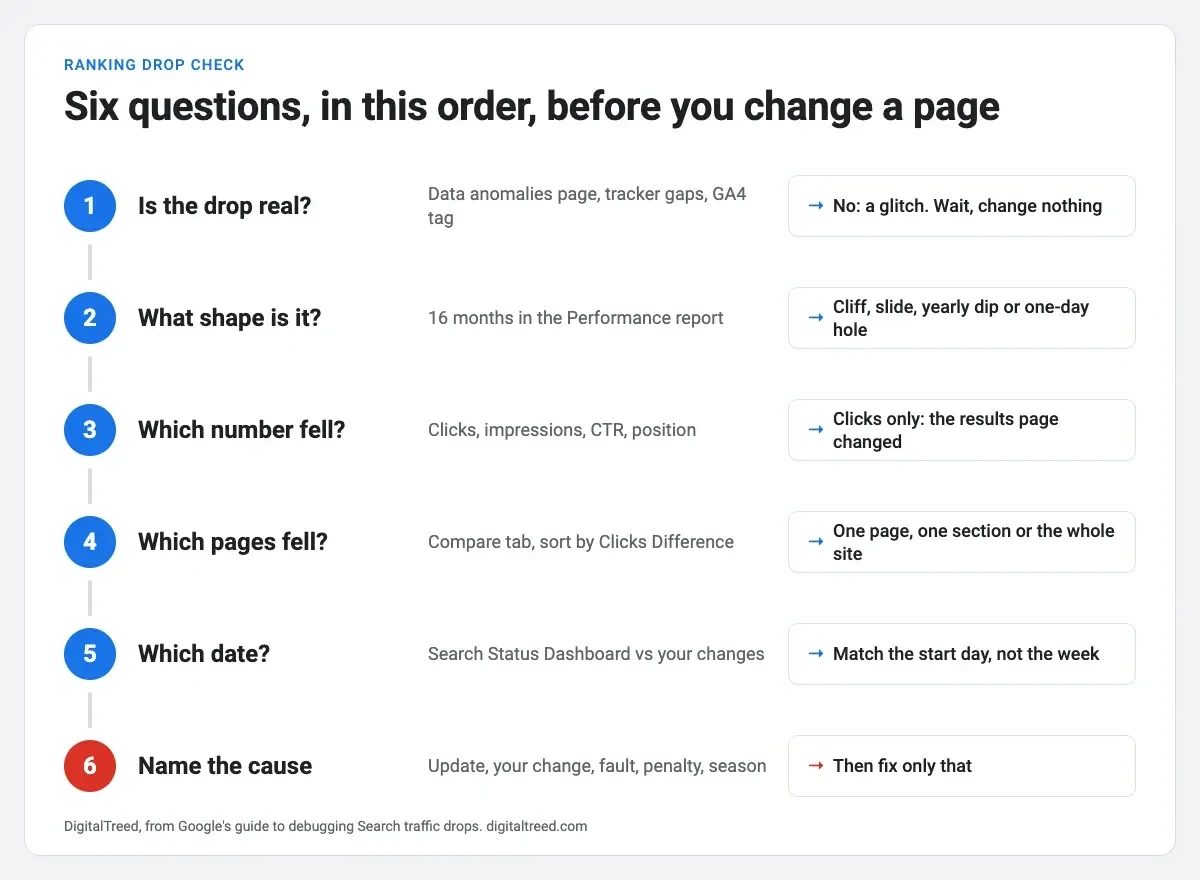 The whole check on one page. Drawn by us from the steps in this guide.
Read the shape of the drop on a 16-month chart
Once you trust the numbers, look at the shape of the line, because the shape alone narrows the cause. Google's own guide to debugging Search traffic drops sketches four patterns. A sudden cliff that stays down points to an algorithmic update, a site-wide security problem or a spam issue. A slow slide over weeks fits a technical fault, like a stray noindex tag that Google only finds as it recrawls each page. A dip that comes back every year is seasonality, which is why a garden center or a tax preparer shouldn't compare November with June and expect the same line. A one-day hole that springs back is usually a glitch.
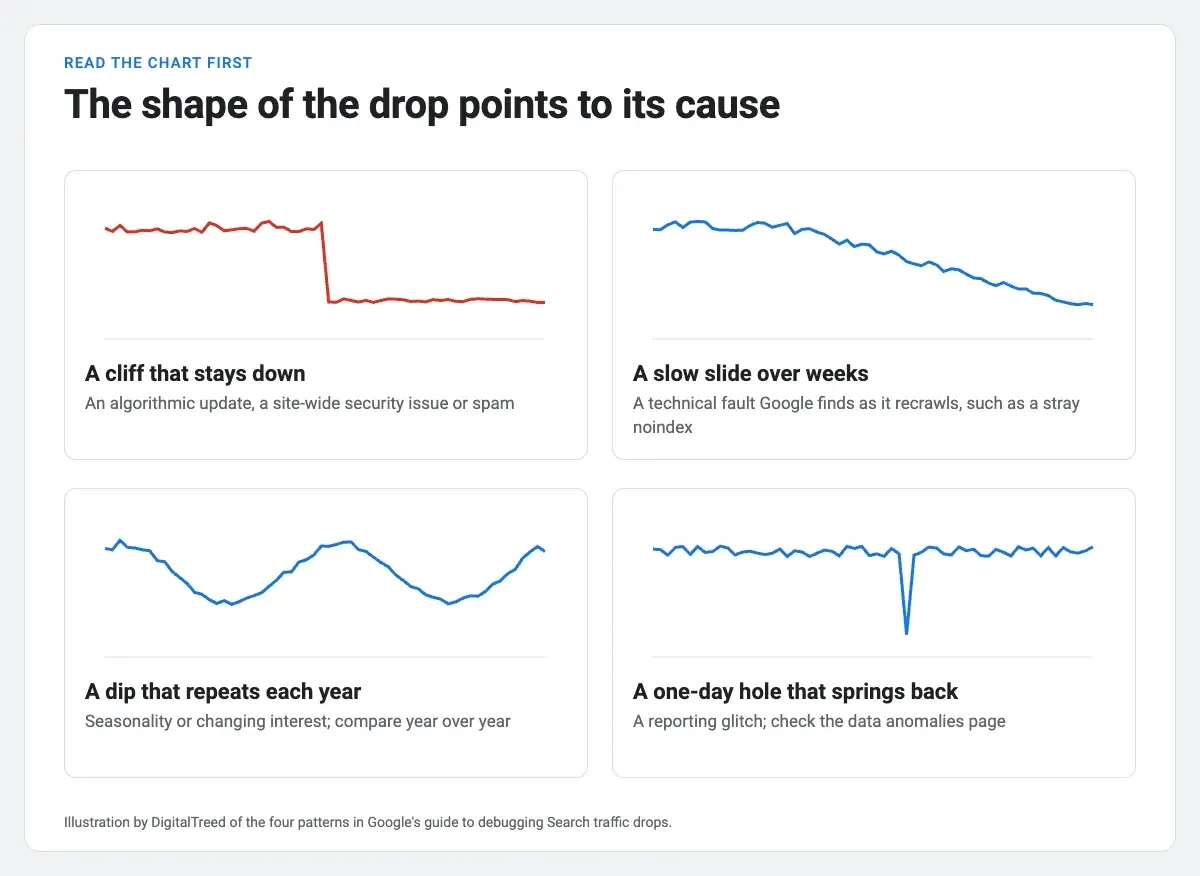 Illustration drawn by us from the four patterns in Google's guide to debugging Search traffic drops.
To see the shape, open the Performance report in Search Console and click 16 months in the date chips above the chart. It's the longest view the report keeps, and it'll show you straight away whether the same weeks dipped last year, before anyone on your team starts rewriting pages.
Check weekdays. Business sites often get fewer clicks on weekends, so a Monday-to-Sunday comparison can show a "drop" that's only the calendar. Compare the same days of the week, or switch to weekly totals, before you worry about one bad Saturday.
Which number fell: clicks, impressions or position?
Next, work out which number moved, because each one tells a different story. Tick all four boxes above the chart: Total clicks, Total impressions, Average CTR and Average position. Then match what you see to this table.
Don't skip CTR.
| What you see | What it usually means | Where to look next |
|---|---|---|
| Clicks down, impressions about the same | You still show up, but fewer people click: a weaker title, a rival rich result or an AI answer above you | Queries tab, then search the top query yourself |
| Clicks and impressions both down | You show up less: lower rankings, pages dropped from the index, or fewer searches | Pages tab, Page indexing report, Google Trends |
| Position down a little (2 to 4) | Normal movement; Google says avoid radical changes | Wait a few weeks and recheck |
| Position down a lot (4 to 29) on many terms | Google now rates other pages as more helpful for those searches | A whole-site review against Google's helpful content questions |
| Only one search type down | A change in Images, Video or News, not web results | The Search type filter |
Those position examples are Google's own: 2 to 4 is its small drop, and 4 to 29 is its large one, the kind that means many pages lost ground. For a large drop, it says to judge the whole site against its helpful content questions, not just the pages that fell.
The first row is the one people miss. If impressions hold but clicks fall, something on the results page may be taking the click. A Pew Research Center study of 900 US adults found people clicked a regular result in 8% of visits with an AI summary. Without one, they clicked in 15% of visits. You can't switch AI Overviews off for your page, but you can search your top query and see what now sits above you.
Then check search types, since Search Console splits web results from Google Images, Video and News, and each one can rise or fall on its own. In the Search type menu, Web now splits into Text-based and a new Multimodal option, next to Image, Video and News. A drop that only shows in Image or Video needs a different fix, because those results depend on your image files and video pages rather than your written content.
Find the pages and queries that lost the most
Now find exactly where the clicks went, because "the whole site dropped" is rarely true. Click the date chip, open the Compare tab and pick "Compare last 3 months to previous period", or a custom range around your drop. Then open the Pages tab and sort by Clicks Difference, as Google suggests. The pages that lost the most float to the top.
Often it's only a handful.
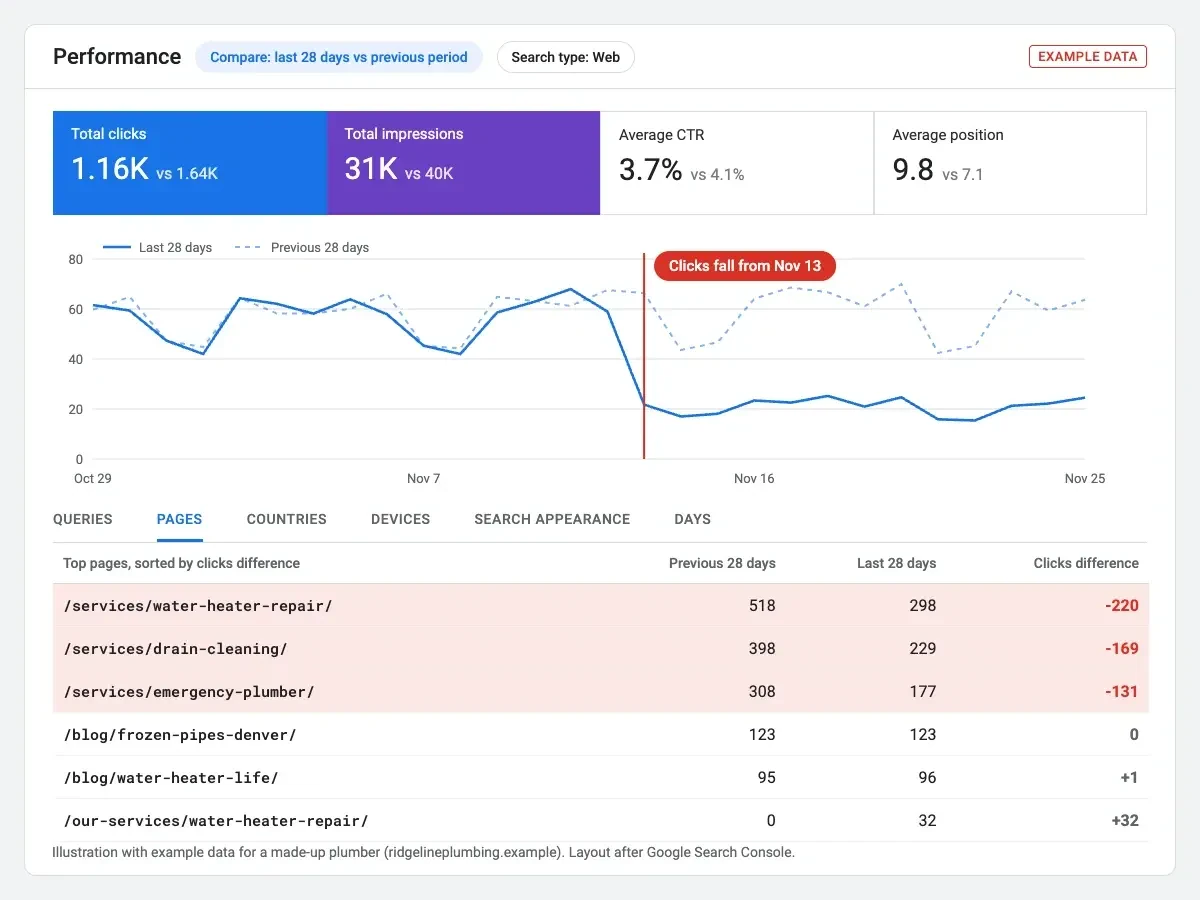 Illustration with example data for a made-up business, drawn in the style of the Search Console Performance report.
Look for a pattern in that list, because the way the losses cluster across your pages is usually a stronger clue than the size of the drop. One page down usually means that page changed, broke or lost its spot to a rival. A group of pages down, such as everything under /services/, points to a template, a section-wide change or a redirect problem. Every page down at once points to something site-wide: an update, a manual action, a security warning or an indexing switch.
Now check queries. If brand searches held steady while service searches fell, people still find you by name, and the loss is in rankings. Watch for two of your own URLs trading places on one query, too. That's keyword cannibalisation, and the cannibalisation chapter of our intermediate SEO guide explains how to pick the page that should win.
For a few of the worst pages, paste the URL into the URL Inspection bar in Search Console. It'll tell you whether Google can index the page right now. If it can't, it'll say why. If any report here is new to you, the Search Console guide on our site tours each one.
Here's how that looks. Example: Ridgeline Plumbing, a made-up plumber in Denver, saw weekly clicks fall from about 410 to 150 in mid-November 2026. The compare view showed its blog was steady. But from the day of the drop, its old service URLs lost most of their clicks. Its main query, "water heater repair denver", slid from position 4 to 19. A pattern like that, with one section gone and the rest fine, says "check your own site" before "blame Google".
Match the start date to Google's update list
With the pages and the date in hand, check whether Google changed something that week. The Google Search Status Dashboard lists every confirmed ranking update, when it started and how long it ran. The November 2026 core update, for example, started on November 10 and finished on November 24, 2026. Google has also listed a December 2026 core update, posted on November 24.
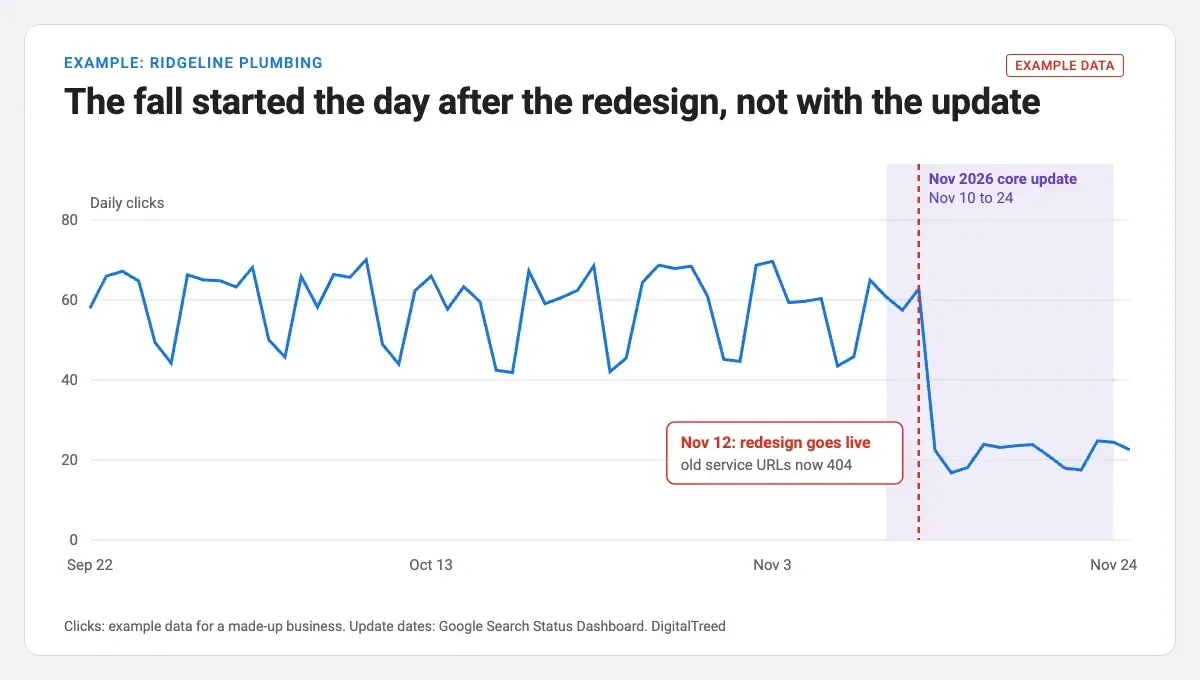 Illustration with example data for a made-up business. Update dates from the Google Search Status Dashboard.
A date match is a clue, not proof.
Google's core updates page says to wait at least a full week after a rollout ends. Then compare the week after it with the week before it began, so the rollout days themselves, when rankings often bounce around, don't muddy your numbers. Our history of Google algorithm updates walks through that method, and the Google algorithm cheat sheet puts every confirmed update in one table.
Back to Ridgeline.
Its drop landed inside the November core update, so the owner assumed Google had hit them. But the site's redesign had gone live on November 12, and the fall started the next day, only on the old service URLs. Two events in one week isn't rare. When it happens, the pages that fell, and the exact day they started falling, are what tell you which one actually did it.
Our video covers the same first checks in under eight minutes, if you'd rather watch.

Rule out your own changes, faults and penalties
If the date doesn't line up with an update, or only part of the site fell, look at what changed on your side. We tested three common causes on a WordPress 7.1.5 test site with no SEO plugin active. They're easy to miss, and that's why.
First, the search engine visibility box. Under Settings, then Reading, WordPress has a tick box called "Discourage search engines from indexing this site", described in the Reading screen docs. When we ticked it, every page still loaded normally for visitors. But each page gained a robots tag reading "noindex, nofollow", the built-in sitemap started returning a 404 error, and robots.txt lost its sitemap line. A site that launches with that box still ticked can quietly vanish from Google while it looks fine in a browser. Nobody notices until the calls slow down.
Second, a changed URL. When we renamed one post's slug, WordPress sent the old address to the new one with a 301 redirect on its own. That's the safe case, and it's why renaming a single post rarely causes a drop on its own, provided the old redirect stays in place.
Third, a changed permalink structure, which you set on the Permalinks screen. Moving posts from /post-name/ to /year/month/post-name/ still redirected, since WordPress could guess the new address from the old one when it couldn't find the page. But switching to /blog/post-name/ left the old post URLs returning 404 errors, on two separate runs. That's the kind of redesign change behind our Ridgeline example.
On your live site, run a few dropped URLs through our HTTP status checker to see each status code and redirect. Then open the Page indexing report and look for a jump in "Not found (404)" or "Excluded by noindex tag". The Crawl stats report shows server errors and robots.txt fetch problems by day. If you've moved URLs, Google's site move guide lists the usual mistakes.
Last, rule out a penalty or a hack. Under Security & Manual Actions, open Manual actions and Security issues. A manual action is a penalty a person at Google applied for breaking its spam policies, and the report names it. Most drops don't come with one.
Spam updates are automatic, so an empty report doesn't clear you. The spam and recovery chapter of our Advanced SEO guide covers what to check next.
What we tested
On November 26, 2026 we used a local WordPress 7.1.5 test site with no SEO plugin active. We toggled the search engine visibility box, renamed one post slug and switched between three permalink structures. After every change we fetched each URL's status code, robots tag, robots.txt and sitemap, then put every setting back. The plumber in this guide is a made-up example, not a client.
Could it be seasonality or less demand?
Sometimes nothing's wrong. Fewer people are searching. Google's guide suggests the Compare tab with "Compare last 3 months year over year". If last year dipped in the same weeks, you're probably looking at the calendar. Then check your top queries in Google Trends to see whether interest fell across the web or only for you.
US businesses feel this every holiday season. Thanksgiving week, Christmas and New Year shift what people search for, and a gutter cleaner and a gift shop see opposite curves. Our Google Trends guide explains the 0 to 100 scale, which trips up a lot of first-time users.
Here's a quick test.
If impressions fell but your average position held, demand probably fell. You're in the same spot, with fewer people looking, and the fix is to wait, or to write for what people search now, not rework the page.
What to do once you know the cause
The fix depends on the branch you ended up on. For a technical fault, fix it, request indexing for your key pages in URL Inspection, and watch the Page indexing report recover. For a glitch or seasonality, don't do anything drastic, because a page that's still good will usually climb back once the glitch is fixed or the season turns. Google's debugging guide warns against radical changes when a page already performs well.
For a drop that lines up with a core update, read Google's helpful content guidance and judge the whole site, not one page. Our upcoming guide to recovering from a Google core update will cover that in depth. For a spam update or a manual action, start with the Advanced SEO recovery steps.
Be patient.
Google says some changes show up within days and others take several months. It also says there's no guarantee of a return if other pages are more helpful. Before you change anything big, it's worth running your homepage through the website audit tool we built, which catches the obvious faults. If you'd like a second pair of eyes, our SEO services include a drop diagnosis, and DigitalTreed sells that service.
Frequently asked
Why does my Google ranking keep changing?
Because Google's results are dynamic. Its traffic drop guide says positions "aren't static or fixed in place" as the web keeps changing, so small daily moves are normal.
How long does it take rankings to come back after a drop?
It depends on the cause. A fixed technical fault can recover once Google recrawls. After a large drop, Google says its systems may take months to judge a site helpful again, per its debugging guide.
Can Google Search Console data be wrong?
Sometimes. Google lists known logging errors on its data anomalies page, including two days missing from bulk exports on February 28 and March 1, 2026 that won't be recovered.
Why did my Google Maps ranking drop?
Maps rankings follow different rules from web results. Google's local ranking help page names relevance, distance and prominence, and the Business Profile guide we wrote covers each one.
Can losing backlinks drop my Google rankings?
It can. Google's How Search works page says Google checks whether "other prominent websites link or refer to the content" when judging quality. So check your lost links in a backlink tool.
How we made this guide: We read Google's documentation on traffic drops, core updates and Search Console. We checked the menu labels in a live Search Console account and ran the WordPress tests on our own local site. Facts checked by the DigitalTreed team on November 26, 2026.
Sources
- Google Search Central: Debugging drops in Google Search traffic
- Google Search Central: Google Search's core updates
- Google Search Status Dashboard: Ranking incident history
- Google Search Status Dashboard: November 2026 core update
- Search Console Help: Data anomalies in Search Console
- Search Console Help: Performance report
- Search Console Help: Page indexing report
- Search Console Help: Crawl stats report
- Search Console Help: Manual actions report
- Search Console Help: Security issues report
- Google Search Central: Spam policies
- Google Search Central: Site moves with URL changes
- Google Search Central: Creating helpful, reliable, people-first content
- Pew Research Center: Google users are less likely to click on links when an AI summary appears (July 22, 2025)
- Search Engine Journal: Check your Nov. 18 rank data before blaming the core update (November 23, 2026)
- WordPress.org: Settings Reading screen
- WordPress.org: Settings Permalinks screen
- Google Trends

Comments
No comments yet. Start the conversation below.