

What free SEO tools can do, and two free stacks to copy
This guide is for anyone doing SEO without a tools budget. Think of the owner of a Kanpur sweet shop who looks after the website, a Delhi dentist's front-desk manager, a Pune coaching centre, a new D2C brand, or a freelancer with a few clients. No SEO terms needed; each one is explained the first time.
By the end you'll have a free tool for every SEO job, know each one's exact free limit, and know the point at which paying for one tool starts to make sense. Almost every limit comes from the guide we wrote on that tool, linked next to it so you can go deeper; the few others are cited to the vendor's own page.
There are seven chapters, about 35 minutes in all. Chapter 1 gives two free stacks to copy, one for a small business and one for a freelancer. Chapters 2 to 6 go job by job, with our own free tools first. The jobs are setup and indexing, keywords and content planning, on-page and technical checks, links and local, then AI visibility and measuring. Chapter 7 puts every limit in one table and says when free stops being enough. Free limits and prices were read on the vendors' own pages between 16 and 18 October 2026.
Quick answer
Free tools cover almost everything a small site needs: Google's and Bing's own data about your site, page and crawl checks, and local listings. What you pay for later is other people's data, like competitors' keywords and links. A Kanpur sweet shop can run on about a dozen free tools. A freelancer adds a few free tiers per client.
Most "best free SEO tools" lists are a pile of 50 logos. This one is sorted by job. For each job we put our own free tools first, then Google's and Bing's, then the free tiers of the paid suites, with their exact limits. Almost every limit comes from the guide we wrote on that tool, and you'll find the link next to it.
Three kinds of "free"
The word means different things on different sites, so it's worth sorting them before you sign up for anything.
- Free for good. Google Search Console, Bing Webmaster Tools, Google Business Profile, GA4, PageSpeed Insights, Google Trends and our own tools. Apart from GA4's enterprise version, Analytics 360, which small sites don't need, no paid version is being held back from you.
- Free tiers. A paid product with a small free allowance, such as Semrush's 10 reports a day[1] or Screaming Frog's 500 URLs per crawl.[2] Useful, and built to make you want more.
- Free trials. The full paid product for a few days, often with a card on file. Surfer's 7-day trial converts to a paid plan unless you cancel.[3] A trial isn't a free tool, so this guide only mentions them where there's no free option at all.
What free tools can't do
Here's the rule that saves most people money. The data Google has about your own site is free, in Search Console. No paid tool knows more about it, and Google says so plainly: "Third-party tools don't have access to our internal ranking data."[4]
What paid suites add is everything outside your site: competitors' keywords and top pages, a full index of links to any site, daily rank tracking for a fixed list of keywords in a set city, and volumes for searches you don't rank for yet. If you don't need those, you don't need to pay. Our Search Console guide goes through that split in its last chapter.
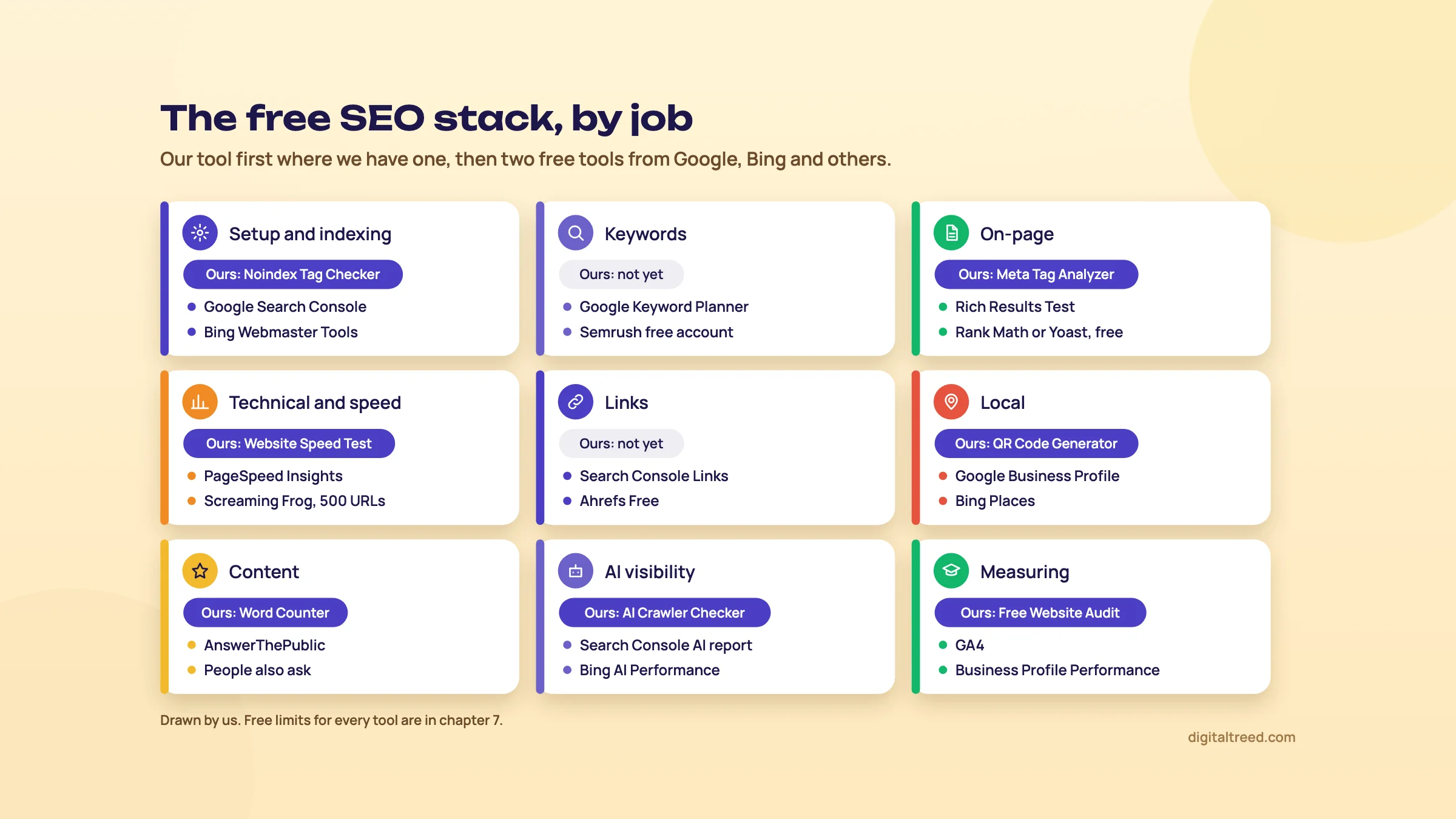 One free stack for every SEO job, our tools first. Drawn by us.
A free stack for a small Indian business
Take a sweet shop in Kanpur with a 20-page WordPress site, a counter, and a rush every Diwali. The owner, or the nephew who runs the site, has maybe two hours a month. This is what we'd set up, in this order:
| Job | Tool | Cost | Time |
|---|---|---|---|
| Google data for the site | Google Search Console | Free | 20 min once, 20 min a month |
| Maps and the local pack | Google Business Profile | Free | 1 hour once, 15 min a week |
| Bing and Copilot | Bing Webmaster Tools, imported from Search Console | Free | 10 min once |
| Calls, orders and enquiries | GA4 | Free | 1 hour once |
| Titles, sitemap, schema in WordPress | Rank Math or Yoast, free version | Free | 30 min once |
| A monthly health check | Our Free Website Audit | Free, 1 audit a day without signing in | 15 min a month |
| Festival planning | Google Trends, then Keyword Planner | Free | 1 hour a quarter |
| Directory listings | Justdial, IndiaMART, Sulekha basic listings | Free | 1 hour once |
That's eight jobs covered and no bill. Add our Meta Tag Analyzer when you rewrite a page, and our Website Speed Test plus PageSpeed Insights if the site feels slow on a phone. Chapters 2 to 6 show each one.
Tip
Don't open fifteen accounts in one afternoon. Set up Search Console and the Business Profile this week, and add the rest once you've read their first reports. A tool you never open is just another password.
A free stack for a freelancer
Now a freelancer in Pune with four clients: a dentist, a coaching centre, a D2C brand and a sweet shop. The base is the same for each client, owned by the client. The client creates Search Console and the Business Profile and adds you. Google's own Business Profile rules say the owner should own the profile and add you as a manager wherever possible[5] (our Business Profile guide covers this). On top, you add tools that look at sites you don't own:
- Semrush free account for a quick look at a client's competitors: 10 reports a day and one demo project.[1]
- Ahrefs Free on every client site you can verify, for a site audit and the site's own backlinks. It's free for unlimited verified sites.[6]
- Screaming Frog, free version, for a crawl of up to 500 URLs on your own computer.
- A free Moz account and MozBar, for Domain Authority, the link score many clients ask about. The account gives 10 link queries a month.[7]
- AnswerThePublic and Ubersuggest free, 3 searches a day each, for question and keyword ideas.
- Our checkers, which take up to 10 URLs per run (Meta Tag Analyzer, HTTP Status Checker, Canonical and Noindex Tag Checkers), for checking a client's fixes in one go.
- A free AI assistant for regex, formulas and first drafts that you check by hand (chapter 6).
That covers audits, on-page work, local work and monthly reports for a handful of small clients. What it doesn't cover well is daily rank tracking by city and deep competitor research, which is where chapter 7 starts. Our freelancing chapter in the career guide covers the rest of the set-up.
How the rest of this guide runs
Chapters 2 to 6 go job by job. In each one, our free tools come first, then Google's and Bing's, then the free tiers of other tools, with the limit and the guide that explains it. Chapter 7 puts every limit in one table and says when it's time to pay. Start with chapter 2, because none of the other jobs matter if Google can't index your pages.
Setup and indexing: making sure Google and Bing can find your pages
Quick answer
Verify your site in Google Search Console and Bing Webmaster Tools, both free, and let your SEO plugin make the sitemap. Then check any page that won't show up with our Robots.txt Tester, Noindex Tag Checker, Canonical Tag Checker, HTTP Status Checker and SSL Checker. Search Console's URL Inspection gives Google's own verdict.
Google lists three technical requirements for a page to be eligible for Search: Googlebot isn't blocked, "the page works, meaning that Google receives an HTTP 200 (success) status code", and the page has indexable content.[8] Every tool in this chapter checks one of those three. Guide 1, chapter 8 walks through the first set-up step by step; here we sort the tools.
Our free tools for this job
All of these work on any public URL, need no sign-up and fetch the live page (a repeat check within a few minutes reuses the last result). The URL checkers have a fair-use limit of 10 checks a minute.
Fetches a site's live robots.txt, or takes rules you paste in before you upload them, and tests up to 10 paths for one crawler. You pick the crawler from a list that includes Googlebot, Bingbot and AI bots such as GPTBot and OAI-SearchBot. Each result shows the exact Allow or Disallow line that decided it, and there's a clear warning if the crawler is blocked from your homepage.
Checks up to 10 URLs in three places a page can say "don't index me": the meta robots tag, the X-Robots-Tag header the server sends, and a robots.txt block. It also shows the final status code and directives such as nofollow and nosnippet. This is the one to run first when a page has vanished after a redesign or a plugin update.
Reads the canonical tag and Link header of up to 10 URLs, then visits the page each one points to. It flags missing, conflicting and cross-domain canonicals, chains, and canonicals that point at a broken or redirecting page.
Shows the final status code, every redirect hop, the total response time and the response headers for up to 10 URLs at a time. Use it after a site move, or to check that old URLs return a single 301 and not a chain.
Reads the live certificate for up to 10 domains: issuer, expiry and days left, whether it covers the exact domain you typed (so test the www and non-www spellings), and the TLS version. An expiring certificate shows amber when 30 days or fewer are left.
Google Search Console
Search Console is Google's free service for checking how your site appears in Google Search. It confirms Google can crawl the site, helps fix indexing problems, lets you ask for re-indexing and shows the searches that bring people in.[9] The free limits rarely bite a small business:
- Up to 1,000 properties per account.[10]
- 16 months of Performance data.[11]
- Tables show up to 1,000 rows;[12] the API and the BigQuery bulk export go further.[13]
- Only sites you verify, and only Google.
The two reports for this job are Pages (which pages are indexed and why the others aren't) and URL Inspection (Google's verdict on one URL, with a live test). Our Search Console guide covers both screen by screen.
Bing Webmaster Tools and IndexNow
Bing Webmaster Tools is a free account,[14] and if your site is already in Search Console you can import it and skip separate verification.[15] Bing had 1.92% of search engine traffic in India in September 2026, by StatCounter's count,[16] but it's still worth the ten minutes. Microsoft says Copilot Chat sends a short query to Bing when it searches the web.[17]
IndexNow is a simple ping that tells participating search engines, Bing among them, that a URL was added, changed or deleted.[18] Rank Math's free plugin includes it.[19] Google isn't on IndexNow's list of participating search engines,[20] so keep your sitemap in Search Console too. Our Bing Webmaster Tools guide sets it up and shows how to prove the pings arrived.
Sitemaps
If your site runs on WordPress, the free versions of Yoast, Rank Math and All in One SEO all make an XML sitemap for you; submit its address once in Search Console and Bing. On other sites, Screaming Frog's free version can generate one for up to 500 URLs.[2] We don't have a sitemap validator yet; until we do, the Sitemaps report in Search Console tells you if Google could read the file.
Find out why one page isn't in Google, for free
- Check the status Paste the URL into our HTTP Status Checker. You want a single 200. A 404, a 5xx or a long redirect chain is your answer.
- Check for noindex Run the same URL through the Noindex Tag Checker. It looks at the meta tag, the header and robots.txt in one go.
- Check the canonical In the Canonical Tag Checker, the page should point to itself. If it points to the home page or a staging site, fix the template.
- Check robots.txt for Googlebot In the Robots.txt Tester, pick Googlebot and test the path. Note the rule it names.
- Ask Google In Search Console, open URL Inspection for the page and read the indexing verdict. If everything above was clean and it says "Crawled - currently not indexed", the problem is the page's content, not a setting.
- Request indexing After a fix, click Request indexing. There's a daily limit per property, and Google doesn't publish the number,[21] so save it for pages that changed.
| Question | Free tool | Limit |
|---|---|---|
| Is the page blocked or noindexed? | Our Noindex Tag Checker and Robots.txt Tester | 10 URLs a check |
| Does it return 200, and where do redirects go? | Our HTTP Status Checker | 10 URLs a check, 100 checks an hour |
| Is HTTPS working? | Our SSL Checker | 10 domains a check |
| Did Google index it, and why not? | Search Console, Pages and URL Inspection | Your verified sites only |
| Did Bing get it? | Bing Webmaster Tools and IndexNow | Your verified sites only |
Once Google can reach the pages, the next question is which words to build them around. That's chapter 3.
Keyword research and content planning for free
Quick answer
Start with Search Console's queries, then size new ideas in Google Keyword Planner and check seasons in Google Trends. For questions, use Google's own suggestions and AnswerThePublic's 3 free searches a day. Semrush, Ubersuggest, Mangools and Moz give a few free look-ups each. Never take a search volume from an AI chatbot.
We don't have a keyword volume tool of our own yet, so this is the one job where Google's free tools come first. Our Word Counter & Keyword Density Checker comes in later, once the page is written (chapter 4). For the method behind the tools, read keyword basics in Guide 1 and keyword research in depth in Guide 2.
Google's free keyword tools
Search Console is where a site with a few months of traffic should start. Performance, Search results, Queries shows the searches you already appear for, with clicks and impressions; the default view is the last three months.[22] Real searches beat any estimate. The catch: only your own site, and only searches you already show for.
Google Keyword Planner is free, but you need a Google Ads account, and to get keyword ideas you must finish the account setup by entering billing information.[23] You don't have to run an ad. Accounts with low or no ad spend see ranges such as "100-1K" instead of exact numbers, a change Google made in 2016.[24] Ranges are fine for choosing which page to write. Our Keyword Planner guide shows how to open it without an ad.
Google Trends is free with no paid tier, and Classic Explore works without signing in.[25] It shows interest on a 0 to 100 scale, not search counts, and very small terms show as 0.[26] Use it for seasons: when "kaju katli" starts to rise before Diwali, or when "NEET coaching" peaks after results. Our Google Trends guide covers reading the scale.
Autocomplete and "People also ask" in Google's own results cost nothing and show the words real people type. Search from a phone in the city your customers are in.
Free tiers of the keyword tools
| Tool | Free limit | Good for | Our guide |
|---|---|---|---|
| Semrush free account | 10 reports a day; about 10 results each and no export in the Keyword Magic Tool[27] | A competitor's top keywords, India database | Semrush |
| Mangools KWFinder | 5 lookups per 24 hours, 15 related and 5 competitor keywords each[28] | A difficulty score on a few seeds | Mangools |
| Ubersuggest | 3 searches a day, 1 project, 25 tracked keywords[29]; Chrome extension 40 searches a day[30] | Ideas and rough volumes for India | Ubersuggest |
| Moz free account | 10 Keyword Explorer queries a month[7] | An occasional second opinion | Moz Pro |
| AnswerThePublic | 3 searches a day; volume and CPC on 2 branches; 30 keywords per export[31] | Questions around a topic | AnswerThePublic |
| AlsoAsked | 3 free searches without an account[32] | "People also ask" as a tree | AnswerThePublic, chapter 4 |
| Keyword Surfer | Free Chrome extension, no Surfer account, India supported[33] | Volumes next to Google results | Surfer |
| Ahrefs free tools | Keyword Generator and Keyword Difficulty Checker on its website[34] | A quick look without an account | Ahrefs |
| Bing Webmaster Tools | Keyword research with Bing's own volumes, by country and device[35] | Bing and Copilot demand | Bing Webmaster Tools |
Every volume in these tools is an estimate, and each tool estimates differently. Pick one, use it every time, and compare keywords with each other rather than treating any number as the truth. That's our view from the Keyword Planner guide, and it holds for all of them.
Warning
Don't ask ChatGPT, Gemini or any chatbot for search volumes. They give a confident number no tool measured. Use them for ideas and grouping, then check sizes in Keyword Planner or Search Console. Our AI tools guide shows what they're good at.
Note
From our work: a women's wear manufacturer's online store. Its product pages targeted short, competitive keywords. We moved them to long-tail keywords, the longer and more specific phrases buyers use. Results started within a month. The lesson: a smaller search you can win beats a big one you can't.
Plan a Kanpur sweet shop's Diwali pages with free tools
- Pull last year's searches In Search Console, set the dates to last October and November and export the queries.
- Find the season In Google Trends, set India and five years and compare "kaju katli" with "diwali sweets box". Note when each starts rising.
- Collect questions Use one AnswerThePublic search on "diwali sweets", then check Google's "People also ask" from a phone in Kanpur.
- Size the list Paste everything into Keyword Planner's Get search volume and forecasts, location Kanpur or Uttar Pradesh. Ranges are enough.
- Map pages One main phrase per page: a gift box page, a sugar-free sweets page, a delivery page. Publish them before the rise you noted in step 2.
Content planning and briefs
The paid content tools have no free plans. Surfer offers a 7-day trial that needs a card and converts unless you cancel.[3] Clearscope has a 14-day trial.[36] Frase has a 7-day trial with no card,[37] and its website has free checkers that need no sign-up for a first result, including a GEO Score Checker for one page.[38] Semrush's free account allows up to 2 documents in its SEO Writing Assistant.[39]
For a business writing a post or two a month, we'd skip all of them. Read the top results yourself, collect the questions from "People also ask", AnswerThePublic and your own customer calls, and write the brief by hand, as Guide 2, chapter 4 shows. Our guides to Surfer, Clearscope and Frase say when they're worth paying for. Next: checking the page once it's written.
On-page, technical and speed checks for free
Quick answer
Check titles and previews with our Meta Tag Analyzer, keyword use with our Word Counter, and JSON-LD with our Schema Markup Validator. For a whole small site, run our Free Website Audit. Screaming Frog's free version crawls 500 URLs, Ahrefs Free audits verified sites, and PageSpeed Insights gives real-user speed data.
On-page work is what you change on the page: title, description, headings, text, images, links and structured data. Technical work is everything that decides whether the page loads fast and correctly for Google and for people. Both have more free tools than any other job.
Our free tools for on-page work
Paste up to 10 URLs, yours or a competitor's. Each gets a Google result preview, a social share card and a checklist for the title, description, canonical, viewport, Open Graph and X card tags. It flags titles under 30 characters as short and over 60 as likely to be cut off, and descriptions under 70 or over 160 characters.
Counts words, characters and sentences, gives a density for each keyword you enter and lists your 15 most used words plus the 2- and 3-word phrases you repeat. Pasted text never leaves your browser, and there's no limit on it. It checks what you wrote; it doesn't find new keywords.
Fetches a page or takes pasted code, finds every JSON-LD block and checks the syntax, @context, @type and baseline fields for 18 common types, such as Article, Product and LocalBusiness. It's honest about its limits: JSON-LD only, no Microdata, and it doesn't run JavaScript, so schema added by a tag manager won't show in URL mode.
Turns up to 200 URLs into HTML, Markdown or BBCode links with your anchor text and rel values (nofollow, sponsored, ugc). Handy for internal links in a long post, and for the link code you send partners (chapter 5).
Cuts out product photos with an AI model that runs in your browser, up to 10 images at a time, and has size presets for Amazon and Flipkart (2000 x 2000) and Shopify. Handy for a D2C store's product pages, and the photos are never uploaded.
Free WordPress plugins
On WordPress, a free SEO plugin writes the tags our tools check. Rank Math's free version includes redirects, a 404 monitor and 5 focus keywords per post by default.[19] In Yoast, redirects are a Premium feature at $118.80 a year per site.[40] All in One SEO's free Lite version has no redirect manager; that starts on its paid Basic plan.[41] If one is already installed and working, keep it. Our guides to Yoast, Rank Math and All in One SEO cover set-up, and Yoast vs Rank Math compares the two most used.
Three more free helpers for this job:
- Rich Results Test: Google's free test of which rich results a page can get, with a preview for some types.[42] After launch, Search Console's rich result reports show valid and invalid items, but from a sample and with a 1,000-row limit on examples.[43] See our Rich Results Test guide.
- validator.schema.org: the general Schema.org validator, for types Google has no rich result for.[44]
- Mangools SERP Simulator: type a draft title and description and see them as a Google result, with pixel widths.[45]
Crawling the whole site
Our audit crawls up to 25 pages and runs 50+ checks across ten scored areas: security, on-page SEO, speed, AI visibility, off-page, lead readiness, email delivery, local SEO, social and schema, and accessibility. Without an account you get the score, every check and live progress, 1 audit a day. A free sign-in (Google or email) adds every fix with the points it adds, so quick wins come first, plus the PDF, a side-by-side with a competitor and 3 audits a day.
For bigger sites, these are the free crawlers:
| Crawler | Free limit | Catch | Our guide |
|---|---|---|---|
| Our Free Website Audit | 25 pages, 1 audit a day (3 signed in) | Small sites; a score, not raw data | - |
| Screaming Frog SEO Spider | 500 URLs per crawl[2] | No crawl settings, saving, JavaScript rendering or API connections on the free version | Screaming Frog |
| Ahrefs Free Site Audit | 5,000 crawl credits a month per verified project[6] | Only sites you verify | Ahrefs |
| Semrush free Site Audit | 100 pages a month[46] | One project | Semrush |
| Bing Site scan | A monthly quota Bing sets per site[47] | Bing doesn't publish it or raise it on request | Bing Webmaster Tools |
| Sitebulb | No free plan; 14-day Pro trial,[48] no card[49] | A trial, not a free tool | Sitebulb |
Our pick: our audit for a site under 25 pages, then a weekly Ahrefs Free audit once the site is verified, and Screaming Frog's free version when you need every URL listed. Screaming Frog vs Sitebulb covers the paid step.
Speed
Gives one URL a 0 to 100 score from a live request: time to first byte, page weight, request count, compression, caching, render-blocking files, image dimensions and third-party domains, with a fix list. It says plainly that it can't measure Core Web Vitals, because those need a real browser. Use it to catch a slow server or an uncompressed page in seconds, then go to Google's tools.
- PageSpeed Insights: free, no account, any public URL.[50] It shows real-user Core Web Vitals from Chrome users where Google has enough data, plus a Lighthouse lab test. Small sites often get no real-user data, and the lab score moves between runs.
- Search Console's Core Web Vitals report: groups of similar pages that pass or fail, from the same real-user data.[51]
- CrUX Vis: a free page that charts weekly real-user history for a URL or a site.[52]
- WebPageTest Starter: free with an account, 150 test runs a month from 30 locations, with Lighthouse, filmstrip and video.[53]
Our PageSpeed Insights guide explains each number, and Guide 3's Core Web Vitals chapter covers the fixes.
Note
From our work: a lesson from teaching. When I taught SEO A to Z at a training institute, my students were already doing client work and saw results in 2 to 3 weeks. Technical SEO was the hardest part for them, because most local business sites ran on WordPress with shared hosting. The most common issue was site speed. The lesson: on a small Indian business site, run the speed test before you buy any crawler.
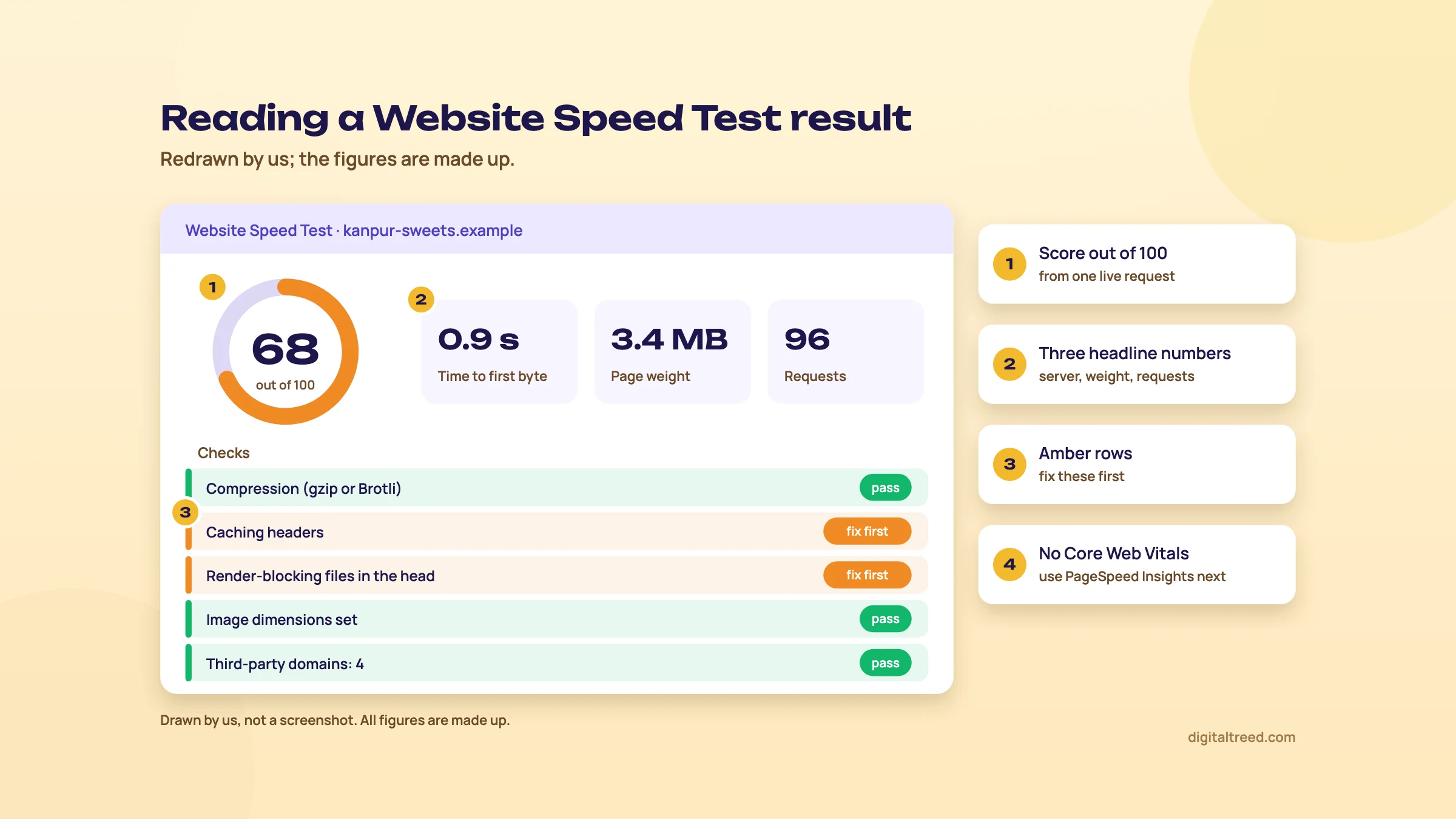 Read the score, the three headline numbers, then fix the amber rows. Drawn by us; the figures are made up.
With the site itself in order, the next jobs happen off it: links and local listings, in chapter 5.
Links and local SEO: the free tools
Quick answer
For links, use Search Console's Links report, Bing Webmaster Tools' Backlinks, which also shows other sites, and Ahrefs Free for your own verified sites. Moz and Semrush give a few free look-ups. For local, a Google Business Profile, Bing Places and basic Justdial, IndiaMART and Sulekha listings are all free.
Links: what you can see for free
A backlink is a link from another site to yours. Free tools show you your own links well and other sites' links only a little. We don't have a backlink checker of our own yet, so the outside tools come first here.
| Tool | Whose links | Free limit |
|---|---|---|
| Search Console, Links report | Your verified site | A sample of links, 1,000 rows per table; exports go further[54] |
| Bing Webmaster Tools, Backlinks | Your site and any other site | "A representative set of links", not the full profile[55] |
| Ahrefs Free | Your verified sites | 1,000 backlinks visible at once,[56] sortable and filterable[6] |
| Ahrefs Backlink Checker | Any site | The top 20 backlinks[34] |
| Moz free account and MozBar | Any site | 10 Link Explorer queries a month[7]; MozBar shows DA and PA with a 1,000-query limit[57] |
| Semrush free account | Any site | Inside the 10 reports a day[1] |
| Ubersuggest free | Any site | 100 backlinks per site[29] |
For a local business, Search Console plus Ahrefs Free is enough to see who links to you and to spot a spammy batch you didn't build. Bing's report is the free way to peek at a competitor's links. Domain Authority (Moz) and Domain Rating (Ahrefs) are each vendor's own score, not Google's; Google says third-party tools don't have access to its internal ranking data.[4] Our guides to Ahrefs and Moz Pro explain what the scores measure.
Once a partner agrees to link to you, send them the code. Our generator writes up to 200 links at a time in HTML, Markdown or BBCode; in HTML it adds the right rel value: sponsored for a paid placement, ugc for a forum post, nofollow where you don't vouch for the link.
Guide 2's link building chapter covers what works and what gets you penalised.
Local: free listings first
A Google Business Profile is free to create and claim.[58] It's the listing behind the map pack, and nothing paid replaces it. Its Performance report shows searches, calls, direction requests and website clicks, for verified profiles only, and it counts Google Ads activity too.[59] Our Business Profile guide covers set-up to suspensions.
Then the other free places your customers look, all with the same name, address and phone:
- Bing Places for Business, free, for Bing Maps.[60]
- Justdial, which offers a free listing.[61]
- IndiaMART, free registration with a profile, products and replies to buyer enquiries.[62]
- Sulekha, free to list a business; the customer leads it sends are paid.[63]
Guide 2's local SEO chapter says what each paid plan adds and how to keep the details matching.
Our free tools for local
- Free Website Audit: its Local SEO area checks for a Google Business link, LocalBusiness schema and the same phone number everywhere on the site.
- Schema Markup Validator: checks LocalBusiness markup on your contact or location page against its baseline fields.
- QR Code Generator: 11 code types, including Location (opens Google Maps with directions), WhatsApp, UPI Pay and Website, which you can point at your review page. Free, with your logo and colours, as PNG or SVG.
A free local SEO week for a Delhi dental clinic
- Fix the profile In Google Business Profile, check the name matches the signboard, the category is Dentist, and hours and phone are right.
- Copy the details Write the name, address and phone once in a note, exactly, and paste that into Bing Places, Justdial and Sulekha.
- Check the website side Run our Free Website Audit and fix anything in Local SEO, then test the contact page in our Schema Markup Validator.
- Make a review code In our QR Code Generator, make a Website code for the clinic's review link and print it for the front desk. Ask every patient, happy or not, and don't offer anything in return; Google's Maps policy bans incentives and asking selectively for positive reviews.[64]
- Read the results After a month, open the profile's Performance report and note calls and direction requests.
Paid local tools are mostly for agencies with many locations. If you want to try one, BrightLocal has a 14-day free trial with no card[65] and Local Falcon gives 100 free credits on sign-up for map-grid scans.[66] A single shop or clinic doesn't need either. Next, the newest job: AI answers, and how to measure all of it.
AI visibility, AI assistants and measuring results, for free
Quick answer
First check AI crawlers can read your site with our AI Crawler Checker. Then measure AI visibility for free in Search Console's generative AI report (impressions only), Bing's AI Performance report (citations) and GA4's AI Assistant channel. Free AI assistants help with ideas, regex and drafts. Measure everything else in Search Console, GA4 and your Business Profile.
Can AI tools read your site?
Enter a site and our checker tests its live robots.txt against 120 crawlers in 8 groups, from GPTBot, OAI-SearchBot, ClaudeBot and PerplexityBot to Bingbot and Googlebot. It gives a score out of 100 for the bots that let AI assistants find and cite you, plus technical signals such as HTTPS, a sitemap and structured data. Blocking training bots is your choice and isn't scored. For any blocked AI bot it gives robots.txt lines to paste. It reads robots.txt, not your firewall, so it can't see a firewall that blocks a bot.
Our Free Website Audit goes one step further in its AI visibility area: it asks AI who it recommends near you, and checks AI crawler access and llms.txt. Neither tool can promise a citation. GEO guide, chapter 6 explains which bots to allow and why.
Free reports that measure AI visibility
| Report | What it shows | What it doesn't |
|---|---|---|
| Search Console, Performance ("Web") | Clicks and impressions, with AI Overviews and AI Mode counted in[67] | Which ones came from AI features |
| Search Console, generative AI reports | Impressions in AI features by page, country and device, open to all sites since 31 August 2026[68] | Clicks, queries or position |
| Bing Webmaster Tools, AI Performance | Citations in Copilot and Bing's AI summaries, and the grounding queries behind them[69] | Clicks; Bing says a citation "does not represent traffic, clicks, or user engagement"[70] |
| GA4, AI Assistant channel | Visits from AI assistants that pass a referrer, in the default channels since 13 May 2026[71] | Visits with no referrer; mentions with no click |
The free tiers of other tools add a little more:
- Semrush free account: a domain's AI mentions, citations and visibility score.[72]
- Mangools AI Search Watcher: a free plan with 5 prompts and 1 monitor, updated weekly.[73]
- Frase AI Visibility Checker: your ChatGPT result free, with an email needed for Perplexity and Gemini.[38]
- Ahrefs: a free AI Visibility Checker on its website,[34] and Web Analytics, which shows visits from AI assistants on verified sites.[74]
And the cheapest tracker of all is a spreadsheet: ask ChatGPT, Perplexity, Gemini and Copilot the same ten buyer questions once a month and note whether you're named or linked. GEO guide, chapter 8 sets up that log and the GA4 channel.
Free AI assistants for SEO work
Gemini has a free plan, ₹0 a month with a Google Account.[75] Perplexity's free plan gives "practically unlimited basic searches", 3 Pro Searches a day and 1 Research query a month.[76] ChatGPT's free plan is ₹0 a month too, with limited uploads, image creation and deep research.[77] Our AI tools guide compares the plans in rupees and covers the privacy settings to change first.
What they're good at, free: keyword ideas and grouping, regex for Search Console filters, spreadsheet formulas, outlines, first drafts of titles and schema, and translations. What they're bad at: search volumes, rankings and facts. Google says it's "critical to manually factcheck and review all AI-generated content", and that includes titles and meta descriptions.[78] So run an AI-drafted title through our Meta Tag Analyzer and AI-written JSON-LD through our Schema Markup Validator before it goes live.
Measuring results
Rankings aren't the result; calls, orders and enquiries are. All of these are free:
- Search Console for searches, clicks and pages, 16 months back (guide).
- GA4, which Google says you can connect "free of charge",[79] for what visitors do after the click. Event data is kept for 2 or 14 months, so set it to 14 on day one.[80] See our GA4 guide.
- Google Tag Manager, free,[81] to count phone and WhatsApp taps as key events (guide).
- Business Profile Performance for calls and direction requests from Maps (chapter 5).
- Microsoft Clarity, "free forever", for heatmaps and session recordings.[82]
A free monthly SEO report in 30 minutes
- Search Console Compare the last 28 days with the previous period. Note the top three pages that gained and lost clicks.
- AI report Export the generative AI report's pages table and save it with the month's date.
- Bing Note total citations in AI Performance and the top grounding queries.
- GA4 In Traffic acquisition, note key events from Organic Search and from the AI Assistant channel.
- Business Profile Note calls, direction requests and website clicks.
- One health check Run our Free Website Audit and fix the top quick win before next month.
Guide 2's measuring chapter explains which numbers to report to a client. Chapter 7 puts every free limit in one table and says when it's worth paying.
Every free limit in one table, and when free stops being enough
Quick answer
Free stops being enough when you need other sites' data every day: competitor keywords, daily rank tracking by city, full link research or crawls past 500 URLs with settings. Then buy one tool for that job and keep the free ones. Entry plans run from about ₹960 a month (AnswerThePublic) to ₹13,344 (Semrush), checked 16 to 18 October 2026.
The free limits, side by side
Every limit below comes from the vendor's own page, as read for the guide linked in the last column. Free tiers change often, so check the vendor's page on the day you rely on one.
| Tool | Free limit | Card needed | Guide |
|---|---|---|---|
| Our free SEO tools | No sign-up; URL checkers take up to 10 URLs a run (Speed Test 1, Hyperlink Generator 200); Free Website Audit 1 a day, 3 signed in | No | Chapters 2 to 6 |
| Google Search Console | Your verified sites, 16 months of data, 1,000-row tables | No | Search Console |
| Bing Webmaster Tools | Your verified sites; Site scan quota set by Bing | No | Bing Webmaster Tools |
| GA4 | Free; event data kept 2 or 14 months | No | GA4 |
| Google Tag Manager | Free | No | Tag Manager |
| Google Keyword Planner | Free with a Google Ads account; ranges on low-spend accounts | Billing details | Keyword Planner |
| Google Trends | Free; relative 0 to 100 scale, no counts | No | Google Trends |
| PageSpeed Insights, Lighthouse | Free, any public URL | No | PageSpeed Insights |
| Rich Results Test | Free, one page per test | No | Rich Results Test |
| Google Business Profile | Free | No | Business Profile |
| Ahrefs Free | Unlimited verified sites; 5,000 crawl credits a month per project; 1,000 backlinks and keywords visible at once | No | Ahrefs |
| Semrush free account | 10 reports a day; 1 demo project; Site Audit 100 pages a month; 10 tracked keywords | No | Semrush |
| Screaming Frog | 500 URLs per crawl, fixed settings | No | Screaming Frog |
| Moz free account | 10 link, 10 keyword and 10 competitive queries a month; MozBar | No | Moz Pro |
| Ubersuggest | 3 searches a day, 1 project, 25 tracked keywords, 150 audit pages a week | No | Ubersuggest |
| Mangools | KWFinder 5 lookups per 24 hours; AI Search Watcher 5 prompts | No | Mangools |
| AnswerThePublic | 3 searches a day | No | AnswerThePublic |
| Yoast, Rank Math, AIOSEO | Free plugins; redirects free only in Rank Math | No | Yoast vs Rank Math, AIOSEO |
| Keyword Surfer | Free extension | No | Surfer |
| Perplexity, Gemini, ChatGPT | Free plans; Perplexity 3 Pro Searches a day | No | AI tools for SEO |
| Sitebulb, Surfer, Clearscope, Frase | No free plan; trials of 7 or 14 days | Surfer: yes; Sitebulb and Frase: no; Clearscope: not stated | Sitebulb, Surfer, Clearscope, Frase |
| SE Ranking | No free plan; 14-day trial with 750 keywords a day | No | SE Ranking |
Sources for the rows are in chapters 2 to 6. The Semrush row is from its pricing page and free account article,[83] the Ubersuggest row from its free account page,[29] and SE Ranking's trial from its pricing page.[84]
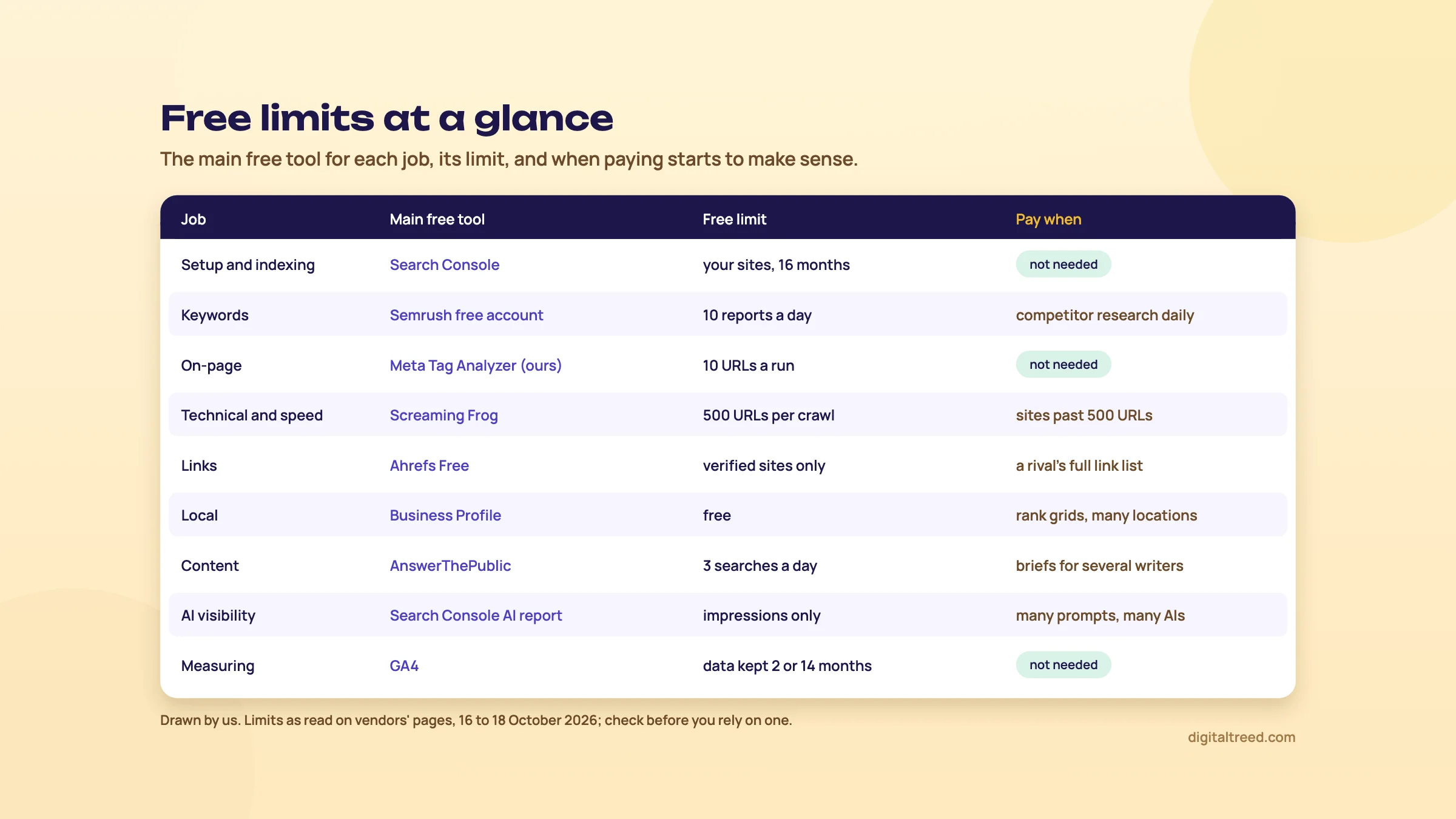 Each job's main free tool, its limit, and the point where paying starts to make sense. Drawn by us.
Signs free has stopped being enough
- You run out of Semrush's 10 reports or Ubersuggest's 3 searches most days, because competitor research is now your daily job.
- A client wants daily positions for 200 keywords in Pune on mobile. Search Console's average position isn't a fixed rank.
- You audit sites over 500 URLs and need saved crawls, JavaScript rendering or custom extraction.
- You need a competitor's full backlink list for outreach, not their top 20.
- You brief several writers every month and the hand-written brief is eating your week.
- You report AI visibility across ChatGPT, Perplexity and Gemini for many prompts, not ten.
- Clients want branded reports, and building them by hand takes a day a month.
None of these apply to a single shop or clinic with a 20 to 50 page site. If you're that business, the stack in chapter 1 is enough, and the money is better spent on photos, faster hosting or better pages.
What to buy first, and what it costs
Buy for the job that hurts, not for the biggest suite. The entry plans below are from our tool guides, read on each vendor's page on the date shown. Where a vendor showed US dollars, rupees are at ₹96 to US$1, the X-Rates average for 1 to 16 October 2026,[85] before any tax.
| Job that outgrew free | First paid step | Entry price | Checked |
|---|---|---|---|
| Keyword ideas with volumes, on a budget | Ubersuggest Individual | ₹1,135 a month[86] | 18 Oct 2026 |
| Keyword difficulty for a learner | Ahrefs Starter | $29 a month (about ₹2,784)[87] | 16 Oct 2026 |
| Simple keyword research and weekly ranks | Mangools Basic | $30.50 a month (about ₹2,928)[88] | 18 Oct 2026 |
| Questions with full exports | AnswerThePublic Starter | $10 a month (about ₹960)[89] | 18 Oct 2026 |
| Crawls past 500 URLs | Screaming Frog licence | £199 or $279 a year (about ₹26,800)[2] | 16 Oct 2026 |
| Explained audits for clients | Sitebulb Lite | $18 a month (about ₹1,728)[49] | 18 Oct 2026 |
| Redirects in WordPress | AIOSEO Basic | ₹3,000 first year, then ₹6,000 a year[41] | 18 Oct 2026 |
| Link metrics clients recognise | Moz Pro Starter | $49 a month (about ₹4,704)[90] | 18 Oct 2026 |
| Content briefs for writers | Frase Starter | $49 a month, or $39 billed yearly (about ₹4,704 or ₹3,744)[37] | 18 Oct 2026 |
| Daily rank tracking for clients | SE Ranking Core | $129 a month (about ₹12,384)[84] | 18 Oct 2026 |
| Competitor and link research at depth | Ahrefs Lite | $129 a month (about ₹12,384)[87] | 16 Oct 2026 |
| Competitors, keywords, ads and local in one place | Semrush SEO | $139 a month (about ₹13,344)[1] | 16 Oct 2026 |
Two more you'll see in plugin dashboards: Yoast SEO Premium is $118.80 a year per site (about ₹11,405),[40] and Rank Math PRO is €95.88 for the first year, about ₹10,350 by our Rank Math guide's rate.[91] For local agencies, BrightLocal's Track plan is $41 a month for one location (about ₹3,936).[65]
Torn between the two big suites? Ahrefs vs Semrush compares them job by job, including how to use one paid and the other's free tier side by side.
Trials: read the small print first
Do not
Do
- Use the free tier for two weeks before any trial
- Pick trials with no card where you can: SE Ranking, Frase and Sitebulb
- Note that Moz's trial is on the Medium plan and needs a card[93]
- Pay monthly for the first two or three months, then decide on yearly
Our view, after all 28 tool guides in this path: most small businesses in India never need to pay for an SEO tool, and most freelancers need exactly one, chosen for the job they do most. If you'd rather not juggle any of this, our SEO service runs the tools and the fixes for you, and our content marketing team writes the pages. You can get a quote in a couple of minutes. Otherwise, set up the two tools from chapter 1 this week, then take the quiz below.
Test yourself
Ten questions on the whole guide. Pick an answer, check it, and see your score at the end.
You got 0 of 10 right.
Frequently asked questions
Frequently asked
What are the best free SEO tools?
For most sites: Google Search Console, Bing Webmaster Tools, Google Business Profile, GA4, Google Keyword Planner, Google Trends and PageSpeed Insights, plus free checkers for tags, crawling and speed, such as our Meta Tag Analyzer, Free Website Audit and Website Speed Test. Add Ahrefs Free for your own backlinks and Semrush's free account for a quick look at competitors.
Is Google Search Console really free?
Yes. There's no paid version. It's free for every site you can verify, with 16 months of data and up to 1,000 properties per account. Its limits are that it shows only your own sites, only Google, and tables of up to 1,000 rows.
What is the best free keyword research tool?
Search Console first, if your site already gets impressions, because it shows the real searches you appear for. For new ideas and sizes, Google Keyword Planner is free with a Google Ads account, though low-spend accounts see ranges. Add Google Trends for seasons and AnswerThePublic's 3 free searches a day for questions.
Is Ahrefs free?
Partly. Ahrefs Free (once called Ahrefs Webmaster Tools) gives a site audit and your own backlinks and keywords for any site you verify, at no cost. Its website also has free tools such as a Backlink Checker showing the top 20 links to any site. Competitor research needs a paid plan, from $29 a month for Starter, and there's no free trial.
Does Semrush have a free plan?
Yes. A free account needs no card and gives 10 reports a day across the main tools, one demo project, a 100-page site audit a month and 10 tracked keywords. Reports show about 10 rows, and the Keyword Magic Tool has no export on the free plan.
What is the best free website audit tool?
For a small site, our Free Website Audit: 25 pages and 50+ checks, with the score and every check in 1 audit a day and no sign-up; a free sign-in adds every fix with its points, the PDF, a competitor compare and 3 audits a day. For bigger sites, Screaming Frog's free version crawls 500 URLs, Ahrefs Free audits sites you verify, and Bing Webmaster Tools has a free Site scan.
Can I do SEO without paid tools?
Yes, for a local business or a small site. Google's and Bing's tools give you your real data, and free checkers cover tags, crawling, speed and local listings. Paid tools mainly add other sites' data: competitor keywords, full link indexes and daily rank tracking. You need those when SEO is your job, not when it's one part of running a shop.
Are free SEO tools accurate?
Google's and Bing's own tools show real data about your own site. Keyword volumes, traffic estimates and authority scores in any tool, free or paid, are estimates, and each vendor models them differently. Use one tool consistently and compare keywords with each other, not with reality.
Which free tools show if AI answers mention my site?
Search Console's generative AI report shows impressions in Google's AI features, and Bing Webmaster Tools' AI Performance report counts citations in Copilot. GA4's AI Assistant channel shows visits from assistants. Our AI Crawler Checker tells you whether AI bots may read your site at all. A monthly prompt log in a spreadsheet covers ChatGPT, Perplexity and Gemini.
Is Screaming Frog free?
The SEO Spider has a free version that crawls up to 500 URLs per crawl, with fixed settings and no saved crawls or JavaScript rendering. A licence costs £199 or $279 a year per user and removes those limits.
Sources
References
- SEO & AI Search Plans and Pricing, Semrush, prices seen 16 Oct 2026, re-checked 18 Oct 2026 from India, accessed 16 Oct 2026
- SEO Spider pricing, Screaming Frog, prices seen 16 Oct 2026, accessed 16 Oct 2026
- How does the Surfer trial work?, Surfer Help Center, 16 Oct 2026, accessed 16 Oct 2026
- Guidance on third-party SEO tools and services, Google Search Central, updated 5 Jun 2026, accessed 16 Oct 2026
- Business eligibility and ownership guidelines, Google Business Profile Help, accessed 16 Oct 2026
- Ahrefs Webmaster Tools (now Ahrefs Free), Ahrefs, accessed 16 Oct 2026
- Cancel Moz Pro Base Plan (Community and paid access compared), Moz Help Hub, accessed 18 Oct 2026
- Google Search technical requirements, Google Search Central, accessed 16 Oct 2026
- About Search Console, Search Console Help, accessed 16 Oct 2026
- Add a website or platform property to Search Console, Search Console Help, accessed 16 Oct 2026
- Introducing the new Search Console, Google Search Central blog, 8 Jan 2018, accessed 16 Oct 2026
- Performance report (Search results): Troubleshooting data discrepancies, Search Console Help, accessed 16 Oct 2026
- About bulk data export of Search Console data to BigQuery, Search Console Help, accessed 18 Oct 2026
- Getting started checklist, Bing Webmaster Tools Help, accessed 18 Oct 2026
- Easily Verify Your Site in Bing Webmaster Tools by Importing from Google Search Console, Bing Webmaster Blog, 13 Sep 2019, updated June 2025, accessed 16 Oct 2026
- Search engine market share in India, StatCounter Global Stats, September 2026 data, accessed 18 Oct 2026
- How web search works in Microsoft Copilot Chat and agents, Microsoft Support, accessed 16 Oct 2026
- What is IndexNow?, IndexNow.org, accessed 18 Oct 2026
- Rank Math SEO (plugin page and free feature list), WordPress.org, accessed 16 Oct 2026
- IndexNow participating search engines (searchengines.json), IndexNow.org, accessed 18 Oct 2026
- URL Inspection tool, Search Console Help, accessed 16 Oct 2026
- Performance report (Search results): Overview and basic setup, Search Console Help, accessed 16 Oct 2026
- Use Keyword Planner, Google Ads Help, accessed 16 Oct 2026
- Google officially throttling Keyword Planner data for low spending AdWords accounts, Search Engine Land, Greg Finn, 13 Aug 2016, accessed 16 Oct 2026
- Explore - Google Trends (seen signed out, India), Google Trends, accessed 16 Oct 2026
- FAQ about Google Trends data, Google Trends Help, accessed 16 Oct 2026
- Keyword Magic Tool, Semrush Knowledge Base, accessed 16 Oct 2026
- KWFinder: free keyword research and analysis tool, Mangools, accessed 18 Oct 2026
- Free Account: Key Features and Limits, Ubersuggest Help Center, updated 26 Jul 2025, accessed 16 Oct 2026
- How to Use the Ubersuggest Chrome Extension for SEO Insights, Ubersuggest Help Center, updated 19 Feb 2026, accessed 16 Oct 2026
- Is There a Free Version of AnswerThePublic?, AnswerThePublic Help Center, updated 16 Oct 2026, accessed 16 Oct 2026
- AlsoAsked pricing, AlsoAsked (Candour), checked 18 Oct 2026, accessed 16 Oct 2026
- Keyword Surfer Extension Explained, Surfer Help Center, 16 Oct 2026, accessed 16 Oct 2026
- Free SEO tools, Ahrefs, accessed 16 Oct 2026
- Keyword research, Bing Webmaster Tools Help, accessed 18 Oct 2026
- Plans and pricing, Clearscope (Mushi Labs), accessed 18 Oct 2026
- Plans and pricing, Frase, accessed 18 Oct 2026
- Free SEO and AI search tools, Frase, accessed 18 Oct 2026
- SEO Writing Assistant, Semrush Knowledge Base, accessed 16 Oct 2026
- Yoast SEO Premium, Yoast, prices seen 16 Oct 2026, accessed 16 Oct 2026
- Pricing (plans, feature table, pricing FAQ and terms), AIOSEO, prices seen from India 18 Oct 2026, accessed 16 Oct 2026
- Rich Results Test, Search Console Help, accessed 18 Oct 2026
- Rich result report overview, Search Console Help, accessed 18 Oct 2026
- Announcing Schema Markup Validator: validator.schema.org (beta), Schema.org blog, 21 May 2021, accessed 16 Oct 2026
- Google SERP Simulator, Mangools, accessed 18 Oct 2026
- How does Site Audit work?, Semrush Knowledge Base, accessed 18 Oct 2026
- Site Scan, Bing Webmaster Tools Help, accessed 18 Oct 2026
- How does the Sitebulb free trial work?, Sitebulb Help Centre, updated 1 Aug 2025, accessed 16 Oct 2026
- Desktop plans for SEO professionals (pricing page and FAQ), Sitebulb, prices seen 18 Oct 2026, accessed 16 Oct 2026
- PageSpeed Insights, Google, report viewed 16 Oct 2026, accessed 16 Oct 2026
- Core Web Vitals report, Search Console Help, accessed 16 Oct 2026
- CrUX Vis, Chrome for Developers, updated 6 May 2025, accessed 16 Oct 2026
- Web Performance Optimization pricing (WebPageTest Starter and Pro), LogicMonitor (Catchpoint), accessed 18 Oct 2026
- Links report, Search Console Help, accessed 16 Oct 2026
- Backlinks, Bing Webmaster Tools Help, accessed 18 Oct 2026
- What can I use for free in Ahrefs?, Ahrefs Help Center, updated 3 Sep 2026, accessed 16 Oct 2026
- MozBar Feature Access, Moz Help Hub, accessed 18 Oct 2026
- Add or claim your Business Profile, Google Business Profile Help, accessed 16 Oct 2026
- Understand your Business Profile performance & insights, Google Business Profile Help, accessed 16 Oct 2026
- Bing Places for Business, Microsoft, accessed 18 Oct 2026
- Justdial Free Listing, Justdial, accessed 16 Oct 2026
- Registration Fee for IndiaMART, IndiaMART Help, updated 11 Dec 2025, accessed 16 Oct 2026
- Advertise your Business Online Free on Sulekha.com, Sulekha, accessed 16 Oct 2026
- Prohibited and restricted content (fake engagement, incentivised reviews), Google Maps user contributed content policy, accessed 16 Oct 2026
- BrightLocal pricing, plans and local SEO packages, BrightLocal, accessed 16 Oct 2026
- Local Falcon pricing, Local Falcon, accessed 16 Oct 2026
- AI features and your website, Google Search Central, updated 10 Dec 2025, accessed 16 Oct 2026
- Introducing Search Generative AI performance reports in Search Console, Google Search Central blog, 3 Jun 2026, note added 31 Aug 2026, accessed 16 Oct 2026
- Introducing AI Performance in Bing Webmaster Tools public preview, Bing Webmaster Blog, 10 Feb 2026, accessed 16 Oct 2026
- AI Performance in Bing Webmaster Tools (FAQs), Bing Webmaster Tools Help, accessed 18 Oct 2026
- [GA4] What's new in Google Analytics, Analytics Help, entry of 13 May 2026, accessed 16 Oct 2026
- Semrush Features for AI Visibility, Semrush Knowledge Base, 13 Oct 2026, accessed 16 Oct 2026
- AI Search Watcher, Mangools, accessed 18 Oct 2026
- Ahrefs Web Analytics, Ahrefs, accessed 16 Oct 2026
- Gemini subscriptions (India), Google, accessed 18 Oct 2026
- Which Perplexity Subscription Plan is right for you?, Perplexity Help Center, accessed 18 Oct 2026
- Plans and Pricing | ChatGPT, OpenAI, seen from India, accessed 18 Oct 2026
- Google Search's guidance on using generative AI content on your website, Google Search Central, updated 1 Oct 2026, accessed 16 Oct 2026
- Set up Analytics for a website and/or app, Google Analytics Help, accessed 16 Oct 2026
- Data retention, Google Analytics Help, accessed 16 Oct 2026
- Google Tag Manager, Google Marketing Platform, accessed 16 Oct 2026
- Microsoft Clarity: free heatmaps and session recordings, Microsoft, accessed 16 Oct 2026
- What can you do with a free Semrush account?, Semrush blog, 10 Dec 2025, accessed 16 Oct 2026
- Subscription, SE Ranking, prices seen 18 Oct 2026 from India, accessed 16 Oct 2026
- Monthly average USD to INR, 2026, X-Rates, accessed 16 Oct 2026
- Plans and pricing, Ubersuggest (Neil Patel Digital), prices seen 18 Oct 2026, accessed 16 Oct 2026
- Plans and pricing, Ahrefs, prices seen 16 Oct 2026, accessed 16 Oct 2026
- Plans and pricing, Mangools, prices seen 18 Oct 2026, accessed 16 Oct 2026
- AnswerThePublic pricing, AnswerThePublic, checked 18 Oct 2026 from India, accessed 16 Oct 2026
- Moz Pro Pricing, Moz, prices seen 18 Oct 2026, accessed 16 Oct 2026
- Rank Math pricing, Rank Math, prices seen 16 Oct 2026, accessed 16 Oct 2026
- Subscriptions and Toolkits, Semrush Knowledge Base, accessed 16 Oct 2026
- Moz Pro Free Trial, Moz Help Hub, accessed 18 Oct 2026
Get the free checklist
Every step of this guide on one page, to print or tick off. We email you the PDF link.