

What SE Ranking is, who it's for, and when you don't need it
This is the SE Ranking guide in our "SEO tools explained" path. It's for freelancers, agency staff and in-house marketers who know the SEO basics and are weighing a mid-priced suite, or already have one and want to use it properly. If keyword difficulty or referring domains are new terms, start with Intermediate SEO.
By the end you'll be able to set up a project that tracks a Delhi dental clinic in Google, on the map and in AI answers. You'll also run and read a site audit, find a competitor's content gap, and build a monthly client report that sends itself. The tasks use Indian examples: a Delhi dentist, a Pune coaching centre and a D2C brand.
There are six chapters, about 35 minutes in all. Chapter 1 covers what SE Ranking is and when you don't need it. Chapters 2 to 5 go through set-up and rank tracking, the audit, the research tools, and AI tracking, reports and the API. Chapter 6 has prices in rupees, pros and cons, and the alternatives, starting with our own free tools. Prices were checked on SE Ranking's pricing page on 18 October 2026, and menu names come from its help centre. We have no affiliate deal with SE Ranking or any tool in this guide.
Quick answer
SE Ranking is a paid SEO suite built around daily rank tracking, with site audits, keyword and competitor research, backlinks, local SEO, AI search tracking and client reports in one account. It suits freelancers and agencies reporting on several sites. A single small business can usually start with Search Console and free tools instead.
SE Ranking describes itself as "an SEO platform for agencies and in-house marketing teams".[1] That's a fair summary. It started as a rank tracker,[2] and rank tracking is still where it's strongest. Every tracked keyword is checked once a day, for the city, device and search engine you pick.[3] Around that it has grown a full suite.
What's in the box
You work in projects. Each project is one website, and inside it you track rankings, run audits and watch competitors. You can also run one-off checks on any other domain or page without making a project.[1] The main tools, with the chapter that covers each:
| Tool | What it does | Chapter |
|---|---|---|
| Rank Tracker (Rankings) | Daily positions in Google, Google Mobile, Bing, Yahoo and YouTube, by country, city or postal code | 2 |
| Local Marketing | Google Maps rankings on a grid, Business Profile stats, listings and reviews | 2 |
| Website Audit | Crawls a whole site for technical and on-page issues | 3 |
| On-Page SEO Checker | Checks one URL against one keyword and the pages ranking for it | 3 |
| Competitive Research | Estimates any domain's keywords, traffic and top pages | 4 |
| Keyword Research | Volume, difficulty and ideas for a keyword | 4 |
| Backlink Checker and Backlink Monitoring | Any site's links, and a watch list of your own | 4 |
| AI Results Tracker | Whether your brand is mentioned or linked in AI Overviews, AI Mode, ChatGPT and more (the pricing page lists Perplexity, the help centre Gemini) | 5 |
| Report Builder, Agency Pack, API | Scheduled client reports, white label, data access | 5 |
The help centre lists the search engines for rank tracking.[4] The AI engines come from the AI Results Tracker page.[5] Content Editor, an AI writing tool, is also included, but this guide doesn't cover it; for content work see our guide to Surfer.
The data behind the research tools is big but not evenly spread. SE Ranking says it holds 5.5 billion keywords in 188 regional databases and 2.7 trillion backlinks.[1] Its own data page gives the India database 49 million keywords, against 584 million for the US.[6] So research numbers for India rest on a smaller base than US numbers do. Keep that in mind in chapter 4.
Who it's for
- Freelancers and small agencies who report rankings to several clients every month. Daily tracking, local grids and scheduled reports are the point of the tool.
- In-house marketers at a business with many locations or many product pages, who need one place for rankings, audits and links.
- Anyone switching from a pricier suite who mainly used it for rank tracking and reports.
Plans start at $129 a month, or $103.20 a month billed yearly, with a 14-day free trial that needs no card.[7] Chapter 6 has the full table in rupees.
When you don't need it
For a 20-page local site you don't need a paid suite. A Delhi dentist with one clinic gets most of what matters for free. Search Console shows searches and clicks, Business Profile covers the map listing, and a free audit tool finds broken pages. Search Console's average position isn't a daily rank: it averages every query, device and date in your filter.[8] For one site, it's still enough to see the trend.
Pay for SE Ranking when one of these is true:
- You need daily positions for a specific city or PIN code, on mobile, including the local pack.
- You report on three or more sites and want reports that build and send themselves.
- You want to see where a clinic or shop ranks on the map across a neighbourhood, not just from one spot.
- You need competitors' keywords and links, and you'd rather not pay Semrush or Ahrefs prices.
Tip
Start with our Free Website Audit. It checks up to 25 pages for SEO, speed, security, local SEO and AI visibility in about a minute, with no account. If that and Search Console answer your questions, you may not need a suite yet.
How SE Ranking compares, in one line each
Against Semrush and Ahrefs, SE Ranking gives you more tracked keywords for about the same money: 2,000 on Core,[7] against 750 on Ahrefs Lite[9] and 500 on Semrush's SEO plan.[10] Its reports are built for agencies too. What we can't tell you from a pricing page is how its keyword and link data compares on your own competitors. Test that in the trial. Moz Pro and Mangools are the other mid-priced options. Chapter 6 has the numbers and a "which one when" table.
Next, set up a project the right way for an Indian city.
Set-up and rank tracking: trial, first project and local tracking for an Indian city
Quick answer
Start the 14-day trial (no card), create a project, and add Google desktop and Google mobile for India with your city as the location. Turn on Local Pack tracking with the business name and phone. Then add Local Marketing for Google Maps grids. Remember each keyword counts once per search engine.
The trial: what you get
The trial is free for 14 days and SE Ranking says no credit card is required. It includes up to 10 projects, 750 tracked keywords a day, 20 AI prompts a day and AI competitive research for 3 domains.[7] That's enough to set up two or three real clients and judge the data. One thing the trial leaves out: SE Visible, the separate AI visibility product, isn't included.[11]
Plan the trial before you start. Day 1: projects and keywords. Days 2 to 7: watch the daily rankings and run the audit. Week 2: build one report and decide.
How the keyword limit is counted
This catches people out. Plans count targets: one keyword in one search engine. SE Ranking's own example is 30 keywords in 2 engines = 60 targets.[7] A "search engine" here means the engine plus its country, region and language, so the same keyword in Google Delhi and Google Mumbai counts twice.[12] Pausing a project doesn't free its keywords; only deleting them does.[12]
2,000
Daily keyword targets on Core; 5,000 on Growth[7]
Top 100
Google results read per check; lower ranks show as no position[8]
1 a day
Standard rank checks, fixed; Recheck Data runs one sooner[3]
Choosing search engines for India
In the project wizard you pick Google (desktop or mobile), Bing, Yahoo, and the AI engines (the help centre lists AI Overviews, AI Mode, ChatGPT and Gemini; the pricing page shows Perplexity instead of Gemini, see chapter 5). For most engines you set the country, language and a precise location.[13] Locations go down to any city or postal code.[4] For an Indian business:
- Country India, and your city. A Delhi clinic's rank for "dentist near me" from a city-level check is what a patient in Delhi sees. A country-level check tells you very little for local searches.
- Add Google Mobile next to desktop. SE Ranking suggests adding both to see rankings on both devices.[13] If your limit allows only one for a local business, we'd pick mobile: that's where people search on the way to a clinic or shop.
- Language English. You can add a second configuration for another language in the same location.[13] Add a Hindi configuration only if you'll write pages for those searches.
- Local Pack on. Toggle it and enter the company name and phone number, and the map results are tracked on desktop and mobile.[4]
Warning
Deleting a search engine or region from a project also deletes its ranking history, with no way to recover it.[4] Decide on locations before you build months of history.
AI Overviews and AI Mode in the same project
If you add AI Overviews or AI Mode as engines, the wizard asks for prompts, the questions people type into AI tools, and your brand name. Prompts count as prompts times engines: 2 prompts in 3 AI engines use 6 units.[13] Core includes 100 prompts a day.[7] Chapter 5 explains what these reports measure and how far to trust them.
Competitors, Search Console and GA4
Step 5 of the wizard takes up to 20 competitors: a whole site, one URL or a section.[13] Add the three to five clinics that actually show up for your keywords. SE Ranking's own advice is 3 to 5 for benchmarking.[14] Step 6 connects Google Analytics, Search Console and Matomo.[13] Connect Search Console: SE Ranking then shows queries with many impressions that you haven't added to the project, so you can track them.[15]
Set up a project for a Delhi dentist with local tracking
- Create the project. In the side menu, click Projects, then Create Project.[13] Enter the clinic's domain and a name like "Clinic, South Delhi". Leave the domain type as the whole domain.
- Add Google mobile and desktop. Country India, location New Delhi (or the clinic's postal code), language English. Toggle Local Pack and type the clinic's name and phone number exactly as they appear on its Business Profile.[4]
- Add 30 to 50 keywords. The searches that bring patients: "dentist in Saket", "root canal treatment cost Delhi", "teeth whitening South Delhi", "emergency dentist near me". At 50 keywords on two engines you use 100 targets.
- Group and tag them. Groups are folders (one per treatment); tags are labels (local, price, emergency). A keyword sits in one group but can have many tags.[14]
- Set target URLs. For each treatment group, set the page you want to rank. A red URL button later means Google is showing a different page than the one you chose.[16]
- Add competitors and connect Search Console. Three to five nearby clinics, then Search Console and GA4 in the last step. Click Finish.
- Add the clinic in Local Marketing. Open Local Marketing in the side menu, click Add Location, connect the Google account that manages the Business Profile and pick the clinic.[17]
- Build a map grid. In Local Rankings, click Tracking setup and switch to grid mode. A 5x5 grid with a 1 km gap around the clinic covers the area patients come from; grids run from 3x3 to 15x15.[18] Add 10 common keywords and click Start Tracking.
- Check the first results by hand. Click a position to open its detail, open Live results in an incognito window, and compare.[8]
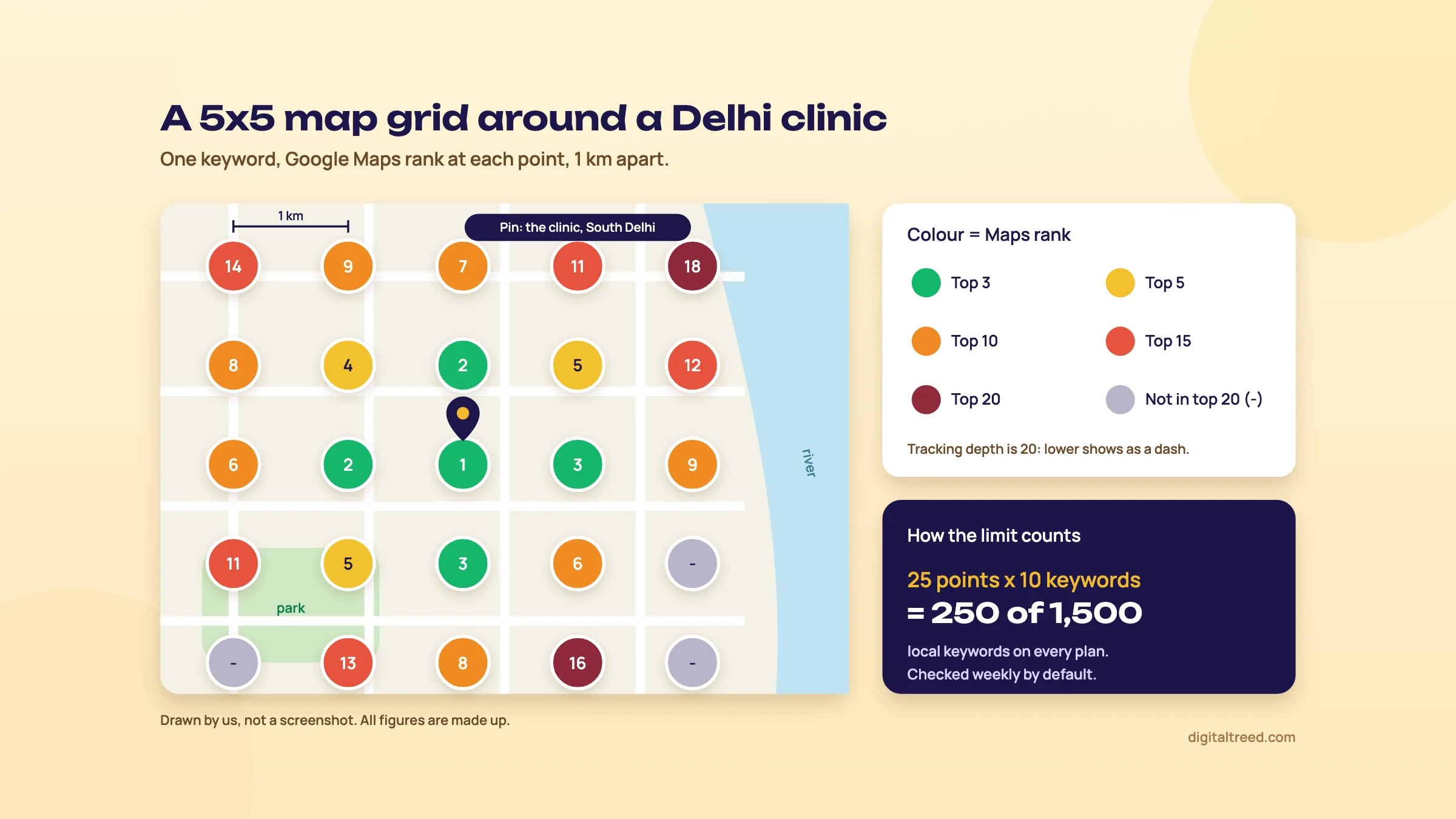 One keyword, 25 points: ranks fall away from the clinic. Drawn by us; the figures are made up.
Local grids, and how the limit works
The grid is the most useful thing SE Ranking does for a clinic, a coaching centre or a sweet shop. Instead of one rank, you see a map of ranks: green where the clinic is in the top 3 on Google Maps, grey where it's outside the top 20.[18] The tracking depth is 20, so anything lower shows as a dash.[18]
The limit counts point and keyword pairs. Our 5x5 grid with 10 keywords uses 250. Every plan has a base of 1,500 Local and Map Rank Tracker keywords, and each extra Plus location adds 500 more.[18] You can switch off grid points that fall on a park or the Yamuna to save limits.
Two timing points. Local rankings are checked once a week by default, not daily, and you can change the day in the location settings.[18] And location data (listings and reviews) refreshes weekly too, or monthly if you choose.[17]
Warning
With profile sync on (it usually is), edits you make to the business profile inside Local Marketing are pushed to the real Google Business Profile.[17] Treat that screen like the Business Profile itself. Our Google Business Profile guide covers what to change and what to leave alone.
Local Marketing also checks listings in business directories against the clinic's name, address and phone. Which directories it checks depends on the country and the business category.[19] We couldn't find SE Ranking's list for India, so check in the trial whether Justdial, Sulekha or IndiaMART appear. For the Indian citation sites and how to fix them by hand, see local SEO in depth.
Reading the Rankings screen
Rankings has Summary, Detailed and Historical views.[20] The charts across the top show average position, traffic forecast, search visibility, SERP features and % in top 10.[3] What to look at, in order:
- % in top 10 and average position by group. A treatment group moving from position 14 to 8 matters more than the account average.
- Red URL buttons. The wrong page is ranking; usually two pages compete. See keyword cannibalisation.
- SERP features. If a keyword shows an AI Overview or a local pack above the organic results, a position 3 may still get few clicks.
Why does SE Ranking's number differ from Search Console's? SE Ranking records one check, for one location and device. Search Console averages everything in your filter. To compare fairly, filter Search Console to the same query, country, device and date.[8] Our Search Console guide shows how.
Next, audit the site you're tracking.
Website Audit and On-Page SEO Checker: find what's broken, then fix the money pages
Quick answer
Website Audit crawls a whole site and sorts issues into critical, warnings and notices, and shows how many health-score points each category can add back. Set the page source, robots.txt rules and JavaScript rendering first, then schedule it weekly or monthly. On-Page SEO Checker compares one page with the pages ranking for its keyword.
The audit starts by itself when you create a project, unless you switch that off, and you get an email when it finishes.[21] You can also run a stand-alone audit for any site, with no project, for a prospect or a competitor.[21] It checks domain metrics and technical parameters such as security, load time, status codes and redirects. It also checks indexation, meta tags, page resources (images, CSS, JavaScript) and internal and external links.[21]
Core includes 250,000 audited pages a month across the account; Growth gives 2 million, with up to 1 million in one project.[7] For most Indian small business sites that limit never matters. Crawl settings do.
The settings to change before the first real crawl
| Setting | What we'd choose | Why |
|---|---|---|
| Source of pages | Site pages for the first audit; XML sitemap later | Site pages follows every internal link from the home page, so it finds pages your sitemap forgot. XML sitemap audits only what you list.[22] |
| Take robots.txt into account | On | Shows the site the way search engines are allowed to see it.[22] |
| Ignore Noindex | Off | Keeps noindex pages out of the audit.[23] |
| JavaScript rendering | On for Shopify, React or page-builder sites | Without it, content loaded by JavaScript isn't seen and the audit is incomplete.[22] |
| Maximum pages to scan | Raise it to your site's size | The default is 1,000 pages.[23] |
| Maximum requests per second | Lower it on shared hosting | A fast crawl can overload a small server and cause 429 or 503 errors.[23] |
| Schedule | Weekly or monthly | Times are set in GMT only, so a 02:00 GMT run is 07:30 in India.[22] |
SE Ranking's help pages disagree on the default crawl speed: the settings page says 5 requests a second, the FAQ says 500. Look at the number in your own settings before you crawl a client's shared-hosting site.
Warning
If the audit won't start or stops at the home page, a firewall is usually blocking the crawler. Allow the user agent SEBot-WA and SE Ranking's IP addresses. Its bot runs from German IPs, so a rule that blocks Germany beats the whitelist. On Cloudflare, also switch off Bot Fight Mode.[23]
Reading the Issue Report
Every issue has a severity: critical (fix as soon as possible), warning (review and address) or notice (information, no direct effect on site health). Each category shows "+X pts", the points it can add to the health score.[24] Click an issue for the fix, and click the number in the Pages column for the affected URLs. With two or more audits, pick an earlier date to compare.[24]
The health score is SE Ranking's score, not Google's. Don't chase 100. Sort by what affects pages that bring enquiries, in this order:
- Pages that can't be indexed by mistake: 4XX errors on live service pages, noindex on a page you want found, redirect chains.
- Speed problems on the main templates: large images and render-blocking files on the home page and service pages.
- Titles and descriptions: missing, duplicated or cut off on pages that rank on page one or two.
- Everything else, in batches, once a month.
Some flags are noise. Tracking tags and CTA links from tools such as HubSpot can show up as 4XX errors or broken redirects, though the pages are fine.[24] External links can be flagged as broken when the other site refuses the crawler's quick HEAD request, even though they open in a browser. You can exclude those domains in Rules for scanning pages.[23] And if language versions sit on different domains, the hreflang return-link warning will always fire, so ignore it.[24]
Before you trust any issue count, confirm the big ones in Search Console's Pages report. Google's view of what is indexed is the one that counts. Our Search Console guide explains each reason.
Note
From our work: when I taught SEO A to Z at a training institute, my students were already doing client work and saw results in two to three weeks. The hardest part for them was technical SEO, because the local business sites they handled mostly ran on WordPress with shared hosting. The most common issue was site speed. The lesson for this audit: fix speed on the templates that earn money before you work down the rest of the list.
Run an audit for the Delhi dentist and turn it into a fix list
- Run a free check first. Put the clinic's home page into our Free Website Audit for a quick, no-account view of speed, security, local SEO and AI visibility.
- Open Website Audit. Click Projects, then Website Audit in the submenu, or use the three-dot menu next to the project.[21]
- Check the settings. Source: Site pages. Robots.txt on, Ignore Noindex off. Turn on JavaScript rendering if the site uses a page builder. Lower the request rate if the clinic is on shared hosting.
- Restart the audit and wait for the email.
- Filter to critical issues. Note the affected service pages: root canal, implants, braces, contact.
- Check the fixes with our free tools. Redirects and 404s in the HTTP Status Checker (up to 10 URLs, every hop). Titles and snippets in the Meta Tag Analyzer. Speed in the Website Speed Test.
- Download the PDF. Click Download report, choose the sections, add a short note to each.[21] That note is your fix list for the developer.
- Schedule it monthly, the week after the developer's usual update day.
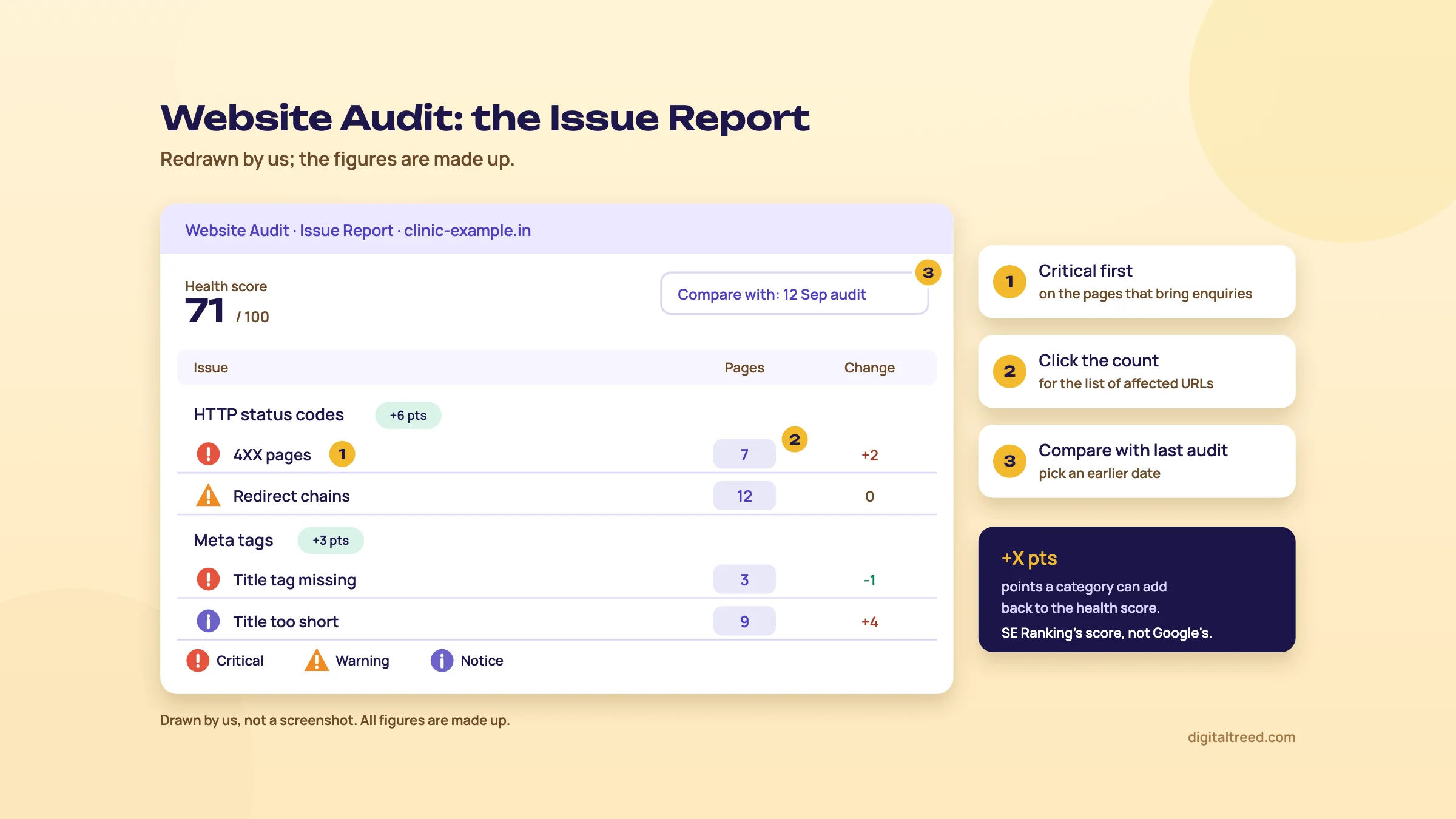 Critical issues first, click the Pages count for URLs, compare with the last audit. Drawn by us; the figures are made up.
On-Page SEO Checker: one page, one keyword
The audit looks at the whole site. On-Page SEO Checker looks at one URL for one search,[23] and compares it with the top competitors.[25] You enter the URL, search engine, country, region, depth and Google interface language, then a primary keyword and secondary keywords.[25] Core allows 50 checks, Growth 1,000, shared with the SERP Analyzer.[7] With only 50 on Core, save them for the pages that matter.
Use it on the clinic's root canal page for "root canal treatment cost Delhi", once the audit's technical issues are fixed. Read its suggestions as a reading list, not a recipe. Google says it has no preferred word count,[26] so padding a page to match a competitor's length won't help. Ask instead: does our page answer the cost question as clearly as the pages above it? Our Word Counter & Keyword Density Checker is enough to check a draft, and on-page in depth has the rules we follow.
You can export the report as a PDF, email it, or share it by guest link, which anyone can open without logging in.[25] Guest links are a Growth feature: the pricing page shows them as not included in Core, so on Core send the PDF or the email instead.[7]
Next, use the research tools to see what competitors rank for.
Competitive Research, Keyword Research and backlinks: what each number means
Quick answer
Competitive Research estimates any domain's keywords, traffic and competitors; Competitor Comparison shows keywords two rivals rank for and you don't. Keyword Research gives volume, difficulty and ideas. Backlink Checker shows any site's links, Backlink Gap finds sites linking to rivals, and Backlink Monitoring checks your own links weekly. Always pick India first.
Competitive Research
Enter a domain or URL, select a region, click Analyze.[27] Select India every time. The Overview tab shows organic and paid traffic, keywords, referring domains, backlinks and two SE Ranking scores, Domain Trust and Page Trust, plus an AI Search widget.[28] The organic tab adds estimated clicks from current rankings, traffic cost, and the list of keywords the site ranks for.[29]
Every traffic figure here is an estimate built from rankings and search volumes, not the site's real visits. SE Ranking says its machine-learning forecast lines up closely with Search Console data.[28] That's the vendor's claim. Test it yourself: run your own site and compare the estimate with Search Console clicks for the same month. If it's off by half for you, it's probably off by half for competitors too, and you can still use it to rank them against each other.
Three tabs earn their keep:
- Competitors: sites that get organic traffic for keywords like yours. Hide Wikipedia and YouTube to see real rivals.[29] These are often not the businesses you think of as competitors.
- Competitor Comparison: enter up to three domains and see their keyword overlap, including keywords both competitors rank for and you don't.[29] That last list is your content gap.
- Pages & Subdomains: where a rival's estimated traffic lands, so you see which topics carry their site.[29]
Historical months go back to February 2020, for searches on a whole domain with its subdomains (not single URLs or Competitor Comparison). Core shows up to 6 months of history; Growth shows all of it.[30]
Keyword Research
Enter a keyword and you get its search volume, cost per click and Keyword Difficulty, plus similar, related and low-volume ideas.[31] The parts to read:
| Number | What it is | How we use it |
|---|---|---|
| Search volume | Based on Google Keyword Planner data, with SE Ranking's own adjustment to split grouped keywords[32] | For size, not as an exact count. A 0 can mean Google restricts the topic (healthcare is one).[32] |
| Keyword Difficulty | How hard the top 10 is to enter, from the quality of those results and their links[33] | Compare keywords inside SE Ranking only; other tools score differently |
| Search intent | Informational, navigational, transactional, commercial or local[33] | Decide the page type: service page, blog post or location page |
| Similar and related | Similar keywords contain your keyword plus other words; related keywords share ranking pages with it[34] | Build the long list, then group it into pages |
| Organic results | The top 100 pages for the keyword in that region[33] | See what kind of page Google prefers |
For a Delhi dentist, the healthcare restriction is the one to watch. Dental searches can show 0 or low volume for that reason, so cross-check with the queries Search Console already shows for the clinic. Our Keyword Planner guide covers how Google's own volume data works.
Note
From our work: a women's wear manufacturer's online store. Its product pages targeted short, competitive keywords. We moved them to long-tail keywords, and results started within a month. The lesson for Keyword Research: the similar and low-volume lists matter more than the head term.
Find the content gap for a Pune coaching centre
- Find real competitors. In Competitive Research, enter the centre's domain, select India, click Analyze, and open Competitors. Hide the big players and note the two coaching sites closest to yours.
- Compare. Open Competitor Comparison, enter your domain and those two, and click Show Results.[29]
- Take the gap list. Keywords both rivals rank for and you don't, for example "MPSC coaching fees Pune", "best NEET batch timings", "CET crash course Pune".
- Check each in Keyword Research. Look at intent and the top 10. If the top results are centre pages, it's a service page; if they're guides, it's a blog post.
- Group them into pages. One page per intent, not one per keyword. Topic clusters explains how.
- Add the winners to Rankings, with a target URL for each, so the next monthly report shows whether the new pages work.
Backlink Checker
Backlink Checker finds the backlinks of any domain and analyses each one against more than 15 parameters.[35] SE Ranking says its index holds 2.7 trillion backlinks.[1] Domain Trust, its link score, shows "how likely a domain is to rank high in search results", in SE Ranking's words.[36] It's SE Ranking's metric, not Google's. Use it to compare sites, never as a target to sell.
Warning
The totals and the tables aren't the same thing. The headline counts are the whole profile SE Ranking found; the tables you view and export are a sample, capped by your plan and weighted to the strongest referring domains. A site showing 2,600 referring domains can export a few dozen rows. For the full list, SE Ranking points you to its Data API.[37]
Backlink Gap Analyzer takes your domain and up to 5 competitors and lists sites that link to them but not to you, up to 10,000 backlinks per domain.[36] Sort by Domain Trust, then check each site by hand. A local news site or an industry association that links to two rivals is a real lead. A directory that links to everyone is not.
Backlink Monitoring
This is a watch list for links you already have or have earned. Add them by hand, from a TXT or CSV file, or import them from Search Console.[38] It shows each link's status (found or not found), Google indexation, anchor text, target URL and dofollow or nofollow.[39] Every link is rechecked weekly.[37]
For a D2C brand that gets a feature on a lifestyle site or a partner blog, add the link the day it goes live. If the status flips to not found, or the link turns nofollow after an edit, you'll know in a week and can ask for it back. Send partners the exact link code from our Hyperlink Generator so the anchor and URL are right the first time.
A disavow list exists in the tool too.[39] Google says most sites won't need to disavow links;[40] our link building chapter explains when it applies.
Next: AI search tracking, client reports and the API.
AI search tracking, client reports, white label and the API
Quick answer
AI Results Tracker runs your prompts in AI Overviews, AI Mode, ChatGPT and other AI assistants and records whether your brand is mentioned or linked. Report Builder makes scheduled PDF or HTML reports with your logo. Full white label needs the Agency Pack ($69 a month, billed yearly). Every plan includes API credits and an MCP connection.
AI Results Tracker: what it measures
The tracker is in every current plan and in the trial.[5] You add prompts, the questions people ask AI tools, and SE Ranking checks the answers on each AI engine you chose. The help centre lists four engines: Google AI Overviews, Google AI Mode, Gemini and ChatGPT.[41] The pricing page's add-on card names only three (AI Overviews, AI Mode and ChatGPT), and its plan table says 5 LLMs to track without naming them, so check the engine list in the wizard before you buy.
Three tabs: Rankings, Competitors and Sources.[5] The numbers mean different things, and SE Ranking says they aren't expected to line up:[41]
- Link presence and position: whether the answer cites a link to your site, and where the first one sits.
- Mention presence and position: whether your brand name appears in the answer. This is name matching, so an answer can name you without linking, or link without naming you.
- AI answers (Sources tab): how many answers, for one prompt on one engine on one date, cited a given site.
Tip
If your brand shows 0% mentions while you can see it in the answers, the brand name in the project probably doesn't match how the AI writes it. SE Ranking's example is "ION" against "ION Group".[41] For "Dr Mehta's Dental Care", enter the form patients and AI answers actually use, and put the one you report on first.
How far to trust it
These reports are useful as a trend, for a fixed list of prompts. They're not a measure of how many people saw you. AI answers change from one check to the next, as SE Ranking's own FAQ says.[41] And Google says: "No third-party tool has access to our internal ranking or AI systems."[42] Trackers ask the engines questions, as you could by hand. Our GEO chapter on measuring AI visibility covers Google's wording, the free reports in Search Console and Bing, and a manual prompt log.
Keep the traffic in proportion too. SE Ranking's own study of 101,574 sites with Google Analytics connected found AI platforms sent 0.32% of all their traffic from January to April 2026, against 42.75% from organic search.[43] It's a vendor study, and a vendor that sells AI tracking. The same GEO chapter charts which AI tools sent those visits.
Limits and the AI Search add-on
Core tracks 100 prompts a day and Growth 250.[7] Usage counts prompts times engines, and the limit is shared across all projects. Prompts in paused projects still count; only deleting them frees the slots.[41] Twenty prompts on three engines use 60 checks per refresh.[41]
The AI Search add-on raises the limits, removes the brand limit in AI competitive research and includes SE Visible, the separate AI visibility product.[11] It costs $89 a month for 200 prompts, $179 for 450 or $345 for 1,000, with 20% off billed yearly.[11] "Prompts" is the pricing page's unit.[7] The help page counts the same packages in "checks per month", where one check is one prompt on one engine, so ask sales which applies before you size a package. We wouldn't buy it for one local business. Start with the prompts included in your plan.
Report Builder
Report Builder makes reports in PDF, HTML or XLS. You choose the sections, add your logo and company name, write comments, and send them by hand or on a schedule.[44] The details that matter:
- Templates: ready-made ones for SEO reports, rankings and traffic, organic traffic, competitors, website audit and Google Ads, or build your own.[45]
- Schedule: daily, weekly or monthly, with the day, the time and the time zone, to up to 5 email addresses.[46]
- HTML reports get their own URL that opens without signing in.[47] Handy for clients who never open attachments.
- Logo: JPG, GIF or PNG, 400x200 pixels, up to 100 KB.[48]
- Limits: Core allows 10 reports in Report Builder, Growth 30.[7] The Agency Pack makes scheduled reports unlimited.[49]
Two traps. Business Profile searches and search keywords only fill in for periods of 3 months or more, so a "last month" report shows 0 for those two blocks.[50] And GA4 events appear only if they're marked as key events in GA4.[46] Mark the clinic's appointment form submission as a key event before the first report. Our GA4 guide shows how.
Build a monthly client report for the Delhi dentist
- Set your branding. In Report Builder, open Templates and select the Default template. Add your agency name and a 400x200 logo.[47]
- Create the report. Go to Reports, pick a ready-made SEO template, choose the clinic's project and title it "Clinic SEO report, monthly".[45]
- Set the period and format. Date range: Last month. Format: PDF for the owner, or HTML if they read on the phone.
- Put outcomes first. Order the sections: Search Console clicks and impressions, GA4 key events (appointment requests), then rankings by treatment group, then the local grid, then audit issues fixed. Delete the rest.
- Write three lines at the top. What changed, why, what's next. Use a text element from the Formatting tab.[47] This is the part clients actually read.
- Schedule it. Monthly, early in the month, 10:00 India time, to the owner and the clinic manager. The help centre describes the schedule as a day of the week and a time, so check which day yours sends.[46]
- Add a quarterly local report. A second report with a 3-month range, so the Business Profile searches and keywords show.[50]
- On Growth, send a guest link to the Rankings module if the owner wants to look between reports. The pricing page lists guest links as a Growth feature,[7] and they stop opening while a project is paused.[46]
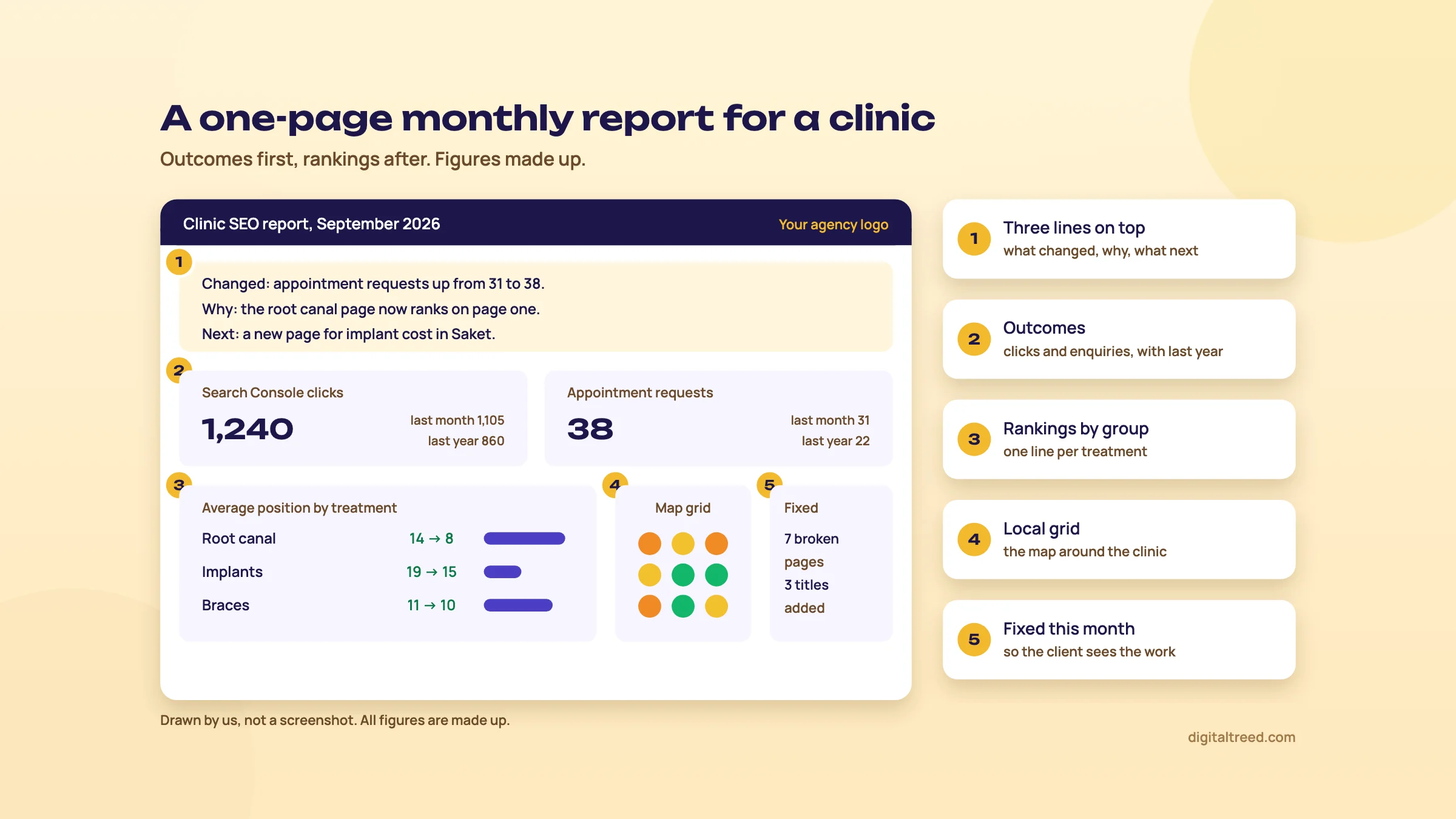 Outcomes first, rankings after, and the work done at the end. Drawn by us; the figures are made up.
For the thinking behind that layout (outcomes first, last month and last year beside each number), see measuring SEO. The free route is Data Studio with the Search Console and GA4 connectors; SE Ranking pays off when you send ten of these a month.
White label and the Agency Pack
The Agency Pack is an add-on for yearly Core, Growth or Enterprise plans only. Trial accounts get it during the trial.[49] On the pricing page it costs $69 a month for 30 projects, $99 for 50 and $129 for 100, all billed yearly. The first tier shows 30 client seats.[7] What it adds:
- White label: your own domain for the platform, a custom interface and login page, and reports sent from your own email or SMTP server.[51]
- Client seats: view-only logins for clients, who can't edit projects or settings.[7]
- Unlimited scheduled reports, with AI summaries.[7]
- Lead Generator: an audit widget for your own site that collects visitors' emails.[7]
- A listing in SE Ranking's Agency Catalog.[7]
The pricing page gives 30 client seats on the 30-project tier, 50 and 100 on the larger ones; the Agency Pack help page, last updated in February 2026, still says up to 10. Ask sales to confirm in writing before you promise logins to clients.
Do you need it? A freelancer with five clients can send branded PDFs from Report Builder without it. Buy it when clients want their own login under your name, or you send more scheduled reports than your plan allows.
API and MCP
There are two APIs on one key. The Project API works inside your account (projects, rankings, audits, competitors). The Data API pulls SE Ranking's research data (keywords, domains, backlinks, AI search, audits) and spends credits.[52] Core includes 25,000 Data API credits a month and Growth 100,000.[52] The API add-on starts at $45 a month billed yearly for 3 million credits, and a standalone API plan with no SE Ranking subscription starts at $179 a month, billed yearly.[7] The rate limit is 10 requests a second.[52]
The MCP server connects SE Ranking to AI assistants such as Claude and ChatGPT, so you can ask for data in plain language. It uses your Data API key.[53] Every answer it gives is still SE Ranking's estimate, and the assistant can misread it. Check any number you send a client against the report it came from.
Most freelancers won't touch the API. Agencies use it to pull rankings into their own dashboards. Next, what it all costs.
SE Ranking pricing in India, pros and cons, and the alternatives
Quick answer
On 18 October 2026 SE Ranking's Core plan cost $129 a month (about ₹12,384) or $103.20 a month billed yearly, and Growth $279. Prices are in US dollars only. Agency Pack, AI Search and API are paid add-ons. Small sites can start with our free tools, Search Console and Business Profile.
We read every price below on SE Ranking's own pricing page on 18 October 2026, opened from India.[7] The page showed US dollars only; we saw no rupee prices. Where we give rupees, it's the dollar price at ₹96 = US$1, rounded, as a guide to what your card will be charged before any tax or bank fees. We have no affiliate deal with SE Ranking or any tool here.
The plans
| Plan | Core | Growth | Enterprise |
|---|---|---|---|
| Monthly | $129 (about ₹12,384) | $279 (about ₹26,784) | Custom |
| Billed yearly, per month | $103.20 (about ₹9,907) | $223.20 (about ₹21,427) | Custom |
| Projects and manager seats | 10 and 1 | 30 and 3 | Custom |
| Keywords tracked daily | 2,000 | 5,000 | Custom |
| AI prompts tracked daily | 100 | 250 | Custom |
| Audit pages a month | 250,000 | 2 million | Custom |
| On-Page SEO Checker | 50 | 1,000 | Custom |
| Report Builder reports | 10 | 30 | Custom |
| Competitive Research history | 6 months | All time | Custom |
| Local Marketing | 3 locations, 1,500 local keywords | 3 locations, 1,500 local keywords | Custom |
| Data API credits a month | 25,000 | 100,000 | Full API |
| Also in Growth | - | Guest links, page change monitoring, dedicated support | - |
All figures from the pricing page, checked 18 October 2026.[7] Yearly billing saves 20% and is paid up front; it also includes free assisted migration from another tool.[7] Content Marketing and Local Marketing are now included in Core and Growth, and you can buy extra limits for both from the Billing page.[12]
Add-ons and extras
| Add-on | Price a month | About ₹ | Billing |
|---|---|---|---|
| Agency Pack (white label, client seats, unlimited scheduled reports) | $69 (30 projects), $99 (50), $129 (100) | ₹6,624 to ₹12,384 | Yearly only |
| AI Search (200, 450 or 1,000 prompts) | $89, $179 or $345; yearly $71.20, $143.20 or $276 | ₹8,544 to ₹33,120 monthly | Monthly or yearly |
| API (3M, 12M or 60M credits) | $45, $149 or $555 | ₹4,320 to ₹53,280 | Yearly only |
| Extra manager seat | From $16 | From ₹1,536 | With plan |
| Extra tracked keywords | From $22.40 (Core), from $32 (Growth) | From ₹2,150 | With plan |
| Extra Local Marketing location | From $18.40 | From ₹1,766 | With plan |
Add-on prices are from the same page on the same day.[7] AI Search monthly prices match the help centre's table.[11]
14 days
Free trial, no credit card, 750 keywords a day[7]
20%
Saving with yearly billing, paid up front[7]
No refunds
Except when the service wasn't delivered as promised[7]
Paying from India
Payments go through Stripe. You can pay by card (Visa, Mastercard, American Express and others), Apple Pay, Google Pay or Link; bank transfer and direct debit depend on your country and currency.[54] PayPal isn't accepted.[12] Use a card with international payments switched on. On tax, SE Ranking's billing FAQ only says VAT is charged to users in EU countries and the UK.[12] It says nothing about India, so check the final amount on the checkout page, and ask your CA how to treat a foreign software invoice in your books.
Tip
What a real Delhi agency set-up costs: Core yearly ($103.20) plus the Agency Pack ($69) is $172.20 a month, about ₹16,531, paid as one yearly bill of about ₹1,98,374. Without white label, Core yearly alone is about ₹9,907 a month.
Pros and cons
Pros
- 2,000 daily tracked keywords on the entry plan, against 500 on Semrush's SEO plan and 750 on Ahrefs Lite
- Rank tracking to city or postal code, mobile and desktop, with the local pack
- Google Maps grid tracking and Business Profile data included in every plan
- Report Builder with schedules and HTML reports in every plan
- 14-day trial with no card, and a cancel-anytime monthly option
- AI Overviews, AI Mode, ChatGPT and other AI assistant tracking in the same project
- API credits and an MCP connector in every plan
Cons
- US dollars only; no rupee pricing, no PayPal
- The India keyword database (49 million) is a fraction of the US one (584 million)
- Backlink tables are a capped sample of the full profile
- White label and client logins cost extra, yearly only
- Local rankings are weekly by default, not daily
- SE Ranking's own pages disagree in places (AI engines, client seats, crawl speed)
- No refunds once you've paid, except when the service isn't delivered as promised
Sources for the comparisons in the pros: SE Ranking's pricing page,[7] and the Semrush[10] and Ahrefs[9] pricing pages as read on 18 October 2026. The database sizes come from SE Ranking's data page.[6]
The alternatives
Our own free tools first. None of them tracks rankings, but they cover most of what a small site needs from an audit:
The Free Website Audit checks up to 25 pages across SEO, speed, security, local SEO and AI visibility. The Meta Tag Analyzer shows a Google and social preview for up to 10 URLs. The HTTP Status Checker follows every redirect for up to 10 URLs. The AI Crawler Checker tells you whether GPTBot, ClaudeBot, PerplexityBot and more than 100 other bots can read the site. Then Google's own free tools: Search Console for real clicks and positions, and Business Profile for the map listing.
| Situation | Pick | Why |
|---|---|---|
| One local business, small budget | Our free tools, Search Console, Business Profile | Real data for your own site, free |
| Freelancer or agency reporting on 5 to 30 sites | SE Ranking Core or Growth | Most tracked keywords and reporting for the price |
| Clinics, coaching centres, shops with map rankings | SE Ranking | Grid tracking and Business Profile data in the plan |
| Deep competitor and keyword research, PPC too | Semrush | SEO plan $139 a month on 18 October 2026; 500 tracked keywords[10] |
| Link research and content gaps | Ahrefs | Lite $129 a month on 18 October 2026; free tier for your own sites[9] |
| A mid-priced suite with a known link metric | Moz Pro | Domain Authority and Keyword Explorer; see our guide for current prices |
| A beginner who wants easy keyword research | Mangools | KWFinder and simple tools; see our guide for current prices |
Our opinion: if rank tracking and client reports are most of what you'd use a suite for, SE Ranking is the one we'd trial first. If research depth is the point, trial Semrush or Ahrefs on the same competitors during the same fortnight and compare. If you can't decide, you probably don't need a suite yet.
Prefer to hand it over? Our SEO service covers tracking, audits and monthly reports, and you can get a quote in rupees.
Test yourself
Ten questions on the whole guide. Pick an answer, check it, and see your score at the end.
You got 0 of 10 right.
Frequently asked questions
Frequently asked
What is SE Ranking used for?
Mainly for tracking where a site ranks every day, by city and device, and reporting it to clients. It also audits sites, researches competitors' keywords and links, tracks Google Maps rankings on a grid, and checks whether a brand appears in AI Overviews, AI Mode, ChatGPT and other AI assistants.
Is SE Ranking free?
No. There's a 14-day free trial with no credit card, which includes 10 projects and 750 tracked keywords a day. After that, plans start at $129 a month, or $103.20 a month billed yearly (prices checked 18 October 2026).
How much does SE Ranking cost in India?
SE Ranking shows prices in US dollars only. Core is $129 a month, about ₹12,384 at ₹96 to the dollar, or about ₹9,907 a month billed yearly. Growth is $279, about ₹26,784. Your bank may add a foreign transaction fee.
Can SE Ranking track rankings in a specific Indian city?
Yes. When you add Google to a project you can set the location to any city or postal code, add mobile and desktop separately, and turn on Local Pack tracking with your business name and phone number. Each location counts separately against your keyword limit.
Is SE Ranking better than Semrush?
For rank tracking and client reporting, it gives more for the money: 2,000 daily keywords on Core against 500 on Semrush's $139 SEO plan (both checked 18 October 2026). If deep keyword and competitor research or PPC data is the main job, we'd lean to Semrush. Trial both on the same competitors.
Does SE Ranking track AI Overviews?
Yes. The help centre lists AI Overviews, AI Mode, ChatGPT and Gemini as engines you can add to a project, with prompts and your brand name; the pricing page names Perplexity instead of Gemini. It records whether your brand is mentioned or linked. Core includes 100 prompts a day; each prompt counts once per engine.
Does SE Ranking have white-label reports?
Every plan lets you add your logo and company name to reports. Full white label, with your own domain, login page and email sending, and view-only client seats, needs the Agency Pack: from $69 a month, billed yearly only.
Why are SE Ranking's positions different from Search Console?
SE Ranking records one check for one location and device. Search Console averages your position across every query, device, country and date in the filter. To compare, filter Search Console to the same query, country, device and date.
Can I pay for SE Ranking with PayPal or UPI?
Not PayPal: SE Ranking says it isn't accepted. Payments go through Stripe by card, Apple Pay, Google Pay or Link, with bank transfer in some countries. UPI isn't listed. Use a card with international payments switched on.
Does SE Ranking give refunds?
Generally no. Its pricing page says payments are non-refundable except when the service wasn't delivered as promised or a promotion says otherwise. Use the 14-day trial before you pay, and start monthly before committing to a year.
Sources
References
- What is SE Ranking?, SE Ranking Help Center, updated 15 Oct 2026, accessed 18 Oct 2026
- About us, SE Ranking, accessed 18 Oct 2026
- Rankings tool overview, SE Ranking Help Center, updated 9 Oct 2026, accessed 18 Oct 2026
- How to set search engines and regions, SE Ranking Help Center, updated 25 Sep 2026, accessed 18 Oct 2026
- What is the AI Results Tracker?, SE Ranking Help Center, updated 15 Oct 2026, accessed 18 Oct 2026
- SE Ranking data: search, AI visibility, backlinks & API, SE Ranking, accessed 18 Oct 2026
- Subscription, SE Ranking, prices seen 18 Oct 2026 from India, accessed 18 Oct 2026
- Accuracy of rankings FAQ, SE Ranking Help Center, updated 9 Oct 2026, accessed 18 Oct 2026
- Plans & pricing, Ahrefs, prices seen 18 Oct 2026, accessed 18 Oct 2026
- Plans & Pricing, Semrush, prices seen 18 Oct 2026 from India, accessed 18 Oct 2026
- AI Search Add-on, SE Ranking Help Center, updated 16 Oct 2026, accessed 18 Oct 2026
- Payment and billing details FAQ, SE Ranking Help Center, updated 9 Oct 2026, accessed 18 Oct 2026
- How to create a project, SE Ranking Help Center, updated 15 Oct 2026, accessed 18 Oct 2026
- Keyword tracking use cases, SE Ranking Help Center, updated 13 Oct 2026, accessed 18 Oct 2026
- Google Search Console integration, SE Ranking Help Center, updated 20 Jul 2026, accessed 18 Oct 2026
- How to add a target URL for rank tracking, SE Ranking Help Center, updated 25 Sep 2026, accessed 18 Oct 2026
- Local Marketing Overview, SE Ranking Help Center, updated 1 Oct 2026, accessed 18 Oct 2026
- Local Rankings, SE Ranking Help Center, updated 18 Sep 2026, accessed 18 Oct 2026
- Business Listings, SE Ranking Help Center, updated 23 Sep 2026, accessed 18 Oct 2026
- How to work with the Rankings data, SE Ranking Help Center, updated 8 Oct 2026, accessed 18 Oct 2026
- How to use Website Audit, SE Ranking Help Center, updated 27 Aug 2026, accessed 18 Oct 2026
- How to configure Website Audit settings, SE Ranking Help Center, updated 13 Jul 2026, accessed 18 Oct 2026
- Website Audit FAQ, SE Ranking Help Center, updated 9 Oct 2026, accessed 18 Oct 2026
- Understanding the Issue Report, SE Ranking Help Center, updated 19 Jul 2026, accessed 18 Oct 2026
- How to use On-Page SEO Checker, SE Ranking Help Center, updated 26 Jul 2026, accessed 18 Oct 2026
- Creating helpful, reliable, people-first content, Google Search Central, updated 5 Oct 2026, accessed 18 Oct 2026
- What is Competitive Research?, SE Ranking Help Center, updated 7 Oct 2026, accessed 18 Oct 2026
- Overview tab in Competitive Research, SE Ranking Help Center, updated 17 Dec 2025, accessed 18 Oct 2026
- Google Search: Organic Traffic, SE Ranking Help Center, updated 16 Jul 2026, accessed 18 Oct 2026
- Historical data in Competitive Research, SE Ranking Help Center, updated 9 Oct 2026, accessed 18 Oct 2026
- Keyword Research Overview, SE Ranking Help Center, updated 15 Oct 2026, accessed 18 Oct 2026
- Search Volume Checker, SE Ranking Help Center, updated 11 Oct 2026, accessed 18 Oct 2026
- Overview section, SE Ranking Help Center (Keyword Research), updated 4 Feb 2026, accessed 18 Oct 2026
- Keyword suggestions, SE Ranking Help Center, updated 19 Sep 2026, accessed 18 Oct 2026
- Backlink Checker Overview, SE Ranking Help Center, updated 26 Sep 2026, accessed 18 Oct 2026
- Backlink Gap Analyzer Overview, SE Ranking Help Center, updated 5 Sep 2025, accessed 18 Oct 2026
- Backlinks FAQ, SE Ranking Help Center, updated 9 Oct 2026, accessed 18 Oct 2026
- How to add backlinks for monitoring, SE Ranking Help Center, updated 28 Jun 2026, accessed 18 Oct 2026
- Backlink Monitoring Overview, SE Ranking Help Center, updated 24 May 2026, accessed 18 Oct 2026
- Disavow links to your site, Search Console Help, Google, accessed 18 Oct 2026
- AI Results Tracker FAQ, SE Ranking Help Center, updated 15 Oct 2026, accessed 18 Oct 2026
- Google's guide to optimizing for generative AI features on Google Search, Google Search Central, updated 10 Jul 2026, accessed 18 Oct 2026
- Analysis of top AI search engines: who is catching up to ChatGPT?, SE Ranking (vendor study), 18 Jun 2026, accessed 18 Oct 2026
- Report Builder Overview, SE Ranking Help Center, updated 23 Aug 2026, accessed 18 Oct 2026
- How to create reports in the Report Builder, SE Ranking Help Center, updated 5 Oct 2026, accessed 18 Oct 2026
- Reports FAQ, SE Ranking Help Center, updated 14 Oct 2026, accessed 18 Oct 2026
- Report settings, SE Ranking Help Center, updated 24 May 2026, accessed 18 Oct 2026
- Pre-structured report templates, SE Ranking Help Center, updated 22 Jun 2026, accessed 18 Oct 2026
- Agency Pack Overview, SE Ranking Help Center, updated 4 Feb 2026, accessed 18 Oct 2026
- Google Business Profile, SE Ranking Help Center (Local Marketing), updated 26 Aug 2026, accessed 18 Oct 2026
- White Label Overview, SE Ranking Help Center, updated 15 Oct 2026, accessed 18 Oct 2026
- Getting Started with SE Ranking's API, SE Ranking Help Center, updated 23 Sep 2026, accessed 18 Oct 2026
- Setup, SE Ranking Help Center (MCP), updated 15 Oct 2026, accessed 18 Oct 2026
- Payment and billing overview, SE Ranking Help Center, updated 30 Sep 2026, accessed 18 Oct 2026
Get the free checklist
Every step of this guide on one page, to print or tick off. We email you the PDF link.