
Quick answer
To make a WordPress website, buy a domain and hosting, install WordPress, pick a block theme and build your pages in the Site Editor. Add a few trusted plugins, turn on two-step login and backups, then launch and submit your sitemap to Google. A lean year 1 costs about $47, but renewals push year 2 to about $227.
WordPress is free software, and it runs 39.6% of all websites, per W3Techs on October 21, 2026. You pay for the domain, the hosting and your time instead. Most guides skip what year 2 costs.
This guide shows US small-business owners how to make a WordPress website, step by step. We tested every screen on a fresh copy of WordPress 7.1.3 in WordPress Playground, the official in-browser version, on October 22, 2026. Several steps in older tutorials don't match what you'll see now.
Key takeaways
- WordPress itself is free and open source under the GPLv2 license, per WordPress.org. You pay for a domain and hosting.
- The newest version is 7.1.3, released October 6, 2026 with 7 security fixes, per the WordPress 7.1.3 release note.
- Intro hosting prices rise at renewal. SiteGround StartUp goes from $2.99 to $17.99 a month, as of October 2026.
- With the default block theme there is no Menus screen. You build menus in Appearance > Editor > Navigation.
- Before launch, untick "Discourage search engines" under Settings > Reading, then add your sitemap in Search Console.
What do you need before you start?
You need 3 things: a domain name, a hosting plan and a few hours a week for about a month. The domain is your address, like yourbusiness.com. Hosting is the computer that stores the site and serves it to visitors.
A .com domain costs about $11 a year. Porkbun lists .com at $11.08 for both registration and renewal, as of October 2026. Many hosts give a free domain, but only for the first year.
Check that the host meets WordPress.org's recommended requirements: PHP 8.3 or newer, MySQL 8.0 or MariaDB 10.11 or newer, and HTTPS support. Every host we priced includes a free SSL certificate, which gives you HTTPS. Bluehost, for one, names Let's Encrypt, a nonprofit that issues free certificates.
Not sure WordPress is right for you? If you mainly want an online store, compare WordPress vs Shopify first. If you want strong search basics, here are the reasons WordPress works well for SEO.
WordPress.com or WordPress.org: which one should you use?
Both run the same WordPress software. The difference is who looks after it. As WordPress.com's own comparison page puts it, the real choice is between its "managed WordPress hosting and a self-hosted WordPress site."
| Self-hosted (WordPress.org software) | WordPress.com | |
|---|---|---|
| Who runs it | You, on any host you choose | Automattic, the company behind WordPress.com |
| Updates and security | You do them, or your host helps | Done for you |
| Plugins and themes | Any you choose | On every paid plan, from Personal up |
| Cheapest paid start | About $36 for year 1 of hosting | $4 a month on Personal, billed yearly |
| Best for | Owners who want full control | Owners who want the least upkeep |
Prices in this table are as of October 2026. WordPress.com now allows plugins on all paid plans, per its plan features page. Older guides say you need the Business plan, which is no longer true.
Our take: pick self-hosted if you want any plugin and plan to grow the site. Pick WordPress.com Personal or Premium if you never want to think about servers.
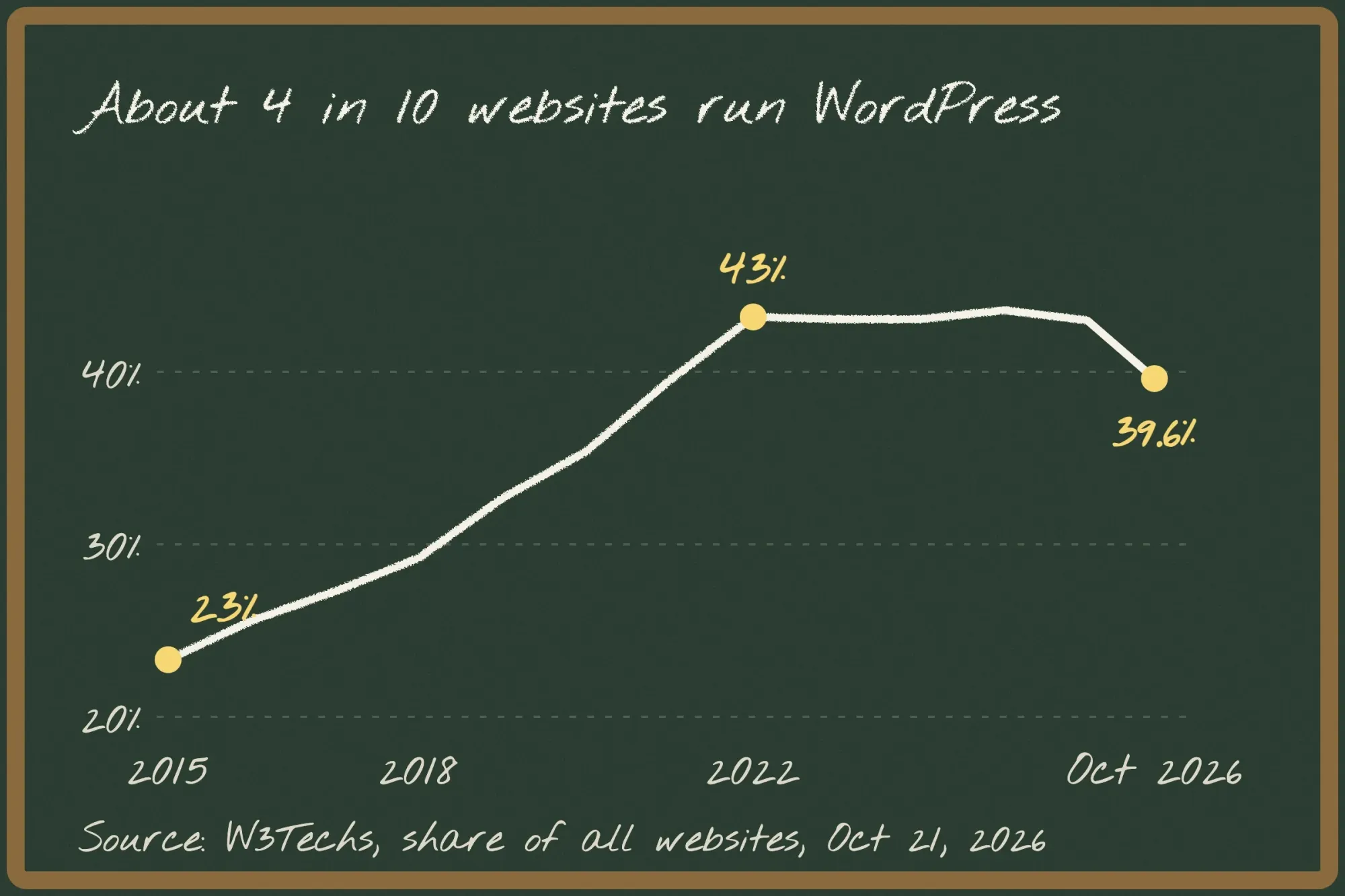 Source: W3Techs, share of all websites, 1 January each year and October 21, 2026. The 2026 dip is unexplained; sites with no detectable CMS rose at the same time.
WordPress has been the most used site builder for years. Its share of all websites grew from 23.3% in 2015 to 43.2% in 2022, per W3Techs' yearly history. By October 21, 2026 it was 39.6%. W3Techs doesn't say why. Shopify is next at 5.3%.
How much does a WordPress website cost?
A basic do-it-yourself WordPress site costs about $47 in year 1 and about $227 in year 2, using SiteGround StartUp and an $11.08 domain. The jump comes from hosting renewals. We read every price below on the hosts' own US pages on October 22, 2026.
| Item | Year 1 | Year 2 | Notes |
|---|---|---|---|
| WordPress software | $0 | $0 | Free and open source |
| Domain (.com) | $0 to $11.08 | $11.08 | Free first year at many hosts |
| SSL certificate | $0 | $0 | Included by the hosts we checked |
| Theme and basic plugins | $0 | $0 | Twenty Twenty-Five and free plugins |
| SiteGround StartUp | $35.88 | $215.88 | 12 x $2.99, then 12 x $17.99 |
| Bluehost Starter | $143.64 for 3 years | $0 until year 4 | Then $9.99 a month |
| Hostinger Premium | $119.52 for 4 years | $0 until year 5 | Then $10.99 a month |
| DreamHost Launch | $95.52 for 4 years | $0 until year 5 | Then $7.99 a month |
| WordPress.com Premium | $96 | $108 | $8, then $9 a month, billed yearly |
All prices are in USD, as of October 2026. Long prepaid terms lock in the low price but charge it all up front. SiteGround renews StartUp at $17.99 a month. Bluehost renews Starter at $9.99 a month after a 36-month term.
As of October 2026, Hostinger charges $119.52 for 48 months of Premium, then $10.99 a month. DreamHost charges the full 4-year Launch term at checkout, then $7.99 a month. WordPress.com Premium is $8 a month for year 1, then $9.
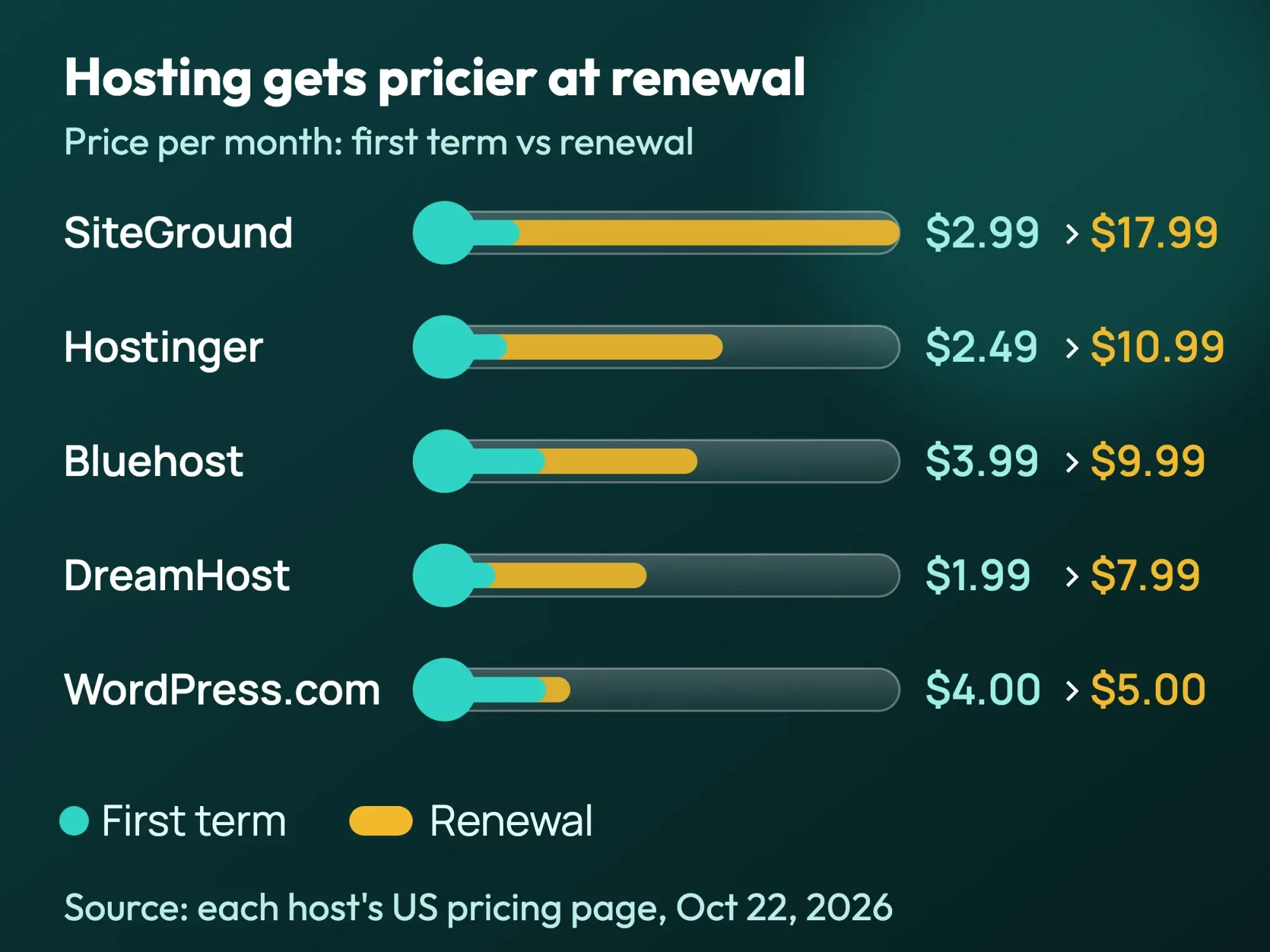 Source: each host's US pricing page, October 22, 2026. The WordPress.com row is the Personal plan. Intro prices need a prepaid term of 1 to 4 years; promotions change often.
Most paid extras are optional. Spam filtering is the one to plan for: Akismet's pay-what-you-can Personal plan covers personal sites only. Its commercial plan starts at $9.95 a month, billed yearly, per Akismet's pricing page, as of October 2026.
Prices on these pages change often, and several showed seasonal sales on October 22, 2026. Write down the renewal price and date before you pay.
How to make a WordPress website in 10 steps
Here is the whole build in order. Each step names the screen you'll see in WordPress 7.1.3.
Make a WordPress website
- Decide what the site must do List your pages: Home, Services, About, Contact and a Privacy Policy. Pick one main action, such as a call, a booking or a quote request.
- Choose self-hosted or WordPress.com Use the comparison above. If you plan to sell online, read our ecommerce website guide first.
- Buy your domain Choose a short .com that is easy to spell, without hyphens. Note when the free first year ends.
- Buy hosting Check PHP 8.3+, HTTPS, backups and the renewal price. Avoid a 4-year prepay until you know you will keep the site.
- Install WordPress and lock the login Most hosts install it for you. Log in at yourdomain.com/wp-admin. Don't use "admin" as your username, and turn on two-step login.
- Set the basics Under Settings > General, set the site title and time zone. Under Settings > Permalinks, choose "Post name" for clean addresses.
- Pick a block theme Twenty Twenty-Five is the default and free. Design the header, footer and colors in Appearance > Editor, and build menus under Navigation.
- Build your pages Add pages with blocks and patterns. Give every image alt text and every form field a label.
- Add a few plugins Install only what you need, from WordPress.org or a well-known company. Delete any plugin you stop using.
- Test and launch Run the launch checklist below, then check how fast your homepage loads with our free website speed test.
Google publishes 3 speed targets, called Core Web Vitals, per web.dev. A "good" page shows its main content within 2.5 seconds and reacts to taps within 200 milliseconds. Its layout should also stay steady, with a layout shift score of 0.1 or less. A light theme, compressed images and few plugins get most beginners there.
What looks different in WordPress 7.1.3?
We opened a fresh WordPress 7.1.3 site with the Twenty Twenty-Five theme in WordPress Playground on October 22, 2026. Here is what a beginner will notice, and where older tutorials go wrong.
First, the Appearance menu shows only Themes, Editor and Fonts. With this theme, there is no Menus or Customize screen. You edit menus in Appearance > Editor > Navigation instead.
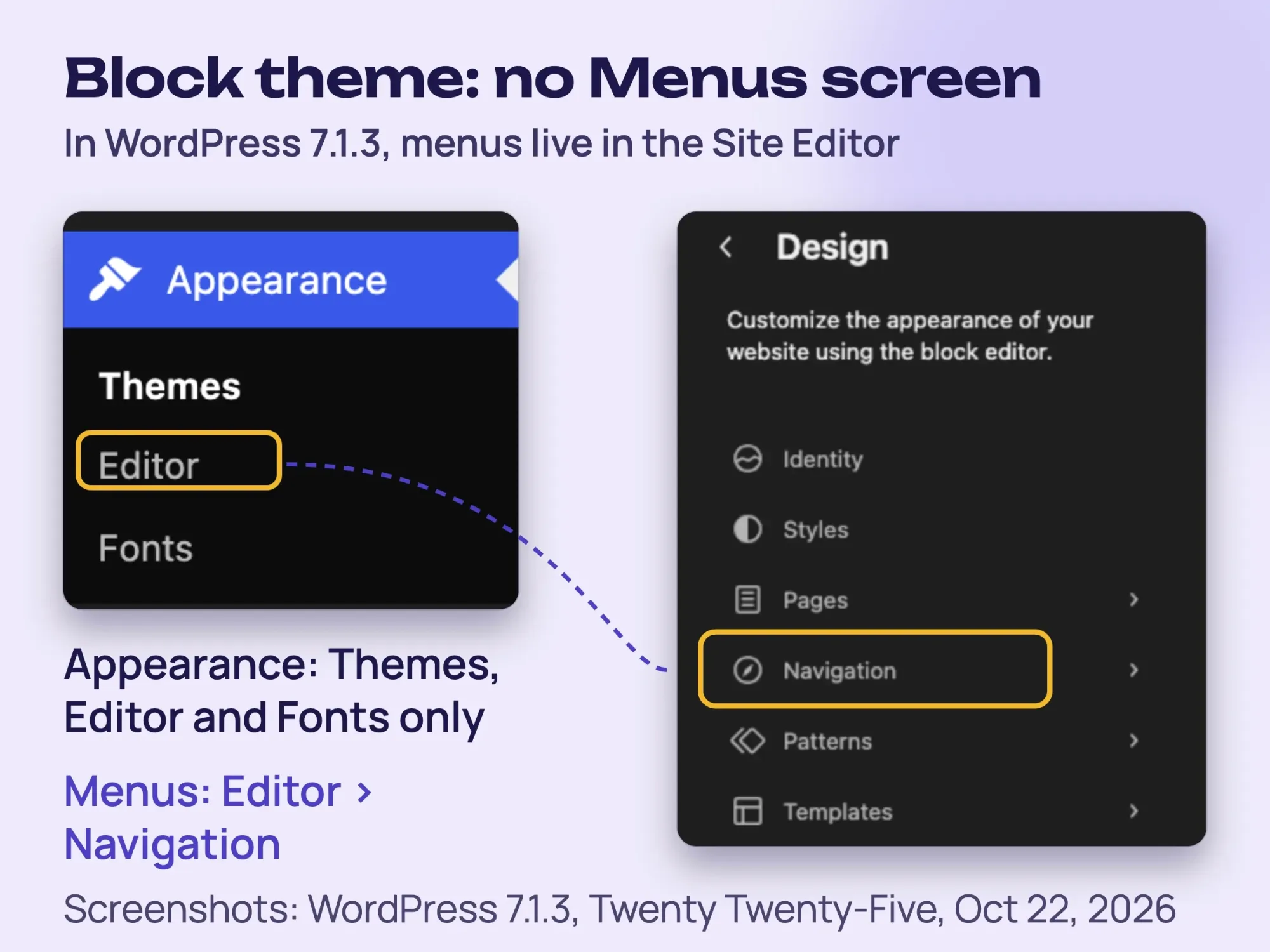 Screenshot: our WordPress 7.1.3 test site with Twenty Twenty-Five, WordPress Playground, October 22, 2026.
WordPress's own docs explain why: the Site Editor "is only available when you install and activate a Block theme," per the Site Editor documentation. With a classic theme, the old Menus screen still applies.
Second, the Settings menu has a new Connectors screen. It stores keys for AI services from Anthropic, Google and OpenAI, and each one needs a plugin. The screen arrived with WordPress 7.0, which added an "AI Client in Core," per the 7.0 release post. You don't need any of it to build a site.
Third, Settings > Reading has the "Discourage search engines from indexing this site" box. In our test it was unticked. Some hosts and staging copies tick it, so check it before launch.
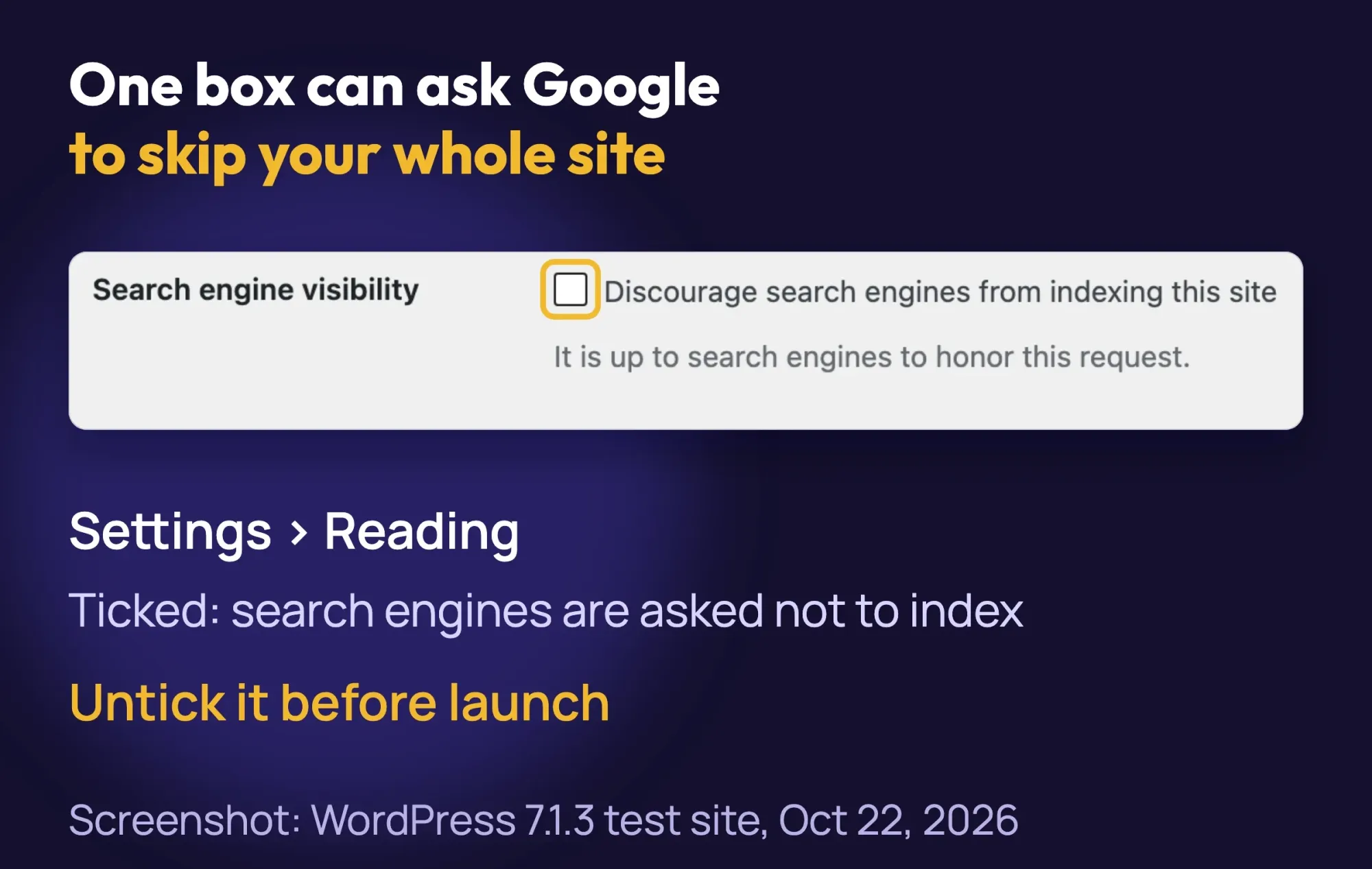 Screenshot: our WordPress 7.1.3 test site, Settings > Reading, October 22, 2026.
Fourth, WordPress already makes a sitemap at /wp-sitemap.xml. Ours listed 4 sitemaps for posts, pages, categories and users. Core sitemaps arrived in version 5.5, per the WordPress core announcement.
How to keep your WordPress site safe
Keep WordPress, your theme and your plugins updated, use strong unique logins with two-step sign-in, and keep several backups in different places. WordPress's hardening guide says older versions "are not maintained with security updates."
Version 7.1.3 shipped 7 security fixes, and WordPress recommends updating "immediately," per its October 6, 2026 release note. Keep automatic updates for minor releases switched on. They're on by default.
- Use a username other than "admin" and a password manager.
- Turn on two-step login for every account that can publish.
- Install plugins and themes only from WordPress.org or well-known companies.
- Keep 3 to 5 recent backups in different places, as the WordPress backup guide advises.
- Delete plugins and themes you no longer use.
Your host's backup is one copy. Add a second copy off the server, for example with the free UpdraftPlus plugin sending files to cloud storage. Then test one restore, so you know it works.
Security is the hardest part to keep up with on your own. Want updates, backups and fixes handled for you? Our web development team builds and looks after WordPress sites. (DigitalTreed sells this service.)
Does the ADA apply to your website?
If your business is open to the public, the Department of Justice says the ADA covers your website too. Its web accessibility guidance says the ADA applies to "businesses that are open to the public," including services "offered on the web."
The DOJ has no detailed technical rule for private businesses. Most teams aim for WCAG 2.2 level AA, the current W3C standard. The DOJ names common barriers to avoid:
- Poor color contrast, or color alone to carry meaning
- Images without alt text
- Videos without captions
- Forms without labels
- Pages you cannot use with a keyboard
The DOJ also warns about automated checkers and overlays. A "clean" report "does not necessarily mean everything is accessible." This is general information, not legal advice; check with an attorney for your situation.
How to get your new site on Google
After launch, search Google for site:yourdomain.com. If pages show, you're in the index, per Google's SEO Starter Guide. Then add your site to Search Console and submit /wp-sitemap.xml.
Our Google Search Console guide walks through the setup. Google says a sitemap "isn't required" but helps, and its sitemap help page suggests letting your CMS make one. If you install Yoast SEO, submit its sitemap instead.
Be patient. Google says some changes "could take several months" to show. For more steps, see how to get a new WordPress site indexed. A local business should also set up its Google Business Profile; our local SEO guide explains how.
What to check before you launch
- HTTPS works on every page; check it with our free SSL checker
- "Discourage search engines" is unticked under Settings > Reading
- Permalinks are set to "Post name"
- The sample page and "Hello world!" post are deleted
- The contact form reaches the right inbox, with spam protection on
- A Privacy Policy page is published and linked in the footer
- Every image has alt text, and the site works with the keyboard alone
- The phone number is tappable on mobile
- Backups run, with one copy off the host
- Hosting and domain renewal dates are in your calendar
For more pre-launch search checks, see our 4 SEO steps before a WordPress site goes live.
Example: a 2-person CPA firm in Tampa
Example: a made-up firm, "Bayside Tax & Books," wants consultation requests before tax season. It needs Home, Services, Fees, About, Contact and Privacy pages.
The partners choose self-hosting on SiteGround StartUp: $35.88 for year 1 and $215.88 for year 2, as of October 2026. They add a .com for $11.08 a year and use Twenty Twenty-Five.
Their plugins are a contact form, Akismet's commercial plan, Yoast SEO, Wordfence and UpdraftPlus. Each partner gets a separate login with two-step sign-in, and no one shares an "admin" account.
Their year 1 total is $46.96: $35.88 for hosting plus $11.08 for the domain, as of October 2026. Akismet's commercial plan adds $119.40 a year.
The contact form asks only for name, email, phone and a short message. Tax documents go through a secure client portal, never a plain web form. That rule is our advice, not a legal requirement we checked.
What to do if your site breaks
A white screen or "critical error" usually points to a plugin or server problem; see our HTTP 500 error fix. "Error establishing a database connection" has its own fix. A redirect loop after turning on HTTPS is covered in too many redirects.
Frequently asked
Which hosting should I pick?
Pick a host that meets WordPress requirements: PHP 8.3+, MySQL 8.0+ or MariaDB 10.11+, and HTTPS. Then compare the renewal price, not the first-term price.
Do I need to know how to code?
No. You build pages with blocks and ready-made patterns in the block editor, the default editor since WordPress 5.0 in December 2018.
How long does it take to build a WordPress website?
A simple 5-page site takes a beginner about 4 weeks at a few hours a week. That is our estimate; your pages and photos decide the real time.
Can AI build my WordPress website?
Partly. WordPress 7.0 added AI connections, and many hosts sell AI builders. You still need to check every fact, price and alt text yourself.
Which plugins does a small business site need?
Usually 4 or 5. Start with an SEO plugin such as Yoast SEO, Site Kit by Google and a security plugin such as Wordfence. Then add a backup plugin and a contact form.
Your next step
This week, write your page list and your one main action, then compare 2 hosts on their renewal price. That hour keeps the year 2 renewal bill from surprising you.
If you would rather have the site built for you, our quote estimator shows a price range in USD in about a minute.
How we made this guide: it's built from WordPress.org's requirements, release notes and documentation and WordPress.com's plan pages. We also used the hosts' own US pricing pages, W3Techs, the DOJ's ADA guidance and Google's Search Central docs. We tested the screens on a fresh WordPress 7.1.3 site in WordPress Playground on October 22, 2026.
We checked every number against the source named next to it on October 22, 2026. WordPress 7.2 was in beta that day, so some screens may change.
First published April 2020. Rewritten October 2026: new step-by-step build for WordPress 7.1.3, our own screenshots, year 1 vs year 2 costs, security, ADA and Google launch steps.
Sources
- WordPress.org: Requirements
- WordPress.org: About WordPress
- WordPress.org: Releases archive
- WordPress 7.1.3 Maintenance and Security Release, October 6, 2026
- WordPress 7.0 "Armstrong", May 20, 2026
- WordPress Playground
- WordPress documentation: Site Editor
- WordPress documentation: Block editor
- WordPress: Hardening WordPress
- WordPress: Backups
- WordPress core: XML sitemaps in 5.5, July 22, 2020
- WordPress.com vs WordPress.org (WordPress.com)
- WordPress.com pricing
- WordPress.com plan features
- W3Techs: CMS usage, October 21, 2026 (vendor survey)
- W3Techs: yearly CMS trends (vendor survey)
- SiteGround WordPress hosting prices (vendor)
- Bluehost WordPress hosting prices (vendor)
- Hostinger WordPress hosting prices (vendor)
- DreamHost WordPress hosting prices (vendor)
- Porkbun domain prices (vendor)
- Akismet pricing (vendor)
- Let's Encrypt
- US Department of Justice: Guidance on Web Accessibility and the ADA, March 18, 2022
- W3C: WCAG 2.2, December 12, 2024
- Google: SEO Starter Guide
- Google: Build and submit a sitemap
- web.dev: Web Vitals


Comments
No comments yet. Start the conversation below.