

What Clearscope is, who it's for, and setting it up
This guide is part of our "SEO tools explained" path. It's for content managers, in-house SEOs and agencies who brief writers every month and are deciding whether Clearscope is worth the money. Our running example is a made-up D2C skincare brand with a blog of about 150 posts.
By the end you'll know what the Content Grade measures and why it isn't Google's score. You'll be able to use term suggestions without stuffing them, find decaying pages in Content Inventory, and brief a freelancer with a shared Draft. You'll also know when the free route is enough.
There are five chapters, about 26 minutes in all. Chapter 1 explains what Clearscope is, who needs it and how to set it up with Google Docs and WordPress. Chapter 2 covers Drafts, the Content Grade and terms, and chapter 3 the Content Inventory, Topic Exploration and AI features. Chapter 4 does three real jobs step by step. Chapter 5 has the plans, read on Clearscope's own pricing page on 18 October 2026, with pros and cons and the alternatives, our free tool first.
Quick answer
Clearscope is a paid content optimisation tool. It reads the pages Google ranks for a search, then grades your draft on how well it covers the same topic. It also watches your published pages for decay. It suits content teams with a monthly budget. A 20-page local business site doesn't need it.
Clearscope does three jobs. Before you write, it shows what the ranking pages cover. While you write, it grades your draft in real time. After you publish, it keeps an eye on the page in Search Console data and tells you when it starts to slip. It's made by Mushi Labs, the name in the footer of its own site.[1]
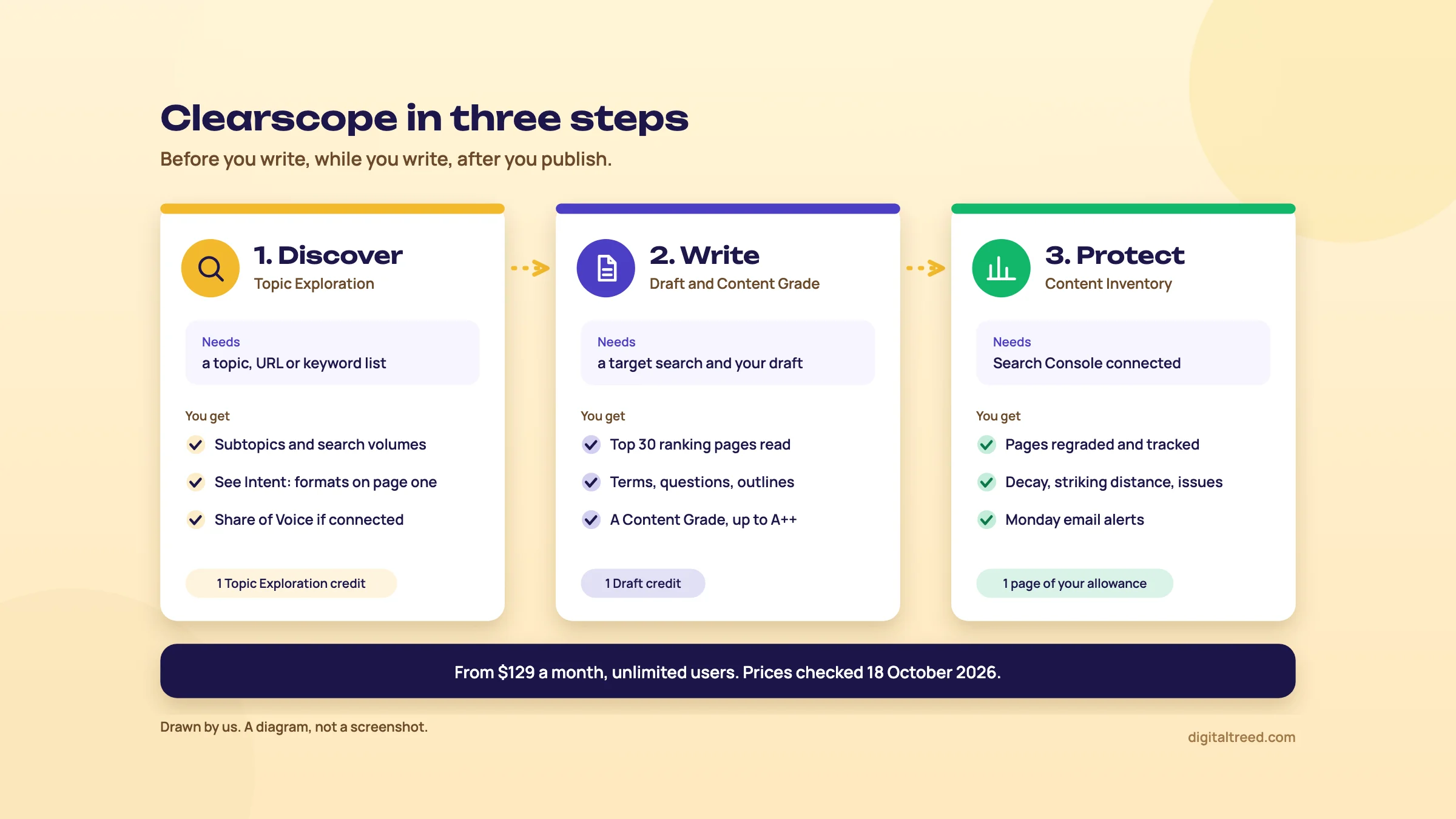 Clearscope's three jobs and what each one needs. Drawn by us; prices checked 18 October 2026.
The parts, and what Clearscope calls them
The menus use Clearscope's own words, so learn them first.
| Name in Clearscope | What it is | Uses up |
|---|---|---|
| Draft (also called a content report) | An analysis of the top 30 desktop and mobile pages for one search, with suggested terms, questions, outlines and a Content Grade for your text[2] | One Draft credit[3] |
| Topic Exploration | Keyword and topic research from a seed topic, a URL or your own keyword list[4] | One Topic Exploration credit |
| Content Inventory | Your published pages, graded and tracked with Search Console data[5] | One page from your plan's allowance |
| Query Tracking | Checks chosen questions in AI chatbots to see whether your brand is mentioned[1] | Tracked Queries on your plan |
The editor also has a Draft with AI builder that writes outlines and full drafts, and plugins for Google Docs, Microsoft Word and WordPress.[6] Chapters 2 and 3 cover each part.
Who it's for
Clearscope makes sense when content is a line in your budget, not a side job. Think of a D2C brand publishing eight buying guides a month, a SaaS company with a blog team, or an agency writing for several clients. The plans include unlimited users and projects,[1] so a whole editorial team and its freelancers can work in one account. A shared Draft link lets an outside writer open one Draft in Guest Mode without a login.[6]
The Content Inventory is the other reason teams pay. If you have 200 published articles, nobody checks each one by hand every month. Clearscope regrades them and sends a weekly email on Mondays.[5]
Who doesn't need it
The cheapest plan is $129 a month (about ₹12,384).[1] For a Delhi dentist or a Kanpur sweet shop with a 20-page site, that's a lot of money for a tool that grades text. Those sites live or die on their Google Business Profile, reviews, service pages and speed. They don't need a term list for each page.
For a small site, a free routine does most of the job:
- Read the first page of Google for your keyword and note what every result covers. Guide 2, chapter 4 walks through it.
- Check your draft's length and repeated phrases with our Word Counter & Keyword Density Checker.
- Find decaying pages by comparing date ranges in Search Console, as in Guide 2, chapter 6.
Clearscope also supports only five languages: English, French, German, Italian and Spanish.[7] If your buyers search in Hindi or another Indian language, the Drafts can't analyse those searches.
Set-up: the trial and the account
Clearscope's pricing page offers a 14-day free trial, with no contracts.[1] You sign up with Google or with a name, email and password.[8] The sign-up form we saw didn't ask for a card. Paid plans are charged by credit or debit card (American Express, Mastercard or Visa). Bank transfer is only for annual plans over $5,000 or where procurement requires it.[9]
Fourteen days goes fast, so have a real draft and a real Search Console property ready before you start.
Set up Clearscope on day one
- Connect Search Console In the left sidebar, under Content Inventory, open the Pages tab and click "Connect Google Account". Sign in with the Google account that has access to your Search Console property.[10]
- Create a verified project Pick the Search Console property and the closest locale on offer (Clearscope doesn't list an India one), then click "Create verified project".[10]
- Import pages Use the automated import for one folder, such as /blog/, or add URLs by hand. Switch on future auto-importing if you want new posts added as you publish. Clearscope says set-up can take up to half an hour.[10] Each page counts against your plan's allowance.
- Invite your team Go to Account, then Settings, then the Users tab, and click "+ Invite users".[11] Give writers the Member role. Members use the core features but can't add or remove inventory pages or change projects.[12]
- Turn on shared Drafts If writers will use Google Docs or WordPress, an admin can make every new Draft shared by default in organisation settings.[13] The add-ons only work with a shared Draft link.
- Filter junk terms later Under Account, Settings, Advanced, you can filter terms out of future Drafts and add scraping rules.[14] Leave this until you've seen a few Drafts.
If your site sits behind Cloudflare or another firewall, Clearscope's crawler (Clearscopebot) may be blocked. Its help page lists the IP addresses to allow.[15]
Install the Google Docs add-on and the WordPress plugin
Most writers never open Clearscope itself. They see the grade in the sidebar of the editor they already use.
Google Docs. The add-on is private. You can't find it by searching the Workspace Marketplace, so install it from the link on Clearscope's help page. Then open a document, go to Extensions, Clearscope, Start, paste a shared Draft link and click "Link draft".[13] You need edit rights on the document and a desktop browser. If you see "Error 400: admin_policy_enforced", your Workspace admin is blocking third-party apps.[13]
WordPress. Search for "Clearscope" under Plugins, Add New, then install and activate it. It works in both the Classic and the block (Gutenberg) editor and needs WordPress 5.0 or later.[16] In the block editor, click the "C" icon at the top right, paste the shared Draft link and click "Link report". The plugin's WordPress.org page showed version 2.0.9, updated 15 October 2026, with "200+" active installations.[17] That's a small number. Our guess is that most teams use the Google Docs route instead.
Tip
Write in Google Docs, grade it there, then paste into WordPress. Use the WordPress plugin only for refreshing posts that are already live. One place for the grade means fewer "which version is final?" arguments.
Next, the Draft itself: what the Content Grade measures, and why you shouldn't chase an A++.
Drafts, the Content Grade and term suggestions
Quick answer
A Clearscope Draft reads the top 30 pages for your search and lists the terms, questions and headings they share. The Content Grade, up to A++, rises as you use more of those terms. It's Clearscope's own measure of topic coverage, not Google's score. Use it to find gaps, then stop at a good-enough grade.
What happens when you create a Draft
You type a target search, pick a locale and language, and optionally a city, state or region. Click Create Draft and Clearscope runs a live analysis that takes about one to two minutes. It simulates a search for your audience's location, language and device, and pulls the top 30 desktop and mobile pages Google ranks.[2] Each Draft uses one credit.[3]
A Draft is a snapshot. It shows the results page on the day you created it, not as it is today.[18] For a fast-moving topic, a Draft from three months ago may be grading you against pages that no longer rank.
The editor, tab by tab
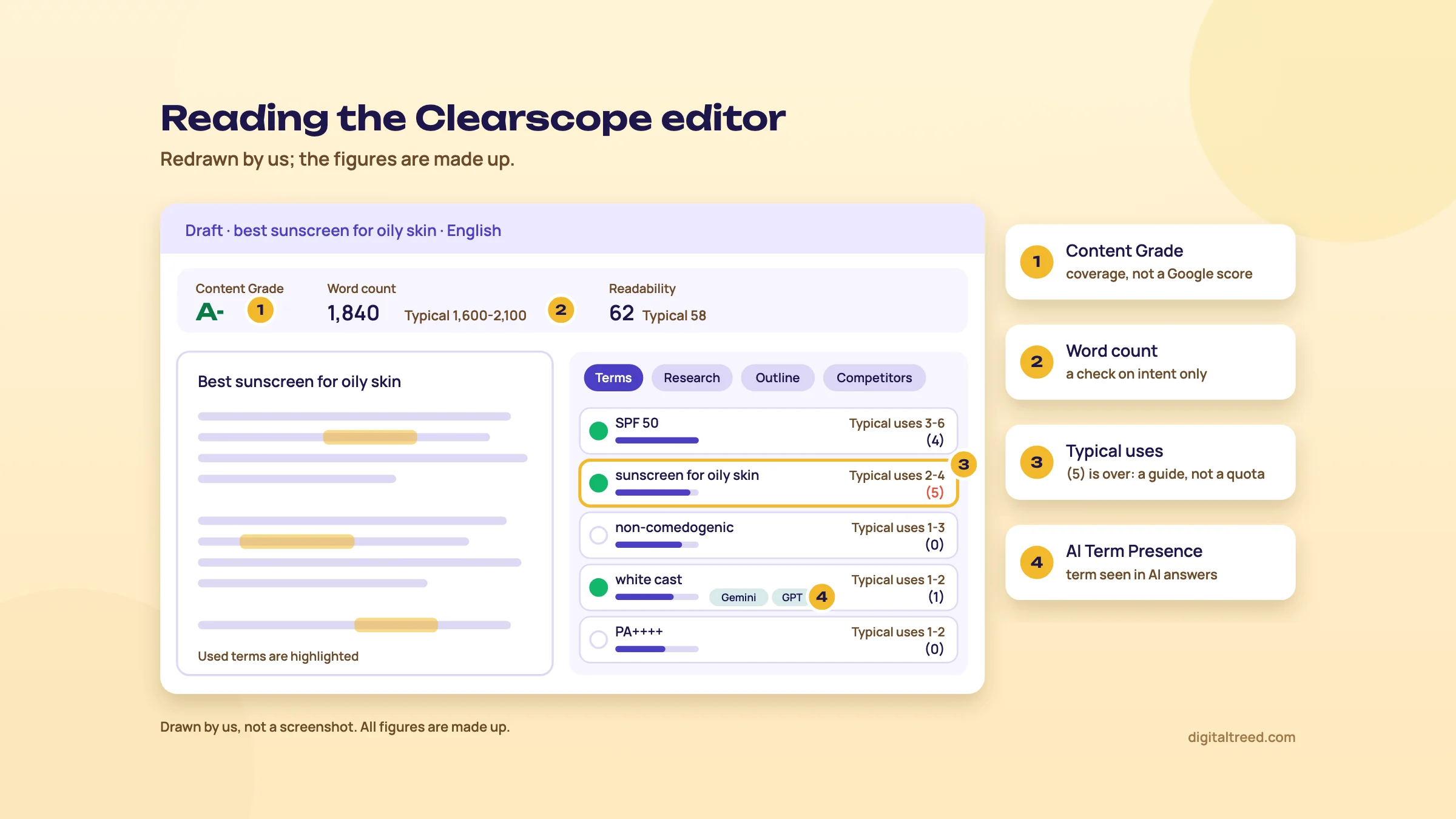 The four parts of the editor to read, and what each one means. Drawn by us; figures made up.
| Part | What it shows | What to do with it |
|---|---|---|
| Content Grade | How well your text covers the topic compared with the analysed pages; the top grade is A++[6] | Use it as a gap check, not a target |
| Word count | Your count against a recommended range based on the competing pages' length[6] | A sanity check on intent, nothing more |
| Readability | A score based on Flesch Reading Ease, with a "Typical" figure for the top pages[19] | Match your reader, not the competitors' average |
| Terms | Recommended terms sorted by importance, which you can re-sort by Unused or AI Presence[6] | Scan for subtopics you forgot |
| Research | Questions from People Also Ask and similar features, plus authoritative sources the top pages cite[6] | Answer the real questions; check every source yourself |
| Outline | The heading structure of the top 30 pages[6] | See the usual order, then add what they skip |
| Competitors | Where each page ranks on desktop and mobile, and its Content Grade[6] | Spot low-grade pages that still rank well |
| Term Map | How each of the top 30 pages uses the recommended terms[6] | Tell a must-have term from one only two pages use |
That "Competitors" row is the most honest part of the tool. If a page with a C grade sits at number two, the grade clearly isn't what Google is ranking on.
How the grade is worked out
Clearscope scrapes the ranking pages and scores each term's importance by how much it appears in competitors' articles. Importance runs from 10 (a must-include term) down to 1. When you use a term, the editor highlights it, ticks it in the list and updates the grade in real time.[20] Using more of the suggested terms raises the grade.[6]
So the grade measures one thing: how much of the shared vocabulary of the top pages your draft uses. It doesn't know whether your facts are right, whether you have first-hand experience, or whether anyone links to you. Google doesn't see it at all.
Clearscope's marketing says its recommendations come from NLP and LLM technology, naming Google Cloud, OpenAI and IBM Watson.[21] That's the vendor's description; it doesn't publish the model.
Does a higher grade mean higher rankings?
Not by much. Ahrefs tested content scores from five tools, Clearscope among them, against Google rankings for 20 random keywords. Its write-up, updated 21 May 2025, says: "We found weak correlations everywhere."[22] Clearscope's correlation was in the very weak group with Surfer and Frase. Two caveats: Ahrefs sells its own content tool, and because Clearscope gives letter grades, the author used ChatGPT to turn them into numbers. Twenty keywords is also a small sample. Even so, nobody has published evidence that pushing an A to an A++ moves rankings.
Ahrefs' own advice from the same study is to score "in the same ballpark as top-ranking pages", and that's enough.[22] We agree. Look at the grades of the pages ranking now on the Competitors tab and aim for roughly that. Then spend your time on what no tool can grade.
Google has no ideal word count
Clearscope says the typical word count is the median length of the pages on Google's first page, usually the top 10.[23] It isn't a Google number. Google's helpful content guidance asks whether you're writing to a particular word count because you've heard Google prefers one, and answers: "(No, we don't.)"[24] Guide 2, chapter 4 covers page length and the studies behind it.
If the top pages are 800-word answers and your draft is 3,000 words, you've probably drifted off intent. That's the only use for the range.
Use the terms without stuffing them
Each term shows "Typical uses" as a range, with your own count in brackets. Clearscope's help says this figure "is to be used as a guide rather than a rule".[20] Writers still treat it as a quota. That's how you get a buying guide that says "best perfume for men in summer" eleven times.
Google lists keyword stuffing as spam: filling a page with keywords "in an attempt to manipulate rankings", often unnaturally or out of context.[25]
Do not
- Treat every term as a box to tick
- Repeat a term to reach the top of its "Typical uses" range
- Add a heading only to fit a term in
- Keep terms that belong to a different intent (a competitor's brand name, a city you don't serve)
- Rewrite a clear sentence to fit a term
Do
- Read the term list as a list of subtopics
- Ask "would my reader expect this here?" for each unused term
- Use a term once where it genuinely belongs
- Filter off-topic terms in Account, Settings, Advanced
- Check the finished text for repeated phrases
Term filtering stops a term appearing in future Drafts. Clearscope notes it may change how your content is graded, and it doesn't touch Drafts you've already made.[14]
Before you hand the draft over, paste it into our Word Counter & Keyword Density Checker. It shows word, character and sentence counts, the density of each target keyword, and your most-used one-, two- and three-word phrases, with colour-coded bars. Pasted text stays in your browser. If one phrase shows red, rewrite those sentences.
AI Term Presence
Some terms in the list carry small Gemini and GPT icons. They mean the term appeared in an AI-generated answer for your target search. Click the term to read the full AI responses.[20] It's a quick look at the words AI answers use. It isn't proof that using the term gets you cited; nobody outside the AI companies knows that. Our GEO guide, chapter 4 covers what does help.
Local targeting for Indian cities
A Draft can target a city or region. Clearscope says the suggested terms and competitors then shift to what ranks in that place.[26] Its examples are all American cities and it doesn't list supported places, so type Mumbai or Pune in your trial and check the suggestions look local before you count on them.
Chapter 3 moves from single drafts to your whole site: the Content Inventory, Topic Exploration and the AI features.
Content Inventory, Topic Exploration and the AI features
Quick answer
Content Inventory tracks your published pages with Search Console data and flags decay, near-page-one rankings, indexing problems and internal link gaps. Topic Exploration finds what to write next. The AI features add Query Tracking in ChatGPT and Gemini, AI Term Presence and a Draft with AI builder. The inventory is the part worth paying for.
Content Inventory: what it tracks
Connect Search Console and import pages first (chapter 1). Each page then gets a Target Query, chosen automatically, and a Content Grade against that query. You can change the query if it's wrong.[5] The page view shows impressions, clicks over time and average position for the target query. Clearscope scans and re-evaluates the library monthly and emails a Monday Alert each week.[5]
Two numbers need care.
- SEO Value is Search Console clicks multiplied by the average cost per click.[5] It's a rough "what would these clicks cost in ads" figure. CPCs are often low in India, so the number can look small next to a US site's. Don't put it in a client report as revenue.
- The inventory grade can differ from a fresh Draft's grade. The inventory regrades daily against the results page saved when you added the page, and fetches a new results page every 30 days.[18] A Draft uses today's results. Neither is wrong; they're snapshots from different days.
The inventory also logs major Google algorithm updates and major LLM version updates on the charts, and you can add your own annotations.[5] Note every refresh you publish. Six months later you'll want to know why a line moved.
Content Views: the starter list
Content Views are saved filters tied to your Search Console data. The starter views are All Pages, AI Cited Pages, Best Opportunities, Internal Linking, Striking Distance Queries, Technical Issues and Content Decay. You can build custom ones too, such as one per topic cluster or author, and subscribe to a weekly email on Mondays when pages enter or leave a view.[27]
| View | What it shows | What to do |
|---|---|---|
| Content Decay | Clicks in the last 90 days against the same 90 days a year earlier, as a number and a percentage, with a 12-month sparkline[28] | Refresh pages with a negative change and a falling sparkline |
| Striking Distance Queries | Pages on page two or below whose target query has over 100 average monthly searches (adjustable)[29] | Improve pages sitting around positions 10 to 20 |
| Technical Issues | Pages with redirects, canonical errors, crawl errors, robots.txt blocks or indexing blocks[30] | Pass to the developer; confirm in Search Console |
| Internal Linking | Link suggestions with anchor text, based on each page's top three queries[31] | Add the links that make sense to a reader |
The Content Decay view compares with the same window last year, which is the right way to read Indian traffic. A gifting brand's Diwali month, October or November, always beats its June. Comparing with last month would call June "decay" every year.
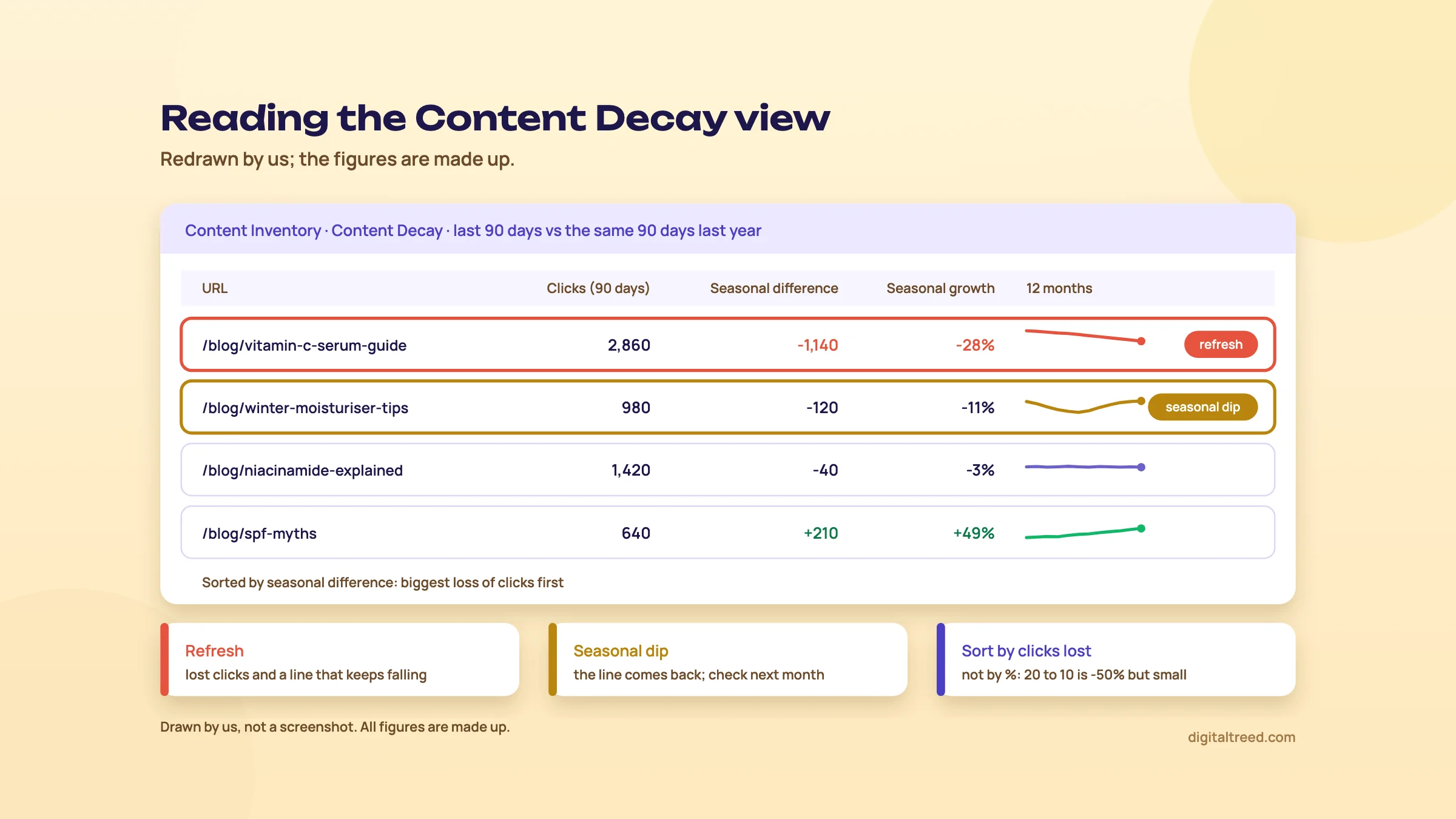 Which decaying pages to refresh first, and which to leave. Drawn by us; figures made up.
From the Decay or Striking Distance view you can create a Draft for a page directly.[28] That costs a Draft credit, so pick your top few, not the whole list. Guide 2, chapter 6 covers how to decide between refreshing, merging and removing a page.
Topic Exploration: what to write next
Topic Exploration starts from a topic, a URL or a list of your own keywords. The Topics tab groups subtopics with 30-day impressions and average monthly search volume. If your site is connected, Share of Voice shows how much of each group you already cover. The Keywords tab expands the seed with autocomplete letters, numbers and questions.[4]
The "See Intent" button on each keyword scans the results page. It shows SERP features such as AI Overviews, video carousels and image packs, and groups results by intent.[4] Use it before you commit to a topic. If page one is all videos, a 2,000-word article is the wrong format.
Each exploration uses one credit. On monthly plans unused credits don't roll over; on annual plans you get the year's credits upfront.[3] For keyword research alone, it's an expensive way to get volumes. Search Console, Google Keyword Planner and Google Trends are free. See our Keyword Planner guide.
The AI features today
Query Tracking. You choose questions and Clearscope checks whether AI chatbots mention your brand in their answers. The pricing page says ChatGPT and Gemini. It also lists brand visibility tracking and "query fan-out awareness", meaning the web searches AI platforms run to build an answer.[1] The product page also names Claude and shows a mention percentage smoothed with rolling averages.[32] Essentials includes 50 tracked queries and Business 300.[1]
Treat these numbers as a sample. AI answers change from one run to the next, and no outside tool sees inside the engines. GEO guide, chapter 8 explains how to read prompt tracking and what Search Console and Bing show for free.
AI Cited Pages. A starter view in the inventory.[27] Clearscope's launch post says it matches AI citation data from tracked topics to your inventory pages, counting citations in ChatGPT, Gemini and Perplexity for prompts Clearscope's system writes.[33] That post is from October 2025, before Query Tracking, so check what the view shows in your trial.
Draft with AI. A guided builder. You choose the searcher intent and the content type (article, product or service page, or how-to guide). You set a tone from a live page, a writing sample or a default, then pick a title. Clearscope drafts an outline you can edit and export as a brief, or turn into a full AI draft.[34]
Warning
An AI draft that scores A++ can still be wrong. Google's guidance on generative AI says: "It is critical to manually factcheck and review all AI-generated content for accuracy and trustworthiness before publishing."[35] Check every number, claim and product detail by hand.
We'd use the outline builder to brief writers and skip the full AI draft for anything that carries your brand's name. Guide 2, chapter 5 sets out a safe way to use AI in writing.
Chapter 4 puts all this to work on three real jobs.
Step by step: three real jobs in Clearscope
Quick answer
Three jobs. Optimise a D2C skincare brand's product guide in Google Docs without stuffing it. Find decaying pages in Content Inventory and confirm them in Search Console. Then brief a freelance writer with a shared Draft. The examples are made up; the menu names come from Clearscope's help pages.
Our running example is a made-up D2C skincare brand selling online across India. Its blog has about 150 posts and buying guides. The content team is a manager and three freelance writers, which is the size where Clearscope starts to earn its fee.
Job 1: optimise a product guide draft
The writer has a first draft of "best sunscreen for oily skin", a buying guide that links to the brand's three sunscreens. It reads well but nobody has checked it against what ranks.
Optimise a D2C product guide in Google Docs
- Read page one first Search the keyword yourself in an incognito window. Note the format: listicles, single product pages, or videos. If it's all product pages, a long guide may be the wrong page type. Guide 2, chapter 4 shows how to read it.
- Create the Draft Enter "best sunscreen for oily skin", choose the locale and English, and click Create Draft. Wait one to two minutes.[2]
- Share it and link it Toggle the Draft to Shared. In the Google Doc, open Extensions, Clearscope, Start, paste the link and click "Link draft".[13]
- Check the Competitors tab Note the grades of the pages ranking in the top five. That's your target zone, not A++.
- Sort terms by Unused Go down the list. For each unused term, ask whether a buyer expects it. "SPF 50", "PA++++", "non-comedogenic" and "white cast" probably belong. A rival brand's product name doesn't.
- Add sections, not words If several unused terms point to one missing subtopic, such as how to reapply over makeup, write that section properly. Don't sprinkle terms into existing sentences.
- Answer the Research questions Pick the two or three People Also Ask questions[6] that fit. Answer each under its own heading, in its first 40 to 60 words.
- Add what no competitor has Your own test photos, the SPF lab report, real customer reviews, the price in rupees. The grade won't move. This is still the step that makes the page worth ranking.
- Check for stuffing Paste the final text into our Word Counter & Keyword Density Checker. If the main phrase shows red, or one two-word phrase dominates the list, rewrite those sentences.
- Fact-check and publish Check every claim about ingredients and SPF against the product label and lab report before it goes live.
Skincare claims touch health, so the fact-check matters more than the grade. If an AI tool helped with any part of it, check that part twice.
Job 2: find the pages that are decaying
Traffic to the blog is flat but the team keeps publishing. Some older posts are probably sliding. Here's how to find them.
Find decaying pages with Content Inventory
- Open the view In Content Inventory, choose Content Decay from the starter views at the top of the page.[28]
- Sort by seasonal difference The biggest negative numbers are clicks lost against the same 90 days last year.[28] Start with lost clicks, not percentages. A page that fell from 20 to 10 clicks lost 50% but barely matters.
- Read the sparkline Keep pages whose 12-month line slopes down steadily. A summer sunscreen guide that dips in winter and recovers isn't decaying.
- Check the cause in Search Console For each candidate, open Performance, filter by the page and compare the same two periods.[36] Did impressions fall (Google shows it less), or did CTR fall (people see it but click something else, often an AI Overview)?
- Check the technical side Open the Technical Issues view to rule out redirects, canonical errors or robots.txt blocks.[30]
- Pick three and refresh Click "+ Draft" next to a page to grade it against today's results.[29] Update the facts, prices and products first, then the coverage. Follow Guide 2, chapter 6 to decide whether to refresh, merge or remove.
- Annotate On the page's chart, click "+ Annotate" and note the date and what you changed.[37]
- Subscribe Subscribe to the Content Decay view so the Monday email tells you when new pages join it.[27]
Tip
No Clearscope? In Search Console's Performance report, compare the last three months with the same three months last year, then open the Pages tab and sort by the click difference. It's the same comparison as the Content Decay view, done by hand, for free. The Search Console guide shows the filters.
Job 3: brief a freelance writer
The brand wants a new guide, "vitamin C serum for beginners", from a freelancer who has never used Clearscope.
Turn a Draft into a brief for a freelancer
- Create the Draft Enter the keyword and click Create Draft.[2]
- Build the outline Click "Get Started", then "Draft with AI". Choose the intent and the content type, then pick a title. Edit the outline: delete headings that don't fit, drag sections into order, and add your own, such as "How to patch-test".[34]
- Export it as a brief Export the outline as a brief instead of generating the full draft.[34]
- Export the terms In the editor's Terms tab, click Export for a CSV with each term, its importance and its typical uses.[38] Delete the rows you don't want used.
- Add your own brief fields The reader, the products to link, the claims the writer must not make, and one thing only you can supply. Guide 2, chapter 4 lists the fields.
- Share the Draft Toggle Shared and send the link. The writer works in Guest Mode with no login.[6] Anyone with the link sees that Draft only, nothing else in your account.[13]
- Set the target Write the grade you'll accept in the brief, such as "within one grade of the top three results". Tell the writer that a lower grade with better facts wins.
Chapter 5 covers what all this costs, and the cheaper ways to get most of it.
Clearscope pricing, pros and cons, and the alternatives
Quick answer
Clearscope has no free plan, only a 14-day trial. Essentials costs $129 a month (about ₹12,384) and Business $399 (about ₹38,304), both with unlimited users. Enterprise is custom. Extra pages and Drafts cost more. Surfer and Frase are cheaper; our free Word Counter and Search Console cover the basics.
The plans
Read on Clearscope's pricing page, checked 18 October 2026.[1] The page shows US dollars only, with no India price, so the rupee figures are ours at ₹96 = US$1.
| Plan | Price a month | Pages tracked | Drafts a month | Topic Explorations a month | Tracked Queries |
|---|---|---|---|---|---|
| Essentials | $129 (about ₹12,384) | 50 | 20 | 20 | 50 |
| Business | $399 (about ₹38,304) | 300 | 20 | 50 | 300 |
| Enterprise | Custom | Custom credits | Custom | Custom | Custom |
All plans: unlimited users and projects, Query Tracking, brand visibility tracking, onboarding and support. Business adds a dedicated account manager. Enterprise adds custom agreements, crawler whitelisting and single sign-on.[1] Note that Business has more pages, explorations and tracked queries, but the same 20 Drafts as Essentials.
Extras on the same page, at the default amounts shown:[1]
- 100 more inventory pages: $25 a month on Essentials (about ₹2,400), $15 a month on Business (about ₹1,440).
- 10 more Drafts: $50 on Essentials (about ₹4,800), $20 on Business (about ₹1,920); unlike the pages, the page doesn't say whether this repeats every month.
Add-ons are billed to your subscription automatically when you go over an included credit.[39] The help page's worked example still uses an older $189 Essentials price, so go by the pricing page.
Terms that matter
- No contract on monthly plans. Cancel any time.[1]
- Cancelling locks you out. You lose access to the platform and your Drafts. Reactivate a monthly plan within 12 months and your history comes back. Annual plans can't be paused.[40] Export the terms and briefs you care about before you cancel.
- Credits don't roll over on monthly plans. Annual plans get all the year's credits upfront.[3] The pricing page doesn't show an annual price; it says yearly custom plans can be invoiced.[1]
- Payment by card: American Express, Mastercard or Visa. Bank transfer only for annual plans over $5,000.[9] Check that your Indian card is enabled for international payments.
Tip
Twenty Drafts a month is the real limit. If your team publishes eight pieces and refreshes six old ones, that's 14 Drafts. Count your monthly output before choosing a plan; don't let the page allowance decide for you.
Pros and cons
Pros
- A simple editor; Clearscope says it is designed for fast adoption[1]
- Google Docs, Word and WordPress add-ons, so writers stay in their own editor
- Unlimited users and guest links for freelancers
- Content Inventory with a year-on-year decay view, striking distance and technical issue views
- Term Map and Competitors tabs show when the grade doesn't explain rankings
- Query Tracking in AI chatbots included on every plan
Cons
- Expensive: about ₹12,384 a month before any add-ons
- No free plan; 14-day trial only
- Only 20 Drafts a month, even on Business
- Five languages, none of them Indian
- The grade rewards matching the top pages, not adding something new
- A test by Ahrefs found only a weak link between content scores and rankings
The alternatives
Start with what's free. Our Word Counter & Keyword Density Checker shows your word count, keyword density and most-repeated phrases, so you can check a draft for stuffing before it goes live. Search Console gives you the decay comparison, and Google's own results page gives you the outline and the questions.
The two closest paid tools, read on their pricing pages on 18 October 2026:
- Surfer: Discovery at $49 a month billed yearly (120 documents a year, upfront) or $59 monthly (10 a month), about ₹4,704 or ₹5,664; Standard at $99 billed yearly (360 a year) or $119 monthly (30 a month), with 25 AI prompts tracked weekly.[41] See our Surfer guide.
- Frase: Starter at $39 a month billed yearly or $49 month to month (about ₹3,744 or ₹4,704), with a 7-day trial and no credit card.[42] See our Frase guide.
| Situation | What we'd use | Why |
|---|---|---|
| A 20-page local site (clinic, shop, coaching centre) | Google's results page, Search Console, our Word Counter | Free, and the gains are in your Business Profile and service pages, not term lists |
| A blogger or one-person business | Frase Starter, or the free routine above | Lowest paid price, with SEO scores and 10 articles a month |
| A small team writing up to 30 pieces a month | Surfer Standard | 360 documents a year for $99 a month billed yearly (or 30 a month at $119 monthly), against Clearscope's 20 Drafts for $129 |
| A content team with freelancers and 100+ published pages | Clearscope Essentials | Unlimited seats, Google Docs add-on, Content Inventory for decay |
| A large library to monitor | Clearscope Business | 300 pages tracked and cheaper extra pages |
| You only need decay tracking | Search Console comparison, by hand | Same year-on-year comparison, free |
If you'd rather not run the tools at all, our content marketing service plans, writes and refreshes the pages for you. Now test yourself with the quiz.
Test yourself
Ten questions on the whole guide. Pick an answer, check it, and see your score at the end.
You got 0 of 10 right.
Frequently asked questions
Frequently asked
What is Clearscope used for?
Clearscope helps content teams write and maintain pages for search. It analyses the top pages Google ranks for a keyword, suggests terms, questions and headings, and grades your draft as you write. Its Content Inventory then tracks published pages with Search Console data and flags decay.
How much does Clearscope cost?
Checked on 18 October 2026: Essentials is $129 a month (about ₹12,384) and Business $399 a month (about ₹38,304), with Enterprise priced on request. Every plan has unlimited users. Extra inventory pages and Drafts cost more. Prices are shown in US dollars only.
Does Clearscope have a free plan or trial?
There's no free plan. The pricing page offers a 14-day free trial, and monthly plans have no minimum contract. If you cancel, you lose access to your Drafts unless you reactivate a monthly plan within 12 months.
Is the Clearscope Content Grade a Google ranking factor?
No. The grade is Clearscope's own measure of how much of the top pages' vocabulary your draft uses. Google doesn't see it. An Ahrefs test of five tools' scores across 20 keywords found only weak correlations with rankings.
Do I need an A++ grade to rank?
No. Check the grades of the pages ranking now on the Competitors tab and aim for roughly the same. After that, your time is better spent on facts, first-hand detail and anything the other pages don't have.
How do I avoid keyword stuffing when using Clearscope?
Treat the term list as a list of subtopics, not a quota. Use a term only where a reader would expect it, write missing sections properly, and filter off-topic terms in settings. Then paste the text into a keyword density checker to catch repeated phrases.
Does Clearscope work with Google Docs and WordPress?
Yes. There's a private Google Docs add-on, installed from a link on Clearscope's help page, a WordPress plugin for the Classic and block editors, and a Microsoft Word integration. The Google Docs and WordPress add-ons need a shared Draft link.
Can Clearscope track AI search visibility?
Partly. Query Tracking checks chosen questions in AI chatbots and reports how often your brand is mentioned. The pricing page names ChatGPT and Gemini, and the product page adds Claude. Treat the results as a sample, because AI answers change from run to run.
Clearscope vs Surfer vs Frase: which is cheaper?
Clearscope is the most expensive of the three. On 18 October 2026, Frase Starter cost $39 a month billed yearly and Surfer Discovery $49 a month billed yearly, against $129 a month for Clearscope Essentials. Clearscope's case rests on unlimited seats and its Content Inventory.
Does Clearscope support Hindi or other Indian languages?
No. Its help page lists English, French, German, Italian and Spanish. For English-language searches in India it works, but check in the trial that the India locale and the Indian cities you need are available.
Sources
References
- Plans and pricing, Clearscope (Mushi Labs), accessed 18 Oct 2026
- Analyzing the search for topics, Clearscope Support Center, accessed 18 Oct 2026
- How do Clearscope credits work?, Clearscope Support Center, accessed 18 Oct 2026
- Discover what to write about, Clearscope Support Center, accessed 18 Oct 2026
- Monitoring your published content, Clearscope Support Center, accessed 18 Oct 2026
- Editing and optimizing your content, Clearscope Support Center, accessed 18 Oct 2026
- What languages does Clearscope support?, Clearscope Support Center, accessed 18 Oct 2026
- Start for free (sign-up form), Clearscope, accessed 18 Oct 2026
- What payment methods do you accept?, Clearscope Support Center, accessed 18 Oct 2026
- Connecting your Google Search Console property, Clearscope Support Center, accessed 18 Oct 2026
- How do I invite more users to my Clearscope account?, Clearscope Support Center, accessed 18 Oct 2026
- What are the different roles a user can be?, Clearscope Support Center, accessed 18 Oct 2026
- How do I use the Google Docs integration?, Clearscope Support Center, accessed 18 Oct 2026
- Can I exclude terms and domains from my Drafts?, Clearscope Support Center, accessed 18 Oct 2026
- What is Clearscopebot?, Clearscope Support Center, accessed 18 Oct 2026
- How do I use the WordPress plugin?, Clearscope Support Center, accessed 18 Oct 2026
- Clearscope (plugin), WordPress.org, version 2.0.9, updated 15 Oct 2026, accessed 18 Oct 2026
- Why is there sometimes a difference between Content Inventory and Draft grades?, Clearscope Support Center, accessed 18 Oct 2026
- How does the Readability score work?, Clearscope Support Center, accessed 18 Oct 2026
- How does Clearscope grade your content?, Clearscope Support Center, accessed 18 Oct 2026
- Optimize: produce top-ranking optimized content with confidence, Clearscope, accessed 18 Oct 2026
- Do higher content scores mean higher Google rankings? We studied it (so you don't have to), Ahrefs blog (Si Quan Ong), updated 21 May 2025, accessed 16 Oct 2026
- How does the typical word count get calculated?, Clearscope Support Center, accessed 18 Oct 2026
- Creating helpful, reliable, people-first content, Google Search Central, updated 5 Oct 2026, accessed 16 Oct 2026
- Spam policies for Google web search, Google Search Central, updated 28 Aug 2026, accessed 16 Oct 2026
- Optimizing for local search with Local SEO Targeting, Clearscope Support Center, accessed 18 Oct 2026
- Monitoring your content at scale with Content Views, Clearscope Support Center, accessed 18 Oct 2026
- Track slowdowns and spot pages that need a refresh with the Content Decay Content View, Clearscope Support Center, accessed 18 Oct 2026
- Identify page-one opportunities with the Striking Distance Queries Content View, Clearscope Support Center, accessed 18 Oct 2026
- Troubleshoot indexing errors with the Technical Issues Content View, Clearscope Support Center, accessed 18 Oct 2026
- Optimize your site with the Internal Linking Content View, Clearscope Support Center, accessed 18 Oct 2026
- Expand: go beyond rankings, own the conversation, Clearscope, accessed 18 Oct 2026
- Introducing: Clearscope's AI Cited Pages Content View, Clearscope, 17 Oct 2025, accessed 16 Oct 2026
- Writing a quality first draft, Clearscope Support Center, accessed 18 Oct 2026
- Google Search's guidance on using generative AI content on your website, Google Search Central, updated 1 Oct 2026, accessed 16 Oct 2026
- Performance report (Search results): advanced filtering and comparison, Search Console Help, accessed 18 Oct 2026
- Page-level annotations, Clearscope Support Center, accessed 18 Oct 2026
- How do I export terms?, Clearscope Support Center, accessed 18 Oct 2026
- How do plan addons work?, Clearscope Support Center, accessed 18 Oct 2026
- Can I pause my Clearscope subscription?, Clearscope Support Center, accessed 18 Oct 2026
- Pricing and plans, Surfer, accessed 18 Oct 2026
- Pricing, Frase, accessed 18 Oct 2026
Get the free checklist
Every step of this guide on one page, to print or tick off. We email you the PDF link.