

What Frase is, who needs it, and the day-one set-up
This guide is part of our "SEO tools explained" path. It's for content writers, freelancers and small teams who brief or write articles every month and want to know whether Frase earns its fee. Our running example is a made-up dental clinic in Delhi.
By the end you'll be able to set up a trial without wasting it, run a research session and pin what belongs in a brief, and read Frase's SEO, GEO and EEAT scores for what they are. You'll also know how to use its AI writer within Google's rules, turn Search Console data into a refresh list, and send drafts to WordPress.
There are five chapters, about 25 minutes in all. Chapter 1 explains what Frase is now and sets up the account. Chapter 2 covers research and briefs, and chapter 3 the editor, the scores, AI writing, Search Console and WordPress. Chapter 4 does three real jobs step by step. Chapter 5 has the plans, read on Frase's own pricing page on 18 October 2026, with pros and cons and the alternatives, our free tools first.
Quick answer
Frase is a paid content tool: it reads the pages that rank for a topic, turns what it finds into a brief, writes or helps you write the article, scores the draft and publishes it to WordPress. It suits teams briefing several articles a month. A small site that publishes twice a month doesn't need it.
What Frase does now
The older Frase app focused on content optimisation.[1] Today Frase calls itself an "agentic SEO & GEO platform" that researches, creates, optimises and tracks content.[2] Its help centre describes the work as a loop of five steps:
- Listen. Search Console data, AI Visibility tracking and an on-site question widget called Frase Answers show what people look for.
- Create. Research, then a brief, then the article.
- Publish. One click sends the draft to WordPress, Webflow, Sanity, Wix or Frase's own hosted CMS.
- Monitor. SEO Analytics for Google rankings, AI Visibility for citations in AI answers.
- Fix. Content Guard spots a page losing rank and drafts a revision for you to approve.
All five come from Frase's quickstart page.[2] For this guide the parts that matter are the research view, the brief, the editor and its scores, and the Search Console link. Those are what you pay for if you're an SEO or a content writer.
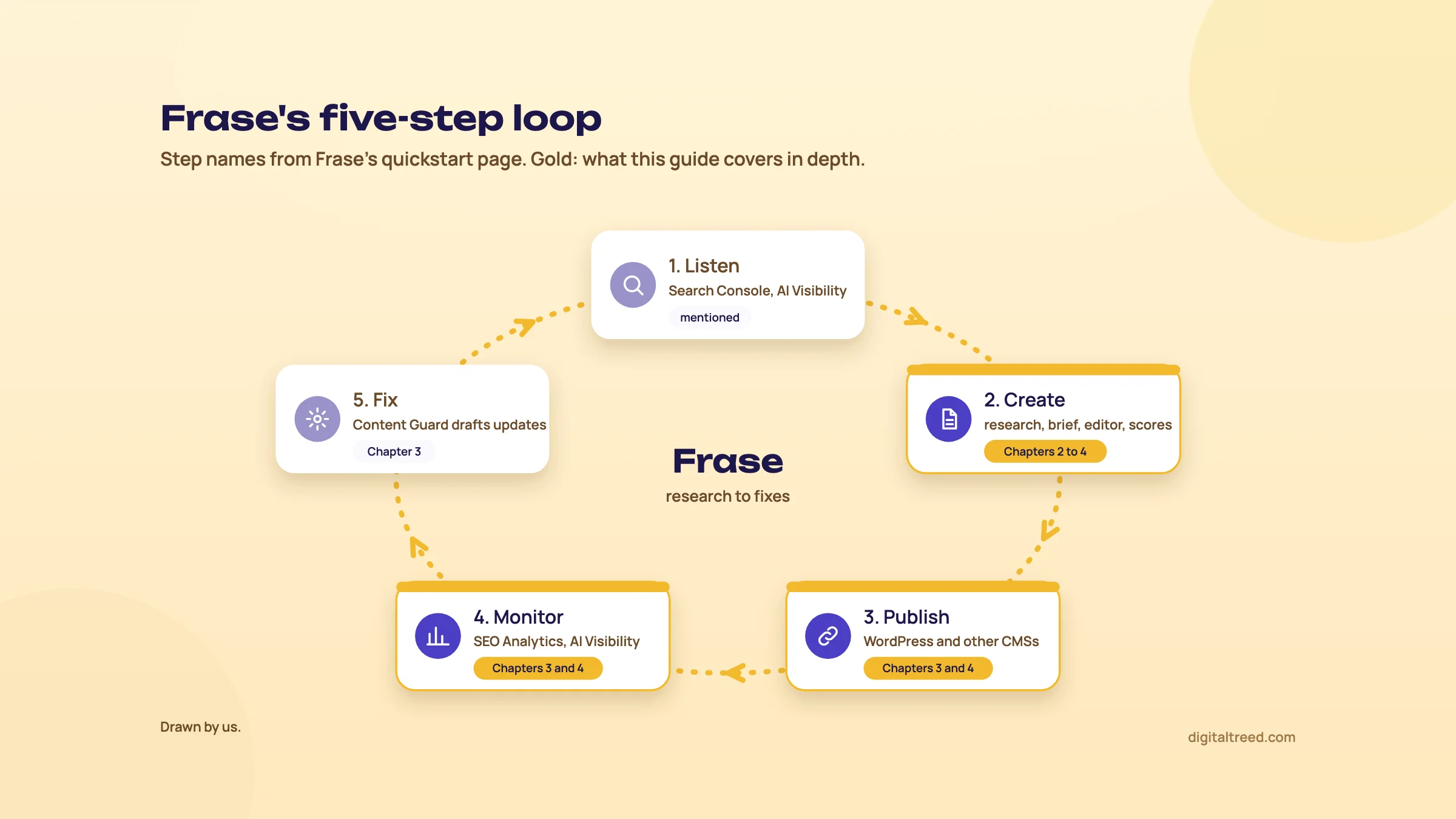 The five steps as Frase's quickstart page names them; gold marks what this guide covers in depth. Drawn by us.
New Frase and Legacy Frase
There are two Frase apps right now, and older reviews mix them up. The new app runs at next.frase.io. Legacy Frase still works at app.frase.io for accounts that haven't moved, and moving is optional, with no deadline set.[1]
Some names changed in the move. What Legacy Frase called "Outlines" are now "briefs", and "Rank-Ready Credits" are now "Article Credits".[1] If a review talks about a single topic score or a "Content Analytics" screen, it's describing the old app.[3] The new editor shows three scores instead, SEO, GEO and EEAT, which chapter 3 explains. This guide follows the new app.
Who it's for, and when you don't need it
Frase's own pricing page aims Starter at "solos, freelancers, and single-site teams", Professional at in-house teams, and Scale at agencies and multi-site brands.[4] In practice, we'd put it this way:
- Worth it: you brief freelance writers every month, you run a content team, or you're an agency writing for several client sites and want briefs that look the same every time.
- Probably not worth it: a dental clinic, a sweet shop or a coaching centre that publishes one or two posts a month. The brief method in Guide 2, chapter 4 takes about 30 minutes with free tools: the results page, "People also ask", autocomplete and Search Console.
- Wrong tool: if you need keyword volumes for hundreds of terms, backlink data or rank tracking for a whole site, a suite such as Semrush or SE Ranking fits better.
One more honest point. Frase can research, write and publish on its own if you let it.[4] That's the part we'd be most careful with, for reasons chapter 3 sets out.
Set up the account
There's no free plan, only a 7-day trial with no card.[4] The trial gives you 1 domain, 50 audit pages, 25 AI prompts, 5 articles, 10 briefs, 5 hero images and 3 seats.[5] Five articles go fast, so plan the trial before you start it.
Set up Frase on day one
- Add your site Click the site selector at the top left and choose Add Site. Frase crawls the site, drafts a brand profile and lists likely competitors. The crawl can take a few minutes.[6]
- Connect Search Console Go to Settings, then Integrations, find Google Search Console and click Connect. Map the property to the right site in Site Settings. Data starts importing within 24 hours.[7]
- Set your market In Brand Hub, Site Settings, set the default country and language. Pick your city from the type-ahead list under geographic reach if you serve one area.[8]
- Check Brand Hub Review the brand voice, competitors and other brand details Frase drafted from your site. Fix anything wrong: Frase says every detail in Brand Hub affects its content work.[2]
- Connect WordPress (optional) Also under Settings, Integrations. Chapter 3 has the steps.
- Run a first audit (optional) Optimize, then Audit, then New Audit. On the trial it covers 50 pages.[9]
Search Console is the one connection to make on day one. Without it, Frase can still research and write, but it "can't see how anything you've already published is doing".[6] If you connect a client's property as an agency, you need Owner-level access to it.[6]
Warning
Setting a location doesn't make the research local. A research session takes a country and language, and the city you set is used for Frase's first gap analysis, to fill in the competitor location, and as a fallback for location pages.[8] For a "near me" style search in Delhi, check the real Google results for Delhi yourself as well. Frase's help pages don't list its supported countries, so check India appears in the market list before you rely on it.
Once the site and Search Console are in, the next chapter runs a research session and turns it into a brief.
Research and briefs: SERP analysis, headings, questions and evidence
Quick answer
A Frase research session reads the pages ranking for your topic and sorts what it finds into keywords, headings, gaps, questions, evidence, competitors and related angles. You pin what belongs in your page, then click Generate brief. Frase writes a section-by-section brief from your pins, with facts you approve one by one.
Start a research session
Go to Plan & Create, then Research, and click New Research. Type a topic, a search query or a working title; Frase says the more specific it is, the more useful the results.[10] Content language and target market load from your site settings, and you can change them for this one session.
Open "Audience, goal & brand guidance" before you run it. The goal and audience steer what the research looks for, and you can pick a Brand Hub voice or none.[10] Then click Run research. Each run counts toward your monthly limit, but a run that fails doesn't.
Tip
Write the audience the way Guide 2's brief template does: "a patient in Delhi with tooth pain, comparing clinic prices before booking", not "dental patients". The more exact the reader, the less generic the brief.
The seven sections of the results
A section only appears when the research found something for it.[10] Click a section's title to see everything in a side panel.
| Section | What's in it | What we'd do with it |
|---|---|---|
| Keywords | The terms the piece is written to win, with metrics | Pin one main keyword and a few close variants. Add your own if Frase missed one |
| What ranks and headings | The pages ranking now and how they're built | Read the page types first. Pin headings a reader would miss if they were gone |
| Opportunities | Where the ranking pages leave room | Pick the gaps you can fill from your own work |
| Questions | What readers ask about the topic | Pin the ones that match the page's intent |
| Evidence and insights | Figures and claims, with the sites they came from | Open each source before you pin it |
| Competitors | Competing businesses and how they position themselves | Note what they all say, so you can say something else |
| Topic directions | Related angles beyond this one | Usually a separate page, not a section |
The section names and what they hold are from Frase's research help page; the third column is our advice.[10]
Frase says the questions come from "People Also Ask, forums, and answer engines".[11] It doesn't say how many results it reads or how it weights them. Treat the list as a head start, and still open the "People also ask" box yourself, since your own front desk will know questions no tool shows.
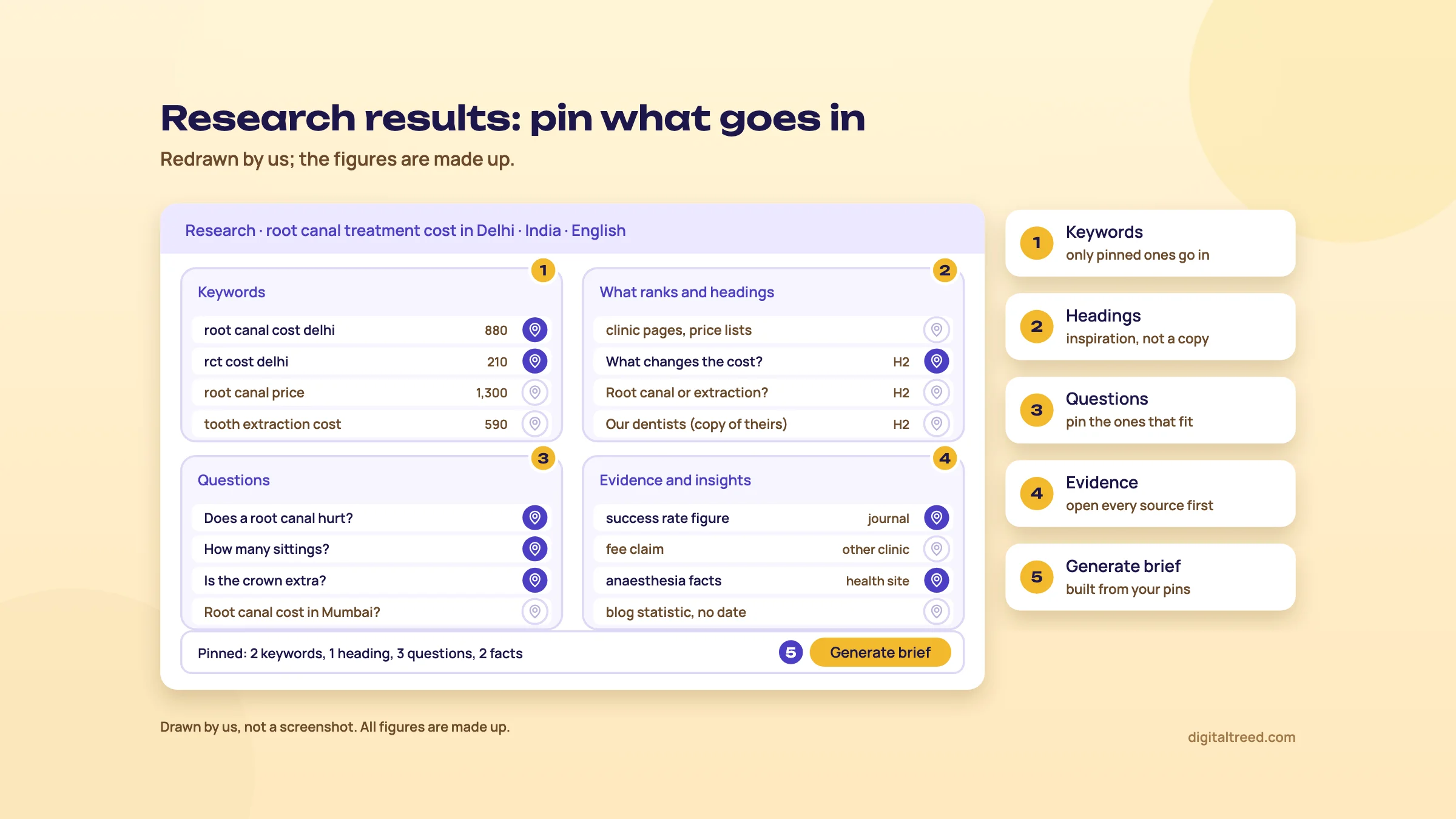 Only what you pin goes into the brief. Drawn by us; the figures are made up.
Pins decide what goes into the brief
This is the rule that catches people out: suggested keywords you haven't pinned don't go into the brief.[10] Pin at least one keyword. Pinning headings, questions and evidence is optional, but those are what the brief is built from.
Frase says competitor headings are used "as inspiration" for a unique outline and are not copied word for word.[10] Good. Still, an outline built from what already ranks will look like what already ranks. The part that makes your page worth ranking is the angle only you can add, and no research tool finds that for you.
Four links sit under the topic: Edit setup to change and rerun, Writing inputs for everything you've pinned, Sources for every page analysed, and Ask AI to ask what the results mean.[10] A finished research report can be exported to PDF, HTML, Markdown, Google Docs or Notion.[12] That's handy when the writer doesn't have a Frase seat.
Generate and check the brief
Click Generate brief (it needs the Editor role or higher), choose a content type and target word count, then Generate Brief.[10] Frase has 16 content types, from blog and FAQ to comparison and landing page, and the outline and scoring adjust to the one you pick.[12] For a clinic's price page, that's the landing page type, not a blog post.
A finished brief has five parts:[13]
- a section-by-section outline built from the results page
- target keywords and topic coverage
- evidence mapped to sections: stats, quotes and supporting facts
- a do's and don'ts guide
- content type, tone and audience
Then open the Facts panel. You approve the facts the article may use and reject the rest; when Frase writes, rejected facts and sources stay out.[13] This is the most useful control in the whole tool. Use it like an editor: open every source, reject anything from a site you wouldn't cite yourself, and reject any number without a date.
The target word count deserves a word of caution. Google asks whether you're writing to a word count because you've heard it prefers one, and answers "(No, we don't.)"[14] Use Frase's figure as a sanity check against the top pages, as Guide 2 suggests, not a target.
If you change your pins after the brief exists, open the brief and click Update brief in the banner. Updating doesn't cost an extra credit.[10]
With an approved brief, the next step is the editor: who writes, what the scores mean and how much of the writing to hand to AI.
The editor, content scores, AI writing, Search Console data and WordPress
Quick answer
Frase's editor scores a draft from 0 to 100 on SEO, GEO and EEAT. These are Frase's own models, not Google's, so use them as a checklist. AI can write some or all of the article, but Google says it's "critical to" fact-check AI content by hand. Search Console data then shows which published pages to refresh.
Who writes: Frase, you, or both
In the brief's Article outline, click Assign and pick Frase writes or I write. You can split the work by switching single sections to yourself, and Frase marks it as split work.[13] When you write, your chosen headings move into the editor and every section is yours.
Our default is the split. Let Frase draft the sections that are plain explanation, and write the sections yourself that need your experience: your prices, your process, your cases. Those are the parts that make the page different from the ten above it, and AI can't know them.
The three scores, and what they really measure
The Score tab sits at the top right of the editor. Each score runs from 0 to 100, updates as you edit, and shows red for needs work, yellow for good and green for strong.[15]
| Score | What Frase says it measures | What raises it |
|---|---|---|
| SEO | On-page practice for traditional search | Keywords in headings, a clean heading order, fuller thin sections, internal and external links |
| GEO | How easily AI systems can extract, understand and cite the page | Clear definitions, concrete data, explicit answers, lists and tables, cited sources |
| EEAT | How well the copy stands up to Google's quality guidelines | An author bio, credentials, high-authority citations, more depth |
All three rows are Frase's own descriptions.[15] Frase says an SEO score of 70 to 85 or more is "generally solid", tells you not to chase 100, and suggests improving whichever score lags most.[15] Since its 16 content types arrived, the GEO score is judged by AI against your content type's rubric.[12]
Warning
None of these is a Google number. Google doesn't publish an EEAT score; it says E-E-A-T "itself isn't a specific ranking factor", though its systems use a mix of signals that can identify it.[14] And its AI optimisation guide says: "No third-party tool has access to our internal ranking or AI systems."[16] A green EEAT score means you ticked Frase's boxes, such as adding an author bio. It doesn't mean Google trusts the page.
Two details from the help pages are worth knowing. A keyword counts toward the SEO score only as a whole word, so a term tucked inside a longer word earns nothing.[15] And one Manual Tip asks for "quotable" sentences of 10 to 35 words.[17] That's fine advice for readers too, as long as you don't chop every paragraph into pieces for a score.
Our view, the same as in Guide 2, chapter 4: content scores are good checklists and bad targets. A draft can score green while saying nothing new. Check the score once the draft is written, fix the gaps that help the reader, and ignore the rest. Before you publish, paste the draft into our Word Counter to make sure no phrase has crept past natural use while you chased coverage.
It shows word, character and sentence counts, the density of each target keyword and your top one-, two- and three-word phrases, with colour bars for natural, borderline and too much. Pasted text stays in your browser.
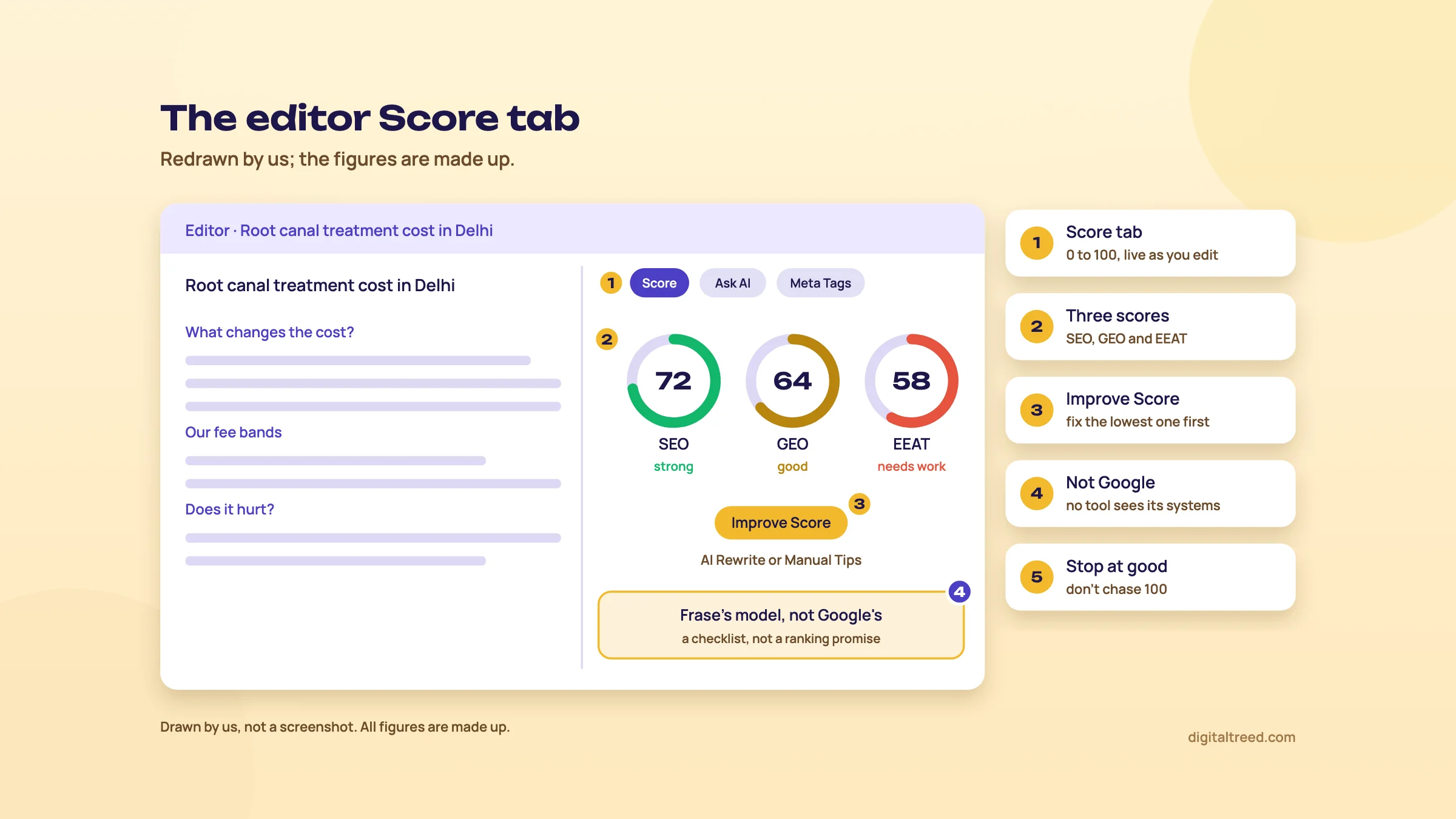 SEO, GEO and EEAT scores in the editor: a checklist, not a Google number. Drawn by us; the figures are made up.
AI writing, and what Google says about it
Frase writes whole articles in one pass, and its Ask AI tab can rewrite, shorten or proofread a selection, with accept and reject on each changed paragraph.[12] In the Score tab, the Improve Score button opens a Content Diagnostic with two routes: AI Rewrite, which works through the plan for you, or Manual Tips you apply yourself.[17]
Google's position has two halves. First, using AI isn't the problem: "Appropriate use of AI or automation is not against our guidelines," it wrote in February 2023, as long as it isn't used mainly to manipulate rankings.[18] Second, generating many pages without adding value for users may break its spam policy on scaled content abuse.[19] Its guide, updated on 1 October 2026, adds:
It is critical to manually factcheck and review all AI-generated content for accuracy and trustworthiness before publishing.[19]
That review also covers titles, meta descriptions, structured data and image alt text.[19] So if Frase generates your meta tags, check them too. For a health page, such as a dental clinic's, the bar is higher: Google says YMYL content "must be highly accurate and consistent with established expert consensus".[14] Have the dentist read it before it goes live. Guide 2, chapter 5 covers AI-assisted writing in full.
Do not
- Turn on auto-publish for a new site and walk away
- Rewrite a whole article with AI to push a score up
- Publish an AI-written fee, dosage or legal fact without checking it
Do
- Approve facts one by one in the Facts panel
- Write the experience sections yourself
- Read every AI change before you accept it
- Add a byline and say how the page was made
Search Console data: SEO Analytics and Content Opportunities
Once Search Console is connected, SEO Analytics shows clicks, impressions, CTR, average position, query and page performance over time, and a page status of healthy, declining or at risk.[20] Frase's advice is to start with pages in positions 4 to 10 and refresh before you write something new.[20] We agree with the order; it's the same as Guide 2, chapter 6.
The data also feeds Content Opportunities, under Plan & Create, which lists ranking chances and content decay. On a page you already own, the action Update, Refresh, Expand or Fix This Post opens it in the editor, importing it from your CMS first.[21] Scans run once per site every 24 hours.[21]
Content Guard watches published pages that were made in Frase. When one drops in rank, Frase drafts an update (titles, descriptions, headings, internal links), and nothing changes until you approve unless you turn on auto-apply.[22] Starter watches 10 pages, Professional 75 and Scale 300.[4] We'd leave the setting on "Always ask me".
Frase doesn't say how much Search Console data it imports. Its pricing page lists reporting history of "Current only" on Starter, 3 months on Professional and 12 months on Scale.[4] Search Console itself keeps 16 months of Performance data,[23] so for a year-on-year check, use Search Console directly. Chapter 4 shows both.
WordPress
Frase publishes to WordPress through an application password, not a plugin:[24]
- In Frase, go to Settings, then Integrations, and select WordPress under CMS Publishing.
- Enter your dashboard URL ending in /wp-admin, and your WordPress admin email as the username.
- In WordPress, go to Users, then Profile, scroll to Application Passwords and generate one. Copy it at once, since WordPress shows it only once, and paste it into Frase's Password field.
- Click Connect.
Your host or security plugin must allow Frase, or the connection fails.[24] To publish, click Publish in the editor, choose WordPress and send it as a draft or a live post. If you use Rank Math, its SEO fields sync on publish.[24] The help page mentions no Yoast sync, so Yoast users should check the title and description after publishing. Our Rank Math guide covers that plugin. We'd always send as a draft and do the final read in WordPress.
Frase step by step: a dentist's price page and a refresh from Search Console
Quick answer
Three real jobs: build a brief for a Delhi dental clinic's "root canal cost" page, refresh an old post that Search Console shows slipping, and send the finished page to WordPress as a draft. Each takes 15 to 40 minutes, and each keeps the facts, the prices and the final read in human hands.
Our example is a made-up dental clinic in Delhi with a WordPress site, a dentist who will review every page, and a seven-day Frase trial. All figures below are made up.
Task 1: a brief for the "root canal cost" page
Someone searching "root canal cost in Delhi" is close to booking. They want a price range, what changes it, and whether the clinic is near them. A blog post won't satisfy that; a service page with real fee bands will.
Build a root canal cost brief in Frase
- Look at Google first Search "root canal cost in Delhi" on google.co.in in an incognito window. Note the page types (clinic pages, price lists, directories), any map pack and the "People also ask" questions. Frase's research works by country, so this is your Delhi check.
- Start the research Plan & Create, then Research, then New Research. Topic: "root canal treatment cost in Delhi". Check the market is India and the language English.
- Set the goal and audience Goal: "book a consultation". Audience: "adults in Delhi with tooth pain, comparing clinic prices before booking". Click Run research.
- Pin the keywords Pin one main keyword and two or three close variants, such as "root canal price Delhi" and "RCT cost". Nothing you don't pin goes into the brief.
- Pin the questions Keep the ones a patient asks at the desk: does it hurt, how many sittings, is a crown extra, does insurance cover it. Skip questions about other cities.
- Pin evidence carefully Open each source. Pin only dental associations, government health sites or published studies. Reject other clinics' price claims; your own prices go in, not theirs.
- Generate the brief Click Generate brief, choose the landing page type, and set a word range close to the top clinic pages.
- Add what only you know In the brief, add a section for the clinic's own fee bands (front tooth, back tooth, re-treatment, with and without a crown), what's included, and a short case the dentist approves.
- Approve facts In the Facts panel, reject anything without a source or a date. Then assign the sections: Frase can draft the "what is a root canal" part; the dentist or you write the prices and process.
Note
The page is a health topic, so Google holds it to the YMYL bar: it "must be highly accurate and consistent with established expert consensus".[14] Put the reviewing dentist's name and qualification on the page.
If you'd rather not pay for Frase for one page, the same brief takes about 30 minutes with the free method and template in Guide 2, chapter 4. For more question ideas, see our AnswerThePublic guide.
Task 2: refresh an old post using Search Console data
The clinic has a 2024 post, "How much do dental implants cost?", that used to bring steady clicks. Here's how to find out whether it's slipping, and fix it.
Refresh a slipping post with Search Console and Frase
- Confirm the drop in Search Console In Performance, compare the last 3 months year over year and open the page's Queries tab.[25] Lost position means decay; steady position with fewer impressions means less demand. Guide 2, chapter 6 has the full steps.
- Check Frase's view In SEO Analytics, look at the page's status and its queries in positions 4 to 10.[20] Then open Opportunities and look for a refresh suggestion on that URL.
- Import the post Click the opportunity's Update, Refresh, Expand or Fix This Post action[21], or go to Plan & Create, Content, New Content, Optimize Existing and import it from the URL.[17]
- Compare with what ranks now Open the Keyword Research tab in the editor's side panel. It shows what top pages cover that your post doesn't, and the topics tick off as you add them.[10]
- Work the Checklist Go through topic coverage, structure, authority and meta tags.[17] Update every price and fact, with its source and date.
- Read the scores last Open Score and use Manual Tips for the lagging score, not AI Rewrite, so the dentist's wording survives.
- Check keyword use Paste the new text into our Word Counter & Keyword Density Checker and fix any phrase marked as too much.
- Republish on the same URL Keep the URL, change the visible "last updated" date only because the content really changed, and add a Search Console annotation[26] on the day you republish.
Frase's Content Guard page says it only watches pages created in Frase and live at a URL.[22] Its Optimize Existing page, though, tells you to turn Content Guard on once an imported article is updated and republished.[17] Check the Guard tab after you republish. Either way, look at the page in Search Console again 6 to 8 weeks later.
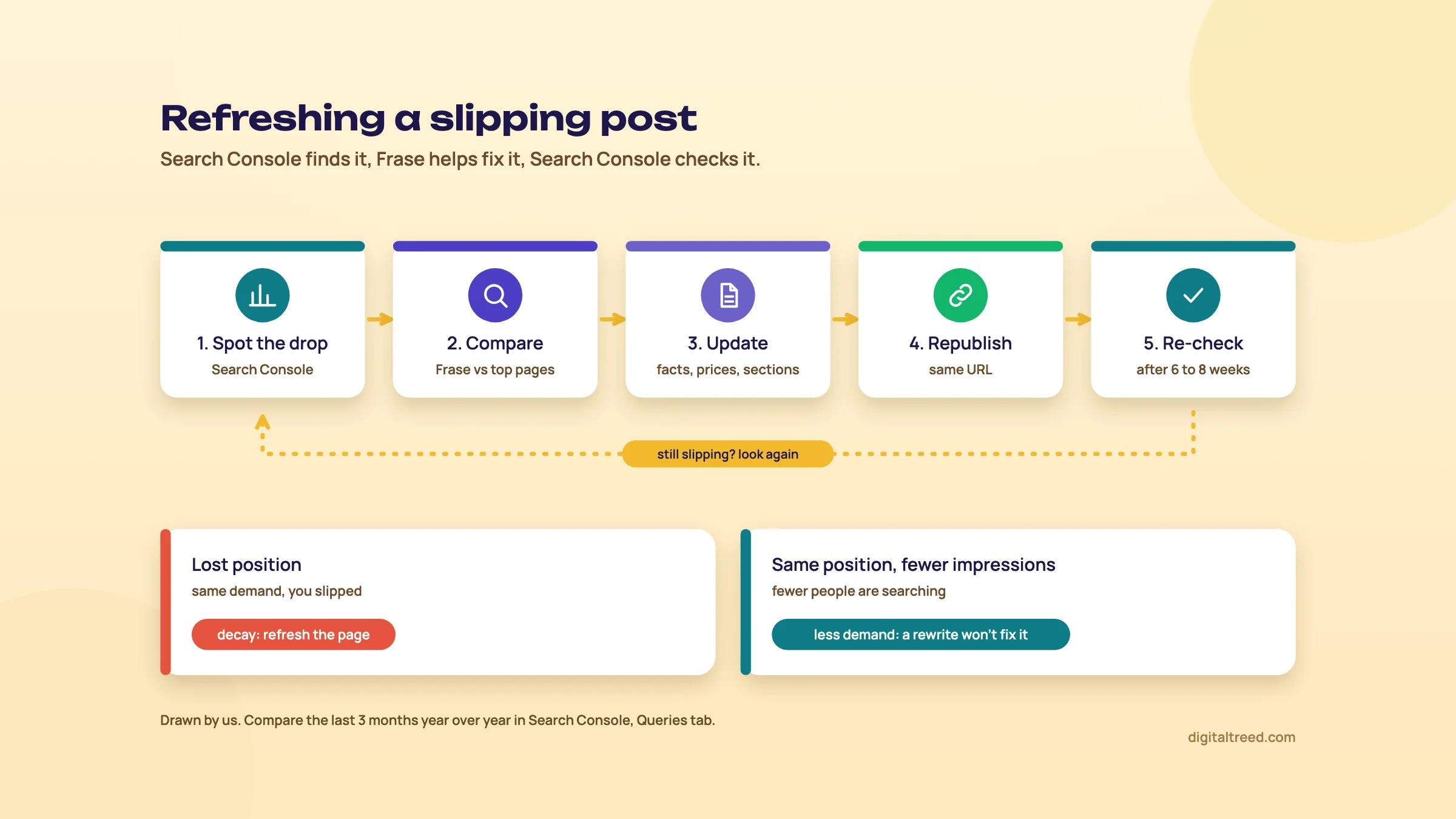 Search Console finds the slipping page; Frase helps with the update. Drawn by us.
Task 3: send it to WordPress as a draft
Publish from Frase to WordPress safely
- Connect once Use the application password steps in chapter 3. If it fails, ask your host whether a security plugin blocks it.
- Write the meta tags yourself In the Meta Tags tab, write the title and description, or generate them and then check them by hand.[27]
- Publish as a draft Click Publish, tick WordPress and choose Save as drafts.[27]
- Final read in WordPress Check prices, phone number, the doctor's byline, images and alt text, and the Rank Math or Yoast fields.
- Check the live page After publishing, run the URL through our Meta Tag Analyzer to see the title and description in a Google-style preview.
Once a few pages are live, chapter 5 helps you decide whether Frase is worth keeping after the trial.
Frase pricing, pros and cons, and the alternatives
Quick answer
Frase has no free plan, only a 7-day trial with no card. Starter costs $49 a month, or $39 a month billed yearly; Professional $129 or $103; Scale $299 or $239; Enterprise is custom (checked 18 October 2026). Every plan includes AI Visibility tracking. For one small site, free tools cover most of it.
Plans and limits
Frase's pricing page shows prices in US dollars only; it had no rupee price when we checked from India on 18 October 2026.[4] We give rupees at ₹96 to US$1, the X-Rates average for 1 to 16 October 2026.[28] The page doesn't mention GST or other taxes.
| Checked 18 October 2026 | Starter | Professional | Scale |
|---|---|---|---|
| Billed monthly | $49 a month (about ₹4,704) | $129 (about ₹12,384) | $299 (about ₹28,704) |
| Billed yearly, per month | $39 (about ₹3,744) | $103 (about ₹9,888) | $239 (about ₹22,944) |
| Seats | 1 | 3, extra $29 a month each | 5, extra $29 a month each |
| Sites (domains) | 1 | 5 | 10 |
| Articles a month | 10 | 40 | 100 |
| Audit pages a month | 50 | 250 | 1,000 |
| AI generations a month | 25 | 100 | 350 |
| Content Guard pages | 10 | 75 | 300 |
| AI Visibility engines | ChatGPT, Google AI | Adds Perplexity | Adds Claude, Gemini |
| AI Visibility prompts | 50 | 200 | 500 |
| API, MCP and CLI requests | 5,000 a month | 20,000 a month | 50,000 a month |
| Reporting history | Current only | 3 months | 12 months |
| Over the limit | Stops at the limit | Optional pay-as-you-go | Optional pay-as-you-go |
All figures are from the pricing page.[4] "Professional" is the one Frase marks most popular; we marked it because it's the first plan with a content calendar and internal linking suggestions. Enterprise adds white-label reports, a client portal, SSO and 24 months of history, at a custom price.
A few more terms from the same page and Frase's help centre:
- Yearly billing takes 20% off the monthly rate.[4]
- Pay-as-you-go is off by default. Switched on, Professional charges $5 per extra article, $0.50 per audit page and $0.25 per AI prompt; Scale charges $4, $0.40 and $0.20.[5]
- Upgrades are prorated at once; downgrades start at the next billing cycle.[5]
- FraseCMS hosting is free up to 100,000 page views a month; Basic is $19 a month (about ₹1,824) and Pro $99 (about ₹9,504) on top of your plan.[4]
- The trial gives Professional's features with 5 articles, 50 audit pages, 25 AI prompts and up to 3 seats.[4]
Frase also has three free checkers that need no sign-up for a first result: a GEO Score Checker for one page, an AI Visibility Checker for a domain, and an Agent Readiness Checker.[29] The AI Visibility Checker shows your ChatGPT result free and asks for an email for Perplexity and Gemini.
Tip
Which plan? A freelancer writing for one site: Starter, billed monthly until you're sure. Two or more sites or writers: Professional, since Starter covers one seat and one site. Use the trial on real work, such as the tasks in chapter 4, not on test topics.
Pros and cons
Pros
- Research to brief to draft in one place, with exports to PDF, Google Docs and Notion
- Pins and a Facts panel give you real control over what the writer may use
- Questions from "People also ask", forums and answer engines in one list
- Search Console data turned into refresh suggestions
- WordPress publishing with Rank Math sync
- AI Visibility tracking included on every plan
- Starter can't run up a surprise bill
Cons
- No free plan; the trial lasts 7 days
- Research works by country, not city
- SEO, GEO and EEAT scores are Frase's own models and reward matching what ranks
- Auto-writing and auto-publishing make it easy to publish unchecked AI text
- Two apps (new and Legacy), so older reviews and tutorials are often out of date
- US dollar prices only
Alternatives, and which one when
Our own free tools cover the checks around a brief: keyword use in the draft, and the tags and health of the live page.
We don't have a brief generator or content score of our own yet; it's on our build list. Until then, here's how we'd choose.
| Situation | Our pick | Why |
|---|---|---|
| One small business site, a post or two a month | The free brief method in Guide 2, chapter 4 | Results page, "People also ask", autocomplete and Search Console are free |
| Finding the questions people ask | AnswerThePublic | Question research on its own, with a small free allowance |
| Checking keyword use in a draft | Our Word Counter | Free, and pasted text stays in your browser |
| Briefing several writers every month | Frase | Briefs, facts and drafts in one workflow |
| Scoring drafts against top pages with an AI writer | Surfer | A Content Editor that scores drafts against top pages, from $49 a month billed yearly[30] |
| Editorial team tracking content decay | Clearscope | A content grade and a page inventory that flags decay, from $129 a month with unlimited users[31] |
| Finding pages to refresh, for free | Google Search Console | 16 months of your own clicks and positions, free[23] |
For more free options by job, see our best free SEO tools guide, and for using AI assistants directly, the AI tools for SEO guide. If you'd rather hand the briefs and writing over, our content marketing service does that work, and you can get a quote online.
Test yourself
Ten questions on the whole guide. Pick an answer, check it, and see your score at the end.
You got 0 of 10 right.
Frequently asked questions
Frequently asked
What is Frase used for?
Frase is used to research a topic from the pages that already rank, turn that research into a content brief, write or draft the article, score it, and publish it to a CMS such as WordPress. It also tracks Google performance through Search Console and mentions in AI answers through its AI Visibility feature.
Is Frase free?
No. There's no free plan, only a 7-day free trial with no card, which includes 5 articles, 10 briefs and 3 seats. Frase also has three free checkers (GEO Score, AI Visibility and Agent Readiness) that give a first result without sign-up.
How much does Frase cost in India?
Frase prices in US dollars only. On 18 October 2026, Starter was $49 a month or $39 a month billed yearly (about ₹4,704 or ₹3,744 at ₹96 to the dollar). Professional was $129 or $103, and Scale $299 or $239. The pricing page doesn't mention GST or other taxes.
Is Frase good for SEO?
It's good for one part of SEO: planning and writing pages that cover what searchers need. It isn't a full SEO suite; for backlinks, large keyword lists or site-wide rank tracking you'll need another tool. Its scores are Frase's own models, so treat them as a checklist, not a ranking promise.
What is the Frase content score?
The new Frase editor shows three scores from 0 to 100: SEO for on-page practice, GEO for how easily AI systems can quote the page, and EEAT for signals like author bios and citations. Frase says an SEO score of 70 to 85 or more is generally solid and advises against chasing 100.
Does Google penalise AI content written with Frase?
Not for being AI-written. Google says appropriate use of AI isn't against its guidelines, but generating many pages without adding value can break its scaled content abuse policy. Its October 2026 guidance says it's critical to fact-check and review all AI-generated content by hand before publishing.
Does Frase work with WordPress?
Yes. You connect it under Settings, Integrations with your /wp-admin URL, your WordPress admin email and an application password, then publish articles as drafts or live posts. Rank Math fields sync when you publish. Your host or security plugin must allow the connection.
Can Frase use my Google Search Console data?
Yes. Connect it under Settings, Integrations, and data starts importing within 24 hours. Frase uses it for SEO Analytics, refresh and quick-win suggestions in Content Opportunities, and Content Guard alerts when a page loses rank.
Frase vs Surfer vs Clearscope: which should I use?
Frase suits teams that want research, briefs and drafts in one workflow. Surfer centres on scoring a draft against top pages, with an AI writer. Clearscope suits editorial teams that want a content grade and decay tracking. For one small site, Google's free sources and Search Console are usually enough.
What is the difference between new Frase and Legacy Frase?
Legacy Frase, at app.frase.io, focused on content optimisation; the new app, at next.frase.io, adds site audits, strategy, AI Visibility and publishing. Moving is optional. Some names changed: outlines are now briefs, and Rank-Ready Credits are now Article Credits.
Sources
References
- Legacy Migration Guide, Frase help centre, accessed 18 Oct 2026
- Quickstart, Frase help centre, accessed 18 Oct 2026
- Topic Score, Frase Help Center via the Wayback Machine, 2024, accessed 16 Oct 2026
- Plans and pricing, Frase, accessed 18 Oct 2026 (Yearly and Monthly views)
- Plans & Pricing, Frase help centre, accessed 18 Oct 2026
- Connect Your Data, Frase help centre, accessed 18 Oct 2026
- Google Search Console, Frase help centre, accessed 18 Oct 2026
- Target a Country, Region, or City, Frase help centre, accessed 18 Oct 2026
- Run Your First Audit, Frase help centre, accessed 18 Oct 2026
- Research a Topic Before You Write, Frase help centre, accessed 18 Oct 2026
- SEO & Content Research Tool, Frase, accessed 18 Oct 2026
- Changelog, Frase help centre, accessed 18 Oct 2026
- Create New Content that Ranks, Frase help centre, accessed 18 Oct 2026
- Creating helpful, reliable, people-first content, Google Search Central, updated 5 Oct 2026, accessed 16 Oct 2026
- Content Scores Explained, Frase help centre, accessed 18 Oct 2026
- Google's guide to optimizing for generative AI features on Google Search, Google Search Central, updated 10 Jul 2026, accessed 16 Oct 2026
- Optimize Existing Content, Frase help centre, accessed 18 Oct 2026
- Google Search's guidance about AI-generated content, Google Search Central blog, 8 Feb 2023, accessed 16 Oct 2026
- Google Search's guidance on using generative AI content on your website, Google Search Central, updated 1 Oct 2026, accessed 16 Oct 2026
- SEO Analytics, Frase help centre, accessed 18 Oct 2026
- Content Opportunities, Frase help centre, accessed 18 Oct 2026
- Content Guard, Frase help centre, accessed 18 Oct 2026
- Introducing the new Search Console, Google Search Central blog, 8 Jan 2018, accessed 16 Oct 2026
- Wordpress, Frase help centre, accessed 18 Oct 2026
- Performance report (Search results): Overview and basic setup, Search Console Help, accessed 18 Oct 2026
- Adding context to your Search Console data with custom annotations, Google Search Central blog, 17 Nov 2025, accessed 16 Oct 2026
- Create Your First Article, Frase help centre, accessed 18 Oct 2026
- Exchange Rate Average (US Dollar, Indian Rupee), X-Rates, 1-16 Oct 2026 average, accessed 16 Oct 2026
- Free SEO and AI search tools, Frase, accessed 18 Oct 2026
- Pricing & Plans, Surfer, accessed 18 Oct 2026
- Plans and pricing, Clearscope, accessed 18 Oct 2026
Get the free checklist
Every step of this guide on one page, to print or tick off. We email you the PDF link.