

What Surfer is, who it's for, and when you don't need it
This guide is for people who already write or commission content: an in-house marketer at a D2C brand, an agency content lead, a freelance writer whose clients ask for "a Surfer score of 70". It also suits a small business owner wondering if the tool is worth the money. You should know what a keyword and search intent are; Intermediate SEO covers both.
By the end you'll be able to set Surfer up without being caught by the trial and read the Content Score for what it is. You'll write a brief for a Pune coaching centre page. You'll also be able to refresh an old post from Content Audit, check an AI draft the way Google asks, and decide which plan, if any, you need.
There are five chapters, about 31 minutes of reading. Chapter 1 explains what Surfer is and when you don't need it. Chapter 2 covers set-up, the Content Editor and what Google and the studies say about scores. Chapter 3 goes through research, Content Audit, Surfer AI, AI Tracker and the integrations. Chapter 4 does three jobs step by step. Chapter 5 has the plans in USD and rupees, pros and cons, and the alternatives, starting with our own free tools. Prices and limits were read from Surfer's pricing page and help centre on 18 October 2026.
Quick answer
Surfer is a paid content optimisation platform. Its Content Editor compares your draft with the pages that rank and gives it a Content Score from 0 to 100. Around it sit keyword research, a Content Audit of your old pages, an AI writer and AI visibility tracking. It suits teams that publish often. One small business site rarely needs it.
Surfer is made by Surfer Sp. z o.o., a company based in Wrocław, Poland.[1] In October 2025 it was bought by Positive, a European marketing software group, which is why its pricing page now carries the Positive name at the top.[2] Surfer's own post on the deal says the team, product and focus stay the same.[3] For you as a user, it's still called Surfer and it still lives at surferseo.com.
What Surfer actually does
Think of it as five tools sharing one account. Surfer's help centre describes them like this:[4]
| Tool | What it does | Chapter |
|---|---|---|
| Content Editor | Gives you guidelines (terms, headings, length, questions) taken from the pages that rank for your keyword, and scores your draft as you write | 2 |
| Keyword Research and Topical Map | Groups keywords into clusters, each a possible page; Topical Map does it for your whole domain using Search Console data | 3 |
| Content Audit | Pulls your top pages from Search Console, scores them and flags the ones worth refreshing | 3 |
| Surfer AI | Writes a full article draft from the same guidelines, in about 20 minutes | 3 |
| AI Tracker | Checks a list of prompts in ChatGPT, Perplexity, Google AI Mode, AI Overviews and Gemini, and shows whether your brand is mentioned | 3 |
There's also a free Chrome extension, Keyword Surfer, which shows search volumes inside Google results without an account,[5] plus add-ons for Google Docs and WordPress.
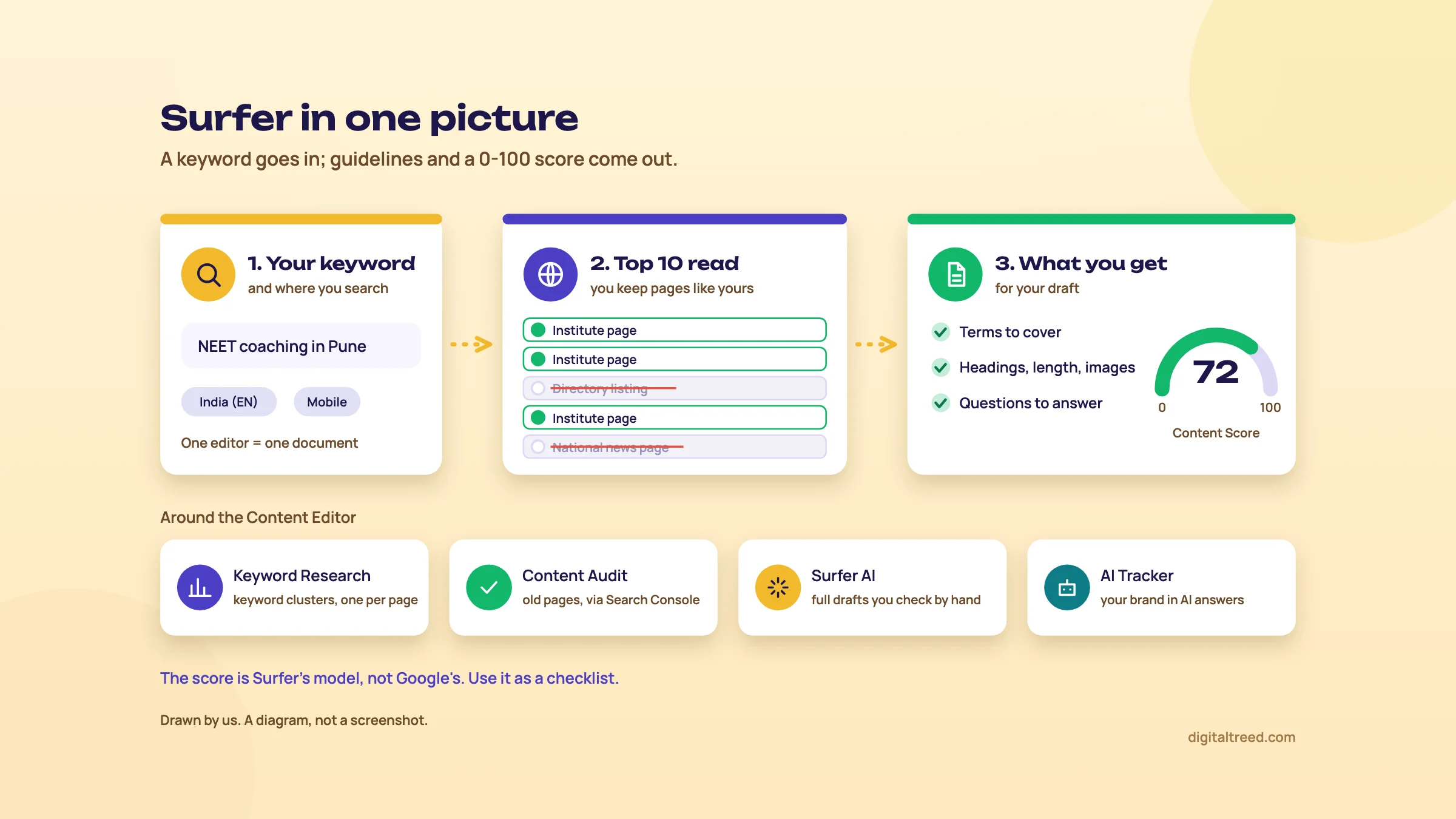 Surfer's main tool and the four around it. Drawn by us.
Who it's for
Surfer's own plan notes point Discovery at solo content creators, Standard at small teams and agencies with steady content work, and Pro at agencies or businesses managing several brands.[6] In practice we'd say it earns its fee when three things are true:
- You publish or refresh several articles a month, every month.
- Someone other than you writes them, so you need a brief a freelancer can follow.
- You compete for informational searches where the top pages are long guides, not maps or directories.
A content team at a D2C brand, an agency writing blogs for ten clients, or an edtech site with hundreds of exam guides fits that picture.
When you don't need it
A Kanpur sweet shop with a 20-page site doesn't need Surfer. Neither does a Delhi dentist whose leads come from Google Maps. Their wins come from a good Business Profile, a clear service page per treatment and reviews, none of which a content score measures. The cheapest plan is $49 a month on yearly billing,[1] and for a site that publishes twice a month you'd mostly be paying for a checklist you can build yourself.
What you'd do instead is free: read the results page, collect the questions from "People also ask" and Search Console, and write the brief by hand, as in Guide 2, chapter 4. Then check the draft with our free tools before you publish.
The one thing to understand before you start
The Content Score is Surfer's own model. Google doesn't use it, doesn't publish anything like it, and says plainly that it has no preferred word count.[7] Surfer itself says it's usually impossible to reach 100, and that you should aim to be 10 to 20 points above your competitors rather than chase the top score.[8] Keep that in mind and Surfer is a useful checklist. Forget it and you'll write for a number. Chapter 2 shows what the score measures and what the evidence says about it.
Next, set up an account and run your first Content Editor.
Set-up, the Content Editor and what the Content Score means
Quick answer
Start the 7-day Pro trial (it needs a card and converts unless you cancel), connect Search Console, then open a Content Editor. Pick competitors that match your page type before you write. The Content Score combines an SEO Score and an AI Search Score; above 66 is "ready to compete" in Surfer's terms. It's Surfer's model, not Google's.
Day one: the trial and the settings that matter
New accounts get a 7-day trial of the Pro plan. You choose a plan and enter card details at checkout, and after 7 days the subscription converts to that plan and your card is charged. The trial doesn't cancel by itself.[9] To stop it, go to Settings, then Billing, then Your subscription, and click Cancel subscription.[9] If you cancel during the trial, the account expires at the end and you lose the data stored in it.[9]
Warning
Put a reminder in your phone for day 6. Payment is by credit or debit card on monthly and yearly plans (yearly plans can also be paid by bank transfer, on request), billing is in USD or EUR, and PayPal isn't accepted.[10] If your Indian card is blocked for international payments, switch that on in your bank app first.
Then do these four things before you write anything:
- Connect Search Console. Profile icon (top right), Settings, Search Console, Add Google Account, then choose the Google account that has your site as a verified property and approve the permissions.[11] Content Audit, Topical Map and internal link suggestions all need it; the Content Editor works without it.[11] Not set up yet? Our Search Console guide covers verification.
- Add your GSTIN if you have one. Surfer's invoice FAQ says Indian customers with a valid GSTIN aren't charged VAT or GST, and those without one are.[12] If you forgot it at sign-up, Support can add it.
- Fill in Brand Knowledge. It's included from Standard up.[1] Surfer drafts it for you (business description, industry, topics and audience, competitors) under Settings, then Workspace, then Brand Knowledge. Correct it, so the AI features describe your business and not a guess.[13]
- Install the extensions you'll use: the Google Docs extension if your writers work in Docs, the WordPress plugin if you publish there (both in chapter 3; integrations come with Standard and up, not Discovery).[1]
Create a Content Editor
In the left menu, open Content Editor and select + New Content. Enter your keyword (one main keyword is usually enough; up to 20 per editor), then choose a location and language, desktop or mobile, and a folder.[14] Select Create-Deep analysis. The next steps let you pick a template, review the ranking pages, edit the suggested word count and add instructions, then choose "Write it yourself" or "Generate content".[14] Each editor you create counts as one document against your plan.[14]
For India, pick the India location in English (Surfer marks language versions with suffixes like "-EN").[15] Surfer says it can add a city to the Content Editor's location list if you ask Support.[16]
The step most people skip: choose the competitors
Everything Surfer tells you comes from the pages it compares you with. By default it picks five of the top ten results with the highest Content Score, and it needs at least three different domains to calculate anything.[17] Surfer's own advice is to keep only pages with the same search intent and content type as yours. Drop pages that rank on authority rather than content, and remove word-count outliers.[17]
This is where an Indian local page goes wrong. Search "NEET coaching in Pune" and the top ten may include directory listings and national chains. Leave a directory in and Surfer will ask you for its length and its terms. Take it out. You'll find the setting under the gear icon, in the Customization Panel.[17]
What the guidelines panel shows
The Customization Panel has four parts:[17]
- Competitors: the pages your guidelines are built from.
- Content structure: suggested words, paragraphs, headings and images. You can change them.
- Terms: words and phrases sorted by relevance, which you can include, exclude, mark for headings or blacklist. You can also import your own list.
- Topics and questions: drawn from competitors, four Google "People also ask" questions, and Surfer's own database.
While you write, the right-hand panel runs as a workflow: research and outline, write and optimise, internal links, a pre-publish review (readability, plagiarism, AI readability), then publish or export.[14]
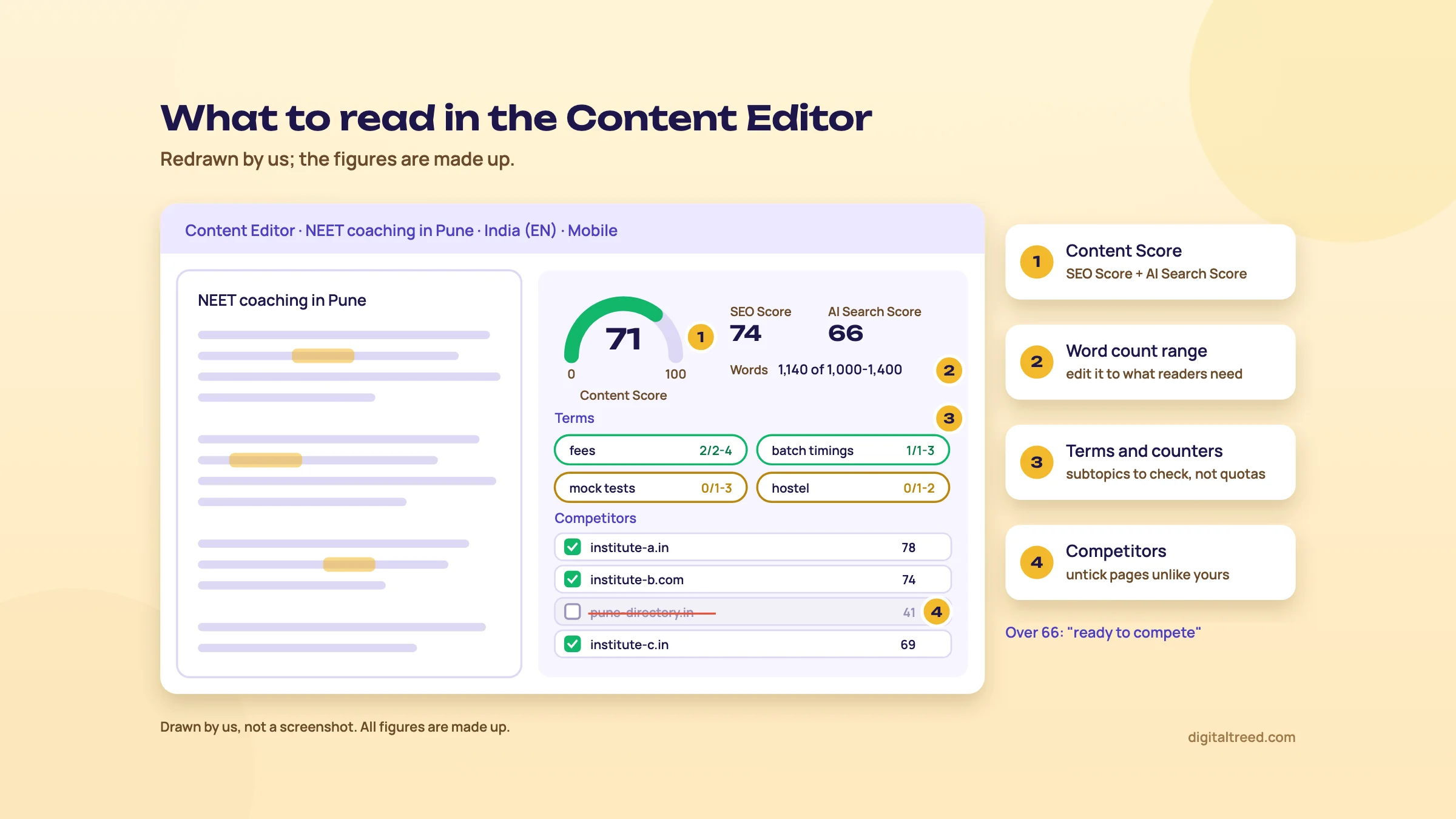 What to read in the Content Editor. Drawn by us; simplified view, October 2026, figures made up.
How the Content Score is built
Surfer's help centre says the Content Score is a value from 0 to 100 made of two parts:[8]
- SEO Score: keyword use, topical coverage, structure and alignment with the top pages. Surfer says term use in context matters more than how often a term appears, and that word count, headings and images count but aren't the main drivers.
- AI Search Score: Facts Coverage (the facts and entities that AI answers on the topic usually contain) and Upfront Intent Alignment (whether you answer the main question early). Surfer notes it doesn't yet compare you with competitors.
Below 33
"not optimized enough", in Surfer's words[8]
33 to 66
reasonably well optimised, room to improve[8]
Over 66
"ready to compete"; 100 is usually impossible[8]
Surfer's advice is to stay 10 to 20 points above your competitors and not chase the maximum, because "over-optimizing can actually hurt your final content".[8] We agree with that line more than with anything else in the panel.
What Google says about length and keywords
None of Google's documentation mentions a content score, and two things Surfer's panel shows, word count and term counts, are ones Google has addressed directly.
The length of the content alone doesn't matter for ranking purposes (there's no magical word count target, minimum or maximum, though you probably want to have at least one word).[18]
Its helpful content page lists a warning sign: writing to a particular word count because you've heard Google prefers one. Google's answer: "(No, we don't.)"[7] On keywords, the same Starter Guide says excessively repeating the same words "is tiring for users", and that keyword stuffing is against Google's spam policies.[18] The spam policy's examples include "repeating the same words or phrases so often that it sounds unnatural".[19] Google publishes no target keyword density, so there's no number to aim for. Read Surfer's term counts as "did I forget this subtopic?", never as a quota.
Google also asks whether your content gives "original information, reporting, research, or analysis".[7] A score built from what already ranks can't see that. Your fee table, your result data and your photos don't raise it, and they're what makes the page worth ranking.
Does a higher score mean higher rankings? The studies
Both studies we found are by vendors that sell content scores, so read them with that in mind.
| Study | What it measured | Result |
|---|---|---|
| Surfer (vendor), 2025 data, last updated 9 September 2026 | Spearman correlation between Surfer's Content Score and position, 10,000 queries, top 100 results each (1,000,000 results) | 0.28 overall; 0.19 for instructional and short-fact queries[20] |
| Ahrefs (vendor of a rival tool), May 2025 | Correlation between rank and the scores of five tools (Surfer, Frase, NeuronWriter, Clearscope, Ahrefs' own), 20 random keywords | "Weak correlations everywhere"; Surfer was among the three with very weak correlations[21] |
A correlation of 0.28 means higher-ranking pages tend to score a little higher. It doesn't show that raising the score moves a page up, because pages that rank well are often thorough for other reasons. Neither study says where the queries came from or covers India specifically. Our reading: the score is a fair test of "have I covered the topic?", and a poor predictor of "will this rank?".
Do not
- Push a page from 72 to 90 by adding terms
- Keep a directory or a marketplace in your competitor list for a service page
- Pad a page to hit Surfer's word range
- Paste the term list into the page
Do
- Pick 5 competitors with your intent and page type
- Use missing terms and questions as a list of subtopics to check
- Stop at "ready to compete" and spend the time on facts only you have
- Check repetition with a density tool before you publish
To check a draft outside Surfer, paste it into our Word Counter & Keyword Density Checker. It shows word, character and sentence counts, a count and percentage for each target keyword, and your most-repeated one-, two- and three-word phrases. That last table is the one that catches a phrase you've used twenty times without noticing.
Chapter 3 covers the rest of Surfer: research, Content Audit, Surfer AI and AI Tracker.
Research, Content Audit, Surfer AI, AI Tracker and the integrations
Quick answer
Keyword Research (Standard and up) groups keywords into page-sized clusters; Topical Map (Pro and up) maps your domain from Search Console. Content Audit scores your top pages and flags quick wins. Surfer AI drafts a full article you still fact-check by hand. AI Tracker checks prompts in AI answers. Keyword Surfer is free; Docs and WordPress need Standard.
Keyword Research, Topic Research and Topical Map
These three overlap, and the plan table decides which you get. On the pricing page, Keyword Research starts at Standard, while Topical Map is Pro and Peace of Mind only.[1]
- Keyword Research: enter a keyword and location, and Surfer groups what the top pages rank for into clusters. Each cluster shows a main keyword, search intent, sub-keywords and the average Content Score of the top pages. Volumes come from Surfer's data partners as a 12-month average.[22] Each cluster is roughly one page, and "Create Content Editor" turns it into a brief.[22]
- Topic Research: the same idea from a seed topic, no Search Console needed.[23]
- Topical Map: clusters the keywords from your Search Console property, then suggests "neighbour" clusters you haven't covered. It refreshes every 14 days and supports 23 countries, India in English among them.[24] Surfer warns that small or new domains need more content before it works well, and suggests Keyword Research first.[24]
Treat the volumes as sizes, not facts, as with any third-party tool. For your own site, Search Console's queries are the real numbers. If clusters, intent and cannibalisation are new to you, Guide 2, chapter 2 explains them without a paid tool.
Content Audit: which old pages to fix first
Content Audit is included on every content plan, from Discovery up.[1] It needs Search Console. Once connected, it shows your top 100 pages with impressions, clicks and CTR for the last 30 days, compared with the 30 days before.[25] For each page it picks a main keyword, the one that sent the most clicks in the last 30 days. It then shows the page's average position for it and calculates an SEO Score.[25]
The useful part is the Recommendations tab. Pages with an SEO Score below 70 that rank between 4th and 20th appear there as quick wins.[25] Click Optimize and the page opens in the Content Editor with your live text imported.[26]
Four details trip people up:
- The main keyword can be wrong. It's set when the project is created and isn't updated automatically.[25] Check it and change it by hand, because the score and guidelines depend on it.[26]
- Page slots are limited: 10 on Discovery, 50 on Standard, 200 on Pro and 500 on Peace of Mind, shared across your domains.[1]
- Numbers won't match Search Console exactly. Content Audit uses only final data, which arrives 2 to 3 days late, and the API differs slightly from the interface.[25]
- The location is fixed. It comes from your last 30 days of traffic and can't be changed in the app; Support removes the project and you add it again with the right location.[25]
Surfer's step-by-step guide says content "should be re-optimized every 3 to 6 months".[26] That's Surfer's rule of thumb, not Google's. We'd refresh when the facts change or the clicks drop, using the year-over-year check in Guide 2, chapter 6. It's free and works for any site.
Auto-Optimize and Facts
Auto-Optimize adds relevant terms to your draft in one click; you approve or discard each change.[14] It's included from Standard up.[1] Facts, in the AI Search part of the panel, lists facts drawn from up to the top 20 results and from AI models such as ChatGPT, Perplexity and Google AI Overviews. Auto-Optimize can insert them. Facts works in 18 languages; Hindi isn't one of them.[27]
Be careful here. Facts copied from the pages that already rank are, by definition, not new. And a fact inserted by a model is still a claim you have to check. Use the source links Surfer shows and open them.
Surfer AI: what it writes, and what Google says
Surfer AI writes a whole article from the Content Editor's guidelines. Surfer says a long-form draft takes about 20 minutes (allow up to 30). It has up to 30 headings and a minimum of about 2,000 words, and you can't set the length directly.[28] Surfer's help pages list between 18 and 29 languages for it, none of them Hindi,[15] and its FAQ names GPT-4 Turbo, GPT-4o and GPT-4o-mini among the models it uses.[28]
That 2,000-word floor is worth pausing on. A Pune coaching centre's fee page or a Delhi dentist's root canal page doesn't need 2,000 words, and Google says length alone doesn't matter.[18]
Google's position on AI content has two halves. AI use is allowed: "Appropriate use of AI or automation is not against our guidelines."[29] Using it mainly to manipulate rankings is spam, and mass-produced pages fall under the scaled content abuse policy.[30] And since 1 October 2026 Google's page on generative AI content adds this:
It is critical to manually factcheck and review all AI-generated content for accuracy and trustworthiness before publishing.[30]
The same page says the review covers titles, meta descriptions, structured data and image alt text too.[30] Google's helpful content page also suggests telling readers how content was made, including where automation or AI was used.[7] Guide 2, chapter 5 has the full picture.
Surfer also sells a Humanizer that rewrites AI text and shows an "AI Detector %".[31] We don't think it's worth your time for SEO. Google judges whether a page is helpful and accurate, not whether a detector flags it, and a rewritten draft still needs every fact checked.
AI Tracker: are you in AI answers?
AI Tracker runs a list of prompts through AI models and reports a Visibility score, mention rate, average position, and the sources the models cite.[32] Standard tracks 25 prompts in ChatGPT only, weekly; Pro tracks 50 prompts daily across ChatGPT, Perplexity, Google AI Mode, AI Overviews and Gemini; Peace of Mind tracks 100.[32] There's also a standalone AI Search Analytics plan (chapter 5).[33] Extra prompts cost $18 a month per pack of 10.[32]
Two points before you pay for it. AI answers change from one run to the next; Surfer says it handles this by repeating questions across models and keeping what's consistent.[32] And a tracker only tells you what happened for the prompts you chose. Google's own Search Console reports and Bing's AI Performance report are free; Guide 5, chapter 8 shows how to combine them with a manual prompt log.
The Chrome extension and the integrations
| Add-on | What it does | Cost |
|---|---|---|
| Keyword Surfer (Chrome) | Shows monthly search volume, related keywords with a similarity score, and content ideas inside Google results; exports to CSV; India is a supported country | Free, no Surfer account needed[5] |
| Google Docs extension (Chrome) | Shows Content Editor guidelines beside a Google Doc. Only the guidelines sync, not the text, and anyone who needs to see them must install the extension[34] | Needs Integrations: Standard and up[1] |
| WordPress plugin | Exports from the editor to a post or page and back, and shows the guidelines in a WordPress sidebar. Supports Gutenberg, Classic Editor and Elementor; needs PHP 8.3 or later | Free plugin, needs an active plan with Integrations[35] |
Integrations (WordPress, Google Docs, Contentful and Zapier) aren't on Discovery.[1] If your writers live in Google Docs, that alone rules Discovery out.
Tip
On a WordPress site, check the plugin's PHP 8.3 requirement before you buy. Many Indian shared hosting plans let you switch PHP versions in the control panel, but test the rest of your site after you do. Surfer also notes that Wordfence's "Disable WordPress application passwords" setting can block the plugin.[35]
Chapter 4 puts all of this to work on three real jobs.
Three jobs, step by step: a brief, an old-post audit and an AI draft check
Quick answer
Write a brief for a Pune coaching centre's NEET page in the Content Editor, with only same-type competitors and your own facts added. Audit an old post from Content Audit's quick wins and refresh it on the same URL. Before publishing any Surfer AI draft, check every fact, number and line of metadata by hand.
Each job starts with what you can do free, because sometimes that's enough. The examples are made up: a NEET coaching centre in Pune and its blog.
Job 1: a brief for a Pune coaching centre page
The page is "NEET coaching in Pune", a service page that should turn a parent's search into a visit or a call. Before Surfer, do the free part from Guide 2, chapter 4: search the phrase yourself and note what kind of page wins. For a local service search you'll usually see a map pack, a few institutes' own pages and directory listings. That tells you the page type before any tool does.
Build a brief for "NEET coaching in Pune" in the Content Editor
- Create the editor Content Editor, + New Content, keyword "NEET coaching in Pune", location India (English), mobile. Parents search on phones, so pick mobile. Select Create-Deep analysis.[14]
- Fix the competitors Open the gear icon. Untick directory listings, marketplaces and national exam news pages. Keep about five institutes' own pages. They must come from at least three different domains, or the score won't calculate.[17]
- Cut the word count to the job If the suggested range is far above what a parent needs, lower it under Content structure. Surfer allows this and says to use your own judgement.[17]
- Sort the terms Exclude terms that don't apply to you (a batch you don't run, a city you don't teach in). Mark two or three real subtopics for headings, such as batch timings, fees and results.
- Pick the questions Under Topics and questions, tick the ones a parent would ask, and add your own from enquiry calls: "Is there a hostel?", "Do you offer a crash course?"
- Add what only you know In the outline notes, list the facts the writer must get from you: fees for each batch, faculty names and years of teaching, last year's verified results, the address and landmark, and photos of real classrooms.
- Share it Use Share to create a link the writer can open without a login. Only one shareable link works at a time.[36] On Standard and up, a Google Doc with the guidelines beside it is the other option.[34]
The brief should end up as a short list, not a 2,000-word target. It needs the intent (compare and choose an institute), the main question answered in the first lines, five or six sections, the questions, your facts and one call to action. Surfer's upfront-answer check rewards the same thing,[8] but you'd do it anyway.
When the draft comes back, check it in two of our free tools before it goes live. Paste the text into the Word Counter & Keyword Density Checker to see the word count and the phrases repeated most. Then, once the page is live, run its URL through the Meta Tag Analyzer. It shows a Google result preview and a social share card, and checks the title, description, canonical, viewport and Open Graph tags.
Job 2: audit an old post
The coaching centre's blog has a 2024 post, "NEET preparation timetable for 12th students", that used to bring parents and students in. Clicks are falling. The free check comes first: in Search Console, compare the last three months with the same months a year ago, as in Guide 2, chapter 6. If the position held and only impressions fell, demand dropped and a rewrite won't fix it. If the position slid, it's a refresh job.
Refresh a decaying post with Content Audit
- Open Content Audit Choose the domain. Surfer lists your top 100 pages with 30-day clicks, impressions, CTR and an SEO Score.[25]
- Start with Recommendations Pages with an SEO Score below 70 that rank 4th to 20th show up as quick wins.[25] Pick the timetable post if it's there; otherwise filter for positions 11 to 20 and sort by SEO Score, lowest first.[26]
- Check the main keyword Surfer sets it from past clicks and doesn't update it.[25] If it shows "neet timetable pdf" and you want "neet preparation timetable", change it, because the score and guidelines follow it.[26]
- Open it in the Content Editor Click Optimize; your live text is imported.[26] Remove any competitor that isn't a similar guide.
- Fix the facts first Update the exam dates, the syllabus notes and anything else that changed, from the official exam body's notice, before you look at the score.
- Then fill the gaps Use missing terms and questions as a list of subtopics to check. Add a section only if a student would miss it. Stop when you're 10 to 20 points above the competitors, as Surfer itself advises.[8]
- Publish on the same URL Export to WordPress if the plugin is connected,[35] or copy as HTML. Change the visible date only because the content really changed.[7]
- Mark it and wait Add a custom annotation to the Performance chart in Search Console[37] and compare again in four to six weeks.
Run the refreshed URL through the Meta Tag Analyzer too. A refreshed post with a 2024 title in the search result undoes half the work.
Job 3: check a Surfer AI draft before it goes live
Say the coaching centre wants a quick guide, "How to choose a NEET coaching centre in Pune", and the manager generates it with Surfer AI. Google calls it "critical to" fact-check and review all AI-generated content by hand before publishing.[30] Here's how we'd do that review.
Review an AI draft line by line
- Cut to the useful length Surfer AI writes about 2,000 words or more.[28] Delete the generic sections a parent wouldn't read.
- Highlight every claim Fees, dates, cut-offs, pass rates, names, anything with a number. Each one gets a source you've opened, or it goes.
- Open the Facts sources If Facts or Auto-Optimize inserted something, open the source Surfer shows for it.[27] A fact that appears on five ranking pages can still be out of date on all five.
- Replace the generic with your own Real batch sizes, real fees, a quote from a teacher, a photo of the timetable board.
- Check the metadata as well Google's review rule covers titles, meta descriptions, structured data and alt text.[30] Run the live page through the Meta Tag Analyzer.
- Say how it was made If AI wrote much of it, a short note on how the page was produced is what Google's "How" question asks for.[7]
Note
From our work: a global sports platform. Its technical SEO was already good, but its posts linked to no outside sources, so nothing showed where the facts came from, and earlier link building had used spammy tactics. We added sourced sports statistics to the posts, and collaboration requests brought contextual links and brand mentions. Traffic rose 60%. Lesson: a fact with a visible source is worth more than another term in the panel.
A free extra: research with Keyword Surfer
If you're not ready to pay, install Keyword Surfer from the Chrome Web Store. It needs no Surfer account, supports India, and shows monthly volume and related keywords with a similarity score next to your Google results.[5] Search "NEET coaching in Pune", "NEET crash course Pune" and "NEET repeater batch Pune", tick the useful ideas into its collection, and export a CSV for your keyword sheet.[5] Check the real results page for each one before you decide on a page.
Chapter 5 adds up what all this costs.
Pricing in USD and rupees, pros and cons, and alternatives
Quick answer
Surfer has no free plan, only a 7-day Pro trial. Discovery costs $49 a month billed yearly (120 documents a year, upfront) or $59 monthly (10 a month), about ₹4,704 or ₹5,664; Standard is $99 (360 a year) or $119 (30 a month), checked 18 October 2026. No rupee prices. Most small Indian sites are better served by free tools.
The plans, checked 18 October 2026
Surfer's pricing page shows prices in USD only; its help centre says billing is in USD or EUR.[6] So the rupee figures below are ours, at ₹96 = US$1, the X-Rates average for 1 to 16 October 2026 that we use across these guides.[38] Your bank's rate and card fees will differ. The page doesn't mention GST, but the invoice FAQ says Indian customers without a valid GSTIN are charged VAT or GST.[12]
| Discovery | Standard | Pro | Peace of Mind | |
|---|---|---|---|---|
| Per month, billed yearly | $49 (about ₹4,704) | $99 (about ₹9,504) | $182 (about ₹17,472) | $299 (about ₹28,704) |
| Per month, billed monthly | $59 (about ₹5,664) | $119 (about ₹11,424) | $219 (about ₹21,024) | $359 (about ₹34,464) |
| Documents (Content Editor or Surfer AI) | 10 a month (120 a year) | 30 a month (360 a year) | 30 a month (360 a year) | Unlimited, fair use |
| Seats | 1 | 3 | 5 | 10 |
| Content Audit pages | 10 | 50 | 200 | 500 |
| AI Tracker | None | 25 prompts, ChatGPT, weekly | 50 prompts, 5 AI models, daily | 100 prompts, 5 AI models, daily |
| Keyword Research | No | Yes | Yes | Yes |
| Topical Map | No | No | Yes | Yes |
| Auto-Optimize, plagiarism check | No | Yes | Yes | Yes |
| Google Docs, WordPress integrations | No | Yes | Yes | Yes |
| API access | No | No | No | Yes |
All figures are from the pricing page and its comparison table,[1] read with the yearly and monthly toggle in turn. On the monthly toggle, the page shows a twelfth of the yearly document count. Peace of Mind's "unlimited" is capped by the fair usage policy at 500 documents a month on monthly billing or 6,000 a year on annual.[39] Enterprise is priced on request and is annual only.[40]
There's also AI Search Analytics, AI Tracker on its own: $82 a month billed yearly or $95 monthly (about ₹7,872 or ₹9,120) for 50 prompts refreshed daily across five AI models, five seats and five brand workspaces.[33] The 100-prompt tier is $158 or $185, and 200 prompts is $308 or $365.[33]
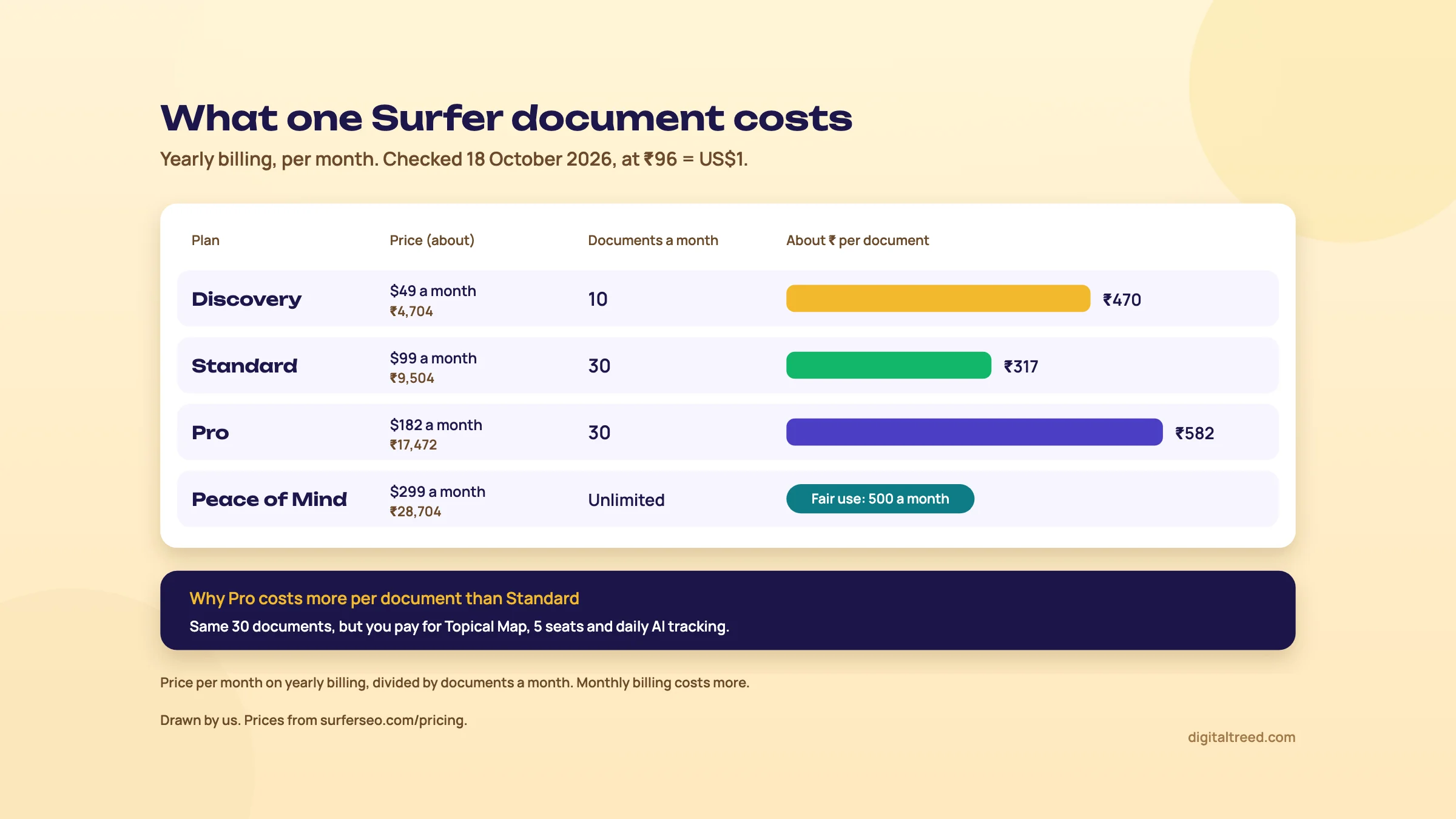 Price per document on yearly billing, checked 18 October 2026 at ₹96 = US$1. Drawn by us.
Yearly or monthly?
Yearly billing saves up to 17%.[6] By our arithmetic, Discovery is $588 a year (about ₹56,448) against $708 paid monthly. The catch: on a yearly plan you pay the whole year upfront and get the year's limits in one batch, and unused limits don't roll over.[41] Downgrades on a yearly plan only take effect at the end of the billing year.[41] Our advice is to pay monthly for the first two or three months, count how many documents you actually use, then switch.
Which plan, if any
- Discovery is a scoring tool for one writer. With no Keyword Research, no integrations and no AI Tracker, it's the Content Editor plus Content Audit on 10 pages.
- Standard is the plan most small teams would need: 30 documents, three seats, Google Docs and WordPress, and Keyword Research.
- Pro makes sense only if you want Topical Map, daily AI tracking across five models, or more than three writers.
Pros and cons
Pros
- Fast, shareable briefs built from the pages that rank
- Surfer's own guidance warns against chasing 100 and lets you edit competitors, length and terms
- Content Audit turns Search Console data into a shortlist of pages to refresh
- India (English) is supported in Content Editor, Topical Map and the free Keyword Surfer
- Google Docs and WordPress integrations writers actually use
- Detailed, recently updated help centre
Cons
- No free plan, and the trial needs a card and auto-converts
- USD or EUR billing only, no rupee prices
- The score rewards matching what already ranks, not adding something new
- The only ranking studies we found are by vendors, and both found weak correlations
- Surfer AI and Facts don't support Hindi
- Key features (Keyword Research, integrations, Topical Map) sit behind higher plans
Alternatives, and which one when
Start with the free options. For a small business, they cover most of what Surfer does.
| Tool | Cost | Use it when |
|---|---|---|
| Our Word Counter & Keyword Density Checker | Free | You've written the page and want word count, keyword counts and repeated phrases |
| Our Meta Tag Analyzer | Free, up to 10 URLs at once | You want the Google preview, the social card and a tag checklist before and after publishing |
| A hand-written brief (Guide 2, chapter 4) | Free | You write one or two pages a month and can read the results page yourself |
| Google Search Console | Free | You want real queries and the year-over-year check for refreshes |
| Keyword Surfer | Free extension | You want quick volumes inside Google results |
| Frase | From $39 a month billed yearly or $49 monthly (about ₹3,744 or ₹4,704), 7-day trial without a card, checked 18 Oct 2026[42] | You mostly need briefs and outlines from research, at a lower price |
| Clearscope | From $129 a month (about ₹12,384), 14-day trial, checked 18 Oct 2026[43] | An editorial team wants a simple grade and tracking of published pages |
| Semrush or Ahrefs | Paid suites | You need backlinks, rank tracking and competitor research as well as content tools |
We'd also like a free brief tool of our own. A content brief generator (headings, questions and entities for a keyword) is on our list of tools to build. Until it exists, Frase is the outside tool we point to for briefs. For AI tools used directly, see ChatGPT, Perplexity and Gemini for SEO tasks, and for everything free by job, Best free SEO tools.
| You are | Our pick | Why |
|---|---|---|
| A Pune coaching centre or Delhi clinic with one site | Search Console, a hand-written brief, our free tools | Your pages are few and local; a score adds little |
| A freelance writer with 4 to 8 articles a month | Frase Starter, or Surfer Discovery if clients ask for a Surfer score | Cheapest way to produce briefs and check drafts |
| A D2C brand with an in-house content team | Surfer Standard, monthly at first | 30 documents, 3 seats, Google Docs and WordPress, Content Audit |
| An agency running content for many clients | Surfer Pro, or Clearscope Business | More seats, page slots and brand workspaces |
If you'd rather have someone plan and write the content, see our content marketing service or get a quote. Then take the 10-question quiz below.
Test yourself
Ten questions on the whole guide. Pick an answer, check it, and see your score at the end.
You got 0 of 10 right.
Frequently asked questions
Frequently asked
What is Surfer SEO used for?
Mainly for briefing and checking content. Its Content Editor reads the pages that rank for your keyword and gives you terms, headings, questions and a suggested length, then scores your draft from 0 to 100. Around it are Keyword Research, Topical Map, Content Audit for old pages, Surfer AI for drafts, and AI Tracker for brand mentions in AI answers.
Is Surfer SEO free?
No. There's no free plan, only a 7-day trial of the Pro plan that needs a card and converts to a paid plan unless you cancel. The Keyword Surfer Chrome extension is free and needs no account, and the Humanizer has a small free allowance.
How much does Surfer cost in India?
Surfer doesn't show rupee prices; it bills in USD or EUR. On 18 October 2026 Discovery was $49 a month billed yearly or $59 monthly (about ₹4,704 or ₹5,664 at ₹96 = US$1), and Standard was $99 or $119 (about ₹9,504 or ₹11,424). Without a GSTIN, Surfer says Indian customers are charged VAT or GST on top.
What is a good Content Score in Surfer?
Surfer's help centre says over 66 means your content is ready to compete, and that 100 is usually impossible. It advises aiming 10 to 20 points above your competitors and warns that over-optimising can hurt the content. Once you're there, spend the time on facts only you have.
Does Google use Surfer's Content Score?
No. It's Surfer's own model built from the pages it analyses. Google says there's no ideal word count, and that keyword stuffing, repeating words until they sound unnatural, is against its spam policies. The only ranking studies of content scores we found are by vendors, and they found weak correlations.
Is content written with Surfer AI safe for Google?
Google says appropriate use of AI isn't against its guidelines, but using it mainly to manipulate rankings is spam. Its generative AI page says it's critical to fact-check and review AI content by hand before publishing, including titles, descriptions, structured data and alt text. Surfer AI drafts run to about 2,000 words or more, so cut and check them.
Does Surfer work for Indian keywords and Hindi?
Its core tools work in any language and location, and India in English is supported in Topical Map and Keyword Surfer. But Surfer AI and the Facts feature work in a set list of languages (18 for Facts, 18 to 29 for Surfer AI, depending on the help page), and Hindi isn't one of them. For Hindi pages you'd write yourself and use the Content Editor's guidelines.
Does Surfer work with Google Docs and WordPress?
Yes, from the Standard plan up. A Chrome extension shows the guidelines beside a Google Doc (the text itself doesn't sync), and a free WordPress plugin exports content both ways and shows the guidelines in a sidebar. The plugin supports Gutenberg, Classic Editor and Elementor and needs PHP 8.3 or later.
Surfer or Frase: which is better?
For briefs and outlines on a budget, Frase is cheaper, from $39 a month billed yearly with a 7-day trial that needs no card. Surfer is stronger if you want Content Audit tied to Search Console, a team workflow and AI tracking in one place. See our Frase and Clearscope guides for the details.
Do I need Surfer for a small business website?
Usually not. A local shop, clinic or coaching centre with a few service pages gets more from Google Business Profile, Search Console and a hand-written brief. Our free Word Counter & Keyword Density Checker and Meta Tag Analyzer cover the pre-publish checks. Surfer pays off when you publish several articles a month with writers you need to brief.
Sources
References
- Pricing & Plans (with Compare Full AI SEO Plans table), Surfer, seen 18 Oct 2026, accessed 16 Oct 2026
- Positive acquires Surfer, Positive, 28 Oct 2025, accessed 16 Oct 2026
- The Surfer Acquisition: What Our Users Can Expect, Surfer blog, Paulina Kaleta, updated 9 Sep 2026, accessed 16 Oct 2026
- What is Surfer?, Surfer Help Center, 8 Oct 2026, accessed 16 Oct 2026
- Keyword Surfer Extension Explained, Surfer Help Center, 16 Oct 2026, accessed 16 Oct 2026
- Pricing FAQ, Surfer Help Center, 17 Oct 2026, accessed 16 Oct 2026
- Creating helpful, reliable, people-first content, Google Search Central, updated 5 Oct 2026, accessed 16 Oct 2026
- Content Score in the Editor Explained, Surfer Help Center, 6 Oct 2026, accessed 16 Oct 2026
- How does the Surfer trial work?, Surfer Help Center, 16 Oct 2026, accessed 16 Oct 2026
- What forms of payment do you accept?, Surfer Help Center, 27 Sep 2026, accessed 16 Oct 2026
- Step 1: How to add Google Search Console to Surfer, Surfer Help Center, 8 Oct 2026, accessed 16 Oct 2026
- What should I know about Surfer invoices?, Surfer Help Center, 16 Oct 2026, accessed 16 Oct 2026
- Brand Knowledge, Surfer Help Center, Wojciech Pollok, updated 14 Oct 2026, accessed 16 Oct 2026
- Content Editor Overview, Surfer Help Center, 15 Oct 2026, accessed 16 Oct 2026
- Surfer Language & Location Support, Surfer Help Center, 13 Oct 2026, accessed 16 Oct 2026
- Can you add a new location?, Surfer Help Center, 25 Sep 2026, accessed 16 Oct 2026
- How to use the Customization Panel in Content Editor, Surfer Help Center, 14 Oct 2026, accessed 16 Oct 2026
- SEO Starter Guide: The Basics, Google Search Central, updated 10 Dec 2025, accessed 16 Oct 2026
- Spam policies for Google web search, Google Search Central, updated 28 Aug 2026, accessed 16 Oct 2026
- Does Surfer's Content Score Still Work in 2025? Here's What the Data Shows, Surfer blog, Kristavja Caci, updated 9 Sep 2026, accessed 16 Oct 2026
- Do Higher Content Scores Mean Higher Google Rankings? We Studied It (So You Don't Have To), Ahrefs, Si Quan Ong, 21 May 2025, accessed 16 Oct 2026
- Keyword Research, Surfer Help Center, 15 Oct 2026, accessed 16 Oct 2026
- Topic Research, Surfer Help Center, 23 Sep 2026, accessed 16 Oct 2026
- Topical Map, Surfer Help Center, 12 Oct 2026, accessed 16 Oct 2026
- Content Audit, Surfer Help Center, 16 Oct 2026, accessed 16 Oct 2026
- Step 3: How to fix your existing content, Surfer Help Center, 15 Oct 2026, accessed 16 Oct 2026
- Facts, Surfer Help Center, 28 Sep 2026, accessed 16 Oct 2026
- Surfer AI, Surfer Help Center, 6 Oct 2026, accessed 16 Oct 2026
- Google Search's guidance about AI-generated content, Google Search Central blog, 8 Feb 2023, accessed 16 Oct 2026
- Google Search's guidance on using generative AI content on your website, Google Search Central, updated 1 Oct 2026, accessed 16 Oct 2026
- Surfer's Humanizer and AI Detector, Surfer Help Center, 15 Oct 2026, accessed 16 Oct 2026
- AI Tracker, Surfer Help Center, 16 Oct 2026, accessed 16 Oct 2026
- AI Search Analytics, Surfer Help Center, 16 Oct 2026, accessed 16 Oct 2026
- Google Docs Extension Explained, Surfer Help Center, 28 Sep 2026, accessed 16 Oct 2026
- What Is the WordPress Plugin and How to Install It?, Surfer Help Center, 6 Oct 2026, accessed 16 Oct 2026
- Main Features of Content Editor, Surfer Help Center, 15 Oct 2026, accessed 16 Oct 2026
- Adding context to your Search Console data with custom annotations, Google Search Central blog, 17 Nov 2025, accessed 16 Oct 2026
- Exchange Rate Average (US Dollar, Indian Rupee), X-Rates, 1-16 Oct 2026 average, accessed 16 Oct 2026
- Fair Usage Policy, Surfer Help Center, 15 Oct 2026, accessed 16 Oct 2026
- Which plan to choose?, Surfer Help Center, 7 Oct 2026, accessed 16 Oct 2026
- Annual Plans Limits Allocation, Surfer Help Center, 16 Oct 2026, accessed 16 Oct 2026
- Frase pricing, Frase, seen 18 Oct 2026, accessed 16 Oct 2026
- Plans & Pricing, Clearscope, seen 18 Oct 2026, accessed 16 Oct 2026
Get the free checklist
Every step of this guide on one page, to print or tick off. We email you the PDF link.