

The short answer: which crawler to pick, by situation
This guide is for people who already crawl sites, or are about to pay for a crawler, and are stuck between the two desktop tools most technical SEOs name first. Freelancers auditing Indian small business sites, agency leads choosing a tool for the team, in-house technical SEOs, and developers who get handed crawl exports. It's written at the advanced level: we assume you know what a canonical, a redirect chain and rendered HTML are.
By the end you'll know which crawler fits your work and where each one is the wrong choice. You'll also know what the cheapest useful set-up costs in rupees, for one person and for a team of five. And you'll have a workflow for running both without paying twice for the same job.
Chapter 1 is the short answer by situation. Chapters 2 and 3 go job by job: crawl set-up and rendering, scale, Issues vs Hints, crawl maps, then the Google integrations, extraction, scheduling, comparison, client reports, cloud and AI. Chapter 4 covers the free options and prices side by side. Chapter 5 is the learning curve and using both together. A quiz and an FAQ close it.
Every fact comes from our fact-checked Screaming Frog and Sitebulb guides and the vendors' own pages. We read Screaming Frog's[1] and Sitebulb's pricing pages[2] again on 18 October 2026; nothing had changed since our tool guides. Neither company pays us, and there are no affiliate links here.
Quick answer
Small sites under 25 pages need neither: start with our Free Website Audit. Up to 500 URLs, Screaming Frog's free version is enough. Freelancers and developers who want raw data get the most from a Screaming Frog licence. Agencies sending audits to clients get more from Sitebulb Pro. Teams sharing one audit look at Sitebulb Cloud.
Both tools crawl a site, render JavaScript, pull in Search Console and Analytics data, and compare one crawl with the next. Either will find your broken links and noindexed money pages. The difference is what happens after the crawl. Screaming Frog gives you tables and expects you to decide what matters; its own user guide says an Issues export is not an audit it would recommend "without expert guidance and prioritisation".[3] Sitebulb ranks its findings as Hints and explains each one, in wording it says is simple enough to paste into a client report.[4]
So the question isn't which crawler is better. It's who reads the output: you, a developer, or a client.
Our pick by situation
| You are | Our pick | About ₹ a year | Why |
|---|---|---|---|
| Owner of a 20-page business site (a Kanpur sweet shop, a Delhi dental clinic) | Neither. Our Free Website Audit, then Search Console | ₹0 | Ranked fixes for the first 25 pages after a free sign-in, no install, no crawl settings to learn |
| Freelancer auditing small Indian sites (WordPress, shared hosting, under 500 URLs) | Screaming Frog free, plus our audit for the client summary | ₹0 | 500 URLs with no time limit covers a typical local business site |
| Freelancer with sites over 500 URLs, or migrations | Screaming Frog licence | ₹26,800 | One price for any number of sites; list mode and the redirect reports |
| Agency or consultant sending audits to clients every month | Sitebulb Pro | ₹40,800 | Prioritised, explained Hints, crawl maps and PDF reports |
| In-house technical SEO checking every release | Screaming Frog licence, or Sitebulb Pro if developers read the output | ₹26,800 or ₹40,800 | Both compare crawls; Sitebulb's Fixed and Regressed counts read better in a release note |
| Developer testing a staging build or scripting checks | Screaming Frog licence | ₹26,800 | Command line, headless runs, custom extraction and an MCP server that can start crawls |
| Several SEOs on the same client sites, or week-long crawls | Sitebulb Cloud | ₹1,44,000 (Mini) | Shared projects and recurring audits that don't depend on a laptop |
Rupee figures are ours at ₹96 to the US dollar (chapter 4): Screaming Frog at $279 a year,[1] Sitebulb Pro at $425 a year[5] and Cloud Mini at $125 a month.[6]
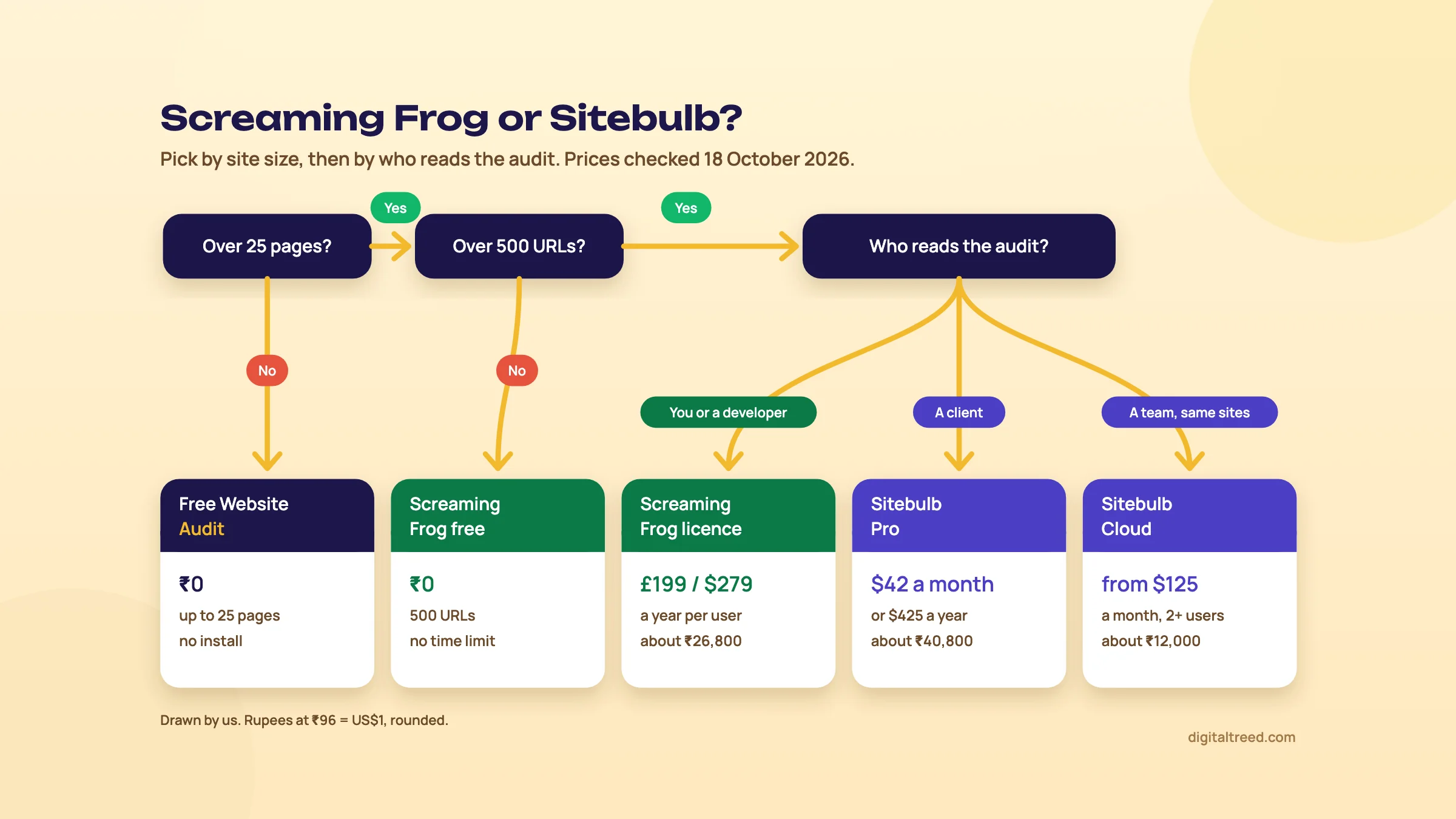 Pick by site size, then by who reads the audit. Drawn by us; prices checked 18 October 2026.
Freelancer auditing small Indian sites
Many local business sites run WordPress on shared hosting, with a few dozen to a few hundred URLs. For those, we'd run our Free Website Audit first, because it scores the things a crawler doesn't see well: SSL, speed, email records, local signals. It crawls up to 25 pages, runs 50+ checks across ten scored areas, and needs no sign-up for one audit a day.[7]
Then crawl the whole site with Screaming Frog's free version, which stops at 500 URLs[1] but needs no account and has no time limit.[8] The catch is that the free version locks the configuration, crawl speed included.[8] On a fragile shared server that matters; crawl outside business hours and watch response times.
Note
From our work: shared hosting. When I taught SEO, the students were already doing client work. Technical SEO was the hardest part for them, because most local business sites ran on WordPress with shared hosting, and the most common issue was site speed. Neither crawler fixes the hosting. Pick the cheaper one that finds the problem, and spend the rest on the fix.
Sitebulb has no free plan, only a 14-day Pro trial[9] that needs no card,[2] so it isn't a tool to keep for small clients. Lite at $18 a month covers 10,000 URLs per audit but leaves out structured data, performance and accessibility checks.[2]
Agency: Sitebulb for the report, Screaming Frog for the hard jobs
An agency's audit is read by a client, then by a developer. Sitebulb is built for that hand-off: each Hint has a priority, a coverage figure and an explanation page,[10] and Pro adds customised PDF reports and audit comparisons.[2] Crawl maps also show a non-technical owner why their category pages sit too deep.
We'd still keep one Screaming Frog licence in the team. Migration redirect checks in list mode and XPath extraction are Screaming Frog's ground (chapter 3), and they're the jobs agencies get paid extra for.
In-house technical SEO: pick by who reads it
If you own one large site and read tables happily, a Screaming Frog licence does almost everything for about two-thirds of Sitebulb Pro's yearly price. If your audits go to a product team, Sitebulb's Lost and Found counts (Fixed, Regressed) per Hint after each release are easier to put in a ticket.[11] Both need Search Console beside them: a crawler shows what can be crawled, Search Console shows what Google did.
Developer: Screaming Frog
A developer wants to script it. Screaming Frog runs headless from the command line with options like --crawl, --export-tabs and --crawl-comparison,[12] and its MCP server lets an AI assistant run crawls and export data.[13] Sitebulb's MCP is read-only and can't start a crawl.[14] For a quick check of a few URLs, our HTTP Status Checker shows every redirect hop for up to 10 URLs without installing anything.
Tip
Not sure? Run Screaming Frog's free version and a Sitebulb trial on the same client site in the same week, as our full audit chapter suggests. Whichever output you'd send to the client is your answer.
Chapter 2 starts the side-by-side with the crawl itself: configuration, rendering, scale and how each tool reports what it found.
Side by side: crawl set-up, rendering, scale, Issues vs Hints, and crawl maps
Quick answer
Both render JavaScript in headless Chrome, respect robots.txt by default and write crawls to disk. Screaming Frog offers more crawl controls and scales to about 2 million URLs with 4GB of RAM in database mode. Sitebulb Pro defaults to 500,000 URLs per audit. Screaming Frog lists issues; Sitebulb ranks and explains Hints. Both draw crawl maps.
Crawl configuration
Screaming Frog's configuration menu is the longer one. You get Spider and List modes, regex include and exclude rules, and limits by depth, query strings and URL path. There's also a custom robots.txt you can test before it goes live, user-agent presets, and speed as threads or a Max URI/s cap.[15] All of that needs a licence; in the free version the configuration is locked.[8]
Sitebulb covers the same decisions in a guided set-up screen per project: Sample or Standard audit, mobile or desktop, crawler type, which reports to run, crawl sources, speed, robots directives and parameter handling.[16] Two choices are better thought out than in most crawlers. The Sample audit crawls a limited number of URLs per level so you can measure a big site before committing to a full crawl.[17] And Crawl Parameters can be switched off with a list of safe parameters kept, such as pagination, which stops filter and sort URLs eating an e-commerce crawl.[18]
| Setting | Screaming Frog | Sitebulb |
|---|---|---|
| Default speed | 5 threads; cap by Max URI/s[15] | 5 threads and at most 5 URLs a second[16] |
| Robots.txt | Respect, ignore, or ignore but report status; custom robots.txt per subdomain[15] | Respect by default; untick, or paste a virtual robots.txt for one audit[19] |
| Crawl a URL list | List mode, results exported in upload order[20] | URL List as a crawl source, next to the website and XML sitemaps[21] |
| Orphan pages | Sitemap, GA4 and Search Console orphan filters after Crawl Analysis[22] | XML Sitemaps as a crawl source, plus an option to crawl URLs found in Search Console and Analytics[21] |
| Free version | Configuration locked[8] | No free plan; Lite limits crawl speed[2] |
Our take: for a first audit of an unknown site, Sitebulb's guided screen gets you to a sensible crawl faster. For an awkward one (a staging site behind a login, a crawl of one template, a robots.txt test), Screaming Frog has the switch you need. Before either, test the live robots.txt against the crawler's user agent with our Robots.txt Tester.
JavaScript rendering
Both use a headless Chromium browser. Screaming Frog's Rendering setting has Text Only (raw HTML) and JavaScript, which crawls the rendered HTML and, as Google does, also picks up links in the raw HTML.[15] Sitebulb's equivalents are the HTML Crawler, its default, and the Chrome Crawler.[23]
The differences are in pricing and reporting. Screaming Frog's rendering needs a licence.[1] Sitebulb includes JavaScript crawling on every plan, Lite included.[2] Sitebulb also has a Response vs Render report that lists what changed between the server HTML and the rendered page: content, links and indexability.[24] In Screaming Frog you get the JavaScript tab and rendered screenshots,[15] and you build the comparison yourself. If a canonical or noindex only appears after rendering, Sitebulb tells you; in Screaming Frog you go looking. Our advanced guide explains why that gap matters (see rendering and JavaScript SEO).
Scale and storage
| Screaming Frog (licence) | Sitebulb Desktop | |
|---|---|---|
| URLs per crawl | Limit Crawl Total defaults to 5 million;[15] about 2 million URLs with 4GB of RAM in database storage[12] | Lite 10,000; Pro 500,000 by default, up to 2 million if the machine copes[2] |
| Where data goes | Database storage on disk (default) or RAM[12] | Disk; a 1.6-million-URL site took 6GB, or 36GB with Link Analysis[17] |
| Machine | 64-bit OS, 4GB RAM minimum; SSD and 16GB past 1 million URLs[12] | 64-bit Windows 10 or 11, or macOS Sonoma or later; 4GB free RAM, 8GB recommended[25] |
| Operating systems | Windows, macOS, Ubuntu and Fedora Linux[1] | Windows and macOS[25] |
| Long crawls | Crawls save as they run; reopen from File > Crawls[12] | Pause, close and resume later[17] |
The 5 million figure is a setting, not a promise; your RAM and disk decide. For a 20,000-product D2C store, either tool on an 8GB laptop is fine. Past a few hundred thousand URLs, Screaming Frog on a well-specified machine has more headroom, and Sitebulb's answer is Cloud (chapter 3). If your team uses Linux, Sitebulb Desktop isn't an option.
Issues tab vs Hints
This is the real difference between the two tools.
| Screaming Frog Issues tab | Sitebulb Hints | |
|---|---|---|
| How many checks | "Over 300 SEO issues", by its own count[26] | 300+ Hints on Pro, 100+ on Lite[2] |
| Priority | High, Medium, Low[3] | Critical, High, Medium, Low, Insight[10] |
| Type | Issue, Opportunity, Warning[3] | Issue, Opportunity, Potential Issue[10] |
| Extra columns | URL count and share of the crawl ("% of Total")[3] | URL count, coverage, and how many affected URLs are indexable[4] |
| Explanation | In-app description and tips per issue; every tab and filter explained in the user guide[3] | A "Learn more" page per Hint with causes and fixes[10] |
| Grouping | By tab and filter, which give each issue its name[3] | By report, plus HTML Templates (top 50 templates)[27] |
Both vendors are honest that priorities aren't rules. Screaming Frog says its priorities "are not hard rules" and the tab "does not substitute expertise".[3] Sitebulb says every site "will trigger at least 20 Hints" and that fixing standard checklist items often won't move organic results.[4] In both, the priority label is where you start reading.
Where Sitebulb saves real time is the indexable count and HTML Templates. A Critical Hint on two non-indexable URLs can wait; a Medium one on 1,100 indexable product pages that share one template is one fix for the developer. In Screaming Frog you get the same answer by exporting the filter and pivoting it in a spreadsheet. That's fine for you, and slow for a junior.
One trap in Screaming Frog: orphan,[22] near-duplicate, Link Score[3] and sitemap filters stay empty until you run Crawl Analysis.[15]
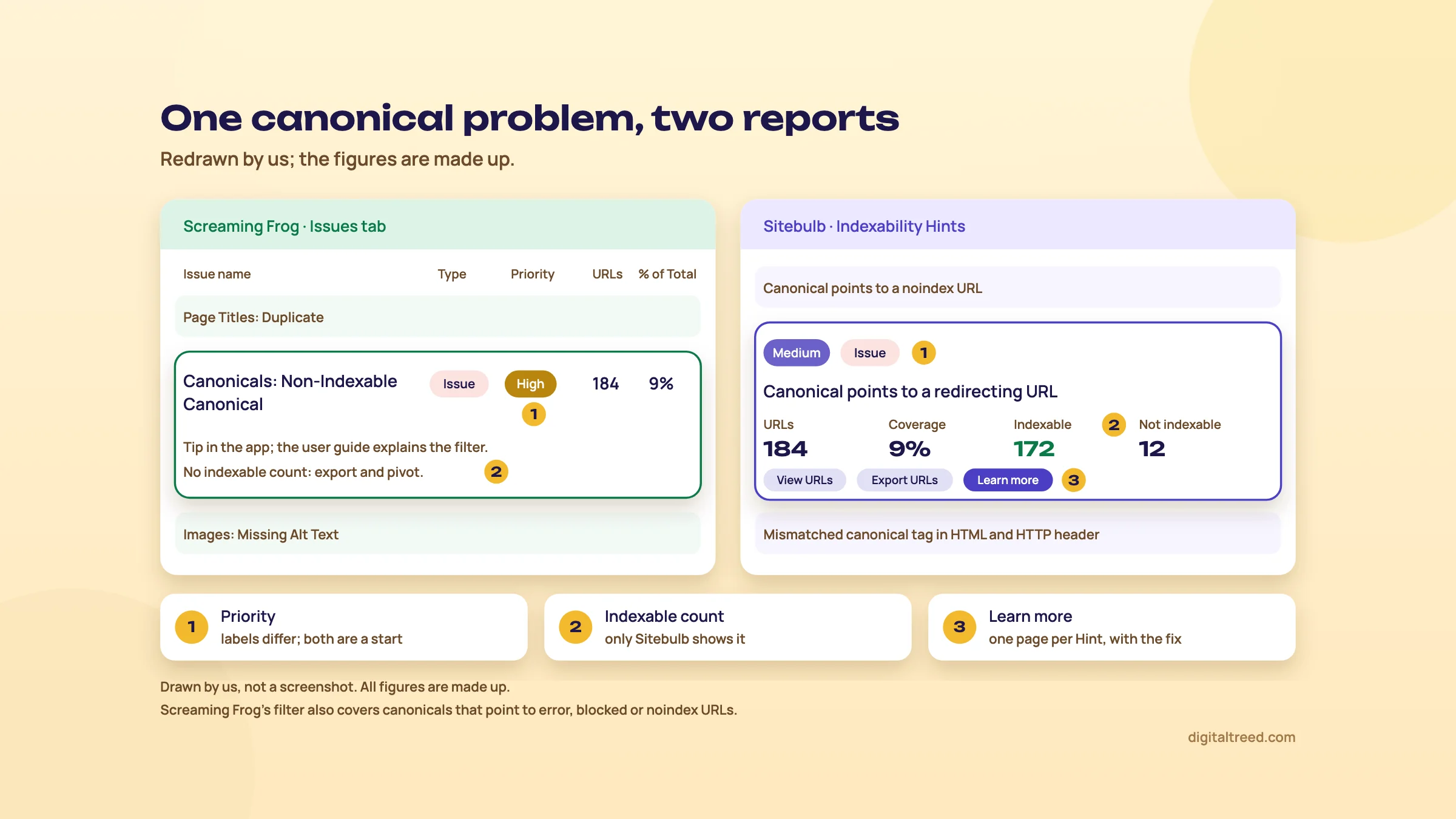 The same canonical problem, two ways of reporting it. Drawn by us; figures made up.
Crawl maps and visualisations
Both draw the crawl, and both draw it the same way: each line is the first link the crawler found to a page, not every link. Screaming Frog's crawl visualisations show how it crawled the site "by the first link to a page";[12] Sitebulb's Crawl Map draws the first link found, breadth first.[28] Read either as a picture of depth, not of your full internal linking.
| Screaming Frog | Sitebulb | |
|---|---|---|
| Graphs | Force-Directed Crawl Diagram, 3D version and Crawl Tree Graph; the same three for directory trees; word clouds[12] | Crawl Map, Crawl Tree and Crawl Radial; three Directory graphs[29] |
| Size | Up to 10k URLs in the browser, then right-click Focus to expand a section by another 10k[30] | Up to 10,000 URLs, indexable and not, says the visualisations page;[29] the Crawl Maps FAQ says only indexable HTML URLs with incoming links are drawn[28] |
| Useful switch | Node colours by response code or segment[30] | Highlight non-indexable URLs in red; rebuild from one URL[29] |
| In the free version | Yes, site visualisations are listed as free[1] | On every plan ("Crawl Maps")[2] |
Screaming Frog's maps are good for you. Sitebulb's are good for a meeting: the non-indexable highlight turns a canonical mistake into half a map going red, which no owner forgets. Guide 3's chapter on site architecture suggests crawl maps for exactly that conversation.
Chapter 3 moves from the crawl to what you add to it and do with it: Google's data, extraction, scheduling, reports, cloud and AI.
Side by side: Google data, extraction, scheduling, comparison, reports, cloud and AI
Quick answer
Both pull Search Console and Analytics data into the crawl. Only Screaming Frog connects PageSpeed Insights and link APIs, extracts with XPath, and runs from the command line. Sitebulb's extraction is point-and-click CSS. Sitebulb has better comparison counts, PDF reports and a real Cloud product. Screaming Frog's MCP can start crawls; Sitebulb's is read-only.
Search Console, GA4 and PageSpeed Insights
| Data | Screaming Frog (licence) | Sitebulb |
|---|---|---|
| Search Console | Search Analytics clicks, impressions, CTR and position, plus URL Inspection for the first 2,000 HTML URLs it finds, breadth first[15] | Search Console data and a URL Inspection report for the top 2,000 HTML URLs by URL Rank[31] |
| Analytics | GA4: seven metrics by default, up to 65, with channel filters[15] | Google Analytics, on all plans[2] |
| Speed | PageSpeed Insights API: Lighthouse plus CrUX field data, or local Lighthouse[15] | Its own Chrome as it crawls: lab metrics for a 10% sample by default, no INP[32] |
| Link metrics | Majestic, Ahrefs and Moz APIs with your own accounts[15] | Not documented. Its integrations are Google Analytics, Search Console and Sheets,[2] so backlink data stays in your link tool |
| Google Sheets | Export tabs to Sheets; Looker Studio crawl report[12] | Export URLs to Sheets;[10] auto-export is Pro only[2] |
Google caps URL Inspection at 2,000 queries a day per site,[33] and the quota is per property, not per tool. Run both crawlers on the same day and the second one gets what's left.
Speed is the clearest gap. Screaming Frog's PageSpeed Insights connection can return Chrome UX Report data, the real-user Core Web Vitals, per URL.[15] Sitebulb's numbers are lab data from its own browser; it collects LCP, CLS, TBT, TTI, FCP and TTFB, but INP isn't on the list.[32] Sitebulb's strength here is averaging Web Vitals by template.[34] For field data on a key page, use PageSpeed Insights directly.
Custom search and custom extraction
Screaming Frog has up to 100 custom search filters (contains or doesn't contain, text or regex) and up to 100 extractors using XPath (1.0 to 3.1[35]), CSS Path or regex, with function values such as count(//h1).[15] There's a point-and-click helper too, but the power is in writing your own expressions.
Sitebulb's content extraction is built around a visual picker. You load an example URL, click the element, and it fills in the CSS selector. Each rule extracts by text, HTML, an attribute or a regex pattern, and can return the first match, all matches, a word count or simply whether a match exists. A Test tab checks the rule on Desktop before you crawl.[36] The help page doesn't mention XPath. Lite also limits how many extraction options you can add.[2]
For price, SKU and author on a D2C store, both work. For JSON inside a script tag, a nested attribute or a count across a whole template, we'd use Screaming Frog. Its user guide warns against copying XPath straight from the browser, since those expressions depend on an element's exact position.[35]
Scheduling and crawl comparison
| Screaming Frog | Sitebulb | |
|---|---|---|
| Scheduling | File > Scheduling, once or at intervals; headless exports to files, Sheets or Looker Studio[12] | Once, daily, weekly, bi-weekly, monthly or quarterly[37]; Pro only[2] |
| After a scheduled crawl | Since 24.0: auto-compare the last two crawls, show the changes in the completion email and attach exports[13] | Lost and Found on the next audit in the project[11] |
| Command line | Yes, including --crawl-comparison[12] | Not documented, so no scripted or server runs; schedule audits inside the app instead |
| Comparison | Added, New, Removed and Missing per filter, plus change detection on titles, H1s, word count and more; database storage needed[38] | Lost and Found (Remained, Found, Lost; Fixed and Regressed per Hint) automatically;[11] Compare Audits on any two audits[39], Pro only[2] |
| Machine off | The schedule runs where Screaming Frog is installed, a PC or your own server,[8] so that machine must be on | Desktop needs the computer on and Sitebulb running; Load on Startup and Run missed audits help[40] |
Screaming Frog is the better scheduler: command line, cron, email summaries. Sitebulb is the better reader of the result. "Fixed 1,040, Regressed 12" on one Hint is what a developer wants after a release, and it appears without setting anything up. Both only mean something if the second crawl uses the same settings as the first.
Client reports and white label
Sitebulb builds a PDF of the whole audit or of one report, with the charts and tables you choose,[41] and lists "Customized PDF Reports" as a Pro feature.[2] Sitebulb's Upgrade to Pro page says those PDFs are "completely white label", with no mention of Sitebulb in them;[52] no help page explains how to add your own logo, so test that in the trial before you promise a branded report.
Screaming Frog's client output is exports (CSV, Excel, Google Sheets) and the Looker Studio crawl report, a time series of crawl overview data sent to Google Sheets for a Looker Studio dashboard.[12] That dashboard is yours to brand, but you build it. We found no PDF audit report in its pricing page's feature list.[1]
Cloud options
Screaming Frog's pricing page sells one licence per user, with no hosted plan.[1] Its FAQ says every version "is a server version", which you can run on a dedicated server or in the cloud, and that every user accessing that machine needs their own licence.[8] You manage the server.
Sitebulb Cloud is a hosted product: from $125 a month for 2 users and 50,000 URLs, to Medium at $495 a month for 10 users and 1 million URLs per audit (Enterprise is priced on request), with recurring audits and unlimited projects on every plan.[6] Sitebulb itself calls it "a lot more expensive" and pitches it at very big sites or teams working from the same audit data.[2] Its page also lists Slack, Data Studio and webhook integrations, and every plan above Mini includes Sitebulb Pro desktop licences for its users.[6]
AI and MCP
| Screaming Frog | Sitebulb | |
|---|---|---|
| Prompts on crawl data | OpenAI, Gemini, Ollama and Anthropic prompts per URL, results in an AI tab[15] | Not documented: Sitebulb's AI works on finished audits through the MCP, not on each page's content |
| Embeddings | Semantic similarity, low relevance content and content clusters (22.0)[43] | Not documented, so no similarity or topic clustering from page content |
| MCP | Since 24.0: AI assistants can run crawls, analyse and export data; needs database storage[13] | Since v10.0 (9 Sep 2026)[44]: Claude and ChatGPT read finished audits, read-only, up to 50 example URLs per issue[14] |
| Ready-made workflows | Add from Library: a few preset prompts per AI provider, and example JavaScript snippets such as image alt text and embeddings[15] | Five Skills, including What To Fix First and Dev Handoff[45] |
| Who pays | You pay the AI provider for API use[15] | MCP access listed on every plan[2] |
They solve different problems. Screaming Frog's AI features work on the content of every page: drafting alt text, classifying pages, finding near-duplicate topics. Sitebulb's MCP works on the audit: what to fix first, what changed. Whatever you use, Google calls it "critical to" fact-check AI output, titles and meta descriptions included, before it goes live.[46] Our AI tools for SEO guide covers the assistants themselves.
Chapter 4 puts the prices side by side, including what a team of five pays.
Free options and pricing side by side
Quick answer
Screaming Frog is free to 500 URLs for as long as you like; Sitebulb has only a 14-day Pro trial. For one person, Screaming Frog's £199 or $279 a year (about ₹26,800) is cheaper than Sitebulb Pro at $425 a year (about ₹40,800). For a team of five, Sitebulb Pro yearly works out cheaper. Prices checked 18 October 2026.
What you get free
| Screaming Frog free version | Sitebulb free trial | |
|---|---|---|
| How long | No time limit[1] | 14 days, doesn't auto-renew[9] |
| Sign-up | None; no email capture[8] | A free account created inside the app;[47] no card[2] |
| Crawl size | 500 URLs per crawl[1] | Same as Pro: 500,000 URLs per audit[9] |
| Features | Broken links, redirects, titles and meta, directives, hreflang, exact duplicates, XML sitemaps, site visualisations[1] | Everything in Pro[9] |
| Locked | Configuration, saving crawls, JavaScript rendering, APIs, extraction, comparison, scheduling[1] | Nothing until day 14; then the Pro features go unless you buy[9] |
They're free for different jobs. Screaming Frog's free version is a tool you keep: a 300-page coaching centre site or a clinic chain's site can be crawled every month at no cost. Sitebulb's trial is an evaluation: use it on a real client audit and a re-audit after the fixes, then decide. And for a site under 25 pages, our Free Website Audit does the job with no install at all.[7]
Paid plans, checked 18 October 2026
Neither vendor shows a rupee price. Both show US dollars and pounds (and euros), so the rupee figures here are the dollar price at ₹96 = US$1, the X-Rates average for 1 to 16 October 2026,[48] the same rate our tool guides use. Neither pricing page mentions GST.
| Plan | Price | About in INR | Limit |
|---|---|---|---|
| Screaming Frog licence, 1 to 4 bought | £199 or $279 a year per user | ₹26,800 a year | Unlimited URLs, bound by memory and storage[1] |
| Screaming Frog, 5 to 9 bought | £189 or $265 a year per user | ₹25,400 a year | Same[1] |
| Sitebulb Lite, 1 user | $18 a month or $180 a year | ₹1,730 a month or ₹17,280 a year | 10,000 URLs per audit[2] |
| Sitebulb Pro, 1 user | $42 a month or $425 a year | ₹4,030 a month or ₹40,800 a year | 500,000 URLs per audit, up to 2 million[5] |
| Each extra Sitebulb Pro user | $11 a month, or $115.60 a year for the second user and $112.20 a year for each one after that | ₹1,060 a month, or about ₹11,100 and ₹10,770 a year | Up to 50 users[2] |
| Sitebulb Cloud Mini | $125 a month | ₹12,000 a month | 2 users, 50,000 URLs a month[6] |
| Sitebulb Cloud Small | $245 a month | ₹23,520 a month | 5 users, 1 million URLs a month, 250,000 per audit; includes 5 Pro desktop licences[6] |
| Sitebulb Cloud Medium | $495 a month | ₹47,520 a month | 10 users, 2.5 million URLs a month, 1 million per audit[6] |
Screaming Frog's bigger bulk tiers are $249 (10 to 19) and $235 (20 or more) per licence.[1] Its separate Log File Analyser is £99 or $139 a year (about ₹13,300) if you also want server log analysis.[49]
What a team pays in a year
The per-user maths flips the answer for teams. Our arithmetic, from the prices above:
- One person: Screaming Frog ₹26,800 against Sitebulb Pro yearly ₹40,800. Screaming Frog is about two-thirds of the price.
- Two people: Screaming Frog 2 × $279 = $558 (about ₹53,570); Sitebulb Pro yearly $425 + $115.60 = $540.60 (about ₹51,900). Roughly level.
- Five people: Screaming Frog 5 × $265 = $1,325 (about ₹1,27,200); Sitebulb Pro yearly $425 + $115.60 + 3 × $112.20 = $877.20 (about ₹84,210), the total Sitebulb's page shows for five users.
So for a solo freelancer Screaming Frog is cheaper, and for an agency of five Sitebulb Desktop is cheaper, even before you count the time its explanations save. Cloud is a different budget: Sitebulb itself says it's "a lot more expensive".[2] Cloud Small, at $2,940 a year (about ₹2,82,240), includes five Pro desktop licences too, but price it only if you need shared projects or crawls that outlast a laptop.
Rules that catch people out
- Screaming Frog licences are per person, not per company. One user can install on several devices; two people need two licences. When a licence expires, you're back on the free version and can't open saved crawls.[8]
- Screaming Frog has no discount codes. It's a yearly purchase, not a monthly subscription, with the same price for everyone apart from bulk discounts.[8]
- Sitebulb Lite is not "Pro with fewer URLs". Performance, structured data, hreflang, accessibility, scheduling and audit comparison are Pro only.[2]
Tip
Paying from India: Screaming Frog's FAQ says the usual reason a card is declined is the bank blocking an international payment to the UK. Ask the bank to allow it, use PayPal, or ask support about a bank transfer.[8] Sitebulb takes cards and PayPal; purchase orders and invoices are for yearly plans only.[2]
Price isn't the whole cost. Chapter 5 covers the other one: how long each takes to learn, and how to run both without paying twice.
Learning curve, using both together, and switching
Quick answer
Sitebulb is quicker to learn because every Hint explains itself; Screaming Frog takes longer because you decide what each table means. Many teams use both: Sitebulb for the client audit and release checks, a Screaming Frog licence for migrations, extraction and scripted crawls. Switching is easy, since neither locks your data in.
The learning curve
Screaming Frog's interface is a wall of tabs and filters, and its own documentation says the Issues tab "does not substitute expertise".[3] That's the honest summary. A junior who opens it on day one sees dozens of issues with a High, Medium or Low label and no advice on which matter for this site. A senior sees exactly the data they wanted, in a format every other SEO and many developers already know.
Sitebulb is easier on a new person. Each Hint links to a page on why it matters and how to fix it,[10] so a junior learns why a canonical pointing at a redirect is a problem while fixing it. The risk runs the other way: people trust the priority badge. Sitebulb rates "Canonical points to a redirecting URL" as Medium,[50] yet on a store where every product canonical redirects, it's the first fix.
| If you are | Easier start | Why |
|---|---|---|
| New to technical SEO | Sitebulb trial, then Screaming Frog free | Explanations first; raw data once you know what to look for |
| Comfortable with regex and spreadsheets | Screaming Frog | Every setting is a menu away; the user guide documents each one |
| Managing juniors | Sitebulb | Hints and their explanation pages train people as they audit |
| A developer | Screaming Frog | Command line, exports and XPath feel familiar |
Whichever you pick, read our tool guides before the first paid crawl: the Screaming Frog guide covers configuration and the tabs, and the Sitebulb guide covers audit settings and reading Hints.
Using both together
Running both isn't a luxury. A Screaming Frog licence plus Sitebulb Pro yearly is about ₹67,600 a year for one person (chapter 4), or about ₹5,630 a month. The point is to give each tool the jobs it's best at, not to crawl every site twice.
| Job | Tool | Feature |
|---|---|---|
| Monthly client audit and report | Sitebulb | Hints, crawl maps, PDF report |
| Release or fix check | Sitebulb | Lost and Found: Fixed and Regressed per Hint[11] |
| Migration redirect check | Screaming Frog | List mode with the old URLs, exported in upload order[20] |
| Pull price, SKU or schema type from every product | Screaming Frog | Custom extraction with XPath[15] |
| Weekly crawl with an email to the developer | Screaming Frog | Scheduling with auto-compare and email[13] |
| Real-user Core Web Vitals by URL | Screaming Frog | PageSpeed Insights API with CrUX data[15] |
| Show an owner why pages sit too deep | Sitebulb | Crawl Map with non-indexable URLs highlighted[29] |
Audit a 2,000-page WooCommerce store with both crawlers
- Run the free check. Put the homepage through our Free Website Audit to catch SSL, speed and email problems a crawl won't explain.
- Agree the crawl. Ask the developer for a safe speed and an allow-list entry if the site is behind a CDN. Sitebulb's pre-audit can flag a CDN such as Cloudflare that may block crawlers.[44]
- Crawl with Sitebulb first. Chrome Crawler on a sample, then a Standard audit with SEO, Page Resources and Structured Data ticked, XML Sitemaps as a crawl source, and Search Console set to crawl the URLs it finds.
- Triage by template. Sort Hints by priority, then by indexable count, and group them in HTML Templates. Write one fix per template.
- Add the Screaming Frog jobs. Extract price and SKU with XPath, and pull PageSpeed Insights field data for one URL per template. Don't run URL Inspection in both tools on the same day; they share Google's 2,000-a-day quota.[33]
- Re-audit after the fixes. Start a new Sitebulb audit in the same project with the same configuration, and read Fixed and Regressed in Lost and Found.
Switching from one to the other
Neither tool holds your data hostage. Screaming Frog exports any tab to CSV, Excel or Google Sheets,[12] and Sitebulb exports Hint URLs to CSV or Sheets,[10] with Bulk Exports for several data types at once.[51] What doesn't move is history: Screaming Frog's crawl comparison and Sitebulb's Lost and Found only compare crawls made in the same tool. Before you switch, export last month's key filters so the first crawl in the new tool has something to compare with by hand.
Three things to expect when you switch:
- Screaming Frog to Sitebulb: fewer settings, and Hints with their own names. Match the checks you relied on to their Hints before you drop the licence. If you used XPath extraction, test whether Sitebulb's CSS-selector rules can do the same.[36]
- Sitebulb to Screaming Frog: no PDF report, and no client-ready explanation page per issue, only in-app tips and the user guide. Plan time to turn exports into a client report, or build a Looker Studio crawl report.[12]
- Either way: numbers won't match exactly. Speed settings, rendering, parameter handling and what each tool counts as a URL differ, so compare trends, not totals.
Do not
- Crawl the same client site with both tools every month
- Send a raw Screaming Frog export to a client
- Treat a Sitebulb priority badge as your fix order
- Promise a white-label PDF before testing it in the trial
Do
- Give each tool the jobs it does best
- Keep the same crawl settings between audits you compare
- Pair either crawler with Search Console
- Start small sites on our Free Website Audit
If you'd rather hand the crawling over, our SEO service starts with a technical audit, or get a quote. For more free tools beside these two, see our best free SEO tools guide.
Test yourself
Ten questions on the whole guide. Pick an answer, check it, and see your score at the end.
You got 0 of 10 right.
Frequently asked questions
Frequently asked
Is Screaming Frog or Sitebulb better?
Neither is better at everything. Screaming Frog is the stronger tool for raw data, custom extraction, list-mode migrations and automation. Sitebulb is stronger when someone else has to act on the audit, with ranked, explained Hints, crawl maps and PDF reports. Pick by who reads the output.
Is Sitebulb cheaper than Screaming Frog?
For one person, no. On 18 October 2026 Screaming Frog cost £199 or $279 a year per user (about ₹26,800), and Sitebulb Pro $425 a year (about ₹40,800). Sitebulb Lite is cheaper at $180 a year but limited to 10,000 URLs per audit and leaves out several reports. For a team of five, Sitebulb Pro yearly is cheaper.
Does Sitebulb have a free version?
No. It has a 14-day trial equivalent to Pro, with no card and no auto-renewal. Screaming Frog's free version crawls 500 URLs with no time limit, but with the configuration locked.
Do both tools render JavaScript?
Yes. Both use headless Chrome. In Screaming Frog, JavaScript rendering needs a licence; Sitebulb includes its Chrome Crawler on every plan and adds a Response vs Render report that shows what changed after rendering.
Can Sitebulb do custom extraction like Screaming Frog?
Yes, with CSS selectors you usually pick by pointing and clicking, extracting text, HTML, an attribute or a regex match. Screaming Frog also supports XPath 1.0 to 3.1 and up to 100 extractors, which is why we'd pick it for harder extraction jobs.
Is there a cloud version of Screaming Frog?
Not a hosted one. Screaming Frog says every version is a server version, so you can run it on your own cloud server, and each user of that machine needs a licence. Sitebulb sells Sitebulb Cloud, a hosted product from $125 a month.
Which crawler is better for client reports?
Sitebulb. It builds PDF reports from an audit, and its Hint explanations are written to be readable by clients. Screaming Frog's client output is exports and a Looker Studio crawl report you set up yourself. Test Sitebulb's branding options in the trial, because its help pages don't document white-label PDFs.
Can I use Claude or ChatGPT with these crawlers?
Yes. Screaming Frog's MCP server (version 24) lets AI assistants run crawls and export data, and it can send prompts on page content to OpenAI, Gemini, Ollama or Anthropic. Sitebulb's MCP (v10.0, September 2026) gives Claude and ChatGPT read-only access to finished audits. Check AI output by hand before it goes live.
Do I need either tool for a small business website?
Usually not. For a site under 25 pages, our Free Website Audit gives ranked fixes after a free sign-in, and Search Console shows what Google crawled and indexed. Screaming Frog's free version covers sites up to 500 URLs.
Should I use both Screaming Frog and Sitebulb?
If you audit for clients every month, often yes. Use Sitebulb for the audit, report and release checks, and a Screaming Frog licence for migrations, XPath extraction, PageSpeed field data and scheduled crawls. Together they cost about ₹67,600 a year for one person.
Sources
References
- SEO Spider pricing (free vs paid features, licence prices in GBP, USD and EUR, download versions), Screaming Frog, prices seen 16 Oct 2026, re-checked 18 Oct 2026, accessed 16 Oct 2026
- Desktop plans for SEO professionals (pricing page, monthly view, and its FAQ), Sitebulb, prices seen 18 Oct 2026, accessed 16 Oct 2026
- SEO Spider user guide: tabs, Screaming Frog, accessed 16 Oct 2026
- About Sitebulb Hints, Sitebulb Help Centre, updated 27 Jan 2025, accessed 16 Oct 2026
- Desktop plans for SEO professionals (Yearly toggle), Sitebulb, yearly prices seen 18 Oct 2026 after selecting Yearly, accessed 16 Oct 2026
- Cloud plans for SEO teams and agencies (Cloud Server pricing), Sitebulb, prices seen 18 Oct 2026, accessed 16 Oct 2026
- Free Website Audit, DigitalTreed, accessed 18 Oct 2026
- SEO Spider FAQ (licences, payment, pricing, free version, server version), Screaming Frog, accessed 18 Oct 2026
- How does the Sitebulb free trial work?, Sitebulb Help Centre, updated 1 Aug 2025, accessed 16 Oct 2026
- Hint Explanations (what Hints are, importance levels, warning types, coverage), Sitebulb, accessed 18 Oct 2026
- Lost and Found URL Metrics, Sitebulb Help Centre, updated 28 Nov 2025, accessed 16 Oct 2026
- SEO Spider user guide: general (installation, crawling, storage, memory, visualisations, scheduling, command line, exports), Screaming Frog, accessed 18 Oct 2026
- Screaming Frog SEO Spider Update: Version 24.0 (with 24.1 to 24.3 notes), Screaming Frog, Dan Sharp, 19 May 2026, accessed 16 Oct 2026
- What the Sitebulb MCP can and can't do, Sitebulb Help Centre, updated 20 Jul 2026, accessed 16 Oct 2026
- SEO Spider user guide: configuration, Screaming Frog, accessed 16 Oct 2026
- Choosing the right settings for efficient auditing, Sitebulb Help Centre, updated 28 Feb 2025, accessed 16 Oct 2026
- How to crawl large websites, Sitebulb Help Centre, updated 1 Oct 2025, accessed 16 Oct 2026
- Include & Exclude URLs settings, Sitebulb Help Centre, updated 2 Mar 2026, accessed 16 Oct 2026
- Robots Directives Settings, Sitebulb Help Centre, updated 14 Oct 2024, accessed 16 Oct 2026
- How To Use List Mode, Screaming Frog, accessed 16 Oct 2026
- Audit settings, Sitebulb Help Centre, updated 18 Oct 2024, accessed 16 Oct 2026
- How To Find Orphan Pages, Screaming Frog, accessed 16 Oct 2026
- Crawler Settings, Sitebulb Help Centre, updated 20 Jun 2025, accessed 16 Oct 2026
- Response vs Render Report, Sitebulb Help Centre, updated 17 Oct 2024, accessed 16 Oct 2026
- Download Sitebulb (Windows and Mac system requirements), Sitebulb, accessed 18 Oct 2026
- SEO Spider Tool (overview), Screaming Frog, accessed 16 Oct 2026
- HTML Page Templates, Sitebulb Help Centre, updated 9 Jul 2025, accessed 16 Oct 2026
- Crawl Maps FAQs, Sitebulb Help Centre, updated 17 Sep 2024, accessed 16 Oct 2026
- Site Visualisations, Sitebulb Help Centre, updated 14 Oct 2024, accessed 16 Oct 2026
- Site Architecture & Crawl Visualisations Guide, Screaming Frog, accessed 18 Oct 2026
- URL Inspection Report, Sitebulb Help Centre, updated 17 Oct 2024, accessed 16 Oct 2026
- Performance Report, Sitebulb Help Centre, updated 30 Mar 2026, accessed 16 Oct 2026
- Usage limits (Search Console API), Google for Developers, updated 28 Aug 2025, accessed 16 Oct 2026
- Auditing Performance & Mobile Friendly with Sitebulb, Sitebulb Help Centre, updated 18 Nov 2025, accessed 16 Oct 2026
- Web Scraper Tool: custom extraction tutorial and XPath examples, Screaming Frog, accessed 16 Oct 2026
- Content Extraction Settings, Sitebulb Help Centre, updated 1 Oct 2025, accessed 16 Oct 2026
- Audit Scheduling settings, Sitebulb Help Centre, updated 10 Sep 2024, accessed 16 Oct 2026
- How To Compare Crawls, Screaming Frog, accessed 16 Oct 2026
- Comparing Audits, Sitebulb Help Centre, updated 28 Oct 2024, accessed 16 Oct 2026
- Access and adjust Sitebulb's scheduling settings, Sitebulb Help Centre, updated 10 Oct 2024, accessed 16 Oct 2026
- Build PDF reports from Sitebulb Audits, Sitebulb Help Centre, updated 10 Oct 2024, accessed 16 Oct 2026
- Sitebulb Website Audit Tool - Software Features, Sitebulb, accessed 18 Oct 2026
- Screaming Frog SEO Spider Update: Version 22.0, Screaming Frog, Dan Sharp, 10 Jun 2025, accessed 16 Oct 2026
- Release Notes (v10.0 Sitebulb MCP launch, 9 Sep 2026; v9.4.3, 27 Jan 2026), Sitebulb, accessed 18 Oct 2026
- Sitebulb Skills for Claude and ChatGPT, Sitebulb Help Centre, updated 11 Aug 2026, accessed 16 Oct 2026
- Google Search's guidance on using generative AI content on your website, Google Search Central, updated 1 Oct 2026, accessed 16 Oct 2026
- How to start your free Sitebulb Desktop trial, Sitebulb Help Centre, updated 1 Oct 2025, accessed 16 Oct 2026
- Exchange Rate Average (US Dollar, Indian Rupee), X-Rates, average for 1-16 Oct 2026, accessed 16 Oct 2026
- Log File Analyser pricing, Screaming Frog, prices seen 16 Oct 2026, accessed 16 Oct 2026
- Canonical points to a redirecting URL (Hint), Sitebulb, accessed 18 Oct 2026
- Navigating Sitebulb Audits, Sitebulb Help Centre, updated 20 Mar 2025, accessed 16 Oct 2026
- Upgrade to Sitebulb Pro, Sitebulb, accessed 21 Oct 2026
Get the free checklist
Every step of this guide on one page, to print or tick off. We email you the PDF link.