
Quick answer
If your code is on GitHub, start with GitHub Actions, which gives 2,000 free Linux minutes a month on private repos as of October 28, 2026. Past that, CircleCI Free gives 6,000 small Docker minutes and GitLab Free gives 400, while Jenkins needs your own server. Count your monthly pipeline runs first.
Say you're the one developer at a small US business, and every release still means copying files by hand. A CI/CD tool is a service that runs your tests and deploys your code each time someone pushes a change. GitHub Docs put the CI half plainly: committing code often "detects errors sooner". So picking among CI/CD tools comes down to minutes, runners and how much set-up you'll own.
We start with what a CI/CD tool does on every push, then put GitHub Actions, GitLab, CircleCI and Jenkins in one table. Next come free minutes, what the same pipeline costs in a month, and self-hosted runners. We end with one pipeline written as four config files, tested on our machine, and when to choose each. Up front, we'd use the CI tool built into the place your code already lives.
Key takeaways
- Our sample pipeline took 14 lines on GitLab and 29 on CircleCI.
- GitHub Actions Free includes 2,000 Linux minutes a month for private repos.
- CircleCI's 30,000 free credits equal 6,000 minutes on its small Docker class.
- GitLab Free covers 133 runs of an example 3-minute pipeline.
- Self-hosted runners use no paid minutes on GitHub, GitLab or CircleCI.
What a CI/CD tool does on every push
What actually happens when you push? The tool reads a config file in your repo, starts a fresh machine called a runner, and runs the commands in that file. For a PHP site, the build step is usually just a syntax check, followed by the tests and then a deploy. The deploy won't run unless the tests pass. A Node site follows the same shape, just with npm commands instead of PHP ones, and it'd use the same four tools.
The runner is where the money goes. GitHub, GitLab and CircleCI rent you runners by the minute, and all three also let you plug in a machine of your own. Jenkins works the other way round. The project calls it a self-contained Java-based program that you install yourself, so there's no minute meter, just a server bill and the hours someone spends keeping it patched.
The habits around the tool, like small commits, code review and tests, are in our software engineering basics for business owners. How often a team ships is a planning call, and our agile vs waterfall guide covers it.
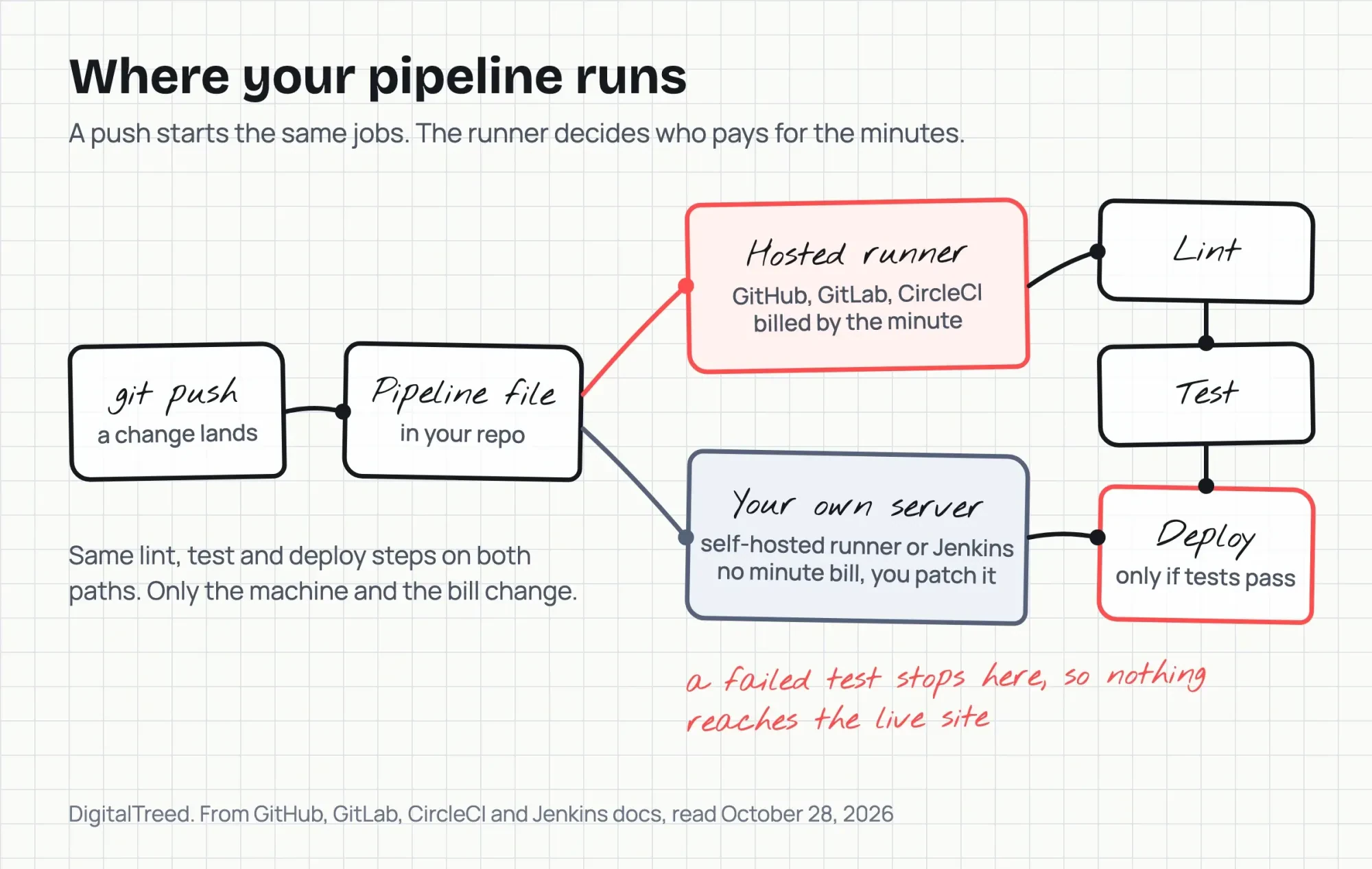 Diagram by DigitalTreed, from GitHub, GitLab, CircleCI and Jenkins docs read October 28, 2026
GitHub Actions, GitLab, CircleCI and Jenkins in one table
Compare where the pipeline file lives, what's free, what an extra minute costs, and whether your own machine is allowed. Here's how they compare as of October 28, 2026, from GitHub Actions billing, GitLab pricing, CircleCI pricing and the Jenkins docs:
| Tool | Pipeline file | Free hosted time a month | Extra minute, small Linux | Your own runners |
|---|---|---|---|---|
| GitHub Actions | .github/workflows/*.yml | 2,000 minutes (private repos) | $0.006 (Linux 2-core) | Free to use |
| GitLab CI/CD | .gitlab-ci.yml | 400 compute minutes | $0.01 ($10 per 1,000) | Unlimited, no minutes used |
| CircleCI | .circleci/config.yml | 30,000 credits (6,000 small Docker minutes) | $0.003 small, $0.006 medium (paid credits, Performance plan) | No per-minute charge |
| Jenkins | Jenkinsfile | None (no hosted runners) | None | Always your own server |
The extra-minute column isn't a like-for-like price. GitHub's $0.006 is charged per whole minute, while GitLab's $0.01 only comes in $10 packs of 1,000. CircleCI's rate assumes you've moved to a paid plan that can buy credits. Each vendor also counts a minute its own way, by the whole minute, by the second or in credits, and that's what decides how far a free tier stretches.
How many free minutes do you really get?
That depends on what each vendor counts as a minute. GitHub's 2,000 minutes on the Free plan are for private repositories, since standard runners in public ones don't use the quota, per its Actions billing docs. GitHub also rounds each job up to the nearest whole minute, so a 20-second job uses a full minute. GitLab is different. It bills closer to the second. Its compute minutes docs give the formula as job duration in seconds / 60 x a cost factor. That factor is 1 on the default small Linux runner and 2 on medium. A 90-second job on the small runner uses 1.5 minutes (90 / 60 x 1). The Free tier gets 400 of those minutes a month.
CircleCI counts credits instead of minutes. Its Free plan includes 30,000 credits a month and calls that up to 6,000 build minutes on a small Docker resource class (CircleCI pricing). That works out to 5 credits a minute (30,000 / 6,000). On the Linux medium class at 10 credits a minute, the same credits last 3,000 minutes, and free credits don't roll over.
Here's what that means in runs. Take an example pipeline billed at 3 minutes a run. GitHub's allowance covers 666 runs a month (2,000 / 3, rounded down), GitLab's covers 133 (400 / 3) and CircleCI's small class covers 2,000 (6,000 / 3). That's a 15-to-1 spread between the smallest and largest free plan (2,000 / 133).
Jenkins has no allowance to count. On GitHub, each 3-minute run past 666 costs under 2 cents (3 x $0.006 = $0.018).
What the same pipeline costs in a month
We priced two example workloads for that 3-minute pipeline, where Example A is 200 runs a month (600 minutes) and Example B is 1,000 runs (3,000 minutes). Both are examples, not benchmarks. The rates, as of October 28, 2026, are GitHub's $0.006 per Linux 2-core minute, GitLab's $10 per 1,000 extra minutes and CircleCI's $15 per 25,000 credits. For Jenkins we used DigitalOcean Droplet pricing for a 4 GiB Basic server at $24 a month, as an example only.
| Tool, prices read October 28, 2026 | Formula | Example A, 600 min | Example B, 3,000 min |
|---|---|---|---|
| GitHub Actions Free | (minutes - 2,000) x $0.006, never below $0 | $0 | $6.00 |
| GitLab Free | (minutes - 400) / 1,000, rounded up, x $10 | $10 | $30 |
| CircleCI Free, small class | minutes x 5 credits, against 30,000 free | $0 (3,000 credits) | $0 (15,000 credits) |
| Jenkins on a $24 server | flat server price | $24 | $24 |
Example B is where the gap shows: $0, $6, $24 and $30 for the same 3,000 minutes. Jenkins costs $24 either way.
By those formulas, CircleCI Free costs $0 in both examples, and GitLab Free costs the most of the hosted three. Its packs are one-time payments that roll over to the next month if unused, so Example A's $10 pack leaves 800 minutes for later (1,000 - 200). CircleCI's paid Performance plan starts at $15 monthly as of October 28, 2026. You'd need it to buy credits past the free 30,000. On the medium class, Example B uses all 30,000 free credits (3,000 x 10). And the Jenkins row leaves out the hours spent on updates.
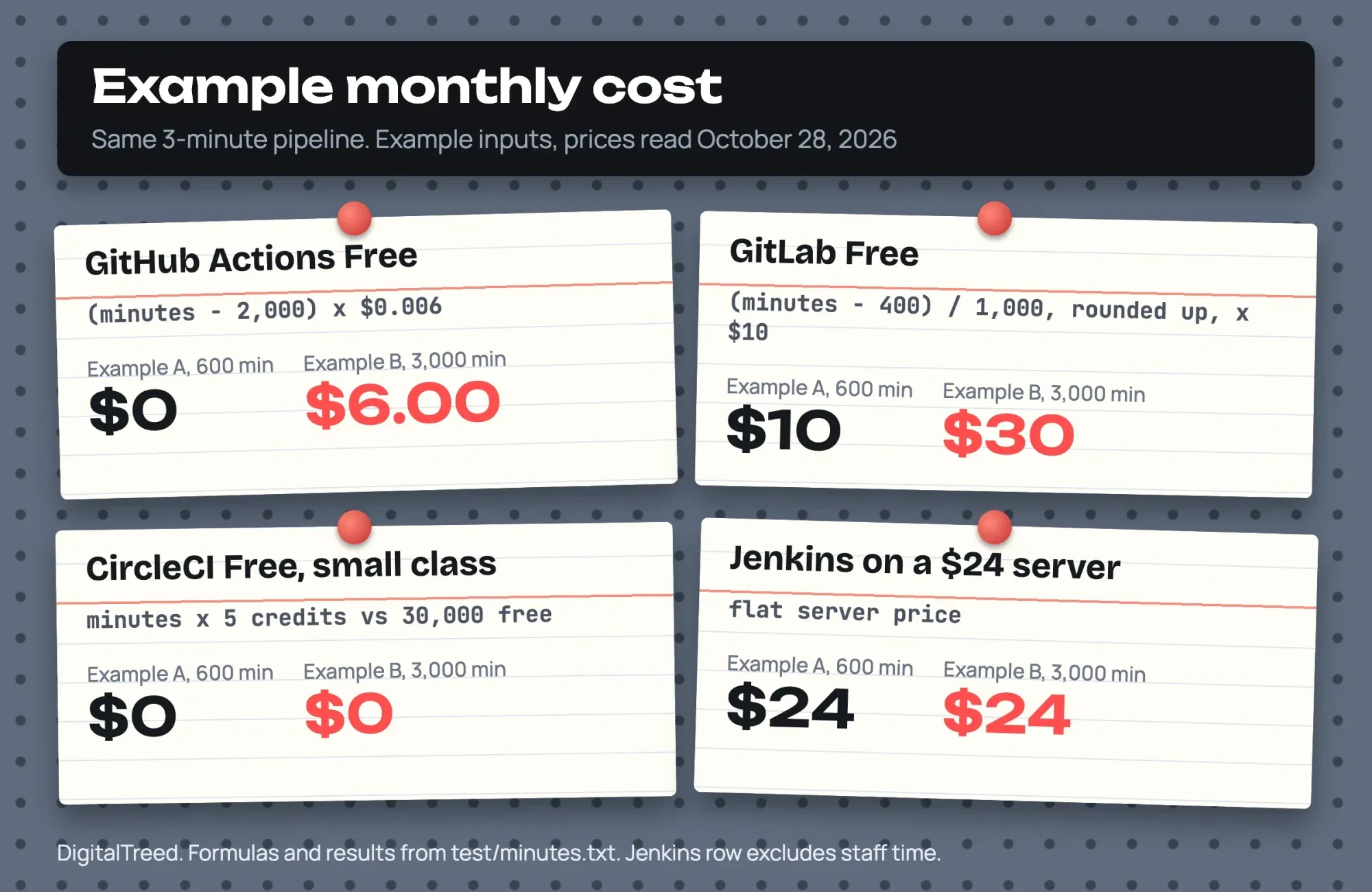 Diagram by DigitalTreed from our cost formulas (test/minutes.txt), example inputs, vendor prices as of October 28, 2026
Only one of those bills, GitLab's $30 in Example B, is higher than a $24 server, and that's where self-hosting comes in.
Self-hosted runners move the bill to your own server
That's what a self-hosted runner does. The service still runs the pipeline, but jobs run on a machine you own or rent, and GitHub says those runners are free to use with Actions. You pay to maintain the machines. You're also responsible for updating the operating system and every other piece of software on them.
GitLab's pricing FAQ says jobs on your own runners don't use compute minutes and are unlimited (GitLab pricing). Its runner docs describe self-managed runners as installed and managed by you. CircleCI doesn't charge per build minute on self-hosted runners, but network egress past the plan allowance costs 420 credits per GB. Its Free plan also runs only 5 self-hosted tasks at once (CircleCI pricing).
Jenkins is the all-in version. It needs Java 21 or later. Its install guide lists 256 MB of RAM as the minimum, but 4 GB+ of RAM and 50 GB+ of drive space for a small team. That's why our cost table used a 4 GiB server, and at $24 a month that's $288 a year ($24 x 12), before anyone's time.
We'd self-host only when the runner can use a machine you already keep running, like an office server. A new server rented just to save minutes won once in our two examples. That was GitLab Free in Example B, where packs cost $30 and the server $24, a $6 monthly saving ($30 - $24). In Example A the server loses everywhere, at $24 against GitLab's $10 and $0 on GitHub and CircleCI. And against GitHub's $6 overage in Example B, it costs $18 a month more ($24 - $6), before anyone's time.
One pipeline, four config files
Whichever runner you use, the pipeline is one file in your repo, so to compare set-up effort we wrote one pipeline four times for a small example PHP project. It lints three PHP files, runs five tests and has a deploy job that runs only on the main branch. The deploy line is a placeholder, since the real command depends on your host.
GitHub reads workflows from the .github/workflows directory in your repo. Here's our file, at 21 non-blank lines:
name: ci
on:
  push:
    branches: [main]
  pull_request:
jobs:
  test:
    runs-on: ubuntu-latest
    container: php:8.3-cli
    steps:
      - uses: actions/checkout@v7
      - name: Lint
        run: for f in src/*.php public/*.php tests/*.php; do php -l "$f"; done
      - name: Test
        run: php tests/run-tests.php
  deploy:
    needs: test
    if: github.ref == 'refs/heads/main'
    runs-on: ubuntu-latest
    steps:
      - run: echo "Deploy step goes here (rsync or your host's deploy command)"
GitLab reads a .gitlab-ci.yml file from the repo root, and the same pipeline came out shortest, at 14 non-blank lines:
stages: [test, deploy]

test:
  stage: test
  image: php:8.3-cli
  script:
    - for f in src/*.php public/*.php tests/*.php; do php -l "$f"; done
    - php tests/run-tests.php

deploy:
  stage: deploy
  image: alpine:3.20
  script:
    - echo "Deploy step goes here (rsync or your host's deploy command)"
  rules:
    - if: $CI_COMMIT_BRANCH == "main"
Its rules line keeps deploy on main, as the if line does in our GitHub file.
CircleCI's file sits at .circleci/config.yml and needs a workflows section to tie the two jobs together, which made it the longest at 29 non-blank lines. A Jenkinsfile is checked into source control like the others, and ours came to 21 lines. There's a catch, though. Its when branch line, which keeps the deploy off other branches, only works on a multibranch Pipeline, per the Jenkins pipeline syntax docs.
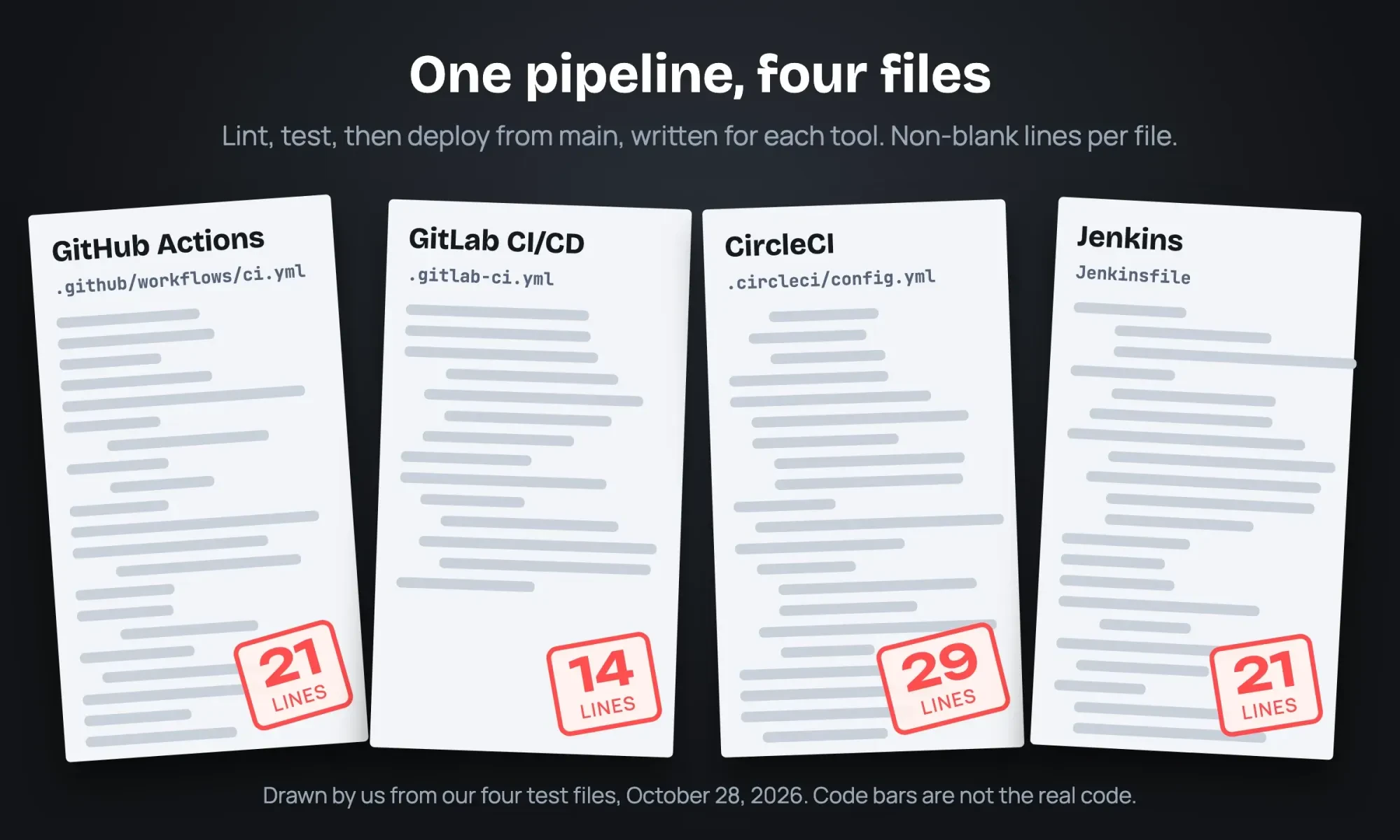 Drawn by us from our four test files (test/site), October 28, 2026
Line counts aren't the whole set-up job, though. Our Jenkinsfile uses agent any, so PHP has to be installed on the Jenkins machine itself. On the hosted three, the file is the bulk of the job once the repo is connected. A Node site would swap the PHP image and commands for Node ones, and our PHP vs Node.js comparison covers that choice. The deploy job automates the launch step in our website development process.
Running the pipeline's commands locally showed the exit code a CI tool acts on.
All 3 PHP files linted clean and 5 of 5 tests passed, with exit code 0, in 0.137 seconds. Then we planted a bug that drops the minus sign from negative amounts in the format_usd function. Our software engineering basics post covers writing tests like these; here the question is what the pipeline does with the result.
That run failed. It gave 4 passed and 1 failed, with format_usd(-500) returning $5.00 instead of -$5.00, and exit code 1. In all four files, deploy starts only after the tests pass, so on a real service that exit code would keep the broken code off the live site. A failed run still costs the minutes it used, and GitHub's own billing example counts a run that fails after 5 minutes as 5 minutes.
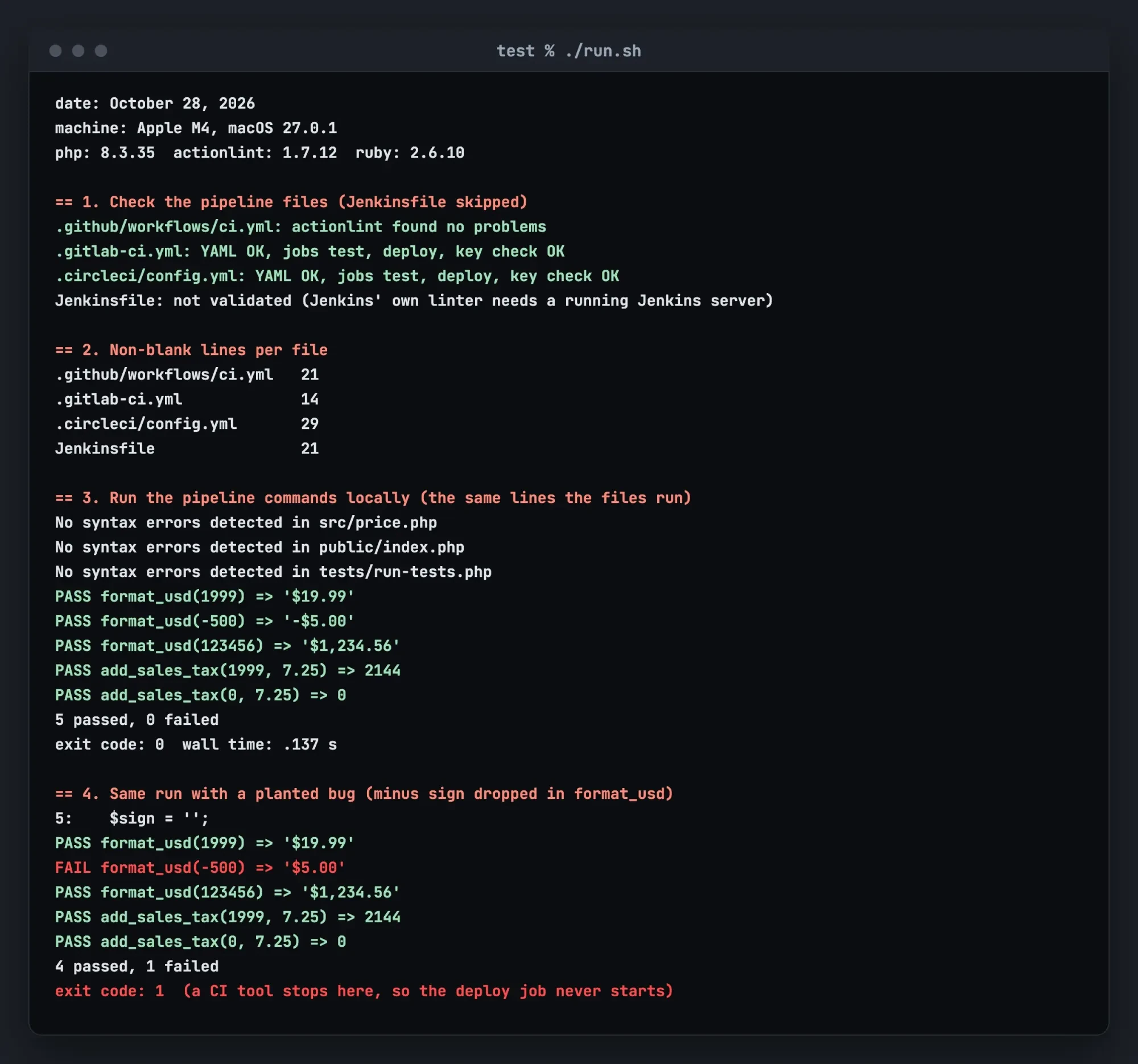 Source: our test output from test/output.txt, word for word, rendered as a terminal page, October 28, 2026
What we tested
We ran test/run.sh on October 28, 2026, on an Apple M4 Mac with macOS 27.0.1, PHP 8.3.35 and Ruby 2.6.10. The actionlint checker, version 1.7.12 and already installed on that Mac through Homebrew, found no problems in the GitHub file. Our own script parsed the GitLab and CircleCI YAML and checked their keys, not with the vendors' own validators, which we didn't install or sign in to. Jenkins' own linter works through a running Jenkins server, so the Jenkinsfile went unchecked, and nothing was pushed to any service.
Which CI/CD tool fits your team
Here's where we'd land for a small team:
- Choose GitHub Actions if your code is on GitHub and your runs fit in 2,000 free minutes, like Example A's 600.
- Choose GitLab CI/CD if your code is on GitLab, and budget $10 per 1,000 minutes past the free 400. Free allows 5 users per top-level group.
- Choose CircleCI if hosted minutes are your limit and you have 5 or fewer active users a month.
- Choose Jenkins if someone will own a server with 4 GB+ of RAM and keep Java and Jenkins updated.
- Keep what you have if your current pipeline works and its bill sits inside the free tier.
Our take: go with the CI tool built into the place your code already lives, because it needs no second account and no repo move. After the first month, compare your real minutes with the free allowance and the formulas in our cost table. Once deploys run on their own, put your key pages through the HTTP status checker on our site after each one to confirm they still return 200. If you're hiring someone to set this up, our full stack developer hiring guide covers rates and tests.
Pipeline set-up is part of what we do for web development clients, and we charge for it. A quote request gets you our price for one pipeline like the one above, and a second bid keeps it honest.
Frequently asked
What happens when GitHub Actions minutes run out?
If no payment method is on file, GitHub blocks usage once the quota is used up, per its Actions billing docs.
When do GitLab compute minutes reset?
On the first day of each month. GitLab's compute minutes docs say usage resets to 0 for all namespaces then.
Is Jenkins really free?
The software is. Jenkins is released under the MIT License, which grants permission to use it free of charge. You still pay for the server it runs on.
Does CircleCI charge a full minute for a short job?
No. CircleCI's credits FAQ says it rounds up to the nearest second first, then up to the nearest credit.
How we made this guide: We wrote one example pipeline in four config files, then ran its commands on a local machine. We checked the GitHub file with actionlint and the GitLab and CircleCI keys with our own script, and left the Jenkinsfile unchecked. Nothing was pushed to any service. Prices come from GitHub, GitLab, CircleCI and DigitalOcean pages, and Jenkins figures from its install and pipeline docs, all read October 28, 2026. Facts checked by the DigitalTreed team on October 28, 2026.
First published August 2020. Rewritten October 28, 2026 as a priced comparison of four CI/CD tools for small dev teams.
Sources
- GitHub Docs: About continuous integration
- GitHub Docs: GitHub Actions billing
- GitHub Docs: Actions runner pricing
- GitHub Docs: Self-hosted runners
- GitHub Docs: Workflows
- GitLab: Pricing
- GitLab Docs: Compute minutes
- GitLab Docs: Runners
- GitLab Docs: CI/CD YAML syntax reference
- CircleCI: Pricing
- CircleCI Docs: Credits
- CircleCI Docs: Configuration introduction
- Jenkins: Home page
- Jenkins: Installing Jenkins (WAR file)
- Jenkins: Using a Jenkinsfile
- Jenkins: Pipeline syntax
- Jenkins: Pipeline development tools
- Jenkins: License
- DigitalOcean: Droplet pricing
- actionlint (GitHub repository)


Comments
No comments yet. Start the conversation below.