

What Ahrefs is, who it's for, and when you don't need it
This guide is for people who know what SEO is and now want to use Ahrefs properly. That means freelancers deciding whether a plan pays for itself, in-house marketers who inherited an Ahrefs login, and business owners who want the free tier without paying for anything they won't open. If you're new to SEO, read SEO for beginners first; this guide assumes you know what a backlink and a keyword are.
By the end you'll be able to set up Ahrefs Free on your own site and read the numbers that matter (DR, UR, KD, traffic potential, referring domains) without being fooled by them. You'll also run five real jobs: find link prospects, find a competitor's content gap, find pages that lost traffic, research keywords for India, and turn a Site Audit into a fix list. You'll also know what each plan costs, how credits run out, and when a free tool (including ours) does the same job.
The chapters run in the order you'd meet the tool. First what it is and how to set it up, then Site Explorer, Keywords Explorer, the rest of the toolset, and Brand Radar for AI visibility. Then come the step-by-step tasks, and finally pricing, pros and cons and alternatives. There's a 10-question quiz and an FAQ at the end. Every price comes from Ahrefs' own pricing page, checked 16 October 2026.[1] Ahrefs lists prices in US dollars only, before tax, even when you open the page from India, so we give rupee figures as estimates.
Quick answer
Ahrefs is an SEO suite built on its own web crawler and backlink index. Use it to study any site's links and rankings, research keywords, audit your site and track positions. If you only manage one small site, Search Console plus the free Ahrefs tier is usually enough. Pay when competitor research earns you money.
Ahrefs started as a backlink checker, and links are still what most people buy it for. It crawls the web with its own bot and stores what it finds: which pages link to which, and which pages rank for which searches. Every report in the tool is built from that data, plus estimates on top of it.
Ahrefs says its backlink index is "updated with fresh data every 15–30 minutes" and that a full refresh of the whole database takes about two months.[2] Those are its own figures, and so are the ones below. Treat them as the vendor describing its product, not as an independent test.
35T
external backlink records in its history, by Ahrefs' count[3]
1.4B
keywords in its India keyword database, 217 locations in all[3]
22.6B
pages in the content index behind Content Explorer[4]
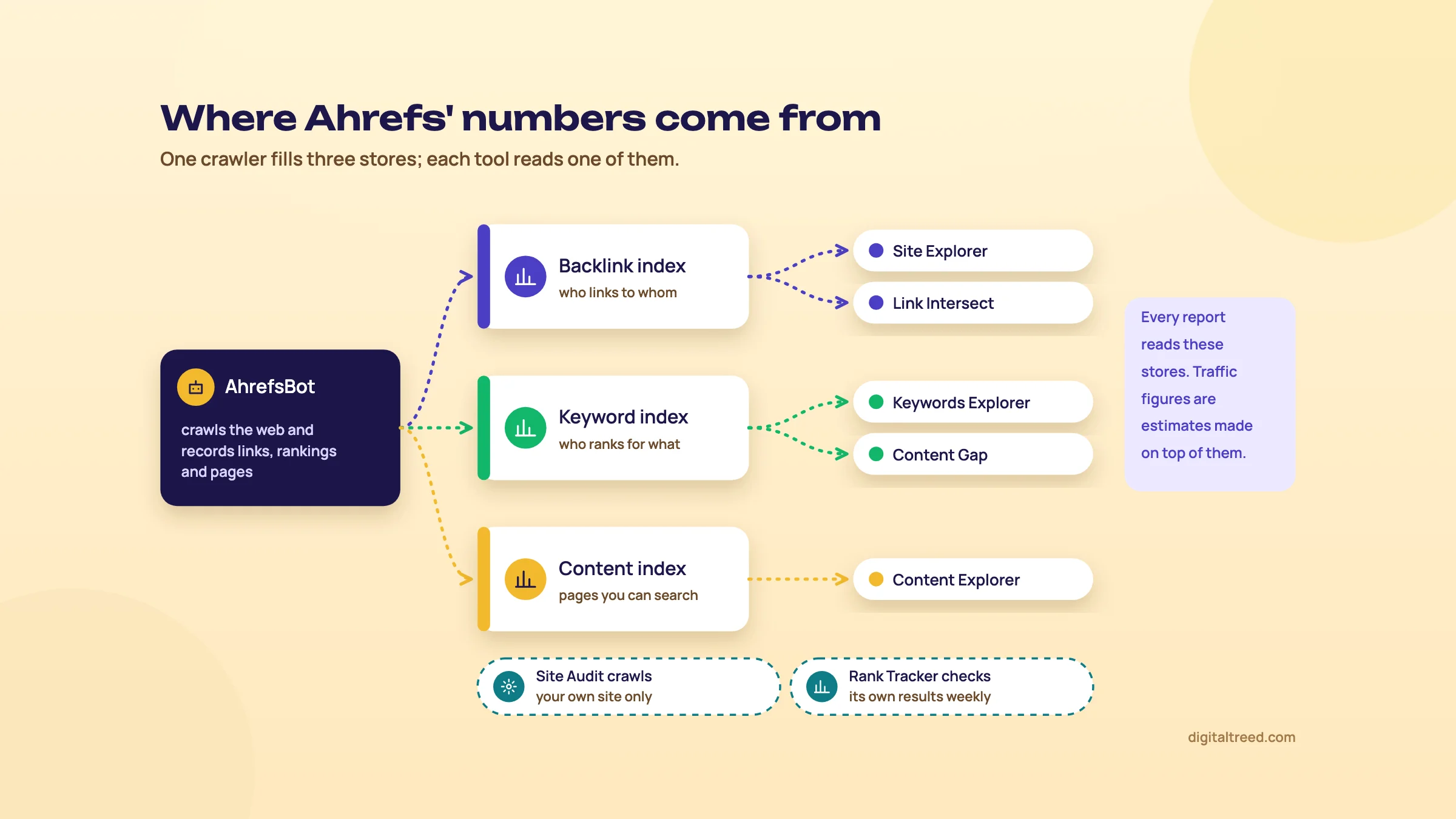 Where Ahrefs' numbers come from. Drawn by us.
The tools inside Ahrefs
The menu has grown a lot. These are the parts an SEO uses week to week, and the chapter of this guide that covers each.
| Tool | What it does | Chapter |
|---|---|---|
| Site Explorer | Backlinks, referring domains, organic keywords and top pages of any site, page or folder | 3 |
| Keywords Explorer | Keyword ideas with volume, Keyword Difficulty, traffic potential and parent topic, by country | 4 |
| Competitive Analysis | Content Gap (keywords) and Link Intersect (links) across up to 10 competitors | 4 and 7 |
| Site Audit | Crawls your site for 170+ technical and on-page issues | 5 |
| Rank Tracker | Weekly positions for a keyword list you choose, by location and device | 5 |
| Content Explorer | A search engine over pages, for content ideas, link prospects and mentions | 5 |
| Web Analytics | Cookieless visitor analytics, including traffic from AI assistants | 2 |
| Brand Radar | How often AI answers mention or cite a brand | 6 |
There's more on the menu (GBP Monitor, Social Media Manager, Report Builder, an AI Content Helper, an API and an MCP server).[1] We leave those out. They're either in beta, sold separately, or not why anyone picks Ahrefs.
Who it's for
- Freelancers and agencies who research competitors' links and keywords for clients every week. This is the core user, and the Standard plan's pitch on the pricing page is "Perfect for freelance SEOs and marketing consultants."[1]
- In-house SEO and content teams who plan content from keyword data and need to see what competitors publish and earn links for.
- Site owners who want a second opinion on their own site for free. Ahrefs Free covers that at no cost.
When you don't need it
For a 20-page local site, such as a Delhi dental clinic or a Kanpur sweet shop, you don't need a paid suite. Your customers search a few dozen phrases, your competitors are the five clinics on the map, and Search Console already shows the searches you appear for. Google's Links report shows who links to you, from a sample of links.[5] Add Ahrefs Free for a proper audit and a fuller link list on your own site, and you're covered at no cost.
Pay when one of these is true:
- You need to see a competitor's links, keywords or top pages, and the free tier only shows sites you own.[6]
- You plan content at scale and need volumes, difficulty and traffic potential for hundreds of keywords at once.
- A client pays you enough that the plan is a small share of the fee. Our career guide gives the same advice: learn a paid suite when a job or client pays for it, not before.
Warning
Every traffic number Ahrefs shows for a site you don't own is an estimate. Ahrefs says so itself: its Organic traffic metric is "an estimation" of clicks from Google, built from the keywords it sees a site ranking for.[7] For your own site, Search Console's numbers win.
Ahrefs and the rest of this path
Ahrefs and Semrush are the two big suites, and they overlap a lot. Our Semrush guide covers the other one, and Ahrefs vs Semrush compares them job by job. For your own site's real Google data, start with Google Search Console; nothing in Ahrefs replaces it.
Next, set up the free tier on your own site. It takes about 15 minutes if your site is already in Search Console.
Setting up Ahrefs Free (formerly Ahrefs Webmaster Tools) and a paid account
Quick answer
Sign up for Ahrefs Free, add your site as a project, and verify it, ideally by connecting Google Search Console. Verified sites get Site Audit (5,000 crawl credits a month each), Site Explorer for your own site (1,000 backlinks and keywords visible at once) and Web Analytics. On a paid plan, set user credit limits on day one.
Ahrefs Free: what the free tier gives you
Ahrefs Webmaster Tools, the old name you'll still see in older guides, is now called Ahrefs Free.[6] It works only on sites you prove you own. Here's what you get on each verified site:
| Tool | Free limit |
|---|---|
| Verified websites | Unlimited |
| Site Audit | 5,000 crawl credits a month per project |
| Site Explorer (your own site) | 1,000 backlinks and 1,000 keywords visible at once |
| Web Analytics | Up to 1 million events per project |
| AI Content Helper | 1 document a month |
| SEO Toolbar | DR and UR only; on-page checks fully available |
Sources: Ahrefs' Free page and its help article on free features.[6] The toolbar row is from the help article.[8]
Two details make the free tier more generous than it looks. Crawl credits are only used on HTML pages that return status 200, so redirects, broken URLs and images don't count.[6] And "1,000 at once" is a view limit: Ahrefs says you can sort and filter the list to pull out the links and keywords that matter. It also says the tools and data are the same as in the paid product; paid plans add higher limits, the premium tools, and the ability to look at sites you don't own.[6]
What you can't do for free: look at a competitor, use Keywords Explorer, or track rankings. Starter ($29 a month) is the first plan that adds those.[9] Chapter 8 compares every plan.
Step 1: create the account and add your site
Sign up from the Ahrefs Free page. On first login, or later from the Dashboard with "+ Create", you get two ways to add a project: import from Google Search Console, or add it manually.[10]
- Import from GSC (our pick). Connect your Google account, select all permissions, tick the sites you want, set Site Audit options, and click Import. Every site already verified in Search Console comes in verified. It also puts your Search Console performance on the Ahrefs Dashboard.
- Add manually. Enter the domain, then choose the protocol and the mode (the whole domain, one subdomain, a folder or a single URL). Ahrefs warns that the wrong mode can give "very different results", so for a normal business site pick the whole domain with subdomains.
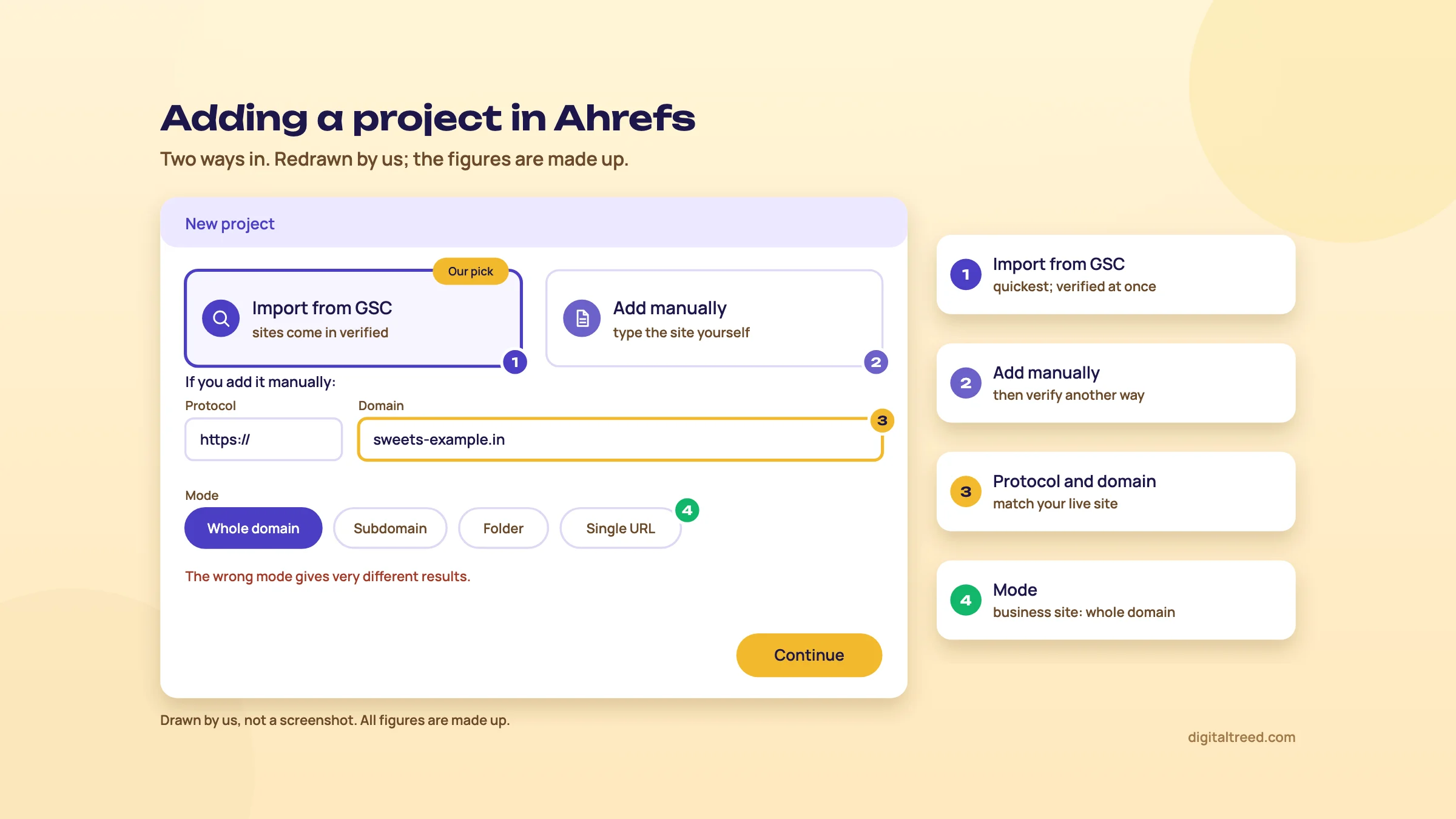 Adding a project: import from Search Console, or add it manually and pick the right mode. Drawn by us; figures made up.
Step 2: verify ownership
Verification is what unlocks the free tools. There are four methods:[11]
| Method | How | Watch out for |
|---|---|---|
| Google Search Console (recommended) | Connect your Google account; sites verified in GSC verify automatically | The project must match the GSC property: www.example.com in one and example.com in the other gives an error |
| DNS record | Add a TXT record at your domain registrar | Can take up to 48 hours to go through |
| HTML file | Upload a file to the root folder | Caching plugins can hide it; the file must stay |
| HTML tag | Add a meta tag to the homepage <head> | The tag must stay; Ahrefs checks it regularly |
If your site isn't in Search Console yet, fix that first; our Search Console guide walks through it. On WordPress, the HTML tag method is usually quickest after that. Paste the tag, then view the page source and search for it to confirm it's there.
One more thing to check if verification or crawling fails: Ahrefs asks you to make sure your site isn't blocking it in any way.[11] Open yoursite.com/robots.txt and look for a group that starts "User-agent: AhrefsBot" with a Disallow line, and ask your host whether a firewall blocks crawlers.
Step 3: the settings to change on day one
- Site Audit schedule. The project set-up asks for a schedule, the URL sources the crawl starts from, and crawl settings.[10] A weekly crawl is plenty for a small site and stays well inside 5,000 credits. If your site runs on JavaScript, turn on the "Execute JavaScript" toggle in the crawl settings. Site Audit can run JavaScript,[12] but the toggle is off by default.[13]
- Rank Tracker location (paid plans). When you add keywords, pick India and, for a local business, the city. Rank Tracker can go from country to city to ZIP code (a PIN code, for us).[14]
- Competitors (paid plans). The last set-up step adds competitors to Rank Tracker. Add the three to five sites you actually lose customers to, not the biggest names in your industry.
- Web Analytics. Paste the script into your site's <head>, or use Google Tag Manager. Ahrefs detects GTM and gives you a matching snippet.[15] It uses no cookies and stores no IP addresses with analytics data,[15] and it shows traffic from AI assistants.[8] It's a decent second opinion next to GA4, not a replacement for your GA4 setup.
- Credit limits (Starter and Lite). These plans run on monthly credits (chapter 8). Workspace admins can set each user's limit in Account settings, Limits and usage. Pay-as-you-go extra credits are off by default.[16] Leave them off until you know your monthly use.
Tip
Install the Ahrefs SEO Toolbar in Chrome or Firefox while you're here. On the free account it shows DR and UR and runs on-page checks (titles, indexability, redirect chains) on any page you open.[8] It's handy when you're looking at a competitor's page and don't want to spend credits.
If you bought a paid plan
Everything above still applies, and verified projects stay free to add on every plan: the limits only count unverified projects (1 on Starter,[17] 5 on Lite, 20 on Standard, 50 on Advanced).[1] So verify every site you own, and keep the unverified slots for clients' and competitors' sites. Verified projects also get extra allowances, including 5,000 more crawl credits each and 500 credits that can only be spent inside verified projects.[18]
Each plan includes one user. Don't share one login across a team: Ahrefs' help centre says shared access breaks its terms and can get the account blocked, and asks you to buy extra seats instead.[19]
With the project verified, open Site Explorer on your own domain. That's the next chapter.
Site Explorer: DR, UR, backlinks, organic keywords and top pages
Quick answer
Site Explorer shows any site's backlinks, referring domains, organic keywords and top pages. DR and UR score link strength from 0 to 100, relative to other sites. Organic traffic is an estimate built from rankings, volume and click rates. Use the numbers to compare sites with each other, not as facts about any one site.
Type a domain, a folder or a single URL into Site Explorer and pick the scope. The Overview gives you the headline numbers; the left menu lists the reports. On Ahrefs Free you get these reports for your own verified sites: Overview, Backlinks, Referring domains, Anchors, Organic keywords, Organic positions, Top pages, Organic competitors, the paid search reports, Best by links, Crawled pages and the internal link reports.[8] Paid plans open the same reports for any site, and Standard adds a few more, such as Broken backlinks, Outgoing links and Linking authors.[1]
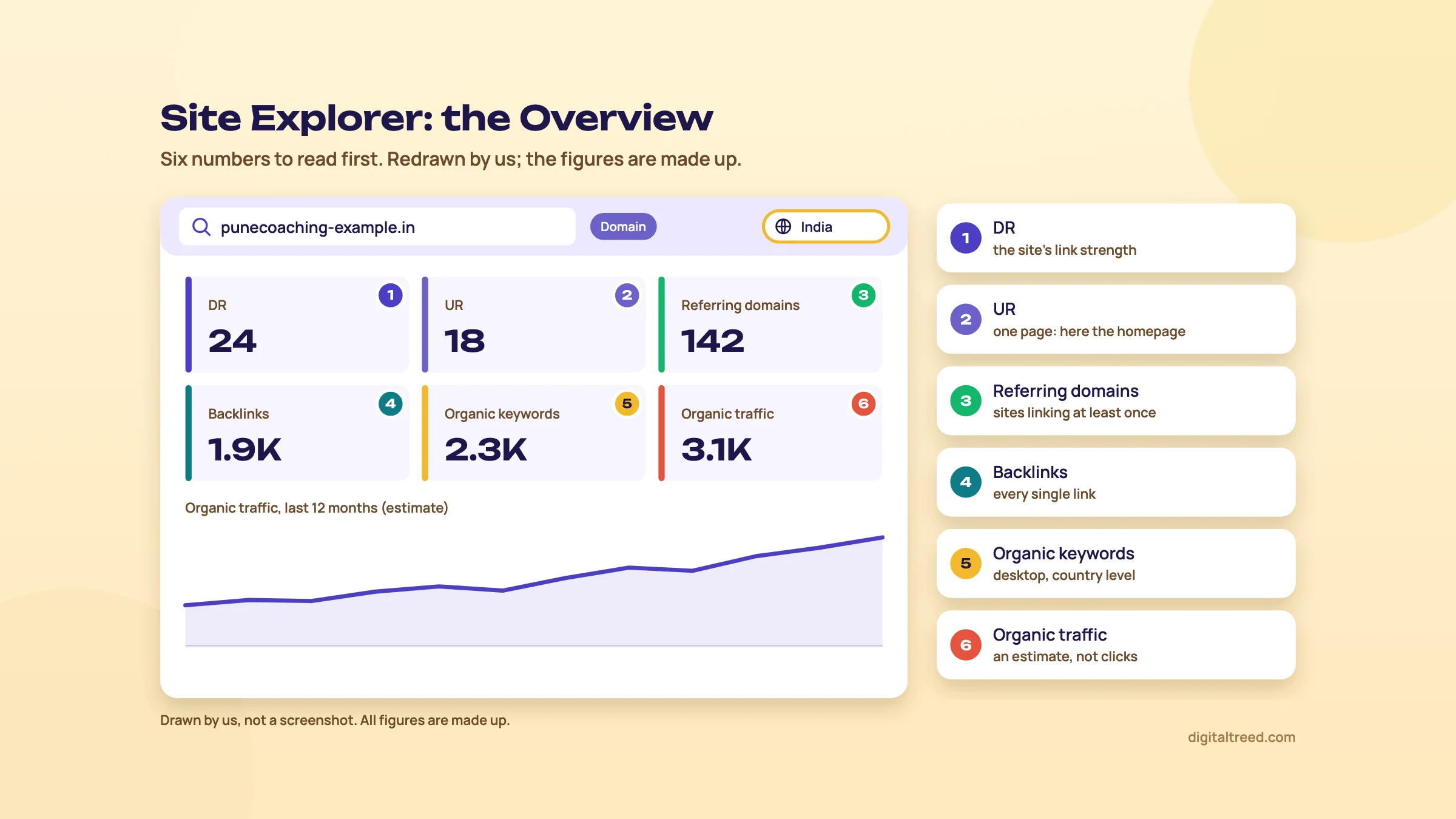 Site Explorer's Overview: the six numbers to read first. Drawn by us; figures made up.
Domain Rating (DR)
DR is the strength of a whole site's backlink profile compared with every other site in Ahrefs' database, on a 0 to 100 scale.[20] Two details explain most of the confusion around it:
- Links are shared out. A linking domain splits its rating equally among all the domains it links to. So a DR 10 site that links to three sites can move your DR more than a DR 80 site that links to a million.
- It's relative. When big sites gain links, everyone else gets pushed down the scale. Your DR can drop without you losing a single link.
Ahrefs itself says you can't call a DR of 30, 50 or 70 "good" in absolute terms; it's good if it's comparable to similar sites.[20] We'd go further. DR isn't a Google metric, and as Guide 1's myths chapter explains, no third-party authority score is the number Google uses. Use DR to compare a few sites in the same niche and to shortlist link prospects. Never use it as a client's KPI, and never buy a link because of it.
URL Rating (UR)
UR is the same idea for a single page: the strength of that page's link profile, 0 to 100.[21] It counts internal and external links, respects nofollow, and follows the basic PageRank principles. The scale is logarithmic, so going from UR 20 to 30 is much easier than from 70 to 80. If you put a domain into Site Explorer, the UR you see belongs to the homepage only.
Ahrefs says UR tracks Google rankings better than DR does.[20] That makes sense: Google ranks pages, not domains. When you compare your page with the pages above it, look at UR and referring domains to that page, not DR.
Backlinks and referring domains
A backlink is one link from another site. A referring domain is a site that links to you at least once.[22] Ten links from one newspaper count as ten backlinks but one referring domain. Watch referring domains. Backlink totals jump around with sitewide links in footers and sidebars, and they tell you little.
Ahrefs' own research, cited in its help centre, found that the vast majority of pages without any referring domains get no traffic from Google. More referring domains went with more search traffic.[22] That's a vendor study showing a correlation, not proof that links cause traffic. Our link building chapter covers which links are worth earning.
The reports you'll use most:
- Referring domains: who links to the site, sortable by DR and traffic. Start every link review here.
- Backlinks: each link, with anchor text and type (dofollow, nofollow, UGC, sponsored). Switch on "one link per domain" to cut the noise; it costs one extra credit on credit-based plans.[23]
- Best by links: the site's pages ordered by links. On a competitor this is a list of content that earns links.
- Anchors: the words other sites use to link. A natural profile is mostly brand names and URLs. A profile full of exact-match anchors like "best dentist in Delhi" is a warning sign.
Organic keywords and organic traffic
An organic keyword is a search where the site shows up in Google's results.[24] Ahrefs fills this report itself, from the keywords in its database. Three limits matter:
- It undercounts. Ahrefs says the number is almost always smaller than the real one, because its database doesn't hold every search.[24]
- It's desktop data, by country. The Organic keywords report shows desktop rankings only, and locations only at country level.[25] A local business cares about phone searches in one city. For that, you need Rank Tracker (chapter 5) or Search Console.
- Positions update at different speeds. Popular keywords are rechecked often, sometimes several times a day; low-volume ones as rarely as once in one or two months.[26]
Organic traffic is built on top of that: for each keyword, Ahrefs takes the site's position, the search volume and its estimated click rate for that position, and adds it all up.[7] Ahrefs says to treat it as "precisely that: estimations", and that it works best for comparison. India matters here too. Ahrefs' traffic index covers about 30 million keywords for India against 140 million for the United States,[3] so estimates for Indian sites rest on a smaller sample.
Traffic value is the cost of that estimated traffic if you bought it through Google Ads, worked out from each keyword's CPC.[27] It's a quick way to show a client that their "boring" service pages bring the valuable visits. It isn't revenue.
Warning
Don't put Ahrefs traffic estimates for your own site in a client report. Search Console has the real clicks. Ahrefs answers a different question: how does this site compare with its competitors, which Search Console can't see.
Top pages and organic competitors
Top pages lists a site's pages in order of the estimated organic traffic they bring.[28] On a competitor, it's the quickest view of what's working for them. Since a 2020 update it has also had a comparison mode: pick a previous month or year and you see traffic, keyword and position changes for each page.[29] Chapter 7 uses this to find pages that lost traffic.
Organic competitors lists sites that rank for many of the same keywords. Expect surprises: for an Indian coaching centre, the "competitors" can turn out to be education portals and news sites, not the other institute on your street. Those portals are worth studying for content ideas, but they aren't who you pitch against.
What each number tells you, and what to do
| Metric | What it is | What to do with it |
|---|---|---|
| DR | Site-wide link strength, relative, 0-100 | Compare with direct competitors; shortlist link prospects; never a KPI |
| UR | One page's link strength, 0-100 | Compare your page with the pages that outrank it |
| Referring domains | Sites linking at least once | Track month on month; compare with the pages above you |
| Organic keywords | Searches Ahrefs sees the site ranking for (desktop, country level) | Find topics competitors rank for; check Search Console for your own |
| Organic traffic | Estimated monthly Google clicks | Compare sites and spot trends; don't report it as real traffic |
| Traffic value | Ads cost of that traffic | Show which pages bring valuable visits |
Next: Keywords Explorer, where the same data is turned around so you start from a search instead of a site.
Keywords Explorer: KD, traffic potential, parent topic and the India database
Quick answer
Keywords Explorer gives keyword ideas with volume, Keyword Difficulty (KD), traffic potential and parent topic for a country you choose. Set it to India. KD only counts the links to the top 10 pages. Traffic potential and parent topic tell you whether a keyword needs its own page or belongs inside a broader one.
Keywords Explorer starts on the Starter plan; the free tier doesn't include it.[9] Type one or more seed keywords, pick a country and a search engine, and you get an Overview of each keyword plus reports full of ideas. Our keyword research chapter explains the method (intent, traffic potential, difficulty and business potential). This chapter is about reading Ahrefs' version of those numbers.
Set the country to India, every time
Volumes, KD and the results Ahrefs reads are all per country. Ahrefs covers 217 locations, and its India keyword database holds about 1.4 billion keywords, fourth in its list after the US, Brazil and the UK.[3] If you research in the default United States database, you'll plan content around American searches.
Indian searches mix English with Hindi and other languages, often typed in Latin script. How India searches covers why that splits demand across many spellings. In Ahrefs, that means checking the variants one by one, or as a batch: you can paste up to 10,000 keywords at once, and on credit-based plans that costs a single credit.[23]
Search volume
Volume is how many times a month, on average over the last 12 months, people in the chosen country search the keyword.[26] Hover over the trend chart to see single months, which matters for anything seasonal (sweets before Diwali, coaching before exam season).
Every tool's volume is an estimate. Ahrefs builds its numbers from Google Keyword Planner, Google Trends data and other third-party sources.[30] In its own study, comparing estimates with Search Console impressions, Ahrefs found its volumes roughly accurate for 60% of the keywords studied, against 45% for Keyword Planner. That's a vendor testing itself, so read it as "directionally accurate", which is how Ahrefs describes it. Volume and CPC are refreshed at least once a month.[26]
Keyword Difficulty (KD)
KD estimates how hard it is to reach Google's top 10 for a keyword, from 0 to 100. Ahrefs calculates it from the number of referring domains pointing at the current top 10 organic results, and it ignores on-page factors.[31] So KD is a link-difficulty score. It can't see that the top results are thin, out of date, or the wrong format for the search.
- Use it, as Ahrefs suggests, as a "first filter" to drop keywords that are out of reach and to order the rest.
- A grey KD is a cached score: the results haven't been rechecked for 20 days or more.[31] For a keyword you're about to write for, refresh it. On paid plans the Update button uses your monthly SERP updates.
- Look at the actual results before you trust a low KD. When the top 10 for a local search is full of directories such as Justdial, KD reflects the directories' links. It can read "hard" for a search where a good local page with reviews might still break in.
Traffic potential and parent topic
These two are why many people pick Ahrefs over cheaper keyword tools.
Parent topic answers "can I rank for this keyword with a broader page?" Ahrefs takes the page ranking first for your keyword and finds the search that sends that page the most traffic. That search is the parent topic.[32] If "jee coaching fees in pune" has the parent topic "jee coaching in pune", Google is happy to answer both with one page. Write one strong page, not two thin ones.
Traffic potential is the estimated organic traffic of the page currently ranking first for the parent topic.[33] It's usually bigger than the keyword's own volume, because a top page ranks for hundreds of related searches. Ahrefs shows it only for the parent topic, not for every keyword in a list.
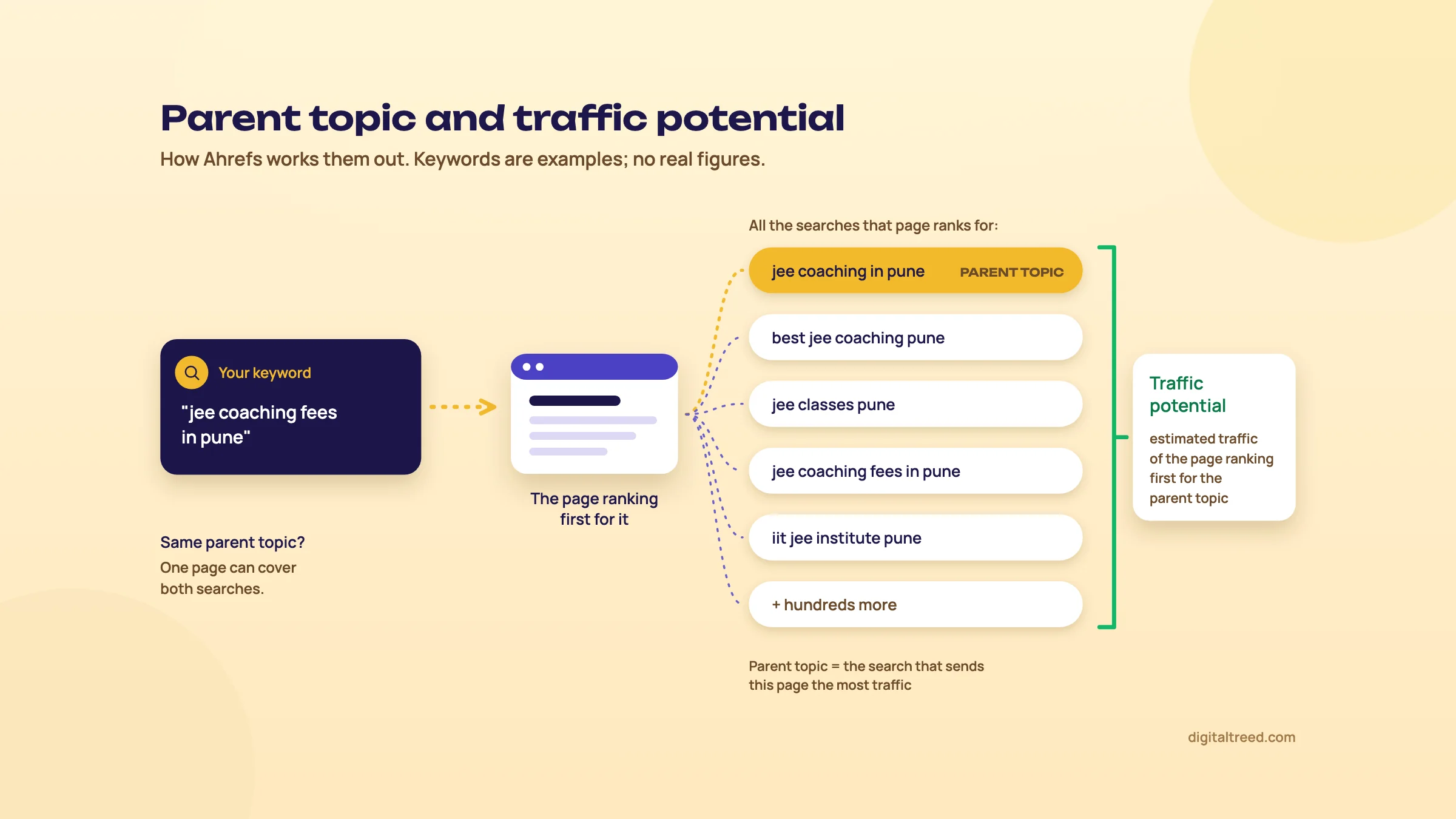 How Ahrefs works out parent topic and traffic potential. Drawn by us; keywords are examples.
Two limits. Only keywords whose results Ahrefs updates regularly have a parent topic. And grouping a list by parent topic (keyword clusters) needs the Standard plan or higher.[32] On Lite or Starter you can still add the Parent topic column and sort by it.
The ideas reports
Ahrefs says Keywords Explorer has six report types for finding ideas.[34] Its help centre groups them into three reports: Matching terms (with Terms match, Phrase match and a Questions toggle), Related terms (Also rank for and Also talk about) and Search suggestions.[35] The free Keyword Generator on ahrefs.com uses its own labels, such as "Having same terms".[36] For a local business, the Questions toggle is the useful one: it's a ready list of FAQ and blog topics. "Also rank for" shows what the top pages rank for, which is often the best guide to what a page should cover.
Search intent labels, AI keyword suggestions and translations are on Standard and above.[1] You can judge intent yourself by looking at the results, as our keyword chapter shows.
Content Gap: keywords your competitors have and you don't
Content Gap sits under Competitive Analysis. Choose the Keywords option, enter your domain (or one URL with "Exact URL"), add up to 10 competitors, and click "Show keyword opportunities".[37] You get the keywords they rank for that you don't, with filters for country, KD, traffic and positions. Competitive Analysis needs Lite or higher; Starter doesn't include it.[9] Chapter 7 runs a full Content Gap for a D2C brand.
Tip
Keywords Explorer costs credits on Starter and Lite: one for opening a report, one more each time you apply filters or change dates.[23] Opening the same report with the same settings within 30 minutes is free. Plan your filters before you click "Show results".
Next: the tools that look after your own site, and the one that searches everyone else's content.
Site Audit, Rank Tracker and Content Explorer
Quick answer
Site Audit crawls your site for 170+ issues and is free on verified sites. Rank Tracker checks positions for your chosen keywords weekly, down to a city, on mobile and desktop, from the Starter plan. Content Explorer searches about 22.6 billion pages for content ideas, link prospects and mentions, and needs Standard or higher.
Site Audit
Site Audit crawls your pages and flags technical and on-page problems: slow pages and Core Web Vitals, titles and meta descriptions, H1s, duplicates, indexability, redirects, links, images, JavaScript and CSS, robots.txt, sitemaps, structured data, localization (hreflang) and more. Ahrefs counts 170+ issues, grouped as errors, warnings and notices, each with fixing instructions.[12] It can execute JavaScript, pulls Chrome UX Report and Lighthouse speed data, and suggests internal links. You can export every issue as a CSV or ZIP to hand to a developer.
How much it crawls depends on the plan. Only internal HTML pages that return 200 use crawl credits.[18]
| Plan | Crawl credits a month | Max pages per project |
|---|---|---|
| Ahrefs Free (verified sites) | 5,000 per project | (bounded by the credits) |
| Lite | 100,000 | 25,000 |
| Standard | 500,000 | 50,000 |
| Advanced | 1.5 million | 250,000 |
Sources: pricing page for paid plans,[1] Ahrefs Free page for the free tier.[6] Verified projects get their own 5,000 credits on every plan, on top of these.
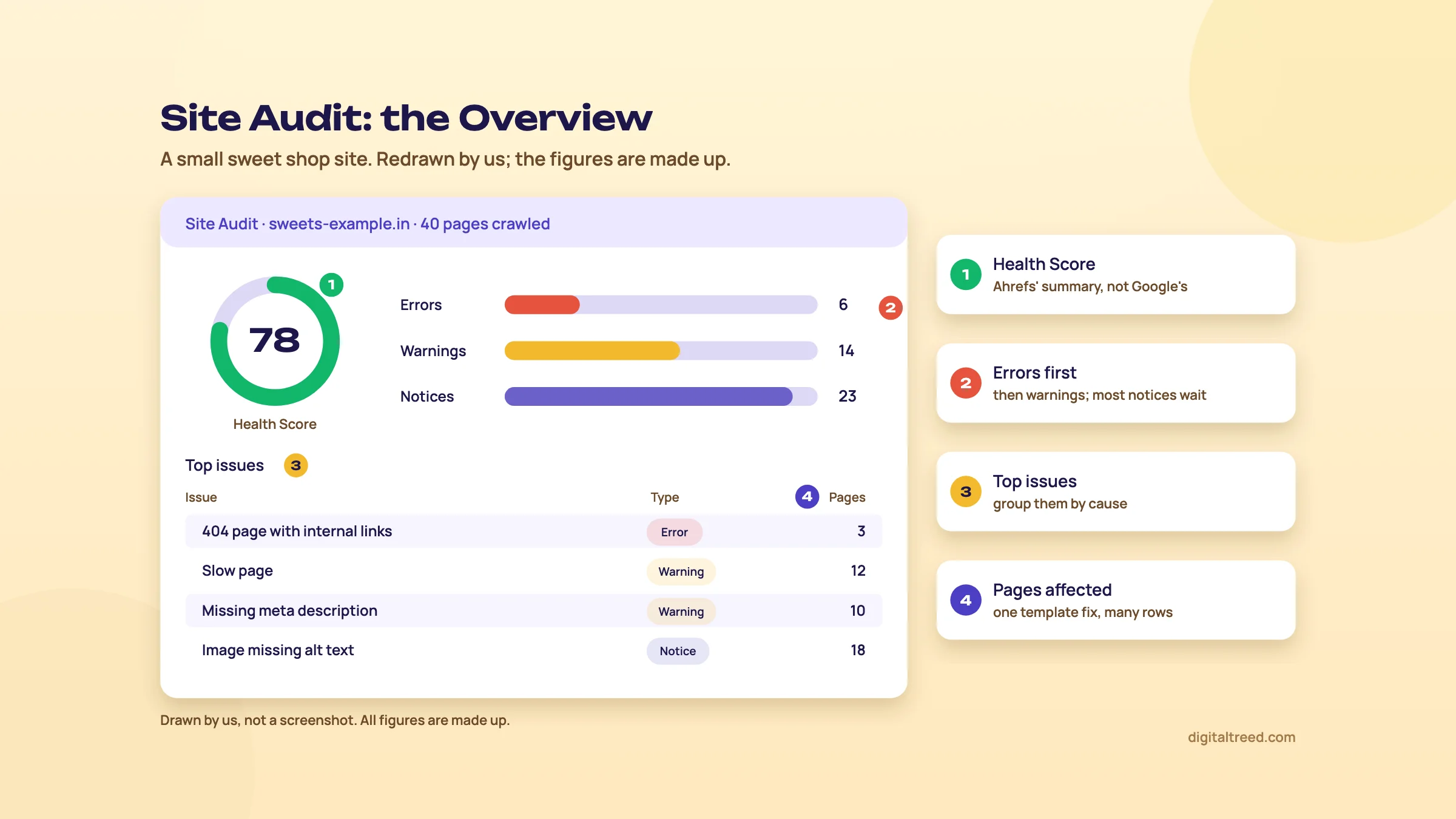 A Site Audit Overview: read errors first and group issues by cause. Drawn by us; figures made up.
How we'd read a Site Audit:
- Start with errors that affect indexing: 4xx pages that still have internal links, noindex on pages that should rank, broken redirects, canonicals pointing at the wrong URL.
- Then the issues that touch many pages at once, usually a template problem (missing H1 on every product page, a duplicate title pattern). One theme fix clears hundreds of rows.
- Leave most notices. They're information, not problems.
Don't chase a Health Score of 100. It's Ahrefs' summary, not Google's, and the last few points are often notices that make no difference to rankings. Our full SEO audit chapter covers the order of work in detail, and our own tools check single URLs fast when you want to confirm a fix:
It checks up to 10 URLs at once and shows the full redirect chain and response headers, so you can confirm a redirect or 404 fix without waiting for the next crawl.
Rank Tracker
Rank Tracker checks where your pages rank for a keyword list you choose. It isn't on the free tier. Starter tracks 50 keywords, Lite 750, Standard 2,000 and Advanced 5,000.[17] The pricing page lists those three paid tiers too.[1]
- Updates are weekly on every plan by default.[38] We think that's fine for SEO; in our view, daily checks mostly show Google's normal day-to-day wobble.
- Location goes down to a city or ZIP code, on mobile and desktop.[14] This is the fix for Site Explorer's desktop-only, country-level view (chapter 3).
- It records 19 SERP features, including AI Overviews, local packs and People also ask, so you can see when an AI Overview appears above your result.
- Competitors: compare with up to 10, with share of voice and position groups (1-3, 4-10, 11-20 and so on).
- History: you can import past rankings from Site Explorer when you add keywords. Those come from desktop data in your main location only.[25]
Rank Tracker and Search Console answer different questions. Search Console's average position is an average across every search you appeared for. A tracker gives one position, for one keyword, in one place, once a week. Our measuring chapter explains how to use both without mixing them up.
Content Explorer
Content Explorer is a search engine for marketers: type a topic, and it searches Ahrefs' content index of about 22.6 billion pages, with filters for traffic, Domain Rating, referring domains, language, author, word count, publication date and page status.[4] It's on Standard and above, not Lite.[1]
It has two modes. All pages searches the whole index and suits content ideas and link prospects. News searches a list of approved news sites and adds a pages-over-time chart, which suits PR and tracking brand mentions.[39]
Three jobs it does well:
- Unlinked mentions. Search your brand name, then check which pages mention you without linking. A polite email asking for a link is an easier conversation than cold outreach, because they already know you.
- Low-competition topics. Filter for pages with good organic traffic and few referring domains. Those topics can rank without many links.
- Broken link building by topic. Ahrefs keeps an index of 404 pages, so you can find dead pages in your niche that still have links, then offer your page as the replacement.[4]
Note
On Lite you can get most of this from Site Explorer instead: the Best by links report on a competitor shows their most linked pages, and Link Intersect (chapter 7) finds sites that link to your competitors. Content Explorer is a reason to move up to Standard, not a reason to start there.
Next: Brand Radar, Ahrefs' tool for AI answers, and what it costs.
Brand Radar and AI visibility in Ahrefs
Quick answer
Brand Radar tracks how often AI answers mention or cite a brand. Lite and higher plans include a few custom prompts (5 on Lite, checked daily on one platform). The AI Visibility Index, covering 481 million+ modelled prompts, costs $199 a month per platform or $699 for all. Small Indian brands should start with the free reports instead.
Brand Radar is Ahrefs' answer to "does ChatGPT recommend us?" It runs prompts through AI platforms, stores the answers, and counts which brands and pages appear. Our GEO guide's measuring chapter sets out the free ways to measure AI visibility; this chapter covers what Ahrefs adds and what it charges.
What it covers
The platforms are Google AI Overviews and AI Mode, ChatGPT, Perplexity, Gemini and Copilot. Grok is listed, but Ahrefs says it currently can't collect new Grok data. Claude can be tracked with custom prompts only, and each Claude check uses 8 checks.[40] Brand Radar also reports search demand, web mentions, and, in beta, YouTube, Reddit and TikTok.
It works in two ways:
| Custom prompts | AI Visibility Index | |
|---|---|---|
| What it is | Questions you write, checked on the platforms you choose | 481 million+ prompts Ahrefs has already run, searchable for any brand |
| Best for | Small or new brands, niche questions | Established brands, benchmarking against competitors |
| Included in plans | Lite 5 prompts, Standard 10, Advanced 20 (daily, 1 platform) | No |
| Price to add | Packages from $50 a month | $199 a month per platform; $699 for all platforms |
Sources: Brand Radar page and help centre.[41] The per-platform and all-platform prices are from the help article.[40]
The plan allowance is counted in checks. One check is one prompt, run once, on one AI platform, in one location. Lite includes 150 checks a month, Standard 300, Advanced 600.[42] Five prompts checked daily on one platform use 150 checks, so Lite's allowance is used up by that. Check weekly instead of daily and the same allowance covers more prompts. Starter gets no custom prompts.
If you need more, there are prompt packages: Basic at $50 a month for 2,500 checks, Growth at $100 for 7,000, and Scale at $250 for 25,000. Extra checks cost 2, 1.5 and 1 US cent each.[1]
The metrics, and how much to trust them
Brand Radar reports four main numbers: mentions (your brand named in the answer text), citations (a link to your pages), AI share of voice (your share of mentions and citations against competitors within a topic set), and estimated impressions.[41]
The index prompts aren't real chats people typed. Ahrefs takes keywords from its database, expands them into questions using People also ask and "semantic fanout", runs them on each platform, and re-tests question sets monthly on a 90-day window.[41] The prompts run without a logged-in user or past context. Real users, with chat history and personal settings, may see different answers.[40]
The demand figure is modelled too. Since 31 August 2026, "AI adjusted volume" has been the Google search volume of the prompt's parent keyword multiplied by a ratio for each platform, which Ahrefs derives from AI-referred traffic across sites it measures.[43] No AI company publishes prompt volumes. These are Ahrefs' estimates, as our GEO guide warns about all such numbers.
In Ahrefs' own worked example, a ChatGPT prompt shows a volume of 150 because its parent keyword had 1,296 Google searches in a month, times 0.115.[43] That's useful for ranking prompts against each other. It isn't a count of anything.
Who should pay for it
Ahrefs says the index "may have limited coverage for brands with little or no search volume".[41] That describes most Indian small businesses. A Kanpur sweet shop or a Delhi dental clinic is likely to find little about itself there, and $199 a month (about ₹19,104) would buy a mostly empty report.
Our order:
- Free first. Search Console's generative AI report, Bing's AI Performance report, AI referrals in GA4, and a monthly manual prompt log, all set out in our GEO guide. Ahrefs' Web Analytics also shows traffic from AI assistants free, and its Bot Analytics shows AI crawlers, free while in beta.[41]
- The free AI Visibility Checker on ahrefs.com gives a limited preview: total AI mentions, mentions by platform, and the top 5 topics, cited domains and cited pages for a brand.[44] Run it once for your brand and two competitors.
- If you already pay for Lite, use the included custom prompts on your five most important buyer questions, checked weekly across several platforms.
- Buy the index only for a brand with real search demand, or for a client paying for monthly AI visibility reporting.
Before you measure anything, check that AI crawlers can reach your site. Our checker tests GPTBot, ClaudeBot, PerplexityBot and more than 100 other bots against your robots.txt. A site that blocks the search crawlers won't be cited, and no tracker will tell you why.
Next: five real jobs, step by step.
Five jobs in Ahrefs, step by step
Quick answer
Five jobs cover most of what people pay Ahrefs for: link prospects, a competitor content gap, pages that lost traffic, keyword research for India, and a Site Audit fix list. The first two need Lite or higher and keyword research needs Starter. The lost-traffic and Site Audit jobs work on Ahrefs Free for your own site.
The businesses below are examples, and the steps use Ahrefs' menu names from its help centre. Menus change, so if a label has moved, search the help centre for the report name.
1. Find link prospects for a Delhi dental clinic
Sites that link to two or three of your competitors are the most likely to link to you: they already cover your topic. Link Intersect finds them. It's under Competitive Analysis and is on Lite and every higher plan,[1] so not on Starter.[9]
Link prospects with Link Intersect
- Pick three to five real competitors Clinics in your part of Delhi that rank for the searches you want, not national chains. Check them in Site Explorer first; a competitor with five referring domains won't give you many ideas.
- Open Link Intersect Competitive Analysis in the top menu, then Link Intersect. Choose Referring domains.[45]
- Enter your domain and the competitors Your site as the target, up to 10 competitor URLs below. Click "Show link opportunities".
- Keep sites that link to at least two competitors Use the lower set of filters, where you choose which competitors the links must come from.[45] One competitor's link can be a paid listing; two or three suggest a site that covers dentists in your area.
- Filter out the noise In the upper filters, set a minimum traffic, so you skip sites nobody visits. Don't set a high minimum DR: a local health blog or a Delhi residents' association site with DR 15 can be worth more to a clinic than a global directory.
- Vet each prospect by hand Ahrefs' own checklist: is the site relevant to yours, does it get organic traffic, does it link out to lots of sites, and is it publishing good content?[20] Drop anything that sells links.
- Export and plan the ask Export to a sheet (Starter can't export; Lite can export 500,000 rows a month).[17] Group prospects by why they linked: a list of clinics, a resource page, a news story. Each group gets its own pitch.
Note
From our work: a global sports platform and networking community already had good technical SEO, but its posts linked to no outside sources, so nothing showed where their facts came from, and its earlier link building had used spammy tactics. We added sourced sports statistics to the posts. Collaboration requests brought contextual links and brand mentions, and traffic rose 60%. Lesson: give other sites something worth linking to.
Our link building chapter covers what to send and what gets you penalised. When you write the outreach email and want to show a site owner the exact link you're suggesting, our Hyperlink Generator makes the HTML for them.
2. Run a content gap for a D2C brand
Say you sell handmade block-print kurtas online from Jaipur. Three competing D2C brands get far more search traffic than you. Content Gap shows the searches they rank for and you don't.
Competitor content gap
- Open Content Gap Competitive Analysis, then Content Gap, with the Keywords option selected.[37]
- Enter your site and up to 10 competitors Use "Exact URL" if you want to compare one category page with theirs. Click "Show keyword opportunities".
- Set the location to India and use the upper filters for KD and traffic. Start with KD under 20 and some volume, so the first list is winnable.
- Set position ranges With the lower filters, keep keywords where at least two competitors rank in the top 10. One competitor ranking can be luck; two or three means the topic is real.
- Click an overlap Clicking an intersecting section between two sites shows the gap between just those two.[37]
- Sort into page types Product and category searches ("block print kurta set") go to category pages; questions ("how to wash block print cotton") go to blog posts or care guides. Paste a few into Keywords Explorer and check the parent topic, so one page covers each group.
- Write a brief for each page Look at the ranking pages, note what they cover, and plan something better. Our content brief chapter has the template.
Note
From our work: a perfume brand had a slow WordPress site that hurt crawling and indexing. With the developer we moved to a lighter theme, added a caching plugin and optimised images; we wrote blog posts based on competitors' topics and synced products to Google Merchant Center. Results came in 5-6 weeks, including organic orders. Lesson: competitors' topics only pay off once Google can crawl your pages properly.
3. Find the pages that lost traffic
For your own site, Search Console has the real clicks, so start there. Ahrefs adds the "why": which keywords dropped and who took the spot. This works on Ahrefs Free for a verified site.
Find and diagnose pages that lost traffic
- Confirm the drop in Search Console Performance, then compare the last 3 months with the same period last year, Pages tab. Note the pages with the biggest click loss. Comparing with last year stops festival seasons and exam months from fooling you.
- Open Top pages in Ahrefs Site Explorer on your domain, country India, then Top pages.
- Turn on comparison The compare filter, added in 2020, lets you pick a previous month or year and shows traffic, keyword and position changes per page.[29] Sort by the traffic change.
- Open the page's keywords For each losing page, look at which keywords fell and to which position. Click through to the SERP and see who is above you now.
- Name the cause A competitor with a better page; a new AI Overview or other feature pushing results down; a second page of yours competing for the same search; or a technical change. Check the last one fast with our HTTP Status Checker: a page that now redirects or returns 404 explains everything.
- Fix in order Technical problems first, then refresh the content. Our content refresh chapter covers what to change.
For a competitor, the same Top pages comparison tells you which of their pages are slipping, which can be the topics worth attacking now. On Standard and above, Site Explorer also has a Calendar view of day-by-day changes.[1]
4. Keyword research for a Pune coaching centre
A JEE and NEET coaching centre in Pune wants a page for each course and a few blog posts parents and students will actually search for.
Keyword research in the India database
- Set Keywords Explorer to India Every time; the default may be another country.
- Enter seeds "jee coaching pune", "neet coaching pune", "jee coaching fees", "best coaching for jee". Seeds describe what you offer, not your brand name.
- Open the ideas reports Use Matching terms in Phrase match mode for course and location searches, and its Questions toggle for blog ideas ("is jee coaching necessary for class 11").
- Add the Parent topic column Keywords with the same parent topic belong on one page. If you're on Standard, group by parent topic instead.[32]
- Check KD and the results Use KD as a first filter, then look at the actual top 10. If it's all national portals, a page targeting a Pune area name ("jee coaching in kothrud") may be the better first target.
- Save a list Starter allows 5 keyword lists of up to 100 keywords each; Lite allows 50.[17]
- Map and schedule One row per page: target keyword, parent topic, traffic potential, page type, priority. Our keyword chapter's business-potential score (0 to 3) decides the order.
When the page is written, check that the main phrase and its variants appear naturally, without stuffing. Our free checker counts it for you:
5. Turn a Site Audit into a fix list for a Kanpur sweet shop
A 40-page WordPress site on shared hosting, with product pages for kaju katli, laddoos and gift boxes. Everything here is free on a verified site.
From Site Audit to a fix list
- Run the crawl From the project, start Site Audit. A 40-page site uses a tiny share of the 5,000 monthly crawl credits.[6]
- Open errors first Issues are split into errors, warnings and notices.[12] Errors are where indexing problems usually show up.
- Check speed issues Shared hosting and heavy images are the usual suspects on small WordPress sites. Confirm with our speed test, which reports server response time, page weight and render-blocking files.
- Group by cause Ten pages "missing meta description" is one task for whoever edits product pages, not ten tasks.
- Write the list For each row: issue, pages affected, who fixes it (owner, developer, hosting), and how long it takes. Export the issues as CSV for the developer; the fixing instructions are included.[12]
- Recrawl after fixes Site Audit lets you pick any two crawls and compare them, issue by issue, to confirm each fix landed.[46]
Want a second opinion without any account? Our Free Website Audit runs 50+ checks across 25 pages, covering SEO, speed, security and AI visibility, and gives a points-ranked action plan and a PDF.
The last chapter puts prices on all of this, so you can see which plan these jobs need.
Ahrefs pricing, credits, free tools and alternatives
Quick answer
Ahrefs Free costs nothing for your own sites. Paid plans are Starter $29, Lite $129, Standard $249 and Advanced $449 a month, with Enterprise at $1,499 (checked 16 October 2026; listed in US dollars, before tax). Starter and Lite run on monthly credits; Standard and up don't. There's no free trial and refunds are rare.
The plans, checked 16 October 2026
Ahrefs' pricing page shows prices in US dollars only. We opened it from India and saw no rupee prices and no mention of tax.[1] Ahrefs' help centre fills the gap: listed prices don't include tax, India is one of the countries where it charges GST, and a business that gives its GST number can ask for that tax back.[47] You can also choose to pay in rupees, at an exchange rate Ahrefs sets.[48] The rupee column below is our estimate at ₹96 to the dollar, the X-Rates monthly average for 1 to 16 October 2026.[49] Your card statement will differ with your bank's rate and any foreign transaction fee.
| Plan | A month | About ₹ | Unverified projects | Tracked keywords | Credits | History | Extra users |
|---|---|---|---|---|---|---|---|
| Ahrefs Free | $0 | ₹0 | 0 (verified sites only) | 0 | Own sites only | - | - |
| Starter | $29 | ₹2,784 | 1 | 50 | 200 a month | 1 month | None |
| Lite | $129 | ₹12,384 | 5 | 750 | 1,000 per user | 6 months | Up to 2, $40 each |
| Standard | $249 | ₹23,904 | 20 | 2,000 | Unlimited | 2 years | Up to 5, $60 each |
| Advanced | $449 | ₹43,104 | 50 | 5,000 | Unlimited | 5 years | Up to 10, $80 each |
| Enterprise | $1,499, annual only | ₹1,43,904 | 100 | From 10,000 | Unlimited | Unlimited | Unlimited, $100 each |
Sources: pricing page for Lite to Enterprise; Starter's limits are from Ahrefs' help article on the plan.[17] Every plan includes one user; Enterprise starts from three. Paying yearly saves "up to 17%", according to the pricing page.[1]
What changes as you move up, apart from the numbers:
- Starter adds Keywords Explorer, Rank Tracker and a look at any website in Site Explorer, within 200 credits.[9] No exports, 250 rows per report (25 in Top pages), no extra users, and it renews monthly only.[17]
- Lite adds Competitive Analysis (Content Gap and Link Intersect), exports of 500,000 rows a month, 2,500 rows per report, alerts, 5 custom AI prompts, and API and MCP access.[9]
- Standard removes the credit limit and adds Content Explorer, Portfolios, keyword clusters, search intents, Broken backlinks and the Calendar view.[1]
- Advanced adds a Looker Studio integration, more projects, crawl credits and history.
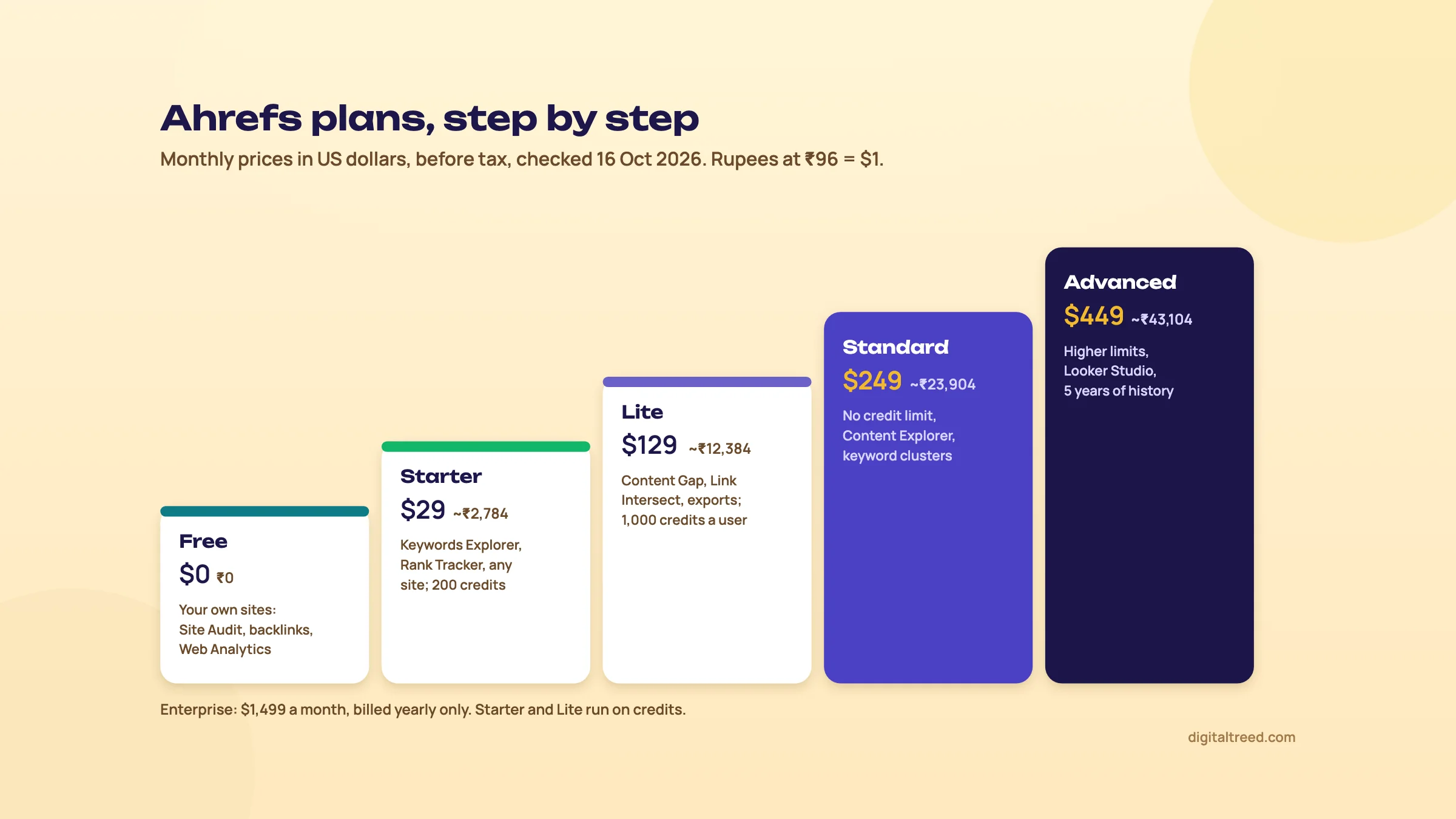 What each Ahrefs plan adds, prices checked 16 October 2026. Drawn by us.
How credits work (Starter and Lite)
Credits are the part people get wrong. On Starter and Lite, every tool except Site Audit, Rank Tracker and Brand Radar uses them.[23]
- 1 credit each time you open a report, including all its charts.
- 1 more each time you apply filters and click "Show results", change dates, open the SERP or position history, switch modes such as "one link per domain", or add competitors to a chart.
- Free: reopening the same report with the same settings within 30 minutes, moving between pages of results, and sorting.
- Bulk is cheap: up to 10,000 keywords in Keywords Explorer, or 200 URLs in Batch Analysis, for 1 credit.
Starter has 200 credits a month and you can't buy more.[16] On Lite, each user is charged by how much they use. A user who uses 0 to 5 credits in a month is free, 6 to 100 is a "Casual" user at $20 a month, and above that a "Power" user at $40. The plan includes one Power user with 1,000 credits. Extra credits, if you switch on pay-as-you-go, cost $50 per 500. Ahrefs says only 20% of its paid users needed extra credits.
What does 1,000 credits feel like? About 45 a working day. A competitor review that opens ten reports and filters each twice uses about 30. That's fine for one person working a few clients. Two people sharing research every day on Lite is when Standard's unlimited use starts to make sense, at $120 a month more.
Warning
Charges on Lite can grow quietly. A colleague you add who opens six reports in a month becomes a $20 Casual user, and charges apply even if you remove them before the month ends.[16] Set each user's limit in Account settings, Limits and usage, and leave pay-as-you-go off.
Add-ons
| Add-on | Price a month | About ₹ | What it adds |
|---|---|---|---|
| Brand Radar AI Visibility Index | $199 per platform; $699 all | ₹19,104; ₹67,104 | AI mentions and citations across 481M+ prompts (chapter 6) |
| Custom prompt packages | $50, $100 or $250 | ₹4,800 to ₹24,000 | 2,500, 7,000 or 25,000 AI prompt checks |
| Content Kit | From $99 | ₹9,504 | AI Content Helper and AI Content Grader |
| Report Builder | $99 | ₹9,504 | 50 reports, 500 widgets, scheduling |
| Project Boost Pro | $20 per project | ₹1,920 | Auto-submit to IndexNow, always-on audit at 10 pages a minute, instant recrawl |
| Project Boost Max | $200 per project | ₹19,200 | Patches, always-on audit at 30 pages a minute |
Sources: pricing page,[1] and the Brand Radar help article for the per-platform prices.[40]
Trials, refunds and payment
Ahrefs' FAQ on its pricing page is blunt: "We never run discounts." Asked about free trials, it points you to Ahrefs Free instead. It doesn't issue refunds in general; on a monthly plan you can ask for one if you haven't used the service, and it may decline if it sees "material activity". It accepts Visa, Mastercard, American Express and UnionPay cards, and wire transfers for Enterprise. There's no contract or set-up fee, and when you cancel you keep access until the period ends, then drop to Ahrefs Free.[1]
So test everything you can on Ahrefs Free and the free tools before you pay, and start on a monthly plan.
The free tools on ahrefs.com
Separate from Ahrefs Free, the site has free tools that work without verification.[50] They're deliberately limited, but fine for a quick look:
- Backlink Checker: the top 20 backlinks to any site or page.
- Website Authority Checker: any site's DR.
- Keyword Generator (Google, Bing, YouTube, Amazon) and Keyword Difficulty Checker.
- SERP Checker: the top 10 for any keyword in any country. Website Traffic Checker: estimated search traffic for a site or page.
- Broken Link Checker, Keyword Rank Checker, XML Sitemap Generator and Website Change Monitor.
- AI Visibility Checker, plus AI Overviews and AI Mode trackers.
- SEO Toolbar for Chrome and Firefox.
Our intermediate guide already sends readers to the free Backlink Checker for broken link building, until our own backlink tool is ready.
Pros and cons
Pros
- A generous free tier for your own sites: unlimited verified sites, a 170+ issue audit, your own backlinks and keywords
- Backlink data from its own crawler, refreshed every 15 to 30 minutes, by Ahrefs' own account
- Traffic potential and parent topic make keyword decisions faster than volume alone
- Clear help centre; metrics like DR, UR and KD are documented
- A $29 Starter plan for one person learning the tool
Cons
- No free trial, no discounts, refunds rarely
- Credits on Starter and Lite run out, and extra users on Lite are billed by use
- Organic keywords are desktop and country-level only; local tracking needs Rank Tracker
- India estimates rest on a smaller keyword sample than the US
- Content Explorer and keyword clusters need Standard at $249
- Prices listed in US dollars before GST; the rupee cost moves with the exchange rate
Alternatives, starting with ours
Our free tools cover the site-health side of Ahrefs without an account. They don't do backlinks or search volumes; for those, use the free options from Google and Bing below, or a paid suite.
| Job | Our free tool | Free outside tool | Paid instead of Ahrefs |
|---|---|---|---|
| Site health check | Free Website Audit (50+ checks, 25 pages, PDF) | Ahrefs Free Site Audit; Screaming Frog free (500 URLs)[51] | Semrush Site Audit; Screaming Frog paid |
| Redirects and status codes | HTTP Status Checker (10 URLs) | Search Console URL Inspection | Any crawler |
| Titles, descriptions, previews | Meta Tag Analyzer | - | - |
| AI crawler access | AI Crawler Checker | - | - |
| Backlinks | Not yet | Search Console Links report (a sample, 1,000 rows per table);[5] Bing Webmaster Tools[52] | Semrush; Moz Pro |
| Keyword volumes | Not yet | Google Keyword Planner; Search Console queries | Semrush; SE Ranking; Mangools; Ubersuggest |
| Rank tracking | Not yet | Search Console average position | SE Ranking; Semrush |
The closest paid rival is Semrush. Its SEO plan is $139 a month (about ₹13,344), and it has a free plan with 10 reports a day.[53] Our Semrush guide covers it, and Ahrefs vs Semrush compares the two job by job. For the cheaper suites, see our guides to SE Ranking, Moz Pro, Mangools and Ubersuggest. For a full list of free options, see Best free SEO tools.
Which one when
| You are | Our pick | Why |
|---|---|---|
| A local business with one small site | Search Console, Ahrefs Free and our free tools | You need your own data and a clean site, not competitor research |
| A student or new freelancer learning | Ahrefs Free, then Starter ($29) for a month or two | Learn Site Explorer and Keywords Explorer cheaply; cancel when done |
| A freelancer with 3 to 5 clients | Lite ($129), if links and content gaps are your work | Content Gap, Link Intersect and exports; watch your credits |
| A small agency or team | Standard ($249) | No credit limits, Content Explorer, clusters |
| You also run Google Ads and local SEO | Compare with Semrush first | See Ahrefs vs Semrush |
If you'd rather hand the work over, our SEO service runs this research for you, and you can get a quote in a couple of minutes. Otherwise, start with Ahrefs Free on your own site this week and run the Site Audit in chapter 7.
Test yourself
Ten questions on the whole guide. Pick an answer, check it, and see your score at the end.
You got 0 of 10 right.
Frequently asked questions
Frequently asked
Is Ahrefs free?
Partly. Ahrefs Free costs nothing and works on any number of sites you verify as your own. It includes Site Audit (5,000 crawl credits a month per project), Site Explorer for your own site with 1,000 backlinks and keywords visible at once, and Web Analytics. Looking at competitors, Keywords Explorer and Rank Tracker need a paid plan, from $29 a month.
How much does Ahrefs cost in India?
Ahrefs lists prices in US dollars only, even from India, and adds GST for Indian buyers (a business can claim it back with its GST number).[47] On 16 October 2026 Starter was $29 a month (about ₹2,784 at ₹96 to the dollar), Lite $129 (about ₹12,384), Standard $249 (about ₹23,904) and Advanced $449 (about ₹43,104). Before GST, your card statement will differ with your bank's exchange rate and fees; you can also choose to pay in rupees at Ahrefs' own rate.[48]
Does Ahrefs have a free trial?
No. Its pricing page says it never runs discounts and, when asked about trials, points you to Ahrefs Free. Refunds are not issued in general; on a monthly plan you can ask if you haven't used the service. So test on Ahrefs Free first and start on a monthly plan.
What happened to Ahrefs Webmaster Tools?
It's now called Ahrefs Free. It's the same idea: free Ahrefs data and tools for websites you prove you own. You verify a site through Google Search Console, a DNS record, an HTML file or an HTML tag.
What is a good Domain Rating in Ahrefs?
There's no fixed number. Ahrefs says DR is relative, so a DR of 30 or 60 isn't good or bad on its own; it's good if it's comparable to similar sites. Compare your DR with the sites you actually compete with, and judge link prospects by relevance and traffic, not DR alone.
Does Google use Ahrefs Domain Rating?
No. DR is Ahrefs' own score of a site's backlink profile. Google doesn't use any third-party authority score. DR is useful for comparing sites and shortlisting link prospects, not as a goal in itself.
How accurate is Ahrefs traffic data?
It's an estimate. Ahrefs works it out from the keywords it sees a site ranking for, their search volumes and estimated click rates, and says to treat the result as an estimate that works best for comparison. For your own site, use Search Console's real clicks; use Ahrefs to compare yourself with competitors.
What are credits in Ahrefs?
Credits are how Starter and Lite plans limit usage. Opening a report uses one credit, and applying filters or changing dates uses another. Starter has 200 a month; Lite has 1,000 per user. Site Audit, Rank Tracker and Brand Radar don't use credits, and Standard and higher plans have no credit limit.
Is Ahrefs worth it for a small business?
For one small local site, usually not. Search Console, Ahrefs Free and free audit tools cover your own site. Ahrefs pays off when you need competitors' links and keywords, plan content at scale, or work for clients whose fees cover the plan.
Is Ahrefs better than Semrush?
It depends on the job. Ahrefs is best known for its backlink data and keyword metrics like traffic potential; Semrush covers more ground, including PPC and local, and has a free plan with 10 reports a day. Our Ahrefs vs Semrush guide compares them task by task.
Sources
References
- Plans and pricing, Ahrefs, prices seen 16 Oct 2026, accessed 16 Oct 2026
- How often is Ahrefs links database updated?, Ahrefs Help Center, updated 3 Sep 2026, accessed 16 Oct 2026
- We're powered by seriously big data, Ahrefs, accessed 16 Oct 2026
- Content Explorer, Ahrefs, accessed 16 Oct 2026
- Links report, Search Console Help, accessed 16 Oct 2026
- Ahrefs Webmaster Tools (now Ahrefs Free), Ahrefs, accessed 16 Oct 2026
- What is Organic Traffic in Ahrefs and how do we calculate it?, Ahrefs Help Center, updated 3 Sep 2026, accessed 16 Oct 2026
- What can I use for free in Ahrefs?, Ahrefs Help Center, updated 3 Sep 2026, accessed 16 Oct 2026
- What's the difference between all Ahrefs subscription plans?, Ahrefs Help Center, accessed 16 Oct 2026
- How to add a project in your Dashboard, Ahrefs Help Center, updated 3 Sep 2026, accessed 16 Oct 2026
- Verifying ownership of your project or website, Ahrefs Help Center, updated 3 Sep 2026, accessed 16 Oct 2026
- Site Audit, Ahrefs, accessed 16 Oct 2026
- How should I configure my Site Audit settings?, Ahrefs Help Center, accessed 16 Oct 2026
- Rank Tracker, Ahrefs, accessed 16 Oct 2026
- About Ahrefs Web Analytics, Ahrefs Help Center, accessed 16 Oct 2026
- Ahrefs' usage-based pricing for credit-based plans, Ahrefs Help Center, updated 3 Sep 2026, accessed 16 Oct 2026
- About Ahrefs' Starter plan, Ahrefs Help Center, updated 3 Sep 2026, accessed 16 Oct 2026
- About Rows, Export rows, and user limits, Ahrefs Help Center, updated 3 Sep 2026, accessed 16 Oct 2026
- What is the difference between Credit-based plans and Unlimited credit plans?, Ahrefs Help Center, updated 3 Sep 2026, accessed 16 Oct 2026
- What is Domain Rating (DR)?, Ahrefs Help Center, updated 3 Sep 2026, accessed 16 Oct 2026
- What is URL Rating (UR)?, Ahrefs Help Center, updated 3 Sep 2026, accessed 16 Oct 2026
- What's the difference between referring domains and backlinks?, Ahrefs Help Center, updated 3 Sep 2026, accessed 16 Oct 2026
- What actions consume credits, Ahrefs Help Center, updated 3 Sep 2026, accessed 16 Oct 2026
- What are organic keywords?, Ahrefs Help Center, updated 3 Sep 2026, accessed 16 Oct 2026
- Difference between the Rank Tracker and Site Explorer's Organic Keywords report, Ahrefs Help Center, updated 3 Sep 2026, accessed 16 Oct 2026
- How often is the data in Keywords Explorer and Site Explorer updated?, Ahrefs Help Center, updated 3 Sep 2026, accessed 16 Oct 2026
- What is Traffic value and Paid traffic cost in Site Explorer?, Ahrefs Help Center, updated 3 Sep 2026, accessed 16 Oct 2026
- How do I find out what keywords a website is ranking for?, Ahrefs Help Center, updated 3 Sep 2026, accessed 16 Oct 2026
- Top Pages 2.0: report revamp, Ahrefs product blog, 13 Nov 2020, accessed 16 Oct 2026
- How accurate is keyword search volume in Ahrefs?, Ahrefs Help Center, updated 3 Sep 2026, accessed 16 Oct 2026
- What does KD stand for in Keywords Explorer?, Ahrefs Help Center, updated 3 Sep 2026, accessed 16 Oct 2026
- What is Parent Topic, and how to use it?, Ahrefs Help Center, updated 3 Sep 2026, accessed 16 Oct 2026
- What is the difference between Traffic potential and Search volume in Keywords Explorer?, Ahrefs Help Center, updated 3 Sep 2026, accessed 16 Oct 2026
- Keywords Explorer, Ahrefs, accessed 16 Oct 2026
- How to use the keyword ideas reports in Keywords Explorer, Ahrefs Help Center, updated 3 Sep 2026, accessed 16 Oct 2026
- Free Keyword Generator, Ahrefs, accessed 16 Oct 2026
- How to use Content Gap to find keyword ideas from competitor websites, Ahrefs Help Center, updated 3 Sep 2026, accessed 16 Oct 2026
- How frequently do my tracked keywords get updated?, Ahrefs Help Center, updated 3 Sep 2026, accessed 16 Oct 2026
- About All pages and News modes in Content Explorer, Ahrefs Help Center, updated 3 Sep 2026, accessed 16 Oct 2026
- What is Brand Radar, and how to use it?, Ahrefs Help Center, updated 3 Sep 2026, accessed 16 Oct 2026
- Brand Radar, Ahrefs, accessed 16 Oct 2026
- How to set up custom prompts to track brand visibility in AI assistants, Ahrefs Help Center, updated 3 Sep 2026, accessed 16 Oct 2026
- What is AI adjusted volume and how is it calculated, Ahrefs Help Center, updated 3 Sep 2026, accessed 16 Oct 2026
- Free AI Visibility Checker, Ahrefs, accessed 16 Oct 2026
- How to use Link Intersect to find backlink ideas from competitor websites, Ahrefs Help Center, updated 3 Sep 2026, accessed 16 Oct 2026
- How to compare changes between two crawls in Site Audit, Ahrefs Help Center, updated 3 Sep 2026, accessed 16 Oct 2026
- Why am I charged GST/VAT/consumption tax/sales tax and how can I get it refunded?, Ahrefs Help Center, updated 16 Oct 2026, accessed 16 Oct 2026
- I used to pay for Ahrefs in my national currency; when I try to re-purchase it shows me a different price. Why?, Ahrefs Help Center, updated 3 Sep 2026, accessed 16 Oct 2026
- Monthly average USD to INR, 2026, X-Rates, 1-16 Oct 2026 average, accessed 16 Oct 2026
- Free SEO tools, Ahrefs, accessed 16 Oct 2026
- SEO Spider pricing (free version: 500 URLs), Screaming Frog, seen 16 Oct 2026, accessed 16 Oct 2026
- Start using Bing Webmaster Tools to improve your site visibility, Bing Webmaster Blog, 17 Jun 2025, accessed 16 Oct 2026
- Semrush SEO and AI search plans and pricing, Semrush, prices seen 16 Oct 2026, accessed 16 Oct 2026
Get the free checklist
Every step of this guide on one page, to print or tick off. We email you the PDF link.