

What AnswerThePublic is, who it's for, and when you don't need it
This guide is for people who write for their own business site or a client's. Think of the owner of a Lucknow sweet shop planning festival posts, a Pune coaching centre's office manager writing an FAQ page, a D2C brand planning videos, or a freelancer. No SEO terms needed; each one is explained the first time.
By the end you'll be able to set the right country and language, read the wheel and the lists, and export the questions. Then you'll turn them into posts, FAQ sections and an outline. You'll also know when Google's free features do the same job.
There are four chapters, about 20 minutes of reading in all. Chapter 1 explains what the tool is and where its data comes from. Chapter 2 covers the free account and how to read a report. Chapter 3 does three real jobs step by step. Chapter 4 covers the plans, pros and cons, and the alternatives. Prices and limits were read from AnswerThePublic's own pricing page and help centre on 18 October 2026.
Quick answer
AnswerThePublic collects autocomplete suggestions around a keyword from Google, Bing, YouTube, TikTok, Instagram and Amazon, and sorts them into questions, prepositions, comparisons, alphabeticals, numbers and related terms. It's a question finder for blog posts and FAQs. A free account gives 3 searches a day. For one small business, Google's own free features often do the same job.
What it is
When you start typing in Google, it suggests ways to finish your search. Those suggestions are called autocomplete. Google says they "reflect real searches that have been done on Google", shaped by the language, the location, trending interest and your past searches.[1]
AnswerThePublic collects those suggestions for you, many at once. Type one short keyword, such as "sweets", and it asks the search box hundreds of variations: "how sweets", "sweets for", "sweets vs", "sweets a", "sweets b" and so on. Then it groups what comes back. Its help centre describes it as a search-listening and content ideation tool that pulls autocomplete data from Google, Bing, YouTube, Amazon, TikTok and Instagram.[2] You don't install anything; the searches run on its servers, not in your browser.[3]
The site belongs to Answer the Public Ltd, a company registered in England and Wales.[4] NP Digital, the agency Neil Patel co-founded, bought it in May 2022, and the pricing page now says the tool is part of NP Digital.[5] NP Digital also owns Ubersuggest, but the two are separate subscriptions: paying for one doesn't give you the other.[6]
Where its suggestions come from
Its data page, updated 9 October 2026, lists these sources:[3]
| Group | Sources | What you get |
|---|---|---|
| Search engines | Google, Bing, plus Google's People Also Ask | Autocomplete grouped by modifier, and the questions from Google's "People also ask" box |
| Social | YouTube, TikTok, Instagram | What people type into those search boxes, useful for video and reels |
| Shopping | Amazon, Google Shopping | Amazon suggestions and a panel of the top 10 Google Shopping products |
| AI | ChatGPT, Gemini | Prompt suggestions and saved AI answers (see the warning below) |
| Trends | Google Trends | Trending Keywords for Google and YouTube, on paid plans[7] |
Search volume and cost per click (CPC) always come from Google, for the previous month, even in the YouTube or Amazon sections.[3] So "volume" next to a TikTok suggestion is Google's number for those words, not TikTok's.
Warning
The AI prompts are not a log of what people typed into ChatGPT. AnswerThePublic says they're generated from variations of your keyword and aren't ranked by volume or any other metric.[8] Treat them as brainstorming. Another of its own help pages calls them "real prompts used in ChatGPT and Gemini conversations",[6] which contradicts that; we go with the more detailed AI Models page.
The six ways it groups suggestions
These groups are called modifiers: small words added to your keyword. The Search Modifiers report shows the first five; Related is the sixth branch of the wheel:[9]
- Questions
- Your keyword with how, what, why, can, where, which and similar words. "How to store sweets in summer." The best source of blog and FAQ topics.
- Prepositions
- Your keyword with for, is, to, with, near, without. "Sweets for Diwali gifts", "sweets without sugar". These show the purpose behind a search.
- Comparisons
- Your keyword with and, like, or, vs. "Kaju katli vs barfi." Good for comparison posts and buying guides.
- Alphabeticals
- Your keyword followed by each letter from A to Z, which brings out long-tail phrases you wouldn't think of.
- Numbers
- Suggestions with a number in them, such as "1 kg sweets box price".
- Related
- Other searches around the topic that don't fit the patterns above.
Each group shows up as a wheel you can click into, and as a plain list.[2] Chapter 2 explains which view to use when.
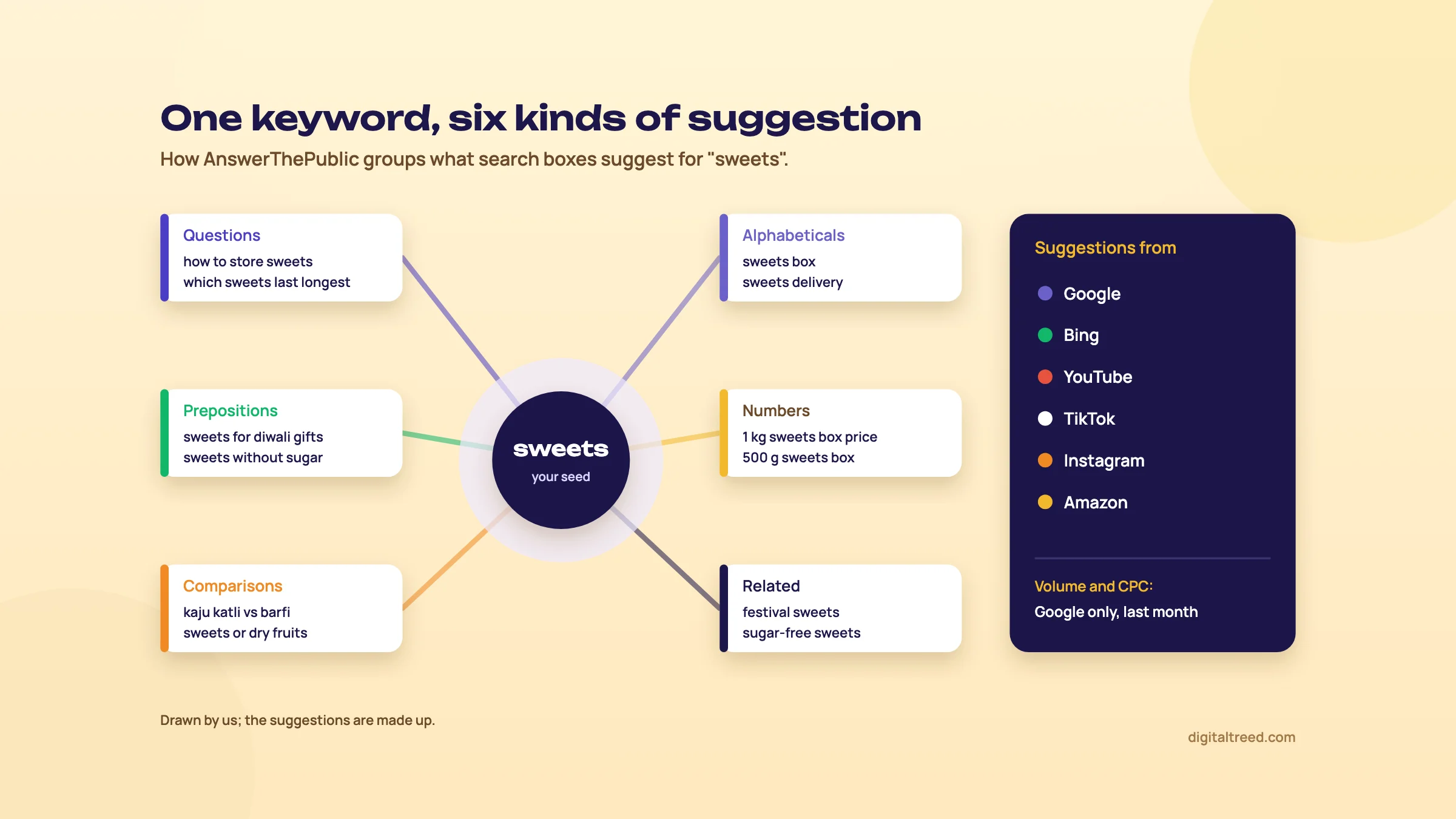 The six groups AnswerThePublic sorts suggestions into, and where they come from. Drawn by us; the suggestions are made up.
Who it's for
It's for anyone who writes for a website or a channel and wants to know what people actually ask. A Lucknow sweet shop planning festival posts. A Pune coaching centre writing an FAQ page about fees and batches. A D2C skincare brand checking what people type on Amazon and YouTube before shooting videos. A freelancer showing a client a picture of the questions around their product.
It's not a full SEO suite. It doesn't track rankings, audit your site or show who ranks for what. For those jobs, see Ubersuggest or Semrush.
When you don't need it
For one local business, you can get most of the same questions free from Google itself. Type your keyword with a letter or a question word after it and read the suggestions, then open the "People also ask" box. Guide 1 shows how in Keyword basics. If your site already gets visits, Search Console shows the questions you already appear for, which beats any suggestion list.
AnswerThePublic earns its place when you need many topics fast, want YouTube, Amazon or Instagram suggestions in one go, or need a picture to show a client. Our view: start with Google's free sources, and open AnswerThePublic when you're planning a month of posts at once.
Next, set up a free account and learn to read a report.
Set up a free account and read a report
Quick answer
Register free to get 3 searches a day. Before each search, check the country and language: from India the search box may start on India and Hindi. Use one or two words as the seed. Use the wheel for a quick picture and the lists or export for real work. Volume and CPC are Google's figures for last month.
Free account or no account
Without signing in, the homepage offers one free search. Register, and you get 3 searches a day, more keyword data and a history of your searches.[10] The daily limit resets every day.[11] Each free search loads the full report: keyword wheels, AI Models, Organic Searches, Shopping, Social Media, Search Modifiers and People Also Ask, with some suggestions locked.[11]
Three searches go quickly if you waste them on long phrases. AnswerThePublic's own advice is to start with short, broad topics; very long phrases return few or no results, because people rarely type them exactly.[12] So "sweets" or "kaju katli" beats "best sugar-free sweets shop in Lucknow for Diwali". Plan your three seeds on paper before you search.
Set the country and language first
Next to the search box is a small chip with a flag and two letters. Loaded from an Indian connection on 18 October 2026, the homepage's chip read "Country: India, language: Hindi".[10] If your customers search in English, click the chip and switch the language to English before you search, or you'll spend one of your three searches on the wrong report.
To change the default for every search, open your account settings and the Region & Language tab, then pick a Default Report Region and Default Report Language.[13] A few limits to know:[14]
- Filtering works only at country level. There's no Lucknow or Kanpur setting, so add the city to your seed or look for city names in the results.
- Only the countries and languages in the drop-down are supported. Hindi and Urdu are in the database's language list; Tamil, Bengali and Marathi aren't.[15]
- Some results may come back in another language than the one you picked, because search engines decide what's relevant.
Hindi and mixed-language searches
Many Indians type Hindi words in English letters, or mix Hindi and English in one search. Guide 2 explains this in How India searches. AnswerThePublic has no setting for these mixed searches. Our suggestion: run your seed once with India and English and once with India and Hindi, and see which report brings back the mixed forms your customers use. Then compare with what Google suggests on your own phone, typed the way a customer would type it.
The wheel, the lists and the export
The wheel is the picture AnswerThePublic is known for. In the Ideas section, each wheel is one branch of suggestions, and you can hover over a keyword to see its volume and CPC.[9] Clicking a branch, such as Questions, opens a wheel just for that branch.[2] It's good for a first look and for showing a client.
For real work, use the lists. Pick a category from the bar at the top of the report and use the Export option on its table to download Excel (XLSX) or CSV.[16] The wheel itself downloads as a PNG image from the Export button at its top right, with your keyword, language and location printed on it.[16] The People Also Ask section, lower down the Search Engines report, has its own Export button.[16]
| View | Use it for | Free account |
|---|---|---|
| Wheel | A quick picture of the topic; a slide for a client | PNG at lower resolution than paid plans[11] |
| List (table) | Reading every suggestion, filtering to questions only | Some suggestions locked |
| XLSX or CSV export | Sorting, removing junk, grouping into posts | XLSX limited to 30 keywords per export[11] |
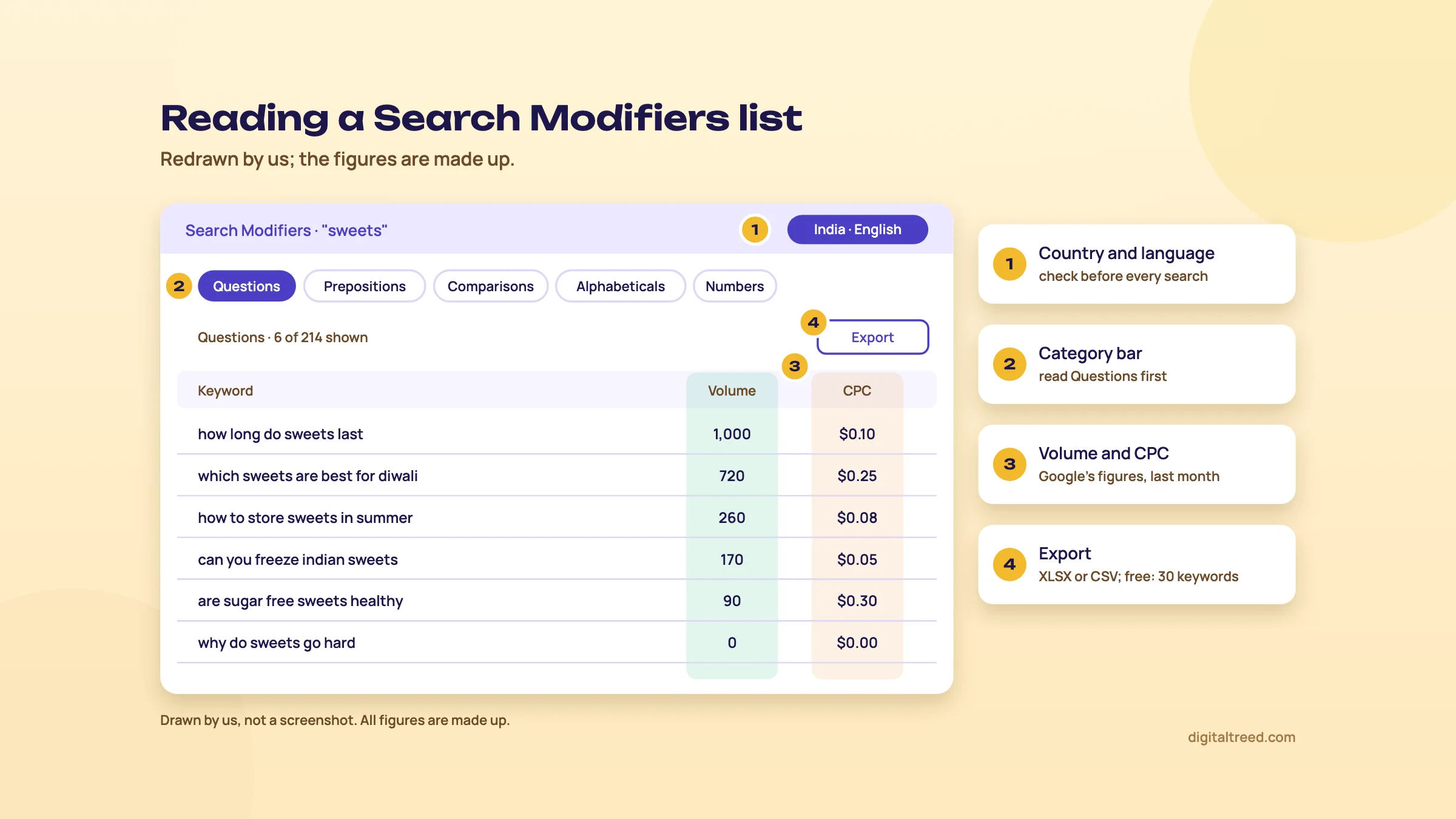 Check the chip, read Questions first, treat volume and CPC as Google's figures, then export. Drawn by us; the figures are made up.
Volume and CPC, and why some show zero
Volume is roughly how many times a month a phrase is searched on Google; CPC is what advertisers pay for a click on it in Google Ads. Both come from Google, reflect the previous month, and are the same in every platform's section.[3] On a free account you see them for only two branches per report.[11]
A zero doesn't mean nobody searches it. Google holds back volume and CPC for some topics, such as some health, medical and financial queries, so a Delhi dentist may see zeros on treatment questions.[17] Long questions often show zero or tiny numbers too. That's fine: a question that a few customers ask every month is still worth a paragraph on your page. For volume ranges straight from Google, use Google Keyword Planner.
The other parts of the report
- People Also Ask. Questions taken from Google's "People also ask" box. The starter guide calls it one of the most practical sections.[9] We agree: these are questions Google already pairs with your topic.
- Social Media and Shopping. YouTube, TikTok and Instagram suggestions, and Amazon suggestions with a top 10 Google Shopping products panel.[9] Useful for a D2C brand.
- AI Models. Generated ChatGPT and Gemini prompts, grouped by intent: informational, navigational, commercial, transactional.[8] Free accounts see 10 prompts per search and get 30 AI responses a month.[11]
- Trending Keywords and Compare. Rising searches from Google Trends data over the last 30 days,[9] and a side-by-side of two reports for the same keyword. Both need a subscription; Compare needs Growth or Business.[7]
Search listening alerts
"Search listening" is AnswerThePublic's name for watching what people search over time. A Search Listening Alert follows one keyword and sends a weekly email of new suggestions found for it.[7] You can start tracking from the report's action bar,[9] and you manage the emails in the Notifications tab of your account.[7] Alerts are paid only: Starter gets 1, Growth 5 and Business 20.[7]
For a business with seasons, such as sweets before Diwali or coaching before exam results, one alert on your main keyword is a cheap way to catch new questions. For most small sites, rerunning the same search every few months on the free account does the job.
Now use it on a real job.
Three jobs, step by step: questions, FAQ sections and an outline
Quick answer
Spend your 3 free searches on three short seeds, export the questions, and delete anything off-topic. Group what's left by what the reader wants: one group becomes one post. Turn the best questions into H2 headings with a 40 to 60 word answer under each. The same job works with Google's free features, only slower.
The example is a sweet shop in Lucknow (made up) that wants a blog: one post a week for the festival season, plus an FAQ on its gift boxes page. The suggestions quoted below are examples we wrote to show the method, not real AnswerThePublic data. Your own report will differ.
Job 1: find questions for a sweet shop's blog
Find 30 blog questions for a Lucknow sweet shop
- Pick three seeds List what you sell and when people buy it. Choose three short seeds: one product group ("sweets"), one hero product ("kaju katli"), one occasion ("diwali sweets"). Short seeds give more results than long phrases.
- Set the chip Register free and click the country and language chip. Choose India and English (or Hindi, if your customers search in Hindi script).
- Run the first seed Search "sweets". Open Search Modifiers and read Questions first, then Prepositions and Comparisons.
- Open People Also Ask Scroll down the Search Engines report. These are Google's own questions, so mark every one that fits your shop.
- Export Use the Export button on the Questions table and on People Also Ask. On a free account, XLSX exports stop at 30 keywords, so export the branches you need one at a time.
- Repeat for the other two seeds That's your three searches for the day. If you need more, carry on tomorrow.
- Clean the sheet Paste everything into one sheet. Delete duplicates, other cities, other countries and anything you can't answer from your shop's own experience. Add a column for which product or page each question belongs to.
A cleaned list for a sweet shop might cover how long sweets keep, which sweets travel well, sugar-free options, eggless or pure-ghee claims, gift box sizes and prices, and delivery. Questions you can answer with real facts from your counter, such as your own shelf-life advice, are worth more than generic ones.
Tip
Add your customers' own words. Go through a month of WhatsApp enquiries and phone notes and add those questions to the same sheet. Guide 2 does this in Keyword research in depth. Customers' questions often beat any tool's list, because they come with a buying reason attached.
Job 2: group the questions into posts
Don't write one post per question. Thirty questions often make five or six posts, because many ask the same thing in different words. Group them by what the reader wants to do:
| Group | Example questions (made up) | Becomes |
|---|---|---|
| Keeping sweets fresh | how long does kaju katli last; can you freeze sweets; how to store milk sweets in summer | One post: "How long Indian sweets last, and how to store them" |
| Choosing gifts | which sweets are best for diwali gifts; sweets for corporate gifts; dry fruit sweets vs milk sweets | One post, linking to the gift boxes page |
| Health | are sugar-free sweets really sugar-free; sweets for diabetics | One careful post, with what you actually use |
| Buying and delivery | sweets box price per kg; can sweets be couriered; sweets delivery near me | FAQ on the gift boxes and delivery pages, not a blog post |
The last row matters. Questions about price, delivery and "near me" come from people ready to buy. Answer them on the page that sells, not in a blog post they'll never find from the product page. Guide 2 covers matching a page to what the searcher wants in Content briefs and pages that match search intent.
Job 3: turn a group into FAQ sections and an outline
Turn one question group into an outline with FAQ sections
- Pick the main question From the group, choose the question that covers the others. It becomes the H1 and the title, in plain words: "How long do Indian sweets last?"
- Order the rest Put the remaining questions in the order a customer would ask them: shelf life first, then storage, then travel and freezing. Each becomes an H2.
- Write a short answer under each Start each section with a direct 40 to 60 word answer, then the detail. Each section should make sense on its own, for a reader who jumps straight to it.
- Add what only you know Your own shelf-life advice by sweet, the packing you use for couriers, a photo of the box. This is what a competitor copying the same AnswerThePublic list can't add.
- Put the buying questions in an FAQ block Price, delivery and order questions go into a short FAQ at the end of the post and on the gift boxes page, each answered in two or three sentences.
- Check the outline Read only the H1 and H2s. If they work as a table of contents, the outline is done.
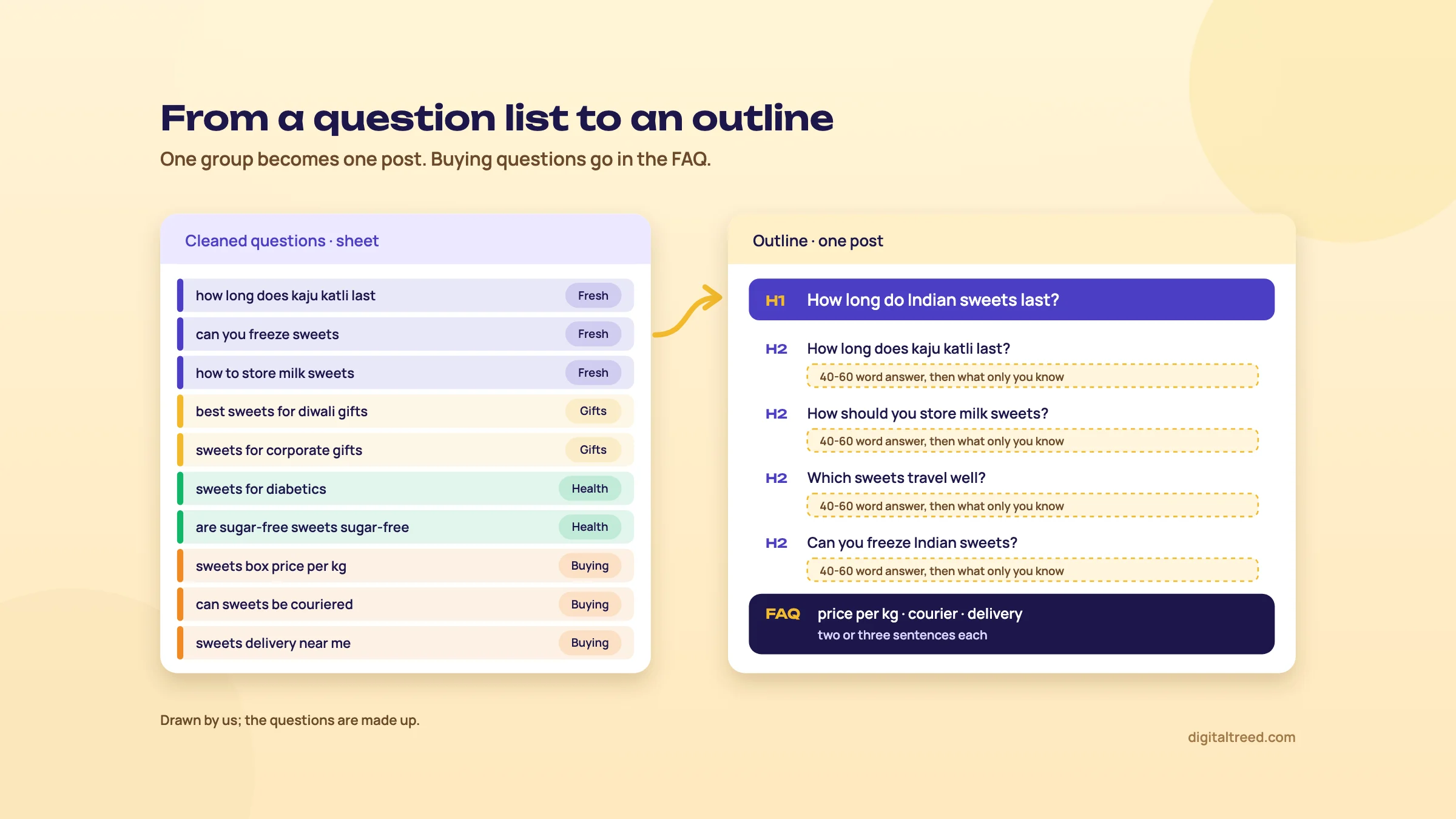 One group of questions becomes one post; buying questions go in the FAQ. Drawn by us; the questions are made up.
Note
FAQ sections are for readers now, not for extra space in Google. FAQ rich results, the expandable questions under a search result, stopped showing in Google Search on 7 May 2026.[18] Write FAQs because customers ask those questions. GEO chapter 4, Writing for citation, shows how to write answers that AI tools can quote.
The same job without AnswerThePublic
If your three searches are used up, do Job 1 in Google. Open a private window on google.co.in and type your seed followed by a question word ("sweets how", "sweets which") and then each letter ("sweets a", "sweets b"). Note the suggestions. Then search the seed and open three or four "People also ask" questions; each one you open loads more. It's slower, but AnswerThePublic pulls its Google suggestions[2] from this same autocomplete.[1] Google says autocomplete removes some predictions under its policies, for example on health claims,[1] so neither method shows every question people ask.
When your outline is ready, check your finished draft for keyword repetition with our Word Counter & Keyword Density Checker, then publish.
Free vs paid, prices, pros and cons, and alternatives
Quick answer
The free account gives 3 searches a day. In India on 18 October 2026, paid plans showed in US dollars: Starter $10 a month (about ₹960) or $80 a year. A 50% yearly offer ($60) was on when we looked, due to end 8 November 2026. Paid plans add volume and CPC on every branch, full exports and alerts. Most small businesses can stay free.
What the free account gives you
3
searches a day on a free account, reset daily[11]
2
branches per report with volume and CPC on free[11]
30
keywords per XLSX export on free[11]
7
day free trial, monthly plans only, once per account[19]
Free users also get search history and can save keywords in Keyword Lists.[11] For a sweet shop planning a few posts a month, that's enough.
The paid plans
AnswerThePublic sets prices by country, using your IP address at the time of purchase.[20] Its pricing page, loaded from India on 18 October 2026, showed US dollars, not rupees. We've added "about ₹" at ₹96 = US$1, the 1 to 16 October 2026 average we use across these guides.[21] The page doesn't mention GST. A yearly offer was on when we looked: "50% off annual", due to end 8 November 2026. If it has ended, the regular yearly prices in the table apply. The offer "Renews at the same price every year until you cancel".[22]
| Free | Starter | Growth | Business | |
|---|---|---|---|---|
| Monthly | $0 | $10 (about ₹960) | $49 (about ₹4,704) | $99 (about ₹9,504) |
| Yearly, offer price (to 8 Nov 2026) | - | $60 (about ₹5,760) | $294 (about ₹28,224) | $594 (about ₹57,024) |
| Yearly, regular price | - | $80 | $392 | $792 |
| Searches | 3 a day | 100 a month | 200 a month | 300 a month |
| Users | 1 | 1 | Up to 3 | Up to 10 |
| Search listening alerts | - | 1 | 5 | 20 |
| Keyword Lists | Yes (number not stated) | 1 | Unlimited | Unlimited |
| Compare over time | - | - | Yes | Yes |
| AI prompt suggestions a month | 10 per search | 1,000 | 2,000 | 3,000 |
| Content Studio credits a month | 0 | 60 | 350 | 800 |
Plan limits are from the pricing page and the plans help page.[7] Both the Monthly and Yearly tabs were read from India on 18 October 2026.[22] Prices elsewhere can be higher: the same page data listed $20, $99 and $199 a month as base prices.[22]
Two things to read before paying:
- Search limits on paid plans are monthly, not daily. Starter's 100 searches reset on your billing date, even on a yearly plan.[7] That's about 3 a day, the same as free; what you pay for is full data, exports, alerts and AI credits.
- After the trial, fees are generally non-refundable.[23] The trial ends at a time shown in UTC, which is 5 hours 30 minutes behind India, so cancel a day early.[19] Yearly plans have no trial and are charged at once.[23] You can cancel any time from the Manage Account area, and the plan usually stays active until the end of the billing period.[23] Lifetime plans are no longer sold.[7]
Paying from India: it takes credit and debit cards, PayPal, Google Pay and Apple Pay, and the help page lists international payment restrictions among common reasons for a declined card.[19] Switch on international use in your bank app first. Need an invoice in your company's name? The pricing FAQ says to email support.[22] Paid plans also include Content Studio, an AI article writer that uses credits (10 per article),[7] and an API in Alpha.[24] We'd judge the plans on the research data alone; any AI draft needs checking by hand before it goes live.
Pros and cons
Pros
- Hundreds of questions from one short seed, in seconds
- Google, Bing, YouTube, TikTok, Instagram and Amazon suggestions in one report
- India as a country, and Hindi and Urdu as languages
- Google's People also ask questions included and exportable
- Wheel images that make a topic easy to explain to a client
- A real free account, no card needed
Cons
- 3 free searches a day, and paid plans are capped at 100 to 300 a month
- Country only: no city setting
- No setting for mixed Hindi and English searches; Tamil, Bengali and Marathi aren't supported
- Volume and CPC are Google-only, for last month, and missing for some health and finance topics
- AI prompts are generated, not real user logs
- Prices in US dollars for India, and no refunds after the trial
Alternatives, and which one when
We don't have an autocomplete or question tool of our own yet; both are on our build list. Until then, start with Google's free features.
| Tool | Cost | Use it when |
|---|---|---|
| Google autocomplete and People also ask | Free | You need questions for one or two pages and have 20 minutes |
| Google Search Console | Free | Your site already gets visits and you want the questions you already appear for |
| Google Keyword Planner | Free with a Google Ads account | You want Google's own volume ranges for the questions you found |
| AlsoAsked | 3 free searches without an account; paid from $12 a month plus tax, billed yearly (about ₹1,152), or $15 billed monthly, checked 18 Oct 2026[25] | You want only People also ask questions, mapped as a tree |
| AnswerThePublic | 3 free searches a day; Starter $10 a month | You want many questions at once, or YouTube, Amazon and Instagram suggestions |
| Ubersuggest | 3 free searches a day[26]; Individual ₹1,135 a month, checked 18 Oct 2026[27] | You want questions plus volume, difficulty, an audit and rank tracking |
| Frase | No free plan, 7-day trial; from $49 a month, or $39 a month billed yearly (about ₹3,744), checked 18 Oct 2026[28] | You brief writers every month and want questions and outlines in one place |
| You are | Our pick | Why |
|---|---|---|
| A Lucknow sweet shop writing 4 posts a month | Google's free features plus AnswerThePublic free | Three searches a day is plenty for three seeds a week |
| A D2C brand making YouTube and Instagram videos | AnswerThePublic free, then Starter for a month | Social and Amazon suggestions in one place |
| A freelancer pitching content plans to clients | AnswerThePublic Starter, yearly if the offer is still on | Full exports and wheel images for proposals |
| A team briefing several writers | Frase, or Growth for its users and alerts | Briefs and outlines, shared across people |
For the full method, see Keyword research in depth, and for every free option by job, Best free SEO tools. If you'd rather have someone plan and write the posts, see our content marketing service or get a quote. Then take the quiz below.
Test yourself
Ten questions on the whole guide. Pick an answer, check it, and see your score at the end.
You got 0 of 10 right.
Frequently asked questions
Frequently asked
What is AnswerThePublic used for?
Finding the questions and phrases people search around a topic. It collects autocomplete suggestions from Google, Bing, YouTube, TikTok, Instagram and Amazon and groups them as questions, prepositions, comparisons, alphabeticals, numbers and related terms. Most people use it to plan blog posts, FAQ sections and videos.
Is AnswerThePublic free?
Partly. A free account gives 3 searches a day, with some suggestions locked, volume and CPC on only two branches per report, and XLSX exports limited to 30 keywords. Paid plans add full data, exports and alerts, and there's a one-time 7-day free trial on monthly plans.
How much does AnswerThePublic cost in India?
On 18 October 2026 the pricing page showed US dollars for India: Starter $10 a month (about ₹960), Growth $49 and Business $99, with yearly plans at $80, $392 and $792, or $60, $294 and $594 under a 50% offer that was on then, due to end 8 November 2026. Prices are set by country, so they can change with your location.
Who owns AnswerThePublic?
NP Digital, the agency co-founded by Neil Patel, which also owns Ubersuggest. The site itself is run by Answer the Public Ltd, a company registered in England and Wales. AnswerThePublic and Ubersuggest are separate subscriptions.
Where does AnswerThePublic get its data?
From autocomplete on Google, Bing, YouTube, TikTok, Instagram and Amazon, plus Google's People also ask, Google Shopping and Google Trends. Search volume and CPC come only from Google and reflect the previous month. The AI prompts are generated from your keyword, not taken from real ChatGPT logs.
Does AnswerThePublic work for India and Hindi?
Yes for India as a country, and Hindi and Urdu are among its supported languages. There's no city setting and no option for mixed Hindi and English searches, and languages such as Tamil, Bengali and Marathi aren't supported. Check the country and language chip before every search.
Why does AnswerThePublic show zero search volume?
Usually because Google doesn't report volume and CPC for that kind of query, such as some health, medical and financial topics, or because the phrase is long and rarely searched. A zero doesn't mean nobody asks it. Use Keyword Planner for Google's own ranges.
Is AnswerThePublic better than Google's People also ask?
It's faster, not better. It includes People also ask questions and adds hundreds of autocomplete suggestions in one report. For one or two pages, typing your keyword into Google and opening People also ask gives you much the same questions for free.
What is the difference between AnswerThePublic and AlsoAsked?
AnswerThePublic collects autocomplete suggestions from several platforms and groups them by modifier. AlsoAsked shows only Google's People also ask questions, mapped as a tree of related questions. Both give a few free searches; AlsoAsked's paid plans started at $12 a month plus tax, billed yearly, on 18 October 2026.
Can I cancel AnswerThePublic and get a refund?
You can cancel any time from the Manage Account area, and the plan usually stays active until the end of the billing period. After the free trial, fees are generally non-refundable, and yearly plans have no trial. The trial's end time is shown in UTC, so cancel a day early if you don't want to pay.
Sources
References
- How Google autocomplete predictions work, Google Search Help, accessed 18 Oct 2026
- How to Get the Most out of AnswerThePublic, AnswerThePublic Help Center, updated 15 May 2026, accessed 16 Oct 2026
- How AnswerThePublic Collects Data, AnswerThePublic Help Center, updated 9 Oct 2026, accessed 16 Oct 2026
- Terms and Conditions, AnswerThePublic, last updated 16 Apr 2026, accessed 16 Oct 2026
- NP Digital's Latest Acquisition Provides Enhanced Customer Insights for Analytically Driven Marketers, NP Digital press release via GlobeNewswire, 31 May 2022, accessed 16 Oct 2026
- Is Ubersuggest Included in AnswerThePublic Plans?, AnswerThePublic Help Center, updated 8 May 2026, accessed 16 Oct 2026
- AnswerThePublic Plans and Limits Explained, AnswerThePublic Help Center, updated 15 Oct 2026, accessed 16 Oct 2026
- AI Models Report in AnswerThePublic, AnswerThePublic Help Center, updated 9 Oct 2026, accessed 16 Oct 2026
- AnswerThePublic Starter Guide, AnswerThePublic Help Center, updated 15 Oct 2026, accessed 16 Oct 2026
- AnswerThePublic homepage, AnswerThePublic, accessed 18 Oct 2026 from India
- Is There a Free Version of AnswerThePublic?, AnswerThePublic Help Center, updated 15 Oct 2026, accessed 16 Oct 2026
- How to Find Questions and Content Ideas with AnswerThePublic, AnswerThePublic Help Center, updated 26 Aug 2026, accessed 16 Oct 2026
- Managing Your AnswerThePublic Account, AnswerThePublic Help Center, updated 7 Oct 2026, accessed 16 Oct 2026
- How to Use AnswerThePublic Country Results for Local SEO, AnswerThePublic Help Center, updated 15 May 2026, accessed 16 Oct 2026
- How to Update the Default Language and Location, AnswerThePublic Help Center, updated 16 Jul 2026, accessed 16 Oct 2026
- How to Export Image Wheels, Reports, and Articles in AnswerThePublic, AnswerThePublic Help Center, updated 16 Oct 2026, accessed 16 Oct 2026
- AnswerThePublic Showing Zero Search Volume and CPC? Here's Why, AnswerThePublic Help Center, updated 16 Apr 2026, accessed 16 Oct 2026
- Latest Google Search documentation updates, Google Search Central, accessed 18 Oct 2026
- Payments, Billing, and Free Trials in AnswerThePublic, AnswerThePublic Help Center, updated 15 Oct 2026, accessed 16 Oct 2026
- Local Prices and Currencies: Why Prices Differ Across Regions, AnswerThePublic Help Center, updated 14 May 2026, accessed 16 Oct 2026
- US dollar to Indian rupee, monthly average 2026, X-Rates, 1-16 Oct 2026 average, accessed 16 Oct 2026
- AnswerThePublic pricing, AnswerThePublic, checked 18 Oct 2026 from India, accessed 16 Oct 2026
- AnswerThePublic Refund Policy, AnswerThePublic Help Center, updated 16 Oct 2026, accessed 16 Oct 2026
- Does AnswerThePublic Have an API?, AnswerThePublic Help Center, updated 30 Sep 2026, accessed 16 Oct 2026
- AlsoAsked pricing, AlsoAsked (Candour), checked 18 Oct 2026, accessed 16 Oct 2026
- Free Account: Key Features and Limits, Ubersuggest Help Center, updated 26 Jul 2025, accessed 16 Oct 2026
- Ubersuggest pricing, Ubersuggest (NP Digital), checked 18 Oct 2026 from India, accessed 16 Oct 2026
- Plans and pricing, Frase, checked 18 Oct 2026, accessed 16 Oct 2026
Get the free checklist
Every step of this guide on one page, to print or tick off. We email you the PDF link.