

What Ubersuggest is, who it's for, and when you don't need it
This guide is for people who do their own SEO. Think of the owner of a Kanpur sweet shop, a Pune coaching centre's office manager, a student, or a freelancer with a few local clients. You don't need to know any SEO terms; each one is explained the first time it comes up.
By the end you'll have a free account and a project, and you'll know what every number on the main reports means. You'll also find keywords on three searches a day, audit a small site, track 20 keywords and decide whether paying is worth it.
There are five chapters, about 30 minutes of reading. Chapter 1 explains what the tool is and when you don't need it. Chapter 2 covers set-up and the Chrome extension. Chapter 3 goes report by report. Chapter 4 does four real jobs step by step. Chapter 5 covers the plans in rupees, pros and cons, and the alternatives, starting with our own free tools. Prices and plan limits were read from Ubersuggest's own pricing page on 18 October 2026.
Quick answer
Ubersuggest is a low-cost SEO suite from Neil Patel's agency, NP Digital. It does keyword ideas, a site audit, rank tracking, backlinks, content ideas and AI visibility checks. The free account gives 3 searches a day. It suits small business owners and beginners; one small site rarely needs more than Google's free tools.
What it is
Ubersuggest is an online SEO tool. You type a keyword or a website, and it shows search volumes, how hard a keyword is to rank for, which pages a site ranks with, and what's broken on a site. Its homepage says it is part of NP Digital,[1] and its pricing page introduces Neil Patel as co-founder of Neil Patel Digital.[2] It runs in the browser at app.neilpatel.com, and there's a Chrome extension that adds its numbers to Google results.
It's built for people who do their own SEO. Its help centre compares it with Ahrefs and Semrush, and describes it as designed for clarity and direct action, for users new to SEO or managing SEO on their own.[3] That's a fair description. The screens are simpler than the big suites, and the reports point you at a next step.
What's inside
The left-hand menu, seen signed out on 18 October 2026, groups the tools under Analyze and Audit, AI Search Visibility, Research Topics, Competitive Research, Content Creation, Link Building, Local SEO and Apps & Integrations.[4] The parts a beginner uses most:
| Feature | What it does |
|---|---|
| Keyword Ideas | Suggestions for a keyword, in five tabs: Autocomplete, Related, Questions, Prepositions and Comparisons, each with volume and difficulty[5] |
| AI Keyword Overview | One keyword in depth: volume, SEO Difficulty, search intent, an AI summary and the top 100 ranking URLs[6] |
| Content Ideas | Popular pages on a topic with estimated visits, backlinks and social shares[7] |
| Traffic Overview | Estimated organic traffic, top pages and keywords for any site[8] |
| Site Audit | Crawls a site and lists SEO issues by priority, with an SEO health score[8] |
| Backlinks | Links and referring domains pointing to a site, new and lost backlinks, and sites that link to competitors but not to you[8] |
| Rank Tracking | Weekly Google positions for your chosen keywords[9] |
| AI Search Visibility | How often your brand is mentioned in ChatGPT and Gemini answers to set prompts[10] |
| AI Writer / Content Creation | AI-written blog posts, page titles and meta tags;[8] paid plans include 2 to 10 AI articles a month[2] |
| Chrome extension | Volume, CPC and SEO Difficulty under Google results, plus traffic and backlinks for each result[11] |
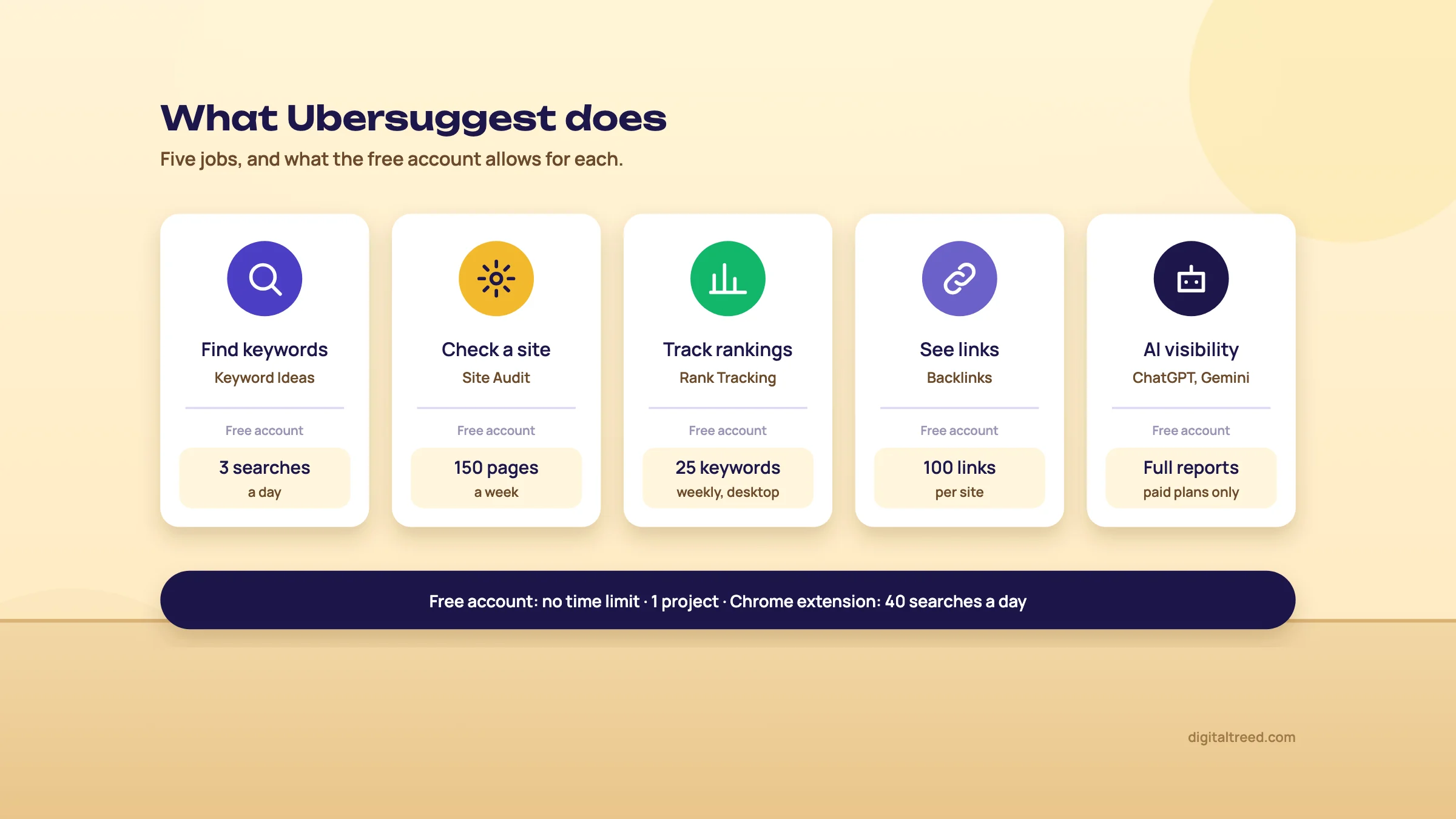 What the free account allows for each job, as of October 2026. Drawn by us.
Where the numbers come from
Every number in Ubersuggest, apart from data from your own connected accounts, is an estimate. Its help centre says it gathers data from Google's API, with monthly updates, and that its backlink data comes from the Moz API.[12] The pricing page FAQ adds that it uses "multiple data providers to come up with estimations".[2] Traffic figures cover organic search only and update once a month.[13]
That's normal for this kind of tool. Semrush and Ahrefs estimate too. The rule is the same for all of them: use the numbers to compare keywords and sites, and use Search Console for what really happens on your own site.
Does it work for India?
Mostly, yes. India is on the vendor's list of countries it covers.[14] You can choose cities as well as countries, but some locations are greyed out where Ubersuggest doesn't have enough data, and it can't say when they'll be added.[14] Rank Tracking works at country and city level, with the same warning that not every city is available.[9] So try Kanpur first, and fall back to India if it's greyed out.
The language list on its homepage includes Hindi, Bengali, Marathi, Tamil, Gujarati, Kannada, Malayalam and Punjabi.[1] Prices are shown in rupees to visitors in India; we cover them in chapter 5.[15]
Warning
Search volume is blank for some whole topics. Ubersuggest shows zero volume for highly regulated medical and financial subjects and sensitive health topics, among others, in line with Google Ads policies.[16] A Delhi dentist or a loan agent may see zeros that don't mean nobody searches.
Who it's for
- A shop, clinic or coaching centre owner who wants keyword ideas and a simple weekly rank report without learning a big suite.
- A beginner or student learning SEO on real data. The free account is enough to practise.
- A freelancer with a handful of small local clients who wants cheap rank tracking and audits in one place.
When you don't need it
For a 20-page local site you can do without it. Search Console shows the searches you already appear for, with real clicks and impressions.[17] Google's Keyword Planner gives search estimates from Google itself.[18] Our Free Website Audit checks a small site without an account. None of these cost anything.
You'd also skip it if you need deep link research or large competitor studies. Ubersuggest's own comparison says Ahrefs offers advanced filtering for deep research and suits experienced practitioners who need granular control.[3] For that, see our Ahrefs and Semrush guides.
If you're new to keywords, read Guide 1's keyword basics first. Then open a free account in chapter 2.
Set up Ubersuggest: account, first project and the Chrome extension
Quick answer
Register with an email or Google, then add your site as a project: domain, location, competitors and keywords to track. Choose your city or India as the location, connect Google Analytics and Search Console, and install the Chrome extension. Log in at least once every 30 days, or tracking pauses.
Signed out, free or trial
You can run a search without an account. Signed out, the Keyword Ideas page says you're on the unregistered version with 1 search, and offers 3 daily searches for free if you sign up.[4] A free account is created as soon as you register, and it has no time limit.[19]
The 7-day free trial is a different thing. It's only on monthly plans, it needs a payment method, and you get it once per account. If you don't cancel in Account & Billing before the seven days end, the first month is charged, and that charge isn't refunded.[20] Our advice: stay on the free account until you've used it for a week or two and know what you'd pay for.
Create your account
Click Sign In at the top right, then Register Here. Fill in your email and a password, tick the terms box and click Register Here. Or click "Continue with Google" on the same screen.[21] The labels were the same when we checked on 18 October 2026.
Use the Google account that owns your Search Console property. Ubersuggest's pricing FAQ says signing in with Google lets it reach your Search Console account to find more issues on your site.[2]
Add your first project
A project is your own website, tracked over time. The free account allows one.[19] The current steps, from Ubersuggest's help centre:[22]
- On the Dashboard, click Add Project.
- Enter the domain and click Start Analysis.
- Check the Business Summary it writes about your site, then click create.
- Pick the competitors to track.
- Review the suggested prompts for tracking your visibility in ChatGPT and Gemini.
- Choose the keywords to track.
Set up a project for a Kanpur sweet shop
- Add the site Click Add Project, type the shop's domain (say, a made-up kanpursweets.in) and click Start Analysis.
- Fix the summary Read the Business Summary. If it calls the shop a bakery or a wholesaler, correct it if the screen lets you; if it doesn't, check the suggested competitors and prompts on the next screens extra carefully.
- Pick two competitors The free account allows 2 per project.[19] Choose the two shops that show up for "sweet shop in Kanpur", not a national brand.
- Set the location Try Kanpur. If it's greyed out, use India.[14] The free account allows one location.[19]
- Add keywords Up to 25 on the free account.[19] Chapter 4 shows how to pick 20 good ones.
One counting rule matters on every plan. The same keyword tracked in two locations counts as two keywords.[22] If you add a keyword without choosing a location, Ubersuggest tracks it in every location in the project.[22] With one location on the free account, that's not a problem yet.
The settings to change on day one
| Setting | What to do | Why |
|---|---|---|
| Location | Your city, or India if the city is greyed out | Volumes and rankings differ by place; Kanpur results aren't Mumbai results |
| Mobile rank tracking | Turn it on in project settings (paid plans; some lifetime tiers are desktop only) | It's off by default and free accounts can't use it[23] |
| Google Analytics | Connect it to the project | Organic traffic for your own domain then comes from Analytics, not an estimate[13] |
| Search Console | Connect it | Ubersuggest says the integrations give more accurate data[8] |
| Your calendar | A reminder to log in once a month | After 30 days without a login, tracking pauses and the missed data can't be recovered[9] |
If your customers find you on their phones, and a sweet shop's mostly will, mobile positions are the ones you want. That's one of the few real reasons to pay: the free account tracks desktop only.[19]
If the site audit stops at one page
Many small sites sit behind Cloudflare or a WordPress security plugin. Ubersuggest says a Site Audit that scans one page or none, or shows "Site crawl has stopped", usually means its crawler is blocked.[24] Its fix is to whitelist its IP addresses in your firewall, Cloudflare or Wordfence settings. The crawler's user agent is RSiteAuditor.[24] Ask your developer to add the list from that help page; don't turn the firewall off.
Install the Chrome extension
The extension shows Ubersuggest data while you search Google. To install it, open Apps & Integrations (in the left-hand menu or the top bar), click Chrome Extension or Install,[25] then Add to Chrome and Add Extension in the Chrome Web Store.[11] You can also find it in the Chrome Web Store as "Ubersuggest - SEO and Keyword Discovery". The listing shows 600,000 users and an update on 15 October 2026, and says it also works on YouTube and Amazon searches.[26]
Under each Google search it shows monthly volume, CPC, SEO Difficulty and Paid Difficulty. For each result, it adds Domain Authority, estimated monthly traffic, backlinks and top organic keywords.[11] The free account gets 40 extension searches a day; Individual 150, Business 300, Enterprise 900. Stay logged in so searches count against your plan.[11] Limits reset at midnight UTC, which is 5:30 in the morning in India.[27]
Tip
If you don't want the panel on every search, click the arrow next to it and choose how long to hide it.[11] It keeps the panel out of the way on searches you don't need it for.
Your project is set. Chapter 3 explains what each number on these screens means.
The reports that matter, and what each number means
Quick answer
Five reports do most of the work: Keyword Ideas and AI Keyword Overview for keywords, Traffic Overview for competitors, Site Audit for problems and Rank Tracking for progress. Read Volume as a size, SEO Difficulty as a rough guide, and traffic as an estimate. Check the real results page before you trust any score.
Keyword Ideas
Go to Research Topics, then Keyword Ideas (older help pages call the menu Keyword Research). Choose Search by Keyword or Search by Website, type up to three keywords, pick the language and location, and search.[28] The results come in five tabs:[5]
- Autocomplete (Suggestions in some help pages): the common searches that contain your words, from Google autocomplete.
- Related: other searches people make around the topic.
- Questions: what people ask, the best source for blog posts and FAQ sections.
- Prepositions: searches with "for", "near", "with" and so on.
- Comparisons: "versus" and "or" searches.
Each keyword gets four numbers. Here's what they mean and what we'd do with them.
| Column | What it means | What to do with it |
|---|---|---|
| Volume | Estimated average monthly searches in the chosen location[6] | Read it as a size (tiny, small, big). Close variants often show the same figure, so don't add them up[29] |
| CPC | The average cost per click advertisers pay[6] | A hint of buying intent. A high CPC usually means people searching it buy |
| PD (Paid Difficulty) | Competition among advertisers[6] | Ignore it for SEO |
| SD (SEO Difficulty) | Estimated competition in the organic results; higher is harder[6] | Use it to sort, then look at the real top 10 |
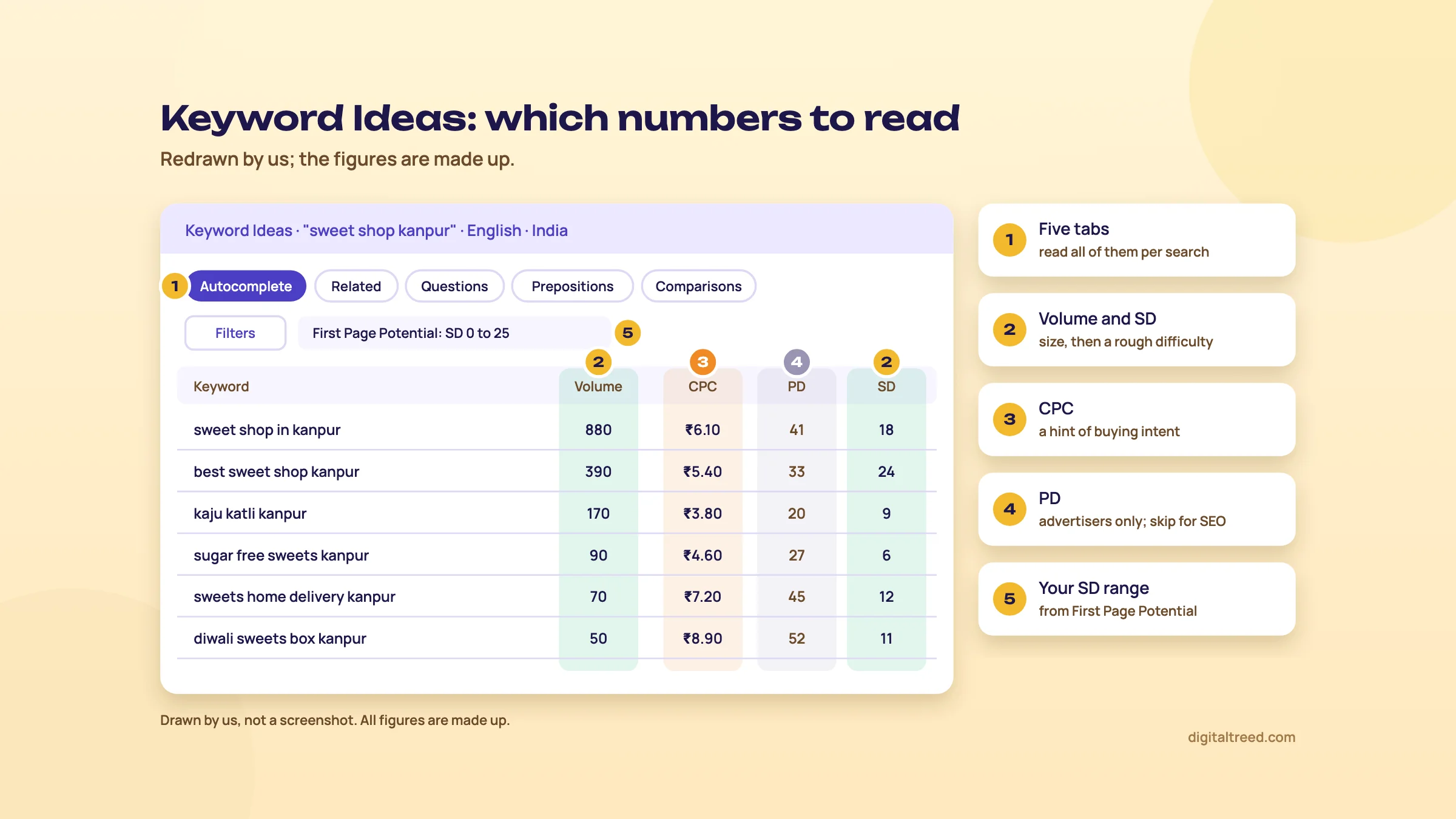 Read Volume and SD for SEO, CPC as a buying hint, and skip PD. Drawn by us; the figures are made up.
Filters narrow the list by volume, CPC, SEO Difficulty and words to include or exclude.[5] First Page Potential is the useful one: enter your domain, and it suggests the SEO Difficulty range your site can aim for, based on its Domain Authority.[30] Enter the root domain; a page URL gives the same answer.[30]
You can export the list to CSV, copy it, or add keywords to a Keyword List or to Rank Tracking.[5] Free accounts can't add keywords to rank tracking or lists straight from these reports.[19]
SEO Difficulty, honestly
SEO Difficulty is Ubersuggest's guess at how hard a keyword is, based mainly on the authority and backlinks of the pages ranking now.[31] Its help centre suggests sites still building authority focus on keywords with SD between 0 and 40.[28] It also says not to rely on the score alone: check intent and look at the top-ranking pages yourself.[31]
We agree, and we'd go further for local businesses. A search like "sweet shop near me" is decided mostly by the map pack and Business Profiles, which a difficulty score built on backlinks doesn't measure. Two more limits: SEO Difficulty isn't shown when you pick All Locations,[32] and it can be out of date. You can refresh it, which uses 1 credit per refresh.[6]
AI Keyword Overview
This report is one keyword in depth. Open Research Topics, then AI Keyword Overview, enter the keyword, language and location, and click AI Search.[6] You get:
- a summary: volume, SEO Difficulty, the average backlinks of the top 10 pages, search intent and "prompt intent";
- an AI Summary of SEO challenges and content ideas (paid monthly plans only);
- keyword ideas from autocomplete, questions, prepositions and comparisons;
- a breakdown with CPC, a 12-month volume chart by device, volume in the top 5 countries, searcher age groups and click behaviour;
- the top 100 URLs ranking for the keyword, with backlinks, estimated visits and a 0 to 100 authority score.[6]
Free users can't see the full history, the AI Summary or more than 10 AI prompt ideas.[6] Of all of it, the top 100 list is the most useful. If page one is all Justdial, Zomato and big brands, a small shop's own page won't get there soon, whatever the score says.
Content Ideas
Under Competitive Research, Content Ideas lists pages that do well on a topic, with estimated visits from Google, total backlinks, and Facebook, Pinterest and Reddit shares.[7] Ubersuggest suggests looking for pages with at least 75 estimated visits and 10 backlinks, and skipping giant brands.[7] Use it to see what a good page on the topic covers. Then write something better from your own knowledge; don't copy the outline.
Traffic Overview (the traffic analyzer)
Type any domain to see its estimated organic traffic, top pages and the keywords bringing visits. The estimate multiplies each keyword's volume by an expected click rate for the site's position.[13] It counts organic search only, and it updates at the start of each month, taking up to 2 days.[13]
Don't panic at a zero. Ubersuggest says sites with very low search visibility, which is common for local businesses, may show no traffic estimate at all.[33] For your own site, connect Google Analytics: the organic traffic shown is then pulled from Analytics, not estimated.[13]
Backlinks
The Backlinks report shows total backlinks and referring domains, anchor text, and new and lost links.[8] The data comes from the Moz API.[12] Free accounts see up to 100 backlinks per site.[19] Backlink Opportunity lists sites linking to your competitors but not to you.[8] For a shop, the useful finds are local: a newspaper's food page, a city blog, a wedding directory. Read Guide 2's link building chapter before you email anyone.
Site Audit
The audit crawls HTML pages by following internal links and starts from the https version of the site.[34] The report opens with the SEO score, Pages Discovered (successful, redirected, broken, blocked) and SEO Issues Discovered.[35] Issues are grouped as Critical Errors, Warnings and Recommendations, and each one shows how hard it is to fix and its SEO impact.[36] At the bottom is site speed for desktop and mobile.[35]
Two flags trip up beginners. Ubersuggest flags any page with fewer than 200 words as low word count, which is normal for Contact and About pages.[34] And duplicate titles on paginated pages are generally fine.[34] You can ignore issues that don't apply, and the score updates.[37] Chapter 4 walks through a full audit.
Rank Tracking
Rank Tracking shows where your tracked keywords sit in Google's top 100. Updates run weekly on all plans; the help centre says daily updates are no longer available,[9] and the pricing page lists weekly tracking for every plan.[2] (One newer help page still mentions a Daily option in Project Settings; if you see it, use it.)[38] Keywords are grouped as Top 3, Top 10, Top 100 and Not Ranked.[9]
Read the Average Position with care. Any keyword outside the top 100 counts as position 100,[39] so adding ten new keywords you don't rank for yet makes the average look worse overnight. Also, only organic results count. A page that appears only in a featured snippet, People also ask or the local pack can show as Not Ranked.[38]
Note
Ubersuggest's position won't match what you see on your phone. It checks from a fixed location and language, while your own search is personalised.[38] Search Console's average position is a different number again: an average over every impression in a date range.[38] Our measuring chapter explains which to report.
Enterprise plans also get Pixel Rank Tracking, in beta, which measures how far down the page your result appears, below ads and AI Overviews.[40]
AI Search Visibility
This report runs a set of prompts in AI tools such as ChatGPT and Gemini and counts how often your brand is mentioned, even without a link. It shows a visibility percentage, an industry rank against competitors and the prompts that mention you.[10] For a local business you can add a city to the topic.[10] AI answers change from one run to the next, which Ubersuggest itself says,[10] so treat the percentage as a trend over months. Guide 5's measuring chapter shows free ways to do the same.
Now put the reports to work. Chapter 4 has four real jobs.
Four jobs, step by step: keywords, an audit, tracking and a competitor
Quick answer
The free account is enough for four real jobs. Find keywords for a Kanpur sweet shop with three planned searches, audit a small site of up to 150 pages a week, track 20 keywords weekly on desktop, and size up a competitor. Plan each search before you spend it; the limit resets daily.
Job 1: find keywords for a Kanpur sweet shop
Three searches a day is tight, so plan them.[19] Write your products and areas on paper first. The Chrome extension's 40 daily searches cover the rest, because it shows volume and difficulty under every Google search you make.[11]
Build a keyword list for a Kanpur sweet shop
- List what and where Products (kaju katli, sweets box, sugar-free sweets, namkeen), occasions (Diwali, Raksha Bandhan, weddings) and areas (Swaroop Nagar, Kidwai Nagar, Kakadeo).
- Search 1: the shop In Keyword Ideas, type "sweet shop kanpur", choose English, and set the location to Kanpur, or India if Kanpur is greyed out.[14] Open each of the five tabs.
- Search 2: the products Use the three-keyword box: "kaju katli", "sweets box", "sugar free sweets".[28]
- Search 3: the season "diwali sweets box". Check the Questions tab for blog and FAQ ideas. If the counter says you've run out sooner than this, do the rest tomorrow.
- Fill the gaps in Google With the extension on, search the area names plus "sweets" and note the volume under each search.[11] Write down Google's own autocomplete suggestions too.
- Check the real results For your best ten, look at page one. A map pack means the Business Profile matters more than a page; a page full of directories means a long climb.
- Give each keyword a page In a sheet: keyword, rough size, intent (buy, visit, learn), and the page it belongs to. One main keyword per page.
Free accounts can't send keywords from these reports to lists or rank tracking,[19] so the sheet is your list. That's no loss: you'd want the sheet anyway.
Prefer longer phrases. "Sugar free sweets in Kanpur" will have a small number next to it, and that's fine. The person typing it wants to buy, and fewer shops have a page for it.
Note
From our work: a women's wear manufacturer had product pages aimed at short, competitive keywords. We moved them to long-tail keywords, and results started within a month. Lesson: a small number on a specific search often beats a big number you can't reach.
For a fuller method, with Keyword Planner and Search Console in the same sheet, see Guide 2's keyword research chapter and our Keyword Planner guide.
Job 2: audit a small site
Take a Pune coaching centre with a 40-page WordPress site. The free audit crawls up to 150 pages, once a week, with no recrawl on demand.[41] That's enough for this site, but you get one look a week, so fix in batches.
Audit a Pune coaching centre's site and make a fix list
- Start the audit Open Site Audit. Without a project, enter the address; with one, click the pencil icon and enter it.[36]
- Check Pages Discovered first Count successful, redirected, broken and blocked pages.[35] If only one page was crawled, the crawler is blocked or the site lacks HTTPS or a sitemap; see chapter 2.[34]
- Open See All SEO Issues Filter to Critical Errors. Each issue shows the difficulty to fix and the SEO impact.[36] Start with high impact, low difficulty.
- Skip the false alarms Low word count on Contact or Fees pages (under 200 words) is fine.[34] Ignore issues that don't apply.[37]
- Read the speed section Switch between desktop and mobile at the bottom of the report.[35] Run the slowest page through our Website Speed Test, which scores one URL out of 100 and lists what is slowing it down, such as render-blocking files and missing caching.
- Export and assign Export to CSV and give each row an owner: you for titles and text, the developer for speed and redirects.[35] Free accounts export CSV only.[19]
- Re-check next week The free audit runs weekly; check that fixed issues have gone.
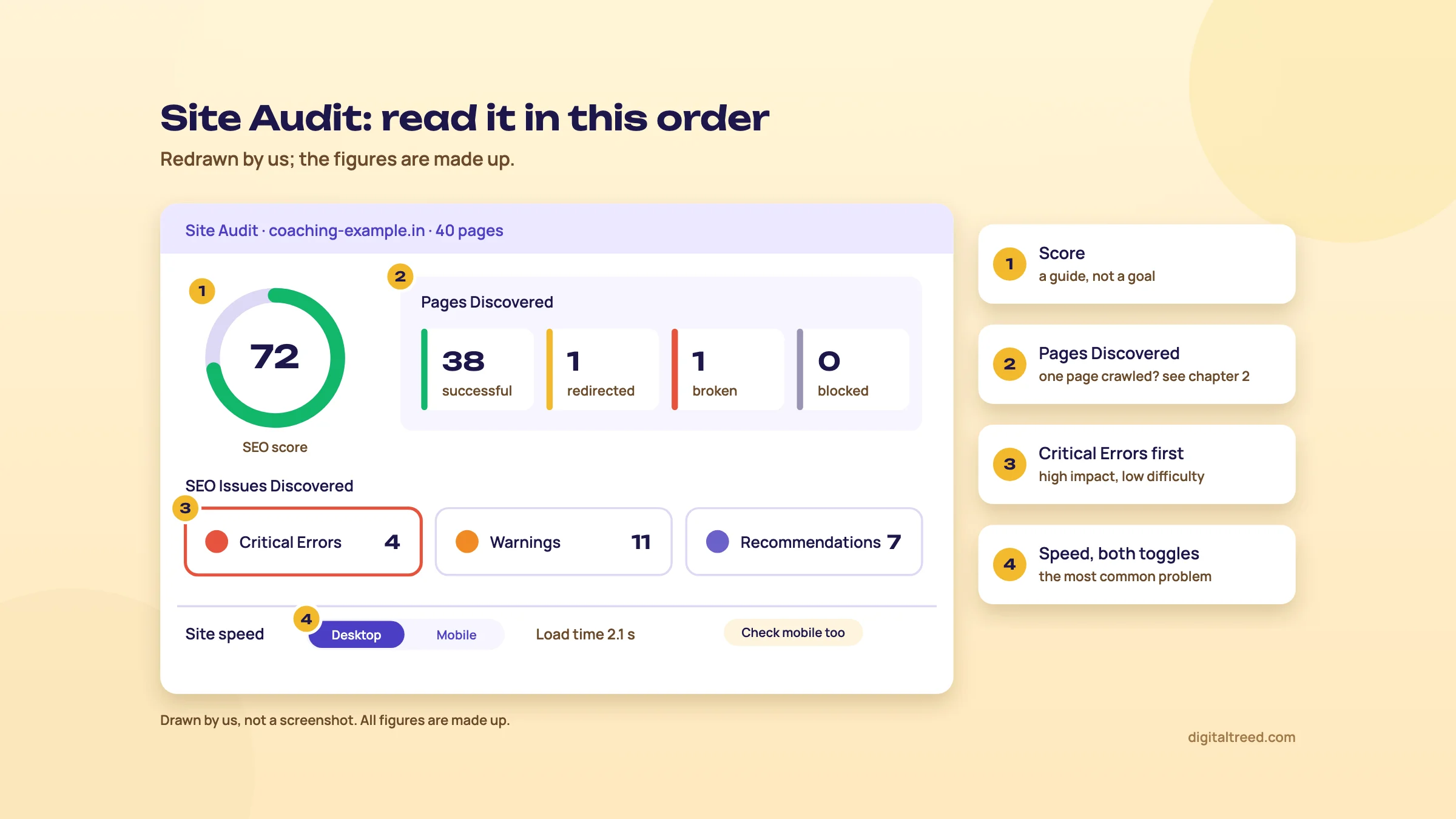 Pages Discovered first, then Critical Errors, then speed on both devices. Drawn by us; the figures are made up.
Run our Free Website Audit on the same site. It needs no sign-up for one audit a day, crawls up to 25 pages, and scores ten areas, including local SEO, lead readiness and whether AI tools name the business. Sign in, free, to see every fix with the points it adds. The two tools check different things, so the second opinion is worth the minute. For titles and descriptions page by page, our Meta Tag Analyzer takes up to 10 URLs and shows the Google preview.
Note
From our work: teaching SEO. When I taught SEO, the hardest part for students already doing client work was technical SEO, because local business sites mostly run on WordPress with shared hosting. The most common issue was site speed. Lesson: on a coaching centre's site, check the speed section before you polish meta descriptions.
Job 3: track 20 keywords
The free account tracks 25 keywords in one project, updated weekly, on desktop only, in one location.[19] Twenty leaves room for five tests.
Track 20 keywords for the Kanpur sweet shop
- Choose 20 from your sheet About 8 product plus city searches, 5 area searches, 4 occasion searches and 3 questions your blog answers. Leave out your brand name; you'll rank for it anyway.
- Make a CSV One column titled "Keywords", one keyword per row.[9]
- Import Go to Rank Tracking in your project, click Add Keywords, then Import from CSV.[9] Or type them in when you create the project.
- Wait a week New keywords show as Pending until the next weekly update.[42]
- Read it monthly, not daily Watch how many keywords move into Top 10 and Top 3. Keywords outside the top 100 count as 100 in the average, so judge the groups, not the average.[39]
- Check against Search Console Once a month, compare with the Queries tab in Search Console's Performance report, which counts real clicks and impressions.[17]
Remember to log in once a month. Thirty days without a login pauses tracking, and those weeks are lost for good.[9] Removing a project deletes its tracking history.[22] And keep the keyword list steady: if you swap keywords every week, there's no trend to read.
Job 4: size up a competitor in ten minutes
Say you run a D2C skincare brand and a rival seems to be everywhere.
Check a D2C competitor's top pages and links
- Traffic Overview Enter the rival's domain. Note the estimated organic traffic and open Top Pages by Traffic.[8]
- Read the top pages Are they product pages, ingredient guides or "best for oily skin" lists? That tells you which content earns their search traffic.
- Backlinks Enter the same domain in Backlinks. The free view shows up to 100 links.[19] Look for magazines and review sites that could cover you too.
- Treat it as a sketch The traffic figure is an estimate from volumes and click rates, organic only.[13] Compare sites with it; don't quote it as their real traffic.
A Delhi dentist trying the same may see zero volumes. Ubersuggest blanks volume for sensitive health and regulated medical topics.[16] Use Search Console's queries and Google's autocomplete there instead.
These jobs fit the free account. If you keep hitting the limits, chapter 5 shows what paying adds and what it costs in rupees.
Free vs paid, prices in rupees, pros and cons, and alternatives
Quick answer
The free account gives 3 searches a day, one project and 25 tracked keywords. Paid plans for India start at ₹1,135 a month (Individual), ₹7,570 a year or ₹11,350 once for lifetime access, checked 18 October 2026. Start free, try a monthly plan for 7 days, and buy lifetime only if you're sure.
What the free account gives you
3
searches or reports a day on a free account[19]
150
pages crawled a week by the free Site Audit[19]
25
keywords tracked weekly, desktop only[19]
40
Chrome extension searches a day[11]
It also allows one project, one location, 2 competitors, 100 backlinks per site, 3 keyword lists of 30 keywords, and has no time limit.[19] For one local business, that covers a lot.
The paid plans, in rupees
Ubersuggest shows prices in the local currency it detects from your IP address, and it supports INR for users in India.[15] These are the prices its pricing page showed in India on 18 October 2026, with the Monthly, Yearly and Lifetime tabs switched in turn.[2] The page doesn't mention GST or other taxes.
| Free | Individual | Business | Enterprise | |
|---|---|---|---|---|
| Monthly | ₹0 | ₹1,135 | ₹1,890 | ₹3,785 |
| Yearly (billed once a year) | - | ₹7,570 | ₹11,825 | ₹25,640 |
| Lifetime (one payment) | - | ₹11,350 | ₹18,900 | ₹37,850 |
| Searches a day | 3 | 150 | 300 | 900 |
| Projects (brands) | 1 | 1 | 7 | 15 |
| Users | Not stated | 1 | 2 | 5 |
| Tracked keywords per project | 25 | 125 | 150 | 300 |
| Locations per project | 1 | 20 | Unlimited | Unlimited |
| Site Audit pages per project, weekly | 150 | 1,000 | 5,000 | 10,000 |
| Competitors per project | 2 | 5 | 10 | 15 |
| Backlink rows | 100 | 2,000 | 5,000 | 10,000 |
| AI articles a month (monthly and yearly) | - | 2 | 5 | 10 |
Free-plan figures are from Ubersuggest's free account help page.[19] There's also a Custom plan for agencies, priced on request.[2] Add-ons such as 500 extra daily searches, extra projects or extra users are listed at $5 a month each, shown in dollars even on the rupee page.[2] That's about ₹480 at ₹96 = US$1, the 1 to 16 October 2026 average we use across these guides.[43]
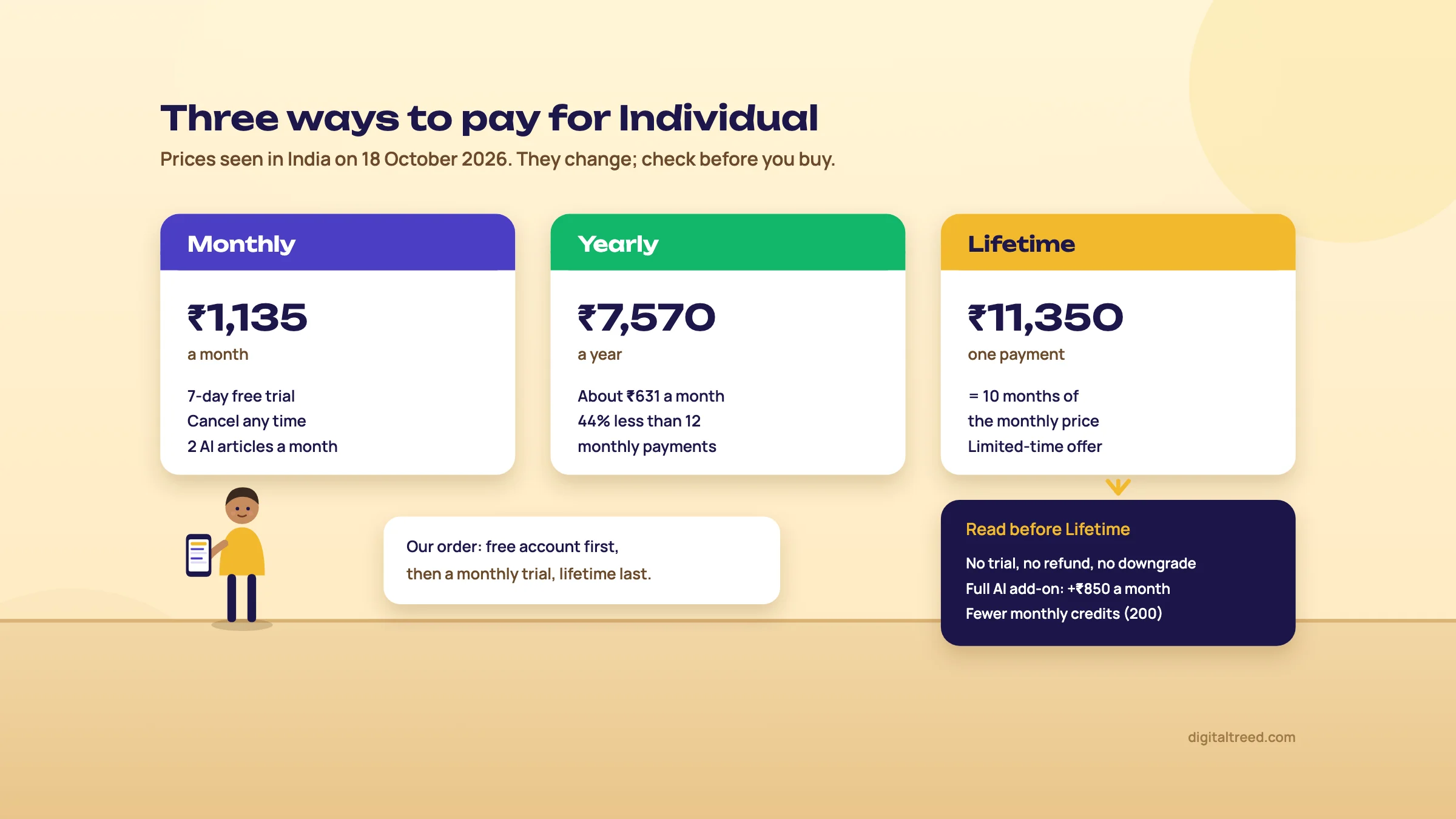 Individual plan prices seen in India on 18 October 2026. Drawn by us.
Monthly, yearly or lifetime?
Do the sums yourself, because the badges don't match them. The tabs say "Save 80%" for yearly and "Save 90%" for lifetime.[2] By our arithmetic, Individual yearly at ₹7,570 is 44% less than twelve monthly payments of ₹1,135 (₹13,620). Business saves 48% and Enterprise 44%. Each lifetime price is exactly ten months of the monthly price.
Lifetime looks like the bargain. Read the small print first:
- No free trial, and the purchase is final and non-refundable.[2]
- You can upgrade to a higher lifetime tier by paying the difference, but you can't downgrade.[44]
- Lifetime plans are limited-time offers, shown only while the offer is on.[44] The page we read had a countdown timer. Don't let it rush you.
- The AI parts are cut back. Lifetime tiers get "AI prompts on demand only" and a free version of AI Search Visibility, ChatGPT insights only. The full AI add-on is an extra ₹850, ₹2,740 or ₹6,525 a month for Individual, Business and Enterprise.[2] Lifetime users also don't get the AI Summary in AI Keyword Overview.[6]
- Monthly credits are lower on lifetime Individual and Enterprise (200 and 700, against 250 and 1,000).[2]
- A 2025 help page describes "lifetime" as access for 50 years;[45] the 2026 page just says permanent access.[44]
Our view: if you'll use Ubersuggest for more than a year and don't care about the AI reports, lifetime Individual is good value. Otherwise pay monthly, cancel when the work is done, and keep the free account. A cancelled plan drops back to a free account.[19]
Paying from India
The free trial needs a credit or debit card, Google Pay, Apple Pay or PayPal, and Ubersuggest asks that your payment method supports international transactions.[46] If your card is blocked for international use, switch that on in your bank app first. The currency is fixed at checkout and can't be changed later.[15] Students with a university email can get 20% off monthly plans for 12 months, and registered non-profits 20% off monthly plans for as long as they qualify; you ask support after starting a trial.[47] Need an invoice in your company's name? The pricing FAQ says to email support.[2]
Pros and cons for beginners
Pros
- A real free account with no time limit
- Rupee prices for India, and a lifetime option
- Simple screens; each audit issue says how hard it is to fix and how much it matters
- Keyword ideas, audit, tracking and backlinks in one place
- India and some Indian cities as locations
- Chrome extension with 40 free searches a day
Cons
- 3 searches a day runs out fast
- Rankings update weekly, and free tracking is desktop only
- All volumes and traffic are estimates, and health or finance keywords may show zero
- Some Indian cities are greyed out
- Lifetime is non-refundable and its AI features cost extra every month
- No API access[2]
Alternatives, and which one when
Start with what's free. Several jobs Ubersuggest does are covered by our own tools and Google's.
| Tool | Cost | Use it when |
|---|---|---|
| Our Free Website Audit | Free, 1 audit a day without sign-up | You want a quick score and fix list for a small site, including local, speed and AI checks |
| Our Meta Tag Analyzer | Free | You're fixing titles and descriptions on up to 10 pages and want the Google preview |
| Our Word Counter & Keyword Density Checker | Free | You've written the page and want to check how often the keyword appears |
| Google Search Console | Free | You want the real searches, clicks and positions for your own site |
| Google Keyword Planner | Free with a Google Ads account | You want search estimates from Google itself and don't mind ranges |
| Mangools | Free account; paid from $30.50 a month (about ₹2,928), checked 18 Oct 2026[48] | You want a beginner-friendly keyword difficulty tool and paid rank tracking |
| Semrush | Free account; paid from $139 a month (about ₹13,344), checked 16 Oct 2026[49] | You need deep competitor and keyword data, or you work for many clients |
| AnswerThePublic | Separate product from the same company | You want the full question map; Ubersuggest only includes a sample of it[50] |
For the whole list of free options by job, see Best free SEO tools. If you need daily rank tracking for several client sites, see SE Ranking, from $129 a month (about ₹12,384) on 18 October 2026.[51]
| You are | Our pick | Why |
|---|---|---|
| A Kanpur sweet shop with one site | Search Console, our Free Website Audit and Ubersuggest free | Real data, a fix list and keyword ideas, all at ₹0 |
| A beginner learning SEO | Ubersuggest free, then a 7-day monthly trial | Real reports to practise on, and the trial shows what paying adds |
| A freelancer with 3 to 5 local clients | Ubersuggest Business, monthly | 7 projects, unlimited locations and 300 searches a day |
| An agency or a D2C brand with big competitors | Semrush or Ahrefs | Deeper data and filters for large competitor work |
If you'd rather have someone run this for you, see our SEO service or get a quote. Then take the 10-question quiz below.
Test yourself
Ten questions on the whole guide. Pick an answer, check it, and see your score at the end.
You got 0 of 10 right.
Frequently asked questions
Frequently asked
Is Ubersuggest free?
Partly. The free account has no time limit and gives 3 searches or reports a day and one project. It tracks 25 keywords weekly on desktop, audits up to 150 pages a week and shows 100 backlinks per site. The Chrome extension adds 40 free searches a day. Paid plans lift those limits.
How much does Ubersuggest cost in India?
On 18 October 2026 its pricing page showed rupee prices in India: Individual ₹1,135, Business ₹1,890 and Enterprise ₹3,785 a month. Yearly billing was ₹7,570, ₹11,825 and ₹25,640, and lifetime was ₹11,350, ₹18,900 and ₹37,850 as a single payment. Prices change, so check the page on the day you buy.
Is the Ubersuggest lifetime deal worth it?
It can be, if you'll use the tool for more than a year and don't need the AI reports. Each lifetime price equals ten months of the monthly price. But there's no trial or refund, you can't downgrade, and full AI features cost an extra monthly add-on. Try a monthly plan's 7-day trial first.
How accurate is Ubersuggest's data?
Its numbers are estimates. Ubersuggest says it uses several data providers, takes keyword data from Google's API with monthly updates, and gets backlinks from the Moz API. Traffic covers organic search only. Use it to compare keywords and sites, and use Search Console for your own site's real clicks and positions.
Does Ubersuggest work for India and Indian cities?
India is on its list of covered countries, and you can choose cities for keyword research and rank tracking. Some cities are greyed out where it lacks data, and it can't say when they'll be added. If your city is greyed out, choose India and keep the city name in the keyword.
How often does Ubersuggest update rankings?
Weekly. Its help centre says rank tracking updates once a week on all plans and daily updates are no longer available. Positions cover Google's top 100 organic results. If you don't log in for 30 days, tracking pauses and the missed weeks can't be recovered.
Is Ubersuggest better than Google Keyword Planner?
They do different jobs. Keyword Planner gives search estimates from Google itself, but small ad accounts often see ranges. Ubersuggest adds SEO Difficulty, question ideas, the pages that rank, and tracking. Many small businesses use both: Keyword Planner for size, Ubersuggest for ideas, and Search Console for what really happens.
Is Ubersuggest as good as Semrush or Ahrefs?
Not for deep research. Semrush and Ahrefs have more data and finer filters for large competitor and link studies. Ubersuggest is simpler and much cheaper, and for one local business or a beginner it does most of what's needed. Ubersuggest's own comparison makes the same split.
Does Ubersuggest have a Chrome extension?
Yes. It shows monthly volume, CPC and SEO Difficulty under Google searches, and Domain Authority, traffic and backlinks for each result. It also works on YouTube and Amazon searches. Free accounts get 40 extension searches a day; Individual gets 150, Business 300 and Enterprise 900.
How do I cancel Ubersuggest?
Cancel in the Account & Billing section of your dashboard. A cancelled plan drops back to a free account, with the free limits. If you're on the 7-day trial, cancel before it ends: once the first paid month is charged, that charge isn't refunded.
Sources
References
- Ubersuggest: Free Keyword Research Tool, Neil Patel Digital, accessed 18 Oct 2026
- Plans and pricing, Ubersuggest (Neil Patel Digital), prices seen 18 Oct 2026, accessed 16 Oct 2026
- Comparing Ubersuggest with Other SEO Tools, Ubersuggest Help Center, updated 1 Nov 2025, accessed 16 Oct 2026
- Keyword Ideas (Ubersuggest app, signed out), Ubersuggest, accessed 18 Oct 2026
- Keyword Ideas: Understanding and Using the Keyword Tabs, Ubersuggest Help Center, updated 9 May 2025, accessed 16 Oct 2026
- Ubersuggest AI Keyword Overview: A Complete Guide, Ubersuggest Help Center, updated 15 Dec 2025, accessed 16 Oct 2026
- Discover New Content Ideas with Ubersuggest, Ubersuggest Help Center, updated 15 Nov 2025, accessed 16 Oct 2026
- Complete Guide to All Ubersuggest Features, Ubersuggest Help Center, updated 27 Feb 2026, accessed 16 Oct 2026
- Rank Tracking: Monitor Keywords & SEO Rankings, Ubersuggest Help Center, updated 23 Jan 2026, accessed 16 Oct 2026
- Introducing AI Search Visibility in Ubersuggest, Ubersuggest Help Center, updated 1 Sep 2026, accessed 16 Oct 2026
- How to Use the Ubersuggest Chrome Extension for SEO Insights, Ubersuggest Help Center, updated 19 Feb 2026, accessed 16 Oct 2026
- How Does Ubersuggest Gather Data?, Ubersuggest Help Center, updated 22 Aug 2025, accessed 16 Oct 2026
- How Ubersuggest Traffic Estimations Work, Ubersuggest Help Center, updated 2 Feb 2026, accessed 16 Oct 2026
- Why is my Location Greyed Out?, Ubersuggest Help Center, updated 24 Jan 2025, accessed 16 Oct 2026
- Prices and Currency Displayed Incorrectly for My Location, Ubersuggest Help Center, updated 24 May 2025, accessed 16 Oct 2026
- Zero Search Volume in SEO: What It Means, Causes, and Limitations, Ubersuggest Help Center, updated 27 Feb 2026, accessed 16 Oct 2026
- Performance report (Search results): Overview and basic setup, Search Console Help, accessed 18 Oct 2026
- Use Keyword Planner, Google Ads Help, accessed 18 Oct 2026
- Free Account: Key Features and Limits, Ubersuggest Help Center, updated 26 Jul 2025, accessed 16 Oct 2026
- Ubersuggest Refund Policy, Ubersuggest Help Center, updated 15 Feb 2026, accessed 16 Oct 2026
- Step-by-Step Guide to Creating an Account With Ubersuggest, Ubersuggest Help Center, updated 19 Aug 2024, accessed 16 Oct 2026
- How to Create a Project and Track Keywords, Ubersuggest Help Center, updated 3 Jun 2026, accessed 16 Oct 2026
- Rank Tracking: Desktop and Mobile Results, Ubersuggest Help Center, updated 19 Dec 2025, accessed 16 Oct 2026
- Troubleshooting Ubersuggest Site Audit Crawl Issues, Ubersuggest Help Center, updated 22 Jul 2026, accessed 16 Oct 2026
- Apps & Integrations, Ubersuggest (Neil Patel Digital), accessed 18 Oct 2026
- Ubersuggest - SEO and Keyword Discovery, Chrome Web Store, listing updated 15 Oct 2026, accessed 18 Oct 2026
- Chrome Extension Limits per Tier, Ubersuggest Help Center, updated 10 Jul 2024, accessed 16 Oct 2026
- How to Get Keyword Ideas Using the Keyword Research, Ubersuggest Help Center, updated 3 Feb 2026, accessed 16 Oct 2026
- Similar Keywords with Same Volume, Ubersuggest Help Center, updated 4 Jul 2024, accessed 16 Oct 2026
- Keyword Ideas: First Page Potential Feature, Ubersuggest Help Center, updated 9 May 2025, accessed 16 Oct 2026
- How SEO Difficulty Works: A Comprehensive Guide, Ubersuggest Help Center, updated 26 Jul 2025, accessed 16 Oct 2026
- A Guide to Global Keyword Data Search, Ubersuggest Help Center, updated 1 Aug 2025, accessed 16 Oct 2026
- Why Ubersuggest Displays Zero Traffic (and What It Means), Ubersuggest Help Center, updated 2 Feb 2026, accessed 16 Oct 2026
- Ubersuggest's Site Audit Guide, Ubersuggest Help Center, updated 22 Feb 2025, accessed 16 Oct 2026
- Running a Site Audit With Ubersuggest, Ubersuggest Help Center, updated 5 Oct 2025, accessed 16 Oct 2026
- Can I Audit A Website Without Creating A Project?, Ubersuggest Help Center, updated 5 Sep 2025, accessed 16 Oct 2026
- Site Audit: Ignore Issues, Ubersuggest Help Center, updated 27 Dec 2024, accessed 16 Oct 2026
- Why Rank Tracking Positions May Differ From a Manual Google Search, Ubersuggest Help Center, 2 Sep 2026, accessed 16 Oct 2026
- Rank Tracking: Understanding Average Position, Ubersuggest Help Center, updated 25 Sep 2025, accessed 16 Oct 2026
- Pixel Rank Tracking: See How Visible Your Keywords Really Are, Ubersuggest Help Center, updated 14 Sep 2026, accessed 16 Oct 2026
- Site Audit Limits for Free Users, Ubersuggest Help Center, 14 Sep 2024, accessed 16 Oct 2026
- Why Are Tracked Keywords Showing as 'Pending' or 'Not Ranked'?, Ubersuggest Help Center, updated 17 Oct 2025, accessed 16 Oct 2026
- US dollar to Indian rupee, monthly average 2026, X-Rates, 1-16 Oct 2026 average, accessed 16 Oct 2026
- How Lifetime Subscriptions Work in Ubersuggest, Ubersuggest Help Center, updated 2 Sep 2026, accessed 16 Oct 2026
- Explore Subscriptions, Upgrades, and Free Trials, Ubersuggest Help Center, updated 1 Aug 2025, accessed 16 Oct 2026
- How to Start a Free Trial with Ubersuggest, Ubersuggest Help Center, updated 20 Feb 2026, accessed 16 Oct 2026
- Non-Profit and Student Discounts in Ubersuggest, Ubersuggest Help Center, 20 Feb 2026, accessed 16 Oct 2026
- Plans and pricing, Mangools, accessed 18 Oct 2026
- Plans & Pricing, Semrush, prices seen 16 Oct 2026 from India, accessed 16 Oct 2026
- Is AnswerThePublic Included in Ubersuggest Plans?, Ubersuggest Help Center, updated 13 Dec 2024, accessed 16 Oct 2026
- Subscription, SE Ranking, prices seen 18 Oct 2026 from India, accessed 16 Oct 2026
Get the free checklist
Every step of this guide on one page, to print or tick off. We email you the PDF link.