

What Mangools is, who it's for, and setting up a free account
This guide is part of our "SEO tools explained" path. It's for small business owners, bloggers and freelancers who want keyword difficulty scores and local data without the price or the learning curve of a big suite. Our running example is a Pune coaching centre with a new website.
By the end you'll be able to set up a free account without wasting your daily lookups and read KWFinder's columns and Keyword Difficulty. You'll find city-level keywords for India and judge a results page in SERPChecker. And you'll know how to set up rank tracking in SERPWatcher and find links worth copying in LinkMiner.
There are five chapters, about 27 minutes in all. Chapter 1 explains what Mangools is and sets up the account. Chapter 2 covers KWFinder and Keyword Difficulty, and chapter 3 the other four tools, the free tools and the new AI features. Chapter 4 does four real jobs step by step. Chapter 5 has the plans, read on Mangools' own pricing page on 18 October 2026, with pros and cons and the alternatives, our free tools first.
Quick answer
Mangools is a small SEO suite of five tools: KWFinder for keywords, SERPChecker for the results page, SERPWatcher for rankings, LinkMiner for backlinks and SiteProfiler for site strength. One plan unlocks all five. The free account needs no card and gives KWFinder 5 lookups per 24 hours, enough to try it.
Mangools started as one tool. Peter Hrbáčik, its founder and CEO, launched KWFinder in August 2014. SERPChecker followed in 2016, when Mangools became the brand name for the set. LinkMiner came in January 2018 and SiteProfiler, the fifth tool, in September 2018.[1] The company is in Bratislava, Slovakia. It's part of itrinity, a group that runs several software businesses and lists Mangools as "Bootstrapped 2014" in its portfolio.[2]
The five tools in one table
| Tool | What it answers | The number to look at first |
|---|---|---|
| KWFinder | What do people search, how often, and how hard is it to rank? | Search (monthly volume) and KD (Keyword Difficulty, 0 to 100)[3] |
| SERPChecker | Who ranks on page one for a keyword, and how strong are they? | Link Profile Strength and the other 45+ metrics for each result[4] |
| SERPWatcher | Where does my site rank this week? | Performance Index and each keyword's position[5] |
| LinkMiner | Which sites link to a competitor? | Link Strength, Citation Flow and Trust Flow[6] |
| SiteProfiler | How strong is this website overall? | Domain Authority, Citation Flow and Trust Flow, plus top content and competitors[7] |
The tools are joined up. Mangools doesn't sell them separately, and says KWFinder "doesn't make any sense" without SERPChecker, because the difficulty score is built from SERPChecker data.[8] You click a keyword in KWFinder and the right-hand panel is SERPChecker. You can send a keyword list to SERPWatcher.[3] From LinkMiner you can open a linking site in SiteProfiler.[6]
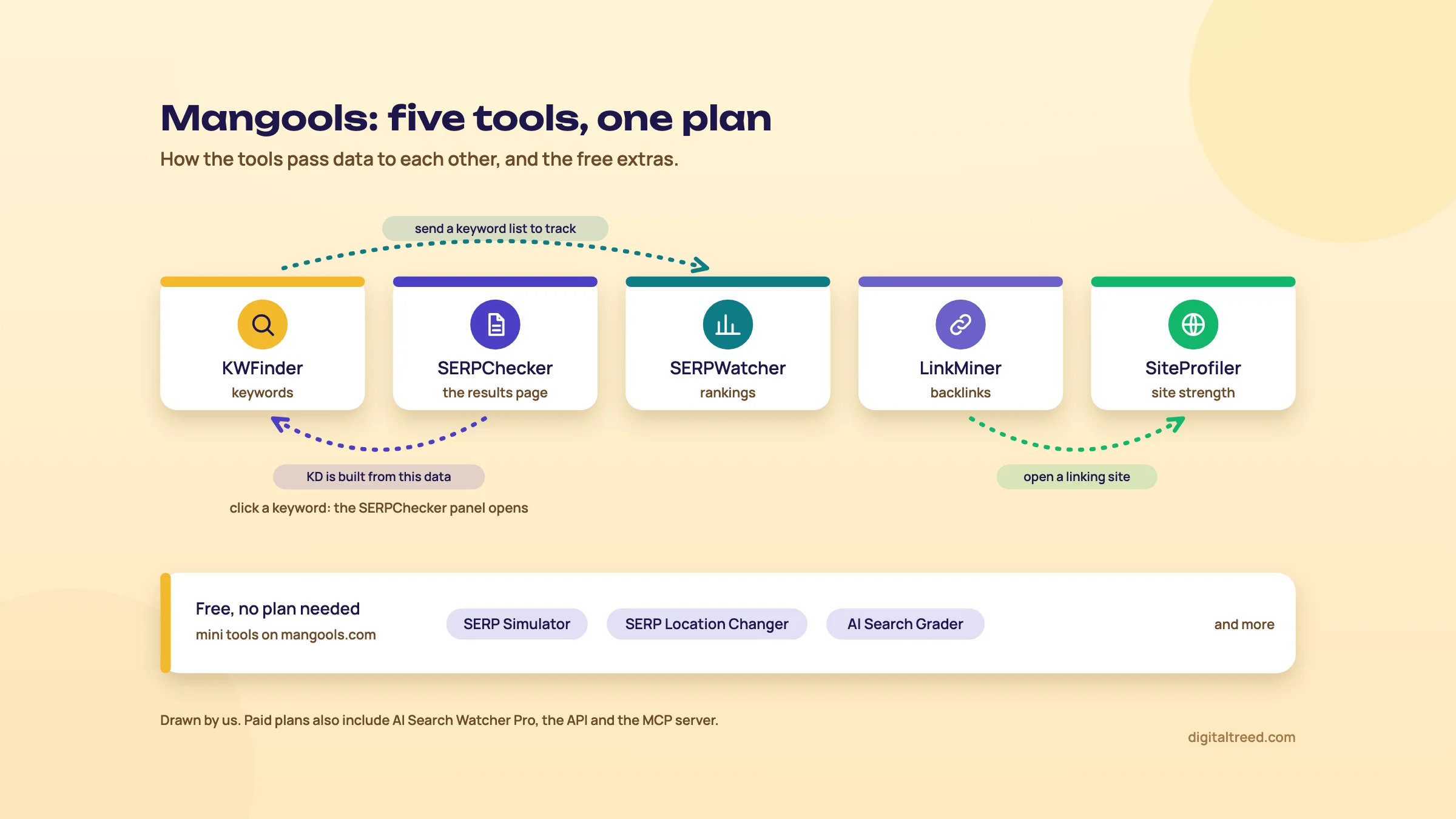 Five tools, one plan, and the free extras. Drawn by us.
Next to the five, Mangools now has an AI visibility tracker (AI Search Watcher), an MCP server for AI assistants, and free mini tools such as the SERP Simulator. Chapter 3 covers them.[9]
Who it's for
Mangools describes its Basic plan as being "for solopreneurs, freelance SEOs and marketers".[9] That matches who we'd send to it: a blogger, a freelancer with three or four local clients, or a small business owner who does their own SEO. The screens are simpler than Semrush or Ahrefs, and there are fewer reports to get lost in.
It's a good fit when the main job is finding keywords a small site can actually rank for, then checking who it's up against. Think of a Pune coaching centre asking whether "NEET coaching in Pune" is winnable. Or whether a smaller phrase for one area of the city is the better first page.
When you don't need it
- Your site already gets traffic. Search Console shows the searches you already appear for, for free. Start there; our Search Console guide shows how.
- You only need rough volumes. Google Keyword Planner is free with a Google Ads account, and Guide 1's keyword basics works without any paid tool.
- You need site audits. Mangools has no site crawler or technical audit among its five tools. Use our Free Website Audit or a crawler instead.
- You're an agency with many clients. A full suite such as Semrush or SE Ranking adds audits, daily ranks on cheaper plans and client reporting in one place.
Set up a free account
Mangools calls its free plan "completely free" and doesn't ask for a credit card.[8] In KWFinder, a free account gets 5 lookups per 24 hours, with 15 related keywords and 5 competitor keywords per lookup.[10] That's enough to test it on one topic, not to build a keyword list.
Older help pages still talk about a 10-day free trial.[5] In June 2023 Mangools turned that trial into a "Free+" plan with higher limits for the same period, after which accounts drop to Free.[11] The current pricing page shows only the paid plans, and we couldn't find today's free limits for the other four tools on any Mangools page. Your own limits are in the dashboard under Available resources, or under your avatar in the top-right corner of any tool.[8]
What counts as a lookup
Limits are easy to burn through by accident, so learn the rules first. From Mangools' FAQ:[8]
- One keyword lookup is each time you type a keyword, domain or URL in the main search box and press the green search button. Importing a list counts as one.
- One SERP lookup is each time the SERPChecker panel loads. In KWFinder that happens when you click a keyword in the list. Recently cached results don't count.
- Limits reset 24 hours after your first request, not at midnight.
Tip
On a free account, plan your 5 lookups before you start. Write the seed phrases down, run each once, and export or copy the results. Clicking around the list to see difficulty scores uses SERP lookups too.
Settings to check on day one
- Location. The location list on KWFinder's search form starts with "Anywhere".[10] Set India, or a city, before every search. The location field is a search box: start typing and it suggests matches.[8]
- Language. The language list includes English and Hindi;[12] KWFinder has more than 40 languages in all.[3] For most Indian businesses, English is right even when people mix languages; Guide 2 explains why in how India searches.
- Currency. The CPC column's currency can be changed; rates update weekly.[3] Switch it to rupees if you'll show the numbers to a client.
- Device. SERPChecker lets you choose desktop or mobile,[4] and so does SERPWatcher.[5] For a local business whose customers search on their phones, pick mobile.
- Refund window. If you upgrade, note the time. Mangools refunds within 48 hours of payment, and not for two subscriptions in a row.[9]
Next, KWFinder in detail: the columns, how Keyword Difficulty is worked out, and what Indian and city-level data you get.
KWFinder: search volume, Keyword Difficulty and local data for India
Quick answer
KWFinder finds keyword ideas three ways: related keywords, Google autocomplete and questions. It also shows the keywords a competitor ranks for. Each row has monthly searches, a 12-month trend, CPC, PPC competition and Keyword Difficulty from 0 to 100. Difficulty only measures the backlinks of page one, so read the results yourself before you pick.
KWFinder is the tool most people buy Mangools for. You type a seed phrase, pick a location and language, and get a list. Click any row and the right side shows that keyword's history and the live results page.
Three ways to search
- Search by Keyword. Ideas come from one of three sources: "Related keywords" (the default, from KWFinder's database), "Autocomplete" or "Questions". The last two build long-tail ideas from Google Autocomplete.[3]
- Search by Domain. Enter a competitor's domain or exact URL and see the keywords it ranks for, with position and estimated visits.[3]
- Keyword Gap. Lists keywords your competitors rank for and you don't. Using two or more competitors needs the Basic plan or higher.[3]
Warning
Mangools' FAQ still lists 17 countries for Search by Domain, and India isn't one of them.[8] That list is out of date. The KWFinder guide says you can choose from 90 locations,[3] and on 18 October 2026 the By Domain list on KWFinder's search form showed 90 countries, India among them.[10] Before you pay, run one Search by Domain for an Indian competitor on the free account to see how many keywords it finds.
What each column means
| Column | What it is | What to do with it |
|---|---|---|
| Search | Average monthly searches, exact match, over the last 12 months by default; you can switch to 6 or 3 months[3] | Compare keywords against each other, not against real traffic |
| Trend | A 12-month chart per keyword (Search by Keyword only)[3] | Spot exam-season or festival peaks; plan the page before the rise |
| CPC | Estimated cost per click for ads[3] | A high CPC hints that the search makes money for someone |
| PPC | Ad competition from 0 to 100, "as reported by Google Ads"; higher means more bidders[8] | Ignore it for SEO; it's about ads, not organic results |
| KD | Keyword Difficulty, 0 to 100; can be switched to Relative KD[3] | Use it to shortlist, then look at the results page |
Two things trip beginners up. First, the data runs about a month behind. Mangools says it "usually" has data "with a one-month lag", so the latest month may be missing.[8] Second, KWFinder's volumes won't match Google Keyword Planner's. KWFinder tries to separate close variants that Keyword Planner groups together.[3] If a row shows N/A, there isn't enough data, usually because almost nobody searches it.[8]
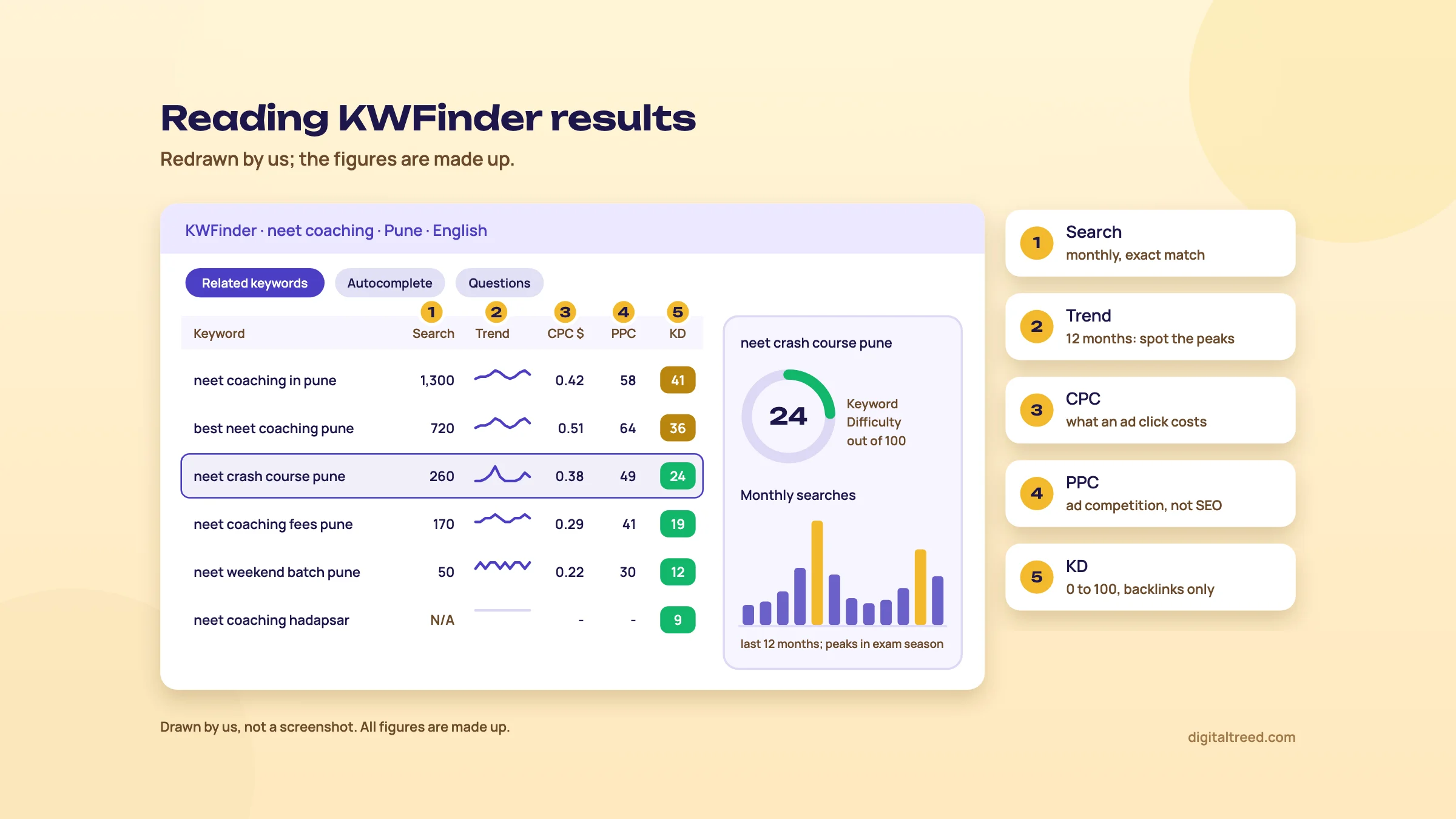 The five KWFinder columns and what to do with each. Drawn by us; figures made up.
How Keyword Difficulty is worked out
KD estimates how hard it is to reach the first page of Google. It looks at one thing only: backlinks. Mangools gives each page on the first results page a Link Profile Strength score. That score comes from Moz's Domain Authority and Page Authority and Majestic's Citation Flow and Trust Flow, each weighted differently. KD then combines the strong and the weak pages, and gives the weaker ones extra weight, because a low-authority page outranking big sites is the opening a small site needs.[12]
Mangools is honest about the limit here. Its KD page says that, of everything that makes a keyword hard, backlinks are "the only factor that can be measured and put into a metric". It also says the Moz and Majestic metrics "are not used by Google in any way".[12] So KD can't see content quality, search intent or how strong your own site is.
The KD scale
KD runs from 0 to 100, and higher is harder.[12] In the tool each score also has a colour, so easy rows stand out.[12] When Mangools updated the formula in September 2018, it moved to six ranges and put the green zone at 0 to 29.[13] We couldn't find a current Mangools page that names all six ranges in text, so we won't print a label table here.
Our rule of thumb for a new local site: shortlist keywords with KD under 30, then open the results page for each one. If page one is all national brands and big directories, skip it even at a low score. If it shows two or three small local sites, it's worth a page.
Tip
Relative Keyword Difficulty (RKD) puts your own page into the sum. Select a keyword, click "Relative values" on the right, enter your URL and click "Set URL". KWFinder re-scores the keyword against your page's link profile, so a stronger page gets a lower RKD.[12]
Note
From our work: a women's wear manufacturer's online store. Its product pages targeted short, competitive keywords. We moved them to long-tail keywords, the longer and more specific phrases buyers use. Results started within a month. The lesson: a smaller search you can win beats a big one you can't, and a difficulty filter is a quick way to find them.
Local data: India, states and cities
This is where KWFinder is useful for Indian businesses. India and Hindi are both in its location and language lists.[12] Mangools says its location list covers cities, regions, counties, states and countries, and the KWFinder page puts the total at about 65,000 locations.[10] Pick a city and you get that city's volumes and its own results page.[14] Type Pune and the list offers "Pune, Maharashtra, India", plus Pune Division and areas such as Pune Cantonment.[10]
Mangools makes a useful split between two kinds of local keyword:[14]
- Implicit keywords don't name a place, such as "NEET coaching". Google shows local results anyway, and the volume covers the whole country you chose.
- Explicit keywords name the place, such as "NEET coaching in Pune". The volume is smaller but the intent is clearly local.
For a Pune coaching centre, look at both. Search "NEET coaching" with the location set to Pune, then search "NEET coaching Pune" with the location set to India. The first tells you how many people in the city search the general phrase; the second tells you how many people anywhere in India name the city. Chapter 4 does this step by step.
Filters, lists and imports
The filter sets minimum search volume, maximum KD, word count, included and excluded words, and CPC and PPC ranges.[3] A useful first filter for a small site is KD up to 29 and at least three words.
Click the star next to a keyword to save it to a list. From a list you can refresh KD, export to CSV or send the keywords to SERPWatcher for tracking.[3] You can also import your own keywords as text or CSV. These were the import limits in Mangools' June 2025 guide:[3]
| Plan | Keywords per import | Imports a day |
|---|---|---|
| Free | 15 | 5 |
| Basic | 200 | 100 |
| Premium | 700 | 500 |
| Agency | 700 | 1,200 |
If Autocomplete or Questions show an error, Mangools says Google has temporarily blocked its requests; waiting a few minutes usually fixes it.[8] For a deeper method of weighing volume, intent and difficulty, see Guide 2's keyword research in depth. Next, the other four tools and the free extras.
SERPChecker, SERPWatcher, LinkMiner, SiteProfiler, the free tools and AI features
Quick answer
SERPChecker shows page one for any keyword and location, with link metrics for each result. SERPWatcher tracks rankings weekly, or daily on Agency. LinkMiner lists a site's backlinks from Majestic's index; SiteProfiler sums up a domain's strength. The free SERP Simulator previews a snippet, and AI Search Watcher tracks brand mentions in AI answers.
SERPChecker: how strong is page one?
Type a keyword, choose a location and Desktop or Mobile, and click "Analyze SERP".[4] You get the top results with their metrics. Mangools says it has local results pages for more than 65,000 locations, so you don't need to be in Pune to see Pune's results.[15]
Its guide counts "45+ SEO metrics", from Mangools' own Link Profile Strength to Moz, Majestic and social numbers.[4] You pick which ones show with "Manage metrics". Green means a low value and red a high one.[4] For a beginner, three columns are enough: Link Profile Strength, Domain Authority and referring domains. Start with those.
SERPChecker also lists the SERP features on the page, such as featured snippets, image packs and carousels, and gives three helper numbers:[4]
- SERP Features Impact, from 1 to 5: how much the extra features pull clicks away from the normal results. Higher means fewer clicks for organic results.
- Visibility: whether each result shows above the fold on the most common screen size.
- CTR: an expected click-through rate from benchmark data, which SERP features can change.
The "Compare" box lets you add your own URL and drag it into any position to see how it stacks up. You can export the table as CSV or save the snapshot as an image.[4]
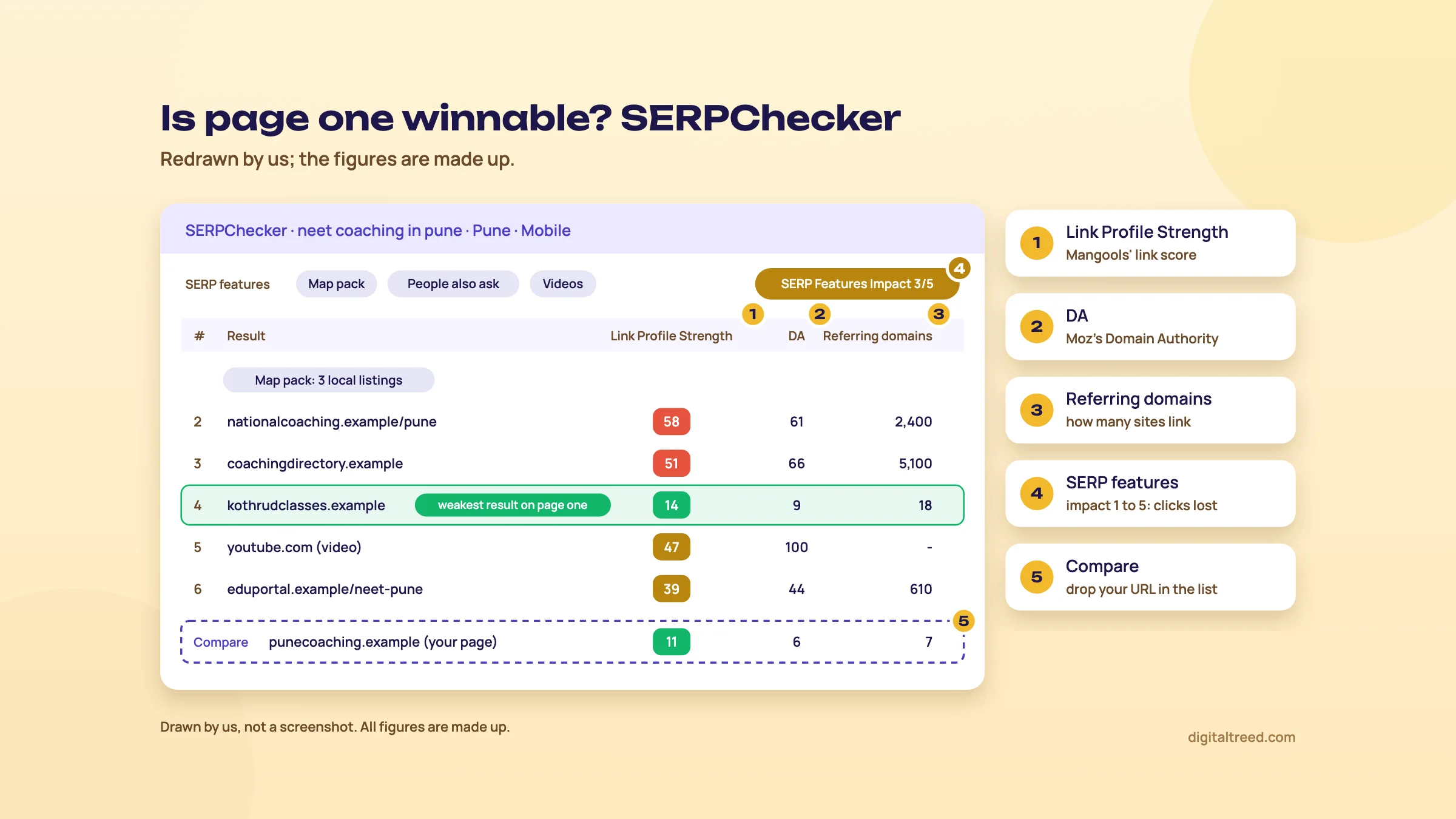 Find the weakest result on page one, then compare your page. Drawn by us; figures made up.
SERPWatcher: where do I rank?
SERPWatcher is the rank tracker. Basic and Premium update rankings weekly; Agency updates daily.[5] You set up a tracking with three details: domain, location and search platform (desktop or mobile). Desktop and mobile trackings of the same keyword count as two keywords, because the tool fetches two results pages.[5]
What the dashboard shows:[5]
- Performance Index: one number for the whole tracking, built from your positions with each keyword weighted by its search volume. It counts every position up to 100.
- Estimated visits: likely clicks from your positions, using average CTR. It only moves for the first two pages, since lower positions get almost no clicks.
- Top gainers and losers, and how many keywords are at #1, top 3, top 10, top 20 and top 100.
- Map pack tracking, in the advanced settings when you create a tracking.
"Share tracking" gives you a link anyone can open as an interactive report. "Reports & Alerts" sends weekly or monthly emails, or an alert when a trigger you pick happens.[5] For agencies there's a white-label report with your logo, and a Google Looker Studio connector.[5]
Tip
Search Console's average position isn't a rank tracker, but it's free and it's Google's own data. For a small site we'd check it first, and pay for a tracker only when a client wants a weekly position report. Our Search Console guide shows the Performance report.
LinkMiner: who links to them?
Enter a domain, subdomain, exact URL or a path such as example.com/blog/* and click "Find backlinks". Mind the input: example.com, www.example.com and https://example.com give different results.[6] The data comes from Majestic's fresh and historic indexes.[6]
- Switch between All links, New links and Lost links.[6] Mangools' FAQ counts a link as new for 90 days after it's found; the LinkMiner guide says 30.[8]
- Tick "One link per referring domain" to see one row per linking site, which is what you want for outreach.
- Link Strength is Mangools' own score for each backlink, built from Citation Flow, Trust Flow, follow or nofollow and other factors. Citation Flow and Trust Flow are Majestic's 0 to 100 scores for link quantity and link quality.[6]
- Click a row and the linking page opens in a preview on the right, scrolled to the link, with the anchor text outlined.[6]
- Star the good ones to keep them in Favorites; export to CSV. Rows load 500 at a time.[6]
SiteProfiler: how strong is the whole site?
SiteProfiler puts a domain's main numbers on one screen. Mangools recommends entering the root domain, since most of the data is domain-based.[7] It has four sections. Overview shows Domain Authority, Page Authority, Citation Flow, Trust Flow and referring IPs. Backlinks shows new and lost links over four months, the follow ratio, top referring domains and anchor texts. Then come Top content and Competitors.[7]
Its guide also lists Alexa Rank and Facebook shares.[7] Alexa Rank is gone: Amazon shut Alexa down on 1 May 2022,[16] and SiteProfiler now shows Website Popularity Rank (WPR) in its place.[24] We'd ignore WPR and Facebook shares; neither tells you anything about Google rankings. Use SiteProfiler to compare two or three competitors side by side, not to judge a site by one score.
The free tools, and our own
Mangools has a set of free mini tools, including the SERP Simulator, SERP Location Changer, SERP Volatility checker, Reddit Threads finder, SEO Content Optimizer and a browser extension.[9] Two are worth knowing.
SERP Simulator lets you type a title and description and see them as a Google result. It counts characters and pixels (600 pixels for the title, 960 for the description) and can bold your keyword. It can also add an AI Overview, ads or a map pack, to show how far down your result sits.[17] After a few tries it asks you to create a free account for more searches.[17]
For a page that's already live, start with our free Meta Tag Analyzer. Paste up to 10 URLs and it reads each page's real tags. Then it shows a Google search preview, a social share preview and a checklist covering the title, description, canonical and viewport. Use Mangools' simulator when you're drafting a title before the page exists.
SERP Location Changer opens Google as if you were searching from another place, in more than 65,000 locations.[18] It's handy for checking a Pune or Kanpur results page from Delhi.
AI features in 2026
Mangools has added three AI pieces. All are new, so test them before you rely on them.
- AI Search Watcher tracks whether your brand is named for a list of prompts, across ChatGPT, AI Overviews, AI Mode, Gemini, Claude, Grok, Llama and Mistral. It runs each prompt twice per update, since AI answers change from run to run. The free plan has 5 prompts and 1 monitor, updated weekly.[19] The paid SEO plans include its Pro level with 500 prompts.[9]
- AI Search Grader is a free one-off check of how often a brand appears for prompts in its niche. Without an account it uses three models (ChatGPT, Mistral and Llama), with limited searches; a free account adds the others, including Claude, Gemini and DeepSeek.[20]
- The MCP server connects Claude, ChatGPT, Cursor and other AI assistants to Mangools data, so you can ask for keyword ideas or rank checks in a chat. You sign in with your Mangools account; Mangools calls the server a beta.[21] Mangools warns that creating trackings this way "may consume paid quota".[21]
What a prompt tracker can and can't tell you is in Guide 5's measuring AI visibility. In short: it samples answers, it doesn't see inside the AI systems. Next, four real jobs in the tools.
Step by step: four real jobs in Mangools
Quick answer
Four jobs cover most of what a small business needs from Mangools. Find local keywords in KWFinder, judge a results page in SERPChecker, track the chosen keywords in SERPWatcher, and find links worth copying in LinkMiner. Our example is a made-up NEET and JEE coaching centre in Pune with a new website.
The coaching centre has a five-page site, no blog and almost no backlinks. It wants students from its own part of the city, and parents who search on their phones. The free account is enough for the first job if you plan your 5 lookups. The other three need a paid plan, or Free+ limits if your account has them.
Find keywords for a Pune coaching centre in KWFinder
- Write five seed phrases first Use the words parents and students use, not your brochure's. For example: "NEET coaching", "JEE coaching", "NEET coaching fees", "11th science classes", "NEET crash course".
- Set location and language In Search by Keyword, type Pune in the location field and pick it from the list. Set the language to English.[14]
- Run the first seed Enter "NEET coaching" and click "Find keywords". That's one lookup.[8] On a free account you'll see 15 related keywords.[10]
- Read the columns, not just the top row Note Search and KD for each idea. Look for rows that name an area, an exam year or a format, such as weekend batches. Those are the long-tail phrases a new site can win.
- Switch the source to Questions For one seed, choose "Questions" instead of "Related keywords".[3] Questions such as fees, timings and eligibility make good sections on your course pages.
- Check the explicit version Set the location to India and search "NEET coaching Pune". This shows how many people anywhere in India name the city.[14]
- Save and copy Star the best ideas into a list called "Pune coaching" and copy them to your keyword sheet with Search, KD and the page each one belongs to.[3]
Expect small numbers. City-level searches for a course are often in the tens or low hundreds a month, and some rows will show N/A. That's normal for local SEO. A page that ranks for ten small searches can bring more admissions than a page stuck on page three for one big one.
Warning
Don't trust a volume to the last digit. Mangools' numbers run about a month behind[8] and differ from Keyword Planner's.[3] Use them to rank your ideas against each other.
Check how strong a results page is in SERPChecker
- Open the keyword In KWFinder, click "NEET coaching in Pune" in your list. The right panel loads the live results page (one SERP lookup).[8] Or open SERPChecker, type the keyword, pick Pune and Mobile, and click "Analyze SERP".[4]
- Look at who ranks Count the result types: national coaching brands, directories, local institutes, YouTube. Two or more local institutes on page one is a good sign for you.
- Read three metrics Use "Manage metrics" to show Link Profile Strength, Domain Authority and referring domains.[4] Find the weakest page in the top 10. That's the bar you have to beat.
- Check the SERP features Is there a map pack, a featured snippet, a video block? A high SERP Features Impact means fewer clicks for normal results.[4] A map pack tells you your Business Profile matters as much as the page.
- Compare your own site Add your URL in the Compare box and drag it next to the weakest result.[4]
- Decide If the weakest result is a local page with few links, write the page. If page one is all national brands, aim at a longer phrase first, such as the area name plus the course.
If the results show a map pack, the job isn't only on the website. Our Google Business Profile guide covers the profile side.
Track your chosen keywords in SERPWatcher
- Create the tracking Open SERPWatcher and fill in Domain, Location (Pune) and Search platform (mobile).[5]
- Turn on map pack tracking In the advanced settings, switch on Map pack tracking so you see your local pack position too.[5]
- Add keywords Import your "Pune coaching" list from KWFinder, or paste the keywords one per line.[5] Start with 20 to 30, not 200.
- Tag by page Give each keyword a tag for its page (NEET page, JEE page, fees page). The Performance Index can then be read per page.[5]
- Set a report and an alert Click "Reports & Alerts", choose Monthly for the owner's report, and add an alert for big rank changes.[5]
- Read it monthly, not daily Positions can jump from one update to the next. Look at the four-week trend, then check Search Console's clicks for the same pages.
Find links worth copying in LinkMiner
- Pick one local competitor Use the weakest local institute you found in SERPChecker, not a national brand.
- Enter the root domain Type example.com, not a page URL, and tick "One link per referring domain".[6]
- Filter Show only DoFollow and active links with the buttons above the table.[6]
- Open each row The preview shows where the link sits on the page.[6] Look for local news, school and college event pages, education directories and city blogs.
- Star the ones you can earn A scholarship test, a free seminar or real results data are reasons for those sites to mention you. Save them to Favorites and export the list.[6]
Skip anything that looks paid or spammy. Guide 2's link building chapter explains what gets a site penalised.
When the pages are written, check each one's title and description in our Meta Tag Analyzer and its keyword use in the Word Counter & Keyword Density Checker. Next, what Mangools costs and what to use instead.
Mangools pricing, pros and cons, and the alternatives
Quick answer
Mangools has three paid plans, all with the five tools. Basic costs $30.50 a month, or $226.20 a year paid yearly; Premium $40.50 or $316.20; Agency $70.50 or $586.20 (checked 18 October 2026). The free account and Google's free tools are enough for most small local sites.
Plans and limits
Mangools' pricing page opens on the yearly prices, which it shows as a monthly figure. Switch it to "Monthly" to see the monthly prices.[9] The page shows US dollars only; it had no rupee price when we checked from India on 18 October 2026. We give rupees at ₹96 to US$1, the X-Rates average for 1 to 16 October 2026.[22]
| Checked 18 October 2026 | Basic | Premium | Agency |
|---|---|---|---|
| Billed monthly | $30.50 a month (about ₹2,928) | $40.50 (about ₹3,888) | $70.50 (about ₹6,768) |
| Billed yearly | $226.20 a year, $18.85 a month (about ₹21,715) | $316.20, $26.35 a month (about ₹30,355) | $586.20, $48.85 a month (about ₹56,275) |
| Keyword research | 100 a day | 500 a day | 1,200 a day |
| Keyword suggestions per lookup | 200 related, 25 competitor | Unlimited* | Unlimited* |
| SERP analysis | 100 a day | 500 a day | 1,200 a day |
| Tracked keywords | 200 | 700 | 1,500 |
| Rank updates | Weekly | Weekly | Daily |
| Backlink rows | 100,000 a month | 500,000 a month | 1.2 million a month |
| Site analysis | 20 a day | 70 a day | 150 a day |
| Extra seats | None | 3 | 5 |
| AI Search Watcher Pro | Included, 500 prompts | Included, 500 prompts | Included, 500 prompts |
| API and MCP | Included | Included | Included |
All figures are from the pricing page.[9] "A day" means per 24 hours, counted from your first request.[8] Basic's "200 / 25" means 200 related and 25 competitor keywords per lookup, the same split as the free plan's 15 and 5.[10] The page doesn't explain the asterisk after Unlimited. Sub-users on Premium and Agency share the main account's limits.[8]
A few more terms from the same pages:
- Paying yearly is cheaper: Basic is $226.20 a year against $366 for 12 monthly payments, about 38% less.[9] Mangools' FAQ puts the saving at up to 35%.[8]
- Refunds within 48 hours of payment, but not for two subscriptions in a row.[9]
- Plans renew automatically. If you turn renewal off, the plan stays active until the paid period ends.[9]
- You can pay by card, bank transfer, crypto, or PayPal through Paddle.[9]
- The tools aren't sold separately.[8]
- AI Search Watcher on its own has a free plan (5 prompts) and a Pro plan at $24.50 a month, or $209.40 a year (about ₹2,352 or ₹20,102).[19]
In 2023 Mangools launched a cheaper Entry plan at $19.90 a month billed yearly.[23] It wasn't on the pricing page when we checked, and older reviews that quote it are out of date.
Tip
Which plan? For one site or a few small clients, Basic. Weekly ranks are fine for local businesses. Pay for Agency only if a client needs daily positions or you need more than 700 tracked keywords. Try the free account for a week first, and buy monthly before you commit to a year.
Pros and cons
Pros
- Simple screens; a beginner can read KWFinder on day one
- Keyword Difficulty with a clear method, plus Relative KD for your own page
- City-level locations, including India, for volumes and results pages
- Five tools in one plan, with a free account and no card
- Shareable rank reports, alerts and a Looker Studio connector
- API, MCP and an AI visibility tracker included in paid plans
Cons
- No site audit or crawler
- KD looks only at backlinks, not content or intent
- Help pages lag the product: the FAQ still leaves India out of Search by Domain
- Weekly rank updates unless you pay for Agency
- Small free limits: 5 KWFinder lookups a day
- US dollar prices only
Alternatives, and which one when
Our own free tools cover the jobs around keyword research: checking pages, tags and keyword use once you've written them.
The Meta Tag Analyzer shows a Google snippet preview for up to 10 live URLs. The Free Website Audit crawls up to 25 pages and scores ten areas, including on-page SEO, speed, local SEO and off-page. The Word Counter checks keyword use in your draft. We don't have a keyword volume tool or rank tracker of our own yet.
| Situation | Our pick | Why |
|---|---|---|
| Small local site, no budget | Google Keyword Planner and Search Console | Free volumes, and your real searches and positions |
| Checking a live page's title and description | Our Meta Tag Analyzer | Reads the real tags; Google and social previews |
| Drafting a title before publishing | Mangools SERP Simulator | Type a draft and see pixel width |
| Beginner who wants difficulty scores cheaply | Mangools Basic, or Ubersuggest | Simple screens, and both have a free tier to try first |
| Freelancer who also needs audits and daily ranks | SE Ranking | Audits, rank tracking and client reports in one tool |
| Agency or in-house team | Semrush | Competitor data, audits and tracking at scale |
| A site health check | Our Free Website Audit | Mangools has no crawler |
For more free options by job, see our best free SEO tools guide. If you'd rather hand the keyword research and pages over, our SEO service can do it, and you can get a quote online.
Test yourself
Ten questions on the whole guide. Pick an answer, check it, and see your score at the end.
You got 0 of 10 right.
Frequently asked questions
Frequently asked
What is Mangools used for?
Mangools is an SEO suite for keyword research, results page analysis, rank tracking, backlink checks and site metrics. Its five tools are KWFinder, SERPChecker, SERPWatcher, LinkMiner and SiteProfiler, and one plan unlocks all of them. Most people buy it for KWFinder, to find keywords a small site can rank for.
Is Mangools free?
Partly. A free account needs no credit card and gives KWFinder 5 lookups per 24 hours, with 15 related and 5 competitor keywords per lookup. That's enough to try it on one topic. Mangools also has free mini tools such as the SERP Simulator and SERP Location Changer, and a free AI Search Watcher plan with 5 prompts.
How much does Mangools cost?
On 18 October 2026, Basic cost $30.50 a month billed monthly, or $226.20 a year. Premium was $40.50 a month or $316.20 a year, and Agency $70.50 or $586.20. Prices are in US dollars only; at ₹96 to the dollar, Basic is about ₹2,928 a month. Mangools offers a refund within 48 hours of payment.
Is KWFinder good for keyword research in India?
For keyword volumes and difficulty, yes: India, Hindi and Indian cities are in its location and language lists. Search by Domain covers India too: on 18 October 2026 its location list showed 90 countries, India among them, although Mangools' FAQ still gives an older list of 17 without India. Run one competitor search on the free account before paying.
What is a good Keyword Difficulty score in KWFinder?
KD runs from 0 to 100, and higher is harder. Mangools put its green zone at 0 to 29 when it updated the formula in 2018. For a new local site we shortlist keywords under 30, then look at the actual results page, because KD only measures backlinks, not content or intent.
How accurate is Mangools' search volume?
Treat it as an estimate. Mangools says its data usually runs a month behind, and its volumes differ from Google Keyword Planner's because it tries to separate close variants. Use the numbers to compare keywords against each other. For searches you already appear for, Search Console is Google's own data.
How often does SERPWatcher update rankings?
Weekly on the Basic and Premium plans, and daily on Agency. Tracking the same keyword on desktop and mobile counts as two keywords. SERPWatcher can also show your map pack position and send weekly or monthly email reports.
Is Mangools better than Ubersuggest or SE Ranking?
It depends on the job. Mangools has simple screens and a clear difficulty score, but no site audit and only weekly ranks below Agency. SE Ranking adds audits and client reporting. See our Ubersuggest and SE Ranking guides for their plans, and pick the one that covers the work you do every week.
Does Mangools have AI features?
Yes. AI Search Watcher tracks whether your brand is named in AI answers from ChatGPT, Google AI Overviews and AI Mode, Gemini, Claude and others, checking each prompt twice per update. AI Search Grader is a free one-off check. An MCP server lets AI assistants such as Claude, ChatGPT and Cursor pull Mangools data.
Who owns Mangools?
Mangools was founded by Peter Hrbáčik, who launched KWFinder in 2014 and is still listed as founder and CEO. The company is based in Bratislava, Slovakia, and is part of itrinity, a group that runs several software businesses. itrinity's site still lists Mangools in its portfolio.
Sources
References
- About us, Mangools, accessed 18 Oct 2026
- Home: Our portfolio, itrinity, accessed 18 Oct 2026
- KWFinder guide: a step-by-step tutorial for beginners, Mangools blog, 1 Jun 2025, accessed 16 Oct 2026
- SERPChecker guide: a step-by-step tutorial for beginners, Mangools blog, 2 Jun 2025, accessed 16 Oct 2026
- SERPWatcher guide: a step-by-step tutorial for beginners, Mangools blog, 19 Jul 2025, accessed 16 Oct 2026
- LinkMiner guide: a step-by-step tutorial for beginners, Mangools blog, 27 Jun 2025, accessed 16 Oct 2026
- SiteProfiler guide: a step-by-step tutorial for beginners, Mangools blog, 7 Jun 2025, accessed 16 Oct 2026
- Frequently asked questions, Mangools, accessed 18 Oct 2026
- Plans and pricing, Mangools, accessed 18 Oct 2026 (Annually and Monthly views)
- KWFinder: free keyword research and analysis tool, Mangools, accessed 18 Oct 2026
- Mangools is FREE again! Meet our new Free and Free+ plans, Mangools blog, 20 Jun 2023, accessed 16 Oct 2026
- Keyword difficulty checker, Mangools, accessed 18 Oct 2026
- Major update: more precise Mangools Keyword Difficulty, Mangools blog, 25 Sep 2018, accessed 16 Oct 2026
- Free and accurate local keyword research tool, Mangools, accessed 18 Oct 2026
- SERPChecker, Mangools, accessed 18 Oct 2026
- We will be retiring Alexa.com on May 1, 2022, Alexa Support (Amazon), archived 2 Jan 2022, accessed 18 Oct 2026
- Google SERP Simulator, Mangools, accessed 18 Oct 2026
- Free Google Location Changer, Mangools, accessed 18 Oct 2026
- AI Search Watcher, Mangools, accessed 18 Oct 2026
- AI Search Grader, Mangools, accessed 18 Oct 2026
- Mangools SEO MCP Server, Mangools, accessed 18 Oct 2026
- Exchange Rate Average (US Dollar, Indian Rupee), X-Rates, 1-16 Oct 2026 average, accessed 16 Oct 2026
- Entry plan: the most affordable plan we've ever made, Mangools blog, 4 Jul 2023, accessed 16 Oct 2026
- August 2022 update, Mangools blog, 31 Aug 2022, accessed 21 Oct 2026
Get the free checklist
Every step of this guide on one page, to print or tick off. We email you the PDF link.