

Quick answer
Digital marketing 101 is mostly about order, not channels. Claim your free Google Business Profile, build a small website you own and connect Google's free tracking, then grow an email list and one social account. Buy ads last, with a capped daily budget. The first 90 days cost you more hours than dollars.
Digital marketing is any marketing that reaches people through a screen: search results, maps, your website, email, social media and online ads. For a local shop or service company, it mostly means being easy to find at the moment someone needs you, then staying in touch after they've bought.
Most beginner guides hand you ten channels and wish you luck. That's the wrong way in. We wrote this for an owner starting from zero, with a few spare hours a week and a small budget, so it runs in the order we'd set things up ourselves.
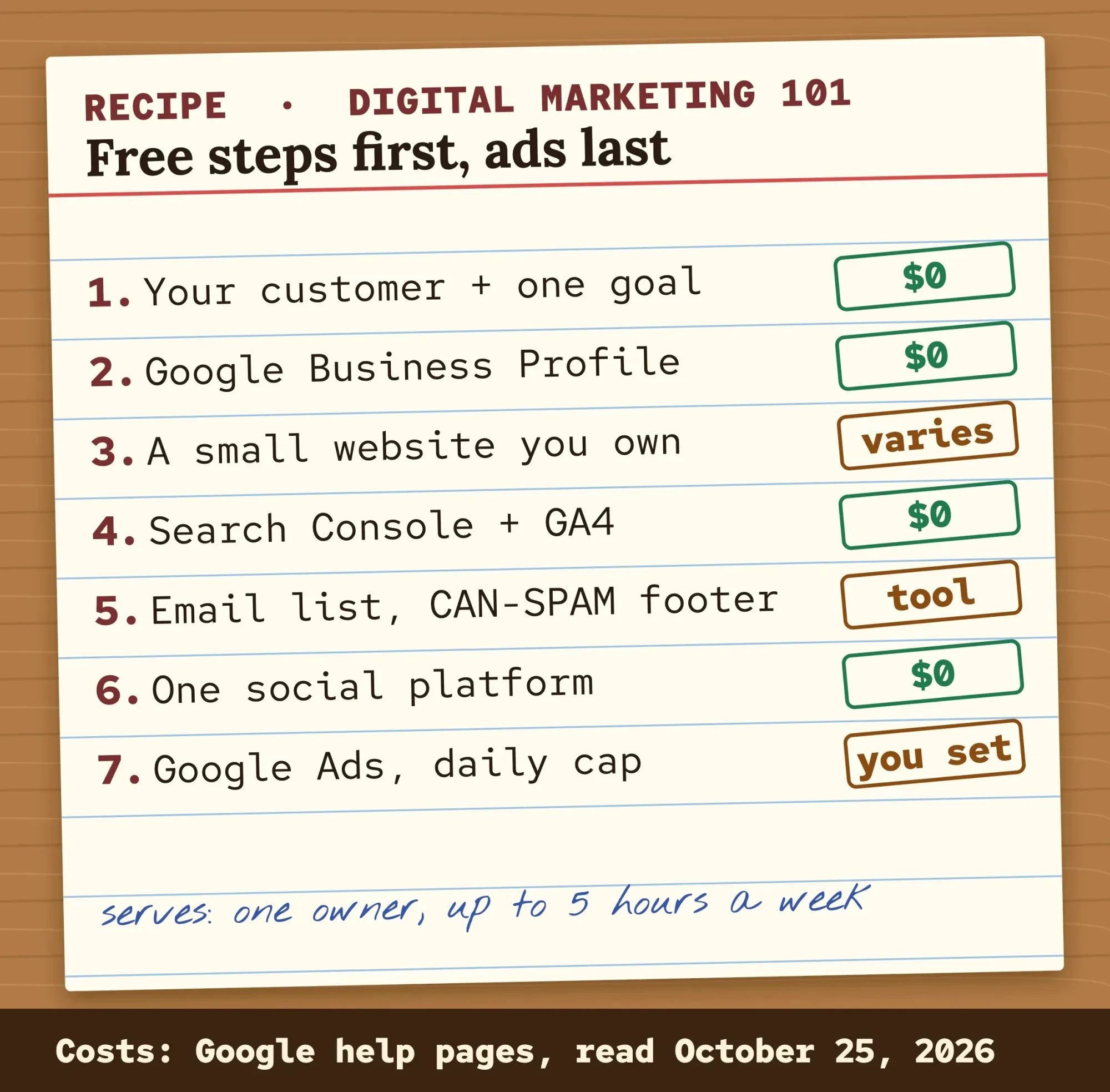 Diagram by DigitalTreed: the order we suggest, free steps first and paid ads last, October 2026.
Each step comes with its cost, and most of them are free.
Key takeaways
- Write down who buys from you and one number to grow in 90 days.
- Google never accepts money to rank a site in its organic results.
- Marketing emails must honor unsubscribe requests within 10 business days.
- A month of Google Ads never costs more than 30.4 times the daily budget.
- Pew found that 91% of US adults own a smartphone.
Write down who buys from you and one goal
Start before any account exists. On paper, answer two questions: who buys from you, and which one number should go up in the next 90 days? The SBA's marketing plan guide asks for the same things. Its plan starts with your target market, ends with a budget, and reminds you that marketing "takes time, money, and preparation."
Keep it small and countable.
New-customer calls, booked quotes or online orders all work. "More awareness" doesn't, because you'll never know whether it happened.
Who you sell to changes the channels too. A homeowner with a leak searches Google that same hour. A company buying office supplies compares vendors for weeks, which is why our guide to B2B vs B2C marketing treats the two buyers separately.
With a customer and a number in hand, open your first account, which is free.
Claim your free Google Business Profile first
That number usually starts with people nearby, and nearby searches show Google's map results. Your Business Profile is what appears there. Google says you can add or claim your business at no charge at business.google.com/add, then verify it.
Don't leave a field blank if you can fill it. Per Google's local ranking tips, businesses with complete and accurate info "are more likely to show up in local search results" than those without. Per Google, three things decide who shows up there: relevance, distance and prominence. And there's "no way to request or pay for a better local ranking" at all.
Reviews feed the prominence part.
You're allowed to ask every customer for one. You aren't allowed to pay for them. Google calls reviews traded for "free or discounted goods or services" fake and misleading content, and it bans them outright. Its Maps policy says incentivized reviews will be removed from Maps, so a discount-for-a-review card at the counter can cost you the very reviews it bought.
The allowed version is a plain request with a short link. Make one with our free review link tool, then text it after each job or print it as a QR code on the invoice.
Use your real business name, the one on your sign, with no added keywords. Google's business name guidelines say it should match your "storefront, website, stationery" and what customers call you. Verification, categories and hours are covered step by step in our Business Profile walk-through.
Your website is the one channel you fully own
A Business Profile gets you found, but your site is where people decide.
It's the one place where you control the words, the photos, the prices and the contact form, and it doesn't vanish when a social app changes its feed or a directory starts charging. That's yours to keep.
It doesn't need to be big. Really. Five pages cover most local businesses: home, services, prices or how quotes work, reviews or past jobs, and contact. Put your phone number at the top of every page, because many visitors will be holding one. Pew's 2026 survey found that 91% of US adults own a smartphone, up from 35% in 2011.
Not sure you need a site yet? We answered that honestly in does my business need a website, including when a profile alone is enough for now.
Once it's live, put your homepage through the website audit tool on our site. It flags missing titles, broken links and slow pages in a minute or two, before a customer or Google trips over them.
Search traffic is free but slow
With a site live, you can start on search engine optimization (SEO), which means making your pages easy for Google to find, understand and show. Here's the good part. Google says it costs nothing to appear in its organic results, and it never accepts money to rank a site.
The catch? Speed. The starter guide Google wrote for SEO says some changes work within hours and "others could take several months" to show. Its advice is to wait a few weeks before you judge. It's refreshingly honest about shortcuts, too: "There are no secrets here that'll automatically rank your site first in Google (sorry!)."
So what do you actually do? Write one page for each service you sell, in the words customers use on the phone. Give every page a clear title that says the service and the town. Answer the questions people ask before they book.
That's most of beginner SEO when you serve one area.
Then check that Google can see you. Search site:yourdomain.com on Google, and if your pages show up, you're in the index. For more detail, connect Google Search Console, which Google calls "a free service" for tracking how your site does in search. Our beginner SEO guide walks through it all, Search Console included.
Email is the list nobody can take away
Search brings strangers, and email brings them back.
It's also the one audience you keep if a platform changes its rules. Someone who gave you their address has usually bought from you or asked for a quote, so a short note at the start of your busy season lands with a person who already trusts you.
Ask for the email on your quote form, at checkout and on the invoice, and tell people what they'll get, like one seasonal reminder a month and no daily sales blasts. Then send something useful about once a month: a seasonal reminder, a new service, a price change with a reason.
US email has rules, and they cover a two-person shop as much as a big brand. Under the CAN-SPAM Act, 15 U.S.C. 7704, each commercial email needs:
- A subject line that doesn't mislead people about what's inside.
- A clear note that it's an ad or offer, unless the reader gave prior affirmative consent.
- A working way to unsubscribe, honored within 10 business days.
- A valid physical postal address for your business.
Mistakes here get expensive. CAN-SPAM is enforced with the FTC Act's civil penalty, and the FTC's table sets a maximum of $53,088 for each violation for penalties assessed after January 17, 2025.
We do marketing, not law, so take this list as a plain summary and not as legal advice. If you email people outside the US or plan to mail a purchased list, ask a business lawyer first.
Our own view: never buy a list.
For list building and the sender rules Gmail and Yahoo enforce, the email strategy guide on our blog goes deeper.
Which social media should a small business use?
Use the one platform your buyers already use, and don't skip a week. For most US small businesses that means Facebook or Instagram, plus YouTube if you can make video. Pew's 2026 survey found YouTube and Facebook are the most used platforms in the country, and about half of adults use Instagram.
Age changes the answer a lot. Among adults 30 to 49, 78% use Facebook and 64% use Instagram. Among 18 to 29, Instagram leads, 79% to 69%. For people 65 and older, Facebook (59%) is far ahead of Instagram (21%).
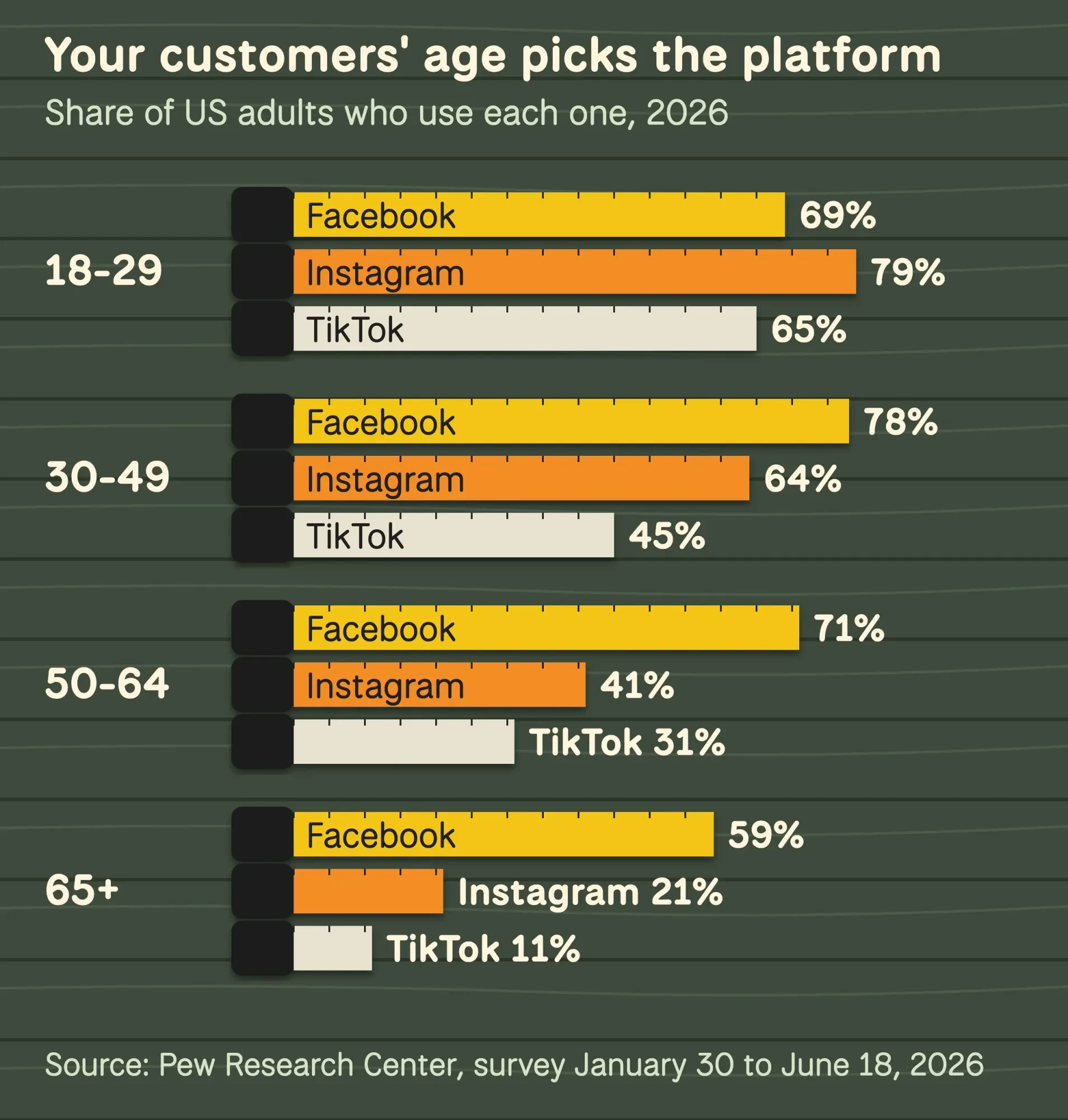 Source: Pew Research Center, Social Media Fact Sheet, survey of US adults January 30 to June 18, 2026. Drawn by DigitalTreed.
Two platforms done halfway usually lose to one done well.
Post real jobs, real faces and real prices, and answer every comment within a day. When you want a weekly rhythm, our step-by-step social plan turns this into a content calendar you can keep up with.
Paid ads work like a faucet
Everything so far costs time. Ads cost money, and they stop the moment you stop paying. That's why they come last: they work best when they send people to a site and a profile that already turn visits into calls.
Google Ads lets you choose your own spend. You set an average daily budget, and Google's budget help page says that for most campaigns you'll never pay more than two times that on any one day, or 30.4 times it in a month.
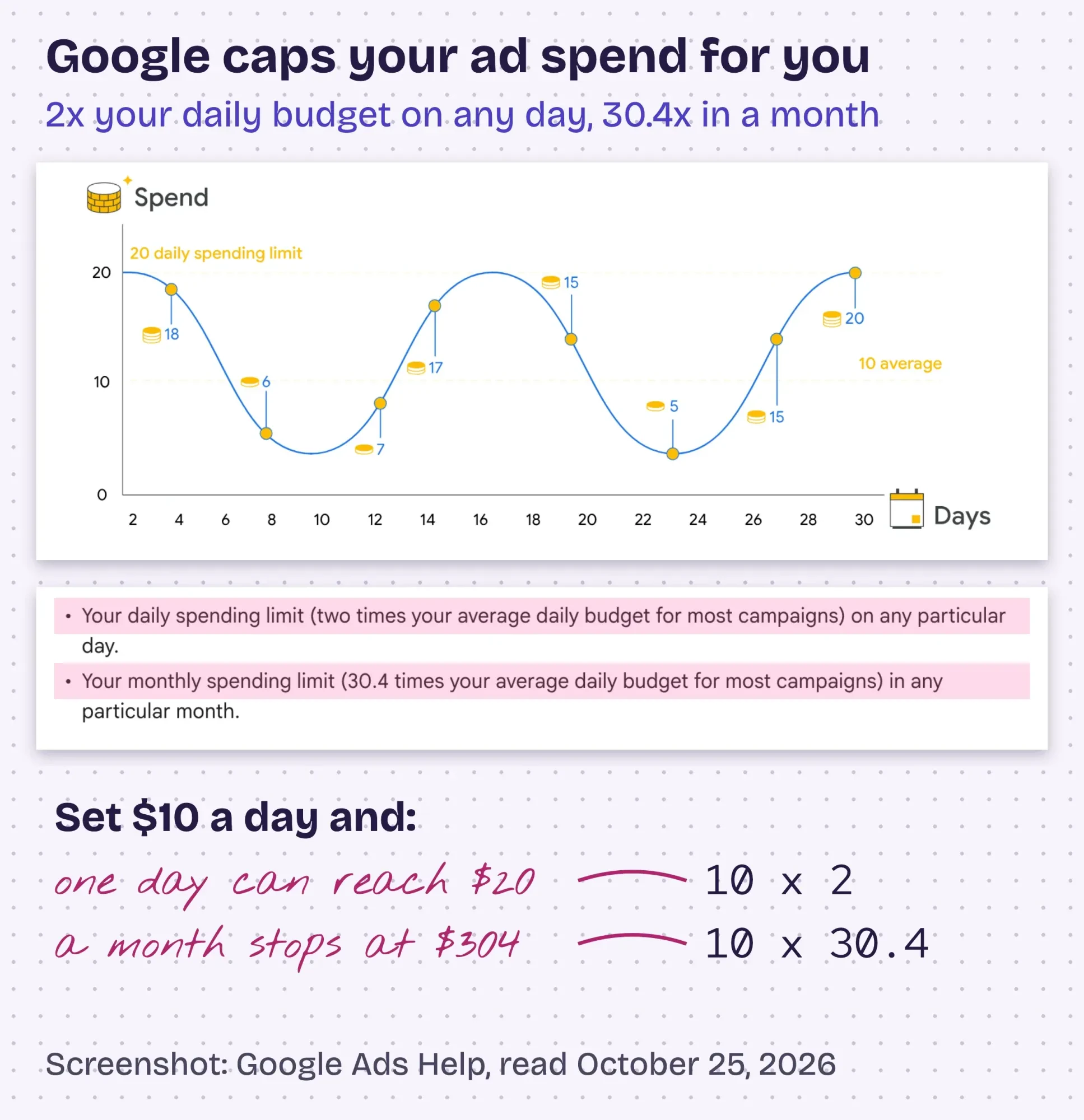 Screenshot: Google Ads Help, "About average daily budgets", read October 25, 2026 with no account signed in; notes by DigitalTreed.
We read that page on October 25, 2026 and worked its numbers for a budget a small shop could live with. Google's own example is $304 a month, set as $10 a day. Its chart shows some days near $20 and others near $5, yet the month still can't pass $304. That rule is what makes a first test safe. Pick the monthly amount you could lose without losing sleep, divide it by 30.4, and that's your daily setting. No guesswork.
Start with search ads on the exact services you sell, in the area you serve, and leave display, video and social ads alone until the search campaign shows you what a lead really costs you. People searching have already said what they want, which isn't true of someone scrolling a feed. Our pay-per-click guide explains keywords, bids and why the landing page matters.
Would you rather not run the account yourself? Our search ads service sets up and manages Google Ads campaigns. It's a paid DigitalTreed service, so compare it with doing it yourself first.
Measure what each channel brings in
Ads make measuring urgent, but every channel needs it, and the basic tools are free. Once the channels are running, our guide to using AI in digital marketing shows which jobs to hand to AI and which rules apply.
Without tracking, you'll keep feeding the channel that feels busy instead of the one that books jobs.
You'll want Google Analytics 4 (GA4) on your site first. Google offers it free of charge, and its setup page says data collection can take up to 30 minutes to start. Then mark your key actions, like form sends and phone taps, so GA4 counts leads as well as visits. Our GA4 setup guide shows how.
Tag every link you post outside your site. When you add campaign tags to a URL, Google says to always include utm_source, utm_medium and utm_campaign. The UTM builder on our site writes them for you. Your newsletter, Facebook posts and ads then each get their own line in GA4.
Once a month, put each channel's cost next to what it brought in, using GA4's lead counts and your own booking log, not one platform's own dashboard. The SBA's version is to compare your marketing and sales costs with the revenue they generate. A channel that brings in more booked work than it costs is working, even if nobody likes your posts.
How much does digital marketing cost in the first 90 days?
For a beginner, the first 90 days cost mostly hours, and the fees stay small. As of October 2026, Google charges nothing for a Business Profile, Search Console, Analytics or a place in organic results. Your real money goes on the website, an email tool once your list grows, and any ad budget you choose.
| Channel | Fee, as of October 2026 | Your time (our estimate) |
|---|---|---|
| Google Business Profile | $0 (Google) | 2 hours to set up, then 30 minutes a week |
| Website | Depends on the platform and who builds it | 10 to 20 hours for a simple DIY site |
| Search Console and GA4 | $0 (Google) | 2 hours to connect, 30 minutes a month to read |
| SEO (organic search) | $0 to appear (Google) | 2 hours a week on pages and titles |
| Varies by tool and list size | 1 to 2 hours per monthly email | |
| One social platform | $0 to post | 1 to 2 hours a week |
| Google Ads | You set it: $10 a day averages $304 a month | 1 hour a week checking searches and leads |
The time column is our own working estimate, not a measured average.
Month one runs heavier because of setup. After that, it's about 5 hours a week. Website costs swing the most, from a DIY builder plan to a custom build.
If you'd rather hire, our digital marketing agency cost guide lists dated price ranges for builds and monthly retainers.
A 90-day plan for a window cleaner with 5 hours a week
Here's how those pieces fit together for one business. Example: Brightpane Window Washing is a made-up two-person window cleaning company in Greenville, South Carolina. The owner has 5 hours a week for marketing, or 65 hours over 13 weeks. He'll test $300 a month on ads, starting in month three.
His ad math follows Google's rule. $300 divided by 30.4 is $9.87 a day, so he sets $9.50 to keep a buffer. That caps a month at $288.80 (9.50 x 30.4) and a single day at $19. These are example numbers worked in October 2026, not a quote.
Brightpane's first 90 days
- Week 1: customer and goal Homeowners within 20 miles. Goal: 15 new booked jobs by day 90. About 1 hour.
- Week 1: Business Profile Claim, verify, add hours, service area, photos and a review link. About 3 hours.
- Weeks 2 to 4: a five-page website Services, prices, past jobs, reviews and contact, with the phone number at the top. About 12 hours.
- Week 4: tracking Connect Search Console and GA4, and mark quote-form sends as key events. About 2 hours.
- Weeks 5 to 8: search, email and one platform Add one page per service, put an email box on the quote form, send the first monthly email and post on Facebook twice a week. About 16 hours.
- Weeks 9 to 12: a capped search campaign Search ads for his services in Greenville at $9.50 a day, with UTM tags on email and Facebook links. About 1 hour a week after a 3-hour setup.
- Week 13: the cost check Booked jobs and spend for each channel side by side. Keep what paid. Cut what didn’t.
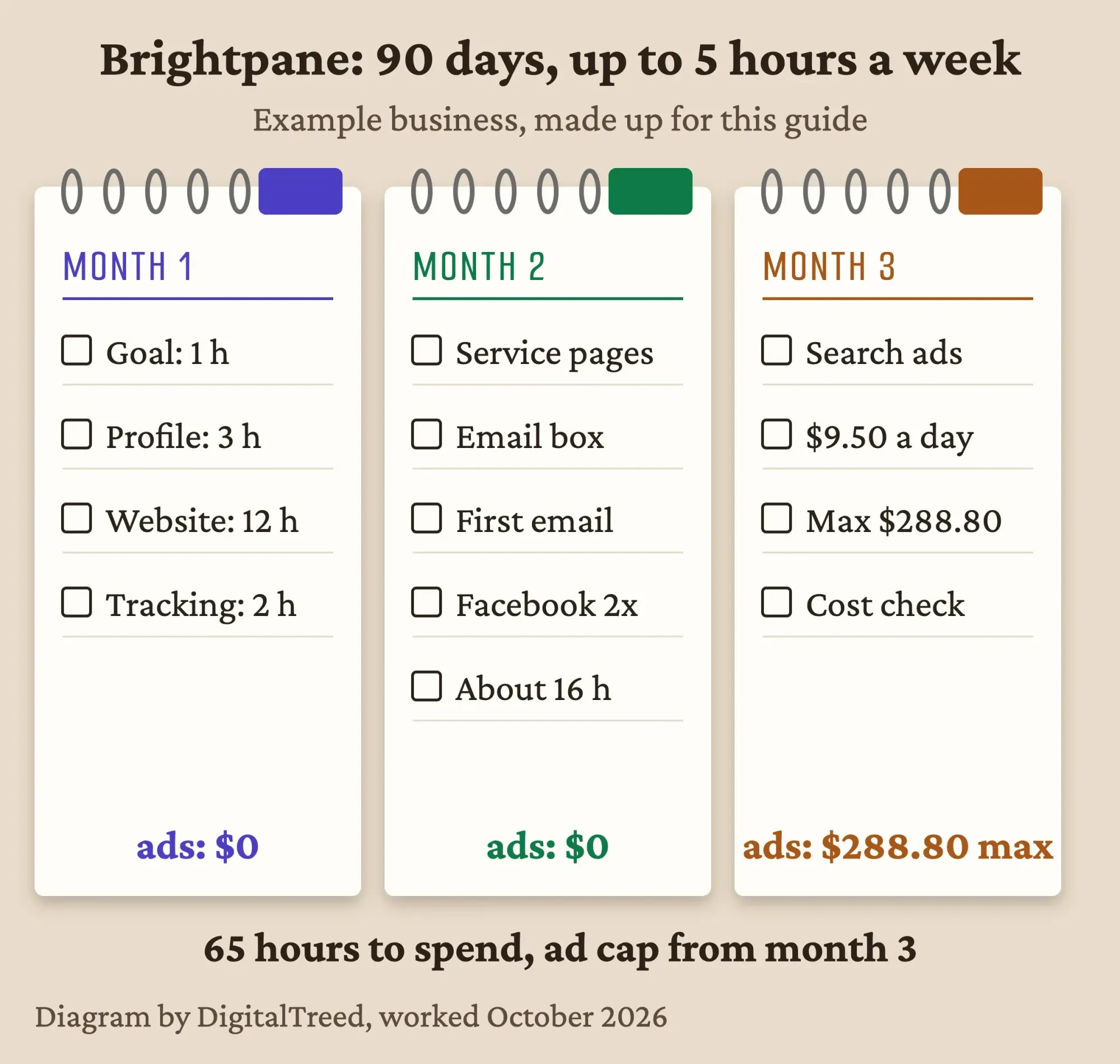 Diagram by DigitalTreed: our made-up Brightpane Window Washing example, worked October 2026.
Notice what's missing: TikTok, influencers, a daily blog, display ads. None of them beats a verified profile and a site that answers the phone.
Add them once the basics bring in work and you've got real numbers to test them against.
Hire help when your hours run out
That plan fits inside 5 hours a week. If you can't find those hours, that's the moment to hire help, not a reason to buy a bigger plan. Google's page on hiring an SEO even says that if you run a small local business, you "can probably do much of the work yourself" without one.
If you do hire, interview the way Google suggests. One of its questions asks what results to expect, and in what timeframe. A good answer names a number and a date, and it doesn't dodge. A weak one talks about rankings and never mentions calls.
Walk away fast from anyone who promises a top spot.
Google is blunt here: no one can guarantee a #1 ranking. If someone offers a free audit, give them read access to Search Console only, as Google advises, and keep the owner login yourself.
Our take: do steps one to four yourself for the first 90 days, even roughly. You'll learn what your customers actually search for, and you'll be a much sharper buyer if you hire later.
When you're comparing offers, ask each one which number they'll report to you every month.
Want a second pair of eyes on your plan? Tell us what you sell and where through our free quote form, and we'll say which step we'd tackle first. DigitalTreed sells these services, so weigh our answer knowing that.
Frequently asked
Is Google Business Profile free?
Yes. Google says you can add or claim your business at no charge. Google also says there's no way to pay for a better local ranking.
How much do Google Ads cost per day?
You choose the amount. Google's own example is a $10 average daily budget for about $304 a month, and for most campaigns one day's spend can reach two times your daily budget, per Google Ads Help as of October 2026.
How long does SEO take to work?
Some changes show in hours and others take several months. Google suggests waiting a few weeks before you judge a change, in its SEO Starter Guide.
How we made this guide: on October 25, 2026 we read each Google help page cited here, the CAN-SPAM statute, the FTC penalty table in the eCFR, the SBA marketing guide and Pew's 2026 surveys. Then we matched every quote to its page. We screenshotted Google's public budget page with no account signed in and did the Example's budget math ourselves. Brightpane Window Washing is made up, and the time estimates are ours. You'll find the source for every number linked right beside it. Before this goes live, Aijaz Alam reads it through and signs off on it.
First published March 2023. Rewritten October 25, 2026: now a step-by-step plan for a US small business, with costs from Google's own pages, the CAN-SPAM rules, Pew's 2026 platform data and a 90-day worked example. The generic channel list and unsourced tips are gone.
Sources
- Google Search Central: SEO Starter Guide
- Google Search Central: Do you need an SEO?
- Search Console Help: About Search Console
- Google Business Profile Help: Add or claim your Business Profile
- Google Business Profile Help: Tips to improve your local ranking on Google
- Google Business Profile Help: Tips to get more reviews
- Google Maps: Prohibited and restricted content
- Google Business Profile Help: Guidelines for representing your business on Google
- Google Ads Help: About average daily budgets
- 15 U.S.C. 7704, CAN-SPAM Act requirements (Cornell LII)
- 16 CFR 1.98, Adjustment of civil monetary penalty amounts (eCFR)
- Analytics Help: Set up Analytics for a website and/or app
- Google Marketing Platform: Google Analytics
- Analytics Help: Collect campaign data with custom URLs
- US Small Business Administration: Marketing and sales
- Pew Research Center: Social Media Fact Sheet (2026)
- Pew Research Center: Mobile Fact Sheet (2026)
Comments
No comments yet. Start the conversation below.