

What Moz Pro is, who it's for, and how to set it up
This guide is for people who know the basics of SEO and keep running into Moz. A client quotes their "DA". A freelancer is choosing a first paid tool. An in-house marketer has inherited a Moz login. If terms like backlink and keyword difficulty are new to you, start with SEO for beginners.
By the end you'll know what Domain Authority, Page Authority, Brand Authority and Spam Score really measure, and what Moz itself says they don't. You'll be able to read Keyword Explorer and Link Explorer, set up a campaign for an Indian business and compare two competitors' links. You'll also know how to work around the reports that have no Indian data. And you'll know which plan, if any, is worth paying for.
The chapters follow the order you'd meet the tool. First what it is and how to set it up, then the authority scores, the two research tools and the campaign tools (crawl, rankings, page grading and AI tracking). Then come four real tasks, and finally pricing, pros and cons and alternatives. A 10-question quiz and an FAQ close the guide. Every Moz price comes from Moz's own pricing page and help centre, checked 18 October 2026.[1] Moz lists prices in US dollars only, so the rupee figures are our estimates.
Quick answer
Moz Pro bundles Keyword Explorer, Link Explorer, Site Crawl, rank tracking, an On-Page Grader and AI visibility tracking. Start with a free Moz Community account and MozBar. Pay only when you need campaigns, more queries or competitor research, and check first whether the reports you want cover India: several cover only four countries.
One company, several products
Moz started as SEOmoz in 2004, a blog and community. It bought the rank tracker STAT in 2018 and has been part of Ziff Davis since 2021.[2] Today "Moz" can mean five different things, and people mix them up:
| Product | What it is | Price (checked 18 Oct 2026) |
|---|---|---|
| Moz Pro | The SEO suite this guide covers | $49 to $299 a month[1] |
| Free tools | MozBar, Link Explorer, Keyword Explorer, Domain Authority Checker, Brand Authority Checker, Competitive Research, MozCast | Free with limits[3] |
| Moz Local | Listings, reviews and social posts for physical locations | From $16 a month billed yearly; the page lists only the US, Canada and the UK[4] |
| STAT | Daily rank tracking for large sites and agencies | From $360 a month[5] |
| Moz API | Moz's link and authority data for your own tools | From $20 a month; free access allows 50 rows a month[6] |
Moz Local is a separate product with its own bill, even if you already pay for Moz Pro.[1] Since its pricing page shows only the US, Canada and the UK, an Indian shop or clinic can skip it and use Google Business Profile directly (see our Google Business Profile guide).
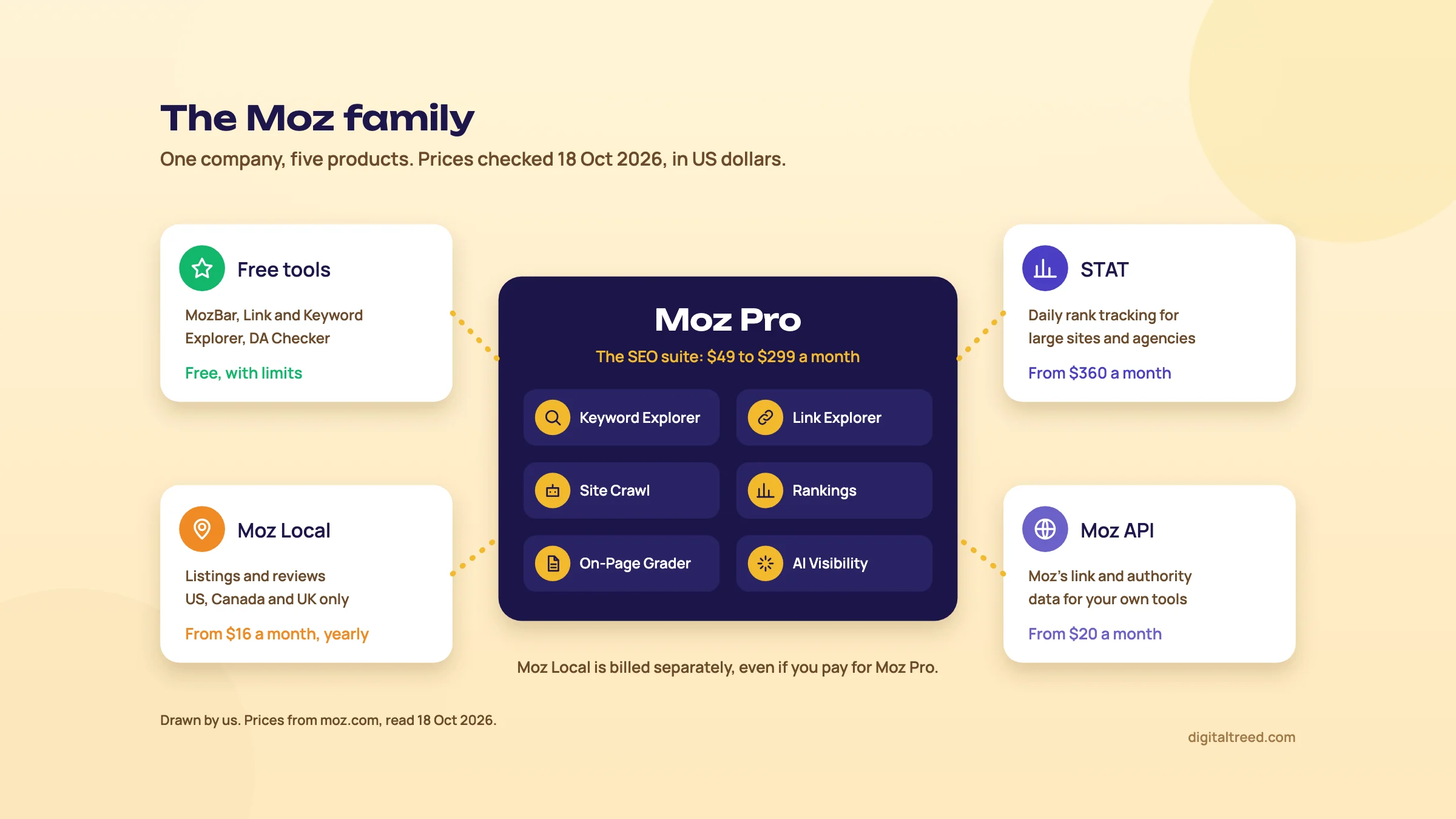 Moz Pro and the four products around it, with prices read on 18 October 2026. Drawn by us.
How big is Moz's data, next to Ahrefs and Semrush?
Each vendor publishes its own figures, counted its own way. On links, Moz's number is the biggest; on keywords, it's far smaller.
| Vendor's own claim | Moz | Semrush | Ahrefs |
|---|---|---|---|
| Links | 45.5 trillion links, 8.7 trillion URLs, 1 billion domains | Over 43 trillion backlinks, 390 million referring domains | 35 trillion external backlinks (history), 494 billion pages in index |
| Keywords | 1.25 billion keyword suggestions, 180 million ranking keywords, 170 Google search engines | 28.8 billion keywords | 29 billion keywords after filtering, 217 locations, 1.4 billion for India |
Sources: Moz's Link Explorer and Keyword Explorer pages,[10] Semrush's Data and Metrics page[8] and backlinks page,[11] and Ahrefs' big data page.[9] Treat the link numbers as marketing, not a ranking. "Links", "backlinks" and "external backlinks history" aren't the same count, and none of the three is independently audited. Even Moz's own menus disagree: one says "over 40 trillion links", another "over 44 trillion".[1]
The keyword gap is real, though. Moz's keyword suggestions come to less than a twentieth of what Semrush and Ahrefs claim, and Ahrefs alone lists 1.4 billion keywords for India.
The India problem
This is the first thing to know before you pay. Several Moz Pro reports use data from only four countries:
- Ranking Keywords (Explore by Site), the report that shows what a site ranks for: US, UK, Canada and Australia.[12]
- Domain Overview: the same four.[13]
- True Competitor: supported markets are US, GB, CA and AU.[14]
- Brand Authority: "currently driven by US, UK, CA, and AU data", in Moz's words.[15]
Keyword Explorer's scores are "English-language centric", and its click-through modelling comes from US English clickstream data.[16] Link data is global, so Link Explorer, Domain Authority and Spam Score work for Indian sites as well as any. Rankings in a campaign are tracked for the Google search engine and location you pick at set-up; check that Google India is in the list during the trial. So for an Indian site, Moz Pro is mostly a link tool and a rank tracker, with keyword research you'll want to check against Google's own numbers.
Warning
Keyword Gap, the report that compares your ranking keywords with up to three competitors, asks you to pick a market. Moz's help page doesn't list which markets it supports,[17] so open the market list and check India is there before you rely on it.
Who it's for, and when you don't need it
Moz Pro suits a freelancer or small agency that wants clear link metrics clients recognise, weekly rank tracking with three competitors per site, and a gentle interface. It suits sites aimed at the US, UK, Canada or Australia best, because every report works there.
You don't need it if you run one local business site in India. Search Console gives you your real queries and clicks, Google Business Profile covers local, and the free Moz account covers the occasional DA check. You also don't need it for keyword research in Indian markets: Google Keyword Planner is free, and Semrush or Ahrefs have far bigger India databases.
Set-up step 1: a free Moz Community account
A free account needs only an email address you verify.[7] It gives you, each month:
| Free Community account | Limit |
|---|---|
| Link Explorer (backlink queries) | 10 a month |
| Keyword Explorer queries | 10 a month |
| Competitive Research queries | 10 a month |
| Campaigns, keyword lists, Rank Checker, On-Page Grader | None |
Source: Moz's comparison of Community and paid access.[18] Ten link queries is enough to check your own site and two competitors once a month. It isn't enough to research link prospects.
Set-up step 2: MozBar
MozBar is a free extension for Chrome and Firefox.[19] It has three levels:
- Not logged in: on-page elements, markup, HTTP status and link highlighting, but no metrics.
- Free Community account: Domain Authority, Page Authority and page-level link counts in the toolbar, DA and PA over Google results, and a 1,000-query limit. Moz's example: a page visit uses 2 queries (one for DA and PA, one for Brand Authority), and results are cached for 48 hours.
- MozBar Premium: included with any paid plan or trial; adds Brand Authority, Domain Overview, Ranking Keywords and Page Optimization.
Install it, log in through the extension's Settings tab, and add sites you don't want metrics for (your email, your bank) to Excluded Domains, so you don't waste queries.[19]
Set-up step 3: the free trial, read the small print
Moz's free trial is for the Medium plan, monthly billing, and needs a credit card.[20] Its length has changed over the years and Moz's help and pricing pages don't state it, so check the end date in your account's subscriptions section on day one. Four rules matter more than the length:
- It renews into a paid Medium plan automatically. Cancel at least 24 hours before the trial ends.[20]
- Upgrading to Large or buying any add-on ends the trial at once and you're billed.
- Moz "does not offer refunds of any kind" under its terms.[18]
- Moz takes Visa, Mastercard, American Express and Discover, credit or debit, but not PayPal, prepaid cards or payment apps.[21] Check that your Indian card is enabled for international recurring payments before you start.
So plan the trial: have your site, three competitors and a keyword list ready on day one, and put a reminder in your calendar two days before it ends.
Day-one settings once you're in
- Allow Moz's crawlers. Site Crawl uses a bot called Rogerbot; the link index uses Dotbot.[22] If your robots.txt or firewall blocks Rogerbot, Site Crawl comes back empty.
- Set your brand name. The campaign name becomes a brand rule that tags keywords as branded or non-branded.[23]
- Label keywords as you add them. Search Visibility is an average of all tracked keywords, so labels stop new keywords from muddying the trend.[24]
- Set the crawl limit to roughly the number of pages on your site, so other campaigns keep their share of the plan's limit.[23]
Chapter 5 walks through the full campaign set-up for a Delhi dental clinic. Next, the scores Moz is famous for.
Domain Authority, Page Authority, Brand Authority and Spam Score
Quick answer
Domain Authority and Page Authority are Moz's 1 to 100 predictions of how well a site or page might rank, built mostly from links. Brand Authority scores brand strength from branded searches. Spam Score is the share of similar sites Google penalised. Moz says DA is not a Google ranking factor. Use all four to compare, never as goals.
Domain Authority (DA)
Domain Authority is a score from 1 to 100 that predicts how likely a whole site is to rank compared with competitors. Moz calculates it with a machine-learning model fed mostly by link data: how many root domains link to the site, how good those links are, and other signals that correlate with rankings.[25]
Domain Authority is not a Google ranking factor and has no effect on the SERPs.[25]
Four things about DA trip people up:
- It's relative. If a giant site gains a billion links, everyone else's DA can drop. Moz's own example is Facebook.[25]
- It's harder at the top. Going from 20 to 30 is much easier than going from 70 to 80.[25]
- It moves without you doing anything, when Moz's index changes, when other sites' scores shift, or when Moz updates the model (Domain Authority 2.0 arrived in 2019).[25]
- New sites start at 1. There's no "good" DA in general; Moz says a DA of 30 may be exceptional in one industry and low in another.[25]
So the right question is never "what's my DA?" It's "how does my DA compare with the sites ranking above me, and is the gap closing?" Moz itself recommends comparing with competitors and watching your count of linking root domains alongside it.[26]
Tip
When a client says "my DA is 12 and my competitor's is 35", show them the Search Console numbers instead. A score Moz built to predict rankings isn't the ranking itself. Our beginner guide's SEO myths chapter covers what Google does say about site-wide scores.
Page Authority (PA)
Page Authority is the same idea for a single URL: a 1 to 100 score, on a logarithmic scale, that predicts how well that page will rank. It looks at dozens of link factors, including linking root domains, followed and nofollowed links, anchor text and redirects. Moz's page is clear that PA "is not an acknowledged Google search engine ranking factor".[27]
Use PA to compare pages that compete for the same keyword. A Pune coaching centre's "NEET coaching" page with PA 15 against rivals at 30 to 40 tells you the gap is links to those pages, not the domain as a whole.
Brand Authority (BA)
Brand Authority is a newer 1 to 100 score for the strength of a brand, built largely from branded searches: people searching the name, and the products linked to it.[15] Like DA it's non-linear, so 10 points near the top is a bigger gap than 10 points near the bottom. Moz suggests comparing BA with DA. A site with high DA and low BA may have links but little real demand for the brand. A well-known shop with weak DA has room to grow in search.
For India, there's a catch you'll find only in the small print: Brand Authority "is currently driven by US, UK, CA, and AU data".[15] A Kanpur sweet shop that's a household name locally may score low simply because Moz doesn't count Indian branded searches. For Indian brands, look at branded clicks in Search Console's branded queries filter instead (our Search Console guide shows how).
Spam Score
Spam Score is the percentage of sites with similar features that Moz found to be penalised or banned by Google. It doesn't score the links pointing at you; it scores the site itself, from 27 signals Moz's model found common among penalised sites.[28]
| Spam Score | Moz's band | What we'd do |
|---|---|---|
| 1% to 30% | Low | Nothing |
| 31% to 60% | Medium | Open the site and look before you take or chase a link from it |
| 61% to 100% | High | Check it by hand; often a thin site or a link farm |
The signals are blunt. They include a domain with numerals or many hyphens, no phone number or email on the page, no favicon, no HTTPS by default, very long or very short titles, and spam-topic words.[28] A small, honest Indian business site can trigger several of them. Moz says a high score "doesn't mean this site is necessarily spammy", and that if you haven't had a penalty, a low or medium score is nothing to worry about.[28] Spam Score updates quarterly, and you can't see which signals your own site triggered.[29]
Warning
Don't disavow links just because Moz gives the linking site a high Spam Score. Moz itself says to check a site's content and its relevance first.[28] Google's view on when a disavow is worth doing is in our advanced guide's chapter on spam policies and recovery.
Two smaller scores you'll see
- Minimum Domain Authority: in Keyword Explorer, the lowest DA among the sites ranking for a keyword.[16] If a DA 9 site ranks on page one, a small site has a chance.
- Rivalry: in True Competitor, a 1 to 100 score combining both sites' DA, keyword overlap, volume and your rankings.[14] It covers only the US, UK, Canada and Australia.
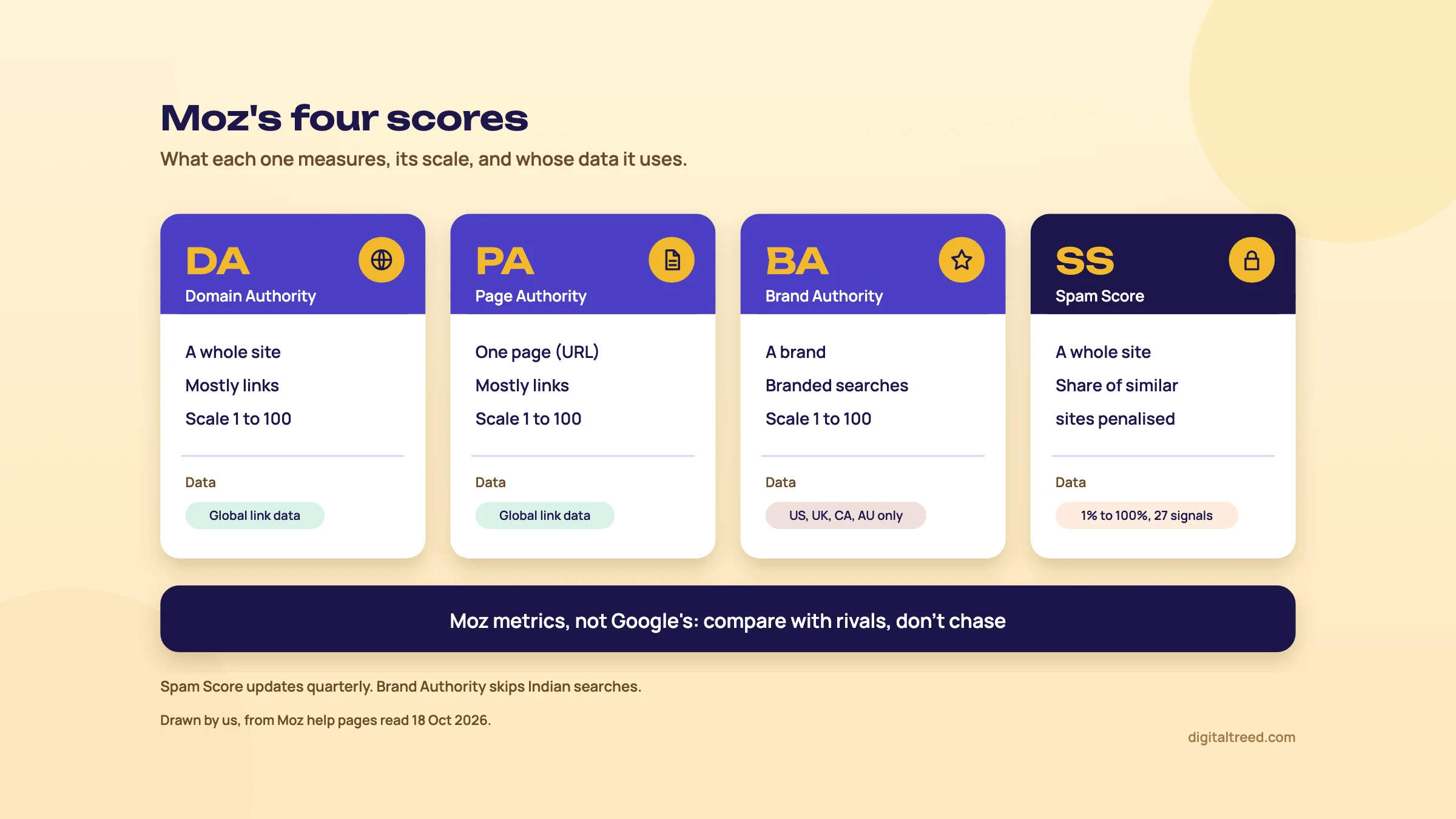 Four Moz scores, what each measures and whose data it uses. Drawn by us.
With the scores clear, chapter 3 opens the two tools where you'll meet them most: Keyword Explorer and Link Explorer.
Keyword Explorer and Link Explorer: the numbers and what to do with them
Quick answer
Keyword Explorer gives each keyword a monthly volume, a Difficulty score, an Organic CTR estimate and a SERP analysis with DA and PA for every result. Link Explorer shows who links to any site, what was gained or lost, and, through Link Intersect, who links to up to five competitors but not to you.
Keyword Explorer: four ways in
Keyword Explorer has four sections you'll use: Explore by Keyword (metrics and SERP for up to 100 keywords at once), Keyword Suggestions (related keywords grouped by topic), Keyword Lists (saved sets you can sort), and Explore by Site (what a domain already ranks for).[16] Pick the locale and language from the drop-down before you click Analyze.
Explore by Site is the one that won't help an Indian site: its Ranking Keywords data covers only the US, UK, Canada and Australia.[12] The other three let you pick a market, so check India is in the list before you rely on them.
The keyword metrics
| Metric | What it means | How to use it |
|---|---|---|
| Monthly Volume | Average monthly Google searches over the last 12 months, so seasons are smoothed out[30] | Demand, roughly. Shown as a range or a single number for Google US, CA, AU and UK; "Data not available" means Moz has no figure yet |
| Difficulty | 1 to 100: how hard it is to reach the top 10, from the PA and DA of the current first page, weighted towards the top results[31] | Compare keywords within your niche. In filters, 1 to 39 is low, 40 to 60 moderate, 61 to 100 high[32] |
| Organic CTR | An estimate of the share of clicks left for normal blue links after ads, images, news and other features[33] | Low CTR means the page is crowded; look at which features you could win instead |
| Priority | 1 to 100, combining Volume, Difficulty, Organic CTR and My Score (your own rating of a keyword's value)[34] | Sort a Keyword List by it. In Explore by Keyword it's been replaced by Minimum Domain Authority[16] |
| Search Intent | Informational, navigational, commercial or transactional[32] | Match the page type to it |
Moz's help page says keywords get "significantly tougher" around Difficulty 40, and that a brand-new site may struggle even in the 20s and 30s.[31] That's how we'd read it too: Difficulty is an average site's view, and yours may be weaker or stronger.
Tip
Find your own Difficulty benchmark. Moz's workflow: list the keywords where your site already ranks in the top 10, put them in a Keyword List, and look at the Difficulty chart. The band holding most of your keywords is the level you can win now.[35] The first step uses Explore by Site, so for an Indian site, build the list from Search Console queries at positions 1 to 10 and paste them in.
Volume for India deserves the same caution. Moz's own help says its CTR modelling uses US English clickstream data, so Difficulty and Opportunity "will both be more English-centric".[16] For Indian volumes, check the same keywords in Google Keyword Planner (see our Keyword Planner guide) and in your own Search Console impressions.
SERP Analysis
Click one keyword and scroll down to SERP Analysis. For each result you get the rank, title, URL, any SERP feature, the page's PA, the domain's DA and Brand Authority, the number of root domains linking to that page, and a Page Score from the On-Page Grader.[16] If an AI Overview appears, the SERP features column shows a preview of it and the URLs it cites.
This is the most useful screen in Keyword Explorer. Read it like this:
- Look at "LRDs to page" first. If the top five pages each have links from 2 to 10 domains, a good page plus a few real links can compete.
- Check DA second. A DA 15 site in the top 10 tells you DA isn't deciding this result.
- Look at Page Score. Low scores near the top mean the pages are thin on the basics, which you can beat on content.
- Note the SERP features. A local pack or an AI Overview changes what "ranking" is worth.
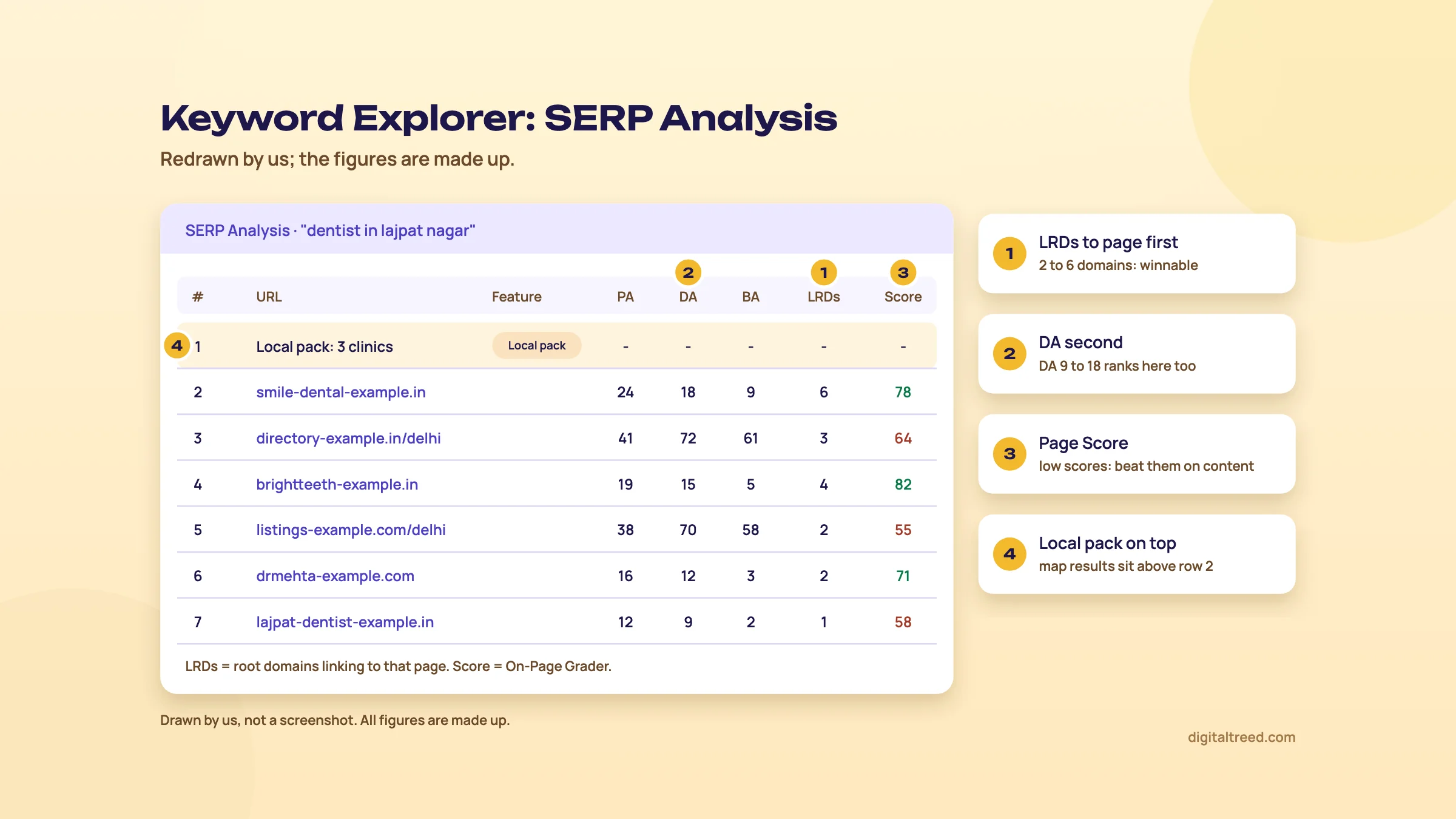 Read root domains linking to the page first, then DA, then Page Score. Drawn by us; the figures are made up.
Keyword Suggestions and lists
Keyword Suggestions starts from one seed keyword and groups results in a Topic Tree Map, sized by total monthly volume.[32] Three suggestion types matter: Top suggestions, Questions (good for blog posts and FAQs) and Similar SERPs (keywords the top pages for your seed also rank for). Filter by Difficulty band and volume, then select keywords and use Add to keyword list or Add to Campaign.
Lists are where the plan limits bite. Standard allows 5 lists of 100 keywords; Medium allows 30 lists of 500.[1]
Link Explorer: what it shows
Link Explorer is Moz's backlink checker. Enter a root domain, subdomain or exact page and you get DA, PA, Spam Score, inbound links, linking domains, anchor text, top pages by links, and linking domains discovered and lost.[7] The free account allows 10 queries a month.
How fresh is it? Moz says newly found links appear within about 3 days, it tries to recrawl high-quality pages at least every 90 days, and most links come from pages crawled less than 6 months ago.[26] Links don't drop out because they're old; they show as Lost when Moz can't find them on a recrawl. DA and PA change only when Moz finds new or lost links to that site.
Moz's index won't show every link. Its crawler, Dotbot, ignores non-canonical pages and respects noindex and robots.txt blocks.[26] Expect your Search Console Links report to list some links Moz hasn't found, and the other way round.
The three Link Explorer screens worth your queries
- Compare Link Profiles: up to five sites side by side (three on Starter, one competitor on a free account), with linking domains, followed links and a 12-month chart of DA, PA or linking domains.[36]
- Link Intersect: sites linking to up to five competitors but not to you, labelled A to E by which competitors they link to, sortable by DA and Spam Score.[37]
- Discovered and Lost: new and lost linking domains over time, which is how you spot a lost link from a good page before it hurts.
Link Tracking Lists let you save prospects from Link Intersect and watch whether a link appears.[37] Starter has none;[38] Standard has one list of 100 links; Medium has 30 lists of 500.[1]
For what makes a link worth having in the first place, see our intermediate guide's chapter on link building that works. Chapter 5 here runs a full competitor comparison step by step.
Campaigns: Site Crawl, rankings, On-Page Grader and AI visibility
Quick answer
A campaign tracks one site and up to three competitors. Each week Moz crawls the site for errors, updates rankings for your tracked keywords and grades chosen pages. Rank Checker and On-Page Grader do one-off checks. On Standard and up, AI Visibility tracks whether ChatGPT, Gemini, Google AI Mode and Perplexity mention you.
What a campaign is
A campaign is one site (a domain, subdomain or subfolder) plus up to three competitors, tracked across up to four search engine and location settings.[1] The site URL can't be changed after you create it, and campaigns can't be copied.[23] Starter has 1 campaign,[38] Standard 3, Medium 10 and Large 25.[1]
Inside a campaign you get Site Crawl, Rankings, Links, Page Optimization and, if you connect Google Analytics, traffic from search. Most of it updates weekly.
Site Crawl
Moz's crawler, Rogerbot, crawls your site once a week, on the weekday you created the campaign; you can't change the day.[39] On the first run it does a quick crawl of about 250 pages, then a full crawl straight after. Issues are grouped into five types:
- Critical Crawler Issues: 5xx server errors, 4xx errors and redirects to 4xx pages. Fix these first.[40]
- Crawler Warnings: noindex and nofollow, in a meta tag or an X-Robots header.[41] Check each one was meant.
- Redirect Issues: temporary (302 and 307) redirects, redirect chains and meta refresh.[42]
- Metadata Issues, such as a missing or overlong title.[43]
- Content Issues: duplicate content and titles, thin content, slow load time and missing or invalid H1.[44]
On WordPress, tag pages often show up as duplicate content. Moz suggests using Ignore so they stop being flagged each week;[44] whether to noindex them is a separate decision for your SEO plugin.
Each 4xx error shows the referring URL, the page holding the broken link. That's where the fix goes: the dead page itself usually doesn't need anything, the link pointing at it does.[40] Mark an issue as Fixed and Moz checks it on the next crawl.
Four limits worth knowing before you rely on it:
- Recrawls on demand need Medium or higher, and the allowance is shared across the account.[39]
- Each new crawl overwrites the last one. You see past counts on the charts but can't open or export old crawls.
- Site Crawl doesn't show outbound links, so broken links to other sites won't appear.
- Rogerbot starts from the http version of your site and you can't point it at https.[23] A site with a clean redirect to https is fine; a misconfigured one shows up as redirect issues.
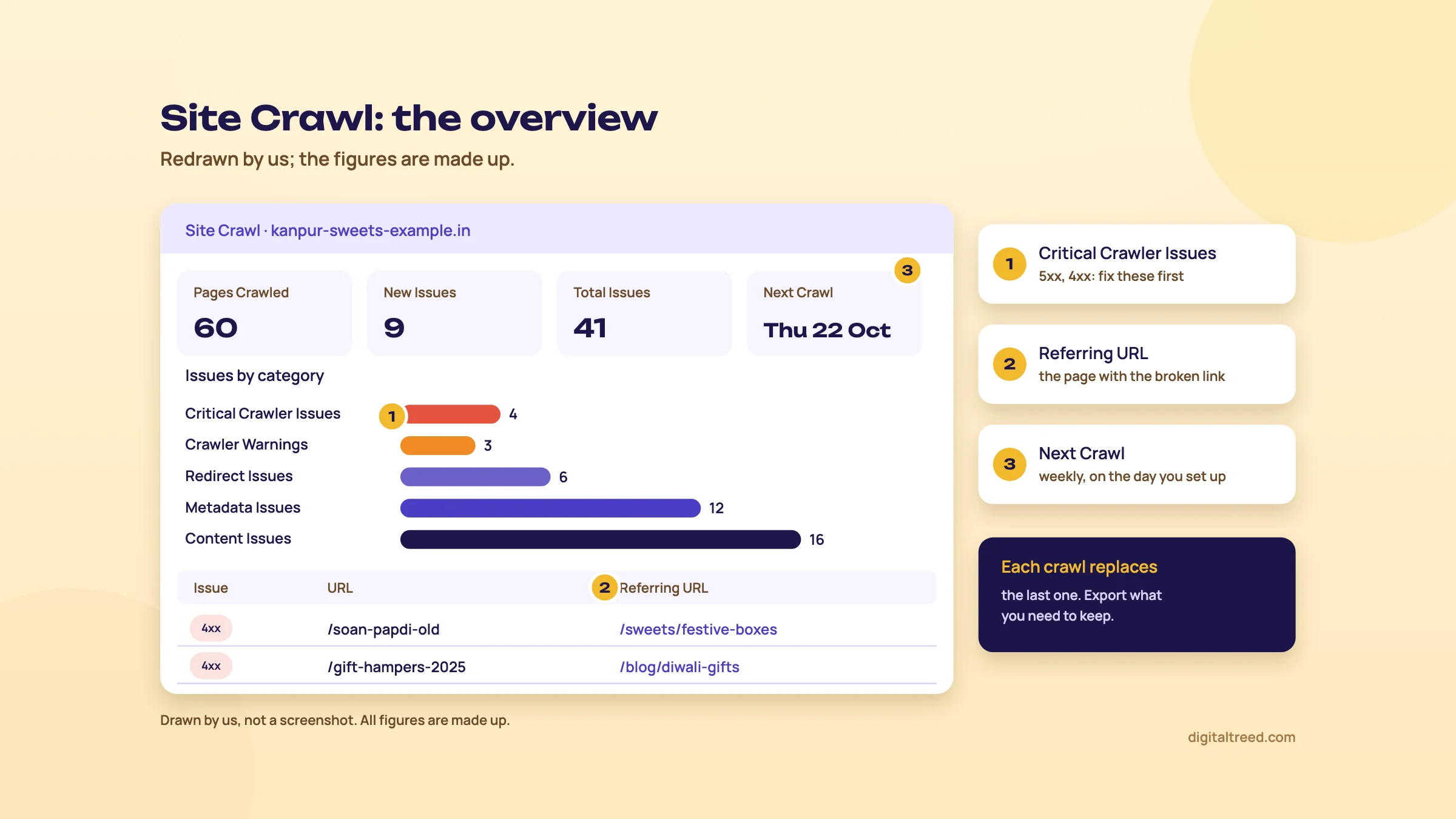 Critical issues first, and fix broken links on the referring page. Drawn by us; the figures are made up.
When a 5xx error shows up, check whether real visitors see it too. Moz's help suggests a third-party status checker for this;[40] ours checks up to 10 URLs and shows every redirect hop.
Rankings and Search Visibility
Rankings update weekly for the keywords you track, for your site and your three competitors.[45] Moz can track Google, Google Mobile, Bing and Yahoo nationally; city or postcode tracking works for Google and Google Mobile only.[45] Each extra location counts as another keyword against your limit, so 10 keywords in 2 cities use 20.[23]
Moz's locations come from a postal code database, and its examples are all US, UK and Australian.[45] Type your city or area into the location box in the trial; if it doesn't appear, track India as a whole.
The headline number is Search Visibility: the share of clicks Moz estimates you get from your rankings, across all tracked keywords, from 0% to 100%.[24] Moz says it's rare to score above the mid-40s on non-branded keywords, so a 12% site isn't failing. The number drops when you add keywords, change search engines or move to https, so label keywords and compare groups, not the whole total.
Rank Checker is the one-off version: check any keyword and URL in a chosen engine and country, once a day per pair, with a year of history.[46] Standard and Medium get 200 checks a day, Large 500,[1] Starter none.[38] It can't do local tracking.
Note
Weekly tracking is enough for most small sites. If you need daily ranks, that's STAT, Moz's enterprise tracker, from $360 a month,[5] or a cheaper daily tracker like SE Ranking (see our SE Ranking guide). For what to report to a client alongside ranks, see Measuring SEO.
On-Page Grader and Page Optimization
On-Page Grader scores one URL against one keyword out of 100, using 27 on-page factors, and lists what's hurting and helping the score.[47] Moz is upfront that 100 doesn't guarantee a ranking. Page Optimization is the same report inside a campaign, rechecked weekly, with a Discover tab that suggests keyword and page pairs.[48]
One gap: the grader doesn't read Open Graph tags, so it won't tell you how a page looks when shared on WhatsApp or LinkedIn.[48] Our free Meta Tag Analyzer checks title, description, Open Graph and Twitter tags of a page.
AI features
Moz has added three AI tools to Pro:
- AI Visibility (Standard and up, and the Medium trial): enter your brand domain, add up to three competitors and up to five brand terms, and Moz tracks prompts in ChatGPT, Gemini, Google AI Mode and Perplexity weekly.[49] It shows whether each brand is mentioned, who's mentioned first, and which pages are cited.[50] Standard tracks 150 prompts on 3 dashboards; extra prompts cost $50 per 100.[1]
- AI Content Brief: a brief for a keyword with audience, structure, keywords to include and questions to answer, editable and exportable as PDF.[51] Standard gets 2 a month, Medium 10.[1]
- AI Overviews by keyword: Keyword Explorer marks keywords that show an AI Overview and lists the URLs it cites.[16]
The citations view is the part we'd actually use. It lists the domains AI answers cite for your prompts, with their DA and Spam Score.[52] Those domains are your outreach and PR list. Treat the mention counts as a sample, though: they're your own prompts, run weekly, and AI answers change from one run to the next.
Before paying for AI tracking, check that AI crawlers can reach your site at all, and set up the free reports first. Our GEO guide covers both in Measuring AI visibility.
Step by step: four real jobs in Moz Pro
Quick answer
Four jobs cover most of what a small team uses Moz Pro for. Compare two Indian competitors' links and find prospects. Find keyword gaps when Moz's own reports have no Indian data. Set up a campaign for a local clinic, and grade a page against its keyword. Each fits inside the Medium trial.
The businesses here are examples. Plan limits are from Moz's pricing page, checked 18 October 2026.[1]
Task 1: compare two competitors' link profiles and find prospects
A D2C brand selling block-print kurtas from Jaipur wants to know why two rival brands outrank it, and which sites might link to it too.
Compare two Indian competitors' links and build a prospect list
- Open Compare Link Profiles In Link Explorer, enter your root domain and click Analyze, then add the two competitors with Add another URL and click Analyze again.[36] A free account can add only one competitor; Starter allows three sites, Standard and up five.
- Read the table Green cells mark the best score per metric. Look at Total Linking Domains and Followed Linking Domains before DA. A rival with DA 32 and 410 linking domains against your DA 18 and 60 is a links gap, not a mystery.
- Check the trend In Metrics Over Time, switch to Linking Domains. A competitor whose line jumped in one month probably ran a campaign; open their Discovered and Lost report to see from where.
- Run Link Intersect Enter your domain, choose root domains as the result type, add both competitors, and click Find opportunities.[37]
- Sort and filter by hand Sort by Sites that Intersect, so domains linking to both rivals come first. Then check each one: fashion blogs, Indian craft and textile sites, gift guides and local news are worth a look; anything with Spam Score above 60% gets a look by hand, and anything with no visible content gets dropped.[28]
- Open the top referring page Click the arrow on the right to see the exact page linking to the competitor. That tells you the angle: a "best Indian kurta brands" list, a craft-cluster story, a stockist page.
- Save and track Select the real prospects and click Add to Link Tracking List. On Standard you have one list of 100 links, on Medium 30 lists of 500.[1]
- Export Download the CSV for your outreach sheet, with a column for the pitch you'll send each site.
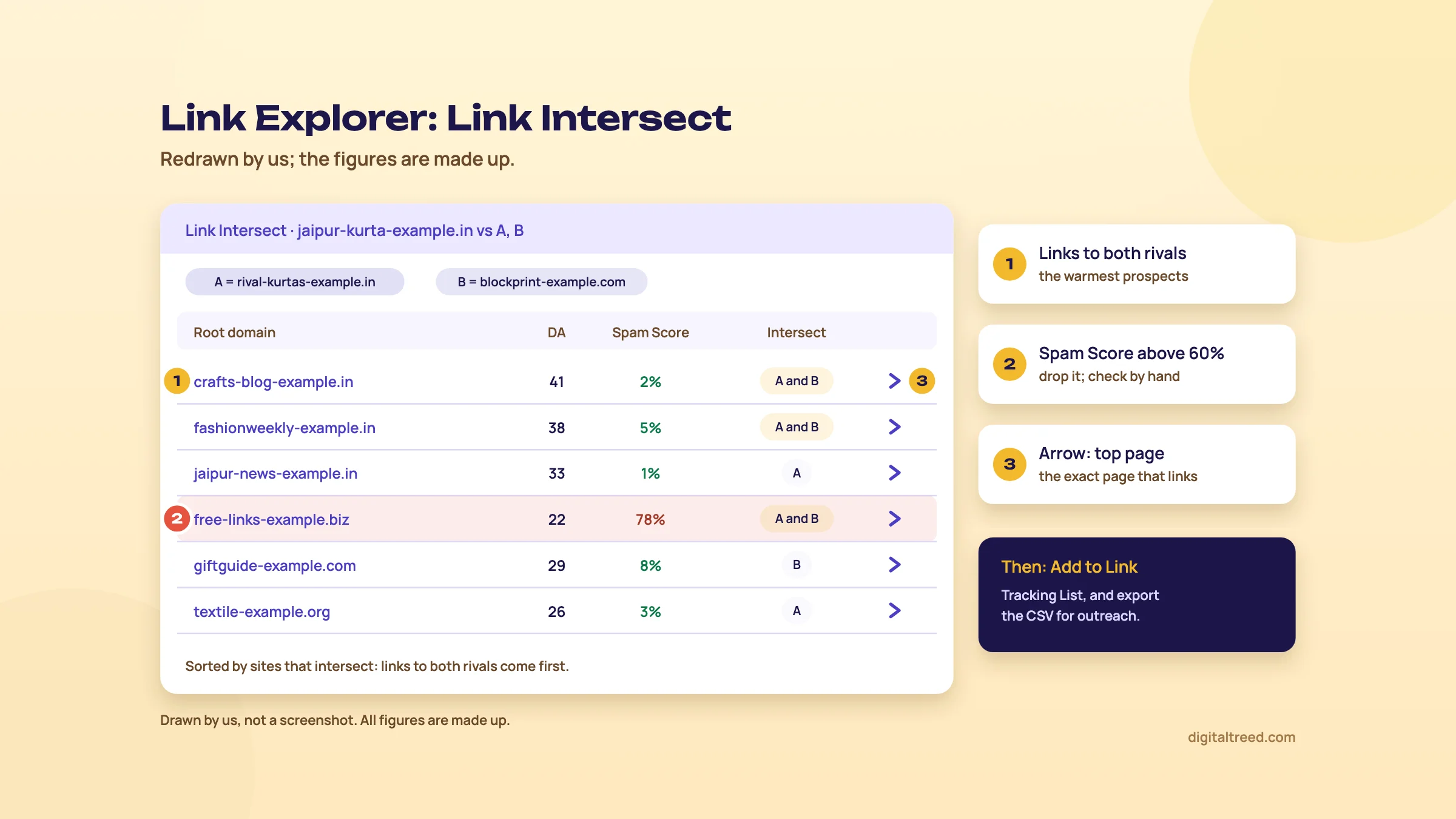 Domains linking to both rivals come first; drop high Spam Score rows after a look. Drawn by us; the figures are made up.
Note
From our work: a global sports platform and networking community already had good technical SEO. But its posts linked to no outside sources, so nothing showed where their facts came from, and its earlier link building had used spammy tactics. We added sourced sports statistics to the posts. Collaboration requests then brought contextual links and brand mentions, and traffic rose 60%. Lesson: a prospect list is only useful once your pages give those sites a reason to link.
Task 2: find keyword gaps for an Indian site
A NEET and JEE coaching centre in Pune wants to know which searches its two biggest local rivals rank for and it doesn't. Moz's quickest tools for this, Ranking Keywords and True Competitor,[14] use only US, UK, Canadian and Australian data.[12] So for Pune you build the gap yourself and let a campaign check it.
Build a keyword gap list for a Pune coaching centre
- Start with what you already rank for Export Search Console queries for the last 3 months. These are the keywords Google already links to your site.
- Generate candidates In Keyword Suggestions, enter seeds such as "NEET coaching in Pune" and "JEE classes Pune", pick India in the market list if it's offered (if not, the closest market, and note the difference), and click Analyze.[32] Use the Questions filter too: "which is the best NEET coaching in Pune" is a page, not just a keyword.
- Remove what you have Drop the candidates already in your Search Console export. What's left is your gap list.
- Save a Keyword List Add the rest to a new list. Standard allows 100 keywords a list, Medium 500.[1] Check volumes for the top 30 in Google Keyword Planner, since Moz's Indian volumes can be thin.
- Track it against the rivals Add the list to your campaign (Add to Campaign), with the two rival sites as competitors and Google India as the search engine. Label the batch "gap".[23]
- Read the Competition tab After the next weekly update, open Rankings, then Competition. The Tracked Keywords Overview shows your rank and each competitor's for every keyword.[53] Sort by a competitor's rank: keywords where they're in the top 10 and you're not ranked are the gap.
- Prioritise Sort the gap by Priority in the Keyword List, and keep keywords inside your Difficulty benchmark (chapter 3) for the next three months.
If you need gaps across thousands of Indian keywords, this is the wrong tool. Semrush's Keyword Gap and Ahrefs' Content Gap work from their India databases directly; see our Semrush and Ahrefs guides. For a dozen pages and two rivals, the method above is enough. Our intermediate guide explains how to judge each keyword's intent and difficulty in Keyword research in depth.
Task 3: set up a campaign for a Delhi dental clinic
Create a Moz Pro campaign for a dentist in Lajpat Nagar, Delhi
- Enter the site Type the domain without http or https, for example the non-www version.[23] You can't change it later. Check the brand name Moz fills in; it becomes your first brand rule.
- Set the crawl limit Set it to about the number of pages on the site, say 80.[23] Rogerbot stops at the limit or when it runs out of pages.
- Connect Google Analytics You need admin access to the GA account.[23] If you don't have it yet, click Skip and connect later in Campaign Settings.
- Choose search engines For a Delhi clinic, add Google India desktop and Google India mobile from the search engine list, if your plan offers them, and use any slots left for other engines or devices. Most patients will search on a phone, so mobile matters more here.
- Add keywords Moz's suggestions come from its Ranking Keywords data, which has no India coverage, so expect few or none.[23] Paste your own: "dentist in lajpat nagar", "root canal treatment delhi", "dental implant cost delhi", "teeth cleaning south delhi" and 15 or so more from Search Console.
- Add a location Type the area or city and pick it from the drop-down. Each location adds the same number of keywords again: 20 keywords tracked nationally and in one city use 40.[23]
- Add competitors Enter up to three nearby clinics' root domains (Moz can't track a competitor's subfolder).
- After set-up In Campaign Settings, Rankings, open Manage Brand Rules and add the clinic's other names, like the doctor's name, so those searches count as branded.[54]
Rankings start after the next weekly update, and Site Crawl sends an email when the first crawl is ready.[39] For the map pack itself, Moz Pro isn't the tool: Google Business Profile's own Performance report is. Our local SEO chapter covers what moves it.
Task 4: grade a page against its keyword
A Kanpur sweet shop's "soan papdi online" page isn't ranking. This one takes 10 minutes.
Grade and fix one product page
- Run On-Page Grader Enter the page URL and the keyword, then click Analyze.[47]
- Open "Hurting your score" Red exclamation marks are the most critical, yellow next, blue suggestions last. Fix reds first.
- Read the title and description Moz parsed If it says they're missing but you can see them, the page may use only Open Graph tags; Moz needs the normal title and meta description tags.[48]
- Check the share preview separately The grader ignores Open Graph,[48] so run the page through our Meta Tag Analyzer for the WhatsApp and Facebook view.
- Track it Add the keyword and page to Page Optimization in the campaign, so it's rechecked each week.
A score of 100 still doesn't guarantee a ranking, as Moz says itself. Once the basics are green, the work moves to content and links. Chapter 6 covers what each plan costs, and when something cheaper or free does the same job.
Moz Pro pricing, pros and cons, and alternatives
Quick answer
Moz Pro costs $49 (Starter), $99 (Standard), $179 (Medium) or $299 (Large) a month, or $79, $143 and $239 a month on yearly billing (checked 18 October 2026, US dollars plus any sales tax). The free account covers occasional checks. There are no refunds, and Standard's 150 keyword queries a month run out fast.
The plans, checked 18 October 2026
Moz's pricing page shows US dollars only, with no option for rupees.[1] The rupee column is our estimate at ₹96 to the dollar, the X-Rates monthly average for 1 to 16 October 2026.[55] Your card statement will differ with your bank's rate and any foreign transaction fee. Moz says prices are list price plus sales tax where it's required to collect it; its tax page lists only US states and Canadian provinces.[56]
| Plan | Monthly | About ₹ a month | Yearly, per month | Users | Campaigns | Tracked keywords | Keyword queries a month | Backlink queries a month |
|---|---|---|---|---|---|---|---|---|
| Free Community account | $0 | ₹0 | - | - | 0 | 0 | 10 | 10 |
| Starter | $49 | ₹4,704 | Not shown | 1 | 1 | 50 | 75 | 75 |
| Standard | $99 | ₹9,504 | $79 (₹7,584) | 1 | 3 | 300 | 150 | 5,000 |
| Medium | $179 | ₹17,184 | $143 (₹13,728) | 2 | 10 | 1,500 | 5,000 | 20,000 |
| Large | $299 | ₹28,704 | $239 (₹22,944) | 3 | 25 | 3,000 | 15,000 | 70,000 |
Sources: the pricing page for Standard to Large,[1] Moz's Starter plan article for Starter,[38] and its Community vs paid comparison for the free account.[18] Medium is the plan Moz marks "Most Popular", and the only one with a free trial. The yearly prices say "billed for your first year" ($950, $1,719 and $2,868), so check the renewal price before you commit. On 18 October the page also showed a banner offering "up to 40%" off, ending that day; offers like this come and go.
The other limits that decide which plan you need:
| Limit | Starter | Standard | Medium | Large |
|---|---|---|---|---|
| Pages crawled a week | 5,000 | 100,000 | 500,000 | 1,250,000 |
| Site recrawls on demand | 0 | 0 | 10 | 25 |
| Rank Checker a day | 0 | 200 | 200 | 500 |
| Keyword lists (keywords each) | 1 (25) | 5 (100) | 30 (500) | 60 (750) |
| Competitive Research queries | 20 | 50 | 75 | 100 |
| AI Visibility dashboards and prompts | 0 | 3 and 150 | 6 and 300 | 12 and 600 |
| AI Content Briefs a month | 0 | 2 | 10 | 50 |
| Branded reports and templates | No | No | Yes | Yes |
The jump that matters most is keyword queries: 150 a month on Standard against 5,000 on Medium. Every Keyword Explorer search uses one, so Standard suits link work and rank tracking, not regular keyword research.
Add-ons
From the pricing page FAQ: extra user seats are $49 a month each (₹4,704). Extra limits cost $10 a month per campaign, $15 per 50,000 pages crawled, $20 per 200 tracked keywords, $10 per 10,000 keyword queries, and $25 per 5 keyword lists or 5 link tracking lists.[1] AI add-ons are $20 per extra AI Visibility dashboard and $50 per 100 extra prompts. A two-person team on Standard pays $148 a month, close to Medium's $179, which already includes two users.
Trial, cancelling and refunds
- The trial is Medium, monthly, card required, and renews automatically (chapter 1).[20]
- Cancel at least 24 hours before renewal. Cancel on the renewal day and the charge goes through with no refund; Moz "does not offer refunds of any kind".[18]
- After cancelling, campaigns are archived and Moz keeps the data for 12 update cycles (12 weeks for weekly data).[18] You can't open the reports until you resubscribe, so export first.
- Moz doesn't offer a student discount, only the 20% yearly saving and a separate offer for registered US 501(c)(3) non-profits.[1]
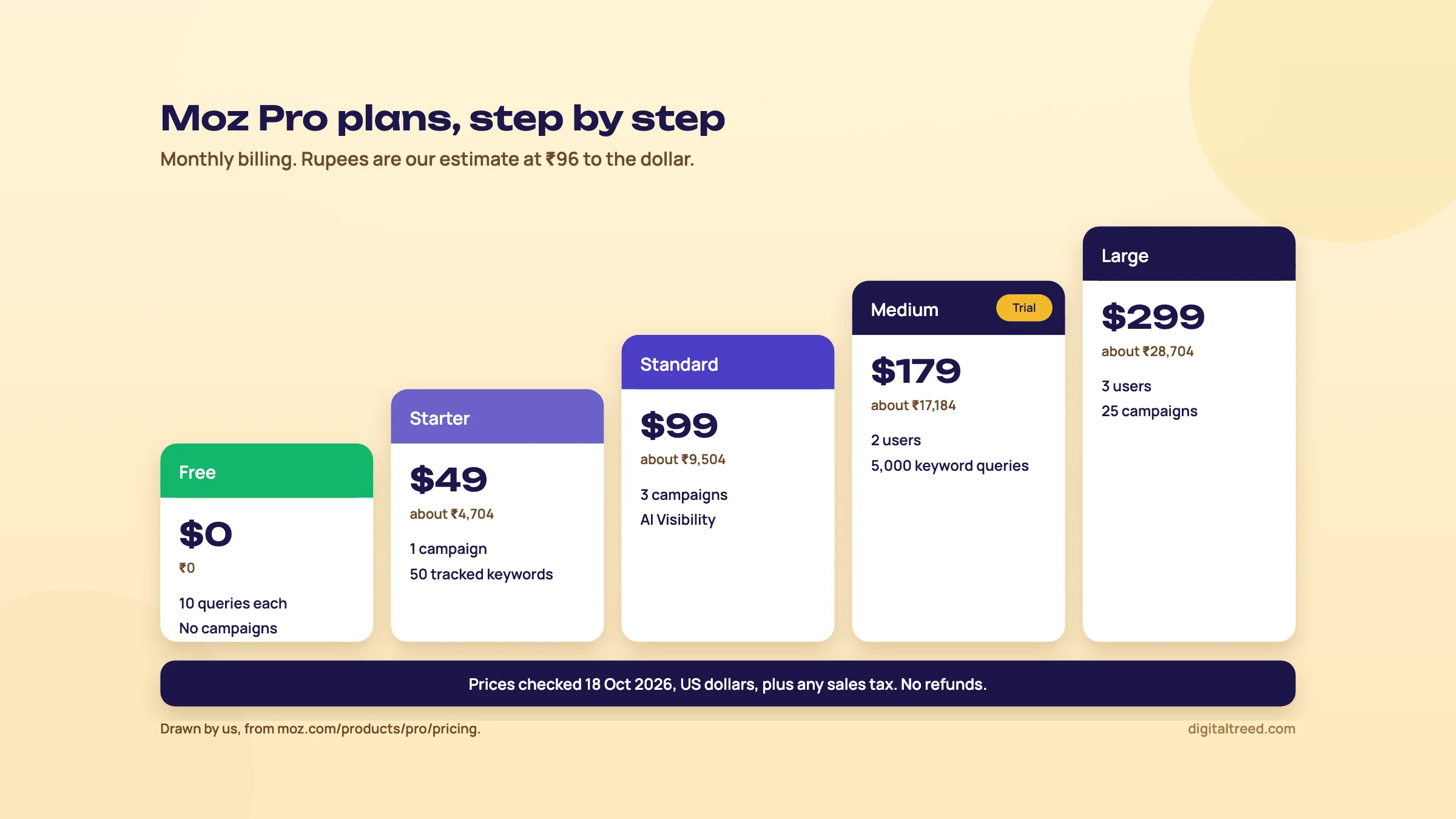 Moz Pro plans in US dollars with rupee estimates at ₹96, checked 18 October 2026. Drawn by us.
Pros and cons
Pros
- DA, PA and Spam Score are the link metrics clients and site owners already recognise
- Large link index by Moz's own figure (45.5 trillion links), with Link Intersect and Compare Link Profiles easy to read
- Clear, well-written help pages that explain how each metric is built
- Weekly campaigns bundle crawl, rankings, page grading and three competitors per site
- AI Visibility from the $99 plan, with cited domains shown alongside DA and Spam Score
- A free account and MozBar are enough for occasional checks
Cons
- Ranking Keywords, Domain Overview, True Competitor and Brand Authority use only US, UK, Canada and Australia data
- Keyword database far smaller than Semrush's or Ahrefs' by each vendor's own count, with English and US-centric scoring
- Standard has only 150 keyword queries a month
- Rankings and crawls are weekly; daily tracking means STAT from $360 a month
- No refunds; the trial needs a card and renews automatically
- Prices in US dollars only, so the rupee cost moves with the exchange rate
Alternatives, starting with ours
Our free tools cover the site-health side of a Moz campaign without an account. They don't do backlinks, volumes or rank tracking; for those, use the free options below or another paid suite.
| Job | Our free tool | Free outside tool | Paid instead of Moz Pro |
|---|---|---|---|
| Site health check | Free Website Audit (50+ checks, up to 25 pages; side by side with a competitor after a free sign-in) | Ahrefs Free Site Audit for verified sites; Screaming Frog free version | Semrush Site Audit; Sitebulb |
| Status codes and redirects | HTTP Status Checker | Search Console URL Inspection | Any crawler |
| Titles, descriptions, social previews | Meta Tag Analyzer | - | Moz On-Page Grader |
| Keyword use on a page | Word Counter & Keyword Density Checker | - | Surfer; Clearscope |
| AI crawler access | AI Crawler Checker | - | - |
| Backlinks and DA | Not yet | Moz free account (10 queries a month); Search Console Links report | Ahrefs; Semrush |
| Keyword volumes for India | Not yet | Google Keyword Planner; Search Console queries | Semrush; Ahrefs; SE Ranking; Mangools |
| Rank tracking | Not yet | Search Console average position | SE Ranking (daily); Semrush |
The closest paid rivals: Semrush's SEO plan is $139 a month (about ₹13,344), and it has a free plan.[57] Ahrefs starts at $29 a month (Starter) and $129 for Lite, with Ahrefs Free for your own verified sites.[58] Both have far larger India keyword data. Our guides cover each one: Semrush, Ahrefs, SE Ranking and Mangools. For the full free list, see Best free SEO tools.
Which one when
| You are | Our pick | Why |
|---|---|---|
| A local business in India with one site | Search Console, Business Profile, a free Moz account and our free tools | You need your own data and a clean site; 10 Moz queries a month cover a DA check |
| A freelancer whose clients are in the US, UK, Canada or Australia | Moz Pro Standard or Medium | Every Moz report works in those markets, and clients know DA |
| A freelancer or agency with Indian clients | Semrush or Ahrefs first; Moz only for link metrics | Moz's ranking keyword and competitor reports have no Indian data |
| Mainly link building and outreach | Moz Pro Standard, or Ahrefs Lite | Standard's 5,000 backlink queries and Link Intersect cover it; Ahrefs has no free trial, so compare Moz's free account with Ahrefs Free on your own site first |
| You need daily ranks | SE Ranking | Moz updates weekly; STAT starts at $360 a month |
If you'd rather hand the research over, our SEO service does it for you, and you can get a quote in a couple of minutes. Otherwise, open a free Moz account this week, compare your site with one competitor in Link Explorer, and decide from that whether the trial is worth starting.
Test yourself
Ten questions on the whole guide. Pick an answer, check it, and see your score at the end.
You got 0 of 10 right.
Frequently asked questions
Frequently asked
Is Moz Pro free?
No, but parts of Moz are. A free Moz Community account gives you 10 Link Explorer, 10 Keyword Explorer and 10 Competitive Research queries a month, plus Domain Authority and Page Authority in the free MozBar extension. Campaigns, rank tracking and the On-Page Grader need a paid plan or the free trial.
How much does Moz Pro cost in India?
Moz lists prices in US dollars only. On 18 October 2026 they were $49 (Starter), $99 (Standard), $179 (Medium) and $299 (Large) a month, or $79, $143 and $239 a month billed yearly. At ₹96 to the dollar that's about ₹4,704, ₹9,504, ₹17,184 and ₹28,704 a month, before your bank's conversion fees.
Is Domain Authority a Google ranking factor?
No. Moz itself says Domain Authority "is not a Google ranking factor and has no effect on the SERPs". It's Moz's prediction of how well a site might rank, built mostly from link data, and it's useful only for comparing your site with the sites ranking around you.
What is a good Domain Authority score?
There isn't one number. DA is relative: Moz says a DA of 30 may be exceptional in one industry and low in another. Compare yours with the sites ranking on page one for your main keywords, and watch whether the gap in linking domains is closing.
How do I check my Domain Authority for free?
Use Moz's free Domain Authority Checker, Link Explorer with a free account, or the MozBar extension while logged in. The free checker also shows linking root domains, ranking keywords and Spam Score for the domain.
Does Moz Pro work for Indian websites?
Partly. Link Explorer, DA, PA, Spam Score and Site Crawl work for any site, and campaigns track rankings in the Google search engine you choose (check that Google India is listed during the trial). But Ranking Keywords, Domain Overview, True Competitor and Brand Authority use only US, UK, Canadian and Australian data, and Keyword Explorer's scores are English and US-centric. For keyword research on Indian markets, Semrush, Ahrefs or Google Keyword Planner are stronger.
Does Moz Pro have a free trial, and can I get a refund?
There's a free trial of the Medium plan, monthly billing, which needs a credit card and renews into a paid plan automatically. Cancel at least 24 hours before it ends. Moz says it doesn't offer refunds of any kind, so set a reminder.
Is Moz better than Ahrefs or Semrush?
For link metrics clients recognise and a simple weekly campaign, Moz is good. For keyword research, and for anything in Indian markets, Ahrefs and Semrush have far bigger keyword databases by their own figures (29 billion and 28.8 billion keywords, against Moz's 1.25 billion suggestions). Ahrefs also starts cheaper, at $29 a month.
What is Spam Score in Moz?
Spam Score is the percentage of sites with similar features, judged on 27 signals, that Moz found penalised or banned by Google. 1% to 30% is low, 31% to 60% medium and 61% to 100% high. A high score is a reason to look at the site, not proof it's spam.
Does Moz track AI search visibility?
Yes, on Standard and higher plans. AI Visibility tracks prompts weekly in ChatGPT, Gemini, Google AI Mode and Perplexity, and shows whether your brand and up to three competitors are mentioned, and which pages are cited. Standard includes 150 tracked prompts; extra prompts cost $50 per 100.
Sources
References
- Moz Pro Pricing, Moz, prices seen 18 Oct 2026, accessed 16 Oct 2026
- About Moz, Moz, accessed 18 Oct 2026
- Free SEO Tools by Moz, Moz, accessed 18 Oct 2026
- Moz Local Pricing, Moz, prices seen 18 Oct 2026, accessed 16 Oct 2026
- STAT Search Analytics: Overview, Moz, accessed 18 Oct 2026
- Moz API Pricing, Moz, prices seen 18 Oct 2026, accessed 16 Oct 2026
- Free Backlink Checker: Moz Link Explorer, Moz, accessed 18 Oct 2026
- Data and Metrics, Semrush Knowledge Base, accessed 18 Oct 2026
- We're powered by seriously big data, Ahrefs, accessed 18 Oct 2026
- Free Keyword Research Tool: Keyword Explorer, Moz, accessed 18 Oct 2026
- Free Backlink Checker, Semrush, accessed 18 Oct 2026
- Ranking Keywords in Keyword Explorer, Moz Help Hub, accessed 18 Oct 2026
- Domain Overview, Moz Help Hub, accessed 18 Oct 2026
- True Competitor, Moz Help Hub, accessed 18 Oct 2026
- What Is Brand Authority and How Is It Calculated?, Moz, Chima Mmeje, updated 18 Nov 2024, accessed 16 Oct 2026
- Explore By Keyword, Moz Help Hub, accessed 18 Oct 2026
- Keyword Gap, Moz Help Hub, accessed 18 Oct 2026
- Cancel Moz Pro Base Plan, Moz Help Hub, accessed 18 Oct 2026
- MozBar Feature Access, Moz Help Hub, accessed 18 Oct 2026
- Moz Pro Free Trial, Moz Help Hub, accessed 18 Oct 2026
- Accepted Methods of Payment, Moz Help Hub, accessed 18 Oct 2026
- Rogerbot, Moz Help Hub, accessed 18 Oct 2026
- Track a Site, Moz Help Hub, accessed 18 Oct 2026
- Search Visibility, Moz Help Hub, accessed 18 Oct 2026
- Domain Authority: What is it and how is it calculated, Moz, Chima Mmeje, updated 18 Mar 2025, accessed 16 Oct 2026
- How We Index The Web, Moz Help Hub, accessed 18 Oct 2026
- What Is Page Authority? How Do I Influence Page Authority?, Moz, Miriam Ellis, 18 Nov 2024, accessed 16 Oct 2026
- Spam Score, Moz Help Hub, accessed 18 Oct 2026
- Investigating Spam Score, Moz Help Hub, accessed 18 Oct 2026
- Monthly Volume, Moz Help Hub, accessed 18 Oct 2026
- Difficulty, Moz Help Hub, accessed 18 Oct 2026
- Keyword Suggestions, Moz Help Hub, accessed 18 Oct 2026
- Organic CTR, Moz Help Hub, accessed 18 Oct 2026
- Priority, Moz Help Hub, accessed 18 Oct 2026
- Find Your Difficulty Benchmark – Next Level, Moz Blog, Meghan Pahinui, 27 Feb 2024, accessed 16 Oct 2026
- Compare Link Profiles, Moz Help Hub, accessed 18 Oct 2026
- Link Intersect, Moz Help Hub, accessed 18 Oct 2026
- Starter plan for Moz Pro, Moz Help Hub, accessed 18 Oct 2026
- Moz Pro Site Crawl Overview, Moz Help Hub, accessed 18 Oct 2026
- Critical Crawler Issues, Moz Help Hub, accessed 18 Oct 2026
- Crawler Warnings, Moz Help Hub, accessed 18 Oct 2026
- Redirect Issues, Moz Help Hub, accessed 18 Oct 2026
- Metadata Issues, Moz Help Hub, accessed 18 Oct 2026
- Content Issues, Moz Help Hub, accessed 18 Oct 2026
- Track Local Keywords, Moz Help Hub, accessed 18 Oct 2026
- Rank Checker, Moz Help Hub, accessed 18 Oct 2026
- On-Page Grader, Moz Help Hub, accessed 18 Oct 2026
- Page Optimization, Moz Help Hub, accessed 18 Oct 2026
- Getting Started with AI Visibility, Moz Help Hub, accessed 18 Oct 2026
- Prompts (AI Visibility), Moz Help Hub, accessed 18 Oct 2026
- AI Content Brief, Moz Help Hub, accessed 18 Oct 2026
- Citations (AI Visibility), Moz Help Hub, accessed 18 Oct 2026
- Track Your Competitors' Rankings, Moz Help Hub, accessed 18 Oct 2026
- Brand Rules, Moz Help Hub, accessed 18 Oct 2026
- Monthly average USD to INR, 2026, X-Rates, 1-16 Oct 2026 average, accessed 16 Oct 2026
- Sales Tax, Moz Help Hub, accessed 18 Oct 2026
- SEO & AI Search Plans and Pricing, Semrush, prices seen 18 Oct 2026, accessed 16 Oct 2026
- Plans and pricing, Ahrefs, prices seen 18 Oct 2026, accessed 16 Oct 2026
Get the free checklist
Every step of this guide on one page, to print or tick off. We email you the PDF link.